MP3 Player
Model:K1
FCCID:2AZAP-K1
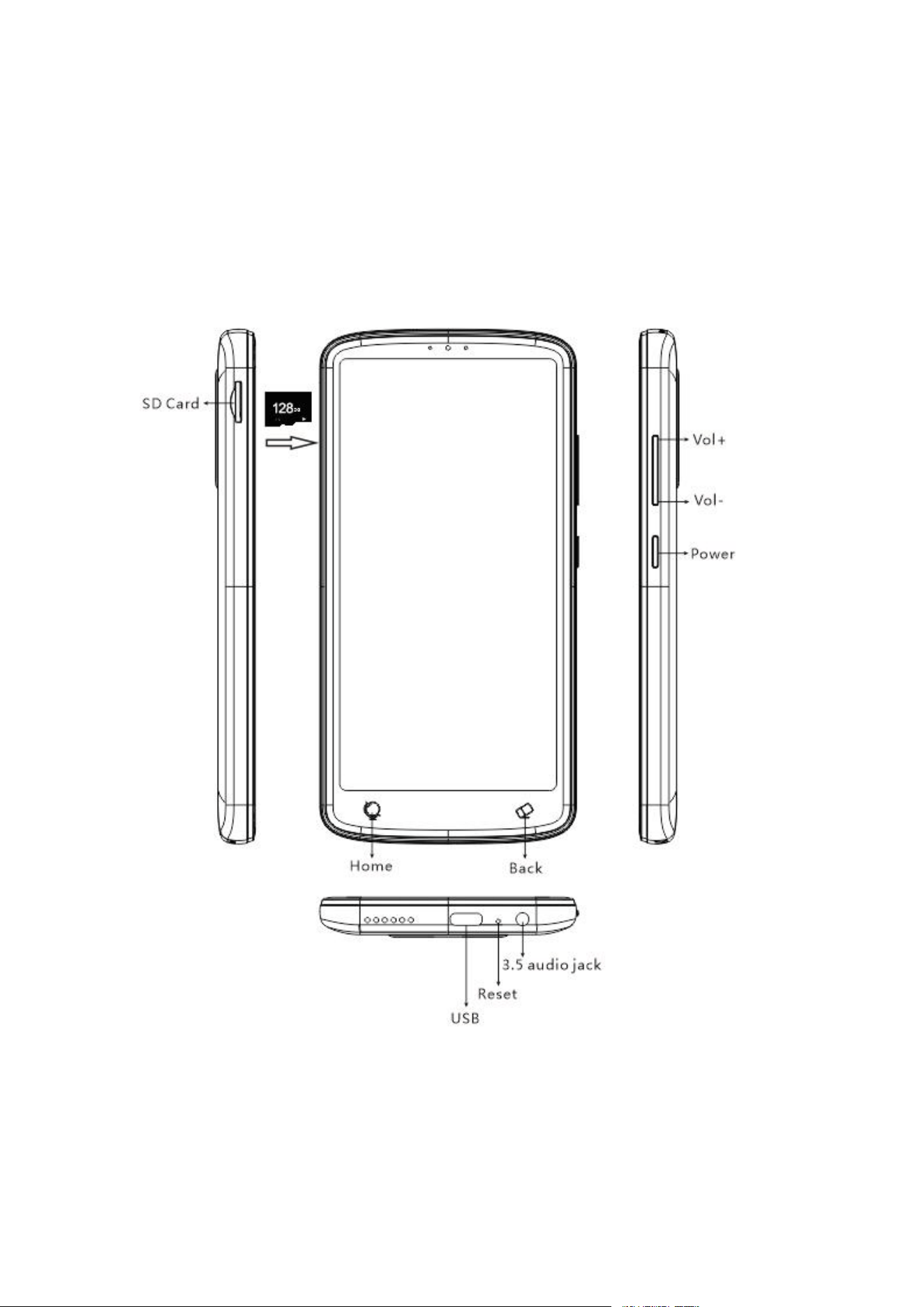
Vol+: Press to increase volume.
Vol-: Press to decrease volume.
Power: Press to bring up the shutdown menu.
HOME: Return to home screen.
Back: Go back to previous screen.

How to quickly master using.
The device has a detailed introduction to software functions and usage guidance - APP
"Tips", where you can fully familiarize yourself with the use of various product features.
How to charge
One end of the cable is connected to the USB-C of this device, and the other end can be
connected to a computer or charger for charging.
How to Upload Audio
First, connect the computer via the data cable and USB-C port, selecting "File Transfer
Mode." Then, copy the files from the "My Recordings" folder on the flash drive to transfer
the recordings to the computer. You can also copy audio files from your computer back
into the "My Recordings" folder.
peaker.
2.FAQ
1) Can I listen to audio while charging?
When the include charging stand is connected to the adapter to charge the recorder, you
can listen to audio while charging, but not when connected to the computer.
2) Can I record without inserting an SD card?
If no SD card is detected, the device will automatically use the emergency recording area
on the internal storage for recording. Audio from the emergency recording area can be
later moved to an SD card.
About Bluetooth connection
1)How to pair Bluetooth Speaker or Headphones.
Firstly, Enable the Bluetooth of the recorder, and turn on your Bluetooth Headphones or
speakers to be in pairing status.
Secondly, come into "search device" to search the Bluetooth devices around, click your
Bluetooth device to pair. (Bluetooth devices that have been paired can be viewed in "My
Devices")
2) If the recorder can recognize your Bluetooth Headphones or speaker but failed to
connect.
·Turn off and re-enable “Start Bluetooth”, and then try to pair again.
·Shuts down and restarts the recorder, and then try to pair again.
·Reset the recorder via the factory setting, and then try to pair again.

If the fault persists, please contact us to get further assistance or replacement/refund. If it
is convenient, please tell us the brand and model of the Bluetooth / speaker so that we
can make an investigation.
3) How to disconnect the Bluetooth Headphones or Speaker
Come to “my device” in Bluetooth setting, click the Bluetooth headphones or speaker
paired, then you can disconnect or delete the Bluetooth Headphones or speaker.
About WIFI connection
1) How to Connect to WiFi.
·Open Settings
·Tap WiFi
·Toggle WiFi ON (if disabled)
·Select your network from the list
·Enter the password (case-sensitive)
·Tap CONNECT
·Wait for the checkmark (✓) to appear
2. How to Disconnect WiFi
Option A: Temporary Disable
·Go to Settings > WiFi > Toggle switch OFF
·Alternative: Swipe down for Quick Settings > Tap WiFi icon to grey it out
Option B: Forget a Network (Permanent removal)
·Settings > WiFi
·Tap the gear icon next to the connected network
·Select FORGET NETWORK
·Confirm → Device won’t auto-reconnect
Specification
Product Size: 5.83X2.91X0.44 inch
Weight: 122g
Screen Size: 5.5inch (720X1440)
Battery Capacity: 5V/2500mAh
Charging Time: 180 minutes
Playback Time:50 Hours
Compatible Audio Format: MP3/WAV/AAC/FLAC/OGG/WMA/
FCC Warning
FCC Requirement
Any changes or modifications not expressly approved by the party responsible for
compliance could void the user's authority to operate the equipment.
This device complies with Part 15 of the FCC Rules. Operation is subject to the following

two conditions:
(1) this device may not cause harmful interference
(2)this device must accept any interference received, including interference that may
cause undesired operation.
Note: This equipment has been tested and found to comply with the limits for a Class B
digital device, pursuant to Part 15 of the FCC Rules.
These limits are designed to provide reasonable protection against harmful interference in
a residential installation. This equipment generates, uses, and can radiate radio frequency
energy, and if not installed and used in accordance with the instructions, may cause
harmful interference to radio communications. However, there is no guarantee that
interference will not occur in a particular installation. If this equipment does
cause harmful interference to radio or television reception, which can be determined by
turning the equipment off and on, the user is encouraged to try to correct the interference
by one or more of the following measures:
-Reorient or relocate the receiving antenna.
-Increase the separation between the equipment and receiver.
-Connect the equipment into an outlet on a circuit different from that to which the receiver
is connected.
-Consult the dealer or an experienced radio/TV technician for help.
15.21 Information to user.
Any Changes or modifications not expressly
approved by the party responsible for compliance
could void the user's authority to operate the equipment.
Warning
>>Do not leave the device in an environment where the temperature is too low or too high
(below -10°C or above 50°C) for a long time. Extreme temperature environments will
cause the device to deform and shorten the service life of the device;
>>Do not use the equipment under thunderstorm weather;
>>Do not place the device in the water for a long time;
>> Do not expose the equipment to the sun for a long time.
Warranty
Thank you for purchasing our products. You will enjoy the following services when using
this product.
Warranty period: Within one year from the date of sale.
Warranty scope: Limited to the product host.
Warranty terms:
①Within 1 year after purchase, failure or damage caused by product quality problems can
be replaced for free or full refund.
②Accessories are not included in the warranty, such as usb cable, earphones, etc., but if
quality problems occur within 7 days after purchase, they can be replaced for free.

③The following conditions are not covered by the warranty
·Out of the warranty period.
·It has been disassembled or repaired privately by the customer.
·Man-made damage, accidental damage or deformation.
·Failure caused by installation and use in abnormal environments such as high
temperature, high pressure, and humidity..
·Damage caused by natural disasters such as lightning strikes, floods, and earthquakes.