The applied nameplate is located at the back of the video monitor.
When using your equipment, basic safety precautions should
always be followed to reduce the risk of fire, electric shock and
injury, including the following:
1. Follow all warnings and instructions marked on the product.
2. Adult setup is required.
3. CAUTION: Do not install the baby unit at a height above 6.5
feet (2 meters).
4. This product is intended as an aid. It is not a substitute for
responsible and proper adult supervision and should not be
used as such.
5. This product is not intended for use as a medical monitor.
6. Do not use this product near water, for example, near to a
bath, sink, swimming pool or shower.
7. CAUTION: Use only the battery provided. There may be a risk
of explosion if a wrong type of battery is used for the parent
unit. The battery cannot be subjected to high or low extreme
temperature and low air pressure at high altitude during
use, storage or transportation. Disposal of battery in fire or
a hot oven, mechanically crushing or cutting the battery can
result in an explosion. Leaving the battery in an extremely
high temperature surrounding environment can result in an
explosion or the leakage of flammable liquid of gas. Battery
subjected to extremely low air pressure may result in an
explosion or the leakage of flammable liquid or gas. Dispose
of used batteries according to the information in The RBRC seal.
8. Use only the power adapter included with this product.
Incorrect power adapter polarity or voltage can seriously
damage the product.
Power adapter information:
Parent Unit Output: 5V DC 1A
VTech Telecommunications Ltd.
Model: VT05EUS05100
Rechargeable battery information:
Zhuhai Great Power Energy Co., Ltd.
Li-ion battery, 3.6V, 2600mAh, 9.36Wh;
Model:
ICR18650-2.6Ah-3.6V-1S1P
9. The power adapter is intended to be correctly oriented in a
vertical or floor mount position. The prongs are not designed
to hold the plug in place if it is plugged into a ceiling, under-
the-table or cabinet outlet.
10. For pluggable equipment, the socket-outlet (power adapter)
should be installed near the equipment and should be easily
accessible.
11. Unplug this product from the wall outlet before cleaning.
Do not use liquid or aerosol cleaners. Use a damp cloth for
cleaning.
12. Do not modify the power adapters or replace with other
power adapters, as this causes a hazardous situation.
13. Do not allow anything to rest on the power cords. Do not install
this product where the cords may be walked on or crimped.
14. This product should be operated only from the type of power
source indicated on the marking label. If you are not sure of
the type of power supply in your home, consult your dealer
or electricity supply provider.
15. Do not overload wall outlets or use an extension cord.
16. Do not place this product on an unstable table, shelf, stand or
other unstable surfaces.
17. This product should not be placed in any area where proper
ventilation is not provided. Slots and openings in the back or
bottom of this product are provided for ventilation. To protect
them from overheating, these openings must not be blocked
by placing the product on a soft surface such as a bed, sofa
or rug. This product should never be placed near or over a
radiator or heat source.
18. Never push objects of any kind into this product through
the slots because they may touch dangerous voltage points
or create a short circuit. Never spill liquid of any kind on the
product.
19. To reduce the risk of electric shock, do not disassemble
this product, but take it to an authorized service facility.
Disassembling or removing parts of the product other than
via the battery door may expose you to dangerous voltages
or other risks. Incorrect reassembling can cause electric shock
when the product is subsequently used.
20. You should test the sound reception every time you turn on
the units or move one of the components.
21. Periodically examine all components for damage.
22. There is a very low risk of privacy loss when using certain
electronic devices, such as baby monitors, cordless
telephones, etc. To protect your privacy, make sure the
product has never been used before purchase, reset the
baby monitor periodically by powering off and then
powering on the units, and power off the baby monitor if
you are not intending to use it for some time.
23. Children should be supervised to ensure that they do not play
with the product.
24. The small parts of this monitor can be swallowed by babies or
small children. Keep these parts out of reach of children.
25. The product is not intended for use by persons (including
children) with reduced physical, sensory or mental
capabilities, or lack of experience and knowledge, unless they
have been given supervision or instruction concerning use of
the appliance by a person responsible for their safety.
SAVE THESE INSTRUCTIONS
Cautions
• Use and store the product at a temperature between 32
o
F
(0
o
C) and 104
o
F (40
o
C).
• Do not expose the product to extreme cold, heat or direct
sunlight. Do not put the product close to a heating source.
• Batteries should not be exposed to excessive heat such as
bright sunshine or fire.
• Mishandling batteries can cause burn, fire or explosion
hazards.
• Warning—Strangulation Hazard—Children
have STRANGLED in cords. Keep this cord out of
the reach of children (more than 3 ft (0.9m) away).
Do not remove warning label on the adapter
cord.
• Never place the baby unit(s) inside the baby’s crib or playpen.
Never cover the baby unit(s) or parent unit with anything such
as a towel or a blanket.
• Other electronic products may cause interference with your
baby unit. Try installing your baby unit as far away from these
electronic devices as possible: wireless routers, radios, cellular
telephones, intercoms, room monitors, televisions, personal
computers, kitchen appliances and cordless telephones.
Precautions for users of implanted cardiac pacemakers
Cardiac pacemakers (applies only to digital cordless devices):
Wireless Technology Research, LLC (WTR), an independent
research entity, led a multidisciplinary evaluation of the
interference between portable wireless devices and implanted
cardiac pacemakers. Supported by the U.S. Food and Drug
Administration, WTR recommends to physicians that:
Pacemaker patients
• Should keep wireless devices at least six inches from the
pacemaker.
• Should NOT place wireless devices directly over the pacemak-
er, such as in a breast pocket, when it is turned ON.
WTR’s evaluation did not identify any risk to bystanders with
pacemakers from other persons using wireless devices.
Electromagnetic elds (EMF)
This VTech product complies with all standards regarding
electromagnetic fields (EMF). If handled properly and according
to the instructions in this user’s manual, the product is safe to be
used based on scientific evidence available today.
Important safety instructions
Quick start guide
RM2701
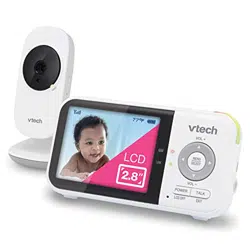
2.8” Accessory Viewer
(for use with RM9751
Wi-Fi 1080p
Yellow Daisy Baby Camera)
Go to www.vtechphones.com
to register your product for
enhanced warranty support and
latest VTech product news.
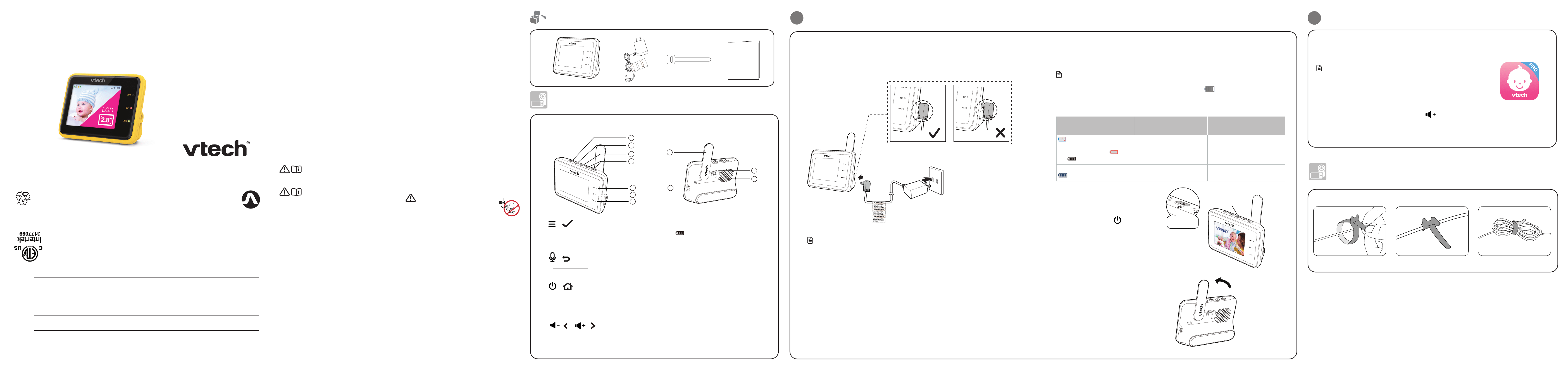
Overview
Parent unit overview
1
/ Menu/Select
• Press to enter the main menu.
• While in a menu, press to choose an
item, or save a setting.
2
/ Talk/Return
• Press and hold to talk to the baby unit.
• While in a submenu, press to go back.
3
/ Power / LCD on/off / Exit
• Press and hold to power on/off the
parent unit.
• Press to screen on/off.
• While in a submenu, press to exit.
4
/
/ /
• Increase or decrease parent unit’s
volume.
• While in a submenu, press to navigate
leftward or rightward.
5 Microphone
6
LED light
• On when the parent unit is connected
to AC power, and the battery is
charging.
• Flashes when the parent unit battery is
low and needs charging.
7 LINK LED light
• On when the parent unit is linked to
the baby unit.
• Flashes when the link to the baby unit
is lost.
8 Antenna
9 Power jack
10 RESET
• Force reboot the parent unit.
11 Speaker
2
1
3
4
5
6
7
11
8
9
10
1
Connect, charge and power on the parent unit
Connect the parent unit
Fully insert the provided power adapter plug into the parent unit power jack. You can hear a
clicking sound if it plugs correctly and the battery LED light turns on.
Charge the parent unit battery before use
The parent unit runs on an internal rechargeable battery or AC power. To continuously monitor
your baby, keep the parent unit connected to AC power. With the battery alone, the parent unit
can cordlessly run for a short time only.
Notes
• Before using the baby monitor for the first time, charge the parent unit battery for 12 hours. When the
parent unit battery is fully charged, the battery icon becomes solid .
• The standby time varies depending on your actual use.
The battery icon indicates the battery status (see the following table).
Battery indicators Battery status Action
alert displays on the parent
unit screen, and the battery
icon becomes empty .
The LED light flashes.
The battery has very little
charge and may be used for
only a short time.
Charge
without interruption
(about 30 minutes).
The battery icon becomes solid
.
The battery is fully charged. To keep the battery charged,
connect it to AC power.
The parent unit turns on automatically
after it connects to the power socket, and
the welcome screen appears.
You can press and hold to turn it on
or off.
Press and hold
Raise the parent unit antenna for
better reception
Notes
• The rechargeable battery in the parent unit is built-in.
• Use only the power adapter supplied with this product.
• Make sure the parent unit is not connected to an electronically controlled electric outlet.
• Connect the power adapter in a vertical or floor mount position only. The adapter prongs are not
designed to hold the weight of the parent unit, so do not connect it to any ceiling, under-the-
table, or cabinet outlet. Otherwise, the adapter may not properly connect to the outlet.
• Make sure the parent unit and the power adapter cords are out of reach of children.
Pair a new parent unit
Each newly purchased parent unit (RM2701) must be paired to your baby unit (RM9751)
before use.
NOTESNOTE
• You can pair one or two baby units to your parent unit.
• Make sure your baby unit is paired with the MyVTech Baby Pro app.
1. Turn on your parent unit and baby unit.
2. Press and hold the PAIR button for 3 seconds until you hear a “beep”.
3. When the Status LED starts flashing, press to continue.
4. Select your baby unit. When the baby unit is successfully paired with your parent unit, the
parent unit displays the live video.
2
Before use
CABLE MANAGEMENT
1 2 3
Technical specications
Channels 11
LCD 2.8’’ Color LCD
(IPS 320x240 pixels)
Nominal effective range Maximum power allowed by FCC and IC. Actual operating range may
vary according to environmental conditions at the time of use.
Power requirement Parent unit power adapter:
Output: 5V DC 1000mA
Parent unit battery: 3.6V 2600mAh, 9.36Wh Lithium-ion battery
What’s in the box
Quick start guide
Strangulation
Hazard
Keep this cord out of reach of children.
The cord needs to be at least three feet
away from the child at all times. Do not
use with an extension cord. Do not
remove this tag.
Éloignez ce cordon des enfants. Le
cordon doit se trouver à au moins trois
pieds d’un enfant et ce, en tout temps.
N’utilisez pas de rallonge. Ne retirez pas
cette étiquette.
Mantenga este cable fuera de la alcance
de los niños. Este cable debe estar por
lo menos tres pies fuera de la alcance
del niño en todo momento. No lo use
con una extensión inalámbrica. No quite
esta etiqueta.
Risque
d’étranglement
Riesgo de
estrangulación
Specifications are subject to change without notice.
© 2022 VTech Telecommunications Ltd.
All rights reserved. 10/22. RM2701_US_QSG_V1
UL STD.
62368-1
CERTIFIED TO
CSA STD.
C22.2 NO.62368-1
CONFORMS TO
Disclaimer and Limitation of Liability
VTech Communications, Inc. and its suppliers assume no responsibility for any damage or loss
resulting from the use of this user’s manual. VTech Communications, Inc. and its suppliers assume no
responsibility for any loss or claims by third parties that may arise through the use of this product.
Company: VTech Communications, Inc.
Address: 9020 SW Washington Square Road - Ste 555 Tigard, OR 97223, United States
Phone: 1 (800) 595-9511 in the U.S. or 1 (800) 267-7377 in Canada
What does this limited warranty cover?
The manufacturer of this VTech Product warrants to the
holder of a valid proof of purchase (“Consumer” or “you”)
that the Product and all accessories provided in the sales
package (“Product”) are free from defects in material
and workmanship, pursuant to the following terms and
conditions, when installed and used normally and in
accordance with the Product operating instructions. This
limited warranty extends only to the Consumer for Products
purchased and used in the United States of America and
Canada.
What will VTech do if the Product is not free from defects
in materials and workmanship during the limited warranty
period (“Materially Defective Product”)?
During the limited warranty period, VTech’s authorized service
representative will replace at VTech’s option, without charge,
a Materially Defective Product. If we choose to replace
the Product, we may replace it with a new or refurbished
Product of the same or similar design. We will retain
defective parts, modules, or equipment. Replacement of the
Product, at VTech’s option, is your exclusive remedy. VTech
will return the replacement Products to you in working
condition. You should expect the replacement to take
approximately 30 days.
How long is the limited warranty period?
The limited warranty period for the Product extends for ONE
(1) YEAR from the date of purchase (90 days on products
purchased as Refurbished*). This limited warranty also
applies to the replacement Product for a period of either (a)
90 days from the date the replacement Product is shipped
to you or (b) the time remaining on the original one-year
warranty (90-day limited warranty on products that are
purchased as Refurbished*); whichever is longer.
*Refurbished products purchased from our online store
carry a 90-day replacement warranty.
What is not covered by this limited warranty?
This limited warranty does not cover:
1. Product that has been subjected to misuse, accident,
shipping or other physical damage, improper installation,
abnormal operation or handling, neglect, inundation,
fire, water or other liquid intrusion; or
2. Product that has been damaged due to repair, alteration
or modification by anyone other than an authorized
service representative of VTech; or
3. Product to the extent that the problem experienced is
caused by signal conditions, network reliability, or cable or
antenna systems; or
4. Product to the extent that the problem is caused by use
with non-VTech accessories; or
5. Product whose warranty/quality stickers, product serial
number plates or electronic serial numbers have been
removed, altered or rendered illegible; or
6. Product purchased, used, serviced, or shipped for repair
from outside the United States of America or Canada, or
used for commercial or institutional purposes (including
but not limited to Products used for rental purposes); or
7. Product returned without a valid proof of purchase (see
item 2 below); or
8. Charges for installation or set up, adjustment of customer
controls, and installation or repair of systems outside the
unit.
How do you get warranty service?
To obtain warranty service in the USA, please visit our
website at www.vtechphones.com or call 1 (800) 595-9511.
In Canada, go to www.vtechcanada.com or call
1 (800) 267-7377.
NOTE: Before calling for service, please review the user’s
manual - a check of the Product’s controls and features may
save you a service call.
Except as provided by applicable law, you assume the risk
of loss or damage during transit and transportation and are
responsible for delivery or handling charges incurred in the
transport of the Product(s) to the service location. VTech
will return replaced Product under this limited warranty.
Transportation, delivery or handling charges are prepaid.
VTech assumes no risk for damage or loss of the Product in
transit.
What must you return with the Product to get warranty
service?
1. Return the entire original package and contents including
the Product to the VTech service location along with a
description of the malfunction or difficulty; and
2. Include a “valid proof of purchase” (sales receipt)
identifying the Product purchased (Product model) and
the date of purchase or receipt; and
3. Provide your name, complete and correct mailing
address, and telephone number.
Other limitations
This warranty is the complete and exclusive agreement
between you and VTech. It supersedes all other written or
oral communications related to this Product. VTech provides
no other warranties for this Product. The warranty exclusively
describes all of VTech’s responsibilities regarding the
Product. There are no other express warranties. No one is
authorized to make modifications to this limited warranty and
you should not rely on any such modification. State/Provincial
Law Rights: This warranty gives you specific legal rights, and
you may also have other rights, which vary from state to state
or province to province.
Limitations: Implied warranties, including those of fitness
for a particular purpose and merchantability (an unwritten
warranty that the Product is fit for ordinary use) are limited
to one year from the date of purchase. Some states/
provinces do not allow limitations on how long an implied
warranty lasts, so the above limitation may not apply to you.
In no event shall VTech be liable for any indirect, special,
incidental, consequential, or similar damages (including,
but not limited to lost profits or revenue, inability to use
the Product or other associated equipment, the cost of
substitute equipment, and claims by third parties) resulting
from the use of this Product. Some states/provinces
do not allow the exclusion or limitation of incidental or
consequential damages, so the above limitation or exclusion
may not apply to you.
Please retain your original sales receipt as proof
of purchase.
Limited warranty
FCC and IC regulations
FCC Part 15
NOTE: This equipment has been tested and found to comply with the requirements for a Class B digital device under Part 15 of
the Federal Communications Commission (FCC) rules. These requirements are intended to provide reasonable protection against
harmful interference in a residential installation. This equipment generates, uses and can radiate radio frequency energy and, if not
installed and used in accordance with the instructions, may cause harmful interference to radio communications. However, there is
no guarantee that interference will not occur in a particular installation. If this equipment does cause harmful interference to radio
or television reception, which can be determined by turning the equipment off and on, the user is encouraged to try to correct the
interference by one or more of the following measures:
• Reorient or relocate the receiving antenna.
• Increase the separation between the equipment and receiver.
• Connect the equipment into an outlet on a circuit different from that to which the receiver is connected.
• Consult the dealer or an experienced radio/TV technician for help.
WARNING: Changes or modifications to this equipment not expressly approved by the party responsible for compliance could void
the user’s authority to operate the equipment.
This device complies with Part 15 of the FCC rules. Operation is subject to the following two conditions: (1) this device may not cause
harmful interference, and (2) this device must accept any interference received, including interference that may cause undesired
operation.
To ensure safety of users, the FCC has established criteria for the amount of radio frequency energy that can be safely absorbed by a
user or bystander according to the intended usage of the product. This product has been tested and found to comply with the FCC
criteria. The baby unit shall be installed and used such that parts of all persons’ body are maintained at a distance of approximately 8 in
(20 cm) or more. The transmitter and antenna of the parent unit shall be held at least 1 in (2.5 cm) from your face.
This Class B digital apparatus complies with Canadian requirement:
CAN ICES-3 (B)/NMB-3(B)
Industry Canada
This device contains licence-exempt transmitter(s)/receiver(s) that comply with Innovation, Science and Economic Development Canada’s
licence-exempt RSS(s). Operation is subject to the following two conditions: (1) This device may not cause interference. (2) This device must
accept any interference, including interference that may cause undesired operation of the device.
The term ‘’IC:‘’ before the certification/registration number only signifies that the Industry Canada technical specifications were met.
This product meets the applicable Innovation, Science and Economic Development Canada technical specifications.
RF radiation exposure statement
The product complies with FCC RF radiation exposure limits set forth for an uncontrolled environment. The baby unit should be
installed and operated with a minimum distance of 8 in (20 cm) between the baby unit and all persons’ body. Use of other accessories
may not ensure compliance with FCC RF exposure guidelines. This equipment complies also with Industry Canada RSS-102 with respect
to Canada’s Health Code 6 for Exposure of Humans to RF Fields.
La plaque signalétique appliquée est située au bas du socle de
l’unité du bébé.
Lorsque vous utilisez votre appareil, vous devriez toujours suivre
certaines mesures de précaution de base afin de réduire les
risques d’incendie, d’électrocution et de blessures corporelles,
dont ceux qui suivent:
1. Observez toutes les instructions et mises en garde inscrites sur
l’appareil.
2. L’installation par un adulte est requise.
3. MISE EN GARDE: N’installez pas l’unité du bébé à une hauteur
supérieure à 2 mètres.
4. Ce produit a été conçu pour être un dispositif d’appoint
seulement. Il n’est pas le remplacement d’une supervision
responsable et adéquate par un adulte et ne devrait pas être
utilisé comme telle.
5. Ce produit n’est pas conçu pour être utilisé en tant que moniteur
médical.
6. N’utilisez pas cet appareil près de l’eau ni de toute autre source
d’humidité, par exemple, près d’une baignoire, cuve à lessive,
évier de cuisine, dans un sous-sol humide ni près d’une piscine,
dans un soussol humide ou une douche.
7. MISE EN GARDE: N’utilisez que la pile fournie. Il peut y avoir
un risque d’explosion si un mauvais type de pile est utilisé
pour le dispositif apaisant. La pile ne peut pas être soumise
a des températures extrêmes élevées ou basses et a une
faible pression atmosphérique a haute altitude pendant son
utilisation, son entreposage ou son transport. Le fait de jeter
la pile dans au feu ou dans un four chaud, ou d’écraser ou de
couper mécaniquement la pile peut entrainer une explosion.
Le fait de laisser la pile dans un environnement a température
extrêmement élevée peut entrainer une explosion ou une
fuite de liquide ou de gaz inflammable. Une pile soumise a
une pression d’air extrêmement basse peut provoquer une
explosion ou une fuite de liquide ou de gaz inflammable.
Mettez au rebut la pile usagée conformément aux informations
figurant dans la section Le sceau RBRC.
8. N’utilisez que l’adaptateur électriques inclus avec ce produit.
L’utilisation d’un adaptateur dont la polarité ou la tension serait
inadéquate risque d’endommager sérieusement le produit et
mettre votre sécurité en péril.
Informations sur l’adaptateur électriques :
Sortie : 5 V CC 1A.
VTech Telecommunications Ltd.
Modèle : VT05EUS05100
Informations sur les piles rechargeables :
Zhuhai Great Power Energy Co., Ltd.
Li-ion battery, 3,6V, 2600mAh, 9,36Wh;
Modèle :
ICR18650-2.6Ah-3.6V-1S1P
9. Lorsqu’ils sont branchés dans une prise de courant, les
adaptateurs secteur ont été conçus pour être orientés
correctement, soit à la verticale ou au plancher. Les broches
n’ont pas été conçues pour supporter le poids du bloc
d’alimentation et le maintenir en place si celuici est branché
dans une prise au plafond, sous une table ou dans un meuble.
10. Pour les appareils raccordés, la prise de courant (de
l’adaptateur secteur) doit être installée près de l’équipement et
doit être facilement accessible.
11. Débranchez ce produit de la prise de courant avant de
procéder au nettoyage. N’utilisez pas de nettoyants en
aérosols. Utilisez un chiffon humide pour le nettoyer.
12. Ne coupez pas les cordons d’alimentation pour remplacer les
fiches, car ceci peut présenter un danger potentiel.
13. Ne laissez aucun objet reposer ni appuyer sur le cordon
d’alimentation. N’installez pas cet appareil dans un endroit où
l’on risque d’écraser le cordon d’alimentation ou de le piétiner.
14. Ne faites fonctionner cet appareil qu’avec le type
d’alimentation indiqué sur l’étiquette. Si vous ne connaissez
pas le type d’alimentation que vous possédez à votre domicile,
consultez votre marchand ou votre compagnie locale
d’électricité.
15. Ne surchargez pas les prises de courant murales ni les rallonges
électriques.
16. Ne placez pas cet appareil sur un chariot, meuble, trépied,
support de montage ni table chancelants.
17. Les trous et ouvertures du boîtier, situés à l’arrière de
l’appareil ou sous celui-ci, servent à aérer l’appareil. Pour
l’empêcher de surchauffer, ne bloquez sous aucun prétexte
ces ouvertures et n’empêchez pas l’aération adéquate de
l’appareil en le plaçant sur un lit, divan, tapis ou toute autre
surface similaire. De même, ne le positionnez pas à proximité
ni au-dessus d’une source de chaleur ou d’un calorifère. De
plus, ne placez pas l’appareil dans un endroit avant de vous
assurer qu’il y ait une bonne circulation d’air.
18. N’enfoncez jamais d’objets à travers les ouvertures de cet
appareil, car ils pourraient entrer en contact avec des points de
tension dangereux ou causer des courts-circuits qui peuvent
dégénérer en incendies ou en risques d’électrocution. Ne
renversez jamais de liquide dans ce produit.
19. Afin de réduire les risques d’électrocution, ne démontez pas cet
appareil, mais apportez-le dans un centre de service autorisé.
L’ouverture du boîtier ou le retrait de toutes pièces que contient
cet appareil, à l’exception de l’accès autorisé à certaines portes
ou ouvertures, risque de vous exposer à des points de tension
dangereux ou d’autres dangers. Un remontage incorrect peut
par la suite présenter des risques d’électrocution.
20. Vous devriez tester la réception chaque fois que vous mettez
l’appareil en fonction.
21. Examinez les composantes afin de vérifier si celles-ci ne sont
pas endommagées.
22. Il existe un très faible risque de perte de confidentialité
avec certains appareils électroniques (autres écoute-bébés,
téléphones sans fils etc.). Pour l’éviter, s’assurer que le
produit n’a jamais été utilisé avant l’achat, réinitialiser l’unité
de façon périodique, éteindre l’écoute-bébé quand il n’est
pas en cours d’utilisation.
23. Les enfants devraient être supervisés afin de vous assurer
qu’ils ne jouent pas avec l’appareil.
24. Les petites pièces de ce moniteur peuvent être avalées par
les bébés ou les petits enfants. Veuillez tenir ces pièces hors
de portée des enfants.
25. Le produit n’est pas conçu pour être utilisé par des personnes
(incluant des enfants) aux capacités physiques, sensorielles
ou mentales réduites ou qui manquent d’expérience et de
connaissances, à moins qu’on leur ait donné suffisamment
de supervision ou d’instructions relativement à l’utilisation de
l’appareil par une personne responsable de leur sécurité.
CONSERVEZ CES INSTRUCTIONS
Mises en garde
• Utilisez et entreposez le produit à une température entre
0˚ C (32˚F) et 40˚C (104˚ F).
• Risque de brûlure, risque d’incendie, risque d’explosion
associé à une mauvaise manipulation de la batterie.
• Le bloc-piles ne doit pas être exposé à la chaleur excessive
telle que la lumière du soleil ou au feu.
• N’exposez pas cet appareil à des froids ou des chaleurs
extrêmes, ainsi qu’à la lumière directe du soleil. Ne l’installez
pas près d’une source de chauffage.
• Avertissement - Risque de strangulation -
Les enfants se sont ÉTRANGLÉS dans des cordons.
Gardez ce cordon hors de portée des enfants (à
plus de 0,9 m). N’enlevez pas cette étiquette.
• Ne jamais placer le moniteur à l’intérieur du berceau ou du parc
de bébé. Ne jamais couvrir le moniteur ou l’unité (s) portative
avec un article tel une serviette ou une couverture.
• D’autres produits électroniques peuvent causer des
interférences auprès de votre caméra IP. Essayez d’installer
votre caméra IP le plus loin possible de ces dispositifs
électroniques : routeurs sans fil, radios, téléphones cellulaires,
interphones, moniteurs de pièces, téléviseurs, ordinateurs
personnels, appareils électriques de cuisine et téléphones
sans fil.
Stimulateurs cardiaques implantés dans l’organisme
Les simulateurs cardiaques (ne s’applique qu’aux dispositifs
numériques sans fil):
L’organisme ‘Wireless Technology Research, LLC (WTR)’, une
firme de recherche indépendante, a mené une évaluation
pluridisciplinaire des interférences entre les téléphones sans fil
portatifs et les stimulateurs cardiaques implantés dans l’organisme.
Appuyée par l’Administration des aliments et drogues (FDA) des
États-Unis, la firme WTR recommande aux médecins:
Avis aux détenteurs de stimulateurs cardiaques
• Vous devriez maintenir les dispositifs sans fil à au moins six pouc-
es du simulateur cardiaque.
• Ils ne doivent PAS placer le téléphone sans fil directement sur
le stimulateur cardiaque, tel que dans une poche de chemise,
lorsque celui-ci est en marche.
L’étude effectuée par l’organisme WRS n’a pas identifié de risque
pour les détenteurs de simulateurs cardiaques causés par les gens
qui utilisent dispositifs sans fil à proximité de ceux-ci.
Champs électromagnétiques (EMF)
Ce produit de VTech est conforme à toutes les normes se rapportant
aux champs électromagnétiques (EMF) standard. Si vous le
manipulez correctement en suivant les instructions de ce guide, son
utilisation sera sécuritaire pendant de nombreuses années, selon les
meilleures évidences scientifiques dont nous disposons aujourd’hui.
California Energy Commission battery
charging testing mode
This video monitor meets the California Energy Commission (CEC) regulations for energy consumption. Your video monitor is set up to
comply with the energy-conserving standards right out of the box.
Follow the instructions to install and charge the battery. The CEC battery charging testing mode is activated while charging.
Even if the parent unit is paired to camera units, the CEC battery charging testing mode is activated while it is powered off and
charging.
For cETL compliance only
The RBRC seal on the lithium-ion battery indicates that VTech Communications, Inc. is voluntarily participating in an
industry program to collect and recycle these batteries at the end of their useful lives, when taken out of service within
the United States and Canada. The program provides a convenient alternative to placing used lithium-ion batteries into
the trash or municipal waste, which may be illegal in your area.
VTech’s participation makes it easy for you to drop off the spent product at local retailers participating in the program
or at authorized VTech product service centers. Please call 1 (800) 8 BATTERY
®
for information on Li-ion battery recycling and disposal
bans/restrictions in your area. VTech’s involvement in this program is part of its commitment to protecting our environment and
conserving natural resources.
The RBRC Seal and 1 (800) 8 BATTERY
®
are registered trademarks of Call2recycle, Inc.
The RBRC seal
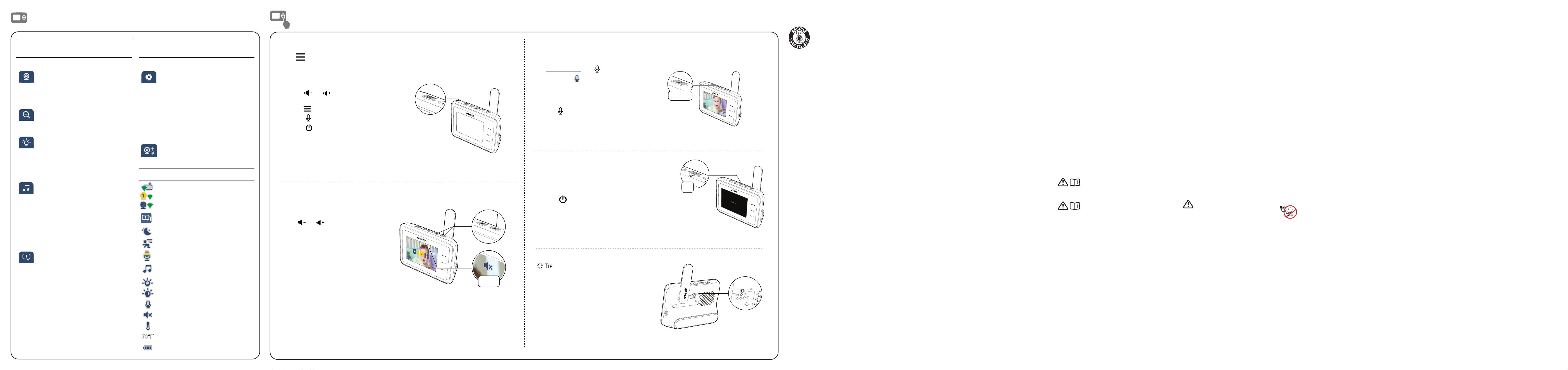
Basic operation
Parent unit icons
Main
Menu
Options
Monitoring mode
• View baby unit 1 or 2 in Single
mode.
• View both baby units in Patrol
mode.
Zoom
• Select from 4 zoom modes.
• Navigate in the zoom image.
Night light
• Turn on/off night light.
• Adjust the brightness level.
• You can also set the timer to turn
off night light after 15, 30 or 60
minutes, or remain on always.
Melodies and soothing sounds
• Play or pause.
• Select to play all melodies, or play
one of the five melodies and five
soothing sounds.
• Adjust the playing volume level.
• You can also set the timer to stop
playing after 15, 30 or 60 minutes,
or play non-stop.
Alerts settings
• Turn on/off motion detection,
temperature, lost link and low
battery alerts.
• Mute or adjust the alerts volume
level.
• Set the motion detection
sensitivity level.
• Select maximum and minimum
temperature for alert range.
• Adjust alert sound level.
Main
Menu
Options
General settings
• Adjust parent unit screen
brightness.
• Turn on/off screen off timer.
• Set the Sound Sensitivity level.
• Adjust baby unit’s speaker
volume level.
• Change temperature format
(°C/°F).
• Help information.
Add baby unit
• Add or remove the selected baby
unit.
Status icons
Router mode
Parent unit, baby unit 1 and baby unit 2
are connected to home Wi-Fi network.
Baby unit 1 and 2 are being viewed in
Patrol mode.
Night vision is turned on.
Motion detection is turned on.
Sound level indicator
Melodies and soothing sounds are
turned on.
Night light is turned on.
Auto night light brightness is activated.
Talkback is turned on.
Parent unit speaker is muted.
Temperature alert is turned on.
Temperature
Battery level indicator
Talk to your baby
1. Press and hold the key.
2. When the icon displays on
screen, speak to your parent unit. Your
voice is transmitted to the baby unit.
3. When finished talking, release
the key and hear your baby
again.
Adjust speaker volume
Press or to adjust your parent
unit speaker volume level received from
the baby unit.
Use the menu
Press on the parent unit to enter the main menu, choose a menu item, or save a
setting. You can use the parent unit menu for advanced settings or operations, such as to
play or stop lullaby, or adjust the motion and sound detection settings.
While in the menu:
• Press or to scroll among the
menu options.
• Press to select an item.
• Press to return.
• Press to exit the menu.
To restore to the default settings or reset the
Wi-Fi connection, you can reset the parent
unit by pressing the RESET key at the back of
the unit.
Use a pin and insert it into the hole on the
back of the parent unit, and then gently press
the button inside.
Turn on/off the parent unit screen
You can turn on or off the parent unit screen
without powering off the parent unit. You
can still hear sound from the baby unit.
• Press on the parent unit to turn off
the screen.
• Press any keys on the parent unit to turn
on the screen again.
Muted
Press and hold
Press