OWNER’S MANUAL
FRONT LOADING
WASHING MACHINE
Read This Manual
Read all instructions and explanations for the
installation before use. Follow the instructions
carefully. Keep the operation instructions handy
for later use. If the appliance is sold or passed
on, ensure that the new owner always receives
this operation instructions.
MODEL:
TW-T37BZP115MWM
1
CONTENTS
SAFETY INSTRUCTIONS
Safety Instructions ......................................................................
INSTALLATION
Product Description ...................................................................
Installation ....................................................................................
OPERATIONS
Quick Start .....................................................................................
Before Each Washing .................................................................
Detergent Dispenser .................................................................
Control Panel ................................................................................
Programs.........................................................................................
Option..............................................................................................
Other Functions............................................................................
Instructions to Connection with the TSmartLife App.....
MAINTENANCES
Cleaning And Care .....................................................................
Trouble Shooting ........................................................................
Technical Specifications ...........................................................
2
11
12
16
17
18
19
20
22
24
27
29
33
Washing Programs Table................................................
28
34
SAFETY INSTRUCTIONS
its service agent or similarly qualified persons in order to avoid a hazard.
If the machine is damaged, it must not be operated unless repaired by
the manufacturer, its service agent or similarly qualified persons. Risk of
electric shock!
•
•
If the supply cord is damaged, it must be replaced by the manufacturer,
ELECTRIC SHOCK HAZARD
Safety Instructions
Note!
2
Warning!
Caution!
Warning!
This combination of symbol and signal word indicates
a potentially dangerous situation which may result in
slight or minor injuries.
This combination of symbol and signal word indicates
a potentially dangerous situation which may result in
slight or minor injuries or damage to property and the
environment.
For your safety, the information in this manual must be followed
to minimize the risk of fire or explosion, electric shock, or to
prevent property damage, personal injury or loss of life.
Explanation of the symbols:
This combination of symbol and signal word indicates
a potentially dangerous situation which may result in
death or serious injuries unless it's avoided.

SAFETY INSTRUCTIONS
3
• Before maintenance, unplug the appliance.
• This appliance must be grounded. In the event of Malfunction or
breakdown , grounding will reduce the risk of electric shock by
providing a path of least resistance for electric current.
• This appliance is equipped with a cord having an equipment-grounding
conductor and grounding plug.The plug must be plugged into an
appropriate outlet that is properly installed and grounded in accordance
with all local codes and ordinances.
• Improper connection for the appliance when using ungrounded outlet
or when GND terminal of outlet is not suitable with GND terminal of
power plug, can result in risk of electric shock. Check with a qualified
electrician or service person if you are in doubt as to whether the
appliance is properly grounded.
• Do not modify the plug provided with the appliance.If it does not
fit into the outlet , have a proper outlet installed by a qualified electrician.
• Make sure that the water and electrical devices must be connected by
a qualified technician in accordance with the manufacturer's
instructions and local safety regulations.
• Pull out its plug from the power socket before cleaning or maintenance.
• Do not use a socket with rated current less than that of appliance.
Never pull out power plug with wet hand.
• Please remember to disconnect water and power supply immediately
after the clothes are washed.

SAFETY INSTRUCTIONS
4
RISK TO CHILDREN
• by Cleaning and user maintenance shall not be made children
without supervision.
• Children of less than 3 years should be kept away unless continuously
supervised.
• Animals and children may climb into the machine. Check the machine
before every operation.
• The glass door may be very hot during the operation. Keep
children and pets far away from the machine during the
operation .
The appliance can be used by children aged from 8 years and
above and persons with reduced physical, sensory or mental
capabilities or lack of experience and knowledge if they have
been given supervision or instruction concerning use of the
appliance in a safe way and understand the hazards involved.
•
• This appliance is not intended for use by persons (including children)
with reduced physical, sensory or mental capabilities or lack of
experience and knowledge unless they have been given supervision
or instruction concerning use of the appliance by a person responsible
for their safety.
• Children should be supervised to ensure that they do not play with
the appliance.
For use in EU contries:
SAFETY INSTRUCTIONS
INSTALLATION LOCATION AND SURROUNDING
RISK OF EXPLOSION
• Do not wash articles that have been cleaned in, washed in, soaked in,
or spotted with combustible or explosive substances (such as wax, oil,
paint, gasoline, degreasers, dry-cleaning solvents, kerosene, etc.)
This may result in fire or explosion.
• The washer is not to be used if industrial chemicals have been used
for cleaning.
5
• All washing and additional substances are to be kept in a safe
place out of the reach of children.
• Do not install the machine on a carpet floor. The obstruction of
the openings by a carpet can damage the machine.
• Keep the appliance clear from heating sources and direct sunlight
to avoid plastic and rubber parts to corrode.
• Do not use the appliance in humid environments or rooms
containing explosive or caustic gas. In case of water leakage or
water splashes let the appliance dry in the open air.
• The appliance must not be installed behind a lockable door, a
sliding door or a door with a hinge on the opposite side to that of
the machine.
• Do not operate the machine in rooms with a temperature of
below 5°C. This can cause damages to parts of it. If it is
unavoidable, make sure to drain the water completely from
the appliance after every use (see “Maintenance - Cleaning of
drain pump filter“) to avoid damages caused by frost.
• Never use flammable sprays or substances in the immediate
proximity of the appliance.
SAFETY INSTRUCTIONS
INSTALLATION
ELECTRICAL CONNECTION
6
• Remove all packaging material and transport bolts before
using the appliance. Otherwise, serious damage may result.
• This appliance is equipped with a single inlet valve and can
be connected to the cold water supply only.
• Mains plug must be accessible after installation.
• Before washing clothes for the first time, the product shall be
operated once throughout all the procedures without any
clothes inside.
• Do not put any excessively heavy objects on the appliance, like
water containers or heating devices.
• The new hose-sets supplied with the appliance are to be used
and that old hose-sets should not be reused.
• Max. Inlet water pressure 1 MPa.
Min. inlet water pressure 0.05 MPa.
• Make sure the supply cable is not trapped by the machine, it can
get damaged.
• Connect the product to a grounded outlet protected by a fuse
complying with the values in the “Technical specifications” table.
The grounding installation has to be made by a qualified
electrician.
Ensure that the machine is installed in accordance with the local
regulations.
• Water and electrical connections must be carried out by a qualified
technician in accordance with the manufacturer‘s instructions and
local safety regulations.
• Don´t use multiple plugs or extension cords.
• The appliance must not have an external switching device such as a
timer or connected to a circuit that is regularly switched on and off.
• Do not pull the plug out of the mains outlet if there is flammable
gas around.
• Never pull out power plug with wet hands.
• Always pull at the plug, not at the cable.
• Always unplug the appliance if it is not being used.
SAFETY INSTRUCTIONS
WATER CONNECTIONS
7
RISK OF DAMAGING APPLIANCE
• Your product is only for home use and is only designed for the textiles
suitable for machine washing.
• Do not climb up and sit on top cover of the machine.
• Do not lean against machine door.
• Please do not close the door with excessive forces. If it is found difficult
to close the door, please check if clothes are put in or distributed well.
• It is forbidden to wash carpets.
• Check the connections of the water inlet hose, the water tap and
the outlet hose for possible problems due to changes of water
pressure. If the connections loosen or leak close the water tap and
get it repaired. Do not use the appliance before the pipes and
hoses are installed properly by qualified persons.
• The water inlet and outlet hoses have to be safely installed and
remain undamaged. Otherwise, water leakage can occur.
• Do not remove the drain pump filter while there is still water in the
appliance. Big quantities of water can leak out, and there is a risk of
scalding due to hot water.

SAFETY INSTRUCTIONS
8
OPERATION AND MAINTENANCE
8
OPERATION AND MAINTENANCE
The washing machine is not to be used if industrial chemicals have been
used for cleaning. Risk of explosion.
•
• Hands shall not be inserted into running drums.
• Before washing the clothes at first time, the product shall be operated
in one round of the whole procedures without the clothes inside.
The suggested program is “DRUM CLEAN”.
• Please check whether the water inside the drum has been drained before
opening its door. Please do not open the door if there is any water visible.
• Be careful of burning when the product drains hot washing water.
• Never add the water by hand during washing.
• After program is completed, Please wait for two minutes to open the door.
• Never use any flammable, explosive or toxic solvents. Do not use
gasoline and alcohol etc. as detergents. Only select detergents
that are suitable for washing machine .
• Make sure that all pockets are emptied. Sharp and rigid items such
as coins, brooches, nails, screws, stones etc. may cause serious
damages to this machine.
• Remove all objects from pockets such as lighters and matches
before use the appliance.
• Items that have been soiled with substances such as cooking oil,
acetone, alcohol, petrol, kerosene, spot removers, turpentine, wax
and wax removers should be washed in hot with an extra amount
of detergent before being dried in the appliance.
• Items containing foam rubber (latex foam), shower caps, water
proof textiles, rubber backed articles and clothes or pillows fitted
with foam rubber pads should not be dried in the machine
• Fabric softeners or similar products should be used as
recommended in their instructions.
• Never try to open the door forcefully. The door will unlock shortly
after the end of a cycle.
• Please do not close the door with excessive force. If it is found
difficult to close the door, please check if the clothes are properly
inserted and distributed.
SAFETY INSTRUCTIONS
TRANSPORT
INTENDED USE
9
• This appliance is intended to be used in household and similar
applications such as:
-.Staff kitchen areas in shops, offices and other working environments;
-.Farm houses;
-.By clients in hotels, motels and other residential type environments;
-.Bed and breakfast type environments;
• The product is intended only for home use and for textiles in
household amounts suitable for machine washing and drying. This
appliance is for indoor use only and not intended for built in use.
Only use according to these instructions. The appliance is not
intended for commercial use.
• Any other use is considered as improper use. The producer is not
responsible for any damage or injuries that may result of it.
• Before Transport:
-.Bolts shall be reinstalled to the machine by a specialized person
-.Accumulated water shall be drained out of the machine
• This appliance is heavy. Transport with care. Never hold any
protruding part of the machine when lifting. The machine door
cannot be used as a handle.
• Always unplug the appliance and close the water tap before
cleaning and maintenance and after each use.
• Never pour water over the appliance for cleaning purpose. Risk of
electric shock!
• Repairs shall only be carried out by the manufacturer, its service
agent or similarly qualified persons in order to avoid a hazard. The
producer will not be responsible for damages caused by the
intervention of not authorized persons.
SAFETY INSTRUCTIONS
ENVIRONMENT
For use in EU countries
This appliance is labelled in accordance with the European Directive 2012/19/EU on
waste electrical and electronic equipment (WEEE). The directive provides the framework
for the EU-wide take-back and recycling of waste equipment.
Disposal of old appliances
The devices marked with this symbol
must not be disposed of in household waste !
For use in other countries
This appliance doesn’t have symbol above. If you want to dispose your appliance,
please contact your local authority or retailer for futher information on collection
and disposal.
10
11
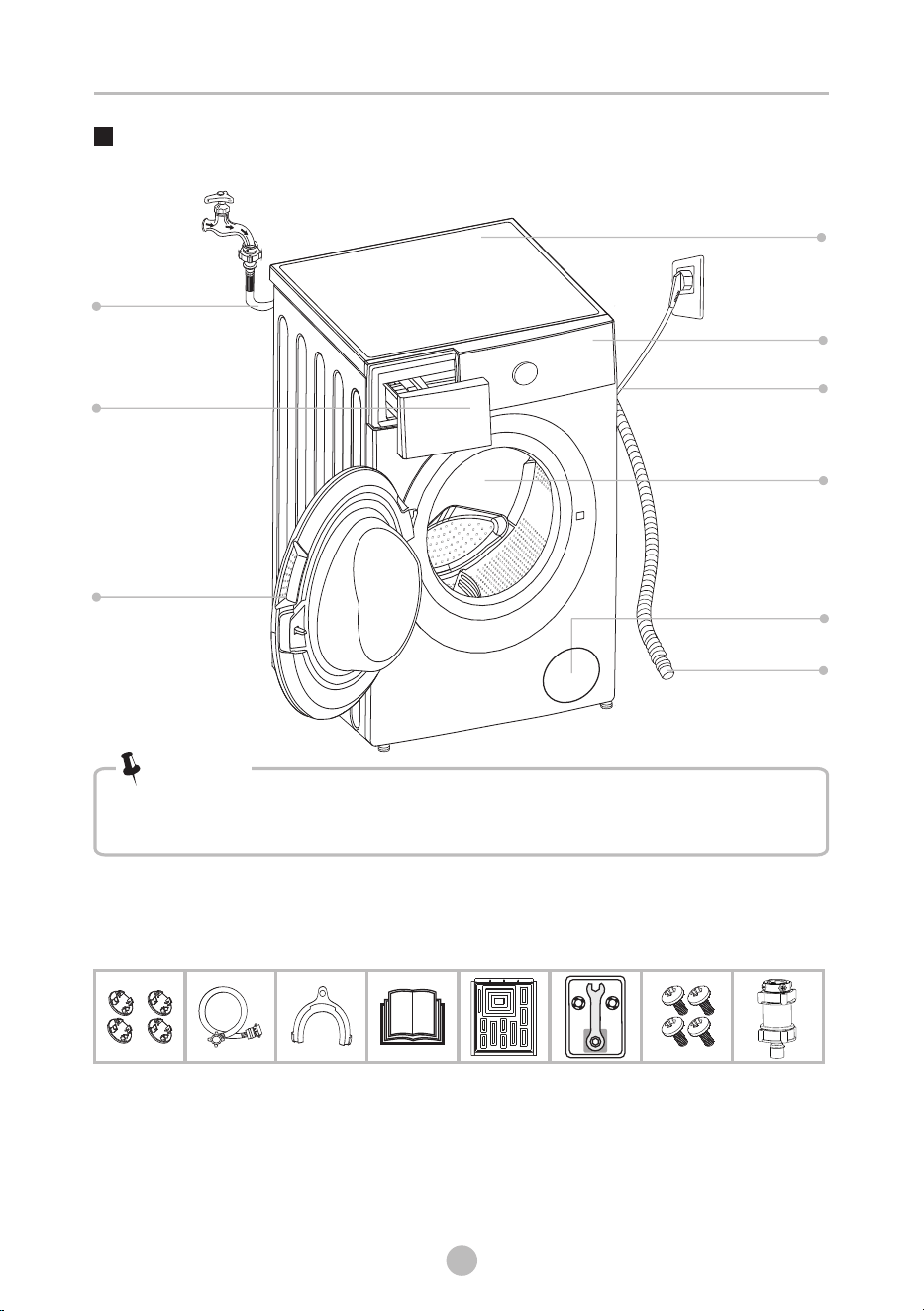
Product Description
• The product line chart is for reference only, please refer to real product
standard.as
Note!
Drum
Power supply cord
Control panel
Detergent dispenser
Drain Pump Filter
Door
Water inlet hose
Top cover
Drain hose
Accessories
INSTALLATION
Transport
hole plug
Water inlet hose
cold water
Drain hose
support
(optional)
Owner’s manual
Screw
(optional)
Rat resistance
panel(optional)
Spanner assembly
(optional)
Water Filter
(optional)
INSTALLATION
Installation
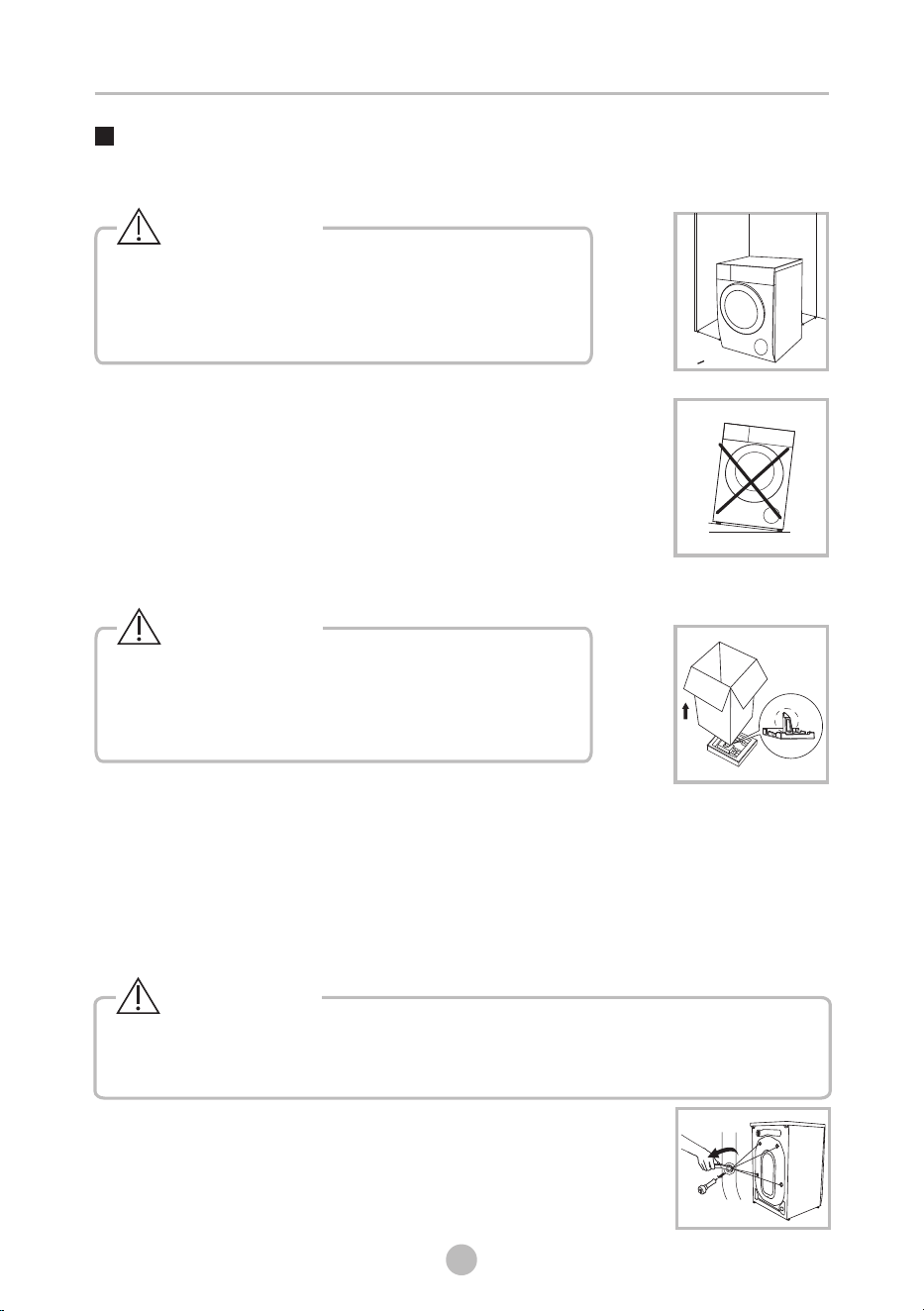
Before installing the machine, the location characterized
as follows shall be selected:
1. Rigid, dry, and level surface.
2. Avoid direct sunlight.
3. Room temperature is above 5°C.
4. Keep far away from the heat sources such as coal or gas.
Unpacking the washing machine
1. Remove the cardboard box and styrofoam packing.
2. Lift the washing machine and remove the base packing.Make sure the small triangle
foam is removed with the bottom one together. If not, lay the unit down with side
surface, then remove the small foam from the unit bottom manually.
3. Remove the tape securing the power supply cord and drain hose.
4. Remove the water inlet hose from the drum.
Please take the following steps to remove the bolts:
1. Loosen 4 bolts with spanner and then remove them.
2. Cover the hole with transport hole plugs.
3. Keep the transport bolts properly for future use.
Remove transport bolts
• Stability is important to prevent the product from
wandering!
• Make sure that the product should not stand on
the power cord.
Warning!
• Packaging material (e.g. Films, Styrofoam) can be
dangerous for children.
• There is a risk of suffocation ! Keep all packaging
well away from children.
Warning!
• You must remove the transport bolts from the backside before using the product.
• You’ll need the transport bolts again if you move the product , so make sure
you keep them in a safe place.
Warning!
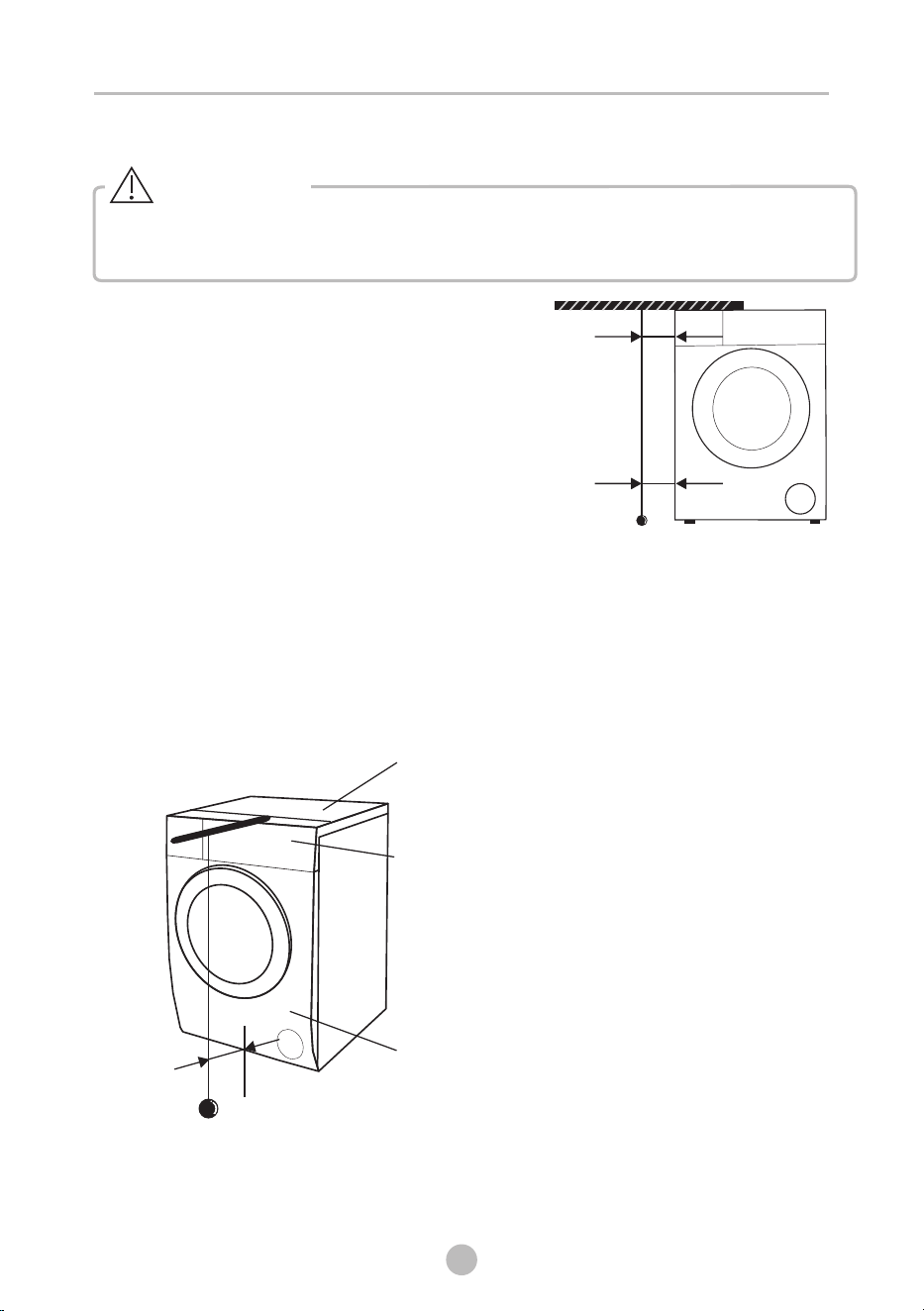
Installation area
12
w
w
W 20mm>
13
Levelling the washing machine
• Check with the gradienter if the machine placement is balanced and steady.
• If there is no gradienter, check the balance as per the following method.
Warning!
1. If it’s balanced from left to right.
• Take a long stick, and tie a rope at the end of it.
Bind a heavy object at the end of the rope.
• Hang the rope from the top cover of the
machine. Adjust the legs till the difference
between ‘a’ and ‘b’ is less than 1cm.
2. If it’s balanced from front to back
• Put the stick at the middle of the control panel, and hang the rope in front of
the machine.
• Keep 10cm away from the rope end to the control panel edge. Adjust the legs
till ‘c’ is 3.5~4.5cm (‘c’ is the distance from rope to bottom of front cover ).
INSTALLATION
b
a
c
Front Cover
Control Panel
Top Cover
14
INSTALLATION
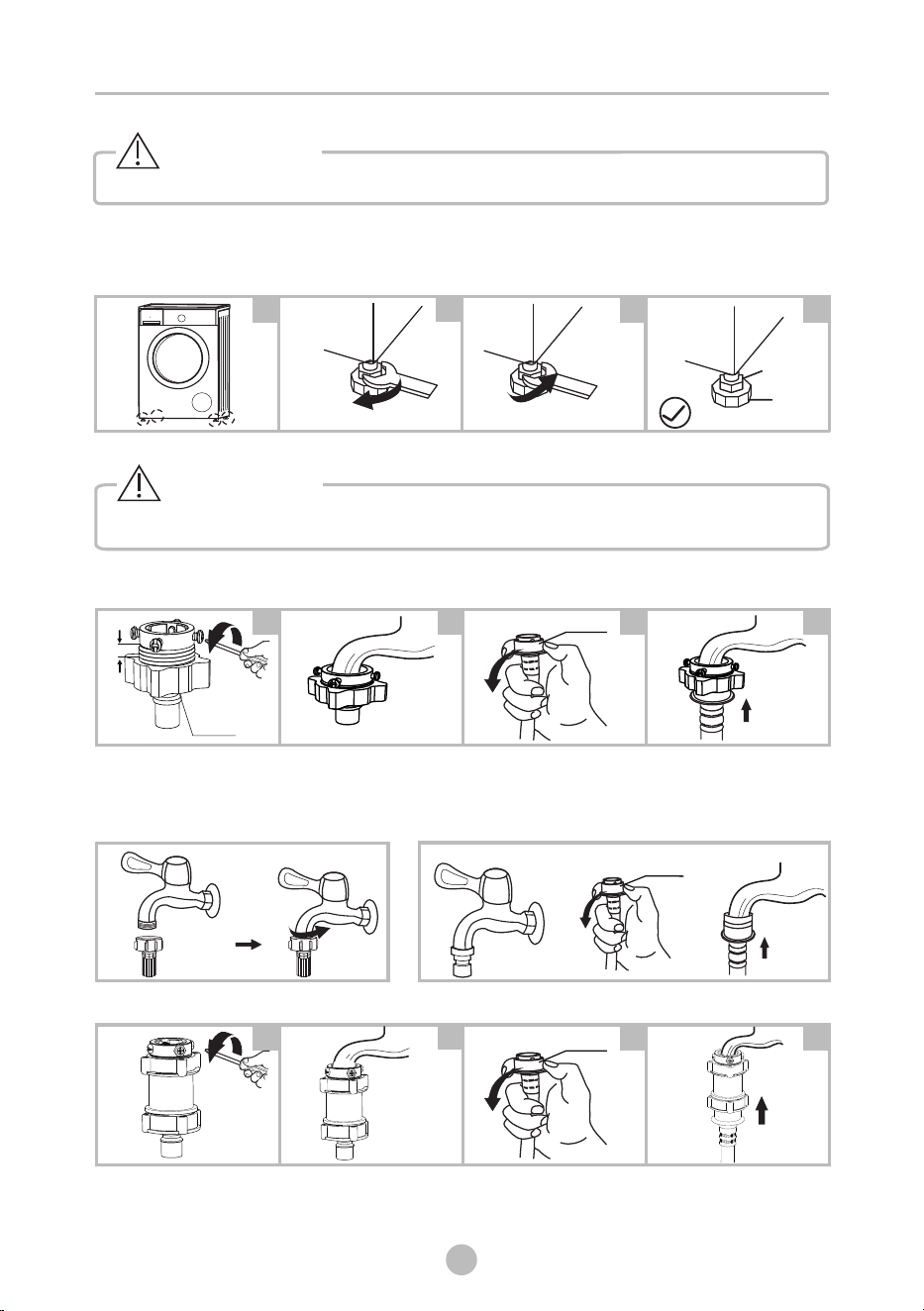
Levelling the washing machine
Connect Water Inlet Hose
2
3
4
1
Raise
Lower
Lock nut
Foot
Loosen clamp nut and
four bolts
Press the tap end
tightly
to the rubber ring
inside the clamp, and
then, tighten the 4 bolts
Press slide bushing,
insert water inlet hose
into connecting base
Slide bushing
2
3
41
Connection finished
Tap with threads and water inlet hose
Special tap for washing machine
Slide bushing
1. Check if the legs are closely attached to the cabinet. If not, please turn them to
their original positions and tighten the nuts.
2. Loosen the lock nut and turn the feet until it closely contacts with the floor.
3. Adjust the legs and lock them with a spanner, make sure the machine is steady.
• The lock nuts on all four feet must be screwed tightly against the housing.
Warning!
Connect the water inlet hose as indicated, there are ways to connect the
inlet hose.
three water
1. Connection between ordinary tap and water inlet hose.
• To prevent leakage or water damage, follow the instructions in this chapter
• Do not kink, crush, modify water inlet hose.or
!
Warning!
Clamp nut
5mm
2. Connection between screw tap and water inlet hose.
Slide bushing
2
3
41
3. Connection between ordinary tap and water inlet hose with water filter.
Loosen clamp nut and
four bolts
Press the tap end
to the rubber ring
inside the clamp, and
then, tighten the 4 bolts
tightly Press slide bushing,
into connecting base
insert water inlet hose
Connection finished
INSTALLATION
Warning!
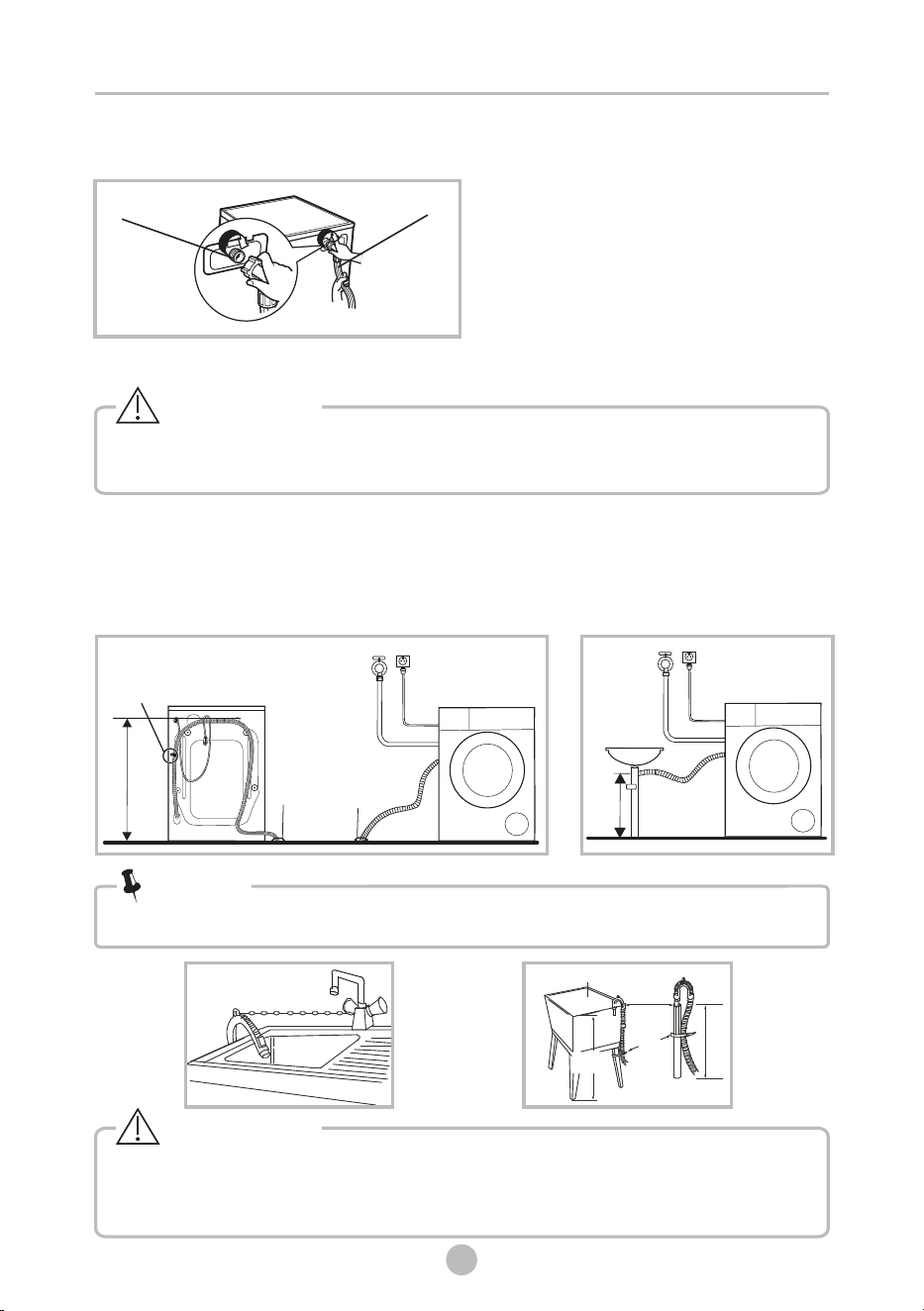
Drain Hose
•
• If drain hose is too long, do not force it into washing machine as it will cause
abnormal noises.
When installing drain hose, fix it properly with a rope.
•
• Position drain hose properly, otherwise damage might result of water leakage.
Do not kink or protract the drain hose.
Trough
Hose Retainer
Bin
d
Max.100cm
Min.60cm
Min.60cm
Max.100cm
If the machine has
• drain hose support, please install it like the following .
Warning!
Note!
Water inlet hose
Water inlet valve
Connect the other end of water inlet hose to the inlet valve at the backside of
product and fasten the hose tightly clockwise.
15
There are two ways to place the end of drain hose:
1. Put it into the drain port. If the drain hose is
put into the drain hole on the floor, fix the
drain hose on the back of the appliance to
prevent water overflow from the drum.
2. Connect it to the branch
the trough. drain hose of
Min. 60cm
Max
. 100cm
Drain port
Do not
the screw
unscrew
Drain port
Min. 60cm
Max
. 100cm
Liquid Detergent
Softener
Sin gle Dos e
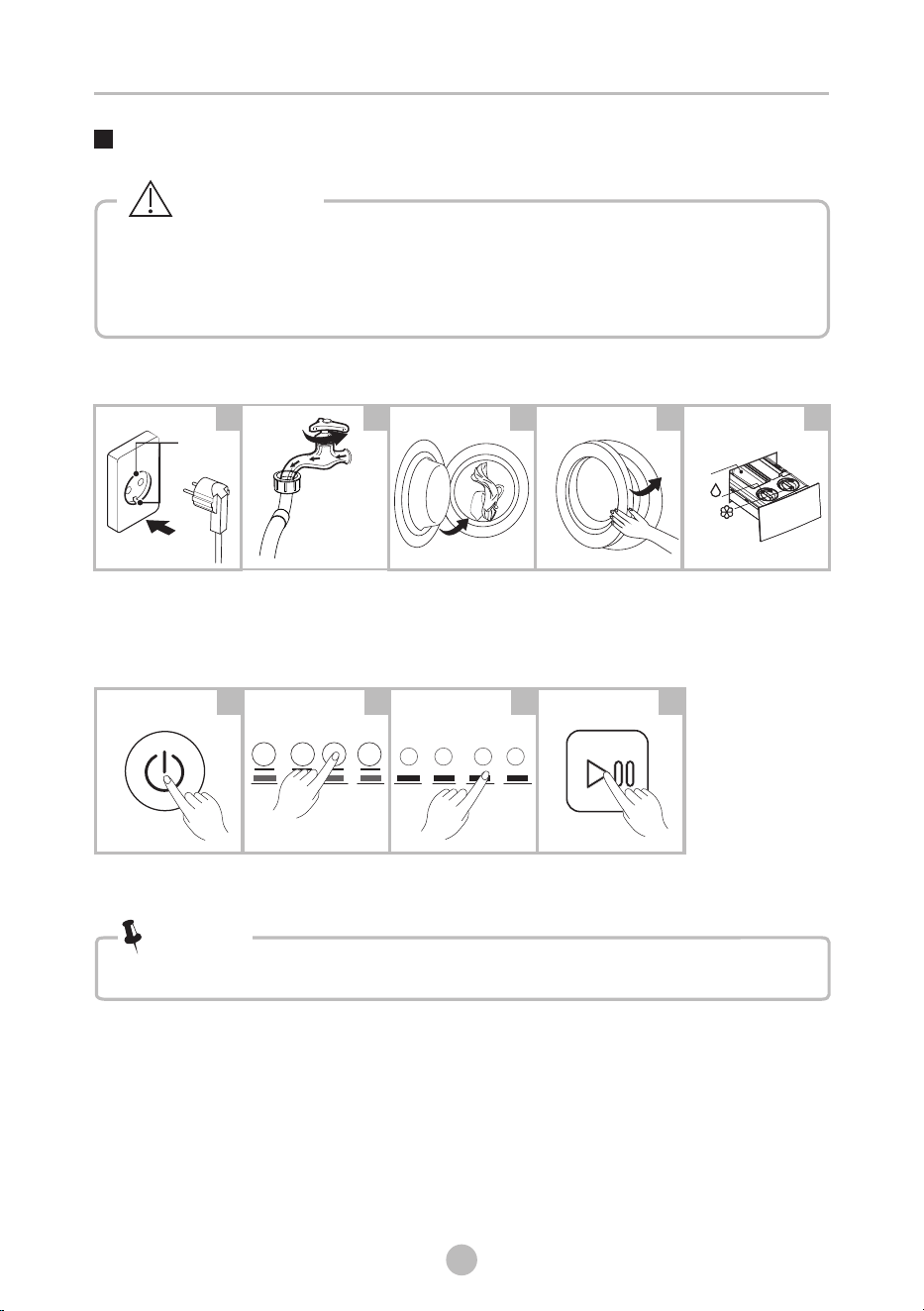
Quick Start
OPERATIONS
10
16
• Before washing, please make sure it’s installed properly.
• Before washing at first time, the washing machine shall be operated in
one round of the whole procedures without clothes in as follows.
The suggested program is “DRUM CLEAN”.
Caution!
1. Before Washing
Buzzer beep or “End” on display.
Open tap
Load
Close door
Plug in
Add detergent
3. After Washing
1 2 3 4 5
2. Washing
Power On
Select function
or default
Start up
1 2 3 4
• If default is selected, step 3 can be skipped.
Note!
Earth
terminal
Select Program
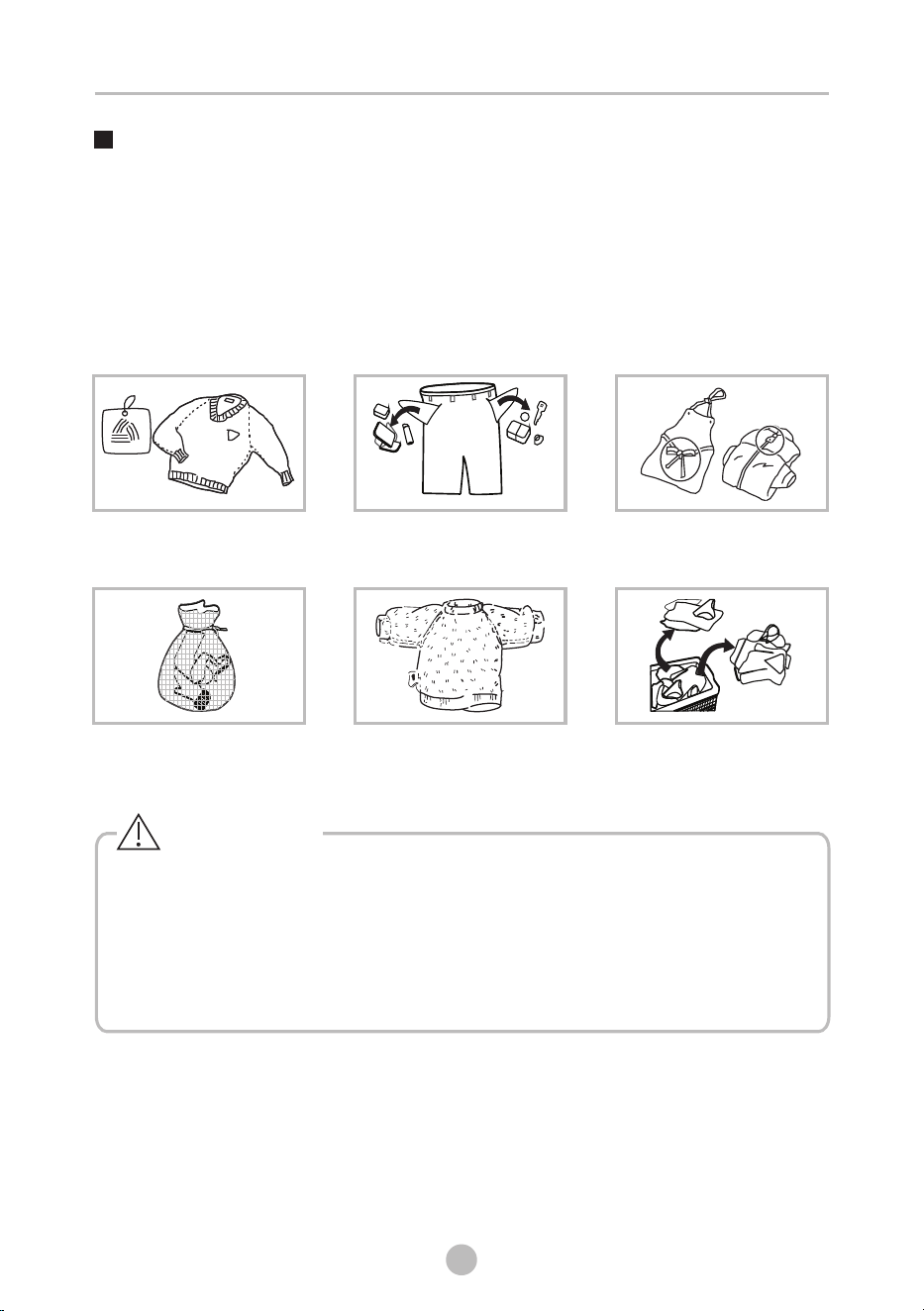
Knot the long strips,zip or
button
• When washing a single clothes, it may easily cause great imbalance and give
alarm. Therefore it is suggested to add one or two more clothes to be washed
together so that washing process can be done smoothly.
• Don't wash the clothes soaked in kerosene, gasoline, alcohol and other
flammable materials.
• The working condition of the washer should be 5 -40 . If used under 0°C, the °C °C
inlet valve and draining system may be damaged. If the machine is placed under
condition of 0°C or less, then it should be transferred to normal ambient
temperature to ensure the water inlet hose and drain hose are not frozen
before use.
• Please check the labels and the explanation of using detergent before wash. Use
non-foaming or less-foaming detergent suitable for machine properly. washing
Take out the items out of
the pockets
Put small clothes into the
pillow slip
Check the label
Before Each Washing
Turn easy-pilling and
long-pile fabric inside out
Separate clothes with
different textures
Warning!
17
OPERATIONS
18
Detergent Dispenser
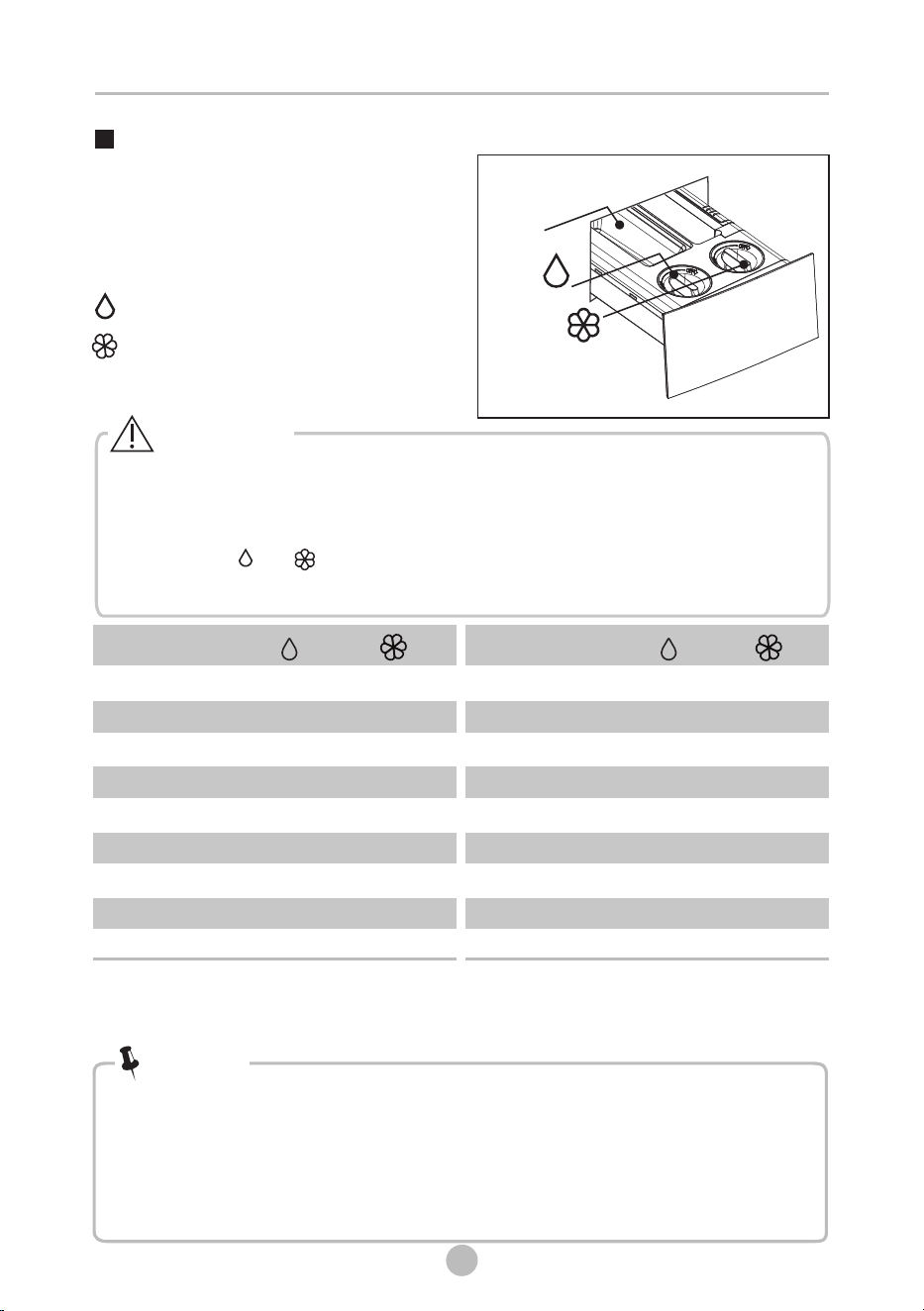
Liquid Detergent
Softener
Single Dose
• Please choose suitable type of detergent for the various washing
temperature to get the best washing performance with less water and
energy consumption.
• Use dry powder detergent to prevent clogging, and clean the dispenser
regularly especially when the washing machine is not used for long
periods of time.
Note!
Caution!
Fill liquid detergent and fabric
softner to dispenser to use
automatic dispensing function.
18
•
want to use powder detergent , you need turn off the function of liquid
detergent automatic dispense and add it into powder detergent case.
• When the “ ”or “ ”icon on the display panel is flashing means lack of
liquid detergent or softener , you need to add it .
This machine is automatic dispensing liquid detergent and softener. If you
Means available
“ ” √
√
Program Program
√
√ √
√ √
√ √
√ √
√ √
√ √
√ √
√ √
√ √
√ √
Liquid Detergent (MAX:≈510ml)
Softener (MAX:≈440ml)
COTTON
QUICK12’
QUICK45’
WHITE
STAINVANISH
COLORALIVE
BEDDING
HYGIENE
WOOL
SPIN ONLY
DOWNLOAD
DRUM CLEAN
ECO WASH
JEANS
BABY CARE
DELICATES
SPORTS
*DOWNLOAD default program is BABY CARE .
The programs (BABY CARE/JEANS/ECO WASH/DELICATES/SPORTS) can only be selected by App
on mobile phones.
TSmartLife
√ √
OPERATIONS
√ √
√ √
√ √
Control Panel
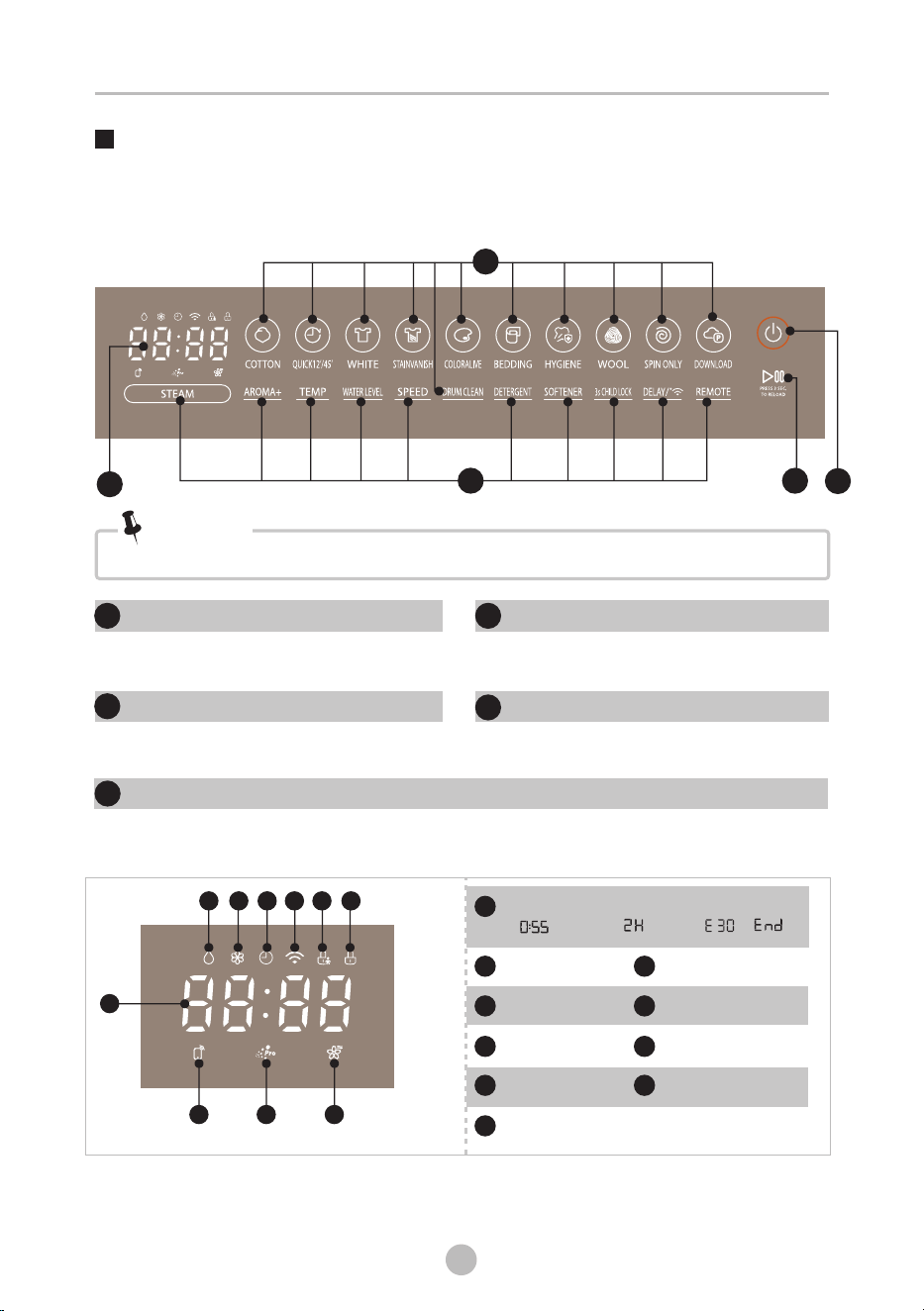
ON/OFF
Product is switched on or off.
Start/Pause
Press the button to start or pause the
washing cycle.
Programs
Available according to the laundry type.
Option
This allows you to select an additional
function .
Note!
• The chart is for reference only, please refer to real product as standard.
1
1
3
1
2
4
Display
The display shows the settings, estimated time remaining, options, and status
messages for your washer. The display will remain on through the cycle.
5
19
OPERATIONS
1
2
3
4
5
A
B
D
Wash Time Delay Time
Error End
C
Detergent
E
Softener
F
Aroma
G
Child Lock
H
Door Lock
I
J
Delay
Wireless Network
Remote Control
BJ E
A
C D H I F G
UFB Pro
Option
10
20
OPERATIONS
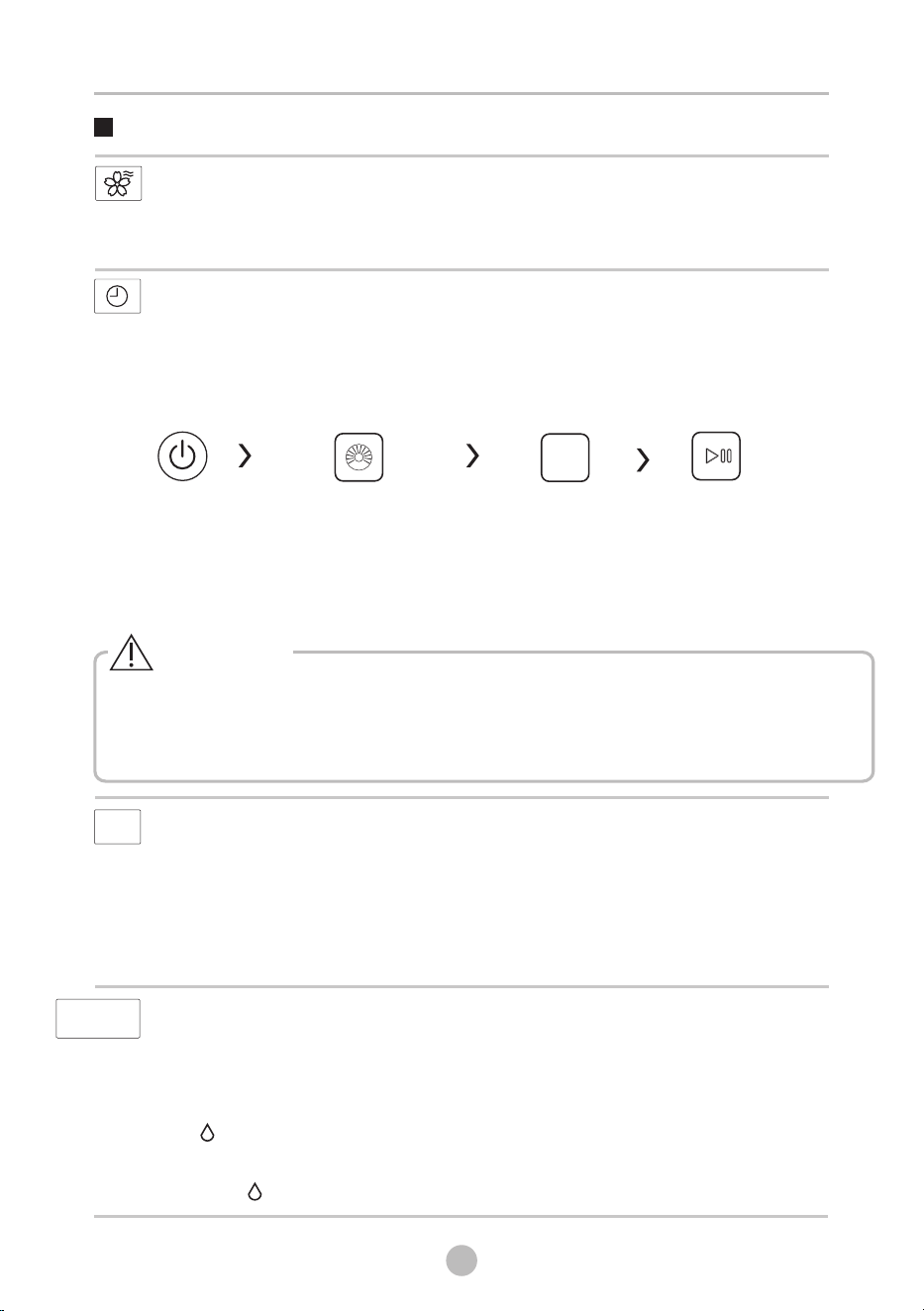
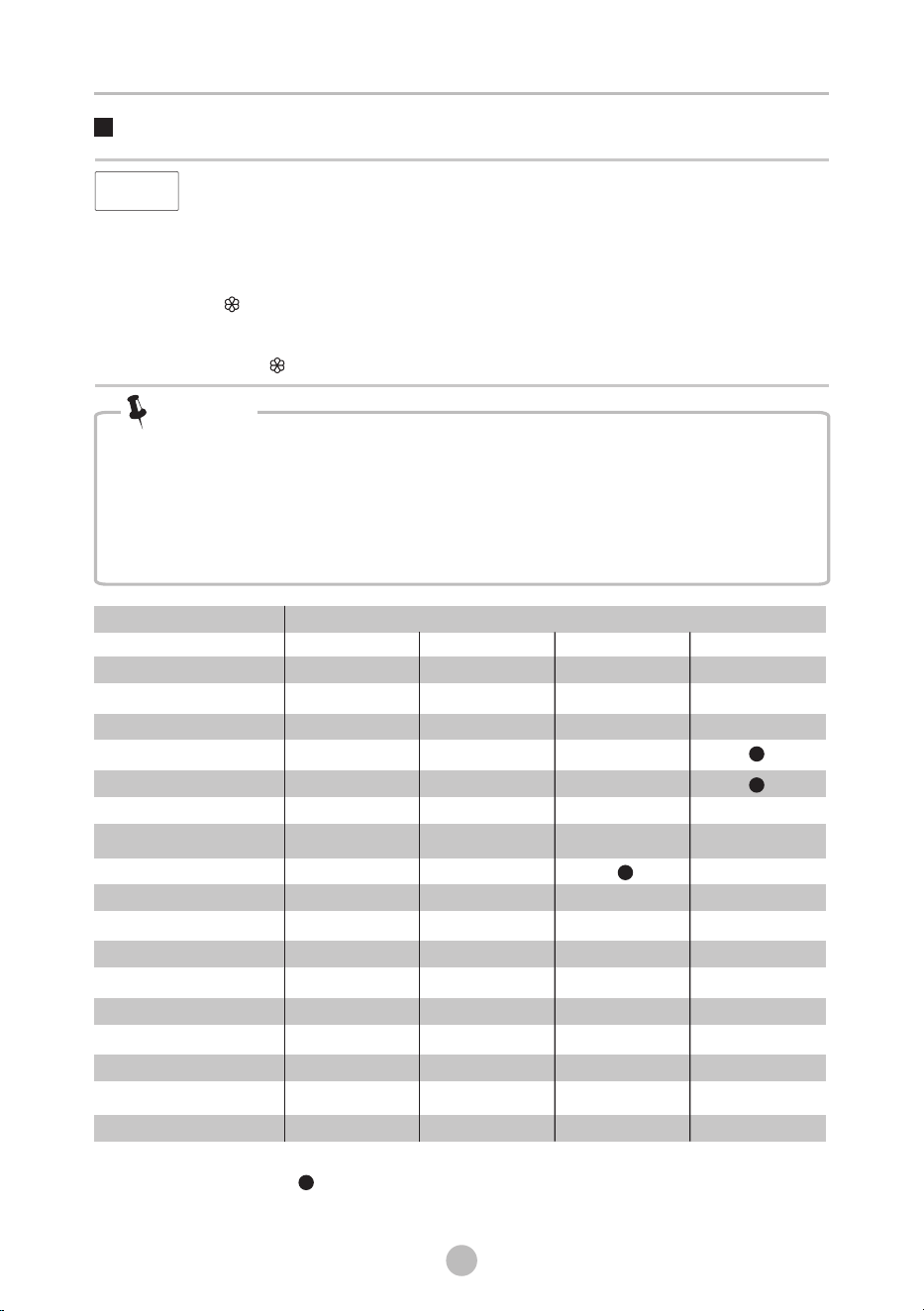
DELAY
Set the Delay end function:
1. Select a program
2.Press the [ DELAY] button to choose the time(the delaying end time is 0-24 H.)
3.Press [Start/Pause] to commence the delay operation
Choose the Program
Start
On/Off
Setting time
DELAY
[ DELAY]
Cancel the Delay function:
Press the button until the display be 0 H, It should be pressed before
starting the program. If the program already started, should press the
[On/Off] button to reset the program.
AROMA+
fibers to absorb softener more efficiently. As a result, with dosing the same
amount of softener, we can achieve better fragrance left on the clohtes.
The function helps to modify the water flow mode and time. Then help the
Caution!
• If there is any break in the power supply while the machine is operating, a special
memory stores the selected program and when the power is restarted, the
selected program will continue running.
STEAM function can penetrate the fiber, which effectively eliminate bacterias and
germs, preventing odors .
STEAM function can be selected with “COTTON”, “ “ “,
.
QUICK45’”, BEDDING
“DOWNLOAD ”, “JEANS”, and “BABY CARE”
STEAM
DETERGENT
DETERGENT
The [DETERGENT] is the function of dispensing liquid detergent automatically.
The default setting is Auto. You can press the [DETERGENT] button to turn off the
detergent automatic dispense function. Then press the [DETERGENT] button, you can
adjust the level of liquid detergent,
total 4 levels :Less, Normal,Extra, Max. The display corresponding show :L-1,L-2 ,L-3,L-4.
The” ” icon light up in display panel, means liquid detergent automatic dispense is
turned on. None icons light up means the liquid detergent automatic dispense is
turned off.
When the “ ” icon is flashing means lack of liquid softener, you need to add it .
STEAM
*DOWNLOAD default program is BABY CARE.
The programs (BABY CARE/JEANS) can only be selected by App on mobile phones.TSmartLife
OPERATIONS
10
21
Option
Note!
You can also adjust the dosage coefficient of detergent and softener according
to usage habits. Press [DETERGENT] or [softener] 3 seconds can change
coefficient.
Detergent coefficient: 0.5,1,1.2,1.5. It means multiple of dosage. The display
corresponding show :H-1,H-2 ,H-3,H-4. Default is H-2.
Softener coefficient: 0.8,1,1.5,2. It means multiple of dosage. The display
corresponding show :S-1,S-2 ,S-3,S-4. Default is S-3.
SOFTENER
SOFTENER
The [SOFTENER] is the function of dispensing liquid softener automatically.
The default setting is Auto. You can press the [SOFTENER] button to turn off the
softener automatic dispense function. Then press the [SOFTENER] button, you can
adjust the level of liquid softener, total 4 levels :Less, Normal, Extra, Max. The
display corresponding show :L-1,L-2 ,L-3, L-4.
The ” ” icon light up in display panel, means liquid softener automatic dispense is
turned on. None icons light up means the liquid softener automatic dispense is
turned off.
When the “ ” icon is flashing means lack of liquid softener, you need to add it .
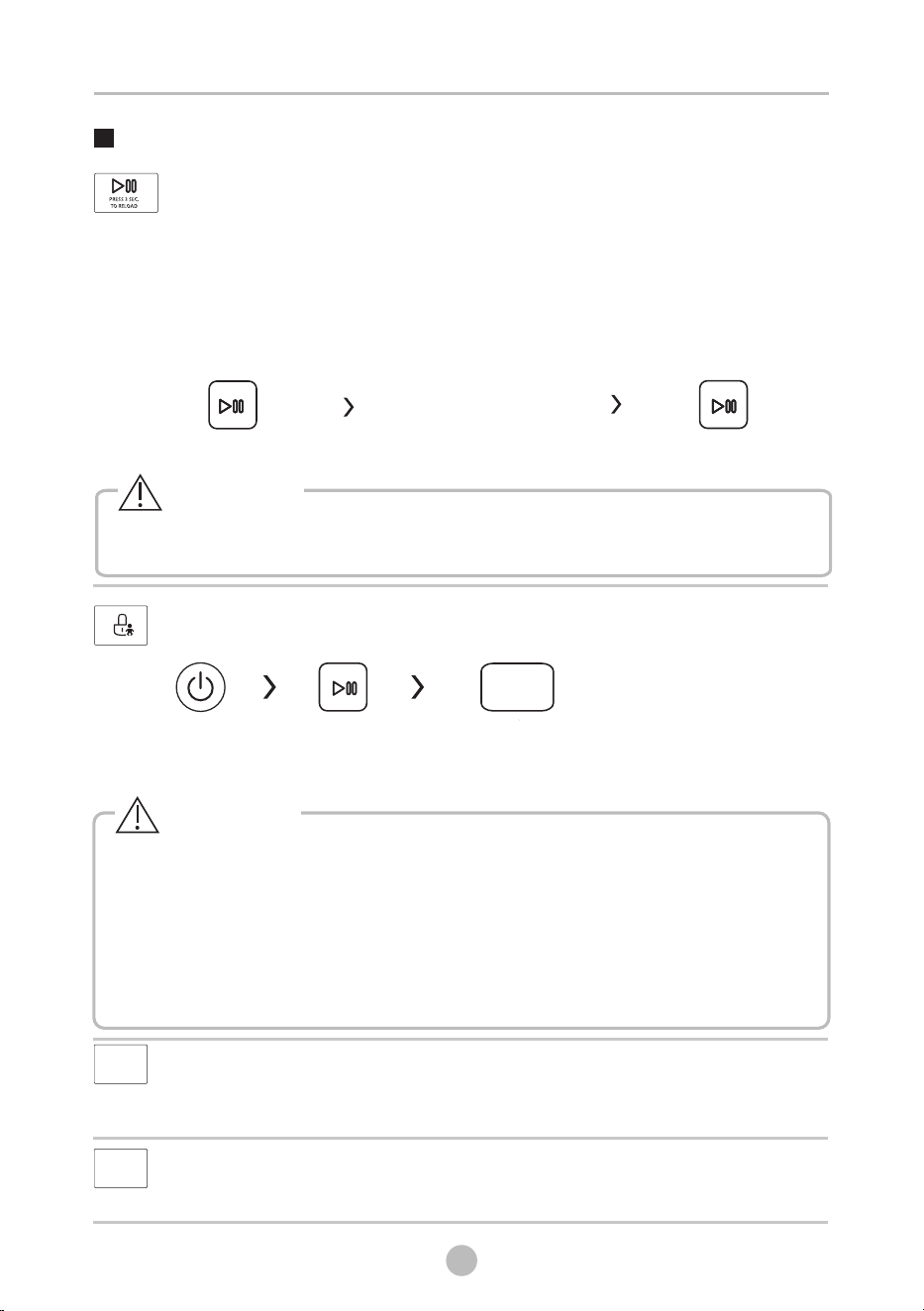
Program Option
AROMA+
DELAY
○
○
○
○
○
○
○
○
○
○
○
○
○
UFB Pro
○
○
○
COTTON
QUICK12’
QUICK45’
WHITE
STAINVANISH
COLORALIVE
BEDDING
HYGIENE
WOOL
SPIN ONLY
DOWNLOAD
DRUM CLEAN
ECO WASH
JEANS
BABY CARE
DELICATES
SPORTS
○
○
○
STEAM
○
○
○
○ ○
○ Means optional
*DOWNLOAD default program is BABY CARE .
Means default
○ ○
○
○
The programs (BABY CARE/JEANS/ECO WASH/DELICATES/SPORTS) can only be selected by
App on mobile phones.
TSmartLife
○
○
○
OPERATIONS
10
22
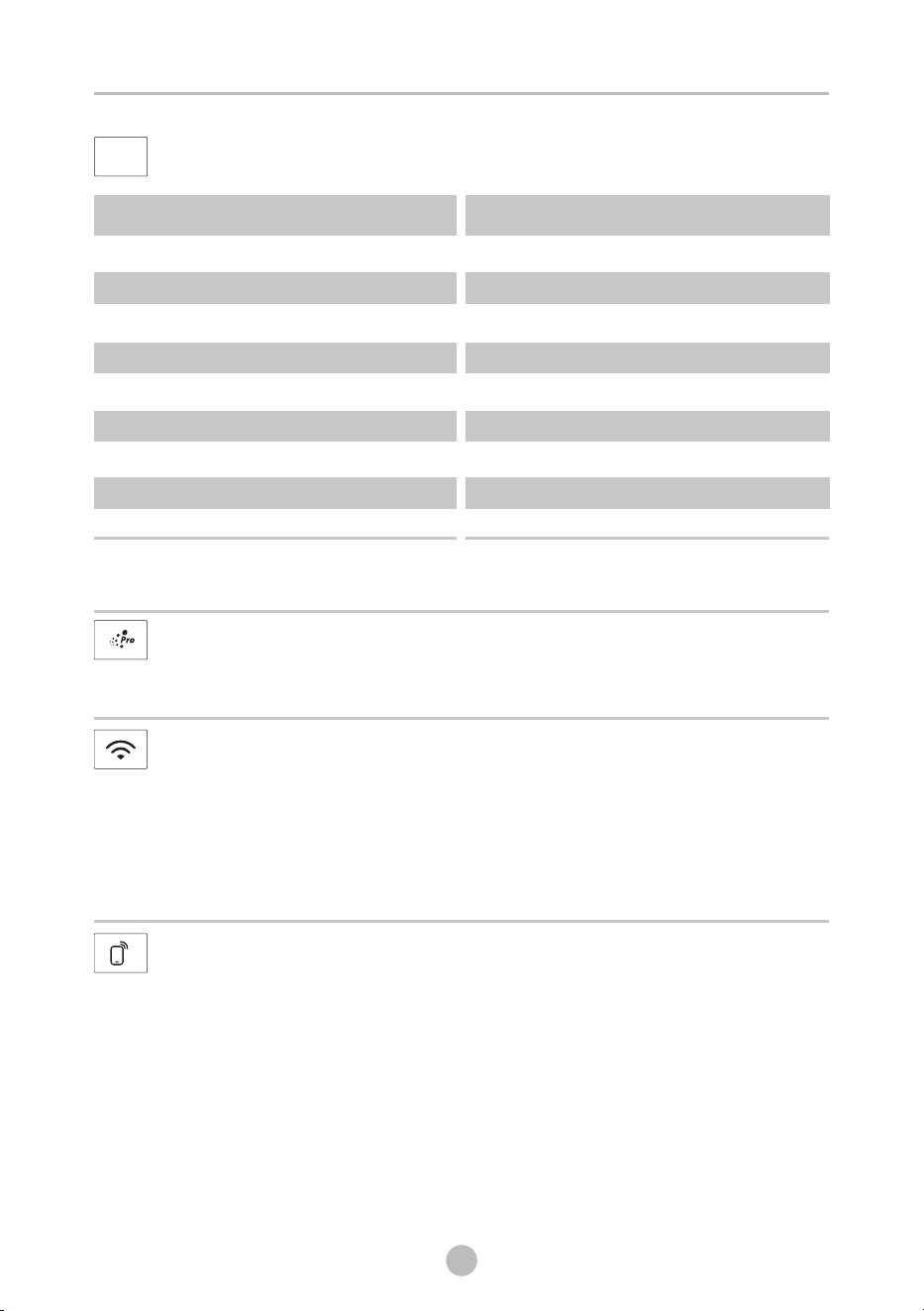
CHILD LOCK
To avoid mis operation by children.
Caution!
On/Off
Start/Pause
Other Functions
Press [ ] button for 3 seconds
till buzzer beep.
3s CHILD LOCK
When the Child Lock is activated, the display will alternately show “CL” and the remaining time.
Pressing any other button will cause the Child Lock indicator to flash.
When the program ends, “CL” and “End” will alternate on the display.
The Child Lock deactivates the function of all buttons except the On/Off button and the Child
lock button!
Only press [ ] for 3 seconds can deactivate the Child Lock!
Please deactivate the Child Lock before selecting a new program!
3s CHILD LOCK
TEMP.
Press the button to regulate the temperature
The display show “---” means the temperature is cold.
Temp.:Cold, 20°C ,30°C, 40°C, 60°C, 90°C .
.
TEMP.
• Don't use the Reload function when the water level is over the lower edge of the door or
the water temparature is high.
Caution!
RELOAD
Cloths can be added after strating washing process.
Please follow the steps as bellow:
1. Press [Start/Pause] for 3 seconds.
2. Wait until the drum stops rotation.
3. The door is unlocked.
4. Add cloths into drum.
5. Close the door and Press [Start/Pause] .
Start/Pause
Press[Start/Pause]3sec.
Reload the clothes
3s CHILD LOCK
W
Adjust the water level of the main wash.
Water Level:AUTO, L-1, L-2, L-3, L-4
ATER LEVEL
WATER LEVEL
10
23
OPERATIONS
UFB Function Pro
The UFB Pro function means that the water is electrolyzed into -OH and ultra
fine bubbles durning washing process, which helps dissolve stains and floating
colors. It is better to remove tough stains and whiten clothes.
Wireless Network
Remote Control
This is the switch of remote control, if you want to use your smartphone to
control the washing machine remotely, you need to press [REMOTE] button.
Considering the safe operation of washing machine, the smartphone remote
control should meet the following conditions:
1. The appliance should connect to the internet;
2. The door of drum should be closed.
Remark:
- If the door is open in anytime, the remote control function will be failure.
- The remote control function is turned off at the end of each cycle automatically,
if you want to use remote control function again, you need turn on it again.
Methods to turn on the Wireless Network function
1. Press [DELAY] button for 3 seconds to turn on the Wireless Network
function, it can also configure the network or reset the network.
Methods to turn off the Wireless Network function
1. Press [ ] 3 seconds to turn off the Wireless Network function.
2. Or unplug the appliance.
AROMA+
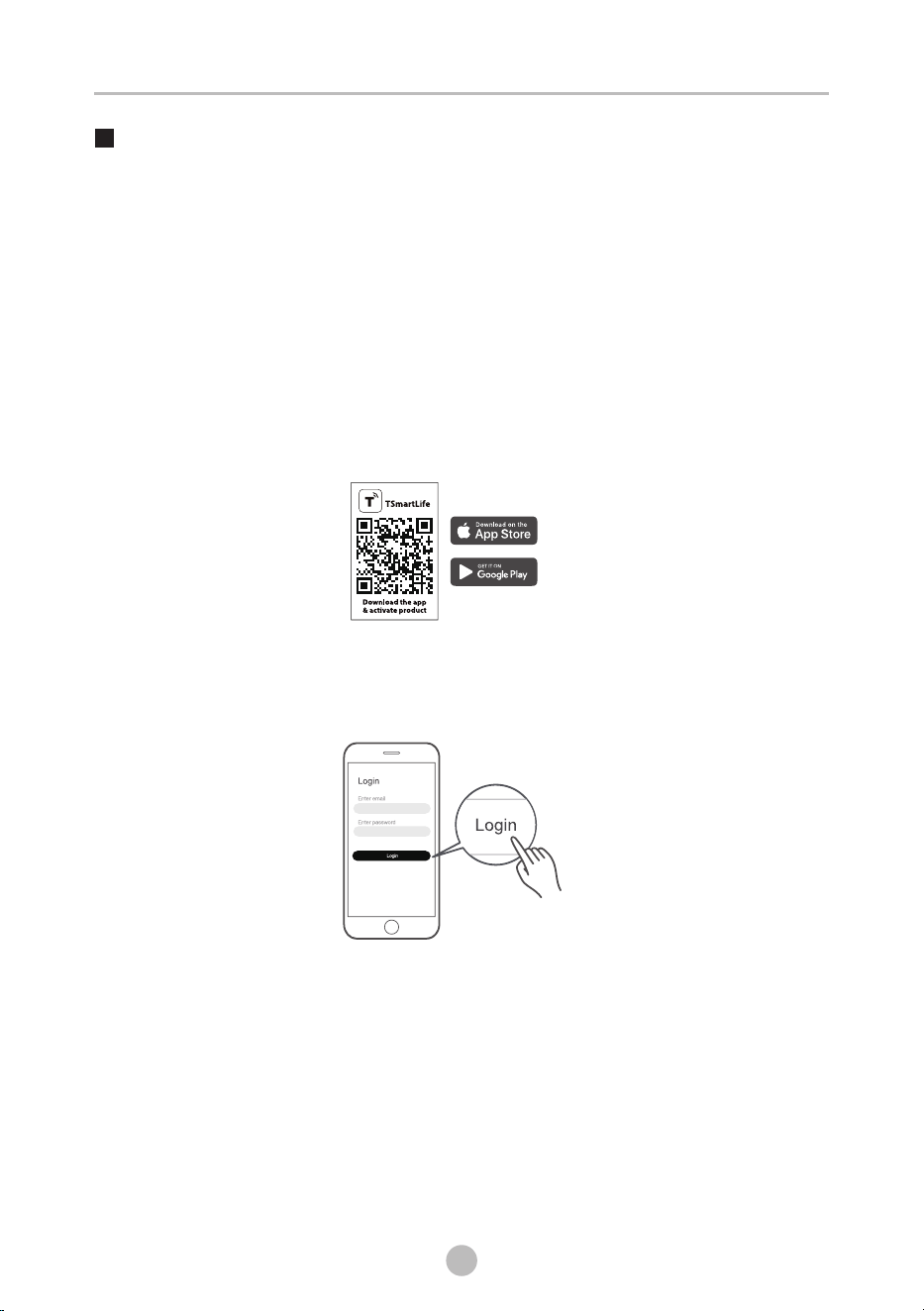
Program Default Spin Speed(rpm) Program Default Spin Speed(rpm)
SPEED
Press the [SPEED] button to change the spin speed.
SPEED
COTTON
QUICK12’
QUICK45’
WHITE
STAINVANISH
COLORALIVE
BEDDING
HYGIENE
WOOL
1000
800
800
800
800
1000
1000
800
800
SPIN ONLY
DOWNLOAD
DRUM CLEAN
ECO WASH
JEANS
BABY CARE
DELICATES
SPORTS
1000
1000
--
800
800
1000
600
800
*DOWNLOAD default program is BABY CARE .
The programs (BABY CARE/JEANS/ECO WASH/DELICATES/SPORTS) can only be selected by
App on mobile phones.
TSmartLife
24
1. Your smartphone is connected to home Wireless Network, and you know the
network password.
2. Make sure you are near the home appliance.
3. The 2.4GHz band wireless signal is enabled on your wireless router.
Follow the below steps to enter the remote control state
Before you start, make sure that:
Download the TSmartLife App
On an app market (Google Play Store, Apple App Store), search for
"TSmartLife" and find the TSmartLife app. Download and install it on
your phone. You can also download the app by scanning the QR code
below.
Register and log in
Open the TSmartLife app, and create a new account to start (you can
also register through a third-party account). If you already had an
existing account, use the account to log in.
Connect your devices to TSmartLife
1: Please make sure your mobile phone is connected to Wireless Network.
If not, go to Settings and turn on the wireless connection, select and
connect to a Wireless Network. Also please turn on the Bluetooth on
your phone. If not, go to Settings and turn it on.
2: Please power on your devices.
3: Open TSmartLife app on your phone.
OPERATIONS
Instructions to Connection with the TSmartLife App
25
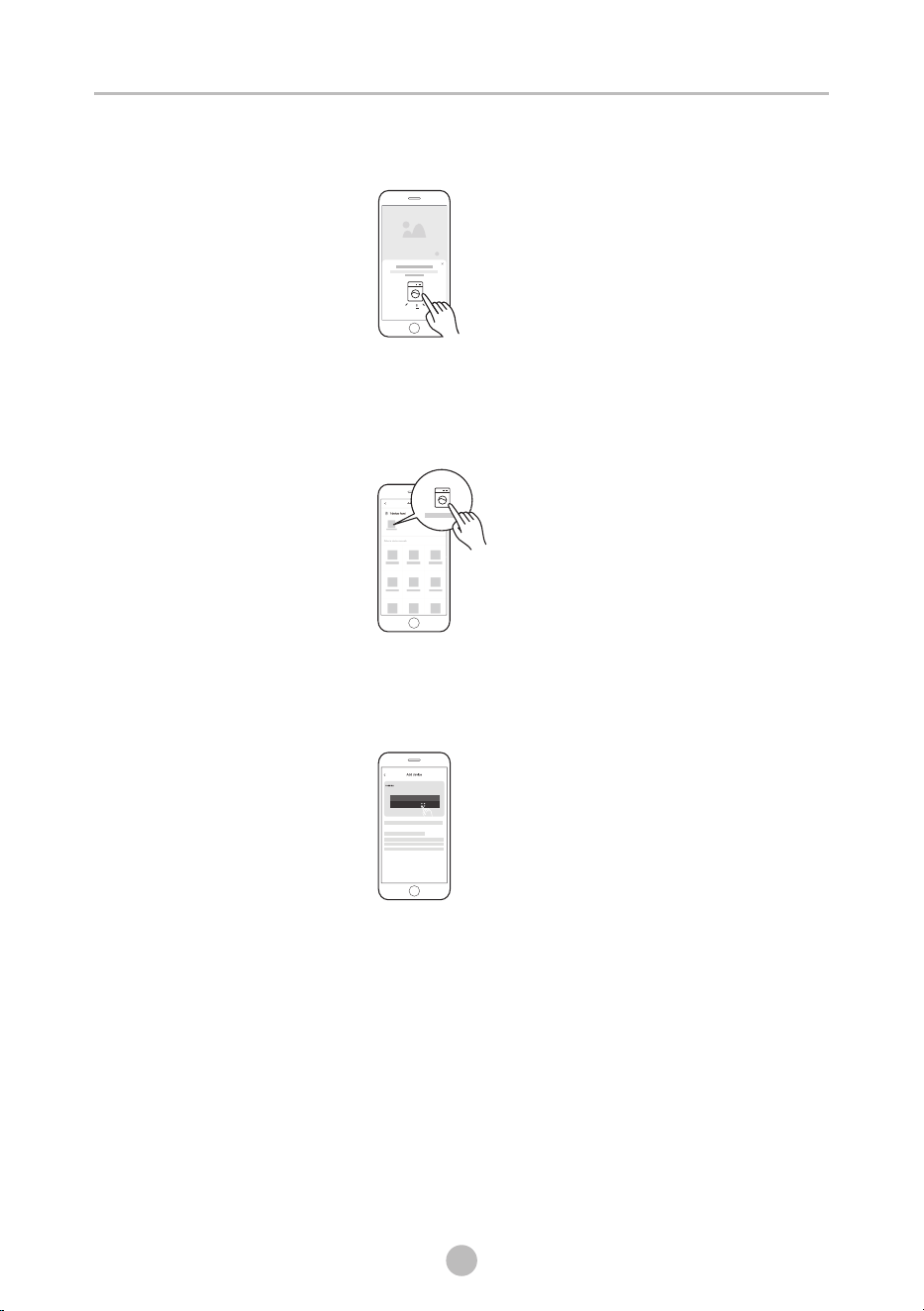
4: If a message of "Smart devices discovered nearby" appears, click to
add.
5: If no message appears, select " + " on the page and select your device
in the list of nearby devices available. If your device is not listed,
please add your device manually by the device category and device
model.
8: 8 8
6: Connect your device to Wireless Network according to the instructions
on app. If the connection fails, please follow the instructions provided
by the app to continue with the operation.
OPERATIONS
26
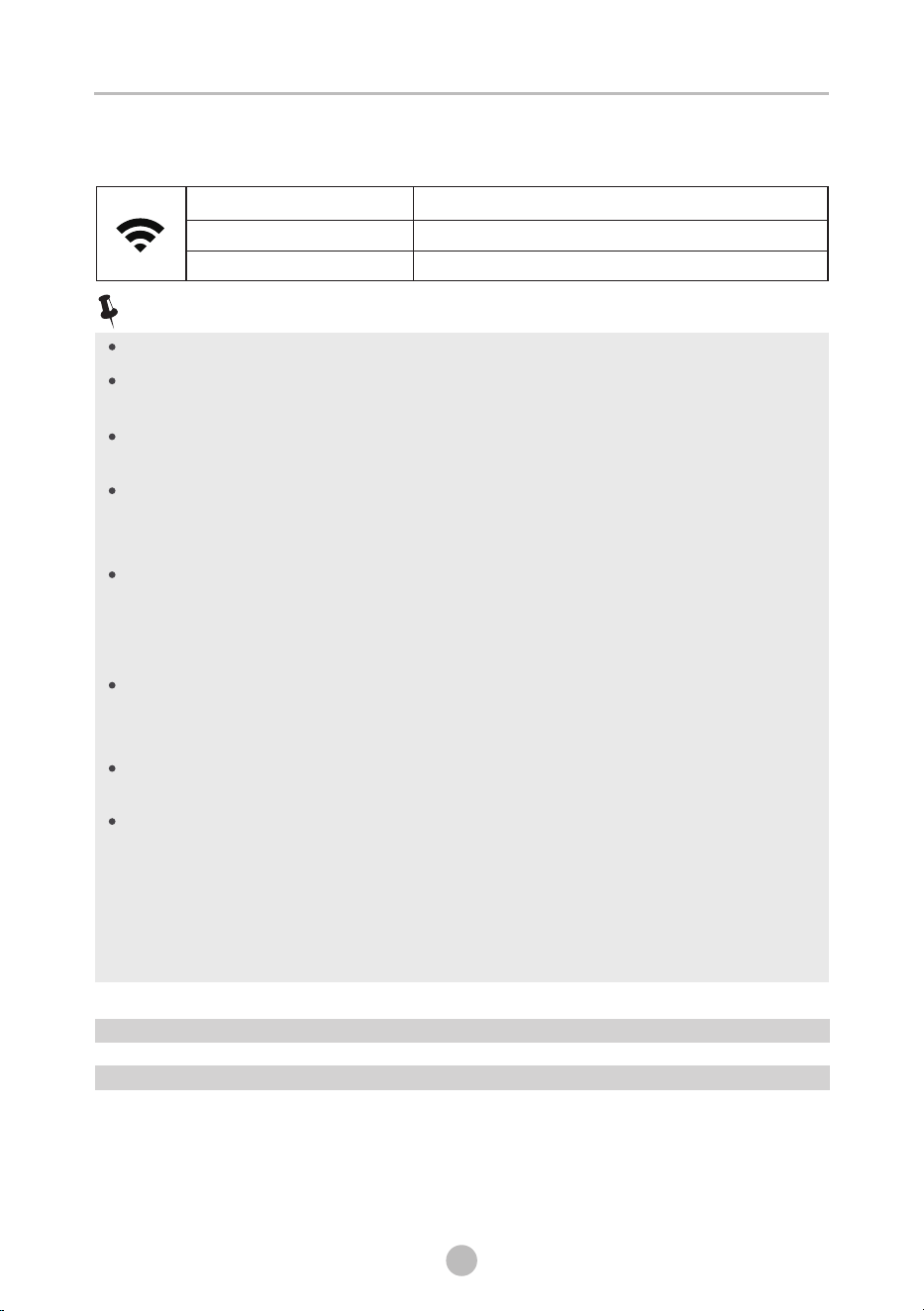
Wireless Network Status Light
Slowly flashing
Waiting for connection
Quickly flashing
Connecting
Quickly flashing solid
Connected to your wireless router
Make sure your devices are powered on.
Keep your mobile phone close enough to your device when you
are connecting network to your device.
Connect your mobile phone to the wireless network at home, and
make sure you know the password of the Wireless Network.
Check if your router supports 2.4 GHz Wireless Network band and
turn it on. If you are not sure whether the router supports 2.4 GHz
band, please contact the router manufacturer.
The device cannot connect to the Wireless Network that requires
authentication, and it usually appears in public area such as
hotels, restaurants, etc. Please connect to a Wireless Network that
does not require authentication.
It is recommended to use a Wireless Network name that only
contains letters and numbers. If your Wireless Network name
contains special characters, please modify it in the router.
Turn off the WLAN+ (Android) or WLAN Assistant (iOS) function of
your mobile phone when connecting network to your devices.
In the case that your device connected to Wireless Network
before but it needs to reconnect, please click "+" on app Home
page, and add your device again by the device category and
model according to the instructions on app.
OPERATIONS
Wireless Network INFORMATION
Working Frequency 2.4G
Extreme Temperature Range -20°C~85°C
Max RF Power Output : E.I.R.P 18dBm BT: 8dBmWireless Network
Note!
10
27
OPERATIONS
Programs
QUICK12’
WOOL
Hand or machine washable wool or richwool textiles Especially
gentle wash program to prevent shrinkage longer program
pauses
- .
,
.
COTTON
Hard-wearing textiles, heat-resistant textiles made of cotton or linen.
SPIN ONLY
Spins with selectable spin speed.
BEDDING
This procedure is suitable for washing few and not very dirty clothes
quickly.
ECO WASH
DRUM CLEAN
This program is specially set in this machine to clean the drum
and It applies high temperature water to make the drum
and tub. When this procedure is performed, the clothes can not be
added. When proper amount of chlorine bleaching agent is put in,
the drum cleaning effect will be better. The customer can use this
procedure regularly according to the need.
tub.
Programs are available according to the laundry type.
This program is specially designed for washing Bedding.
HYGIENE
Washing machine can kill some bacterium, and achieve hygiene
effect.
COLORALIVE
Washing brightly colored clothes, it can protect the colors better.
WHITE
Specially for white clothes.
JEANS
Specially for jeans.
BABY CARE
Washing the baby’s clothes, it can make the baby's wear cleaner and
make the rinse performance better to protect the baby skin.
DOWNLOAD
STAINVANISH
Suitable for washing clothes with special stains, such as coffee stains,
makeup.
By using , you can download addtional cycles to your
washing machine,we have limited cycle numbers on the panel, but
we have more cycles in the app, and we can choose one via the app,
and the by controlling the knob, we can apply the app cycle to the
machine.
TSmartLife App
This program is suitable for energy saving wash.
QUICK45’
This program is suitable for washing not very dirty clothes, save
more energy and washing time.
The programs (BABY CARE/JEANS/ECO WASH/DELICATES/SPORTS) can only be selected by
App on mobile phones.
TSmartLife
DELICATES
For delicate, washable textiles, e.g. made of silk, satin, synthetic, fibres or
blended fabrics.
SPORTS
Washing the activewear.
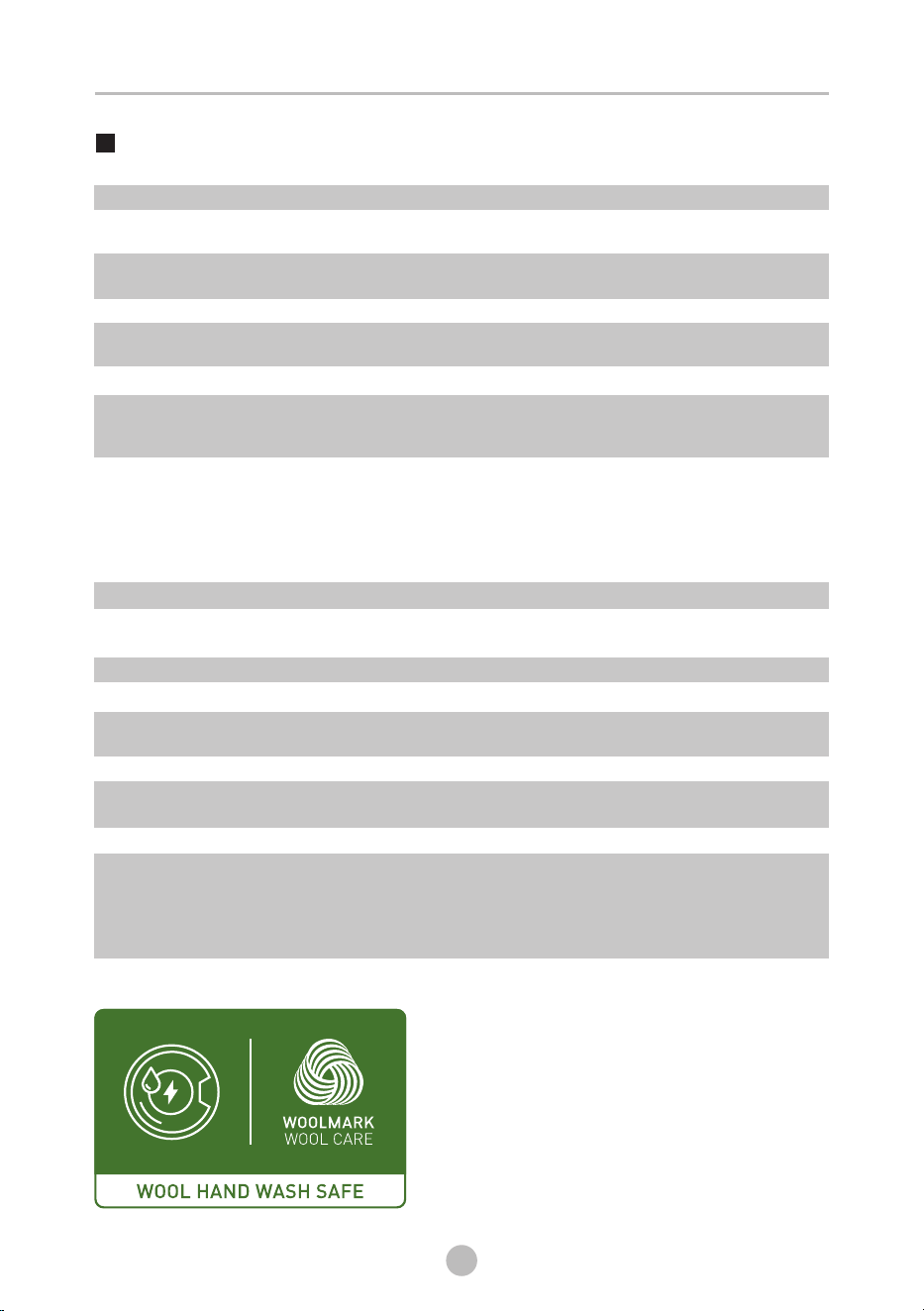
The wool wash cycle of this machine has been tested
and approved by The Woolmark Company for the
washing of wool garments labelled as “hand wash”
provided that the products are washed according to
the instructions on the garment label and those
issued by the manufacturer of this washing machine.
M2119:TW-T37BZP115MWM
Program
Washing Programs Table
10
28
OPERATIONS
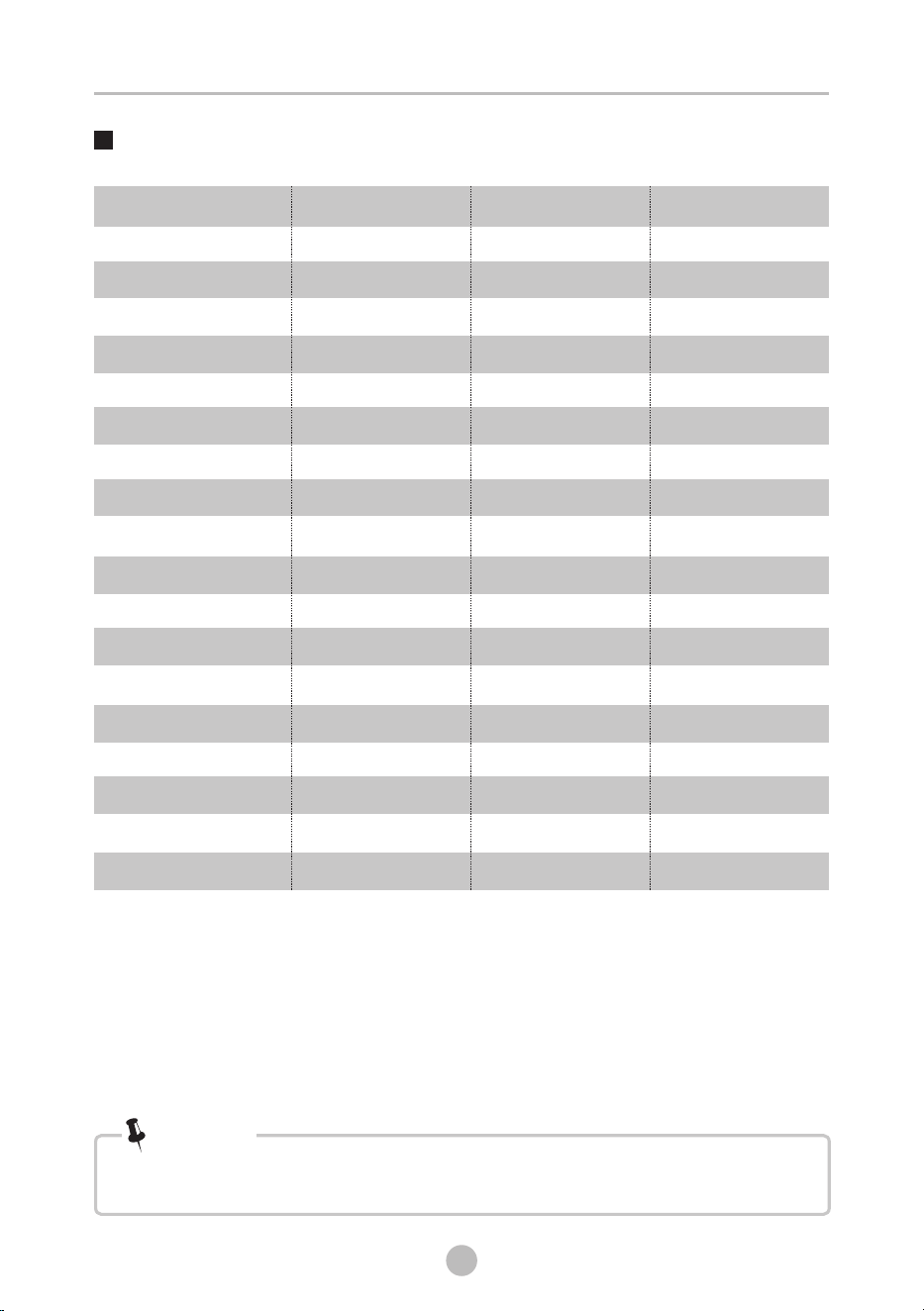
Default Time
Default
Temp.(°C)
Load(kg)
• The parameters in this table are only for user's reference. The actual parameters
maybe different with the parameters in above mentioned table.
Note!
10.5
COTTON
QUICK12’
QUICK45’
WHITE
STAINVANISH
COLORALIVE
BEDDING
HYGIENE
WOOL
SPIN ONLY
DOWNLOAD
DRUM CLEAN
ECO WASH
JEANS
BABY CARE
DELICATES
SPORTS
*DOWNLOAD default program is BABY CARE .
40
--
30
30
--
Cold
40
--
40
--
60
90
30
30
60
30
20
1:18
0:12
0:45
1:09
2:04
1:03
1:48
2:39
1:03
0:12
2:05
1:18
0:57
1:35
2:05
0:50
0:45
10.5
1.0
2.0
5.0
5.0
5.0
10.5
5.0
2.0
10.5
10.5
--
5.0
10.5
10.5
3.0
5.0
The programs (BABY CARE/JEANS/ECO WASH/DELICATES/SPORTS) can only be selected by
App on mobile phones.
TSmartLife
The MY energy test program : COTTON ; Temp. : 60 ; Speed : 1400rpm; other as the default.* °C
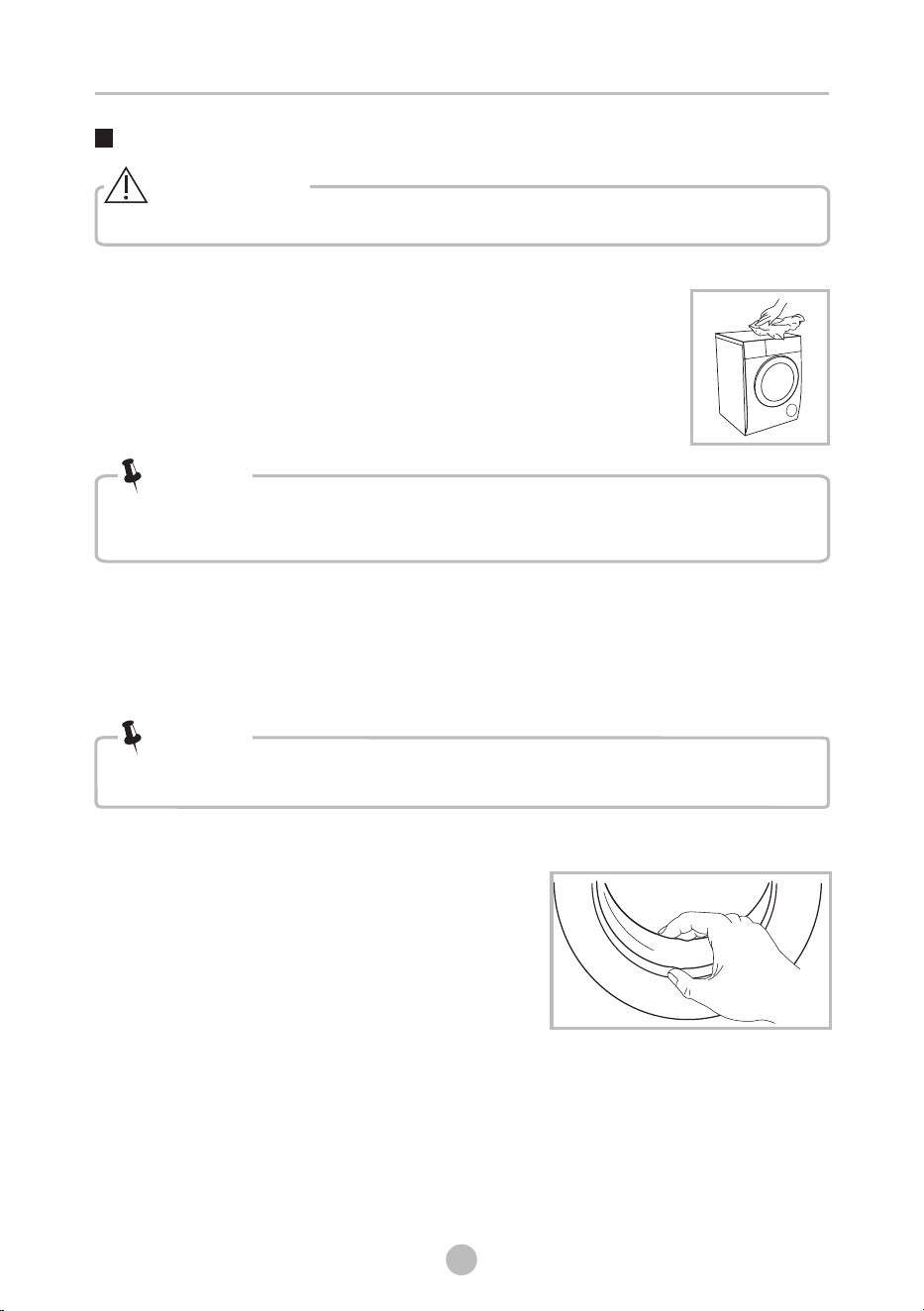
• Before your maintenance starts, please unplug the machine and close the tap.
Cleaning The Cabinet
Cleaning The Drum
• Formic acid and its diluted solvents or equivalent are forbidden, such as
alcohol, solvents or chemical products, etc.
• Don’t put laundry in the washing machine during the drum cleaning.
Cleaning The Gasket And Glass
Warning!
Note!
Note!
Cleaning And Care
The rusts left inside the drum by the metal articles shall be removed immediately
with chlorine-free detergents.
Never use steel wool.
Proper maintenance on the washing machine can extend its
working life. The surface can be cleaned with diluted
non-abrasive neutral detergents when necessary. If there is
any water overflow, use the dry cloth to wipe it off immediately.
No sharp items are allowed.
Wipe the glass and gasket after each wash
to remove lint and stains. If lint builds up it
can cause leaks.
Remove any coins, buttons and other objects
from the gasket after each wash.
MAINTENANCES
29
Clean the Door Seal and Glass every month
to ensure the normal operation of the
appliance.
MAINTENANCES
30
Clean The Detergent Dispenser
• Do not use alcohol,solvents or chemical products to clean the machine.
Note!
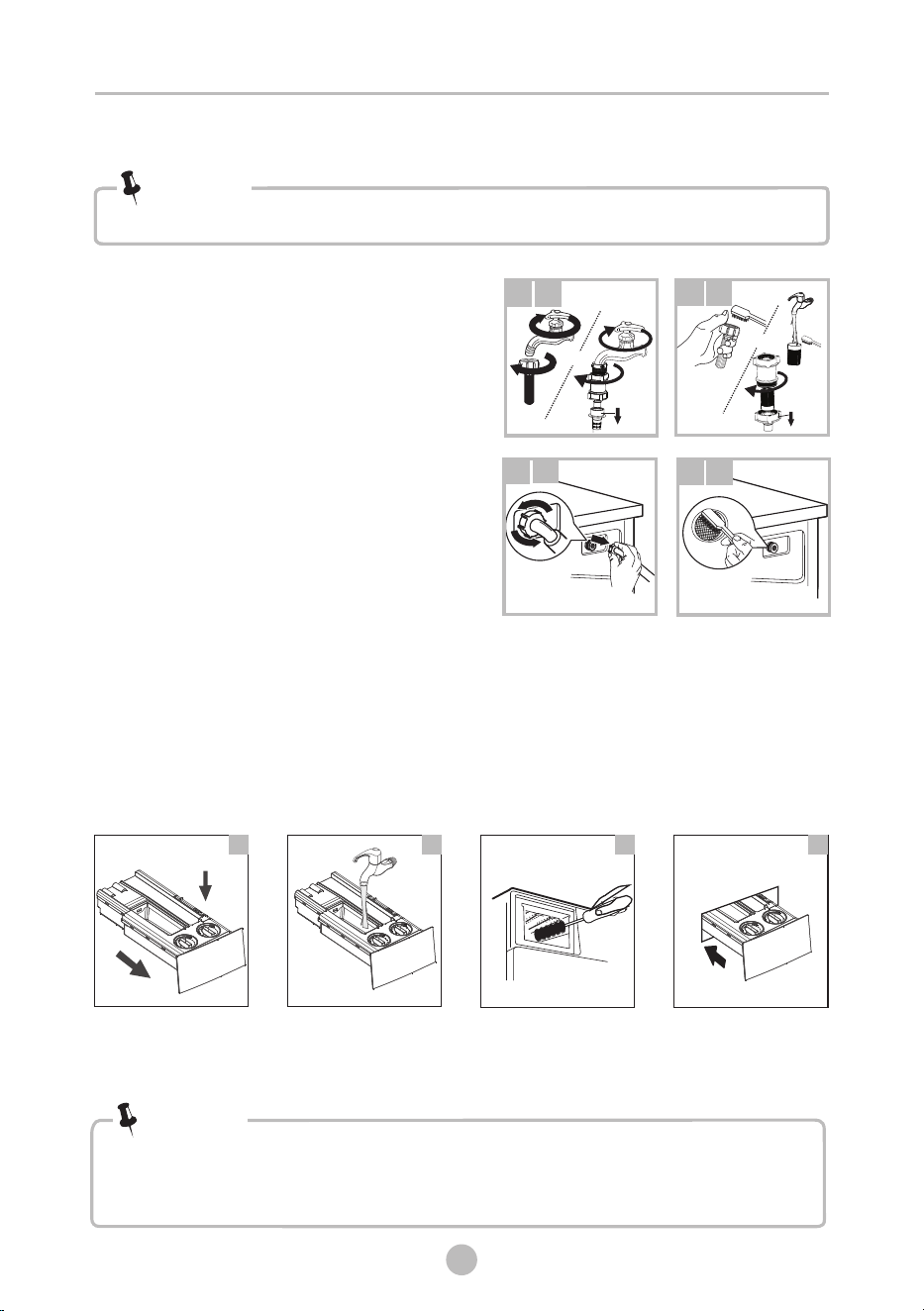
1. Press down the arrow location on the dispenser drawer.
2. Lift the clip up and take out softener cover and wash all grooves with water.
3. Restore the softener cover and push the drawer into position.
Pull out the dispenser
drawer with press the A
Clean the dispenser
drawer under water
Clean inside the recess
with an old toothbrush
Insert the dispenser
drawer
• Clean the detergent dispenser every 3 months to ensure the normal
operation of the appliance.
2
3
4
1
A
Cleaning The Inlet Filter
• Inlet filter must be cleaned if water reduces than before.
Note!
5. Clean the Door Seal and Glass every month to ensure the
normal operation of the appliance.
Cleaning The Inlet Filter
Note!
1
1
2
2
3
3
4
4
Washing the filter in the water inlet hose
1. Close the tap.
2. Remove water inlet hose
from the tap.
or water filter
3. and clean the filter.Disassembly
4. Reconnect the water inlet hose.
Washing the filter in washing machine:
1.
2 . Pull out the filter with long nose pliers
and reinstall it back after being washed.
3. Use the brush to clean the filter.
4. Reconnect the water inlet hose.
Screw off the water inlet hose from the
of the machine.backside
or
or
Cleaning The Drain Pump Filter
•
• Wait until the water cools down.
• Unplug the machine to avoid electrical shock before maintenance.
• Drain pump filter can filter the lints and small foreign matters from the
washing.
• Clean the filter periodically to ensure the normal every 3 months
machine.operation of washing
Be careful of the hot water!
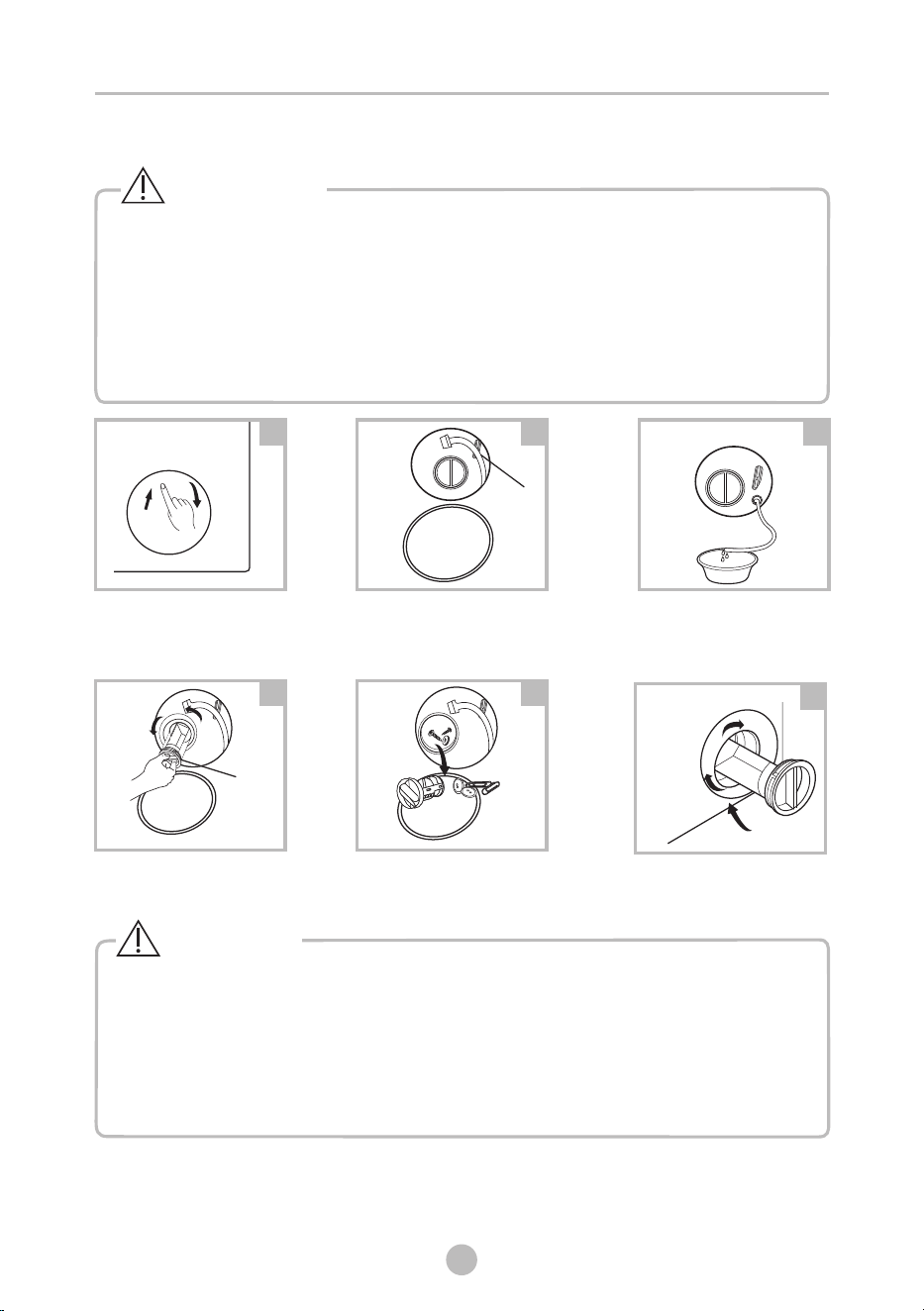
Open the lower cover cap
Pull out the emergency drain
hose, and take off the hose cap
Open the filter cap by turning
to the counter clockwise
Remove extraneous matter
1
2
3
Close the filter cap and the
lower cover cap
6
Emergency
drain hose
After water runs out,
reset the drain hose
Warning!
MAINTENANCES
5
4
Filter cap
31
Caution!
• Make sure that filter cap and emergency drain hose are reinstalled properly, filter cap
should be inserted aligning to hole plates otherwise water may leak.
• When the appliance is in use and depending on the program selected there can be
hot water in the pump. Never remove the pump cover during a wash cycle, always
wait until the appliance has finished the cycle, and is empty. When replacing the filter
cap, ensure it is securely re-tightened.
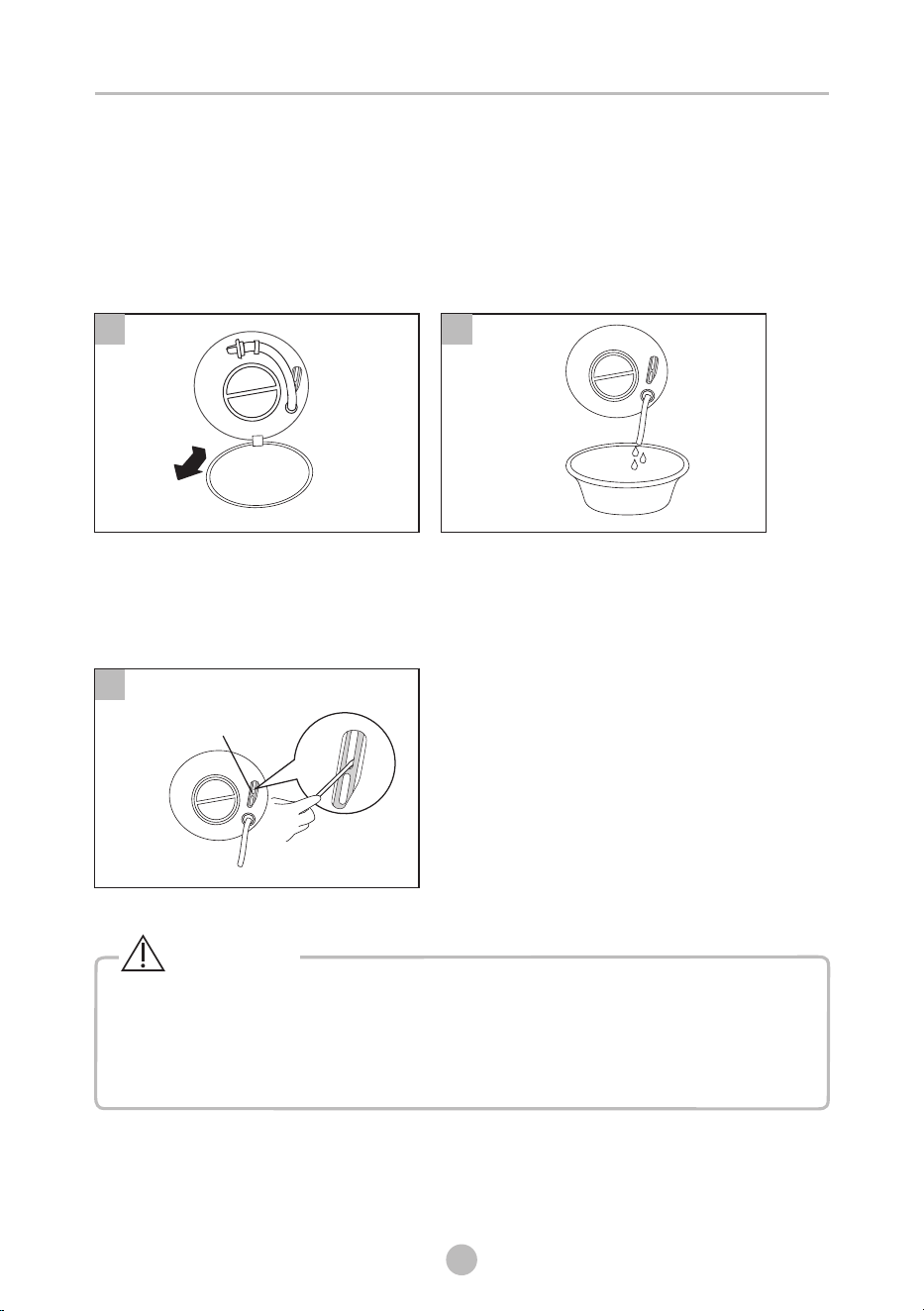
1. Open filter door.
2. In case of power failure,
open the filter door to
drain the cooled water
in the drum.
Emergency Door Release
In case of power failure or other circumstances and door cannot be opened.
If it is necessary to open the door under this circumstances, please pull
down the pull cord inside emergency door and restore the pull cord after
opening the door.
The machine is not allowed to use the emergency switch pull cord during
washing. If need to run machine urgently, it is recommended to open door
after water is cooled, to avoid getting burn caused by high temperature
residual water outflow from the machine tub.
1
2
3
MAINTENANCES
32
Warning!
3. Insert the tool into the pull
ring and pull it downward to
unlock the door of the
machine
Emergency door
opening pull cord
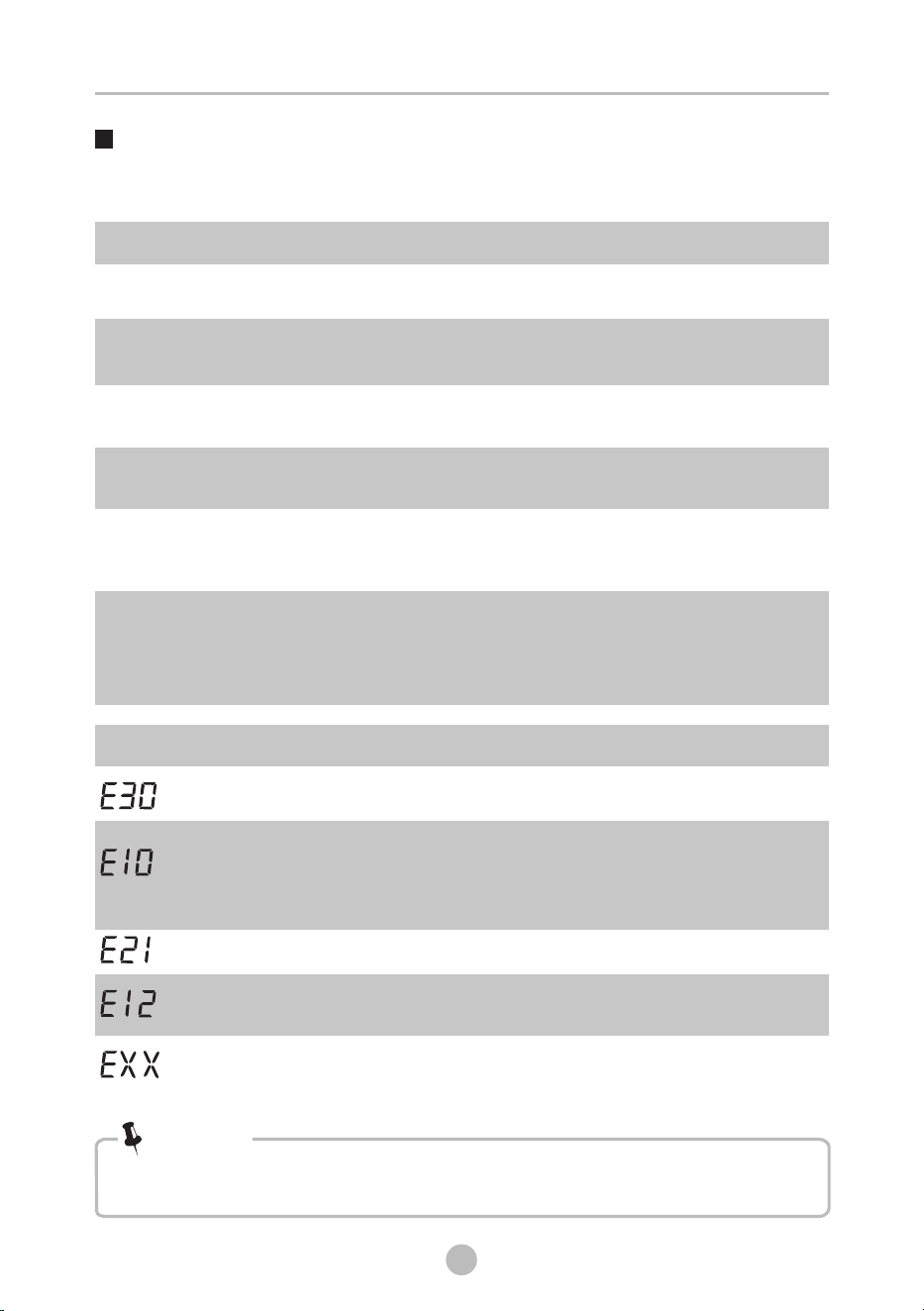
Trouble Shooting
The start of the appliance does not work or it stops during operation.
First try to find a solution to the problem, if not, contact the service centre.
Description
Reason
Solution
Restart after the door is closed
Check if the clothes is stuck
Door is not closed properly
Door can’t be
opened
Safety protection design
is working
Disconnect the power, restart
the product
Water leakage
Connection of water inlet
hose or drain hose is not
proper.
Check connection of water inlet
hose and drain hose.
Clean and wipe the detergent
box
Abnormal noise
Check if the fixing (bolts) have
been removed
Check it’s installed on a solid
and level floor
Indicator or display
does not light
Electrical power cord may
not be plugged in or
connection may be loose.
Make sure plug fits tightly in
wall outlet. Check the power
plug is connected correctly.
Washing machine
can not start up
Detergent residues
in the box
Detergent is dampened
or agglomerated
MAINTENANCES
shows other alarm codes again, contact the service.
After the check, activate the appliance. If the problem occurs or the display
Note!
Description
Reason
Solution
Check if the water pressure is
too low
Straighten the water inlet hose
Check if the inlet valve filter is blocked
Check if the drain hose is blocked
Water supply duration is
too long
Water drain duration is too
long
Try operation again. If the same
trouble continues, call for service.
Others
Water overflow
Stop using the washing machine
and call the service centre for repair
Restart after the door is closed
Check if the clothes is stuck
Door is not closed properly
33
MAINTENANCES
34
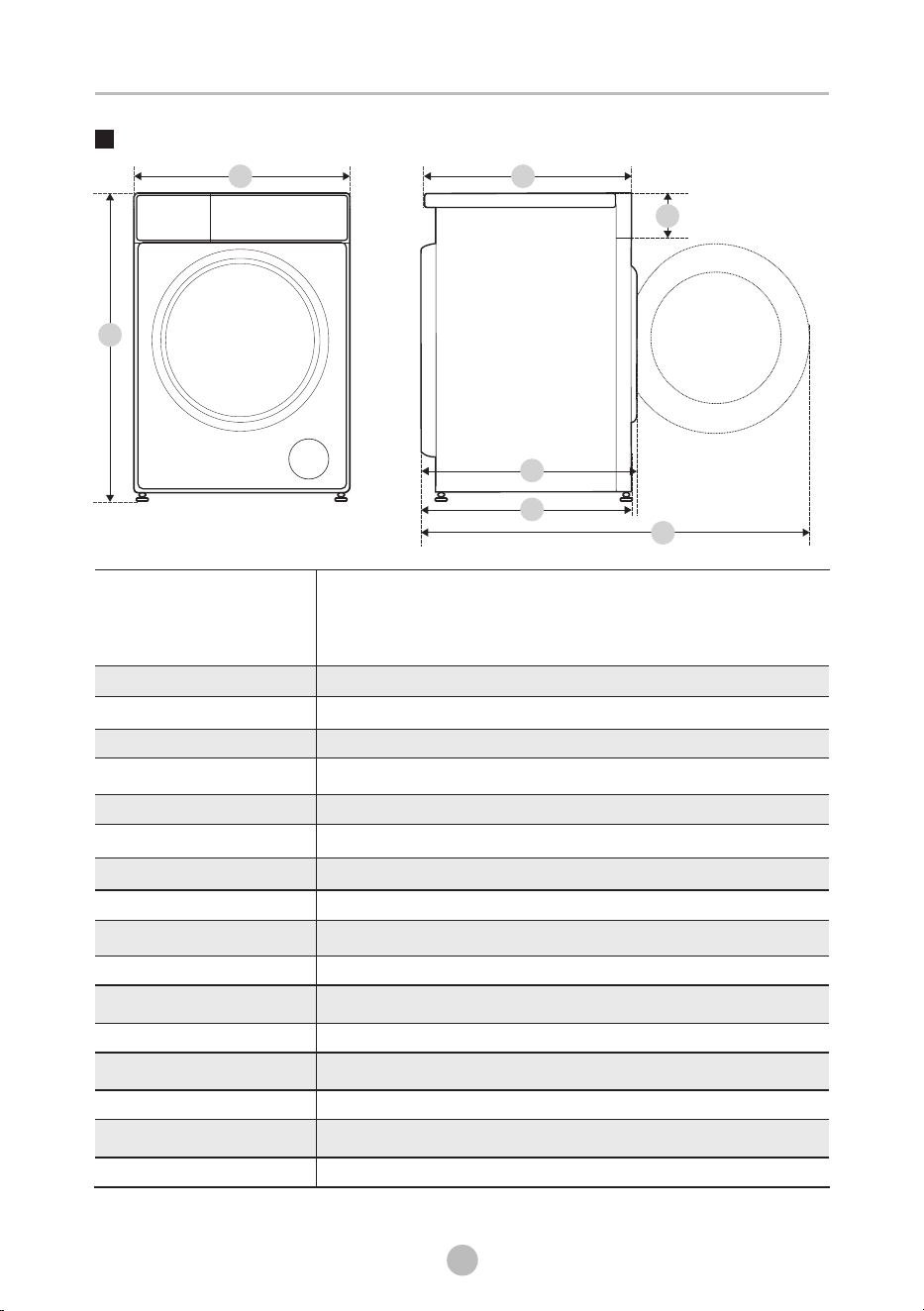
Technical Specifications
A
B
Lower Water Pressure*
0.01 MPa
* When using in a low water pressure environment, product may occur some error and
not guarantee performance.
220-240 V~, 50 Hz
0.05 MPa~1 MPa
10 A
10.5 kg
595 mm
850 mm
535 mm
68 kg
1950 W
582 mm
562 mm
1065 mm
120 mm
Model
Washing Capacity
Dimension
A
B
C
Weight
Rated Power
Reference Dimension
D
E
F
G
MAX. Current
Standard Water Pressure
Power Supply
E
F
D
G
C
TW-T37BZP115MWM