USER MANUAL

1
Catalogue
Installation Instructions...................................................2
Product Instructions........................................................4
Error Codes and Troubleshooting....................................6
Important Safety Instructions..........................................7
Maintenance Instructions................................................8
Warranty Information....................................................11
2
Installation Instructions
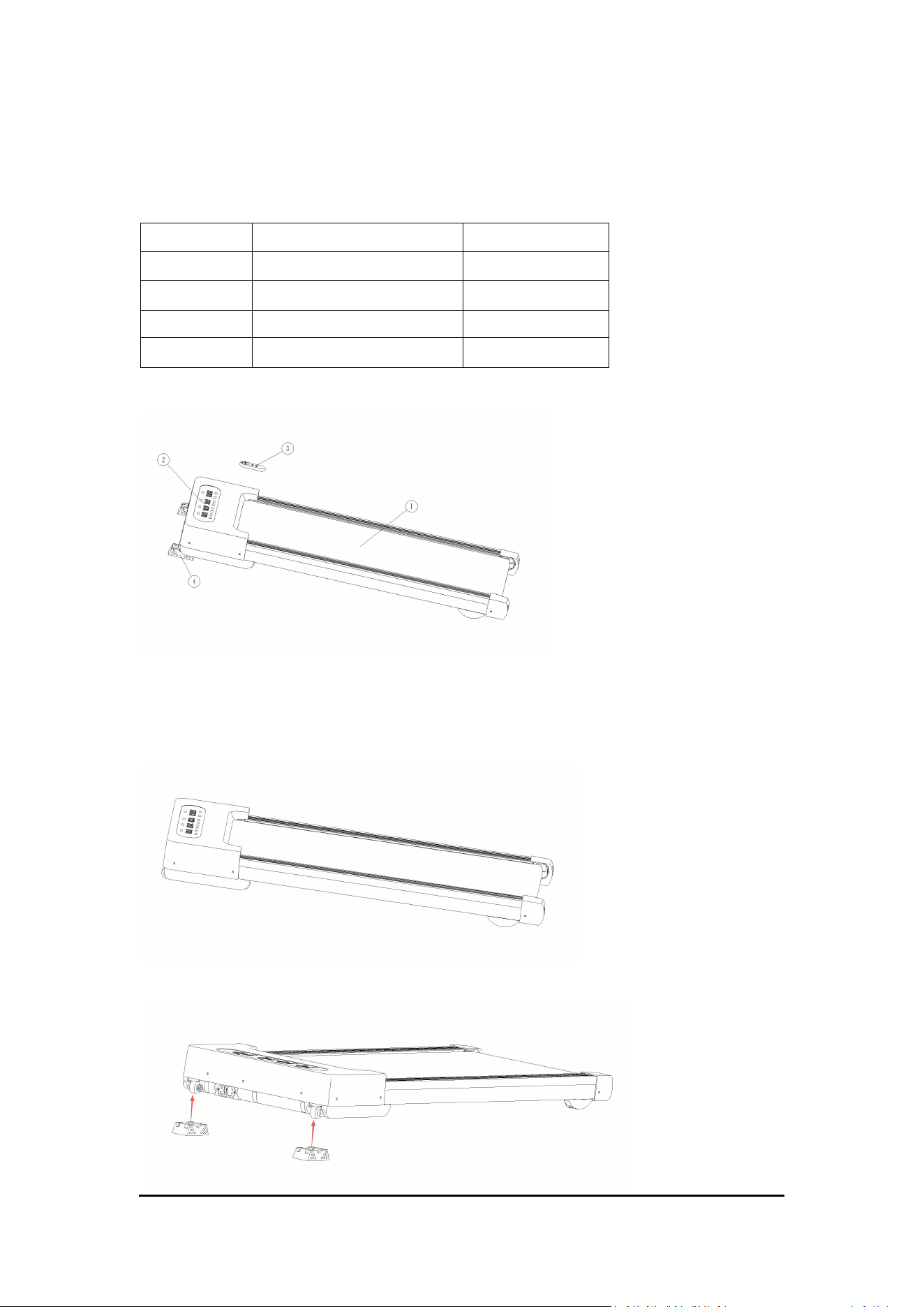
1. Table of installed parts
2. Structure diagram of installed capacity
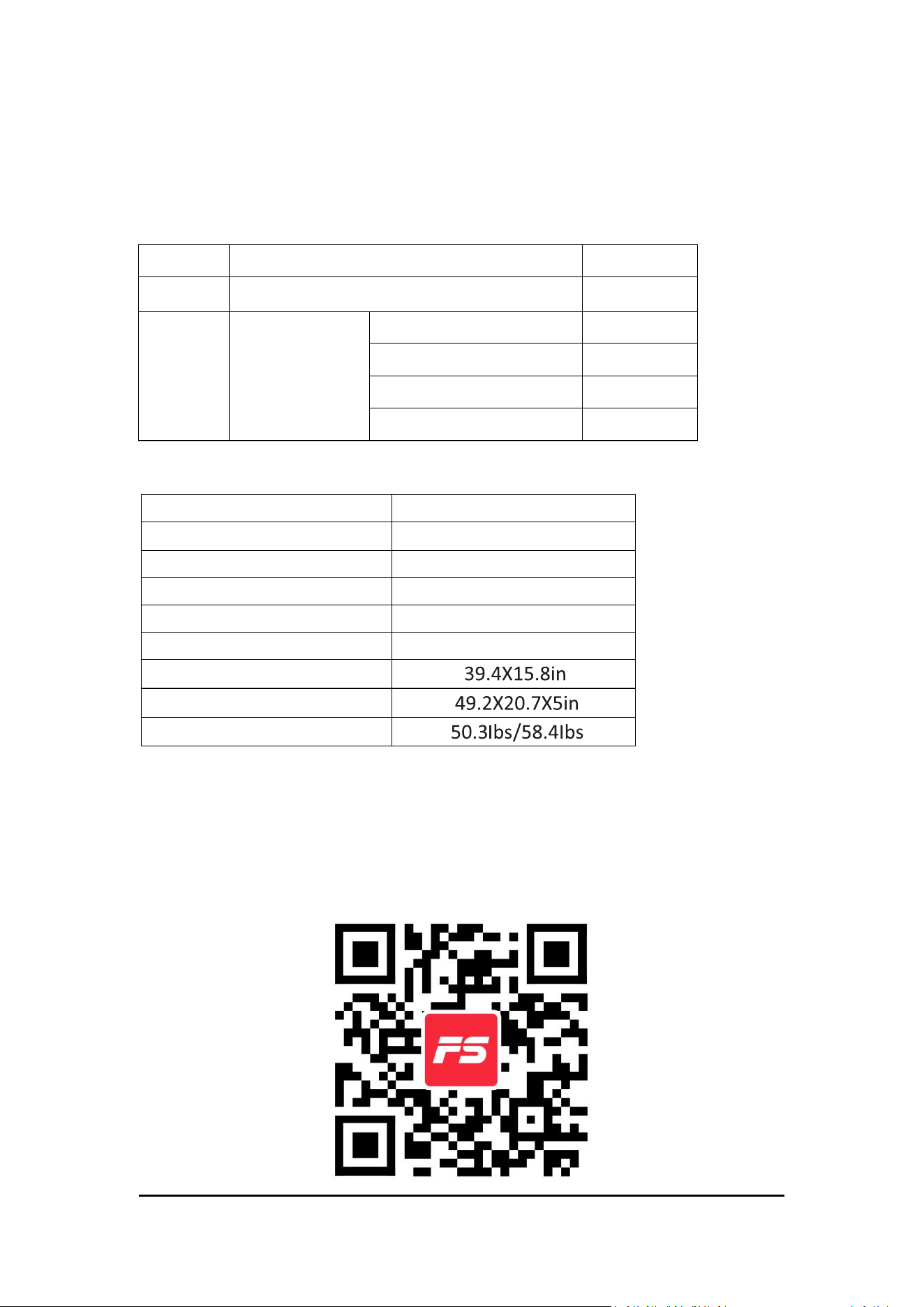
3. Installation steps
a. Open the package, take out the assembly parts in the box, and put
the host flat on the ground.
b. Rotate the front foot pad onto the front end of the frame.
Number
Part name
Quantity
1
Treadmill deck
1
2
Digital watch
1
3
Remote control
1
4
Front frame foot pad
2
3
c. 1> Connect the power cord.
2> Turn on the power switch.
3> Operate the remote control to operate the machine.
4. Product profile
Number
Name
Quantity
1
Complete machine (running platform)
1
2
Accessories
package
Cross screwdriver
1
Remote control
1
30ml silicone oil
1
Instruction
1
5. Technical parameters
Version
W400A
Voltage
110V 60Hz
Motor
0.75HP
Speed
0.6-3.7MPH
Incline
0-12%
Weight capacity
300lbs
Running area
External dimensions
Net weight / Gross weight
Note: The Company reserves the right to modify the product without
prior notice.
FitShow APP:
Scan QR code to download the APP directly, or download and install over
the application stores by search 'FitShow'.
4
Product Instructions
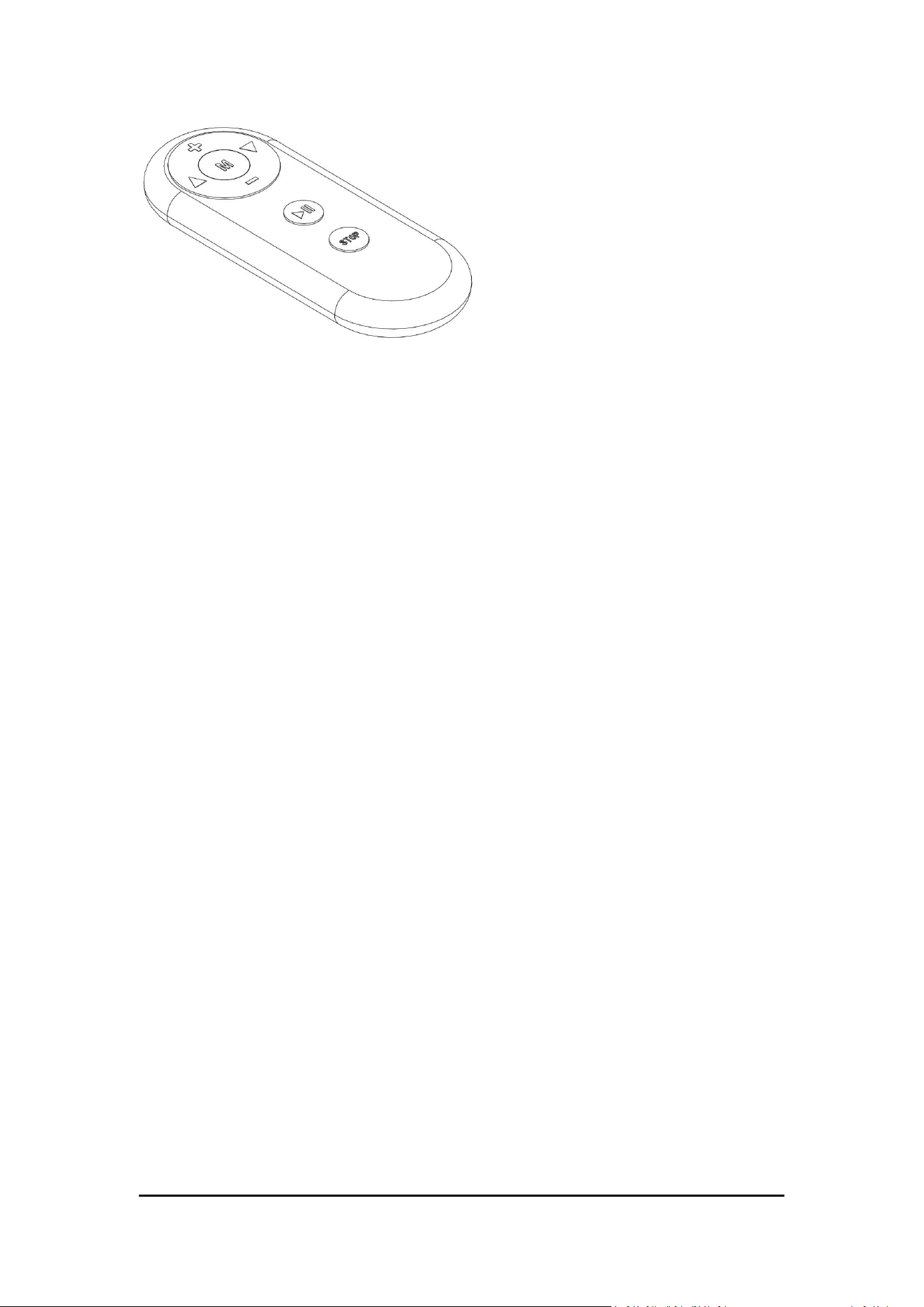
1. Display
2. Brief description
Function with this electronic watch:
·White display
·
Remote control
The terms used in the specification stipulate that:
Treadmill parameters: speed, incline
Motion parameters: distance, calorie, and time.
Movement mode: manual, mode, Program
Full Manual Exercise Mode: An exercise mode without a set
workout target.
Countdown Exercise Mode: An exercise mode with a specific
workout target set.
Automatic Program Exercise Mode: An exercise mode with different
pre-set workout plans within the treadmill. This treadmill has 12 built-in
workout plans.
3. Parameter description
a. Movement parameters in various movement modes:
·Display speed range: 0.6-3.7 mph
·
Display incline range: 0-12 %
·Exercise time in time mode: 8-99 minutes
·
Motion distance in distance mode: 1- 99 miles
·
Number of calories consumed in calorie mode: 20-990 kcal
·Run time for (P01-P10) automatic programs: 8-99 minutes
b. Key function description
5
1>”Start/Pause” Key: When the power is on, pressing this key at any time
starts the treadmill's operation. During a workout, pressing this key
pauses the treadmill's operation, and the interface displays "PAUS".
2>"Speed+ (-) " is the Speed Increase (Decrease) Key: After the treadmill
starts, press to increase (decrease) speed. The adjustment increment is
0.2MPH per press. Speed will increase (decrease) continuously if the key
is held down for more than 1 second.
3> "Lift+ (-) " is the Incline Increase (Decrease) Key: After the treadmill
starts, press to increase (decrease) the incline. The adjustment
increment is 1 level per press. The incline will increase (decrease)
continuously if the key is held down for more than 1 second.
4> “Stop Key”: While the treadmill is running, pressing this key stops the
treadmill operation and resets the data. While the treadmill is paused,
pressing this key resets the treadmill.
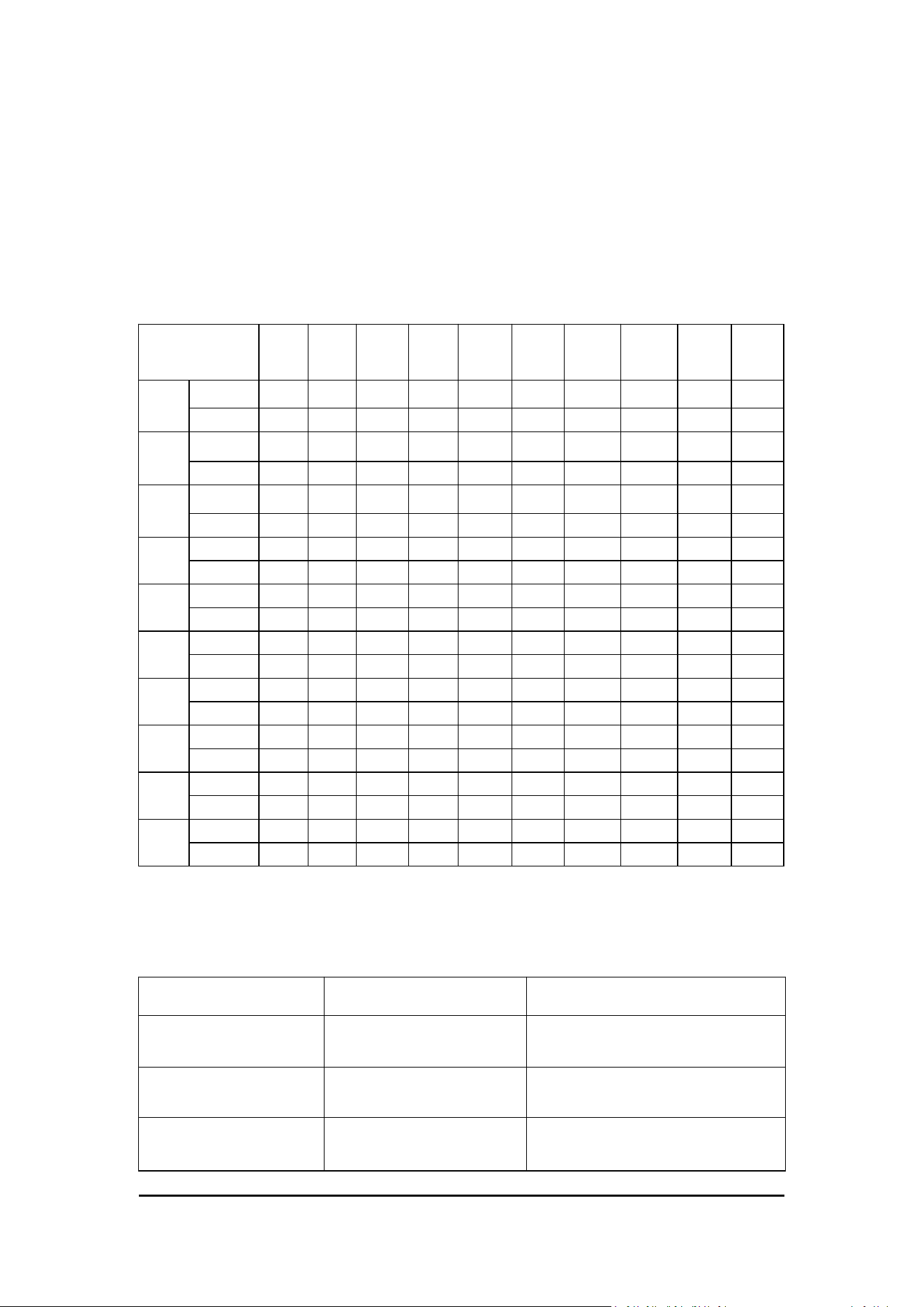
5> "M Mode" is the Program Key: With the treadmill in standby mode,
pressing this key enters the P Program stage. There are ten program
modes from P1 to P10. Different program modes correspond to different
speeds and incline levels. Each program lasts 15 minutes and is divided
into 10 segments, each segment being 1.5 minutes long.
Note:The display window automatically switches every 5 seconds.
Self-test: Press and hold the "Lift+" key, then turn on the power. The
screen will display "9". Then press the "M" key to start the lift self-test.
c. Sleep mode
The treadmill will enter sleep mode if no operation is performed for 5
6
consecutive minutes while in standby state. Press any key to wake it up
from sleep mode.
d. Power off
You can turn off the treadmill by switching off the power switch at any
time. This will not damage the treadmill.
e. Program segment table
Program
1.5
min
3
min
4.5
min
6
min
7.5
min
9
min
10.5
min
12
min
13.5
min
15
min
P1
speed
1.2
1.9
3.1
1.9
3.1
1.9
3.1
1.9
2.5
1.9
incline
2
2
4
4
5
5
4
4
6
6
P2
speed
1.2
3.1
1.9
2.5
1.9
3.1
2.5
3.1
1.9
1.2
incline
3
5
5
8
8
8
7
7
2
2
P3
speed
1.9
2.5
3.7
2.5
1.9
3.1
2.5
3.1
1.9
1.2
incline
3
3
2
2
2
5
5
8
8
3
P4
speed
1.9
3.1
1.9
3.1
2.5
3.1
1.9
3.7
2.5
1.9
incline
2
4
4
6
6
8
8
3
3
3
P5
speed
1.9
2.5
3.1
1.9
3.7
3.1
2.5
3.1
2.5
1.9
incline
3
5
5
4
4
7
7
7
3
3
P6
speed
1.9
3.1
3.7
1.9
3.1
3.7
3.1
1.9
2.5
1.9
incline
3
3
5
5
8
8
6
6
2
2
P7
speed
1.9
2.5
3.1
2.5
3.1
3.7
3.1
3.7
1.9
1.9
incline
6
6
6
8
8
3
3
2
2
2
P8
speed
1.2
2.5
3.1
3.7
3.1
3.7
3.1
2.5
3.1
1.9
incline
7
7
3
3
5
5
5
7
8
8
P9
speed
1.9
3.1
3.7
3.1
3.7
2.5
3.7
3.1
2.5
1.9
incline
5
8
8
3
3
6
6
3
3
3
P10
speed
1.9
2.5
3.7
2.5
3.7
2.5
3.1
3.7
3.1
2.5
incline
9
3
3
4
4
2
2
5
5
5
Error Codes and Troubleshooting
Error Code
Possible Cause
Solution
E08/E19
Abnormal cable contact.
Reinforce the plug-and-pull
cable connections.
E14
Motor driver
overheating.
Wait for the unit to cool down,
then restart the power.
E01-06/E11/E13/E15/
E17 and other
System or electrical
fault.
Contact Rockare after-sales
support

7
Important Safety Instructions
Thank you for choosing our products. The correct use of the treadmill is
a guarantee of your safety and convenience.
1.Please read this manual carefully before use.
2.Pay attention to do not make it block the plug on the wall, reserve 0.8
meters of space in front to facilitate insertion.
3.A safety space of 0.8 meters is reserved on both sides of the treadmill,
and 2 meters (long) * 1 meter (wide) safety space is reserved behind the
treadmill.
4.Always ensure the power cord is properly grounded to avoid the risk of
electric shock.
5.Do not wear too big, too loose clothes when exercising, in case of
safety accidents hanging on the electric treadmill.
6.Exercise gradually according to your physical condition.Avoid
overexertion.
7.Wear appropriate athletic shoes. It is recommended to wear running
shoes or fitness shoes with rubber soles.
8.Do not install or use any non-original accessories. Electric treadmill is a
special equipment, do not modify it for other use.
9.Do not disassemble any parts yourself, such as the motor cover or
roller guards.
10.The treadmill is indoor equipment, do not use outdoors. Put the place
clean and smooth, pay attention to moisture-proof, pay attention not to
put the treadmill on the items such as thick carpet, so as not to affect
the circulation of the lower air of the treadmill.
11.Do not use the treadmill near mist, aerosols, or respiratory
equipment, and keep it away from water, heat sources, and sharp

8
objects.
12.Please perform proper warm-up exercises before using the treadmill.
13.Do not step off the treadmill until it has come to a complete stop.
14.Before each use,ensure all parts are correctly installed and securely
fastened.
15.After each use,turn off the power and unplug the treadmill
16.If the electronic system failure cannot stop, please quickly let your
feet step on the edge bars on both sides, turn off the power supply in
time, and inform the after-sales personnel.
17.This product is designed for healthy adults only. Keep children and
pets away during operation and avoid touching moving parts.
18.Consult your doctor before starting an exercise program. During
exercising, if you feel chest tightness or chest pain, irregular heartbeat,
shortness of breath, dizziness or other discomfort, please stop
immediately!
Maintenance Instructions
To better maintain your electric treadmill and extend the life of the
machine, it is recommended that you turn off the power for 2 hours and
let the machine rest for 10 minutes.
If the running belt is too loose, there will be a skid phenomenon when
running: if too tight, too tight may reduce the motor performance and
aggravate the wear of the drum and the running belt. When the running
belt is tight, you can lift both sides of the running belt from the running
board about 50-75mm.
Running plate lubrication
1. As we mentioned above, the running board lubrication should be
timely, but not excessive lubrication, lubricant is not the better.
Remember: proper lubrication is an important factor in improving the
9
service life of a treadmill.
2. Check whether you need to lubricant, as long as grab the running belt,
touch your hand as far as possible to the center of the back of the
running belt, if your hands with silicone oil (a little damp), namely does
not need to lubricant, if the running board is dry and no stick to the
silicone oil, you need to add lubricating silicone oil.
3. To coat the running plate with smooth silicone oil:
Lift the treadmill to the side, pull up the running belt, and then drop
about 10ML of silicone oil between the running board and the running
belt. Then lay the machine flat and run the treadmill at a speed of
0.6mph to evenly apply silicone oil. Gently step on the running belt on
the front of the treadmill from left to right, and maintain it for about
8-10 minutes to fully absorb the silicone oil by the running belt.
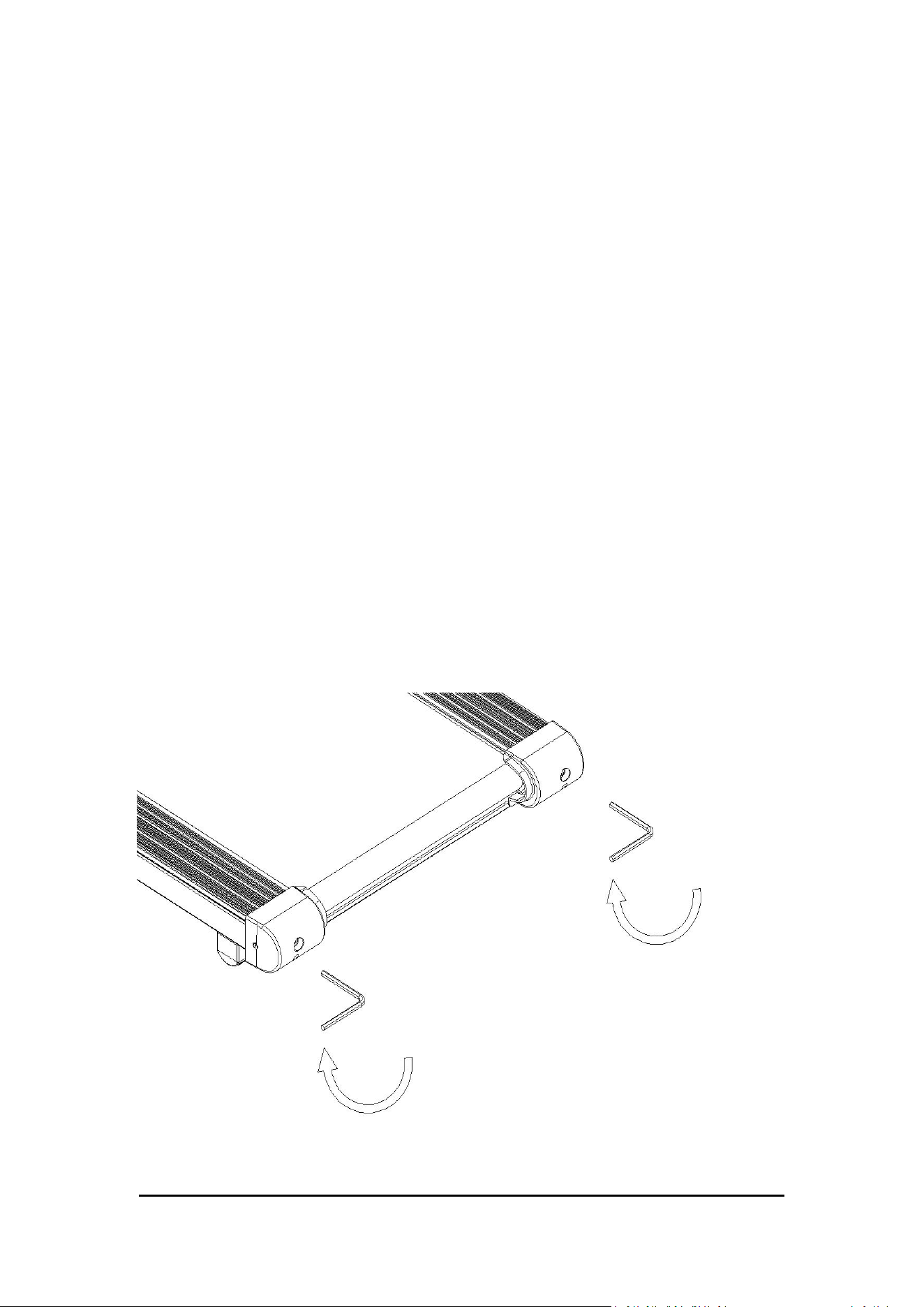
Run with tight adjustment
The running belt of the treadmill has been adjusted before leaving the
factory. Please confirm the operation of the running belt after installing
the running belt first. After a period of use, if the user stops and slips
when running, go clockwise and adjust the running belt adjustment bolt
synchronously. Fine-tuning to the normal use without the above
phenomenon can be.
10
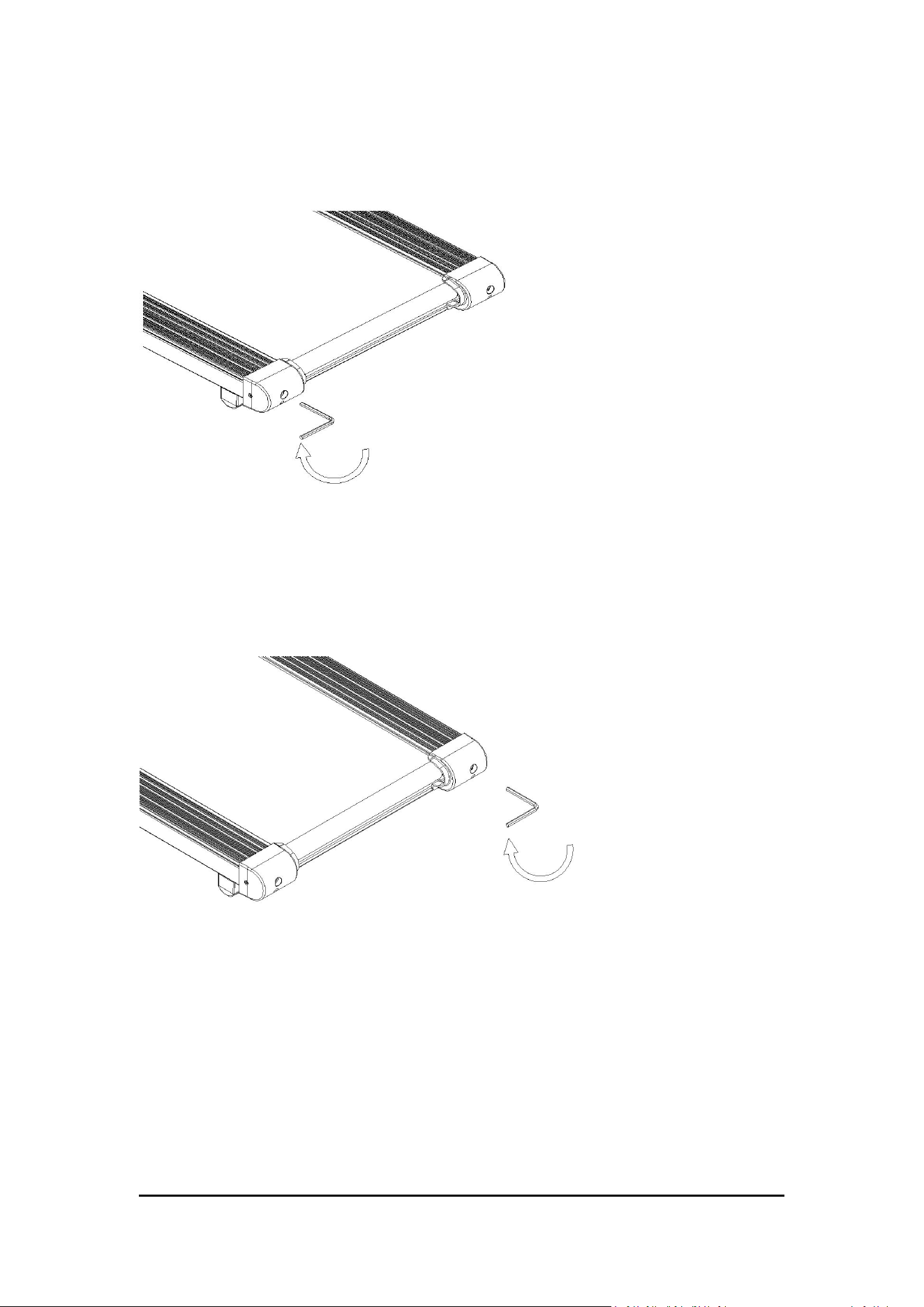
Running belt alignment adjustment
1. Place the electric treadmill on the flat ground.
2. Run at approximately 2.2mph using an electric treadmill.
If the running belt is biased to the left, rotate the adjustment bolt on the
left 1/4 clockwise, and then pause for 30 seconds to correct
automatically. If not, please repeat the above method again.
If the running belt is biased to the right, rotate the right adjustment bolt
1/4 clockwise and pause for 30 seconds to correct automatically. If not,
please repeat the above method again.

11
FCC Statement:
This device complies with part 15 of the FCC Rules.
Operation is subject to the following two conditions:
(1) This device may not cause harmful interference, and
(2) this device must accept any interference received,
including interference that may cause undesired operation.
This equipment has been tested and found to comply with the
limits
for a Class B digital device,
pursuant to part 15 of the FCC Rules.
These limits are designed to provide reasonable protection against
harmful interference in a residential
installation.
This equipment generates, uses and can radiate radio frequency
energy and, if not installed and used in
accordance with the instructions,
may cause harmful interference to radio communications.
However, there is no guarant ee that interference will not occur in a
particular installation.
If this equipment does cause harmful interference to radio or
television reception,
which can be determined by turning the equipment off and on,
the user is encouraged to try to correct the interference by one or
more of the following measures:
—Reorient or relocate the receiving antenna.
—Increase the separation between the equipment and receiver.
—Connect the equipment into an outlet on a circuit different from
that to which the receiver is connected.
—Consult the dealer or an experienced radio/TV technician for
help. Caution: Any changes or modifications
not expressly approved by the party
12
Warranty Information
Welcome to using Rockare series products.
This product is covered by a one-year limited warranty under normal
household use, provided that the product has not been damaged by
misuse, abuse, or other human-caused factors.
Our company shall not be responsible for any failures or damages
resulting from improper installation, incorrect use, or unauthorized
replacement of parts. The warranty does not apply to products that have
been repaired, modified, or disassembled by unauthorized personnel,
and any related repair costs shall be borne by the customer.
This product is intended for household use only. Our company shall not
be responsible for any malfunctions or damages caused by commercial
or non-household use.
If you encounter any product problems, please contact us through the
following methods.
Email: service@rockare.com
Whatsapp: +163 63412245