
版本:A/4
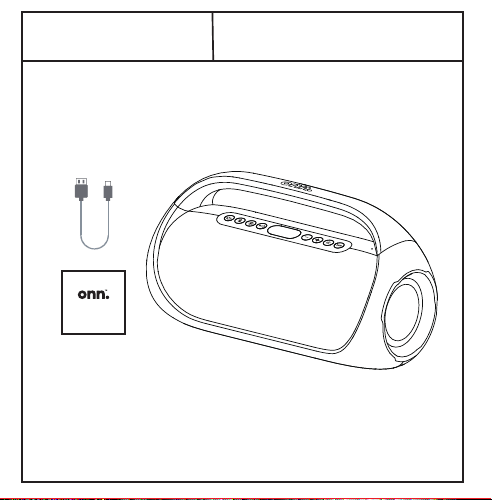
1 USB-C power cable
1 Quick Start Guide
1 Portable FM Boombox
What’s in the Box?
Check to make sure you
have everything below
Quick
Start Guide
11
12 13 14
Get to Know Your Boombox Let’s Get Started! 01 Connect Your Boombox 02
onn. Party Boombox
Bluetooth
Bluetooth
Devices
Portable FM Boombox
Quick Start Guide
100097809
We’d love to hear from
you. Scan with your
Walmart app and let us
know what you think.
Listen to Your Favorite Radios
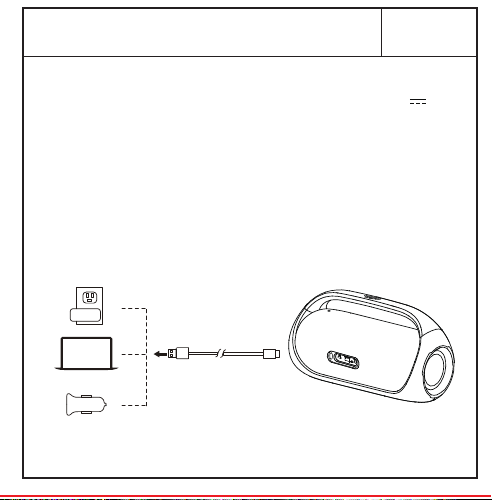
Charge Your BoomboxWired Use? Yes!
Want Your Party to the Next Level?
(not included)
03 04 05
Take a Phone Call
06
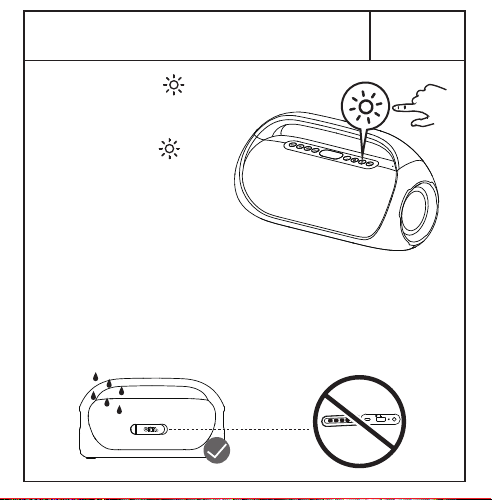
Want More Lighting Eects?
07 08
Black
November 23, 2022_V1
VERMILLION
ICE
1.
2.
3.
4.
5.
6.
7.
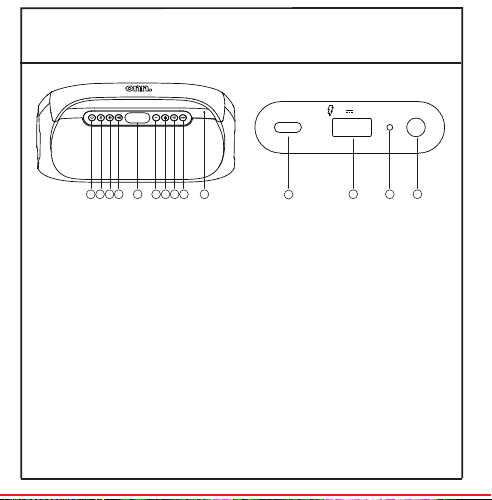
Power
Bluetooth
Source
Play/Pause
LED display
Volume down/
Previous track
Volume up/
Next track
8.
9.
10.
11.
12.
13.
14.
Light
Bass boost
Microphone
USB-C charging port
USB Emergency power
charging port
Reset
3.5 mm AUX input
Need help? We're here for you every day
7 a.m. – 9 p.m. CST. 1-888-516-2630 Give us a call!
1. Press once to answer an incoming call,
press again to hang up the call.
2. Press & hold to reject an incoming call.
* Press twice to wake up the voice assistant
of your device.
More tips:
– Always keep the charging port dry before
connecting power.
– To ensure it is waterproof, always close the
protective cover securely.
USB
AUX IN
Reset
5V 2.1A
1 2 3 4 65 7 8 9 10
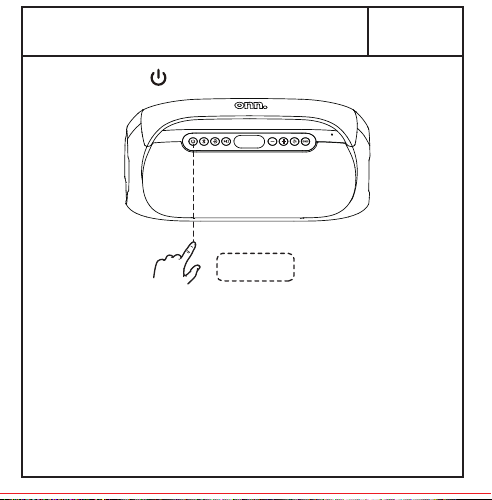
Press & hold to power on/off the speaker.
Fully charge the battery if you might not use this
speaker in the near future. Place it in a cool, dry
place.
Recommend to charge it at least one time for
every half year, in order to keep the battery
performing well. Empty battery too long may
result in fewer hours of usage between charges.
Built-in Rechargeable Li-ion Battery: 7.4V
4000mAh
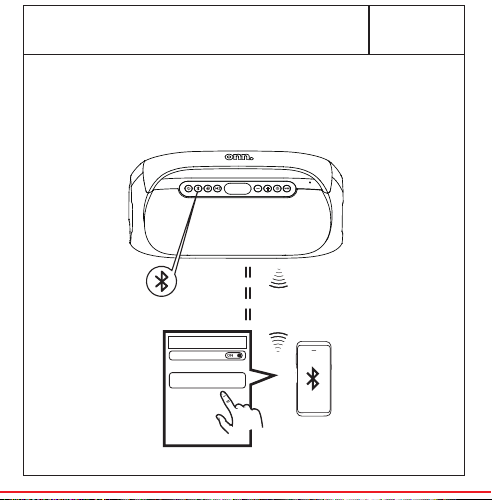
Connect to your device through Bluetooth®
wireless technology, search for the entry
"onn. Party Boombox".
1. USB-A charging port with emergency power
can charge your other smart devices (5V 2.1A
output), when this Boombox is powered on.
2. Connect USB-C to 5V power adapter.
Recommend to use the in-box power cable to
charge your Boombox.
3. The battery icon will flash when charging, and
all battery segments will be lit and remain solid
white once fully charged.
ON/OFF
Press once
Press & hold
Press twice
1 94346 00504 8
Press & Hold
FM
Stereo
10m
* In AUX mode, can't be used, you can
ONLY control it by your audio source device.
Use a 3.5 mm AUX cable (not included) to
connect the speaker to your audio source.
Press Play on your audio source device and
adjust the volume on the speaker .
1.
2.
1.
2.
3.
4.
5.
+
_
_
_
+
+
Press to select FM mode.
Press or to scan and select FM stations
step by step.
Press & hold or to scan and seek (jump to
the next available station).
In FM Mode, press and hold to assign the
current station to a preset number, the LED
screen will show “SAV” to show the station
has been saved. The preset number can be
changed by pressing and .
In FM Mode, press repeatedly to select a
saved radio station.
USB
AUX IN
Reset
5V 2.1A
Power on both speakers, press & hold of
each speaker to enter Party Sync Mode.
When two speakers paired, you will hear “left
channel, right channel”. The left channel is the
master.
Use your mobile device to pair with the master
speaker by Bluetooth pairing method.
Press & hold again to disconnect Party
Sync Mode.
1.
2.
3.
4.
AUX
Press & hold to
turn on/off the light.
Quick press to
switch 6 between
different multicolor
LED lightings.
1.
2.
DC5V
版本:A/4
1 USB-C power cable
1 Quick Start Guide
1 Portable FM Boombox
What’s in the Box?
Check to make sure you
have everything below
Quick
Start Guide
11
12 13 14
Get to Know Your Boombox Let’s Get Started! 01 Connect Your Boombox 02
onn. Party Boombox
Bluetooth
Bluetooth
Devices
Portable FM Boombox
Quick Start Guide
100097809
We’d love to hear from
you. Scan with your
Walmart app and let us
know what you think.
Listen to Your Favorite Radios
Charge Your BoomboxWired Use? Yes!
Want Your Party to the Next Level?
(not included)
03 04 05
Take a Phone Call
06
Want More Lighting Eects?
07 08
Black
November 23, 2022_V1
VERMILLION
ICE
1.
2.
3.
4.
5.
6.
7.
Power
Bluetooth
Source
Play/Pause
LED display
Volume down/
Previous track
Volume up/
Next track
8.
9.
10.
11.
12.
13.
14.
Light
Bass boost
Microphone
USB-C charging port
USB Emergency power
charging port
Reset
3.5 mm AUX input
Need help? We're here for you every day
7 a.m. – 9 p.m. CST. 1-888-516-2630 Give us a call!
1. Press once to answer an incoming call,
press again to hang up the call.
2. Press & hold to reject an incoming call.
* Press twice to wake up the voice assistant
of your device.
More tips:
– Always keep the charging port dry before
connecting power.
– To ensure it is waterproof, always close the
protective cover securely.
USB
AUX IN
Reset
5V 2.1A
1 2 3 4 65 7 8 9 10
Press & hold to power on/off the speaker.
Fully charge the battery if you might not use this
speaker in the near future. Place it in a cool, dry
place.
Recommend to charge it at least one time for
every half year, in order to keep the battery
performing well. Empty battery too long may
result in fewer hours of usage between charges.
Built-in Rechargeable Li-ion Battery: 7.4V
4000mAh
Connect to your device through Bluetooth®
wireless technology, search for the entry
"onn. Party Boombox".
1. USB-A charging port with emergency power
can charge your other smart devices (5V 2.1A
output), when this Boombox is powered on.
2. Connect USB-C to 5V power adapter.
Recommend to use the in-box power cable to
charge your Boombox.
3. The battery icon will flash when charging, and
all battery segments will be lit and remain solid
white once fully charged.
ON/OFF
Press once
Press & hold
Press twice
1 94346 00504 8
Press & Hold
FM
Stereo
10m
* In AUX mode, can't be used, you can
ONLY control it by your audio source device.
Use a 3.5 mm AUX cable (not included) to
connect the speaker to your audio source.
Press Play on your audio source device and
adjust the volume on the speaker .
1.
2.
1.
2.
3.
4.
5.
+
_
_
_
+
+
Press to select FM mode.
Press or to scan and select FM stations
step by step.
Press & hold or to scan and seek (jump to
the next available station).
In FM Mode, press and hold to assign the
current station to a preset number, the LED
screen will show “SAV” to show the station
has been saved. The preset number can be
changed by pressing and .
In FM Mode, press repeatedly to select a
saved radio station.
USB
AUX IN
Reset
5V 2.1A
Power on both speakers, press & hold of
each speaker to enter Party Sync Mode.
When two speakers paired, you will hear “left
channel, right channel”. The left channel is the
master.
Use your mobile device to pair with the master
speaker by Bluetooth pairing method.
Press & hold again to disconnect Party
Sync Mode.
1.
2.
3.
4.
AUX
Press & hold to
turn on/off the light.
Quick press to
switch 6 between
different multicolor
LED lightings.
1.
2.
DC5V
版本:A/4
1 USB-C power cable
1 Quick Start Guide
1 Portable FM Boombox
What’s in the Box?
Check to make sure you
have everything below
Quick
Start Guide
11
12 13 14
Get to Know Your Boombox Let’s Get Started! 01 Connect Your Boombox 02
onn. Party Boombox
Bluetooth
Bluetooth
Devices
Portable FM Boombox
Quick Start Guide
100097809
We’d love to hear from
you. Scan with your
Walmart app and let us
know what you think.
Listen to Your Favorite Radios
Charge Your BoomboxWired Use? Yes!
Want Your Party to the Next Level?
(not included)
03 04 05
Take a Phone Call
06
Want More Lighting Eects?
07 08
Black
November 23, 2022_V1
VERMILLION
ICE
1.
2.
3.
4.
5.
6.
7.
Power
Bluetooth
Source
Play/Pause
LED display
Volume down/
Previous track
Volume up/
Next track
8.
9.
10.
11.
12.
13.
14.
Light
Bass boost
Microphone
USB-C charging port
USB Emergency power
charging port
Reset
3.5 mm AUX input
Need help? We're here for you every day
7 a.m. – 9 p.m. CST. 1-888-516-2630 Give us a call!
1. Press once to answer an incoming call,
press again to hang up the call.
2. Press & hold to reject an incoming call.
* Press twice to wake up the voice assistant
of your device.
More tips:
– Always keep the charging port dry before
connecting power.
– To ensure it is waterproof, always close the
protective cover securely.
USB
AUX IN
Reset
5V 2.1A
1 2 3 4 65 7 8 9 10
Press & hold to power on/off the speaker.
Fully charge the battery if you might not use this
speaker in the near future. Place it in a cool, dry
place.
Recommend to charge it at least one time for
every half year, in order to keep the battery
performing well. Empty battery too long may
result in fewer hours of usage between charges.
Built-in Rechargeable Li-ion Battery: 7.4V
4000mAh
Connect to your device through Bluetooth®
wireless technology, search for the entry
"onn. Party Boombox".
1. USB-A charging port with emergency power
can charge your other smart devices (5V 2.1A
output), when this Boombox is powered on.
2. Connect USB-C to 5V power adapter.
Recommend to use the in-box power cable to
charge your Boombox.
3. The battery icon will flash when charging, and
all battery segments will be lit and remain solid
white once fully charged.
ON/OFF
Press once
Press & hold
Press twice
1 94346 00504 8
Press & Hold
FM
Stereo
10m
* In AUX mode, can't be used, you can
ONLY control it by your audio source device.
Use a 3.5 mm AUX cable (not included) to
connect the speaker to your audio source.
Press Play on your audio source device and
adjust the volume on the speaker .
1.
2.
1.
2.
3.
4.
5.
+
_
_
_
+
+
Press to select FM mode.
Press or to scan and select FM stations
step by step.
Press & hold or to scan and seek (jump to
the next available station).
In FM Mode, press and hold to assign the
current station to a preset number, the LED
screen will show “SAV” to show the station
has been saved. The preset number can be
changed by pressing and .
In FM Mode, press repeatedly to select a
saved radio station.
USB
AUX IN
Reset
5V 2.1A
Power on both speakers, press & hold of
each speaker to enter Party Sync Mode.
When two speakers paired, you will hear “left
channel, right channel”. The left channel is the
master.
Use your mobile device to pair with the master
speaker by Bluetooth pairing method.
Press & hold again to disconnect Party
Sync Mode.
1.
2.
3.
4.
AUX
Press & hold to
turn on/off the light.
Quick press to
switch 6 between
different multicolor
LED lightings.
1.
2.
DC5V
版本:A/4
1 USB-C power cable
1 Quick Start Guide
1 Portable FM Boombox
What’s in the Box?
Check to make sure you
have everything below
Quick
Start Guide
11
12 13 14
Get to Know Your Boombox Let’s Get Started! 01 Connect Your Boombox 02
onn. Party Boombox
Bluetooth
Bluetooth
Devices
Portable FM Boombox
Quick Start Guide
100097809
We’d love to hear from
you. Scan with your
Walmart app and let us
know what you think.
Listen to Your Favorite Radios
Charge Your BoomboxWired Use? Yes!
Want Your Party to the Next Level?
(not included)
03 04 05
Take a Phone Call
06
Want More Lighting Eects?
07 08
Black
November 23, 2022_V1
VERMILLION
ICE
1.
2.
3.
4.
5.
6.
7.
Power
Bluetooth
Source
Play/Pause
LED display
Volume down/
Previous track
Volume up/
Next track
8.
9.
10.
11.
12.
13.
14.
Light
Bass boost
Microphone
USB-C charging port
USB Emergency power
charging port
Reset
3.5 mm AUX input
Need help? We're here for you every day
7 a.m. – 9 p.m. CST. 1-888-516-2630 Give us a call!
1. Press once to answer an incoming call,
press again to hang up the call.
2. Press & hold to reject an incoming call.
* Press twice to wake up the voice assistant
of your device.
More tips:
– Always keep the charging port dry before
connecting power.
– To ensure it is waterproof, always close the
protective cover securely.
USB
AUX IN
Reset
5V 2.1A
1 2 3 4 65 7 8 9 10
Press & hold to power on/off the speaker.
Fully charge the battery if you might not use this
speaker in the near future. Place it in a cool, dry
place.
Recommend to charge it at least one time for
every half year, in order to keep the battery
performing well. Empty battery too long may
result in fewer hours of usage between charges.
Built-in Rechargeable Li-ion Battery: 7.4V
4000mAh
Connect to your device through Bluetooth®
wireless technology, search for the entry
"onn. Party Boombox".
1. USB-A charging port with emergency power
can charge your other smart devices (5V 2.1A
output), when this Boombox is powered on.
2. Connect USB-C to 5V power adapter.
Recommend to use the in-box power cable to
charge your Boombox.
3. The battery icon will flash when charging, and
all battery segments will be lit and remain solid
white once fully charged.
ON/OFF
Press once
Press & hold
Press twice
1 94346 00504 8
Press & Hold
FM
Stereo
10m
* In AUX mode, can't be used, you can
ONLY control it by your audio source device.
Use a 3.5 mm AUX cable (not included) to
connect the speaker to your audio source.
Press Play on your audio source device and
adjust the volume on the speaker .
1.
2.
1.
2.
3.
4.
5.
+
_
_
_
+
+
Press to select FM mode.
Press or to scan and select FM stations
step by step.
Press & hold or to scan and seek (jump to
the next available station).
In FM Mode, press and hold to assign the
current station to a preset number, the LED
screen will show “SAV” to show the station
has been saved. The preset number can be
changed by pressing and .
In FM Mode, press repeatedly to select a
saved radio station.
USB
AUX IN
Reset
5V 2.1A
Power on both speakers, press & hold of
each speaker to enter Party Sync Mode.
When two speakers paired, you will hear “left
channel, right channel”. The left channel is the
master.
Use your mobile device to pair with the master
speaker by Bluetooth pairing method.
Press & hold again to disconnect Party
Sync Mode.
1.
2.
3.
4.
AUX
Press & hold to
turn on/off the light.
Quick press to
switch 6 between
different multicolor
LED lightings.
1.
2.
DC5V
版本:A/4
1 USB-C power cable
1 Quick Start Guide
1 Portable FM Boombox
What’s in the Box?
Check to make sure you
have everything below
Quick
Start Guide
11
12 13 14
Get to Know Your Boombox Let’s Get Started! 01 Connect Your Boombox 02
onn. Party Boombox
Bluetooth
Bluetooth
Devices
Portable FM Boombox
Quick Start Guide
100097809
We’d love to hear from
you. Scan with your
Walmart app and let us
know what you think.
Listen to Your Favorite Radios
Charge Your BoomboxWired Use? Yes!
Want Your Party to the Next Level?
(not included)
03 04 05
Take a Phone Call
06
Want More Lighting Eects?
07 08
Black
November 23, 2022_V1
VERMILLION
ICE
1.
2.
3.
4.
5.
6.
7.
Power
Bluetooth
Source
Play/Pause
LED display
Volume down/
Previous track
Volume up/
Next track
8.
9.
10.
11.
12.
13.
14.
Light
Bass boost
Microphone
USB-C charging port
USB Emergency power
charging port
Reset
3.5 mm AUX input
Need help? We're here for you every day
7 a.m. – 9 p.m. CST. 1-888-516-2630 Give us a call!
1. Press once to answer an incoming call,
press again to hang up the call.
2. Press & hold to reject an incoming call.
* Press twice to wake up the voice assistant
of your device.
More tips:
– Always keep the charging port dry before
connecting power.
– To ensure it is waterproof, always close the
protective cover securely.
USB
AUX IN
Reset
5V 2.1A
1 2 3 4 65 7 8 9 10
Press & hold to power on/off the speaker.
Fully charge the battery if you might not use this
speaker in the near future. Place it in a cool, dry
place.
Recommend to charge it at least one time for
every half year, in order to keep the battery
performing well. Empty battery too long may
result in fewer hours of usage between charges.
Built-in Rechargeable Li-ion Battery: 7.4V
4000mAh
Connect to your device through Bluetooth®
wireless technology, search for the entry
"onn. Party Boombox".
1. USB-A charging port with emergency power
can charge your other smart devices (5V 2.1A
output), when this Boombox is powered on.
2. Connect USB-C to 5V power adapter.
Recommend to use the in-box power cable to
charge your Boombox.
3. The battery icon will flash when charging, and
all battery segments will be lit and remain solid
white once fully charged.
ON/OFF
Press once
Press & hold
Press twice
1 94346 00504 8
Press & Hold
FM
Stereo
10m
* In AUX mode, can't be used, you can
ONLY control it by your audio source device.
Use a 3.5 mm AUX cable (not included) to
connect the speaker to your audio source.
Press Play on your audio source device and
adjust the volume on the speaker .
1.
2.
1.
2.
3.
4.
5.
+
_
_
_
+
+
Press to select FM mode.
Press or to scan and select FM stations
step by step.
Press & hold or to scan and seek (jump to
the next available station).
In FM Mode, press and hold to assign the
current station to a preset number, the LED
screen will show “SAV” to show the station
has been saved. The preset number can be
changed by pressing and .
In FM Mode, press repeatedly to select a
saved radio station.
USB
AUX IN
Reset
5V 2.1A
Power on both speakers, press & hold of
each speaker to enter Party Sync Mode.
When two speakers paired, you will hear “left
channel, right channel”. The left channel is the
master.
Use your mobile device to pair with the master
speaker by Bluetooth pairing method.
Press & hold again to disconnect Party
Sync Mode.
1.
2.
3.
4.
AUX
Press & hold to
turn on/off the light.
Quick press to
switch 6 between
different multicolor
LED lightings.
1.
2.
DC5V
版本:A/4
1 USB-C power cable
1 Quick Start Guide
1 Portable FM Boombox
What’s in the Box?
Check to make sure you
have everything below
Quick
Start Guide
11
12 13 14
Get to Know Your Boombox Let’s Get Started! 01 Connect Your Boombox 02
onn. Party Boombox
Bluetooth
Bluetooth
Devices
Portable FM Boombox
Quick Start Guide
100097809
We’d love to hear from
you. Scan with your
Walmart app and let us
know what you think.
Listen to Your Favorite Radios
Charge Your BoomboxWired Use? Yes!
Want Your Party to the Next Level?
(not included)
03 04 05
Take a Phone Call
06
Want More Lighting Eects?
07 08
Black
November 23, 2022_V1
VERMILLION
ICE
1.
2.
3.
4.
5.
6.
7.
Power
Bluetooth
Source
Play/Pause
LED display
Volume down/
Previous track
Volume up/
Next track
8.
9.
10.
11.
12.
13.
14.
Light
Bass boost
Microphone
USB-C charging port
USB Emergency power
charging port
Reset
3.5 mm AUX input
Need help? We're here for you every day
7 a.m. – 9 p.m. CST. 1-888-516-2630 Give us a call!
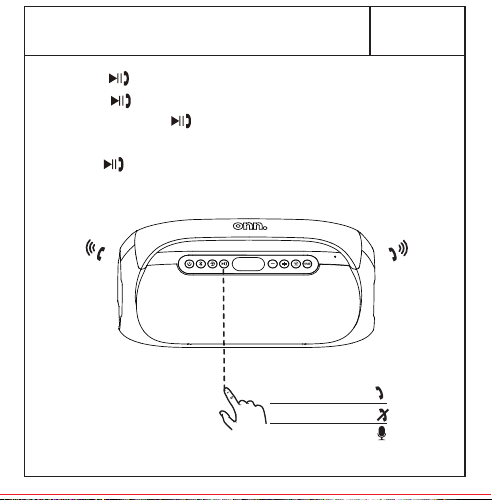
1. Press once to answer an incoming call,
press again to hang up the call.
2. Press & hold to reject an incoming call.
* Press twice to wake up the voice assistant
of your device.
More tips:
– Always keep the charging port dry before
connecting power.
– To ensure it is waterproof, always close the
protective cover securely.
USB
AUX IN
Reset
5V 2.1A
1 2 3 4 65 7 8 9 10
Press & hold to power on/off the speaker.
Fully charge the battery if you might not use this
speaker in the near future. Place it in a cool, dry
place.
Recommend to charge it at least one time for
every half year, in order to keep the battery
performing well. Empty battery too long may
result in fewer hours of usage between charges.
Built-in Rechargeable Li-ion Battery: 7.4V
4000mAh
Connect to your device through Bluetooth®
wireless technology, search for the entry
"onn. Party Boombox".
1. USB-A charging port with emergency power
can charge your other smart devices (5V 2.1A
output), when this Boombox is powered on.
2. Connect USB-C to 5V power adapter.
Recommend to use the in-box power cable to
charge your Boombox.
3. The battery icon will flash when charging, and
all battery segments will be lit and remain solid
white once fully charged.
ON/OFF
Press once
Press & hold
Press twice
1 94346 00504 8
Press & Hold
FM
Stereo
10m
* In AUX mode, can't be used, you can
ONLY control it by your audio source device.
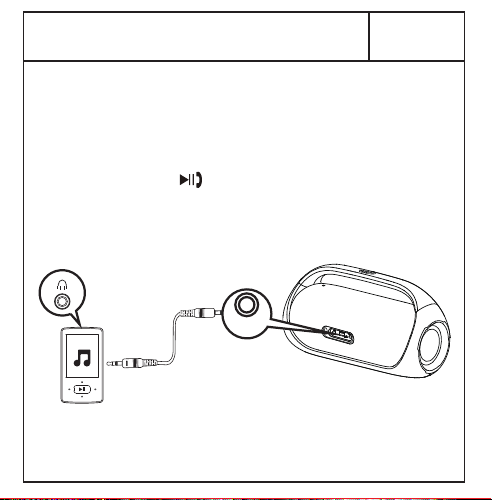
Use a 3.5 mm AUX cable (not included) to
connect the speaker to your audio source.
Press Play on your audio source device and
adjust the volume on the speaker .
1.
2.
1.
2.
3.
4.
5.
+
_
_
_
+
+
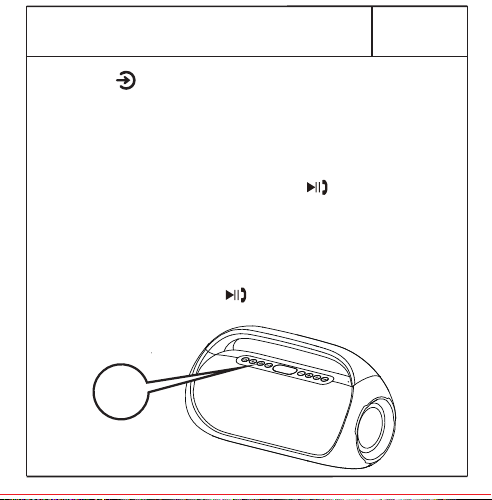
Press to select FM mode.
Press or to scan and select FM stations
step by step.
Press & hold or to scan and seek (jump to
the next available station).
In FM Mode, press and hold to assign the
current station to a preset number, the LED
screen will show “SAV” to show the station
has been saved. The preset number can be
changed by pressing and .
In FM Mode, press repeatedly to select a
saved radio station.
USB
AUX IN
Reset
5V 2.1A
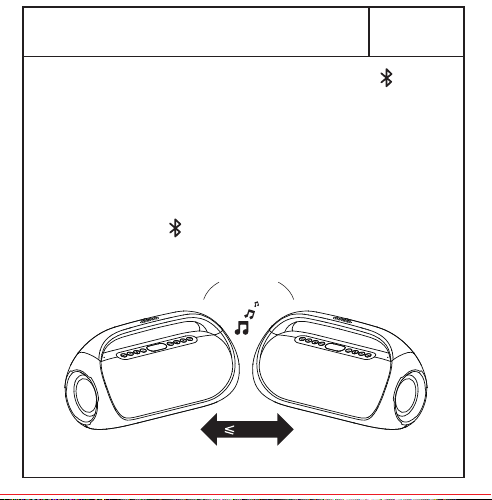
Power on both speakers, press & hold of
each speaker to enter Party Sync Mode.
When two speakers paired, you will hear “left
channel, right channel”. The left channel is the
master.
Use your mobile device to pair with the master
speaker by Bluetooth pairing method.
Press & hold again to disconnect Party
Sync Mode.
1.
2.
3.
4.
AUX
Press & hold to
turn on/off the light.
Quick press to
switch 6 between
different multicolor
LED lightings.
1.
2.
DC5V
版本:A/4
1 USB-C power cable
1 Quick Start Guide
1 Portable FM Boombox
What’s in the Box?
Check to make sure you
have everything below
Quick
Start Guide
11
12 13 14
Get to Know Your Boombox Let’s Get Started! 01 Connect Your Boombox 02
onn. Party Boombox
Bluetooth
Bluetooth
Devices
Portable FM Boombox
Quick Start Guide
100097809
We’d love to hear from
you. Scan with your
Walmart app and let us
know what you think.
Listen to Your Favorite Radios
Charge Your BoomboxWired Use? Yes!
Want Your Party to the Next Level?
(not included)
03 04 05
Take a Phone Call
06
Want More Lighting Eects?
07 08
Black
November 23, 2022_V1
VERMILLION
ICE
1.
2.
3.
4.
5.
6.
7.
Power
Bluetooth
Source
Play/Pause
LED display
Volume down/
Previous track
Volume up/
Next track
8.
9.
10.
11.
12.
13.
14.
Light
Bass boost
Microphone
USB-C charging port
USB Emergency power
charging port
Reset
3.5 mm AUX input
Need help? We're here for you every day
7 a.m. – 9 p.m. CST. 1-888-516-2630 Give us a call!
1. Press once to answer an incoming call,
press again to hang up the call.
2. Press & hold to reject an incoming call.
* Press twice to wake up the voice assistant
of your device.
More tips:
– Always keep the charging port dry before
connecting power.
– To ensure it is waterproof, always close the
protective cover securely.
USB
AUX IN
Reset
5V 2.1A
1 2 3 4 65 7 8 9 10
Press & hold to power on/off the speaker.
Fully charge the battery if you might not use this
speaker in the near future. Place it in a cool, dry
place.
Recommend to charge it at least one time for
every half year, in order to keep the battery
performing well. Empty battery too long may
result in fewer hours of usage between charges.
Built-in Rechargeable Li-ion Battery: 7.4V
4000mAh
Connect to your device through Bluetooth®
wireless technology, search for the entry
"onn. Party Boombox".
1. USB-A charging port with emergency power
can charge your other smart devices (5V 2.1A
output), when this Boombox is powered on.
2. Connect USB-C to 5V power adapter.
Recommend to use the in-box power cable to
charge your Boombox.
3. The battery icon will flash when charging, and
all battery segments will be lit and remain solid
white once fully charged.
ON/OFF
Press once
Press & hold
Press twice
1 94346 00504 8
Press & Hold
FM
Stereo
10m
* In AUX mode, can't be used, you can
ONLY control it by your audio source device.
Use a 3.5 mm AUX cable (not included) to
connect the speaker to your audio source.
Press Play on your audio source device and
adjust the volume on the speaker .
1.
2.
1.
2.
3.
4.
5.
+
_
_
_
+
+
Press to select FM mode.
Press or to scan and select FM stations
step by step.
Press & hold or to scan and seek (jump to
the next available station).
In FM Mode, press and hold to assign the
current station to a preset number, the LED
screen will show “SAV” to show the station
has been saved. The preset number can be
changed by pressing and .
In FM Mode, press repeatedly to select a
saved radio station.
USB
AUX IN
Reset
5V 2.1A
Power on both speakers, press & hold of
each speaker to enter Party Sync Mode.
When two speakers paired, you will hear “left
channel, right channel”. The left channel is the
master.
Use your mobile device to pair with the master
speaker by Bluetooth pairing method.
Press & hold again to disconnect Party
Sync Mode.
1.
2.
3.
4.
AUX
Press & hold to
turn on/off the light.
Quick press to
switch 6 between
different multicolor
LED lightings.
1.
2.
DC5V
版本:A/4
1 USB-C power cable
1 Quick Start Guide
1 Portable FM Boombox
What’s in the Box?
Check to make sure you
have everything below
Quick
Start Guide
11
12 13 14
Get to Know Your Boombox Let’s Get Started! 01 Connect Your Boombox 02
onn. Party Boombox
Bluetooth
Bluetooth
Devices
Portable FM Boombox
Quick Start Guide
100097809
We’d love to hear from
you. Scan with your
Walmart app and let us
know what you think.
Listen to Your Favorite Radios
Charge Your BoomboxWired Use? Yes!
Want Your Party to the Next Level?
(not included)
03 04 05
Take a Phone Call
06
Want More Lighting Eects?
07 08
Black
November 23, 2022_V1
VERMILLION
ICE
1.
2.
3.
4.
5.
6.
7.
Power
Bluetooth
Source
Play/Pause
LED display
Volume down/
Previous track
Volume up/
Next track
8.
9.
10.
11.
12.
13.
14.
Light
Bass boost
Microphone
USB-C charging port
USB Emergency power
charging port
Reset
3.5 mm AUX input
Need help? We're here for you every day
7 a.m. – 9 p.m. CST. 1-888-516-2630 Give us a call!
1. Press once to answer an incoming call,
press again to hang up the call.
2. Press & hold to reject an incoming call.
* Press twice to wake up the voice assistant
of your device.
More tips:
– Always keep the charging port dry before
connecting power.
– To ensure it is waterproof, always close the
protective cover securely.
USB
AUX IN
Reset
5V 2.1A
1 2 3 4 65 7 8 9 10
Press & hold to power on/off the speaker.
Fully charge the battery if you might not use this
speaker in the near future. Place it in a cool, dry
place.
Recommend to charge it at least one time for
every half year, in order to keep the battery
performing well. Empty battery too long may
result in fewer hours of usage between charges.
Built-in Rechargeable Li-ion Battery: 7.4V
4000mAh
Connect to your device through Bluetooth®
wireless technology, search for the entry
"onn. Party Boombox".
1. USB-A charging port with emergency power
can charge your other smart devices (5V 2.1A
output), when this Boombox is powered on.
2. Connect USB-C to 5V power adapter.
Recommend to use the in-box power cable to
charge your Boombox.
3. The battery icon will flash when charging, and
all battery segments will be lit and remain solid
white once fully charged.
ON/OFF
Press once
Press & hold
Press twice
1 94346 00504 8
Press & Hold
FM
Stereo
10m
* In AUX mode, can't be used, you can
ONLY control it by your audio source device.
Use a 3.5 mm AUX cable (not included) to
connect the speaker to your audio source.
Press Play on your audio source device and
adjust the volume on the speaker .
1.
2.
1.
2.
3.
4.
5.
+
_
_
_
+
+
Press to select FM mode.
Press or to scan and select FM stations
step by step.
Press & hold or to scan and seek (jump to
the next available station).
In FM Mode, press and hold to assign the
current station to a preset number, the LED
screen will show “SAV” to show the station
has been saved. The preset number can be
changed by pressing and .
In FM Mode, press repeatedly to select a
saved radio station.
USB
AUX IN
Reset
5V 2.1A
Power on both speakers, press & hold of
each speaker to enter Party Sync Mode.
When two speakers paired, you will hear “left
channel, right channel”. The left channel is the
master.
Use your mobile device to pair with the master
speaker by Bluetooth pairing method.
Press & hold again to disconnect Party
Sync Mode.
1.
2.
3.
4.
AUX
Press & hold to
turn on/off the light.
Quick press to
switch 6 between
different multicolor
LED lightings.
1.
2.
DC5V
版本:A/4
1 USB-C power cable
1 Quick Start Guide
1 Portable FM Boombox
What’s in the Box?
Check to make sure you
have everything below
Quick
Start Guide
11
12 13 14
Get to Know Your Boombox Let’s Get Started! 01 Connect Your Boombox 02
onn. Party Boombox
Bluetooth
Bluetooth
Devices
Portable FM Boombox
Quick Start Guide
100097809
We’d love to hear from
you. Scan with your
Walmart app and let us
know what you think.
Listen to Your Favorite Radios
Charge Your BoomboxWired Use? Yes!
Want Your Party to the Next Level?
(not included)
03 04 05
Take a Phone Call
06
Want More Lighting Eects?
07 08
Black
November 23, 2022_V1
VERMILLION
ICE
1.
2.
3.
4.
5.
6.
7.
Power
Bluetooth
Source
Play/Pause
LED display
Volume down/
Previous track
Volume up/
Next track
8.
9.
10.
11.
12.
13.
14.
Light
Bass boost
Microphone
USB-C charging port
USB Emergency power
charging port
Reset
3.5 mm AUX input
Need help? We're here for you every day
7 a.m. – 9 p.m. CST. 1-888-516-2630 Give us a call!
1. Press once to answer an incoming call,
press again to hang up the call.
2. Press & hold to reject an incoming call.
* Press twice to wake up the voice assistant
of your device.
More tips:
– Always keep the charging port dry before
connecting power.
– To ensure it is waterproof, always close the
protective cover securely.
USB
AUX IN
Reset
5V 2.1A
1 2 3 4 65 7 8 9 10
Press & hold to power on/off the speaker.
Fully charge the battery if you might not use this
speaker in the near future. Place it in a cool, dry
place.
Recommend to charge it at least one time for
every half year, in order to keep the battery
performing well. Empty battery too long may
result in fewer hours of usage between charges.
Built-in Rechargeable Li-ion Battery: 7.4V
4000mAh
Connect to your device through Bluetooth®
wireless technology, search for the entry
"onn. Party Boombox".
1. USB-A charging port with emergency power
can charge your other smart devices (5V 2.1A
output), when this Boombox is powered on.
2. Connect USB-C to 5V power adapter.
Recommend to use the in-box power cable to
charge your Boombox.
3. The battery icon will flash when charging, and
all battery segments will be lit and remain solid
white once fully charged.
ON/OFF
Press once
Press & hold
Press twice
1 94346 00504 8
Press & Hold
FM
Stereo
10m
* In AUX mode, can't be used, you can
ONLY control it by your audio source device.
Use a 3.5 mm AUX cable (not included) to
connect the speaker to your audio source.
Press Play on your audio source device and
adjust the volume on the speaker .
1.
2.
1.
2.
3.
4.
5.
+
_
_
_
+
+
Press to select FM mode.
Press or to scan and select FM stations
step by step.
Press & hold or to scan and seek (jump to
the next available station).
In FM Mode, press and hold to assign the
current station to a preset number, the LED
screen will show “SAV” to show the station
has been saved. The preset number can be
changed by pressing and .
In FM Mode, press repeatedly to select a
saved radio station.
USB
AUX IN
Reset
5V 2.1A
Power on both speakers, press & hold of
each speaker to enter Party Sync Mode.
When two speakers paired, you will hear “left
channel, right channel”. The left channel is the
master.
Use your mobile device to pair with the master
speaker by Bluetooth pairing method.
Press & hold again to disconnect Party
Sync Mode.
1.
2.
3.
4.
AUX
Press & hold to
turn on/off the light.
Quick press to
switch 6 between
different multicolor
LED lightings.
1.
2.
DC5V
版本:A/4
1 USB-C power cable
1 Quick Start Guide
1 Portable FM Boombox
What’s in the Box?
Check to make sure you
have everything below
Quick
Start Guide
11
12 13 14
Get to Know Your Boombox Let’s Get Started! 01 Connect Your Boombox 02
onn. Party Boombox
Bluetooth
Bluetooth
Devices
Portable FM Boombox
Quick Start Guide
100097809
We’d love to hear from
you. Scan with your
Walmart app and let us
know what you think.
Listen to Your Favorite Radios
Charge Your BoomboxWired Use? Yes!
Want Your Party to the Next Level?
(not included)
03 04 05
Take a Phone Call
06
Want More Lighting Eects?
07 08
Black
November 23, 2022_V1
VERMILLION
ICE
1.
2.
3.
4.
5.
6.
7.
Power
Bluetooth
Source
Play/Pause
LED display
Volume down/
Previous track
Volume up/
Next track
8.
9.
10.
11.
12.
13.
14.
Light
Bass boost
Microphone
USB-C charging port
USB Emergency power
charging port
Reset
3.5 mm AUX input
Need help? We're here for you every day
7 a.m. – 9 p.m. CST. 1-888-516-2630 Give us a call!
1. Press once to answer an incoming call,
press again to hang up the call.
2. Press & hold to reject an incoming call.
* Press twice to wake up the voice assistant
of your device.
More tips:
– Always keep the charging port dry before
connecting power.
– To ensure it is waterproof, always close the
protective cover securely.
USB
AUX IN
Reset
5V 2.1A
1 2 3 4 65 7 8 9 10
Press & hold to power on/off the speaker.
Fully charge the battery if you might not use this
speaker in the near future. Place it in a cool, dry
place.
Recommend to charge it at least one time for
every half year, in order to keep the battery
performing well. Empty battery too long may
result in fewer hours of usage between charges.
Built-in Rechargeable Li-ion Battery: 7.4V
4000mAh
Connect to your device through Bluetooth®
wireless technology, search for the entry
"onn. Party Boombox".
1. USB-A charging port with emergency power
can charge your other smart devices (5V 2.1A
output), when this Boombox is powered on.
2. Connect USB-C to 5V power adapter.
Recommend to use the in-box power cable to
charge your Boombox.
3. The battery icon will flash when charging, and
all battery segments will be lit and remain solid
white once fully charged.
ON/OFF
Press once
Press & hold
Press twice
1 94346 00504 8
Press & Hold
FM
Stereo
10m
* In AUX mode, can't be used, you can
ONLY control it by your audio source device.
Use a 3.5 mm AUX cable (not included) to
connect the speaker to your audio source.
Press Play on your audio source device and
adjust the volume on the speaker .
1.
2.
1.
2.
3.
4.
5.
+
_
_
_
+
+
Press to select FM mode.
Press or to scan and select FM stations
step by step.
Press & hold or to scan and seek (jump to
the next available station).
In FM Mode, press and hold to assign the
current station to a preset number, the LED
screen will show “SAV” to show the station
has been saved. The preset number can be
changed by pressing and .
In FM Mode, press repeatedly to select a
saved radio station.
USB
AUX IN
Reset
5V 2.1A
Power on both speakers, press & hold of
each speaker to enter Party Sync Mode.
When two speakers paired, you will hear “left
channel, right channel”. The left channel is the
master.
Use your mobile device to pair with the master
speaker by Bluetooth pairing method.
Press & hold again to disconnect Party
Sync Mode.
1.
2.
3.
4.
AUX
Press & hold to
turn on/off the light.
Quick press to
switch 6 between
different multicolor
LED lightings.
1.
2.
DC5V
版本:A/4
1 USB-C power cable
1 Quick Start Guide
1 Portable FM Boombox
What’s in the Box?
Check to make sure you
have everything below
Quick
Start Guide
11
12 13 14
Get to Know Your Boombox Let’s Get Started! 01 Connect Your Boombox 02
onn. Party Boombox
Bluetooth
Bluetooth
Devices
Portable FM Boombox
Quick Start Guide
100097809
We’d love to hear from
you. Scan with your
Walmart app and let us
know what you think.
Listen to Your Favorite Radios
Charge Your BoomboxWired Use? Yes!
Want Your Party to the Next Level?
(not included)
03 04 05
Take a Phone Call
06
Want More Lighting Eects?
07 08
Black
November 23, 2022_V1
VERMILLION
ICE
1.
2.
3.
4.
5.
6.
7.
Power
Bluetooth
Source
Play/Pause
LED display
Volume down/
Previous track
Volume up/
Next track
8.
9.
10.
11.
12.
13.
14.
Light
Bass boost
Microphone
USB-C charging port
USB Emergency power
charging port
Reset
3.5 mm AUX input
Need help? We're here for you every day
7 a.m. – 9 p.m. CST. 1-888-516-2630 Give us a call!
1. Press once to answer an incoming call,
press again to hang up the call.
2. Press & hold to reject an incoming call.
* Press twice to wake up the voice assistant
of your device.
More tips:
– Always keep the charging port dry before
connecting power.
– To ensure it is waterproof, always close the
protective cover securely.
USB
AUX IN
Reset
5V 2.1A
1 2 3 4 65 7 8 9 10
Press & hold to power on/off the speaker.
Fully charge the battery if you might not use this
speaker in the near future. Place it in a cool, dry
place.
Recommend to charge it at least one time for
every half year, in order to keep the battery
performing well. Empty battery too long may
result in fewer hours of usage between charges.
Built-in Rechargeable Li-ion Battery: 7.4V
4000mAh
Connect to your device through Bluetooth®
wireless technology, search for the entry
"onn. Party Boombox".
1. USB-A charging port with emergency power
can charge your other smart devices (5V 2.1A
output), when this Boombox is powered on.
2. Connect USB-C to 5V power adapter.
Recommend to use the in-box power cable to
charge your Boombox.
3. The battery icon will flash when charging, and
all battery segments will be lit and remain solid
white once fully charged.
ON/OFF
Press once
Press & hold
Press twice
1 94346 00504 8
Press & Hold
FM
Stereo
10m
* In AUX mode, can't be used, you can
ONLY control it by your audio source device.
Use a 3.5 mm AUX cable (not included) to
connect the speaker to your audio source.
Press Play on your audio source device and
adjust the volume on the speaker .
1.
2.
1.
2.
3.
4.
5.
+
_
_
_
+
+
Press to select FM mode.
Press or to scan and select FM stations
step by step.
Press & hold or to scan and seek (jump to
the next available station).
In FM Mode, press and hold to assign the
current station to a preset number, the LED
screen will show “SAV” to show the station
has been saved. The preset number can be
changed by pressing and .
In FM Mode, press repeatedly to select a
saved radio station.
USB
AUX IN
Reset
5V 2.1A
Power on both speakers, press & hold of
each speaker to enter Party Sync Mode.
When two speakers paired, you will hear “left
channel, right channel”. The left channel is the
master.
Use your mobile device to pair with the master
speaker by Bluetooth pairing method.
Press & hold again to disconnect Party
Sync Mode.
1.
2.
3.
4.
AUX
Press & hold to
turn on/off the light.
Quick press to
switch 6 between
different multicolor
LED lightings.
1.
2.
DC5V

版本:A/4
BS2326-安规手册
封面
封底
料号
20221205
李小明
李莹
BS2326
12.005.0004.06399
安规手册
变更提出人 变更原因
项目名称
日期
包装工程师
设计版本
尺寸(mm)
材质
页码P数
颜色
表面处理
工艺
条码要求
装订方式
产品型号
部件名称
平面工程师
无条码
风琴折 线装 其它胶装骑马钉包心折
有条码(清晰易扫描)
说明书类说明:
1、公差(mm):0<a≦50(+0.3/-0.2),
50<a≦150(+1/-0.5),>150
(+1.5/-1。有特殊要求的,按标示公
差执行。
2、要求图文清晰可辨,内容完整,折叠正确,
无重影,墨屎、杂点、脏点、异物、粉点、
套印不准。
3、尺寸按展开尺寸及成型外尺寸测量计算。
A0
6/p
展开尺寸:240x80,成型尺寸:80x80
80g书纸
单色印刷
无
有:
是否有可参考
刀模
颜色
RoHS2.0、Reach
包装指令94/62/EC
大豆油墨印刷
无氯漂白工艺
粘合剂为非石油基
环保要求
油墨中禁止使用
矿物油(法国)
TPCH(美国)
光油 防刮花哑膜哑膜光胶UV油水性光油 水性哑油哑油
无 烫金 烫银 击凸 击凹 压网 其它局部UV
无
BS2326户外音箱项目
80mm
80mm
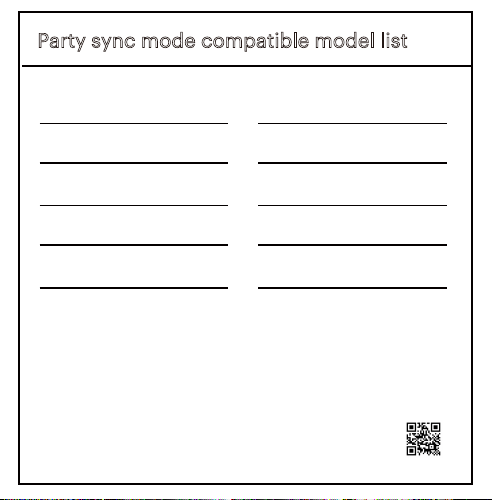
Party sync mode compatible model list
AAAGRY100006896
AAAGRY100006897
AAAAQU100006897
AAAGRY100006902
100008734
100008736
100094813
100094812
100097809
NOTE: This equipment has been tested and found
to comply with the limits for a Class B digital
device, pursuant to Part 15 of the FCC Rules.
These limits are designed to provide reasonable
protection against harmful interference in a
residential installation. This equipment generates,
uses and can radiate radio frequency energy and,
if not installed and used in accordance with the
instructions, may cause harmful interference to
radio communications.
However, there is no guarantee that interference
will not occur in a particular installation. If this
equipment does cause harmful interference to
radio or television reception,which can be
determined by turning the equipment off and on,
the user is encouraged to try to correct the
interference by one or more of the following
measures:
FCC Statement
ISED Statement
This device contains license-exempt transmit-
ter(s)/receiver(s) that comply with Innovation,
Science and Economic Development
Canada’s license-exempt RSS(s). Operation is
subject to the following two conditions:
1.This device may not cause interference.
2.This device must accept any interference,
including interference that may cause undesired
operation of the device.
This equipment should be installed and operated
with a minimum distance of 20 cm between the
radiator and your body.
Le présent appareil est conforme aux CNR
d’Industrie Canada applicables auxappareils radio
exempts de licence. L’exploitation est autorisée
aux deux conditions suivantes : (1)l’appareil ne
doit pas produire de brouillage, et (2) l’utilisateur
de l’appareil doit accepter toutbrouillage
radioélectrique subi, même si le brouillage est
susceptible d’en compromettre lefonctionnement.
Cet équipement doit être installé et utilisé avec
une distance minimale de 20 cm entre le radiateur
et votre corps.
ISED Statement
Reorient or relocate the receiving antenna.
Increase the separation between the
equipment and receiver.
Connect the equipment into an outlet on a circuit
different from that to which the receiver is
connected.
Consult the dealer or an experienced radio/TV
technician for help.
This device complies with Part 15 of the FCC Rules.
Operation is subject to the following two
conditions:
(1) This device may not cause harmful interference.
(2) This device must accept any interference
received, including interference that may cause
undesired operation.
This equipment should be installed and operated
with a minimum distance of 20 cm between the
radiator and your body.
Factory Code
版本:A/4
BS2326-安规手册
封面
封底
料号
20221205
李小明
李莹
BS2326
12.005.0004.06399
安规手册
变更提出人 变更原因
项目名称
日期
包装工程师
设计版本
尺寸(mm)
材质
页码P数
颜色
表面处理
工艺
条码要求
装订方式
产品型号
部件名称
平面工程师
无条码
风琴折 线装 其它胶装骑马钉包心折
有条码(清晰易扫描)
说明书类说明:
1、公差(mm):0<a≦50(+0.3/-0.2),
50<a≦150(+1/-0.5),>150
(+1.5/-1。有特殊要求的,按标示公
差执行。
2、要求图文清晰可辨,内容完整,折叠正确,
无重影,墨屎、杂点、脏点、异物、粉点、
套印不准。
3、尺寸按展开尺寸及成型外尺寸测量计算。
A0
6/p
展开尺寸:240x80,成型尺寸:80x80
80g书纸
单色印刷
无
有:
是否有可参考
刀模
颜色
RoHS2.0、Reach
包装指令94/62/EC
大豆油墨印刷
无氯漂白工艺
粘合剂为非石油基
环保要求
油墨中禁止使用
矿物油(法国)
TPCH(美国)
光油 防刮花哑膜哑膜光胶UV油水性光油 水性哑油哑油
无 烫金 烫银 击凸 击凹 压网 其它局部UV
无
BS2326户外音箱项目
80mm
80mm
Party sync mode compatible model list
AAAGRY100006896
AAAGRY100006897
AAAAQU100006897
AAAGRY100006902
100008734
100008736
100094813
100094812
100097809
NOTE: This equipment has been tested and found
to comply with the limits for a Class B digital
device, pursuant to Part 15 of the FCC Rules.
These limits are designed to provide reasonable
protection against harmful interference in a
residential installation. This equipment generates,
uses and can radiate radio frequency energy and,
if not installed and used in accordance with the
instructions, may cause harmful interference to
radio communications.
However, there is no guarantee that interference
will not occur in a particular installation. If this
equipment does cause harmful interference to
radio or television reception,which can be
determined by turning the equipment off and on,
the user is encouraged to try to correct the
interference by one or more of the following
measures:
FCC Statement
ISED Statement
This device contains license-exempt transmit-
ter(s)/receiver(s) that comply with Innovation,
Science and Economic Development
Canada’s license-exempt RSS(s). Operation is
subject to the following two conditions:
1.This device may not cause interference.
2.This device must accept any interference,
including interference that may cause undesired
operation of the device.
This equipment should be installed and operated
with a minimum distance of 20 cm between the
radiator and your body.
Le présent appareil est conforme aux CNR
d’Industrie Canada applicables auxappareils radio
exempts de licence. L’exploitation est autorisée
aux deux conditions suivantes : (1)l’appareil ne
doit pas produire de brouillage, et (2) l’utilisateur
de l’appareil doit accepter toutbrouillage
radioélectrique subi, même si le brouillage est
susceptible d’en compromettre lefonctionnement.
Cet équipement doit être installé et utilisé avec
une distance minimale de 20 cm entre le radiateur
et votre corps.
ISED Statement
Reorient or relocate the receiving antenna.
Increase the separation between the
equipment and receiver.
Connect the equipment into an outlet on a circuit
different from that to which the receiver is
connected.
Consult the dealer or an experienced radio/TV
technician for help.
This device complies with Part 15 of the FCC Rules.
Operation is subject to the following two
conditions:
(1) This device may not cause harmful interference.
(2) This device must accept any interference
received, including interference that may cause
undesired operation.
This equipment should be installed and operated
with a minimum distance of 20 cm between the
radiator and your body.
Factory Code

版本:A/4
BS2326-安规手册
封面
封底
料号
20221205
李小明
李莹
BS2326
12.005.0004.06399
安规手册
变更提出人 变更原因
项目名称
日期
包装工程师
设计版本
尺寸(mm)
材质
页码P数
颜色
表面处理
工艺
条码要求
装订方式
产品型号
部件名称
平面工程师
无条码
风琴折 线装 其它胶装骑马钉包心折
有条码(清晰易扫描)
说明书类说明:
1、公差(mm):0<a≦50(+0.3/-0.2),
50<a≦150(+1/-0.5),>150
(+1.5/-1。有特殊要求的,按标示公
差执行。
2、要求图文清晰可辨,内容完整,折叠正确,
无重影,墨屎、杂点、脏点、异物、粉点、
套印不准。
3、尺寸按展开尺寸及成型外尺寸测量计算。
A0
6/p
展开尺寸:240x80,成型尺寸:80x80
80g书纸
单色印刷
无
有:
是否有可参考
刀模
颜色
RoHS2.0、Reach
包装指令94/62/EC
大豆油墨印刷
无氯漂白工艺
粘合剂为非石油基
环保要求
油墨中禁止使用
矿物油(法国)
TPCH(美国)
光油 防刮花哑膜哑膜光胶UV油水性光油 水性哑油哑油
无 烫金 烫银 击凸 击凹 压网 其它局部UV
无
BS2326户外音箱项目
80mm
80mm
Party sync mode compatible model list
AAAGRY100006896
AAAGRY100006897
AAAAQU100006897
AAAGRY100006902
100008734
100008736
100094813
100094812
100097809
NOTE: This equipment has been tested and found
to comply with the limits for a Class B digital
device, pursuant to Part 15 of the FCC Rules.
These limits are designed to provide reasonable
protection against harmful interference in a
residential installation. This equipment generates,
uses and can radiate radio frequency energy and,
if not installed and used in accordance with the
instructions, may cause harmful interference to
radio communications.
However, there is no guarantee that interference
will not occur in a particular installation. If this
equipment does cause harmful interference to
radio or television reception,which can be
determined by turning the equipment off and on,
the user is encouraged to try to correct the
interference by one or more of the following
measures:
FCC Statement
ISED Statement
This device contains license-exempt transmit-
ter(s)/receiver(s) that comply with Innovation,
Science and Economic Development
Canada’s license-exempt RSS(s). Operation is
subject to the following two conditions:
1.This device may not cause interference.
2.This device must accept any interference,
including interference that may cause undesired
operation of the device.
This equipment should be installed and operated
with a minimum distance of 20 cm between the
radiator and your body.
Le présent appareil est conforme aux CNR
d’Industrie Canada applicables auxappareils radio
exempts de licence. L’exploitation est autorisée
aux deux conditions suivantes : (1)l’appareil ne
doit pas produire de brouillage, et (2) l’utilisateur
de l’appareil doit accepter toutbrouillage
radioélectrique subi, même si le brouillage est
susceptible d’en compromettre lefonctionnement.
Cet équipement doit être installé et utilisé avec
une distance minimale de 20 cm entre le radiateur
et votre corps.
ISED Statement
Reorient or relocate the receiving antenna.
Increase the separation between the
equipment and receiver.
Connect the equipment into an outlet on a circuit
different from that to which the receiver is
connected.
Consult the dealer or an experienced radio/TV
technician for help.
This device complies with Part 15 of the FCC Rules.
Operation is subject to the following two
conditions:
(1) This device may not cause harmful interference.
(2) This device must accept any interference
received, including interference that may cause
undesired operation.
This equipment should be installed and operated
with a minimum distance of 20 cm between the
radiator and your body.
Factory Code

版本:A/4
BS2326-安规手册
封面
封底
料号
20221205
李小明
李莹
BS2326
12.005.0004.06399
安规手册
变更提出人 变更原因
项目名称
日期
包装工程师
设计版本
尺寸(mm)
材质
页码P数
颜色
表面处理
工艺
条码要求
装订方式
产品型号
部件名称
平面工程师
无条码
风琴折 线装 其它胶装骑马钉包心折
有条码(清晰易扫描)
说明书类说明:
1、公差(mm):0<a≦50(+0.3/-0.2),
50<a≦150(+1/-0.5),>150
(+1.5/-1。有特殊要求的,按标示公
差执行。
2、要求图文清晰可辨,内容完整,折叠正确,
无重影,墨屎、杂点、脏点、异物、粉点、
套印不准。
3、尺寸按展开尺寸及成型外尺寸测量计算。
A0
6/p
展开尺寸:240x80,成型尺寸:80x80
80g书纸
单色印刷
无
有:
是否有可参考
刀模
颜色
RoHS2.0、Reach
包装指令94/62/EC
大豆油墨印刷
无氯漂白工艺
粘合剂为非石油基
环保要求
油墨中禁止使用
矿物油(法国)
TPCH(美国)
光油 防刮花哑膜哑膜光胶UV油水性光油 水性哑油哑油
无 烫金 烫银 击凸 击凹 压网 其它局部UV
无
BS2326户外音箱项目
80mm
80mm
Party sync mode compatible model list
AAAGRY100006896
AAAGRY100006897
AAAAQU100006897
AAAGRY100006902
100008734
100008736
100094813
100094812
100097809
NOTE: This equipment has been tested and found
to comply with the limits for a Class B digital
device, pursuant to Part 15 of the FCC Rules.
These limits are designed to provide reasonable
protection against harmful interference in a
residential installation. This equipment generates,
uses and can radiate radio frequency energy and,
if not installed and used in accordance with the
instructions, may cause harmful interference to
radio communications.
However, there is no guarantee that interference
will not occur in a particular installation. If this
equipment does cause harmful interference to
radio or television reception,which can be
determined by turning the equipment off and on,
the user is encouraged to try to correct the
interference by one or more of the following
measures:
FCC Statement
ISED Statement
This device contains license-exempt transmit-
ter(s)/receiver(s) that comply with Innovation,
Science and Economic Development
Canada’s license-exempt RSS(s). Operation is
subject to the following two conditions:
1.This device may not cause interference.
2.This device must accept any interference,
including interference that may cause undesired
operation of the device.
This equipment should be installed and operated
with a minimum distance of 20 cm between the
radiator and your body.
Le présent appareil est conforme aux CNR
d’Industrie Canada applicables auxappareils radio
exempts de licence. L’exploitation est autorisée
aux deux conditions suivantes : (1)l’appareil ne
doit pas produire de brouillage, et (2) l’utilisateur
de l’appareil doit accepter toutbrouillage
radioélectrique subi, même si le brouillage est
susceptible d’en compromettre lefonctionnement.
Cet équipement doit être installé et utilisé avec
une distance minimale de 20 cm entre le radiateur
et votre corps.
ISED Statement
Reorient or relocate the receiving antenna.
Increase the separation between the
equipment and receiver.
Connect the equipment into an outlet on a circuit
different from that to which the receiver is
connected.
Consult the dealer or an experienced radio/TV
technician for help.
This device complies with Part 15 of the FCC Rules.
Operation is subject to the following two
conditions:
(1) This device may not cause harmful interference.
(2) This device must accept any interference
received, including interference that may cause
undesired operation.
This equipment should be installed and operated
with a minimum distance of 20 cm between the
radiator and your body.
Factory Code
版本:A/4
BS2326-安规手册
封面
封底
料号
20221205
李小明
李莹
BS2326
12.005.0004.06399
安规手册
变更提出人 变更原因
项目名称
日期
包装工程师
设计版本
尺寸(mm)
材质
页码P数
颜色
表面处理
工艺
条码要求
装订方式
产品型号
部件名称
平面工程师
无条码
风琴折 线装 其它胶装骑马钉包心折
有条码(清晰易扫描)
说明书类说明:
1、公差(mm):0<a≦50(+0.3/-0.2),
50<a≦150(+1/-0.5),>150
(+1.5/-1。有特殊要求的,按标示公
差执行。
2、要求图文清晰可辨,内容完整,折叠正确,
无重影,墨屎、杂点、脏点、异物、粉点、
套印不准。
3、尺寸按展开尺寸及成型外尺寸测量计算。
A0
6/p
展开尺寸:240x80,成型尺寸:80x80
80g书纸
单色印刷
无
有:
是否有可参考
刀模
颜色
RoHS2.0、Reach
包装指令94/62/EC
大豆油墨印刷
无氯漂白工艺
粘合剂为非石油基
环保要求
油墨中禁止使用
矿物油(法国)
TPCH(美国)
光油 防刮花哑膜哑膜光胶UV油水性光油 水性哑油哑油
无 烫金 烫银 击凸 击凹 压网 其它局部UV
无
BS2326户外音箱项目
80mm
80mm
Party sync mode compatible model list
AAAGRY100006896
AAAGRY100006897
AAAAQU100006897
AAAGRY100006902
100008734
100008736
100094813
100094812
100097809
NOTE: This equipment has been tested and found
to comply with the limits for a Class B digital
device, pursuant to Part 15 of the FCC Rules.
These limits are designed to provide reasonable
protection against harmful interference in a
residential installation. This equipment generates,
uses and can radiate radio frequency energy and,
if not installed and used in accordance with the
instructions, may cause harmful interference to
radio communications.
However, there is no guarantee that interference
will not occur in a particular installation. If this
equipment does cause harmful interference to
radio or television reception,which can be
determined by turning the equipment off and on,
the user is encouraged to try to correct the
interference by one or more of the following
measures:
FCC Statement
ISED Statement
This device contains license-exempt transmit-
ter(s)/receiver(s) that comply with Innovation,
Science and Economic Development
Canada’s license-exempt RSS(s). Operation is
subject to the following two conditions:
1.This device may not cause interference.
2.This device must accept any interference,
including interference that may cause undesired
operation of the device.
This equipment should be installed and operated
with a minimum distance of 20 cm between the
radiator and your body.
Le présent appareil est conforme aux CNR
d’Industrie Canada applicables auxappareils radio
exempts de licence. L’exploitation est autorisée
aux deux conditions suivantes : (1)l’appareil ne
doit pas produire de brouillage, et (2) l’utilisateur
de l’appareil doit accepter toutbrouillage
radioélectrique subi, même si le brouillage est
susceptible d’en compromettre lefonctionnement.
Cet équipement doit être installé et utilisé avec
une distance minimale de 20 cm entre le radiateur
et votre corps.
ISED Statement
Reorient or relocate the receiving antenna.
Increase the separation between the
equipment and receiver.
Connect the equipment into an outlet on a circuit
different from that to which the receiver is
connected.
Consult the dealer or an experienced radio/TV
technician for help.
This device complies with Part 15 of the FCC Rules.
Operation is subject to the following two
conditions:
(1) This device may not cause harmful interference.
(2) This device must accept any interference
received, including interference that may cause
undesired operation.
This equipment should be installed and operated
with a minimum distance of 20 cm between the
radiator and your body.
Factory Code

版本:A/4
1 USB-C power cable
1 Quick Start Guide
1 Portable FM Boombox
What’s in the Box?
Check to make sure you
have everything below
Quick
Start Guide
11
12 13 14
Get to Know Your Boombox Let’s Get Started! 01 Connect Your Boombox 02
onn. Party Boombox
Bluetooth
Bluetooth
Devices
Portable FM Boombox
Quick Start Guide
100097809
We’d love to hear from
you. Scan with your
Walmart app and let us
know what you think.
Listen to Your Favorite Radios
Charge Your BoomboxWired Use? Yes!
Want Your Party to the Next Level?
(not included)
03 04 05
Take a Phone Call
06
Want More Lighting Eects?
07 08
Black
November 23, 2022_V1
VERMILLION
ICE
1.
2.
3.
4.
5.
6.
7.
Power
Bluetooth
Source
Play/Pause
LED display
Volume down/
Previous track
Volume up/
Next track
8.
9.
10.
11.
12.
13.
14.
Light
Bass boost
Microphone
USB-C charging port
USB Emergency power
charging port
Reset
3.5 mm AUX input
Need help? We're here for you every day
7 a.m. – 9 p.m. CST. 1-888-516-2630 Give us a call!
1. Press once to answer an incoming call,
press again to hang up the call.
2. Press & hold to reject an incoming call.
* Press twice to wake up the voice assistant
of your device.
More tips:
– Always keep the charging port dry before
connecting power.
– To ensure it is waterproof, always close the
protective cover securely.
USB
AUX IN
Reset
5V 2.1A
1 2 3 4 65 7 8 9 10
Press & hold to power on/off the speaker.
Fully charge the battery if you might not use this
speaker in the near future. Place it in a cool, dry
place.
Recommend to charge it at least one time for
every half year, in order to keep the battery
performing well. Empty battery too long may
result in fewer hours of usage between charges.
Built-in Rechargeable Li-ion Battery: 7.4V
4000mAh
Connect to your device through Bluetooth®
wireless technology, search for the entry
"onn. Party Boombox".
1. USB-A charging port with emergency power
can charge your other smart devices (5V 2.1A
output), when this Boombox is powered on.
2. Connect USB-C to 5V power adapter.
Recommend to use the in-box power cable to
charge your Boombox.
3. The battery icon will flash when charging, and
all battery segments will be lit and remain solid
white once fully charged.
ON/OFF
Press once
Press & hold
Press twice
1 94346 00504 8
Press & Hold
FM
Stereo
10m
* In AUX mode, can't be used, you can
ONLY control it by your audio source device.
Use a 3.5 mm AUX cable (not included) to
connect the speaker to your audio source.
Press Play on your audio source device and
adjust the volume on the speaker .
1.
2.
1.
2.
3.
4.
5.
+
_
_
_
+
+
Press to select FM mode.
Press or to scan and select FM stations
step by step.
Press & hold or to scan and seek (jump to
the next available station).
In FM Mode, press and hold to assign the
current station to a preset number, the LED
screen will show “SAV” to show the station
has been saved. The preset number can be
changed by pressing and .
In FM Mode, press repeatedly to select a
saved radio station.
USB
AUX IN
Reset
5V 2.1A
Power on both speakers, press & hold of
each speaker to enter Party Sync Mode.
When two speakers paired, you will hear “left
channel, right channel”. The left channel is the
master.
Use your mobile device to pair with the master
speaker by Bluetooth pairing method.
Press & hold again to disconnect Party
Sync Mode.
1.
2.
3.
4.
AUX
Press & hold to
turn on/off the light.
Quick press to
switch 6 between
different multicolor
LED lightings.
1.
2.
DC5V