Notice:
Please read user manual carefully and keep it for
your records.
• 1- Wireless Speaker
• 1- Micro USB Cable
• 1- Instruction Manual
Warnings:
• Do not let small children play this product - Do not expose
the speaker to liquid, moisture or humidity to avoid the
product’s internal circuit being afected.
• Do not use abrasive cleaning solvents to clean the speaker.
- Store the speaker out of direct sunlight and extreme
temperatures (above 45°C/113°F or below -10°C/- 14°F), as
this may shorten the battery life, afect the operation or
degrade the performance of your speaker.
• Do not dispose of the speaker in a fre as it might result in
an explosion. - Do not expose the speaker to sharp objects as
this will cause scratches and damage.
• Do not drop the speaker. This may cause damage to the
internal circuitry.
• Do not attempt to disassemble the speaker. This may cause
damage to the internal circuitry.
• If the speaker is left for long period without use, charge
once per month to avoid the overconsumption of the
battery.
• This appliance is for indoor use only. Please do not use or
store the unit in high temperature or
hazardous locations. Please do not submerge the unit into
water, as this will ruin the speaker.
• The unit comes with a rechargeable battery, so please do
not throw or put it in a fre to avoid explosion.
• The warranty for this product is invalidated if the product
has been tampered, repaired or modifed in any way.
BC-AU-BS-117-BK
3. Micro SD Function: Insert a Micro SD card. TF mode will start
automatically.
4. USB Function: Insert a USB fash drive. USB mode will start
automatically.
5. FM Radio: Press “M“ on the product to switch to FM mode.
Radio will start automatically.
To AUTO-SCAN the stations, short press button once. It will
take few minutes to search all the stations. Once all the
stations are scanned, they get registered in memory
automatically.
Short press or button to skip selected stations.
Long press or button to increase or decrease the volume.
6. Activate your device’s Bluetooth and set your mobile phone
to search for Bluetooth devices. After the search is completed,
select BC-BS-117 from the Bluetooth device list.
7. TWS Connection is only for two BC-AU-BS-117-BK speakers:
When the two speakers are in Bluetooth mode at the same
time (one of the speaker is connected to the phone), choose
one of them to long press the “M” button, and the two
speakers will be connected automatically. When the
connection is successful, long press the “M” button again, and
the connection will be disconnected (the speaker connected
to the phone will continue to sound)
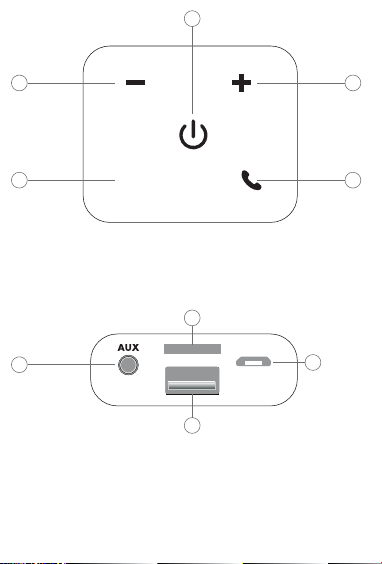
1. Power Switch: Switch power ON/OFF on top of the speaker
by pressing button .
Top of speaker:
Back of speaker:
2. Charging:
• Plug the micro USB cable into the micro USB port on the
back of the speaker, and connect the other end of the
cable with any compatible charger or wall outlet.
• When charging, the small LED indicator will glow solid red.
When fully charged, the LED indicator will turn of.
• Charging time is approximately 2-3 hours.
Bytech NY INC. warrants this product to be free from defects in materials and
workmanship to the original purchaser for a period of 12 months from the original
purchase date. Bytech’s responsibility with regard to this limited warranty shall be
limited solely to repair or replacement as its option, of any product which fails during
normal consumer use. This warranty does not extend to damage or failure which
results from misuse, neglect, accident, alteration, abuse, improper installation or
maintenance. At any time during the 12 month period following the purchase, the
product fails due to defects in material or workmanship, return the defective product
(with freight prepaid) with proof of purchase. Please include $5.00 for return shipping
and handling.
WWW.BYTECHINTL.COM
Bytech NY Inc.
2585 West 13 street
Brooklyn NY 11223
(718) 449-3700
©2020 BYTECH NY INC.
*All trademarks and copyrights are the property of the respective com
Note: This equipment has been tested and found to comply with the
limits for a Class B digital device, pursuant to part 15 of the FCC Rules.
These limits are designed to provide reasonable protection against
harmful interference in a residential installation. This equipment
generates, uses and can radiate radio frequency energy and, if not
installed and used in accordance with the instructions, may cause
harmful interference to radio communications. However, there is no
guarantee that interference will not occur in a particular installation. If
this equipment does cause harmful interference to radio or television
reception, which can be determined by turning the equipment off and
on, the user is encouraged to try to correct the interference by one or
more of the following measures:
—Reorient or relocate the receiving antenna.
—Increase the separation between the equipment and receiver.
—Connect the equipment into an outlet on a circuit different from that to which the
receiver is connected.
—Consult the dealer or an experienced radio/TV technician for help.
Caution: Any changes or modifications not expressly approved could void the user's
authority to operate the equipment.
SPECIFICATIONS:
• With FM, AUX, Bluetooth®, USB/TF card & TWS function
• Bluetooth® : V4.2
• Input: 5V
• Battery Capacity: 1200 mAh
• Sound output: 10 W (5W x 2 )
• Charge time: up to 3 hours
• Play time: up to 2-3 hours
• Standby time: up to 5 hours
• Operating range: 33 feet (10m)
• Battery: 3.7V Built-in Li-ion
• Compatible with most Bluetooth® enabled tablets and
smartphones
M
1. ON/OFF
2. Volume - / Previous
3. Volume + / Next
4. Mode
5. Play/Pause / Answer Call
TF/USB
DC 5V
1. AUX in
2. Micro SD Card Reader
3. USB
4. DC 5V input
2
4
3
5
1
1
2
3
4

Notice:
Please read user manual carefully and keep it for
your records.
• 1- Wireless Speaker
• 1- Micro USB Cable
• 1- Instruction Manual
Warnings:
• Do not let small children play this product - Do not expose
the speaker to liquid, moisture or humidity to avoid the
product’s internal circuit being afected.
• Do not use abrasive cleaning solvents to clean the speaker.
- Store the speaker out of direct sunlight and extreme
temperatures (above 45°C/113°F or below -10°C/- 14°F), as
this may shorten the battery life, afect the operation or
degrade the performance of your speaker.
• Do not dispose of the speaker in a fre as it might result in
an explosion. - Do not expose the speaker to sharp objects as
this will cause scratches and damage.
• Do not drop the speaker. This may cause damage to the
internal circuitry.
• Do not attempt to disassemble the speaker. This may cause
damage to the internal circuitry.
• If the speaker is left for long period without use, charge
once per month to avoid the overconsumption of the
battery.
• This appliance is for indoor use only. Please do not use or
store the unit in high temperature or
hazardous locations. Please do not submerge the unit into
water, as this will ruin the speaker.
• The unit comes with a rechargeable battery, so please do
not throw or put it in a fre to avoid explosion.
• The warranty for this product is invalidated if the product
has been tampered, repaired or modifed in any way.
BC-AU-BS-117-BK
3. Micro SD Function: Insert a Micro SD card. TF mode will start
automatically.
4. USB Function: Insert a USB fash drive. USB mode will start
automatically.
5. FM Radio: Press “M“ on the product to switch to FM mode.
Radio will start automatically.
To AUTO-SCAN the stations, short press button once. It will
take few minutes to search all the stations. Once all the
stations are scanned, they get registered in memory
automatically.
Short press or button to skip selected stations.
Long press or button to increase or decrease the volume.
6. Activate your device’s Bluetooth and set your mobile phone
to search for Bluetooth devices. After the search is completed,
select BC-BS-117 from the Bluetooth device list.
7. TWS Connection is only for two BC-AU-BS-117-BK speakers:
When the two speakers are in Bluetooth mode at the same
time (one of the speaker is connected to the phone), choose
one of them to long press the “M” button, and the two
speakers will be connected automatically. When the
connection is successful, long press the “M” button again, and
the connection will be disconnected (the speaker connected
to the phone will continue to sound)
1. Power Switch: Switch power ON/OFF on top of the speaker
by pressing button .
Top of speaker:
Back of speaker:
2. Charging:
• Plug the micro USB cable into the micro USB port on the
back of the speaker, and connect the other end of the
cable with any compatible charger or wall outlet.
• When charging, the small LED indicator will glow solid red.
When fully charged, the LED indicator will turn of.
• Charging time is approximately 2-3 hours.
Bytech NY INC. warrants this product to be free from defects in materials and
workmanship to the original purchaser for a period of 12 months from the original
purchase date. Bytech’s responsibility with regard to this limited warranty shall be
limited solely to repair or replacement as its option, of any product which fails during
normal consumer use. This warranty does not extend to damage or failure which
results from misuse, neglect, accident, alteration, abuse, improper installation or
maintenance. At any time during the 12 month period following the purchase, the
product fails due to defects in material or workmanship, return the defective product
(with freight prepaid) with proof of purchase. Please include $5.00 for return shipping
and handling.
WWW.BYTECHINTL.COM
Bytech NY Inc.
2585 West 13 street
Brooklyn NY 11223
(718) 449-3700
©2020 BYTECH NY INC.
*All trademarks and copyrights are the property of the respective com
Note: This equipment has been tested and found to comply with the
limits for a Class B digital device, pursuant to part 15 of the FCC Rules.
These limits are designed to provide reasonable protection against
harmful interference in a residential installation. This equipment
generates, uses and can radiate radio frequency energy and, if not
installed and used in accordance with the instructions, may cause
harmful interference to radio communications. However, there is no
guarantee that interference will not occur in a particular installation. If
this equipment does cause harmful interference to radio or television
reception, which can be determined by turning the equipment off and
on, the user is encouraged to try to correct the interference by one or
more of the following measures:
—Reorient or relocate the receiving antenna.
—Increase the separation between the equipment and receiver.
—Connect the equipment into an outlet on a circuit different from that to which the
receiver is connected.
—Consult the dealer or an experienced radio/TV technician for help.
Caution: Any changes or modifications not expressly approved could void the user's
authority to operate the equipment.
SPECIFICATIONS:
• With FM, AUX, Bluetooth®, USB/TF card & TWS function
• Bluetooth® : V4.2
• Input: 5V
• Battery Capacity: 1200 mAh
• Sound output: 10 W (5W x 2 )
• Charge time: up to 3 hours
• Play time: up to 2-3 hours
• Standby time: up to 5 hours
• Operating range: 33 feet (10m)
• Battery: 3.7V Built-in Li-ion
• Compatible with most Bluetooth® enabled tablets and
smartphones
M
1. ON/OFF
2. Volume - / Previous
3. Volume + / Next
4. Mode
5. Play/Pause / Answer Call
TF/USB
DC 5V
1. AUX in
2. Micro SD Card Reader
3. USB
4. DC 5V input
2
4
3
5
1
1
2
3
4
Notice:
Please read user manual carefully and keep it for
your records.
• 1- Wireless Speaker
• 1- Micro USB Cable
• 1- Instruction Manual
Warnings:
• Do not let small children play this product - Do not expose
the speaker to liquid, moisture or humidity to avoid the
product’s internal circuit being afected.
• Do not use abrasive cleaning solvents to clean the speaker.
- Store the speaker out of direct sunlight and extreme
temperatures (above 45°C/113°F or below -10°C/- 14°F), as
this may shorten the battery life, afect the operation or
degrade the performance of your speaker.
• Do not dispose of the speaker in a fre as it might result in
an explosion. - Do not expose the speaker to sharp objects as
this will cause scratches and damage.
• Do not drop the speaker. This may cause damage to the
internal circuitry.
• Do not attempt to disassemble the speaker. This may cause
damage to the internal circuitry.
• If the speaker is left for long period without use, charge
once per month to avoid the overconsumption of the
battery.
• This appliance is for indoor use only. Please do not use or
store the unit in high temperature or
hazardous locations. Please do not submerge the unit into
water, as this will ruin the speaker.
• The unit comes with a rechargeable battery, so please do
not throw or put it in a fre to avoid explosion.
• The warranty for this product is invalidated if the product
has been tampered, repaired or modifed in any way.
BC-AU-BS-117-BK
3. Micro SD Function: Insert a Micro SD card. TF mode will start
automatically.
4. USB Function: Insert a USB fash drive. USB mode will start
automatically.
5. FM Radio: Press “M“ on the product to switch to FM mode.
Radio will start automatically.
To AUTO-SCAN the stations, short press button once. It will
take few minutes to search all the stations. Once all the
stations are scanned, they get registered in memory
automatically.
Short press or button to skip selected stations.
Long press or button to increase or decrease the volume.
6. Activate your device’s Bluetooth and set your mobile phone
to search for Bluetooth devices. After the search is completed,
select BC-BS-117 from the Bluetooth device list.
7. TWS Connection is only for two BC-AU-BS-117-BK speakers:
When the two speakers are in Bluetooth mode at the same
time (one of the speaker is connected to the phone), choose
one of them to long press the “M” button, and the two
speakers will be connected automatically. When the
connection is successful, long press the “M” button again, and
the connection will be disconnected (the speaker connected
to the phone will continue to sound)
1. Power Switch: Switch power ON/OFF on top of the speaker
by pressing button .
Top of speaker:
Back of speaker:
2. Charging:
• Plug the micro USB cable into the micro USB port on the
back of the speaker, and connect the other end of the
cable with any compatible charger or wall outlet.
• When charging, the small LED indicator will glow solid red.
When fully charged, the LED indicator will turn of.
• Charging time is approximately 2-3 hours.
Bytech NY INC. warrants this product to be free from defects in materials and
workmanship to the original purchaser for a period of 12 months from the original
purchase date. Bytech’s responsibility with regard to this limited warranty shall be
limited solely to repair or replacement as its option, of any product which fails during
normal consumer use. This warranty does not extend to damage or failure which
results from misuse, neglect, accident, alteration, abuse, improper installation or
maintenance. At any time during the 12 month period following the purchase, the
product fails due to defects in material or workmanship, return the defective product
(with freight prepaid) with proof of purchase. Please include $5.00 for return shipping
and handling.
WWW.BYTECHINTL.COM
Bytech NY Inc.
2585 West 13 street
Brooklyn NY 11223
(718) 449-3700
©2020 BYTECH NY INC.
*All trademarks and copyrights are the property of the respective com
Note: This equipment has been tested and found to comply with the
limits for a Class B digital device, pursuant to part 15 of the FCC Rules.
These limits are designed to provide reasonable protection against
harmful interference in a residential installation. This equipment
generates, uses and can radiate radio frequency energy and, if not
installed and used in accordance with the instructions, may cause
harmful interference to radio communications. However, there is no
guarantee that interference will not occur in a particular installation. If
this equipment does cause harmful interference to radio or television
reception, which can be determined by turning the equipment off and
on, the user is encouraged to try to correct the interference by one or
more of the following measures:
—Reorient or relocate the receiving antenna.
—Increase the separation between the equipment and receiver.
—Connect the equipment into an outlet on a circuit different from that to which the
receiver is connected.
—Consult the dealer or an experienced radio/TV technician for help.
Caution: Any changes or modifications not expressly approved could void the user's
authority to operate the equipment.
SPECIFICATIONS:
• With FM, AUX, Bluetooth®, USB/TF card & TWS function
• Bluetooth® : V4.2
• Input: 5V
• Battery Capacity: 1200 mAh
• Sound output: 10 W (5W x 2 )
• Charge time: up to 3 hours
• Play time: up to 2-3 hours
• Standby time: up to 5 hours
• Operating range: 33 feet (10m)
• Battery: 3.7V Built-in Li-ion
• Compatible with most Bluetooth® enabled tablets and
smartphones
M
1. ON/OFF
2. Volume - / Previous
3. Volume + / Next
4. Mode
5. Play/Pause / Answer Call
TF/USB
DC 5V
1. AUX in
2. Micro SD Card Reader
3. USB
4. DC 5V input
2
4
3
5
1
1
2
3
4
Notice:
Please read user manual carefully and keep it for
your records.
• 1- Wireless Speaker
• 1- Micro USB Cable
• 1- Instruction Manual
Warnings:
• Do not let small children play this product - Do not expose
the speaker to liquid, moisture or humidity to avoid the
product’s internal circuit being afected.
• Do not use abrasive cleaning solvents to clean the speaker.
- Store the speaker out of direct sunlight and extreme
temperatures (above 45°C/113°F or below -10°C/- 14°F), as
this may shorten the battery life, afect the operation or
degrade the performance of your speaker.
• Do not dispose of the speaker in a fre as it might result in
an explosion. - Do not expose the speaker to sharp objects as
this will cause scratches and damage.
• Do not drop the speaker. This may cause damage to the
internal circuitry.
• Do not attempt to disassemble the speaker. This may cause
damage to the internal circuitry.
• If the speaker is left for long period without use, charge
once per month to avoid the overconsumption of the
battery.
• This appliance is for indoor use only. Please do not use or
store the unit in high temperature or
hazardous locations. Please do not submerge the unit into
water, as this will ruin the speaker.
• The unit comes with a rechargeable battery, so please do
not throw or put it in a fre to avoid explosion.
• The warranty for this product is invalidated if the product
has been tampered, repaired or modifed in any way.
BC-AU-BS-117-BK
3. Micro SD Function: Insert a Micro SD card. TF mode will start
automatically.
4. USB Function: Insert a USB fash drive. USB mode will start
automatically.
5. FM Radio: Press “M“ on the product to switch to FM mode.
Radio will start automatically.
To AUTO-SCAN the stations, short press button once. It will
take few minutes to search all the stations. Once all the
stations are scanned, they get registered in memory
automatically.
Short press or button to skip selected stations.
Long press or button to increase or decrease the volume.
6. Activate your device’s Bluetooth and set your mobile phone
to search for Bluetooth devices. After the search is completed,
select BC-BS-117 from the Bluetooth device list.
7. TWS Connection is only for two BC-AU-BS-117-BK speakers:
When the two speakers are in Bluetooth mode at the same
time (one of the speaker is connected to the phone), choose
one of them to long press the “M” button, and the two
speakers will be connected automatically. When the
connection is successful, long press the “M” button again, and
the connection will be disconnected (the speaker connected
to the phone will continue to sound)
1. Power Switch: Switch power ON/OFF on top of the speaker
by pressing button .
Top of speaker:
Back of speaker:
2. Charging:
• Plug the micro USB cable into the micro USB port on the
back of the speaker, and connect the other end of the
cable with any compatible charger or wall outlet.
• When charging, the small LED indicator will glow solid red.
When fully charged, the LED indicator will turn of.
• Charging time is approximately 2-3 hours.
Bytech NY INC. warrants this product to be free from defects in materials and
workmanship to the original purchaser for a period of 12 months from the original
purchase date. Bytech’s responsibility with regard to this limited warranty shall be
limited solely to repair or replacement as its option, of any product which fails during
normal consumer use. This warranty does not extend to damage or failure which
results from misuse, neglect, accident, alteration, abuse, improper installation or
maintenance. At any time during the 12 month period following the purchase, the
product fails due to defects in material or workmanship, return the defective product
(with freight prepaid) with proof of purchase. Please include $5.00 for return shipping
and handling.
WWW.BYTECHINTL.COM
Bytech NY Inc.
2585 West 13 street
Brooklyn NY 11223
(718) 449-3700
©2020 BYTECH NY INC.
*All trademarks and copyrights are the property of the respective com
Note: This equipment has been tested and found to comply with the
limits for a Class B digital device, pursuant to part 15 of the FCC Rules.
These limits are designed to provide reasonable protection against
harmful interference in a residential installation. This equipment
generates, uses and can radiate radio frequency energy and, if not
installed and used in accordance with the instructions, may cause
harmful interference to radio communications. However, there is no
guarantee that interference will not occur in a particular installation. If
this equipment does cause harmful interference to radio or television
reception, which can be determined by turning the equipment off and
on, the user is encouraged to try to correct the interference by one or
more of the following measures:
—Reorient or relocate the receiving antenna.
—Increase the separation between the equipment and receiver.
—Connect the equipment into an outlet on a circuit different from that to which the
receiver is connected.
—Consult the dealer or an experienced radio/TV technician for help.
Caution: Any changes or modifications not expressly approved could void the user's
authority to operate the equipment.
SPECIFICATIONS:
• With FM, AUX, Bluetooth®, USB/TF card & TWS function
• Bluetooth® : V4.2
• Input: 5V
• Battery Capacity: 1200 mAh
• Sound output: 10 W (5W x 2 )
• Charge time: up to 3 hours
• Play time: up to 2-3 hours
• Standby time: up to 5 hours
• Operating range: 33 feet (10m)
• Battery: 3.7V Built-in Li-ion
• Compatible with most Bluetooth® enabled tablets and
smartphones
M
1. ON/OFF
2. Volume - / Previous
3. Volume + / Next
4. Mode
5. Play/Pause / Answer Call
TF/USB
DC 5V
1. AUX in
2. Micro SD Card Reader
3. USB
4. DC 5V input
2
4
3
5
1
1
2
3
4

Notice:
Please read user manual carefully and keep it for
your records.
• 1- Wireless Speaker
• 1- Micro USB Cable
• 1- Instruction Manual
Warnings:
• Do not let small children play this product - Do not expose
the speaker to liquid, moisture or humidity to avoid the
product’s internal circuit being afected.
• Do not use abrasive cleaning solvents to clean the speaker.
- Store the speaker out of direct sunlight and extreme
temperatures (above 45°C/113°F or below -10°C/- 14°F), as
this may shorten the battery life, afect the operation or
degrade the performance of your speaker.
• Do not dispose of the speaker in a fre as it might result in
an explosion. - Do not expose the speaker to sharp objects as
this will cause scratches and damage.
• Do not drop the speaker. This may cause damage to the
internal circuitry.
• Do not attempt to disassemble the speaker. This may cause
damage to the internal circuitry.
• If the speaker is left for long period without use, charge
once per month to avoid the overconsumption of the
battery.
• This appliance is for indoor use only. Please do not use or
store the unit in high temperature or
hazardous locations. Please do not submerge the unit into
water, as this will ruin the speaker.
• The unit comes with a rechargeable battery, so please do
not throw or put it in a fre to avoid explosion.
• The warranty for this product is invalidated if the product
has been tampered, repaired or modifed in any way.
BC-AU-BS-117-BK
3. Micro SD Function: Insert a Micro SD card. TF mode will start
automatically.
4. USB Function: Insert a USB fash drive. USB mode will start
automatically.
5. FM Radio: Press “M“ on the product to switch to FM mode.
Radio will start automatically.
To AUTO-SCAN the stations, short press button once. It will
take few minutes to search all the stations. Once all the
stations are scanned, they get registered in memory
automatically.
Short press or button to skip selected stations.
Long press or button to increase or decrease the volume.
6. Activate your device’s Bluetooth and set your mobile phone
to search for Bluetooth devices. After the search is completed,
select BC-BS-117 from the Bluetooth device list.
7. TWS Connection is only for two BC-AU-BS-117-BK speakers:
When the two speakers are in Bluetooth mode at the same
time (one of the speaker is connected to the phone), choose
one of them to long press the “M” button, and the two
speakers will be connected automatically. When the
connection is successful, long press the “M” button again, and
the connection will be disconnected (the speaker connected
to the phone will continue to sound)
1. Power Switch: Switch power ON/OFF on top of the speaker
by pressing button .
Top of speaker:
Back of speaker:
2. Charging:
• Plug the micro USB cable into the micro USB port on the
back of the speaker, and connect the other end of the
cable with any compatible charger or wall outlet.
• When charging, the small LED indicator will glow solid red.
When fully charged, the LED indicator will turn of.
• Charging time is approximately 2-3 hours.
Bytech NY INC. warrants this product to be free from defects in materials and
workmanship to the original purchaser for a period of 12 months from the original
purchase date. Bytech’s responsibility with regard to this limited warranty shall be
limited solely to repair or replacement as its option, of any product which fails during
normal consumer use. This warranty does not extend to damage or failure which
results from misuse, neglect, accident, alteration, abuse, improper installation or
maintenance. At any time during the 12 month period following the purchase, the
product fails due to defects in material or workmanship, return the defective product
(with freight prepaid) with proof of purchase. Please include $5.00 for return shipping
and handling.
WWW.BYTECHINTL.COM
Bytech NY Inc.
2585 West 13 street
Brooklyn NY 11223
(718) 449-3700
©2020 BYTECH NY INC.
*All trademarks and copyrights are the property of the respective com
Note: This equipment has been tested and found to comply with the
limits for a Class B digital device, pursuant to part 15 of the FCC Rules.
These limits are designed to provide reasonable protection against
harmful interference in a residential installation. This equipment
generates, uses and can radiate radio frequency energy and, if not
installed and used in accordance with the instructions, may cause
harmful interference to radio communications. However, there is no
guarantee that interference will not occur in a particular installation. If
this equipment does cause harmful interference to radio or television
reception, which can be determined by turning the equipment off and
on, the user is encouraged to try to correct the interference by one or
more of the following measures:
—Reorient or relocate the receiving antenna.
—Increase the separation between the equipment and receiver.
—Connect the equipment into an outlet on a circuit different from that to which the
receiver is connected.
—Consult the dealer or an experienced radio/TV technician for help.
Caution: Any changes or modifications not expressly approved could void the user's
authority to operate the equipment.
SPECIFICATIONS:
• With FM, AUX, Bluetooth®, USB/TF card & TWS function
• Bluetooth® : V4.2
• Input: 5V
• Battery Capacity: 1200 mAh
• Sound output: 10 W (5W x 2 )
• Charge time: up to 3 hours
• Play time: up to 2-3 hours
• Standby time: up to 5 hours
• Operating range: 33 feet (10m)
• Battery: 3.7V Built-in Li-ion
• Compatible with most Bluetooth® enabled tablets and
smartphones
M
1. ON/OFF
2. Volume - / Previous
3. Volume + / Next
4. Mode
5. Play/Pause / Answer Call
TF/USB
DC 5V
1. AUX in
2. Micro SD Card Reader
3. USB
4. DC 5V input
2
4
3
5
1
1
2
3
4

Notice:
Please read user manual carefully and keep it for
your records.
• 1- Wireless Speaker
• 1- Micro USB Cable
• 1- Instruction Manual
Warnings:
• Do not let small children play this product - Do not expose
the speaker to liquid, moisture or humidity to avoid the
product’s internal circuit being afected.
• Do not use abrasive cleaning solvents to clean the speaker.
- Store the speaker out of direct sunlight and extreme
temperatures (above 45°C/113°F or below -10°C/- 14°F), as
this may shorten the battery life, afect the operation or
degrade the performance of your speaker.
• Do not dispose of the speaker in a fre as it might result in
an explosion. - Do not expose the speaker to sharp objects as
this will cause scratches and damage.
• Do not drop the speaker. This may cause damage to the
internal circuitry.
• Do not attempt to disassemble the speaker. This may cause
damage to the internal circuitry.
• If the speaker is left for long period without use, charge
once per month to avoid the overconsumption of the
battery.
• This appliance is for indoor use only. Please do not use or
store the unit in high temperature or
hazardous locations. Please do not submerge the unit into
water, as this will ruin the speaker.
• The unit comes with a rechargeable battery, so please do
not throw or put it in a fre to avoid explosion.
• The warranty for this product is invalidated if the product
has been tampered, repaired or modifed in any way.
BC-AU-BS-117-BK
3. Micro SD Function: Insert a Micro SD card. TF mode will start
automatically.
4. USB Function: Insert a USB fash drive. USB mode will start
automatically.
5. FM Radio: Press “M“ on the product to switch to FM mode.
Radio will start automatically.
To AUTO-SCAN the stations, short press button once. It will
take few minutes to search all the stations. Once all the
stations are scanned, they get registered in memory
automatically.
Short press or button to skip selected stations.
Long press or button to increase or decrease the volume.
6. Activate your device’s Bluetooth and set your mobile phone
to search for Bluetooth devices. After the search is completed,
select BC-BS-117 from the Bluetooth device list.
7. TWS Connection is only for two BC-AU-BS-117-BK speakers:
When the two speakers are in Bluetooth mode at the same
time (one of the speaker is connected to the phone), choose
one of them to long press the “M” button, and the two
speakers will be connected automatically. When the
connection is successful, long press the “M” button again, and
the connection will be disconnected (the speaker connected
to the phone will continue to sound)
1. Power Switch: Switch power ON/OFF on top of the speaker
by pressing button .
Top of speaker:
Back of speaker:
2. Charging:
• Plug the micro USB cable into the micro USB port on the
back of the speaker, and connect the other end of the
cable with any compatible charger or wall outlet.
• When charging, the small LED indicator will glow solid red.
When fully charged, the LED indicator will turn of.
• Charging time is approximately 2-3 hours.
Bytech NY INC. warrants this product to be free from defects in materials and
workmanship to the original purchaser for a period of 12 months from the original
purchase date. Bytech’s responsibility with regard to this limited warranty shall be
limited solely to repair or replacement as its option, of any product which fails during
normal consumer use. This warranty does not extend to damage or failure which
results from misuse, neglect, accident, alteration, abuse, improper installation or
maintenance. At any time during the 12 month period following the purchase, the
product fails due to defects in material or workmanship, return the defective product
(with freight prepaid) with proof of purchase. Please include $5.00 for return shipping
and handling.
WWW.BYTECHINTL.COM
Bytech NY Inc.
2585 West 13 street
Brooklyn NY 11223
(718) 449-3700
©2020 BYTECH NY INC.
*All trademarks and copyrights are the property of the respective com
Note: This equipment has been tested and found to comply with the
limits for a Class B digital device, pursuant to part 15 of the FCC Rules.
These limits are designed to provide reasonable protection against
harmful interference in a residential installation. This equipment
generates, uses and can radiate radio frequency energy and, if not
installed and used in accordance with the instructions, may cause
harmful interference to radio communications. However, there is no
guarantee that interference will not occur in a particular installation. If
this equipment does cause harmful interference to radio or television
reception, which can be determined by turning the equipment off and
on, the user is encouraged to try to correct the interference by one or
more of the following measures:
—Reorient or relocate the receiving antenna.
—Increase the separation between the equipment and receiver.
—Connect the equipment into an outlet on a circuit different from that to which the
receiver is connected.
—Consult the dealer or an experienced radio/TV technician for help.
Caution: Any changes or modifications not expressly approved could void the user's
authority to operate the equipment.
SPECIFICATIONS:
• With FM, AUX, Bluetooth®, USB/TF card & TWS function
• Bluetooth® : V4.2
• Input: 5V
• Battery Capacity: 1200 mAh
• Sound output: 10 W (5W x 2 )
• Charge time: up to 3 hours
• Play time: up to 2-3 hours
• Standby time: up to 5 hours
• Operating range: 33 feet (10m)
• Battery: 3.7V Built-in Li-ion
• Compatible with most Bluetooth® enabled tablets and
smartphones
M
1. ON/OFF
2. Volume - / Previous
3. Volume + / Next
4. Mode
5. Play/Pause / Answer Call
TF/USB
DC 5V
1. AUX in
2. Micro SD Card Reader
3. USB
4. DC 5V input
2
4
3
5
1
1
2
3
4