1
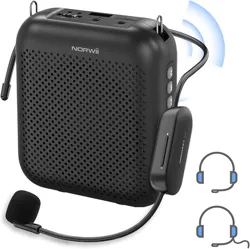
Portable Digital Voice Amplifier
S358 Pro series with or without S128
User Manual

2
Welcome to use digital voice amplifier S358 Pro series, its capacity of lithium batteries can
reach to 4000mAh. With double endurance and long working time, it’s suitable for teaching,
meeting, training, tour guide, singing, square dance, sales promotion, outdoor activities, etc. Please
read the manual carefully before using, so that you can operate the voice amplifier correctly and get
ideal performance.
Product functional features:
1. This amplifier has wired and UHF wireless versions. The wired version has no UHF receiving
circuit and cannot be used as a wireless version. The wireless version has a UHF wireless
receiving circuit, which can achieve wireless amplification with the UHF wireless transmitter.
2. Wired version has 2000mAh or 4000mAh built-in lithium battery separately; and UHF
wireless version has 2000mAh or 4000mAh built-in lithium battery separately.
3. Bluetooth function, you can connect the phone, you can also answer the phone via S358 Pro.
4. With digital amplification technology, its rated power is 5W and max power is up to 10W.
5. High performance double NdFeB foam edge loudspeaker, with clear acoustic fidelity, loud
voice, and high sensitivity.
6. Equipped with mainstream USB-C interface, and can be charged with computer USB port
and mobile phone charger.
7. Dial volume switch, simple and fast volume control. Clear voice tips for mode switch.
3
8. Support TF card, USB disk play, AUX-in, support MP3, WMA, WAV files, support cycle
play. Computer speaker function, it can transmit audio through USB port.
9. Memorizing the status and playback location automatically, enter the state before shutdown
every time you turn it on.
10. Patented industrial design, smooth structure, comfortable touch and easy portability.
Function map:
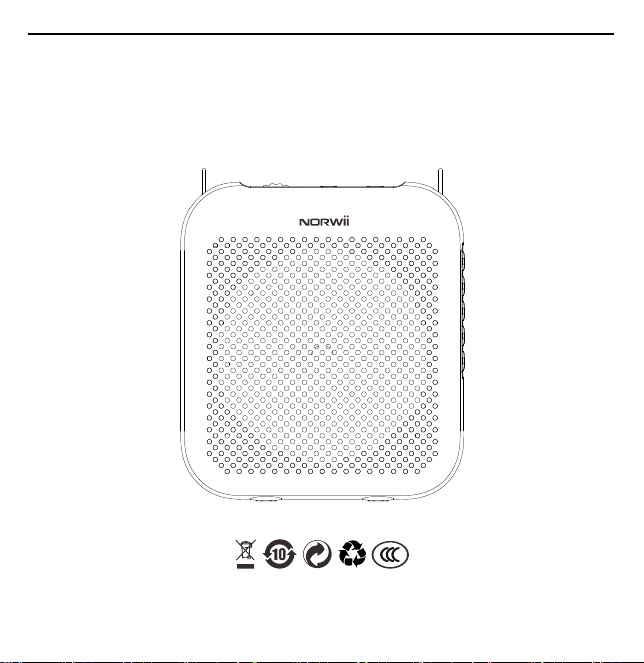
Voice Amplifier
S358 Pro
4
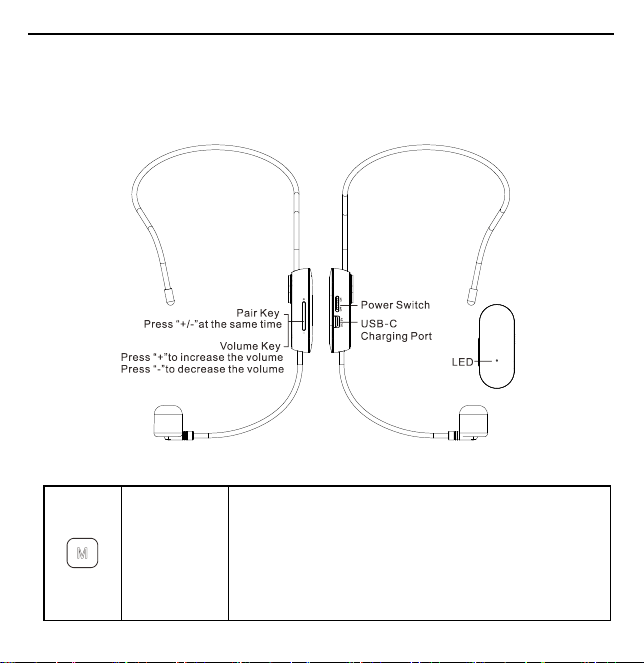
UHF Wireless Transmitter
S128
(S358 Pro UHF voice amplifier only)
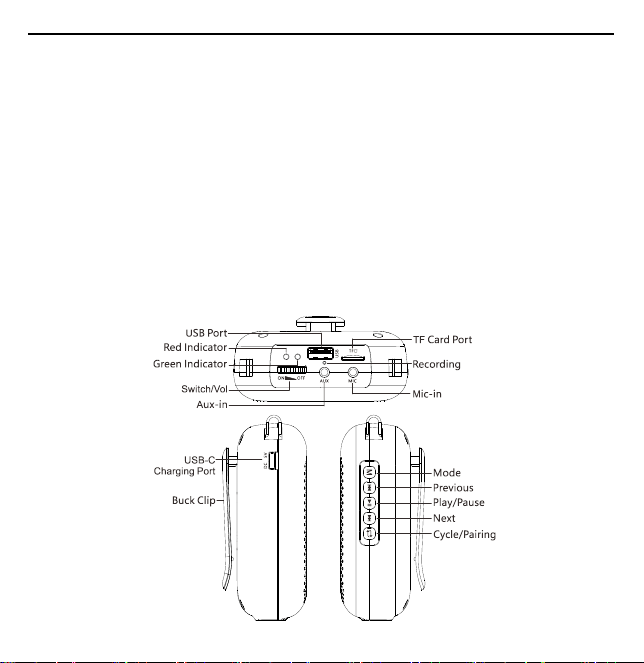
Keys and Ports instruction:
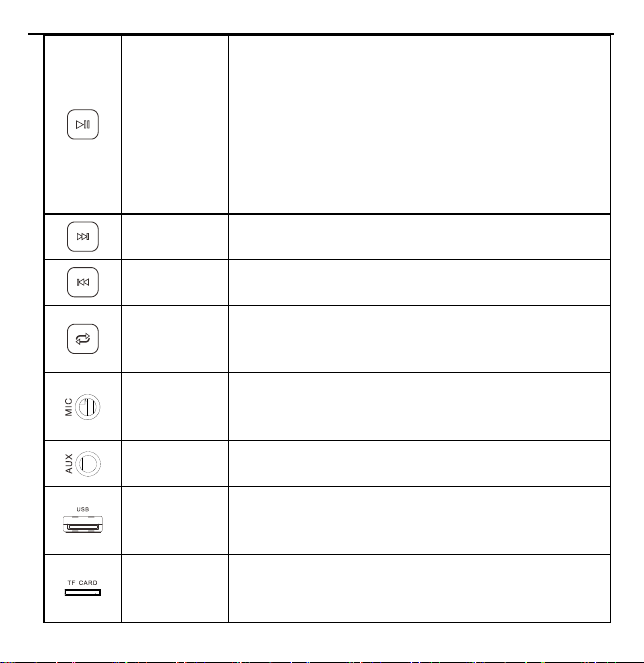
Mode
Shortly press to switch mode in the power-on state, the order
of the mode switching: wait mode → UHF mode (only UHF
wireless version) → Bluetooth mode → recording mode
(microphone inserted, USB disk or TF card) → MP3 mode
(USB disk or TF Card inserted) → AUX mode (the audio cable
plugged in).
5
Play/ Pause
In MP3, AUX, Bluetooth and USB sound card modes, short
press to pause playback, and short press again to resume
playback; In recording mode, short press to start recording,
short press again to pause recording, long press to exit
recording and save the recording file; In Bluetooth mode, after
connecting with the mobile phone, short press to answer the
call, long press to reject the call. If you press this key during
the call, it will hang up the call.
Next
In MP3 Mode, short press to play the next song, long press to
fast forward.
Previous
In MP3 Mode, short press to play the previous song, long press
to fast backward.
Cycle/Coding
In MP3 mode, short press cycle button to switch between full
cycle and single cycle mode; For UHF wireless version in
UHF mode, short press to do pairing.
Mic-in
In Standby mode, insert microphone to 3.5mm microphone
interface to amplify; In recording mode, insert microphone to
record.
Aux-in
3.5mm audio interface, support music play, when audio cable
plugged in, it will switch to AUX mode automatically
USB Port
When USB disk inserted, it will play MP3 file automatically.
When the voice amplifier is connected to a computer, you can
read and write USB disk through the computer.
TF Card
Port
When TF card inserted, it will play MP3 file automatically.
When the voice amplifier is connected to a computer, you can
read and write TF card through the computer.
6
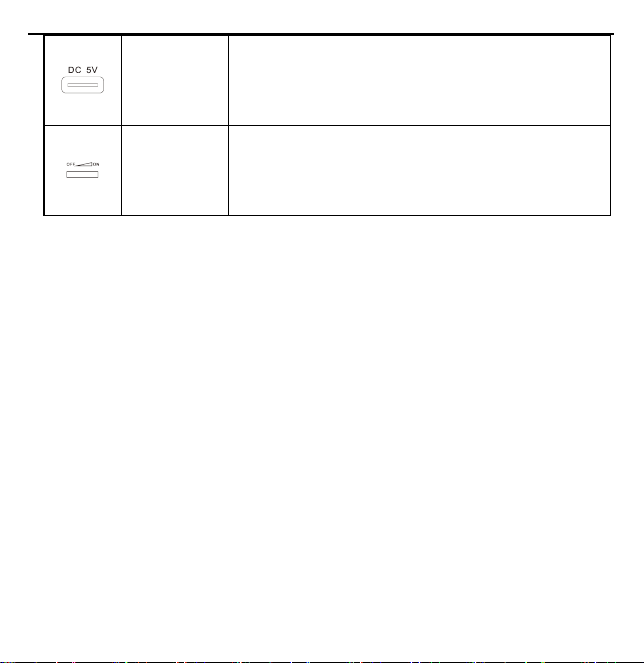
USB-C
Charging
Port
Charging port supports charging through 5V mobile phone
charger and computer USB port; You can connect the charging
port to the computer to read and write USB disk, TF card and
play music from your computer.
Dial Volume
Switch
Turn the dial to turn the machine on and off, and adjust the
volume, turn counterclockwise (pull left) to turn on and
increase the volume, and turn clockwise (pull right) to
decrease the volume and turn off.
Operation description:
1.
Power switch of the voice amplifier:
Pull up
the switch counterclockwise,
turn on the voice amplifier after you hear a "Ka" sound.
It will broadcast the current mode. Pull down the switch clockwise, turn off the voice amplifier
after you hear a "Ka" sound. When it is switched off, the voice amplifier will save the current
mode. Next time when you turn it on, it will automatically load the saved mode.
2.
Volume control of the voice amplifier:
Rotate the volume dial to adjust the volume. Pull the round button counterclockwise to
increase the volume and pull down clockwise to decrease the volume.
3.
Wired microphone voice amplification:

7
Insert the microphone into the MIC interface, and press to switch to “Standby mode”
to amplify. Please wear the microphone well and properly adjust the microphone position and
keep at least 50cm distance from amplifier to avoid howling.
4.
MP3 play of the voice amplifier:
In “Standby mode”, insert USB disk or TF card saved with audio files in MP3, WMA and
WAV formats, it will play the audio files automatically. Short press / to next
song/previous song, long press / to fast forward / fast backward. Short press
to switch between all cycle and single loop.
5.
AUX mode of the voice amplifier:
In standby mode, the voice amplifier is connected to external audio sources such as computers,
mobile phones, PAD, MP3 and other external audio sources through a 3.5mm AUX audio
cable, and it will automatically switch to "AUX mode", which can be used as an external
speaker.
6.
Pairing operation between UHF wireless voice amplifier and UHF wireless transmitter:

8
The product has been paired before leaving the factory. It is not necessary to pair again, but it
can be used for wireless sound reinforcement. If it is necessary to pair again according to the
actual situation.
Take the pairing operation of the voice amplifier and the S128 UHF Wireless microphone as
an example:
1)
Please turn on the power switch of the voice amplifier, then press the key to
enter the "UHF mode" with the corresponding prompt tone, and then press the key to
enter the "waiting for pairing".
2)
After turning the power switch of S128 transmitter to the "ON" power on state, press
the volume "+" button and the volume "-" button at the same time. The blue indicator will
flash three times for signal transmission. If the pairing is successful, the voice amplifier will
give a voice prompt of "pairing is successful". At this time, the voice amplifier can be used,
and the voice amplifier can be adjusted through "+" and "-".
3)
If the voice prompts pairing failure, you can repeat the above two pairing operations.
4)
Tips: This operation process is limited to wireless version only.
7.
Bluetooth mode of the voice amplifier:

9
In Bluetooth mode, after pairing the mobile phone and the voice amplifier, you can play music
or other audio files in the phone, short press to answer the call, long press to
reject the call. If you press this key during the call, it will hang up the call.
8. Voice amplifier connected to computer:
When you connect the voice amplifier with the computer through USB-C charging interface,
the voice amplifier displays “Hdd” on the LED screen. You can use the computer to read and
write the USB disk or TF card inserted in the voice amplifier. Note that when the USB disk
and TF card are inserted into the voice amplifier at the same time, the USB disk will be
identified preferentially. The voice amplifier can be used as an external speaker of the
computer at this time.
9.
Recording of the voice amplifier:
USB disk or TF card must be inserted, short press M to switch the mode to "Recording mode",
facing the recording hole of the voice amplifier, short press to start recording, short
press again to pause recording, long press to save the recording file and Exit
"Recording Mode". Then you can press M to switch to the "MP3 mode", press to play
the recording file.

10
10.
Low battery of the voice amplifier:
When the red LED of the voice amplifier flashes and there is a prompt tone, it means that the
power is low. Please charge the voice amplifier. It will take 3-4 hours to be fully charged.
11.
Voice amplifier charging:
Connect the voice amplifier to 5V mobile phone charger, mobile power bank and other devices
through the USB-C data cable; 1
)
When the voice amplifier is turned on and being charged:
the green LED light will be always on and the red LED will be flashing at a rate of 1 time per
second. After a full charge, the red LED light turns on and the green LED light is also on; 2
)
When the voice amplifier is turned off and being charged: the green LED light will be off, and
the red LED will be flashing at a rate of 1 time per second. When being fully charged, the red
LED will be off, and the green LED will go off.
12.
Power switch of the S128 transmitter:
Push the S128 transmitter switch to "ON" to turn on the power, and the blue indicator lights
up. Push the switch to "OFF" to turn off the power, and the blue indicator lights off.
13.
Volume control of the S128 transmitter:

11
Press the "+" key to increase the voice amplification volume, and press the "-" key to decrease
the voice amplification volume.
14.
S128 transmitter voice amplification:
Put the S128 transmitter on your head directly and adjust the microphone of the S128
transmitter to aim at your mouth, about 5mm away from your mouth. At this time, you can
directly amplify your voice and adjust the amount of voice.
15.
Low battery power of the S128 transmitter:
When the blue LED of the transmitter flashes, it means the power is low. Please charge the
transmitter.
16.
S128 transmitter charging:
When charging, insert one end of the USB-C data cable into the USB-C connector of the
transmitter, and connect the other end to the phone charger or computer USB port to charge.
The red charging indicator is always on when the power is off, and the red indicator is
automatically off when the battery is fully charged; The purple indicator light for charging is
always on when the machine is turned on, and the purple indicator light for full charge becomes
blue.

12
Tips and cautions:
1. The microphone should be placed 0.5 to 1 centimeter in front of your mouth. It is suggested
that the sponge cover should not be removed, because the sponge cover can weaken the air
flow, reduce the noise, and make the voice be clear.
2. Microphone should be as far as from the voice amplifier, and it’s better to place the voice
amplifier back to the microphone. If howling occurs you should reduce the volume or
enlarge the distance between the microphone and the voice amplifier. The microphone
pickup head should not be grasped by hand, otherwise it will be easily howling because of
resonance.
3. The product only supports standard 5V charging and does not support all kinds of QC quick
charging. Charging with a voltage higher than 5V will burn the product or fail to charge.
4. When you use it for the first time, or after a long time before you use it again, please keep
the voice amplifier be fully charged to ensure battery life.
5. In order to avoid distortion or damage caused by excessive voltage or current, please do not
insert the external sound source signal into the MIC interface.
6. Please don’t disassemble, or repair it by non-professional technical personnel. If there are
any problems, please contact our company for after sale service.

13
7. In order to prevent the danger of short-circuiting, please keep products or accessories be
away from water, moisture, rain, or splash.
8. Do not use it in inflammable and explosive areas or in areas where radio equipment is
prohibited. When you entering dangerous areas or prohibited areas, power should be turned
off to avoid potential safety hazards.
9. Do not use it in high temperature, high pressure, and high humidity environment (such as
sunshine exposure, stove, heater, humidifier, water pool, etc.). Do keep it from dangerous
sources (fire source, liquid, explosive, high-speed machinery, etc.) in order to avoid damage
and danger.
10. In order to protect the environment, please put the discarded voice amplifier in the
designated trash can or send it back to the manufacturer. It should not be discarded at will.

14
Product specification:
1. Specification of wired and UHF wireless version with 4000mAh lithium battery:
Rated power
5W
Peak power
10W
Loudspeaker
3-inch 2ohmic magnetic
speaker
Frequency response
120Hz-15KHz
Battery
3.7V/4000mAh, 2 lithium
batteries in parallel
Charging voltage
USB-C/DC 5V 1.5A
Charging
time
3-4 hours
Using time
Wired: 35-38hours
Wireless:16-20hours
Size
91.5*103*44mm
Net weight
222.5g
2. Specification of wired and UHF wireless version with 2000mAh lithium battery:
Rated power
5W
Peak power
10W
Loudspeaker
3-inch 2ohmic magnetic
speaker
Frequency response
120Hz-15KHz
Battery
3.7V/2000mAh, 1 lithium
batteries
Charging voltage
USB-C/DC 5V 1.5A
Charging
time
3-4 hours
Using time
Wired: 16-18hours
Wireless: 8-10hours
Size
91.5*103*44mm
Net weight
209.5g

15
3. Specifications of S128 UHF wireless transmitter Product Support
Battery
3.7V/600mAh
Charging voltage
USB/DC 5V 0.5A
Charging time
2 hours
Using time
Wired: 5-7hours
Chinese
frequency
660MHz-689MHz
Wireless distance
20 meters
US frequency
657.5MHz-662.5MHz
UK frequency
863MHz-865MHz
Packing List:
voice amplifier*1, 3.5mm audio cable*1, USB-C data cable*1, headset microphone*1, adjustable
waistband *1, user manual *1
For UHF wireless version, additional UHF transmitter S128 for wireless version*1, USB-C
cable*1.
Product Support
Shanghai Norwii Technology Co., Ltd
Address: No.277 Jinfeng Road, Pudong New Area, Shanghai, 201201, China
Tel: 86-21-51872080
Email: [email protected]

