Lighting made better.
support@sunco.com
(844) 334-9938
SKU: PN14_SW
User Manual
1x4 LED
Selectable
Ceiling Panel
Ceiling Panel
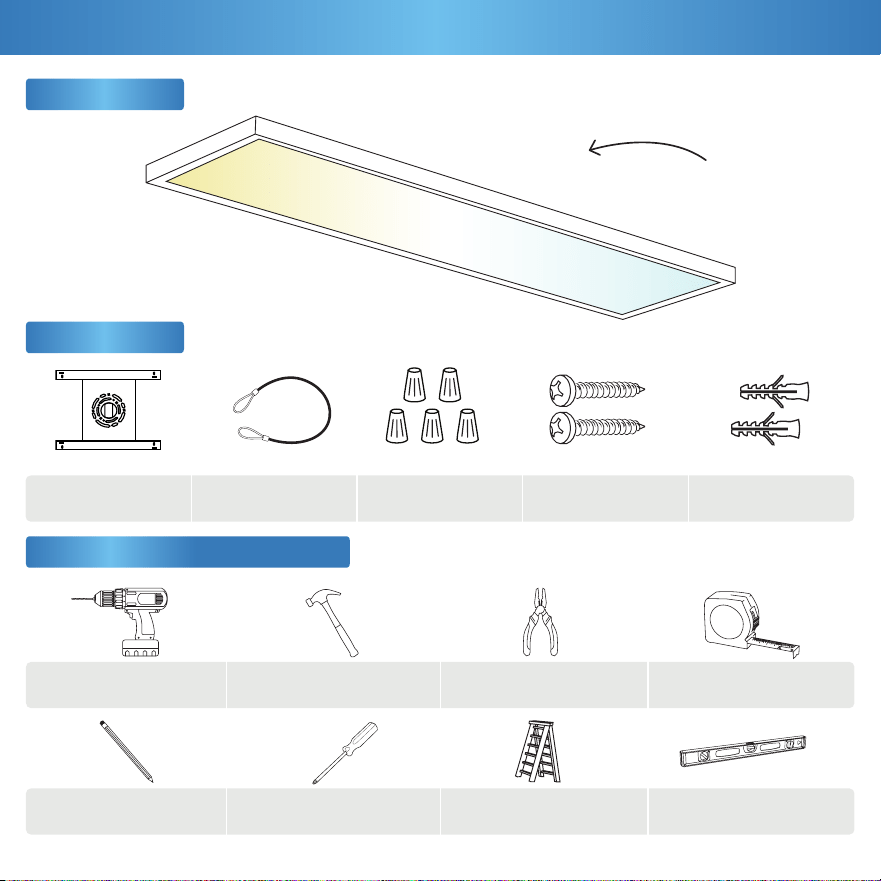
Accessories
Wire Nuts
Mounting Bracket
M4*30 Self-Tapping
Plastic Anchors
1
Safety Cable
/HɢʃȱʑȾɏȩɏʙLɳKɢ
ʙLɀʑUɪɸʙɨ
What’s in the Box?
x1
(A)
(D)
(B)
(E)
(C)
x5
x5
x4 x5
Ladder
Philips ScrewdriverPencil
Pliers
Leveler
Drill Hammer
Get Your Gear (Not Included)
Tape Measure
This device complies with Part 15 of the FCC rules.
Operation is subject to the following two conditions:
1) This device may not cause harmful interference.
2) This device must accept any interference that may cause
undesired operation. Please review all instructions carefully
prior to installation.
ŧ7XUQRƂFLUFXLWEUHDNHUEHIRUHLQVWDOOLQJWKLVƃ[WXUH
• Suitable for use in wet environments at temperatures
ranging from -4°F to 113°F.
ŧ1RWIRUXVHZKHUHGLUHFWO\H[SRVHGWRZDWHU
ŧ1RWLQWHQGHGIRUXVHZLWKHPHUJHQF\ƃ[WXUHV
• Not compatible with photo controls.
• Not compatible with occupancy sensors.
• Not compatible with third party sensors.
• Not compatible with all dimmers. For more dimming
information, please visit www.sunco.com.
• Not compatible with timing devices.
• All electrical connections must be in accordance with local
and National Electric Code (N.E.C.) standards.
• Please review installation manual carefully before
SURFHHGLQJ&RQVXOWDTXDOLƃHGHOHFWULFLDQLI\RXDUHXQIDPLOLDU
with proper electrical wiring connections.
7RUHGXFHWKHULVNRIILUHHOHFWULFVKRFNRUSK\VLFǏOLQMXU\
2
Safety Information
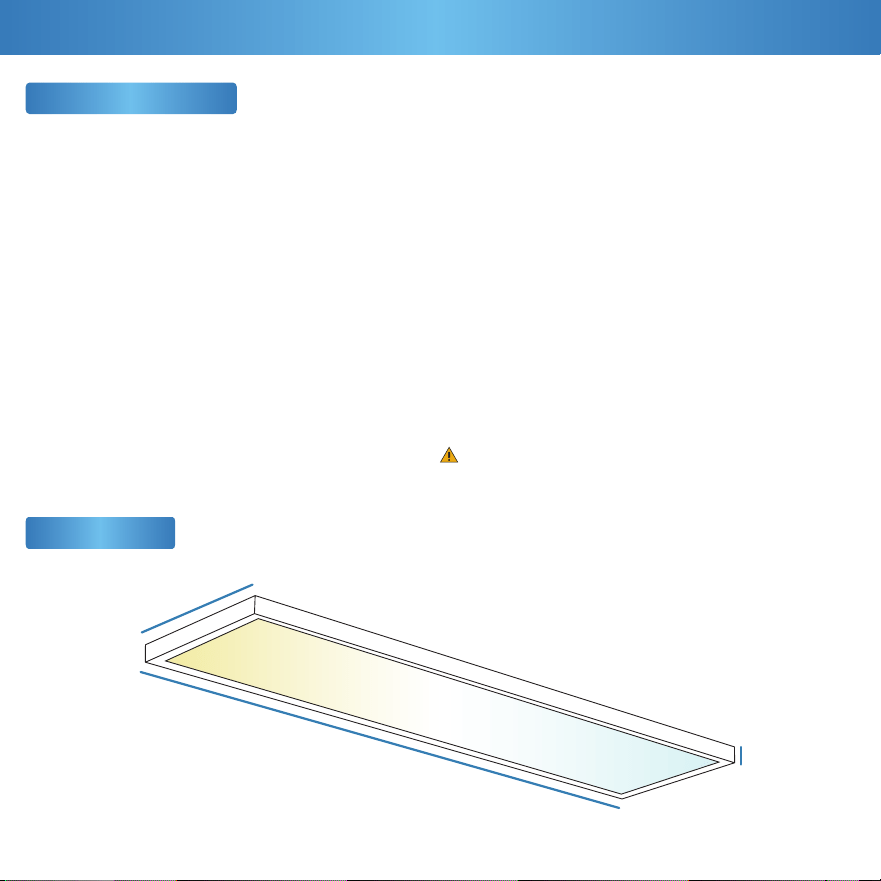
Product Size
2
Before You Start
WARNING:
&ǏQFHU5HSURGXFWLYH+ǏUPZZZ3:ǏUQLQJVFǏJRY
47.4” Length
12” Width
1.4” Height
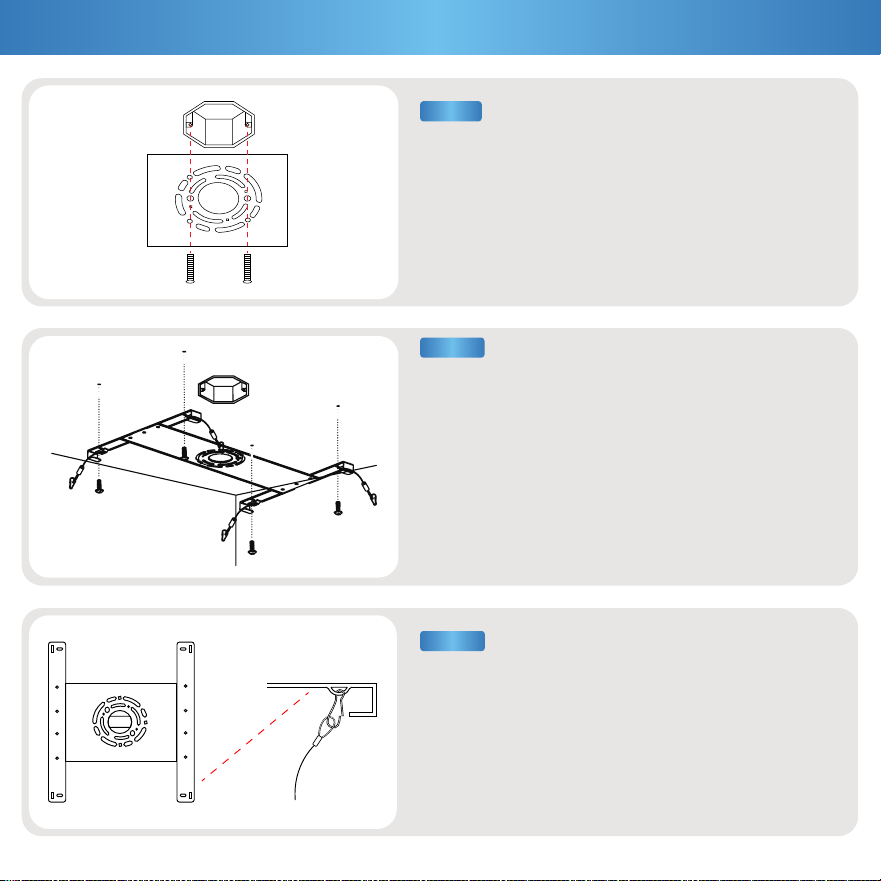
a. Mark the ceiling to desired installation area using
the mounting bracket (A) as a reference.
b. Mark and drill pilot holes, then install plastic
anchors (E) and self-tapping screws (D).
a. For added security, clip the safety cable (B) to the
mounting bracket (A).
a. Turn off circuit breaker before installation.
b. Align the mounting bracket (A) to existing junction box,
then install with self-tapping screws (D).
Note: Compatible with 2.1”, 2.75”, or 3.75” junction boxes.
3
Installation Guide (Surface Mount)
STEP 3
STEP 2
STEP 1
(A)
(D)
(D)
(E)
(A)
(A)
(B)
STEP 5
STEP 4
STEP 6
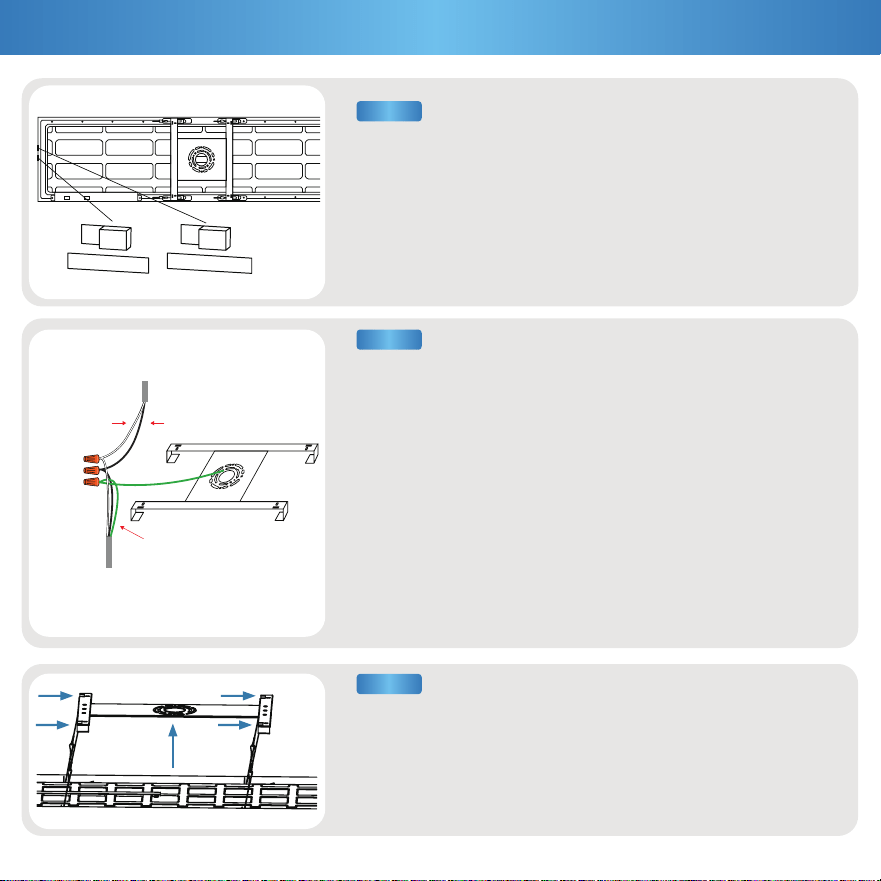
a. Use switches to select desired CCT and brightness settings:
a. Connect luminaire wires with supply wires using included
wire nuts (C):
• Black to Black (Live) • White to White (Neutral)
• Green to Green (Ground)
b. For wire connections with multiple hot wires (240/277V):
• Black to Red (HOT1) • White to Red (HOT2)
• Green to Bare Copper (Ground)
c. Optional: Connect compatible device for dimming features.
Otherwise, cap wires if dimmer is not being used.
• Pink to Pink (DIM-) • Purple to Purple (DIM+)
Brightness
-30W
-40W
-50W
CCT
-3500K
-4000K
-5000K
a. Hold panel flush against ceiling, then slide and lock into place.
b. Turn on circuit breaker and test light.
4
Installation Guide (Cont.)
3
0
W
4
0
W
5
0
W
3500K
4000K
5000K
White (Neutral) Black (Live)
Ground (Green)
Supply
Wires
(C)
Luminaire
Wires
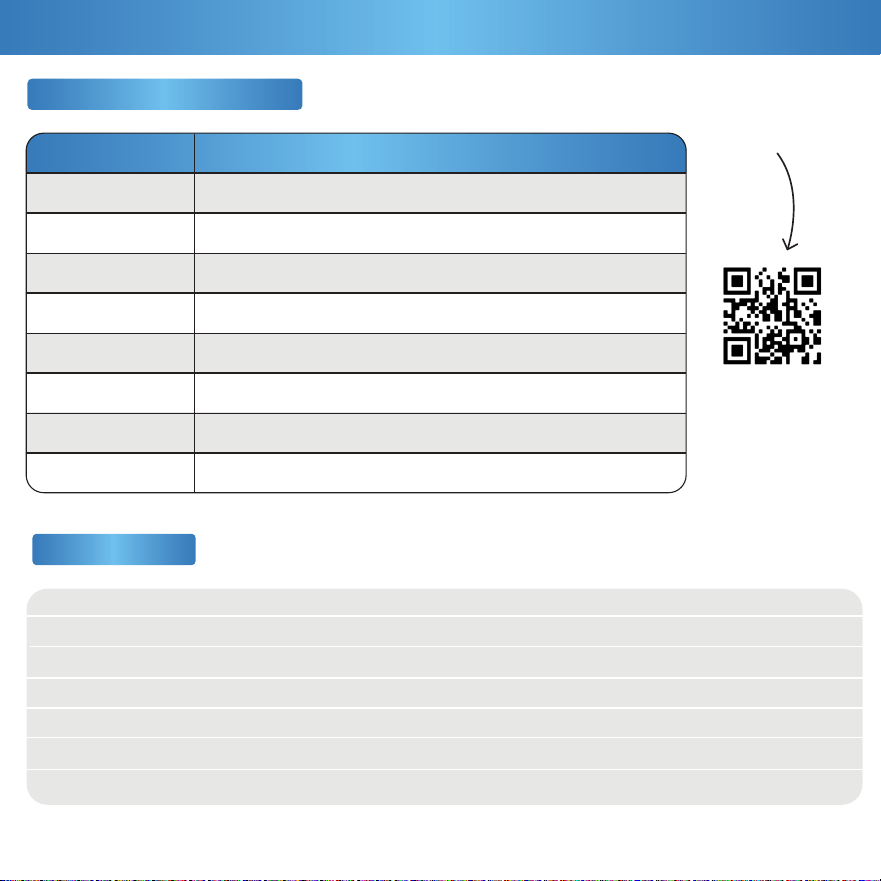
Voltage
Wattage
Power Factor
Beam Angle
Material
CRI
Dimmable
120-277V
:::
>0.9
120°
$/63&&36
0-10 V
KUV
OP
IP20
+]
110 lm/W
'ǏPS5ǏWHG
<HǏUV
Average Lifetime
Lumens
IP Rating
Frequency
Efficacy
Moisture Rating
Warranty
Specifications
Product Details
Brand
Model
LUTRON
DVSTV
DVSTV-WH
WS4FBL3PTC
SF10P-W
5+)%/37&
DD710-BDZ
AWSMT-7DW
LEGRAND
LEVITON
LEVITON
NTSTV-DV
Recommended Dimmers
LUTRON
LUTRON
LEGRAND
COOPER
6FʋɚIʝɠʃȱɏʓʅɸɗ
FʝʛSDʤɵɬȵɏʏʖʛȷʑɠʙLVɢ
Feeling in the dark about an issue with your product? No
worries! Our troubleshooting section is here to shed some light
and provide you with easy-to-follow solutions for any problem.
Light isn’t bright enough.
Light not dimming to lowest setting.
)L[WXUHEX]]LQJZLWKDSSOLDQFHVRUHOHFWURQLFGHYLFHV
)L[WXUHEX]]LQJZKHQGLPPHG
/RRNIRUQHDUE\LQWHUIHUHQFHVWKDWFDQFDXVHEX]]LQJ
Such as televisions, radios, computers, etc.
Light not dimming smoothly.
/LJKWƄLFNHULQJZLWKRWKHUOLJKWVRQWKHVDPHFLUFXLW
Check that the lights on the same circuit are not
overloading the circuit.
/LJKWƄLFNHULQJZKHQWXUQHGRQ
/LJKWƄLFNHULQJZKHQGLPPHG
Verify dimmer switch compatibility.
'RXEOHFKHFNLIƃ[WXUHLVSURSHUO\FRQQHFWHG
and circuit breaker hasn’t been tripped.
Check light-dimmer compatibility. Consider purchasing
compatible switch if necessary.
9HULI\GLPPHUFRPSDWLELOLW\ZLWKƃ[WXUH
Light isn’t turning on.
Light not compatible with dimmer switch.
)L[WXUHEX]]LQJZLWKSRZHURXWDJHV Verify light is connected to surge protector securely.
Verify dimmer switch compatibility.
9HULI\ƃ[WXUHFRPSDWLELOLW\DQGWKDWLWLVJURXQGHG
/LJKWLVƄLFNHULQJZKHQWXUQLQJRQ
&KHFNWKDWƃ[WXUHZLULQJFRQQHFWLRQVDUHVHFXUH
&KHFNSURSHUZDWWDJHDQGIRUXQREVWUXFWHGƃ[WXUH
Ensure minimum dimmer load requirement is met.
If you still need some assistance, please feel free to contact
XVZLWKDQ\TXHVWLRQV2XUWHDPRIOLJKWLQJH[SHUWVDUH
happy to help brighten your day.
Installation
Common Troubleshooting
Dimming
Flickering
Buzzing