IDS Geo
MNG/2023/007 Rev. 1.3 July 2026 User Manual
ORIGINAL INSTRUCTION IN ENGLISH LANGUAGE
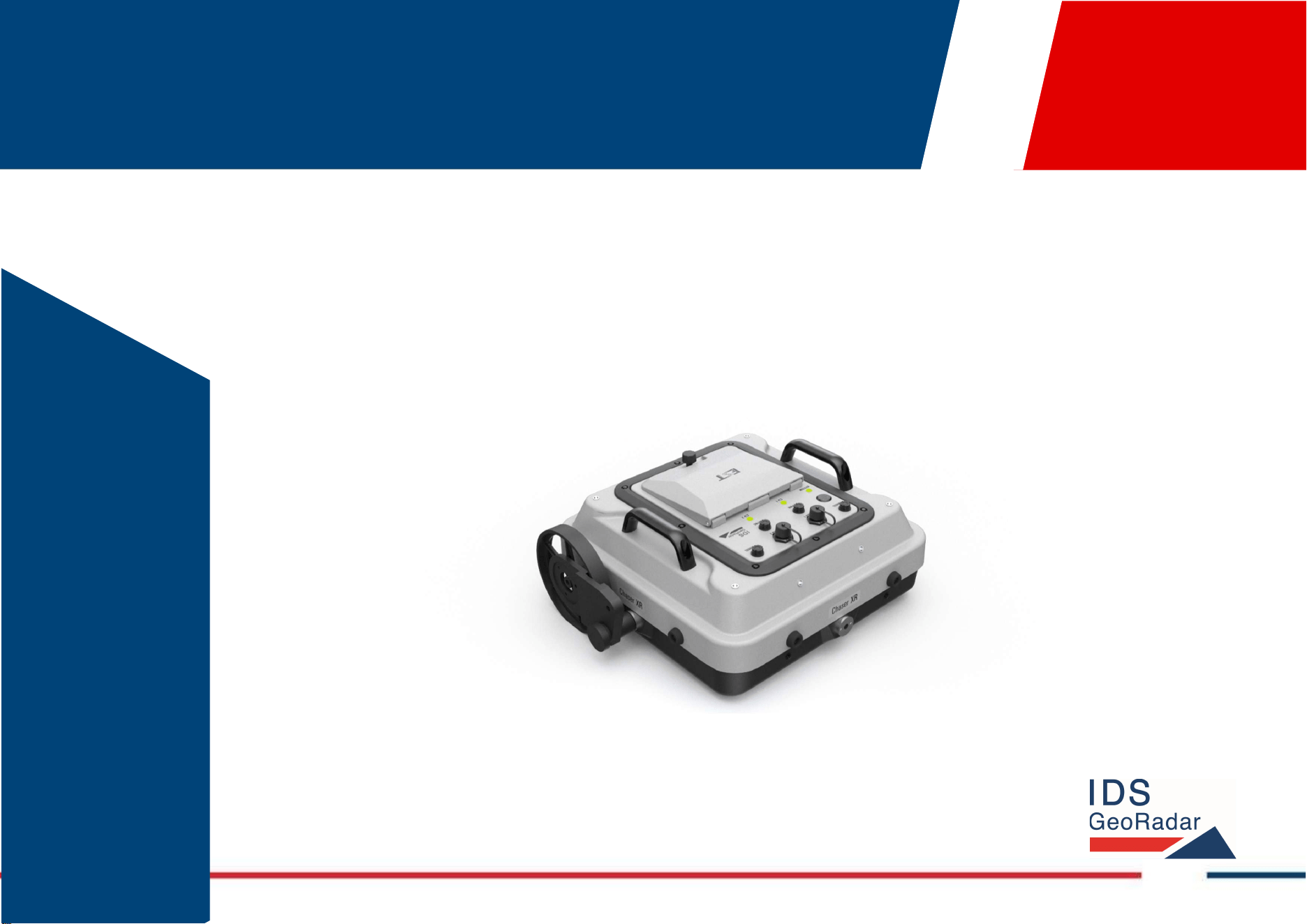
Chaser XR
(Antenna CHASERXR or CHASERXR2)
Version 001
User Manual

Chaser XR – Ver. 001 – User Manual Mod: MDM/011/M2 Rev8
IDS GeoRadar Srl MNG/2023/007 Rev. 1.3 2/ 57

Chaser XR – Ver. 001 – User Manual Mod: MDM/011/M2 Rev8
IDS GeoRadar Srl MNG/2023/007 Rev. 1.3 3/ 57
LEGAL NOTICE
Use of the Manual
This Manual is intended to be used solely by authorized user of IDS GeoRadar Systems. It is specific for internal business purpose only. If you are not an authorized user, you are NOT allowed to
read this Manual and you must return it to IDS GeoRadar as soon as possible. Access to and use of this Manual is also provided subject to the acceptance of the Disclaimer set out below.
Disclaimer
About the Manual
This Manual has been drafted by IDS GeoRadar with the due care in order to ensure the accuracy and completeness. However, please note that no warranty is provided about the fact that the
Manual will be free from error or omission and about the accuracy and/or fitness to the purpose of any information contained herein.
Any representation and/or statement contained herein has been written in good faith and on the basis that, due to negligence, lack of care or otherwise, IDS GeoRadar is not liable for any loss,
including direct, indirect or consequential losses, in contract or in tort for any misstatement or omission contained herein which has occurred or may occur with reference to any representation
and/or statement contained in the Manual.
User shall also acknowledge that some information contained in the Manual may not be up to date. IDS GeoRadar may amend the information contained in the Manual from time to time and IDS
GeoRadar shall not be deemed liable in the event that damages arise with reference to changed circumstances or other information which may affect the accuracy of any information contained in
this version of the Manual.
About the Product
All products designed, produced and distributed by IDS GeoRadar, its Subsidiaries, Affiliated and authorized Distributors (Products) shall not be used, in the design, development, production or use
of chemical, biological, nuclear ballistic weapons. Buyer/ User will defend, indemnify and hold IDS GeoRadar harmless against any liability (including attorney’s fees) for non-compliance with the
terms of this paragraph.
If IDS GeoRadar requires that Buyer/User shall carry out a training with reference to some Product categories, no operation or use of the Products shall be started before its designated Operator/s
has got the User Certificate, as defined by IDS GeoRadar specific procedure which the Buyer confirms to know and accept.
For Products which include specific “Operational” software with automatic data processing and analysis “Tools”, e.g. RockSpot, IBIS Products; Hydra Products, User shall be aware that the results
provided by these “Tools” may be not error free. User that completely relies on the outcomes provided by these Tools only, does it at his own risk.
In no event IDS GeoRadar shall be liable for special, direct, indirect, incidental, exemplary, punitive or consequential damages including, but not limited to, loss of profits or revenue, caused by the
missed or incomplete observance of the instructions and prescriptions for the use of the Products, either separately or in combination with other products.
This paragraph provides only a non-exhaustive summary of the full Product disclaimer. Please see the full Product disclaimer included into the relevant section of this Manual for detailed information.

INDEX Mod: MDM/011/M2 Rev8
IDS GeoRadar Srl MNG/2023/007 Rev. 1.3 4/ 57
Table of Contents
1 INTRODUCTION .......................................................................................................................................................................................................................................... 7
1.1 ESTIMATED READING TIME .................................................................................................................................................................................................................................. 7
1.2 PURPOSE .......................................................................................................................................................................................................................................................... 7
1.3 APPLICATION FIELD ............................................................................................................................................................................................................................................. 7
1.4 INTENDED READERSHIP ........................................................................................................................................................................................................................................ 7
1.5 AUTHORIZATION OF USE ...................................................................................................................................................................................................................................... 7
1.5.1 CE Compliance ...................................................................................................................................................................................................................................... 8
1.5.2 UKCA Compliance ................................................................................................................................................................................................................................. 8
1.5.3 FCC Compliance .................................................................................................................................................................................................................................... 8
2 HOW TO READ THE MANUAL ..................................................................................................................................................................................................................... 8
2.1 MANUAL LAYOUT ............................................................................................................................................................................................................................................... 8
2.2 SYMBOLS .......................................................................................................................................................................................................................................................... 8
2.3 GLOSSARY & ACRONYMS ..................................................................................................................................................................................................................................... 9
3 SAFETY DIRECTIONS ..................................................................................................................................................................................................................................10
3.1 DESCRIPTION ................................................................................................................................................................................................................................................... 10
3.2 INTENDED USE ................................................................................................................................................................................................................................................. 10
3.3 REASONABLY FORESEEABLE MISUSE ..................................................................................................................................................................................................................... 10
3.4 LIMITS OF USE ................................................................................................................................................................................................................................................. 10
3.5 RESPONSIBILITIES ............................................................................................................................................................................................................................................. 10
3.6 HAZARD OF USE ............................................................................................................................................................................................................................................... 11
4 GENERAL DESCRIPTION .............................................................................................................................................................................................................................14
4.1 DELIVERY CONTENTS ......................................................................................................................................................................................................................................... 14
4.1.1 Chaser XR Lite Pack (SAP 989791) ...................................................................................................................................................................................................... 14
4.1.2 Chaser XR Drag Kit (SAP 989754, optional) ........................................................................................................................................................................................ 15
4.1.3 Chaser XR Positioning Kit (SAP 986689, Optional) .............................................................................................................................................................................. 16
4.1.4 Chaser XR Cart (SAP 999066, Optional) .............................................................................................................................................................................................. 16
4.1.5 Chaser XR GNSS Kit for cart (SAP 1020729, Optional) ........................................................................................................................................................................ 17
4.1.6 Chaser XR Off Road Kit for cart (SAP 1020726, Optional)................................................................................................................................................................... 17
4.2 BASIC SYSTEM COMPOSITION ............................................................................................................................................................................................................................. 17
4.3 ACCESSORIES ................................................................................................................................................................................................................................................... 18
4.3.1 Chaser XR Drag Kit (optional) ............................................................................................................................................................................................................. 18

INDEX Mod: MDM/011/M2 Rev8
IDS GeoRadar Srl MNG/2023/007 Rev. 1.3 5/ 57
4.3.2 Chaser XR Positioning Kit (optional) ................................................................................................................................................................................................... 19
4.3.3 Chaser XR Cart (optional) ................................................................................................................................................................................................................... 19
4.4 BATTERY HANDLING ......................................................................................................................................................................................................................................... 20
4.4.1 Charging ............................................................................................................................................................................................................................................. 20
4.4.2 Operation/Discharging ....................................................................................................................................................................................................................... 20
4.4.3 Storage ............................................................................................................................................................................................................................................... 20
4.5 GNSS REQUIREMENTS ...................................................................................................................................................................................................................................... 20
4.5.1 How to connect Chaser XR to a GNSS ................................................................................................................................................................................................. 20
4.5.2 How to connect Chaser XR to a TPS .................................................................................................................................................................................................... 21
5 HOW TO SET UP CHASER XR ......................................................................................................................................................................................................................22
5.1 HOW TO…SET UP CHASER XR LITE....................................................................................................................................................................................................................... 22
5.2 HOW TO…SET UP CHASER XR DRAG KIT (OPTIONAL) .............................................................................................................................................................................................. 23
5.3 HOW TO…SET UP CHASER XR POSITIONING KIT (OPTIONAL) .................................................................................................................................................................................... 26
5.4 HOW TO…SET UP CHASER XR CART (OPTIONAL) .................................................................................................................................................................................................... 26
5.5 HOW TO…SET UP CHASER XR GNSS KIT FOR CART (OPTIONAL) ................................................................................................................................................................................. 29
5.6 HOW TO…SET UP CHASER XR OFF ROAD KIT FOR CART (OPTIONAL) .......................................................................................................................................................................... 30
6 HOW TO WORK ON SITE WITH CHASER XR ................................................................................................................................................................................................32
6.1 HOW TO SET UP CHASER XR IN HH OR VV POLARIZATION ....................................................................................................................................................................................... 32
6.2 HOW TO CONNECT THE FIELD PC AND THE CHASER XR ANTENNA ............................................................................................................................................................................... 32
6.3 HOW TO COLLECT CHASER XR DATA IN LINE MODE ................................................................................................................................................................................................. 35
6.4 HOW TO COLLECT CHASER XR DATA IN GRID MODE ............................................................................................................................................................................................... 37
6.5 HOW TO COLLECT CHASER XR DATA IN GNSS MODE ............................................................................................................................................................................................... 39
6.6 HOW TO COLLECT CHASER XR DATA IN TPS MODE ................................................................................................................................................................................................. 41
6.7 HOW TO COLLECT DATA IN FREE RUNNING MODE .................................................................................................................................................................................................. 42
6.7.1 How to collect data in Free Running Mode with GNSS or TPS ............................................................................................................................................................ 42
6.7.2 How to collect data in Free Running Mode in Line or Grid ................................................................................................................................................................. 43
7 CARE AND TRANSPORT .............................................................................................................................................................................................................................45
7.1 CLEANING INFORMATION ................................................................................................................................................................................................................................... 45
7.2 BATTERY REMOVAL INFORMATION ...................................................................................................................................................................................................................... 46
7.3 PERIODICAL CHECK ........................................................................................................................................................................................................................................... 46
7.4 PROPER SYSTEM USE AND TRANSPORT/SHIPPING .................................................................................................................................................................................................... 47
8 IDS GEORADAR SUPPORT ..........................................................................................................................................................................................................................48
8.1 MYWORLD ...................................................................................................................................................................................................................................................... 48

INDEX Mod: MDM/011/M2 Rev8
IDS GeoRadar Srl MNG/2023/007 Rev. 1.3 6/ 57
8.2 HOW TO MANAGE RETURN FOR SERVICE ............................................................................................................................................................................................................... 48
1 INTRODUCTION Mod: MDM/011/M2 Rev 8
IDS GeoRadar Srl MNG/2023/007 Rev. 1.3 7/ 57
1 INTRODUCTION
This document describes the Chaser XR system and accessories, that is a dual
frequency GPR system by IDS GeoRadar. This document refers to the
concepts the User must learn before initiating the utilization of this device.
Therefore, it is mandatory to carefully read the entire document before
starting and operating the system.
1.1 Estimated Reading Time
The estimated reading time of the entire document is 120 minutes
1.2 Purpose
The purpose of this document is to drive the Reader to a list of actions to
install and use the Chaser XR system, in a thorough, correct, and safe way.
The structure of the manual is organized in a collection of "how-to" as well
as descriptive chapters. Each chapter contains illustrations and basic
descriptions of the main operations to be carried out for system installation
and use on field.
Detailed information of the Chaser XR acquisition software, namely uMap-
Logger, are given in a separate User’s Manual.
1.3 Application field
The main application of Chaser XR and accessories, is the collection of GPR
data over areas of variable extension, and for applications including, but not
limited to, glaciology, environmental, archaeology, geology, geotechnic,
rivers. Also, any type of buried objects or structures may be the aim of the
system if these are buried within its depth of reach.
1.4 Intended readership
The intended Reader(s) of this manual is the technician(s) in charge of using
the system that has undergone the IDS GeoRadar training for Chaser XR.
Training to users, may also be delivered by either IDS GeoRadar local Selling
Units or Distributor Partners.
1.5 Authorization of use
The use of Chaser XR system may be subject to a license and/or an
authorization by the Competent Ministry of the country where the system
will be used. An individual license and restrictions are in place to date in the
following European countries:
France: https://www.anfr.fr/en/broadcasting-authorisation/reseaux-
professionnels/les-frequences-utilisees-a-titre-temporaire/les-systemes-
dimagerie-radar-de-type-gpr-wpr/
Germany:
https://www.bundesnetzagentur.de/SharedDocs/Downloads/DE/Sachgebie
te/Telekommunikation/Unternehmen_Institutionen/Technik/Inverkehrbrin
genvonProdukten/Schnittstellenbeschreibungen/OrtungsfunkOR/SSBOR_N
N022.pdf?__blob=publicationFile&v=4
Portugal: https://www.anacom.pt/render.jsp?categoryId=389647
Romania: https://www.ancom.ro/radio-spectrum_2749
Spain: https://www.boe.es/diario_boe/txt.php?id=BOE-A-2011-19146
Sweden:
https://www.pts.se/sv/bransch/radio/radiotillstand/ansokningshandlingar/
Liechtenstein and Switzerland:
https://www.bakom.admin.ch/bakom/en/homepage/frequencies-and-
antennas/frequency-use-with-or-without-licences/radiocommunication-
licences-in-general.html
For more details with reference to the restriction, please refer to the
following website: ECO Frequency Information System (cept.org)
CH DE
ES FR
LI PT
RO SE
2 HOW TO READ THE MANUAL Mod: MDM/011/M2 Rev 8
IDS GeoRadar Srl MNG/2023/007 Rev. 1.3 8/ 57
1.5.1 CE Compliance
This equipment complies with the essential requirements
and other relevant provisions of Directive 2014/53/UE,
Directive 2011/65/UE + 2015/863/UE RoHS and Regulation
(EC) No 1907/2006 REACH. The full Declaration of its
Conformity can be found either on the CD or a separate
document included with this product.
This is a Class A product. In a domestic environment it may
cause radio interference. If so, the user may need to take
adequate measures.
1.5.2 UKCA Compliance
This equipment complies with the essential requirements of
the Radio Equipment Regulations 2017 (S.I. 2017/1206). The
full Declaration of its Conformity can be found either on the
CD or a separate document included with this product.
Licensing requirements in UK can be found here:
https://www.ofcom.org.uk/manage-your-
licence/radiocommunication-licences/licensed-short-range
1.5.3 FCC Compliance
This device complies with part 15F of the FCC Rules. Operation is subject to
the following two conditions:
1. This device may not cause harmful interference, and
2. This device must accept any interference received, including
interference that may cause undesired operation.
2 HOW TO READ THE MANUAL
2.1 Manual Layout
As mentioned, this User Manual is structured in a “How to” manner. In each
of the relevant chapter, the User shall find the basics information to carry out
the Chaser XR installation and use.
It is strongly recommended to go through this manual thoroughly, and to
read it carefully. However, as the document is divided into a first part that is
descriptive of the whole system, but also into procedures that are self-
consistent and that can be read sparsely, it is not mandatory to read this
document chapter after chapter, in case of need.
Please, note that images and pictures shown in the manual aims at
supporting the Users in understanding the operations described. However,
pictures and images portraited herein may, from time to time, slightly differ
from the actual Hardware and Software they describe.
2.2 Symbols
Warning messages are an essential part of the Safety Concept of the
instrument. They appear wherever hazards or hazardous situations can
occur.
Warning messages:
• make the user alert about direct and indirect hazards concerning
the use of the product, and
• contain general rules of behaviour.
For the user’s safety, all safety instructions and safety messages shall be
strictly observed and followed. Therefore, the manual must always be
available to all persons performing any tasks described herein.
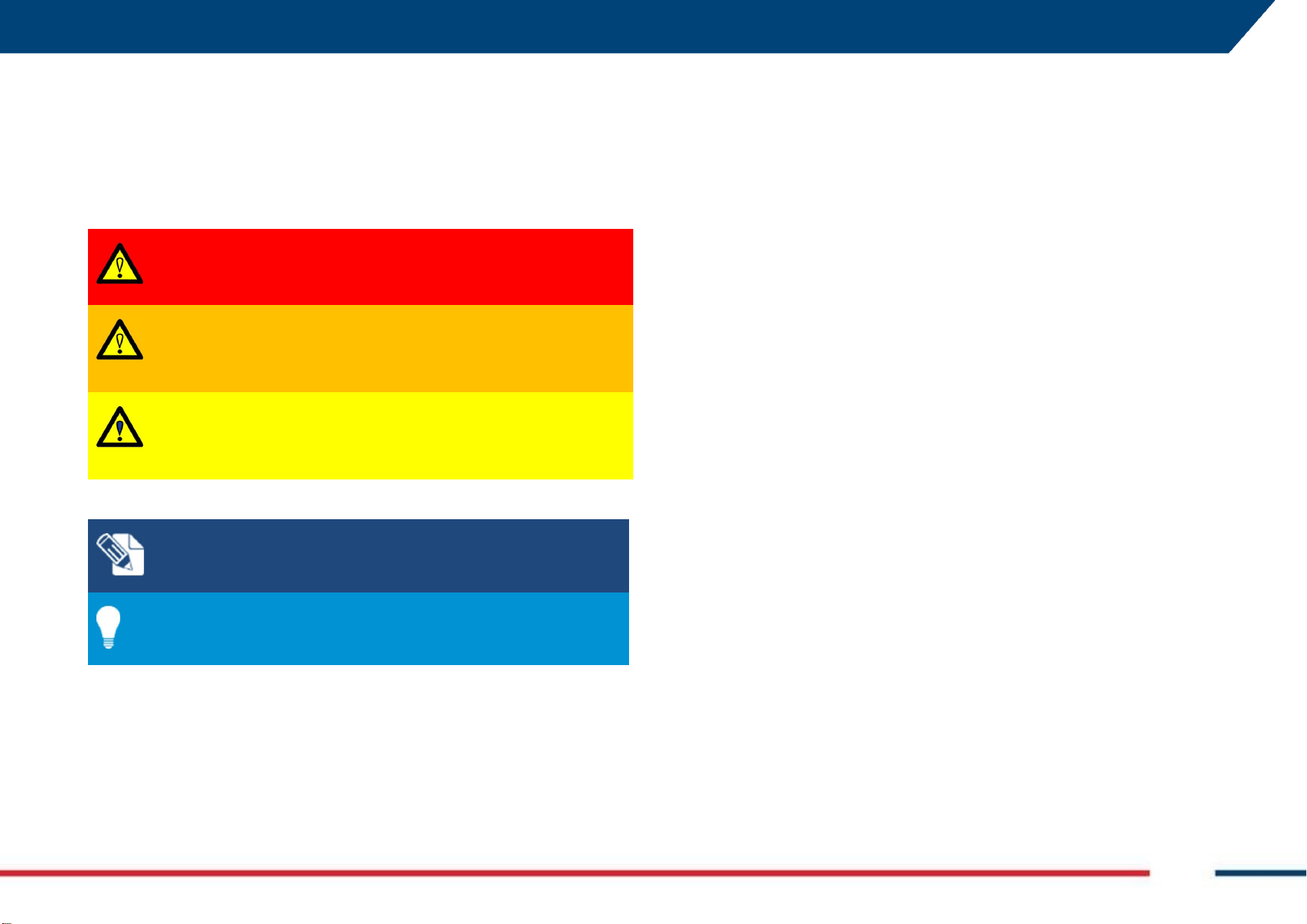
DANGER, WARNING, CAUTION and NOTICE has got standardized signal
words for identifying levels of hazards and risks related to personal injury and
property damage.
2 HOW TO READ THE MANUAL Mod: MDM/011/M2 Rev 8
IDS GeoRadar Srl MNG/2023/007 Rev. 1.3 9/ 57
For safety purposes, it is important to read and fully understand the table
below with the different signal words and their definitions. Supplementary
safety information symbols may be placed within a warning message as well
as supplementary text.
Type
Description
DANGER
Indicates an imminently hazardous situation which,
if not avoided, will result in death or serious injury.
WARNING
Indicates a potentially hazardous situation or an
unintended use which, if not avoided, could result
in death or serious injury.
CAUTION
Indicates a potentially hazardous situation or an
unintended use which, if not avoided, may result in
minor or moderate injury.
NOTICE: Note text/to keep in mind
Tip text
2.3 Glossary & Acronyms
The following acronyms and naming are used in this manual:
- Chaser XR: IDS GeoRadar GPR System
- Controller: PC / Tablet used by the user for data acquisition. The data
acquisition SW (client) is performed on the controller.
- Free Running: acquisition mode triggered by the “time” not by
encoder (wheel or any other type).
- GNSS: Global Navigation Satellite System.
- GPR: Ground Penetrating Radar or Georadar or Ground Probing
Radar.
- HMI: Human Machine Interface.
- HW: Hardware.
- NMEA format: National Marine Electronics Association format.
- RTK: Real Time Kinematic.
- SNR: Signal to Noise Ratio.
- SW: Software.
- UBLOX: GNSS device within the GPR system.
- uMap-Logger: IDS GeoRadar software for GPR data acquisition.
- SAP (follow by 6-digit): ID code to identify the part number.
3 SAFETY DIRECTIONS Mod: MDM/011/M2 Rev 8
IDS GeoRadar Srl MNG/2023/007 Rev. 1.3 10/ 57
3 SAFETY DIRECTIONS
3.1 Description
The following directions enable the person responsible for the product, and
the person who uses the equipment, to anticipate and avoid operational
hazards.
The person responsible for the product must ensure that all users understand
these directions and adhere to them.
3.2 Intended Use
The intended use of Chaser XR is the detection of underground features in
diverse environmental conditions, and within the depth of reach of the
system itself, including but not limited to:
• Geology
• Geotechnical
• Environmental
• Glaciers
• Rivers
• Archaeology
• Forensic
• Buried structures, in general.
NOTE: The product is intended for professional use only; not
for consumers use.
3.3 Reasonably Foreseeable Misuse
Infringing traffic regulation.
Use of the product without instruction.
Use outside of the intended use and limits.
Opening the product using tools, for example screwdriver, unless this
is permitted for certain functions.
Modification or conversion of the product.
Use after misappropriation.
Use of products with obvious damages or defects.
Use with accessories from other manufacturers without the prior
explicit approval of IDS GeoRadar s.r.l.
Inadequate safeguards at the working site.
3.4 Limits of Use
Environment: Suitable for use in an atmosphere appropriate for permanent
human habitation. Not suitable for use in explosive environments.
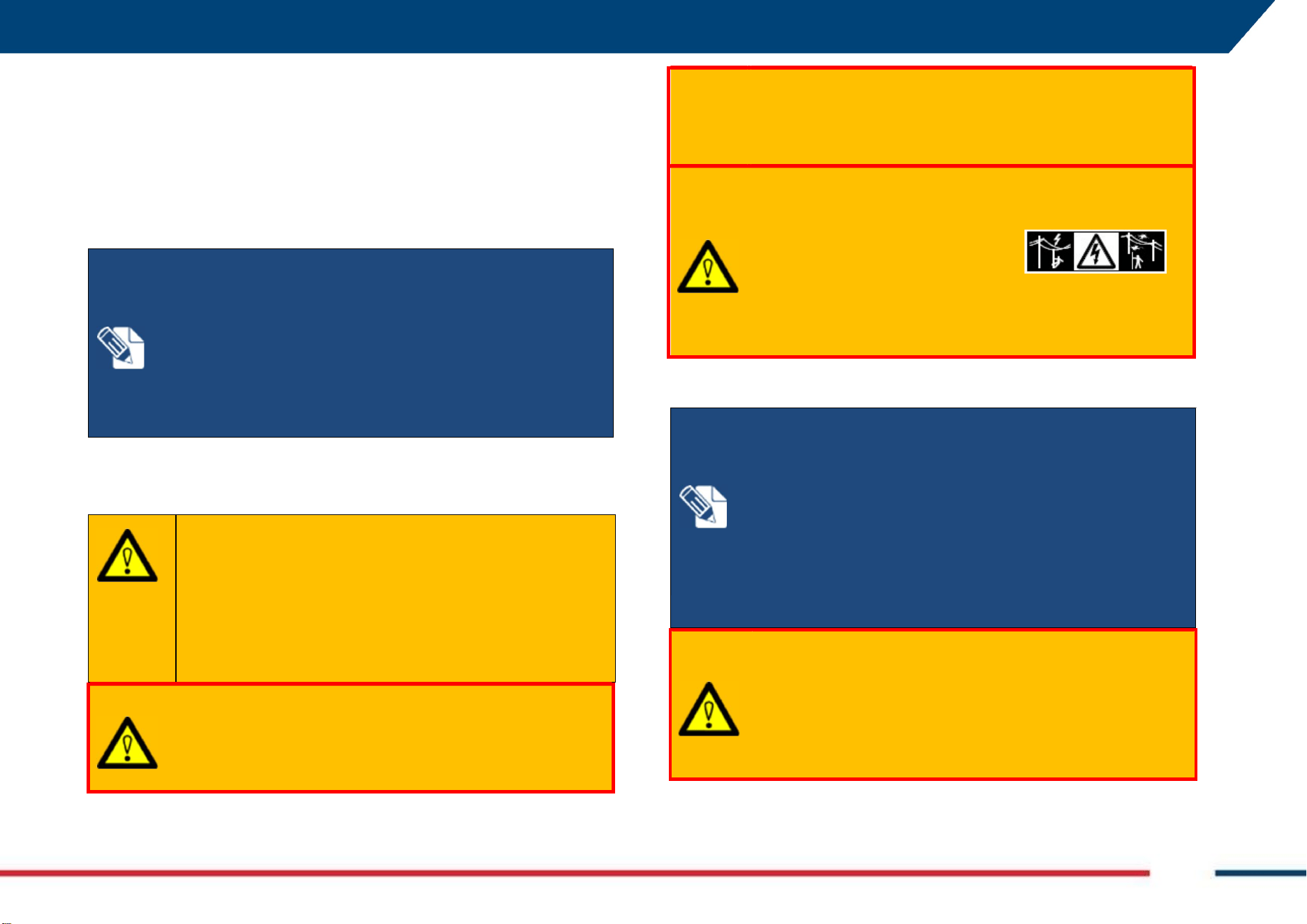
WARNING
:
POTENTIALLY HAZARDOUS AREAS
working in hazardous areas, such as potentially explosive areas, or
close to electrical installations, or similar situations, could result
in death or serious injury.
PRECAUTION: Local safety authorities and safety experts must be
contacted, by the person in charge of the product on site, prior
commencing any survey in potentially hazardous areas, for the
due risk assessment.
3.5 Responsibilities
Manufacturer of the product - IDS GeoRadar s.r.l. is responsible for supplying
the product, including the user manual and original accessories, in a safe
condition.
Person responsible for the product - The person responsible for the product
(the user) has the following duties:
• To understand the safety instructions on the product and the
instructions in the user manual, and the Quick Guides, provided
separately.
3 SAFETY DIRECTIONS Mod: MDM/011/M2 Rev 8
IDS GeoRadar Srl MNG/2023/007 Rev. 1.3 11/ 57
• To ensure that it is used in accordance with the instructions.
• To be familiar with traffic laws and local regulations relating to
safety and accident prevention.
• To inform IDS GeoRadar s.r.l. immediately if the product and the
application becomes unsafe.
• To ensure that the traffic laws, the national laws, regulations,
and conditions for the operation of electromagnetics
transmitters are respected.
3.6 Hazard of use
WARNING
:
CRUSHING HANDS AND FINGERS
While installing and using the system, the risk of fingers pinch-
out, may occur.
PRECAUTION: To mount and use the system, the user must
always wear protective gloves and safety boots.
WARNING
:
RISK OF ACCIDENTS
During surveys there is a danger of accidents occurring if the
user does not pay attention to the surrounding site conditions,
such as obstacles, excavations, or traffic.
PRECAUTIONS:
During operations, the user of the product
must be fully aware of the existing site conditions, and
potential dangers.
WARNING
:
ELECTROCUTION
Because of the risk of electrocution, it is dangerous to use
poles and extensions near electrical installations such as
power cables or electrical railways.
PRECAUTIONS: Keep at a safe distance from electrical
installations. If it is essential to work in this environment, first
contact the safety authorities responsible for the electrical
installations and follow their safety instructions.
WARNING
:
LIGHTING STRICKING
If the product is used with accessories (for example GNSS pole
support), the user may increase the risk of being struck by
lightning.
PRECAUTIONS: Do not use the product during thunderstorm.
NOTICE
:
Watch out for erroneous measurement results if the
product has been dropped or has been misused, modified,
stored for long periods.
Precautions:
Periodically carry out test measurements, particularly after the
product has been subjected to abnormal use and before and
after of important measurements.
NOTICE
:
If the accessories used with the product are not
properly secured and the product is subjected to mechanical
shock, for example blows or falling, the product may be
damaged.
Precautions:
When setting-up the product, make sure that the accessories
are correctly adapted, fitted, secured, and locked in position.
Avoid subjecting the product to mechanical stress.
3 SAFETY DIRECTIONS Mod: MDM/011/M2 Rev 8
IDS GeoRadar Srl MNG/2023/007 Rev. 1.3 12/ 57
WARNING
:
SECURING OF THE WORKING SITE
Inadequate securing of the working site can lead to dangerous
situations, for example in traffic, on building sites, and at
industrial installations.
PRECAUTIONS: Always ensure that the working site is
adequately secured. Adhere to the regulations governing
safety, accident prevention, and road traffic.
WARNING:
EXPOSURE OF BATTERIES TO HIGH MECHANICAL
STRESS, HIGH AMBIENT TEMPERATURE OR IMMERSION INTO
FLUIDS
High mechanical stress, high ambient temperatures or
immersion into fluids can cause leakage, fire, or explosions of
the batteries.
PRECAUTIONS: Protect the batteries from mechanical
influences and high ambient temperatures. Do not drop or
immerse batteries into fluids.
WARNING
:
MECHANICAL INFLUENCES TO BATTERIES
During the transport, shipping, or disposal of batteries it is
possible, for inappropriate mechanical influences, to
constitute a fire hazard.
PRECAUTIONS: Before shipping the product or disposing of it,
discharge the batteries by running the product until they are
flat. When transporting or shipping batteries, the person in
charge of the product must ensure that the applicable national
and international rules and regulations are observed. Before
transportation or shipping, please contact your local passenger
or freight transport company.
NOTICE:
If the product is improperly disposed, the following can
happen:
• If polymer parts are burnt, poisonous gases are produced
which may impair health.
• If batteries are damaged or are heated strongly, they can
explode and cause poisoning, burning, corrosion or
environmental contamination.
• By disposing of the product irresponsibly you may enable
unauthorized persons to use it in contravention of the
regulations, exposing themselves and third parties to the risk of
severe injury and rendering the environment liable to
contamination.
RECYCLING
The crossed out wheeled bin symbol shown on the equipment
indicates that the product must be recycled separately from
other waste at the end of its useful life.
Separate waste disposal of this product at the end of its useful
life will be organised and managed by IDS GeoRadar. When you
decide to dispose of the equipment, contact IDS GeoRadar and
follow the system that IDS GeoRadar has set up to permit the
separate collection of the apparatus at its life end.
Adequate separate collection for its subsequent recycling,
treatment and environmentally friendly disposal contributes
towards avoiding any unnecessary effects on the environment
and to health and favour the reuse or recycling of the materials
that make up the equipment. Unauthorised disposal of this
product as unsorted waste by its possessor will lead to an
administrative penalty foreseen by national regulations.
3 SAFETY DIRECTIONS Mod: MDM/011/M2 Rev 8
IDS GeoRadar Srl MNG/2023/007 Rev. 1.3 13/ 57
NOTICE: Only IDS GeoRadar authorized technical service are
entitled to repair this product.
WARNING
:
Short circuit of battery terminals
Risk of fire, electric shock, and damage.
PRECAUTIONS: Keep away any metallic or wet objects from
the battery terminals inside battery housing.
WARNING
:
Short circuit of battery terminals
If battery terminals are short-circuited e.g., by coming in
contact with jewellery, keys, metallised paper or other metals,
the battery can overheat and cause injury or fire, for example
by storing or transporting in pockets.
PRECAUTIONS: Make sure that the battery terminals do not
come into contact with metallic objects.
WARNING
:
Battery may get hot after prolonged use.
Risk of burning injuries.
PRECAUTIONS: Avoid touching the hot battery. Allow the
battery to cool down before removing it.
4 GENERAL DESCRIPTION Mod: MDM/011/M2 Rev 8
IDS GeoRadar Srl MNG/2023/007 Rev. 1.3 14/ 57
4 GENERAL DESCRIPTION
The Chaser XR GPR system is designed to detect and locate underground
features for a wide range of possible applications including, but not limited
to Geology, Geotechnical, Environmental, Glaciers, Rivers, Archaeology,
Forensic, buried structures in general. It provides georeferenced
underground maps if a supported positioning system is used.
4.1 Delivery Contents
The Georadar system Chaser XR includes 3 possible configurations, as listed
below: 1) is the basic configuration, while 2) and 3) includes optional
components to be purchased separately, namely:
1. Chaser XR Lite Pack (SAP 989791)
2. Chaser XR Drag kit (SAP 989754, optional),
3. Chaser XR Positioning Kit (SAP 986689, optional).
Further to the above, Chaser XR antenna, can be used in combination with
its own optional cart and accessories as listed below:
1. Chaser XR Cart (SAP 999066, optional),
2. Chaser XR GNSS support Kit (SAP 1020729, optional), to be used
only with Chaser XR cart.
3. Chaser XR Off Road wheel Kit (SAP 1020726, optional), to be used
only with Chaser XR cart.
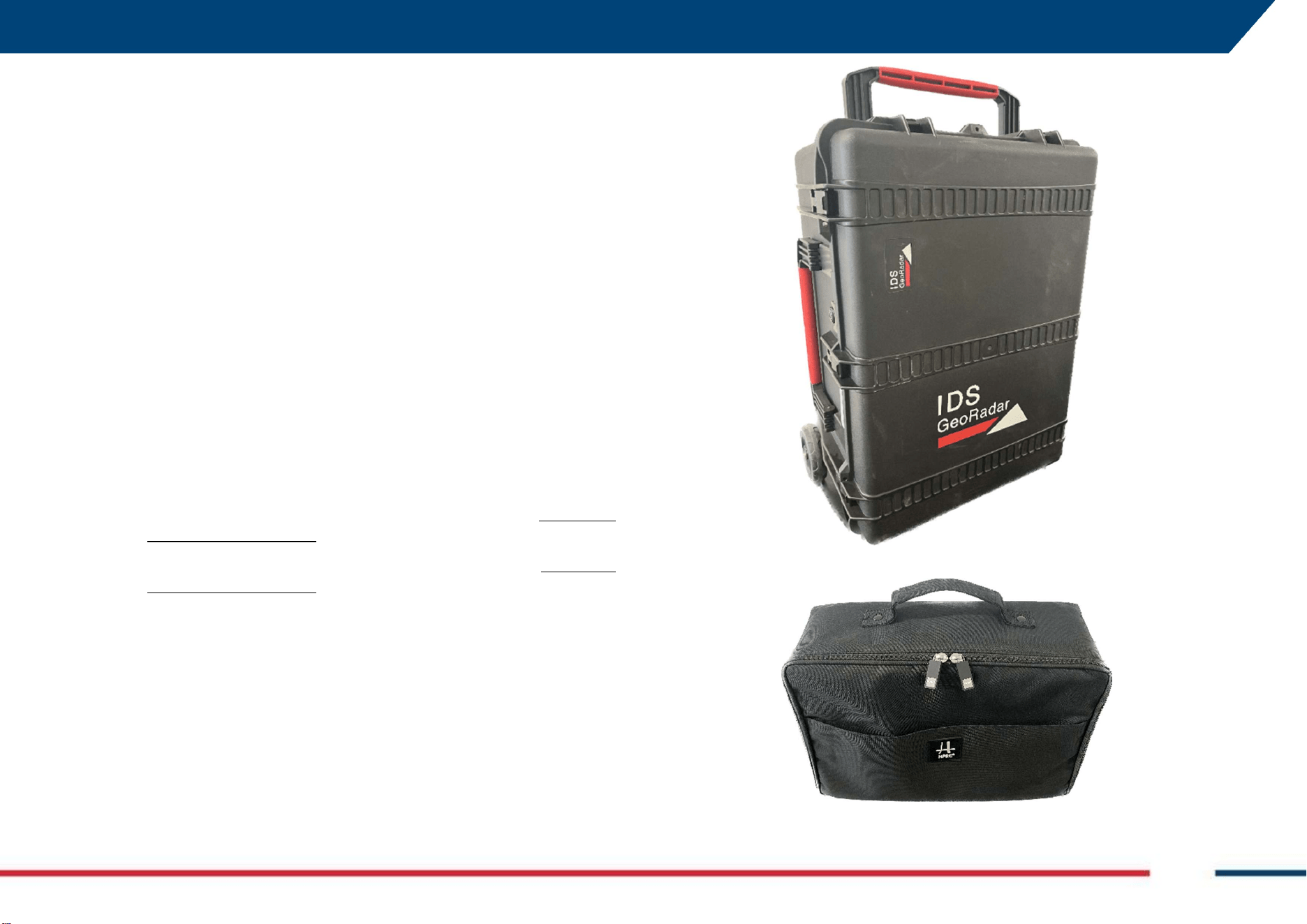
4.1.1 Chaser XR Lite Pack (SAP 989791)
The basic package includes:
a. Hardcase (SAP 989397)
b. HPRC bag 2400 (SAP 989847)
4 GENERAL DESCRIPTION Mod: MDM/011/M2 Rev 8
IDS GeoRadar Srl MNG/2023/007 Rev. 1.3 15/ 57
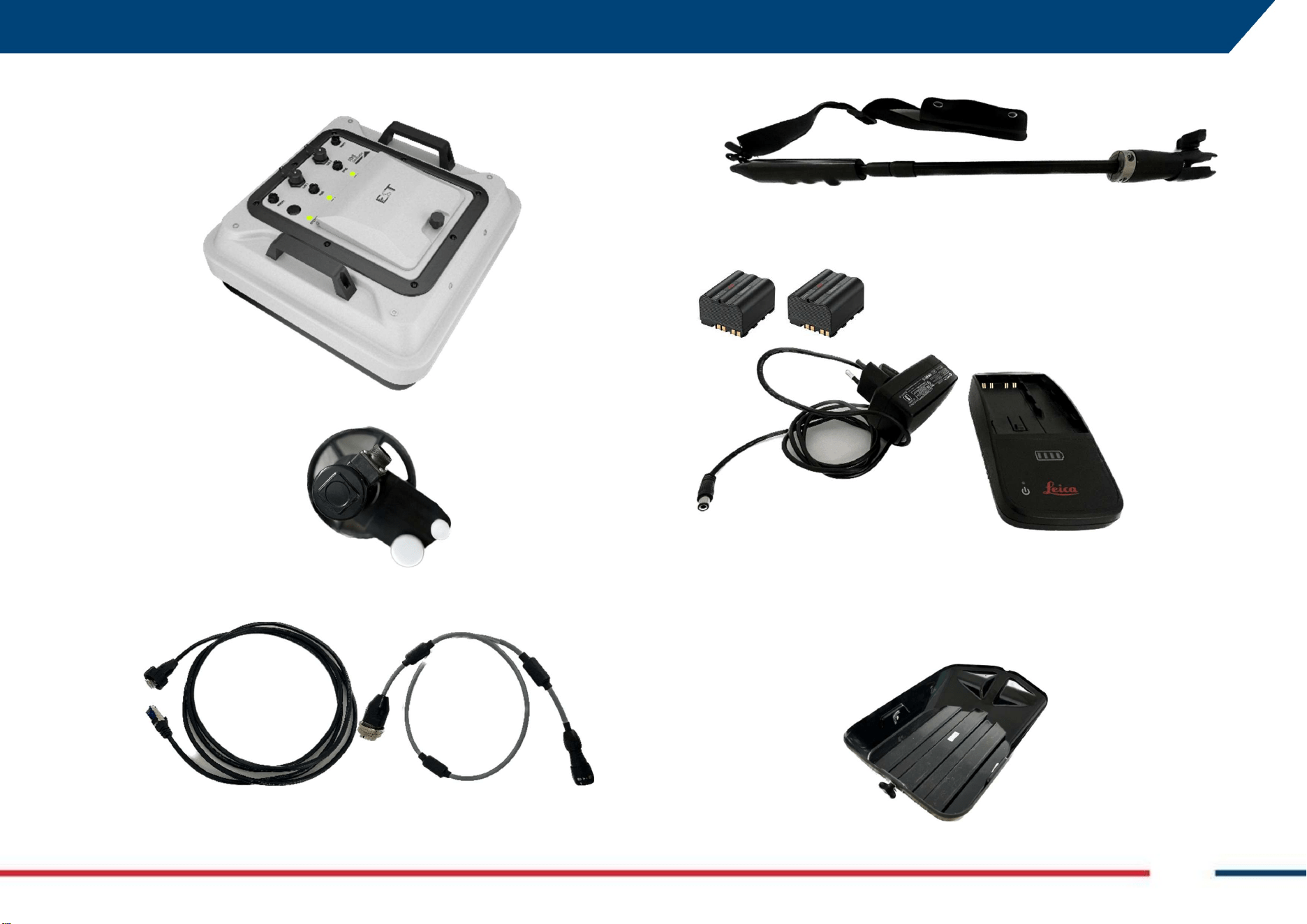
c. Antenna Chaser XR with sledge and handles (SAP 987402)
d. Wheel Encoder WHE50 (SAP 854803)
e. 2.5 meters LAN cable (SAP 987232, left image), and 0.50 meters
Wheel Encoder cable (SAP 987233, right image).
f. Chaser XR Pulling pole kit (SAP 987672).
g. 2 Batteries GEB 364 (SAP 954519) and battery charger GKL311 single
charger prof 3000 (SAP 799185).
4.1.2 Chaser XR Drag Kit (SAP 989754, optional)
This optional package includes:
a. Chaser XR rugged sledge for the antenna (SAP 987605)
4 GENERAL DESCRIPTION Mod: MDM/011/M2 Rev 8
IDS GeoRadar Srl MNG/2023/007 Rev. 1.3 16/ 57
b. Wheel encoder mechanical coupling kit
c. Wheel encoder WHE100 (SAP 854898)
d. Wheel encoder cable (SAP 987233)
4.1.3 Chaser XR Positioning Kit (SAP 986689, Optional)
The optional positioning kit, includes:
a. Chaser XR GNSS Positioning support and bayonet adapter.
Both the optional kits (the Drag kit and the Positioning kit) can be used only
with the Chaser XR Lite Pack.
4.1.4 Chaser XR Cart (SAP 999066, Optional)
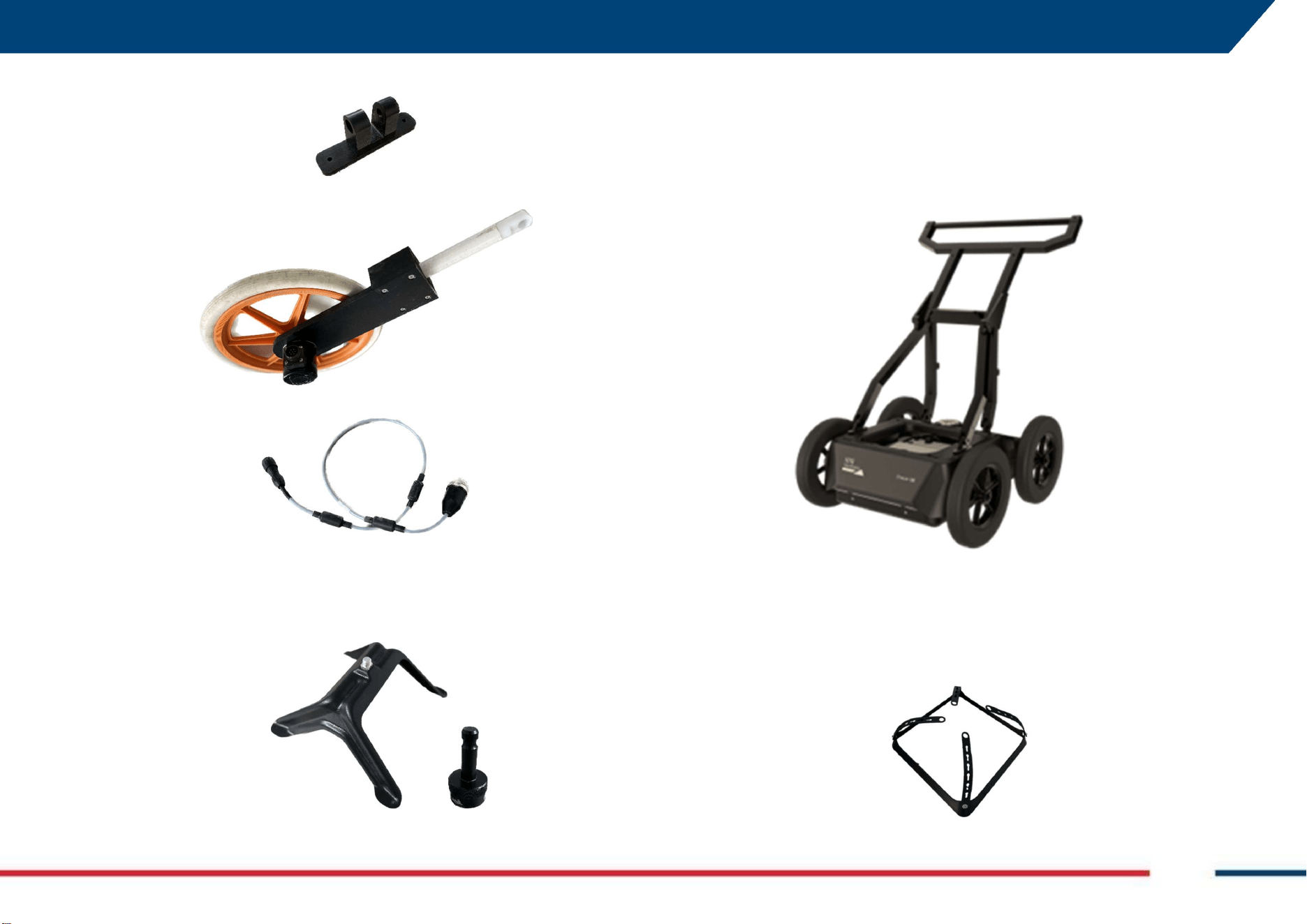
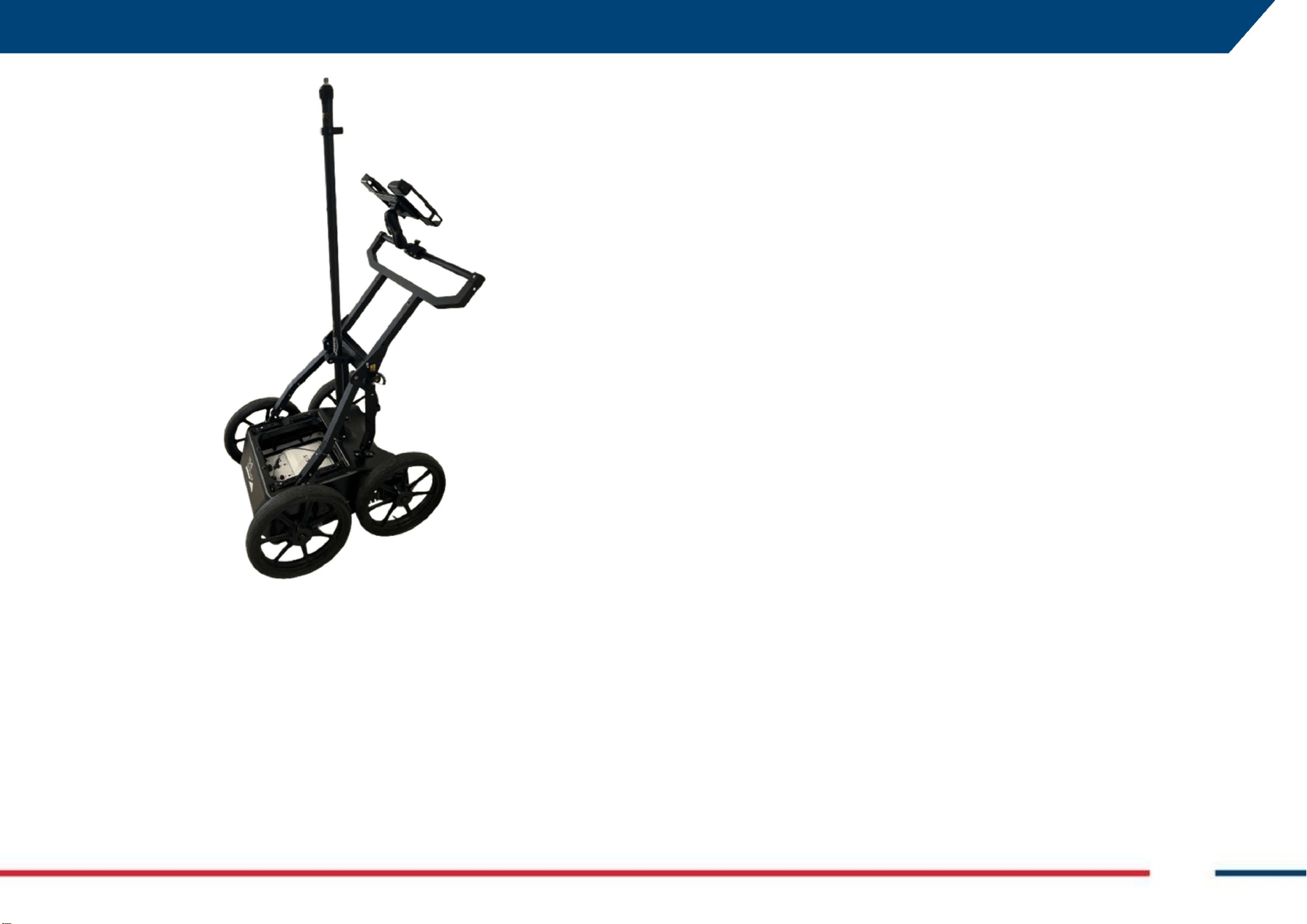
The optional Chaser XR Cart (Fig. 1) includes the following items:
Fig. 1 Chaser XR Cart
a. Antenna lifting frame,
4 GENERAL DESCRIPTION Mod: MDM/011/M2 Rev 8
IDS GeoRadar Srl MNG/2023/007 Rev. 1.3 17/ 57
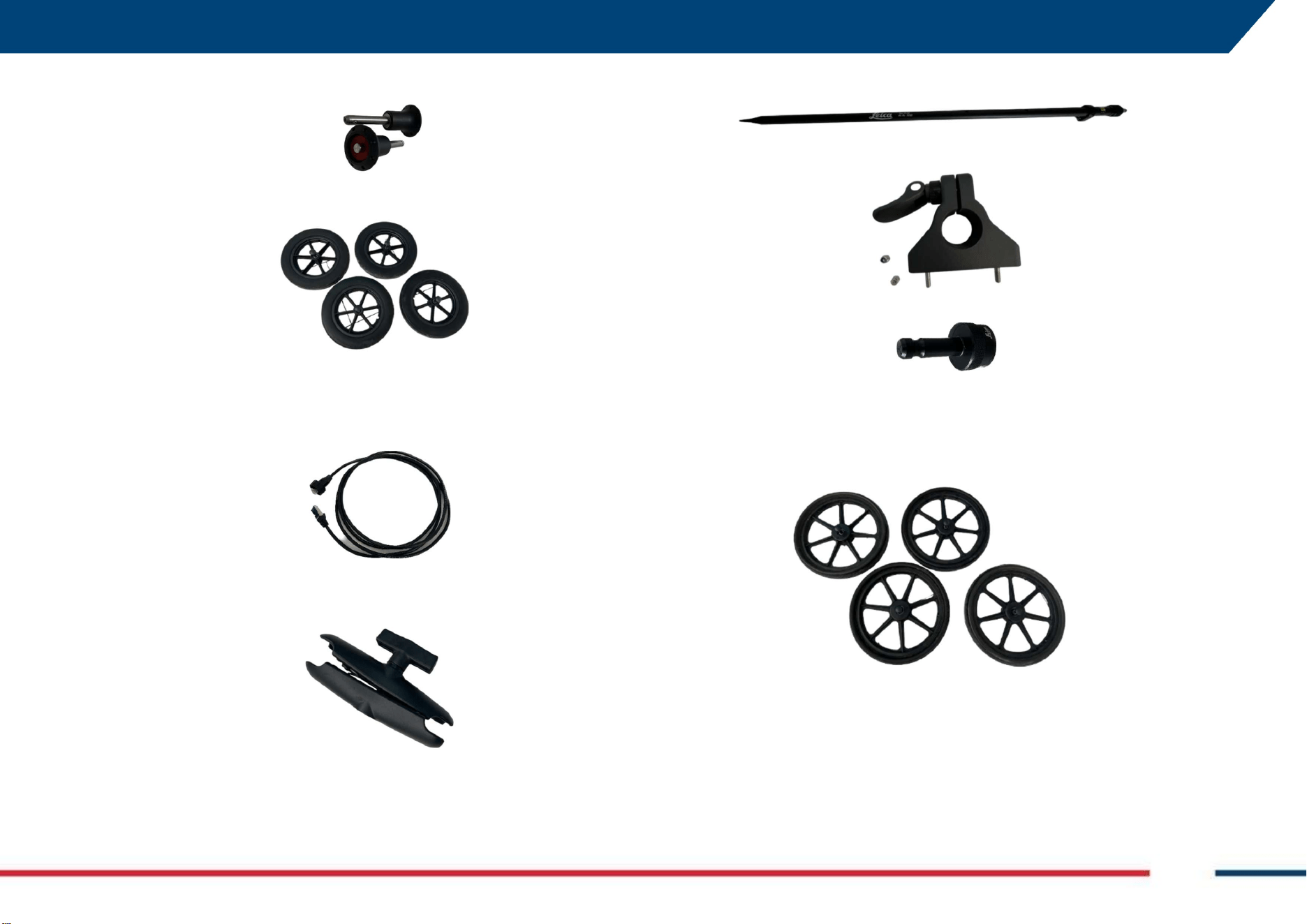
b. 2 Quick release lock pin 72-12,
c. 4 Airless Wheel 310,
d. Encoder kit,
e. LAN cable,
f. Clamp for tablet holder
4.1.5 Chaser XR GNSS Kit for cart (SAP 1020729, Optional)
The Chaser XR GNSS kit for the cart include the following items:
a. GNSS pole
b. GNSS pole support
c. GAD50, TPS adaptor
4.1.6 Chaser XR Off Road Kit for cart (SAP 1020726, Optional)
The Chaser XR Off Road kit for the cart includes the following items:
a. 4 Airless wheel 380 with quick release pins
4.2 Basic System Composition
The Chaser XR Lite Pack is the basic configuration in which the system may
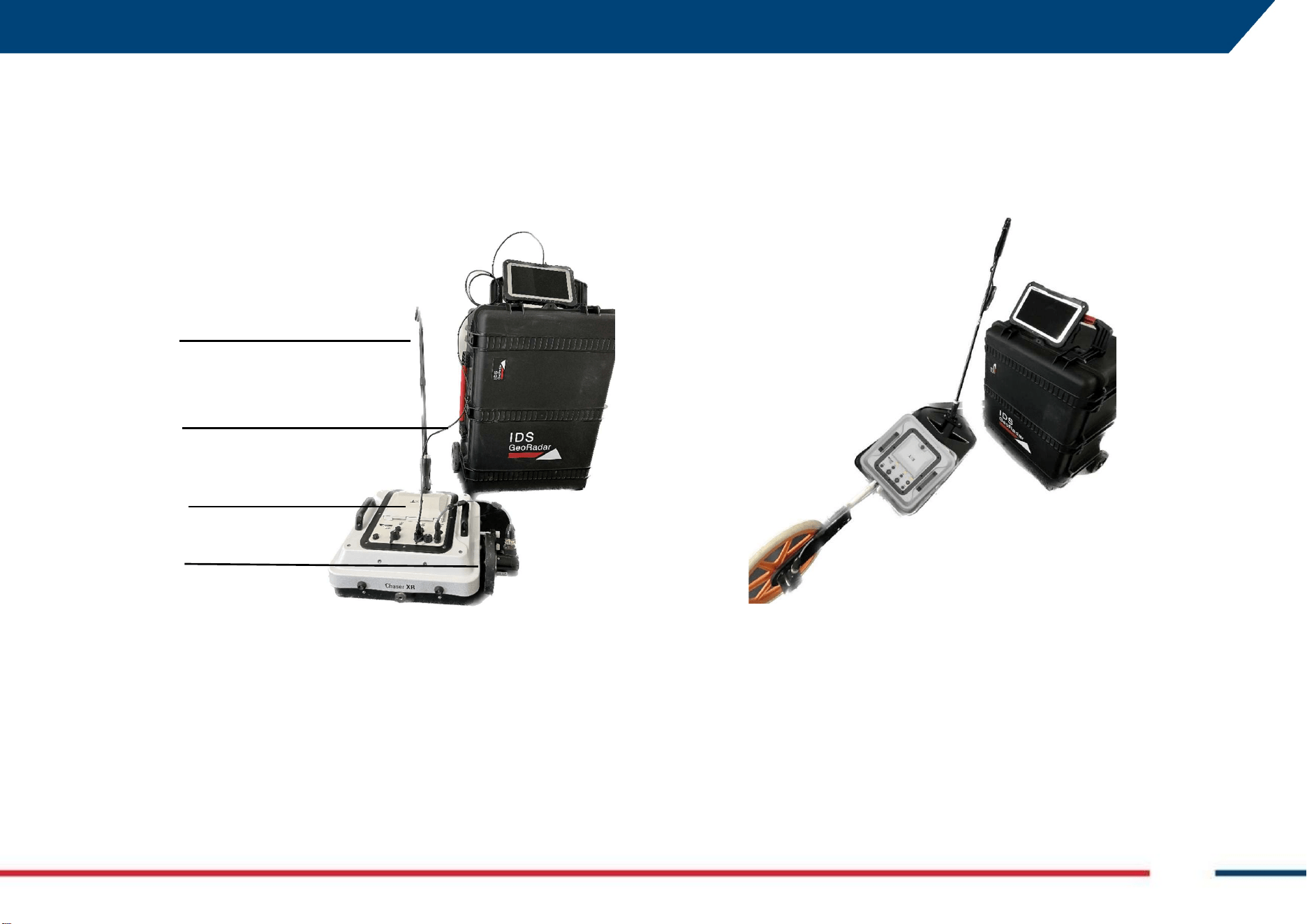
be purchased and used. Fig. 2 shows Chaser XR Lite after assembling and the
following components are illustrated:
4 GENERAL DESCRIPTION Mod: MDM/011/M2 Rev 8
IDS GeoRadar Srl MNG/2023/007 Rev. 1.3 18/ 57
a) The telescopic pulling pole with lace,
b) The LAN cable connecting the antenna and the PC (Note: Chaser XR,
may be deployed also WiFi, without any LAN cable),
c) The Antenna with sledge and handles,
d) The WHE 50 encoder with encoder cable.
Fig. 2 Chaser XR Lite
4.3 Accessories
4.3.1 Chaser XR Drag Kit (optional)
The Chaser XR can be upgraded by the drag kit allowing for the use of the
system over rough surface. This optional kit includes all the items described
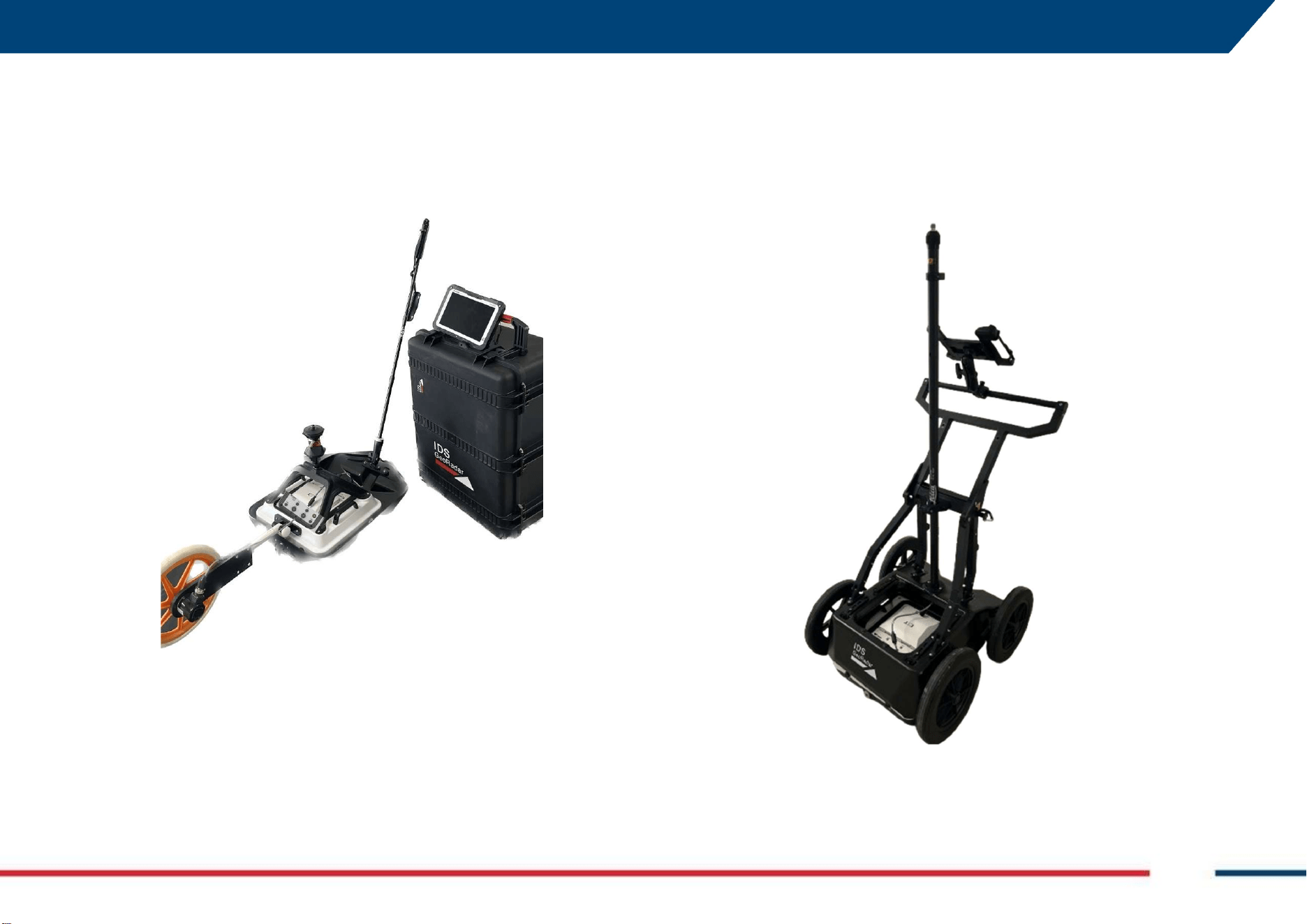
at 4.1.2 and the system, after its installation, is shown below (Fig. 3).
Fig. 3 Chaser XR with Drag kit
Fig. 3 illustrates Chaser XR after installation of the drag kit for rough terrain.
The set up of these components makes the system differs with respect to the
Chaser XR Lite version because of the following items:
a) The WHE 100 encoder type,
b) The mechanical coupling kit,
c) The sledge for rough terrain.
a
b
c
d
a
b
c
4 GENERAL DESCRIPTION Mod: MDM/011/M2 Rev 8
IDS GeoRadar Srl MNG/2023/007 Rev. 1.3 19/ 57
4.3.2 Chaser XR Positioning Kit (optional)
A GNNS or a TPS can be paired to Chaser XR Lite, after installation of the
positioning kit described at 4.1.3. This kit allows for a GNSS antenna receiver
or a 360° prism to be coupled to the top of the antenna case, after fixing it at
its four corners by the 4 screws, provided with the optional kit itself.
Fig. 4 Chaser XR including drag kit and positioning kit
Fig. 4 illustrates Chaser XR in its full configuration also including the
positioning kit. The difference with respect the Lite and the Drag Kit version
relates to:
a) GNSS antenna receiver (“a”, 360° prism not included)
b) Positioning kit (“b”).
4.3.3 Chaser XR Cart (optional)
Chaser XR antenna can be operated in combination with the optional Chaser
XR Cart (Fig. 1). Furthermore, the Chaser XR cart can host a GNSS Kit (Fig. 5)
to operate the system with a GNSS or a TPS, and the Off Road Kit (Fig. 6)
including a set of larger diameter wheels, to operate the system on rough
terrains.
Fig. 5 Chaser XR Cart with GNSS Kit
a
b
4 GENERAL DESCRIPTION Mod: MDM/011/M2 Rev 8
IDS GeoRadar Srl MNG/2023/007 Rev. 1.3 20/ 57
Fig. 6 Chaser XR Cart with Off Road kit
4.4 Battery Handling
4.4.1 Charging
The temperature range for charging batteries is between 0 °C to +40 °C (+32
°F to +104 °F). For optimal charging, we recommend charging the batteries
at a low ambient temperature of +10 °C to +20 °C (+50 °F to +68 °F), if
possible.
4.4.2 Operation/Discharging
The batteries can be operated from −20 °C to +50 °C (−4 °F to +122 °F).
Lower operating temperatures reduce the capacity that can be drawn; higher
operating temperatures reduce the service life of the battery.
4.4.3 Storage
The following recommendations should be kept in mind with respect to
storage of batteries:
Remove batteries from the product and the charger before storing.
After storage recharge batteries before using.
Protect batteries from damp and wetness. Wet or damp batteries
must be dried before storing or use.
The batteries can be stored from −20 °C to +50 °C (−4 °F to +122 °F).
4.5 GNSS requirements
Chaser XR can be used (paired) with a GNSS antenna or a TPS to position the
GPR data in an absolute coordinates system and to receive real-time
positional corrections while the system is moving and collecting georadar
data.
4.5.1 How to connect Chaser XR to a GNSS
Chaser XR can be linked to a GNSS which complies with the following
characteristics:
1. Dual frequency (L1+L2),
2. Positioning update minimum 5Hz (or 0,2sec),
3. RTK: connection to a base station via radio link (UHF or GSM) or
connection to a Continuously Operating Reference Station (CORS) via
internet,
4. NMEA output in GGA format,

4 GENERAL DESCRIPTION Mod: MDM/011/M2 Rev 8
IDS GeoRadar Srl MNG/2023/007 Rev. 1.3 21/ 57
5. Serial cable (RS232) is required, alternatively the GPS can be
connected to the laptop via Bluetooth.
For the pairing procedure (and requirements) of the GNSS with uMap-Logger
(Chaser XR, data acquisition Software) Controller PC, please refer to the
user’s manual of the GNSS manufacturer.
4.5.2 How to connect Chaser XR to a TPS
Chaser XR can be linked to a TPS which complies with the following
characteristics:
1. Robotic Total Station
2. Motorized
3. Automatic Target Recognition (ATR)
4. Positioning update greater than 5 Hz
5. Range >1000 m (with prism)
6. Angular accuracy: <3”
7. Measure synchronization: angles measure and distance measure
must be synchronized; maximum permitted latency must be less
than 2 ms.
8. Wi-Fi/Bluetooth controller is required.
9. Serial port (RS-232) on the controller is required
10. Formatted output strings, pseudo NMEA output (Northing and
Easting coordinates expressed in meters) is required.
In this case, the remote controller must be connected to the Laptop through
Bluetooth or a serial cable.
For the pairing procedure (and requirements) of the TPS with uMap-Logger
(Chaser XR, data acquisition Software) Controller PC, please refer to the
user’s manual of the TPS used.
5 HOW TO SET UP CHASER XR Mod: MDM/011/M2 Rev 8
IDS GeoRadar Srl MNG/2023/007 Rev. 1.3 22/ 57
5 HOW TO SET UP CHASER XR
This section of the User’s Manual provides the description on how to
assemble Chaser XR in all its configurations.
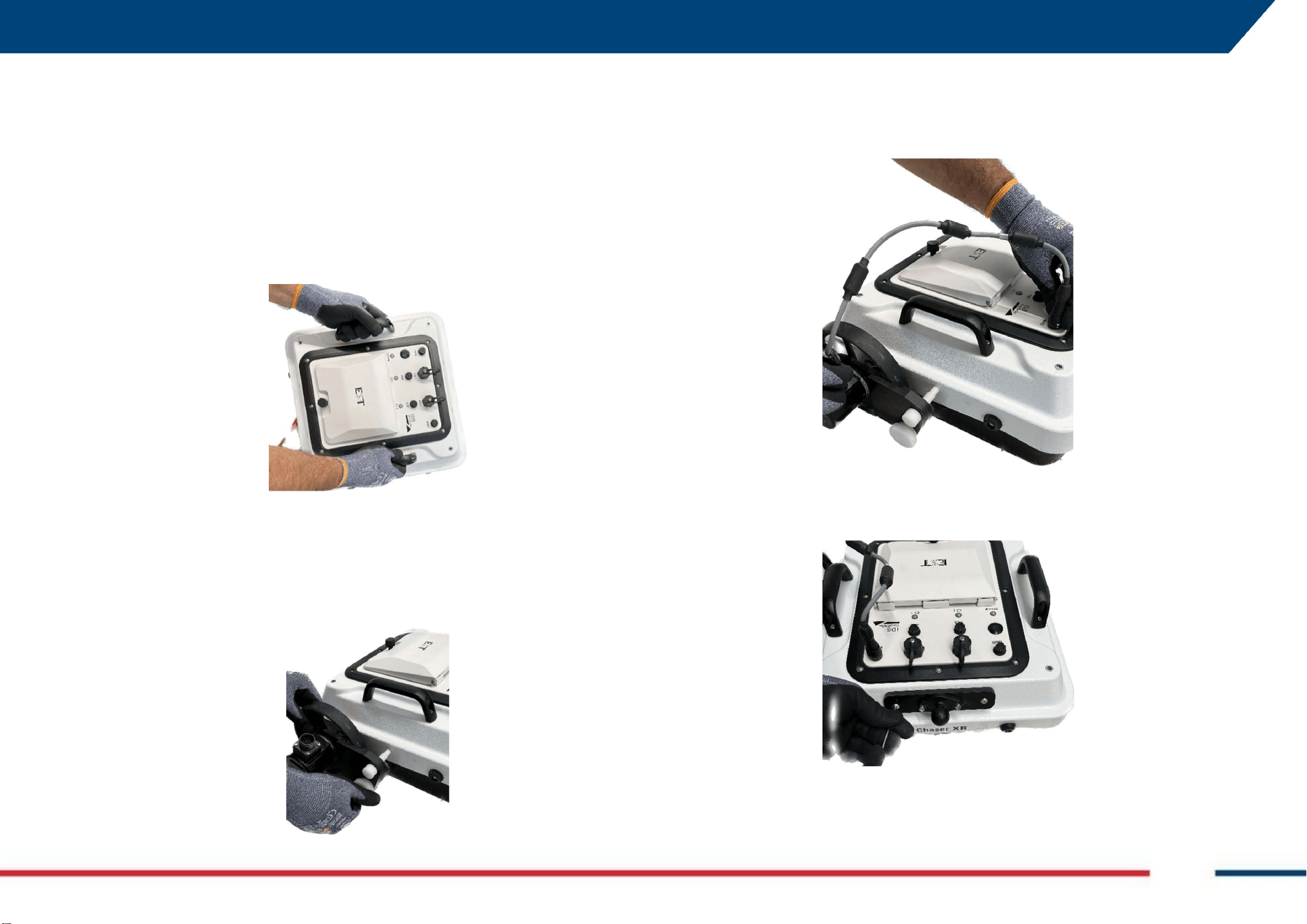
5.1 How to…set up Chaser XR Lite
The assembly of the basic configuration of Chaser XR (Lite) includes the
following steps:
1. Open the Hard case and take off the Antenna.
2. Install the WHE 50 encoder in one of the threaded holes located at
each of the 4 side of the antenna case indicated as the HH or the VV
polarization. The position of the encoder is going to be 90° with
respect to the acquisition mode (i.e.: encoder next to the HH label-
>acquisition mode VV, vice-versa, encoder next to the VV label-
>acquisition mode HH).
3. Plug the WHE50 encoder cable on top of the WHE 50 encoder, on
one side, and on one of the (2) “Wheel” port beside the battery
housing on top of the antenna case, on the opposite side of the
cable.
4. Install the anchor plate for the pulling pole (its position varies
depending on the fact that the system may be used in HH or VV
mode, and this is indicated onto the antenna case).
5 HOW TO SET UP CHASER XR Mod: MDM/011/M2 Rev 8
IDS GeoRadar Srl MNG/2023/007 Rev. 1.3 23/ 57
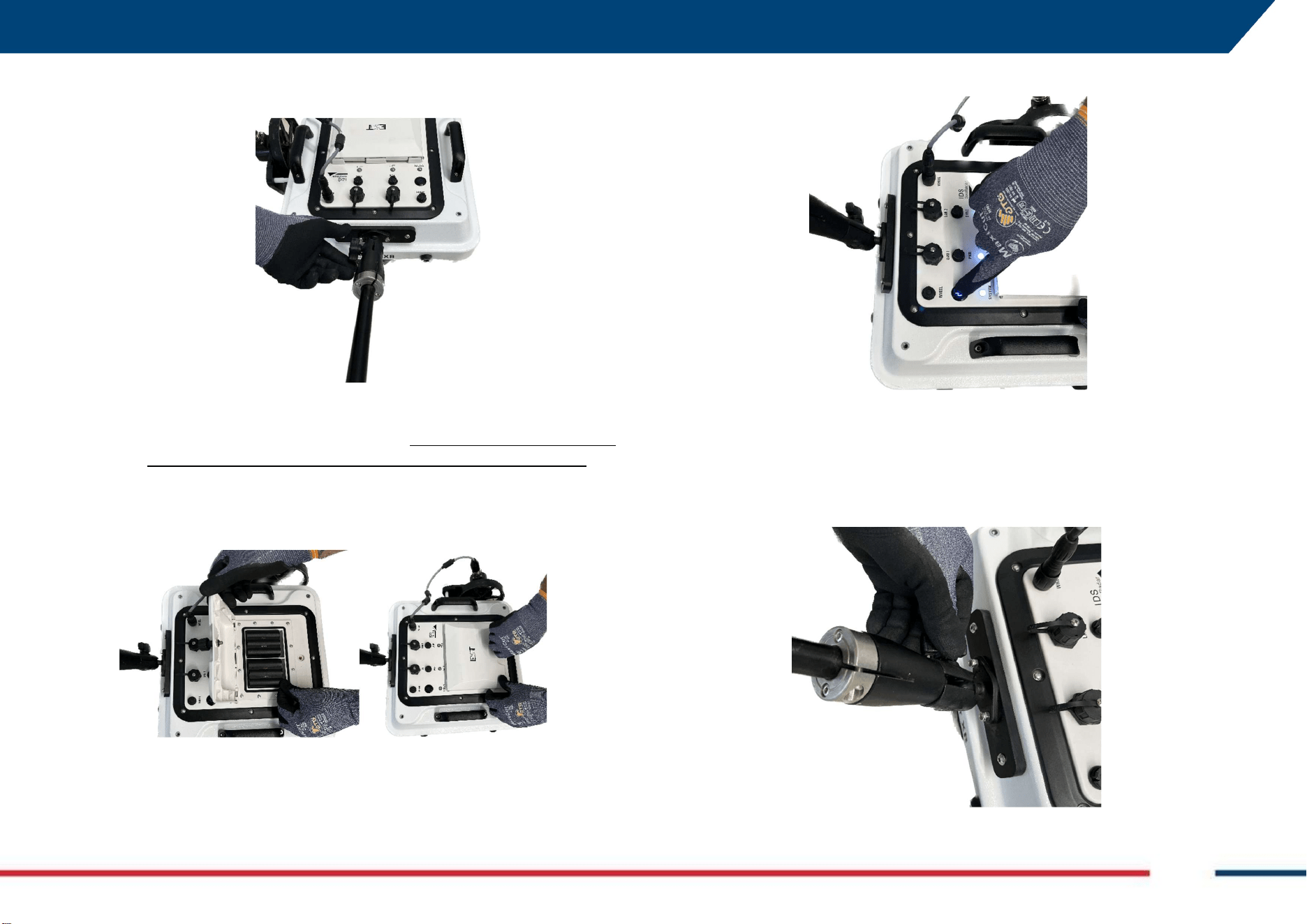
5. Install the drag pole through the ball clamp. The VV or the HH label
closer to it, shall indicate the acquisition mode.
6. Plug the LAN cable on one side on the “LAN” port beside the battery
housing on top of the antenna case, and to the LAN port of the PC
on the opposite side of the cable (NOTE: this operation, is not
necessary if the antenna is connected to the Controller via WiFi).
7. Release the screw on top of the battery compartment cover, open
it, and insert the (2) batteries provided with the system. Then, close
the cover.
8. Chaser XR, is now ready to be turned on using the 0/I button.
5.2 How to…set up Chaser XR Drag Kit (Optional)
Starting from the configuration set up as per 5.1 above, the installation of
the drag kit includes the following steps:
1. Remove the drag pole from its original position.
5 HOW TO SET UP CHASER XR Mod: MDM/011/M2 Rev 8
IDS GeoRadar Srl MNG/2023/007 Rev. 1.3 24/ 57
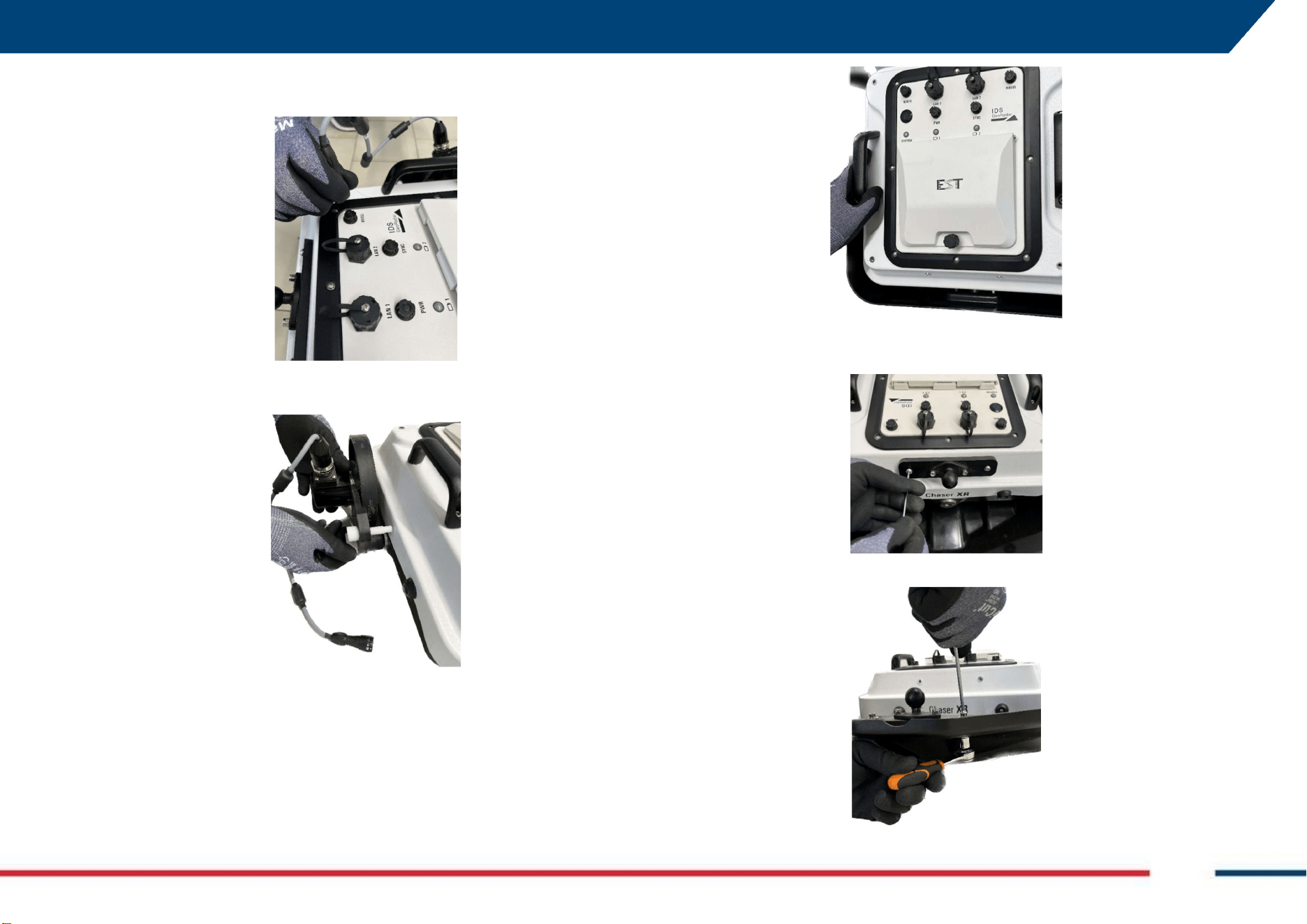
2. Unplug the wheel encoder cable from the Wheel port on top of the
antenna.
3. Remove (unscrew) the WHE50 encoder from the side of the antenna
case.
4. Place the sledge for rough terrain under the antenna and fix it to the
antenna, through the screw.
5. Remove the anchor plate for the drag pole on top of the antenna
(may not be necessary if it does not interfere with use).
6. Install the anchor plate drag pole on the sledge frame.
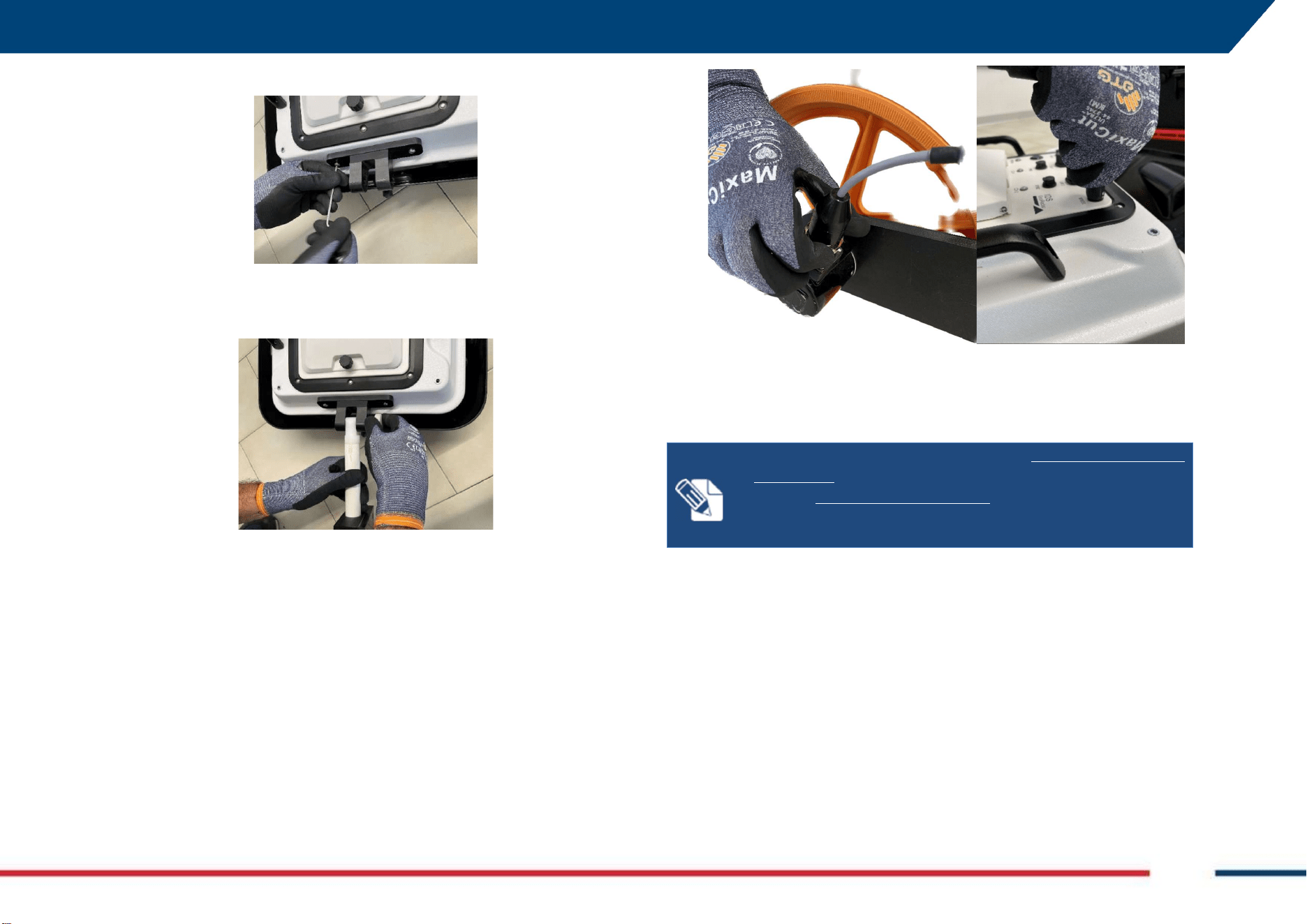
5 HOW TO SET UP CHASER XR Mod: MDM/011/M2 Rev 8
IDS GeoRadar Srl MNG/2023/007 Rev. 1.3 25/ 57
7. Install the anchor plate for the WHE100 encoder.
8. Install the WHE 100 encoder in one of the 4 side of the antenna case
indicated as the HH or the VV polarization. The position of the
encoder is going to be opposite (180°) with respect to the drag pole.
9. Plug the WHE100 encoder cable on top of the WHE 100 encoder, on
one side, and on one of the (2) “Wheel” port beside the battery
housing on top of the antenna case, on the opposite side of the cable.
NOTE:
When Chaser XR is used with
DRAG KIT
and in
HH
orientation, remember to place the connectors side of the
antenna next to WHE100 encoder. This is to optimize encoder
cable length during use.
5 HOW TO SET UP CHASER XR Mod: MDM/011/M2 Rev 8
IDS GeoRadar Srl MNG/2023/007 Rev. 1.3 26/ 57
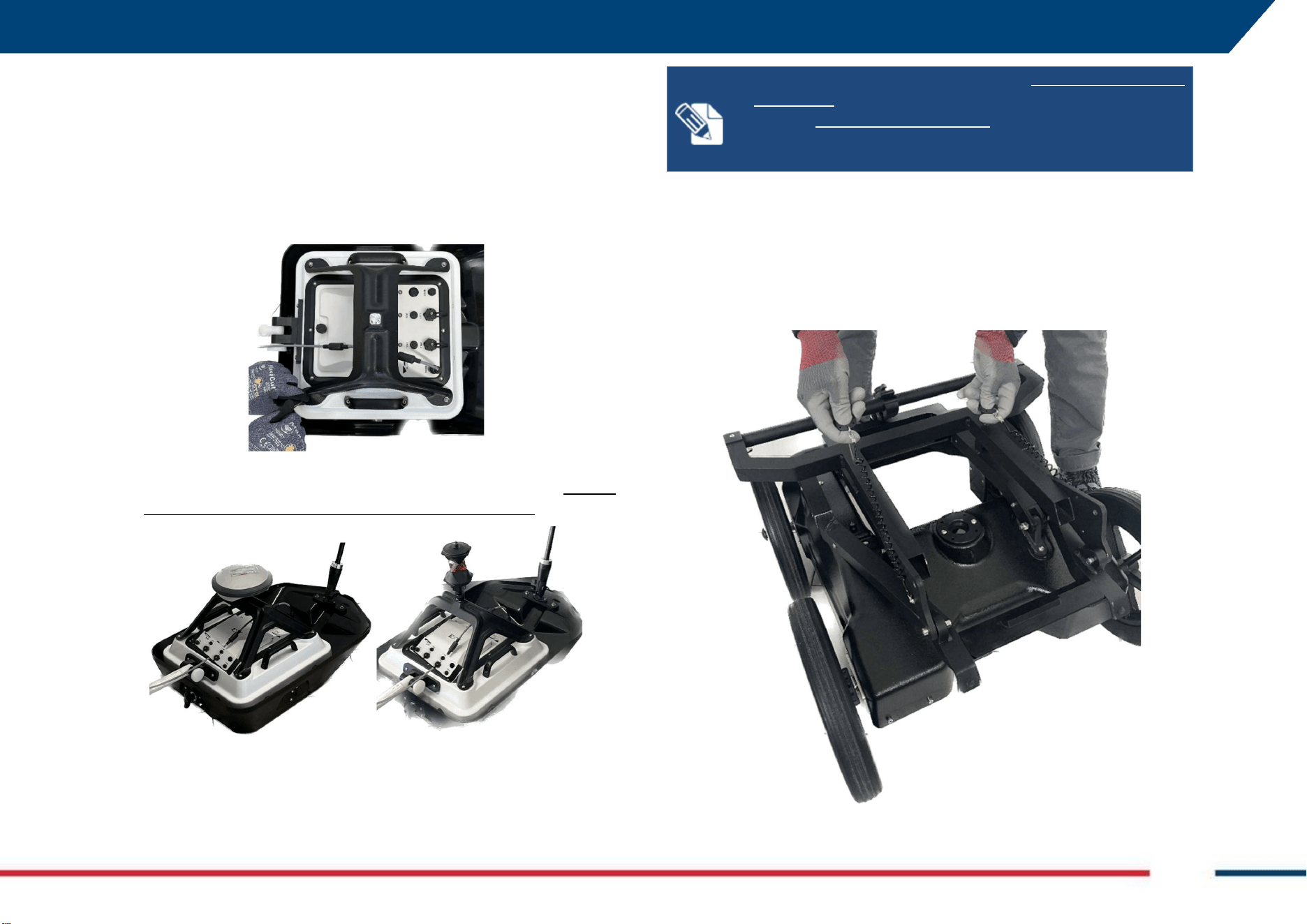
5.3 How to…set up Chaser XR Positioning Kit (Optional)
The Positioning Kit can be used with both the Lite version as well as the
version including the drag kit. Hence, the steps to set it up are:
1. Lay the positioning kit on the top of the antenna making sure that
the holes at its four edges overlap with the threaded holes inserts at
each of the four corners of the antenna and fix with the (4) screws to
secure the kit.
2. Couple the GNSS receiver antenna or the 360° prism either screwing
directly or using the bayonet adapter provided with the kit. Neither
the GNSS nor the prism are provided with any of the kits.
NOTE:
When Chaser XR is used with
DRAG KIT
and in
HH
orientation, remember to place the connectors side of the
antenna next to WHE100 encoder. This is to optimize encoder
cable length during use.
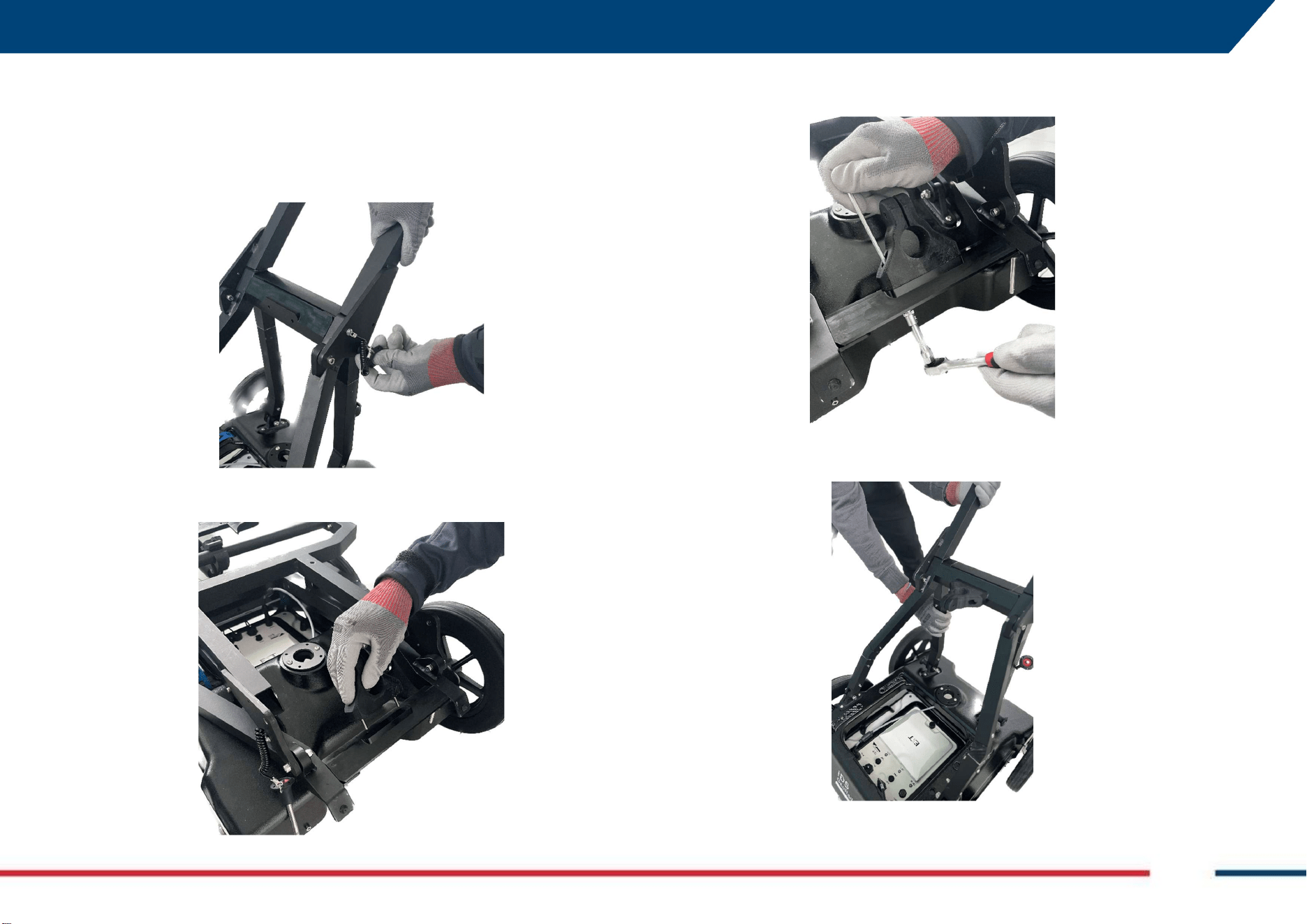
5.4 How to…set up Chaser XR Cart (optional)
To mount Chaser XR antenna on the cart, follow the steps below:
1. Remove the (2) pins blocking the handle to the cart,
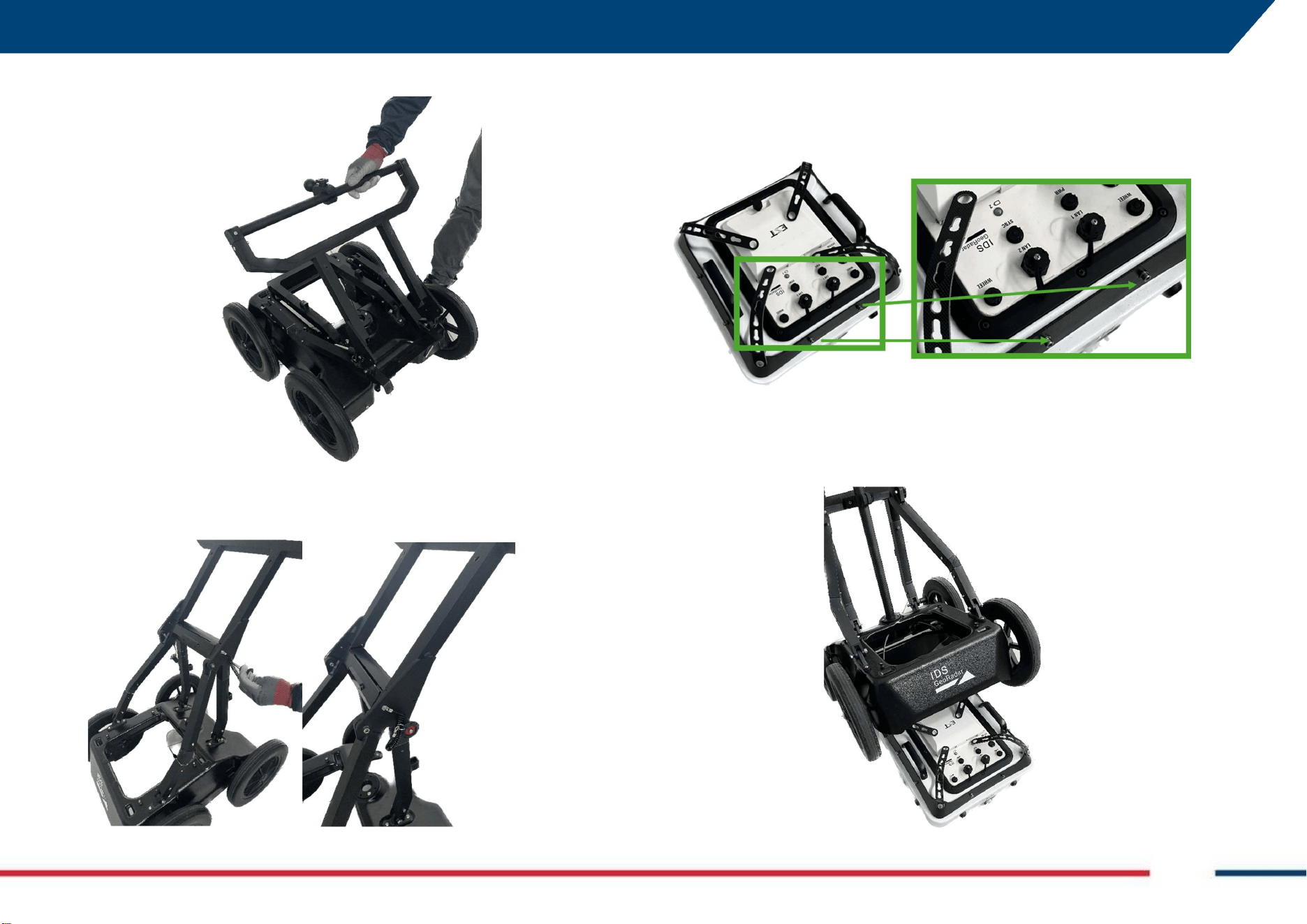
5 HOW TO SET UP CHASER XR Mod: MDM/011/M2 Rev 8
IDS GeoRadar Srl MNG/2023/007 Rev. 1.3 27/ 57
2. Unfold the handle,
3. Fix the (2) pins just removed on the (2) side bars of the rudder to lock
it,
4. Mount the antenna lifting frame on top of the Chaser XR antenna, by
fixing the 8 screws (2 screws each side of the frame), provided with
the kit.
5. Place the cart on top of the antenna (this can be either HH or VV
oriented),
5 HOW TO SET UP CHASER XR Mod: MDM/011/M2 Rev 8
IDS GeoRadar Srl MNG/2023/007 Rev. 1.3 28/ 57
6. The antenna and the cart must be fixed to the 4 pins on top of the
cart by using the four belts (3 slots are present on each belt). The
height of the bottom of the antenna from the ground depends on
the slot used to fix the antenna to the cart.
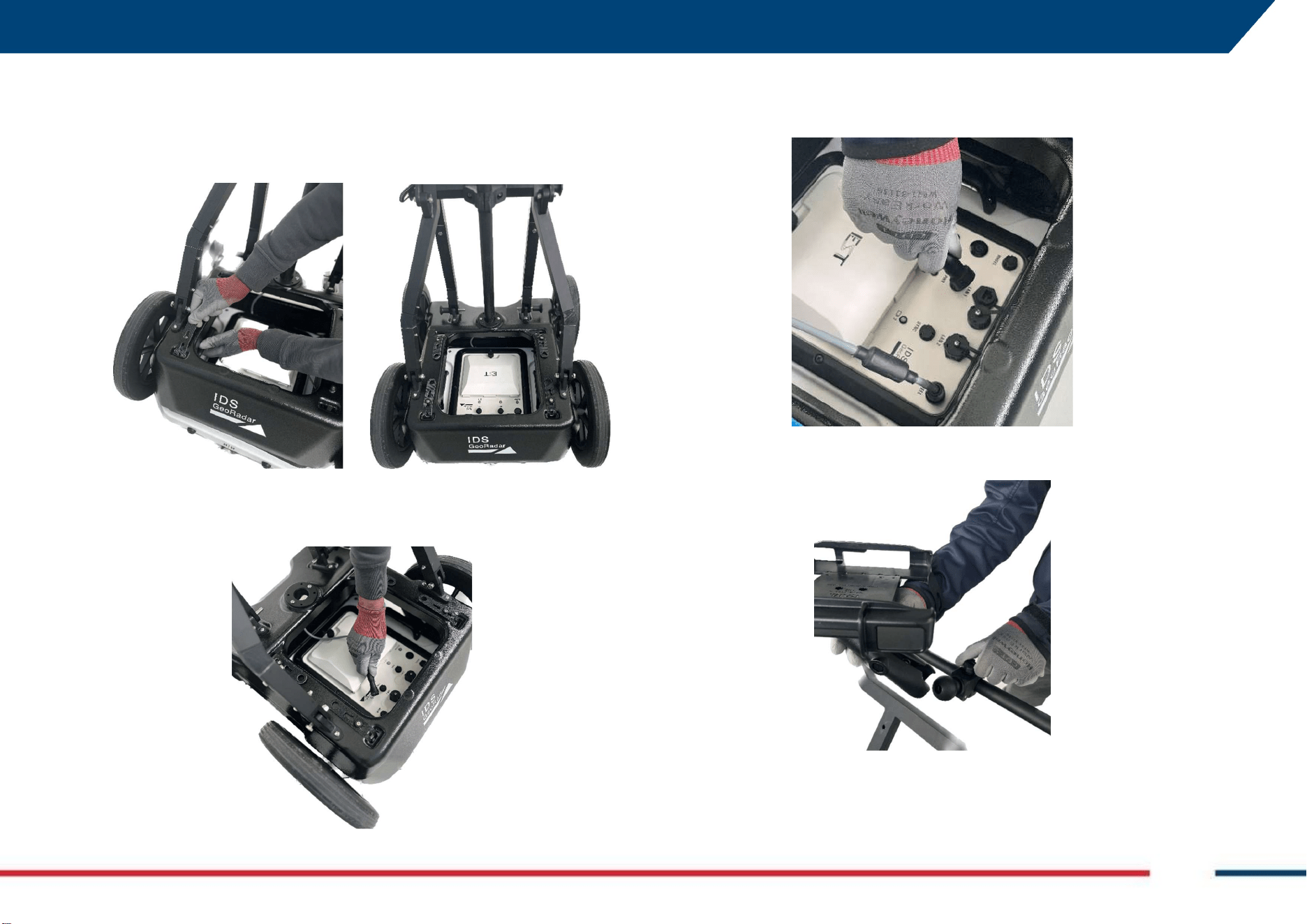
7. Plug the Wheel cable to the corresponding connector on top of the
Chaser XR antenna,
8. Plug the LAN connector (if the system is NOT meant to be connected
via WiFi) to the corresponding LAN connector on top of the Chaser
XR antenna.
9. Fix the clamp for the tablet holder on top of the ball placed in the
center of the handle.
Chaser XR is now ready to be used as shown in Fig. 1.
5 HOW TO SET UP CHASER XR Mod: MDM/011/M2 Rev 8
IDS GeoRadar Srl MNG/2023/007 Rev. 1.3 29/ 57
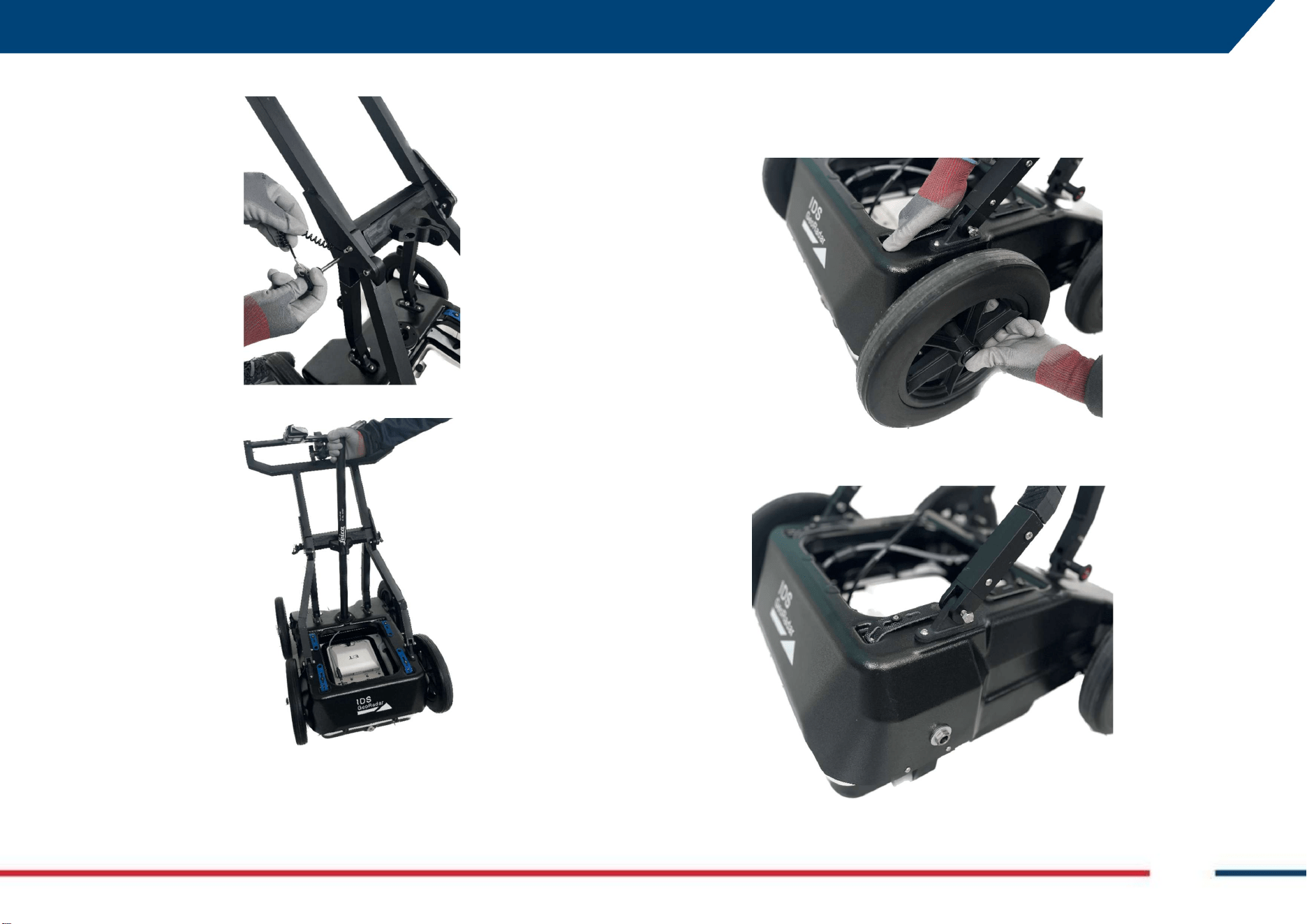
5.5 How to…set up Chaser XR GNSS kit for cart (optional)
To mount Chaser XR GNSS kit for the cart, follow the steps below:
1. Release the (2) pins from the side bars, to place the handle in the
initial position,
2. Place the GNSS pole support and its 2 screws, in the slot on the
central bar of the handle,
3. Fix the GNSS pole support to the central bar, with the (2) screws and
(2) bolts provided.
4. Unfold the handle,
5 HOW TO SET UP CHASER XR Mod: MDM/011/M2 Rev 8
IDS GeoRadar Srl MNG/2023/007 Rev. 1.3 30/ 57
5. Fix the (2) pins to the handle to lock it.
6. Insert the GNSS pole on the GNSS pole support just mounted.
Chaser XR is now ready to be used as illustrated in Fig. 5.
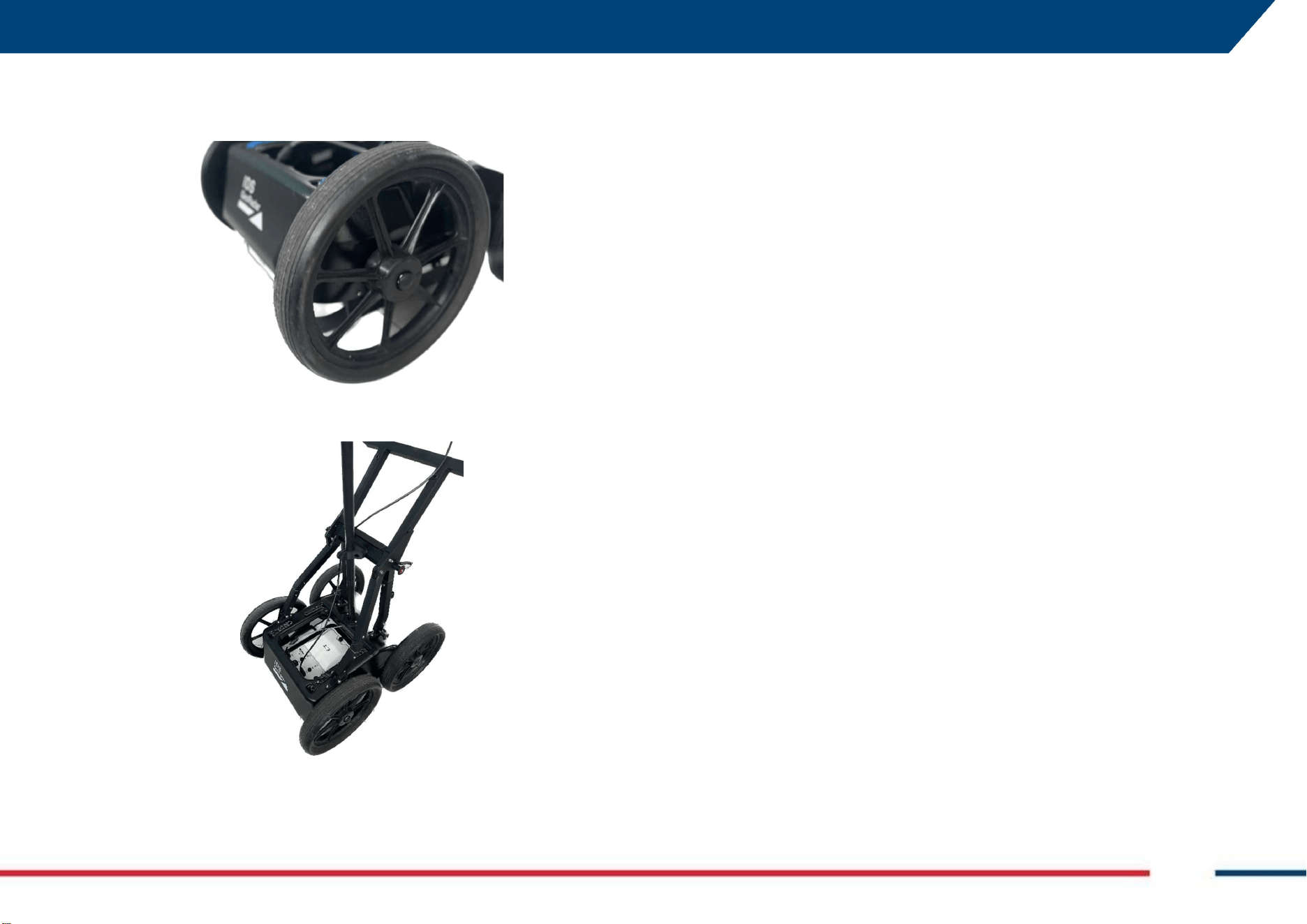
5.6 How to…set up Chaser XR Off Road kit for cart (Optional)
To mount Chaser XR Off Road kit for the cart, follow the steps below:
1. Press the button on the center of the wheel,
2. Pull the wheel gently, to remove the A310 wheel.
5 HOW TO SET UP CHASER XR Mod: MDM/011/M2 Rev 8
IDS GeoRadar Srl MNG/2023/007 Rev. 1.3 31/ 57
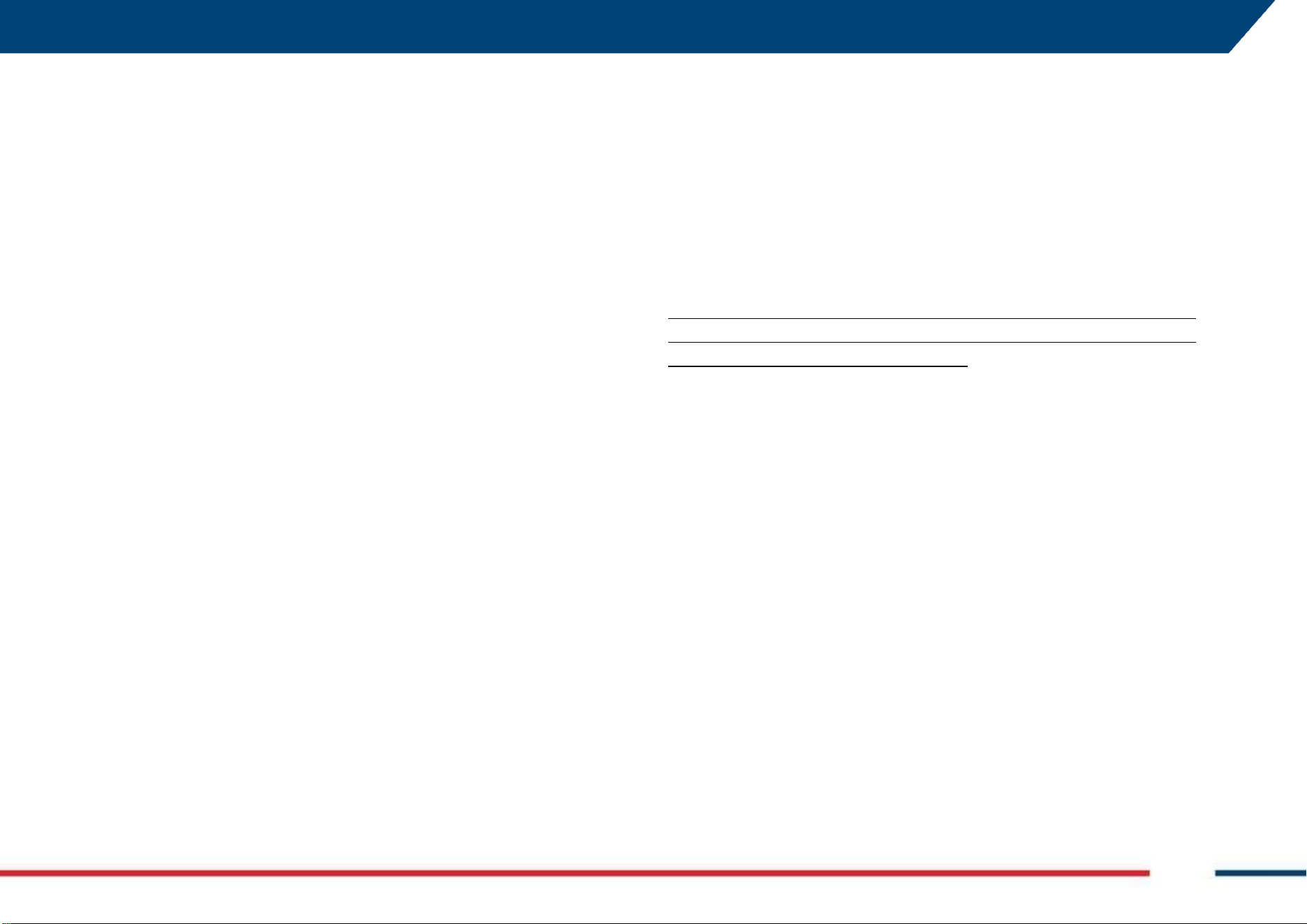
3. Replace the removed wheel with the Airless wheel A380 provided
with the kit
4. Repeat points 1-3 above, for the remaining wheels.
Chaser XR is now ready to be used as illustrated in Fig. 6.
6 HOW TO WORK ON SITE WITH CHASER XR Mod: MDM/011/M2 Rev 8
IDS GeoRadar Srl MNG/2023/007 Rev. 1.3 32/ 57
6 HOW TO WORK ON SITE WITH CHASER XR
Chaser XR is a Georadar system that can be deployed on site in a wide variety
of hardware and software configurations. Also, several positioning systems
(Line, Grid, GNSS, Robotic Total Station) can be associated to Chaser XR HW
and SW. These positioning systems are all associated to a “physical” wheel
encoder to trigger GPR data transmit and receive process.
Besides, the possibility to run data acquisition in Free Running mode is
available. Free running mode allows the User to collect data triggered by time
and not by the motion detected through a wheel encoder.
Free Running typical and/or possible applications are:
1. When a wheel encoder would not be in close contact with the ground
(e.g.: Chaser XR is placed on a boat for river applications), or
2. When wheel encoder would not run correctly on a solid surface (e.g.:
Chaser XR is moved on snow for glacier study applications), or
3. When a positioning system (GNSS or TPS) cannot be used, but
reference position markers are needed (e.g.: tunnel applications), or
4. In case of failure of the wheel encoder chain (1) plug-to-antenna->
2) cable connector-> 3) encoder cable-> 4) connector-to-encoder->
5) encoder).
The aim is to cover the largest possible applications and field conditions.
6.1 How to set up Chaser XR in HH or VV Polarization
Besides the HW product configurations illustrated in 4.2 and 4.3 and their
specific set up illustrated in 5.1, 5.2, 5.3, 5.4, 5.5, and 5.6 Chaser XR can be
deployed in 2 different orientation of the antenna, namely in HH (Horizontal,
internal dipoles perpendicular with respect to the drag direction) or VV
Polarization (Vertical, internal dipoles parallel with respect to the drag
direction).
The HW set up in HH or VV polarization depends upon the relative installation
of the pulling pole and the encoder wheel. If No Drag Kit is installed:
1. VV Polarization acquisition mode:
a. Drag pole attached next to the VV label on the antenna
case.
b. Wheel encoder fixed next to the HH label on the antenna
case.
2. HH Polarization acquisition mode:
a. Drag pole attached next to the HH label on the antenna
case.
b. Wheel encoder fixed next to the VV label on the antenna
case.
If the Drag Kit is installed, the Pulling pole and the WHE 100 encoder, are
installed next to the relative label on the Antenna (VV or HH, respectively)
and they are opposite to each other (180°).
When Chaser XR cart is installed, refer to the HH or VV labels on the antenna
case, for reference:
HH label toward or opposite to Operator-> HH acquisition mode
VV label toward or opposite to Operator-> VV acquisition mode
6.2 How to connect the field PC and the Chaser XR antenna
The connection between the field PC (where the uMap-Logger data
acquisition SW is installed) and the Chaser XR antenna can be fulfilled 1) via
WiFi or 2) via LAN Cable.
Regardless the specific field configuration to be used to collect GPR data, the
common steps to start up the system before commencing any data
acquisition on site are:
1. Connecting Chaser XR antenna and field PC in Wi Fi Mode:
a. Open the battery compartment on top of the antenna case
and insert the (2) batteries. Then close the same battery
compartment.
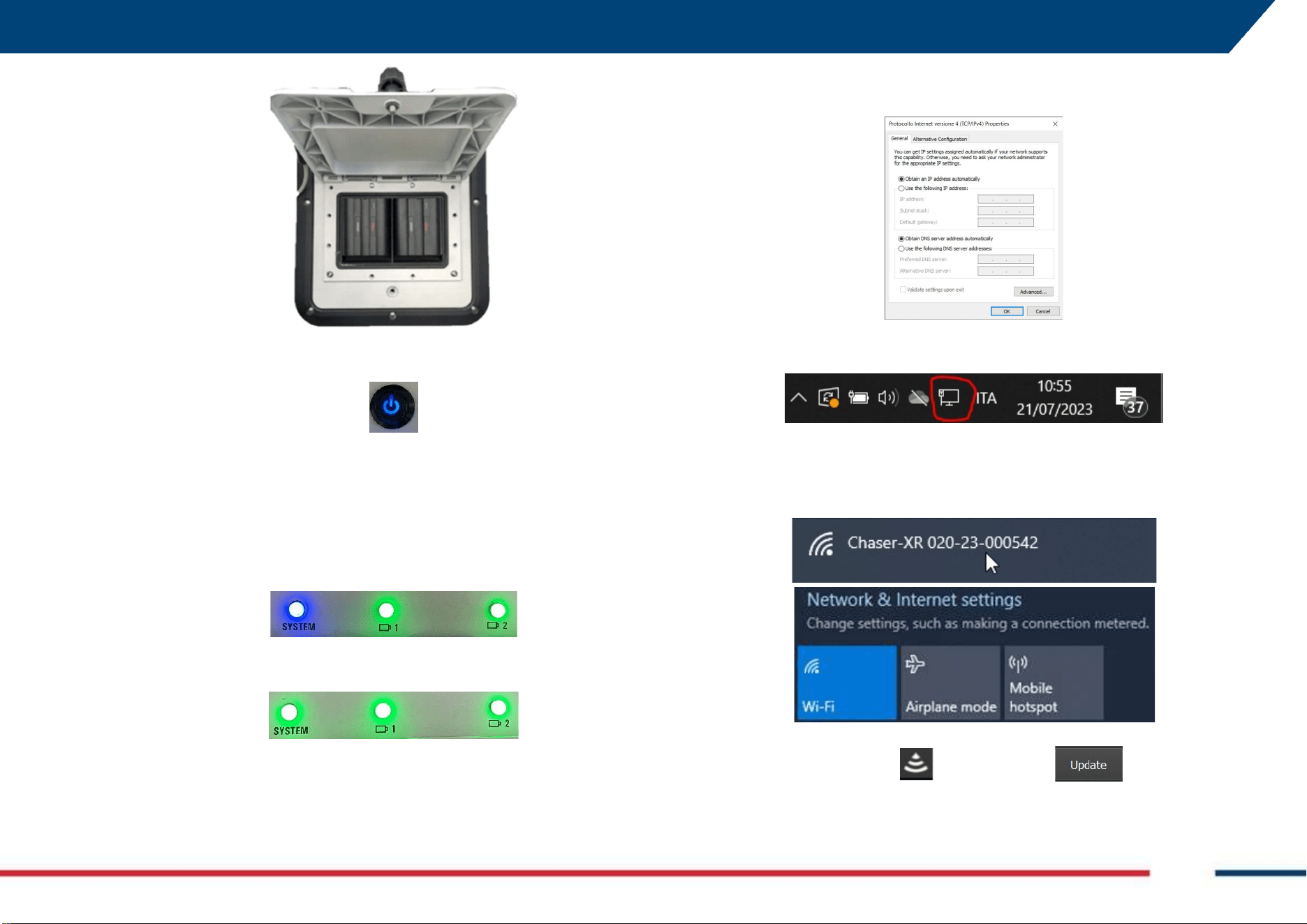
6 HOW TO WORK ON SITE WITH CHASER XR Mod: MDM/011/M2 Rev 8
IDS GeoRadar Srl MNG/2023/007 Rev. 1.3 33/ 57
b. Press the O/I button beside the battery compartment to
start up Chaser XR.
c. 3 leds are present on top of the antenna case: 2 indicating
the “battery” status, 1 the “System” status. As the system is
turned on and the batteries are fully charged, the battery led
shall be solid green (red, in case battery level is low) and the
“system” led shall have long-paused blinking green-to-blue
for three times, indicating that the internal WiFi module is
starting up to generate its own local network.
d. As the “System” led is solid green, Chaser XR internal WiFi is
active and generating its own network.
e. Turn on the field PC where the uMap-Logger software is
installed (note: please refer to the specific uMap-Logger
user’s manual for details on installation. Also, firewall and
antivirus must be OFF). The IP address of the WiFi port of the
PC must be set to DHCP (Dynamic mode and NOT Static IP
address).
f. Click on the network icon on the lower right corner (red
circle in the image below).
g. Select the WiFi network generated by the Chaser antenna
including the serial number of that specific antenna (e.g.:
Chaser XR 020-23-000542). Wait for connection to be
established.
h. Turn on uMap-Logger software, then press on the Radar
diagnostic icon , press update , and the
connection between the antenna and the PC is established.
6 HOW TO WORK ON SITE WITH CHASER XR Mod: MDM/011/M2 Rev 8
IDS GeoRadar Srl MNG/2023/007 Rev. 1.3 34/ 57
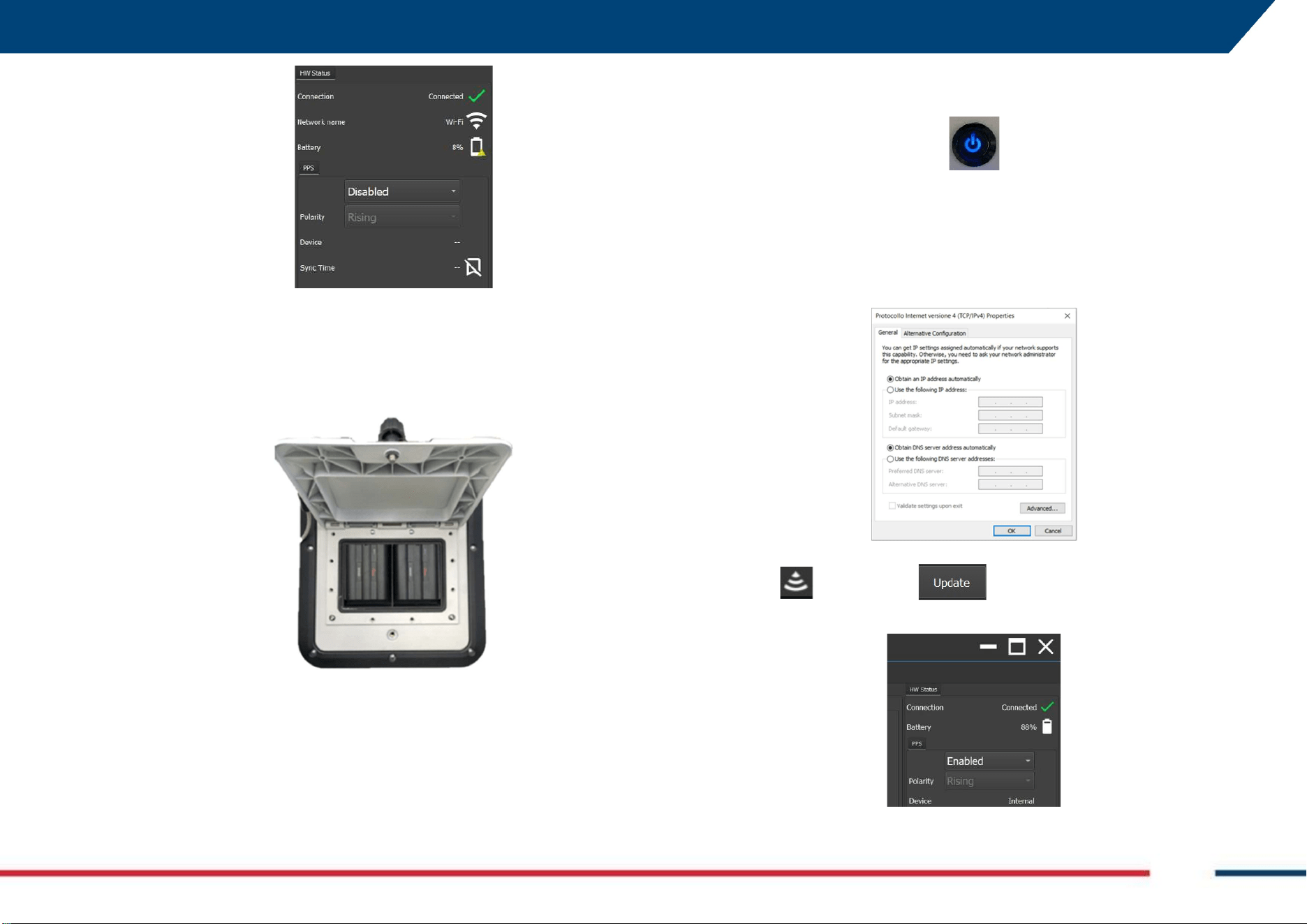
2. Connecting Chaser XR antenna and field PC using LAN Cable:
a. Open the battery compartment on top of the antenna case
and insert the (2) batteries. Then close the same battery
compartment.
b. Connect the field PC and the Chaser XR antenna via the LAN
cable provided with the system: on one side to the antenna
LAN connector, on the opposite side to the LAN ort of the PC.
c. Press the O/I button beside the battery compartment to
start up the antenna. In this case, the green-to-blue blinking
(described in the previous paragraph) will be not present due
to the connection via LAN cable, but the WiFi module will be
start up and usable in any case.
d. Turn on the field PC where the uMap-Logger software is
installed (note: please refer to the specific uMap-Logger
user’s manual for details on installation. Also, firewall and
antivirus must be OFF). The IP address of the Ethernet port
of the PC must be set to DHCP (Dynamic mode and NOT
Static IP address).
e. Turn on uMap-Logger, press on the Radar diagnostic icon
, press update , and the connection between
the antenna and the PC is established.
Chaser XR, is now ready to be used on site for data acquisition.
6 HOW TO WORK ON SITE WITH CHASER XR Mod: MDM/011/M2 Rev 8
IDS GeoRadar Srl MNG/2023/007 Rev. 1.3 35/ 57
NOT
E
:
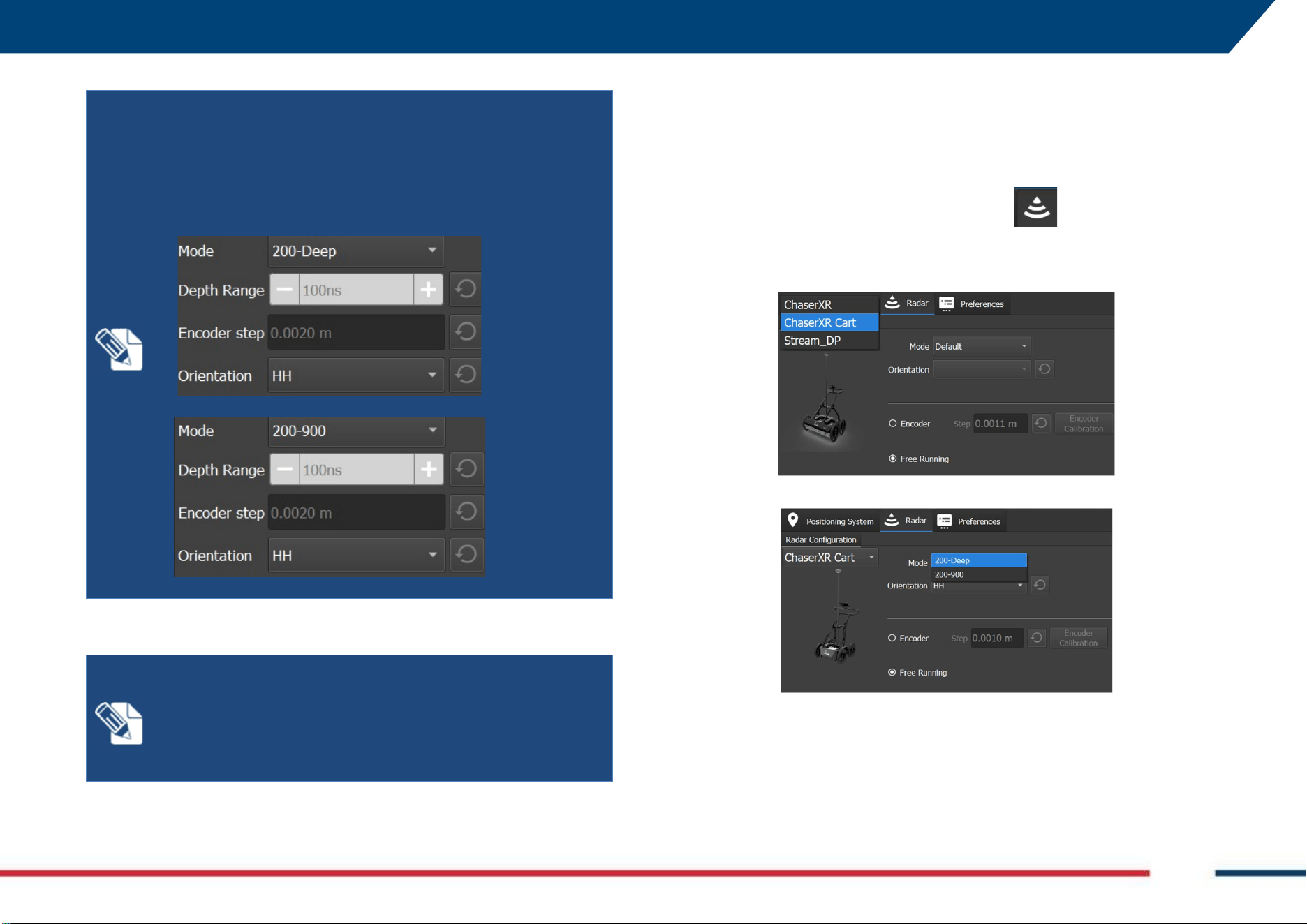
CHASER XR allows to work in two configuration
s
Mode:
200-deep or 200-900. The 200-deep Mode is studied for deep
applications (e.g.: Geology, Geotechnical) and with lower
resolution of the shallower layers; the 200-900 Mode allows
for better balance between shallow resolution and expected
penetration depth.
NOT
E
:
The default Encoder
step
is based on WHE50 encoder
(i.e.: 2mm). The WHE100 encoder has different encoder Step,
hence the encoder calibration should be performed at each
change of encoder wheel. Please, refers to uMap-Logger user’s
manual for detail about encoder calibration,
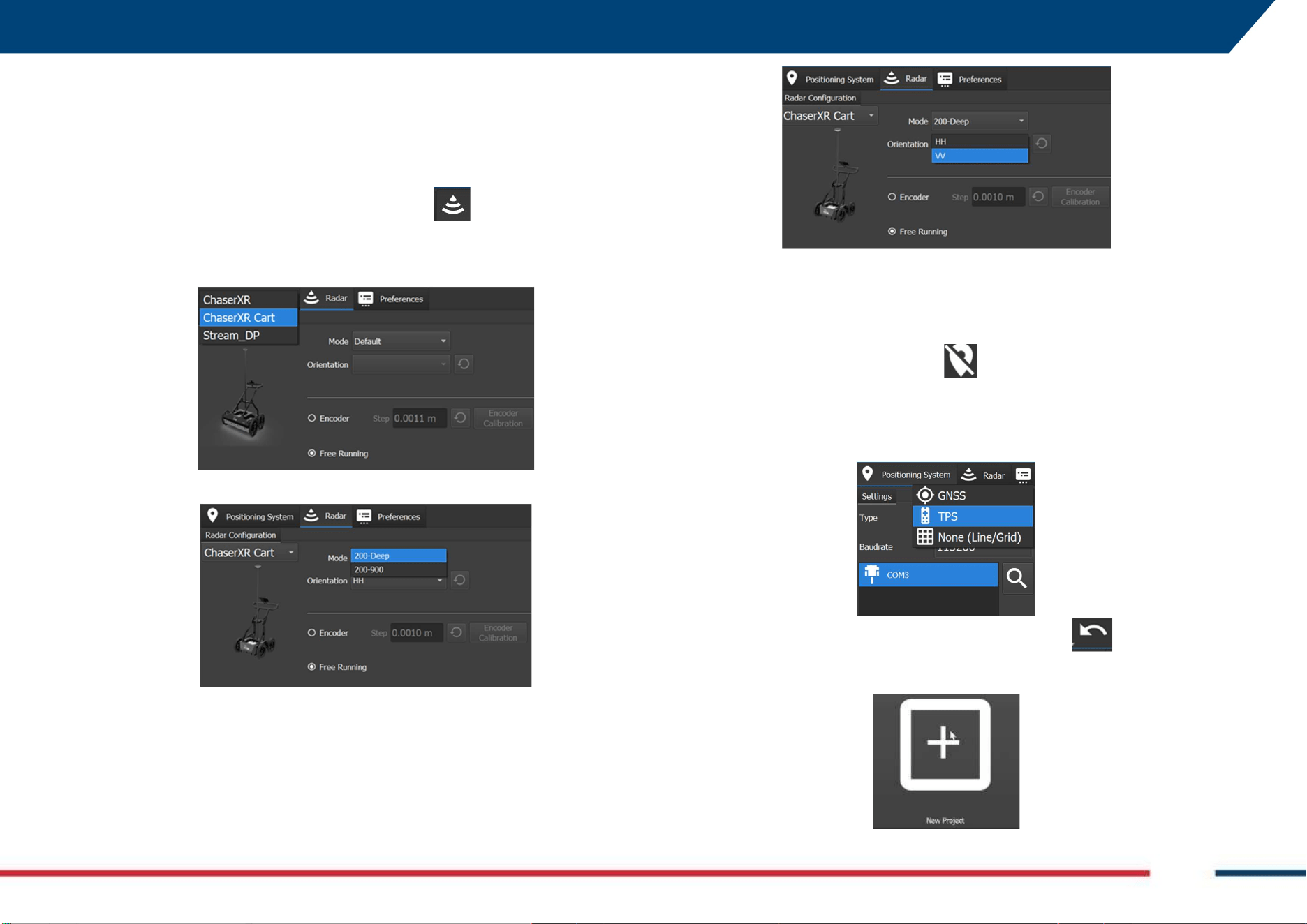
6.3 How to collect Chaser XR data in Line mode
Starting from a set up as per Fig. 1 (Chaser XR cart), Fig. 2 (Chaser XR Lite), or
Fig. 3 (Chaser XR Drag Kit), the minimum steps to be conducted to start
gathering data in Line mode are:
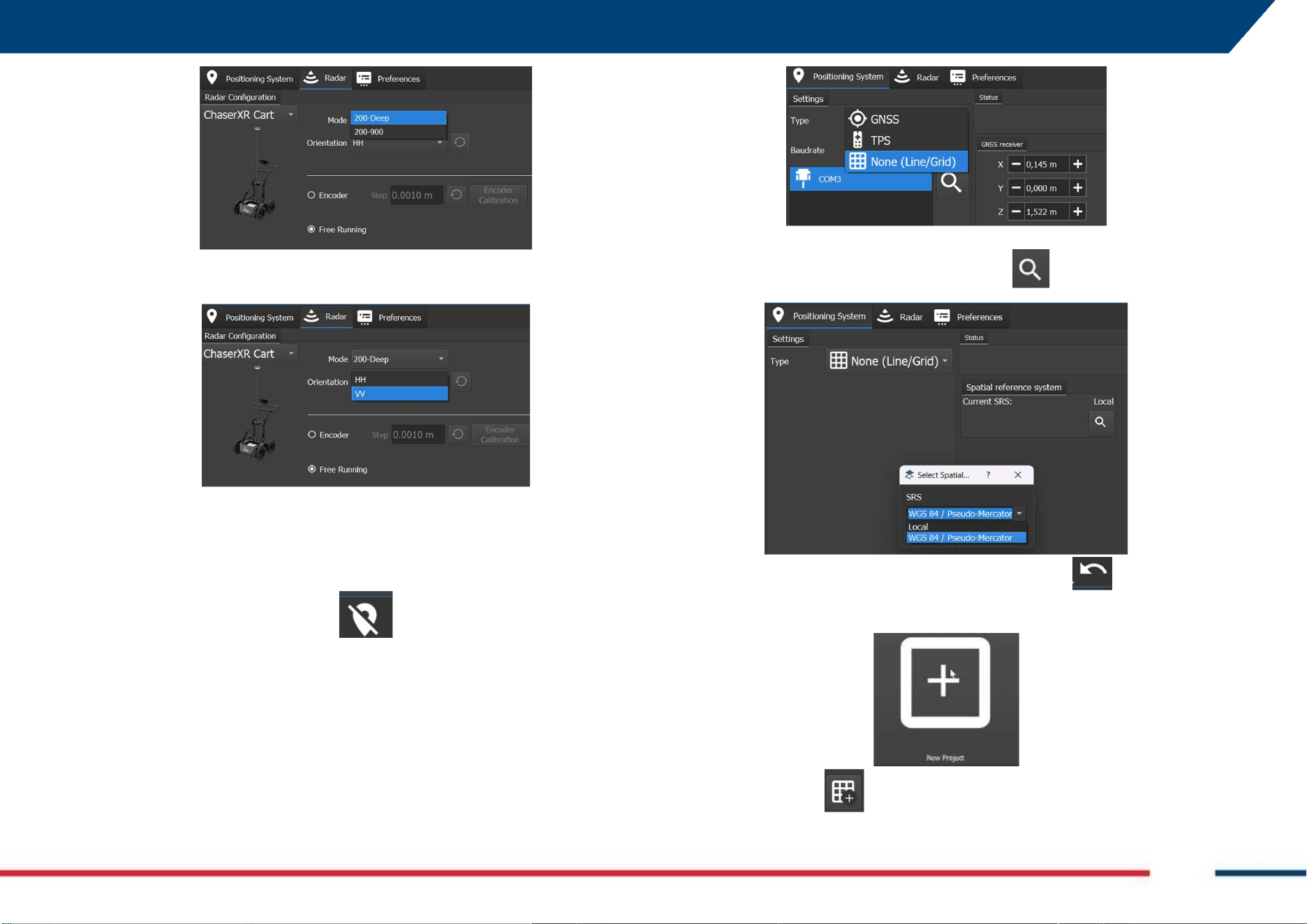
1. Start up the PC and launch the uMap-Logger acquisition software as
per 6.2 and click on the Radar Status icon ,
2. Select from the Radar Configuration drop-down menu, the antenna
type Chaser XR or Chaser XR cart,
3. Select the antenna frequency, from the Mode drop-down menu,
4. Select the Antenna orientation (HH or VV), from the Orientation
drop-down menu,
6 HOW TO WORK ON SITE WITH CHASER XR Mod: MDM/011/M2 Rev 8
IDS GeoRadar Srl MNG/2023/007 Rev. 1.3 36/ 57
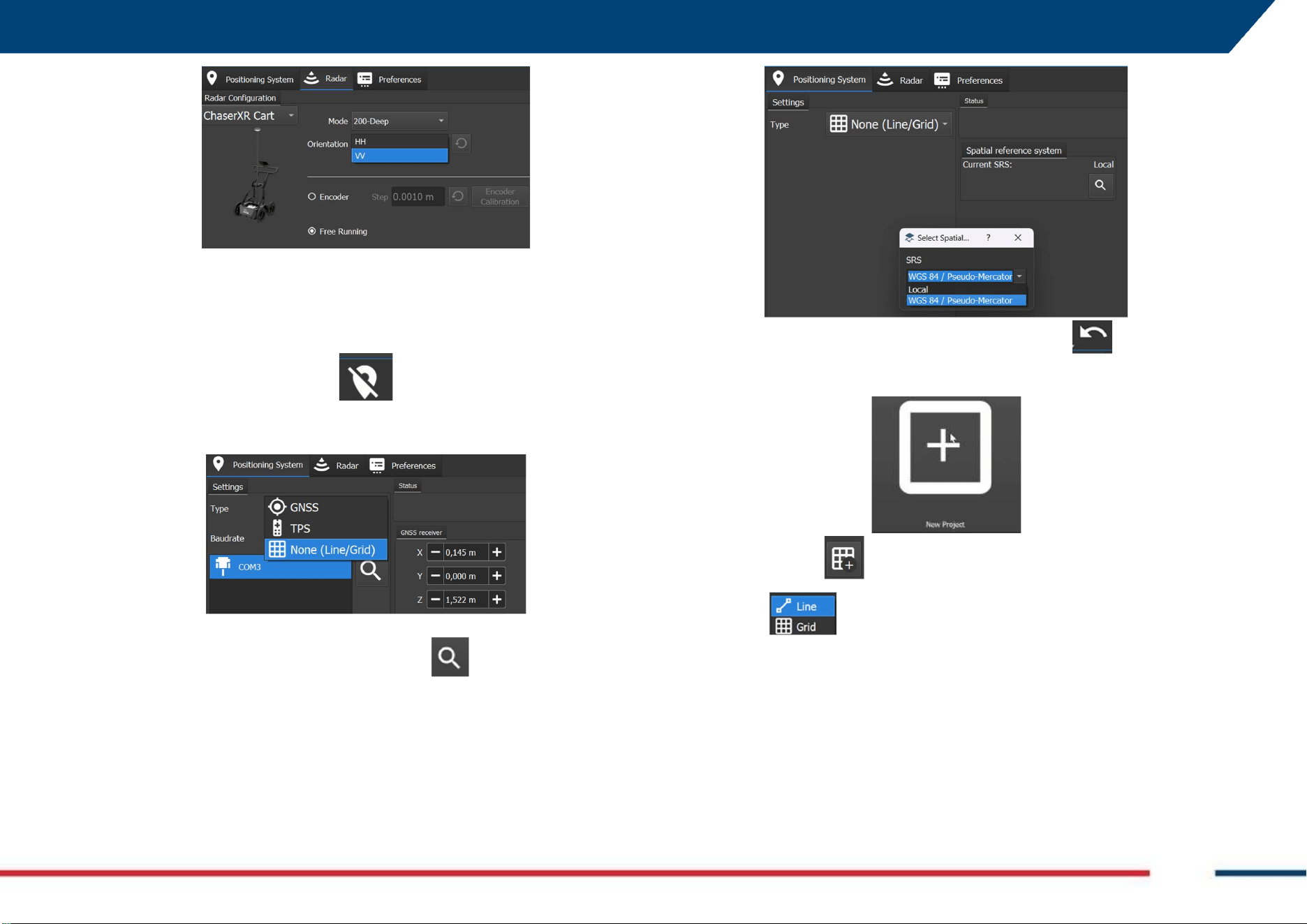
5. Adjust the Encoder step (default value is set for WHE50 of Chaser XR
Lite) by running the Encoder Calibration (refer to uMap-Logger
User’s Manual to run Encoder Calibration),
6. Click on the positioning icon to switch to the Positioning view tab,
7. From the Positioning tab select the None (Line/Grid) Mode by the
Settings drop-down menu,
8. Select the (local or WGS84) Spatial Reference System (SRS) from the
drop-down menu after pressing the icon
9. Go back to the previous page by pressing the icon ,
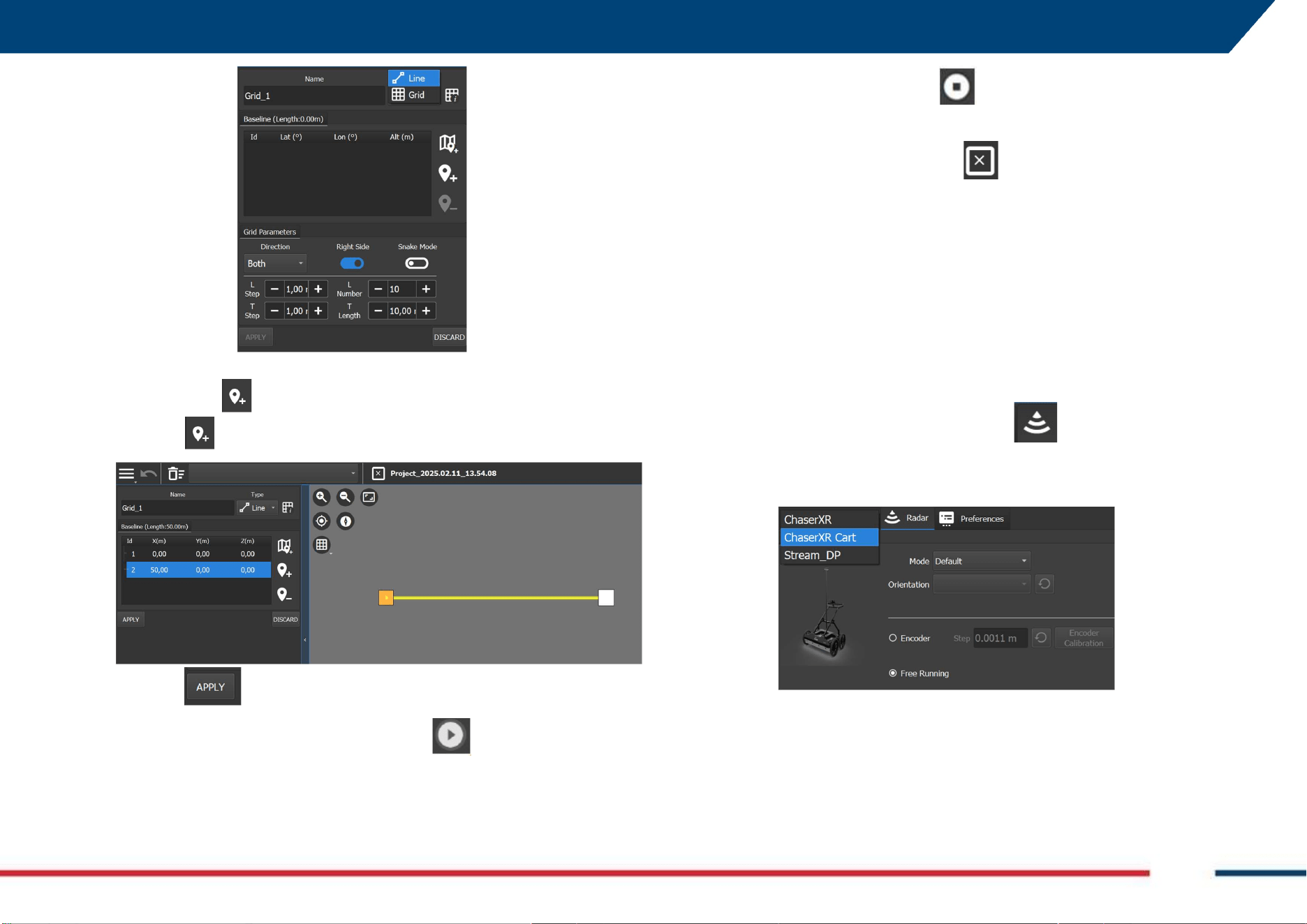
10. Then, press on the New Project icon to start a new project window.
11. Press the icon
12. Select from the drop-down menu
6 HOW TO WORK ON SITE WITH CHASER XR Mod: MDM/011/M2 Rev 8
IDS GeoRadar Srl MNG/2023/007 Rev. 1.3 37/ 57
13. Then press to enter the starting point of the acquisition line and
again the end point (50 meters long line in the image below).
14. Press to confirm the Line just drawn.
15. In the Project Window, press the Play button to start the
acquisition,
16. Press the Stop Acquisition button to close the swath
acquisition,
17. Press the close current project button to close the active
project.
Refer to uMap-Logger Software User’s Manual for specific software tools
and settings.
6.4 How to collect Chaser XR data in GRID mode
Starting from a set up as per Fig. 1 (Chaser XR cart), Fig. 2 (Chaser XR Lite), or
Fig. 3 (Chaser XR Drag Kit), the minimum steps to be conducted to start
gathering data in Grid mode are:
1. Start up the PC and launch the uMap-Logger acquisition software as
per 6.2 and click on the Radar Status icon ,
2. Select from the Radar Configuration drop-down menu, the antenna
type Chaser XR or Chaser XR cart,
3. Select the antenna frequency, from the Mode drop down menu,
6 HOW TO WORK ON SITE WITH CHASER XR Mod: MDM/011/M2 Rev 8
IDS GeoRadar Srl MNG/2023/007 Rev. 1.3 38/ 57
4. Select the Antenna orientation (HH or VV), from the Orientation
drop-down menu,
5. Adjust the Encoder step (Default value is set for WHE50 of Chaser XR
Lite) by running the Encoder Calibration (refer to uMap-Logger
User’s Manual to run Encoder Calibration),
6. Click on the positioning icon to switch to the Positioning view tab,
7. From the Positioning tab select the None (Line/Grid) Mode by the
Settings drop-down menu,
8. Select the (local or WGS84) Spatial Reference System (SRS) from the
drop-down menu after pressing the icon
9. Go back to the previous page by pressing the icon ,
10. Then, press on the New Project icon to start a new project window.
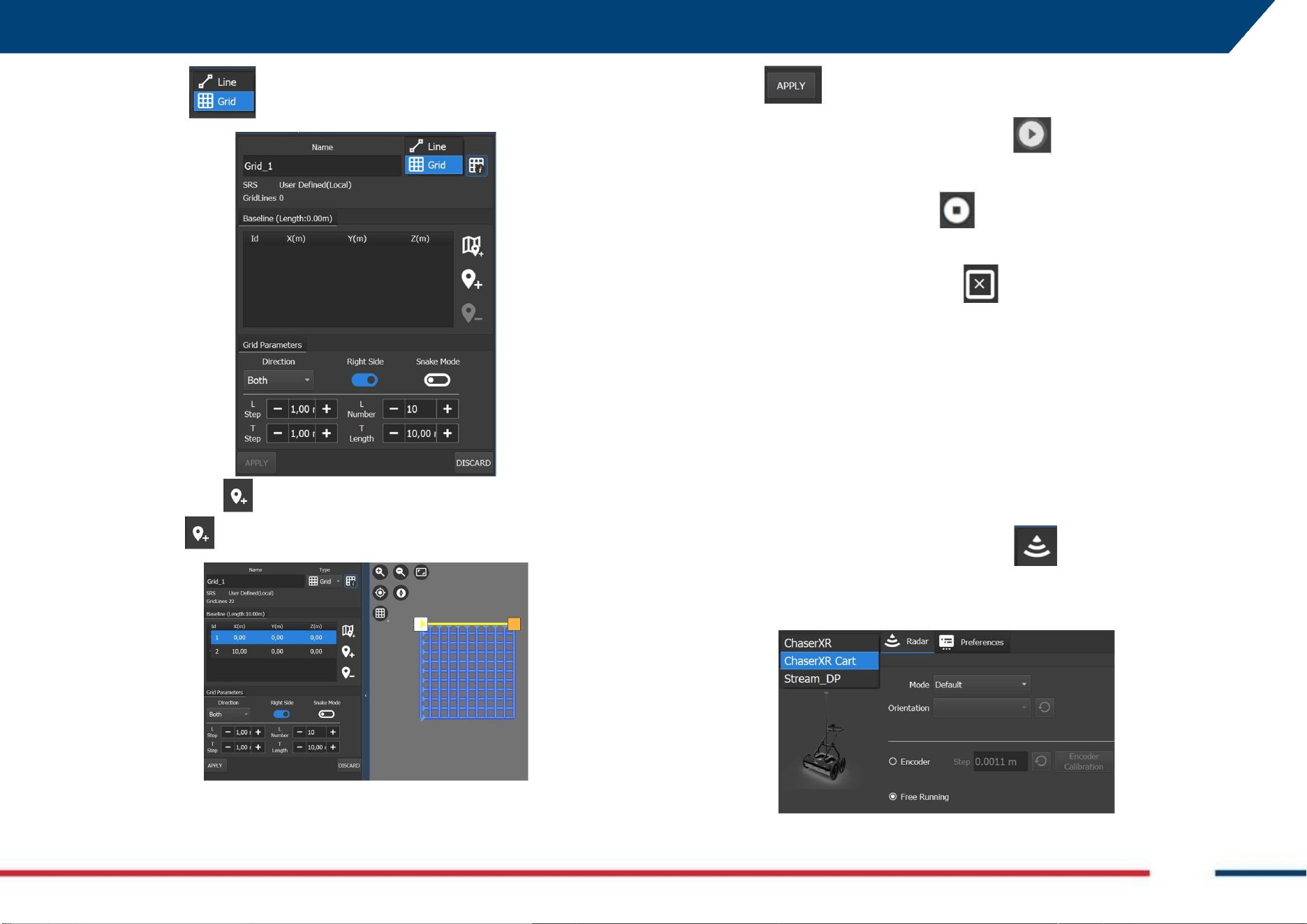
11. Press the icon
6 HOW TO WORK ON SITE WITH CHASER XR Mod: MDM/011/M2 Rev 8
IDS GeoRadar Srl MNG/2023/007 Rev. 1.3 39/ 57
12. Select from the drop-down menu
13. Then press to enter the starting point of the reference line and
again the end point (10 by 10 meters grid in the image below).
14. Edit the Grid trajectory, based on the project specification, and using
the tools described in uMap-Logger User’s manual.
15. Press to confirm the Grid just drawn.
16. In the Project Window, press the Play button to start the
acquisition,
17. Press the Stop Acquisition button to close the swath
acquisition,
18. Press the close current project button to close the active
project.
Refer to uMap-Logger Software User’s Manual for specific software tools
and settings.
6.5 How to collect Chaser XR data in GNSS mode
Starting from a set up as per Fig. 4 (Chaser XR Positioning Kit), or Fig. 5
(Chaser XR with cart and positioning kit) the minimum steps to be conducted
to start gathering data are:
1. Start up the PC and launch the uMap-Logger acquisition software as
per 6.2 and click on the Radar Status icon ,
2. Select from the Radar Configuration drop-down menu, the antenna
type Chaser XR or Chaser XR cart,
6 HOW TO WORK ON SITE WITH CHASER XR Mod: MDM/011/M2 Rev 8
IDS GeoRadar Srl MNG/2023/007 Rev. 1.3 40/ 57
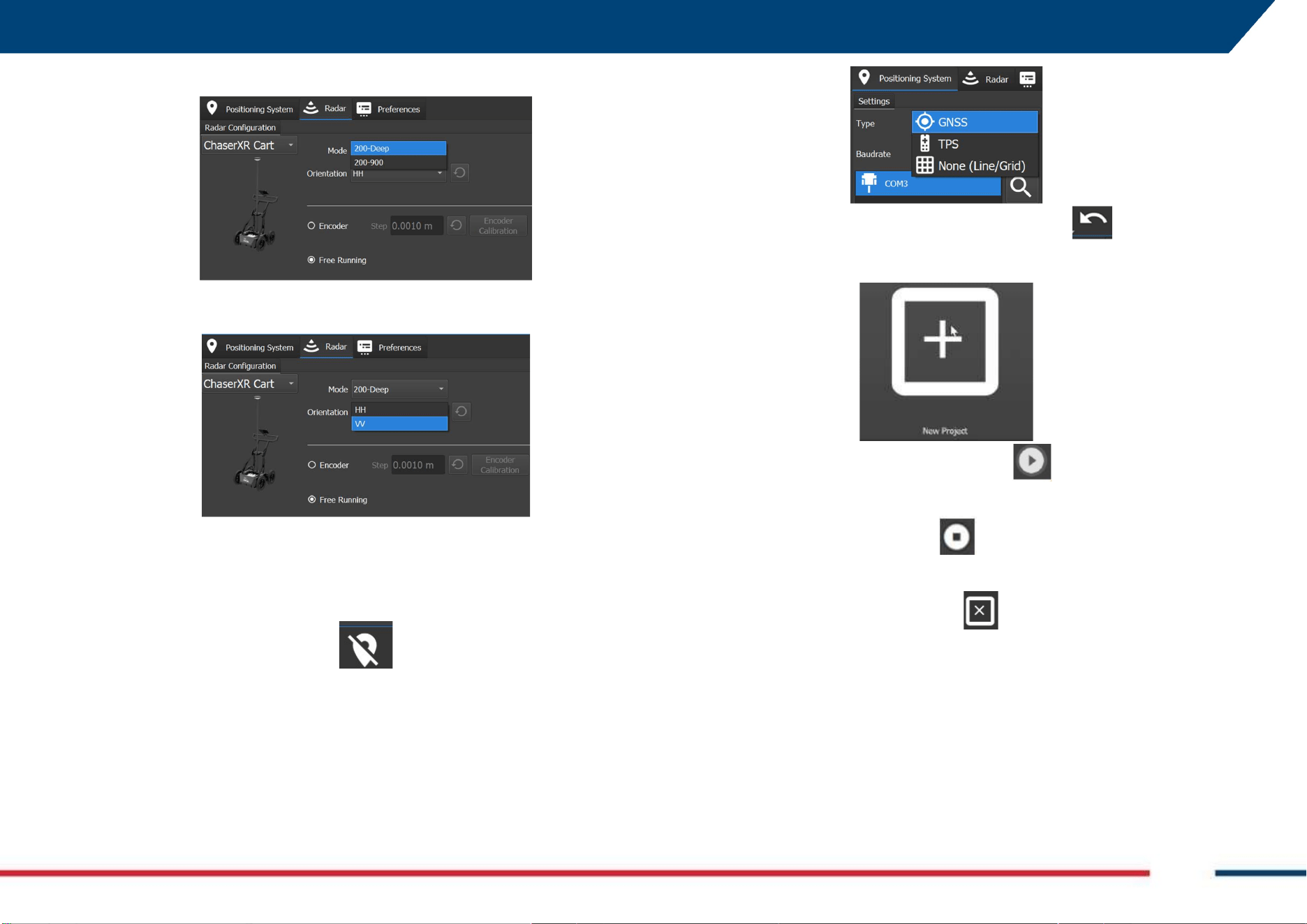
3. Select the antenna frequency, from the Mode drop down menu,
4. Select the Antenna orientation (HH or VV), from the Orientation
drop-down menu,
5. Adjust the Encoder step (Default value is set for WHE50 of Chaser XR
Lite) by running the Encoder Calibration (refer to uMap-Logger
User’s Manual to run Encoder Calibration),
6. Click on the positioning icon to switch to the Positioning view tab,
7. From the Positioning tab select the GNSS Mode by the Settings drop-
down menu,
8. Go back to the previous page by pressing the icon ,
9. Then, press on the New Project icon to start a new project window.
10. In the Project Window, press the Play button to start the
acquisition,
11. Press the Stop Acquisition button to close the swath
acquisition,
12. Press the close current project button to close the active
project.
Refer to uMap-Logger Software User’s Manual for specific software tools
and settings.
Refer to the GNSS Manufacturers User’s Manual to pair with the field PC and
Stream positioning data.
6 HOW TO WORK ON SITE WITH CHASER XR Mod: MDM/011/M2 Rev 8
IDS GeoRadar Srl MNG/2023/007 Rev. 1.3 41/ 57
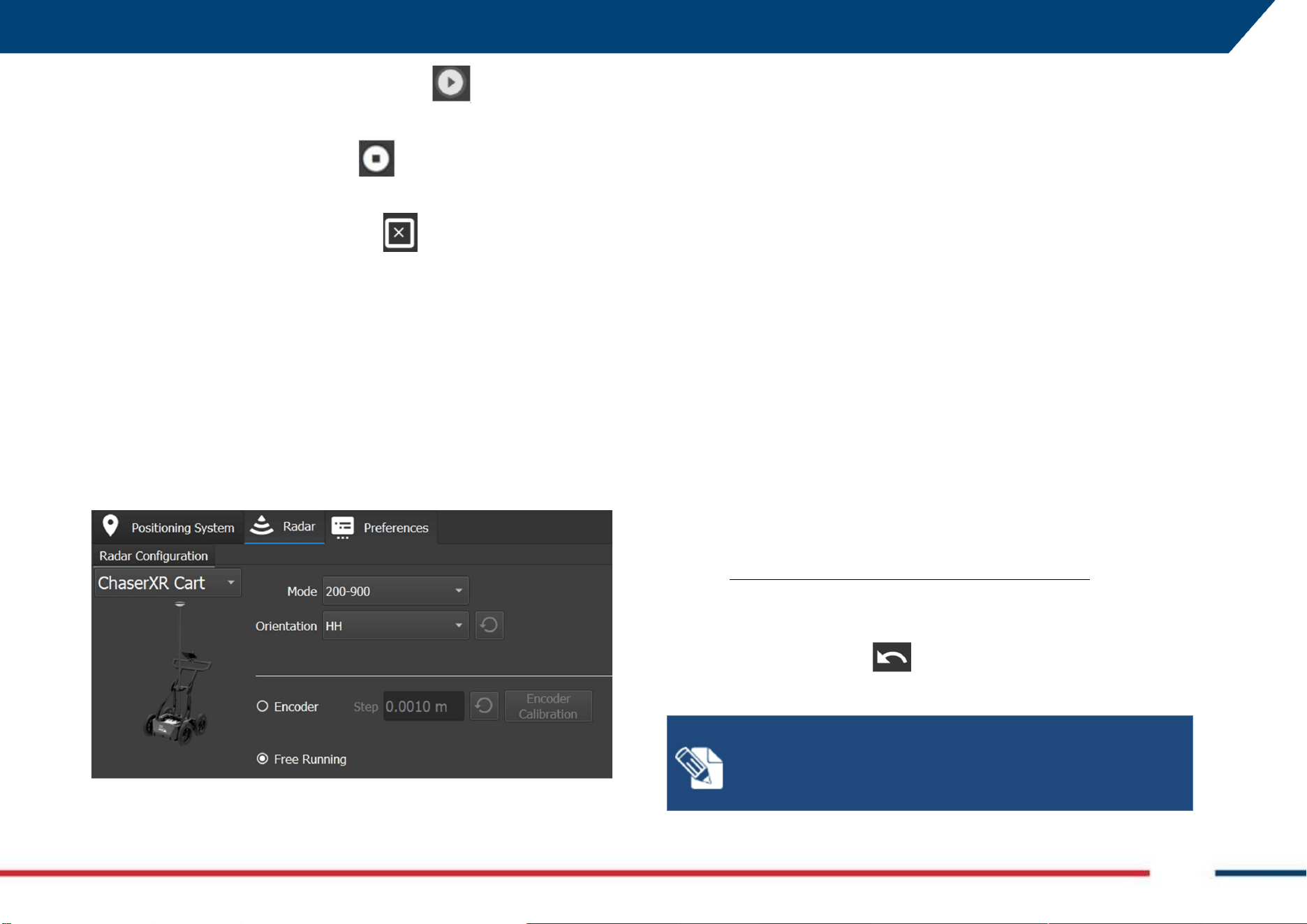
6.6 How to collect Chaser XR data in TPS mode
Starting from a set up as per Fig. 4 (Chaser XR Positioning Kit), Fig. 5 (Chaser
XR with cart and positioning kit) the minimum steps to be conducted to start
gathering data are:
1. Start up the PC and launch the uMap-Logger acquisition software as
per 6.2 and click on the Radar Status icon ,
2. Select from the Radar Configuration drop down menu, the antenna
type Chaser XR or Chaser XR cart,
3. Select the antenna frequency, from the Mode drop down menu,
4. Select the Antenna orientation (HH or VV), from the Orientation
drop down menu,
5. Adjust the Encoder step (Default value is set for WHE50 of Chaser XR
Lite) by running the Encoder Calibration (refer to uMap-Logger
User’s Manual to run Encoder Calibration),
6. Click on the positioning icon to switch to the Positioning view tab,
7. From the Positioning tab select the TPS Mode by the Settings drop-
down menu,
8. Go back to the previous page by pressing the icon ,
9. Then, press on the New Project icon to start a new project window.
6 HOW TO WORK ON SITE WITH CHASER XR Mod: MDM/011/M2 Rev 8
IDS GeoRadar Srl MNG/2023/007 Rev. 1.3 42/ 57
10. In the Project Window, press the Play button to start the
acquisition,
11. Press the Stop Acquisition button to close the swath
acquisition,
12. Press the close current project button to close the active
project.
Refer to uMap-Logger Software User’s Manual for specific software tools
and settings.
Refer to the TPS User’s Manual to pair with the field PC and Stream
positioning data.
6.7 How to collect data in Free Running Mode
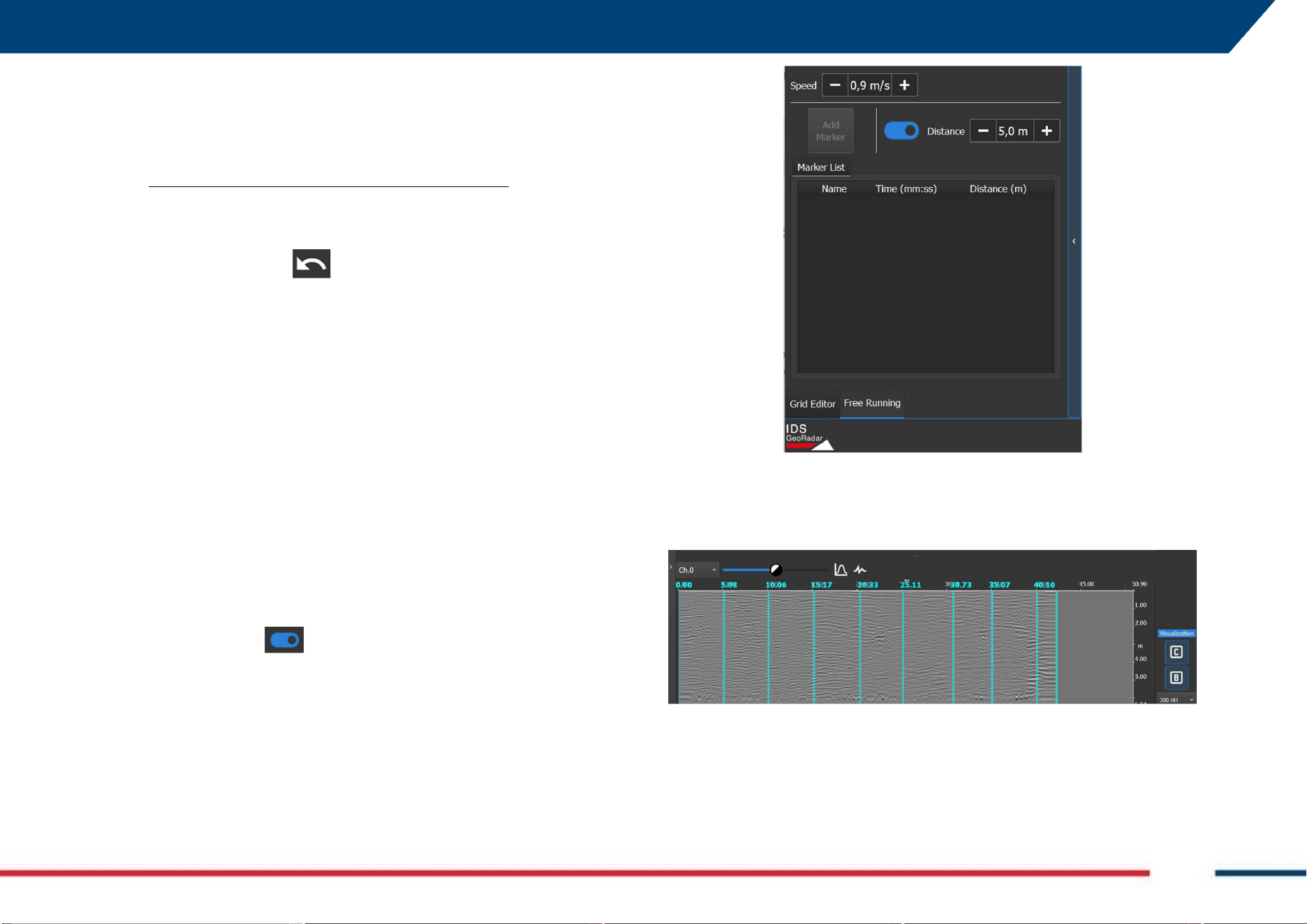
By the Radar configuration tab of uMap-Logger (refer to its own User’s
Manual for details), it is possible to select if the acquisition is triggered by the
Encoder or by time in Free Running mode (Fig. 7).
Fig. 7 Radar Configuration in Free Running acquisition mode
The Free Running mode differs from the Encoder mode because the latter
allows the GPR data trigger through the wheel encoder that is part of the
system, whereas for the Free Running the trigger is given by the time and
disregards the encoder that can be removed or disconnected, for this type of
GPR data acquisition.
As already mentioned in 6 HOW TO WORK ON SITE WITH CHASER XR, Free
Running possible applications are:
1. When a wheel encoder would not be in close contact with the ground
(e.g.: Chaser XR is placed on a boat for river applications), or
2. When wheel encoder would not run correctly on a solid surface (e.g.:
Chaser XR is moved on snow for glacier study applications), or
3. When a positioning system (GNSS or TPS) cannot be used, but
reference position markers are needed (e.g.: tunnel applications), or
4. In case of failure of the wheel encoder.
Free Running mode can run with or without GNSS or TPS.
6.7.1 How to collect data in Free Running Mode with GNSS or TPS
To start a Chaser XR data acquisition in Free Running Mode with GNSS or TPS,
follow the steps below:
1. Select the Radar configuration as described in paragraph 6.5 or 6.6
(only disregarding point 5 on the encoder calibration)
2. Select the Free Running mode from the radar configuration tab (Fig.
7),
3. Press the back arrow and Start a New Project,
4. Collect data as described in paragraph 6.5 or 6.6,
NOTE: During data acquisition in Free Running mode with
GNSS the B-Scan, after pressing the Play button, shall proceed
continuously even if the user is not moving and shall be
correctly resized after stopping the acquisition.
6 HOW TO WORK ON SITE WITH CHASER XR Mod: MDM/011/M2 Rev 8
IDS GeoRadar Srl MNG/2023/007 Rev. 1.3 43/ 57
6.7.2 How to collect data in Free Running Mode in Line or Grid
To start a Chaser XR data acquisition in Free Running Mode in Line or Grid
mode, follow the steps below:
1. Select the Radar configuration as described in paragraph 6.3 or 6.4
(only disregarding point 5 on the encoder calibration)
2. Select the Free Running mode from the radar configuration tab (Fig.
7),
3. Press the back arrow and Start a New Project,
4. Collect data as described in paragraph 6.3 or 6.4,
The Free Running acquisition mode allows the User to include markers on
the B-Scan, when running a survey in Line or Grid. Markers allows the User
to have a direct correspondence between specific point(s) on the B Scan and
Points of Interest (PoI) present along the acquisition line (e.g.: a spray mark
including distance from start of the line, or an object present on site at a
known distance with respect to acquisition line).
Markers can be added:
Automatically (Markers are added automatically at specified
distance),
Manually (User includes marker during data acquisition).
To add markers Automatically, follow the steps below:
1. Select the Free Running tab at the left lower corner of Fig. 8,
2. Activate the icon to enable Automatic Markers,
3. Enter Speed Value during data acquisition (0,9m/s in Fig. 8)
4. Enter the distance between markers (5 m in the example of Fig. 8)
5. Start the acquisition.
Fig. 8 Add Marker in Free Running acquisition
The B Scan shall appear with marker as in the example of Fig. 9, below.
Fig. 9 Example of B Scan with Automatic marker each 5 meter
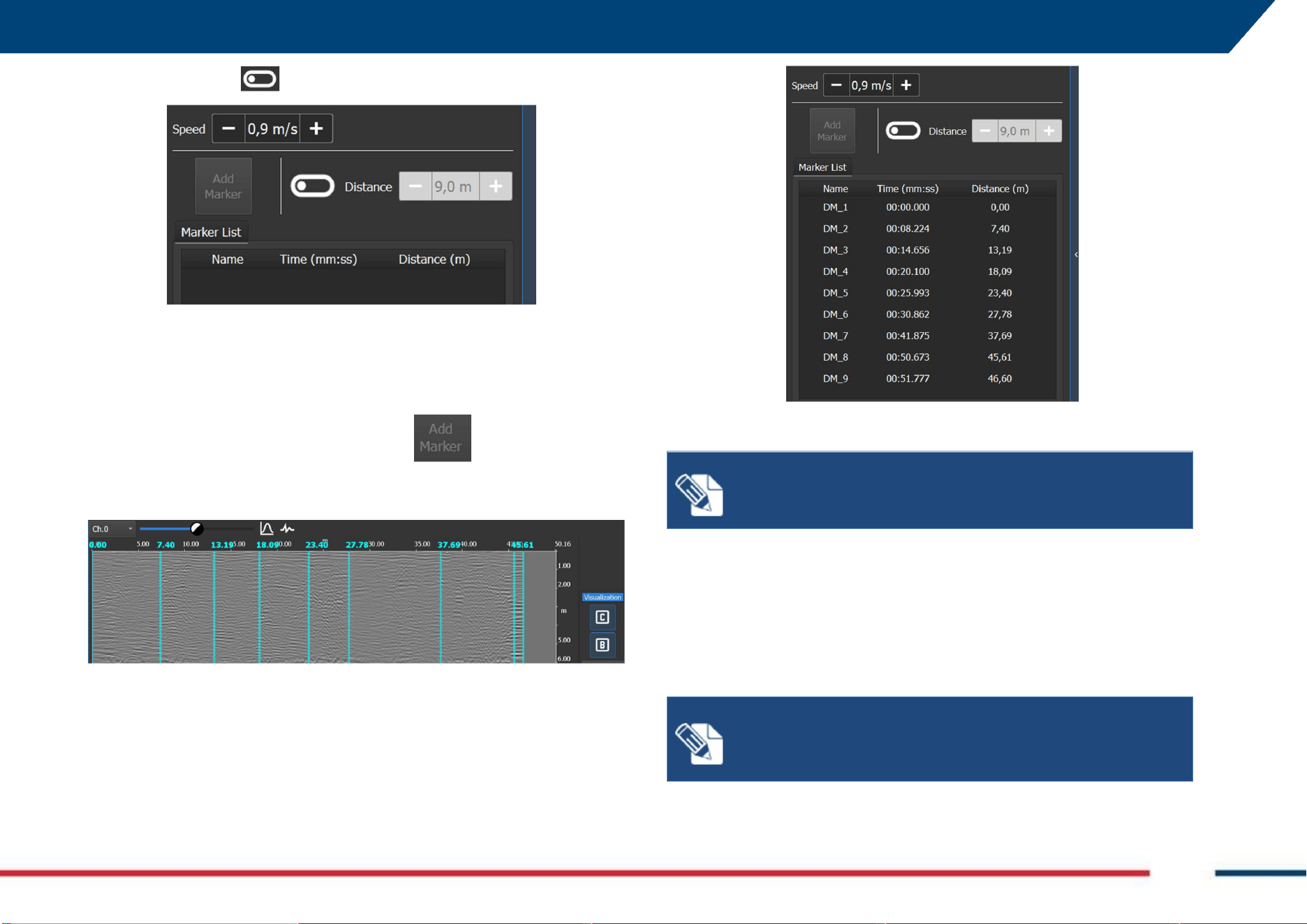
To add markers Manually, follow the steps below:
1. Select the Free Running tab at the left lower corner of Fig. 8,
6 HOW TO WORK ON SITE WITH CHASER XR Mod: MDM/011/M2 Rev 8
IDS GeoRadar Srl MNG/2023/007 Rev. 1.3 44/ 57
2. Slide the icon to disable the Automatic Markers (Fig. 10),
Fig. 10 Add Markers Manually
3. Enter Speed Value during data acquisition (0,9m/s in Fig. 10)
4. Start the acquisition.
5. During data acquisition press the icon every time the User
wants to add a marker at a specific location.
The B Scan shall appear with marker as in the example of Fig. 10, below.
Fig. 11 Add Marker Manually
In both cases, a list of the added Markers shall appear on the left panel (Fig.
12).
Fig. 12 Markers List
NOTE: Markers can be applied ONLY in Free Running
Acquisitions mode in LINE or GRID. Not with GNSS or Total
Station.
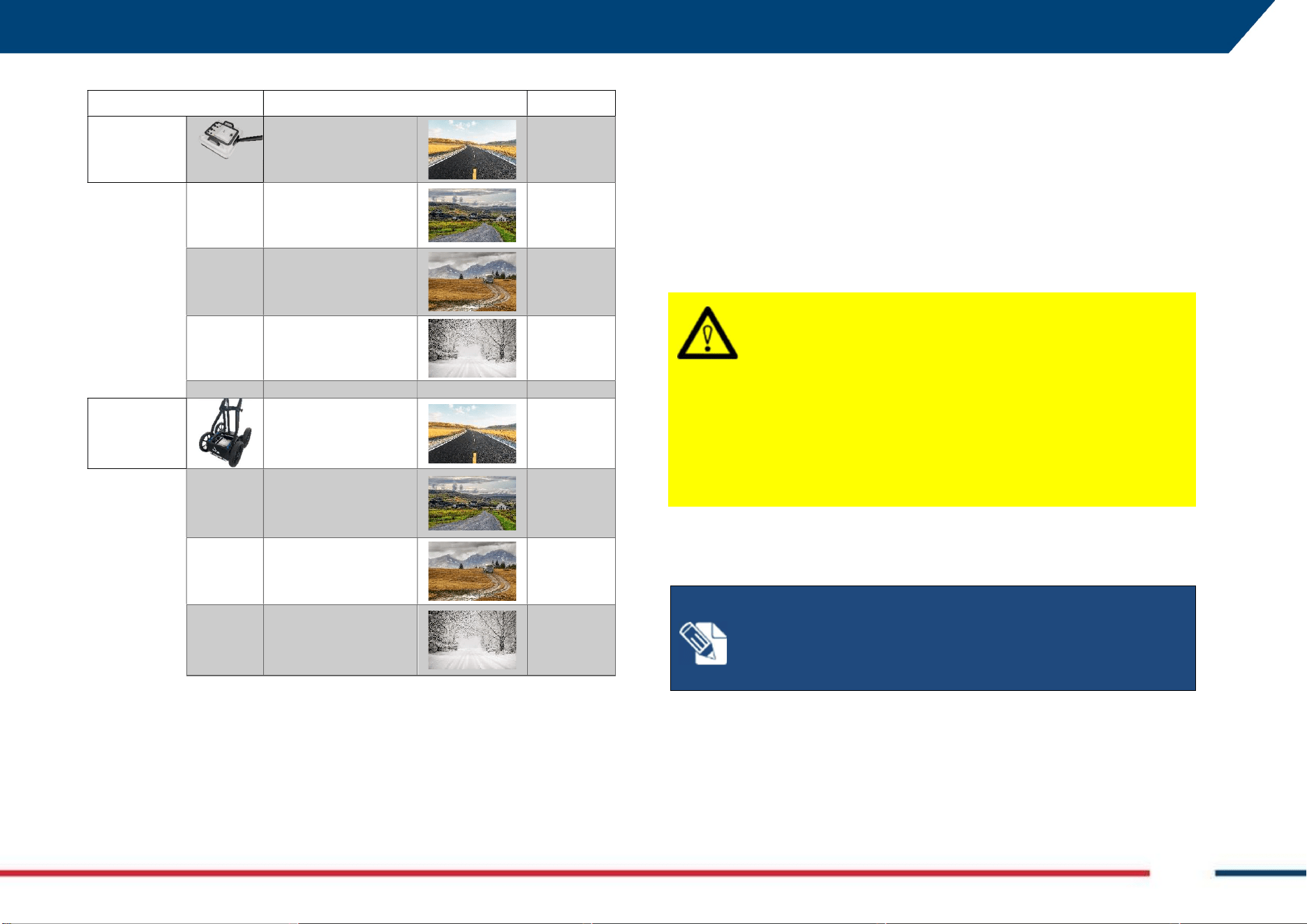
In the following panel (Table 1) a few examples are shown of expected speed
value to be used depending on system and conditions. Values portrayed
herewith shall only be considered as indicative.
Speed value refers to the velocity with which the operator is moving when
operating the system.
NOTE:
Speed entered in the acquisition panel
(
Fig.
10
)
should
be as much as possible close to the “real” one. This, affect the
progress of the B Scan on screen with respect to the actual
position on site.
7 CARE AND TRANSPORT Mod: MDM/011/M2 Rev 8
IDS GeoRadar Srl MNG/2023/007 Rev. 1.3 45/ 57
SYSTEM SURFACE SPEED (m/s)
Chaser XR
Paved/Flat
0.9-1
Grass/moderately
rough
0.7-0.8
Dirt/rough
0.6-0.7
Soft (like snow or sand)
0.5-0.6
Chaser XR
with CART
Paved/Flat
1-1.2
Grass/moderately
rough
0.8-0.9
Dirt/rough
0.7-0.8
Soft (like snow or sand)
0.4-0.5
Table 1 - Speed of acquisition (Average Values). The above values are “indicative”
and may differ based on actual surface condition.
7 CARE AND TRANSPORT
7.1 Cleaning Information
Before cleaning any of the external parts of the apparatus, make sure that all
cables and wires have been unplugged, including the power supply cable. If
a damp cloth is used, make sure it is not wet, to avoid any damage to the
electrical components of the equipment. Wait until the equipment is totally
dry before reconnecting the cables.
CAUTION
:
DAMAGE
TO
ELECTRICAL COMPONENTS
If a damp cloth is used while cleaning the system or part of it,
make sure that this is not wet, to avoid any damage to the
electrical components of the equipment
PRECAUTION
:
Before cleaning any of the external parts of the
apparatus, make sure that all cables and wires have been
unplugged, including the power supply cable.
The Chaser XR should be cleaned periodically using a damp cloth.
NOTE
:
If the
system is dirty, connectors and encoders may not
work properly.
Precautions:
After a field work, check the conditions of the system and clean
it if necessary.
Do not use solvents or abrasive detergents.
7 CARE AND TRANSPORT Mod: MDM/011/M2 Rev 8
IDS GeoRadar Srl MNG/2023/007 Rev. 1.3 46/ 57
CAUTION
:
DAMAGE
TO
ELECTRICAL COMPONENTS
Consider only cleaning products appropriate for electronical
components.
PRECAUTION
:
Verify if the cleaning products are compliant
with electronic devices.
Do not apply liquid directly to the electrical contacts of the various
connectors.
If a specific spray is used to clean the PC monitor, make sure it is not
flammable; in any case, do not spray it directly on the screen, instead, spray
it onto the cleaning cloth.
CAUTION
:
DAMAGE
TO
ELECTRICAL COMPONENTS
Flammable spray could damage the electronic devices, as
controller laptop.
PRECAUTION
:
Verify if the cleaning products are compliant
with electronic devices.
7.2 Battery Removal Information
Remove batteries from the product and the charger before storing.
• After storage recharge batteries before using.
• Protect batteries from damp and wetness. Wet or damp batteries must be
dried before storing or use.
• A storage temperature range of −20 °C to +50 °C/−4 °F to +122 °F in a dry
environment is recommended to minimize self-discharging of the battery.
• At the recommended storage temperature range, batteries containing a
40% to 50% charge can be stored for up to one year. After this storage
period the batteries must be recharged.
As for the Laptop Batteries please, do refer to the PC manufacturer user’s
manual.
7.3 Periodical Check
The Operator should periodically check the status of the antenna sledge,
shells, all cables, any rotating part, and any (potentially) consumable part.
The system must not be used in case of any malfunctioning or broken part,
as this may cause other parts to be damaged and/or malfunction
consequently.
NOTICE
:
The Sledges should be periodically checked out to
verify their status, and should be removed and replaced, when
needed. Prior starting any survey, the status of the sledge
should be verified for integrity.
Precautions:
If the antenna shell is exposed, even partially, because of the
sledge being consumed, the sledge must be replaced
immediately.
NOTICE
:
All the cables and connectors should be verified at
each use of the system
Precautions:
In case of any damage of cables or connectors, immediately
inform IDS GeoRadar to follow up on removal and
replacement.
7 CARE AND TRANSPORT Mod: MDM/011/M2 Rev 8
IDS GeoRadar Srl MNG/2023/007 Rev. 1.3 47/ 57
NOTICE
:
All the connectors on the antenna
and
the
accessories, must be plugged at any time either by the
corresponding cable plug, or by the connector cap, when not
in use. This is to prevent dust or water ingress, that may
damage the connector itself and its functionality.
Precautions:
Verify the connectors status before running a survey.
7.4 Proper system use and transport/shipping
Always use the system as indicated in this manual, by following instructions.
When not in use, the system should always be transported and/or shipped
by using the hard case with which the system is delivered. Transporting
and/or shipping the system outside this packaging or by using other shipping
boxes may cause the system, or part of it, to be damaged.
CAUTION: MECHANICAL DAMAGE OF THE SYSTEM
Transporting and/or shipping the system outside its original
packaging or by using other shipping boxes may cause the
system, or part of it, to be damaged.
PRECAUTION
: The system should always be transported
and/or shipped by using the hard case with which the system
is delivered.
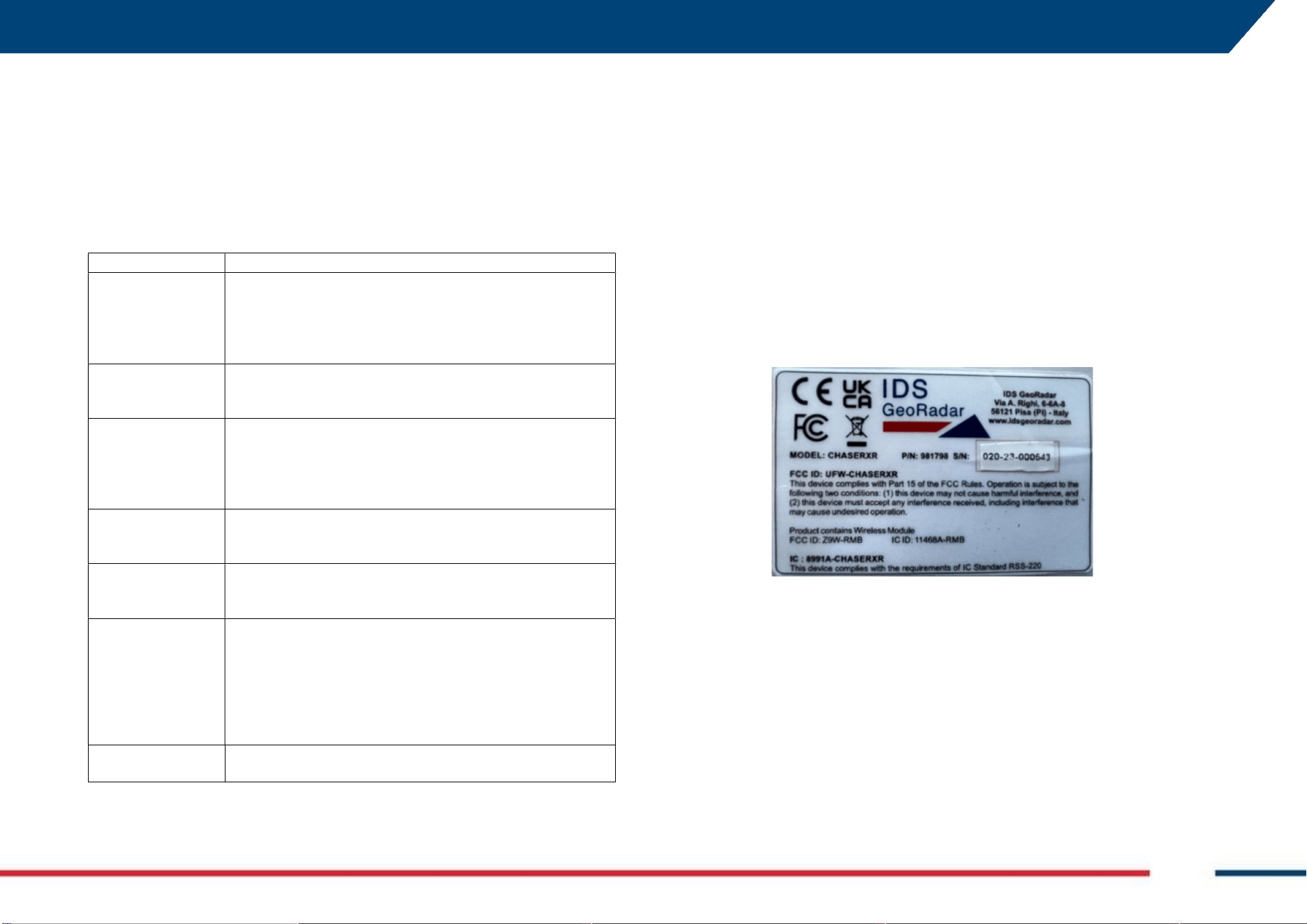
7 CARE AND TRANSPORT Mod: MDM/011/M2 Rev 8
IDS GeoRadar Srl MNG/2023/007 Rev. 1.3 48/ 57
8 IDS GEORADAR SUPPORT
8.1 myWorld
myWorld platform of Leica Geosystems offers a wide range of services,
information, and training material. With direct access to myWorld, the User
can access all relevant services. The availability of services depends on the
instrument model.
SERVICE
DESCRIPTION
myProducts
Add all IDS GeoRadar products that you and your company own
and explore your world of Leica Geosystems. View detailed
information on your products and update your products with
the latest software and keep up to date with the latest
documentation.
myService
View the current service status and full-service history of your
products in IDS GeoRadar service centres including detailed
information on the services performed on your system.
mySupport
Create new support requests for your products that will be
answered by your local Support Team. View the complete
history of your support requests and view detailed information
on each request in case you want to refer to previous support
requests.
myLearning
Welcome to the home of Leica Geosystems online learning!
There are numerous online courses – available to all customers
with products that have valid CCPs (Customer Care Packages).
myTrustedServices
Add your subscriptions and manage users for Leica Geosystems
Trusted Services, the secure software services, that assist you
to optimise your workflow and increase your efficiency.
mySmartNet
HxGN SmartNet is the GNSS correction service built on the
world’s largest reference station network, enabling GNSS-
capable devices to quickly determine precise positions in the
range of one-to-two-centimetre accuracy. The service is
provided 24/7 by a highly available infrastructure and
professional support team with more than 10 years of
experience reliably delivering the service.
myDownloads
Downloads of software, manuals, tools, training material and
news for IDS GeoRadar products.
8.2 How to manage return for Service
On occasions, your GPR may need to be returned to factory for repairs. These
events, depending on circumstances, may be handled under maintenance or
warranty conditions.
IDS GeoRadar, implements an internal ticket system to handle the repair of
its Products worldwide. In this respect, for the global IDS Customer Support
to be able to troubleshoot in case of need, it is necessary identifying the GPR
system first hence, it is mandatory providing information including Serial
number and Product Number of the system or part of it that need repair.
This information may be found on a label placed on top of the system (e.g.:
inside the battery housing, on top of the antenna, on the side of the rudder,
on top of the SCU, etc.…). An example of this label is illustrated in Fig. 13.
Fig. 13 Example of an IDS GPR system label
In any event, the workflow to follow up on a support request is:
1. Contact, by using the local Support mailing list, your local
representative of IDS Customer Support, or enter a support case into
the mySupport page of myWorld, Indicating the following:
a. Type of System or part of it (defined by Product Number or
Article number, that is PN 859224 in Fig. 13)
b. Serial Number (SN 020-23-000543, in Fig. 13)
c. Type of issue
7 CARE AND TRANSPORT Mod: MDM/011/M2 Rev 8
IDS GeoRadar Srl MNG/2023/007 Rev. 1.3 49/ 57
2. The local Representative of IDS Customer Support or the Central IDS
Customer Support shall follow up on the case by a first level, remote
troubleshooting to assess the system and the possible issue.
3. If a further, direct assessment of the system is necessary, the system
shall be returned for analysis. Based on this, a repair under warranty
or maintenance conditions, may be carried out. Depending on cases
and the type of possible repair, return may be towards the local
Representative of IDS or to the IDS GeoRadar main factory.
4. Prior return of the goods, wait for the IDS logistic office to provide a
reference number for the return case and shipping instructions.
5. As the system reaches IDS repair premises, this is analyzed to find
the root cause of the issue, and repaired ONLY after signed approval
of the quotation, in case where the warranty does not apply. The
status of the repair may be checked onto the mySupport page of
myWorld.
6. At the end of the repair, the system is shipped back to the shipping
address indicated at the beginning of the procedure, and this is
conducted based on contractual agreements.
NOTICE
:
The above, is meant solely as a broad indication of
the workflow for the return of a system for repair.
Precautions:
Please, refer to the Contractual Terms and Conditions for more
detailed information.
APPENDIX A DISCLAIMER Mod: MDM/011/M2 Rev 8
IDS GeoRadar Srl MNG/2023/007 Rev. 1.3 50/ 57
APPENDIX A DISCLAIMER
1. General
i. The present Disclaimer applies to all products designed, produced
and distributed by IDS GeoRadar S.r.l., its Subsidiaries, Affiliated
and authorized Distributors (the “Products”). IDS GeoRadar S.r.l.
reserves full ownership and intellectual property rights of any
“Information” contained in this Disclaimer including Trade Marks
and Graphics. No part of this Disclaimer may be used or
reproduced in any forms without the prior written agreement of
IDS GeoRadar S.r.l.
ii. In the event that any provision of this Disclaimer may be invalid,
unlawful or incapable of being enforced by a rule of law, all other
provisions shall, nonetheless, remain in full force and effect. Failure
to either enforce or exercise any right, privilege, or legal remedy at
any time, any provision contained in this Disclaimer, shall not be
deemed a waiver of such provisions or right, remedy, or privilege.
iii. This Disclaimer shall be interpreted, governed, construed and
enforced in accordance with the laws of Italy. User/Buyer hereby
consents to the exclusive jurisdiction of Pisa.
2. Initial Precautions for Setting-up and Use of the Products.
i. The User/Buyer, for setting-up and using the Products, shall consult
the official documentation provided by IDS GeoRadar S.r.l. for the
Products (“Reference Documentation”) and carefully ascertain the
compliance with national laws and requirements, which may limit
or even forbid their use.
ii. For Products which shall operate by circulation in Public
Areas/Roads, with or without moving traffic, Buyer/User shall verify
the approval of local authority and/or site’s owner according to their
specific procedures. IDS GeoRadar S.r.l. shall not be liable for any
direct, indirect, special, incidental or consequential damages or
injuries, including without limitation, lost revenues or lost profits,
resulting by un-authorized use of the Products in Public
Areas/Roads.
iii. Buyer/User further warrants:
that these Products are not being used, in the design,
development, production or use of chemical, biological,
nuclear ballistic weapons. Buyer/ User will defend,
indemnify and hold IDS GeoRadar S.r.l. harmless against any
liability (including attorney’s fees) for non-compliance with
the terms of this article.
That, if IDS GeoRadar S.r.l. requires that Buyer/User shall
carry out a training with reference to some Product
categories, no operation or use of the Products shall be
started before its designated Operator/s has got the User
Certificate, as defined by IDS GeoRadar S.r.l. specific
procedure which the Buyer confirms to know and accept.
iv. For Products which include specific “Operational” software with
automatic data processing and analysis “Tools”, e.g. the IBIS
Products and Hydra Products, User shall be aware that the results
provided by these “Tools” may be not error free. User that
completely relies on the outcomes provided by these Tools only,
does it at his own risk.
v. In no event IDS GeoRadar S.r.l. shall be liable for special, direct,
indirect, incidental, exemplary, punitive or consequential damages
including, but not limited to, loss of profits or revenue, caused by
the use of the Products, either separately or in combination with
other products or relied upon the results provided by the above
“Tools”.
3. Disclaimer for the “Use” of the Products.
i. The User shall follow the instructions provided by IDS GeoRadar
S.r.l. in its official “Reference Documentation” for the Product, in
particular the User’s Technical Manual which contains all the
specific steps and recommendations for a correct setting-up and use
of the Product.
APPENDIX A DISCLAIMER Mod: MDM/011/M2 Rev 8
IDS GeoRadar Srl MNG/2023/007 Rev. 1.3 51/ 57
ii. In no event IDS GeoRadar S.r.l. shall be liable for special, direct,
indirect, incidental, exemplary, punitive or consequential damages
including, but not limited to, loss of profits or revenue, caused by
the missed or incomplete observance of the instructions and
prescriptions for the use of the Products, either separately or in
combination with other products, including but not limited to the
following main aspects:
a. Use of IDS GeoRadar S.r.l. Products outside its limitation of
use, without proper and adequate scientific/technical
knowledge or without specific training.
b. Use of results/outcomes of the measurements performed
by the Product aimed to safety aspects without using
adequate control procedures and assessment by skilled
personnel.
c. Opening of the Equipment (for HW Products) without
express written authorization of IDS GeoRadar S.r.l.;
d. Unauthorized changes and additions to the Products.
e. Use of the Products connected to suspected non-working
equipment or with equipment (mainly PC) having
characteristics not in compliance with the required
specifications of IDS GeoRadar S.r.l. not expressly
authorized by IDS GeoRadar S.r.l.;
f. Poor or faulty operation of the electrical and
telecommunication networks not directly managed by IDS
GeoRadar S.r.l. or its delegates.
g. Poor or faulty operation Software/Hardware of the third
parties connected with IDS GeoRadar S.r.l. Equipment.
h. Poor or faulty operation of the Products due to Software
Virus which infected the Products after their delivery.
i. Use of the Products which have encountered suspected
manumissions, accidents, electrostatic shocks, flashes, fire,
earthquake, flooding or other natural disasters or
unexpected events.
j. Use or storage of the Products outside the limits of the
“Operational Temperature Range” specified by IDS
GeoRadar S.r.l.
APPENDIX B TECHNICAL SPECIFICATIONS Mod: MDM/011/M2 Rev 8
IDS GeoRadar Srl MNG/2023/007 Rev. 1.3 52/ 57
APPENDIX B TECHNICAL SPECIFICATIONS
PARAMETER
CONFIGURATION
Chaser XR 200 Deep Chaser XR 200-900
Number of channels 1 2
Maximum time-range 512ns 128ns
Max number of samples 2048
Maximum radar speed ca 50 km/h (31 mph)
Polarization HH and VV (depending on acquisition mode)
Power consumption Stand-by: 8W up to to 12 W; Acquisition: 10W up to 16W
Max Operating Time
Up to 13h (acquisition), with two batteries. Extended, by hot swap
capability
Antenna Size 430 x 430 x 184 mm
System Size (with Drag Kit
+ Positioning kit)
690 x 496 x 324 mm
Antenna Weight (without
batteries)
5.5Kg
Certification
EC, FCC, IC,
Recommended Laptop Panasonic FZ-G2
Positioning Internal PPS; Encoder; External GNSS and TPS
Working temperature -20°C + 50°C IEC 60068 2-1 and IEC 60068 2-2
Vibration testing CEI EN 60068-2-64:2012
Drop testing CEI EN 60068-2-31: 2011
SOFTWARE SPECIFICATIONS
uMap-Logger
Acquisition Software
Automatic calibration for an easy and quick start-up Visualization and
storage of radar data Real-time visualization of radar tomography
(time-slices). Connection with NMEA positioning. Device multi-
language. Supports both Metric and Imperial units
IQMaps
Processing Software
Advanced 3D processing software with a direct export link to
AutoCAD
Tab. 1 – Radar Sensor Technical Specifications
Exposure to Radio Frequency (RF) Signals:
For this the minimum distance between the user and any
radiating elements is about 200 mm.
SAR evaluation is not required because the output power
value is less than exemption limit at such separation
distance.
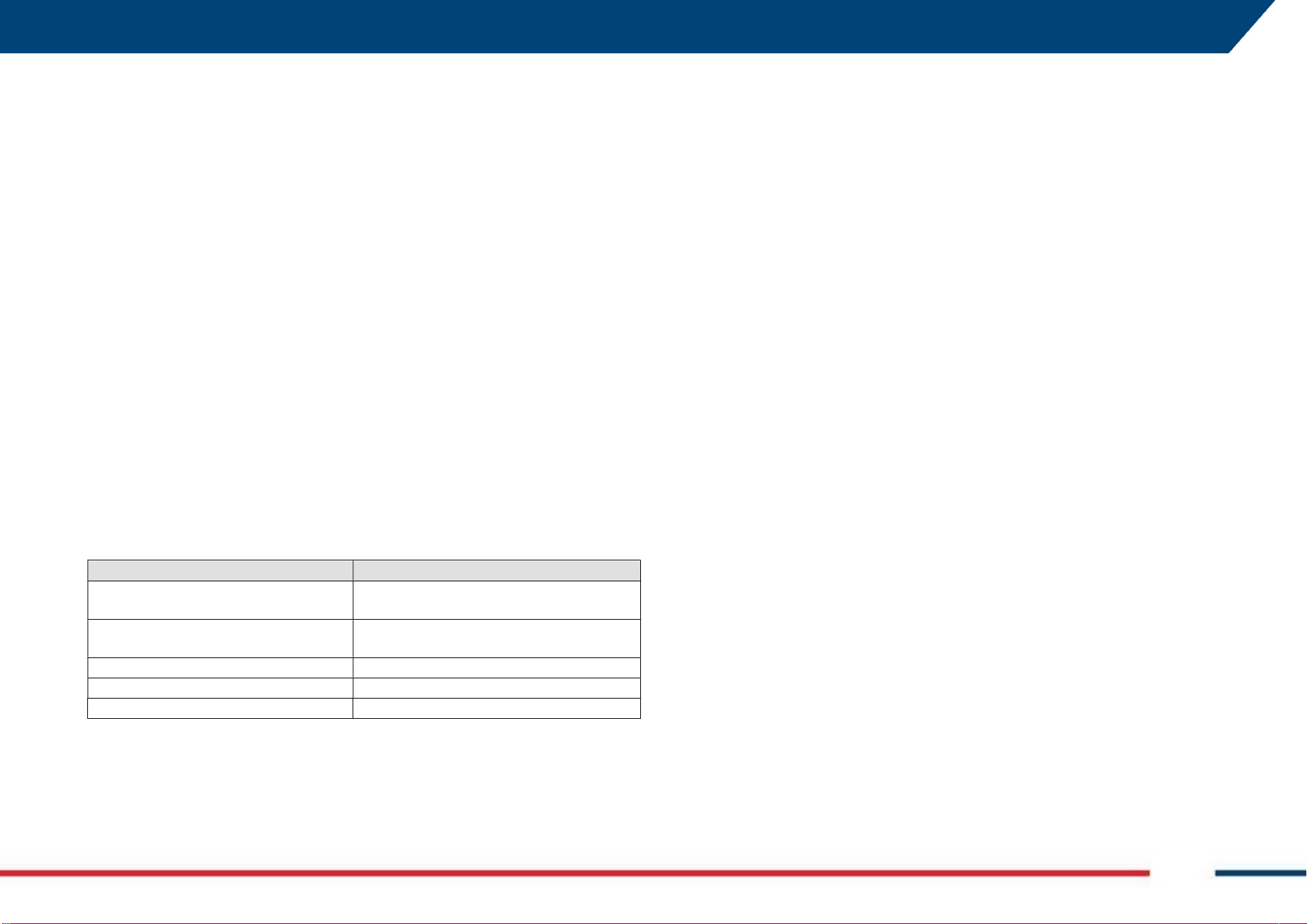
APPENDIX C CONFORMITY TO EUROPEAN Mod: MDM/011/M2 Rev 8
IDS GeoRadar Srl MNG/2023/007 Rev. 1.3 53/ 57
APPENDIX C CONFORMITY TO EUROPEAN
We,
IDS Georadar s.r.l.
via Carducci, 32, 20123 MILANO (MI), ITALY
declare under our sole responsibility that the product
Ground Penetrating Radar (GPR)
Model No(s): CHASERXR ou CHASERXR2
To which this declaration relates, is in conformity with the essential
requirements of
2014/53/EU Directive (RED)
Directive 2011/65/UE + 2015/863/UE RoHS
Regulation (EC) No 1907/2006 REACH
To which this declaration relates is in conformity with the following
standard(s) or other normative document(s)
Verification Standard
Emission immunity tests
ETSI EN 301 489-1 V2.2.3
ETSI EN 301 489-33 V2.2.1
Undesired emissions tests
ETSI EN 302 066 V2.2.1
ETSI TS 103 361 V1.1.1
Radio Requirements
ETSI EN 300 328 V2.2.2
Safety
CEI EN IEC 62368-1:2020
RoHS
EN IEC 63000:2018
APPENDIX D IMPORTANT NOTE FOR US CUSTOMERS Mod: MDM/011/M2 Rev 8
IDS GeoRadar Srl MNG/2023/007 Rev. 1.3 54/ 57
APPENDIX D IMPORTANT NOTE FOR US CUSTOMERS
FCC ID: UFW-CHASERXR
OR
FCC ID: UFW-CHASERXR2
This device complies with part 15 of the FCC Rules:
Operation is subject to the following conditions:
1. This device may not cause harmful interference, and
2. This device must accept any interference received, including interference that may
cause undesired operation
Warning: Changes or modifications to this unit not expressly approved by the party
responsible for compliance could void the user’s authority to operate the
equipment.
Operation of this device is restricted to law enforcement, fire and rescue officials,
scientific research institutes, commercial mining companies, and construction
companies. Operation by any other party is a violation of 47 U.S.C. § 301 and could
subject the operator to serious legal penalties.
Note: This equipment has been tested and found to comply with the limits for a Class
A digital device, pursuant to part 15 of the FCC Rules. These limits are designed to
provide reasonable protection against harmful interference when the equipment is
operated in a commercial environment. This equipment generates, uses and can
radiate radio frequency energy and, if not installed and used in accordance with the
instructions, may cause harmful interference to radio communications. Operation of
this equipment in a residential area is likely to cause harmful interference in which
case the user will be required to correct the interference at his own expense.
Coordination Requirements.
(a) UWB imaging systems require coordination through the FCC before the
equipment may be used. The operator shall comply with any constraints on
equipment usage resulting from this coordination.
(b) The users of UWB imaging devices shall supply detailed operational areas to the
FCC Office of Engineering and Technology who shall coordinate this information with
the Federal Government through the National Telecommunications and Information
Administration. The information provided by the UWB operator shall include the
name, address and other pertinent contact information of the user, the desired
geographical area of operation, and the FCC ID number and other nomenclature of
the UWB device. This material shall be submitted to the following address:
Frequency Coordination Branch., OET
Federal Communications Commission
445 12th Street, SW
Washington, D.C. 20554
ATTN: UWB Coordination
(c) The manufacturers, or their authorized sales agents, must inform purchasers and
users of their systems of the requirement to undertake detailed coordination of
operational areas with the FCC prior to the equipment being operated.
(d) Users of authorized, coordinated UWB systems may transfer them to other
qualified users and to different locations upon coordination of change of ownership
or location to the FCC and coordination with existing authorized operations.
(e) The NTIA/FCC coordination report shall include any needed constraints that apply
to day-to-day operations. Such constraints could specify prohibited areas of
operations or areas located near authorized radio stations for which additional
coordination is required before operation of the UWB equipment. If additional local
coordination is required, a local coordination contact will be provided.
(f) The coordination of routine UWB operations shall not take longer than 15
business days from the receipt of the coordination request by NTIA. Special
temporary operations may be handled with an expedited turn-around time when
circumstances warrant. The operation of UWB systems in emergency situations
involving the safety of life or property may occur without coordination provided a
notification procedure, similar to that contained in CFR47 Section 2.405(a)-(e), is
followed by the UWB equipment user.
Notice: This device devices may not be employed for the operation of toys.
Operation onboard an aircraft, a ship or a satellite is prohibited.
APPENDIX D IMPORTANT NOTE FOR US CUSTOMERS Mod: MDM/011/M2 Rev 8
IDS GeoRadar Srl MNG/2023/007 Rev. 1.3 55/ 57
In order to comply with FCC RF Exposure requirements, this device must be installed
to provide at least 200 m separation from the human body at all times
APPENDIX E IMPORTANT NOTES FOR CANADIAN CUSTOMERS Mod: MDM/011/M2 Rev 8
IDS GeoRadar Srl MNG/2023/007 Rev. 1.3 56/ 57
APPENDIX E IMPORTANT NOTES FOR CANADIAN
CUSTOMERS
IMPORTANT NOTE FOR THE CANADIAN CUSTOMERS
CAN ICES-3 (A)/NMB-3A)
IC Certification Number: 8991A-CHASERXR
OR
IC Certification Number: 8991A-CHASERXR2
This device complies with the requirements of IC Standard RSS-220
This Ground Penetrating Radar Device shall be operated only when in contact with or
within 1 m of the ground.
This Ground Penetrating Radar Device shall be operated only by law enforcement
agencies, scientific research institutes, commercial mining companies, construction
companies, and emergency rescue or firefighting organizations.
This device contains licence-exempt transmitter(s)/receiver(s) that comply with
Innovation, Science and Economic Development Canada’s licence-exempt RSS(s).
Operation is subject to the following two conditions:
1. This device may not cause interference.
2. This device must accept any interference, including interference that may cause
undesired operation of the device.
This device complies with Health Canada's Safety Code for mobile use. The installer of
this device should ensure that RF radiation is not emitted in excess of the Health
Canada's requirement.
NOTE IMPORTANTE POUR LES UTILISATEURS CANADIENS
CAN ICES-3 (A)/NMB-3A)
Numéro de certification : 8991A-CHASERXR
OR
IC Certification Number: 8991A-CHASERXR2
Cet appareil est conforme aux exigences de la norme RSS IC-220
Cet équipement géoradar doit être utilisé que lorsqu’il est en contact ou à moins de 1
mètre du sol.
Cet équipement géoradar doit être utilisé que par des organismes d'application de la loi,
des instituts de recherche scientifique, des sociétés minières commerciales, des
entreprises de construction et de secours d'urgence ou les organisations de lutte contre
les incendies.
Cet appareil contient des émetteurs/récepteurs exempts de licence qui sont conformes
aux RSS(s) exempts de licence d’Innovation, Sciences et Développement économique
Canada. L’exploitation est soumise aux deux conditions suivantes :
1. Cet appareil ne peut pas causer d’interférence.
2. Cet appareil doit accepter toute interférence, y compris les interférences qui peuvent
provoquer un fonctionnement indésirable de l’appareil.
Cet appareil est conforme avec Santé Canada Code de sécurité 6 pour les appareils
mobiles. L’installateur de cet appareil doit s'assurer que les rayonnements RF n'est pas
émis au-delà de I'exigence de Santé Canada.
APPENDIX F CONTACTS Mod: MDM/011/M2 Rev 8
IDS GeoRadar Srl MNG/2023/007 Rev. 1.3 57/ 57
APPENDIX F CONTACTS
The IDS GeoRadar Support team is available to answer any question about:
general enquiries
request of advertising material
technical issues
As well as listening to your suggestions too.
Please, feel free to contact us at:
IDS GeoRadar S.r.l.
via Augusto Righi, 6/6A/8
Ospedaletto - 56121
Pisa, Italy
(39) 050 8934 122
(GEO BU Customer Technical Support)
support.geo@idsgeoradar.com