
Live
Load1
1
2
3
4
5
6
7
8
9
* Make sure your smart phone is connected to
2.4 GHz Wi-Fi network
* Make sure the distance between thedevice and
the router is less than 100ft.
* Make sure the Wi-Fi name and the password
you entered is correct.
* Reset your smart switch: press and hold the
button of the device for 10 seconds.Then set
up smart switch again.
√
×
Load 1
Live
Ground
Neutral
·Enterthe Smart Life account.
·Authorize to use.
And then,the devices you added on will sync to
Alexa App, you can askAlexa to discover new
devices for you in this moment.Please makesure
the device name you set for the smart
switch is unique and recognizable for Alexa
voice assistant.
·Enable to use.
·Neutral Wire is required.Confirm the wall box
contains a Neutral Wire.lf the wall box doesn't
have a Neutral Wire,please call a professional
electrician to install the switch or change another
location where has neutral wire in your home
·Ensure the wire conductors are securely
fastened to each wire.
·Ensure the Wi-Fi signal is strong before wiring
Step 1
Turn off the circuit breaker and use the electrical
tester to test the power.Ensure the switch is off
before wiring
Step 2
Use the electric tester to test power and make
sure the poweris off,and then pull the existing
switch out,disconnect the wires from the existing
switch with pliers.
Follow the wiring diagram to connect the switch
wires to the wires in the wall box with the following
conductors
Q:Why i can't control my smart switch with
Alexa/Google?
A:*Make sure you connect smart switch
successfully with Smart Life app,and the
smart switch is online.
*Make sure you put correct account when you
link Smart Life as a skill on Alexa/Google app
and you can find it on your skills.
*Make sure yourAlexa/Google device is
working fine.
*Check the device name that you set for switch
is non-repetitive and recognizable for voice
assistant.Also,please make sure your native
language is available for Alexa.
Q:Do l need to set up the device again if i
changed my router?
A:Yes!you must set up the smart switch again
if there is any change of your Wi-Fi,either you
changed your router or you moved the device to
a new house.
Q:Why does it turn on/off or come offline surprisingly?
A:Check your Wi-Fi status and make sure the
switch is powered on.Check if you have set
timer for it.
Q:Why my smart switch connection failed?
A:*Please make sure indicator light blinks
quickly, ifindicator light blinks slowly(1 time
every2 seconds).Long press on/off button for
10S until the indicator light blinks quickly.
·Link Smart Life app with Google Home app.
go to Google Home app and find
“Works with Google”
·Search Smart Life
·Enter your Smart Life account.
·Authorize to use
Then Google Home app will guide you through.
Warnings and Precautions
User-Friendly Design
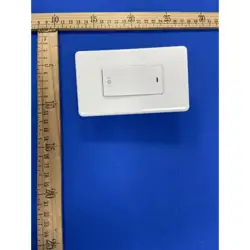
Smart Wi-Fi Human Radar Switch
User Manual
10
11
6051100246 DS-122J美规按键雷达一路开关WIFI英文说明书 宽*高:75*100mm,105铜版纸、20p、正反面四色印刷、风琴9折
FCC Caution.
This device complies with part 15 of the FCC Rules. Operation is subject to the following two
conditions: (1) This device may not cause harmful interference, and (2) this device must accept any
interference received, including interference that may cause undesired operation.
Any Changes or modifications not expressly approved by the party responsible for compliance could
void the user's authority to operate the equipment.
Note: This equipment has been tested and found to comply with the limits for a Class B digital device,
pursuant to part 15 of the FCC Rules. These limits are designed to provide reasonable protection
against harmful interference in a residential installation. This equipment generates uses and can
radiate radio frequency energy and, if not installed and used in accordance with the instructions, may
cause harmful interference to radio communications. However, there is no guarantee that interference
will not occur in a particular installation. If this equipment does cause harmful interference to radio or
television reception, which can be determined by turning the equipment off and on, the user is
encouraged to try to correct the interference by one or more of the following measures:
-Reorient or relocate the receiving antenna.
-Increase the separation between the equipment and receiver.
-Connect the equipment into an outlet on a circuit different from that to which the receiver is
connected.
-Consult the dealer or an experienced radio/TV technician for help.
*RF warning for Mobile device:
This equipment complies with FCC radiation exposure limits set forth for an uncontrolled environment.
This equipment should be installed and operated with minimum distance 20cm between the radiator
& your body.