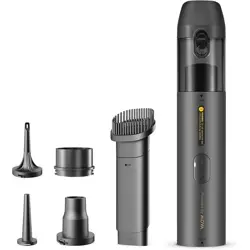
4-in-1 Portable Vortex Vacuum
& Blower
MDV001
User Manual
01EN
Safety Instructions
Battery Safety
Safe Disposal of Used Batteries
Read all safety warnings, instructions, and
illustrations provided with this product carefully
before use, and follow them at all times.
Please keep this manual for future reference.
• This appliance is not intended for use by
persons (including children) with reduced
physical, sensory, or mental capabilities, or
by those lacking experience and knowledge,
unless supervised or instructed by a
responsible person to ensure safe operation.
• Keep children under close supervision
to make sure they do not play with the
appliance.
• The appliance generates a noise level of
approximately 81 dB during operation.
Appropriate hearing protection should be
used.
• The product has strong suction. Keep hair
and loose items at a safe distance to avoid
entanglement.
• The appliance contains a DC motor. Do not
use in flammable or explosive environments.
• Switch off the appliance immediately if
unusual noise or excessive heat is detected.
• This product contains a non-replaceable
battery.
• Do not apply to appliances with a
replaceable battery pack.
• This appliance must only be supplied at
SELV.
• Use only safety-approved adapters and
charging cables for charging. Damage
caused by improper charging is not covered
by warranty.
• Do not leave the product unattended during
inflation. Monitor pressure to avoid over-
inflation.
• The appliance is not waterproof. Use only in
a dry, clean environment. Do not rinse with
water.
• Store the product at temperatures between
0-45 ° C. Extreme heat or cold may shorten
service life and damage the battery.
• If left unused for long periods, the battery
may be damaged. Recharge at least once
every three months.
• Overheating, impact, or water exposure
may cause fire, self-ignition, or explosion.
Avoid use in high temperatures or harsh
environments.
• Do not expose the battery to extremely
high temperatures (e.g., direct sunlight, fire,
microwave ovens, or ovens), as this may
cause explosion or leakage of flammable
liquids and gases.
• Do not expose the battery to extremely low
air pressure, which may result in explosion
or leakage of flammable liquids and gases.
• Do not disassemble, crush, puncture, or cut
the battery, as this may cause explosion.
• Stop using immediately if the battery shows
significant swelling.
• The battery must be removed before
disposing of the appliance.
• Ensure the appliance is disconnected
from power before removing the battery.
• Dispose of used batteries safely and in
accordance with local regulations.
02 EN
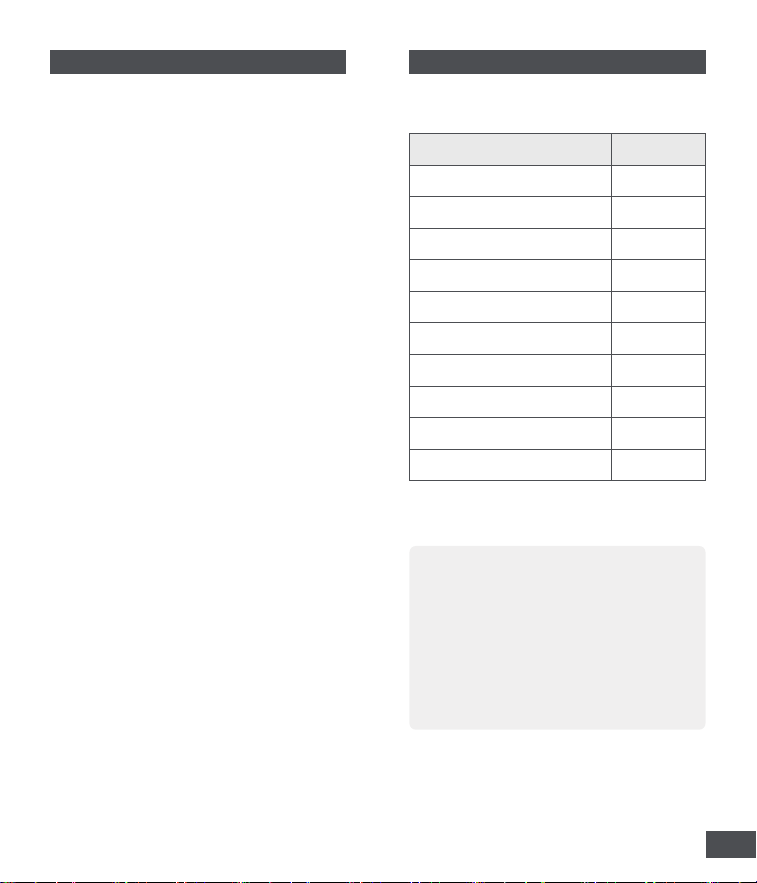
1.1 What's in the Box
NOTE:
1 Product Introduction
• Please examine the tool and accessories
listed above for any signs of shipping
damage. If any part is missing or damaged,
contact the retailer or MOVA Customer
Service.
• Retain the packaging materials until
you have fully inspected and tested the
product.
Name Quantity
Vacuum Cleaner Body ×1
Dust Cup ×1
2-in-1 Brush & Crevice Nozzle ×1
Long Blow Nozzle ×1
Short Blow Nozzle ×1
Swim Ring Nozzle ×1
Air Suction Adapter ×1
USB Charging Cable ×1
Storage Bag ×1
User Manual
(with Warranty Card)
×1
Table of Contents
1 Product Introduction
..................................02
1.1 What's in the Box ...............................................02
1.2 Product Overview ............................................. 03
1.3 Indicator Light Meanings................................ 03
2 Installing/Removing Attachment
...... 04
2.1 Vacuuming Attachments ................................. 04
2.2 Air Suction Attachment .................................. 05
2.3 Blowing Attachments...................................... 05
3 Operation
.......................................................... 06
3.1 Charging .............................................................. 06
3.2 Power On/Off .................................................... 06
3.3 Switch Power Mode ........................................ 06
4 Cleaning and Maintenance
................... 06
4.1 Dust Cup Cleaning ............................................07
4.2 HEPA Filter Replacement ................................07
5 Disposal
............................................................. 08
6 Troubleshooting
............................................ 09
7 Specifications
................................................. 09
8 Warranty
............................................................ 10
03EN
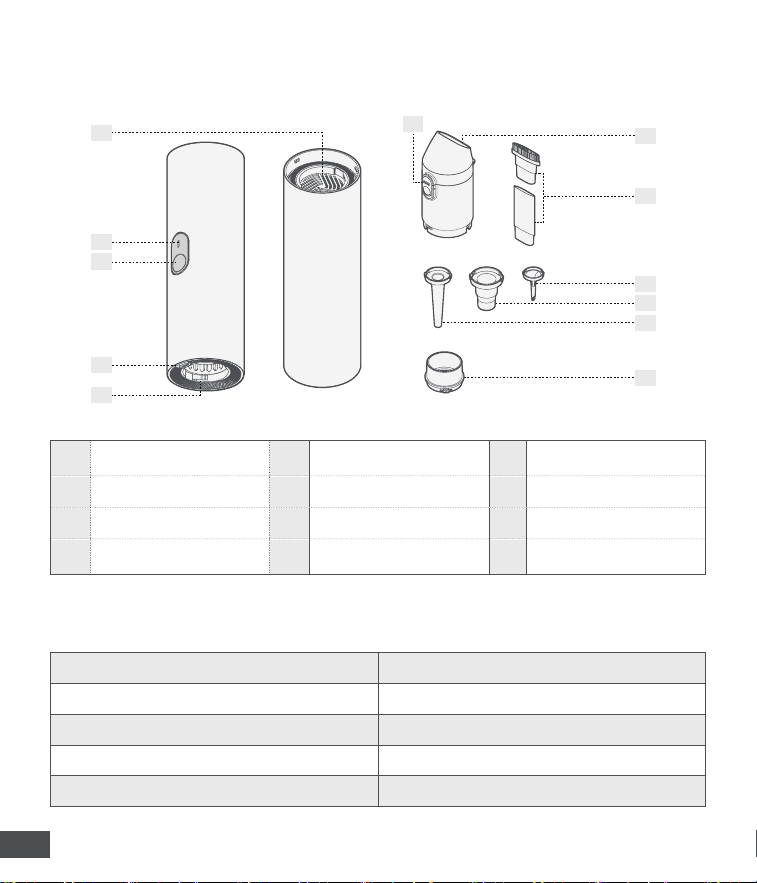
1.2 Product Overview
1.3 Indicator Light Meanings
1
2
3
4
6
7
8
9
10
11
12
5
1 Inlet Opening 5 Outlet Opening 9 Swim Ring Nozzle
2 Indicator Light 6 Dust Cup Cover Switch 10 Short Blow Nozzle
3 Power Button 7 Dust Cup(with filter) 11 Long Blow Nozzle
4 Charging Port 8
2-in-1 Brush
& Crevice Nozzle
12 Air Suction Adapter
White light steady (High Mode) Battery level ≥ 20%
Pink light steady (Low Mode) Battery level ≥ 20%
Red light steady Low battery (Battery level < 20%)
Red light breathing Charging
White light steady Charging Complete
04 EN
2
Installing/Removing Attachment
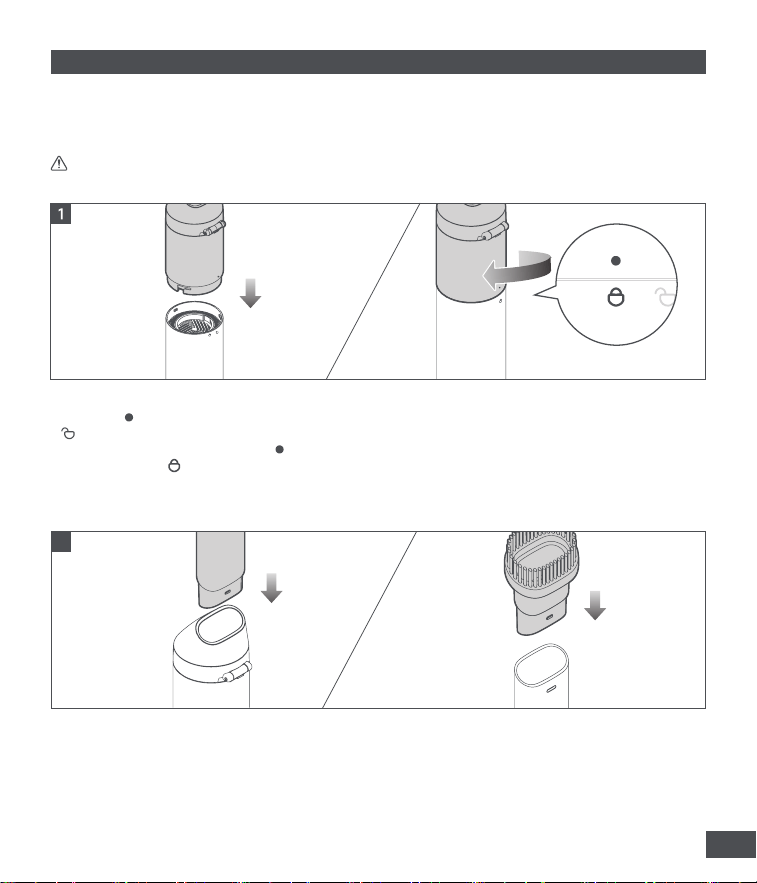
This product can perform vacuuming, inflating, blowing, and air suction functions when equipped with
different attachments.
WARNING: Do not operate the tool without the dust cup installed.
Dust Cup
To install:
To install:
To remove:
To remove:
Align the [ ] mark on the dust cup with the
[ ] symbol on the air inlet. Insert the dust cup
and rotate it clockwise until the [ ] mark is
aligned with the [ ] symbol.
Insert the crevice attachment or the brush
into the dust cup, or attach them together for
combined use. A distinct click will be felt when
properly secured.
Rotate the dust cup counterclockwise to
remove it.
Hold the attachment and pull outward to
remove.
2-in-1 Brush & Crevice Nozzle
2.1 Vacuuming Attachments
2
05EN
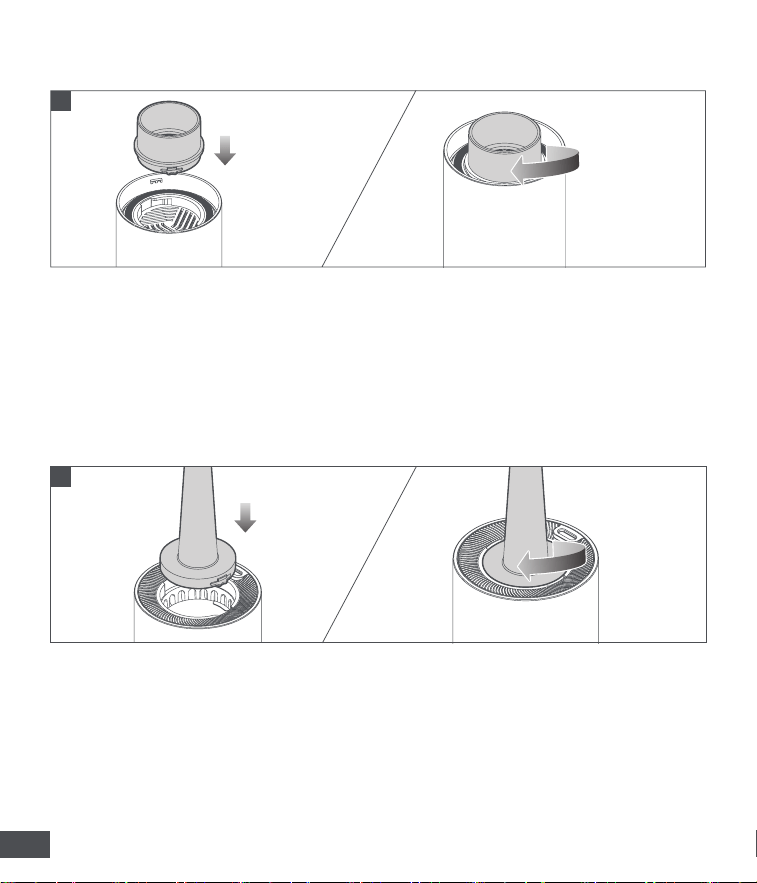
To install:
To install:
To remove:
To remove:
Align the tab on the air suction adapter with
the slot on the inlet opening, insert the adapter,
and rotate it clockwise until it locks into place. A
distinct click will be felt when properly secured.
Align the tab on the nozzle with the slot on
the inlet/outlet opening, insert it, and rotate
clockwise until it locks into place. A distinct click
will be felt when properly secured.
Rotate the adapter counterclockwise to remove.
Rotate the nozzle counterclockwise to remove.
2.3 Blowing Attachments
2.2 Air Suction Attachment
1
2
06 EN
3 Operation
NOTE:
NOTE:
To prolong the product lifespan, it is recommended not to operate the device continuously for more
than 20 minutes.
It is not possible to use the tool while charging the battery.
Use a compliant 5V/2A USB adapter (not supplied) and the original USB charging cable to charge the
device. Fully charge the battery before first use.
3.1 Charging
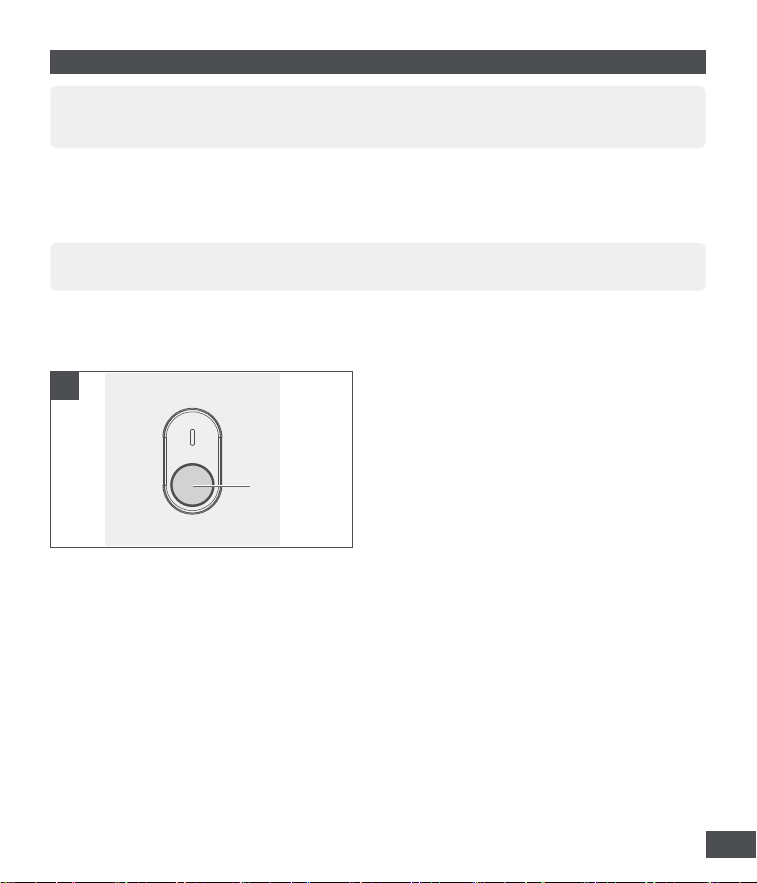
3.2 Power On / Off
3.3 Switch Power Mode
To power on:
To power off:
Press and hold the Power button for 1 second to
start.
Press and hold the Power button for 1 second
while the device is on to turn it off.
Short press the Power button to switch modes: low → high → low.
1
Power On/Off
07EN
4 Cleaning and Maintenance
NOTE:
To extend product lifespan, clean the dust cup after each use. Rinse with clean water and allow it to
dry completely before reassembling.
4.1 Dust Cup Cleaning
4.2 HEPA Filter Replacement
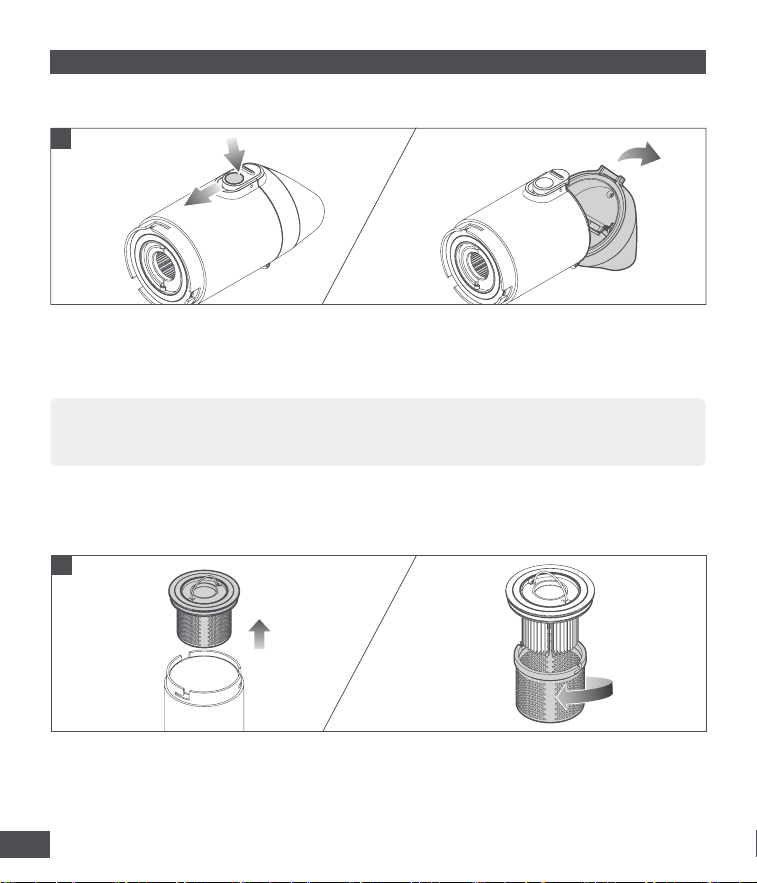
1
1. Push down the dust cup cover switch to unlock, press the switch to open the cover, and empty the
contents.
2. After emptying, close the cover and push the switch upward to lock.
1. Hook the ring at the bottom of the dust cup to remove the filter assembly.
2. Unscrew the filter screen, replace with a new HEPA filter (sold separately), then reinstall the filter
screen and tighten securely.
2
08 EN
5 Disposal
Electrical and electronic devices often contain components that could potentially pose
a danger to human health and the environment if handled or disposed of incorrectly.
However, these components are necessary for the proper operation of the appliance.
The appliance marked with this symbol must not be disposed of with regular household
rubbish.
Batteries and rechargeable batteries contain substances that must not enter the
environment. Please dispose of old batteries in an authorized place according to the
relevant local requirements; they must not be disposed of with the usual domestic waste.
09EN
6 Troubleshooting
7 Specifications
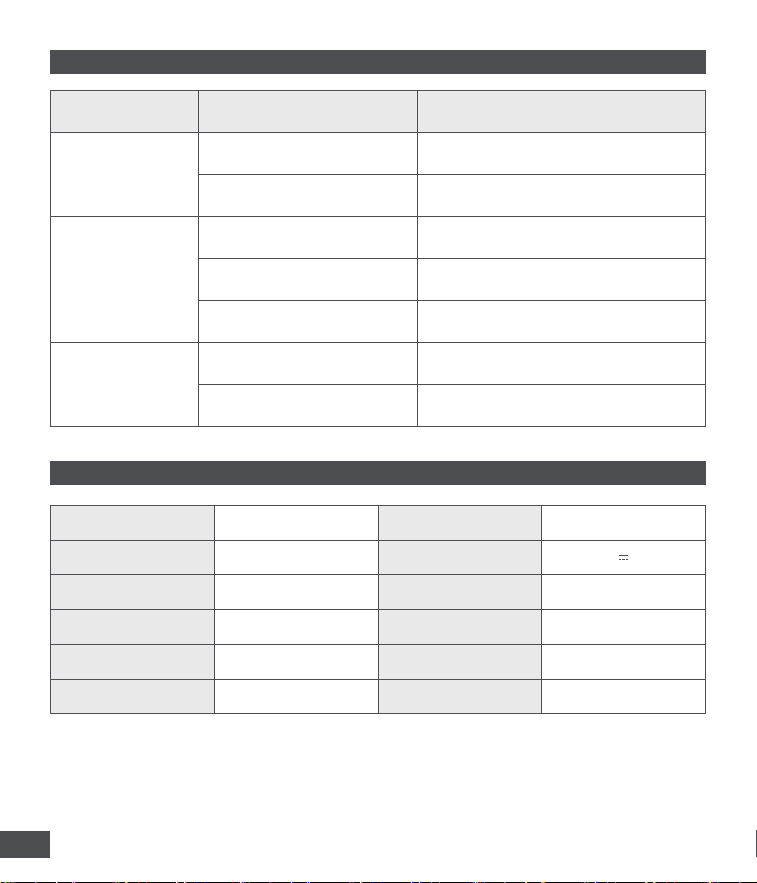
ISSUE CAUSE SOLUTION
Tool does not work
Low battery
Connect to power and fully charge
the battery.
Battery in protection mode
Adjust ambient temperature and
operate in suitable conditions.
Slow inflation
Low battery
Connect to power and fully charge
the battery.
Nozzle not installed properly
Check and ensure the nozzle is
correctly installed.
Loose connection
Ensure the nozzle is securely
connected to the inflatable object.
Leakage at
connection
Nozzle not installed properly
Check and ensure the nozzle is
correctly installed.
Damaged nozzle
Check the nozzle, and replace it
promptly if damaged.
Product name
4-in-1 Portable Vortex
Vacuum & Blower
Rated voltage 7.4V DC
Product model MDV001 Rated input 5V 2A
Net weight (Main unit) ≈ 0.31 kg Motor power 80 W
Product dimensions
(Main Unit)
Ø 55 x 170 mm Battery type Lithium-ion
Max. suction 14000 Pa Battery capacity 2000 mAh
Dust cup capacity 0.16 L Operating temperature 0~45℃
10 EN
8 Warranty
NOTE:
The warranty covers the main unit only and does not include other accessories.
https://www.mova.tech/pages/contact-us
CONTACT US
1. The product is warranted for 1 year from the date of purchase. Please refer to your local laws and
regulations for the specific warranty period applicable in your area.
2. During the warranty period, if any non-human-induced quality issues occur, the product is eligible for
free repair or replacement after confirmation by our company.
3. The warranty does not cover any of the following:
4. For more warranty information, please refer to the official website: https://www.mova.tech
• Product failures or damages caused by the consumer due to improper use (not following the Safety
Instructions in the product manual), maintenance, or storage (including operational errors, liquid
ingress, incorrect plugging/unplugging, scratches, handling, bumps, inputting inappropriate voltage,
inhaling white ash, sand, dust, special adhesive chemicals, metal, and other micro-particles, etc.).
• The whole machine and accessories have exceeded the free warranty period.
• Normal wear and tear, and consumable parts (such as scratches on the shell).
• Damage caused by disassembly by the consumer or service centers not authorized by the
Company.
• No valid proof or valid invoice/invoice copy.
• The model and product attributes on the proof do not match the model attributes of the repaired
product or have been altered.
• Damage caused by natural disasters, accidents, or other irresistible forces.
Address: Floor 9, Building B, No. 7 Qianzhu Road, Taihu Lake Street, Wuzhong District, Suzhou,
Jiangsu Province, P.R.China
Manufacturer: Woting Technology (Suzhou) Co., Ltd.