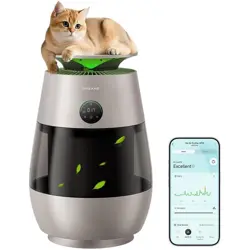

Dreame AirPursue™
PM20 Purifier

01
EN
Safety Instructions
READ AND SAVE THESE INSTRUCTIONS
READ ALL INSTRUCTIONS BEFORE USING (THIS APPLIANCE). Failure to follow the warnings and instructions may result in electric
shock, re and/or serious injury.
Warning
• This appliance can be used by children aged from 8 years and above under supervision.
• This appliance can be used by persons with reduced physical, sensory or mental capabilities or lack of experience and knowledge if they
have been given supervision or instruction concerning use of the appliance in a safe way and understand the hazards involved.
• The purier is not a toy. Children shall not play with or operate this product. Please exercise caution when using the purier near children.
Do not allow children to clean or maintain the purier unless supervised by a parent or guardian.
• Do not use the purier outdoors or on wet surfaces. Only use the product on dry indoor surfaces. Do not touch the plug or any part of the
product with wet hands.
• Do not use the purier near bathtubs, showers, or swimming pools.
• To reduce the risk of re, make sure that the supply cord and the product are kept away from heat sources or direct sunlight.
• Make sure the appliance is o and unplugged when not used for extended periods as well as prior to performing any maintenance or
repairs.
• To reduce the risk of re, explosion, or injury, make sure that the supply cord and lithium battery are undamaged before use. Do not use the
appliance if the supply cord and lithium battery are damaged.
• If the supply cord is damaged, it must be replaced by the manufacturer, its service department, or similarly qualied personnel to avoid
hazards.
• Do not stretch the cable or place the cable under strain. Do not unplug by pulling on the cable. To unplug, grasp the plug, not the cable.
Do not use a power extension cord.
• Do not route the cable under the product. This product must not be placed directly below a socket.
• In order to avoid overheating, do not cover the appliance or power cord.

02
EN
• To avoid burns, do not let bare skin touch product's heating components.
• The fans can be used for tropical climates.
• Keep combustible materials, such as textiles and curtains, away from the product outlet.
• Appliances that are obviously damaged must not be operated.
• Warning: Do not spray or apply perfume directly on or near the lter. Keep essential oils and chemicals away from this product.
• Always carry the appliance by the base, do not carry it by the product head.
• Do not use the product if it is damaged or has been submerged in water.
• Do not lean the appliance against any unstable surface, as this may cause damage to the appliance or personal injury. If the appliance
becomes damaged or is otherwise malfunctioning, please contact our authorized service department. Never attempt to disassemble the
device on your own.
•
WARNING:
Chemical Burn and Choking Hazard. Keep batteries away from children. If swallowed, contact your physician or local
poison control.
• Pacemakers, debrillators and electronic storage media may be aected by strong magnetic elds. Anyone using a pacemaker, debrillator
or electronic storage media should avoid carrying the remote in their pocket or near the device.
• Only use accessories and replacement parts recommended by the manufacturer.
• Only use or install the product on dry indoor surfaces.
• Do not use this heater in the immediate surroundings of a bath, a shower or a swimming pool.
• Do not use this heater if it has been dropped.
• Do not use if there are visible signs of damage to the heater.
• Use this heater on a horizontal and stable surface.
• Children of less than 3 years should be kept away unless continuously supervised.
• Children aged from 3 years and less than 8 years shall only switch on/o the appliance provided that it has been placed or installed in its
intended normal operating position and they have been given supervision or instruction concerning use of the appliance in a safe way and
understand the hazards involved. Children aged from 3 years and less than 8 years shall not plug in, regulate and clean the appliance or
perform user maintenance.

03
EN
Do not cover: In order to avoid overheating, do not cover the heater.
CAUTION — Some parts of this product can become very hot and cause burns. Particular attention has to be given where children and
vulnerable people are present.
WARNING: Do not use this heater in small rooms when they are occupied by persons not capable of leaving the room on their own, unless
constant supervision is provided.
WARNING: To reduce the risk of re, keep textiles, curtains, or any other ammable material a minimum distance of 1 m from the air outlet.
This appliance has a polarized plug (one blade is wider than the other). To reduce the risk of electric shock, this plug is intended to t in a
polarized outlet only one way. If the plug does not t fully in the outlet, reverse the plug. If it still does not t, contact a qualied electrician.
Do not attempt to defeat this safety feature.
WARNING - To Reduce The Risk Of Fire Or Electric Shock, Do Not Use This Fan With Any Solid-State Speed Control Device.
WARNING - To Reduce The Risk Of Fire, Electric Shock Or Injury To Persons, Do Not Use Replacement Parts That Have Not Been Recommended
By The Manufacturer (e.g. Parts Made At Home Using A 3D Printer).

04
EN
IMPORTANT INSTRUCTIONS
When using electrical appliances, basic precautions should always be followed to reduce the risk of re, electric shock, injury to persons, and
hyperthermia, including the following:
01) Read all instructions before using this heater.
02) This heater is hot when in use. To avoid burns, do not let bare skin touch hot surfaces. If provided, use handles when moving this heater.
Keep combustible materials, such as furniture, pillows, bedding, papers, clothes, and curtains at leasta3 feet(0.9 m) from the front of
the heater and keep them away from the sides and rear.
03) Extreme caution is necessary when any heater is used by or near children or invalids and whenever the heater is left operating and
unattended.
04) Always unplug heater when not in use.
05) Do not operate any heater with a damaged cord or plug or after the heater malfunctions, has been dropped or damaged in any manner.
Discard heater, or return to authorized service facility for examination and/or repair.
06) Do not use outdoors.
07) This heater is not intended for use in bathrooms, laundry areas and similar indoor locations. Never locate heater where it may fall into a
bathtub or other water container.
08) Do not run cord under carpeting. Do not cover cord with throw rugs, runners, or similar coverings. Do not route cord under furniture or
appliances. Arrange cord away from trac area and where it will not be tripped over.
09) To disconnect heater, turn controls to o, then remove plug from outlet.
10) Do not insert or allow foreign objects to enter any ventilation or exhaust opening as this may cause an electric shock or re, or damage
the heater.
11) To prevent a possible re, do not block air intakes or exhaust in any manner. Do not use on soft surfaces, like a bed, where openings may
become blocked.
12) A heater has hot and arcing or sparking parts inside. Do not use it in areas where gasoline, paint, or ammable liquids are used or stored.
13) Use this heater only as described in this manual. Any other use not recommended by the manufacturer may cause re, electric shock, or
injury to persons.
14) Always plug heaters directly into a wall outlet/receptacle. Never use with an extension cord or relocatable power tap (outlet/power strip).
15) Hyperthermia can result in death. Symptoms of hyperthermia include high body temperature, headache, nausea, vomiting, tiredness,

05
EN
dizziness, fainting, and rapid pulse. If you begin to experience symptoms related to hyperthermia, turn o the heater and seek medical
attention.
16) To avoid excessive room temperatures which can cause hyperthermia: DO NOT leave product running unattended in a conned space
around infants, or individuals with reduced physical, sensory, or mental capabilities.
17) "SAVE THESE INSTRUCTIONS"
THERMALLY PROTECTED
CAUTION – High temperature, keep electrical cords, drapery, and other furnishings at least 3 feet (0.9 m) from the front of the heater and away
from the side and rear. WARNING – Risk of Hyperthermia.
06
EN
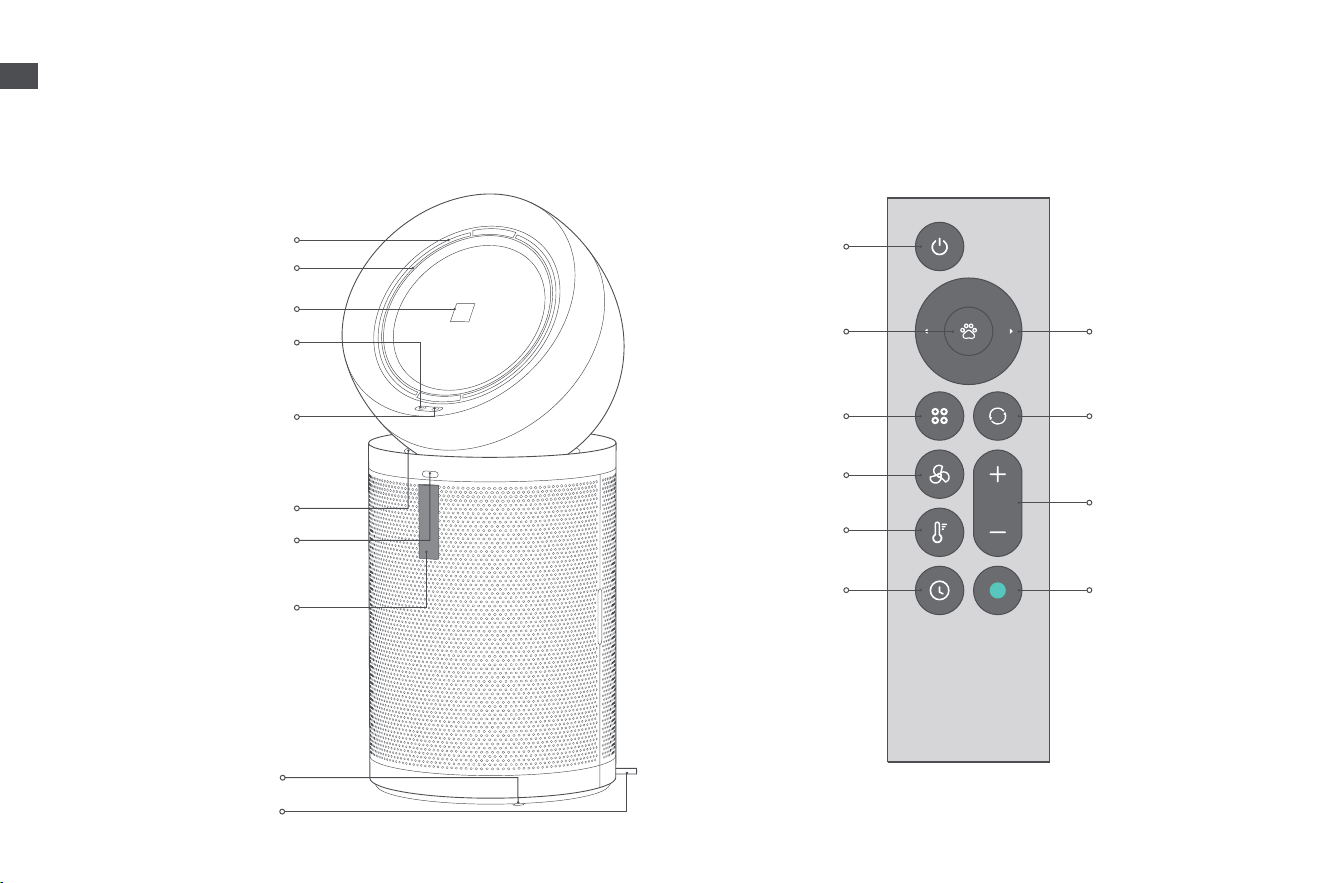
Product Overview
Press to turn on/enter
standby mode
Support magnetic attachment
on the front of the device.
Power Button
Upper Air Outlet
PTC Heating Module
Display Screen
Lower Air Outlet
Infrared Receiving Window
Remote Control
Caster Wheel
Power Cord
Information Switch
Press briey to switch between
air pollutants, temperature,
humidity and lter life.
Power Button
Pet Mode
Information Switch
Airow Direction
Oscillating
horizontally (Four
Levels: OFF, 45° , 90° ,
180° )
Cooling Function
Press briey to turn
on cooling function/
exit heating function.
Airow/
Temperature/
Timer Switch
Button
Purication Level
Switch
AUTO AI/Pet/Comfort
Press to turn on/enter
standby mode
Timer
Press to turn on/o
Heating Function
Airow Speed
Note: The illustrations in this manual are indicative only. The actual product may dier.
07
EN
Product Overview
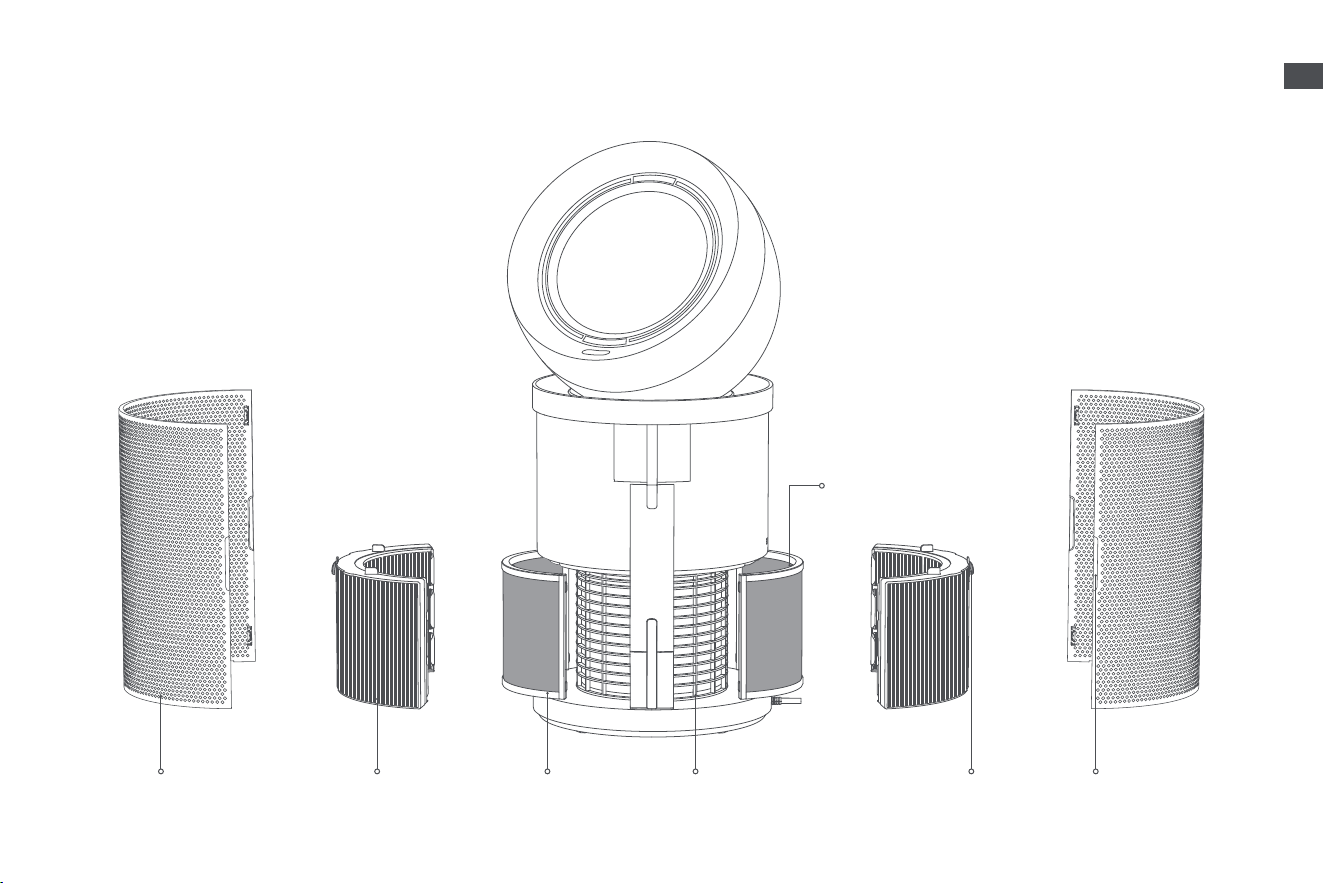
Filter Assembly
Formaldehyde
Catalytic Filter
Carbon
Layer
High Eciency
Composite Filter
Carbon Layer Handle
Magnetic
Housing
Handle of High Eciency
Composite Filter
Integrated Handle of
Magnetic Housing
08
EN
Product Overview
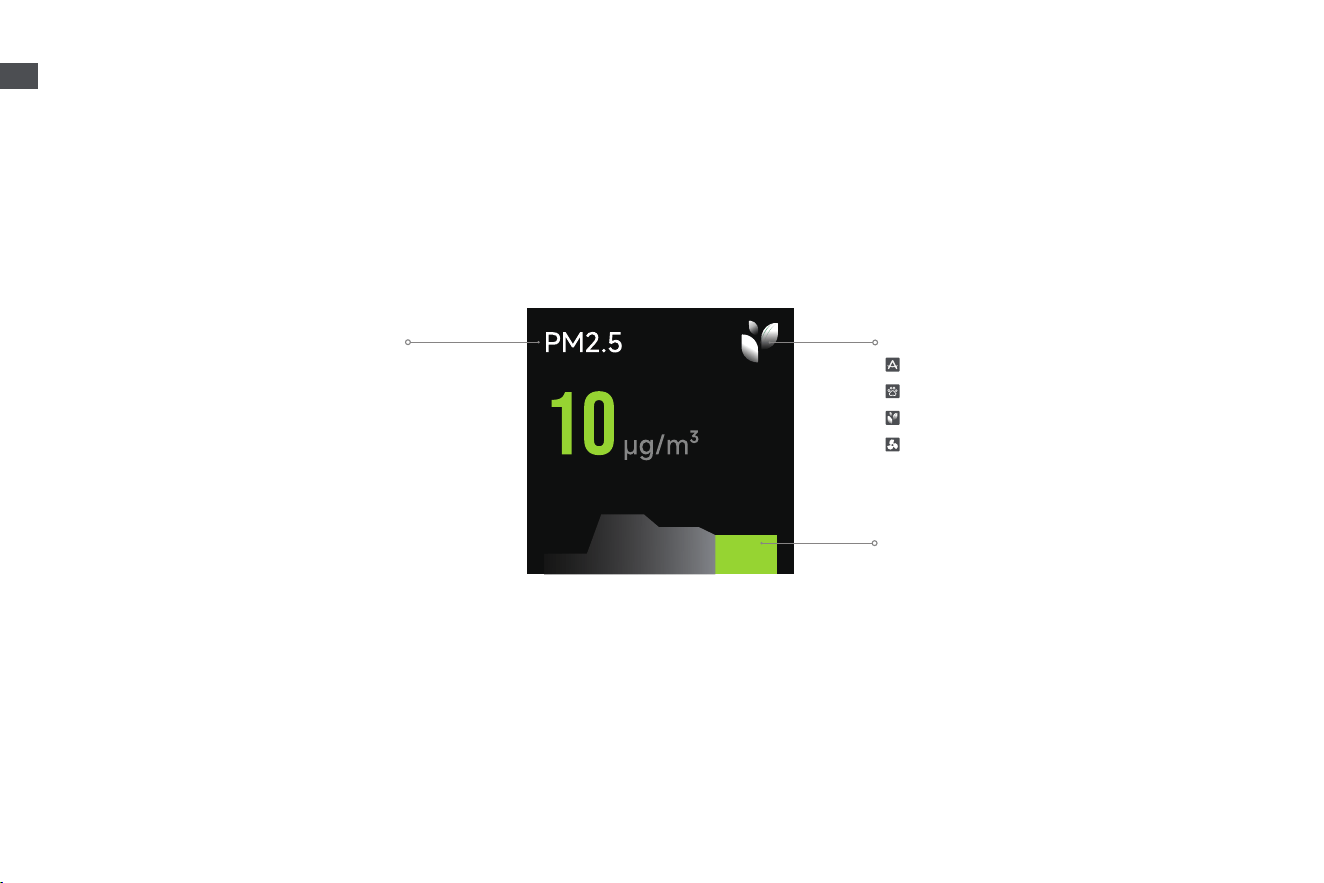
Display Screen
Purication Level Switch
AUTO AI
Pet
Comfort
Custom
Air Quality Level
The green, yellow, orange, and red parts
correspond to excellent, good, mild pollution, and
heavy pollution levels of air quality, respectively.
Information Display
It can be switched to display air quality,
PM1/PM2.5/PM10, TVOC concentration,
formaldehyde concentration, temperature
and humidity.
09
EN
Connecting with the Dreamehome App
1. Download the Dreamehome App
Scan the QR code on the purier, or search "Dreamehome" in the app store to download and install the app.
2. Add Device
Open the Dreamehome App, tap "Scan QR code to connect" and scan the same QR code again to add
the device. Please follow the prompts to nish the Wi-Fi connection.
Note:
• Only 2.4 GHz Wi-Fi is supported.
• Due to upgrades in the app software, the actual operations may dier from the descriptions in this manual. Please
follow the instructions based on the current app version.
Note:
• Do not pull or manually rotate the machine head.
• Before use, place the product steadily in a suitable position, and then connect the power supply.
How to Use
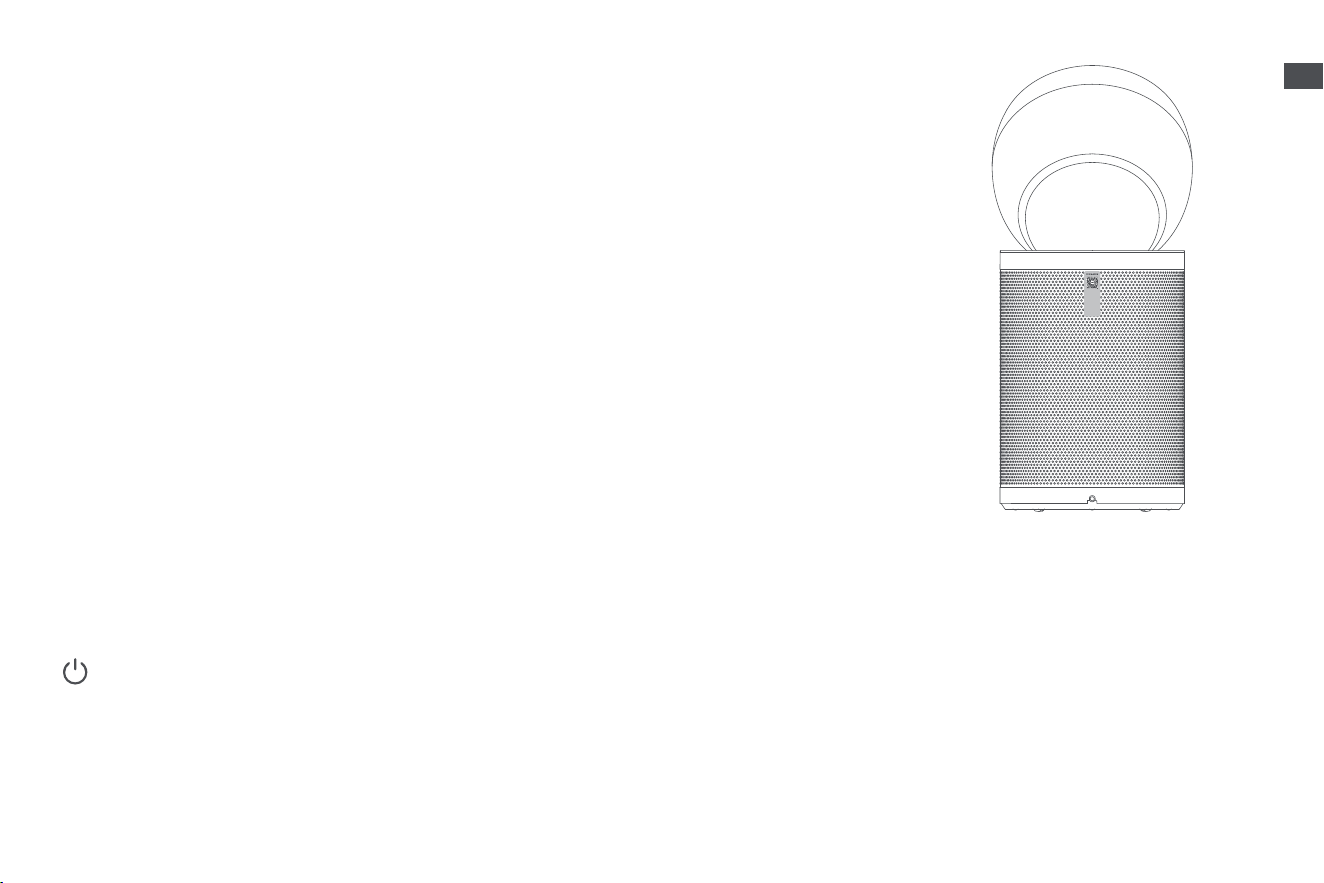
Power On/Standby
Briey press the power button on the machine or remote control to turn on the machine. Wi-Fi is enabled by default, and the factory default
setting is AUTO AI mode. When the machine stops operating, it will resume the last settings upon restarting. Besides, you can enter the
standby mode by pressing the power button.
Note: If the machine is in standby mode, it will automatically start working when it detects someone within a 3-meter range. It is disabled by default and can be
enabled in the App.

10
EN
Note: The temperature range is based on laboratory test conditions.
How to Use
Information Switch
Briey press the information switch button to switch between air quality, pollutants, temperature, humidity, and lter life.
Heating Function
Briey press the heating function to enable the function. Within 3 seconds, briey press the “+” or “-” buttons to adjust the temperature
within the range of 0-40° C. If there is no operation for 3 seconds, the temperature will be automatically conrmed. Briey press the cooling
function to exit the heating function.
Timer
Briey press the timer button to enable the function. Within 3 seconds, briey press the “+” or “-” buttons to adjust the time within the
range of 0-12 hours. The time will be automatically conrmed after 3 seconds without any operation. Press the timer button again to cancel
the timer.
Purification Level Switch
AUTO AI: In this mode, the ventilation speed is dynamically adjusted based on real-time monitoring of pollutant levels, and the upper and
lower air outlets switch automatically every 2 minutes. Once the target air quality is reached, the product keeps the lower outlet open and
runs at the lowest fan speed. The screen brightness adjusts automatically according to ambient light.
Pet: It supports capturing floating pet hair and odors from the air. When the function is enabled, both the upper and lower air outlets open
simultaneously, airflow speed will be at the highest level and the screen brightness will be adjusted automatically based on ambient light.
Comfort: Airflow speed will be at the lowest level. If there is no operation for 3 seconds, the display will automatically turn o.
Custom: Briefly press the airflow speed button (“+”, “-”) to exit the selected purification level and adjust the airflow speed as needed.
11
EN
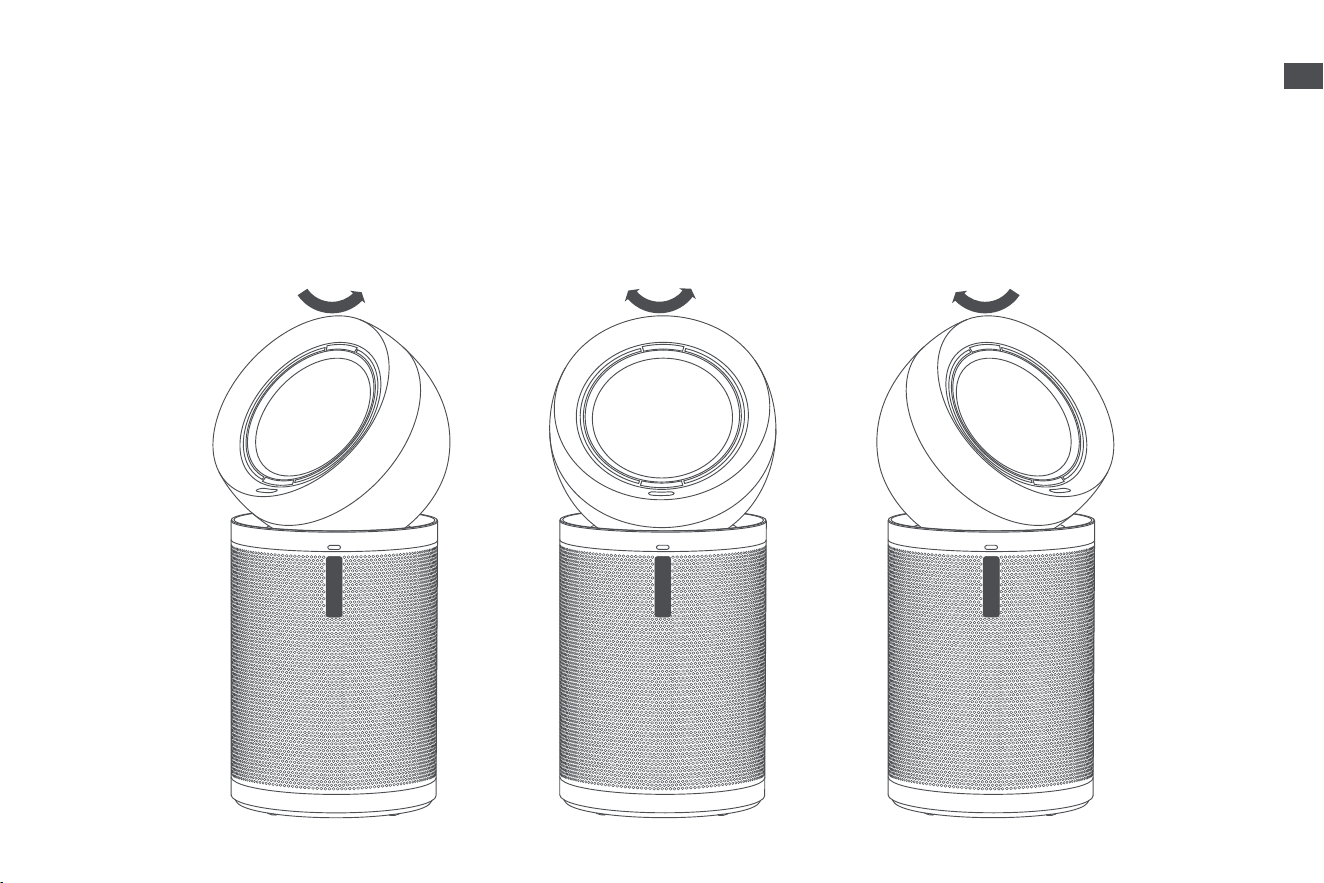
Directional Air Delivery
When only a single person is detected, air delivery follows the person's position. When multiple people are detected, air delivery oscillates
between the largest angle formed by the people positions.
Note: It is disabled by default and can be turned on in the App. When xed angle oscillation function is turned on, the function is disabled.
How to Use
12
EN
Restore Factory Setting
If the machine stops responding or cannot be turned o, press and hold the power button for 10 seconds to forcefully turn it o. Then press
and hold the power button for 3 seconds to turn the machine on.
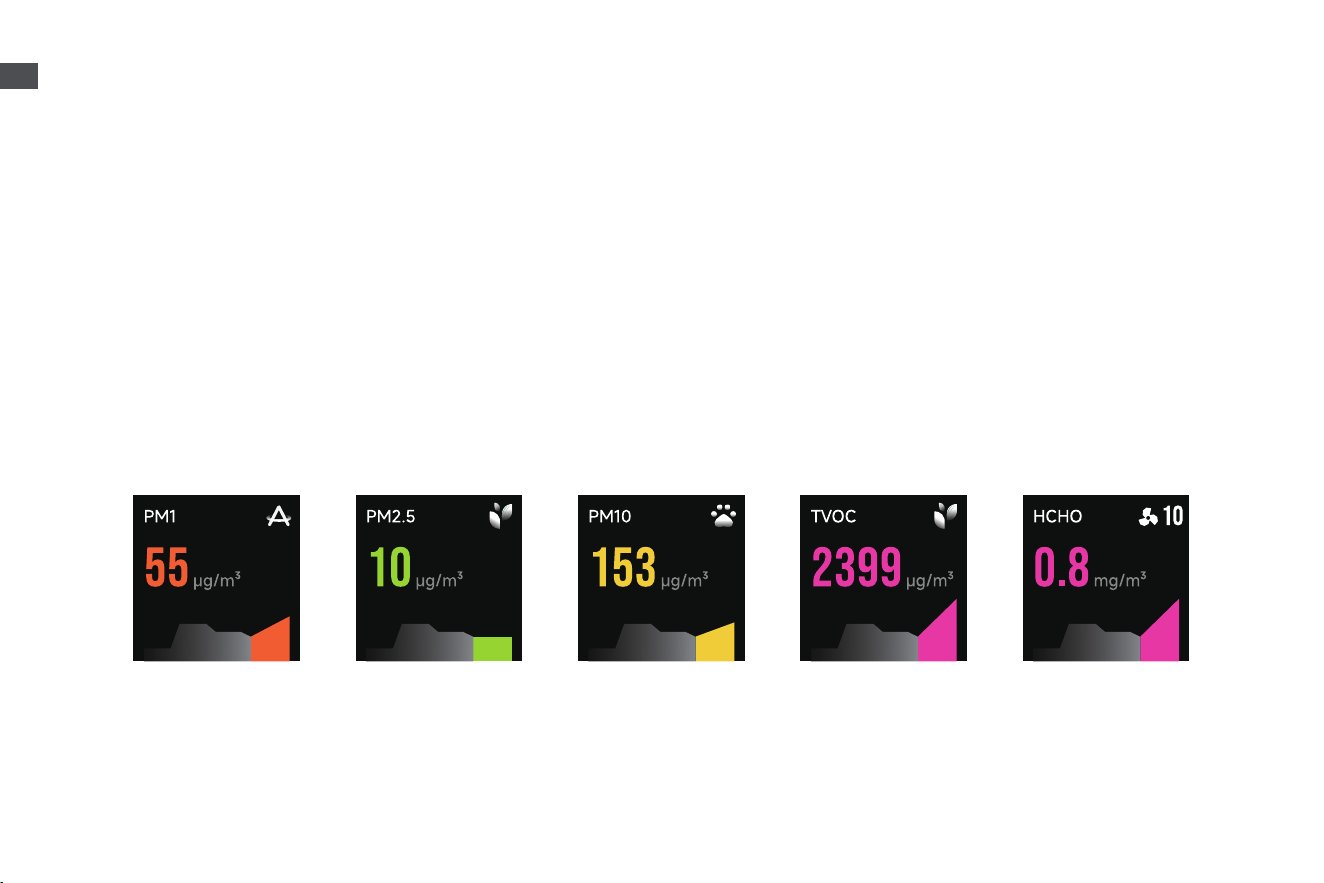
Air Pollutants
Particulate matter (PM1): Microscopic particles up to 1 microns in size, suspended in the air we breathe. These include industrial emissions
and vehicle exhaust.
Particulate matter (PM2.5): Microscopic particles up to 2.5 microns in size, suspended in the air we breathe. These include smoke, bacteria
and allergens.
Particulate matter (PM10): Microscopic particles up to 10 microns in size, suspended in the air we breathe. These include dust, mould and pollen.
TVOC: Total Volatile Organic Compounds. Volatile Organic Compounds(VOCs) are indoor gases emitted from solids or liquids, typically from
paint, carpets, ceilings, and adhesives.
Formaldehyde(HCHO): A common indoor pollutant. It can be usually released from new furniture and paint materials.
PM1 PM2.5 PM10 TVOC HCHO
How to Use
13
EN
Care & Maintenance
Note:
· When the lter life remaining is 10%, the screen will display a reminder. When the life of the lter is exhausted, it means the lter is clogged with pollutants and
may restrict puried air ow and may give o unpleasant smell if continue running over time. To ensure product running at maximum eciency, kindly replace
lter within scheduled maintenance.
· The remaining life of carbon layer and high eciency composite lter can be checked in the App.
· According to Dreame's internal testing, based on 12 hours of daily usage, it is recommended to replace the carbon layer every 6 to 12 months and the high-
eciency composite lter every 16 to 24 months.
· Before the care and maintenance, please turn o the product and unplug the power cord.
* Only use accessories and replacement parts recommended by the manufacturer.
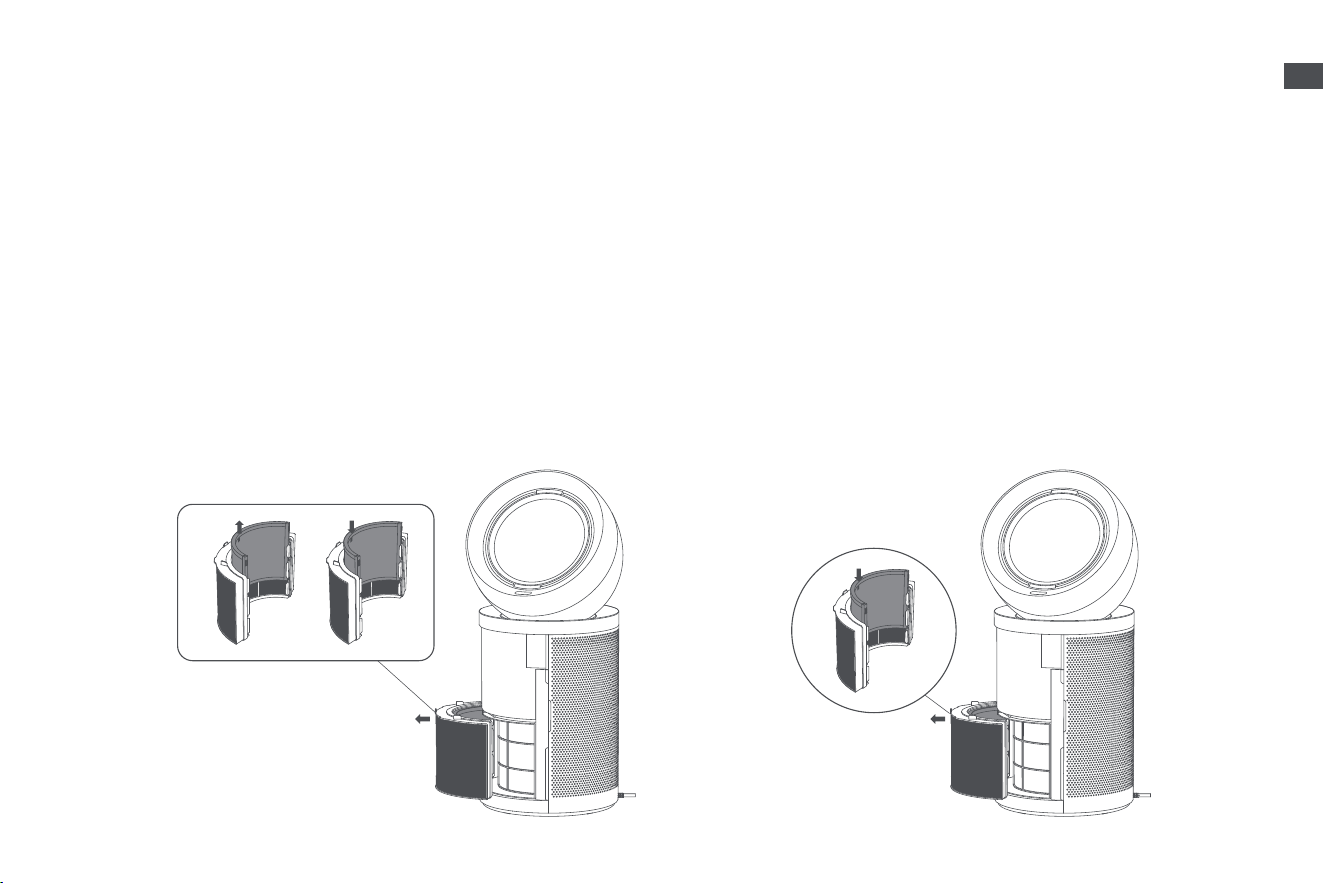
Replacing the High Eciency Composite FilterReplacing the Carbon Layer
1. Remove the magnetic housing from the machine. Grab the handle
of high eciency composite lter to pull it out of the machine. Then,
pull the handle of carbon layer upwards to take it out.
2. Insert the new carbon layer vertically into the high efficiency
composite lter.
1. Remove the magnetic housing from the machine. Grab the handle
of high eciency composite lter to pull it out of the machine. Then,
pull the handle of carbon layer upwards to take it out.
2. Insert the carbon layer vertically into the new high efficiency
composite lter.
14
EN
Care & Maintenance
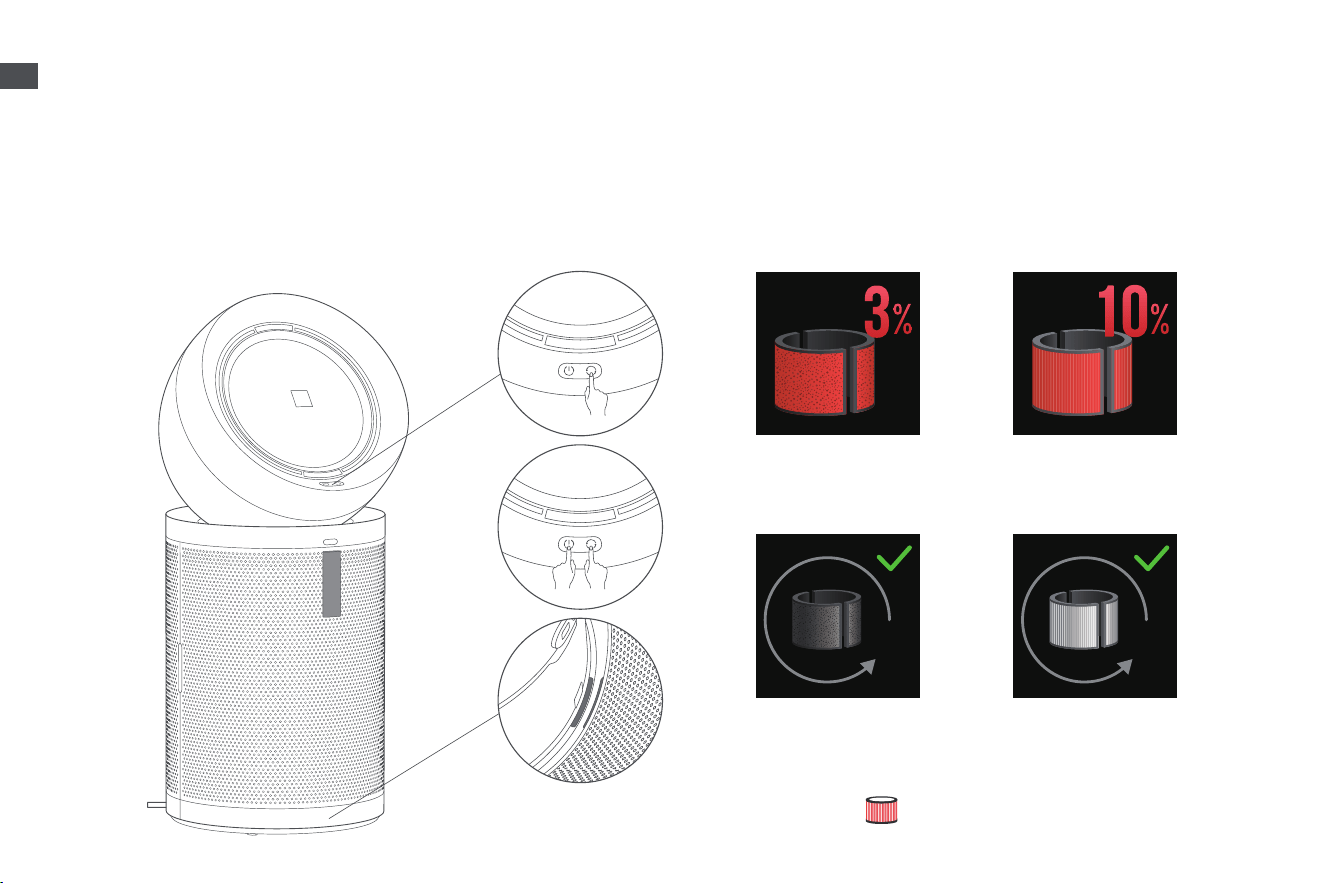
Slide the assembled high eciency composite lter and carbon layer into the machine, then reinstall the magnetic housing. After replacing
the new lter assembly, connect the power and start the machine. Briey press the information switch button on the machine to select the
lter life interface of the new lter. Then, simultaneously press and hold the power button and information switch button for 5 seconds until
the screen prompts that the lter life reset is completed.
Note:
After connecting the power, if the screen displays " ", the lter is not properly installed. Please
reinstall the lter.
Life of High
Eciency
Composite Filter
Life of High Eciency
Composite Filter Life
Reset Completed
Life of Carbon Layer
Life of Carbon Layer
Reset Completed
Reset the Filter Life
15
EN
FAQ
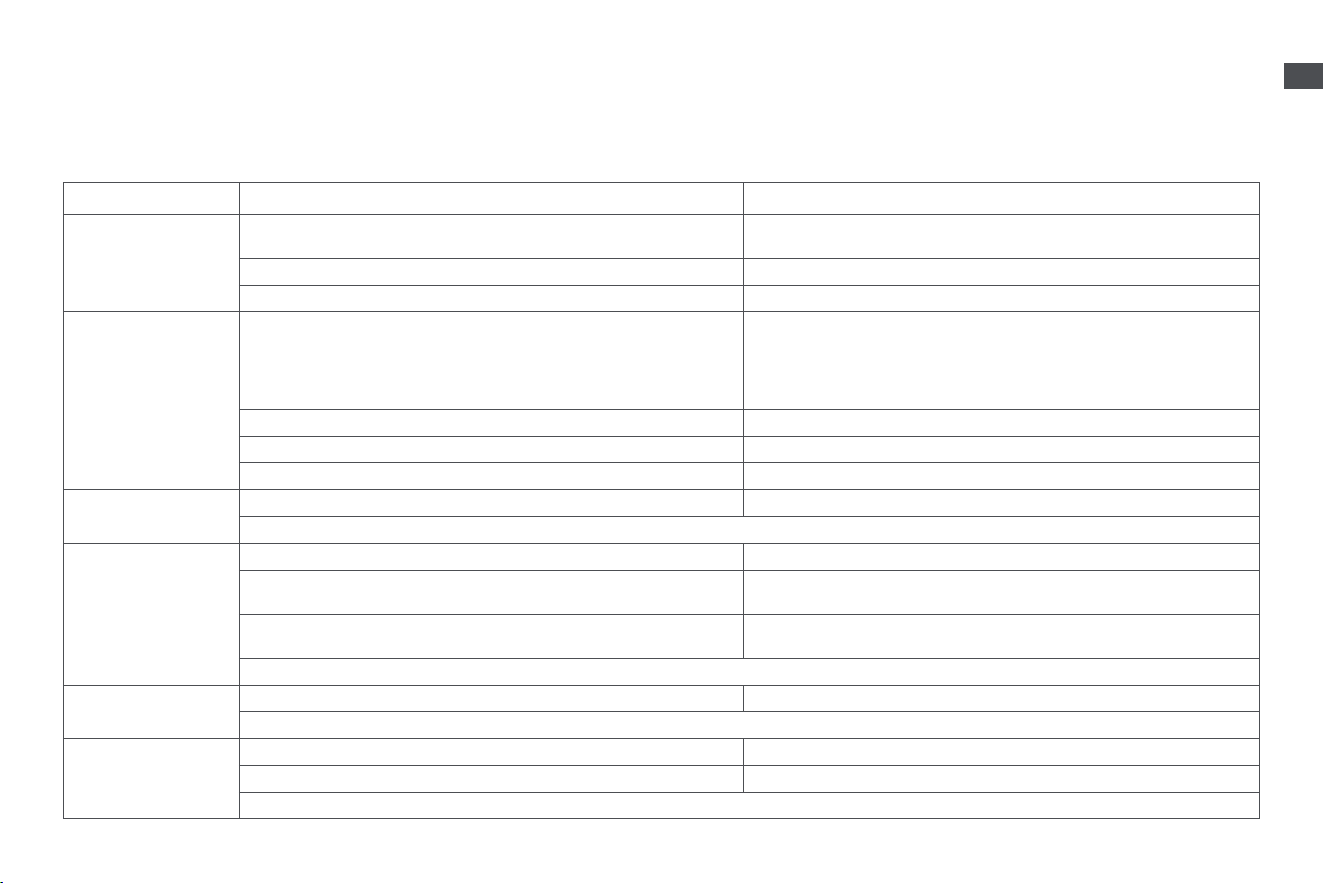
If the machine is not working properly, please refer to the table below.
Errors Possible Causes Solutions
Machine does not turn
on.
The power is not connected or both ends of the charger are not plugged in
correctly.
Check whether the power cord is connected to the socket. Ensure the power
plug is properly inserted before use.
No power in the socket. Try another power socket.
The machine is damaged. Please contact the after-sales department for maintenance.
Emission of odor after the
startup of the air purier.
The air purier is equipped with a formaldehyde decomposition lter. When
rst unpacked and exposed to air, its formaldehyde-removal formula reaches
optimal activation state and may emit a faint medicinal-like odor. This is a
normal characteristic of the formula activation process, and neither indicates
product malfunction nor harmful gas emission.
After unpacking, place the air purier in a well-ventilated area. It is
recommended to enable the “Pet Mode” (at maximum air speed) and run the
purier for 3-5 hours with windows and doors slightly open to enhance indoor-
outdoor air circulation. Generally, such odor will diminish and dissipate within 1
week, requiring no special treatment.
The machine has absorbed excessive gaseous pollutants. Replace the lter or place the lter in a well-ventilated area to air out.
Filter is damp. Air-dry the lter and ensure the product is in a dry environment.
Filter life has expired. Replace the lter and reset the lter life.
The machine makes a
strange noise.
The machine is not placed stably. Place the machine on a stable surface.
If the problem persists after ruling out the above possibility, please contact the after-sales service department for maintenance.
The machine
continuously displays
poor air quality.
Filter life has expired. Replace the lter and reset the lter life.
The outdoor air quality is poor, such as severe weather and smoke from
combustion.
Please close windows and doors while using the machine.
There is high-concentration pollution source interference in the room, such as
smoke from smoking or cooking, incense, perfume or alcohol.
Please open windows for ventilation.
If the problem persists after ruling out the above possibilities, please contact the after-sales service department for maintenance.
The airow direction
cannot be adjusted.
The machine head does not rotate smoothly. Check if there are any obstructions blocking the rotation of the machine head.
If the problem persists after ruling out the above possibility, please contact the after-sales service department for maintenance.
Heating function does not
work.
The temperature is set lower than the current ambient temperature. Adjust the temperature to the appropriate value.
The air outlet is clogged. Clean the blockage in the air outlet.
If the problem persists after ruling out the above possibilities, please contact the after-sales service department for maintenance.
16
EN
FAQ
Specications
Model CVF14A Rated Input 120 V 60 Hz Rated Power 1400 W
Bacteria Removal Rate
≥ 99.9 %(Staphylococcus
epidermidis;
Staphylococcus aureus)
Dimensions 380 × 380 × 850 mm Rated Power (fan mode) 33 W
Clean Air Delivery Rate
(CADR) (for particles)
≥ 400 m³/h
Cumulative Purication
Volume (for particles)
P4
Purication Eciency
(for particles)
Level 1
Clean Air Delivery Rate
(CADR) (for formaldehyde)
≥ 220 m³/h
Cumulative Purication
Volume (for formaldehyde)
F4
Purication Eciency
(for formaldehyde)
Level 1
The purication values are obtained with the machine operating in Pet Mode with both upper and lower air outlets fully open.
The lter material of this machine adopts: treated H13 grade composite, treated activated carbon, and unique never needs replacing catalytic sponge.
The lter's purication performance gradually diminishes over its lifecycle. The machine's LCD screen will indicate the remaining lter life and notify when a replacement is needed.
Filter replacement
reminder continues after
replacement.
The lter life has not been reset. After replacing the lter, please reset the lter life.
The screen displays an
error code/icon.
Please contact the after-sales department for maintenance.
The screen of the air
purier turns black during
operation.
The product is subjected to impact, vibration, shaking, or tilting over 70° . Place the air purier on a at and steady surface and restart it.
The display module of the product is damaged. Please contact our after-sales service personnel for repair.