©2025 EdenPURE® I-5921 BR12388R-1
EdenPURE
®
7584 Whipple Avenue NW
N. Canton, OH 44720
In the event your unit does not appear to be working properly
or the trouble lights start blinking, contact customer service at
To place an order call 1-800-360-1070
or go to www.edenpure.com.
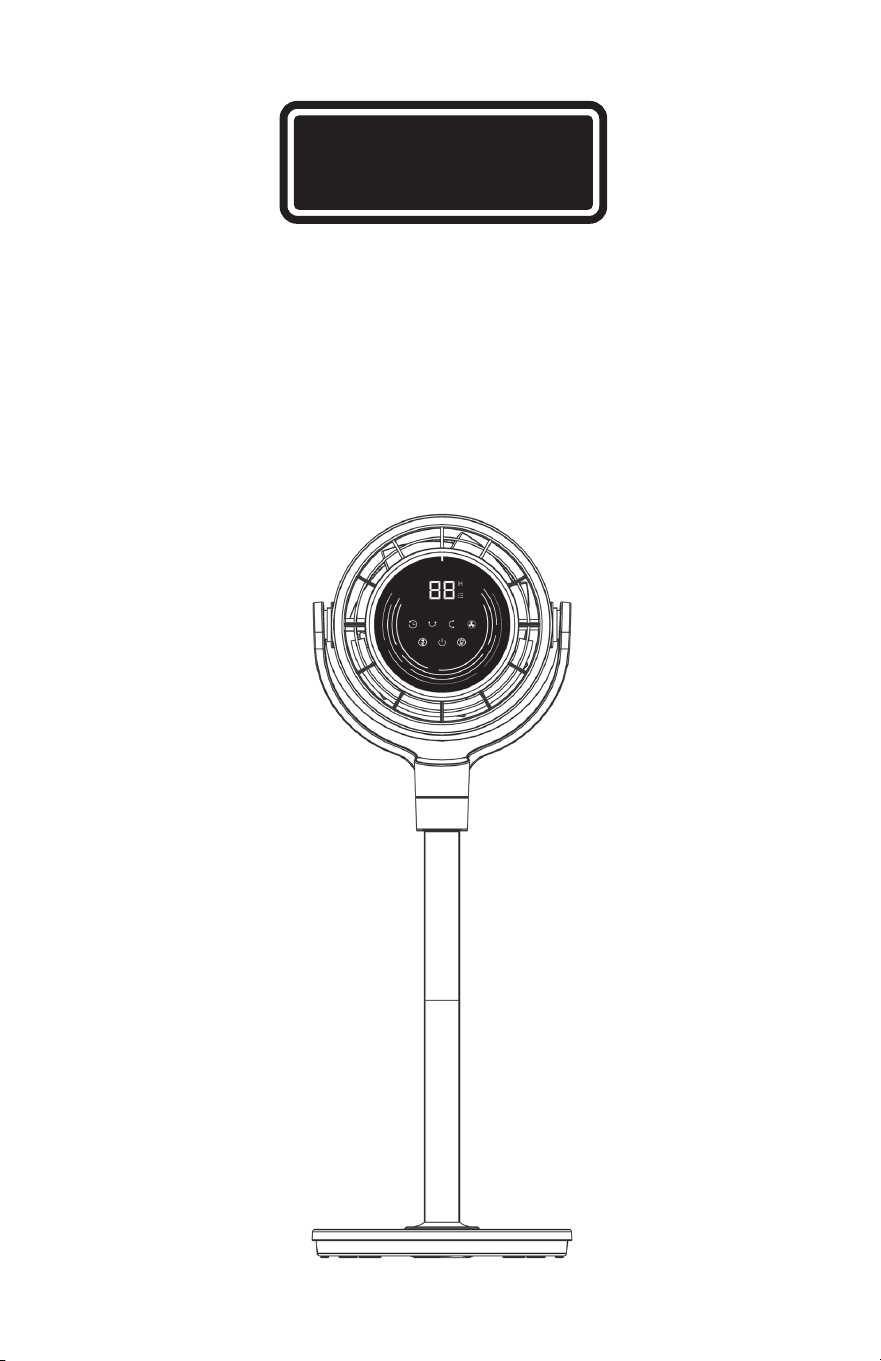
TurboAIR
EdenPURE
®
User’s Manual
Model No.: BW205
EdenPURE
®

Table of Contents
Important Instructions ....................................Page 1
General Safety Warnings ................................ Page 2
General Operation Safety Warnings ..............Page 2
Warnings for the Cord .....................................Page 3
Important Operational Warnings.................... Page 3
Electrical Safety Warnings .............................. Page 4
Servicing Warning ...........................................Page 4
General Reminder............................................Page 4
Specifications .................................................. Page 5
Package Contents ...........................................Page 5
Fan Assemby ...................................................Page 6-8
Controls and Display ....................................... Page 9
Quick Guide of General Operations ............... Page 10-11
Remote Control ............................................... Page 12
More Ways to Use the Fan .............................. Page 13
Cleaning and Maintanance ............................. Page 14-16
Troubleshooting ...............................................Page 17
17
Troubleshooting
PROBLEM POSSIBLE CAUSE AND SOLUTION
The unit won’t turn on.
• Make sure that the cord is connected
to a power outlet and the main voltage
corresponds with the voltage indicated
on the unit.
• Ensure a fan speed setting is selected.
• Unit is damaged or in need of repair.
Unplug the unit and contact Consumer
Service for assistance.
• The outlet is worn or damaged. Try another
outlet or contact a qualified electrician.
The fan is shaky
and wobbling!
• Place the unit on a flat, level surface.
• Incorrect installation might cause it to
wobble. Please refer to the Assembly
Instructions.
Airflow is weak or slow.
• The unit is set to a low speed setting.
Adjust it to a higher speed setting.
• Airflow is blocked. Remove obstruction.Ad-
just direction of airflow towards the user.
The fan is vibrating
and making noise!
• Place the unit on a flat, level surface.
• Be sure not to insert anything into the
air inlet and outlet.
Remote control
is not working.
The battery is dead and needs replaced.
The remote requires a line-of-sight path to
allow for the signal to be received by the
unit. Position the unit so the receiver lens
(located inside the display panel) is visible
from the remote control
116
IMPORTANT INSTRUCTIONS
SAVE THESE INSTRUCTIONS
This User’s Manual and any additional inserts contain important
information about safety, use and disposal. Before using this
product, please familiarize yourself with all operating and safety
instructions. Please keep all documents for future reference.
INTENDED USE: This product is intended to circulate the air
in indoor living spaces only in the United States. This product
(Model BW205 Only) is intended for oor use only. This product
is not intended for commercial or industrial use. The manufacturer
assumes no responsibility for damage or injury due to unauthorized
use or product modication. Failure to follow these directions will
void the product warranty.
Read all
CAUTIONARY MARKINGS
on the appliance and
SAFETY INSTRUCTIONS
in the
USER’S MANUAL.
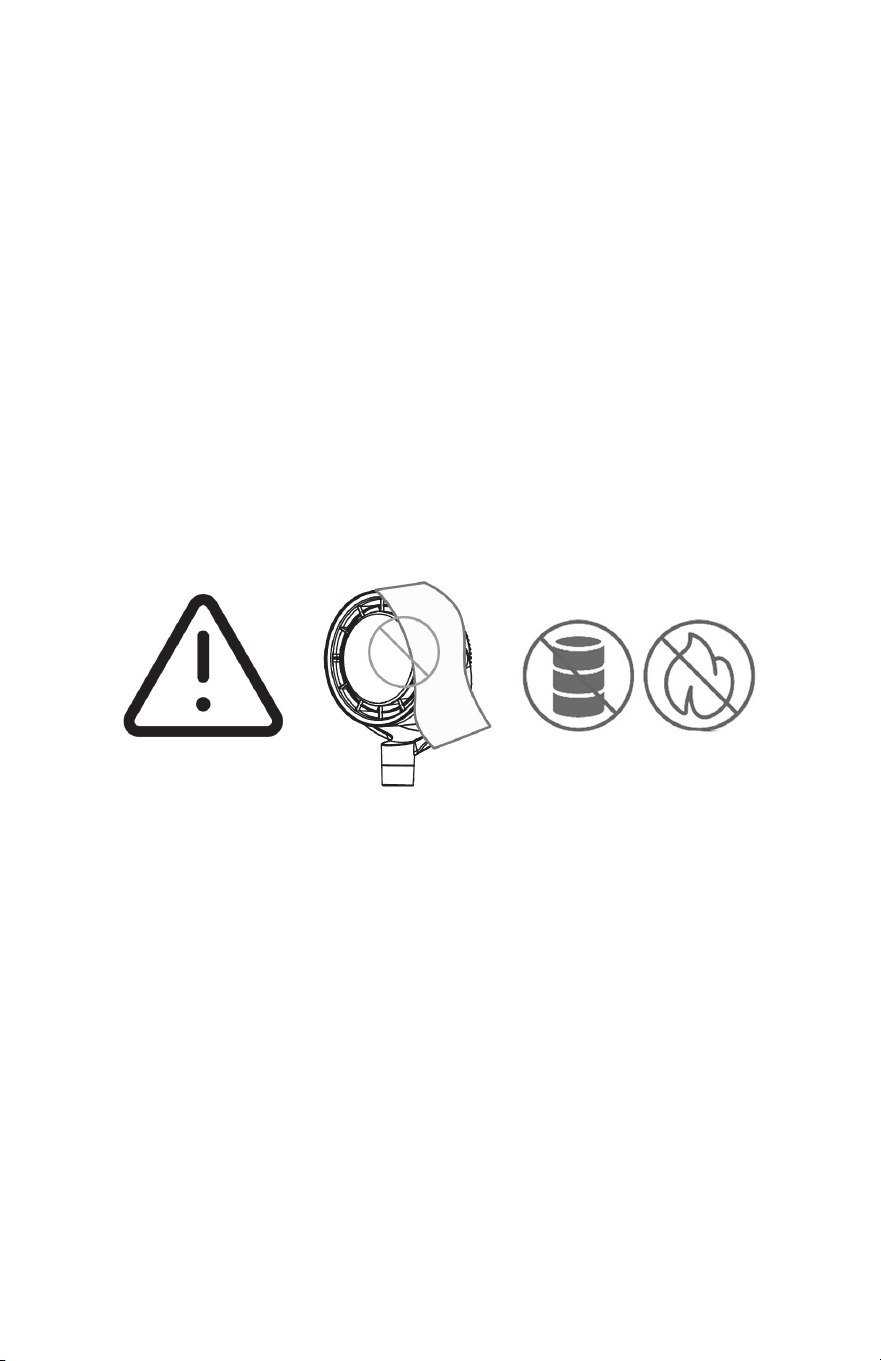
Do not cover
the air inlet and oulet
while the fan
is turned on.
Do not use the fan
near flammable
and combustibles.
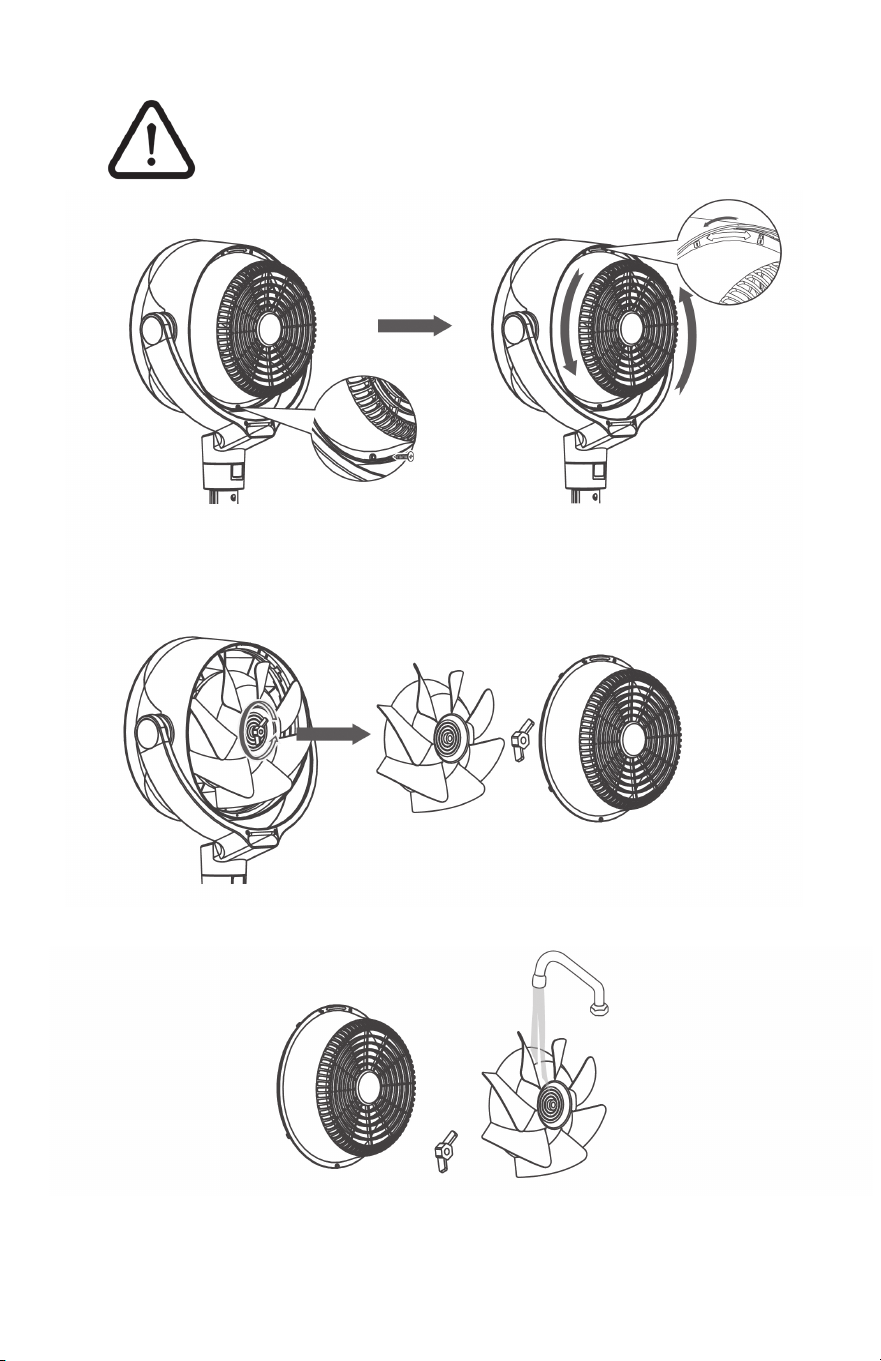
Thoroughly dry all parts, and insert the blade assembly back into
the shaft by aligning the D-shaped points on the center.
Align the point on the rear grill with the right point on the casing,
then rotate the grill clockwise and install the screw back in place.
4
5

Rinse cap, blades, and grills under running water or with a clean,
damp cloth.
3
2 15
GENERAL SAFETY WARNINGS
1. Use the appliance only as described in the this manual. Any other
use may cause re, electrical shock, or personal injury.
2. Risk to Children and Impaired Persons: Supervision is required
during the installation, operation, cleaning and maintenance of
this product by children 12 years of age and younger and anyone
with reduced physical, sensory or mental capabilities. Children
should be supervised to ensure that they do not play with the
appliance, its parts and packaging materials.
GENERAL OPERATION SAFETY WARNINGS
1. Place the appliance on a at, dry surface before use.
2. No part of this product (the appliance, power cord, plug,
packaging, etc.) should be placed near furnaces, replaces,
stoves or other high temperature heat sources.
• Do not use the fan in high-temperature, dusty environments
or places where acid or alkali is stored.
• Do not use it on an uneven or unstable surface.
3. Do not immerse or use it near water and any other liquids.
The appliance, power supply, power cord and plug cannot
come into contact with water.
• Do not use this product on wet surfaces.
• Do not use this product in a bathtub or shower or set the
product where it may fall into a bathtub, laundry, swimming
pool or other water source.
• Do not use this product outdoors or expose it to the weather.
4. Do not use the appliance until the base is installed.
5. When the product is plugged in, do not insert your ngers or
any other foreign objects into the input or output opening grills,
as this may cause a risk of electric shock or re or damage
the product.
6. Do not operate the unit close to curtains or any other fabrics.
Do not hang foreign objects on the grill or they may get pulled
into the fan.
7. Do not dismantle, repair, or try to modify the fan. Servicing should
be performed by customer service.
8. Do not sit or stand on the product.
9. Fans should never blow directly on infants, the elderly, and
patients for long periods of time.
WARNING
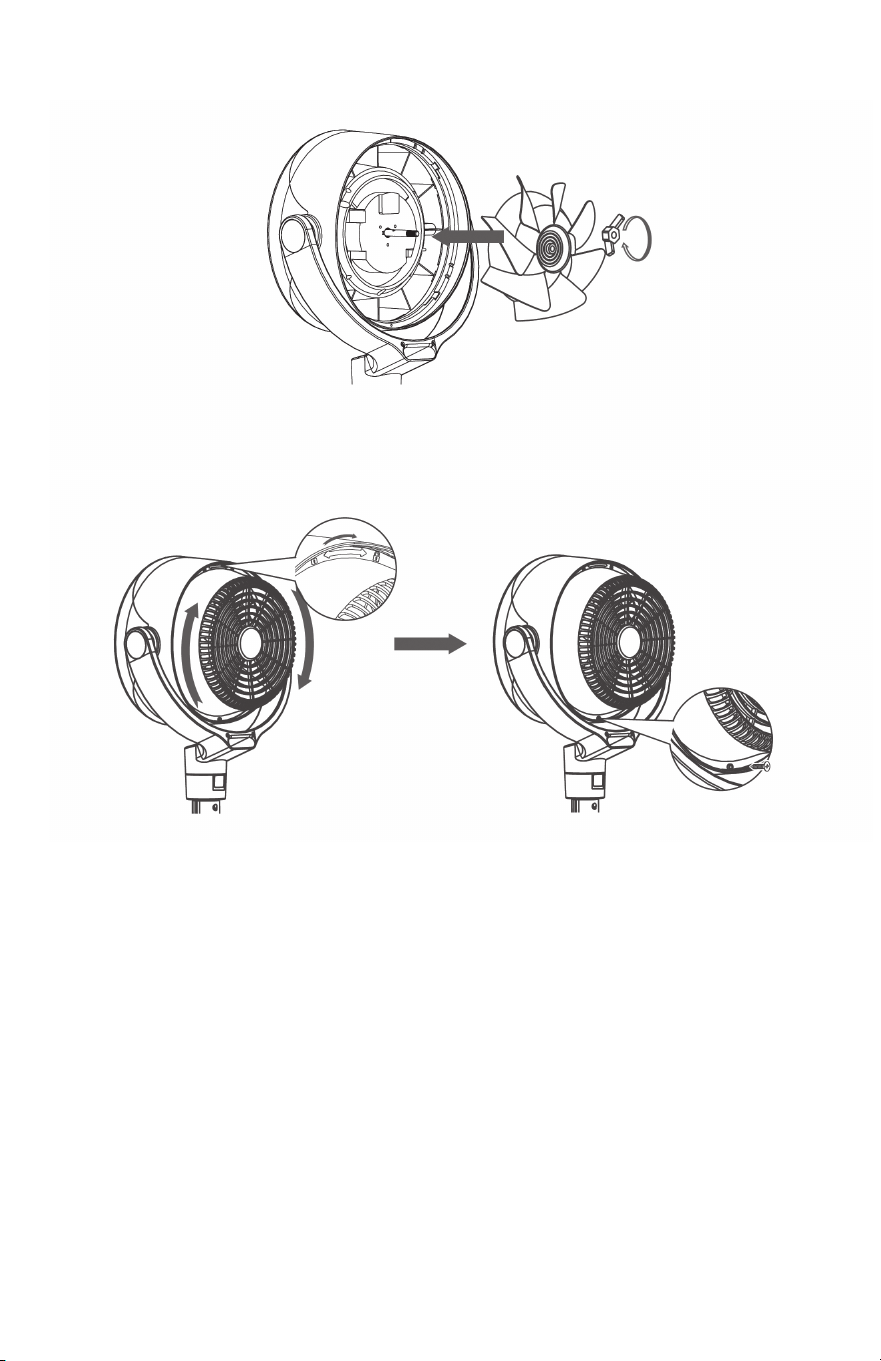
Remove the screws on the rear grills, rotate the grills counterclockwise
to remove them.
Remove the blade cap by rotating it as shown and take the blade
assembly out of the shaft.
1
2

314
WARNINGS FOR THE CORD
1. Do not run the cord under carpeting.
2. Do not cover the cord with throw rugs, runners, or similar
coverings.
3. Do not run the cord under furniture or appliances.
4. The cord should not hang over edges of counters or be placed
where it can be crimped or closed in doors. Arrange the cord
away from trafc areas where it will not be tripped over.
5. Place the fan near an easily accessible outlet so it can be
unplugged quickly during an emergency.
6. When plugged in, never use the power cord as a handle or
otherwise yank, strain or stretch it.
IMPORTANT OPERATIONAL WARNINGS
1. Risk of re. Your appliance is equipped with a detachable power
supply. Use only the power cord and plug provided.
2. Before plugging power cord into electrical outlet, be sure that all
electrical information on the rating label, including voltage,
is compatible with your outlet’s power supply.
3. This appliance has a polarized plug (one blade is wider than the
other.) To reduce the risk of electrical shock, this plug is intended
to t in a polarized outlet only one way. If the plug does not t
fully in the outlet, reverse the plug. If it still does not t, contact a
qualied electrician. Do not attempt to alter the plug to t.
4. A loose t between wall outlet (receptacle) and plug may cause
overheating and distortion of the plug. Discontinue the use of the
product in this outlet. Contact a qualied electrician to replace
loose or worn outlets.
5. Do not use if the unit has been dropped or damaged or if it has
a damaged power cord or plug. To avoid the risk of electrical
shock, do not attempt to repair or replace parts. Only original
replacement parts may be used. If the power cord is damaged,
contact customer service.
6. Before moving, repositioning, servicing, cleaning and when not in
use, use the product control panel to turn the power to the unit
off and then unplug it. To disconnect the plug from the outlet,
grasp and pull only the plug. Also, turn the power off and unplug
the unit if it will be left unattended for an extended period of time
or during electrical storms.
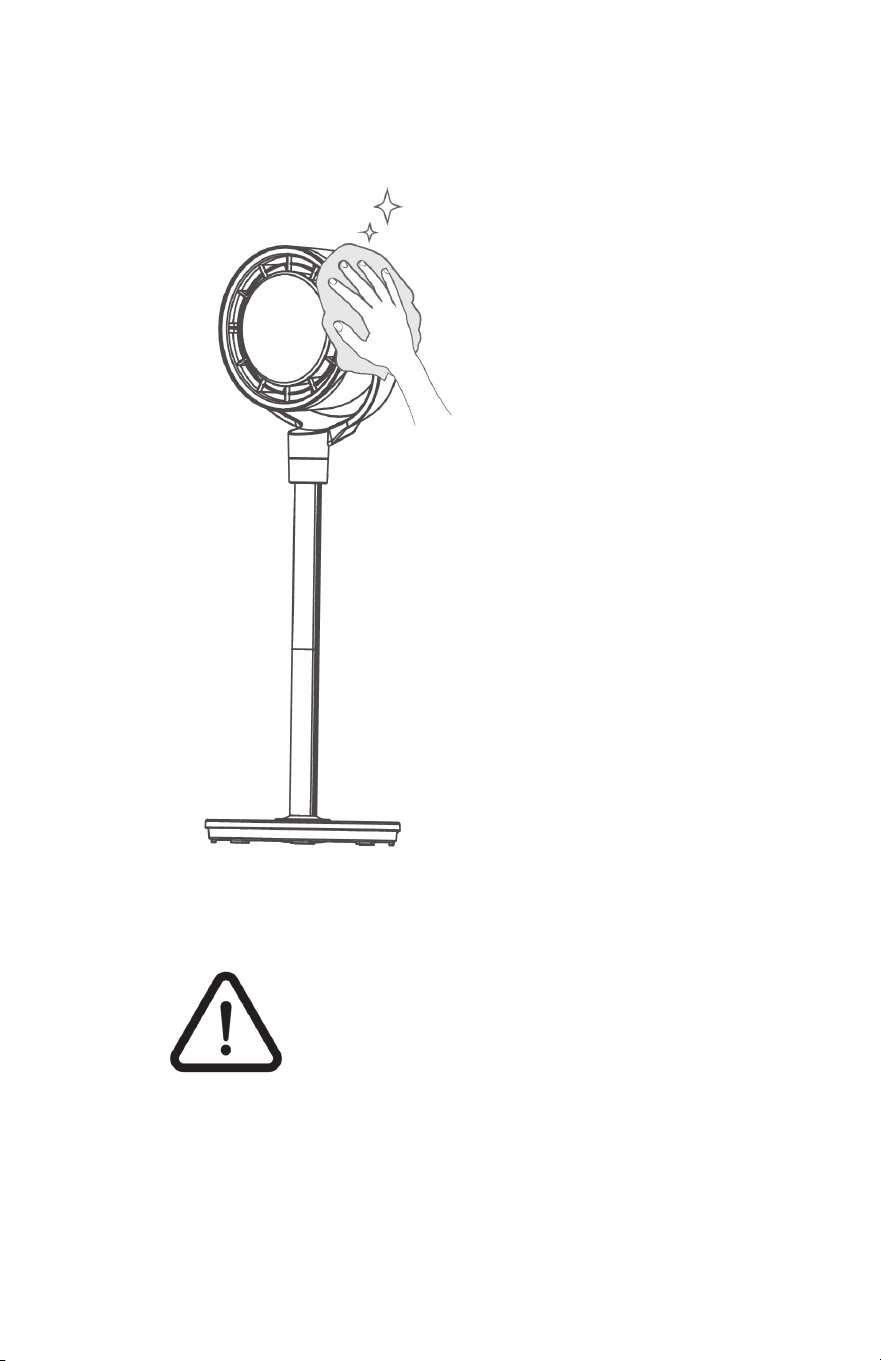
Cleaning and Maintenance
Outer Surface
Gently wipe off the dust
with a soft, dry cloth.
Base and Pole
The base and pole can be
disassembled in the reverse
order of assembly.
CAUTION
1. Always unplug the fan before cleaning
or maintenance to avoid the risk of re,
electric shock, or injury to persons.
2. Do not immerse in water or get water
inside the motor housing.
3. Do not use any chemical agents (such as
gasoline, thinners, solvents, ammonias or
other chemicals) when cleaning the fan.
4. Store in a cool, dry place and cover it
to protect from dust.

4 13
ELECTRICITY SAFETY WARNING:
1. Make sure that the voltage of your electricity supply is the same
as that indicated on the appliance.
2. Always unplug the unit before cleaning or leaving it sit for a long
period of time. Keep your hands dry when plugging/unplugging
the unit into the wall outlet.
3. Do not operate any air circulating fan with a damaged cord or
plug. Discard the fan or call customer service.
4. WARNING: To reduce the risk of circuit overload re or electric
shock, do not use the air circulating fan with any solid-state
speed control device.
5. Use a 12V/2A power adapter only. Turn off the appliance before
plugging it in.
6. WARNING: To reduce the risk of re, electric shock or injury
to persons, do not use replacement parts that have not been
recommended by the manufacturer.
7. If the power cord is damaged, it must be replaced by the
manufacturer or its service agent or a similarly qualied person in
order to avoid a hazard.
SERVICING WARNING
1. Clean your product regularly and as instructed in this manual.
Prior to cleaning, turn off the power on your product and unplug
it. Do not use gasoline, thinners, solvents, ammonias or other
chemicals for cleaning. See the CLEANING instructions provided.
2. Do not open appliance housing while product is plugged in.
GENTLE REMINDER:
Check the appliance regularly and refer to TROUBLESHOOTING or
contact customer service if it shows any of the following signs:
• Power cord or plug is damaged.
• Loud noise, unusual smell or excessive heat.
FOR HOUSEHOLD USE ONLY
READ AND SAVE THESE INSTRUCTIONS
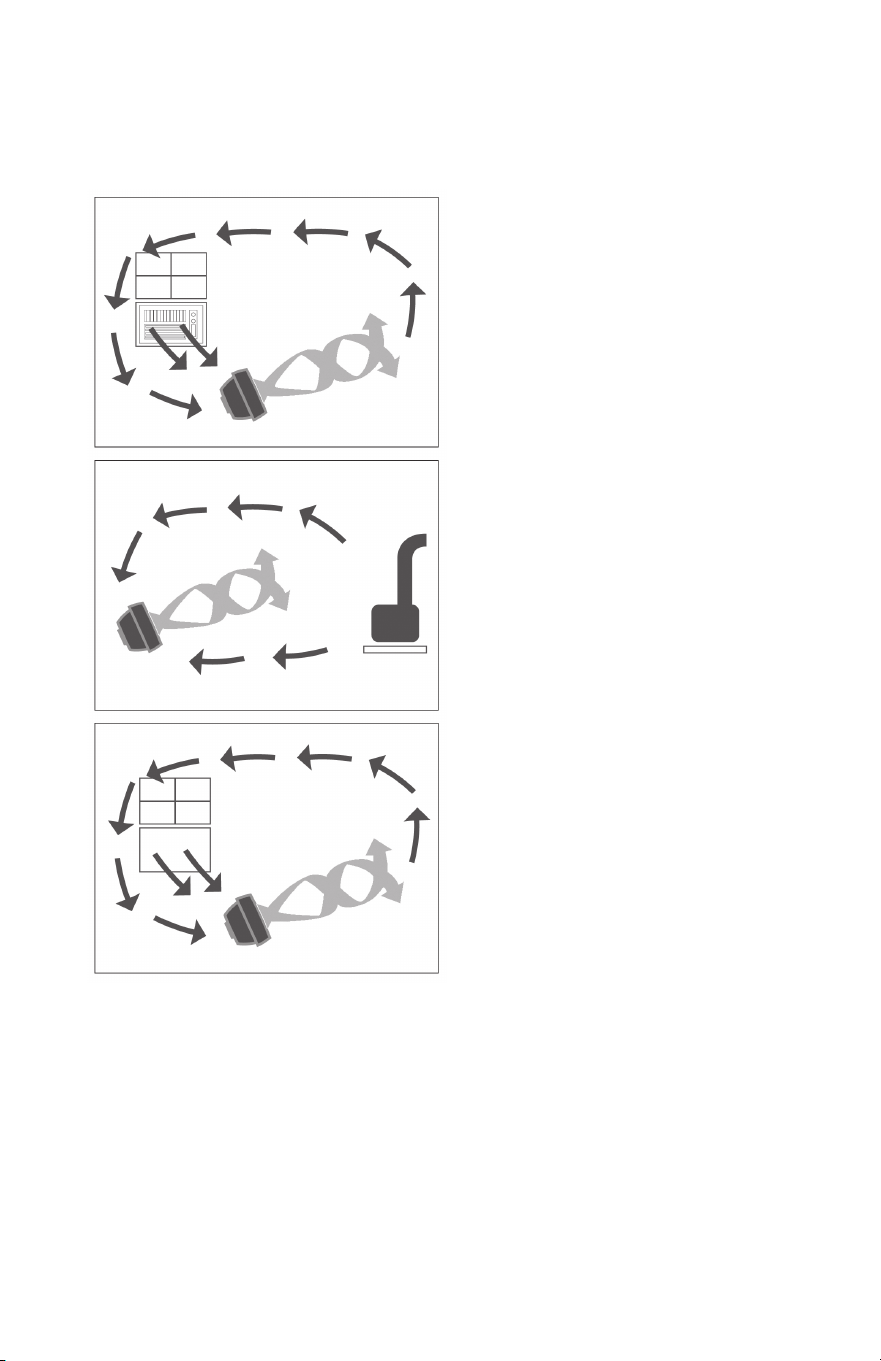
Summer: Use with an
Air Conditioner
Position the air fan in front of your
AC to circulate cold air and provide
better cooling.
Winter: Use with a heater
Send the heat to corner of the room
and circulate warm air faster.
Spring & Fall Circulation
Put in front of an open window
to make the indoors as fresh and
pleasant as the outdoors.
MORE WAYS TO USE THE FAN
Getting the most out of your Fan
12 5
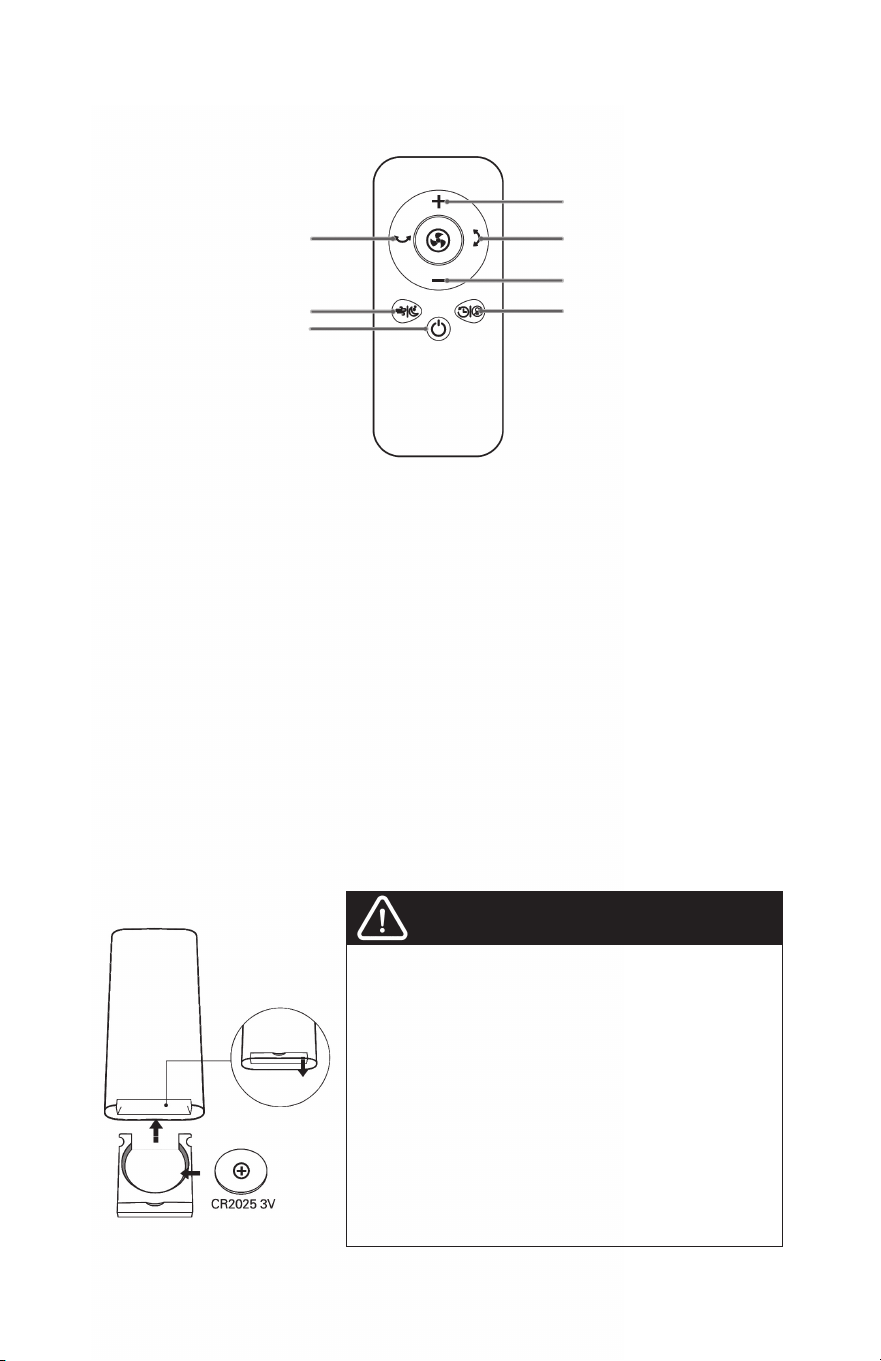
BATTERY REPLACEMENT
1. Press the lock button to pop the battery holder open.
2. Replace with the same battery type with the (+) side facing up.
3. Push the holder in until it’s securely locked into place.
Note: If the indicator on the remote control doesn’t turn on any more,
the battery needs replaced.
WARNING:
This product contains a button battery. If swallowed, it could cause
severe injury or death in just 2 hours. Seek medical attention immediately!
1. The remote control functions are the same as the control panel on the unit.
2. The remote requires a line-of-sight path to allow for the signal to be
received by the unit. Point the remote control at the display panel for
best reception.
3. Your remote includes (1) coin style CR2025 3V battery. Battery comes
pre-installed. Remove any plastic protection from the battery before the
rst use and place it in the remote with the + side facing up. Ensure the
battery is installed correctly with regard to polarity before using the remote.
Remote Control
Horizontal Oscillation
Turbo/Sleep
ON/OFF Button
Increase Speed/Timer
Vertical Oscillation
Decrease Speed/Timer
TIMER/Light
This product contains a lithium button/coin cell battery. If a
new or used lithium button/coin cell battery is swallowed
or enters the body, it can cause severe internal burns
and can lead to death in as little as 2 hours. Always
completely secure the battery compartment. If the
battery compartment does not close securely, stop using
the product, remove the battery, and keep it away from
children. If you think batteries might have been swallowed
or placed inside any part of the body, seek immediate
medical attention.
The batteries must be disposed of properly, including
keeping them away from children.
Even used batteries may cause injury.
WARNING
Chemical Burn Hazard. Keep batteries away from children.
1
2
3
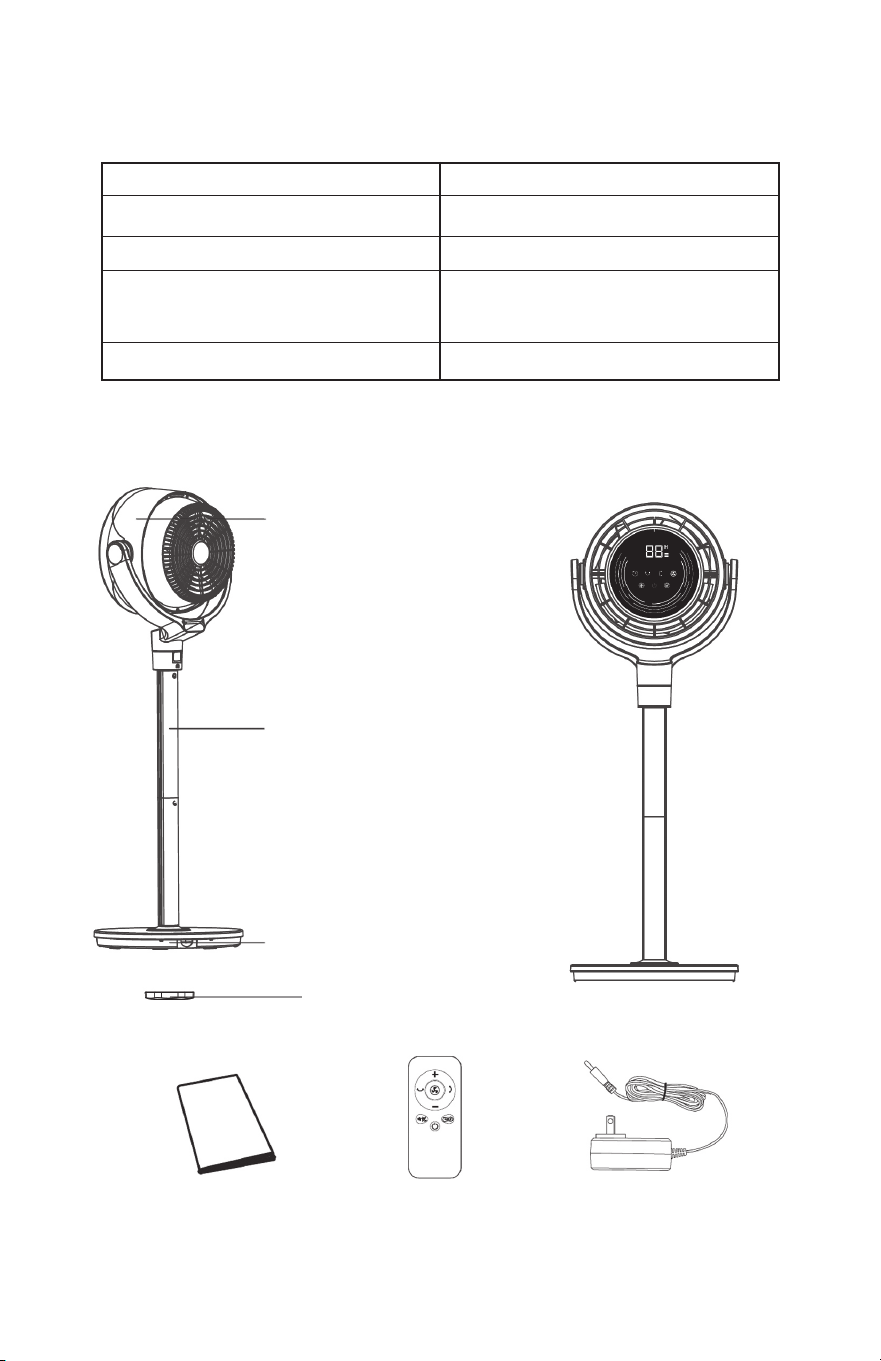
SPECIFICATIONS
PACKAGE CONTENTS
Model BW205
Power Supply
12 -- 2A
Rated Power
24W
Power Adapter
Input: 120V - 60Hz 1.0A
Output:
Battery Type 12V 2A
Fan Head *1
the Polybag *1
Pole *2 PCS
Polybag *1
Base *1
Plastic Base Lock *1
Plastic Base Lock *1 Adapter *1User’s Manual *1
116
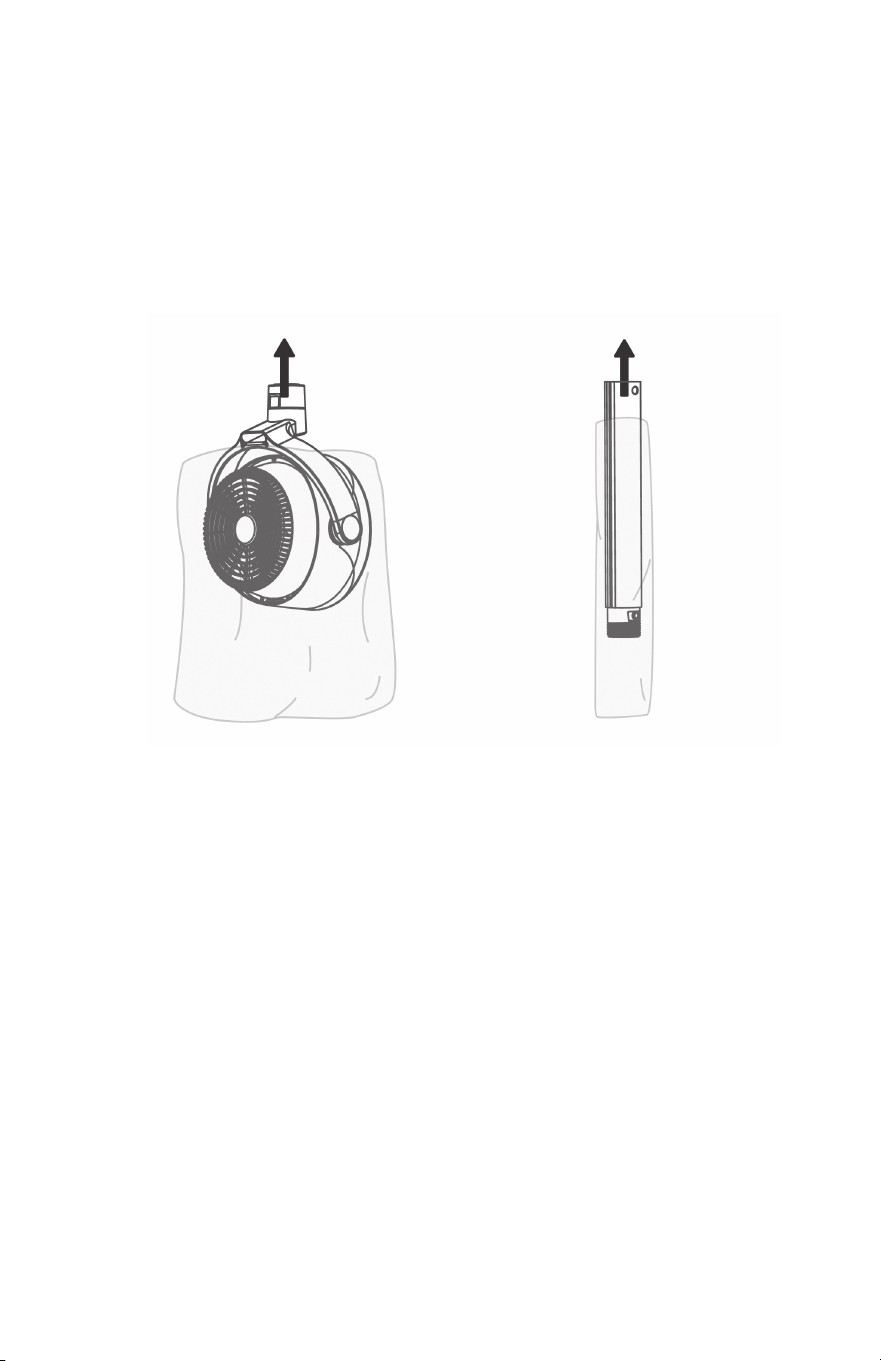
No tools required.
1. When using the fan for the rst time, remove the wraps and
attached parts by following the steps below.
2. Gently place the circulator head face down on the ground on a
soft cloth to avoid scratches or damages to the unit.
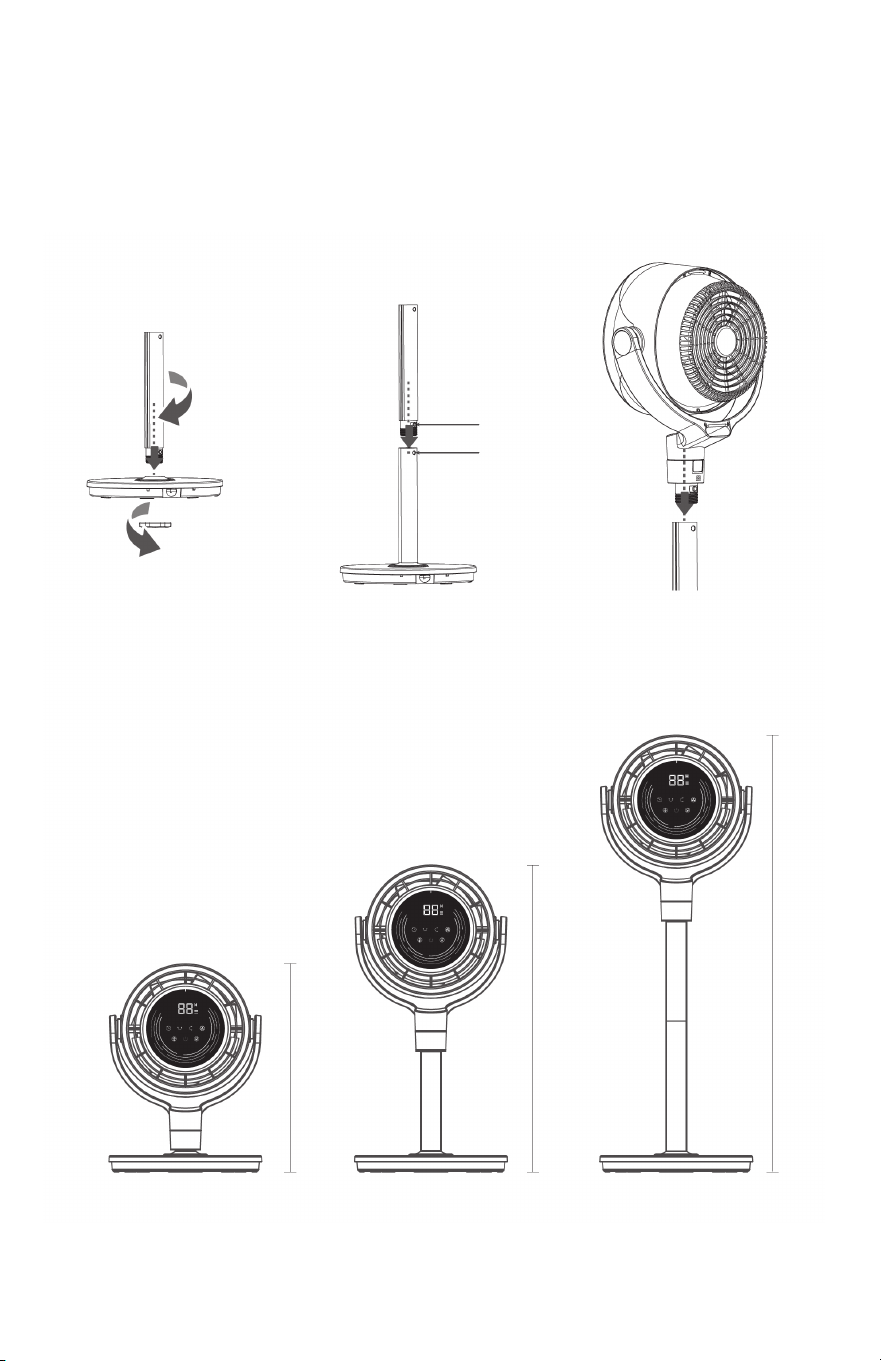
3. Remove the Base and the Pole Assembly
Find the Pole, the Base and the Plastic Base Lock.
Align the Lock Release Button on the Base with the hole
located on the pole. Press the Lock Release Button on
the Pole. Push the pole into the base until the
Lock Release Button snaps into place.
With the fastening nut (Plastic Base Lock) secured on
the underside of the base, rotate the fastening nut
counter-clockwise to remove.
The upper pole and lower pole come pre-assembled.
Fan Assembly
Description: Oscillates airflow horizontally.
Choose from 3 angles: 0° / 60° / 90° / 120°.
Operating: Press on the display or remote control to
choose the horizontal angle. Then it will oscillate airflow
horizontally automatically at the chosen angle.
For horizontal oscillation ( 60° / 90° / 120° ), the display will
show L1, L2, L3. Press and it will stop oscillating.
Horizontal
Oscillation
TIMER
Turbo/Sleep
Light
Memory
Description: When the fan is ON, touch the timer button
repeatedly to set a timer from 1 to 8 hours. When the
timer ends, the fan will automatically stop/start running.
To cancel, set the time to 0 hours.
Note: When the auto off timer is enabled, the display will
return to the set fan speed after 3 seconds.
Operating: Press to activate timer. The Timer Indicator
light and the Display flashes “ 00 ” to indicate Timer
Adjustment Mode. While in this mode, select amount of time
in one-hour intervals by pressing / OR-/+ on Remote
Control. After three seconds, flashing will stop and the display
will show the number of hours the timer is set at. The display
will return to the last speed selected. Touch to quickly tell
how many hours are remaining on the timer.
Description: Select Turbo airflow or Sleep Airflow.
Operating: Press to choose Turbo fan or Sleep mode.
Note:
· Turbo airflow: The fan runs at the maximum speed.
· Sleep airflow: Mute is automatically on and it runs at
a lower and quieter speed. No light is on.
Description: Select to activate the 7 color Ambient lighting.
Operating: Press to turn off the light.
When the fan is turned OFF or disconnected from power,
it will operate under the previous settings ( except the
Timer setting ) when it is turned ON again.
10 7
4. Fan Head Assembly
Align the Lock Release Button on fan head with the hole located
on the pole.
Push the pole onto the fan head until the Lock Release Button
snaps into place.
Button hole
5. Adjusting Height Through Assembling the Poles
12”x 7” x 36”/26”/16”
16”
26”
36”
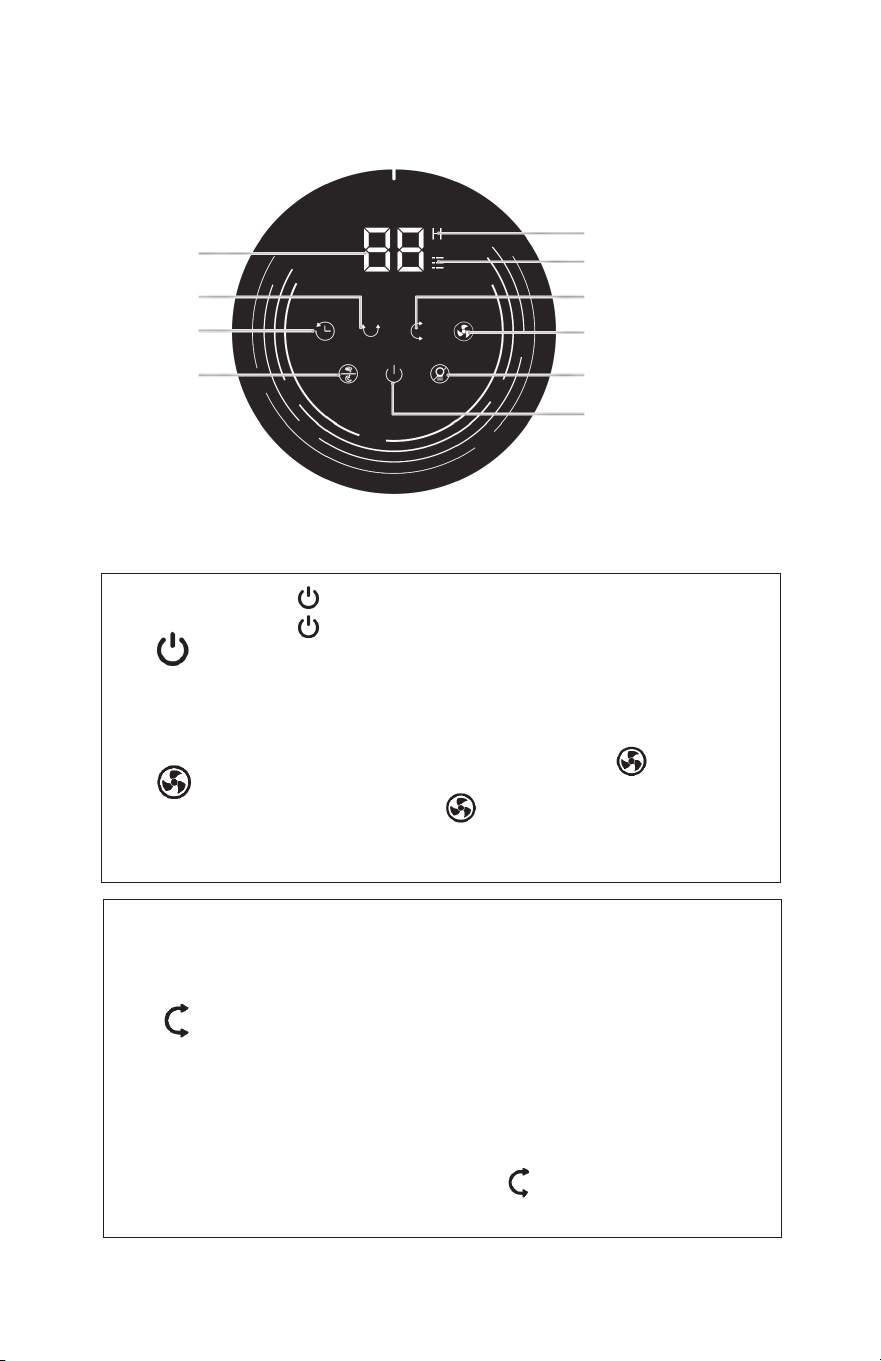
Quick Guide of General Operations
Touch to power ON.
Touch again to power OFF.
Note: 1. The fan is set on Fan Speed 06 by default
for first time use.
2. Your fan returns to the last saved memory setting
when the power is turned on/off after the first use.
Description: Select desired fan speed by pressing on display
OR -/+ on the Remote Control.
Operating: Press and hold of display OR -/+ on the Remote
Control to adjust speed up or down in 12 speed increments. Speed is
indicated by number shown on Speed/ Timer Indicator Display.
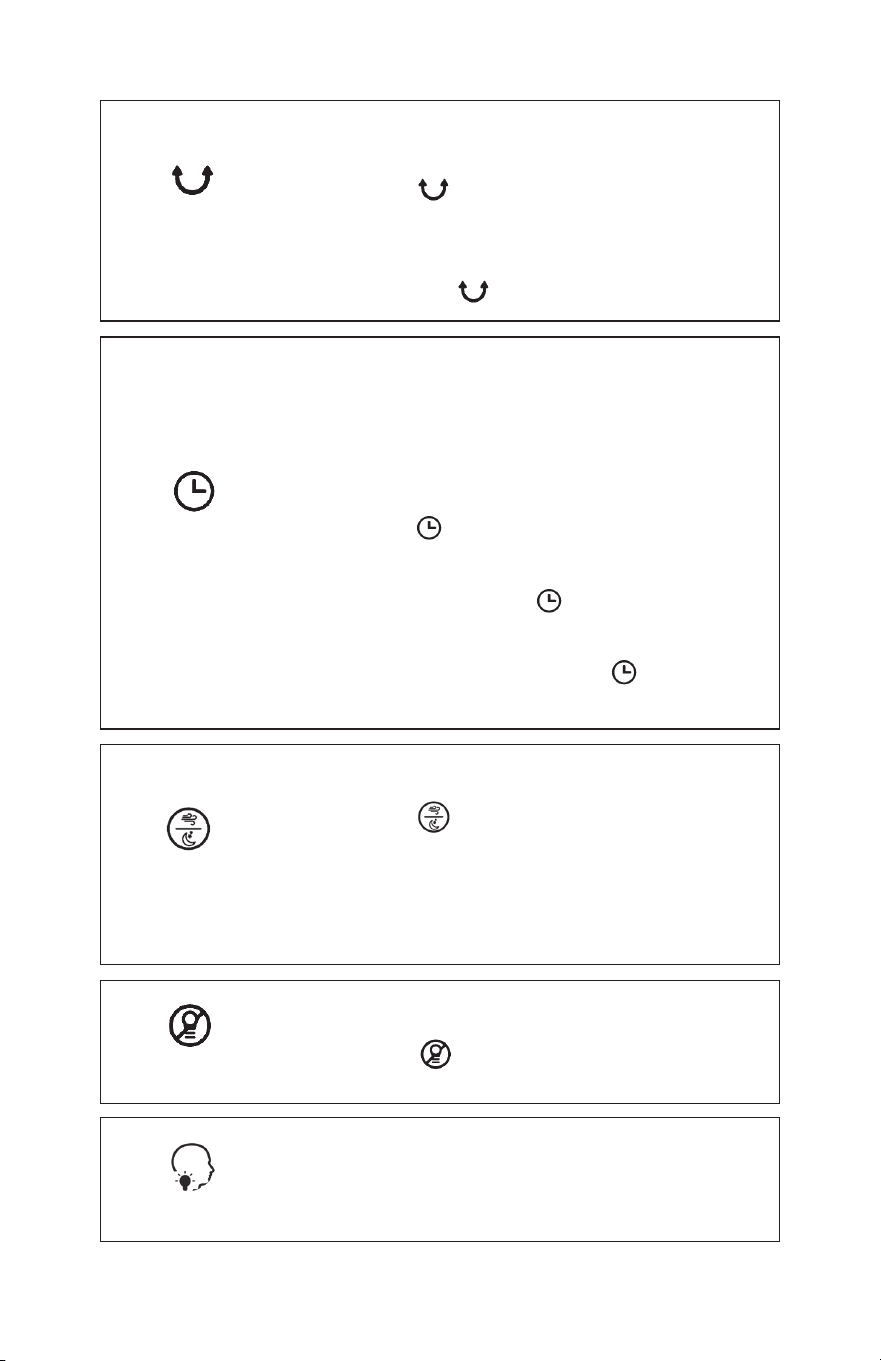
Description: Sweep airflow vertically
(0° / -15°-15° / -30°-30° / -30°-90°
)
There has 3 Modes to choose from.
-15°-15°means oscillating downward 15° and upward 15°, total 30°
-30°-30° means oscillating downward 30° and upward 30°, total 60°
-30°-90° means oscillating downward 30° and upward 90°, total 120°
Operating: Press of display or remote control to choose the
vertical angle.
Then it will sweep airflow vertically and choose angle automatically.
Please note, horizontal ( 0° / -15°-15° / -30°-30° / -30°-90° ),
the display will show U1, U2, U3.
During in vertical oscillating, press and it will stop oscillation
and stay in that angle.
DETAILED OPERATING INSTRUCTIONS:
Display
Horizontal
Oscillation
TIMER
Turbo/Sleep
Turn ON/OFF
Turn Fan
Vertical
Oscillation
Timer Indicator Light
Turn ON/OFF
Light
Turn Fan ON/OFF
Vertical Oscillation
Fan Speed Indicator Light
98
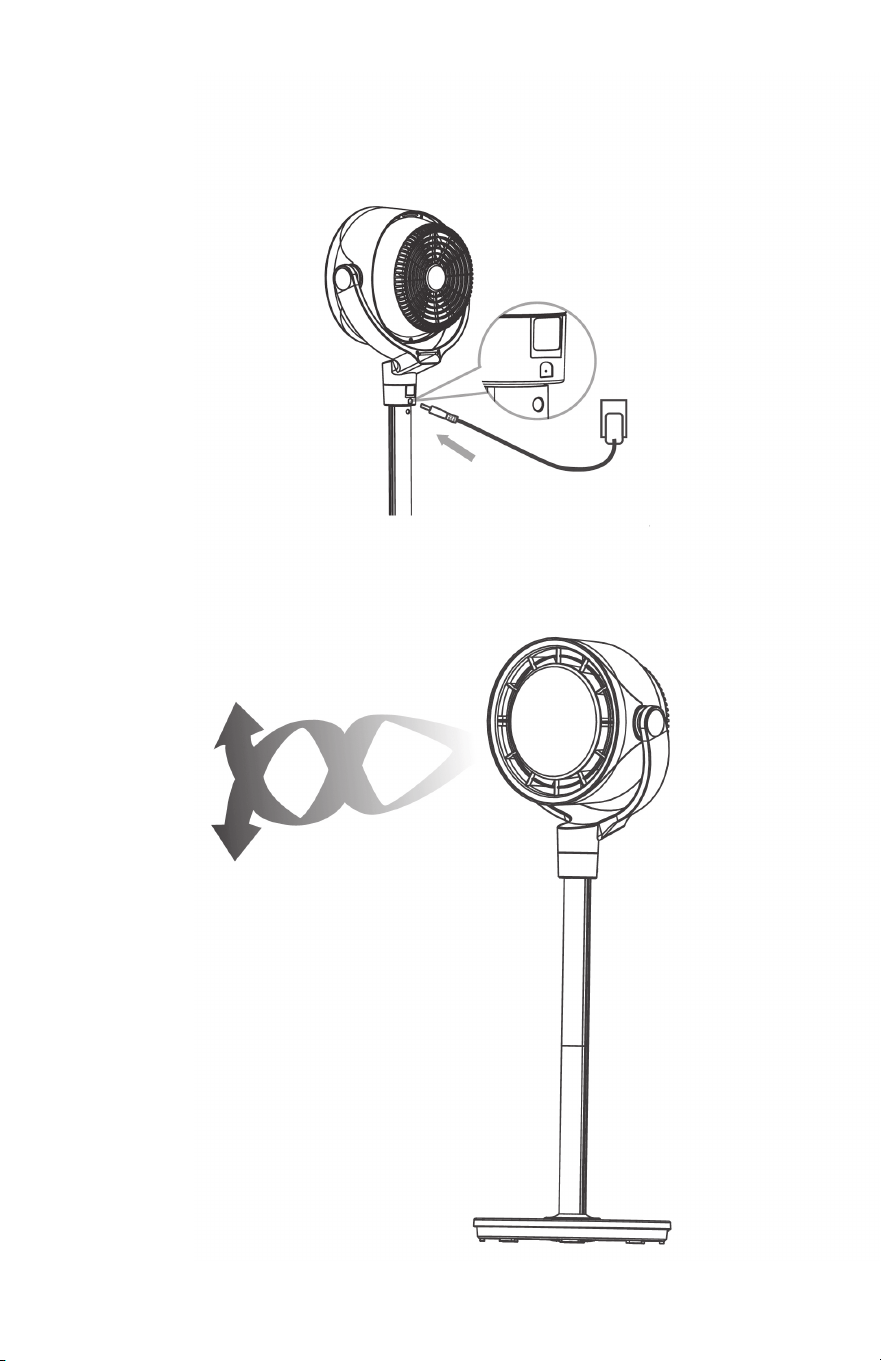
6. Plug the Power
Plug the power cord into the input socket (located at the back
of the fan), and plug the power cord into an electrical outlet.
7. CAUTION
Do not operate the fan if the base has not been installed.
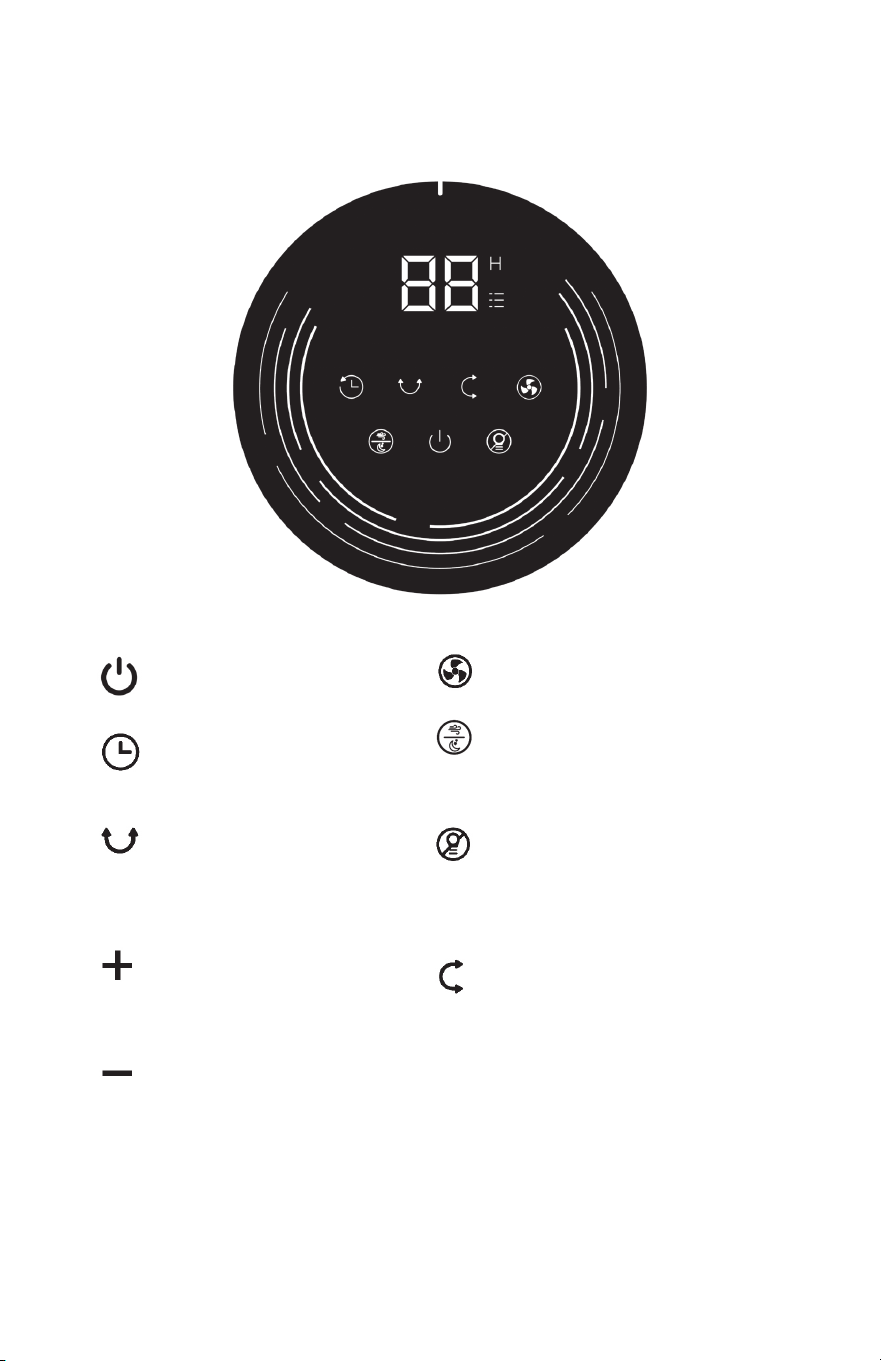
Controls and Display
Fan Speed
• 1-12 Fan Speeds to choose
Turbo/Sleep Button
• Turn on turbo fan ( Highest Speed Fan )
• Turn on Sleep fan ( used at night and
turn off the light automatically )
Light Button
• Turn off the 7 colorful lights
• Turn off all LED lights on the
display screen
• Wake the light by any button
Power Button
• Turn power on/off
Timer Button
• Setting the timer
( from 1-12 hours )
Horizontal Oscillation Button
• Sweep airflow horizontally
( 0°/ 60°/ 90°/ 120° )
Increase Speed / Timer Button
• Increase airflow speed (1-12 Levels)
• Increase Timer (1-12 Hour)
Decrease Speed / Timer Button
• Decrease airflow speed ( 1-12 Levels )
• Decrease Timer ( 1-12 Hour )
Vertical Oscillation Button
• Sweep Airflow Vertically
( 0 / -15°-15 / -30°-30 / -30°-90° )
3 Modes to choose from:
• -15°-15° means oscillating downward 15°
and upward 15°, total 30.
• -30°-30° means oscillating downward 30°
and upward 30°, total 60°
• -30°-90° means oscillating downward 30°
and upward 90°, total 120°
98
6. Plug the Power
Plug the power cord into the input socket (located at the back
of the fan), and plug the power cord into an electrical outlet.
7. CAUTION
Do not operate the fan if the base has not been installed.
Controls and Display
Fan Speed
• 1-12 Fan Speeds to choose
Turbo/Sleep Button
• Turn on turbo fan ( Highest Speed Fan )
• Turn on Sleep fan ( used at night and
turn off the light automatically )
Light Button
• Turn off the 7 colorful lights
• Turn off all LED lights on the
display screen
• Wake the light by any button
Power Button
• Turn power on/off
Timer Button
• Setting the timer
( from 1-12 hours )
Horizontal Oscillation Button
• Sweep airflow horizontally
( 0°/ 60°/ 90°/ 120° )
Increase Speed / Timer Button
• Increase airflow speed (1-12 Levels)
• Increase Timer (1-12 Hour)
Decrease Speed / Timer Button
• Decrease airflow speed ( 1-12 Levels )
• Decrease Timer ( 1-12 Hour )
Vertical Oscillation Button
• Sweep Airflow Vertically
( 0 / -15°-15 / -30°-30 / -30°-90° )
3 Modes to choose from:
• -15°-15° means oscillating downward 15°
and upward 15°, total 30.
• -30°-30° means oscillating downward 30°
and upward 30°, total 60°
• -30°-90° means oscillating downward 30°
and upward 90°, total 120°
10 7
4. Fan Head Assembly
Align the Lock Release Button on fan head with the hole located
on the pole.
Push the pole onto the fan head until the Lock Release Button
snaps into place.
Button hole
5. Adjusting Height Through Assembling the Poles
12”x 7” x 36”/26”/16”
16”
26”
36”
Quick Guide of General Operations
Touch to power ON.
Touch again to power OFF.
Note: 1. The fan is set on Fan Speed 06 by default
for first time use.
2. Your fan returns to the last saved memory setting
when the power is turned on/off after the first use.
Description: Select desired fan speed by pressing on display
OR -/+ on the Remote Control.
Operating: Press and hold of display OR -/+ on the Remote
Control to adjust speed up or down in 12 speed increments. Speed is
indicated by number shown on Speed/ Timer Indicator Display.
Description: Sweep airflow vertically
(0° / -15°-15° / -30°-30° / -30°-90°
)
There has 3 Modes to choose from.
-15°-15°means oscillating downward 15° and upward 15°, total 30°
-30°-30° means oscillating downward 30° and upward 30°, total 60°
-30°-90° means oscillating downward 30° and upward 90°, total 120°
Operating: Press of display or remote control to choose the
vertical angle.
Then it will sweep airflow vertically and choose angle automatically.
Please note, horizontal ( 0° / -15°-15° / -30°-30° / -30°-90° ),
the display will show U1, U2, U3.
During in vertical oscillating, press and it will stop oscillation
and stay in that angle.
DETAILED OPERATING INSTRUCTIONS:
Display
Horizontal
Oscillation
TIMER
Turbo/Sleep
Turn ON/OFF
Turn Fan
Vertical
Oscillation
Timer Indicator Light
Turn ON/OFF
Light
Turn Fan ON/OFF
Vertical Oscillation
Fan Speed Indicator Light
116
No tools required.
1. When using the fan for the rst time, remove the wraps and
attached parts by following the steps below.
2. Gently place the circulator head face down on the ground on a
soft cloth to avoid scratches or damages to the unit.
3. Remove the Base and the Pole Assembly
Find the Pole, the Base and the Plastic Base Lock.
Align the Lock Release Button on the Base with the hole
located on the pole. Press the Lock Release Button on
the Pole. Push the pole into the base until the
Lock Release Button snaps into place.
With the fastening nut (Plastic Base Lock) secured on
the underside of the base, rotate the fastening nut
counter-clockwise to remove.
The upper pole and lower pole come pre-assembled.
Fan Assembly
Description: Oscillates airflow horizontally.
Choose from 3 angles: 0° / 60° / 90° / 120°.
Operating: Press on the display or remote control to
choose the horizontal angle. Then it will oscillate airflow
horizontally automatically at the chosen angle.
For horizontal oscillation ( 60° / 90° / 120° ), the display will
show L1, L2, L3. Press and it will stop oscillating.
Horizontal
Oscillation
TIMER
Turbo/Sleep
Light
Memory
Description: When the fan is ON, touch the timer button
repeatedly to set a timer from 1 to 8 hours. When the
timer ends, the fan will automatically stop/start running.
To cancel, set the time to 0 hours.
Note: When the auto off timer is enabled, the display will
return to the set fan speed after 3 seconds.
Operating: Press to activate timer. The Timer Indicator
light and the Display flashes “ 00 ” to indicate Timer
Adjustment Mode. While in this mode, select amount of time
in one-hour intervals by pressing / OR-/+ on Remote
Control. After three seconds, flashing will stop and the display
will show the number of hours the timer is set at. The display
will return to the last speed selected. Touch to quickly tell
how many hours are remaining on the timer.
Description: Select Turbo airflow or Sleep Airflow.
Operating: Press to choose Turbo fan or Sleep mode.
Note:
· Turbo airflow: The fan runs at the maximum speed.
· Sleep airflow: Mute is automatically on and it runs at
a lower and quieter speed. No light is on.
Description: Select to activate the 7 color Ambient lighting.
Operating: Press to turn off the light.
When the fan is turned OFF or disconnected from power,
it will operate under the previous settings ( except the
Timer setting ) when it is turned ON again.
12 5
BATTERY REPLACEMENT
1. Press the lock button to pop the battery holder open.
2. Replace with the same battery type with the (+) side facing up.
3. Push the holder in until it’s securely locked into place.
Note: If the indicator on the remote control doesn’t turn on any more,
the battery needs replaced.
WARNING:
This product contains a button battery. If swallowed, it could cause
severe injury or death in just 2 hours. Seek medical attention immediately!
1. The remote control functions are the same as the control panel on the unit.
2. The remote requires a line-of-sight path to allow for the signal to be
received by the unit. Point the remote control at the display panel for
best reception.
3. Your remote includes (1) coin style CR2025 3V battery. Battery comes
pre-installed. Remove any plastic protection from the battery before the
rst use and place it in the remote with the + side facing up. Ensure the
battery is installed correctly with regard to polarity before using the remote.
Remote Control
Horizontal Oscillation
Turbo/Sleep
ON/OFF Button
Increase Speed/Timer
Vertical Oscillation
Decrease Speed/Timer
TIMER/Light
This product contains a lithium button/coin cell battery. If a
new or used lithium button/coin cell battery is swallowed
or enters the body, it can cause severe internal burns
and can lead to death in as little as 2 hours. Always
completely secure the battery compartment. If the
battery compartment does not close securely, stop using
the product, remove the battery, and keep it away from
children. If you think batteries might have been swallowed
or placed inside any part of the body, seek immediate
medical attention.
The batteries must be disposed of properly, including
keeping them away from children.
Even used batteries may cause injury.
WARNING
Chemical Burn Hazard. Keep batteries away from children.
1
2
3
SPECIFICATIONS
PACKAGE CONTENTS
Model BW205
Power Supply
12 -- 2A
Rated Power
24W
Power Adapter
Input: 120V - 60Hz 1.0A
Output:
Battery Type 12V 2A
Fan Head *1
the Polybag *1
Pole *2 PCS
Polybag *1
Base *1
Plastic Base Lock *1
Plastic Base Lock *1 Adapter *1User’s Manual *1
4 13
ELECTRICITY SAFETY WARNING:
1. Make sure that the voltage of your electricity supply is the same
as that indicated on the appliance.
2. Always unplug the unit before cleaning or leaving it sit for a long
period of time. Keep your hands dry when plugging/unplugging
the unit into the wall outlet.
3. Do not operate any air circulating fan with a damaged cord or
plug. Discard the fan or call customer service.
4. WARNING: To reduce the risk of circuit overload re or electric
shock, do not use the air circulating fan with any solid-state
speed control device.
5. Use a 12V/2A power adapter only. Turn off the appliance before
plugging it in.
6. WARNING: To reduce the risk of re, electric shock or injury
to persons, do not use replacement parts that have not been
recommended by the manufacturer.
7. If the power cord is damaged, it must be replaced by the
manufacturer or its service agent or a similarly qualied person in
order to avoid a hazard.
SERVICING WARNING
1. Clean your product regularly and as instructed in this manual.
Prior to cleaning, turn off the power on your product and unplug
it. Do not use gasoline, thinners, solvents, ammonias or other
chemicals for cleaning. See the CLEANING instructions provided.
2. Do not open appliance housing while product is plugged in.
GENTLE REMINDER:
Check the appliance regularly and refer to TROUBLESHOOTING or
contact customer service if it shows any of the following signs:
• Power cord or plug is damaged.
• Loud noise, unusual smell or excessive heat.
FOR HOUSEHOLD USE ONLY
READ AND SAVE THESE INSTRUCTIONS
Summer: Use with an
Air Conditioner
Position the air fan in front of your
AC to circulate cold air and provide
better cooling.
Winter: Use with a heater
Send the heat to corner of the room
and circulate warm air faster.
Spring & Fall Circulation
Put in front of an open window
to make the indoors as fresh and
pleasant as the outdoors.
MORE WAYS TO USE THE FAN
Getting the most out of your Fan
314
WARNINGS FOR THE CORD
1. Do not run the cord under carpeting.
2. Do not cover the cord with throw rugs, runners, or similar
coverings.
3. Do not run the cord under furniture or appliances.
4. The cord should not hang over edges of counters or be placed
where it can be crimped or closed in doors. Arrange the cord
away from trafc areas where it will not be tripped over.
5. Place the fan near an easily accessible outlet so it can be
unplugged quickly during an emergency.
6. When plugged in, never use the power cord as a handle or
otherwise yank, strain or stretch it.
IMPORTANT OPERATIONAL WARNINGS
1. Risk of re. Your appliance is equipped with a detachable power
supply. Use only the power cord and plug provided.
2. Before plugging power cord into electrical outlet, be sure that all
electrical information on the rating label, including voltage,
is compatible with your outlet’s power supply.
3. This appliance has a polarized plug (one blade is wider than the
other.) To reduce the risk of electrical shock, this plug is intended
to t in a polarized outlet only one way. If the plug does not t
fully in the outlet, reverse the plug. If it still does not t, contact a
qualied electrician. Do not attempt to alter the plug to t.
4. A loose t between wall outlet (receptacle) and plug may cause
overheating and distortion of the plug. Discontinue the use of the
product in this outlet. Contact a qualied electrician to replace
loose or worn outlets.
5. Do not use if the unit has been dropped or damaged or if it has
a damaged power cord or plug. To avoid the risk of electrical
shock, do not attempt to repair or replace parts. Only original
replacement parts may be used. If the power cord is damaged,
contact customer service.
6. Before moving, repositioning, servicing, cleaning and when not in
use, use the product control panel to turn the power to the unit
off and then unplug it. To disconnect the plug from the outlet,
grasp and pull only the plug. Also, turn the power off and unplug
the unit if it will be left unattended for an extended period of time
or during electrical storms.
Cleaning and Maintenance
Outer Surface
Gently wipe off the dust
with a soft, dry cloth.
Base and Pole
The base and pole can be
disassembled in the reverse
order of assembly.
CAUTION
1. Always unplug the fan before cleaning
or maintenance to avoid the risk of re,
electric shock, or injury to persons.
2. Do not immerse in water or get water
inside the motor housing.
3. Do not use any chemical agents (such as
gasoline, thinners, solvents, ammonias or
other chemicals) when cleaning the fan.
4. Store in a cool, dry place and cover it
to protect from dust.
Rinse cap, blades, and grills under running water or with a clean,
damp cloth.
3
2 15
GENERAL SAFETY WARNINGS
1. Use the appliance only as described in the this manual. Any other
use may cause re, electrical shock, or personal injury.
2. Risk to Children and Impaired Persons: Supervision is required
during the installation, operation, cleaning and maintenance of
this product by children 12 years of age and younger and anyone
with reduced physical, sensory or mental capabilities. Children
should be supervised to ensure that they do not play with the
appliance, its parts and packaging materials.
GENERAL OPERATION SAFETY WARNINGS
1. Place the appliance on a at, dry surface before use.
2. No part of this product (the appliance, power cord, plug,
packaging, etc.) should be placed near furnaces, replaces,
stoves or other high temperature heat sources.
• Do not use the fan in high-temperature, dusty environments
or places where acid or alkali is stored.
• Do not use it on an uneven or unstable surface.
3. Do not immerse or use it near water and any other liquids.
The appliance, power supply, power cord and plug cannot
come into contact with water.
• Do not use this product on wet surfaces.
• Do not use this product in a bathtub or shower or set the
product where it may fall into a bathtub, laundry, swimming
pool or other water source.
• Do not use this product outdoors or expose it to the weather.
4. Do not use the appliance until the base is installed.
5. When the product is plugged in, do not insert your ngers or
any other foreign objects into the input or output opening grills,
as this may cause a risk of electric shock or re or damage
the product.
6. Do not operate the unit close to curtains or any other fabrics.
Do not hang foreign objects on the grill or they may get pulled
into the fan.
7. Do not dismantle, repair, or try to modify the fan. Servicing should
be performed by customer service.
8. Do not sit or stand on the product.
9. Fans should never blow directly on infants, the elderly, and
patients for long periods of time.
WARNING
Remove the screws on the rear grills, rotate the grills counterclockwise
to remove them.
Remove the blade cap by rotating it as shown and take the blade
assembly out of the shaft.
1
2
116
IMPORTANT INSTRUCTIONS
SAVE THESE INSTRUCTIONS
This User’s Manual and any additional inserts contain important
information about safety, use and disposal. Before using this
product, please familiarize yourself with all operating and safety
instructions. Please keep all documents for future reference.
INTENDED USE: This product is intended to circulate the air
in indoor living spaces only in the United States. This product
(Model BW205 Only) is intended for oor use only. This product
is not intended for commercial or industrial use. The manufacturer
assumes no responsibility for damage or injury due to unauthorized
use or product modication. Failure to follow these directions will
void the product warranty.
Read all
CAUTIONARY MARKINGS
on the appliance and
SAFETY INSTRUCTIONS
in the
USER’S MANUAL.
Do not cover
the air inlet and oulet
while the fan
is turned on.
Do not use the fan
near flammable
and combustibles.
Thoroughly dry all parts, and insert the blade assembly back into
the shaft by aligning the D-shaped points on the center.
Align the point on the rear grill with the right point on the casing,
then rotate the grill clockwise and install the screw back in place.
4
5
Table of Contents
Important Instructions ....................................Page 1
General Safety Warnings ................................ Page 2
General Operation Safety Warnings .............. Page 2
Warnings for the Cord .....................................Page 3
Important Operational Warnings.................... Page 3
Electrical Safety Warnings .............................. Page 4
Servicing Warning ...........................................Page 4
General Reminder............................................Page 4
Specifications .................................................. Page 5
Package Contents ...........................................Page 5
Fan Assemby ...................................................Page 6-8
Controls and Display ....................................... Page 9
Quick Guide of General Operations ............... Page 10-11
Remote Control ............................................... Page 12
More Ways to Use the Fan .............................. Page 13
Cleaning and Maintanance ............................. Page 14-16
Troubleshooting ...............................................Page 17
17
Troubleshooting
PROBLEM POSSIBLE CAUSE AND SOLUTION
The unit won’t turn on.
• Make sure that the cord is connected
to a power outlet and the main voltage
corresponds with the voltage indicated
on the unit.
• Ensure a fan speed setting is selected.
• Unit is damaged or in need of repair.
Unplug the unit and contact Consumer
Service for assistance.
• The outlet is worn or damaged. Try another
outlet or contact a qualified electrician.
The fan is shaky
and wobbling!
• Place the unit on a flat, level surface.
• Incorrect installation might cause it to
wobble. Please refer to the Assembly
Instructions.
Airflow is weak or slow.
• The unit is set to a low speed setting.
Adjust it to a higher speed setting.
• Airflow is blocked. Remove obstruction.Ad-
just direction of airflow towards the user.
The fan is vibrating
and making noise!
• Place the unit on a flat, level surface.
• Be sure not to insert anything into the
air inlet and outlet.
Remote control
is not working.
The battery is dead and needs replaced.
The remote requires a line-of-sight path to
allow for the signal to be received by the
unit. Position the unit so the receiver lens
(located inside the display panel) is visible
from the remote control

©2025 EdenPURE® I-5921 BR12388R-1
EdenPURE
®
7584 Whipple Avenue NW
N. Canton, OH 44720
In the event your unit does not appear to be working properly
or the trouble lights start blinking, contact customer service at
To place an order call 1-800-360-1070
or go to www.edenpure.com.
TurboAIR
EdenPURE
®
User’s Manual
Model No.: BW205
EdenPURE
®