Components
Front/Side
��-■ Air Outlet
- Display
-• Operation Panel
c- Handle
'------1. AQI Indicator
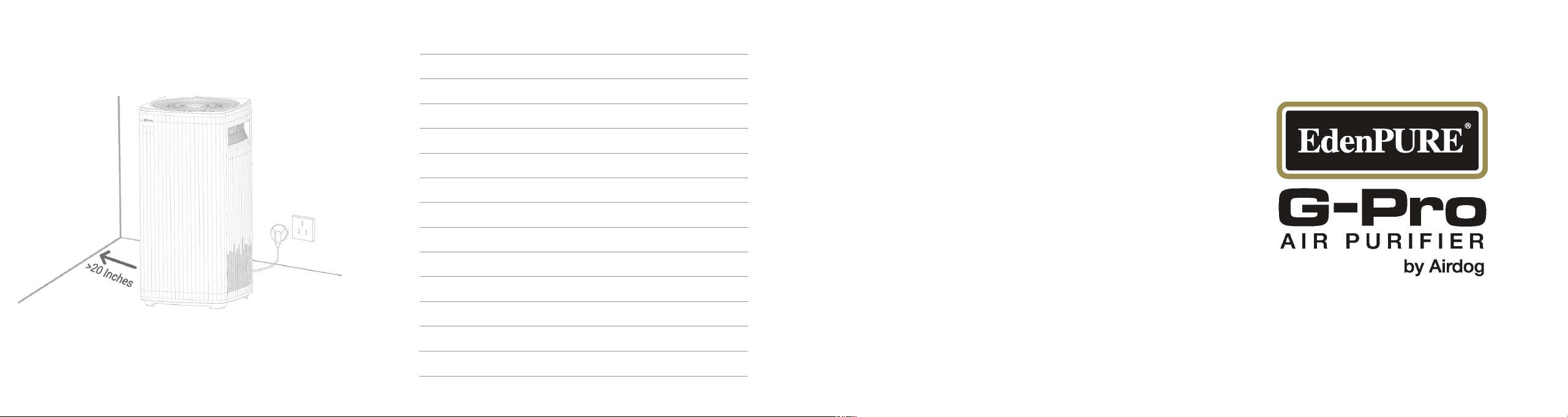
Optimal Location
Always keep at least 20" of clear space around your unit with
no obstructions hindering the air intake flow.
App Setting
Please input "Airdog" in Apple Store or Google Play and get the
FREE APP!
Please keep your Wi-Fi & BT on and make sure it is in 2.4GHz to help
you nish your App seing
Internal Structure
jjJi1
r
L I i
\
_
I
I
I
I
I
I
I
II
1
1
I
:
I
I
ii
i
'
I
I
I
I
I
I
I
I
I
I
I
I
II
,/ f
--
L,�t·.J:1
b
�-----J --
Speci
f
ications
Model
Applicable area (m
2
)
Pull Handle
Ionization Wire Frame
Pre-Filter
KJ500F-PRO
53
CADR
paic
1
e
(m
3
/h)
445
CCM
pa
i
cle
P4
Purication Eciency Level
pa
i
c
1
, High Eciency Level
Ozone (ppb)
slO (Safety Standards50)
Noise (dB(A))
s65.5
Rated Power (
65-60W
Rated Voltage
100-240V~ 50/60Hz
Weight (Lbs)
24.9
Weight (KG)
11.3
Size (Inches)
26(H) * 12.S(L) * 12.S(
Size (CM) 66(H) * 32.5(L) * 32.5(
All gures above are all under the international standards of Air Purier.
-
Designed by Silicon Valley Air Expert
Manufacturer: Suzhou BeiAng Smart Technology Co.,Ltd
175 Songbei Road, Suzhou Industrial Park
Cus
t
ome
r
Se
r
vice
In the event your unit does not appear to be working
properly contact customer service at 1-
8
00-225-6595
or go to [email protected]
EdenPURE
7800 Whipple Avenue NW
N. Canton, OH 44720
To place an order call 1-
8
00-360-1070 or go to edenpure.com
(Airdog Youtube channels)
Scan QR code for more
Video Instructions
Please Recycle
User Manual
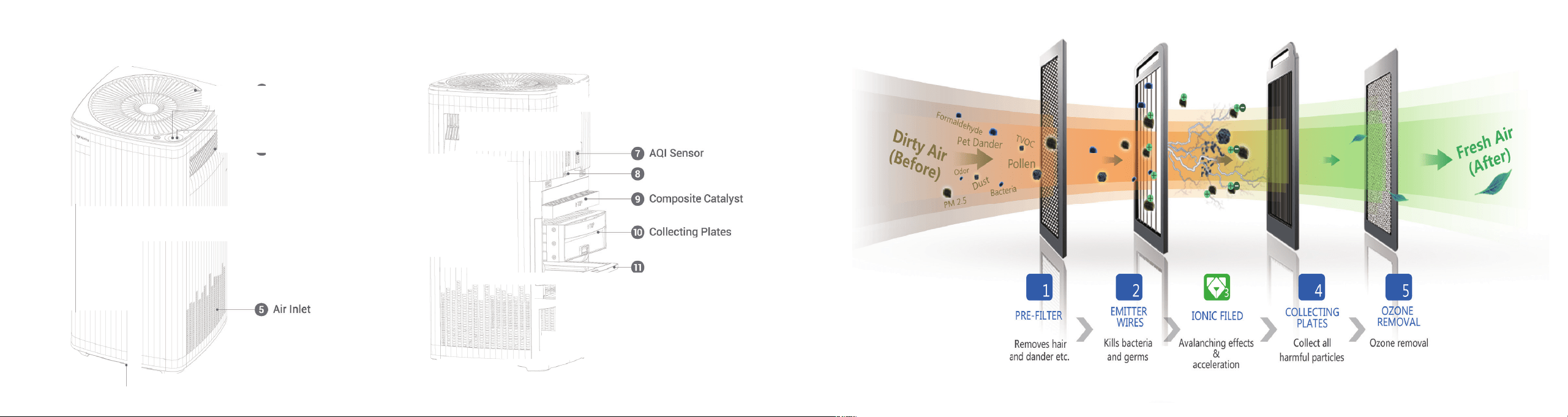
Components
Front/Side
��-■ Air Outlet
- Display
-• Operation Panel
c- Handle
'------1. AQI Indicator
Optimal Location
Always keep at least 20" of clear space around your unit with
no obstructions hindering the air intake flow.
App Setting
Please input "Airdog" in Apple Store or Google Play and get the
FREE APP!
Please keep your Wi-Fi & BT on and make sure it is in 2.4GHz to help
you nish your App seing
Internal Structure
jjJi1
r
L I i
\
_
I
I
I
I
I
I
I
II
1
1
I
:
I
I
ii
i
'
I
I
I
I
I
I
I
I
I
I
I
I
II
,/ f
--
L,�t·.J:1
b
�-----J --
Speci
f
ications
Model
Applicable area (m
2
)
Pull Handle
Ionization Wire Frame
Pre-Filter
KJ500F-PRO
53
CADR
paic
1
e
(m
3
/h)
445
CCM
pa
i
cle
P4
Purication Eciency Level
pa
i
c
1
, High Eciency Level
Ozone (ppb)
slO (Safety Standards50)
Noise (dB(A))
s65.5
Rated Power (
65-60W
Rated Voltage
100-240V~ 50/60Hz
Weight (Lbs)
24.9
Weight (KG)
11.3
Size (Inches)
26(H) * 12.S(L) * 12.S(
Size (CM) 66(H) * 32.5(L) * 32.5(
All gures above are all under the international standards of Air Purier.
-
Designed by Silicon Valley Air Expert
Manufacturer: Suzhou BeiAng Smart Technology Co.,Ltd
175 Songbei Road, Suzhou Industrial Park
Cus
t
ome
r
Se
r
vice
In the event your unit does not appear to be working
properly contact customer service at 1-
8
00-225-6595
or go to [email protected]
EdenPURE
7800 Whipple Avenue NW
N. Canton, OH 44720
To place an order call 1-
8
00-360-1070 or go to edenpure.com
(Airdog Youtube channels)
Scan QR code for more
Video Instructions
Please Recycle
User Manual
How to Use
1. Install the collecting plates that are packed on top of the unit
into the back of the unit.
2. Remove the protective plug cover and plug the unit into
the wall outlet.
3. Then a short press turns the power ON.
4. A long press (over 3 seconds) turns the power OFF.
5. When the power is ON, each short press cycles through
the Auto Mode (default) to Low Speed, Medium Speed, High
Speed, Turbo Speed and Sleep Mode.
6.Press and hold (5-10 seconds) until the air purifier turns
ON, Wi Fi indicator blinks quickly and Wi Fi connection starts.
Cleaning t
h
e Air Quality Sensor
111111111111111111
Clean as needed
1. Unplug the unit from the wall outlet.
2. Remove air quality sensor housing.
3. Use a dry or rubbing alcohol-soaked cotton swab to clean the
sensor.
4. Replace the air quality sensor housing.
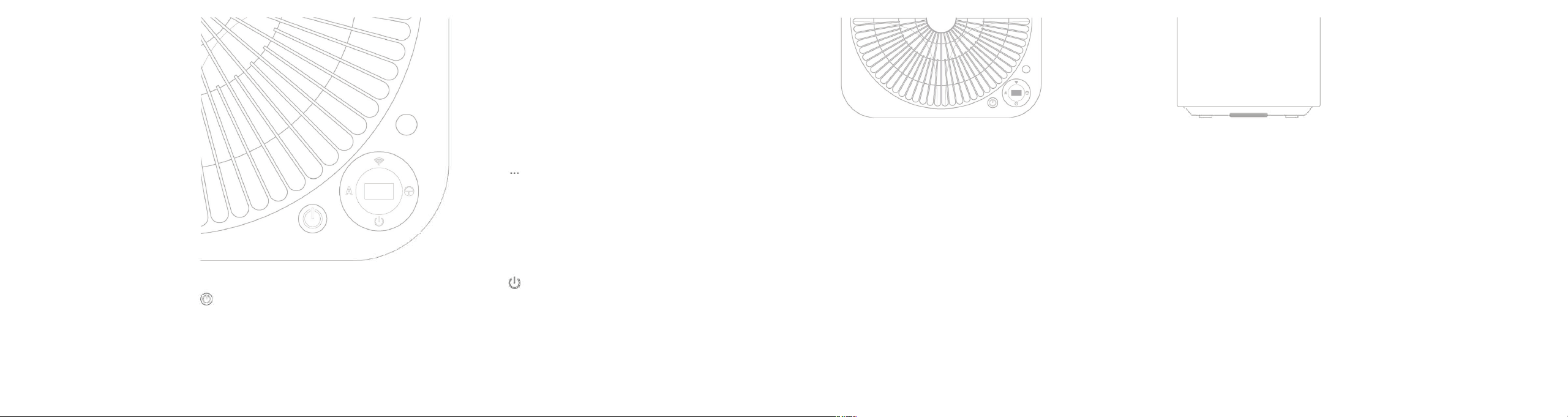
Operation Instruction
� WiFi Indicator
Off: no connection
Quickly Blinking: starting to connect
Slowly Blinking: connecting now On: connected successfully
O Detector
Detects if there are people around. Do not press.
Sleep Mode Indicator
Shows" ... " when the unit is on Sleep Mode. All other
indicators will be off and it will run on low speed.
@
Child Lock
Indicator On: Child Lock function on. Long press operation
button to cancel, or cancel it by APP .
Power Indicator
Indicator lights up when the power is on.
Indicator light is off when the power is off.
Auto Mode Indicator
1. Adjusts wind speed according to the AQI sensor.
2. Runs on Sleep Mode at night automatically. When people
pass by, the AQI indicator will be on as a night light.
(*For some models.)
Cleaning t
h
e Collecting Plates
Clean when AUTO light blinks red
1. Unplug the unit from the wall outlet.
2. Remove the collecting plates.
3. Unlock and separate collecting plates.
4. Wash with water or place in dishwasher (Top rack only).
5. Dry collecting plates.
6. Reassemble and insert.
Display and Air Quality Indicator Instruction
AQI (Air Quality Index)
This is a calculated air quality index based on the
particle numbers that the sensor measures in the air.
Ranges from 0-500.
Wind Speed Indicator/ AQI Value
L l -L4, slow to fast. Wind Speed indication and AQI value
display alternately.
Cleaning Reminder
Displays when collecting plates need to be washed.
Cleaning reminder is only a complimentary reminder, and
cleaning should be performed when needed, even if
before the reminder is showing.
Faulty Reminder
When "9XX" keeps appearing on the display after running
for more than 3 minutes, and power indicator is blinking,
clean the unit and make sure to put every part back
correctly and make solid contact. Please move to the Full
Cleaning Cycle section for more cleaning details.
If "9XX" is still on the display after cleaning, please
contact customer service for further help.
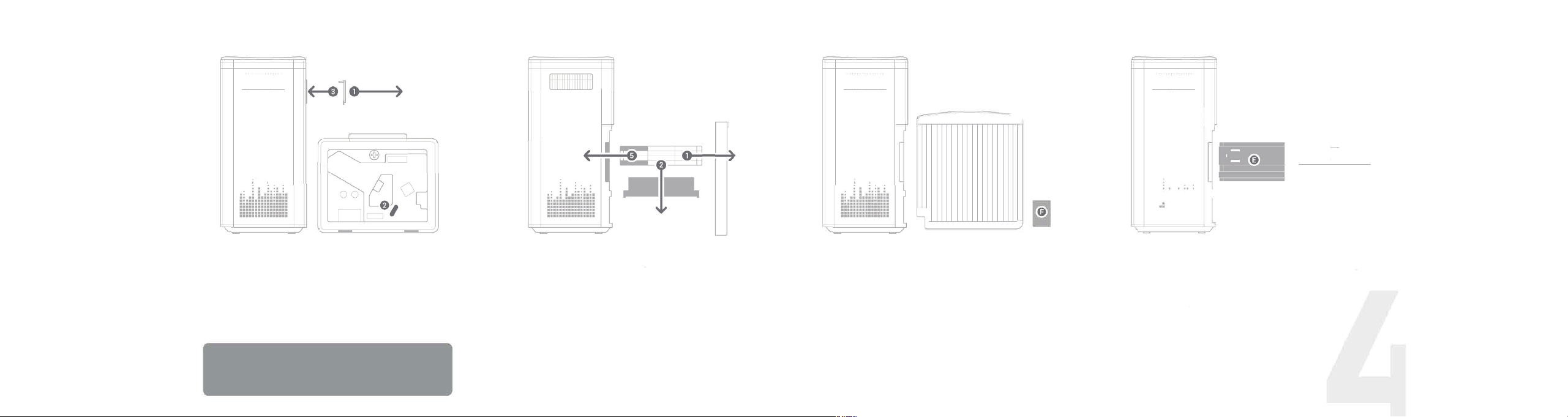
Cleaning t
h
e Wire Frame
111111111111111111
dOl◊
7
1
Clean when you hear a "popping," "crackling" or
"zapping" noise
1. Unplug the unit from the wall outlet.
2. Use a new, clean dry eraser (F) to clean the ionization wire frame
track by sliding back and forth gently. Wires are delicate so handle
very gently.
3. Insert the ionization wire frame in the direction the labeling
indicates.
4. Do a full cleaning cycle.
-
Excellent
AQI 50
-
Good
50 < AQI 100
-
Moderately Polluted
100 < AQI 1 50
-
Hazardous
AQI > 150
AQI numbers are calculated based on the real time particles
numbers
♦in some air volume according to the United States
Envirmental Protection Agency (EPA). The numbers could be
affected by the air flow speed,
♦ air purifier position and ambient
environment. AQI is an indicator of air quality. As the AQI increases,
an increasing-ly large percentage of the population is likely to
experience increasingly severe adverse health effects.
Full Cleaning Cycle
111111111111111111
:
• ■ ■ •••• ■
•• ■ ■ ••••••••
■■ ■■ ■■■■■■■■■■
■■ ■■■■■■■■■■■■■■
■■■■ ■■■■■■■■■■■
■■■ ■■■■■■■■■■■
■■■■■■■■■■■■■■■■
■■■■■■■■■■■■■■■■
■■■■■■■■■■■■■■■■
-
J
�@
I 0W
�
=O=
Recommended cleaning every 3-6 months
1. Unplug the unit from the wall unit.
2. Open back and remove pre-filter
(A), ionization wire frame (B),
collecting plates (C), and composite catalyst (D).
3. Remove protective rubber sleeve
(E).
4. Wash pre-filter, collecting plates, and protective rubber sleeve
with water, allowing to dry completely.
5. Clean with detergent if necessary.
6. Clean with a non-acidic, non-non-abrasive detergent such as
Dawn dish soap if necessary.
7. Replace the composite catalyst regularly (Sold separately) or put
it in the direct sunlight for 1-2 hours.
8.
Reinsert components into unit per user manual's instructions.
How to Use
1. Install the collecting plates that are packed on top of the unit
into the back of the unit.
2. Remove the protective plug cover and plug the unit into
the wall outlet.
3. Then a short press turns the power ON.
4. A long press (over 3 seconds) turns the power OFF.
5. When the power is ON, each short press cycles through
the Auto Mode (default) to Low Speed, Medium Speed, High
Speed, Turbo Speed and Sleep Mode.
6.Press and hold (5-10 seconds) until the air purifier turns
ON, Wi Fi indicator blinks quickly and Wi Fi connection starts.
Cleaning t
h
e Air Quality Sensor
111111111111111111
Clean as needed
1. Unplug the unit from the wall outlet.
2. Remove air quality sensor housing.
3. Use a dry or rubbing alcohol-soaked cotton swab to clean the
sensor.
4. Replace the air quality sensor housing.
Operation Instruction
� WiFi Indicator
Off: no connection
Quickly Blinking: starting to connect
Slowly Blinking: connecting now On: connected successfully
O Detector
Detects if there are people around. Do not press.
Sleep Mode Indicator
Shows" ... " when the unit is on Sleep Mode. All other
indicators will be off and it will run on low speed.
@
Child Lock
Indicator On: Child Lock function on. Long press operation
button to cancel, or cancel it by APP .
Power Indicator
Indicator lights up when the power is on.
Indicator light is off when the power is off.
Auto Mode Indicator
1. Adjusts wind speed according to the AQI sensor.
2. Runs on Sleep Mode at night automatically. When people
pass by, the AQI indicator will be on as a night light.
(*For some models.)
Cleaning t
h
e Collecting Plates
Clean when AUTO light blinks red
1. Unplug the unit from the wall outlet.
2. Remove the collecting plates.
3. Unlock and separate collecting plates.
4. Wash with water or place in dishwasher (Top rack only).
5. Dry collecting plates.
6. Reassemble and insert.
Display and Air Quality Indicator Instruction
AQI (Air Quality Index)
This is a calculated air quality index based on the
particle numbers that the sensor measures in the air.
Ranges from 0-500.
Wind Speed Indicator/ AQI Value
L l -L4, slow to fast. Wind Speed indication and AQI value
display alternately.
Cleaning Reminder
Displays when collecting plates need to be washed.
Cleaning reminder is only a complimentary reminder, and
cleaning should be performed when needed, even if
before the reminder is showing.
Faulty Reminder
When "9XX" keeps appearing on the display after running
for more than 3 minutes, and power indicator is blinking,
clean the unit and make sure to put every part back
correctly and make solid contact. Please move to the Full
Cleaning Cycle section for more cleaning details.
If "9XX" is still on the display after cleaning, please
contact customer service for further help.
Cleaning t
h
e Wire Frame
111111111111111111
dOl◊
7
1
Clean when you hear a "popping," "crackling" or
"zapping" noise
1. Unplug the unit from the wall outlet.
2. Use a new, clean dry eraser (F) to clean the ionization wire frame
track by sliding back and forth gently. Wires are delicate so handle
very gently.
3. Insert the ionization wire frame in the direction the labeling
indicates.
4. Do a full cleaning cycle.
-
Excellent
AQI 50
-
Good
50 < AQI 100
-
Moderately Polluted
100 < AQI 1 50
-
Hazardous
AQI > 150
AQI numbers are calculated based on the real time particles
numbers
♦in some air volume according to the United States
Envirmental Protection Agency (EPA). The numbers could be
affected by the air flow speed,
♦ air purifier position and ambient
environment. AQI is an indicator of air quality. As the AQI increases,
an increasing-ly large percentage of the population is likely to
experience increasingly severe adverse health effects.
Full Cleaning Cycle
111111111111111111
:
• ■ ■ •••• ■
•• ■ ■ ••••••••
■■ ■■ ■■■■■■■■■■
■■ ■■■■■■■■■■■■■■
■■■■ ■■■■■■■■■■■
■■■ ■■■■■■■■■■■
■■■■■■■■■■■■■■■■
■■■■■■■■■■■■■■■■
■■■■■■■■■■■■■■■■
-
J
�@
I 0W
�
=O=
Recommended cleaning every 3-6 months
1. Unplug the unit from the wall unit.
2. Open back and remove pre-filter
(A), ionization wire frame (B),
collecting plates (C), and composite catalyst (D).
3. Remove protective rubber sleeve
(E).
4. Wash pre-filter, collecting plates, and protective rubber sleeve
with water, allowing to dry completely.
5. Clean with detergent if necessary.
6. Clean with a non-acidic, non-non-abrasive detergent such as
Dawn dish soap if necessary.
7. Replace the composite catalyst regularly (Sold separately) or put
it in the direct sunlight for 1-2 hours.
8.
Reinsert components into unit per user manual's instructions.