IMPORTANT SAVE
THESE INSTRUCTIONS
To ensure you get the best results
from your Thunderstorm
®
OxiLeaf
®
,
please read this manual rst and keep
it for future reference. For additional
information, please contact your place
of purchase or call
1-800-225-6595
Thank you for choosing EdenPURE
®
USER’S MANUAL
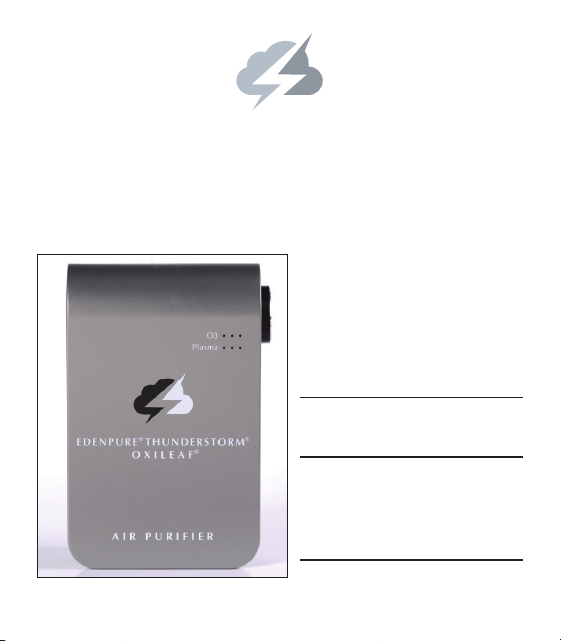
AIR PURIFIER
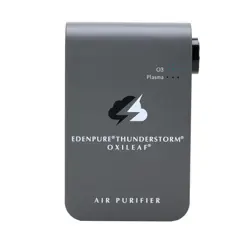
EDENPURE THUNDERSTORM
O XILEAF
®®
®
H
Eliminates 99.9%
of Air Pollution
H
Eliminates Viruses
H
Eliminates Odors!
AIR PURIFIER
EDENPURE THUNDERSTORM
O XILEAF
®®
®
AIR PURIFIER
EDENPURE THUNDERSTORM
O XILEAF
®®
®

1
WHEN TO UNPLUG THE EDENPURE
®
THUNDERSTORM
®
OXILEAF
®
Unplug Thunderstorm OxiLeaf when cleaning it, or if you
will be away from it for an extended period of time.
SAFE STORAGE AND USAGE
Do not use Thunderstorm OxiLeaf in areas
where flammable materials are stored.
YOUR HEALTH
Always seek the advice of a physician or other qualified healthcare provider
with any questions regarding the use of new products in your environment.
DO NOT TAMPER WITH OR OPEN THE UNIT
Do not allow small children to tamper with Thunderstorm OxiLeaf. Opening
or altering the unit in any way will void the warranty.
KEEP AWAY FROM WATER
Do NOT plug unit in or near shower, bathtub or other places where
humidity/moisture could seep into and damage Thunderstorm OxiLeaf.
TO REDUCE THE RISK OF ELECTRIC SHOCK
To reduce the risk of electric shock, this unit has a polarized plug (one blade is
wider than the other). This plug will fit in a polarized outlet only one way. If the
plug does not fit into the outlet, reverse the plug. If it still does not fit, contact
qualified personnel to install the proper outlet. Do not alter the plug in any
way. This product is not to be operated by any power sources other than those
specified and is only to be used with the following products: 1) Information
and Communication Technology Equipment or, 2) A Class 2 Power Unit.
2
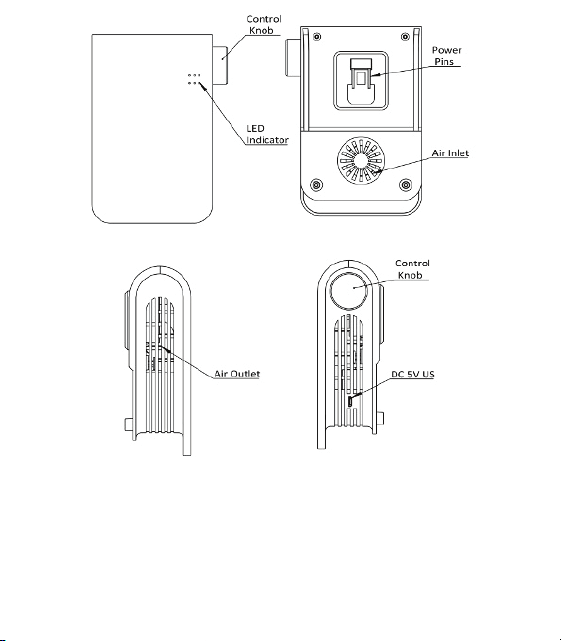
Air Inlet - Where air is pulled in.
Air Outlet - Port where fresh air is expelled.
Control Knob - Adjusts the amount of O
3
or Plasma produced.
LED Indicator - Light indicates when power is on and shows if plasma or O
3
is
turned on.
Power Pins - Used to connect Thunderstorm OxiLeaf into any standard
electrical wall sockets.
DC:5V US - Used to connect Thunderstorm OxiLeaf to USB port.

3
INSTALLATION INSTRUCTIONS
1. Remove the unit from its box and protective material from around the unit.
Inspect the unit for any visible signs of physical damage. If damage is
evident, repack and contact customer service.
2. The unit should be placed in an area free from obstructions. Unlike other
air purifiers, this unit does not draw air in to clean the air in the room. O
3
or
Plasma is produced and emitted from the unit to be dispersed into the air. If
the airflow around the unit is blocked, it will not be able to disperse the O
3
or
Plasma freely throughout the room and may damage the unit. Do not use in
rooms that are unventilated.
WARNING: Keep the unit away from wet surfaces or any areas with high
moisture. Do not use near a bathtub, shower, sink, garages etc. High
humidity and/or moisture could seep into and damage the unit. After
prolonged exposure, oxidation/corrosion of the plug and internal components
can occur and will result in the unit failing to operate properly.
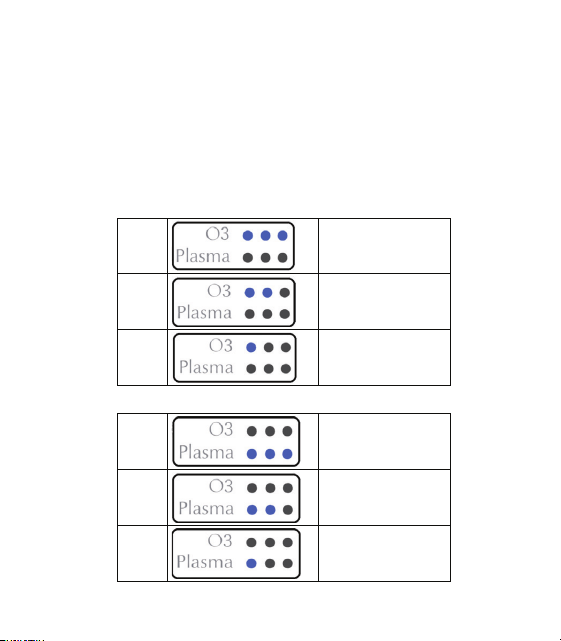
3. Plug the unit into a power outlet or USB port. Push the control knob in and
you will hear a click. The unit will turn on and a blue light will appear in O
3
mode in low mode. You can adjust the O
3
level into medium mode by turning
the knob clockwise until there are two blue lights by the O
3
indicator. Turn the
knob further clockwise and the unit will go into high mode and there will be
three blue lights by the O
3
indicator. The purification strength increases the
further you turn the dial. The optimal setting is when the room is free from
unwanted odor and the air smells fresh without an overly strong purification
smell.
Push the knob again and the unit will go into Plasma mode. There will be one
blue light beside the Plasma indicator indicating the unit is in low mode. You
can adjust the Plasma level into medium mode by turning the knob clockwise
until there are two blue lights by the Plasma indicator. Turn the knob further
clockwise and the unit will go into high mode and there will be three blue
lights by the Plasma indicator. The purification strength increases the further

4
you turn the dial. The optimal setting is when the room is free from unwanted
odor and the air smells fresh without an overly strong purification smell.
Push the knob in again and the unit will shut off.
When the unit is initially plugged in, let it run for approximately 2-3 hours and
the O
3
or Plasma will gradually circulate throughout the room. The unit should
initially be set on the lowest setting and slowly increased until the desired
level of air purification is reached. Each unit will cover up to 250 sq. ft.
ABOUT THE 2 TECHNOLOGIES
The EdenPURE
®
Thunderstorm
®
OxiLeaf
®
works by using O
3
molecules AND
plasma technology to kill bacteria and viruses while getting rid of ANY odor.
After a thunderstorm, natural O
3
molecules – also known as activated
oxygen – are released into the atmosphere, creating that clean, fresh smell
we all associate with storms. The Thunderstorm
®
OxiLeaf
®
harnesses this
natural process, generating O
3
molecules that spread throughout your home.
These molecules actively seek out and attach to viruses, bacteria, and odors,
breaking down their molecular structure and completely neutralizing them to
ensure a safe environment for you and your family.
Some people experience slight discomfort from the smell of O
3
molecules so
we have added a second technology to improve air quality, plasma.
The plasma technology operates by emitting charged ions into the air. These
ions attach to particles in the air such as dust, pet dander, pollen and smoke,
making them charged. Once charged, these pollutants can’t stay airborne
and drop out of the air so you can’t breathe them in anymore.
WHEN AND HOW TO USE EACH TECHNOLOGY
• Use O
3
molecules for strong odor and microbial issues in unoccupied
areas. Since some people may be bothered by the clean smell of O
3
it’s
recommenced to use this setting while the area is unoccupied.

5
• Use plasma for everyday air purification in occupied spaces to enhance air
quality and comfort.
4. Sleep Mode: When the unit is in Sleep Mode, fresh plasma ions come out of
the unit, producing fresh air while you are sleeping. To put the unit in sleep
mode, double click the control knob. All of the lights will come on and be
dimmed. Press the control knob again to exit sleep mode.
APPLICATION: kitchen, dining room, home with pets, smoke, and more.
Use 8' USB cord to plug into car or computer.
PURPOSE: removes unwanted odors, kills bacteria, mold and mildew
Model ...................................................... A6030/B
Voltage Rating .................AC 110V to 240V, DC 5V
8' USB Cord
Energy Consumption .................................. 4 watts
Size ....................................... 6" x 4" x 2" (L*W*H)
Weight ...................................................... 10.6 oz.
Ozone Generator Output .......................... 50mg/hr
Plasma Output ..................................5*10
6
pcs/cm
3
Ambient Noise ..................26 dB SPL to 34 dB SPL
Recommended Room Size ........................ Medium
SPECIFICATIONS
6
If the blue light on the unit is flashing:
1) During intermittent shutdown of the product: Ozone or plasma blue light
flashing indicates intermittent shutdown of the product.
2) Sleep mode: Press the knob twice, and all six lights will flash
simultaneously to enter sleep mode
The intermittent shutdown varies depending on the mode selected. See
below.
Indicator & Status:
High
30 min. on & 5 min. off
Middle
30 min. on & 30 min. off
Low
30 min. on & 60 min. off
Plasma
High 30 min. on & 5 min. off
Middle
30 min. on & 30 min. off
Low
30 min. on & 60 min. off
O
O
z
z
o
o
n
n
e
e

EdenPURE
®
7800 WHIPPLE AVE NW • CANTON, OH 44767
WWW.EDENPURE.COM
800-225-6595
©2024 EdenPURE® I-5900 BR12357R-1
MAINTENANCE
EdenPURE
®
Thunderstorm OxiLeaf Air Purifier is almost maintenance free;
once every month the air inlet and outlet should be vacuumed. Disconnect
the unit and vacuum using a brush attachment running on its lowest power
setting. Gently brush back and forth over the openings to help remove internal
and external contamination. Do not apply the vacuum cleaner for more than 10
seconds at a time or blow air into the unit.
Periodically wipe over the unit with a damp cloth. Do not spray with cleaning
products or allow moisture to enter. It will damage the unit and this is not
covered by the product warranty.
To place an order call 1-800-360-1070 or go to www.edenpure.com
DISPOSAL
This product must not be thrown into the normal household
trash. Please dispose of it separately at a location designated
for this purpose. In the unlikely event your unit does not
appear to be working properly or the lights on the unit start
blinking, contact customer service at 800-225-6595 or