07
Clock setting
09:25
09:25
09:25
01 02 03 04 05 06
CA
B
AYL ashing
AYL
Siri voice
assistant
Answer
incoming
call
Ending
call
2
09:25
1
4
3
5
Clock is
displayed
after pairing
succeeds
My Device
SoundFit Mini
09:25
09:25
09:25
09:25
D E
1
Volume - / Previous track
3
Power on / Power o / Play / Pause / Siri voice assistant
/ Call / Time setting / Pairing disconnected
1 2
Alarm setting / Factory reset
5
Microphone
*Wireless connection enabled devices such as mobile phones, tablets, etc.,
can all be used, while this "User Manual" uses "mobile phones" for illustration.
SoundFit Mini
5.3
3.7V/600mAh
8-10 hours (50% volume)
Approximately 2.5 hours
5V 0.3A
2W
2.78" x 1.72" x 1.30"
2.01oz±0.18oz
Blinking
<
15%
<
8%
2x 2x
Automatic
shut-down
09:25
Volume + / Next track
2
08
09 10 1211 13 14 15 16 17
Alarm 01/02
setting
AL01
on
09:25
Important Tips
Do not use power adapters without safety certication.
For charging, it is recommended to use a 5V/1A certied power adapter.
When you hear the low-battery alert, charge the speaker as soon as
possible.
During charging, the display will blink “----”. When fully charged, the
display will remain solid “----”.
4
Display
Time setting
O/on setting
Time setting
Conrm
USER MANUAL
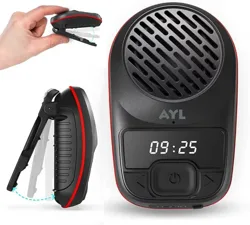
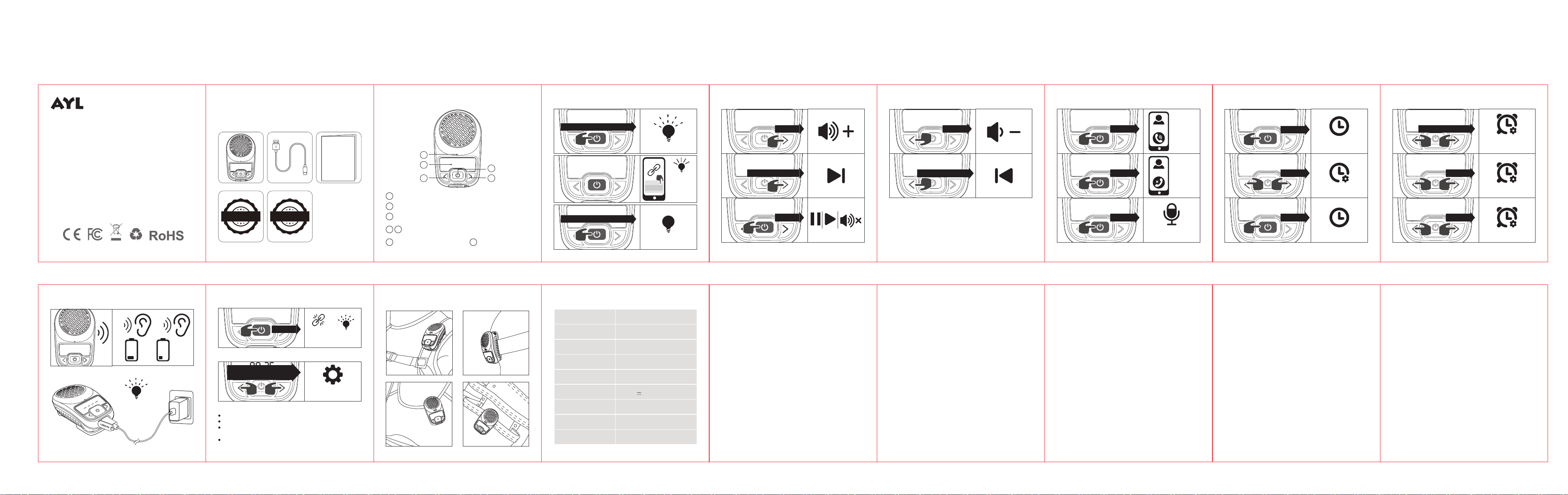
A: SoundFit Mini Speaker B: USB-C Charging Cable
C: User Manual D: Lifetime warranty
E: 100% Customer Satisfaction Guarantee
Package Includes
USER MANUAL
Function Keys
Wireless Pairing
AYL
AYL ashing
Disconnected
Tapx4 again
to reconnect
Tap x4
Disconnect/Reconnect Wireless Paring
Track & Volume ControlTrack & Volume Control Hands-Free Calling Alarm Setting & Cancel
Auto Power off & Charging Wear with Clip SPECIFICATIONS
Time Setting
Power on: press and hold for 2s
OFF
Display o
Power o: press and hold for 2s
Restore factory
settings
09:25
Factory Reset
Press and hold both left and
right buttons for 5s
09:25
09:25
Tap x1
Press and hold for 2s
Press and hold for 3s
09:25
09:25
Press and hold for 2s
Tap x1
09:25
Tap x1
Tap x1
Tap x1
Tap x3
Tap x1
Tap x2
Tap x2
Tap x1
Tap x1
Product Model
Wireless Version
Battery Capacity:
Playback Time
Charging Time
Charging Input
Speaker Unit
Product Size
Product Weight
FREQUENTLY ASKED QUESTIONS FREQUENTLY ASKED QUESTIONS FREQUENTLY ASKED QUESTIONS
Q1: What kind of charger should I use for the speaker?
A:You can use any standard USB-C 5V charger. For best performance, a 5V/1A
chargeris recommended.
Q2: What if there is noise or interruptions during playback?
A:The speaker works normally within 10 metersof the phone in an
unobstructed environment. Beyond 10 meters, or if there are obstacles,
noise or interruptions may occur.
Q3: Why does the speaker automatically shut down when powered on
but not in use?
A:To reduce power consumption, the speaker will automatically shut down
if there is no operation within 10 minutes.
Q4: Why can’t the speaker connect to a previously paired phone?
A:If connection fails, delete the speaker from your phone’s Bluetooth device
list. Then turn Bluetooth on again, search for the speaker’s name (SoundFit
Mini), and manually re-pair.
Q5: Why won’t the speaker power on, or why is it frozen?
A:If the speaker does not turn on by pressing the power button for 2 seconds,
plug in the charger and try again after 30 minutes. Alternatively, press and
hold the power button for 8–20 secondsafter charging to reset the speaker.
Q6: Why can’t the speaker synchronize and calibrate the time when
connected to a mobile phone?
A:When connecting an Android device, please allow the speaker to “access,
retrieve, insert, send, and delete SMS messages.”Note: Some Android devices
may not support time synchronization. If this happens, try connecting with
an iOS device instead.
Important Safety Instructions:
1. Do not disassemble or attempt to repair this speaker yourself, as
it may cause product damage or personal injury.
2. Do not use the speaker in dusty, humid, excessively dry, or
high-temperature environments.
3. Keep the product away from heat sources, direct sunlight, excessive
dust, and strong mechanical vibrations.
4. To reduce the risk of re, do not cover the product with newspapers,
tablecloths, curtains, or similar materials while charging.
5. This speaker is rated IPX6 waterproof, meaning it can withstand
heavy splashes and rain. However, do not submerge the speaker in
water or use it while swimming or diving.
6. If the product is damaged (e.g., power cord or plug damage, liquid
ingress, foreign objects inside the device, or malfunction), please
contact us at [email protected]for assistance or replacement.
7. The speaker includes overcharge protection; however, it is
recommended to unplug the charging cable once the speaker is
fully charged.
8. The maximum ambient operating temperature should not
exceed 104°F.
Precautions for Use:
1. Please read this instruction manual carefully before use and
keep it for future reference.
2. It is recommended to use the included charging cable to
charge the speaker.
3. Fully charge the product before rst use.
4. Use only certied adapters that have passed national safety
certication.
5. If the product will not be used for a long time, charge it at least
once a month to maintain performance.
6. Do not use this product in extremely cold or hot environments
(outside the range of 41°F~95°F). If used beyond this range, the
product may automatically shut down to protect the internal
circuit.
7. When charging in a high-temperature environment, the product
may automatically stop charging to protect the battery.
8. Storage temperature: 23°F~95°F, RH<70% (recommended
77°F±41°F).
Federal Communications Commission (FCC) Statement.
This device complies with part 15 of the FCC Rules. Operation is
subject to the following two conditions:
(1) This device may not cause harmful interference, and
(2) This device must accept any interference received, including
interference that may cause undesired operation.
Note: This equipment has been tested and found to comply with
the limits for a Class B digital device, pursuant to part 15 of the FCC
Rules. These limits are designed to provide Reasonable protection
against harmful interference in a residential installation.
This equipment generates, uses and can radiate radio frequency
energy and, if not installed and used in accordance with the
instructions, may cause harmful interference to radio
communications. However, there is no guarantee that
interference will not occur in a particular installation. If this
equipment does cause harmful interference to radio or television
reception, which can be determined by turning the equipment
o and on, the user is encouraged to try to correct the
interference by one or more of the following measures:
• Reorient or relocate the receiving antenna.
• Increase the separation between the equipment and receiver.
• Connect the equipment into an outlet on a circuit dierent from
that to which the receiver is connected.
• Consult the dealer or an experienced radio/TV technician for help.
Warning: Changes or modications made to this device not
expressly approved by Accessorise Corp. may void the FCC
authorization to operate this device.
Note: The manufacturer is not responsible for any radio or TV
interference caused by unauthorized modications to this
equipment. Such modications could void the user’s authority to
operate the equipment.
RF exposure statement:
This device complies with FCC RF radiation exposure limits set forth
for an uncontrolled environment. The device is installed and
operated without restriction.
MADE IN CHINA
FCC ID: 2BRWN-SFX80
成品尺寸:68x72mm
材质:128G双铜,正反面单色印刷 ,折页
正面反面
SATISFACTION
G
U
A
R
A
N
T
E
E
G
U
A
R
A
N
T
E
E
LIFETIME
W
A
R
R
A
N
T
Y
W
A
R
R
A
N
T
Y
Thank you for your purchase!!
We love our customer and appreciate your feedback.
If there are any questions or concerns,
please contact us at [email protected]

