Model: SLR1000 | Power Source: USB Rechargeable (4400mAh) | Light Output: 1800 Lumens
1. Overview
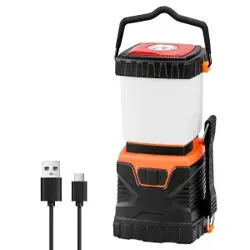
The AYL LED Camping Lantern is a portable, rechargeable lighting device designed for camping, emergency preparedness, and general indoor/outdoor use. It features 46 LED bulbs, four light modes, a built-in power bank, and an IP44 water-resistant construction.

1.1 Package Contents
- 1 x LED Camping Lantern
- 1 x USB Charging Cable
1.2 Product Specifications
| Specification | Details |
|---|---|
| Light Source | 46 LED Bulbs (4 soft white + 42 daylight) |
| Maximum Brightness | 1800 Lumens |
| Battery Capacity | 4400mAh (Lithium-Ion Polymer) |
| Battery Life (Full Charge) | Up to 12 hours |
| Charging Time | 7–8 hours |
| Water Resistance | IP44 (splash-proof) |
| Material | ABS, Plastic, Rubber |
| Dimensions (L x W x H) | 3.75 x 3.75 x 10.25 inches |
| Weight | 1.13 lb (approx.) |
| Input Voltage | 5V DC |
| Wattage | 12W |
2. Features
2.1 Bright LED Bulbs
The lantern is equipped with 46 energy-efficient LED bulbs (4 soft white, 42 daylight) that deliver up to 1800 lumens of bright, even light.

2.2 Four Light Modes & Dimmable
Select from four lighting modes by pressing the power button:
- Daylight – bright white light
- Warm Light – soft, warm glow
- Both – daylight and warm light combined
- Flash Mode – strobe/flashing for emergencies
All modes are dimmable. Press and hold the ON/OFF switch to adjust brightness.
2.3 Rechargeable Battery & Power Bank
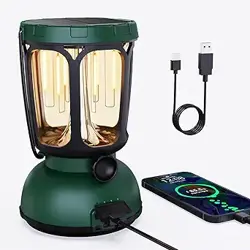
The built-in 4400mAh rechargeable battery provides up to 12 hours of light on a full charge. The lantern can also be used as a power bank to charge smartphones, tablets, or other USB devices during emergencies.
2.4 Water-Resistant (IP44)
With an IP44 rating, the lantern is protected against splashing water from all directions, making it suitable for outdoor use in rain or damp conditions.
2.5 Removable Glare-Reducing Cover
The milky-white bulb cover diffuses light to reduce glare in close quarters. The cover is removable for more focused, directional lighting when needed.
2.6 Slip-Proof Handle
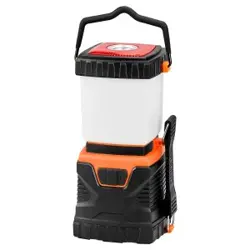
The top handle is designed with a slip-proof rubber grip for easy carrying, hanging, or hands-free use. It can be used to hang the lantern from a tent pole, tree branch, or hook.
3. Use Guide
3.1 Charging the Lantern
- Connect the included USB cable to the charging port on the lantern (located under the protective cover).
- Plug the other end into a USB power source (e.g., wall adapter, computer, car charger).
- The green LED indicator will blink slowly while charging. When fully charged, the indicator will stop blinking or turn solid.
- Full charging takes approximately 7–8 hours.
Maintenance Tip: If the lantern is not used regularly, charge it every 3–6 months to maintain battery health. The built-in battery cannot be removed or replaced.
3.2 Turning On & Selecting Modes
- Press the ON/OFF switch once to turn on the lantern in the last used mode.
- Press the switch repeatedly to cycle through the four modes: Daylight → Warm Light → Both → Flash.
- To adjust brightness, press and hold the switch. The light will dim or brighten gradually. Release when the desired level is reached.
- Press and hold again to continue adjusting.
3.3 Using the Power Bank Function
- Ensure the lantern has sufficient battery charge.
- Connect your smartphone, tablet, or other USB device to the lantern’s USB output port using a compatible cable.
- Charging will begin automatically. The lantern can charge devices even when the light is off.
3.4 Removing the Cover for Focused Light
- Gently twist and pull the milky-white bulb cover upward to detach it.
- With the cover removed, the lantern provides a more concentrated, directional beam.
- To reattach, align the cover and press it back into place until it clicks.
3.5 Hanging the Lantern
- Use the slip-proof handle to hang the lantern from a tent ridge, tree branch, hook, or any suitable anchor point.
- Ensure the hanging point is secure and can support the weight of the lantern (approx. 1.13 lb).
3.6 Battery Status Indicator
The switch has a soft green blinking light that indicates battery power level:
- Blinking green: Battery is charging or has low power (depending on context).
- Solid green (or off when fully charged): Battery is fully charged.
This indicator also helps you locate the lantern in the dark during a power outage.
4. Video Demonstration
Product in Use: The video below demonstrates the lantern’s setup, modes, and features.
Video: The video showcases the product in use and guides you through product setup.
5. Safety & Maintenance
- Do not look directly at the LED bulbs when the lantern is on, especially at maximum brightness. Avoid shining the light into anyone’s eyes.
- The lantern is water-resistant (IP44) but not submersible. Do not immerse it in water.
- Do not disassemble or attempt to replace the built-in battery.
- Store the lantern in a cool, dry place when not in use.
- Test the lantern regularly (every 3–6 months) to ensure reliable performance during emergencies.
- Clean the exterior with a soft, dry cloth. Do not use abrasive cleaners or solvents.
6. Troubleshooting
| Issue | Possible Cause | Solution |
|---|---|---|
| Lantern does not turn on | Battery is depleted | Charge the lantern for 7–8 hours. |
| Light is dim or flickers | Low battery | Recharge the lantern fully. |
| Cannot cycle through modes | Switch may be stuck | Press the switch firmly. If issue persists, contact support. |
| USB device not charging | Lantern battery low or cable not connected properly | Ensure lantern is charged. Check cable connection. |
| Green indicator not blinking | Battery fully charged or indicator malfunction | If lantern works normally, this is not a fault. |
7. Warranty & Support
For warranty service or assistance, please contact the seller (AYL) through the Amazon store or the contact information provided at the time of purchase. The built-in battery is not user-serviceable.
Note: Specific warranty terms and contact details are not provided in this manual. Refer to the packaging or your Amazon order history for seller contact information.