Important statement :
First of all, thanks for the use of our products.
We strongly recommend that you read this handbook
carefully before using this product, which will facilitate your
use. In order to improve the performance of the equipment,
we will make corresponding performance adjustment in the
actual production process, which may lead to inconsistency
between the instructions and the physical operation. We
apologize for this. Please contact the after-sales service
immediately.
Instructions :
● Do not put any object on the product or block the heat
dissipation hole of the product.
● Place the power line in a place that will not be stepped
on, and do not place anything on the power line.
● Please do not force the power plug into the slot. If the
resistance is large, please confirm whether the plug is
inserted in the slot.
● Make sure that the AC power supply is within its safety
range of 100~240V to connect the product to the power
outlet.
● Do not pour any liquid into the interior of the product so
as not to damage the equipment or cause the electric shock.
● Please note that the power supply is not interrupted
when the product is updated.
● Please turn off the machine before cleaning the product
and pull out the power adapter to ensure that the product is
in the state of full power off.
● Avoid the use of dust flying or messy environment in
order to avoid failure.
● Accidental power failure may damage the product, please
avoid connecting the product to a power outlet that may
accidentally cut off the power supply.
● The occurrence of any of the following circumstances,
please check the product by the maintenance department:
power line or plug is damaged; the liquid penetration to the
equipment exposed to moisture; products; product is not
working properly, or you can't get the products in
accordance with the manual operation of products; products
have fallen and damage; products have obvious signs of
damage.
●Please avoid some small pieces of paper, small screws, such
as contact with the product connector, vacancy position, so
as to avoid short circuit situation.
● This product does not connect with the input power
supply to achieve zero energy consumption.
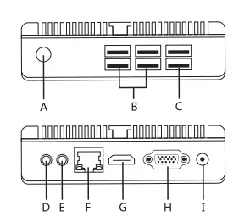
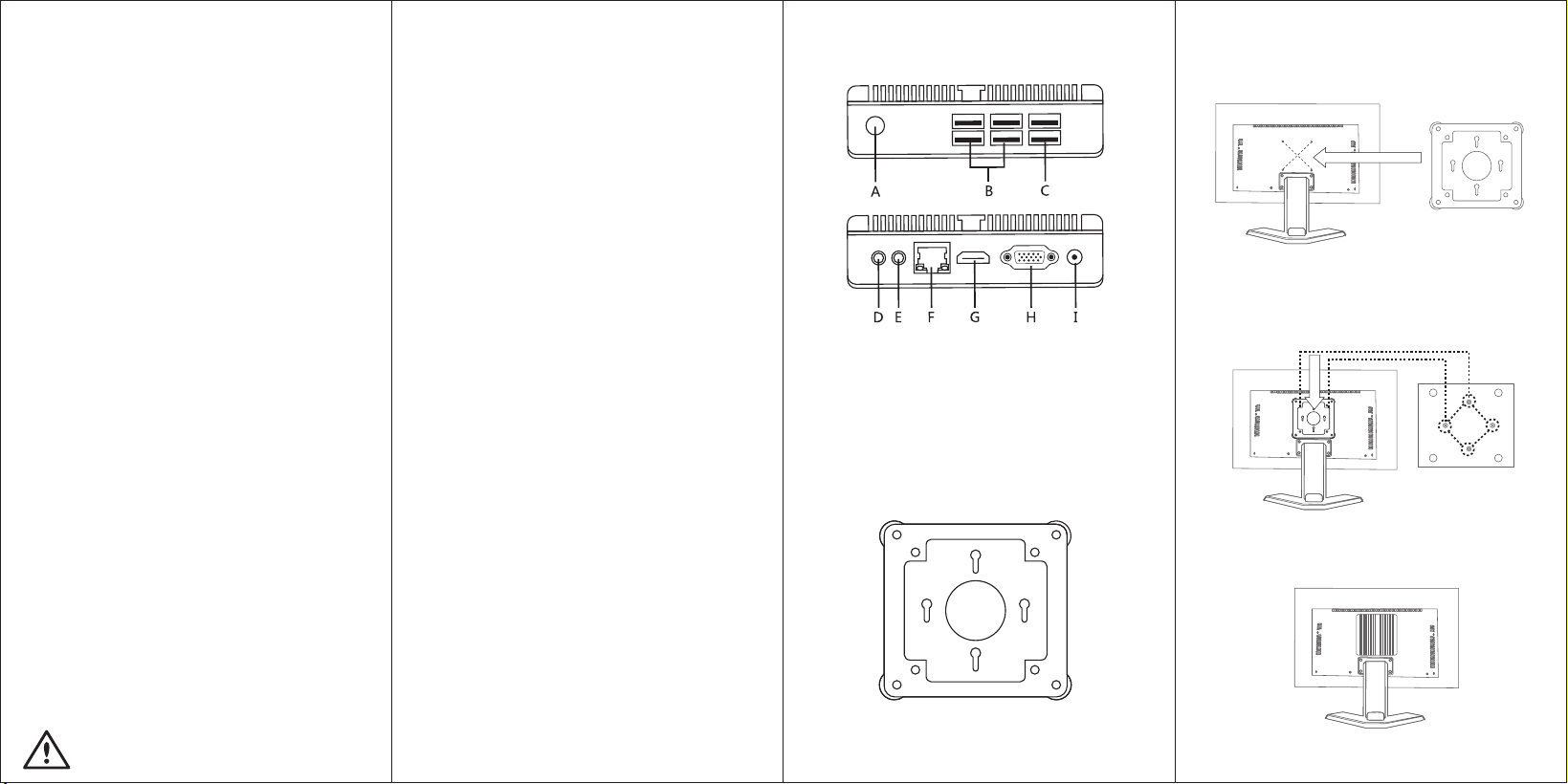
Product interface diagram: Display Back suspension diagram:
First step: fasten the bracket to the monitor with a screw.
Second step:Turn the reverse screw of the product to the
bracket and fasten the screw.
Attention:Switch upwards during installation.
Third step: Finished.
User manual
A : POWER B : USB 3.0 C : USB 2.0
D : Output(SPK) E : Output(MIC) F : LAN
G : HDMI H : VGA I : DC IN
FL-L1
Back hanging bracket
Only suitable for areas 2000 meters above sea level and below use;
Only suitable for the non tropical climate conditions use
E2
Warranty card
Product model:
Date of purchase:
Customer Name:
Service hotline:
Test the qualified date:
Inspector:
Product failure description (customer fill out):
Maintenance results (completed by maintenance personnel):
Maintenance number:
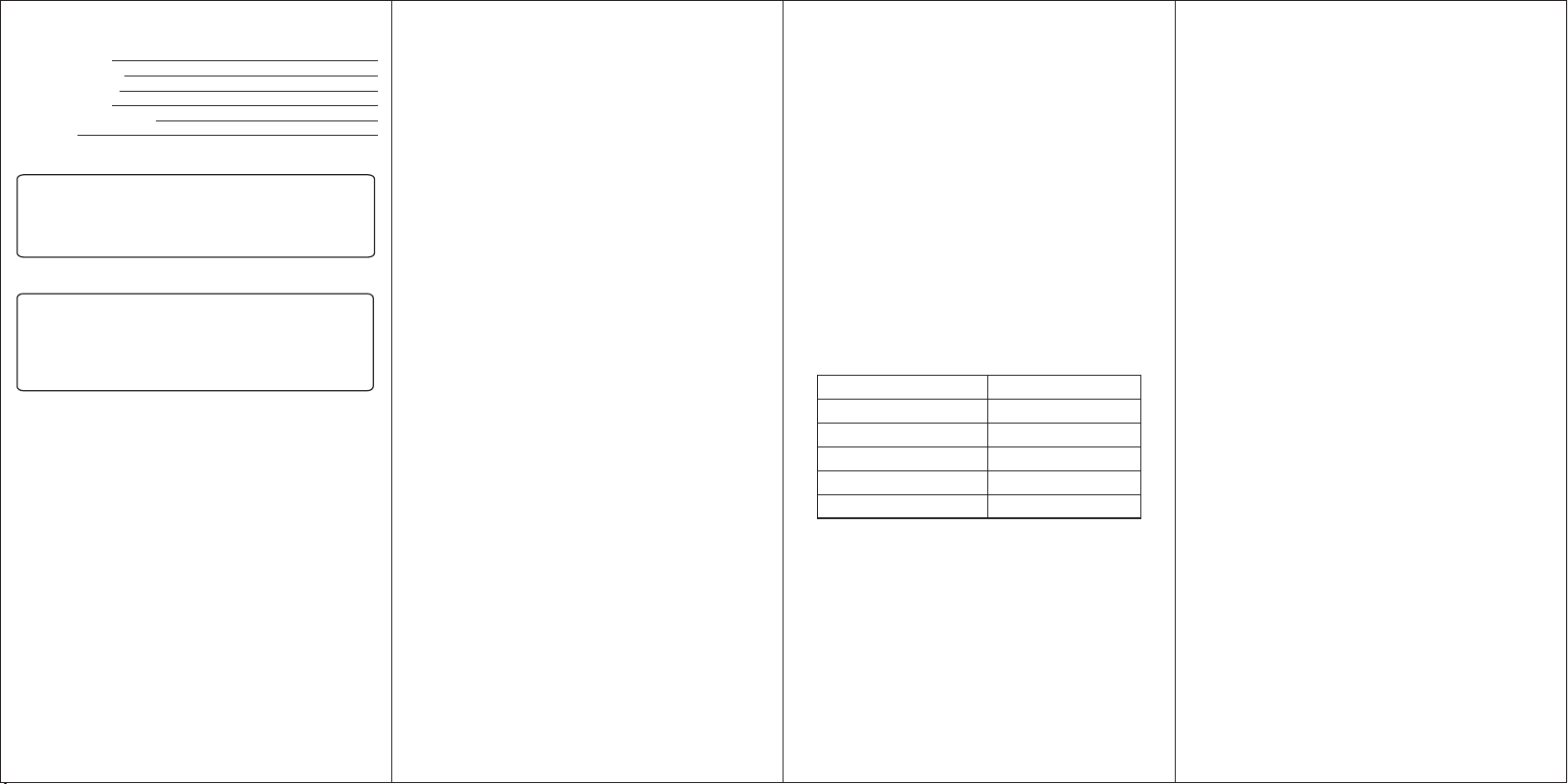
Packing list
Names
hosts
power adapters
Back hanging bracket
User manual
Qualified certificates
Number
1
1
1
1
1
(1) the beginning of the warranty period:
At the time of purchase, the date is included on the valid
warranty card.
Verifiable date of purchase invoice
The warranty period is 36 months after the date of
production.
(2) the quality of the product after maintenance or
replacement is guaranteed for three months. If the
remaining period of the warranty period is more than
three months, the original warranty period shall prevail.
(3) in addition to the product bar code calculated
warranty period, when multiple warranty certificate valid
at the same time, in accordance with the most conducive
to the interests of customers for warranty.
(4) the warranty period indicated by a legal purchase and
sale contract
Effective warranty documents include:
(1) product warranty card
(2) effective purchase invoice
(3) product bar code
(4) the contract / package containing legal
purchase and sale
(5) the product warranty card must include: the
name of the dealer, the model of the product,
Product number, date of purchase.
(6) effective purchase invoice
(7) the legal purchase and sale contract and the
warranty clause separately stipulated in the
product package.
The following cost product failure is not within
the scope of warranty:
(1) beyond the warranty period of the product
(2) no valid warranty certificate can be produced
(3) the warranty certificate is inconsistent with
the product or false voucher, and it is not
guaranteed.
(4) the damage caused by dismantling, repairing
and refitting the product without the
authorization of the manufacturer shall not be
guaranteed.
(5) malfunction caused by human malicious
destruction and no warranty
(6) if the product is stopped, the warranty and
service support is limited to the three year after
the announcement of production.
(7) the legal purchase and sale contract and the
warranty clause separately stipulated in the
product package.
Open box disqualification (DOA) replacement
The unqualified products that are committed to
open the box will be replaced by a new package
within 30 days from the warranty date.
1. DOA range includes failure of open case case,
short attachment and hardware failure within 30
days of open box operation.
2. DOA replacement of the required accessories,
complete package (in the case of packing list is
accurate) or not meet the replacement of the
commitment conditions, according to the
maintenance service standards.
3. annex short products can be provided free of
charge by the service center.
FCC Warning
This device complies with part 15 of the FCC rules.
Operation is subject to the following two conditions:
(1) this device may not cause harmful interference,
and (2) this device must accept any inte rference
received, including interference that may cause
undesired operation.
Changes or modifications not expressly approved by
the party responsible for compliance could void the
user's authority to operate the equipment.
NOTE: This equipment has been tested and found to
comply with the limits for a Class B digital device,
pursuant to part 15 of the FCC Rules. These limits are
designed to provide reasonable protection against
harmful interference in a residential installation. This
equipment generates uses and can radiate radio
frequency energy and, if not installed and used in
accordance with the instructions, may cause harmful
interference to radio communications. However, there
is no guarantee that interference will not occur in a
particular installation. If this equipment does cause
harmful interferenceto radio or television reception,
which can be determined by turning the equipment
off and on, the user is encouraged to try to correct
the interference by one or more of the following
measures:
• Reorient or relocate the receiving antenna.
• Increase the separation between the
equipment and receiver.
• Connect the equipment into an outlet on a
circuit different from that to which the receiver is
connected.
• Consult the dealer or an experienced radio/
TV technician for help.
Radiation Exposure Statement
This equipment complies with FCC radiation exposure
limits set forth for an uncontrolled environment. This
equipment should be installed and operated with
minimum distance 20cm between the radiator and
your body.