
USER MANUAL
1
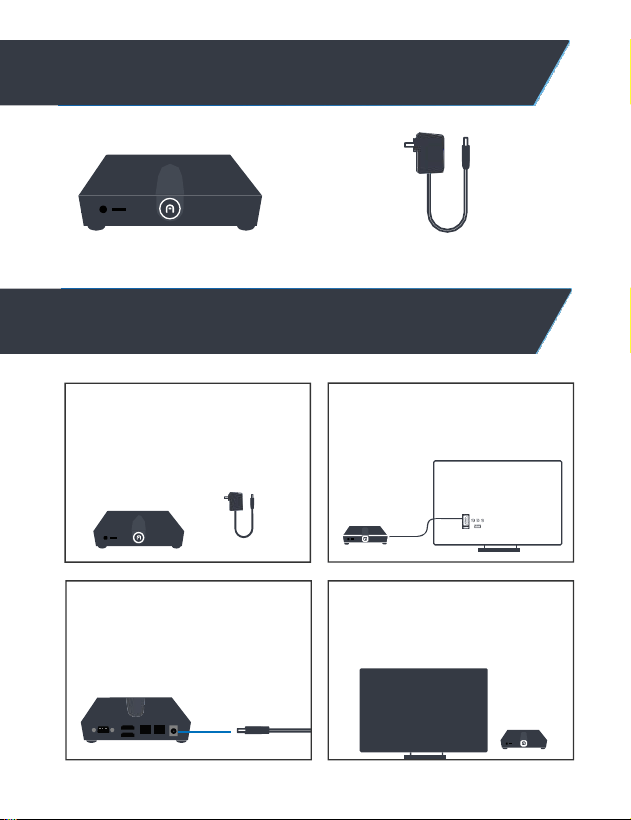
WHAT IN THE BOX?
ALLY PRO
12V/2A POWER ADAPTER
2
INSTALLATIONINSTRUCTIONS
12V/2A
STEP 1: UNBOX AND INSPECT
Connect to your chosen input on
your monitor or TV.
12V/2A
STEP 2: PLUG-IN DEVICE
Plug-in device using your desired
display output.
STEP 3: POWER IT UP
Connect the power adapter
STEP 4: SET UP ACCESSORIES
Choose your input, connect your
accessories and enjoy.
I N P U T

POWER SUPPLY
12V/2A
2
PRODUCT SPECIFICATIONS
Product Specifications
OS/OTHER
OPERATING SYSTEM
WI-FI
GPU MODEL & MANUFACTURE
PROCESSOR, MODEL & MANUFACTURE
PROCESSOR CORE COUNT
PROCESSOR CACHE
ETHERNET
BLUETOOTH
WIRELESS LAN (TYPE)
HDMI®(NUMBER)
HDMI® OUTPUT
USB PORTS
TYPE-C PORT
MICRO SD CARD SLOT
AUDIO OUTPUT
POWER CONNECTOR
Windows 10/11 Pro, Windows IoT, Linux Ubuntu
AC9560 WiFi 5 (M.2-1216) ONBOARD, external antenna
Intel® UHD Graphics
Intel® Twin Lake (N150)
4
6 MB Intel® Smart Cache
1
Gbps (x2)
Intel AC9560, supports Bluetooth 5.1
WiFi 5
HDMI 2.1 (x2)
4k@60fps
USB3.1-GEN2, 10Gbps (x2)
USB2.0 (x2)
USB2.0 (x1)
(x1)
3.5 mm audio jack with L/R/MIC combo (x1)
Locking Power Jack
WEIGHT
DIMENSIONS
WARRANTY
0.66 lbs
5 x 3.9 x 1.4 in
3 year manufacturer’s warranty
MEMORY
RAM INSTALLED
Preinstalled 8GB;DDR5-SLOT (x1)
STORAGE
STORAGE
128GB eMMC
PROCESSOR
NETWORK
INTERFACES /POR T S
3
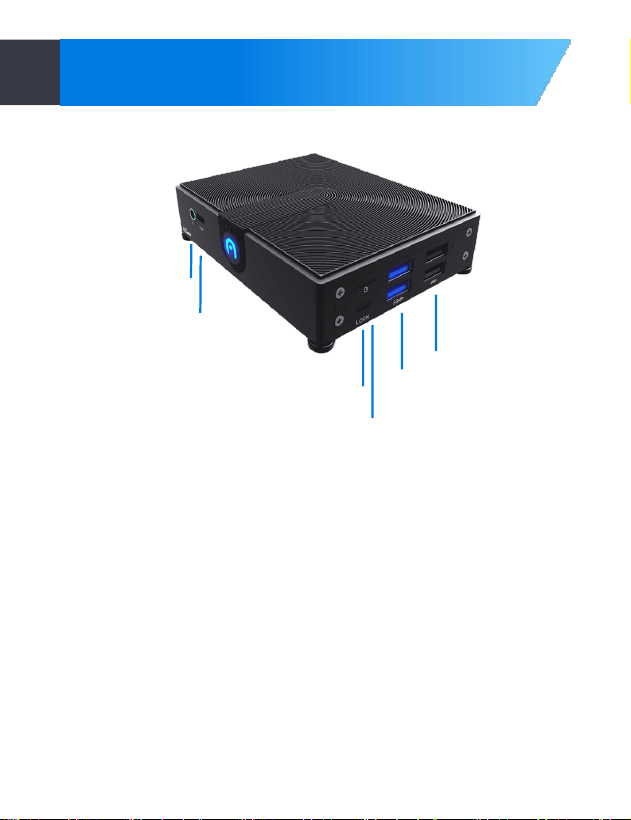
PORT LAYOUT
3.5 mm
Audio Jack
Type-C Port
Micro SD
Slot
USB 2.0
USB 3.0
Kensington
Lock
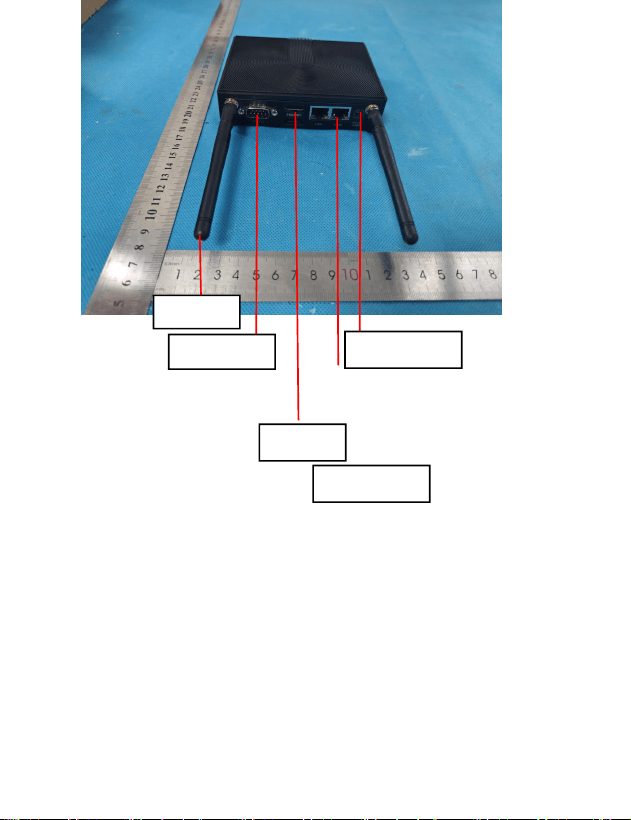
SeriaI Port
HDMI Port
Ethernet
ENT
Power Input


Warnings and Safety In form ation
Thisequipment has beentested and foundtocomply with the limits for a Class B digitaldevice, pursuant to
Part 15 of theFCC Rules. These limits are designed to provide reasonable protection against harmful
interference in a residentialinstallation. This equipment generatesuses andcanradiate radiofrequency
energy and, if not installed
andused in accordancewith the instructions, may
cause harmful interference to
radio communications. However, there is no guarantee that interference will not occur in a particular
installation. If this equipment does cause harmful interference to radioor televisionreception,which canbe
determinedby turningthe equipment off and on, the useris encouragedtotry tocorrect the interferenceby
one or moreof the followingmeasures:
-- Reorient or relocate the receiving antenna
··
Increase the separation between the equipment and receiver.
•• Connect the equipment into an outlet on a circuit different from that to which the receiver is connected
··
Consultthe dealer or an experienced radio/TV technician for help.
Changesor modificationsnotexpresslyapproved bythepartyresponsibleforcompliancecould voidthe
usefs authorityto operate the equipment.
This device complies with part 15 of the FCC Rules. Ope
『
ation is subject to the following two conditions:
(1) This device may not cause harmful interference, and (2) this device must accept any interference receivec
including interference that may cause undesiredoperation
Changes or modifications not expressly approved by the party responsible for compliance could void the
use s auth
『
oity to operate the equipment.
Radiation Exposure Statement
This equipment complies with FCC radiation exposure limits
set forth for an uncontrolled environment. This equipment
should be installed and operated with minimum distance 20cm
between the radiator and your body.
This transmitter must not be co-located or operating in
conjunction with any other antenna or transmitter.