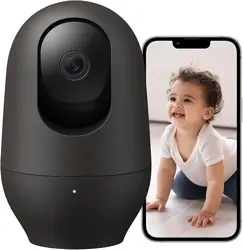
Nooie 360 Cam
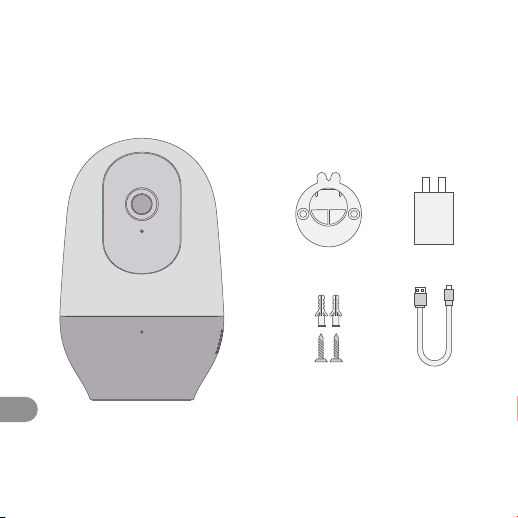
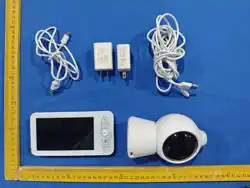
In The Box
Model: IPC100
EN
1
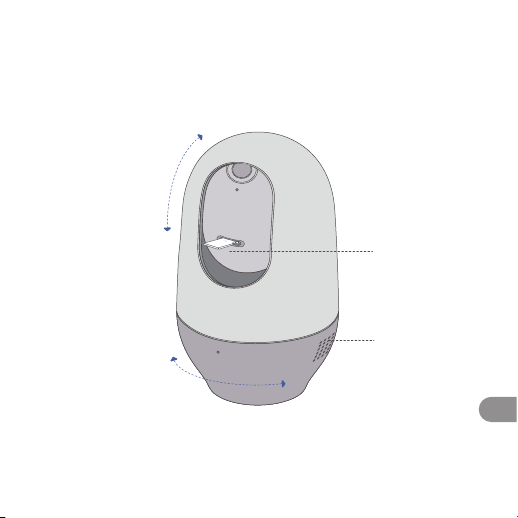
Look Closer
Micro SD slot
Speaker
Vertical
rotation
Horizontal
rotation
EN
2
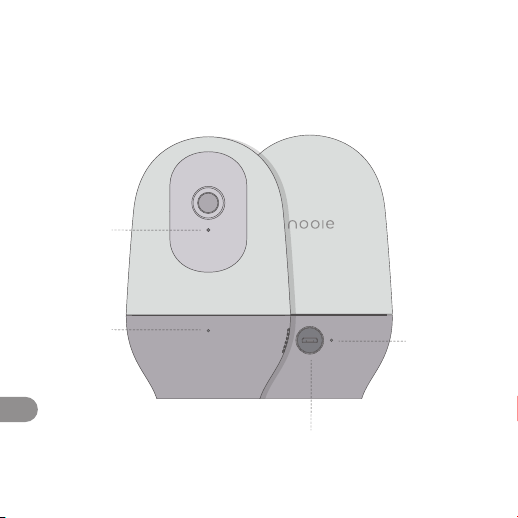
Reset button
Microphone
Status light
USB
EN
3
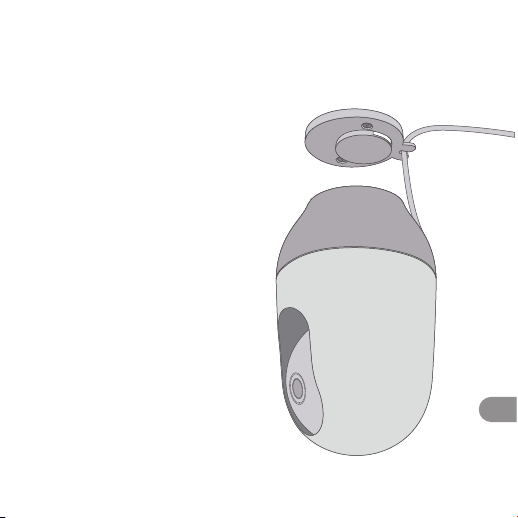
Wall Mount
Attach the wall mount
piece to the bottom of
the camera.
EN
4
Customer Care
Have any questions?
Check out the FAQ on our website!
www.nooie.com/support
Need other help?
Contact us at [email protected]
Want to give your feedback?
Tag us #nooie on social media.
EN
5

1. 12-month limited warranty.
2. Timely customer service via [email protected].
3. Lifetime professional tech support provided by Nooie.
Warranty Terms
EN
6
Caution
Important Notice:
1. Keep away from children's reach at all times.
2. Do not place in any environment that may block
ventilation opening, or impede airflow.
3. Do not place near any heat source or appliance that
emits heat.
4. Do not place in direct sunlight at any time.
EN
7
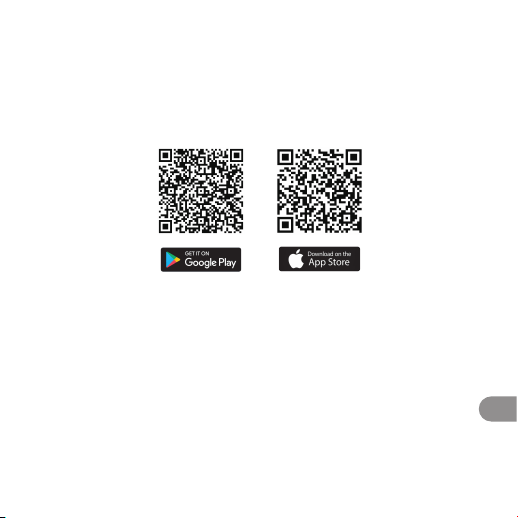
2. Open the App, tap on “Add Device” and choose Nooie
360 Cam.
3. Follow the instructions in the App and connect the
device to the internet.
Set up in the Nooie App
1. Download the Nooie App and create an account.
Note: 5GHz network is not supported.
EN
8
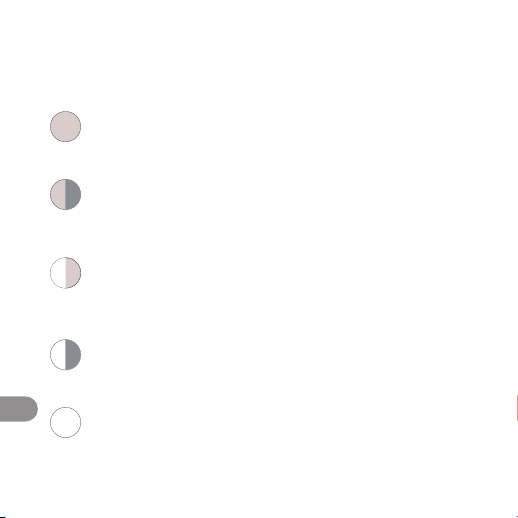
Light Indications
Solid red light
The device is powered on and initializing.
Flashing red light
The device is ready to connect.
Solid white light
The device is working properly.
Flashing between white and red light
Wi-Fi account or password is wrong,
please reconnect.
Flashing white light
Connection is in progress.
EN
9
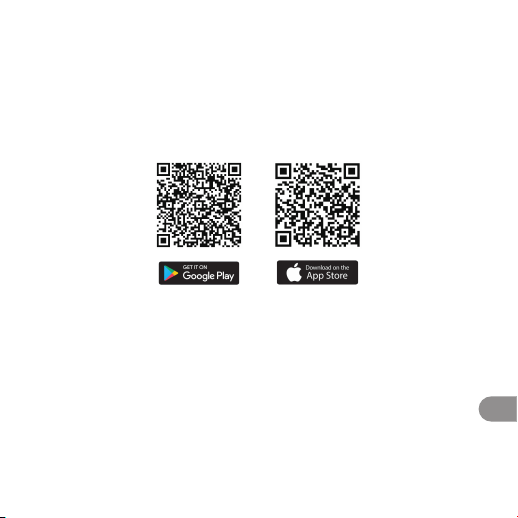
Wie man es einstellt
1. Laden Sie die Nooie-App herunter und erstellen Sie
ein Konto.
2. Öffnen Sie die App, tippen Sie auf "Gerät hinzufügen"
und wählen Sie Nooie 360 Cam.
3. Befolgen Sie die Anweisungen in der App und
verbinden Sie das Gerät mit dem Internet.
Hinweis: 5-GHz-Netzwerk wird nicht unterstützt.
DE
10
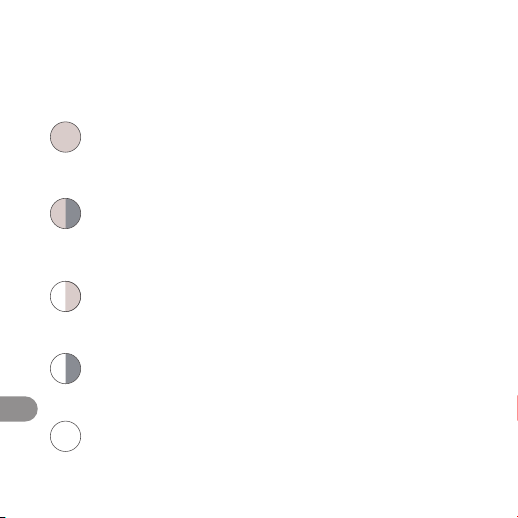
Leichte Hinweise
Andauerndes rotes Licht
Das Gerät ist eingeschaltet und wird
gerade initialisiert.
Andauerndes weißes Licht
Das Gerät funktioniert ordnungsgemäß.
Blinkt zwischen weißem, rotem Licht
Wi-Fi Konto oder Passwort ist falsch,
bitte verbinden Sie erneut.
Blinkendes rotes Licht
Das Gerät ist bereit, sich zu verbinden.
Blinkendes weißes Licht
Das Gerät ist verbunden.
DE
11
Comment mettre en place
1. Téléchargez l'application Nooie et créez un compte.
2. Ouvrez l'application, appuyez sur "Ajouter un appareil"
et choisissez Nooie 360 Cam.
3. Suivez les instructions de l'application et connectez
l'appareil à Internet.
Remarque: le réseau 5 GHz n'est pas pris en charge.
FR
12
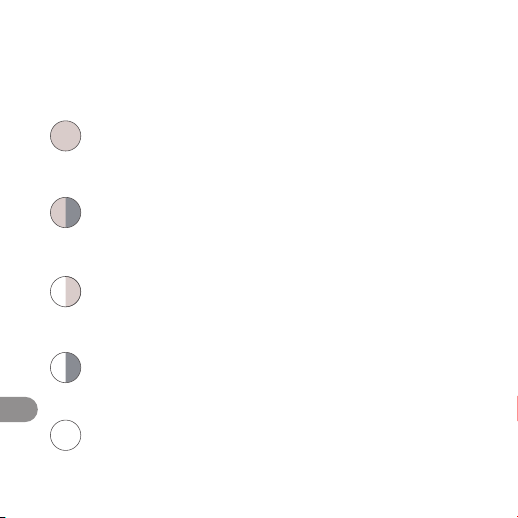
Indications lumineuses
Voyant rouge fixe
L'appareil est sous tension et en cours
d'initialisation.
Voyant blanche fixe
L'appareil fonctionne correctement.
Voyant rouge clignotant
L'appareil est prêt à se connecter.
Voyant clignote entre blanche et rouge
Le compte Wi-Fi ou le mot de passe est
incorrect, veuillez reconnecter.
Voyant blanche clignotante
La connexion est en cours.
FR
13
Come impostare
1. Scarica l'app Nooie e crea un account.
Nota: la rete 5GHz non è supportata.
2. Apri l'app, tocca "Aggiungi dispositivo" e scegli Nooie
360 Cam.
3. Seguire le istruzioni nell'app e connettere il dispositivo
a Internet.
IT
14
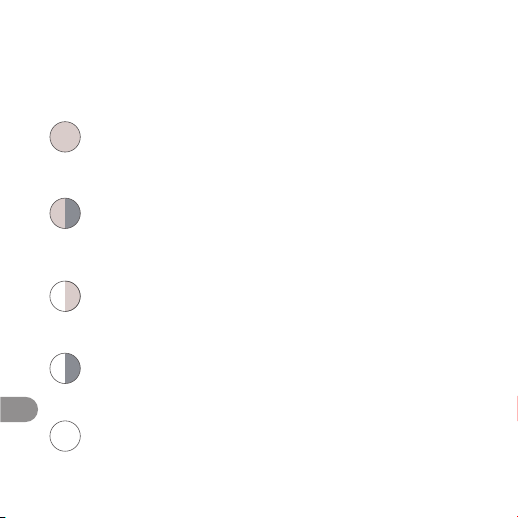
Lo Stato delI'indicatore
Indicatore Rossa Fissa
Il dispositivo è acceso e in fase di
inizializzazione.
Indicatore Bianco
Il dispositivo funziona perfettamente.
Indicatore Rossa Lampeggiante
Il dispositivo è pronto per la connessione.
Lampeggia tra luce bianca e rossa
L'account Wi-Fi o la password sono sbagliati,
ti preghiamo di riprovare.
Indicatore Lampeggiante Bianco
La connessione è in corso.
IT
15
Como instalarlo
1. Descargue la aplicación Nooie y cree una cuenta.
2. Abra la aplicación, toque "Agregar dispositivo" y elija
Nooie 360 Cam.
3. Siga las instrucciones en la aplicación y conecte el
dispositivo a internet.
Nota: la red de 5GHz no es soporte.
ES
16
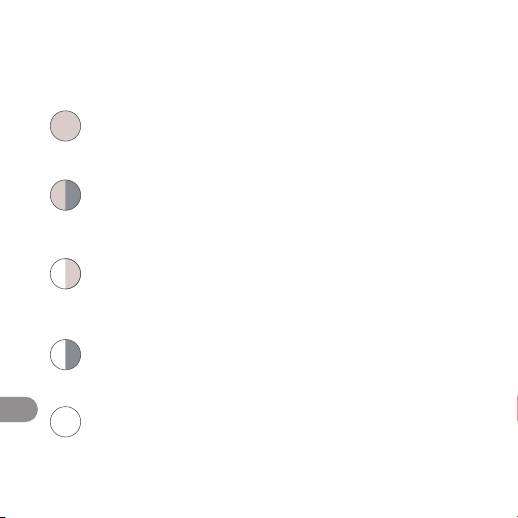
Indicaciones de luz
Luz roja sólida
El dispositivo está encendido e inicializado.
Luz blanca sólida
El dispositivo funciona correctamente.
Parpadeando entre la luz blanca y roja
Wi-Fi cuenta o contraseña es incorrecto,
por favor vuelva a intentarlo.
Luz roja intermitente
El dispositivo está listo para conectarse.
Luz blanca intermitente
La conexión está en progreso.
ES
17
Konfiguracja w aplikacji Nooie App
1. Pobierz aplikację Nooie App i załóż konto.
2. Otwórz aplikację, dotknij "Add Device" i wybierz Nooie
360 Cam.
3. Postępuj zgodnie z instrukcjami w aplikacji i podłącz
urządzenie do internetu.
Uwaga: Sieć 5GHz nie jest obsługiwana.
PL
18
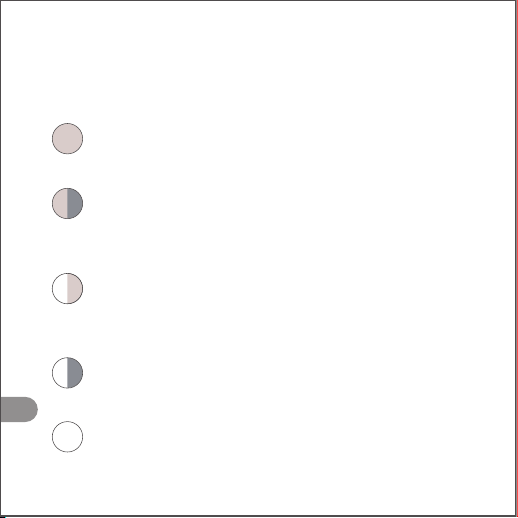
Wskaźniki świetlne
Stałe czerwone światło
Urządzenie jest włączone i zainicjowane.
Stałe białe światło
Urządzenie działa prawidłowo.
Miganie pomiędzy białym i
czerwonym światłem
Konto lub hasło Wi-Fi jest nieprawidłowe,
Proszę ponownie nawiązać połączenie.
Migające białe światło
Połączenie jest w trakcie realizacji.
Migające czerwone światło
Urządzenie jest gotowe do nawiązania połączenia.
PL
19
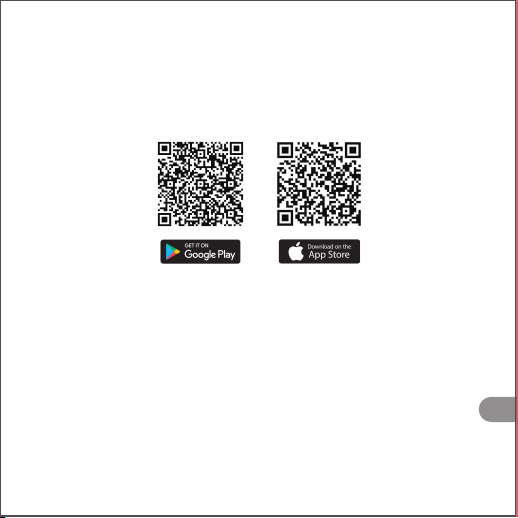
Instellen in de Nooie App
1. Download de Nooie App en maak een account aan.
2. Open de App, tik op "Add Device" en kies Nooie 360
Cam.
3. Volg de instructies in de App en verbind het apparaat
met het internet.
Opmerking: 5GHz netwerk wordt niet ondersteund.
NL
20
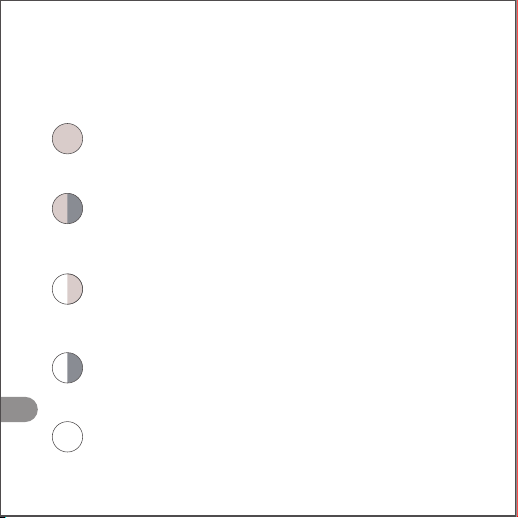
Lichtindicaties
Continu rood licht
Het apparaat is ingeschakeld en geïnitialiseerd.
Continu wit licht
Het apparaat werkt naar behoren.
Knipperend tussen wit en rood licht
Wi-Fi-account of wachtwoord is verkeerd,
maak opnieuw verbinding.
Wit knipperend licht
Er wordt verbinding gemaakt.
Knipperend rood licht
Het apparaat is klaar om verbinding te maken.
NL
21
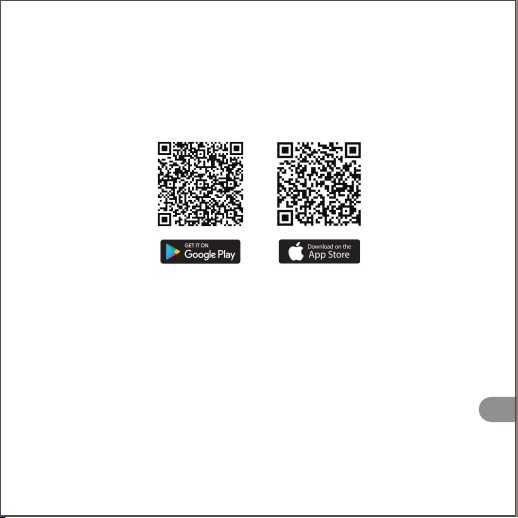
Konfigurera i Nooie-appen
1. Ladda ner Nooie-appen och skapa ett konto.
2. Öppna appen, tryck på "Add Device" och välj Nooie
360 Cam.
3. Följ instruktionerna i appen och anslut enheten till
internet.
Obs: 5GHz-nätverk stöds inte.
SE
22
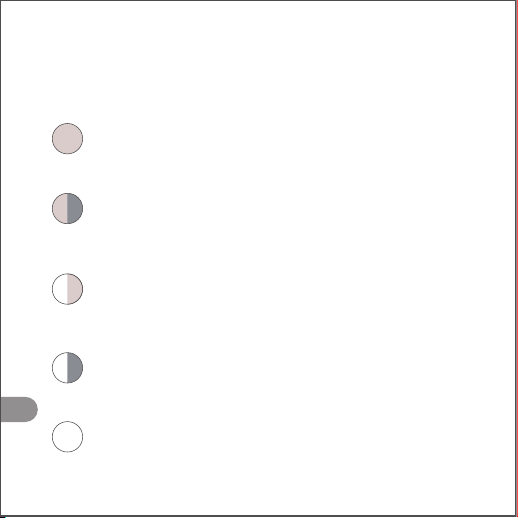
Ljusindikationer
Fast rött ljus
Enheten är påslagen och initialiseras.
Fast vitt ljus
Enheten fungerar som den ska.
Blinkande mellan vitt och rött ljus
Wi-Fi-kontot eller lösenordet är fel, gör en ny
anslutning.
Blinkande vitt ljus
Anslutningen pågår.
Blinkande rött ljus
Enheten är redo att ansluta.
SE
23

This device contains licence-exempt transmitter(s)/re-
ceiver(s) that comply with Innovation, Science and
Economic Development Canada’s licence-exempt RSS(s).
Operation is subject to the following two conditions:
(1)This device may not cause interference.(2)This device
must accept any interference, including interference that
may cause undesired operation of the device.
L’émetteur/récepteur exempt de licence contenu dans le
présent appareil est conforme aux CNR d’Innovation,
Sciences et Développement économique Canada
applicables aux appareils radio exempts de licence.
L’exploitation est autorisée aux deux conditions
suivantes :(1)L’appareil ne doit pas produire de
brouillage; (2)L’appareil doit accepter tout brouillage
radioélectrique subi, même si le brouillage est suscepti-
ble d’en compromettre le fonctionnement.
IC Statement
-- Reorient or relocate the receiving antenna.
-- Increase the separation between the equipment and
receiver.
-- Connect the equipment into an outlet on a circuit
different from that to which the receiver is connected.
-- Consult the dealer or an experienced radio/TV
technician for help.
This device complies with part 15 of the FCC Rules.
Operation is subject to the following two conditions:
(1) This device may not cause harmful interference, and
(2) this device must accept any interference received,
including interference that may cause undesired
operation.
Any Changes or modifications not expressly approved by
the party responsible for compliance could void the
user's authority to operate the equipment.
This equipment complies with FCC radiation exposure
limits setforth for an uncontrolled environment. This
equipment should be installed and operated with
minimum distance 20cm between the radiator & your
body.
EN
24
This equipment complies with IC RSS‐102 radiation
exposure limits set forth for an uncontrolled environ-
ment. This equipment should be installed and operated
with minimum distance 20cm between the radiator and
your body.
Cet équipement est conforme aux limites d'exposition
aux radiations IC CNR‐102 établies pour un environne-
ment non contrôlé. Cet équipement doit être installé et
utilisé avec une distance minimale de 20 cm entre le
radiateur et votre corps.
IC RF Statement
-- Reorient or relocate the receiving antenna.
-- Increase the separation between the equipment and
receiver.
-- Connect the equipment into an outlet on a circuit
different from that to which the receiver is connected.
-- Consult the dealer or an experienced radio/TV
technician for help.
This device complies with part 15 of the FCC Rules.
Operation is subject to the following two conditions:
(1) This device may not cause harmful interference, and
(2) this device must accept any interference received,
including interference that may cause undesired
operation.
Any Changes or modifications not expressly approved by
the party responsible for compliance could void the
user's authority to operate the equipment.
This equipment complies with FCC radiation exposure
limits setforth for an uncontrolled environment. This
equipment should be installed and operated with
minimum distance 20cm between the radiator & your
body.
EN
25
Hereby, Nooie LLC declares that this device is in
compliance with the essential requirements and other
relevant provisions of Directive 2014/53/EU.
This product can be used across EU member states. Do
not use the Device in the environment at too high or too
low temperature, never expose the Device under strong
sunshine or too wet environment. The suitable tempera-
ture for Nooie and accessories is -20°C-50°C. When
charging, please place the device in an environment that
has a normal room temperature and good ventilation.
This product complies with the radio interference
requirements of the European Community.
CE-DOC
Declaration of Conformity
RF exposure information: The Maximum Permissible
Exposure (MPE) level has been calculated based on a
distance of d=20 cm between the device and the human
body. To maintain compliance with RF exposure
requirement, use product that maintain a 20cm distance
between the device and human body.
CAUTION RISK OF EXPLOSION IF BATTERY IS REPLACED
BY AN INCORRECT TYPE. DISPOSE OF USED BATTERIES
ACCORDING TO THE INSTRUCTIONS
Wi-Fi Operating Frequency Range: 2.4~2.4835GHz (2.4G)
2.4G Wi-Fi Max Output Power: 16.42dBm (TRP for
Nooie); The following importer is the responsible party
(contact for EU matters only)
Importer: WSJ Product LTD
Importer Address: Eschborner Landstrasse 42-50, 60489
Frankfurt, Germany
The following importer is the responsible party (contact
for UK matters only)
Importer: WSJ Product LTD
Importer Address: Unit 1 Alsop Arcade, Brownlow Hill,
Liverpool L3 5TX, GB
-- Reorient or relocate the receiving antenna.
-- Increase the separation between the equipment and
receiver.
-- Connect the equipment into an outlet on a circuit
different from that to which the receiver is connected.
-- Consult the dealer or an experienced radio/TV
technician for help.
This device complies with part 15 of the FCC Rules.
Operation is subject to the following two conditions:
(1) This device may not cause harmful interference, and
(2) this device must accept any interference received,
including interference that may cause undesired
operation.
Any Changes or modifications not expressly approved by
the party responsible for compliance could void the
user's authority to operate the equipment.
This equipment complies with FCC radiation exposure
limits setforth for an uncontrolled environment. This
equipment should be installed and operated with
minimum distance 20cm between the radiator & your
body.
EN
26
Hereby, Nooie LLC declares that this device is in
compliance with the essential requirements and other
relevant provisions of Directive 2014/53/EU.
This product can be used across EU member states. Do
not use the Device in the environment at too high or too
low temperature, never expose the Device under strong
sunshine or too wet environment. The suitable tempera-
ture for Nooie and accessories is -20°C-50°C. When
charging, please place the device in an environment that
has a normal room temperature and good ventilation.
RF exposure information: The Maximum Permissible
Exposure (MPE) level has been calculated based on a
distance of d=20 cm between the device and the human
body. To maintain compliance with RF exposure
requirement, use product that maintain a 20cm distance
between the device and human body.
CAUTION RISK OF EXPLOSION IF BATTERY IS REPLACED
BY AN INCORRECT TYPE. DISPOSE OF USED BATTERIES
ACCORDING TO THE INSTRUCTIONS
Wi-Fi Operating Frequency Range: 2.4~2.4835GHz (2.4G)
2.4G Wi-Fi Max Output Power: 16.42dBm (TRP for
Nooie); The following importer is the responsible party
(contact for EU matters only)
Importer: WSJ Product LTD
Importer Address: Eschborner Landstrasse 42-50, 60489
Frankfurt, Germany
The following importer is the responsible party (contact
for UK matters only)
Importer: WSJ Product LTD
Importer Address: Unit 1 Alsop Arcade, Brownlow Hill,
Liverpool L3 5TX, GB
-- Reorient or relocate the receiving antenna.
-- Increase the separation between the equipment and
receiver.
-- Connect the equipment into an outlet on a circuit
different from that to which the receiver is connected.
-- Consult the dealer or an experienced radio/TV
technician for help.
This device complies with part 15 of the FCC Rules.
Operation is subject to the following two conditions:
(1) This device may not cause harmful interference, and
(2) this device must accept any interference received,
including interference that may cause undesired
operation.
Any Changes or modifications not expressly approved by
the party responsible for compliance could void the
user's authority to operate the equipment.
This equipment complies with FCC radiation exposure
limits setforth for an uncontrolled environment. This
equipment should be installed and operated with
minimum distance 20cm between the radiator & your
body.
EN
27
Hereby, Nooie LLC declares that this device is in
compliance with the essential requirements and other
relevant provisions of Directive 2014/53/EU.
This product can be used across EU member states. Do
not use the Device in the environment at too high or too
low temperature, never expose the Device under strong
sunshine or too wet environment. The suitable tempera-
ture for Nooie and accessories is -20°C-50°C. When
charging, please place the device in an environment that
has a normal room temperature and good ventilation.
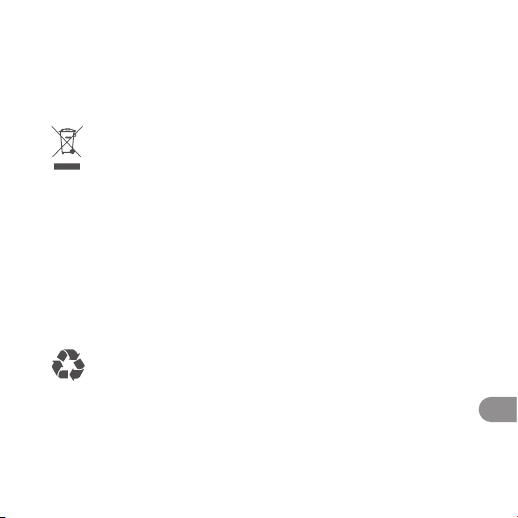
This symbol means the product must not be
discarded as household waste, and should be
delivered to an appropriate collection facility for
recycling. Proper disposal and recycling helps
protect natural resources, human health and the
environment. For more information on disposal
and recycling of this product, contact your local
municipality, disposal service, or the shop where
you bought this product.
This product is designed and manufactured with
high quality materials and components, which can
be recycled and reused.
RF exposure information: The Maximum Permissible
Exposure (MPE) level has been calculated based on a
distance of d=20 cm between the device and the human
body. To maintain compliance with RF exposure
requirement, use product that maintain a 20cm distance
between the device and human body.
CAUTION RISK OF EXPLOSION IF BATTERY IS REPLACED
BY AN INCORRECT TYPE. DISPOSE OF USED BATTERIES
ACCORDING TO THE INSTRUCTIONS
Wi-Fi Operating Frequency Range: 2.4~2.4835GHz (2.4G)
2.4G Wi-Fi Max Output Power: 16.42dBm (TRP for
Nooie); The following importer is the responsible party
(contact for EU matters only)
Importer: WSJ Product LTD
Importer Address: Eschborner Landstrasse 42-50, 60489
Frankfurt, Germany
The following importer is the responsible party (contact
for UK matters only)
Importer: WSJ Product LTD
Importer Address: Unit 1 Alsop Arcade, Brownlow Hill,
Liverpool L3 5TX, GB
-- Reorient or relocate the receiving antenna.
-- Increase the separation between the equipment and
receiver.
-- Connect the equipment into an outlet on a circuit
different from that to which the receiver is connected.
-- Consult the dealer or an experienced radio/TV
technician for help.
This device complies with part 15 of the FCC Rules.
Operation is subject to the following two conditions:
(1) This device may not cause harmful interference, and
(2) this device must accept any interference received,
including interference that may cause undesired
operation.
Any Changes or modifications not expressly approved by
the party responsible for compliance could void the
user's authority to operate the equipment.
This equipment complies with FCC radiation exposure
limits setforth for an uncontrolled environment. This
equipment should be installed and operated with
minimum distance 20cm between the radiator & your
body.
EN
28
This equipment has been tested and found to comply
with the limits for a Class B digital device, pursuant to
Part 15 of the FCC Rules. These limits are designed to
provide reasonable protection against harmful interfer-
ence in a residential installation. This equipment
generates uses and can radiate radio frequency energy
and, if not installed and used in accordance with the
instructions, may cause harmful interference to radio
communications. However, there is no guarantee that
interference will not occur in a particular installation. If
this equipment does cause harmful interference to radio
or television reception, which can be determined by
turning the equipment off and on, the user is encouraged
to try to correct the interference by one or more of the
following measures:
FCC Statement
-- Reorient or relocate the receiving antenna.
-- Increase the separation between the equipment and
receiver.
-- Connect the equipment into an outlet on a circuit
different from that to which the receiver is connected.
-- Consult the dealer or an experienced radio/TV
technician for help.
This device complies with part 15 of the FCC Rules.
Operation is subject to the following two conditions:
(1) This device may not cause harmful interference, and
(2) this device must accept any interference received,
including interference that may cause undesired
operation.
Any Changes or modifications not expressly approved by
the party responsible for compliance could void the
user's authority to operate the equipment.
This equipment complies with FCC radiation exposure
limits setforth for an uncontrolled environment. This
equipment should be installed and operated with
minimum distance 20cm between the radiator & your
body.
EN
29

-- Reorient or relocate the receiving antenna.
-- Increase the separation between the equipment and
receiver.
-- Connect the equipment into an outlet on a circuit
different from that to which the receiver is connected.
-- Consult the dealer or an experienced radio/TV
technician for help.
This device complies with part 15 of the FCC Rules.
Operation is subject to the following two conditions:
(1) This device may not cause harmful interference, and
(2) this device must accept any interference received,
including interference that may cause undesired
operation.
Any Changes or modifications not expressly approved by
the party responsible for compliance could void the
user's authority to operate the equipment.
This equipment complies with FCC radiation exposure
limits setforth for an uncontrolled environment. This
equipment should be installed and operated with
minimum distance 20cm between the radiator & your
body.
EN
30
-- Reorient or relocate the receiving antenna.
-- Increase the separation between the equipment and
receiver.
-- Connect the equipment into an outlet on a circuit
different from that to which the receiver is connected.
-- Consult the dealer or an experienced radio/TV
technician for help.
This device complies with part 15 of the FCC Rules.
Operation is subject to the following two conditions:
(1) This device may not cause harmful interference, and
(2) this device must accept any interference received,
including interference that may cause undesired
operation.
Any Changes or modifications not expressly approved by
the party responsible for compliance could void the
user's authority to operate the equipment.
This equipment complies with FCC radiation exposure
limits setforth for an uncontrolled environment. This
equipment should be installed and operated with
minimum distance 20cm between the radiator & your
body.
EN
31

-- Reorient or relocate the receiving antenna.
-- Increase the separation between the equipment and
receiver.
-- Connect the equipment into an outlet on a circuit
different from that to which the receiver is connected.
-- Consult the dealer or an experienced radio/TV
technician for help.
This device complies with part 15 of the FCC Rules.
Operation is subject to the following two conditions:
(1) This device may not cause harmful interference, and
(2) this device must accept any interference received,
including interference that may cause undesired
operation.
Any Changes or modifications not expressly approved by
the party responsible for compliance could void the
user's authority to operate the equipment.
This equipment complies with FCC radiation exposure
limits setforth for an uncontrolled environment. This
equipment should be installed and operated with
minimum distance 20cm between the radiator & your
body.
Designed in USA
Made in China