User Manual
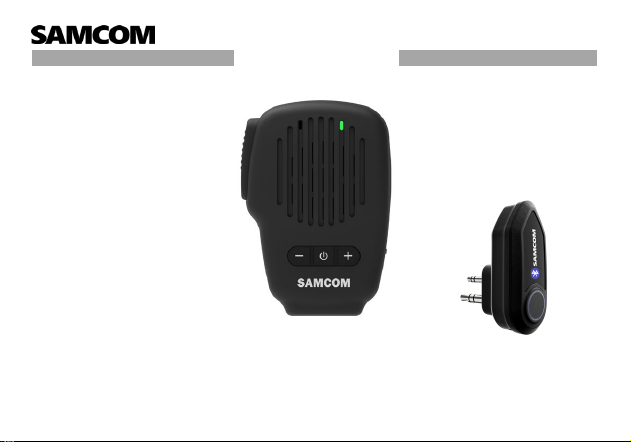
Bluetooth Speaker Microphone for Walkie Talkie
Model: RMSP07
Tech Support Service
Please contact us immediately if you need any tech support service and
have any after-sale problems. We will give feedback to you within 24
hours.
FB page: SAMCOM Radios
Instagram: SAMCOM Radios
sanconsales@outlook.com
sanconmarketing2@outlook.com
Please contact with SAMCOM team
www.samcom-radios.com

Product Specification
Item: Bluetooth Adapter
Model: X7-TX
Battery Type: Lithium Polymer Battery
Battery Capacity: 230mAh 3.7V (851mWh)
Battery Life: About 10 hours
Charging time: About 2 hours
Charging input: 5.00V
FCC ID:2BPIZ-X7-TX
Item: Bluetooth Speaker Mic
Model: RMSP07
Battery Type: Lithium Polymer Battery
Battery Capacity: 1000mAh 3.7V
(3.7Wh) Battery Life: About 10 hours
Charging time: About 2 hours
Charging input: 5.00V
FCC ID:2BPIZ-RMSP07
After-Sales Service and Support
Warr
anty Period
15 months from the date of purchase of the product.
The following conditions are not warranted
1. Damage caused by self-disassembly;
2. Failure caused by falling and man-made mechanical damage;
3. Failure or damage caused by force majeure;
4. Contact with liquid, water, rain, extreme humidity or heavy perspiration, sand, dirt or like extreme heat,
or food.
Pleas
e read this manual carefully before using the product and keep it properly.
The illustrations of products, accessories and other products in the manual are schematic diagrams and
are for reference only. Due to the update and upgrade of the product, the actual product and the
schematic diagram may be slightly different, please refer to the actual product.
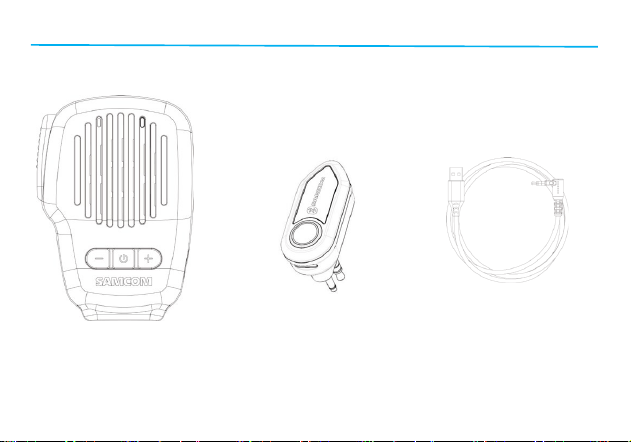
Package Contents
Bluetooth Speaker Mic
Bluetooth Adapter
Charging Cable
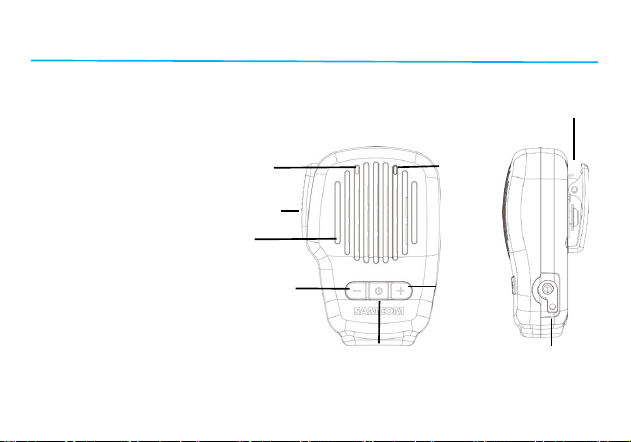
Products
Products - Bluetooth Speaker Mic
① PTT button
② Microphone ⑨
③ Indicator LED
④ Speaker
⑤ Volume -
⑥ Power button ② ③
⑦ Volume +
⑧ Headphone jack/Charging jack
⑨ Back clip ①
④
⑤ ⑦
⑥ ⑧
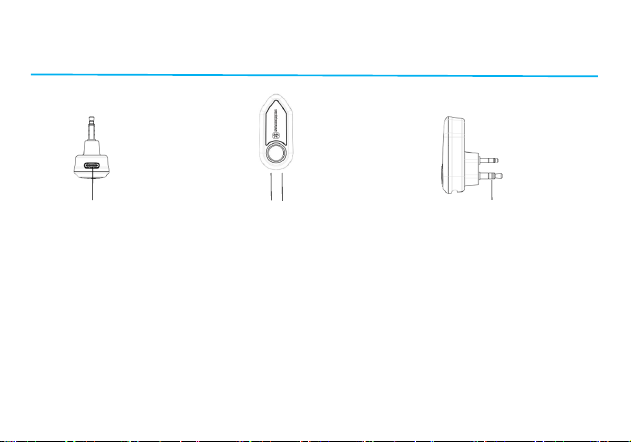
Products
2 Pin K Head Plug
① ②③
① Type-C Charging Port ② Indicator Light ④ 2-pin Plug
③ Power Button
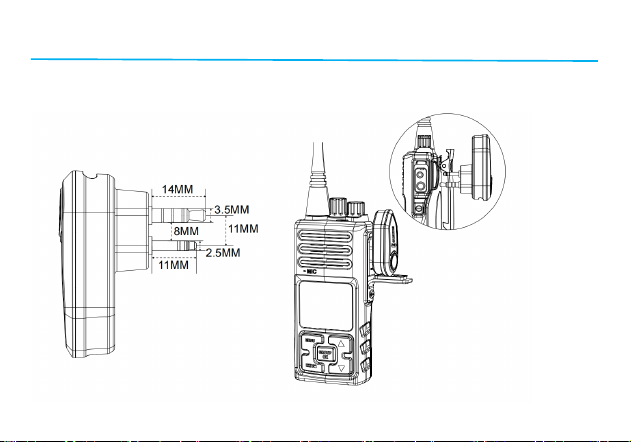
2 Pin K Head Plug Connector Installation
Products
2 Pin K Head Plug
SAMCOM X7-TX Two-Pin Standard Connector Diameter 2.5mm and 3.5mm, Space of two pin 11mm,
Please confirm the interface type of your walkie talkies.
Battery and Charging
●Battery Notification
1)Bluetooth Speaker Mic : When the battery capacity less than 20%, the red indicator will flash and a
voice announce “Low Battery.”
2)Bluetooth Adapter: When the battery capacity less than 20%, the red indicator will flash to indicate
low battery.
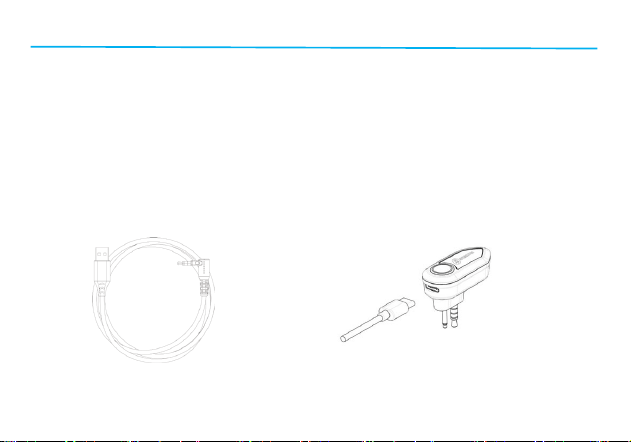
●Charging Indicator
1)Bluetooth Speaker Mic : Red light on while charging; when red light turns green, it means the
charging of Bluetooth Speaker Mic is finished.
2)Bluetooth Adapter: Red light on while charging; when red light turn to green light means the charging
of Bluetooth Adapter is finished.
Bluetooth Speaker Mic Charging Cable Bluetooth Adapter Charging Cable
Button Operations and Functions
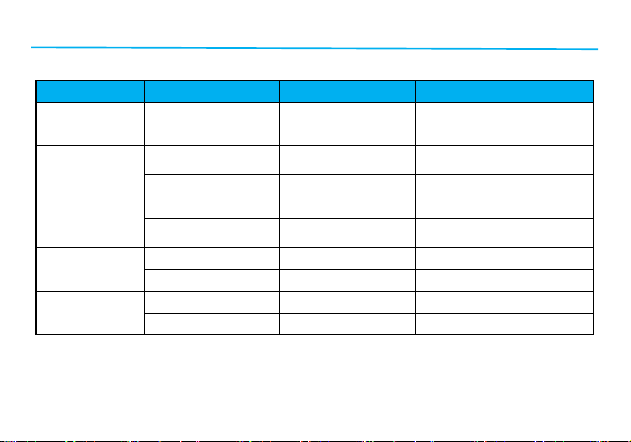
●Bluetooth Speaker Mic – Button Operations
Button
Operation
Function
Indicator light
PTT Button
Connected to
Bluetooth Adapter –
Long Press
Activate PTT
Transmission
Red Light Steady
Power Button
Long Press /Power Off
Red and green lights
flashing/All Lights Off
After successfully
connecting your
phone– Short Press
Pause Play Answer
Call End Call / Hang
Up
Green Light Flashes Once
Every 5 Seconds
Power On Without
Connection
Auto Power Off after
300 Seconds
All Lights Off
Volume +
Button
Short Press Increase Volume ---
Long Press
Next Track
---
Volume –
Button
Short Press Decrease Volume ---
Long Press Previous Track ---
Button Operations Functions and Pairing
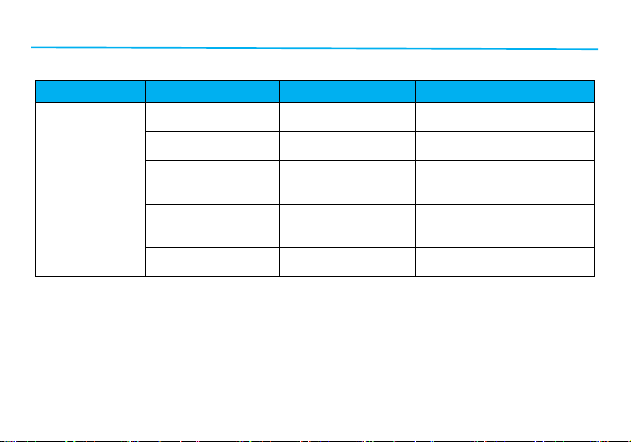
●Bluetooth Adapter – Button Operations
Button
Operation
Function
Indicator
Power Button
Long press for 3
seconds
Power on
Green light on for about 1
second
In power on state –
short press
Searching /
Connecting state
Green light flashes / blinks
When connected to
adapter – short
press
Cancel PTT
transmission
Red light off
In power on state –
long press for 3
seconds
Power off
Red light on for about 1
second, Then all lights off
In Unpaired /
Disconnected State
Auto power off after
300 seconds
All lights off

Pairing and Connection Method
The bluetooth speaker mic and the bluetooth adapter have been pre-paired at the time of factory
shipment. Simply insert the adapter into the radio and power it on to use.
(After pressing and holding the power button to turn on both the bluetooth speaker mic and the
bluetooth adapter, the indicator lights will flash green slowly, indicating that pairing has been
successfully completed and the devices are ready for use.)
●Pairing Bluetooth Speaker Mic with Mobile Phone
1)Step 1: Long press the bluetooth speaker mic power button for 3 seconds to turn on. The green
light will turn on for about 1 second, then the red and green lights will flash, indicating the bluetooth
speaker mic is in pairing mode.
2)Step 2: Enable Bluetooth on your phone and select the bluetooth speaker mic from the list of
available devices(Bluetooth name for bluetooth speaker mic is RMSP07). Once successfully
connected, the green light will flash slowly.
●Pairing Bluetooth Speaker Mic with Bluetooth Adapter
1)Step 1: Long press the bluetooth speaker mic power button for 3 seconds to turn on. The green
light will turn on for about 1 second, then the red and green lights will flash, indicating the bluetooth
speaker mic is in pairing mode.

2)Step 2: Long press the bluetooth adapter power button for 3 seconds to turn on. The green light will
turn on for about 1 second. The red and green lights will flash, indicating the adapter is in pairing
mode.
3)Step 3: Once both the bluetooth speaker mic and adapter are powered on, they will automatically
pair. When pairing is successful, the green light will flash slowly.
●
Dual Pairing Mode for Bluetooth Adapter with Radio and Mobile Phone at the same time
1)Step 1: Long press the bluetooth speaker mic power button for 3 seconds to turn it on. The green
light will turn on for about 1 second, then the red and green lights will flash, indicating the bluetooth
speaker mic is in pairing mode.
2)Step 2: Enable Bluetooth on your phone and pair it with the bluetooth speaker mic. Once
connected, the green light will flash slowly.
3)Step 3: Long press the bluetooth adapter power button for 3 seconds to turn on. The green light will
turn on for about 1 second. Once both the bluetooth speaker mic and adapter are powered on, they
will automatically pair.
When pairing is successful, the green light will flash slowly.

Safety Warning
W
arning
1.Do not disassemble, repair or modify device for any reason, as this may cause a fire to completely
damage the product.
2.Do not expose the device to an environment where the temperature is too low or too high (below 0°C or
above 45°C);
3.Do not use the device during thunderstorms, which can cause abnormalities in the device and increase
the risk of electric shock;
4.Do not puncture or scratch the product with hard objects
5.Do not wipe this product with corrosive liquid and store the product in an environment containing
corrosive substances. Avoid contact with liquids
6.This product contains small accessories, please place it out of the reach of children to avoid the risk of
suffocation caused by swallowing.
A
ttention
1.If the product has not been used for more than two weeks, it is recommended to charge the product
before use;
2.Must choose a charger produced by a regular manufacturer and certified by FCC;

NOTE: This equipment has been tested and found to comply with the limits for a Class B digital device,
pursuant to part 15 of the FCC Rules. These limits are designed to provide reasonable protection against
harmful interference in a residential installation. This equipment generates, uses and can radiate radio
frequency energy and, if not installed and used in accordance with the instructions, may cause harmful
interference to radio communications. However, there is no guarantee that interference will not occur in a
particular installation. If this equipment does cause harmful interference to radio or television reception,
which can be determined by turning the equipment off and on, the user is encouraged to try to correct the
interference by one or more of the following measures:
- Reorient or relocate the receiving antenna.
- Increase the separation between the equipment and receiver.
-Connect the equipment into an outlet on a circuit different from that to which the receiver is connected.
-Consult the dealer or an experienced radio/TV technician for help
Changes or modifications not expressly approved by the party responsible for compliance could void the
user's authority to operate the equipment.
This device complies with Part 15 of the FCC Rules. Operation is subject to the following two conditions:
(1) this device may not cause harmful interference, and (2) this device must accept any interference
received, including interference that may cause undesired operation.
FCC RF Exposure Warning Statement:
This equipment complies with FCC radiation exposure limits set forth for an uncontrolled environment.
This equipment can be used in portable exposure conditions.