User Manual
Model: I-
Shenzhen Innotrik Technology Co., Ltd.
http://www.innotrik.com
lavalier microphone speaker
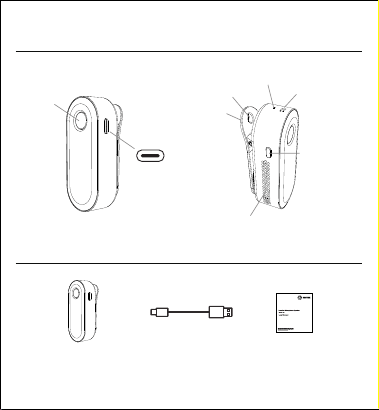
Microphone
Host × USB Cable × Manual ×
1
Product introduction
Package list
Host :
Mute button
USB Port
Speaker
Power On/Off
button
Indicator Light
Lanyard Hole
Back Clip
Microphone muted: Red light always on.
Microphone resumes pickup: Red light off.
Wireless connection normal: blue light always on.
Standby, USB connection, Wireless not connected: blue light flashes.
Charging when powered off: The blue breathing light flashes slowly, and the blue
light turns off when fully charged.
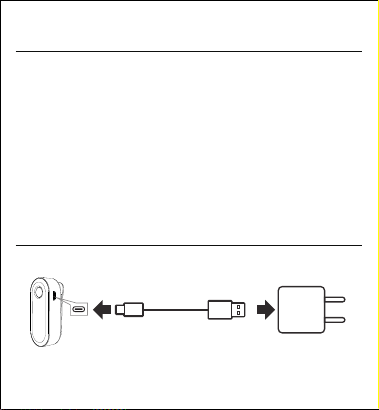
USB-A port V/A charging
power supply
(Not included)
When using it for the first time, the battery needs to be fully charged.
If the host prompts low battery, please charge it in time.
2
Indicator light instructions
Charging
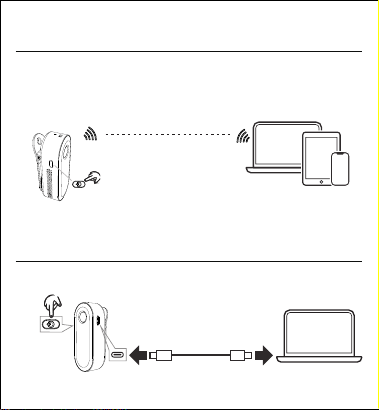
Wireless connection
between devices
Computer mobile devices
USB data cable
Host
Wireless connection usage
USB connection usage
Press it quickly three times, and the voice will prompt
that the Bluetooth is disconnected.
Turn on the device, insert the USB cable into
both ends, and there will be a voice prompt USB
connected.
Wireless pairing connection and
disconnection
Press and hold
to power on
Pairing successful,The host's
blue light turns to a steady on,
and the voice will prompt that
Bluetooth is connected.
Devices such as mobile
phones and tablets
Turn on Bluetooth,search for
the host model, and select
pairing.
Press and hold to power on, the blue light
flashes waiting for connection
Host

Function operation
Power on and power off:
Long press the power button to power on, the host indicator blue light will flash;
long press this button again to power off.
Wireless pairing connection and disconnection:
The host's blue light flashes waiting, turn on the phone's Bluetooth, search for the
host model, click to connect successfully, and the blue light will turn to steady on;
Quickly press the power button times to disconnect the current wireless
connection.
USB wired connection:
When the device is powered on, plug in the USB cable between devices, it is plug-
and-play, and it will prompt that the connection is successful.
Used as an external microphone and speaker:
Answer incoming calls by pressing the answer key on your phone.
Reject incoming calls by pressing the reject key on your phone.
End ongoing calls by pressing the hang-up key on your phone.
To adjust the speaker volume, press the volume up key on devices such as mobile
phones and tablets to gradually increase the volume.
Press the volume down key on the mobile phone to gradually decrease the volume.
Microphone mute:
Press the microphone mute button, the indicator red light will turn on, indicating
that the microphone is muted; press this button again, the red light will go off, and
the microphone will resume picking up sound.
Note: The host device will automatically power off after minutes if there is no
connection (Bluetooth or USB).
Scan the QR code to download the APP and experience its rich language functions:
Once your phone and host are connected, scan the QR code to install the app and
begin your intelligent language learning journey, learning new languages anytime,
anywhere.
Choose a device suitable for you,
such as a mobile phone. Open
WeChat, scan the QR code on the
right, and you will be prompted to
download the corresponding APP
application to begin your
intelligent language learning
journey, learn new languages
anytime and anywhere.
5
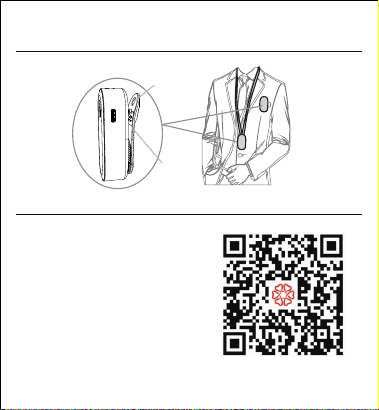
Wearing and clipping methods
Download the APP, register and use it.
Lanyard Hole
Back Clip

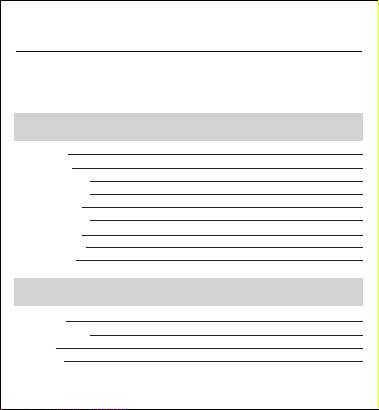
Operating environment: °C to °C
Storage environment: -°C to °C
Humidity environment: % to %
(no condensation)
Host size: **mm (including
back clip)
Host weight: about grams
USB interface: version . and above
Rated Input: DC V mA
Wireless transmission distance: up to
meters
Battery Life: up to ~ hours
Built-in Battery: rated capacity mAh
Wireless Working Frequency: .G
frequency band
Audio Features: ° intelligent sound
pickup, echo cancellation, dynamic noise
reduction, automatic gain control, full-
duplex communication
6
Basic parameters
Safety information
This product contains a built-in rechargeable lithium battery. Battery safety warning:
Do not disassemble, impact, squeeze, or throw into fire!
This product must not be submerged in water or other liquids.
The USB adapter used to charge the main unit must have a C certification mark or a
national/regional safety certification.
If the main unit's built-in battery is not used for a long time, it is recommended to
charge and discharge it once every three months to maintain a stable battery level.
First of all, thank you for using the products of Shenzhen Innotrik Technology Co., Ltd.
(hereinafter referred to as "we"). In order to make our service more satisfactory to you,
please read this notice carefully after purchasing the product and keep this warranty
card properly.
User Name
Repair Record
7
Warranty card
Friendly reminder: To protect your rights, please fill out the form carefully and keep it
safe as a repair receipt.
Purchase Information
Postal Code
Contact Number
Contact Address
Product Model
Product Number
Purchase Date
Invoice Number
Dealer Name
Repair Date
Fault Description
Solution
Repairman
Note:
.This warranty card must be filled out completely and stamped by the final direct
dealer. We will not be responsible for warranty service if it is not stamped.
. If you use the product correctly according to the instruction manual and a quality
issue arises during the warranty period, you can enjoy free repair services by
presenting this warranty card and valid proof of purchase (such as the purchase
invoice). If the warranty period has expired, you can still enjoy paid repair services
provided by us.
.We promise to provide a free warranty for the products sold for one year from the
date of sale. If the contract you signed with us is inconsistent with the above-
mentioned warranty period, the warranty period stated in the signed contract shall
prevail.
.If you encounter any problems with the product you purchased, please contact
your dealer for after-sales service.
8
Certificate
of onformity
We will not provide free warranty service in the following circumstances:
A.Product damage caused by violating the usage instructions in the product manual.
B.Hardware damage caused by improper assembly.
C.Product damage caused by unauthorized modifications or self-repair.
D.Product damage caused by exceeding the allowed usage or storage environment.
E.Product damage caused by abnormal external forces.
F.Product damage caused by natural disasters or other force
majeure events.
G.Unable to provide this warranty card and valid proof of purchase.
H.Unauthorized removal or damage of the disassembly label.
I.Other situations not covered by the free warranty.
* The above warranty information is subject to change at any time. Please refer to the
official website for the latest warranty policy.
For all repair services, please contact qualified service personnel. If the
equipment malfunctions, please call customer service at -- to report
the problem. Unauthorized disassembly and repair are strictly prohibited.
Manufacturer: Shenzhen Innotrik Technology Co., Ltd.
Add: Floor nd and rd, Building A, Baoshi Technology Park, Baoshi
Road, Tangtou Community, Shiyan Street, Baoan District, Shenzhen.
PC:
Tel: +--
Web: http://www.innotrik.com

FCC Warnning:
This equipment has been tested and found to comply with the limits for a Class B digital
device,pursuant to part 15 of the FCC Rules. These limits are designed to provide
reasonable protection against harmful interference in a residential installation. This
equipment generates, uses and can radiate radio frequency energy and, if not installed
and used in accordance with the instructions, may cause harmful interference to radio
communications. However, there is no guarantee that interference will not occur in a
particular installation. If this equipment does cause harmful interference to radio or
television reception, which can be determined by turning the equipment off and on, the
user is encouraged to try to correct the interference by one or more of the following
measures:
• Reorient or relocate the receiving antenna.
• Increase the separation between the equipment and receiver.
• Connect the equipment into an outlet on a circuit different from that to which the
receiver is connected.
• Consult the dealer or an experienced radio/TV technician for help.
Caution: Any changes or modifications to this device not explicitly approved by
manufacturer could void your authority to operate this equipment.
This device complies with part 15 of the FCC Rules. Operation is subject to the following
two conditions:
(1)This device may not cause harmful interference, and (2) this device must accept any
interference received, including interference that may cause undesired operation.
This equipment complies with FCC radiation exposure limits set forth for an uncontrolled
environment. This equipment should be installed and operated with minimum distance
0cm between the radiator and your body.

ISED Statement
‐ English: This device contains licence-exempt transmitter(s)/receiver(s) that comply with
Innovation Science and Economic Development Canada’s licence-exempt RSS(s).
Operation is subject to the following two conditions:
(1) This device may not cause interference.
(2) This device must accept any interference, including interference that may cause undesired
operation of the device.
‐ French:Cet appareil contient des émetteurs/récepteurs exempts de licence qui sont
conformes aux CNR exempts de licence d’Innovation, Sciences et Développement économique
Canada. Le fonctionnement est soumis aux deux conditions suivantes :
(1) Cet appareil ne doit pas causer d’interférences.
(2) Cet appareil doit accepter toute interférence, y compris les interférences susceptibles de
provoquer un fonctionnement indésirable de l’appareil.
This equipment complies with Canada radiation exposure limits set forth for an uncontrolled
environment.
This equipment should be installed and operated with minimum distance 0cm between the
radiator & your body.
Cet équipement est conforme Canada limites d'exposition aux radiations dans un
environnement non contrôlé.
Cet équipement doit être installé et utilisé avec une distance minimale de 0 cm entre le
radiateur et votre corps.