SAFETY WARNINGS
04
Electric shock hazard: Do not open device housing. No user-serviceable
parts inside.
Use only the supplied power adapter.
Disconnect power before cleaning.
Do not expose device to rain or moisture.
If device falls into water, disconnect power immediately and contact
a professional.
Fire and burn hazard: Device may become hot during operation.
This is normal.
READ CAREFULLY BEFORE USE.
PRODUCT OVERVIEW
03
YOUR SLEEP, YOUR CONTROL.
Essential oil helps
you sleep
Aroma system
Immersive soundscapes
optimized for sleep
Dual speakers
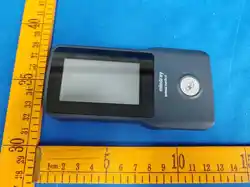
Full-color display, multi-touch
5-inch touchscreen
Local data processing for
privacy protection
Sleep analysis
Circadian-aligned
ambient lighting
Light system
CHOKING HAZARD WARNING
02
CONTAINS SMALL PARTS.
Choking hazard. Contains small parts. Not for children under 3 years.
Keep out of reach of children under 3 years.
If small parts are swallowed, seek medical attention immediately.
This product is not a toy.
PACKAGE CONTENTS
01
CONTENTS OF BOX.
Note: Retain all packaging materials for at least 30 days for returns/exchanges.
Item
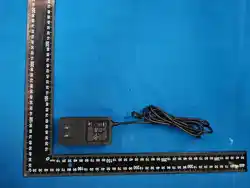
Power Adapter &
Cord
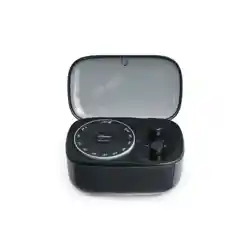
Dream One™
Main Unit
Quick Start Card
Safety & Warranty
Guide
Product Certificate
Qty.
1
Contains electronic components.
Do not disassemble.
Strangulation hazard.
Keep away from infants and toddlers.
Paper materials. Keep away from fire.
—
—
1
1
1
1
Cautions
INSTALLATION INSTRUCTIONS
06
THREE STEPS TO BETTER SLEEP.
Place
Install essential oil
Place device on a stable surface 0.51 m from the headboard.
Keep away from flammable items such as curtains and paper.
Keep out of reach of infants and toddlers.
Align bottle with color tab and twist onto Dream One™.
Note: Use outside the above conditions may cause device malfunction or
safety hazards.
Items
Operating
Temperature
Storage
Temperature
Relative Humidity
5°C to 45°C 41°F to 113°F
20°C to 45°C 4°F to 113°F
5% to 95% (non-condensing)
Altitude 0 to 3000 m 0 to 10,000 ft)
Placement Surface Horizontal, stable, heat-resistant surface.
Surrounding Space
Leave 10 cm 4 in clearance around all sides
for ventilation.
Requirements
OPERATING ENVIRONMENT
05
USE IN A SUITABLE ENVIRONMENT.
If you or a family member have a history of epilepsy, photosensitive
seizures, or have experienced dizziness, vision changes, or muscle
twitching, consult a doctor before use.
Sleep data is for reference only and is not a substitute for medical
diagnosis. If you have sleep disorders or other health concerns, consult
a doctor.
Photosensitive seizure warning: A very small percentage of individuals
may experience seizures when exposed to certain light patterns.
Health note: This device is not a medical device.
Do not cover device. Keep vents unobstructed.
Do not place device on beds, sofas, or other soft surfaces.
If burning smell or smoke is detected, disconnect power immediately.
TECHNICAL SPECIFICATIONS
09
STRONG INNER SELF.
Components
Screen
Housing
Vents
Wipe gently with a dry, soft, lint-free cloth.
Wipe with a slightly damp soft cloth and
dry immediately.
Use a dry, soft-bristled brush to remove dust.
Speakers Use a dry, soft-bristled brush. Do not use liquids.
Cleaning method
Processor
Memory / Storage
Display
Connectivity
2GB LPDDR4 / 64GB eMMC
5-inch IPS touchscreen, 10801080
Wi-Fi 6 802.11ax), Bluetooth 5.4
Audio 20W bass + 15W treble, 20Hz–20kHz
Quad-core ARM Cortex-A53
CLEANING AND MAINTENANCE
08
KEEP DEVICE CLEAN.
Note: Disconnect power before cleaning.
Do not use:
Alcohol, solvents, ammonia, or abrasive cleaners.
Spray liquids directly onto the device.Sharp objects for cleaning.
Immerse the device in water.
HEARING PROTECTION
07
PROTECT YOUR HEARING.
Hearing damage warning: Prolonged exposure above 85 dB may cause
permanent hearing loss.
Default max sleep sound volume: 60 dB.
Screen warns if volume exceeds safe level.
Recommended nighttime volume: 50 dB.
If tinnitus or hearing loss occurs, lower volume and see a doctor.
Connect power
Connect the power cord to the device and the power adapter.
Plug the adapter into a properly grounded outlet 100240V compatible).
Device will power on automatically (startup takes approx. 30 seconds).
Tip: Ensure the power outlet is easily accessible for quick disconnection
in an emergency. Unplug when not in use for extended periods.
REGULATORY COMPLIANCE
10
FCC ID 2BX68DREAMONE
This device complies with Part 15 of the FCC Rules. Operation is subject to
the following two conditions: 1) this device may not cause harmful
interference, and 2) this device must accept any interference received,
including interference that may cause undesired operation.
Note: This equipment has been tested and found to comply with the limits
for a Class B digital device, pursuant to Part 15 of the FCC Rules. These
limits are designed to provide reasonable protection against harmful
interference in a residential installation. This equipment generates, uses
and can radiate radio frequency energy and, if not installed and used in
accordance with the instructions, may cause harmful interference to radio
communications. However, there is no guarantee that interference will not
occur in a particular installation. If this equipment does cause harmful
interference to radio or television reception, which can be determined by
turning the equipment off and on, the user is encouraged to try to correct
the interference by one or more of the following measures:
— Reorient or relocate the receiving antenna. — Increase the separation
between the equipment and receiver. — Connect the equipment into an
outlet on a circuit different from that to which the receiver is connected.
— Consult the dealer or an experienced radio/TV technician for help.
Caution: Changes or modifications not expressly approved by the party
responsible for compliance could void the user's authority to operate the
equipment.
RF Exposure: This equipment complies with FCC radiation exposure limits
set forth for an uncontrolled environment. This equipment should be
installed and operated with a minimum distance of 20 cm between the
radiator and your body.
RF exposure information
California Proposition 65 warning
This device complies with government requirements for radio wave exposure.
Designed and manufactured to meet FCC RF energy exposure limits.
WARNING This product can expose you to chemicals including lead, which
is known to the State of California to cause cancer and birth defects or other
reproductive harm. For more information go to www.P65Warnings.ca.gov.
COMPLIES WITH GLOBAL STANDARDS.
Microphone
Sensors
Lighting
Essential Oil Diffuser
Ambient light
45 full-color LED lights
Ultrasonic atomizer 2.5W 3
Power Input
Power Consumption
Dimensions / Weight
Operating
Temperature
Certifications
100240V AC, 50/60 Hz
Standby power 1W
200 200 180 mm / Net Wt 4.19 lbs 1.9 kg
5°C to 45°C
FCC, CEC
Dual microphones with noise reduction
LIMITED WARRANTY
14
WE'VE GOT YOU COVERED.
For details, please refer to the warranty card.
Issue
Device won't turn on
Screen unresponsive/
software error
Cannot connect
to Wi-Fi
Check power and outlet. Inspect cord.
Unplug for 5 seconds, then reconnect.
Verify password. Check router band support.
Restart router.
Fragrance spray
clogged
If diffuser is clogged, gently wipe the atomizer with
an alcohol swab.
Overheat Warning Clear vents. Avoid heat. Move to cooler area.
Solution
TROUBLESHOOTING
13
HAVING ISSUES? TRY THESE.
RECYCLING & ENVIRONMENTAL CARE
12
BE ENVIRONMENTALLY RESPONSIBLE.
This product contains electronic components and should not be disposed
of with household waste. Please follow local e-waste regulations for
disposal.
Eco-certification:
MICROPHONE AND PRIVACY
11
YOUR PRIVACY COMES FIRST.
For a full description of what data we collect and how it is used, visit the
privacy policy at [www.mindora.com/privacy] or scan the QR code
in the app.
Microphone is off by default and can only be manually turned on by you.
This product has no voice conversation function. It does not record,
store locally, or upload any audio to the cloud.
Only used for real-time sleep environment analysis when manually
activated. All processing is done locally on the device.
PRODUCT IDENTIFICATION
16
PRODUCT INFORMATION.
Manufacturer: Shanghai Genesis Technology Co.,Ltd
Made in China.
Serial number location: See package label.
Firmware version: See Settings → About.
Document version: 1.0 | March 2026.
Mindora
© 2026 Mindora All rights reserved.
CUSTOMER SUPPORT
15
WE'RE HERE FOR YOU.
Email: [email protected]
Official website: www.mindora316.com/m/d100
Service hours: 9 AM6 PM PT, Mon–Fri
Firmware updates: Automatic via Wi-Fi.
Manual check: Settings → System → Update.
Dream One™
More info: visit our official website.