
Product User Guide
1. Product Overview
This application is a wellness monitoring solution designed to track sleep-related physiological indicators. By
connecting with compatible smart hardware, the system can collect and analyze physiological data such as heart rate,
respiratory rate, sleep duration, and sleep patterns.The application automatically generates daily reports to help
users better understand their sleep habits and physiological trends over time. In addition, the application provides
comprehensive device management features, including multi-user access, time zone and region configuration, and
real-time device status monitoring, making it easy to manage and review sleep-related data.
2. Core Functions
2.1 Device Setup and Network Configuration
Preparation
Before configuring the device, please ensure that:
* The device is connected to a power source.
* Network configuration is completed within 5 minutes after powering on the device. Bluetooth is automatically
enabled during this period.
If network configuration is not completed within 5 minutes:
* Disconnect and reconnect the power supply, or
* Press and hold the Reset button on the side of the device for approximately 5 seconds to restart network
configuration mode.
Network Configuration Steps
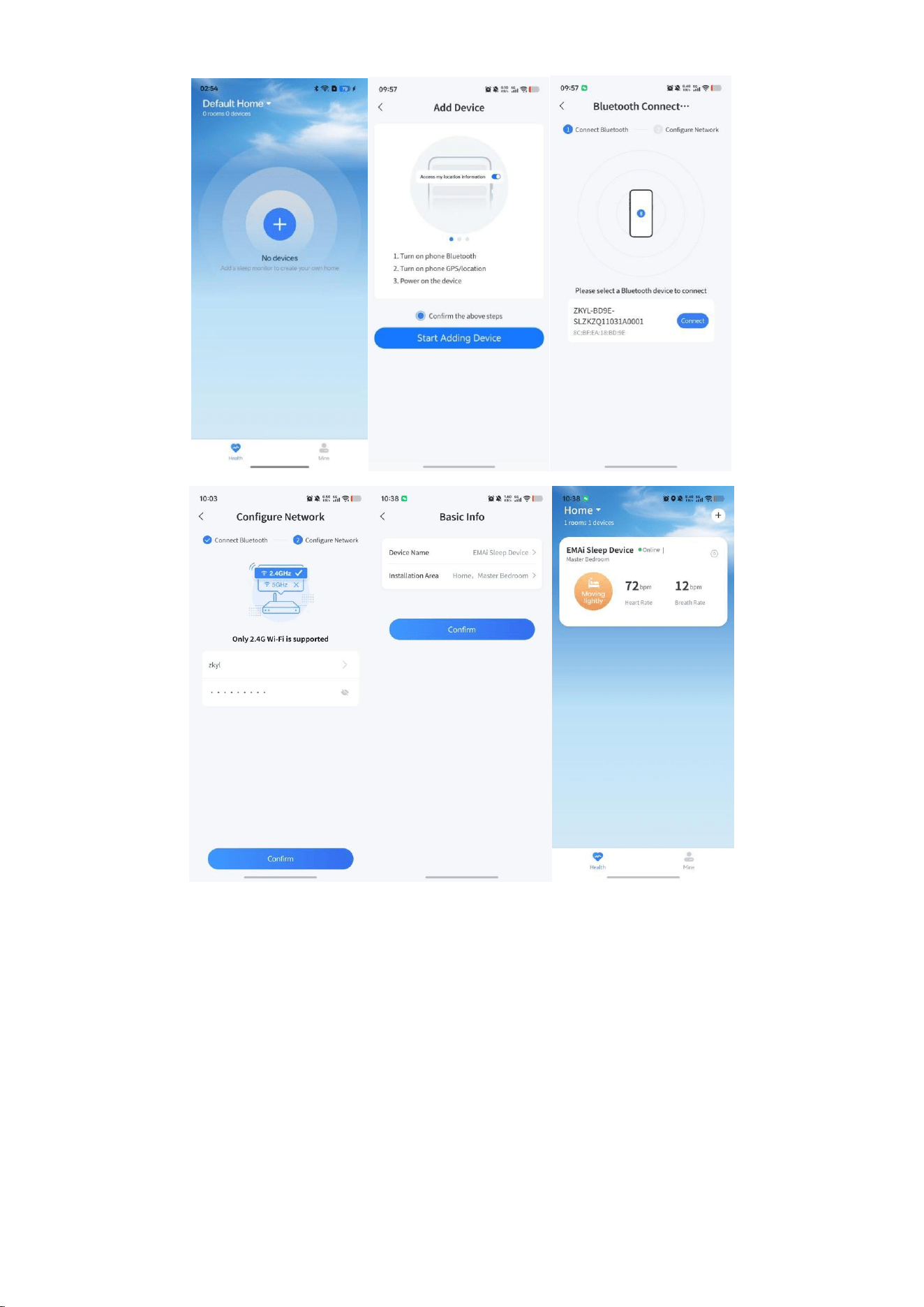
1. Create an Account
Register an account using your email address and log in to the app.
2. Add a Device
On the Home page, tap the “+” button.
Follow the on-screen instructions to:
* Enable Bluetooth
* Grant Location permissions (if required by your mobile device)
Then tap Start Adding Device.
3. Connect the Device
Select the target device with a name beginning with “ZKYL” from the device list and tap Connect.
4. Configure the Network
Wi-Fi Version
* Enter the Wi-Fi password when prompted.
* Only 2.4 GHz Wi-Fi networks are supported.
5. Complete Setup
After successful connection:
* Assign a device name.
* Select the installation location.
Once setup is complete, the device will appear on the Home page.
2.2 Device Management
Users can access the Device Details page using either of the following methods:
* Tap the device card on the Home page.
* Tap the Settings icon in the upper-right corner of the device card.
Device Details Features
Real-Time Monitoring
View device status and current sensor readings.
Alert Management
Receive alert notifications and customize alert settings when applicable.
Parameter Configuration
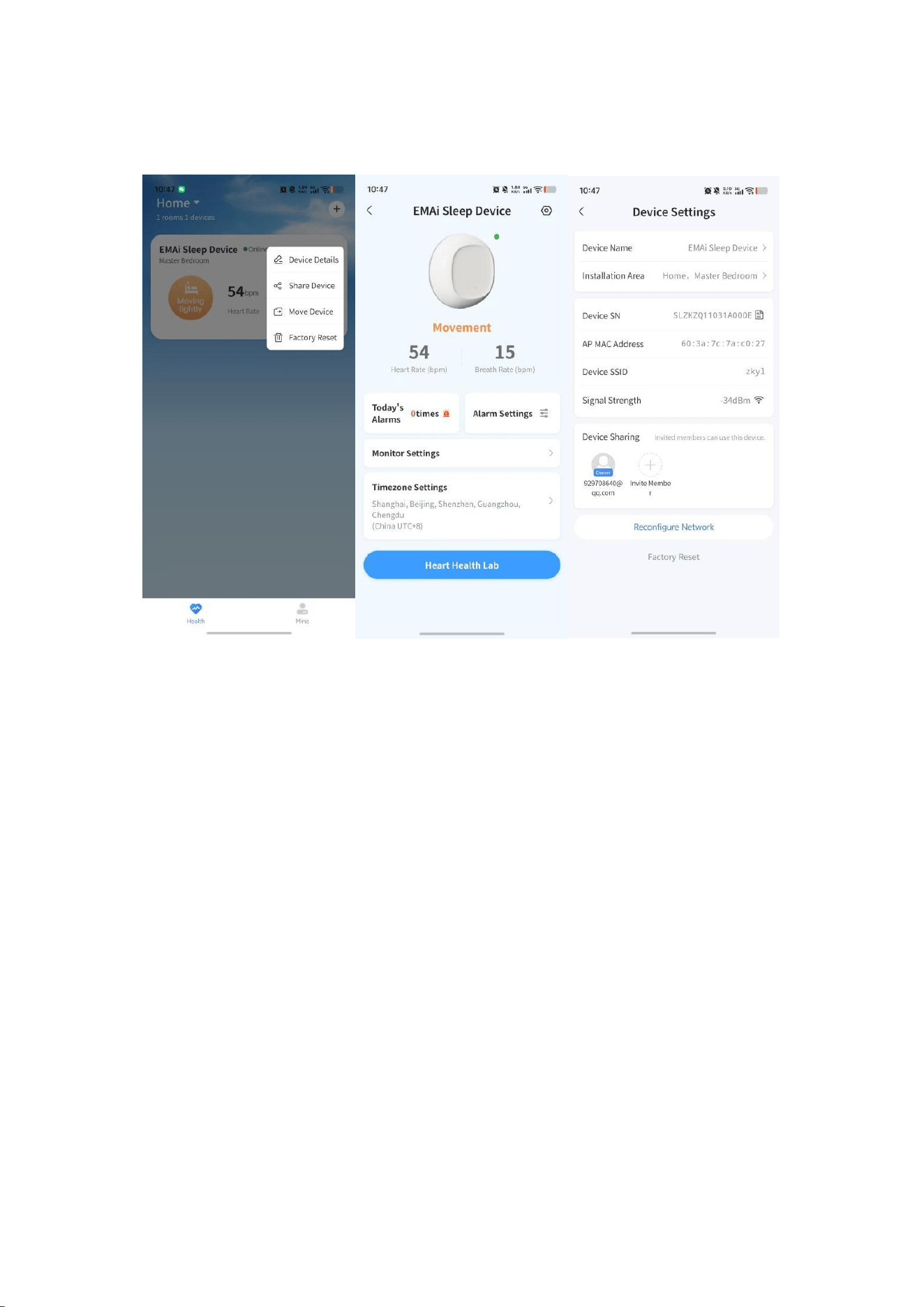
Configure user information, device time zone, and regional settings.
System Settings
Access additional device configuration options through the Settings menu.
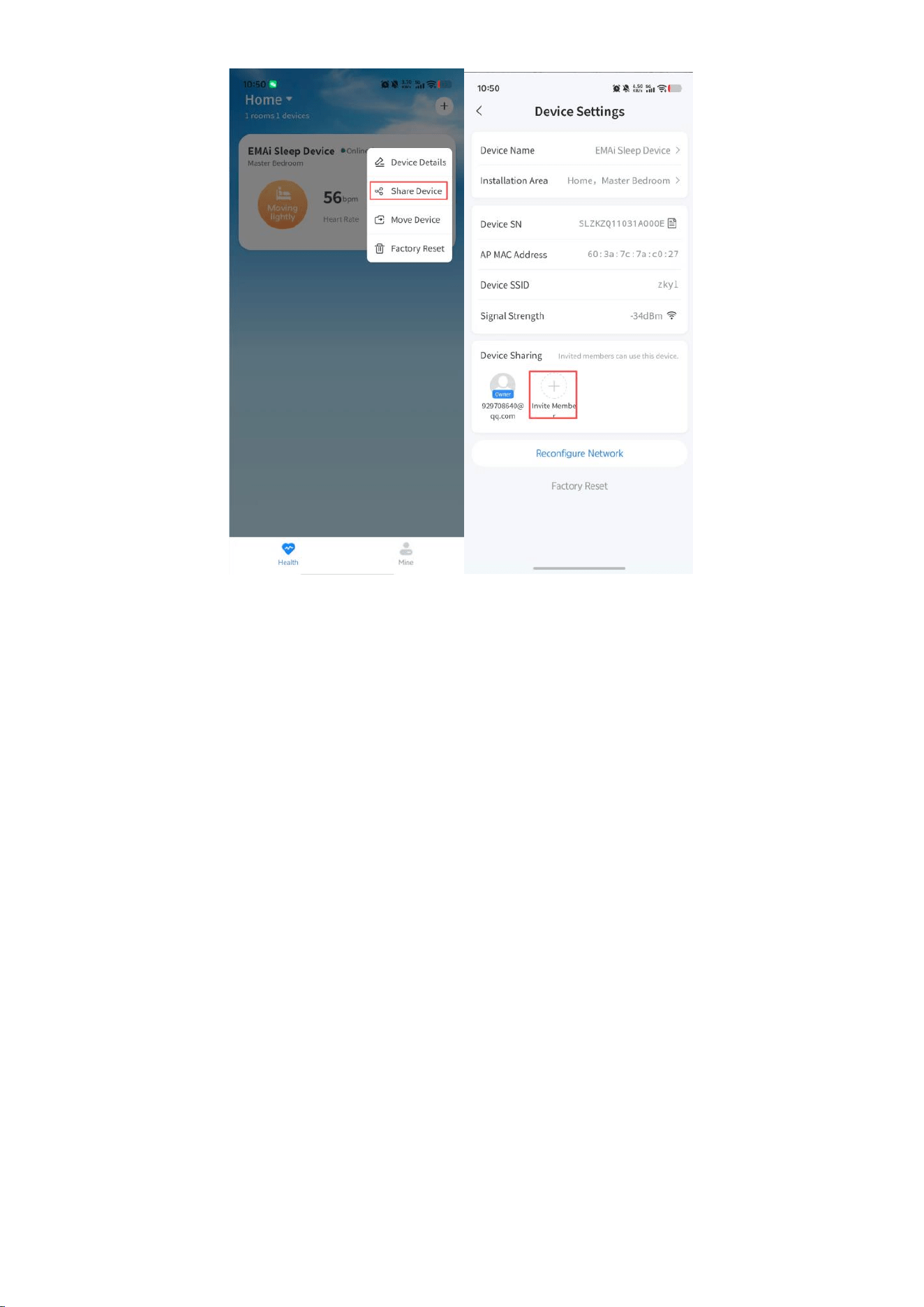
2.3 Device Sharing
After the device is successfully configured, the first user who completes setup automatically becomes the device
owner.
The owner may use the Device Sharing feature to grant access to family members or caregivers.
Authorized users can view available monitoring information associated with the device, enabling convenient sharing
of wellness information with authorized users.
2.4 Data Monitoring
Installation Requirements
For optimal performance:
* Install the device approximately 80 cm (31.5 inches) above the head area of the bed.
* Adjust the device so that the sensor is directed toward the chest area of the monitored individual.
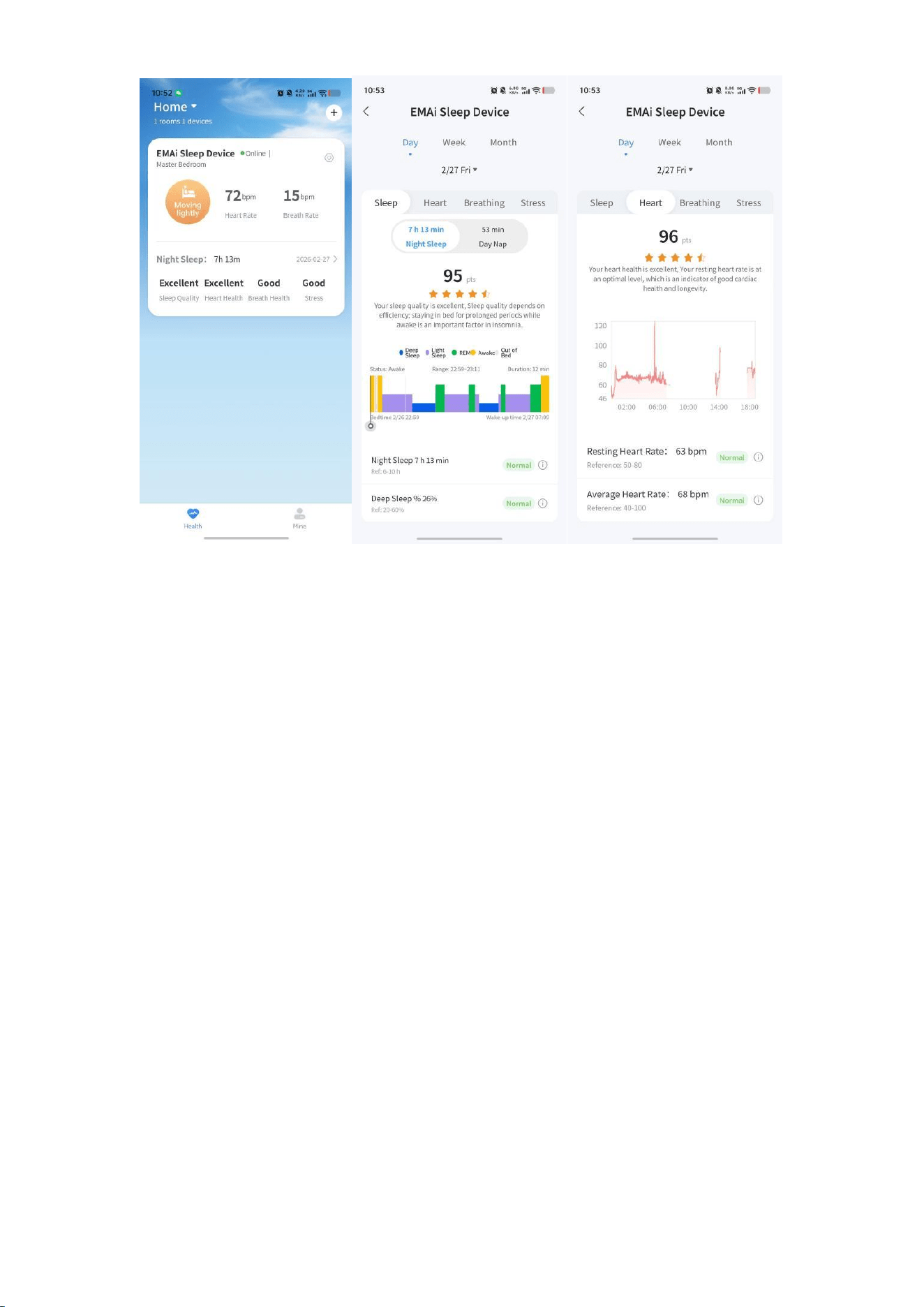
Sleep Report Generation
The device automatically collects sleep-related data while the user is sleeping.
After the monitoring session is complete, the application generates a detailed analysis report that may include:
* Sleep Quality Scores
* Respiratory Monitoring Summary
* Estimated Stress-Related Wellness Metrics
* Heart Rate Trends
* Sleep Duration Statistics
Users may select individual report sections to view additional information, trends, and wellness insights.
Data Interpretation
All scores, indicators, and wellness insights provided by the application are generated using proprietary algorithms
and are intended solely for informational and general wellness purposes. Results may vary and should not be relied
upon for medical or healthcare decisions。
Important Notice
This product is intended for general wellness and sleep monitoring purposes only. It is not a medical device and is not
intended to diagnose, treat, cure, monitor, or prevent any disease or medical condition. The information provided by
this product should not be used as a substitute for professional medical advice. Please consult a qualified healthcare
professional regarding any health concerns.
FCC Statement
This equipment has been tested and found to comply with the limits for a Class B digital device, pursuant to Part 15
of the FCC Rules.
These limits are designed to provide reasonable protection against harmful interference in a residential installation.
This equipment generates, uses and can radiate radio frequency energy and, if not installed and used in accordance
with the instructions, may cause harmful interference to radio communications. However, there is no guarantee that
interference will not occur in a particular installation. If this equipment does cause harmful interference to radio or
television reception, which can be determined by turning the equipment off and on, the user is encouraged to try to
correct the interference by one or more of the following measures:
* Reorient or relocate the receiving antenna.
* Increase the separation between the equipment and receiver.
* Connect the equipment into an outlet on a circuit different from that to which the receiver is connected.
* Consult the dealer or an experienced radio/TV technician for help.
Caution: Any changes or modifications to this device not explicitly approved by manufacturer could void your
authority to operate this equipment.
This device complies with part 15 of the FCC Rules. Operation is subject to the following two conditions: (1) This
device may not cause harmful interference, and (2) this device must accept any interference received, including
interference that may cause undesired operation.
RF Exposure Information
The device has been evaluated to meet general RF exposure requirement.
The device can be used in portable exposure condition, compliance with exposure requirements.