特色功能
蓝牙输入
2.4G输入
红外输入
红外学习
迷你键盘
鼠标功能
1:1用户体验
1:1体感捕捉
8KHZ语音输入
锂离子
电池
A6
A6
A6
A6
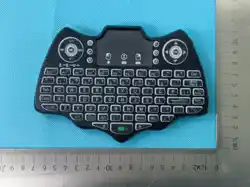
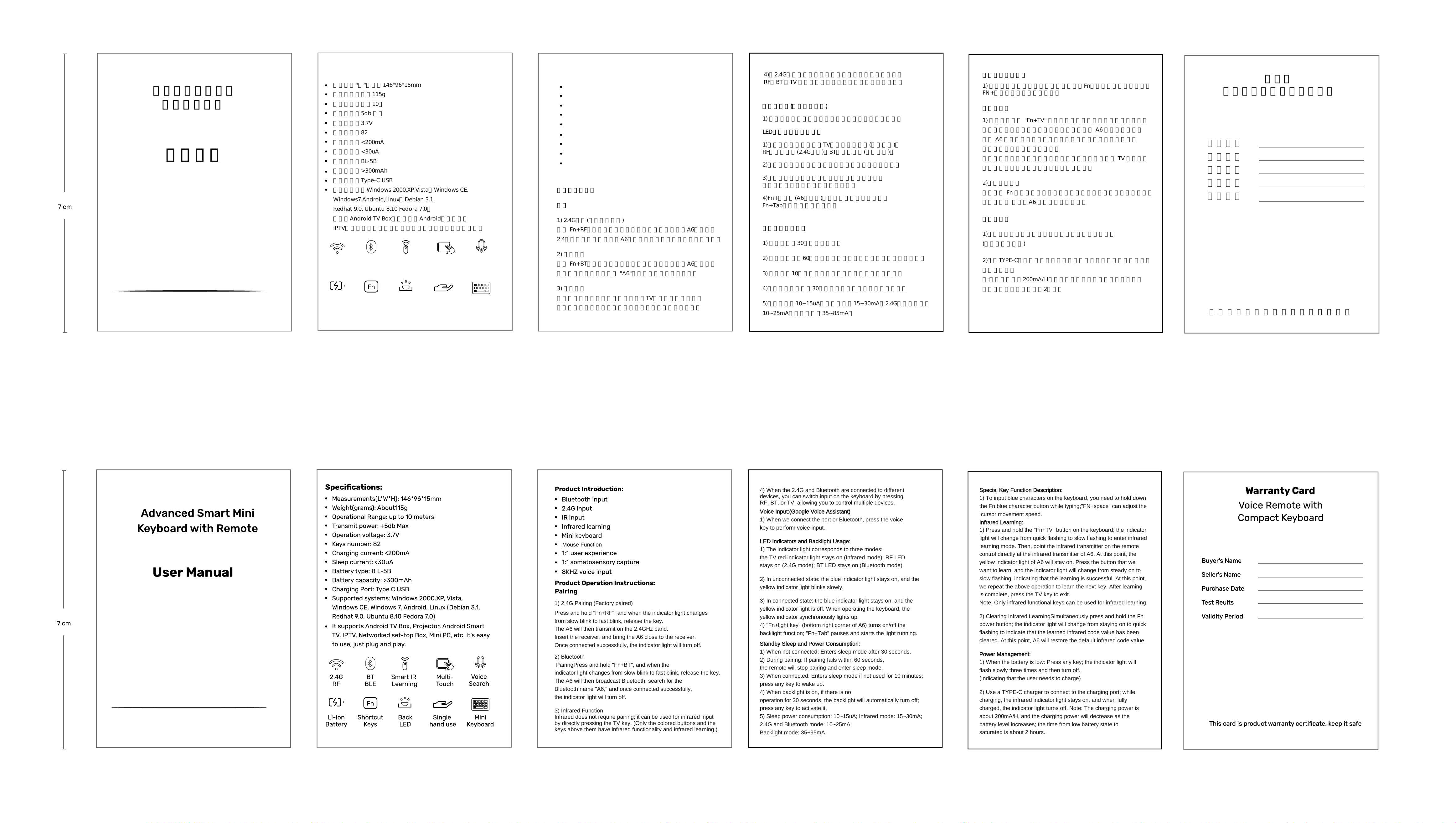
高级智能迷你键盘
带遥控器功能
用户手册
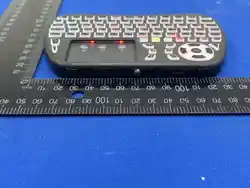
尺寸(长*宽*高):146*96*15mm
重量(克):约115g
操作范围:最大10米
发射功率:5db 最大
工作电压:3.7V
按键数量:82
充电电流:<200mA
休眠电流:<30uA
电池类型:BL-5B
电池容量:>300mAh
充电端口:Type-C USB
支持的系统:Windows 2000.XP.Vista,Windows CE.
Windows7.Android,Linux(Debian 3.1,
Redhat 9.0, Ubuntu 8.10 Fedora 7.0)
它支持Android TV Box、投影仪、Android智能电视、
IPTV、网络机顶盒、迷你电脑等。使用简单,只需插入即用。
2.4G
红外
蓝牙
产品参数:
红外学习
多点触控 语音搜索
组合
快捷键
炫彩
背光灯
单手
操作
迷你
键盘
Mouse Function
产品操作说明:
配对
1) 2.4G配对(出厂已配对好)
按住 Fn+RF,当指示灯从慢闪变为快闪时松开按键,A6此时发送
2.4频段,插入接收器,把A6靠近接收器,连接成功后指示灯熄灭。
2) 蓝牙配对
按住 Fn+BT,当指示灯从慢闪变为快闪时松开按键,A6此时发送
蓝牙广播,搜索蓝牙名称 "A6",连接成功后指示灯熄灭。
3) 红外功能
红外不需要配对,可以通过直接按下TV键来进行红外输入。
(只有彩色按钮及其上方的按键具有红外功能和红外学习)
1) 2.4G Pairing (Factory paired)
4)当2.4G和蓝牙分别连接到不同设备时,可以在键盘上按
RF、BT 、TV
3) Infrared Function
Infrared does not require pairing; it can be used for infrared input
by directly pressing the TV key. (Only the colored buttons and the
2) Bluetooth
PairingPress and hold "Fn+BT", and when the
indicator light changes from slow blink to fast blink, release the key.
The A6 will then broadcast Bluetooth, search for the
Bluetooth name "A6," and once connected successfully,
Press and hold "Fn+RF", and when the indicator light changes
from slow blink to fast blink, release the key.
The A6 will then transmit on the 2.4GHz band.
Insert the receiver, and bring the A6 close to the receiver.
Once connected successfully, the indicator light will turn off.
the indicator light will turn off.
keys above them have infrared functionality and infrared learning.)
进行切换输入,这样可实现控制多台设备。
1)
语音输入:(谷歌语音助手)
当我们连接端口或蓝牙时,按下语音键执行语音输入。
LED指示和背光灯使用:
2)
1)指示灯对应三种模式,TV红色指示灯常亮(红外模式);
RF指示灯常亮(2.4G模式);BT指示灯常亮(蓝牙模式)。
未连接状态:蓝色指示灯常亮,黄色指示灯缓慢闪烁。
4)Fn+灯光键(A6右下角)开启、切换关闭背光功能;
Fn+Tab
3)连接状态:蓝色指示灯常亮,黄色指示灯熄灭。
当操作键盘时,黄色指示灯同步亮起。
暂停、开始灯光奔跑。
2) In unconnected state: the blue indicator light stays on, and the
LED Indicators and Backlight Usage:
1) The indicator light corresponds to three modes:
the TV red indicator light stays on (Infrared mode); RF LED
stays on (2.4G mode); BT LED
4) When the 2.4G and Bluetooth are connected to different
devices, you can switch input on the keyboard by pressing
RF, BT, or TV, allowing you to control multiple devices.
Voice Input:(Google Voice Assistant)
1) When we connect the port or Bluetooth, press the voice
key to perform voice input.
stays on (Bluetooth mode).
yellow indicator light blinks slowly.
待机休眠和功耗:
1) 未连接时:30秒后进入休眠。
2) 配对时:如果60秒内配对失败,遥控器将停止配对并进入休眠。
3) 连接时:10分钟内未使用会进入休眠,按任意键唤醒。
4)开启背光时无操作30秒背光灯自动关闭,按任意键激活。
5)休眠功耗:10~15uA,红外模式:15~30mA;2.4G和蓝牙模式:
10~25mA;背光模式:35~85mA。
特殊键功能描述
Special Key Function Description:
1) To input blue characters on the keyboard, you need to hold down
the Fn blue character button while typing;"FN+space" can adjust the
cursor movement speed.
Infrared Learning:
1) Press and hold the "Fn+TV" button on the keyboard; the indicator
light will change from quick flashing to slow flashing to enter infrared
learning mode. Then, point the infrared transmitter on the remote
control directly at the infrared transmitter of A6. At this point, the
yellow indicator light of A6 will stay on. Press the button that we
want to learn, and the indicator light will change from steady on to
slow flashing, indicating that the learning is successful. At this point,
we repeat the above operation to learn the next key. After learning
is complete, press the TV key to exit.
Note: Only infrared functional keys can be used for infrared learning.
2) Clearing Infrared LearningSimultaneously press and hold the Fn
power button; the indicator light will change from staying on to quick
flashing to indicate that the learned infrared code value has been
cleared. At this point, A6 will restore the default infrared code value.
Power Management:
1) When the battery is low: Press any key; the indicator light will
flash slowly three times and then turn off.
(Indicating that the user needs to charge)
:
1) 长按键盘上的 "Fn+TV" 按钮,指示灯从快闪变为慢闪以进入红外
学习模式,然后将遥控器上的红外发射头直对 A6 的红外发射头,
此时 A6 的黄色指示灯常亮,按下我们要学习的按钮,指示灯从
常亮变为慢闪,然后学习成功。
此时,我们重复以上操作学习下一个键,学习完成后按 TV 键退出。
红外学习
1) 要在键盘上输入蓝色字符,您需要按住Fn蓝色字符按钮进行输入;
FN+空格可调节光标移动速度。
:
注:仅能发射红外功能按键可用于红外学习。
2)红外学习清除
同时按住 Fn 电源按钮,指示灯将从常亮变为快速闪烁表示已清除学习
的红外码值 ,此时A6 恢复默认红外码值。
电源管理:
1)当电量低时:按任意键,指示灯闪慢闪三次后熄灭。
(指示用户需充电)
2)使用TYPE-C充电器接入充电口,充电时红外指示灯常亮,充电饱和
指示灯熄灭。
注:充电功率约为200mA/H,充电功率会随电量增加而衰减,电池
亏电状态到饱和时间约为2
3) In connected state: the blue indicator light stays on, and the
yellow indicator light is off. When operating the keyboard, the
yellow indicator synchronously lights up.
4) "Fn+light key"
(bottom right corner of A6) turns on/off the
backlight function; "Fn+Tab" pauses and starts the light running.
Standby Sleep and Power Consumption:
1) When not connected: Enters sleep mode after 30 seconds.
2) During pairing: If pairing fails within 60 seconds,
the remote will stop pairing and enter sleep mode.
3) When connected: Enters sleep mode if not used for 10 minutes;
press any key to wake up.
4) When backlight is on, if there is no
operation for 30 seconds, the backlight will automatically turn off;
press any key to activate it.
5) Sleep power consumption: 10~15uA; Infrared mode: 15~30mA;
2.4G and Bluetooth mode: 10~25mA;
Backlight mode: 35~95mA.
小时。
买家姓名
卖家姓名
购买日期
测试结果
保修卡
2) Use a TYPE-C charger to connect to the charging port; while
charging, the infrared indicator light stays on, and when fully
charged, the indicator light turns off. Note: The charging power is
about 200mA/H, and the charging power will decrease as the
battery level increases; the time from low battery state to
saturated is about 2 hours.
适配紧凑键盘的语音遥控器
有效日期
这张卡是产品保修证书,请妥善保管

This device complies with part 15 of the FCC Rules. Operation is subject to the following two conditions: (1) This device may not cause
harmful interference, and (2) this device must accept any interference received, including interference that may cause undesired
operation.
NOTE: This equipment has been tested and found to comply with the limits for a Class B digital device, pursuant to Part 15 of the FCC
Rules. These limits are designed to provide reasonable protection against harmful interference in a residential installation. This
equipment generates, uses and can radiate radio frequency energy and, if not installed and used in accordance with the instructions,
may cause harmful interference to radio communications. However, there is no guarantee that interference will not occur in a particular
installation. If this equipment does cause harmful interference to radio or television reception, which can be determined by turning the
equipment off and on, the user is encouraged to try to correct the interference by one or more of the following
measures:
-- Reorient or relocate the receiving antenna.
-- Increase the separation between the equipment and receiver.
-- Connect the equipment into an outlet on a circuit different from that to which the receiver is connected.
-- Consult the dealer or an experienced radio/TV technician for help.
Changes or modifications not expressly approved by the party responsible for compliance could void the user's authority to operate the
equipment.
The device has been evaluated to meet general RF exposure requirement. The device can be used in portable exposure condition without
restriction.
This device contains licence-exempt transmitter(s) that comply with Innovation, Science and Economic Development Canada’s licence-
exempt RSS(s). Operation is subject to the following two conditions: 1. This device may not cause interference. 2. This device must accept
any interference, including interference that may cause undesired operation of the device. Cet appareil contient un ou des émetteurs
exempts de licence conformes aux RSS exempts de licence d'Innovation, Sciences et Développement économique Canada. Le
fonctionnement est soumis aux deux conditions suivantes : 1. Cet appareil ne doit pas causer d'interférences. 2. Cet appareil doit
accepter toutes les interférences, y compris les interférences susceptibles d'entraîner un fonctionnement
The device has been evaluated to meet general RF exposure requirement. The device can be used in portable exposure condition without
restriction.
L'appareil a été évalué pour répondre aux exigences générales d'exposition aux RF. L'appareil peut être utilisé sans restriction dans des
conditions d'exposition portables.