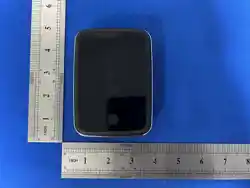
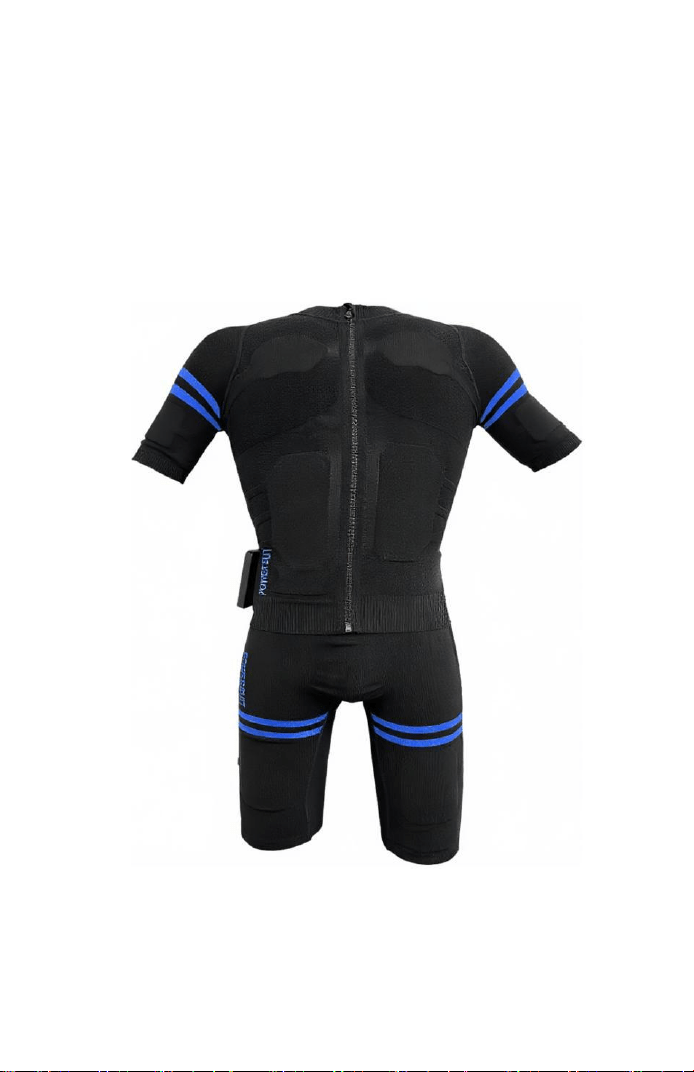
EMS Fitness suit
User Manual
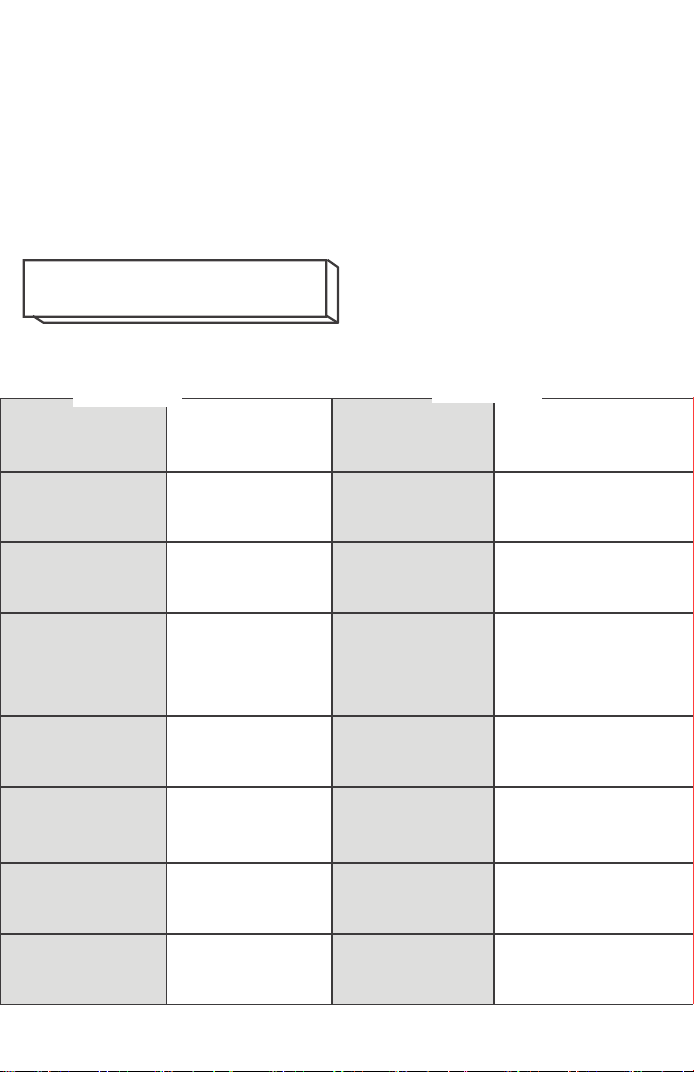
Product
Name
EMS Fitness
suit
Material
Nylon Fibre
Charging
Voltage
5V2A
Battery
Capacity
3000mAh
Main Unit
Weight
Approx.
140g
Charging
Interface
Type-C
Output
Current
≤10mA
Controller
Battery
Type
Lithium
Battery
Operating
Voltage
DC3.5-
DC4.2V
Ambient
Temperature
0-40℃
Charging
Time
Approx.
2.5 hours
Usage Time
Approx.
3 hours
Output
Voltage
VPP(0-
100V)
Main Unit
Dimensions
106*75*20mm
Pulse
Frequency
5-120HZ
Adjustable
Pulse Width
5-500US
Adjustable
Thank you for purchasing this product!
To ensure correct usage, please read this manual
thoroughly before operation.
For future reference, please keep this manual in a
safe place.
Product Specifications
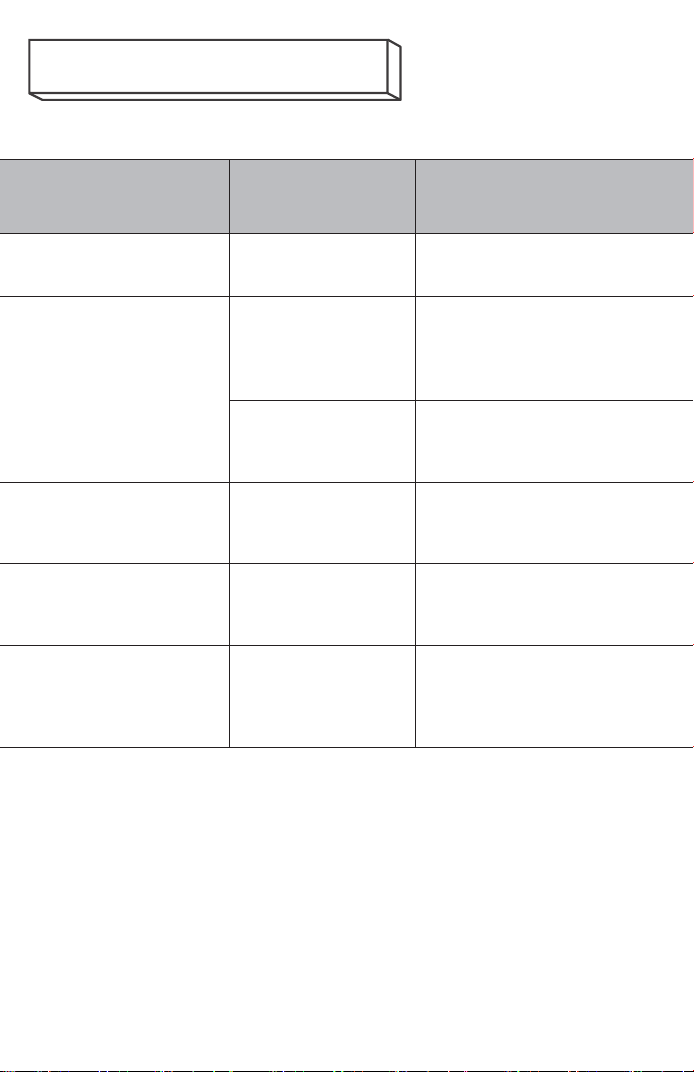
Status
Possible
causes
Treatment Procedure
Unable to connect
to the power supply
Battery
depleted
Initiate charging
No electrical
stimulation
detected
Intensity not
adjusted
Press the intensity
increase button until
the electrical current
is felt
Setting the
intensity too
low
Press the intensity
increase button to
elevate intensity
Electrical
stimulation is too
weak
Residual
charge too
low
Initiate charging
Electrical
stimulation is too
strong
Setting the
intensity too
high
Press the intensity
decrease button to
lower intensity
Electrical
stimulation was
abruptly
interrupted
Residual
charge too
low
Initiate charging
Frequently Asked Questions
The following persons should not
use this product.
Heart disease patients
Pregnant women, women who have recently given birth
The following individuals should consult a doctor
before using this product.
Individuals with an allergic constitution
Patients with a fever of 38°C or above
Individuals requiring rest due to sensory
disturbances or abnormal infections of the skin
Dermatitis or wounds, etc.
Spinal fractures, sprains, muscle strains, etc.
Patients with circulatory disorders
patients with acute (painful) conditions
Individuals currently taking medication
Individuals with bone abnormalities such as
osteoporosis
Safety and Precautions
malignant tumour patients
Individuals with abnormal blood pressure
Individuals experiencing abnormal brain nerve
function (e.g., epilepsy)
Individuals experiencing a distinct sense of
physical abnormality
Patients undergoing treatment at medical
institutions for conditions such as diabetes causing
severe peripheral circulatory impairment
Persons with sensory impairments caused by
disabilities
Please observe the following precautions during use.
Failure to do so may result in accidents, personal
injury, malfunctions, product damage, or
contamination.
Fitness Suit: Cleanse your skin before donning the suit.
Pull the front and back zips upwards to the neckline,
ensuring all electrodes lie flush against the skin. To
remove the suit, pull the front zip downwards. Position
the back zip pull tab upwards, then grasp the fabric at
each shoulder and pull to guide the back zip downwards to
the bottom for easy removal.
Do not place the fitness equipment in a microwave
oven to heat it, near a source of fire, or splash
liquids onto the main body of the product.
Do not use on infants or pets, nor use as a toy for
infants or pets.
Should you experience pain or discomfort during or
after use, or notice any abnormal conditions such as
rough skin, dryness, cracking, rashes, redness,
itching, burning sensations, inflammation, or
allergic reactions, discontinue use immediately and
consult a doctor. Continued use may exacerbate
symptoms.
Operating Instructions

1 Powering On: Press and hold the host unit's ‘ Power
Switch’ composite button for 3 seconds until the orange
light illuminates, indicating the unit is powered on.
2 Account Registration: Open the tablet, connect to the
network, tap the APP icon to enter the APP interface, and
follow the on-screen instructions to complete account
registration first. After successful registration, tap
your account to log in and proceed to the next APP
interface.
3. APP Bluetooth Connection Interface: With the host
unit's LED illuminated in orange, select ‘Connect Device’
on the APP interface. A notice will appear; read it
carefully, tick the agreement box, then click ‘Confirm’
to proceed to the connection screen. Once “ Connected ”
is displayed and the host unit's LED changes from orange
to blue, Bluetooth connection is successful. Click
‘Connected’ to enter the mode selection screen. Tap the
profile icon in the top-left corner to edit personal
details. Complete the information accurately to
facilitate subsequent calorie calculations during
workouts. Upon completing your profile, tap ‘Continue’
to return to the mode selection screen.
4. APP Mode Selection Screen:
Five fixed modes and one VIP mode are available. Fixed
modes allow adjustment only of parameters highlighted in
green within their specific interface (e.g., exercise
duration, repetition time). VIP mode permits
customisation of all APP parameters (e.g., frequency,
pulse width, rise time, fall time, repetition time)

according to individual requirements.
5. APP Intensity Control Interface: After selecting a
mode, press the ‘ Start ’ button to enter the intensity
operation interface. When a channel detects load, its ‘+’
and ‘ - ’ buttons illuminate green; when no load is
detected, they glow white. If white illumination occurs,
check the connection between the main unit and the top
pin of the bodysuit. When a channel indicator is green,
press its ‘+’ button once. The corresponding body part
will illuminate green, indicating one voltage level
output for that channel.
Press the Intensity ‘+’ button to increase intensity by
one level per press, adjustable from 0% to 100%.
Press the Intensity ‘-’ button to decrease intensity by
one level per press, adjustable from 100% to 0%.
Upon completion of the preset exercise duration, press
‘ Restart ’ to cycle through the set time and continue
usage.
To pause mid-exercise, press the ‘Pause’ button.
Upon completion of the set exercise duration, press the
Return button to revert to the mode selection interface.
Here, you may view calories expended during the workout
or select alternative modes to continue exercising.
Kindly note: An internet connection is required during
account registration. Initial login to a newly registered
account necessitates an internet connection for account
verification. Subsequent logins to this account may
proceed without an internet connection.
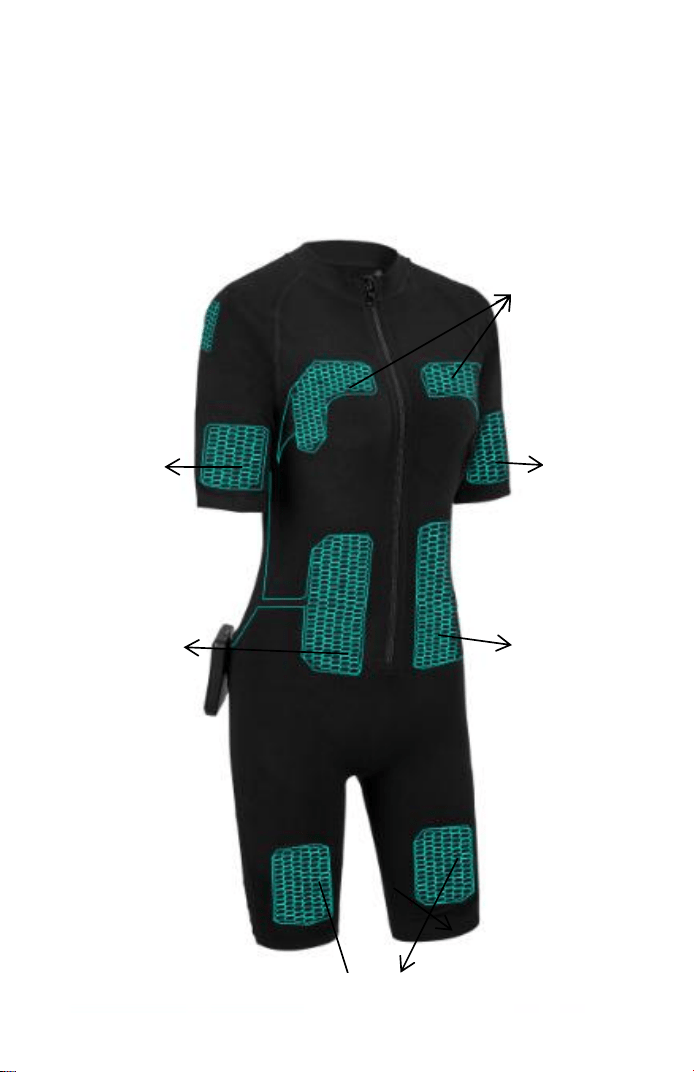
Front
Chest
Pector
Front leg
Quadriceps
Right arm
Biceps
Left arm
Biceps
Abdomen
Abdominal
muscles
Abdomen
Abdominal
muscles
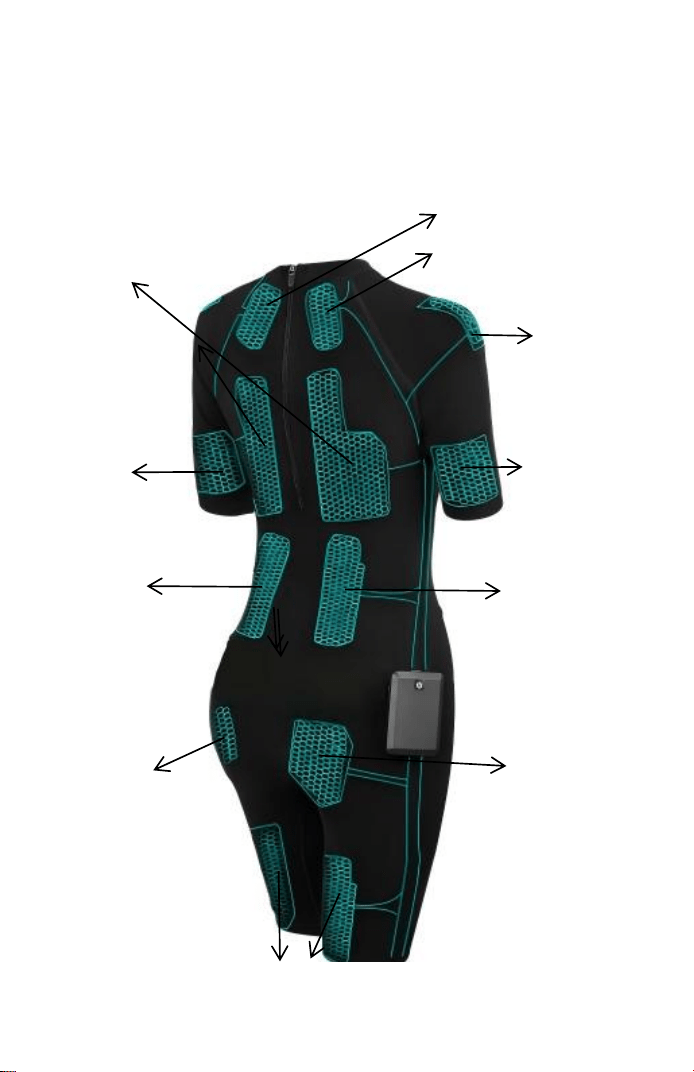
Reverse Side
Neck
Upper trapezius
Posterior thigh
Biceps femoris
Gluteus
maximus
Gluteal
region
Back
Trapezius
Rhomboid
muscles
Teres
major and
teres
minor
Lumbar
region
Spinalis
Right arm
Triceps
brachii
Left arm
Triceps
brachii
Lumbar
region
Spinalis
muscle
Gluteus
maximus
Gluteal
region
Shoulder
Deltoid
muscle
This product's controller requires a 5V 2A
charging input, compatible with all 5V 2A USB
chargers. Please connect the charger to the
product's charging port via a cable for charging.
This product does not support fast charging.
The main unit displays a red light during
charging and a green light when fully charged.
Regarding Transport and Carriage: As this product
contains batteries, it is prohibited from being checked in
as air cargo. Individual items may be carried onto the
aircraft.
Manufacturer: Shenzhen Xinkang Health Technology Co., Ltd.
Address: Units B201 & B301, Buildings A16 & A17, Tan Tou
West Industrial Park, Tan Tou Community, Songgang Subdistrict,
Bao'an District, Shenzhen
Telephone: 400-186-6708
Routine Maintenance/Parameters

FCC Warning Statement: Changes or modifications to this unit not
expressly approved by the party responsible for compliance could void the
user’s authority to operate the equipment. This equipment has been
tested and found to comply with the limits for a Class B digital device,
pursuant to Part 15 of the FCC Rules. These limits are designed to provide
reasonable protection against harmful interference in a residential
installation. This equipment generates, uses and can radiate radio
frequency energy and, if not installed and used in accordance with the
instructions, may cause harmful interference to radio communications.
However, there is no guarantee that interference will not occur in a
particular installation. If this equipment does cause harmful interference to
radio or television reception, which can be determined by turning the
equipment off and on, the user is encouraged to try to correct the
interference by one or more of the following measures:
- Reorient or relocate the receiving antenna.
- Increase the separation between the equipment and receiver.
- Connect the equipment into an outlet on a circuit different from that
to which the receiver is connected.
- Consult the dealer or an experienced radio/TV technician for help.
This device complies with Part 15 of the FCC Rules. Operation is subject
to the following two conditions: (1) this device may not cause harmful
interference, and (2) this device must accept any interference received,
including interference that may cause undesired operation.

FCC Radiation Exposure Statement
The device has been evaluated to meet general RF exposure
requirement.
The device can be used in portable exposure condition without
restriction.