
Product Manual
7-Button Custom Silicone Remote Control
Model No.: 009
Power Rating: 0.025W
Battery Type: CR2025 3V Coin Cell
1. Product Overview
This lightweight silicone remote control is specially designed to match dimmable
lighting fixtures, supporting power on/off, timing auto-shutoff, and brightness
adjustment functions. Adopts standard CR2025 coin cell power supply, low power
consumption, stable signal transmission, simple operation for indoor light
decoration use.
2. Button Functions Introduction
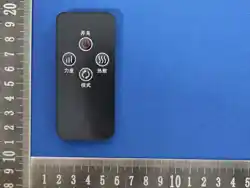
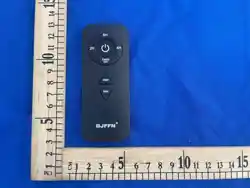
Front Panel Buttons
1. Power Button (Center Icon)
Turn the matched light fixture ON or OFF.
2. 2H / 4H / 8H Timing Buttons
Set auto-off countdown timer:
Press 2H: Light will automatically shut down after 2 hours
Press 4H: Light will automatically shut down after 4 hours
Press 8H: Light will automatically shut down after 8 hours
1. TIMER OFF
Cancel all active timing settings immediately.
2. DIM+ Button
Increase the brightness of the connected light fixture.
3. DIM- Button
Decrease the brightness of the connected light fixture.
Back Cover Battery Compartment
Marked with CR2025 battery installation diagram and RELEASE unlock indicator
for easy battery replacement.
3. Battery Installation Steps
1. Flip the remote control to the back side, locate the RELEASE mark at the bottom of battery
cover.
2. Push the battery cover tab following the RELEASE arrow direction to slide out the cover.
3. Insert one CR2025 3V coin cell battery into the compartment, match positive (+) and
negative (-) polarities as printed on the diagram.
4. Slide the battery cover back into place until fully locked.
4. Operation Instructions
1. Press the central Power button to activate the remote control and turn on your matching
light product.

2. Select 2H / 4H / 8H to set automatic power-off timing as needed; press TIMER OFF to clear
timing mode.
3. Press DIM+ to brighten the light, press DIM- to dim the light to your preferred brightness
level.
4. If the remote fails to respond, replace the CR2025 coin cell battery with a new one.
5. Safety Warnings
WARNING: Contains CR2025 coin lithium battery.
KEEP BATTERIES AWAY FROM CHILDREN. Swallowing a coin battery may cause severe internal
burns and fatal injury within 2 hours.
If battery is swallowed, seek emergency medical treatment immediately.
Do not disassemble, puncture, short-circuit or dispose of battery in fire.
Remove battery if the remote will not be used for a long time to avoid leakage damage.
This remote is only compatible with matching designated lighting products, do not use for
other electrical devices.
Do not expose the remote to high temperature, rain or humid environment.
a) The statement "Ensure the batteries are installed correctly according to polarity (+ and -)."
b) The statement "Do not mix old and new batteries, different brands or types of batteries,
such as alkaline, carbon-zinc, or rechargeable batteries.'
c) The statement "Remove and immediately recycle or dispose of batteries from equipment
not used for an extended period of time according to local regulations."
d) The statement "Always completely secure the battery compartment. If the battery
compartmentdoes not close securely, stop using the product, remove the batteries, and keep
them away from children."
6. Product Specifications
Product Name: 7-Button Custom Silicone Remote Control
Model: 009
Rated Power: 0.025W
Power Supply: CR2025 3V Coin Cell Battery
Operating Voltage: 3V
Button Quantity: 7 Buttons
Material: ABS plastic housing + silicone key buttons
7. Troubleshooting
1. Remote no signal / light does not respond → Check if CR2025 battery is installed correctly or
replace a new battery.
2. Brightness adjustment function invalid → Confirm the matched light fixture supports
dimming function.
3. Timing function does not work → Re-select timing button after turning the light on, press
TIMER OFF to reset before re-setting timer.

FCC Statement
This device complies with part 15 of the FCC Rules. Operation is subject to the following
two
conditions: (1) This device may not cause harmful interference, and (2) this device must
accept any interference received, including interference that may cause undesired
operation. This equipment has been tested and found to comply with the limits for a Class
B digital device, pursuant to part 15 of the FCC Rules. These limits are designed to
provide reasonable protection against harmful interference in a residential installation.
This equipment generates, uses and can radiate radio frequency energy and, if not
installed and used in accordance with the instructions, may cause harmful interference to
radio communications. However, there is no guarantee that interference will not occur in a
particular installation. If this equipment does cause harmful interference to radio or
television reception, which can be determined by turning the equipment off and on, the
user is encouraged to try to correct the interference by one or more of the following
measures:
•Reorient or relocate the receiving antenna.
•Increase the separation between the equipment and receiver.
•Connect the equipment into an outlet on a circuit different from that to which the receiver
is connected.
•Consult the dealer or an experienced radio/TV technician for help.
Caution: Any changes or modifications to this device not explicitly approved by
manufacturer could void your authority to operate this equipment.
RF Exposure Information
The device has been evaluated to meet general RF exposure requirement. The device
can be used in portable exposure condition without restriction.