正面
反面
Sound der dabei bleibt
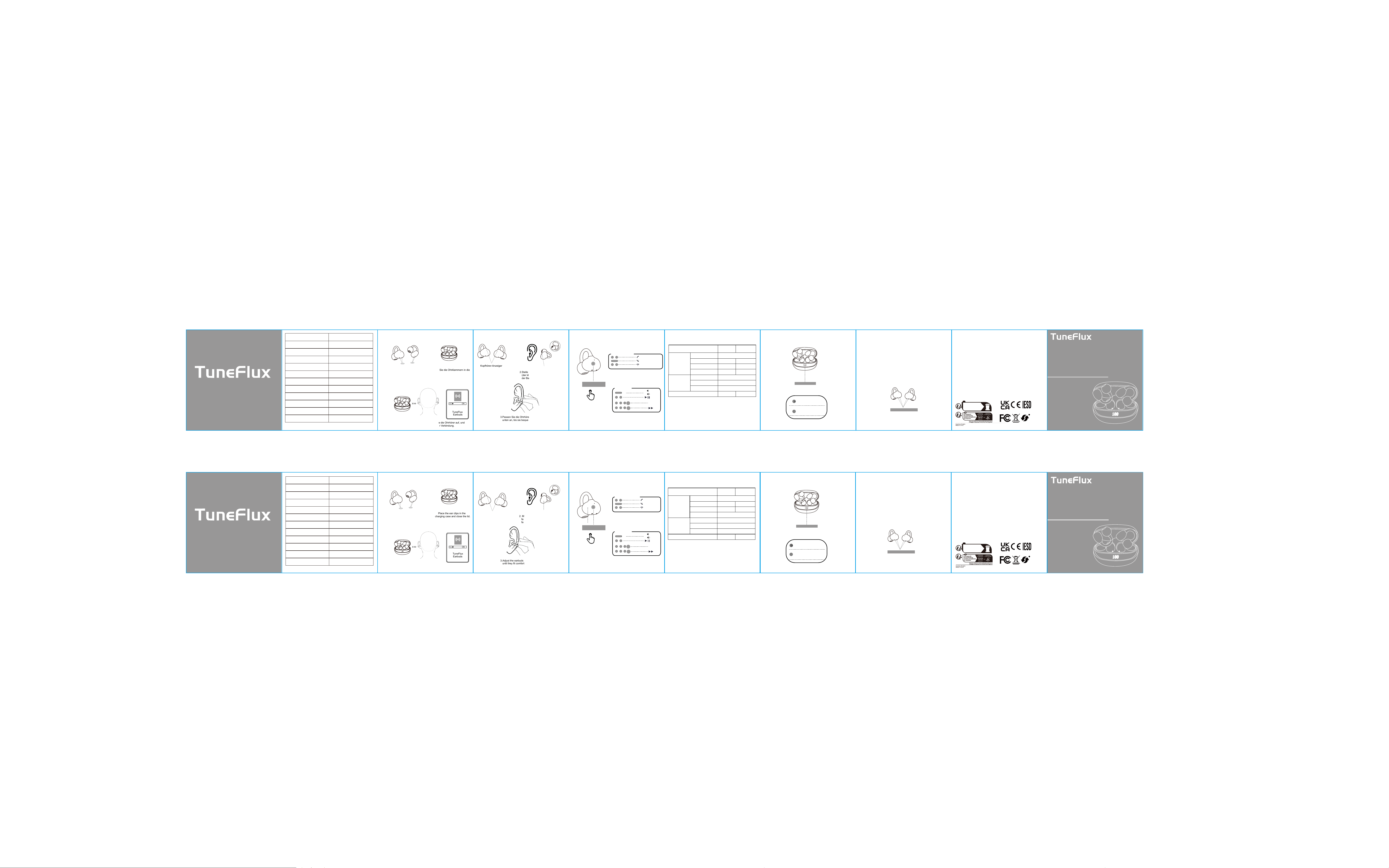
Sound that Keeps Up
Kurzanleitung
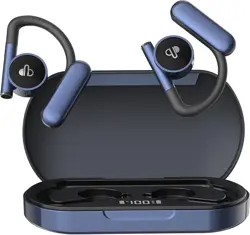
Offene-Ohren Kopfhörer
Entfernen Sie die Schutzfolien
Setzen Sie die Ohrklammern in die
ON
Kopfhörer-Anzeiger
2.Stellen Sie sicher, dass der Lautsprecher
(der kleinere
Teil) nach vorne zeigt und
der Batteriefachdeckel nach hinten zeigt.
Schallausgang
3.Passen Sie die Ohrhörer nach oben oder
unten an, bis sie bequem sitzen.
Erste Paarung
Empfohlen
Intelligente Touchsteuerung
Touchbereich
Telefonanruf-Status
Annehmen
Ablehnen
Gespräch beenden
Musikmodus
2S
Spracha
L
L
R
R
+
-
Fehlerbehebungshandbuch
Wenn die Ohrhörer nicht verbinden oder nur eine
Seite ordnungsgemäß funktioniert, folgen Sie
bitte diesen Schritten:
1.Löschen Sie alle Bluetooth-Einträge für [TuneFlux-B12
Ohrhörer] von Ihrem Telefon und schalten
Sie Bluetooth aus.
2.Legen Sie beide Ohrhörer in die Ladestation, schließen
Sie den Deckel und warten Sie 5 Sekunden.
Place the ear clips in the
charging case and close the lid.
ON
Earbuds
2. Make sure the speaker (the smaller part)
faces foward, and the battery housing
faces backward.
sound outlet
3.Adjust the earbuds up or down
until they fit comfortably
.
FIRST-TIME PAIRING
RECOMMENDED
SMART TOUCH CONTROLS
TOUCH AREA
PHONE CALL STATUS
Answer
Decline
End Call
MUSIC MODE
2S
Voice
Assistant
L
L
R
R
+
-
LED BEHAVIORS
TROUBLESHOOTING GUIDE
If the earbuds fail to connect or only one side works
properly, please follow these steps:
1.Delete all [TuneFlux-B12 Earbuds] Bluetooth records from
your phone and turn off Bluetooth.
2.Place both earbuds into the charging case, close the lid, and wait for 5
seconds.
Öffnen Sie den Deckel, setzen Sie die Ohrhörer auf, und
wählen Sie "TuneFlux" zur Verbindung.
Earbuds
TuneFlux
TuneFlux
ssistent
Quick Start Guide
Open-Ear Headphones
Ziffern blinken Laden
Anzeige 100: Akku voll
Warnhinweise und Hinweise zur Nutzung des Produkts
Bitte verwenden Sie keine korrosiven Reinigungsmittel zum
Reinigen dieses Produkts.
Heizen Sie dieses Produkt nicht auf oder bringen Sie es in die Nähe
einer Feuerquelle, wie z. B. eines Kochherdes.
Lassen Sie dieses Produkt nicht lange Zeit direkter
Sonneneinstrahlung ausgesetzt.
Werfen Sie dieses Produkt nicht in die Feuer, um Explosionen zu vermeiden.
Versuchen Sie nicht, dieses Produkt zu zerlegen und zu modifizieren, da es
keine reparierbaren Komponenten enthält.
Verwenden Sie dieses Produkt nicht im Regen.
Wenn Sie dieses Produkt über einen längeren Zeitraum nicht verwenden
möchten, lagern Sie es in einer trockenen Umgebung auf und laden Sie die
Kopfhörer mindestens einmal pro Monat auf, um ihre Lebensdauer zu verlängern.
Vermeiden Sie extreme Temperaturen und Staub.
Product Usage Warnings and Precautions
Do not use corrosive cleaning agents to clean this product.
Do not heat this product or place it near a fire source, such as a cooking stove.
Do not expose this product to direct sunlight for a long time.
Do not discard this product in fire to avoid explosion.
Do not attempt to disassemble this product to make any modifications, as it
does not contain any repair components.
Do not use this product in the rain.
If you do not plan to use this product for a long time, please store it in a dry
environment and charge the headphones at least once a month to extend their
lifespan. Avoid extreme temperatures and dust.
Numbers blinking Charging
Display 100: Battery full
V6.0
2.402GHz-2.480GHz
A2DP、AVRCP、HSP、HFP
3.7v,40mAh
Φ11mm
3.7V,400mAh
5V/200mA
Type-C
Bluetooth-Version
Betriebsfrequenz
Unterstützte Bluetooth-Protokolle
Musikspielzeit
ca. 4 Stunden
Gesprächsdauer
ca. 3 Stunden
Akkuspannung der Kopfhörer
Lautsprechereinheit
Akkukapazität der Ladestation
Ladezeit der Ladestation
ca. 2 Stunden
Ladeeingangsspezifikation des
Akkufachs
Akkuzykluslebensdauer
Lade- und Entladezyklen ≥ 300
Ladeanschluss der Ladestation
Bluetooth Version
V6.0
Working frequency
2.402GHz-2.480GHz
Support Bluetooth protocol A2DP、AVRCP、HSP、HFP
Music time
About 4 hours
Call duration
About 3 hours
Headphone battery
3.7v,40mAh
Speaker unit Φ11mm
Capacity of the charging case
3.7V,400mAh
Charging time of the charging case About 2 hours
Charging input standard for the
battery compartment
5V/200mA
Battery cycle life
The charge and discharge
cycle is ≥300 times
The charging port of the
charging case
Type-C
LED-Verhaltensweisen
LED-Anzeige
LED indicator
Basic Operations
Control
Left
Right
Music playback
Play/pause
tap twice(either side)
Next song
tap three times
Lower the volume
-1 level per second
Long press
Increase the volume
Long press
+1 level per second
Conversation
Answer the call
tap twice(either side)
Call ended
tap twice(either side)
Reject the call
Press and hold for 2 seconds (either side)
tap three times
Voice assistant (Siri and Google Assistant)
Steuerung
Links
Rechts
Musikwiedergabe
Wiedergabe/Pause
Zweimal tippen (entweder Seite)
Nächster Song
Dreimal tippen
Verringern Sie die Lautstärke
Anrufe
Gehen Sie ans Telefon
Zweimal tippen (auf einer beliebigen Seite)
Gespräch beenden
Zweimal tippen (auf einer beliebigen Seite)
Anruf ablehnen
2 Sekunden gedrückt halten
(auf einer beliebigen Seite)
Dreimal leicht tippen
Sprachassistent (Siri und Google Assistant)
Basic Operations
Headset Connection Indicator Light
1. Open the charging case lid, the earphones will turn on automatically with
red and blue lights flashing on both ears.
2. After the earphones are paired, the red and blue lights on one earphone
will flash.
3. After pairing with the phone, the indicator lights will turn off.
Ladestation und schließen Sie diese
1. Öffnen Sie den Ladecase, die rote
und blaue LED der Kopfhörer
blinkt, um den Paarungsmodus
einzuschalten. Wenn das
Licht ausgeht, ist die
Paarung erfolgreich.
Headphone Indicator
1. Open the charging case. The red
and blue LED of the headphones
blinks to enter pairing mode. When
the light goes out, the pairing
is successful.
Remove the protective films.
Werden die Kopfhörer automatisch wieder verbinden?
Die Kopfhörer verbinden sich automatisch mit dem
zuletzt verbundenen Gerät.
Will the earphones automatically reconnect?
The headphones will automatically connect to the last connected device.
Hinweise zur Ladung der Kopfhörer
(Bevor Sie ein neues Gerät verbinden, trennen Sie bitte die Bluetooth-Verbindung
mit dem vorher gepaarten Gerät.)
(Please disconnect the Bluetooth connection with the previously paired
device before connecting to a new one.)
Headphone Charging Precautions
Manufacturer:
HONGKONG BAOYITONG LIMITED
Address:
RM 4C, 12/F TUNG LEE IND BLDG 9 LAI YIP ST
KWUN TONG 999077 HONGKONG
1. Wenn sich auf den Ladekontaktanschluss der Ohrhörer Wasserflecken,
Schweiß oder andere Verunreinigungen befinden, reinigen Sie sie
vor dem Laden, um einen schlechten Kontakt zu vermeiden.
2. Setzen Sie die Ohrhörer in eine vollständig geladene Ladestation und
schließen Sie den Deckel. Die Ohrhörer beginnen automatisch mit dem Laden.
Ladekontaktanschluss
R
FR
ÉLÉMENTS D'EMBALLAGE
À SÉPARER ET À DÉPOSER
DANS LE BAC DE TRI
BAC
DE
TRI
6
100
6
100
1. If there are water stains, sweat or other impurities on the charging interface
contacts of the earbuds, wipe them clean before charging to avoid poor contact.
2. Place the earbuds into a fully charged charging case and close the lid;
the earbuds will start charging automatically
.
Charging Contact Port
Manufacturer:
HONGKONG BAOYITONG LIMITED
Address:
RM 4C, 12/F TUNG LEE IND BLDG 9 LAI YIP ST
KWUN TONG 999077 HONGKONG
R
FR
ÉLÉMENTS D'EMBALLAGE
À SÉPARER ET À DÉPOSER
DANS LE BAC DE TRI
BAC
DE
TRI
3.If the earbuds still fail to connect after disconnection and being put back
into the charging case, you can check whether the charging
ports are clogged with dirt.
3.Wenn die Ohrhörer nach der Trennung und dem Zurücklegen
in die Ladebox immer noch keine Verbindung herstellen, können
Sie prüfen, ob die Ladeanschlüsse durch Schmutz verstopft sind.
Lang drücken
+1 Stufe pro Sekunde
Lang drücken
-1 Stufe pro Sekunde
Lautstärke erhöhen
Kopfhörer-Verbindungsanzeige
1. Öffnen Sie den Deckel des Ladeetuis, schalten sich die Ohrhörer automatisch
ein, wobei an beiden Ohrhörern rote und blaue Lichter blinken.
2. Nachdem die Ohrhörer gekoppelt sind, blinken die roten und blauen Lichter an
einem der Ohrhörer.
3. Nach der Kopplung mit dem Handy erlöschen die Anzeigelichter.
FCC label information:
FCC ID: 2BT6B-B12
Model No.: B12

FCC warning statements:
This equipment has been tested and found to comply with the limits for a Class
B digital device, pursuant to part 15 of the FCC Rules. These limits are
designed to provide reasonable protection against harmful interference in a
residential installation. This equipment generates, uses and can radiate radio
frequency energy and, if not installed and used in accordance with the
instructions, may cause harmful interference to radio communications.
However, there is no guarantee that interference will not occur in a particular
installation. If this equipment does cause harmful interference to radio or
television reception, which can be determined by turning the equipment off and
on, the user is encouraged to try to correct the interference by one or more of
the following measures:
• Reorient or relocate the receiving antenna.
• Increase the separation between the equipment and receiver.
• Connect the equipment into an outlet on a circuit different from that to which
the receiver is connected.
• Consult the dealer or an experienced radio/TV technician for help.
Caution: Any changes or modifications to this device not explicitly approved
by manufacturer could void your authority to operate this equipment.
This device complies with part 15 of the FCC Rules. Operation is subject to the
following two conditions: (1) This device may not cause harmful interference,
and (2) this device must accept any interference received, including
interference that may cause undesired operation.
The device has been evaluated to meet general RF exposure requirement. The device
can be used in portable exposure condition without restriction.