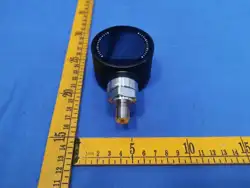
DIGITAL PRESSURE GAUGE
MANUAL
Ⅰ. NOTICE
Ⅲ. DESCRIPTION
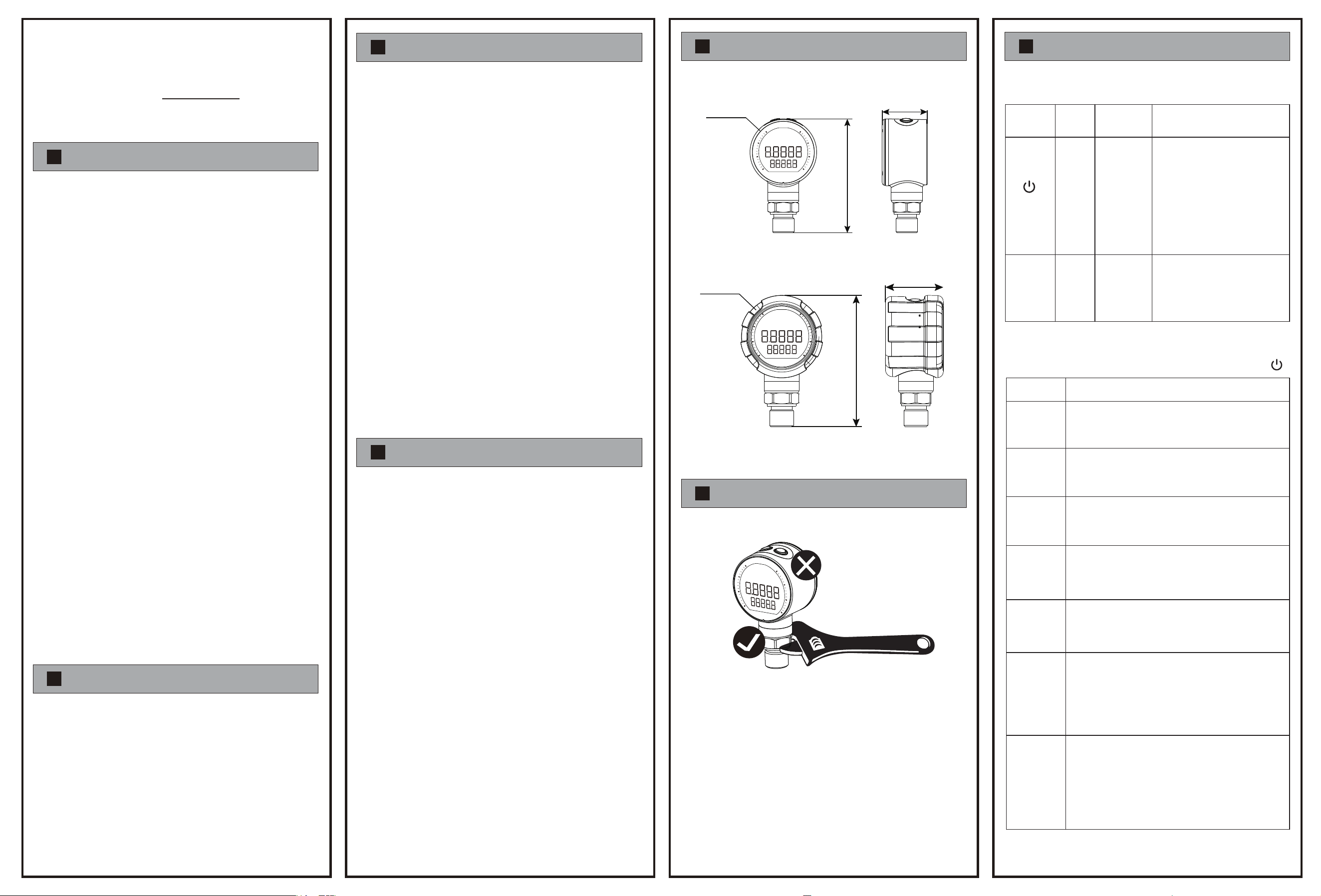
Ⅴ. DIMENSION
Ⅵ. INSTALL
Ⅶ. FUNCTION DESCRIPTION
Ⅳ. SPECIFICATION
Ⅱ. WARNING
Intelligent digital pressure gauge is a sophisticated pressure
measuring product suitable for portable pressure measurement. This
product adopts a main and auxiliary screen design, with the main
screen displaying real-time pressure and the auxiliary screen
switchable to display temperature, humidity, maximum value,
minimum value and other data. The protection level is IP67. The
product adopts Type-C external power supply and is equipped with
Bluetooth function for convenient and quick debugging and parame-
ter configuration. It is mainly suitable for use in inspection
instruments, calibration instruments and other scenarios.
Pressure range:
Vacuum range: (0~-100) kPa
Compound range: -0.1~0.1...1.0...2.5 MPa
Micro pressure range: -100...-25...-5~2...5...25...100 kPa
Conventional range: 0~0.16...10...60 MPa
(See product label for details)
Accuracy : See product label for details
Power supply voltage: Lithium battery (rechargeable)
or powered by 2 AAA batteries
Contact method: Bluetooth
Installation method: M20 * 1.5, G1/4 external thread,
G1/2 external thread
Dial size: 2.5 inch
Data Configuration: Bluetooth configuration
Data storage: 100W pieces
Screen display mode: LCD screen (black background with white
text)
Joint material: 304 stainless steel
Protection level: IP67
Operating temperature: (-10~60) ℃
(!) Product damage caused by non-professional operations that are
not in accordance with the operating instructions is not covered in
the warranty.
1. When the ambient temperature is above 60”C, please use a
forced fan or cooler for cooling.
2. The installation, debugging and maintenance of this product
should be carried out by qualified engineering and technical
personnel.
3. The product shell should be reliably grounded to help resist
electromagnetic interference and ensure electrical safety.
4. If the fault or abnormality of this product may cause a major
accident in the system, please set up an appropriate external
protection circuit to prevent accidents.
5. The company is not responsible for any direct or indirect losses
other than the product itself.
6. The company reserves the right to change product instructions
without notice.
Configurable to record up to 1 million data entries
Low power consumption design
Split-screen display on the main and secondary screens allows
simultaneous display of multiple values
Bluetooth connection debugging, compatible with SECA
software, supports digital twins, enables parameter adjustment
and data viewing at any time
☆
☆
☆
☆
5.1 Without protective cover 7.1 Product Top Button Description
7.2 Quick function description under the Power Button( )
Note:
5.2 With protective cover
1. After receiving the product, please check whether the packaging
and appearance are intact, and check whether the product
model and specifications match the product you purchased.
2. Install and wire the product correctly and reliably according to
the process connection, electrical connection and installation
method provided by the product.
3. During use, please pay attention to the product's technical
specifications and usage conditions, such as allowed medium
and temperature, overload pressure, power supply voltage, etc.
4. The digital pressure gauge is a precision device. Users should
not disassemble it by themselves when using it, and do not
touch the diaphragm with hard objects to avoid damage to the
product.
5. During the installation process, pay attention to protecting the
product and do not install or disassemble it forcefully, otherwise
it will easily damage the product, especially the installation
thread.
6. Please use a suitable wrench when installing or disassembling.
Do not forcibly twist the shell by hand to tighten or disassemble,
otherwise the damage caused will not be covered by the
warranty.
7. After installation and power-on test, it usually takes several
minutes for the product to have stable output and normal
operation. This is a normal phenomenon.
8. After power-on test after installation, if abnormal phenomena
occur, please contact our company’s after-sales technicians
unless you have the product adjustment equipment and skills.
9. It may be affected by installation stress during the installation
process. After the installation is completed, if the reading is not
at zero, please clear it before use.
111
Φ65
(Dial size)
44
Φ65
(Dial size)
114.5
50.5
Do not twist this area.
1. Before installing the device, please confirm if the installation
space can accommodate the product.
2. Be sure to use an adjustable wrench when installing the
pressure gauge. The wrench must complete the equipment
tightening operation at the hexagonal position of the threaded
interface to ensure airtightness. Do not directly fix the device
by twisting other parts!
3. Please make sure to fully charge the product in advance and
use the standard adapter and charging cable when charging.
After on-site installation, ensure that the product has electricity
before it can operate normally.
Name
power
button
settings
key
Power on
Quick function
switching
Unit switching
System
Settings
Button Function Instructions
SET
In the power on state: Short press
the power button to quickly
switch the display content and
shortcut functions of the
secondary screen, long press the
power button for 3 seconds to
shut down.
In shutdown state: Short press to
power on
In startup mode: Short press to
switch units, long press for 3
seconds to enter system
parameter settings
Quick Access
maximum
minimum
Current
temperature
Zero
clearing
Record
Full scale
Current
humidity
Functional Description
The MAX symbol lights up, and the secondary screen
displays the current maximum value.
The MIN symbol lights up, and the secondary screen
displays the current minimum value.
The ℃ or ℉ symbol lights up, and the secondary screen
displays the current ambient temperature.
%The symbol lights up, and the secondary screen displays
the current environmental humidity.
The FS flag lights up, and the secondary screen displays
the current full-scale value.
The secondary screen displays code C-L, and the main
screen pressure display flashes at a frequency of 1 second.
Press the SET button briefly to fully display the main screen
and clear the current zero position. Zero tolerance limit of
10% FS.
When the code rcd is displayed on the secondary screen,
short press the SET button to quickly start data recording.
The recording interval is the same as the current acquisition
frequency. When recording the status, rcd flashes once
every 1 second. Short press the SET button again to stop
recording.
Ⅷ. SYSTEM PARAMETER SETTING
Ⅸ
. BLUETOOTH COMMUNICATION
Content Code Display
Sampling
frequency
Filter
Coefficient
Temperature
unit
Auto
Shutdown
Absolute
pressure
mode s
witching
Bluetooth
switch
Secondary
screen: rAtE
Main screen:
setting values
Secondary
screen: FIR
Main screen:
setting values
Default: 3
Default: ℃
Default: AS-0
(function
disabled)
Secondary
screen: TEMP
Main screen:
℉/℃
Secondary
screen: AS-1/0
Main screen:
ON/OFF
Secondary
screen: ABS
Main screen:
ON/OFF
Set whether to enable absolute
pressure mode, ON/OFF。
ON means to turn on the absolute
pressure mode, OFF means to turn
off the absolute pressure mode.
Secondary
screen: BLE
Main screen:
setting values
Functional Description Default Value
Default: 0.3S
SECA
Android/ios
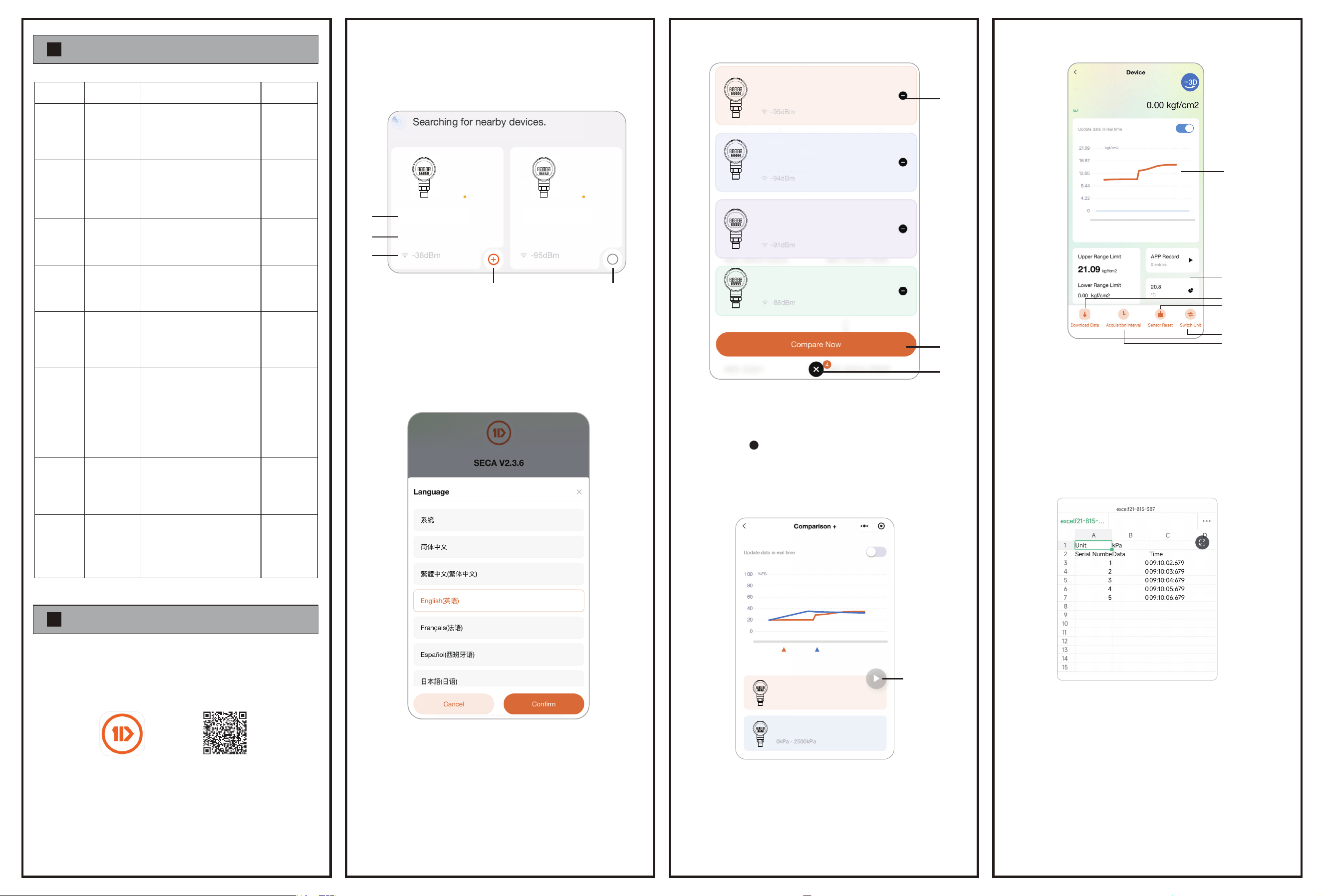
This product can be debugged through on-site WeChat mini programs and
APP clients. The set parameters include: data collection frequency, current
pressure data, reset function, etc.
2.1 Main interface composition
① : Equipment model name.
② : Device MAC address.
③ : Bluetooth communication signal situation, the larger the value, the
worse the signal.
④ : Connect the device.
⑤ : Remove the device.
①
②
③
④
⑤
+
-
DGP-1 DGP-2
F0:6F:C3:16:10:97 F0:6F:C3:16:10:98
2.2 Sub interface composition
2.3 Multi device connection group mode
*Up to 4 different Bluetooth
devices can be added to the
same group.
①
②
③
DPG-1
DPG-2
DPG-3
DPG-4
F0:6F:C3:16:10:96
F0:6F:C3:16:10:97
F0:6F:C3:16:10:98
F0:6F:C3:16:10:99
2.4 Data observation under multi device connection
2.5 Single device connection mode
DPG-1
0kPa-2500kPa
DPG-1 DPG-2
DPG-2
①
2.6 Data export mode
Note:
① In data export mode, the exported data includes parameters
such as collection time, real-time pressure situation, serial number,
etc.
② The total amount of exported data is related to the collection
time and sampling frequency.
③ The larger the amount of data, the longer the export time. If the
exported data exceeds 1000 at a time, please ensure that the
digital pressure gauge and mobile phone maintain Bluetooth
communication at all times.
Set the collection frequency
and gear of the sensor.
Here are 10 gear options
available: 0.1S, 0.3S, 0.5S, 0.7S,
1S, 2S, 3S, 5S, 8S, and 10S
Set the filtering coefficient
within the range of 1 to 7.
Set the unit for displaying the
current ambient temperature,
which can be switched
between ℉ and ℃ units.
Set whether to enable automatic
shutdown function, AS-1 means
to turn on the function, AS-0
means to turn off the function.
The instrument panel will
automatically shut down within
30 minutes without any button
operation after being turned on.
Backlight
delay
shutdown
Default:
3 minutes
Secondary
screen: BL
Main screen:
setting values
Set the backlight delay off time
within the range of 1 minute, 3
minutes, 5 minutes, 7 minutes,
and 10 minutes, with the
backlight normally on.
Set whether to enable
Bluetooth function, ON/OFF。
ON means Bluetooth function
is turned on, OFF means
Bluetooth function is turned off.
Default: ON
Bluetooth
function
turned on
Use the mobile system 'Scan' or browser 'Scan' to scan the QR code below
and install the app using the installation package.
Both of the above methods can search for devices, just connect.
After installing "SECA", device debugging can be carried out through the
following operations:
1.
2.
2.
Note:
① Under the secondary interface, the version number of the software
function can be viewed.
② Users can switch app languages in the language function menu.
(After selecting, you need to restart the app)
Note:
① : Remove added devices
② : Enter data comparison
③ : Click to switch to the
device addition interface
X
Note:
① : Users can click the play button to enable/disable remote data
recording. The final mobile phone will organize the collected data
into EXCEL format.
Note: To ensure the normal connection of the mobile phone to the device,
please keep the cellular data, positioning, and Bluetooth functions on at
all times.
Enter Mini Program
Note:
①:Read technical data from device history.
② :Reset operation of digital pressure gauge.
③ :Unit switching.
④ :Modify the equipment acquisition interval.
⑤ :Enable/disable remote data recording.
⑥ :Pressure line chart.
⑥
①
②
③
④
⑤
DPG-1
F0:6F:C3:16:10:96
Open "Google Play" on your Android phone, search for "SECA"
to download the app.
Open the "App Store" on your iOS phone and search for "SECA"
to download the app
① Android:
② iOS:
Note: Enabling the
internal absolute
pressure sensor will
reduce the accuracy
to ± 1% FS, for
reference only.
Restore
factory
settings
Secondary
screen: REST
Main screen:
CONF
Note: After restoring
the factory settings,
delete all recorded
data and restore all
set values to the
factory state.
Set to restore factory settings, the main
screen displays CONF, short press the
power button CONF to start flashing, and
short press the power button again to
restart the instrument, indicating
successful factory settings restoration.
Ⅻ. AFTER-SALE SERVICE
Ⅺ
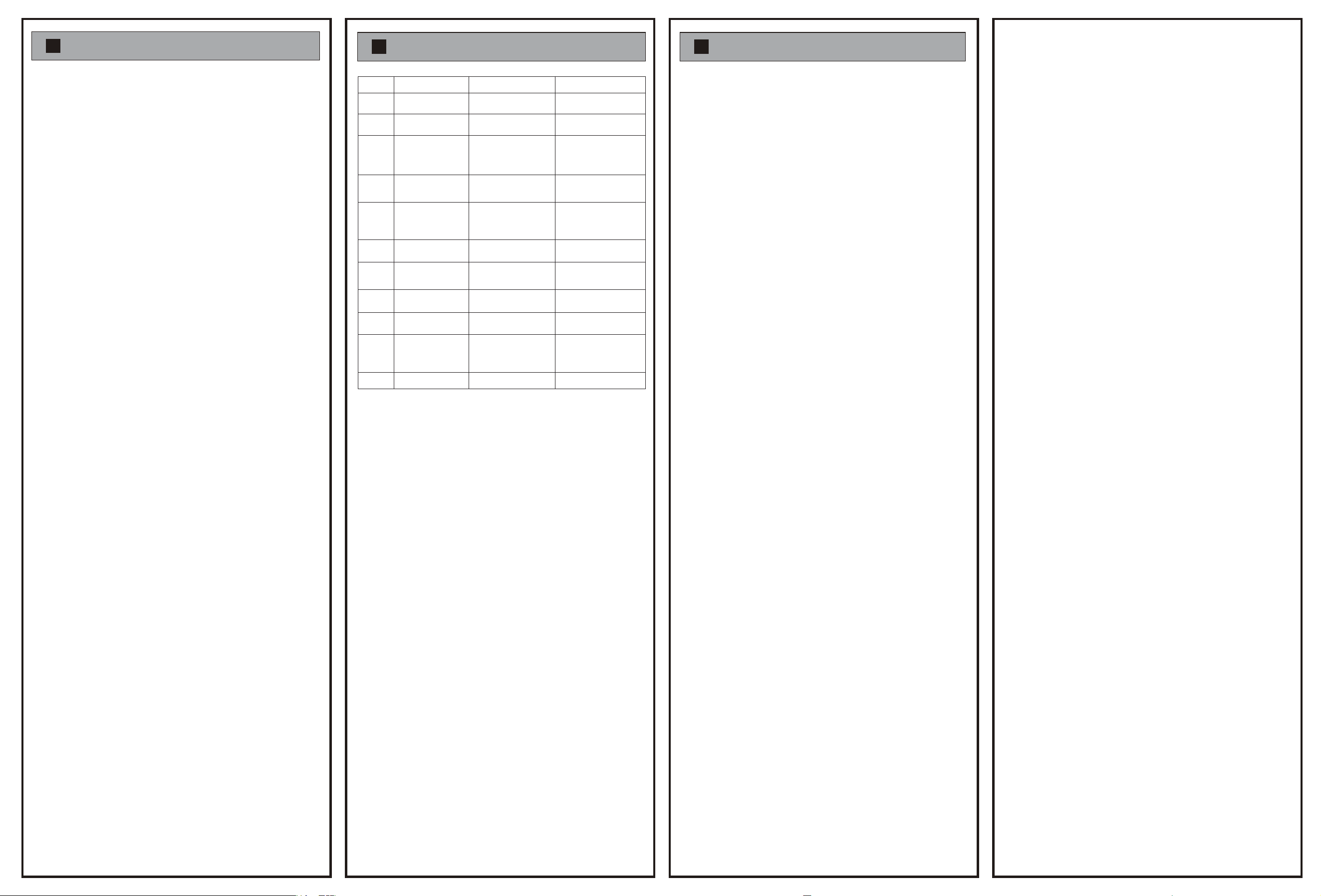
. PROBLEMS & SOLUTIONS
Ⅹ. FCC WARNING
After-sales service and warranty terms
The product warranty period is 24 months from the date of delivery. If
our company's products fail during normal use within 7 days from the
date of sale, consumers can choose refunds, exchanges, mainte-
nance and other services. After consumers purchase our company's
products, they can be repaired free of charge within two years if there
is a failure that is not caused by human damage. The purchase time
is based on the invoice or receipt date issued at the time of purchase.
For consumers who are not satisfied with the free replacement or free
warranty service, our company still provides technical services.
The following situations do not qualify for the "Three Guaran-
tees" service
1) All damage caused by human factors and use in abnormal working
environment, failure and damage caused by not using according to
the instructions or using in an environment not specified in the
instructions, etc.;
2) Users dismantle, repair, and modify products without the consent of
our company;
3) Damage caused by poor transportation after purchasing our
products;
4) Damage caused by other force majeure (such as floods, lightning
strikes, earthquakes, abnormal voltage);
5) Normal use, wear, cracking and contamination, etc.;
6) The products are mainly divided into shells, circuit boards and
pressure-sensitive components. The normal wear and tear of the shell
is not covered by warranty, and the shell will not be replaced.
Over-range use or high-temperature use will cause circuit board
damage and are not covered by warranty. The warranty does not
cover damage to the pressure-sensing element caused by overpres-
sure or touching the membrane with hard objects;
7) Products that do not belong to our company (such as fakes);
8) Failure to provide valid shopping receipts, no warranty card, etc.;
9) Some accessories are not covered by the three guarantees, such
as batteries, etc. If there is any damage, please purchase accessories
for this product.
Warning:
Do not disassemble the product without authorization!
It is strictly forbidden to insert sharp objects into the
pressure-inducing hole!
2026-03-09 B/0
1.
2.
⚠
1
2
The backlight
is very dim
Battery identification
flashing
3
5
7
Pressure remains
unchanged
4
Display E-E 1. Abnormal sensor
communication
2. Sensor damage
1. Return to factory for
repair
Display E-H
The numerical jump
is too slow
1. Battery charging
2. Replace the dry battery
Low battery level
1. Battery charging
2. Replace the dry battery
Low battery level
1. Resetting under pressure
leads to
2. Pressure hole blockage
3. The sensor is damaged
1. Pressure exceeds the
range
2. Sensor damage
1. Filter constant setting issue
2. The collection frequency
setting cycle is too long
1. Adjust the filtering coefficient
2. Adjust the collection frequency
6
Display LOW bAtt
Low battery level 1. Battery charging
2. Replace the dry battery
8
The value jumps
too fast
Filter constant setting
issue
1. Easy to damage sensors
2. Easy to cause leakage
1. Easy to damage
pressure gauge
2. Causing pressure
deviation
Adjust the filtering
coefficient
Add buffer tubes
Add heat pipes/fins
9
10
Frequent pressure
impact
There is high
temperature on site
Memory data is full Clear stored data
11
FULL
1. Be careful not to
overpressure
2. Return to factory for
repair
1. Reset to zero without
pressure
2. Check the pressure hole
3. Return to factory for repair
Number Problem Reason Solution
This device complies with part 15 of the FCC Rules. Operation is subject to the
following two
conditions: (1) This device may not cause harmful interference, and (2) this
device must
accept any interference received, including interference that may cause
undesired operation.
Note: This equipment has been tested and found to comply with the limits for
a Class B digital
device, pursuant to part 15 of the FCC Rules. These limits are designed to
provide
reasonable protection against harmful interference in a residential installa-
tion. This equipment
generates, uses and can radiate radio frequency energy and, if not installed
and used in
accordance with the instructions, may cause harmful interference to radio
communications.
However, there is no guarantee that interference will not occur in a particular
installation. If this equipment does cause harmful interference to radio or
television reception, which can be determined by turning the equipment off
and on, the user is encouraged to try to correct the interference by one or
more of the following measures:
—Reorient or relocate the receiving antenna.
—Increase the separation between the equipment and receiver.
—Connect the equipment into an outlet on a circuit different from that to
which the receiver is connected.
—Consult the dealer or an experienced radio/TV technician for help.
Note: The Grantee is not responsible for any changes or modifications not
expressly
approved by the party responsible for compliance. such modifications could
void the user's authority to operate the equipment.
The device has been evaluated to meet general RF exposure requirement.
This equipment complies with FCC's RF radiation exposure limits set forth for
an uncontrolled environment. This device and its antenna(s) must not be
co-located or conjunction with any other antenna or transmitter.