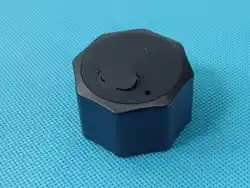

Car Tracker Tags
USER MANUAL
Structure introduction
Car Tracker Tags
Connection: Apple Find My network for global positioning search
Shell: ABS+N52 Strong Magnet,Environmentally
friendly and durable
Battery capacity: 1000mAh Rechargeable Battery
Standby time: 60 months
Product size: 45*45*25mm
Product weight: 80g
System requirements and compatibility:
①Apple lD installation
②iOS 14.5 or later for iPhone and iPod touch models
③iPad models with iPad OS 14.5 or newer installed
Parameters
Preparation for Connection
1. Turn on your phone's Bluetooth
(Settings - Turn on Bluetooth)
2. Open the phone Settings -
Notifications - Find My
(turn on all notification permissions)
3. Open the phone Settings - Cellular -
Find My (WLAN and Cellular Data)
4. The mobile device must be logged
into Apple ID.
(These are the default options if
you haven't turned them off manually)
1. Press Power Button once
2. Hear four beeps "di di”
3. Open the app "Find My"
Steps for connection
4. Click on "Items → Add Item →Other
Supported Item" for the first Item
Click on Items → '+' → Add Other Item"
if not the first item
5. Search for the product name "Smart Tag" - Click on "Connect -
Name Item - Choose an Emoji - Done" (Make sure that the product
is within 1 meter of the device to which it is to be connected).
Features
1. Anti-lost function
When the product leaves the connected device for a
distance, the device system will automatically pop up
to remind lost.
2. Positioning function
The location of the product can be viewed on the
down the fifth press for more than 5 seconds until you
hear a prompt sound to restore factory settings. Only
then can it be paired with another phone
using the "Find My" app on the phone. Then, quickly
press the button five times consecutively, holdin
The built-in 1000mAh Polymer battery of the product
Please fully charge the device before use.(normally a
battery can be used for about 60 months).
5. Shutdown"Long press 3 seconds" will make two
"beeps" to indicate that the product is turned off.
6. After pairing with a phone, you need to unpair i
connected device (iPhone, iPad, MAC).
Note: The positioning function is realized through the
official Find My network, as long as there are Apple
devices around the product, you can know the
location of the product. (This process does not
disclose personal information)
3. Reminder function
Click on "Play Sound" in the App "Find My", and the
device will emit a continuous sound of "di, di…" (Make
sure that the device and the phone are within barrier-
free 4 meters of each other).
4. Battery
t
g
.
Function
Key
Charging
Port
Smart Tag
www.findcardtag.com
serve@findcardtag.com
Scan the QR code
To view the Setup Video
And Activate the Warranty.
FCC Caution:
This device complies with part 15 of the FCC Rules. Operation is
subject to the following two conditions: (1) This device may not
cause harmful interference, and (2) this device must accept any
interference received, including interference that may cause
undesired operation.
Any changes or modifications not expressly approved by the party
responsible for compliance could void the user's authority to operate
the equipment.
NOTE: This equipment has been tested and found to comply with
the limits for a Class B digital device, pursuant to Part 15 of the
FCC Rules. These limits are designed to provide reasonable
protection against harmful interference in a residential installation.
This equipment generates, uses and can radiate radio frequency
energy and, if not installed and used in accordance with the
instructions,may cause harmful interference to radio communications.
However, there is no guarantee that interference will not occur in a
particular installation.
If this equipment does cause harmful interference to radio or
television reception,which can be determined by turning the
equipment off and on, the user is encouraged to try to correct the
interference by one or more of the following measures:
-- Reorient or relocate the receiving antenna.
-- Increase the separation between the equipment and receiver.
-- Connect the equipment into an outlet on a circuit different from
that to which the receiver is connected.
-- Consult the dealer or an experienced radio/TV technician for help.
The device has been evaluated to meet general RF exposure
requirement. The device can be used in portable exposure condition
without restriction.