Instruction Manual
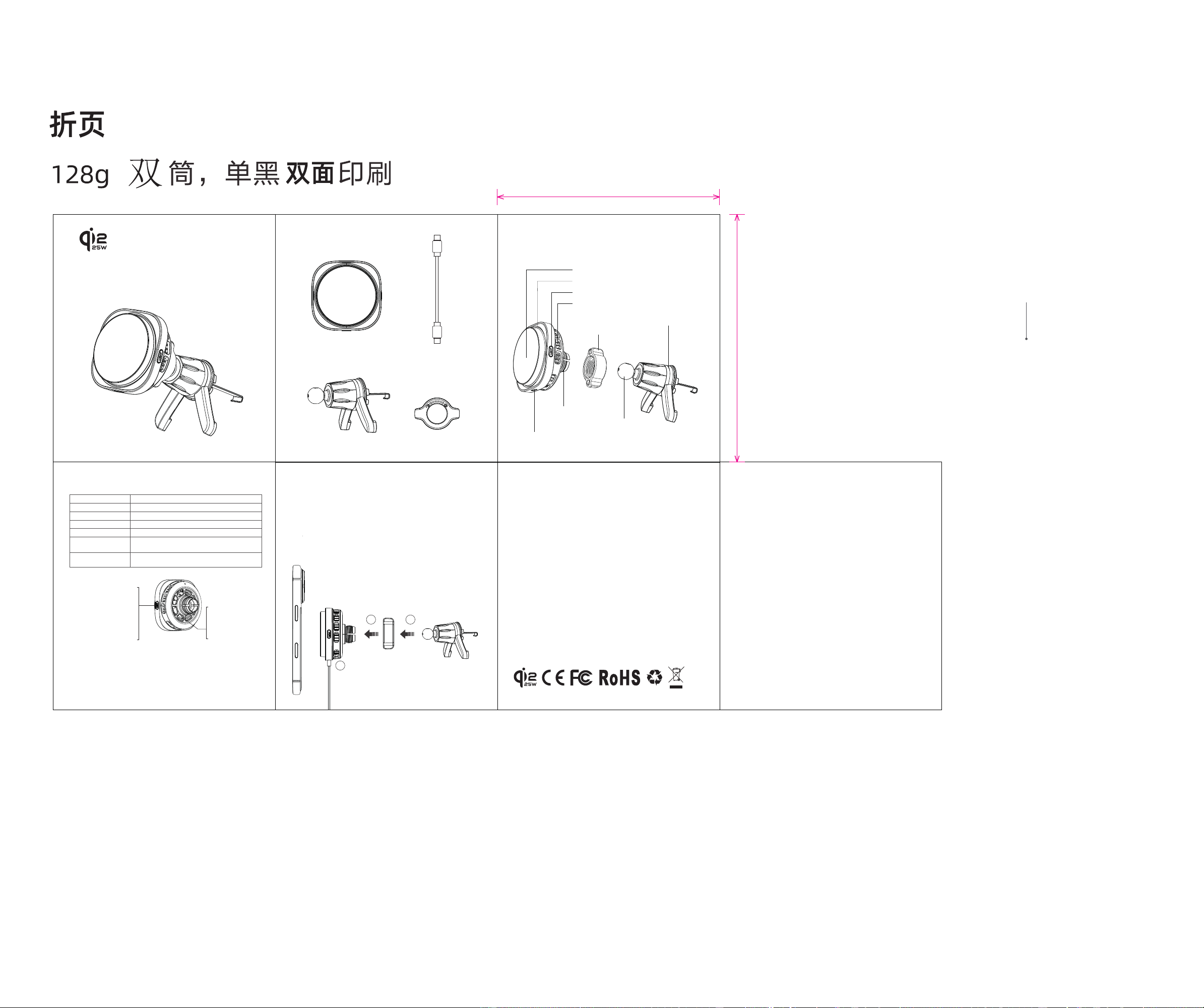
Accessories List
Product Introduction
LED Ambient Light Status Indication
Main Unit × 1
Instruction Manual × 1
Type-C Charging
Cable (1m) × 1
Air Vent Clip × 1 Nut × 1
Nut
LED Ambient Light
Aluminum Alloy Heat Sink
type-c Po
Magnetic Wireless Charging Area for Mobile Phones
Refrigeration (On/O) & LED Ambient Light (On/O) Button
Refrigeration (On/O):
LED Ambient Light (On/O):
Back View Schematic Diagram
When Refrigeration is On:
e fan keeps running
continuously.
When Refrigeration is O:
e fan stops running.
Clip Mount
Ball Joint
Air Vent Clip
Wireless Car Charger
Operation Instructions
Product SpecicationsAdapter Selection
Frequently Asked Questions
(1)Please ensure that your mobile phone suppos wireless charging.
(2)Please connect to a power source using the original charging cable before use.
(3) Please make sure there are no metallic materials, magnetic objects, credit cards or pop
sockets between your phone and phone case.
Why is this charger not working?
Why is fast charging not working?
(1)Please use a PD 45W or higher car charger adapter. e maximum power is 25W,
and the refrigeration function can be activated.
(2) Please connect to a power source with the original charging cable before use.
Made in China
Mode LED Ambient Light
Power-On
Standby
Charging
Fully Charged
Foreign Object Detection /
Protection Status
Ice-blue light stays on continuously
Light turns o
Ice-blue light stays on continuously
Ice-blue light breathes once then switches to standby mode
I ce-blue light ashes 5 times then switches to standby mode
Over-Temperature /
Over-Current Status
I ce-blue light ashes 5 times then switches to standby mode
1
3
2
70*78mm
Refrigeration Function Description
Power-on State: e refrigeration function runs for 5 seconds and then stops.
Standby State: e refrigeration function remains inactive.
Operating State: e refrigeration function stas automatically when a mobile phone is
placed on it for charging.
Fully Charged State: e refrigeration function stops automatically.Power-on with Charging
Device Connected: e refrigeration function keeps running continuously.
Name:
Wireless Car Charger
Product Dimensions (Bare Unit):
68mm*68mm*45mm
Input:
15V⎓3A
Operating Frequency:
110-360KHz
Mobile Phone Output:
25W (max)
Eective Wireless Charging
Distance (for Mobile Phones):
≤3mm
Conversion Eciency:
60%-80%
Material:
ABS + Silicone
Long-press the button to
turn the refrigeration
function on or o; the mode
cycles alternately.
Sho-press the button to
turn the LED ambient light
on or o; the mode cycles
alternately.
●When using a car charger adapter with an output power of less than 30W, the
refrigeration function cannot be activated.
●When using a PD 30W car charger adapter, the maximum charging power for the
mobile phone is 15W, and the refrigeration function can be activated.
●When using a car charger adapter with PD 45W or higher output power, the
maximum charging power for the mobile phone is 25W, and the refrigeration function
can be activated.
❶Place the nut into the ball joint, inse the clip mount into the ball joint and
tighten it with the nut.
❷Place the air vent clip onto the car air vent blades and tighten to lock it in
place.
❸Inse the USB-C charging cable; the ice-blue light will breathe once and then
switch to standby mode. Place your iPhone on the wireless charging area for
magnetic attachment, and the light will turn o when the device enters charging
mode.
FCC Warning Statement
Changes or modications not expressly approved by the pay responsible
for compliance could void the user’s authority to operate the equipment.
is equipment has been tested and found to comply with the limits for a
Class B digital device, pursuant to Pa 15 of the FCC Rules. ese limits
are designed to provide reasonable protection against harmful
inteerence in a residential installation. is equipment generates uses
and can radiate radio frequency energy and, if not installed and used in
accordance with the instructions, may cause harmful inteerence to radio
communications. However, there is no guarantee that inteerence will not
occur in a paicular installation. If this equipment does cause harmful
inteerence to radio or television reception, which can be determined by
turning the equipment o and on, the user is encouraged to t to correct
the inteerence by one or more of the following measures:
‐‐ Reorient or relocate the receiving antenna.
‐‐ Increase the separation between the equipment and receiver.
‐‐ Connect the equipment into an outlet on a circuit dierent from that to
which the receiver is connected.
‐‐ Consult the dealer or an experienced radio/TV technician for help.
FCC Radiation Exposure Statement
e antennas used for this transmitter must be installed to provide a
separation distance of at least 20 cm from all persons and must not be
co‐located for operating in conjunction with any other antenna or
transmitter.
is device complies with Pa 15 of the FCC Rules. Operation is subject to
the following two conditions:
(1)is device may not cause harmful inteerence.
(2)is device must accept any inteerence received, including
inteerence that may cause undesired operation.
70mm
78mm
70mm
78mm