CAR PLAYER
CAR PLAYER
Operation Manual
RADIO
SPECIFICATION
Power Supply Voltage
Max Current Consumption
Max Output Power
System setup password
12~14.4V DC, Negative Ground
10A
4X60W
“1234"
Thank you very much for purchasing and using our products, when you receive
the product, please do not take the product directly to the car for installation,
because the product is in the after a long journey, it may affect the product. Please
try the machine before installing.
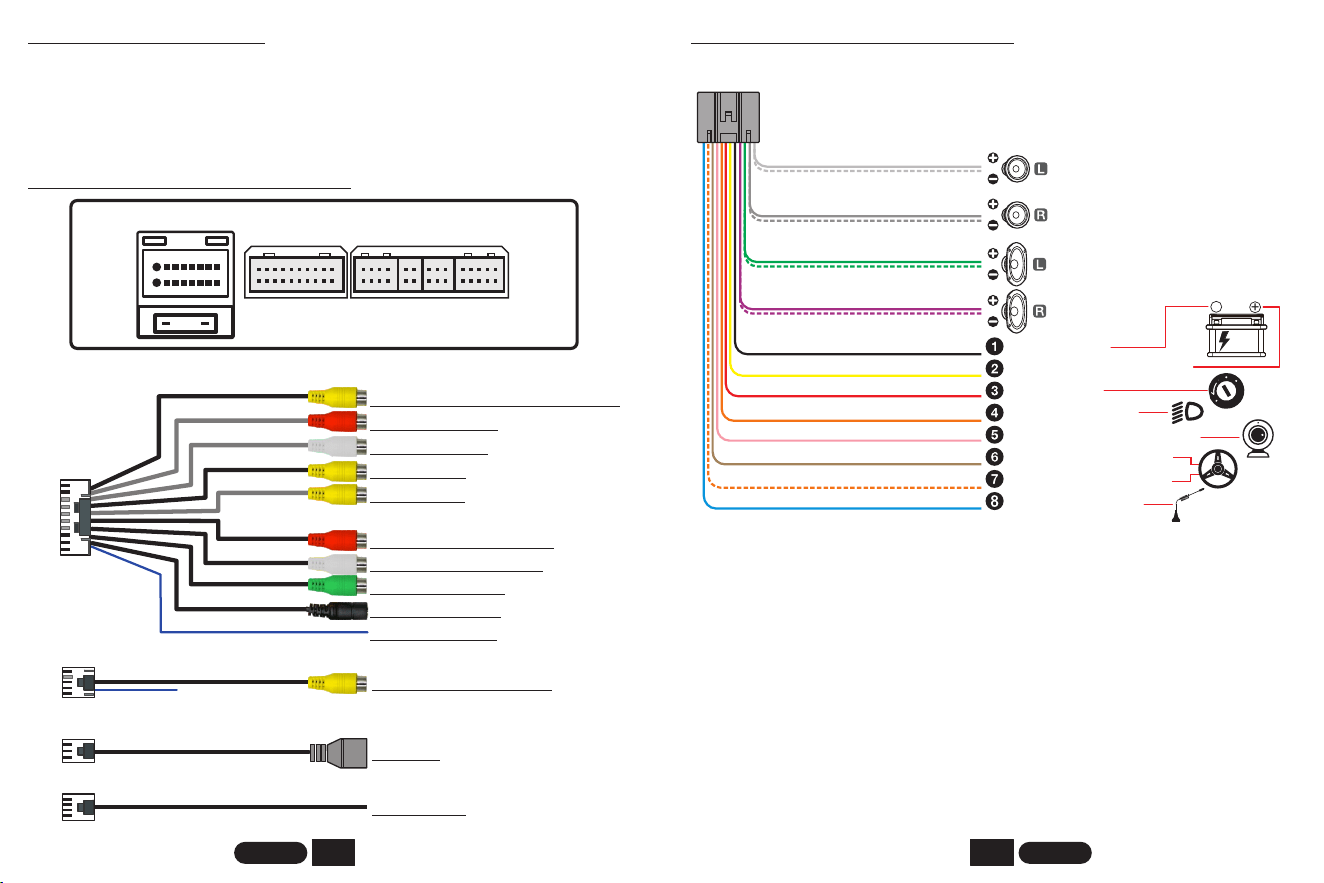
REAR INTERFACE DESCRIPTION
REAR INTERFACE DESCRIPTION
* The yellow line B+ keeps the power on and the machine has a memory
function.
* 8 speaker cables, each cable can not be grounded, can not be shared, can not
touch the line, otherwise there will be no sound output, output sound distortion,
machine fever and so on.
* When the yellow line B+ and the red line ACC have a 12V positive power at the
same time, the unit can be turned on normally.
BEFORE INSTALLATION
GND
BATTERY
ACC
ILLUMINATION
KEY2
ANT
Front speaker
Rear speaker
+
-
12V
White
White/black striped
Gray
Gray/black striped
Green
Green/black striped
Purple
Purple/black striped
Black(thick)
Yellow
Red
Orange
Pink
Brown
Orange/black striped
Blue
REVERSE
KEY1
Ground Wire/B-
Constant Power Supply +12V
Ignition Switch
Illuminate Backlight
Reversing camera control line
Steering Wheel Control -2
Steering Wheel Control -1
Auto Antenna Power
1
2
ENGLISH ENGLISH
WiFi
BT Antenna
Antenna
USB Port
F-CAM(VIDEO-IN-2)
AUX R IN
AUX L IN
VIDEO-IN-1
VIDEO OUT
FR OUT
FL OUT
SUB WOOF
MIC
AMP CONT
Reversing Camera Input
R-CAM
Video Input 2(Front Camera Input)
Right Audio Input
Left Audio Input
Video Input 1
Video Output
Front Right Audio Output
Front Left Audio Output
Subwoofer Output
Microphone Input
Amplifier Control
Power Plug
20P
USB1/2
10P
4P/6P
10A
Power Plug
20P 8P 4P 6P 10P
8P
Protocol Box
only use when need
REVERSING CAMERA INSTALLATION METHOD
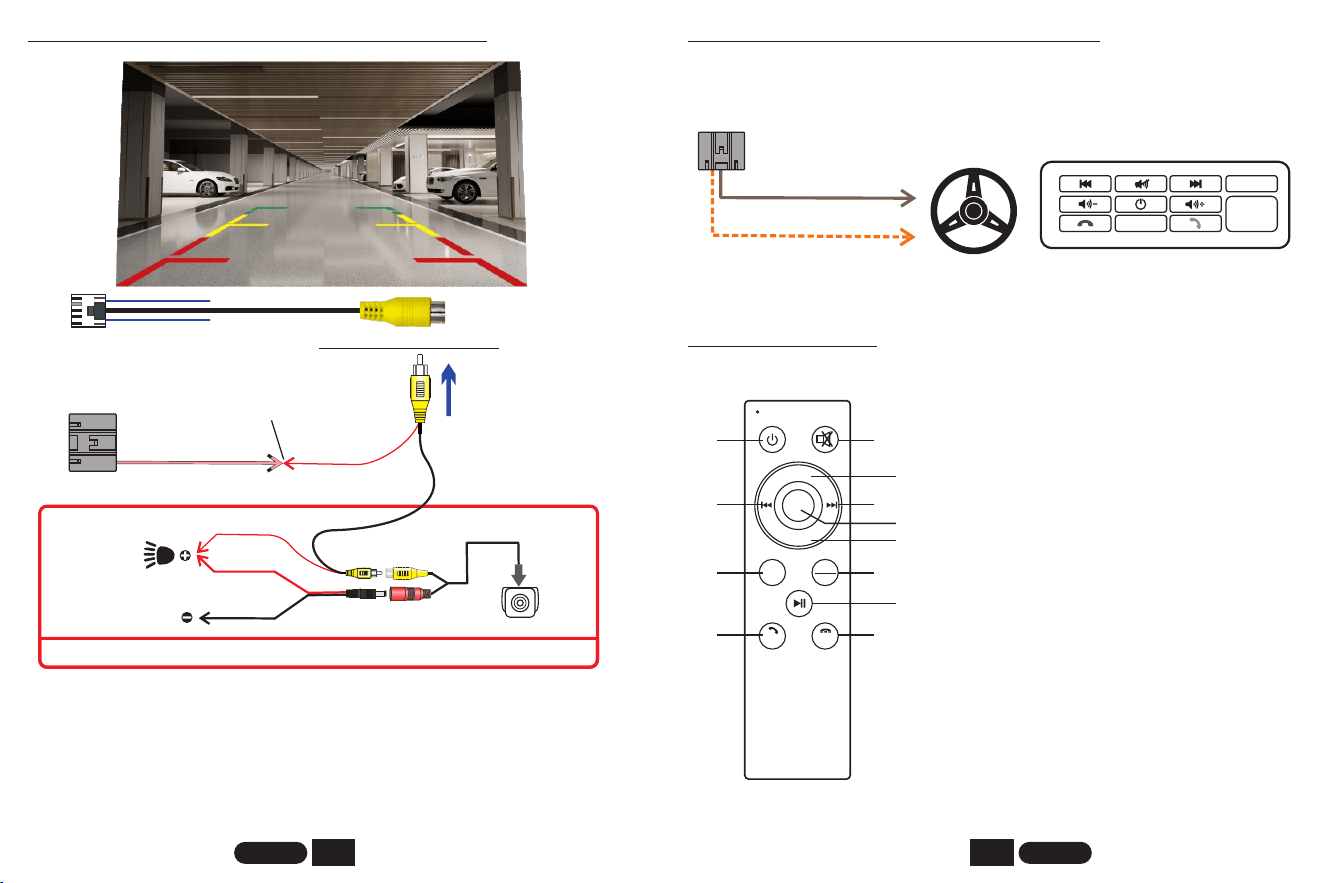
If the reversing camera is not installed, please do not connect the
REVERSE/BACK cable to any place. Please leave the cable unconnected,
otherwise the machine will not display properly, or it will automatically enter the
reverse mode, which will cause the machine to fail. In case of such a situation,
please disconnect the REVERSE/BACK line as soon as possible to avoid affecting
the normal use of the user.
pink
Red
(Reverse)
Red
Black
Red
Rear view camera
Connected
This part is installed at the rear of the car.
(GND)
Reverse light
LEARNING STEERING WHEEL CONTROLS
KEY2
KEY1
So ur ce
Reset
Confirm
Example:
Press and hold a button on the steering wheel of the original car and find
the button icon corresponding to the function of the button on the steering wheel.
Click the icon to change the color, learning is successful.
Orange/black
Brown
Reversing Camera Input
3
4
ENGLISH ENGLISH
6. Next Track
7. Sel / Enter
8. Mode: Switch for Radio - BT - Aux In -
USB - SD
2. Mute On/off
3. Volume +
12. End Call; Go To Video Playback
5. Previous Track
4. Volume -
10. Play / Pause
9. Band/AMS: Band Switching, Automatic
Search And Storage Of Radio Stations
11. Answer Call; Go To Music Player
1. Power On/off
VOL+
VOL-
SEL
MODE
BAND
AMS
AUDIO
VIDEO
1
2
3
4
5
6
7
8
9
10
11
12
Only some models are supported
REMOTE CONTROL
5
6
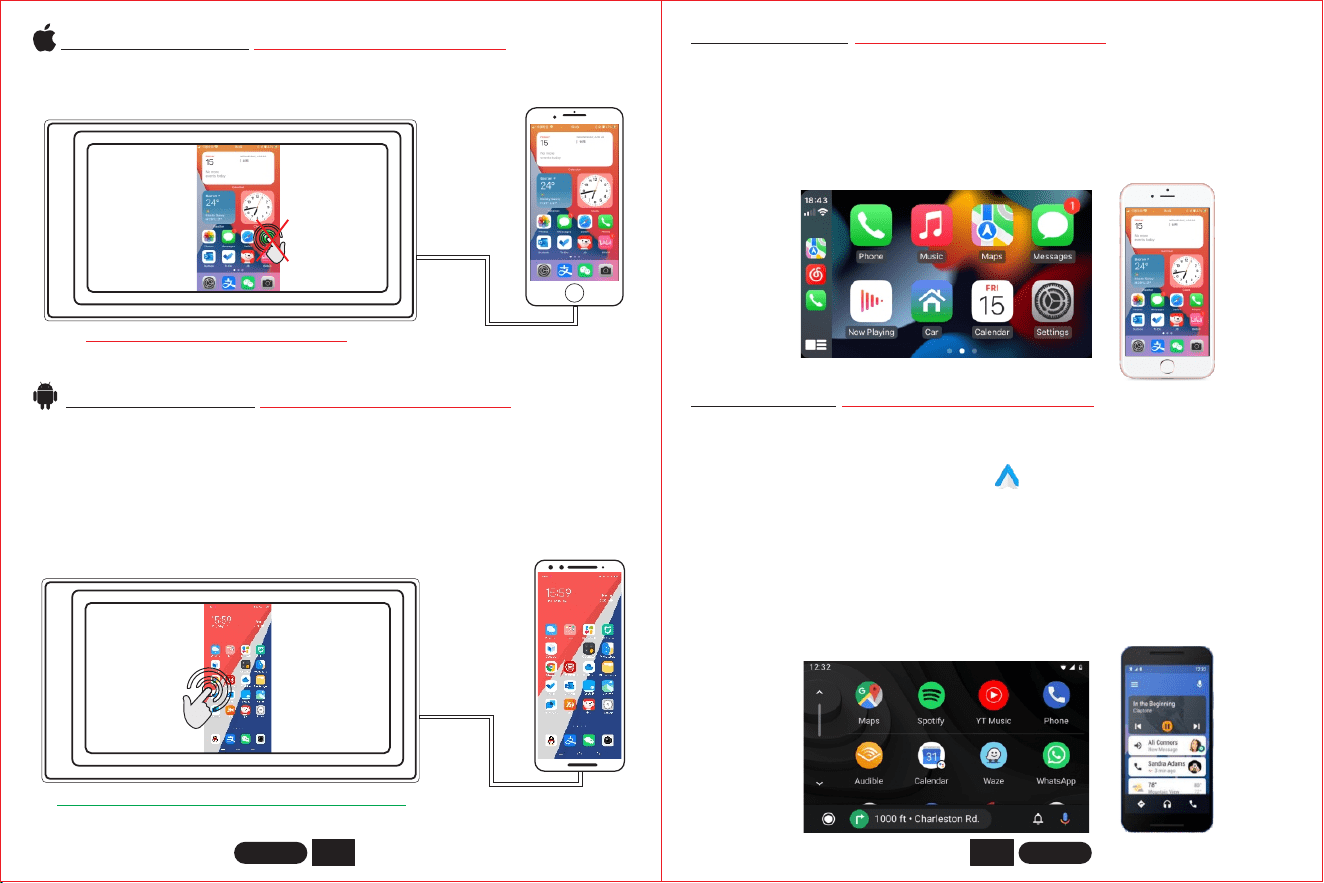
Apple CarPlay (Only some models support)
Android Auto (Only some models support)
This feature is not supported in all countries, and “Google Play” services need to
be available locally.
1. Need to download and install “Android Auto” software in “Google Play”.
3. Wired connection: Just connect the USB data cable, and then it will automatically enter
the Android Auto interface.
4. First turn on the Bluetooth and wifi functions of the mobile phone, Wireless connection:
and then connect the Bluetooth. Then it will automatically enter the Android Auto
interface. (Note: The signal is transmitted through wifi at this time, so even if the
Bluetooth function is turned off, it will be transmitted normally. When the wifi function is
turned off, Android Auto will be disconnected.)
2. A mobile phone with Android 6.0 or higher must be used. Must use a valid data cable
connection.
1. Wired connection: Just connect the USB data cable, and then it will automatically enter
the CarPlay interface.
2. Wireless connection: first turn on the bluetooth and wifi functions of the mobile phone,
and then connect the bluetooth. Then it will automatically enter the CarPlay interface.
(Note: The signal is transmitted through wifi at this time, so even if the Bluetooth function
is turned off, it will be transmitted normally. When the wifi function is turned off, CarPlay
will be disconnected.)
ENGLISH ENGLISH
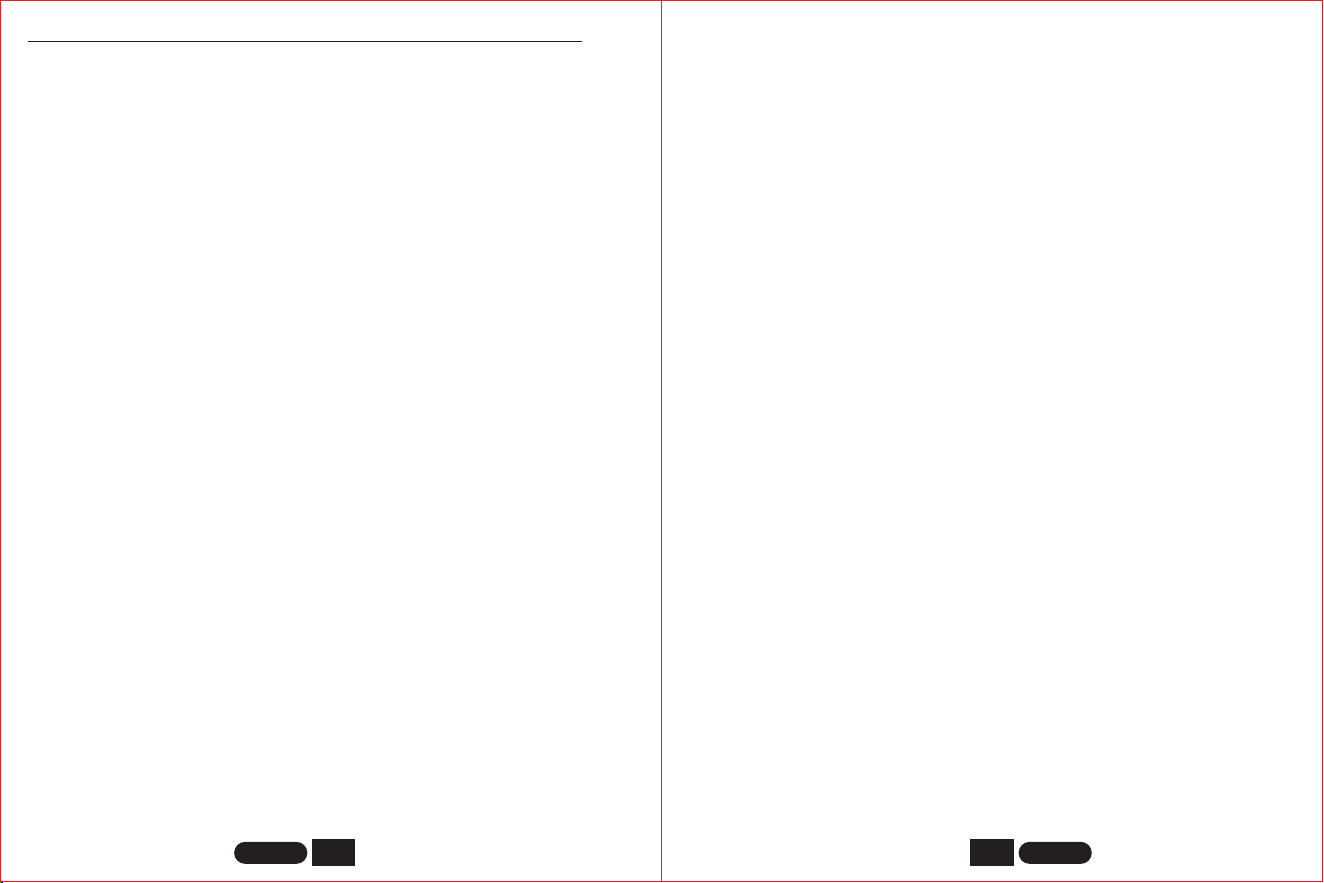
When the device is plugged into the iPhone, the content of the phone screen
will be projected onto the car screen.
iPHONE Mirrorlink (Only some models support)
NO
Touch input
Android Mirrorlink (Only some models support)
When using an Android device, after connecting the USB data cable, you will
be prompted to install the APP software. After installation, Plug the data
cable again, it will enter the screen mirroring mode. And it can be operated
on both the player screen and the phone screen.
Mirrorlink
APP
YES
Touch input
You can’t control your iphone here.
Only the image transfer is successful at this time. The sound can only be
transmitted after the Bluetooth connection is successful.
You can also control your android phone here.
7
8
ENGLISH ENGLISH
1) Cannot boot normally
1. "Yellow" "Red" "Black" this 3 lines only connected 2 line of them, so it will not
start, it should be that the yellow line is connected to the positive pole, red
line to the key control line, black to the negative pole, less connection or
wrong connection does not boot.
2. The original car line and unit wiring can not be connected to the color, the
color of the original car line is not standard, if you connect like that it can not
only be turned on but also may burn.
5. Every time you change the fuse, it burns. Please don’t change it again The
reason is that when you first connect the positive and negative poles, the
protection circuit of the unit is short-circuited. The unit can be repaired
under the guidance of our master. No basis can only be returned to the
after-sales or new unit. If these are no problem, or also don’t boot, please
make the final step to confirm, find a 12V battery or 12V power supply
“yellow” and “red” twist together with the positive, black to the negative pole,
press the button check if it can boot or no, if you can boot, it showed that the
original car line is not right connect, or there is a problem with the car line.
If it can’t be boot, the unit is broken. Does not boot unit, check the line
carefully, do not blindly suspect the unit problem.
3. The original car plug can’t be plugged directly into the new unit, even if it just
plugs in, it can’t be used, otherwise it won’t be turned on or burned.
4. The 3 wires are connected right, but it does not boot. Check if the fuse on the
yellow line is broken. If there is no problem with the fuse, twist the yellow
and red wires together. Turn on the key and press the unit’s power button to
see if it can be turned on.
2) Automatic shut-down
2. The voltage is unstable: please find a 12V-5A which one is the power supply
and re-tested to see if it will automatically shut down. If it does not
automatically shut down after the test, please replace the power supply. If it
will automatically shut down, it is problem with the unit.
1. The cable error connect: If the blue cable (automatic antenna power supply)
is connected to the power cable of the unit, an automatic shutdown will
occur. Please follow the correct wiring method to solve the problem.
3) There is noise
4) Remote control cannot be used
1. Test method: Turn on the camera of the mobile phone and align the light of the
remote control, then press the button of the remote control to see if the phone will
light up. If it is not lit, there will be no power. Replace the battery; If it is lit, there is
electricity, which proves that there is no problem with the remote control.
5) Settings can not be saved ( no memory )
1. The yellow line and the red line are connected together (separate yellow to
positive, red to key control).
2. Yellow and red are reversed (just change position).
6) Bluetooth not working
Turn on the machine, search for the Bluetooth name of the machine using the
Bluetooth of the mobile phone, and then click Connect, after connecting, you
can answer calls or play songs via Bluetooth.
7) The product emits smoke
1. Please reset the unit or unplug the power cord and plug it in.
2. The Volume knob is broken, and the knob can be replaced.
8) The sound cannot be adjusted
9) Reversing camera does not display
Replace the fuse FUSE, if the problem cannot be solved, the internal circuit has
been burned. After-sales service is required.
1. Wrong wiring or missing wiring.
Camera connection method:
1) Find accessories : 1 camera + 1 power cord +1 video cable.
Solution: When replacing the speaker or listening to the song, the volume should not
be too large.
Solution: Take the iron speaker cable. Directly connected to the speaker cable of the
unit.
1. The original speaker power is too small. When the volume of the unit is turned up,
there will be noise.
2. The speaker cable is grounded.
COMMON PROBLEMS AND SIMPLE TROUBLESHOOTING
9
10
ENGLISH ENGLISH
And then find the back of the unit the CAM video input interface, find the positive
and negative of the backup light.
2. The camera is broken. If the lamp that is properly wired to the camera is not lit,
it will be broken and replaced with a new one.
First find the reverse control line on the power line of the unit. The control line is a
pink line. connect this line to the positive pole of 12V and the screen will turn
blue.
3) There are two sockets on the camera, the red socket is connected to the power
cable, the yellow is inserted into the video cable, the red wire of the power
cable and the wire of the video cable are screwed together on the positive pole
of the reverse lamp, and the black wire of the power cable is not used,
connected, the other end of the video cable is connected to the CAM video input
interface on the back of the unit. The red line coming out of the video line is
connected to the reversing control line of the power line.
2) Find the port of the wiring.
10) USB devices cannot be played
Format the USB flash disk, and the file system is selected as: FAT32, re-download
on or two songs and try again. If it still doesn't work, please replace the USB
flash drive.
11) FM does not receive the radio station
1. The antenna plug is not fully inserted, the antenna is disconnect or the line is
disconnect.
2. Search station, press AS will automatically search or press before or after
button.
Can’t solve the above 2 points, Please unplug the antenna plug and find a
screwdriver or a metal strip to insert it instead of the antenna.
12) There is no sound right after installation
Dear customers, the unit has been tested before shipment. If there is no
sound, it is usually a wiring error or the original car speaker wire is short-
circuited with iron. According to the steps to check it:
1. Check if the speaker cable is short-circuited and connected. Please
reconnect if you have any short circuit.
2. Check how many speaker cables according to the original speaker cable if
there are only 2 speaker cables to prove that the original car line does not
match our unit, you need to re-route the original car line. One speaker must
lead to 2 speaker wires. 2 speakers must be have 4 speaker cables to
available.
13) There is no sound after a while
Disconnect all the speaker cable from the unit (do not remove them), and then
find an external speaker to receive the gray and purple of the tail line of the unit.
Green any group, and then try to see if there is any sound. If there is a sound, it is
proved that the car’s speaker line is short-circuited with iron or the speaker is
damaged. If there is no sound, the unit is broken.
Any changes or modifications not expressly approved by the party responsible for
compliance could void the user’s authority to operate the equipment. This device
complies with Part 15 of the FCC Rules. Operation is subject to the following two
conditions: (1) this device may not cause harmful interference, and(2) this device
must accept any interference received, including interference that may cause
undesired operation.
Note: This equipment has been tested and found to comply with the limits for a
Class B digital device, pursuant to Part 15 of the FCC Rules. These limits are
designed to provide reasonable protection against harmful interference in a
residential installation. This equipment generates, uses, and can radiate radio
frequency energy, and if not installed and used in accordance with the instructions,
may cause harmful interference to radio communications. However, there is no
guarantee that interference will not occur in a particular installation. If this
equipment does cause harmful interference to radio or television reception,
which can be determined by turning the equipment off and on, the user is
encouraged to try to correct the interference by one or more of the following
measures:– Reorient or relocate the receiving antenna.– Increase the separation
between the equipment and receiver.– Connect the equipment into an outlet on a
circuit different from that to which the receiver is connected.– Consult the dealer or
an experienced radio/TV technician for help.
This equipment complies with FCC radiation exposure limits set forth for an
uncontrolled environment. This equipment should be installed and operated with a
minimum distance of 20cm between the radiator & your body. This transmitter must
not be co-located or operating in conjunction with any other antenna or transmitter.

