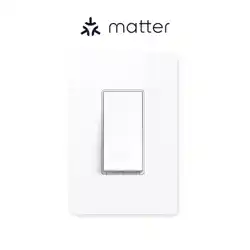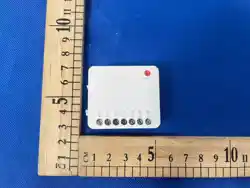
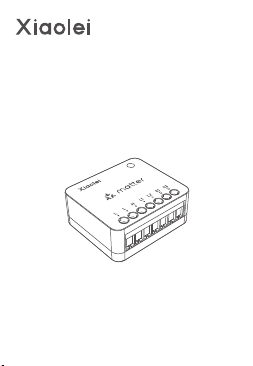
Matter 2-gang
Smart Switch
MK2

01
[Works with Major Matter Ecosystems]
MK2 is a Matter-certified smart switch that works seamlessly
with Apple Home, Amazon Alexa, Google Home, SmartThings,
and other Matter platforms. Manage devices from different
brands in one app.
[Ultra-Compact Design]
Compact and versatile, MK2 fits easily into EU and US standard
wall boxes. Ideal for both new installations and existing switch
upgrades.
[Multiple External Switch Types]
Supports both rocker and momentary switches for flexible
manual control and smart automation.
[Make Conventional Devices Smart]
Easily upgrade lights, fans, outlets, and small appliances without
replacing existing devices.
[Dual-Channel Control]
Two independent channels allow separate ON/OFF control of
two loads via external switches or smart home platforms.
[Safety Certifications]
MK2 is FCC, CE, RED, RoHS and ErP certified for reliable
operation, electromagnetic compatibility, electrical safety, and
environmental compliance.
[App Control]
Use Matter-compatible apps or the L-Home app for pairing,
switching, cloud scenes, and automations. Use the NFC Lighting
app for quick on-site parameter configuration.
Product Introduction
μ
ErP
02
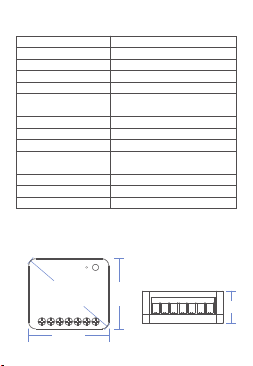
Unit: mm
Max. 5A/CH (Capacitive);
Max. 10A/CH (Resistive)
Weight
Package Size
30±5g
L49×W64×H25(mm)
Model
Operating Voltage
Output Current
Dimensions
Channels
Wireless Protocol
Rated Load
Operating Temperature
MK2
Matter over WiFi
100-240V~,50/60Hz
Max. 16A (2 Channels Total)
L45×W39.4×H18(mm)
2CH
70A@10ms
-10℃~40℃
Relay Inrush Current
Compatible Loads /
Devices
Lighting, Home Appliances
Compatible Wall Switches
Momentary Switch, Rocker Switch
56.4
18
39.4
45
Specications
Dimensions
03
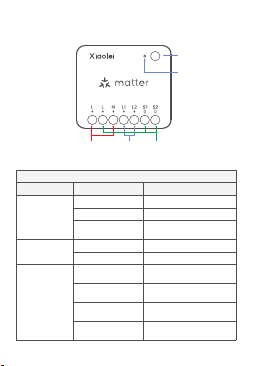
Power
Input
Load
Output
Product Overview
5 Slow Green
Flashes
Switches to Toggle
Switch Mode
4 Slow Green
Flashes
Switches to Two-Way
Switch Mode
2 Slow Green
Flashes
Switch to Momentary
Switch Mode (Default)
Slow Flashing Red
Factory Reset in Progress
3 Slow Green
Flashes
Switch to Rocker Switch
Mode
Fast Flashing Red
Ready for Factory Reset
Slow Flashing Blue
Firmware Update in
Progress
Indicator Status
Solid blue
Fast Flashing Blue
Normal
Ready to Pair
Button and LED Indicator Status
Device Status
Press 3 times
within 1s
-
Button Action
Press and hold
for 15s, press 3
times within 3s
Function Button
LED Indicator
Momentary /
Rocker
Switch Input
04
①
This device supports Matter and works with major
smart home platforms. Download a compatible app
and make sure your Matter hub is powered on and
online before setup.
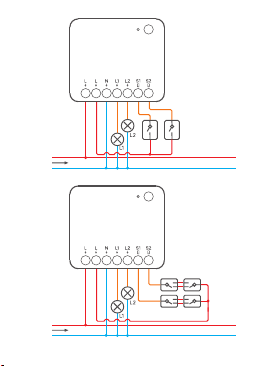
Wiring
For electrical safety, install a 16A miniature circuit
breaker (MCB) or residual current circuit breaker
(RCCB) upstream of MK2.
Disconnect the main power supply before wiring.
Installation and maintenance must be performed
by a qualified electrician. Never wire or touch the
terminals while the device is powered.
Follow the wiring diagram carefully. Wire size:
0.5–2.5mm² (24–14AWG). Strip length: 6–7mm.
Do not exceed the rated load.
Do not connect the SW terminal to neutral or ground.
Doing so may damage the device or create a safety
hazard.
The device supports both momentary and rocker
switches. The default setting is Momentary Switch
Mode.
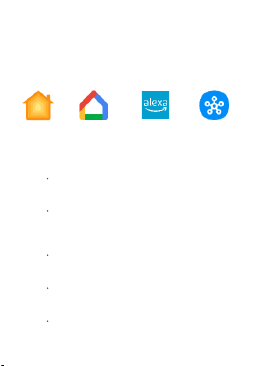
Matter App & Hub Setup
②
Amazon Alexa
Apple Home
Google Home SmartThings
05
L
N
100-240V~
L
N
100-240V~
06
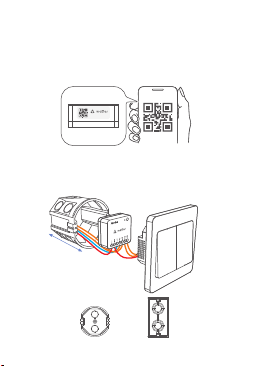
Add to a Matter Platform
Open a Matter-compatible app, such as Apple Home or
Google Home. Tap "Add Device," then scan the Matter
QR code on the device and follow the on-screen
instructions.
③
Installation
For in-wall installation, use a wall box at least 50mm
deep.
④
EU Wall Box US Wall Box
XXXX-XXX-XXXX
≥
5
0
mm
07
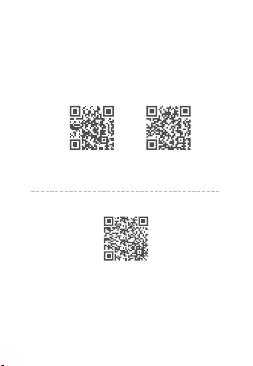
Use with NFC Lighting or L-Home App
Scan the QR code below to download the NFC configuration
tool. Configure Power-On State, Switch Control Type, and other
parameters before pairing. You can also use the L-Home app.
Scan the QR code on the right for the Digital Manual and more
details.
NFC Lighting APP L-Home APP
Digital Manual

Method 1: Press and hold the function button for 15 seconds.
Release it when the indicator flashes red rapidly.Within 3
seconds, press the function button 3 times. The indicator will
flash red slowly while the device resets.The reset is complete
when the indicator flashes blue rapidly.
Method 2: Make sure the device is powered on and online.
Open the L-Home app and go to the device set tings.Tap
"Delete Device." When "Deleted Successfully" appears, the
factory reset is complete.
Method 3: Make sure the device is powered on. Open the NFC
Lighting app and tap "Read/ Write Matter Device."Follow the
on-screen instructions to find and connec t the device, then tap
"Factory Reset" on the parameter page.
Factory Reset
08

09
FAQs
This product is designed to comply with the Matter standard.
As Matter is still evolving, some features, performance, and
network stability may be limited by the current version.
Product performance is subject to the current Matter version.
We will continue to update and optimize the product as Matter
evolves.
Q1: Does this device support Matter?
A: Yes. It works with major smart home platforms including Apple
Home, Google Home, Amazon Alexa, and SmartThings.
Q4: What should I do if 5GHz WiFi is not supported during
pairing?
A: This device supports 2.4GHz WiFi only, not 5GHz. If your router
uses a combined 2.4GHz/5GHz network, disable this feature in
the router settings, connect your phone to the 2.4GHz WiFi
network, and try pairing again.
Q2: Does this device require a neutral wire?
A: Yes. A neutral wire is required for proper installation and
operation.
Q3: Can this device be installed in a small space behind a wall
switch or outlet?
A: Yes. Its compact design fits standard electrical wall boxes and
is ideal for space-limited installations.

FCC Statement
1. This device complies with Part 15 of the FCC Rules. Operation
is subject to the following two conditions:
(1)This device may not cause harmful interference.
(2)This device must accept any interference received, including
interference that may cause undesired operation.
10
The device has been evaluated to meet general RF exposure
requirement. This equipment should be installed and operated
with a minimum distance of 20 cm between the radiator
and your body.
2. Changes or modifications not expressly approved by the
party responsible for compliance could void the user’s authority
to operate the equipment.
energy and, if not installed and used in accordance with the
instructions, may cause harmful interference to radio communi-
cations. However, there is no guarantee that interference will not
occur in a particular installation. If this equipment does cause
harmful interference to radio or television reception, which can
be determined by turning the equipment off and on, the user is
encouraged to try to correct the interference by one or more of
the following measures:
• Reorient or relocate the receiving antenna.
• Increase the separation between the equipment and receiver.
• Connect the equipment into an outlet on a circuit different
from that to which the receiver is connected.
• Consult the dealer or an experienced radio/TV technician for
help.
Note: This equipment has been tested and found to comply with
the limits for a class B digital device, pursuant to Part 15 of the
FCC Rules. These limits are designed to provide reasonable
protection against harmful interference in a residential installation.
This equipment generates uses and can radiate radio frequency

11
Attention
Product installation and commissioning should be done by a
qualified professional.
LTECH products are and not lightningproof non-waterproof
(special models excepted). Please avoid the sun and rain. When
installed outdoors, please ensure they are mounted in a water
proof enclosure or in an area equipped with lightning protection
devices .
Good heat dissipation will prolong the working life of products.
Please ensure good ventilation.
Please check if the working voltage used complies with the
parameter requirements of products.
The diameter of wire used must be able to load the light fixtures
you connect and ensure the firm wiring.
Before you power on products, please make sure all the wiring
is correct in case of incorrect connection that causes damage
to light fixtures.
If a fault occurs, please do not attempt to fix products by your-
self. If you have any question, please contact us or an
authorized dealer.

Warranty Agreement
Warranty periods from the date of manufacture: 2 years
Free repair or replacement services for quality problems are
provided within warranty periods. Warranty exclusions below:
Warranty exclusions below:
Following conditions are not within the guarantee range of free
repairing or replacement services:
Beyond warranty periods.
Any artificial damage caused by high voltage, overload, or
improper operations.
Products with severe physical damage.
Damage caused by natural disasters and force majeure.
Warranty labels and barcodes have been damaged.
No any contract or invoice signed by LTECH .
1. Repair or replacement provided is the only remedy for
customers. LTECH is not liable for any incidental or consequential
damage unless it is within the law.
2. LTECH has the right to amend or adjust the terms of this
warranty. The warranty that issues in writting shall prevail.
* Specifications and contents are subject to change without notice. If the
actual product differs from this manual, the actual product shall prevail.
For questions, please contact us or an authorized dealer.
Updated: 08/17/2026_A0
12

Email: lt@ltech-led.
Manufacturer: Zhuhai LTECH Technology Co., Ltd.
Address: 1st Building,No. 183, Shui'an 1st Road, Xiangzhou District, 519060
Zhuhai City, PEOPLE'S REPUBLIC OF CHINA
Website: www.ltech-led.com
com
Made in China