v3.1
Guardian Alert
English
SET UP INSTRUCTIONS
Emergency Wall Communicator
Model #37920
This accessory is to be used with the LogicMark’s DECT line of Personal
Emergency Response Systems. This includes the FreedomAlert and the
LifeSentry product line. Up to a total of 4 pendants and Emergency Wall
Communicators (EWC) can be learned to one LogicMark “DECT” (1.9
Ghz) base unit.
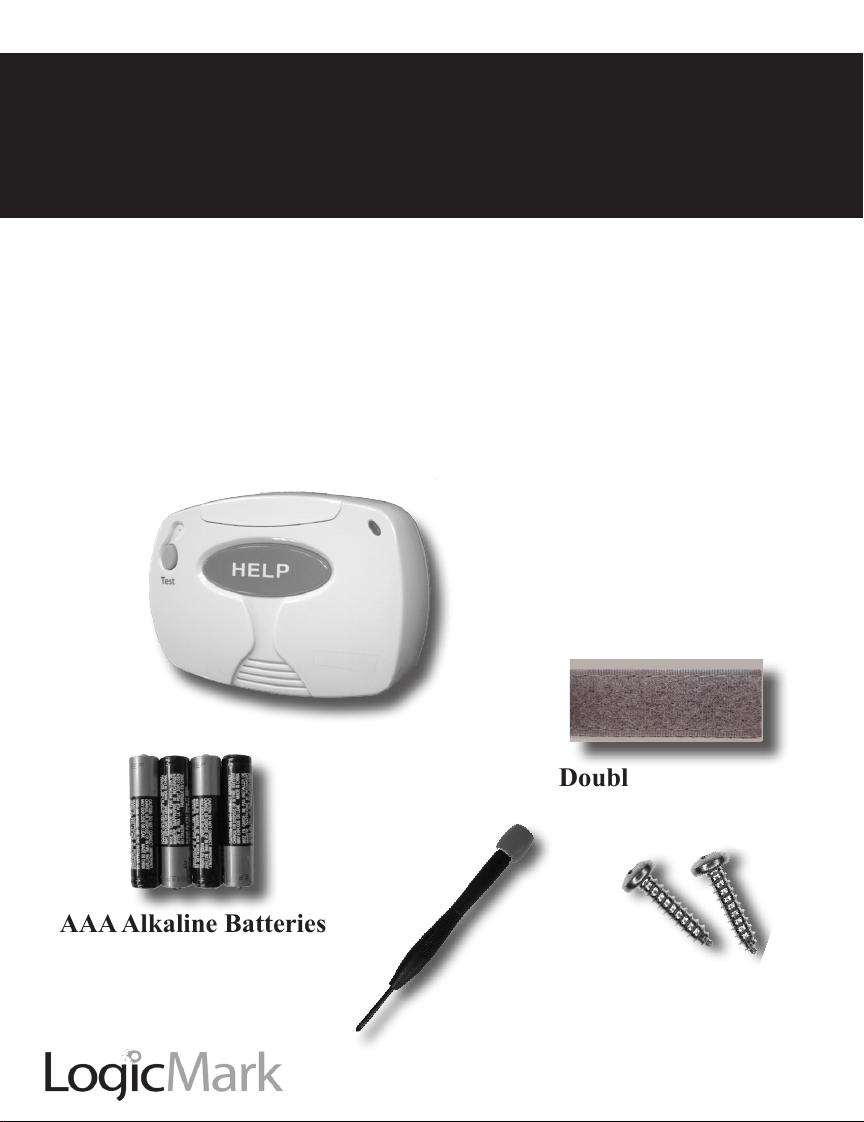
CONTENTS:
Emergency Wall
Communicator
(EWC)
AAA Alkaline Batteries
4 pieces
Double Stick Velcro
Screwdriver
2 Screws

2
Emergency Wall Communicator
v3.1
TABLE OF CONTENTS
Installing the Batteries ..............................................................................3
Learning the EWC to the Base of Your PERS System ..........................3
Battery Check ............................................................................................ 4
System Check ............................................................................................5
Warranty ....................................................................................................7
Product Specications ..............................................................................8
NOTE: Before programming this Emergency Wall Communicator (EWC)
to work with your LogicMark DECT base unit, you must acknowledge that
all of the Warnings, Limitations of Liability, Disclaimers, FCC information
and Testing Instructions written in the LogicMark Personal Emergency
Response System (PERS) instruction manuals pertain to the use of this
EWC as well when used with these products. By programming this EWC
to your LogicMark PERS product, you acknowledge that you have a copy
of these instructions and have read them. If you do not have a copy, you
can always download one off of our website or by calling our company
and requesting one.

v3.1 Emergency Wall Communicator 3
Installing the Battery
Use the supplied screwdriver to unscrew the battery compartment.
Install the 4 AAA alkaline batteries - alternating them as they are installed.
Note the polarity on the inside of the battery cover. The spring contacts are
meant to touch the negative side of the batteries. Close the battery cover
using the screwdriver provided.
Learning the EWC to the Base unit of Your PERS System.
Note: Throughout this manual, EWC will refer to the Emergency Wall
Communicator; Pendant will refer to a hand-held pendant used by the
Personal Emergency Response System (PERS) and Base will refer to the
base unit of the PERS system.
On the Base Unit:
1. Push and release the RED Code Learn button on the back of the
Base unit. (Use the tip of the screwdriver or a ball-point pen to reach
through the case). You will hear a voice prompt “Pendant Learning”
On the EWC:
2. PUSH the Gray Battery Test button and the RED Emergency button
simultaneously –HOLD both buttons for a few seconds until you hear
“Pendant Learning” from the EWC - then release both buttons.
• If“BaseandPendantoutofRange”isheardfromtheEWC,stop
- wait 30 seconds and start at step #1 again.
3. When Pendant learning has been successful you will hear “All Systems
are OK” and then it will announce the mode of the Base unit.

4
Emergency Wall Communicator
v3.1
Notes:
• Youhaveupto45secondsafterpushingtheREDCodeLearnbutton
on the Base unit to get the EWC to enter “Pendant Learning”.
• Learning additional Pendants or EWCs does not erase previously
learned Pendants or EWCs.
• TheBaseunitwillautomaticallyexitthePendantlearningmodeafter
several seconds or if Pendant learning failed.
• Onlyacombinedtotalof4PendantsandEWCscanbelearnedtoa
Base unit. If a Pendant has been lost or replaced, erase all the Pendants
andrelearnallcurrentPendantsandEWCs.(Seenextparagraph).
At a later point in time, you might want to erase your previously learned
pendants. You can erase all previously learned Pendants and/or EWCs by
simply holding down the red Code Learn button at the back of the Base unit
for8seconds.Youwillheartheconrmationof“PreviousPendantCodes
Erased” from the Base unit. After that, you can program a new Pendant to
the Base unit following the steps above as desired.
Mounting the Product.
You have two choices to mount the product to the wall. You can use the
two screws provided - or you can use the special Velcro style fastener
provided.Ifusingthescrews-locatethescrewsexactly3and1/8inches
apart on the wall. If using the Velcro - make sure the surfaces are clean
and dry before mounting.
Battery Check:
The 4 AAA alkaline batteries should power the unit for over one year in
standby mode. When the EWC is used - there are several hours of talk
time on fresh batteries. We recommend replacement of the batteries every
6 months, just like a smoke detector.
TheEWChasabuilt-inbatterytestertoallowyoueasyconrmationofthe
status of the batteries. When you press the small Gray button on the EWC,

v3.1 Emergency Wall Communicator 5
a voice announcement will inform you of the condition of the battery. One
of the following messages will be heard:
“Battery is ok.”
Check the battery condition monthly.
“Battery is low.”
Thebatteriesshouldbereplacedwithinthenextweeks.
“Replace battery now.”
The 4 AAA batteries should be replaced now with 4 new AAA
alkaline batteries.
Please note: If there is no response after pressing the button for one second
or more, the batteries are dead and must be replaced immediately.
The battery should be tested at least monthly along with
the System Check outlined below.
System Check:
The gray button on the top left side of the EWC which is used to perform
the BATTERY CHECK, will also used to perform a SYSTEM CHECK.
Press and hold this button for more than four (4) seconds. One of the fol-
lowing announcements will be made.
“All systems are ok.”
Thisconrmsthefollowing:
Battery status.
The EWC is working.
The Base unit is working.
The Base unit is connected to a working phone line.
The EWC is within range of the Base unit.

6
Emergency Wall Communicator
v3.1
“System cannot detect dial tone.”
The Base unit is not connected to the phone line or can not get a
dial tone for some reason.
“Base and Pendant out of range.”
Thisconrmsoneormoreofthefollowing:
The EWC has malfunctioned.
The Base has malfunctioned.
The EWC and Base unit are not communicating with each other
or are out or range.
Caution - To ensure proper operation, this equipment must be installed
according to the these instructions. We highly recommend that you
perform this System Check after installation and at least monthly to
conrm that your system is working properly It is also recommended
to perform this system check after a lightning storm that could damage
the Base unit which is plugged into the phone line.
Water Resistance:
This EWC is designed to be mounted on a bathroom wall if desired.
However,itshouldneverbesubmergedorexposedtowatercontinuously.
If your EWC is not working, call our tech support at 703-934-7934 .
Information The FCC Wants You To Know:
FCC ID: TYD3X911
ThisdevicecomplieswithPart15oftheFCCRules.Operationis
subject to the following two conditions: (1) this device may not cause
harmful interference, and (2) this device must accept any interference
received, including interference that may cause undesired operation.
Canada IC: 8471A-3X911 This Class B digital apparatus complies with
Canadian ICES-003.

v3.1 Emergency Wall Communicator 7
ONE YEAR LIMITED WARRANTY
LogicMark, LLC warrants to the original consumer/purchaser that this
product shall be free of defects in material and workmanship under normal
use and circumstances for a period of one (1) year from the date of original
purchase for use. When the original consumer/purchaser returns the prod-
uct pre-paid to LogicMark, LLC; 10106 Bluegrass Pkwy; Louisville KY,
40299, USA within the warranty period, and if the product is defective,
LogicMark, LLC will at its option repair or replace such.
This warranty shall constitute the sole liability of LogicMark, LLC concern-
ingtheproduct.LogicMark,LLCexpresslydisclaimsallotherwarranties
INCLUDING, WITHOUT LIMITATION, THE WARRANTIES OF MER-
CHANT ABILITY AND FITNESS FOR A PARTICULAR PURPOSE. NO
PERSON, FIRM, OR CORPORATION IS AUTHORIZED TO ASSUME
FOR LogicMark, LLC. ANY OTHER LIABILITY IN CONNECTION
WITH THE SALE AND USE OF THE PRODUCT. LogicMark, LLC and
agents and distributors will bear no liability whatsoever for incidental or
consequential damages or charges of any kind.
Somestatesdonotallowtheexclusionorlimitationofincidentalorcon-
sequential damages, so the above disclaimer regarding incidental or con-
sequential damages may not apply to you.
This warranty is void if the product has been damaged or tampered with or
if the product or any such parts have been opened. In all cases of damage
duringshipment,aclaimmustbeledwiththeshippingcarrierandnot
with LogicMark, LLC.
Thiswarrantygivesyouspeciclegalrights;youmayalsohaveotherrights
which vary from state to state.
OUT OF WARRANTY REPAIRS
Ifthewarrantyperiodhasexpiredorifyouarenottheoriginalownerofthe
product, LogicMark, LLC will at its option either (1) replace this product
with a functionally similar (but not necessarily identical) refurbished prod-
uct or (2) repair the original product and return it to the original consumer/
purchaser after payment of repair/replacement charges has been received.

8
Emergency Wall Communicator
v3.1
10106 Bluegrass Pkwy;
Louisville KY, 40299
Tel: 1-703-934-7934
TollFree:1-800-519-2419
Fax:1-703-934-7935
www.LogicMark.com
©2013 LogicMark, LLC
Product Specications:
RF Characteristics: 1.9 Ghz DECT Communication Technology
Operating Range Should cover your typical American house
- but needs to be tested after installation.
Batteries 4 AAA Alkaline. Replace every 6 months
Water-resistance WaterSprayStandardIPX5(showeronly).
Number of Products/Base Unit Up to a total of
4 Pendants and Emergency
Wall Communicators can be programmed to
one Base unit.
OperatingTemperature 32˚to120˚F.(0˚to49˚C).