OPERATION MANUAL
WIRELESS REMOTE TRANSMITTER FEWL14
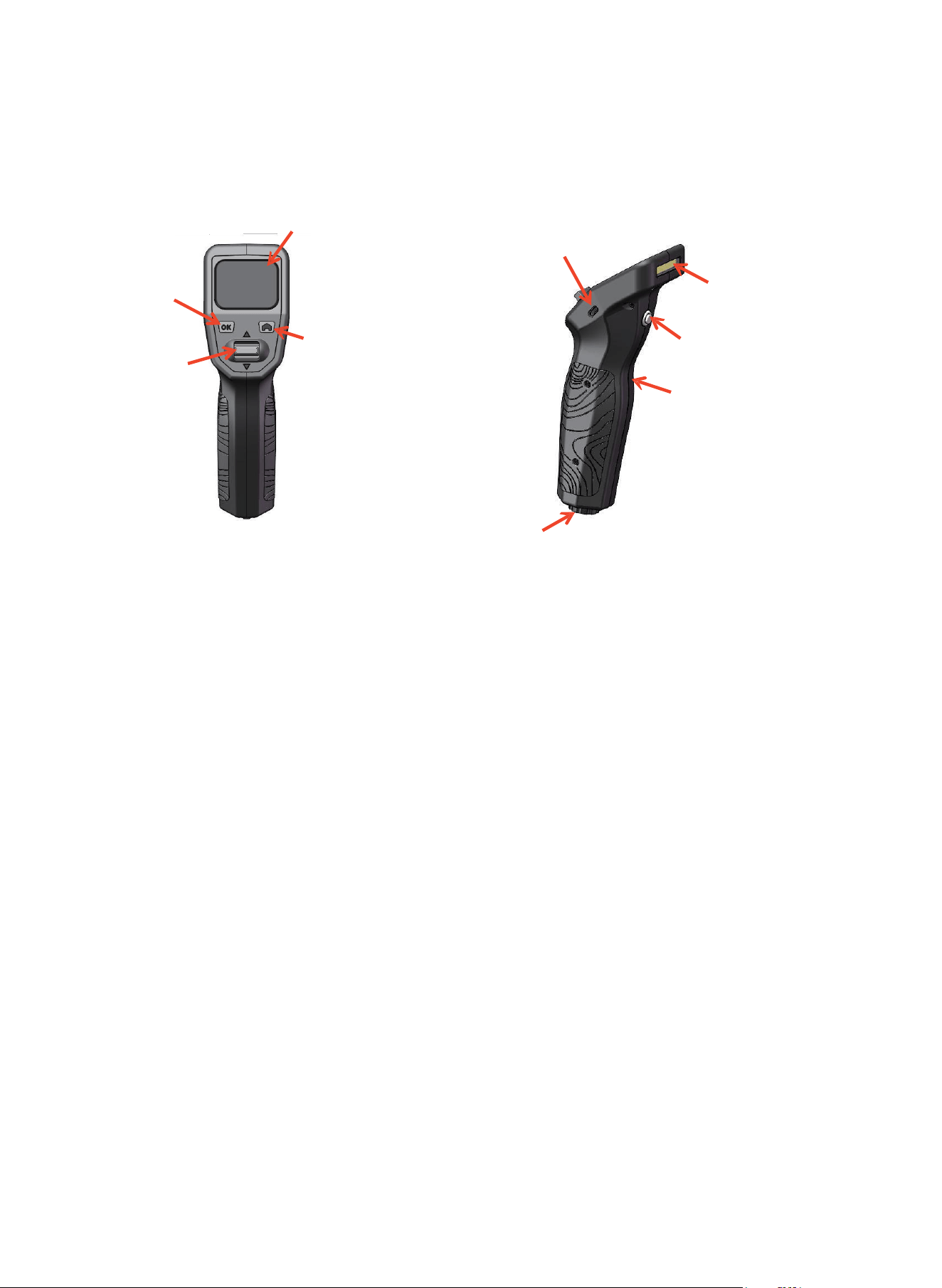
“OK” KEY
“CHOOSE”
BUTTON
OPERATION
1.
SWITCH ON:
IPS LCD
“HOME” KEY
BATTERY
CHARGING
PORT
SOCKET for
WIRE REMOTE
CONTROL
COB LIGHT
COB LIGHT
SWITCH
SAFETY INDUCTIVE
SWITCH(inside)
Presson “HOME” and “OK” key simultaneously for 3 seconds, main interface enters IPS LCD.
2.
OPERATION or SETTING:
Push up or down “CHOOSE” BUTTON to select “winching” icon or “gear(setting)” icon,then press ‘‘OK” KEY to
confirm.
3.
WINCHING:
When the hand fully holds the transmitter, the SAFETY INDUCTIVE SWITCH is triggered and the word SAFETY
turns to orange color from grey color.
Push UP or DOWN to pull IN or pull OUT.
NOTE: When WIRE REMOTE CONTROL is connected to both TRANSMITTER and RECEIVER, the wireless
remote control is automaticly transfered to wire remote control, SAFETY INDUCTIVE SWITCH and “CHOOSE”
BUTTON stop functioning simultaneously.
4.
SETTING:
After selecting “GEAR(SETTING” icon, push “CHOOSE” BUTTON up or down to select what you required,
press “OK” KEY to confirm:
SYNCING------Programming.
Programming must be fulfilled in 3 seconds after the TRANMITTER is powered in. In 3 seconds the
TRANSMITTER will be powered off. To get into SYNCING interface, the above steps have to be repeated.
BRIGHTNESS------Brightness adjusting on IPS LCD
Push “CHOOSE” BUTTON up or down to select brightness accordingly. Press “OK” KEY to confirm.
NIGHT MODE------Night mode selecting on IPS LCD
Push “CHOOSE” BUTTON up or down to select or guit NIGHT MODE. Press “OK” KEY to confirm.
5.
COB LIGHT:
Switch on or off COB light.
6.
Switch off WIRELESS REMOTE TRANSMITTER:
Presson “HOME” and “OK” key simultaneously for 3 seconds, WIRELESS REMOTE TRANSMITTER is switched
off. Or WIRELESS REMOTE TRANSMITTER will automaticly switch off in 3 minutes standby.
7.
Battery Charging:
Connect changing cord(provided) to CHARGING PORT to charge the battery in TRANSMITTER.

FCC Warning:
This equipment has been tested and found to comply with the limits for a Class B digital device, pursuant to part 15
of the FCC Rules. These limits are designed to provide reasonable protection against harmful interference in a
residential installation. This equipment generates, uses and can radiate radio frequency energy and, if not installed
and used in accordance with the instructions, may cause harmful interference to radio communications. However,
there is no guarantee that interference will not occur in a particular installation. If this equipment does cause
harmful interference to radio or television reception, which can be determined by turning the equipment off and on,
the user is encouraged to try to correct the interference by one or more of the following measures:
• Reorient or relocate the receiving antenna.
• Increase the separation between the equipment and receiver.
• Connect the equipment into an outlet on a circuit different from that to which the receiver is connected.
• Consult the dealer or an experienced radio/TV technician for help.
Caution: Any changes or modifications to this device not explicitly approved by manufacturer could void your
authority to operate this equipment.
This device complies with part 15 of the FCC Rules. Operation is subject to the following two conditions: (1) This
device may not cause harmful interference, and (2) this device must accept any interference received, including
interference that may cause undesired operation.
Important Note:
RF Exposure Information
The device has been evaluated to meet general RF exposure requirement. The device can be used in portable
exposure condition without restriction.