Start Shooting
遇到问题? 我们帮您解决。
お困りですか?私たちがサポートします。
-オンラインサポート
Having issues? We’re here to help.
- 在线客服
- 常见问题
- 维修服务
- 意见反馈
- Online Support
- FAQs
- Repair Service
- Feedback
ヘルプセンター
Help Center
帮助中心
Help Center
Having issues? We ' re here to help.
- Online Suppor
- FAQ
- Repair Servic
- Feedback
6
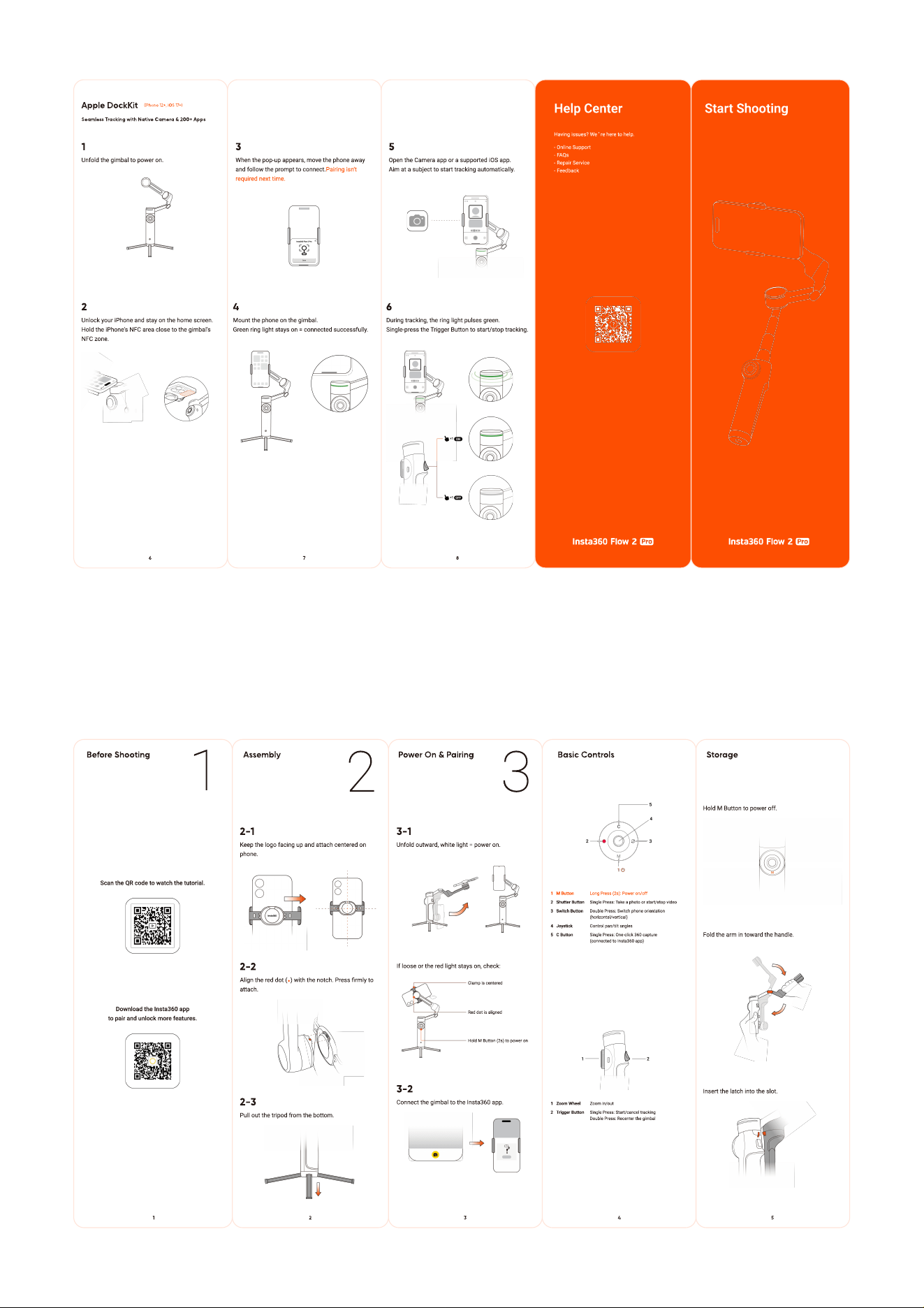
During tracking, the ring light pulses green
Single-press the Trigger Button to start/stop tracking.
5
Open the Camera app or a supported iOS app
Aim at a subject to start tracking automatically.
8
3
When the pop-up appears, move the phone a
w
ay
and
f
ollo
w
the prompt to connect.
Pairing isn't
required next time.
4
M
ount the phone on the gimbal
G
reen ring light stays on
=
connected success
f
ully.
7
Apple DockKit
(iPhone 12+, iOS 17+)
Seamless Tracking with Native Camera & 200+ Apps
6
2
U
nlock your i
P
hone and stay on the home screen
Hold the i
P
hone's
N
FC area close to the gimbal's
N
FC
z
one.
1
U
n
f
old the gimbal to po
w
er on.
Hold
M
Button to po
w
er o
ff
.
Fold the arm in to
w
ard the handle.
I
nsert the latch into the slot.
Storage
5
Basic Controls
1 M
Bu
tton
L
ong
P
ress
(2
s
):
P
o
w
er on/o
ff
2
Sh
u
tter
Bu
tton Single
P
ress
:
Take a photo or start/stop video
3
S
w
it
c
h
Bu
tton Double
P
ress
:
S
w
itch phone orientation
(
hori
z
ontal/vertical
)
4 J
o
ys
ti
ck
Control pan/tilt angles
5
C
Bu
tton Single
P
ress
:
One-click
360
captur
(
connected to
I
nsta
360
app
)
1
Z
oo
m
W
heel
Z
oom in/out
2
T
rigger
Bu
tton Single
P
ress
:
Start/cancel trackin
Double
P
ress
:
Recenter the gimbal
4
3
-
1
U
n
f
old out
w
ard,
w
hite light
=
po
w
er on.
If
loose or the red light stays on, check
:
Clamp is centered
Hold
M
Button
(2
s
)
to po
w
er on
Red dot is aligned
3
-
2
Connect the gimbal to the
I
nsta
360
app.
P
ower
O
n &
P
airing
3
3
2
-
1
K
eep the logo
f
acing up and attach centered on
phone.
2
-
2
Align the red dot
(
)
w
ith the notch.
P
ress
rmly to
attach.
2
-
3
P
ull out the tripod
f
rom the bottom.
Assem
b
l
y
2
2
Scan
the
QR
code
to
watch
the
tutorial.
Download
the
Insta360
ap
to
pair
and
unlock
more
features.
Be
f
ore Shooting
1
1