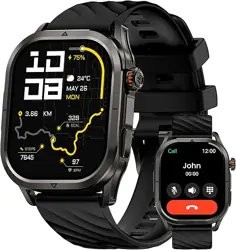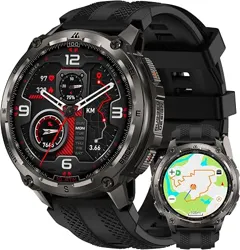

KOSPET TANK T4/M4
User Manual
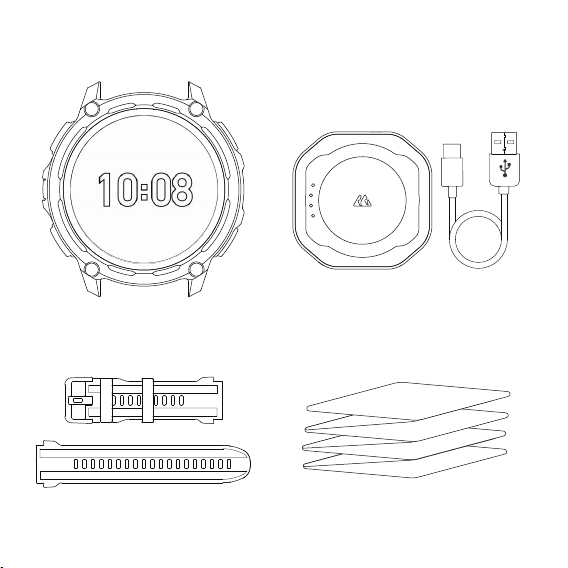
Smartwatch (including strap), Magnetic charging dock (including cable), User manual
Packing List
Strap
Smartwatch
Magnetic charging dock
(including cable)
User manual
1
About the Watch
2
1
5
6
3
2 4
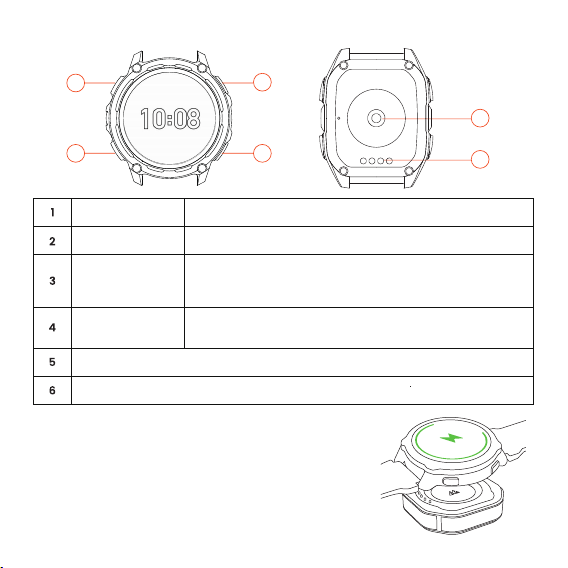
SEL button
· Press and hold the SEL button to power on / power off.
· Press the SEL button once to enter the App list / return to
the home screen.
DOWN button
Press the DOWN button once to scroll down through options.
UP button
Press the UP button once to scroll up through options.
BACK button
The BACK button can be used to count laps / return to
other pages.
Heart rate sensor
Charging port
· Please use the original KOSPET charger to charge the watch.
Before charging, please ensure that both the charger and the
watch are dry and clean.
Notes:
· Please use a power adapter with an output current of 500mA
or higher and ensure that it is certified to meet safety standards.

3
Watch Wear and Care Tips
After water activities (e.g., swimming, surfing), please shake the watch promptly to
remove residual water from holes in the watch case and wipe the watch body and the
strap with a soft cloth dampened with clean water. Allow them to dry completely before
wearing the watch again to prevent salt deposits that may affect the normal use of the
watch.
Cleaning and Maintenance After Water Activities
After intense activities (e.g., running, hiking, cycling), sweat and acidic residues may
accumulate on the watch. Please rinse the watch with clean water and dry it promptly to
minimize long-term corrosion.
Cleaning Tips After Workouts
Do not use soap, hand sanitizer, shampoo, or other harsh chemicals to clean the watch, in
order to avoid skin irritation or component damage caused by residues.
Cleaning Precautions
Device defects or damage caused by improper cleaning or chemical exposure is not
covered under warranty.
Do not expose the watch to the following conditions to maintain its water resistance.
· High-temperature environments (e.g., saunas, hot showers)
· Strong corrosive liquids or UV/radiation exposure
Usage Environment Precautions
Note: Prolonged exposure to extreme conditions accelerates gasket deterioration, which
may lead to water ingress.
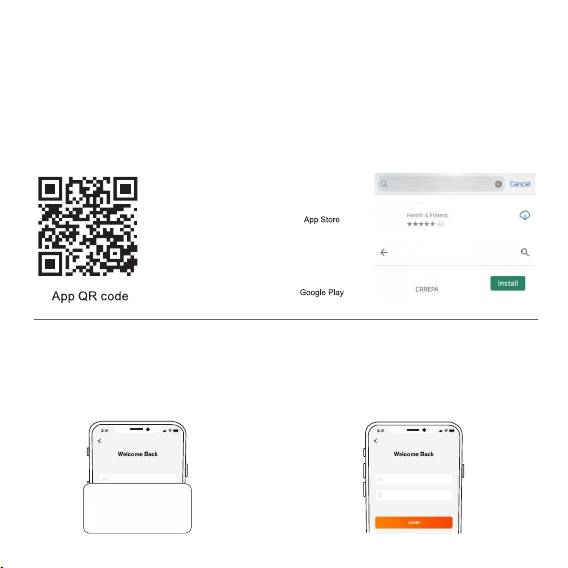
Before using the smartwatch, please download the Apexmove App where you can access
more health and fitness data insights and customize various settings, which helps you to
embrace a healthier and more active lifestyle.
App Download and Installation
Apexmove
Method 2:
Enter the keyword "Apexmove" in the
Apple App Store or Google Play Store to
download and install the App.
Apexmove
Apexmove
Apexmove
Apexmove
App Registration and Login
1. The App will request permissions on your
phone. We will use this information to
enhance your user experience and guarantee
the absolute security of this information.
2. To fully experience all features of the
smartwatch, please register and log into
your account before using the App and
grant necessary permissions to the App.
4
Method 1:
Scan the QR code below to download
and install the App.
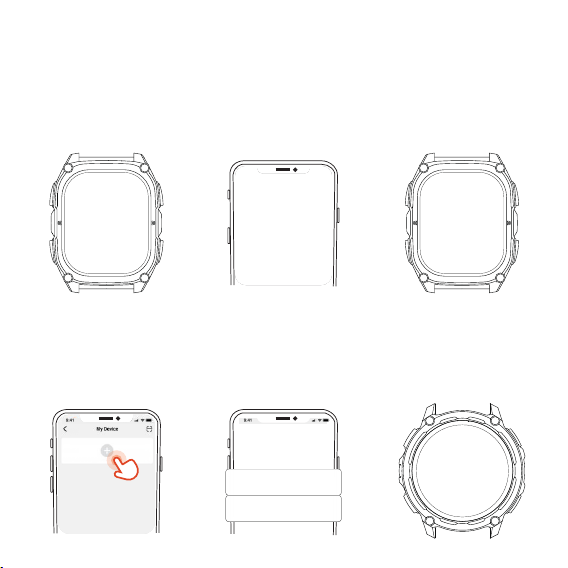
Pairing and Connection
Method 1:
① Press and hold the SEL button for 3 seconds to power on the watch, select the language,
and enter the QR code interface.
② Open the App and go to My > My Device.
③ Select the scanning icon and complete pairing by scanning the QR code.
Method 2:
① Press and hold the SEL button for 3 seconds to power on the watch.
② Open the App and go to My > My Device.
③ Select the Add Device icon, find "KOSPET TANK T4/M4" from nearby devices, and tap to
pair the device.
5
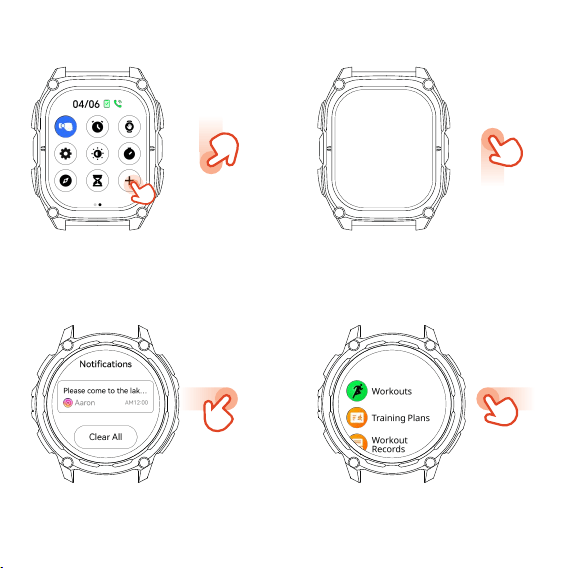
Swipe Down:
Swipe down on the home screen to
access the Control Center where you
can customize relevant features.
Swipe Right:
Swipe right on the home screen to view
unread notifications.
Gesture Operations
Swipe Up:
Swipe up on the home screen to
access the Shortcut Cards.
Swipe Left:
Swipe left on the home screen to enter
the App List.
6
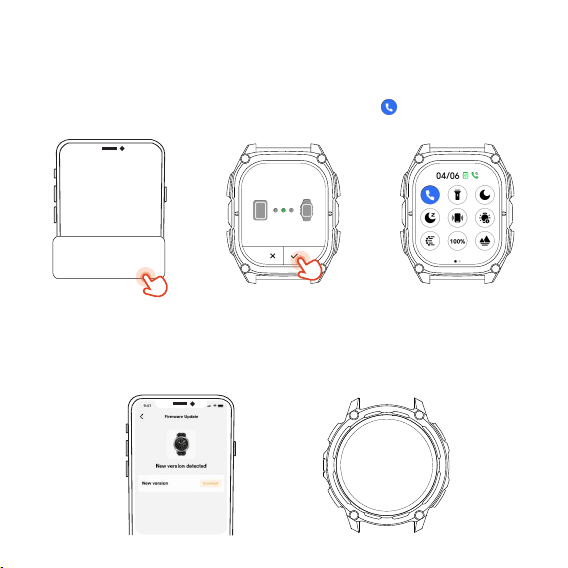
BT Calling Setup
OTA Update
7
For Android Phones
To ensure the normal use of the watch, once it is connected to the App, please tap "Pair" in
the App to enable BT calling.
When pairing the watch with an Android phone, please confirm BT pairing on the watch.
To ensure the normal use of BT calling feature, please keep the enabled on the watch.
Before using the watch, please open the App and go to My > My Device > Firmware Update
to download the latest firmware version.
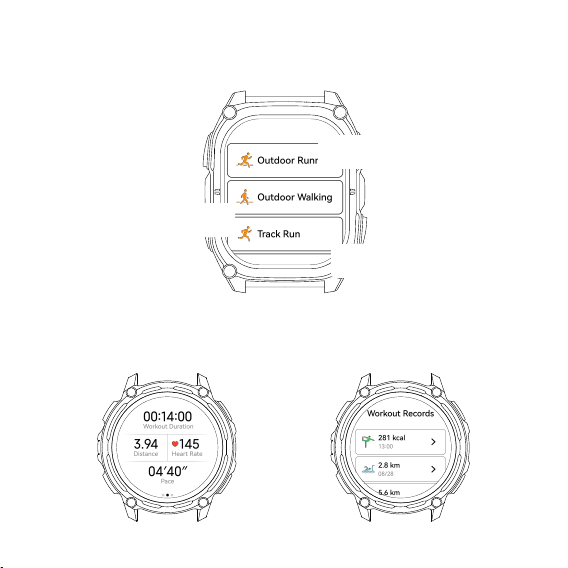
Professional Sports Algorithms
This device features 23 professional sports algorithms compatible with various
mainstream sports scenarios, in order to provide you with scientific sports data.
High-precision motion sensors can capture multi-dimensional data in real time to
intelligently analyze your sports performance. There are even more professional sports
features to help you push your limits.
8
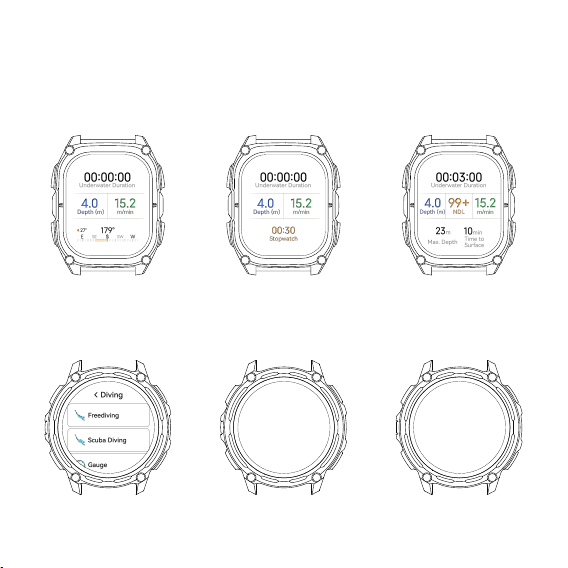
Diving Algorithm
The device is equipped with a professional diving algorithm that covers all scenarios,
including freediving, scuba diving, and gauge diving.
To ensure your diving safety, it tracks depth, temperature, ascent/descent speed,
and no-decompression limit in real time.
Please enter the watch’s workout list to select a diving mode. Before scuba diving, make
sure to compete the setup of relevant parameters.
9
Note: For safety reasons, please dive with an experienced buddy and consult a doctor
about your physical condition before diving to avoid life-threatening risks.
10
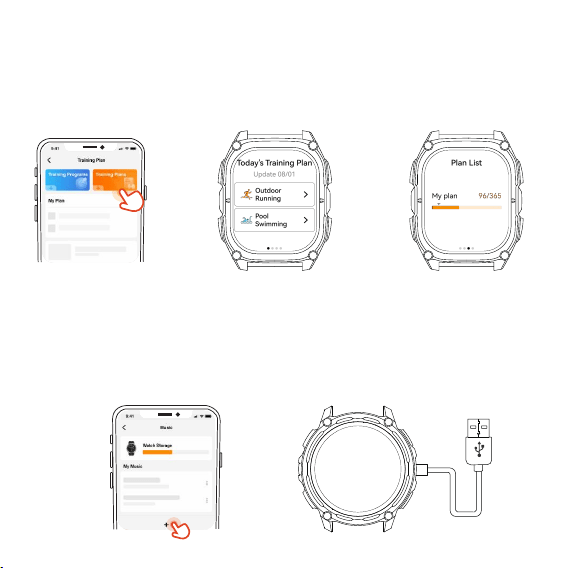
Training Plans
You can create personalized training plans in the App with a few simple steps.
Once the training plans are synced successfully, you can directly begin your training
programs on the watch. You can also check your training schedule and progress to better
achieve your training goals.
Local Music and Wireless BT Earphones
You can transfer music to the watch via the App or by connecting the watch to a device
(e.g., a computer) with a USB cable.
You can listen to your local music during workouts by pairing BT earphones or directly
through the watch.
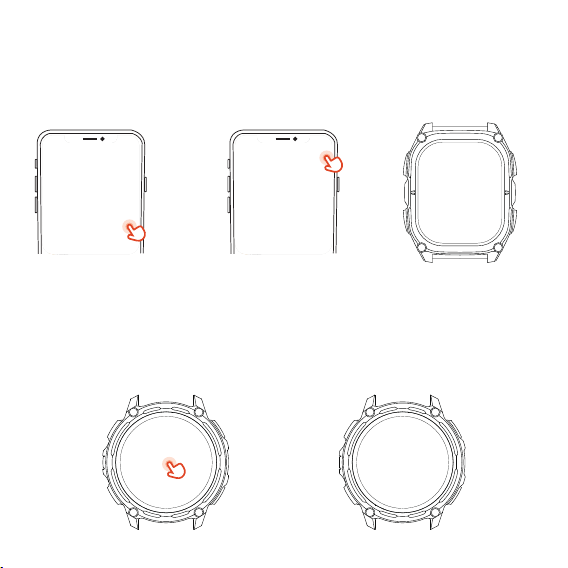
Exploration Feature
You can create location points and routes via the App.
You can use the routes and location points for navigation after they are synced to the
watch.
11
Navigation Feature
After entering the navigation or workout page on the watch, you can start the navigation
feature on the watch by selecting a route or location point.
11
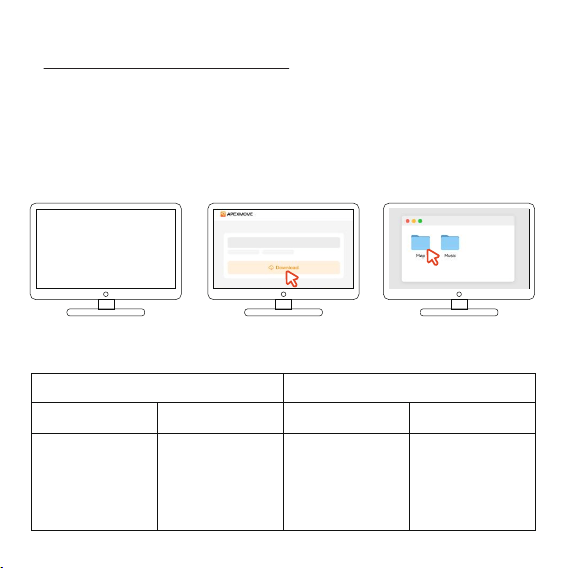
Offline Map Feature
1. Use an electronic device such as a computer (which is recommended) or tablet to visit
https://support.kospet.com/map-download and access the map download page.
2. Search for the desired region on the map download page, click "Download", and wait for
the file to finish downloading. After extracting the downloaded file, you will get a file
folder named after the region.
3. Place the watch on the charging dock, and then connect it to a computer or tablet via a
cable. Copy the downloaded file folder to the "Map" directory to complete the import of
map files.
12
Technical Specifications
T4 M4
Frequency
Power (EIRP)
Frequency
Power (EIRP)
2402-2480MHz
BeiDou, GPS,
GLONASS,
GALILEO ,QZSS,
NavIC
BT: 3.23 dBm
BLE: 3.13 dBm
2402-2480MHz
BeiDou, GPS,
GLONASS,
GALILEO ,QZSS,
NavIC
BT: 2.02 dBm
BLE: 1.93 dBm

For products purchased from the KOSPET official online store (http://www.kospet.com),
please visit https://kospet.com/pages/warranty-policy for the warranty policy.
If you have any further questions, feel free to:
· Email: [email protected]
· Call: +1 (507) 668-8466 (Service hours: Monday to Friday, 9:00 AM - 6:00 PM EST)
For purchases made on Amazon, please contact: [email protected].
Warranty Policy
13
This equipment complies with FCC radiation exposure limits set forth for an uncontrolled
environment.
FCC Radiation Exposure Statement
Any changes or modifications not expressly approved by the party responsible for
compliance could void the user's authority to operate the equipment.
This device complies with part 15 of the FCC Rules. Operation is subject to the following
two conditions:
(1) This device may not cause harmful interference, and.
(2) This device must accept any interference received, including interference that may
cause undesired operation.
FCC Caution
· Do not expose the watch to high temperatures or place it near heat sources, such as
heaters, ovens, microwaves, or water heaters, as excessive heat may cause battery
explosion and other safety hazards.
· This product is not a professional medical device and cannot be used for medical
purposes, or the as basis for diagnosis of any medical condition. All detection results are
provided for reference purposes only.
· While the watch passed waterproof testing before leaving the factory, wear and tear
during daily use may affect its sealing performance. Please use the watch carefully while
swimming or diving, and avoid wearing it in saunas or during hot showers.
· This product uses a non-removable polymer battery. Disassembly by unauthorized
personnel is strictly prohibited to prevent potential risks.
Safety Precautions

This equipment has been tested and found to comply with the limits for a Class B digital
device, pursuant to part 15 of the FCC Rules. These limits are designed to provide
reasonable protection against harmful interference in a residential installation. This
equipment generates, uses, and can radiate radio frequency energy and, if not installed
and used in accordance with the instructions, may cause harmful interference to radio
communications. However, there is no guarantee that interference will not occur in a
particular installation. If this equipment does cause harmful interference to radio or
television reception, which can be determined by turning the equipment off and on, the
user is encouraged to try to correct the interference by one or more of the following
measures:
· Reorient or relocate the receiving antenna.
· Increase the separation between the equipment and the receiver.
· Connect the equipment to an outlet on a circuit different from that to which the receiver
is connected.
· Consult the dealer or an experienced radio/TV technician for help.
Important Notice
14
This user manual is published by KOSPET. The company reserves the right of final
interpretation and may make adjustments to this manual anytime if necessary. Please
refer to the latest version published on the KOSPET official website. Feature descriptions on
the foregoing pages are provided for reference only.
Manufacturer:
Shenzhen Amazwear Technology Co., Ltd.
MADE IN CHINA
34/F, Changjiang Center, Intersection of Renmin Road and Jianshe Road, Jingxin
Community, Longhua Subdistrict, Longhua District, Shenzhen, Guangdong, China
Address: