JY931 Bluetooth Speaker User Manual
Product Features: This 5.3-inch Bluetooth-powered analog audio amplifier with TYPE-C
charging port is a multifunctional speaker that connects via smartphones, computers, or
Bluetooth-enabled TVs, integrating your home audio system for immersive sound delivery. It
delivers powerful, precise audio reproduction for the ultimate listening experience, making it an ideal
companion for leisure, entertainment, and relaxation. Additionally, its built-in charging port meets
daily device charging needs.
I. Product Features and Connectivity Overview
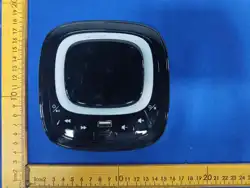
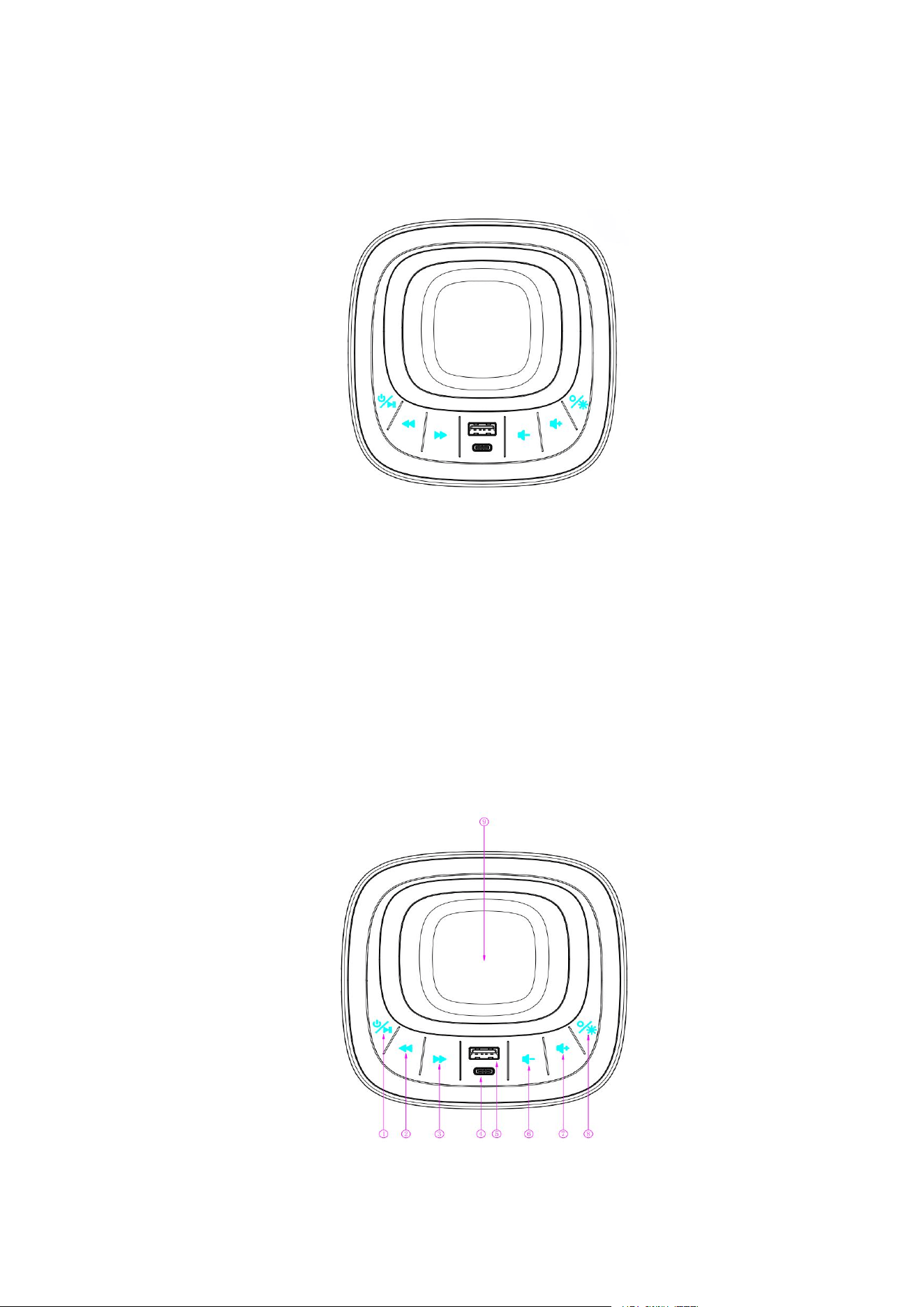
1) Schematic diagram of the panel interface

1
Switch on/off/Pause
2
Previous Song
3
Next Track
4
Type-C
5
USB
6
Reduce volume
7
Increase volume
8
Ambient light switch/mode
9
Magnetic wireless charger
After connecting the speaker and confirming everything is correct, plug one end of the DC 12V
power adapter into the speaker's power socket and the other end into a standard 110V
–
240V
outlet. Once powered on, press and hold the power button
—
the indicator light will illuminate and
a notification sound will play.
Enable Bluetooth functionality on the device (e.g., smartphone), search for and select the speaker's
name from the Bluetooth device list: JY931
If you need to enter a pairing password, the default password is usually "0000". After a successful
connection, you will hear an audible confirmation from the speaker indicating that the connection
has been established.
2) Detailed Functional Description
1
Long press the system power button to turn on/off or pause music playback
2
Switch a song at a single point
3
Switch to the next song at a single point
4
Type-C charging: 20W (uses the same fast-charging port as USB-A)
5
USB charging at 20W (uses the same fast charging as the USB-C port)
6
Long press or single tap to lower the volume
7
Long press or single tap to increase the volume
8
Colorful ambiance light mode: music rhythm flashing, color-changing scrolling light,
gradient rhythm, monochrome blue light, or turn off the ambiance lights
9
Magnetic wireless charger, 15W
3) Precautions
1. Before use, ensure the supply voltage matches the speaker's requirements and employ the
specified DC 12V power adapter.
2. Avoid using the speaker in high-temperature, humid, or dusty environments.
3. Do not leave the speaker near magnetic objects for extended periods to avoid compromising
sound quality and device performance.
4. When cleaning the speaker, first disconnect the power supply and gently wipe it with a soft, dry
cloth. Do not use chemical cleaners.
5. If the speaker is not used for an extended period, disconnect the power supply.
6.
When the device is playing music, do not charge external devices through its USB or
Type-C ports.
7. During operation, magnetic wireless charging generates normal temperature rise. When the
temperature reaches the preset threshold, the device automatically activates its overheating
temperature control protection and suspends charging to cool down.
8. During charging, ensure the magnetic adsorption is securely aligned to prevent misalignment
or displacement, which could reduce charging efficiency and cause localized abnormal heating.
9. The charging area must not contain metal objects, bank cards, magnetic components, or hard
debris to avoid interfering with magnetic positioning, obstructing charging, or posing
high-temperature risks.
10. When the phone/charging terminal has an excessively thick casing or its built-in magnetic
components do not meet specifications, the charging power will be reduced, potentially triggering
abnormal charging protection.
11. If Bluetooth cannot connect, check whether other devices are connected to the current system. If
so, restart the device and reconnect. The Bluetooth signal distance should be
≤
10 meters.
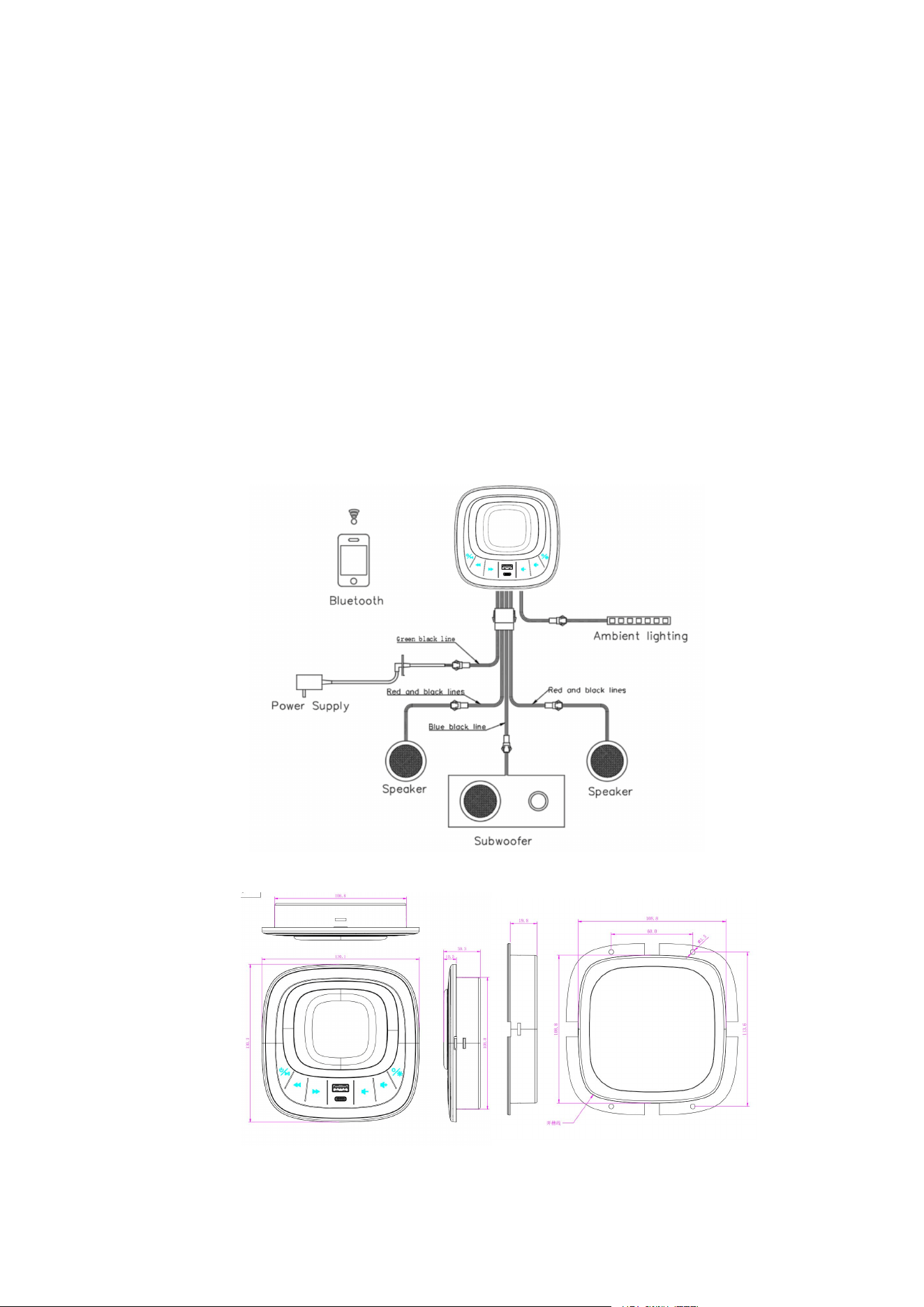
4) Circuit diagram
5) Controller dimensions

FCC Caution.
This device complies with part 15 of the FCC Rules. Operation is subject to the following two
conditions:
(1) This device may not cause harmful interference, and
(2) this device must accept any interference received, including interference that may cause
undesired operation.
Any Changes or modifications not expressly approved by the party responsible for compliance
could void the user's authority to operate the equipment.
Note: This equipment has been tested and found to comply with the limits for a Class B digital
device, pursuant to part 15 of the FCC Rules. These limits are designed to provide reasonable
protection against harmful interference in a residential installation. This equipment generates uses
and can radiate radio frequency energy and, if not installed and used in accordance with the
instructions, may cause harmful interference to radio communications. However, there is no
guarantee that interference will not occur in a particular installation. If this equipment does cause
harmful interference to radio or television reception, which can be determined by turning the
equipment off and on, the user is encouraged to try to correct the interference by one or more of
the following measures:
-Reorient or relocate the receiving antenna.
-Increase the separation between the equipment and receiver.
-Connect the equipment into an outlet on a circuit different from that to which the receiver is
connected.
-Consult the dealer or an experienced radio/TV technician for help.
FCC Radiation Exposure Statement
This device complies with FCC RF radiation exposure limits set forth for an uncontrolled
environment. This transmitter must not be co-located or operating in conjunction with any
other antenna or transmitter.
For BT function, the device has been evaluated to meet general RF exposure requirement.
The device can be used without restriction. For wireless charger function, the device has
been evaluated to meet general RF exposure requirement. This device must operate with a
minimum distance of 20 cm between the radiator and user body.