Instruction Manual
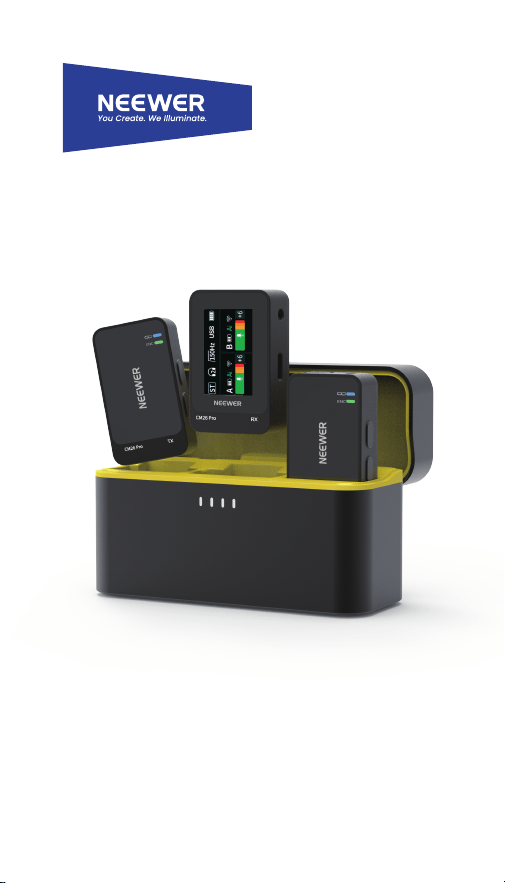
CM�� Pro Wireless AI Lav Mic

© ���� Shenzhen Neewer Technology Co., Ltd. All Rights Reserved.
This document is the sole property of Shenzhen Neewer Technology Co., Ltd
and shall not be, reproduced, transmitted, transcribed, stored in a retrieval
system or translated in any form, by any means, without prior written
permission from Shenzhen Neewer Technology Co., Ltd. Shenzhen Neewer
Technology Co., Ltd reserves the right to change content in this instruction
manual at any time and without prior notice.
Version Control
Copyright
Date
Version number
Issued by
02/02/2026
1.0
Description
Wireless AI Lav Mic
Product Overview
Package Contents
Thank you for choosing this Wireless Microphone!
The 2.4GHz adaptive frequency-hopping communication and
advanced low-latency digital wireless technology deliver high-quality
audio with a stable, reliable wireless connection.
The natural choice for interviewing, vlogging, live streaming, online
teaching, and more.
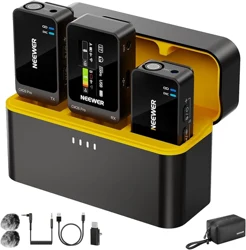
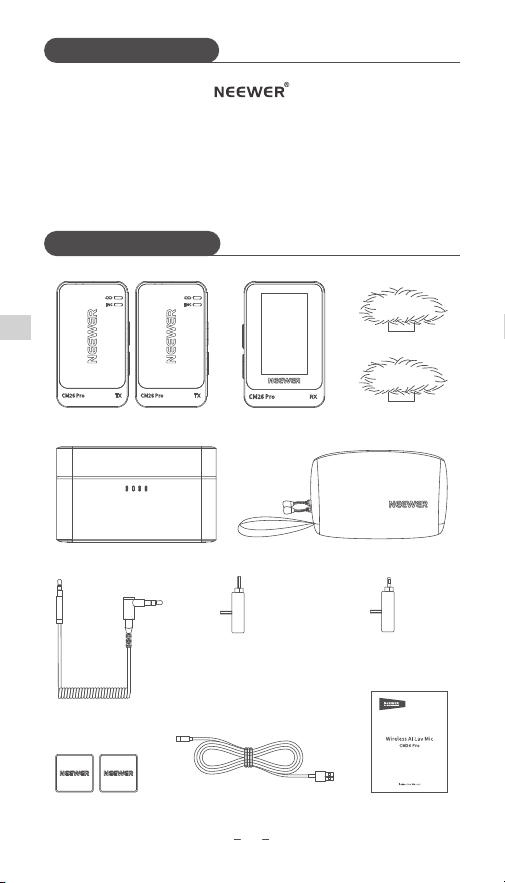
Transmitter (TX)×2 Receiver (RX)×1 Windscreen×2
Charging Case×1 Storage Case×1
Camera Audio Cable×1
Magnet×2 Charging Cable×1
USB-C to USB-C
OTG Adapter×1
USB-C to Lightning
OTG Adapter×1
User Manual×1
��
EN
Product Illustration
��
EN
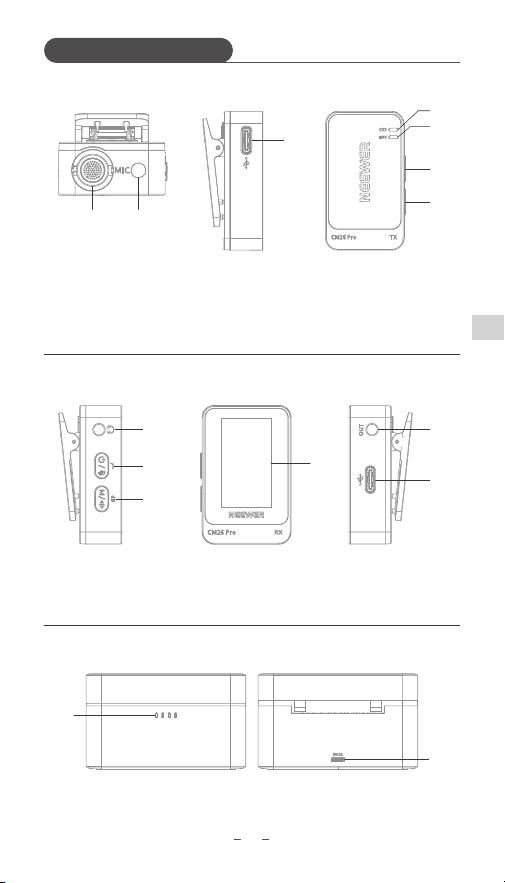
⑤ OTG Audio Output
⑥ USB-C Port
① Headphone Jack
② Power Button ④ Display
③ Function Button
RX:
④
⑤
⑥
①
②
③
TX:
① Built-In Microphone
② 3.5mm TRS Input
③ USB-C Port
④ Operating Status
Indicator
⑤ Noise Cancellation/
Volume Indicator
⑥ Power Button
⑦ Function Button
① ②
③
④
⑤
⑥
⑦
Charging Case:
① Battery Level Indicator ② USB-C Port
②
①
Functions
��
EN
③
④
①
②
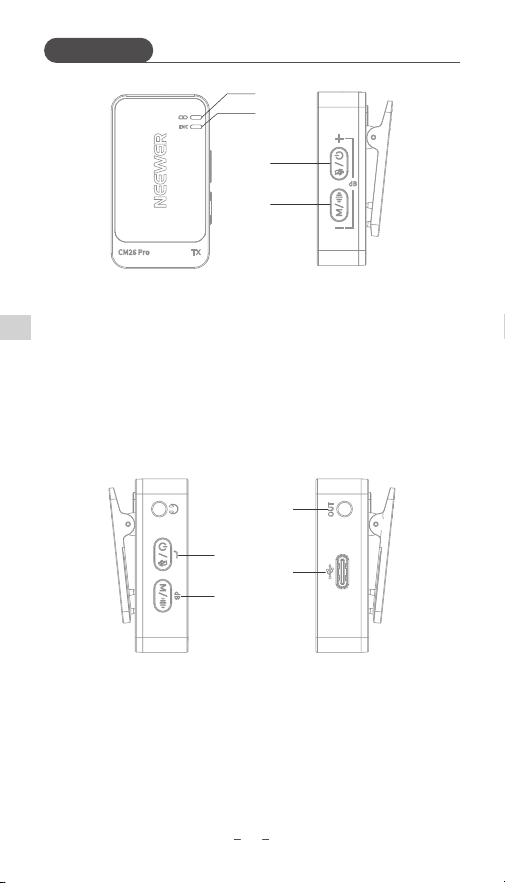
RX:
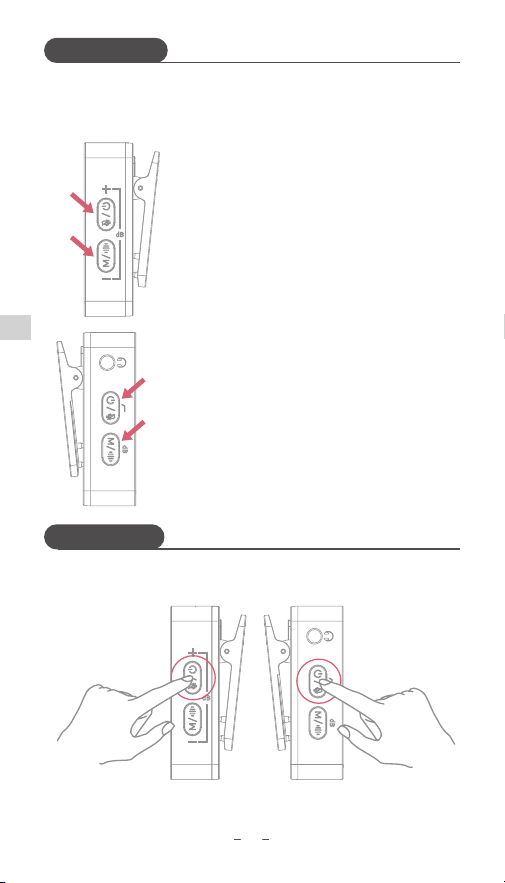
① Power Button: Long press for 2s: Power on/off;
Single press: Enable low cut; Double press: Mute.
② Function Button: Long press for 1.5s: Switch output
modes(M/ST/MS); Single press: Adjust volume;
Double press: Enable AI noise cancellation.
③ Audio Output Jack: Connects cameras and camcorders.
④ USB-C Port: Connects or charges phones, laptops, and other
devices.
① Operating Status Indicator: Unpaired: Slow flashing blue;
Paired: Solid blue; Muted: Solid red; Charging: Slow flashing red.
② Noise Cancellation/Volume Indicator: AI 1 on: Solid blue;
AI 2 on: Solid green; Volume adjustment: Flashing blue 1x;
Maximum/minimum volume: Quick flashing blue 3x.
③ Power Button: Long press for 2s: Power on/off;
Single press: Increase volume; Double press: Mute/unmute.
④ Function Button: Single press: Decrease volume;
Double press: Enable/disable AI noise cancellation.
TX:
①
②
③
④
��
EN
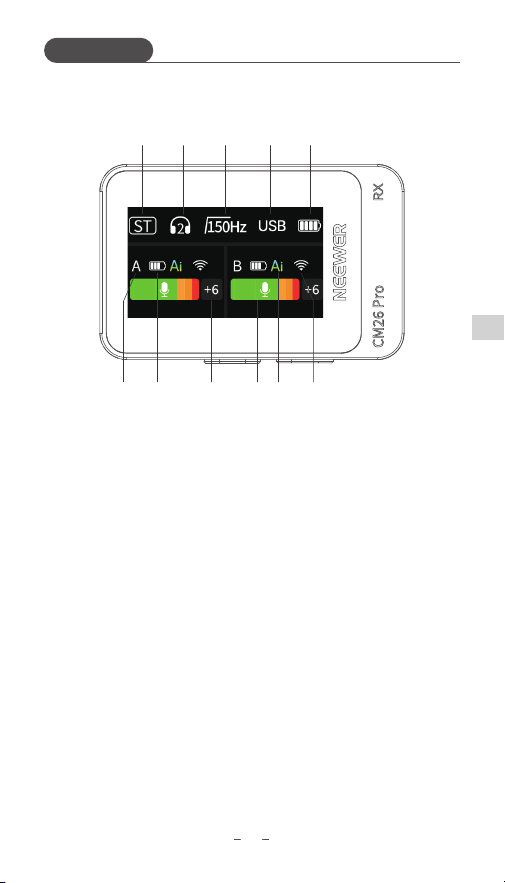
Display:
① Output Mode:
·M: Mixed output. Audio from channels A and B is combined and
sent to both left and right channels.
·ST: Stereo output. Channel A is sent to the left channel, and
channel B to the right channel.
·MS: Safety track output.
② RX volume.
③ Frequency: 75Hz, 150Hz, or off.
④ USB connection: Appears when connected to a phone or laptop.
⑤ RX battery level.
⑥ TX connection status.
⑦ TX battery level.
⑧ TX gain: -6 to +6.
⑨ TX volume level.
⑩ TX noise cancellation status.
⑪ TX signal strength.
① ② ③ ④ ⑤
⑥ ⑦ ⑧ ⑨ ⑩ ⑪
Functions
How to Pair
How to Use
��
EN
Pairing:
The following method can be used should the RX and TX devices not
pair automatically.
TX:
With power on, simultaneously long press the
power and function buttons for 2s to enter
pairing mode, the Working Status Indicator will
flash blue rapidly. When the flashing stops,
pairing is complete. (Repeat to pair the second
TX).
RX:
With power on, simultaneously long press the
power button and function buttons for 2s until
the WiFi symbol starts flashing on the display,
indicating RX is now in the pairing mode. When
the symbol stops flashing, pairing is complete.
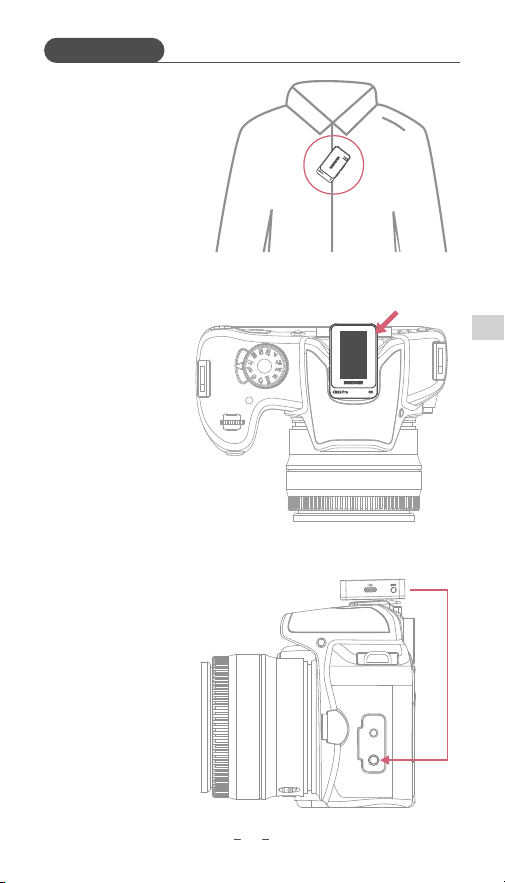
1. Long press the power button on RX and TX to power them on.
TX RX
MIC
��
EN
2. Wear the TX on clothing.
3. Mount the RX on the camera.
4. Use the camera audio cable to
connect the RX's audio output
port to the camera’s mic input
port.
How to Use
��
EN
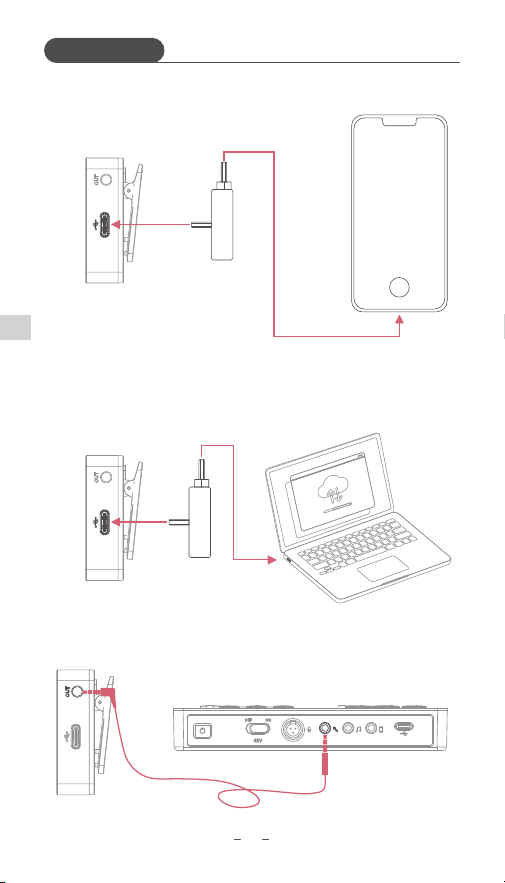
Use RX with a phone:
Use the OTG adapters to connect the RX to
the phone's USB-C or Lightning port.
Note: Some phones may require
OTG function activation from
settings.
Use RX with other devices:
1. Use the USB-C to USB-C OTG adapter to connect the RX to a
laptop's USB-C port.
2. Use the camera audio cable to connect the RX's audio output
port to the sound card's MIC input or LINE IN port.
How to Use

��
EN
1. This product is a precision electronic device. Avoid water
exposure and heavy impact.
2. If water ingress occurs, power off immediately, shake out
excess water, and contact our customer service.
3. If the product isn't used over an extended period of time, fully
chargement the battery every three months to maintain
battery health.
4. Do not expose the built-in battery to direct sunlight, fire, or
other high-temperature environments.
5. If the TX and RX cannot be powered off, press and hold the
power button for 8s to reset.
Note①:
Most components of this product are made of non-toxic,
eco-friendly materials. Components containing toxic or
hazardous substances/elements cannot be replaced due to
limitations in global technical development.
Note②:
The Environmental Protection Use Period depends on normal
operating temperature and other conditions. This symbol
indicates that, from the production date, hazardous substances
in this electronic product will not cause significant environmen-
tal pollution or pose serious risks to personal safety or property
under normal use. The period is 10 years.
Safety Precautions

Note:
- To check the remaining battery of the charging case, open the
lid to activate the indicator.
- Close the lid to automatically chargement the TX and RX
devices.
- The case can fully chargement TX + TX + RX twice.
- Opening the lid automatically powers on TX and RX; closing the
lid automatically powers them off.
* The product images used in this manual are for reference only.
The actual appearance and colors may vary.
* The product and user manual contents are subject to change
without prior notice.
��
EN
Specifications
Model
CM26 Pro
Frequency Response
20Hz-20KHz
<20dBm
<5V/2A
-10℃ - 45℃
Room temperature
100*40*60mm
≈205g
5V/2A
3.8V/2000mAh
RF Power
Charging Input
Operating Temperature
Storage Temperature
Dimensions
Weight
Charging Case:
Charging Input
Battery Type

Manufacturer:
Shenzhen Neewer Technology Co.,Ltd.
深圳市纽尔科技有限公司
Room 3001, Yuecai Plaza (North) 3008
Taibai Road, Luohu District Shenzhen,
Guangdong China.
vip@neewer.com
Lingfeng Electronic (UK) Ltd
International House, 10 Churchill Way,
Cardiff, CF10 2HE, United Kingdom,
office.lingfeng@gmail.com
(for both batteries and products)
NW Formations GmbH
Hoferstrasse 9B, 71636 Ludwigsburg, Germany,
info.nwforma[email protected]
(for both batteries and products)