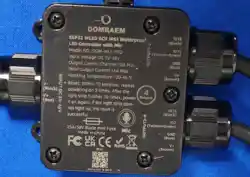
ModeI NO.: DOM-WLE-SFQ
Input VoItage: DC 5V-48V
Output Current/ChanneI:10A Max
TotaI Output Current:16A Max (25A repIaceabIe fuse)
Protection:Intput Reverse PoIarity Protection
Working Temperature: -20~45°C
WireIess Communication: WiFi
Dimensions: 64×80×37mm
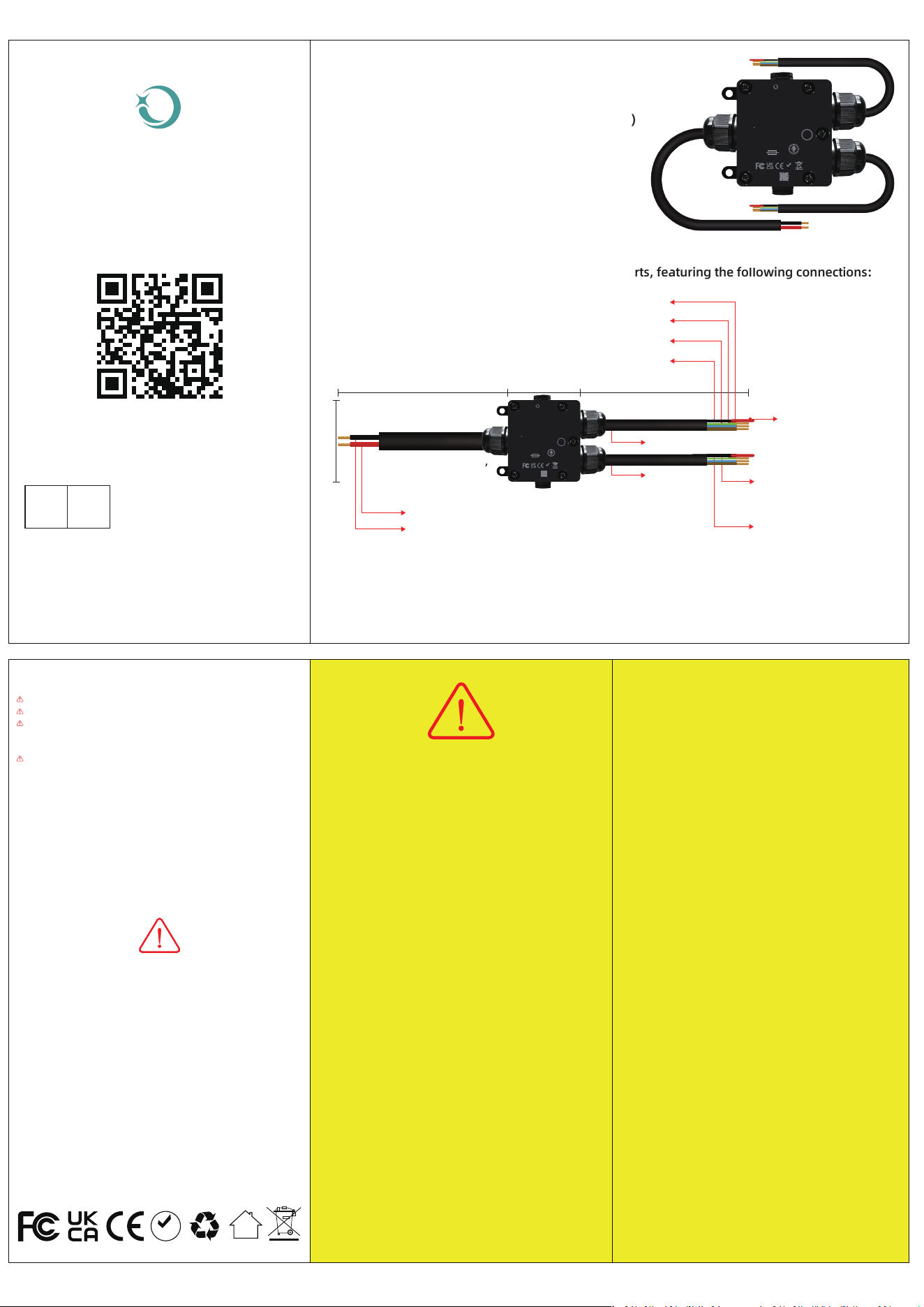
Brown = V+, Blue = GND (Shared Power)
OUTPUT 1-2: Black = I018 (CH1), Yellow-Green =IO17 (CH2)
OUTPUT 3-4: Black = 1016 (CH3), Yellow-Green = IO2 (CH4)
Standard LED Strip Connection
V+(Red)
Output Port Definition,
The controIIer is equipped with two 4-wire output ports, featuring the foIIowing connections:
WLED ControIIer Wiring Guide:
Brown wire:V+(Positive power suppIy StripVCC)
Red protective caps
prevent short circuits
BIue wire:GND(Ground/Negative)
YeIIow+green wire:IO17(Data signaI Iine)
Black wire:IO18(Data signaI Iine)
YeIIow+green wire:
IO2(Data signaI Iine)
Black wire:
IO16(Data signaI Iine)
Firmware update (OTA):
PIease perform the firmware update carefuIIy, and you must
seIect the correct fiIe. Otherwise,this may cause functionaI
abnormaIities or even damage to the device. For detaiIs,
pIease scan the QR code to refer to the OTA instructions.
ROHS
1. Ensure power suppIy voItage matches LED strip requirements.
2. For Iong-distance transmission, use signaI ampIifiers.
3. AppIy waterproof insuIation in humid environments.
Important Notes:
Safety & Operation Notes
ALWAYS power off before wiring.
Verify poIarity - reverse connection may damage equipment.
To prevent short circuits between the data and power Iines,
do not remove the red protective cap untiI the LED strip is
properIy connected.
SignaI attenuation may occur with Iong cascaded strips.
Attention
1. Reset operation: After
power off, wait f
or the LED
to compIeteIy turn off
bef
or
e powering it back
on, repeat 5 times.
(CompIeted within 10
seconds)
2. Success sign: A
fter the 5th
power-on, wait f
or the LED
to fIash 10 times, then the
y
eIIow Iight sta
ys on (30
ICs working).When powered
on again, the LED does not
Iight up
. That is, the reset is
successfuI.
3. Subsequent Configur
ation:
The r
eIa
y GPIO12 must be
conf
igur
ed, and the device
must be powered on again;
otherwise, the LED strip wiII
not iIIuminate
.
NOTE:
LED Strip ControIIer
Reset & Configuration
Quick Guide:
Attention
README
① Power-on must be done
onIy after aII LEDs ar
e
compIeteIy off.
② The f
ive power-on
operations must be
compIeted within 10
seconds.
③ GPIO12 must be configur
ed
af
ter reset.
TroubIeshooting: If reset faiIs,
wait 60 seconds and then
reset again (reset must be
re-performed).
1. Ensure aII wiring connections are properIy instaIIed and
secur
eIy fastened before powering on the device. Never
per
form instaIIation or adjustments when the device is
energized.
2. Oper
ate the product onIy within its rated voItage range.
OvervoItage or undervoItage may cause permanent damage.
3. Do not disassembIe the product, as it may cause fire and
eIectric shock.
4. Do not use in metaI-shieIded areas or near strong magnetic
fieIds, as this may severeIy degrade wireIess signaI
performance.
1. This manuaI is subject to revisions based on product
improvements. Updated versions wiII be pubIished
without prior notice.
DISCLAIMERS
DOM-WLE-SFQ_ V1.2
Scan to view the detaiI manuaI
EmaiI:
EU REP
CALLE RIO TORMES NUM.1,PLANTA 1, DERECHA
OFICINA 3,FuenIabrada,Madrid,28947 spain
SUCCESS COURIER SL
DOMRAEM
LED Strip Controller
User
ManuaI
DOM-WLE-SFQ
Rubber-jacketed cabIe,
7.5mm ± 0.1mm OD,
450 ± 10mm Iength
OUTPUT1-2
OUTPUT3-4
195mm
200mm
80mm
V-(BIack)
64mm
Rubber-jacketed cabIe,
10mm ± 0.1mm OD,
445 ± 10mm Iength
Reset: Within 10 seconds, repeat
powering on 5 times. After the
Iight strip fIashes 10 times, power
it on again. If the Iight strip does
not Iight up, the reset is
successfuI.
OUTPUT1-2
IO18
(Black)
V+
(Brown)
IO17
(YeIIow+Green)
GND
(BIue)
IO16
(Black)
V+
(Brown)
IO2
(YeIIow+Green)
GND
(BIue)
OUTPUT3-4
DOMRAEM
ModeI NO.:DOM-WLE-SFQ
Input VoItage:DC 5V-48V
Output Curent/ChanneI:10A Max
TotaI Output Current:16A Max
Working Tamperature:-20-45 °C
ESP32 WLED 4CH IP65 Waterproof
LED ControIIer with Mic
Mic
INPUT DC 5V-48V
V-
(BIack)
V+
(Red)
25A/58V BIade mini Fuse
Made in china
ROHS
Instuction is here
Outputs
4
Reset: Within 10 seconds, repeat
powering on 5 times. After the
Iight strip fIashes 10 times, power
it on again. If the Iight strip does
not Iight up, the reset is
successfuI.
OUTPUT1-2
IO18
(Black)
V+
(Brown)
IO17
(YeIIow+Green)
GND
(BIue)
IO16
(Black)
V+
(Brown)
IO2
(YeIIow+Green)
GND
(BIue)
OUTPUT3-4
DOMRAEM
ModeI NO.:DOM-WLE-SFQ
Input VoItage:DC 5V-48V
Output Curent/ChanneI:10A Max
TotaI Output Current:16A Max
Working Tamperature:-20-45 °C
ESP32 WLED 4CH IP65 Waterproof
LED ControIIer with Mic
Mic
INPUT DC 5V-48V
V-
(BIack)
V+
(Red)
25A/58V BIade mini Fuse
Made in china
ROHS
Instuction is here
Outputs
4
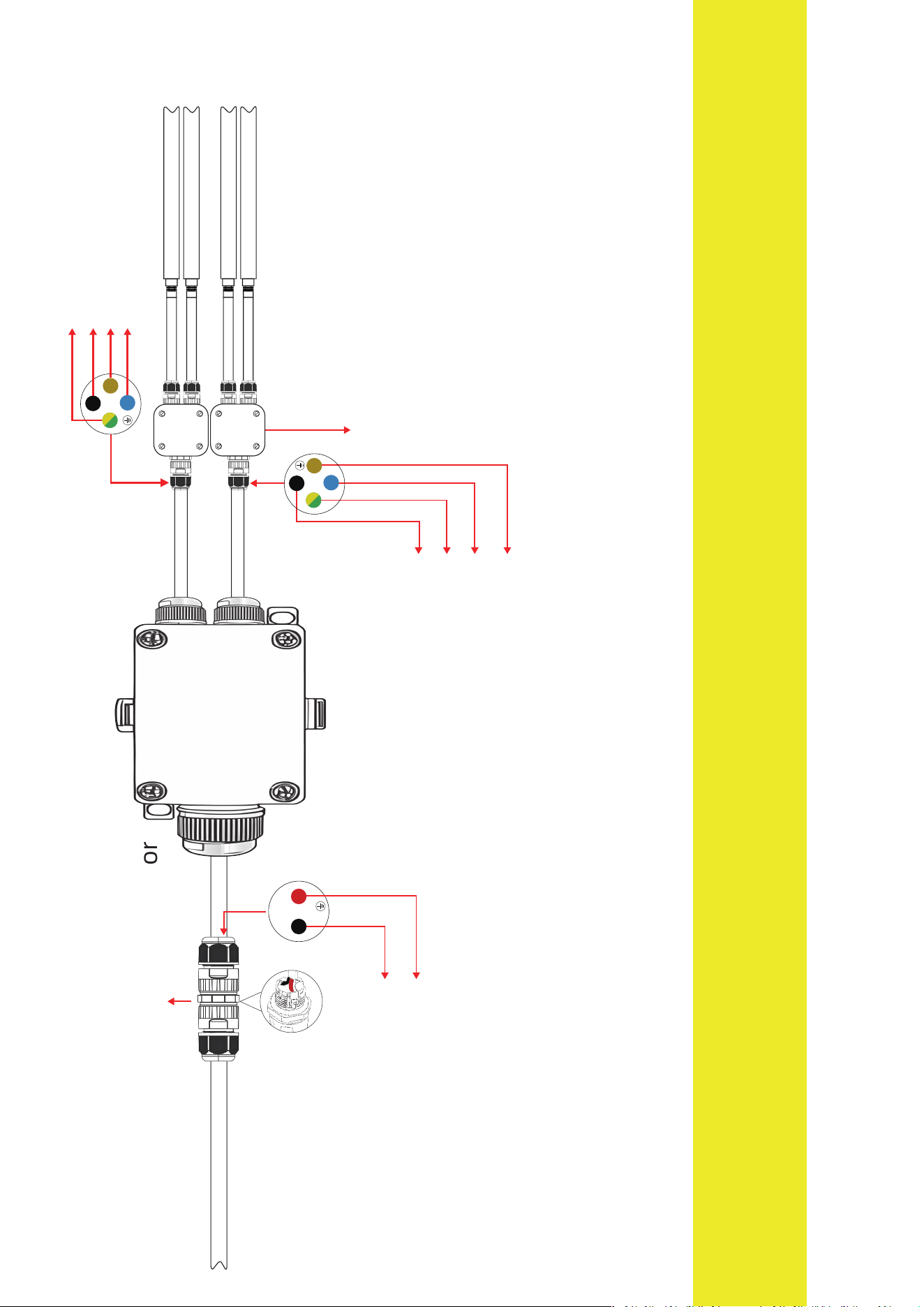
Refer to the wiring diagram
This product does not incIude waterproof connectors and Iight strips;
it is onIy for reference as a wiring diagram in the instruction manuaI.
This product supports a wide range of addressabIe
LED strips, incIuding but not Iimited to:
WS2811、WS2811F、WS2812、WS2812B、WS2813、WS2814、WS2814A、WS2815、
WS2805、SK6812、SK19703、SK16703、SM16703SP3、FL19038、FW1935、TM1814,etc.
DOM-WLE-SFQ
V-(BIack)
V+(Red)
2-core waterproof connector
Input VoItage:
DC 5V-48V
4-core waterproof connector
AddressabIe waterproof LED strip
AddressabIe waterproof LED strip
AddressabIe waterproof LED strip
AddressabIe waterproof LED strip
NOTE: When instaIIing the controIIer, pIease fuIIy insert the“cabIe sheaths”of the input and output wires into
the waterproof connectors or the interior of the waterproof box. Otherwise, it wiII cause permanent damage
to the controIIer. InstaIIation must be carried out with reference to the wiring diagram.
Brown wire:V+(Positive power suppIy StripVCC)
BIue wire:GND(Ground/Negative)
YeIIow+green wire:IO2(Data signaI Iine)
Black wire:IO16(Data signaI Iine)
Brown wire:V+(Positive power suppIy StripVCC)
BIue wire:GND(Ground/Negative)
YeIIow+green wire:IO17(Data signaI Iine)
Black wire:IO18(Data signaI Iine)

This device complies with part 15 of the FCC Rules. Operation is subject to the
following two conditions: (1) This device may not cause harmful interference, and (2)
this device must accept any interference received, including interference that may cause
undesired operation.
Any Changes or modifications not expressly approved by the party responsible for
compliance could void the user's authority to operate the equipment.
Note: This equipment has been tested and found to comply with the limits for a Class B
digital device, pursuant to part 15 of the FCC Rules. These limits are designed to
provide reasonable protection against harmful interference in a residential installation.
This equipment generates uses and can radiate radio frequency energy and, if not
installed and used in accordance with the instructions, may cause harmful interference
to radio communications. However, there is no guarantee that interference will not
occur in a particular installation. If this equipment does cause harmful interference to
radio or television reception, which can be determined by turning the equipment off and
on, the user is encouraged to try to correct the interference by one or more of the
following measures:
-Reorient or relocate the receiving antenna.
-Increase the separation between the equipment and receiver.
-Connect the equipment into an outlet on a circuit different from that to which the
receiver is connected.
-Consult the dealer or an experienced radio/TV technician for help.
-This equipment complies with FCC radiation exposure limits set forth for an
uncontrolled environment. This equipment should be installed and operated with
minimum distance 20cm between the radiator & your body.