C
ONTROL
MO
D
UL
E
S
E
R
IE
S
·
MS
-
G
W
08
G
W
8
—
I
R
/
R
F
C
ontro
l
M
o
d
u
le
N
e
twor
k
-
c
ontro
lled
mo
d
u
le
t
h
a
t
c
onv
e
rts
H
TTP
/
I
P
c
omm
a
n
d
s
i
nto
I
n
f
r
a
r
ed
a
n
d
433
M
H
z
Ra
di
o
F
r
e
qu
e
n
c
y
c
ontro
l
8
w
i
r
ed
I
R
ports
p
l
us
a
360
°
I
R
bl
a
st
e
r
,
R
F
le
a
rn
i
n
g
f
or
ro
lli
n
g
a
n
d
fi
x
ed
-
c
o
de
r
e
mot
e
s
,
100
%
w
eb
‑
b
a
s
ed
c
on
fig
ur
a
t
i
on
.
MS-GW08
D
O
C
UM
E
NT
User Manual — English
A
PPL
IE
S
TO
FI
RMW
A
R
E
V3.7.x
W
EB
I
NT
E
R
FACE
Chrome / Firefox (Internet Explorer not supported)
ST
A
TUS
Draft — pending user review, not yet approved for distribution
R
E
V
I
S
I
ON
v0.6 (draft) — 2026-11-08
A
UT
H
OR
Hernan Horigian
1.1 / Overview
P
ro
d
u
c
t
O
v
e
rv
ie
w
T
he
M
o
l
S
m
a
rt
G
W
8
i
s
a
n
I
R
/
R
F
c
ontro
l
mo
d
u
le
t
h
a
t
gi
v
e
s
a
ny
a
utom
a
t
i
on
c
ontro
lle
r
,
h
u
b
or
c
ustom
s
c
r
i
pt
I
P
‑
b
a
s
ed
c
ontro
l
ov
e
r
I
n
f
r
a
r
ed
a
n
d
433
M
H
z
Ra
di
o
‑
F
r
e
qu
e
n
c
y
de
v
ice
s
—
a
i
r
c
on
di
t
i
on
e
rs
,
TV
s
a
n
d
ot
he
r
I
R
‑
r
e
mot
e
e
qu
i
pm
e
nt
,
p
l
us
R
F
‑
c
ontro
lled
c
urt
a
i
ns
,
g
a
t
e
s
a
n
d
tu
b
u
l
a
r
motors
(
i
n
cl
u
di
n
g
S
om
f
y
RTS
a
n
d
TU
BE
.
C
on
fig
ur
a
t
i
on
i
s
100
%
w
eb
‑
b
a
s
ed
—
no
mo
bile
a
pp
i
s
r
e
qu
i
r
ed
.
T
he
mo
d
u
le
prov
ide
s
8
w
i
r
ed
I
R
e
m
i
tt
e
r
ports
p
l
us
a
360
°
I
R
bl
a
st
e
r
(
w
hich
s
h
a
r
e
s
port
1
w
i
t
h
t
he
w
i
r
ed
e
m
i
tt
e
rs
),
a
n
d
a
s
i
n
gle
e
xt
e
rn
a
l
R
F
a
nt
e
nn
a
f
or
t
he
433
M
H
z
r
a
di
o
.
I
MPORT
A
NT
T
he
G
W
8
supports
a
m
a
x
i
mum
o
f
24
r
egi
st
e
r
ed
r
e
mot
e
c
ontro
l
s
R
F
a
n
d
I
R
c
om
bi
n
ed
).
T
he
mo
d
u
le
c
a
n
be
i
nst
a
lled
l
oos
e
,
i
n
a
n
e
qu
i
pm
e
nt
r
a
ck
,
or
i
ns
ide
a
m
e
t
a
l
e
n
cl
osur
e
/
p
a
n
el
.
W
he
n
e
n
cl
os
ed
i
n
m
e
t
a
l
,
M
o
l
S
m
a
rt
r
ec
omm
e
n
d
s
r
e
mov
i
n
g
t
he
sto
ck
a
nt
e
nn
a
a
n
d
fi
tt
i
n
g
a
n
e
xt
e
rn
a
l
a
nt
e
nn
a
i
nst
e
a
d
,
to
a
vo
id
R
F
s
hieldi
n
g
/
i
nt
e
r
fe
r
e
n
ce
f
rom
t
he
e
n
cl
osur
e
.
NOT
E
T
hi
s
e
qu
i
pm
e
nt
i
s
not
e
nt
i
t
led
to
prot
ec
t
i
on
a
g
a
i
nst
h
a
rm
f
u
l
i
nt
e
r
fe
r
e
n
ce
a
n
d
must
not
c
a
us
e
i
nt
e
r
fe
r
e
n
ce
to
d
u
l
y
a
ut
h
or
i
z
ed
syst
e
ms
.
1.2 / Overview
T
ech
n
ic
a
l
S
p
ecific
a
t
i
ons
FIE
L
D DE
S
C
R
I
PT
I
ON
Model
MS
G
W
08
(
m
a
r
ked
on
t
he
e
n
cl
osur
e
a
n
d
i
n
t
he
w
eb
i
nt
e
r
f
a
ce
a
s
“
G
W
8ˮ)
RF range
U
p
to
150
m
,
li
n
e
o
f
s
igh
t
RF type
O
p
e
n
/
fi
x
ed
‑
c
o
de
433.92
M
H
z
,
OOK
or
A
SK
mo
d
u
l
a
t
i
on
—
no
e
n
c
rypt
i
on
,
no
ro
lli
n
g
c
o
de
r
e
qu
i
r
ed
to
c
a
ptur
e
a
r
e
mot
e
RF‐tested motor brands
S
om
f
y
·
TU
BE
·
A
mor
i
m
A
m
bie
nt
e
G
3
·
E
mt
ec
o
·
A
OK
·
U
di
n
e
s
e
IR ports
8
w
i
r
ed
I
R
e
m
i
tt
e
r
ports
1
360
°
I
R
bl
a
st
e
r
(
bl
a
st
e
r
s
h
a
r
e
s
port
1
w
i
t
h
t
he
w
i
r
ed
e
m
i
tt
e
rs
)
Learning
I
R
c
o
de
s
a
n
d
R
F
c
o
de
s
Max. registered remotes
24
R
F
a
n
d
I
R
c
om
bi
n
ed
)
Network
10/100
E
t
he
rn
e
t
RJ
45
a
n
d
W
i
‑
F
i
Power
DC
5
V
/
2
A
,
US
B
‑
C
c
onn
ec
tor
NOT
E
T
he
mo
d
u
le
d
o
e
s
not
s
hi
p
w
i
t
h
a
b
un
dled
US
B
‑
C
pow
e
r
a
d
a
pt
e
r
/
c
a
ble
i
n
e
v
e
ry
ki
t
—
us
e
a
5
V
/2
A
(
or
be
tt
e
r
)
US
B
‑
C
pow
e
r
sour
ce
.
1.3 / Overview
M
o
del
&
P
h
ys
ic
a
l
R
efe
r
e
n
ce
T
he
G
W
8
s
hi
ps
i
n
a
s
i
n
gle
c
on
fig
ur
a
t
i
on
—
mo
del
MS-GW08
—
w
i
t
h
a
f
ront
p
a
n
el
c
a
rry
i
n
g
t
he
st
a
tus
L
ED
a
n
d
two
h
a
r
d
w
a
r
e
b
uttons
,
a
n
d
a
r
e
a
r
p
a
n
el
c
a
rry
i
n
g
t
he
R
F
a
nt
e
nn
a
c
onn
ec
tor
,
t
he
8
I
R
e
m
i
tt
e
r
ports
,
t
he
E
t
he
rn
e
t
port
a
n
d
t
he
US
B
‑
C
pow
e
r
i
nput
.
Front panel — STATUS LED, Restart and SET buttons Rear panel — RF antenna, IR ports 1‐8, LAN, 5V
(USB‐C)
C
ONTROL
/
PORT
F
UN
C
T
I
ON
STATUS (front)
B
li
n
k
s
d
ur
i
n
g
b
oot
/
p
a
i
r
i
n
g
;
so
lid
on
ce
t
he
mo
d
u
le
h
a
s
j
o
i
n
ed
t
he
n
e
twor
k
Restart (front)
P
r
e
ss
to
r
eb
oot
t
he
mo
d
u
le
SET (front)
H
o
ld
f
or
5
s
ec
on
d
s
to
e
nt
e
r
W
i
‑
F
i
p
a
i
r
i
n
g
mo
de
—
s
ee
M
e
t
h
o
d
2
W
i
‑
F
i
Pa
i
r
i
n
g
RF (rear)
E
xt
e
rn
a
l
a
nt
e
nn
a
c
onn
ec
tor
f
or
t
he
433
M
H
z
r
a
di
o
C
ONTROL
/
PORT
F
UN
C
T
I
ON
IR 1‐8 (rear)
W
i
r
ed
I
R
e
m
i
tt
e
r
ports
—
port
1
i
s
s
h
a
r
ed
w
i
t
h
t
he
b
u
il
t
‑
i
n
360
°
I
R
bl
a
st
e
r
LAN (rear)
10/100
E
t
he
rn
e
t
port
5V (rear)
US
B
‑
C
pow
e
r
i
nput
,
5
V
/
2
A
1.4 / Overview
Sa
fe
ty
Wa
rn
i
n
g
s
&
P
r
ec
a
ut
i
ons
T
he
s
e
po
i
nts
a
pp
l
y
to
t
he
MS
G
W
08,
i
n
a
ddi
t
i
on
to
a
ll
n
a
t
i
on
a
l
a
n
d
l
o
c
a
l
r
eg
u
l
a
t
i
ons
.
W
A
RN
I
N
G
P
ow
e
r
t
he
mo
d
u
le
on
l
y
f
rom
a
5
V
/
2
A
(
or
be
tt
e
r
)
US
B
‑
C
sour
ce
.
U
s
i
n
g
a
n
un
de
rs
i
z
ed
or
d
a
m
a
ged
pow
e
r
a
d
a
pt
e
r
/
c
a
ble
c
a
n
c
a
us
e
i
nst
a
bili
ty
or
d
a
m
a
ge
t
he
un
i
t
.
NOT
E
T
he
G
W
8
i
ts
elf
on
l
y
h
a
n
dle
s
l
ow
‑
vo
l
t
a
ge
I
R
/
R
F
/
US
B
‑
C
w
i
r
i
n
g
—
i
t
d
o
e
s
not
sw
i
t
ch
li
n
e
‑
vo
l
t
a
ge
l
o
a
d
s
.
A
ny
e
qu
i
pm
e
nt
i
t
c
ontro
l
s
(
a
i
r
c
on
di
t
i
on
e
rs
,
motor
i
z
ed
c
urt
a
i
ns
,
g
a
t
e
s
,
e
t
c
.)
s
h
ou
ld
st
ill
be
i
nst
a
lled
a
n
d
w
i
r
ed
f
o
ll
ow
i
n
g
t
h
a
t
e
qu
i
pm
e
nt
'
s
own
m
a
nu
a
l
a
n
d
a
ll
a
pp
lic
a
ble
elec
tr
ic
a
l
c
o
de
s
.
NOT
E
T
hi
s
e
qu
i
pm
e
nt
i
s
not
e
nt
i
t
led
to
prot
ec
t
i
on
a
g
a
i
nst
h
a
rm
f
u
l
i
nt
e
r
fe
r
e
n
ce
a
n
d
must
not
c
a
us
e
i
nt
e
r
fe
r
e
n
ce
to
d
u
l
y
a
ut
h
or
i
z
ed
syst
e
ms
.
NOT
E
U
s
i
n
g
t
hi
s
pro
d
u
c
t
ot
he
r
t
h
a
n
a
s
de
s
c
r
ibed
i
n
t
hi
s
m
a
nu
a
l
m
a
y
vo
id
t
he
w
a
rr
a
nty
;
M
o
l
S
m
a
rt
i
s
not
li
a
ble
f
or
d
a
m
a
ge
r
e
su
l
t
i
n
g
f
rom
m
i
sus
e
.
C
h
a
n
ge
s
or
mo
dific
a
t
i
ons
not
a
pprov
ed
b
y
M
o
l
S
m
a
rt
c
ou
ld
vo
id
t
he
us
e
r
'
s
a
ut
h
or
i
ty
to
op
e
r
a
t
e
t
he
e
qu
i
pm
e
nt
.
2.1 / Installation
M
e
t
h
o
d
1
—
E
t
he
rn
e
t
T
he
s
i
mp
le
st
w
a
y
to
b
r
i
n
g
a
G
W
8
onto
t
he
n
e
twor
k
:
C
onn
ec
t
t
he
mo
d
u
le
to
a
sw
i
t
ch
/
rout
e
r
port
w
i
t
h
a
st
a
n
d
a
r
d
E
t
he
rn
e
t
c
a
ble
—
t
he
ST
A
TUS
L
ED
bli
n
k
s
w
hile
i
t
b
oots
.
1
F
rom
a
c
omput
e
r
on
t
he
s
a
m
e
n
e
twor
k
,
op
e
n
a
b
rows
e
r
a
n
d
v
i
s
i
t
http://molsmart.local/scan
.
2
T
he
M
o
l
S
m
a
rt
D
e
v
ice
S
c
a
nn
e
r
li
sts
e
v
e
ry
M
o
l
S
m
a
rt
de
v
ice
f
oun
d
on
t
he
n
e
twor
k
,
i
n
cl
u
di
n
g
t
hi
s
mo
d
u
le
'
s
W
i
‑
F
i
a
n
d
E
t
he
rn
e
t
I
P
s
.
3
C
lick
Open Device Web Page
n
e
xt
to
t
he
mo
d
u
le
to
j
ump
str
a
igh
t
i
nto
i
ts
w
eb
i
nt
e
r
f
a
ce
.
4
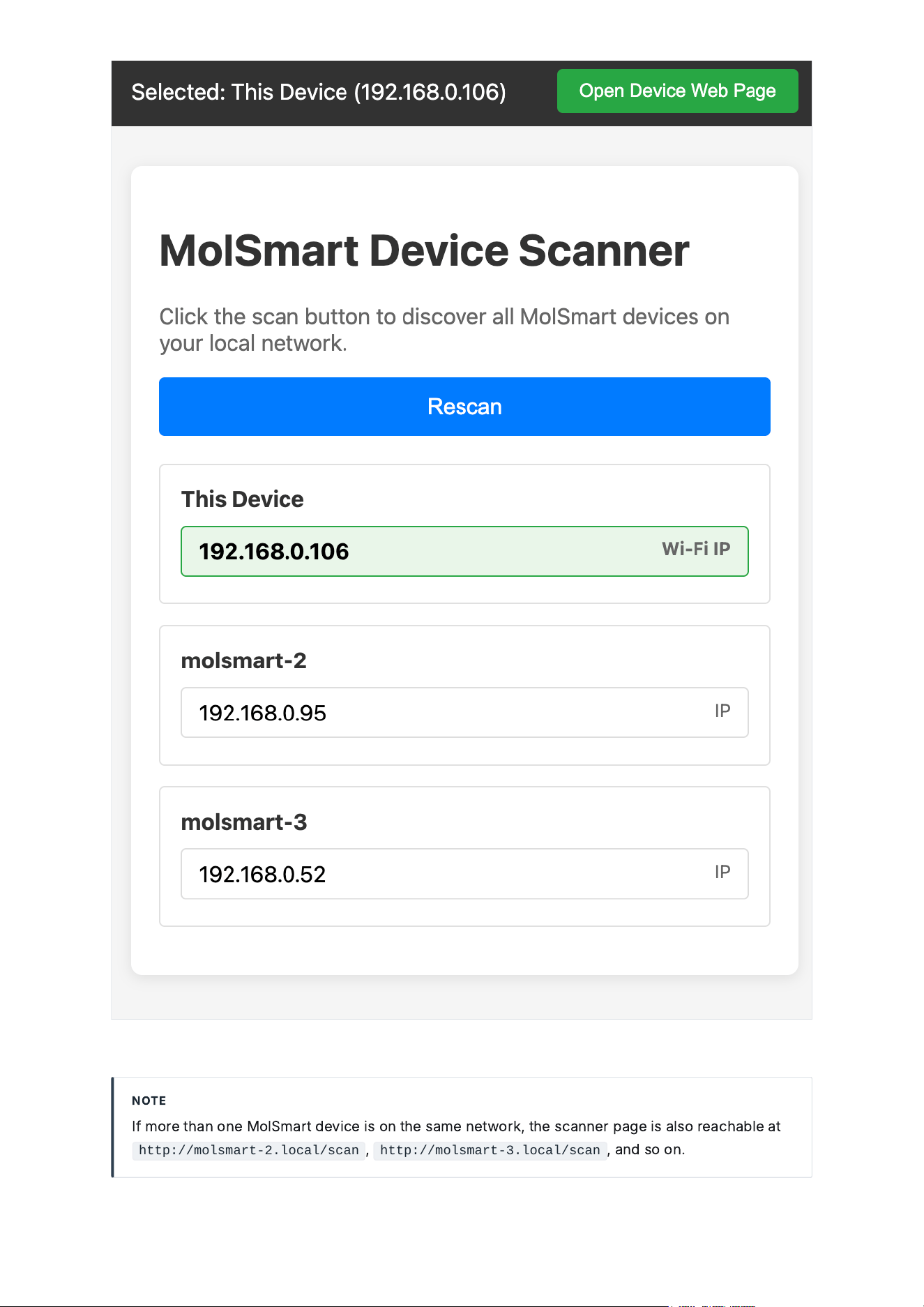
MolSmart Device Scanner — http://molsmart.local/scan
NOT
E
I
f
mor
e
t
h
a
n
on
e
M
o
l
S
m
a
rt
de
v
ice
i
s
on
t
he
s
a
m
e
n
e
twor
k
,
t
he
s
c
a
nn
e
r
p
a
ge
i
s
a
l
so
r
e
a
ch
a
ble
a
t
http://molsmart-2.local/scan
,
http://molsmart-3.local/scan
,
a
n
d
so
on
.
2.2 / Installation
M
e
t
h
o
d
2
—
W
i
‑
F
i
Pa
i
r
i
n
g
U
s
e
t
hi
s
m
e
t
h
o
d
to
j
o
i
n
t
he
mo
d
u
le
to
a
W
i
‑
F
i
n
e
twor
k
i
nst
e
a
d
o
f
E
t
he
rn
e
t
,
or
a
ny
t
i
m
e
t
he
mo
d
u
le
'
s
n
e
twor
k
s
e
tt
i
n
g
s
n
eed
to
ch
a
n
ge
—
no
pr
e
v
i
ous
l
y
‑
r
egi
st
e
r
ed
r
e
mot
e
i
s
l
ost
b
y
r
e
p
e
a
t
i
n
g
t
hi
s
pro
ced
ur
e
.
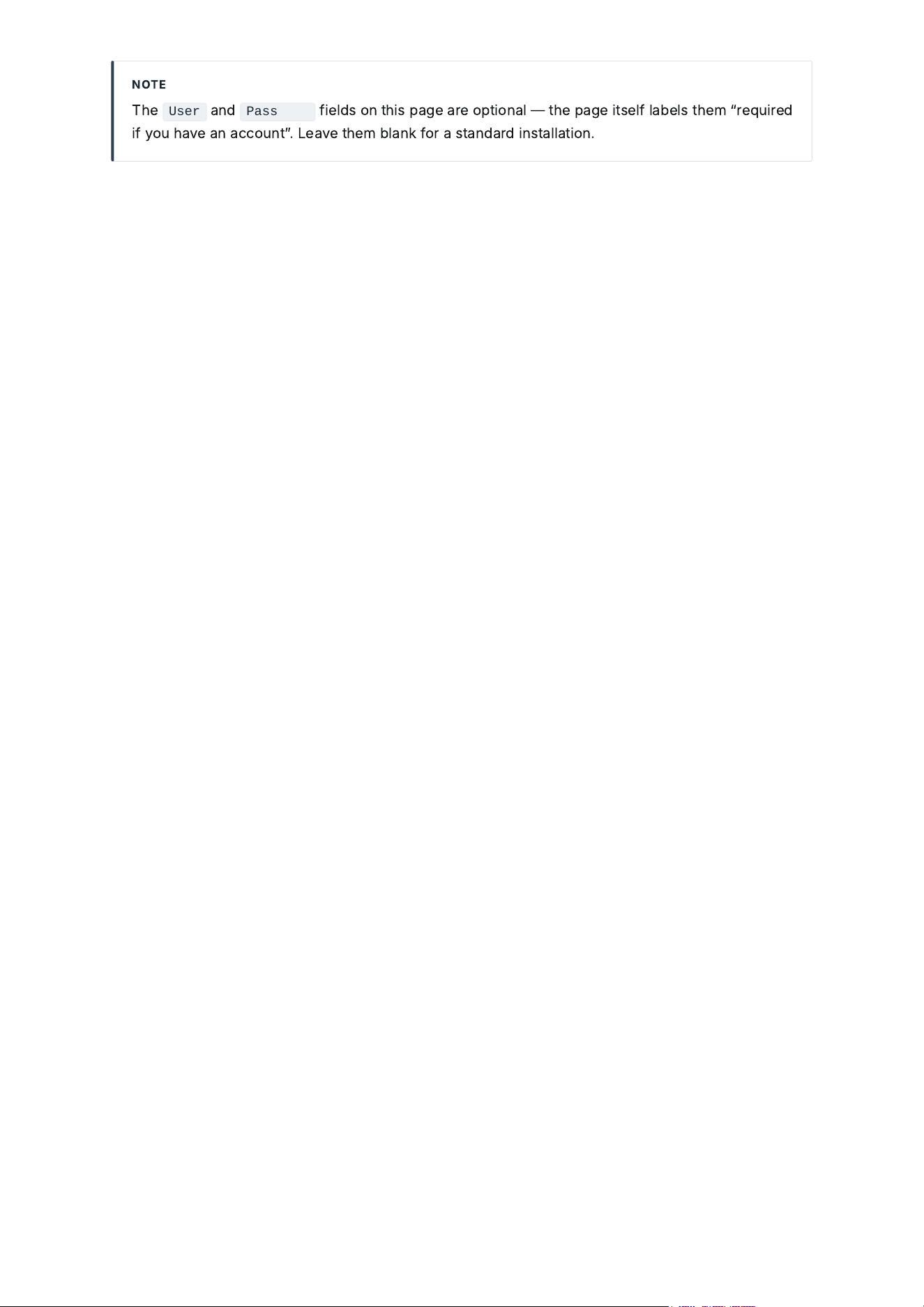
MolSmart GW8 Network Setup — reached at 192.168.4.1/init while in pairing mode
P
ow
e
r
t
he
mo
d
u
le
v
i
a
US
B
‑
C
a
n
d
w
a
i
t
f
or
i
t
to
fi
n
i
s
h
b
oot
i
n
g
.
1
P
r
e
ss
a
n
d
h
o
ld
t
he
SET
b
utton
on
t
he
f
ront
p
a
n
el
f
or
5
s
ec
on
d
s
,
unt
il
t
he
ST
A
TUS
L
ED
st
a
rts
bli
n
ki
n
g
to
i
n
dic
a
t
e
p
a
i
r
i
n
g
mo
de
.
2
O
n
a
p
h
on
e
or
c
omput
e
r
,
l
oo
k
f
or
a
n
e
w
W
i
‑
F
i
n
e
twor
k
n
a
m
ed
MolSmart-XXXXXXX
(
t
he
su
ffi
x
i
s
t
he
mo
d
u
le
'
s
M
AC
a
dd
r
e
ss
)
a
n
d
c
onn
ec
t
to
i
t
—
no
p
a
sswor
d
r
e
qu
i
r
ed
.
3
O
p
e
n
a
b
rows
e
r
a
n
d
v
i
s
i
t
http://192.168.4.1/init
.
4
O
n
t
he
s
e
tup
p
a
ge
,
fill
i
n
t
he
W
i
‑
F
i
n
e
twor
k
t
he
mo
d
u
le
s
h
ou
ld
j
o
i
n
SS
ID
/
p
a
sswor
d
),
or
c
on
fig
ur
e
t
he
E
t
he
rn
e
t
s
ide
i
nst
e
a
d
DHC
P
or
a
st
a
t
ic
I
P
.
5
S
u
b
m
i
t
a
n
d
w
a
i
t
f
or
c
on
fi
rm
a
t
i
on
—
t
he
mo
d
u
le
j
o
i
ns
t
he
c
on
fig
ur
ed
n
e
twor
k
a
n
d
c
a
n
be
di
s
c
onn
ec
t
ed
f
rom
;
r
ec
onn
ec
t
your
p
h
on
e
/
c
omput
e
r
to
your
norm
a
l
n
e
twor
k
.
6
R
e
a
ch
t
he
mo
d
u
le
'
s
w
eb
i
nt
e
r
f
a
ce
a
t
t
he
L
A
N
/
W
i
‑
F
i
I
P
s
h
own
on
t
he
s
e
tup
p
a
ge
,
or
fi
n
d
i
t
a
g
a
i
n
v
i
a
http://molsmart.local/scan
(
c
omput
e
r
a
n
d
mo
d
u
le
must
be
on
t
he
s
a
m
e
n
e
twor
k
).
7
NOT
E
T
he
User
a
n
d
Password
field
s
on
t
hi
s
p
a
ge
a
r
e
opt
i
on
a
l
—
t
he
p
a
ge
i
ts
elf
l
a
bel
s
t
he
m
“
r
e
qu
i
r
ed
if
you
h
a
v
e
a
n
a
cc
ount
ˮ.
L
e
a
v
e
t
he
m
bl
a
n
k
f
or
a
st
a
n
d
a
r
d
i
nst
a
ll
a
t
i
on
.
3.1 / Web Interface
S
yst
e
m
D
e
t
a
il
s
O
p
e
n
i
n
g
t
he
mo
d
u
le
'
s
I
P
i
n
a
b
rows
e
r
s
h
ows
t
he
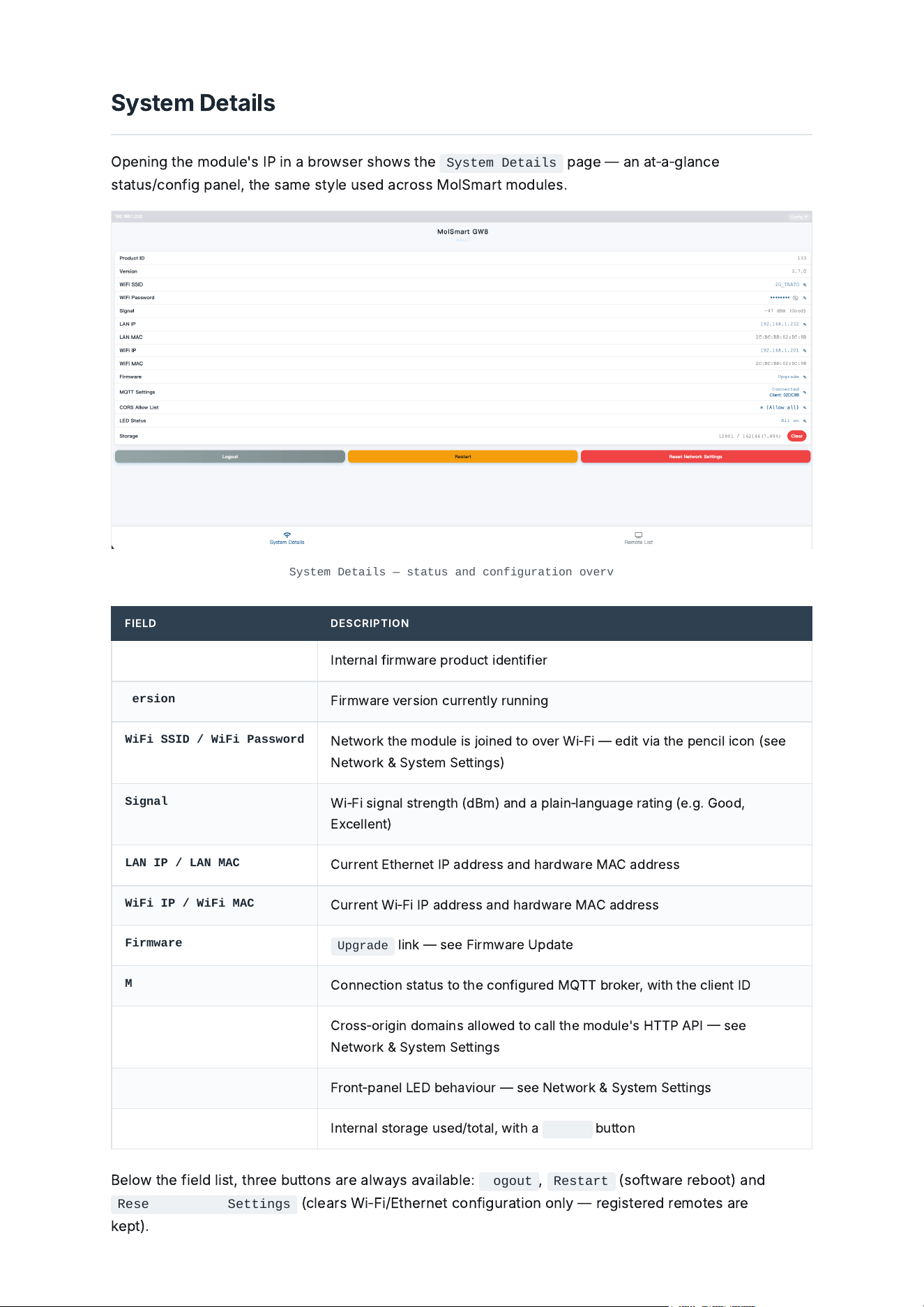
System Details
p
a
ge
—
a
n
a
t
‑
a
‑
gl
a
n
ce
st
a
tus
/
c
on
fig
p
a
n
el
,
t
he
s
a
m
e
sty
le
us
ed
a
c
ross
M
o
l
S
m
a
rt
mo
d
u
le
s
.
System Details — status and configuration overview
FIE
L
D DE
S
C
R
I
PT
I
ON
Product ID
I
nt
e
rn
a
l
fi
rmw
a
r
e
pro
d
u
c
t
ide
nt
ifie
r
Version
F
i
rmw
a
r
e
v
e
rs
i
on
c
urr
e
nt
l
y
runn
i
n
g
WiFi SSID / WiFi Password
N
e
twor
k
t
he
mo
d
u
le
i
s
j
o
i
n
ed
to
ov
e
r
W
i
‑
F
i
—
edi
t
v
i
a
t
he
p
e
n
cil
ic
on
(
s
ee
N
e
twor
k
&
S
yst
e
m
S
e
tt
i
n
g
s
)
Signal
W
i
‑
F
i
s
ig
n
a
l
str
e
n
g
t
h
(
d
B
m
)
a
n
d
a
p
l
a
i
n
‑
l
a
n
g
u
a
ge
r
a
t
i
n
g
(
e
.
g
.
G
oo
d
,
E
x
celle
nt
)
LAN IP / LAN MAC
C
urr
e
nt
E
t
he
rn
e
t
I
P
a
dd
r
e
ss
a
n
d
h
a
r
d
w
a
r
e
M
AC
a
dd
r
e
ss
WiFi IP / WiFi MAC
C
urr
e
nt
W
i
‑
F
i
I
P
a
dd
r
e
ss
a
n
d
h
a
r
d
w
a
r
e
M
AC
a
dd
r
e
ss
Firmware
Upgrade
li
n
k
—
s
ee
F
i
rmw
a
r
e
U
p
d
a
t
e
MQTT Settings
C
onn
ec
t
i
on
st
a
tus
to
t
he
c
on
fig
ur
ed
MQTT
b
ro
ke
r
,
w
i
t
h
t
he
clie
nt
ID
CORS Allow List
C
ross
‑
or
igi
n
d
om
a
i
ns
a
ll
ow
ed
to
c
a
ll
t
he
mo
d
u
le
'
s
H
TTP
A
P
I
s
ee
N
e
twor
k
&
S
yst
e
m
S
e
tt
i
n
g
s
LED Status
F
ront
‑
p
a
n
el
L
ED
beh
a
v
i
our
—
s
ee
N
e
twor
k
&
S
yst
e
m
S
e
tt
i
n
g
s
Storage
I
nt
e
rn
a
l
stor
a
ge
us
ed
/
tot
a
l
,
w
i
t
h
a
Clear
b
utton
B
el
ow
t
he
field
li
st
,
t
h
r
ee
b
uttons
a
r
e
a
l
w
a
ys
a
v
a
il
a
ble
:
Logout
,
Restart
(
so
f
tw
a
r
e
r
eb
oot
)
a
n
d
Reset Network Settings
(
cle
a
rs
W
i
‑
F
i
/
E
t
he
rn
e
t
c
on
fig
ur
a
t
i
on
on
l
y
—
r
egi
st
e
r
ed
r
e
mot
e
s
a
r
e
ke
pt
).
3.2 / Web Interface
N
e
twor
k
&
S
yst
e
m
S
e
tt
i
n
g
s
E
v
e
ry
edi
t
a
ble
field
on
S
yst
e
m
D
e
t
a
il
s
op
e
ns
a
sm
a
ll
di
a
l
o
g
w
he
n
i
ts
p
e
n
cil
ic
on
i
s
clicked
.
T
he
most
‑
us
ed
on
e
s
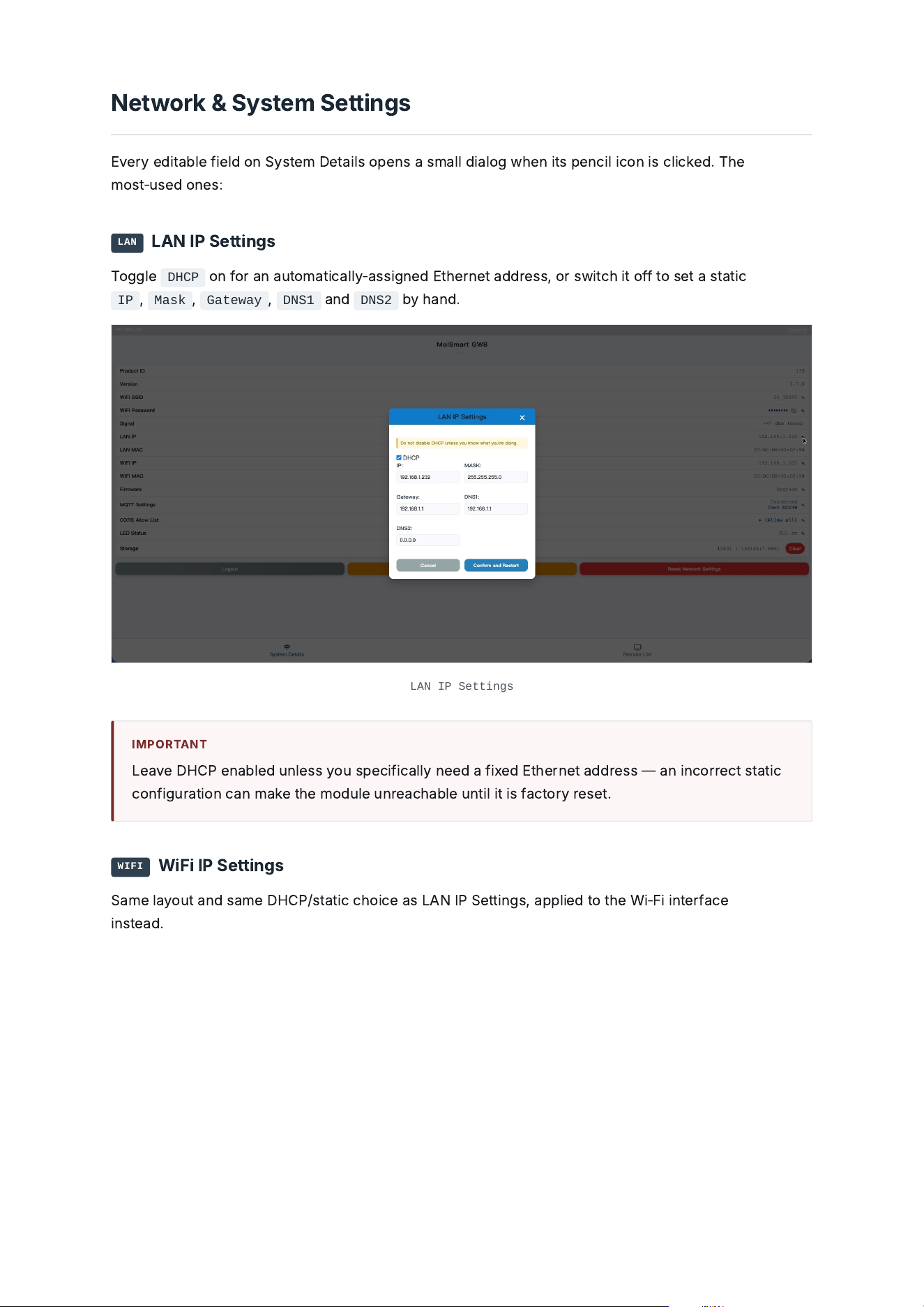
:
LAN
L
A
N
I
P
S
e
tt
i
n
g
s
T
o
ggle
DHCP
on
f
or
a
n
a
utom
a
t
ic
a
ll
y
‑
a
ss
ig
n
ed
E
t
he
rn
e
t
a
dd
r
e
ss
,
or
sw
i
t
ch
i
t
o
ff
to
s
e
t
a
st
a
t
ic
IP
,
Mask
,
Gateway
,
DNS1
a
n
d
DNS2
b
y
h
a
n
d
.
LAN IP Settings
I
MPORT
A
NT
L
e
a
v
e
DHC
P
e
n
a
bled
un
le
ss
you
sp
ecific
a
ll
y
n
eed
a
fi
x
ed
E
t
he
rn
e
t
a
dd
r
e
ss
—
a
n
i
n
c
orr
ec
t
st
a
t
ic
c
on
fig
ur
a
t
i
on
c
a
n
m
a
ke
t
he
mo
d
u
le
unr
e
a
ch
a
ble
unt
il
i
t
i
s
f
a
c
tory
r
e
s
e
t
.
WIFI
W
i
F
i
I
P
S
e
tt
i
n
g
s
Sa
m
e
l
a
yout
a
n
d
s
a
m
e
DHC
P
/
st
a
t
ic
ch
o
ice
a
s
L
A
N
I
P
S
e
tt
i
n
g
s
,
a
pp
lied
to
t
he
W
i
‑
F
i
i
nt
e
r
f
a
ce
i
nst
e
a
d
.
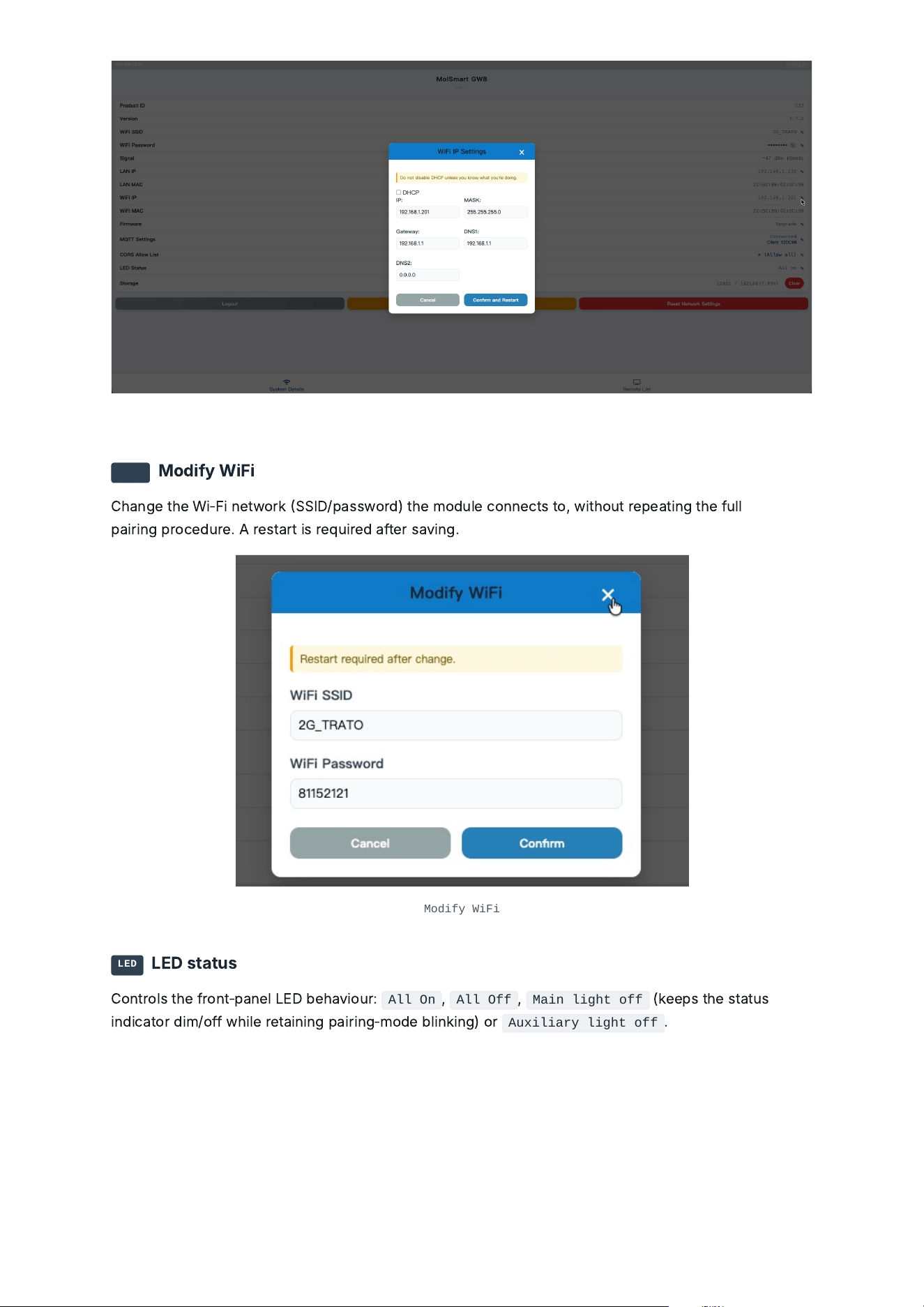
WiFi IP Settings
SSID
M
o
dif
y
W
i
F
i
C
h
a
n
ge
t
he
W
i
‑
F
i
n
e
twor
k
SS
ID
/
p
a
sswor
d
)
t
he
mo
d
u
le
c
onn
ec
ts
to
,
w
i
t
h
out
r
e
p
e
a
t
i
n
g
t
he
f
u
ll
p
a
i
r
i
n
g
pro
ced
ur
e
.
A
r
e
st
a
rt
i
s
r
e
qu
i
r
ed
a
f
t
e
r
s
a
v
i
n
g
.
Modify WiFi
LED
L
ED
st
a
tus
C
ontro
l
s
t
he
f
ront
‑
p
a
n
el
L
ED
beh
a
v
i
our
:
All On
,
All Off
,
Main light off
(
kee
ps
t
he
st
a
tus
i
n
dic
a
tor
di
m
/
o
ff
w
hile
r
e
t
a
i
n
i
n
g
p
a
i
r
i
n
g
‑
mo
de
bli
n
ki
n
g
)
or
Auxiliary light off
.
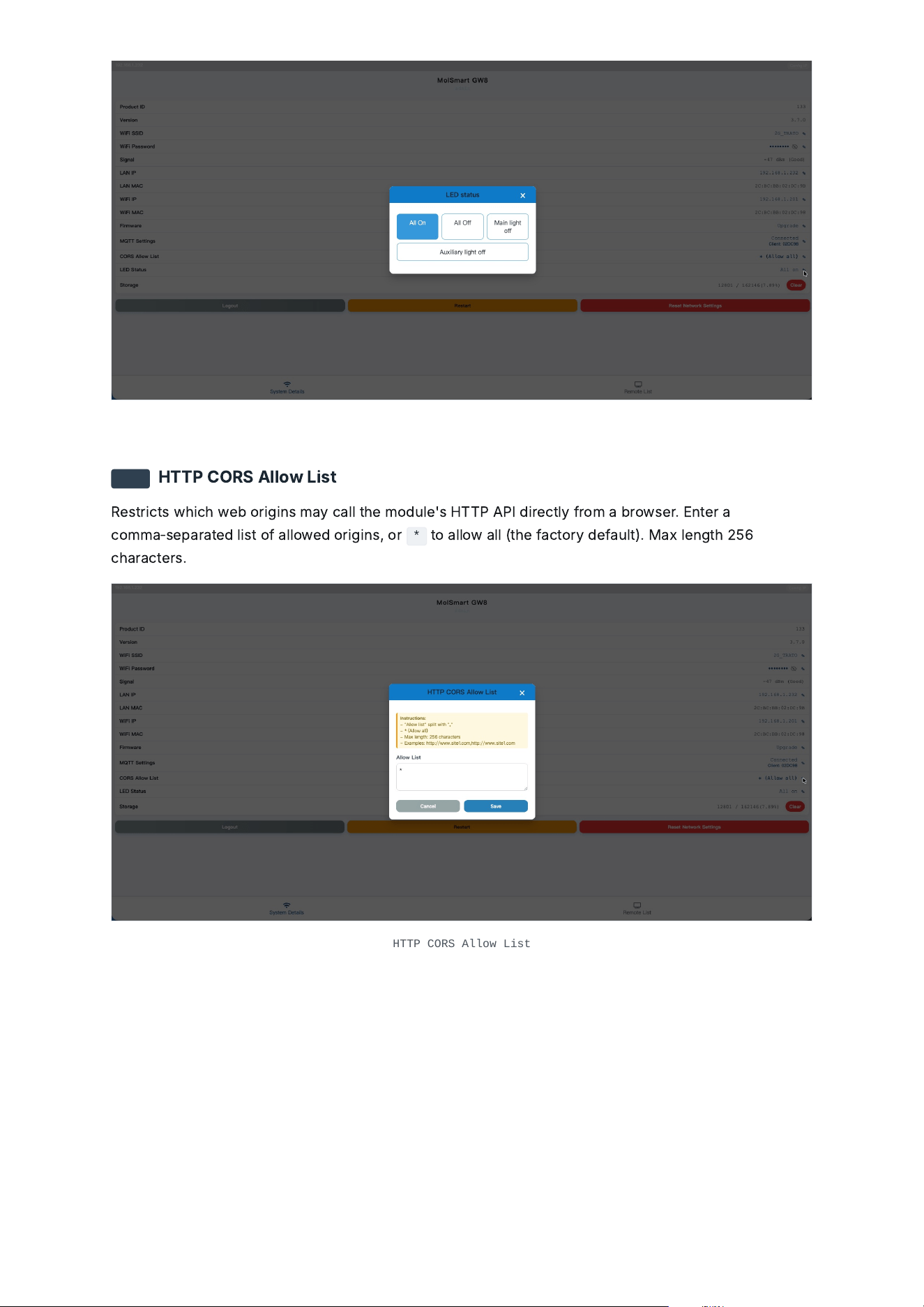
LED status
CORS
H
TTP
C
ORS
A
ll
ow
L
i
st
R
e
str
ic
ts
w
hich
w
eb
or
igi
ns
m
a
y
c
a
ll
t
he
mo
d
u
le
'
s
H
TTP
A
P
I
di
r
ec
t
l
y
f
rom
a
b
rows
e
r
.
E
nt
e
r
a
c
omm
a
‑
s
e
p
a
r
a
t
ed
li
st
o
f
a
ll
ow
ed
or
igi
ns
,
or
*
to
a
ll
ow
a
ll
(
t
he
f
a
c
tory
def
a
u
l
t
).
Ma
x
le
n
g
t
h
256
ch
a
r
a
c
t
e
rs
.
HTTP CORS Allow List
4.1 / Remote Control Setup
R
e
mot
e
L
i
st
&
A
ddi
n
g
a
R
e
mot
e
T
he
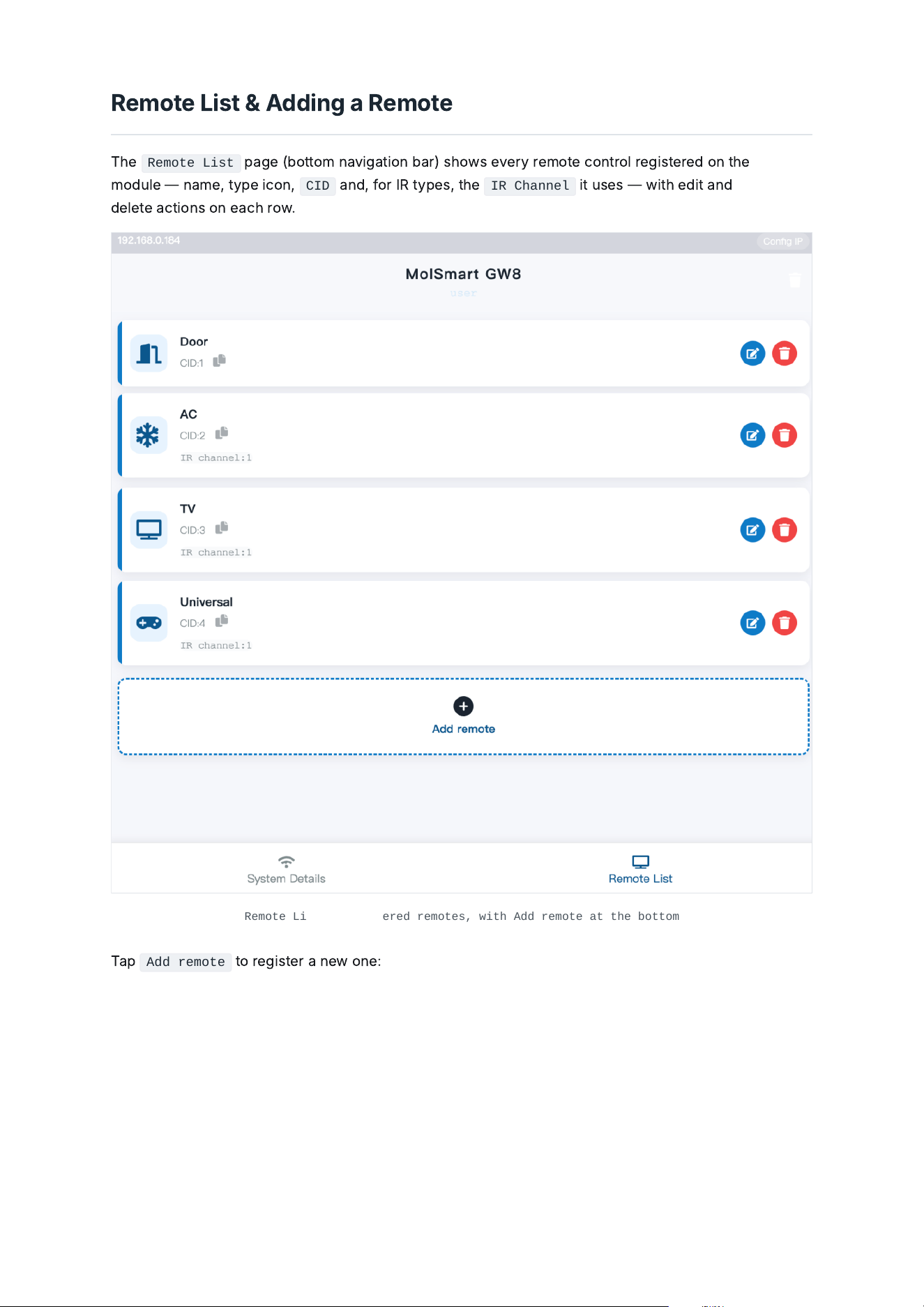
Remote List
p
a
ge
(
b
ottom
n
a
v
ig
a
t
i
on
b
a
r
)
s
h
ows
e
v
e
ry
r
e
mot
e
c
ontro
l
r
egi
st
e
r
ed
on
t
he
mo
d
u
le
—
n
a
m
e
,
typ
e
ic
on
,
CID
a
n
d
,
f
or
I
R
typ
e
s
,
t
he
IR Channel
i
t
us
e
s
—
w
i
t
h
edi
t
a
n
d
dele
t
e
a
c
t
i
ons
on
e
a
ch
row
.
Remote List — registered remotes, with Add remote at the bottom
Ta
p
Add remote
to
r
egi
st
e
r
a
n
e
w
on
e
:
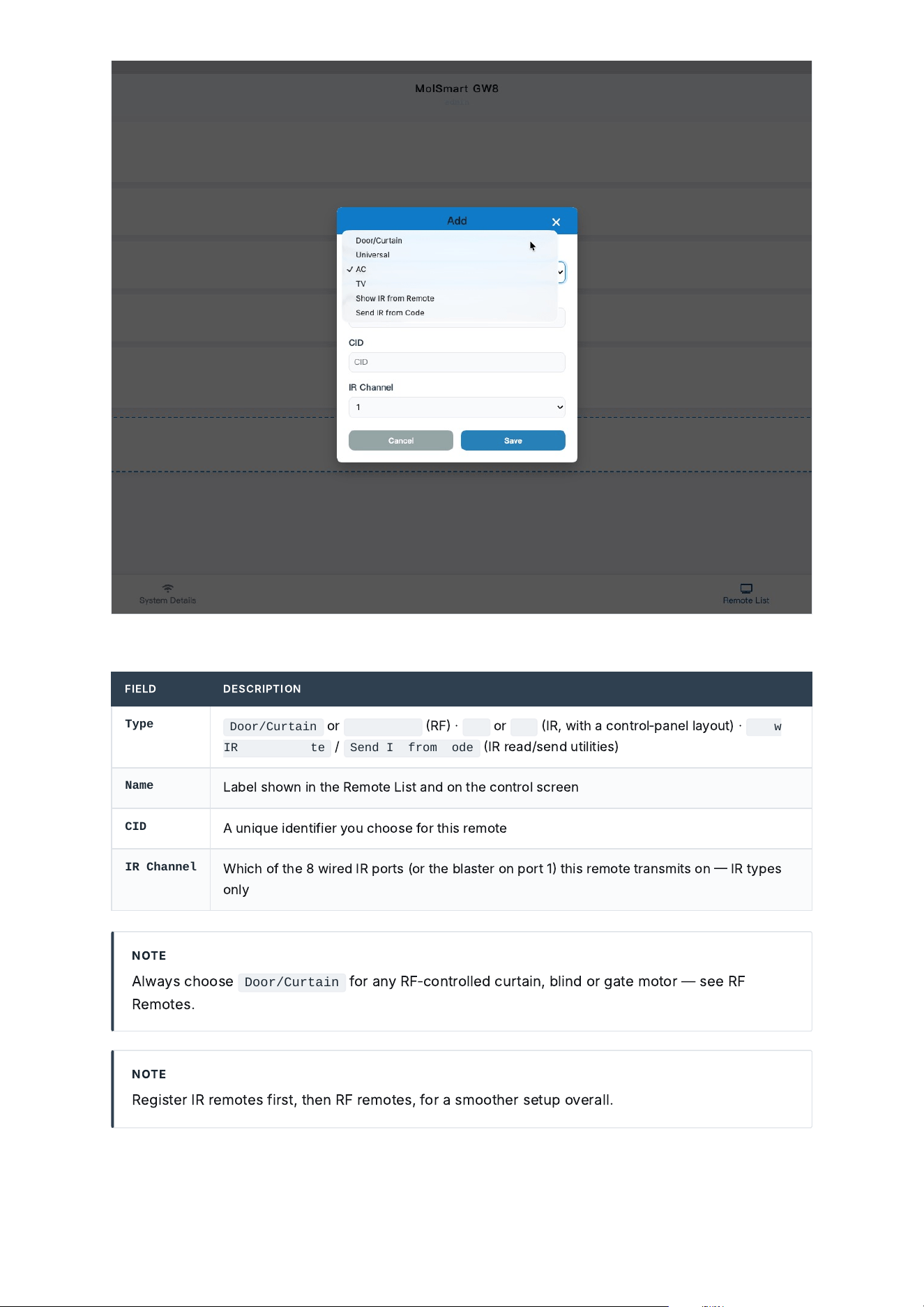
Add — choose a remote type, then set its Name/CID/IR Channel
FIE
L
D DE
S
C
R
I
PT
I
ON
Type
Door/Curtain
or
Universal
R
F
·
AC
or
TV
I
R
,
w
i
t
h
a
c
ontro
l
‑
p
a
n
el
l
a
yout
)
·
Show
IR from Remote
/
Send IR from Code
I
R
r
e
a
d
/
s
e
n
d
ut
ili
t
ie
s
)
Name
La
bel
s
h
own
i
n
t
he
R
e
mot
e
L
i
st
a
n
d
on
t
he
c
ontro
l
s
c
r
ee
n
CID
A
un
i
qu
e
ide
nt
ifie
r
you
ch
oos
e
f
or
t
hi
s
r
e
mot
e
IR Channel
W
hich
o
f
t
he
8
w
i
r
ed
I
R
ports
(
or
t
he
bl
a
st
e
r
on
port
1
t
hi
s
r
e
mot
e
tr
a
nsm
i
ts
on
I
R
typ
e
s
on
l
y
NOT
E
A
l
w
a
ys
ch
oos
e
Door/Curtain
f
or
a
ny
R
F
‑
c
ontro
lled
c
urt
a
i
n
,
bli
n
d
or
g
a
t
e
motor
—
s
ee
R
F
R
e
mot
e
s
.
NOT
E
R
egi
st
e
r
I
R
r
e
mot
e
s
fi
rst
,
t
he
n
R
F
r
e
mot
e
s
,
f
or
a
smoot
he
r
s
e
tup
ov
e
r
a
ll
.
5.1 / RF Remotes
C
opy
i
n
g
a
n
R
F
R
e
mot
e
(
R
A
W
/
C
OPY
)
O
p
e
n
t
he
n
e
w
l
y
‑
a
dded
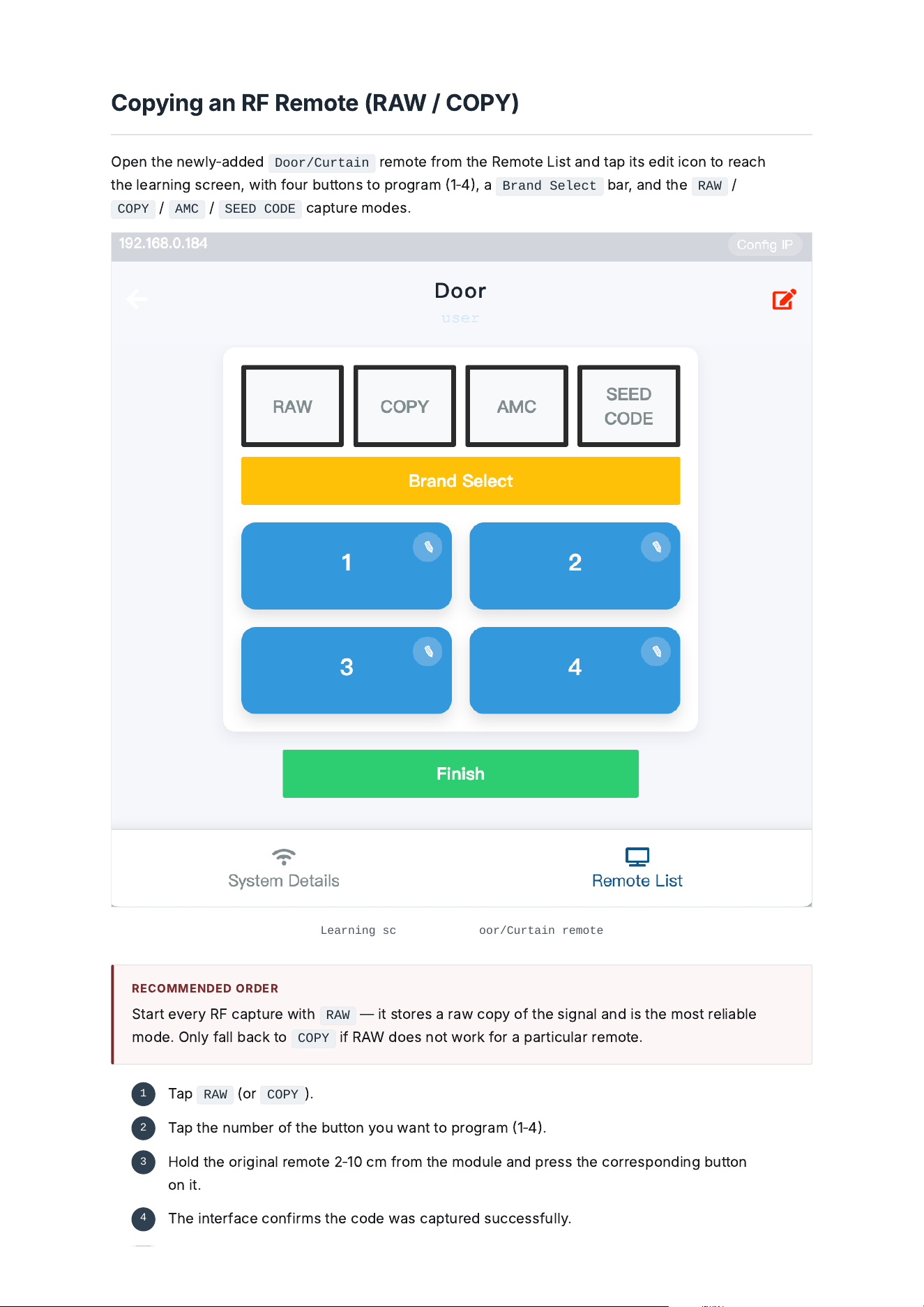
Door/Curtain
r
e
mot
e
f
rom
t
he
R
e
mot
e
L
i
st
a
n
d
t
a
p
i
ts
edi
t
ic
on
to
r
e
a
ch
t
he
le
a
rn
i
n
g
s
c
r
ee
n
,
w
i
t
h
f
our
b
uttons
to
pro
g
r
a
m
1
‑
4,
a
Brand Select
b
a
r
,
a
n
d
t
he
RAW
/
COPY
/
AMC
/
SEED CODE
c
a
ptur
e
mo
de
s
.
Learning screen for a Door/Curtain remote
R
EC
OMM
E
N
DED
OR
DE
R
S
t
a
rt
e
v
e
ry
R
F
c
a
ptur
e
w
i
t
h
RAW
—
i
t
stor
e
s
a
r
a
w
c
opy
o
f
t
he
s
ig
n
a
l
a
n
d
i
s
t
he
most
r
eli
a
ble
mo
de
.
O
n
l
y
f
a
ll
b
a
ck
to
COPY
if
R
A
W
d
o
e
s
not
wor
k
f
or
a
p
a
rt
ic
u
l
a
r
r
e
mot
e
.
Ta
p
RAW
(
or
COPY
).
1
Ta
p
t
he
num
be
r
o
f
t
he
b
utton
you
w
a
nt
to
pro
g
r
a
m
1
‑
4.
2
H
o
ld
t
he
or
igi
n
a
l
r
e
mot
e
2
‑
10
c
m
f
rom
t
he
mo
d
u
le
a
n
d
pr
e
ss
t
he
c
orr
e
spon
di
n
g
b
utton
on
i
t
.
3
T
he
i
nt
e
r
f
a
ce
c
on
fi
rms
t
he
c
o
de
w
a
s
c
a
ptur
ed
su
cce
ss
f
u
ll
y
.
4
MO
DE
W
HE
N
TO
US
E
I
T
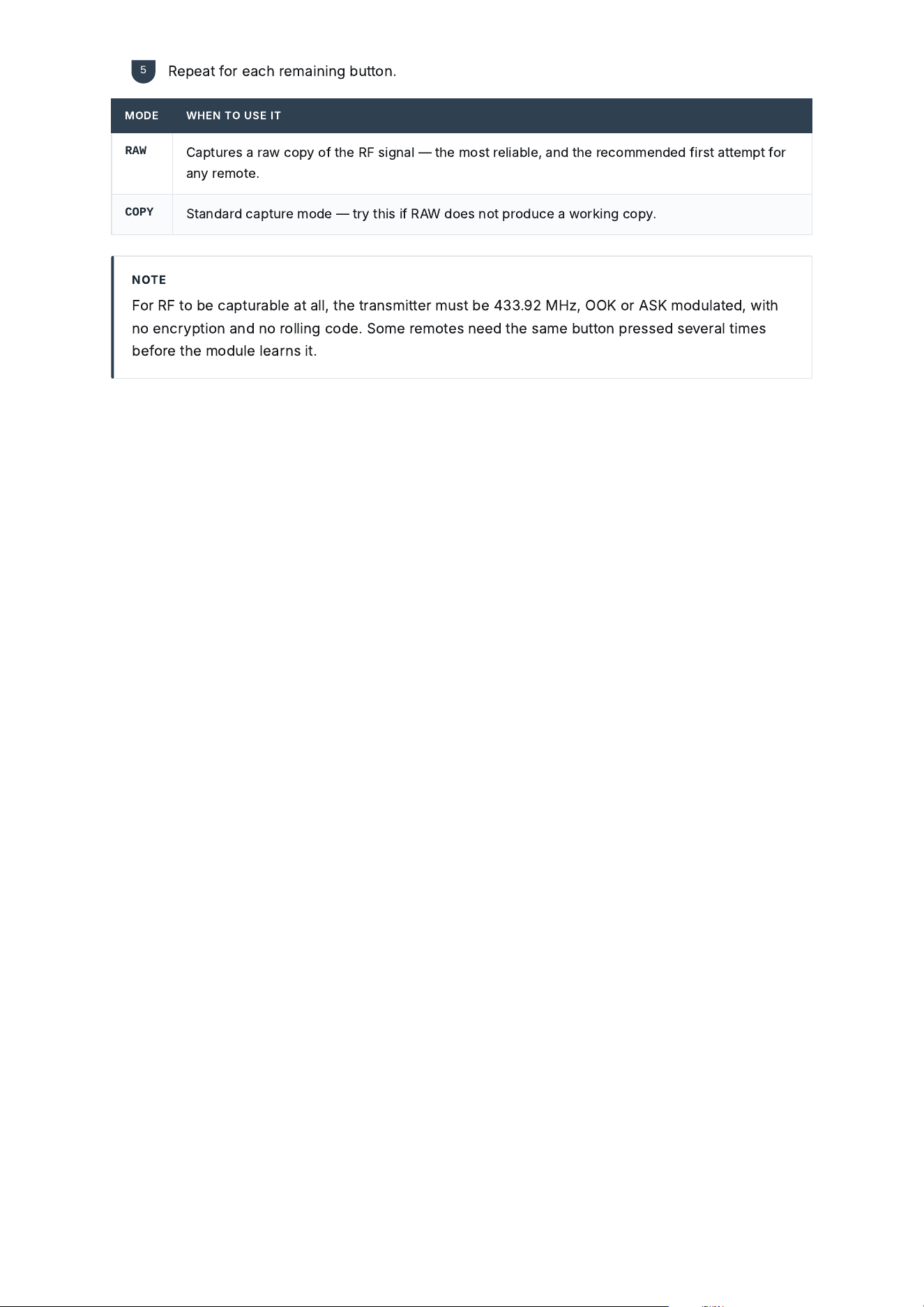
RAW
C
a
ptur
e
s
a
r
a
w
c
opy
o
f
t
he
R
F
s
ig
n
a
l
—
t
he
most
r
eli
a
ble
,
a
n
d
t
he
r
ec
omm
e
n
ded
fi
rst
a
tt
e
mpt
f
or
a
ny
r
e
mot
e
.
COPY
S
t
a
n
d
a
r
d
c
a
ptur
e
mo
de
—
try
t
hi
s
if
R
A
W
d
o
e
s
not
pro
d
u
ce
a
wor
ki
n
g
c
opy
.
NOT
E
F
or
R
F
to
be
c
a
ptur
a
ble
a
t
a
ll
,
t
he
tr
a
nsm
i
tt
e
r
must
be
433.92
M
H
z
,
OOK
or
A
SK
mo
d
u
l
a
t
ed
,
w
i
t
h
no
e
n
c
rypt
i
on
a
n
d
no
ro
lli
n
g
c
o
de
.
S
om
e
r
e
mot
e
s
n
eed
t
he
s
a
m
e
b
utton
pr
e
ss
ed
s
e
v
e
r
a
l
t
i
m
e
s
bef
or
e
t
he
mo
d
u
le
le
a
rns
i
t
.
R
e
p
e
a
t
f
or
e
a
ch
r
e
m
a
i
n
i
n
g
b
utton
.
5
5.2 / RF Remotes
SOM
F
Y
RTS
&
TU
BE
Pa
i
r
i
n
g
S
om
f
y
RTS
a
n
d
TU
BE
tu
b
u
l
a
r
‑
motor
r
e
mot
e
s
us
e
a
b
r
a
n
d
‑
sp
ecific
p
a
i
r
i
n
g
fl
ow
i
nst
e
a
d
o
f
a
p
l
a
i
n
R
A
W
/
C
OPY
c
a
ptur
e
—
t
he
mo
d
u
le
b
r
iefl
y
j
o
i
ns
t
he
motor
'
s
own
RTS
p
a
i
r
i
n
g
s
e
qu
e
n
ce
.
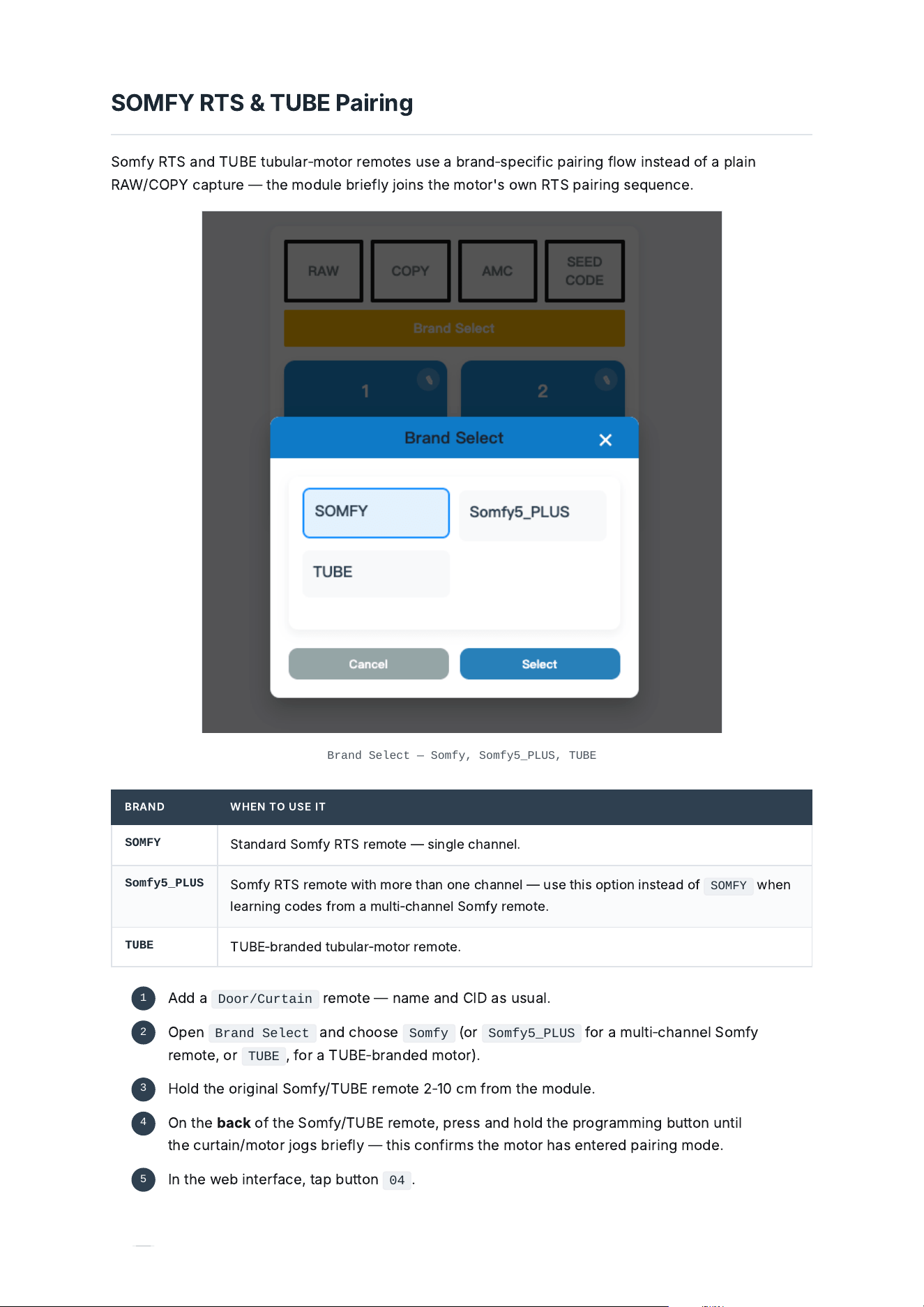
Brand Select — Somfy, Somfy5_PLUS, TUBE
B
R
A
N
D
W
HE
N
TO
US
E
I
T
SOMFY
S
t
a
n
d
a
r
d
S
om
f
y
RTS
r
e
mot
e
—
s
i
n
gle
ch
a
nn
el
.
Somfy5_PLUS
S
om
f
y
RTS
r
e
mot
e
w
i
t
h
mor
e
t
h
a
n
on
e
ch
a
nn
el
—
us
e
t
hi
s
opt
i
on
i
nst
e
a
d
o
f
SOMFY
w
he
n
le
a
rn
i
n
g
c
o
de
s
f
rom
a
mu
l
t
i
‑
ch
a
nn
el
S
om
f
y
r
e
mot
e
.
TUBE
TU
BE
‑
b
r
a
n
ded
tu
b
u
l
a
r
‑
motor
r
e
mot
e
.
A
dd
a
Door/Curtain
r
e
mot
e
—
n
a
m
e
a
n
d
CID
a
s
usu
a
l
.
1
O
p
e
n
Brand Select
a
n
d
ch
oos
e
Somfy
(
or
Somfy5_PLUS
f
or
a
mu
l
t
i
‑
ch
a
nn
el
S
om
f
y
r
e
mot
e
,
or
TUBE
,
f
or
a
TU
BE
‑
b
r
a
n
ded
motor
).
2
H
o
ld
t
he
or
igi
n
a
l
S
om
f
y
/
TU
BE
r
e
mot
e
2
‑
10
c
m
f
rom
t
he
mo
d
u
le
.
3
O
n
t
he
b
a
ck
o
f
t
he
S
om
f
y
/
TU
BE
r
e
mot
e
,
pr
e
ss
a
n
d
h
o
ld
t
he
pro
g
r
a
mm
i
n
g
b
utton
unt
il
t
he
c
urt
a
i
n
/
motor
j
o
g
s
b
r
iefl
y
—
t
hi
s
c
on
fi
rms
t
he
motor
h
a
s
e
nt
e
r
ed
p
a
i
r
i
n
g
mo
de
.
4
I
n
t
he
w
eb
i
nt
e
r
f
a
ce
,
t
a
p
b
utton
04
.
5
6.1 / IR Remotes
I
R
O
v
e
rv
ie
w
T
he
mo
d
u
le
h
a
s
8
w
i
r
ed
I
R
e
m
i
tt
e
r
ports
a
n
d
on
e
360
°
I
R
bl
a
st
e
r
,
w
hich
s
h
a
r
e
s
port
1
w
i
t
h
t
he
w
i
r
ed
e
m
i
tt
e
rs
.
A
i
r
c
on
di
t
i
on
e
rs
h
a
v
e
a
b
u
il
t
‑
i
n
c
o
de
lib
r
a
ry
t
h
a
t
c
a
n
o
f
t
e
n
be
m
a
t
ched
di
r
ec
t
l
y
;
TV
s
a
n
d
most
ot
he
r
I
R
e
qu
i
pm
e
nt
n
eed
e
a
ch
b
utton
le
a
rn
ed
i
n
di
v
id
u
a
ll
y
f
rom
t
he
or
igi
n
a
l
r
e
mot
e
.
NOT
E
R
egi
st
e
r
I
R
r
e
mot
e
s
bef
or
e
R
F
r
e
mot
e
s
f
or
a
smoot
he
r
ov
e
r
a
ll
s
e
tup
.
Wa
i
t
—
t
he
motor
m
a
y
j
o
g
2
‑
3
mor
e
t
i
m
e
s
d
ur
i
n
g
t
hi
s
st
e
p
.
O
n
ce
i
t
s
e
tt
le
s
,
p
a
i
r
i
n
g
i
s
c
omp
le
t
e
.
6
6.2 / IR Remotes
A
i
r
C
on
di
t
i
on
e
r
C
ontro
l
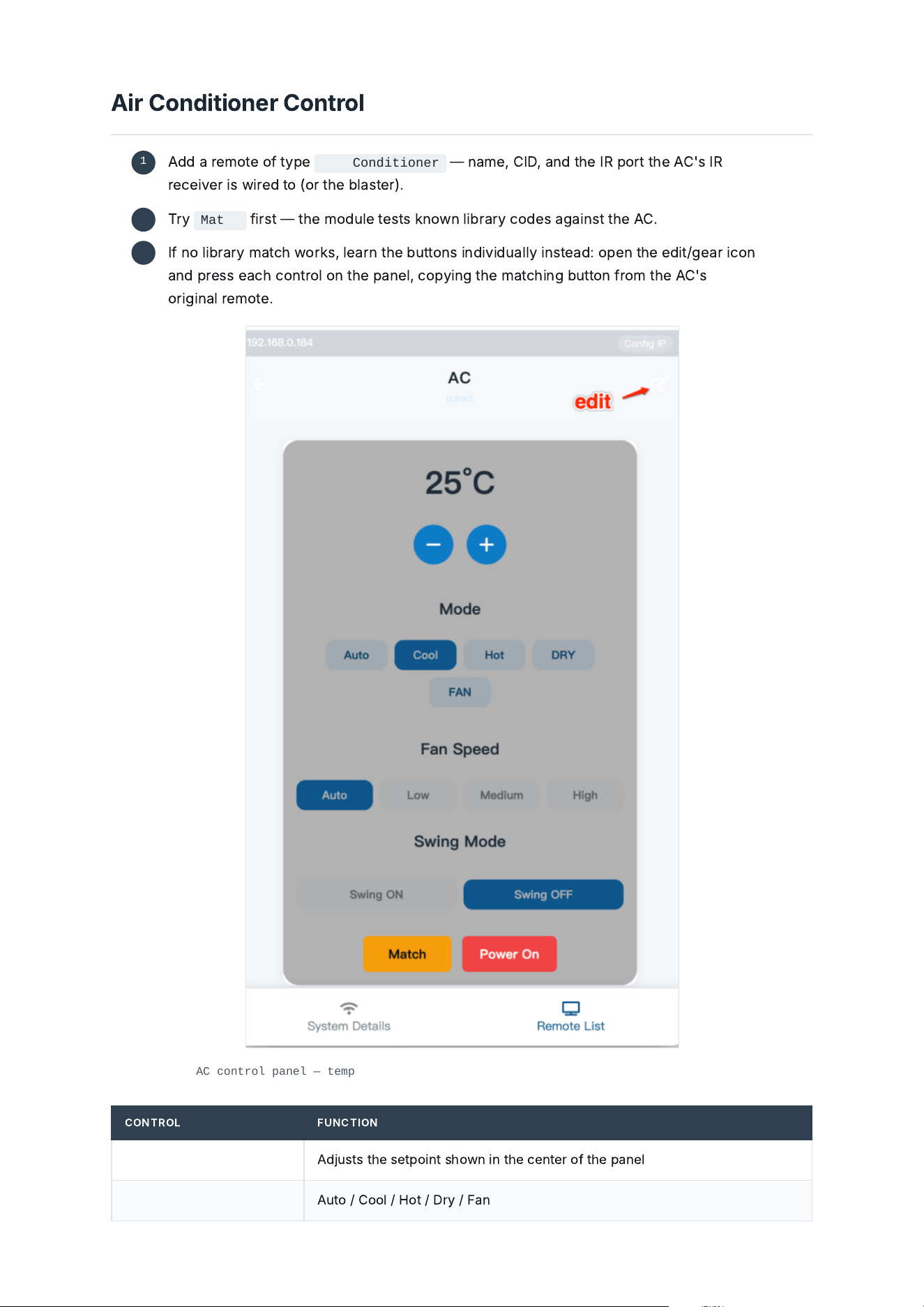
AC control panel — temperature, Mode, Fan Speed, Swing Mode, Match / Power On
C
ONTROL
F
UN
C
T
I
ON
Temperature +/-
A
dj
usts
t
he
s
e
tpo
i
nt
s
h
own
i
n
t
he
ce
nt
e
r
o
f
t
he
p
a
n
el
Mode
A
uto
/
C
oo
l
/
H
ot
/
D
ry
/
F
a
n
A
dd
a
r
e
mot
e
o
f
typ
e
Air Conditioner
—
n
a
m
e
,
CID
,
a
n
d
t
he
I
R
port
t
he
AC
'
s
I
R
r
ecei
v
e
r
i
s
w
i
r
ed
to
(
or
t
he
bl
a
st
e
r
).
1
T
ry
Match
fi
rst
—
t
he
mo
d
u
le
t
e
sts
k
nown
lib
r
a
ry
c
o
de
s
a
g
a
i
nst
t
he
AC
.
2
I
f
no
lib
r
a
ry
m
a
t
ch
wor
k
s
,
le
a
rn
t
he
b
uttons
i
n
di
v
id
u
a
ll
y
i
nst
e
a
d
:
op
e
n
t
he
edi
t
/
ge
a
r
ic
on
a
n
d
pr
e
ss
e
a
ch
c
ontro
l
on
t
he
p
a
n
el
,
c
opy
i
n
g
t
he
m
a
t
chi
n
g
b
utton
f
rom
t
he
AC
'
s
or
igi
n
a
l
r
e
mot
e
.
3
C
ONTROL
F
UN
C
T
I
ON
Fan Speed
A
uto
/
L
ow
/
M
edi
um
/
H
igh
Swing Mode
S
w
i
n
g
ON
/
S
w
i
n
g
O
FF
Match
T
e
sts
t
he
b
u
il
t
‑
i
n
AC
c
o
de
lib
r
a
ry
a
g
a
i
nst
t
hi
s
un
i
t
Power On
S
e
n
d
s
a
dedic
a
t
ed
pow
e
r
‑
on
c
omm
a
n
d
6.3 / IR Remotes
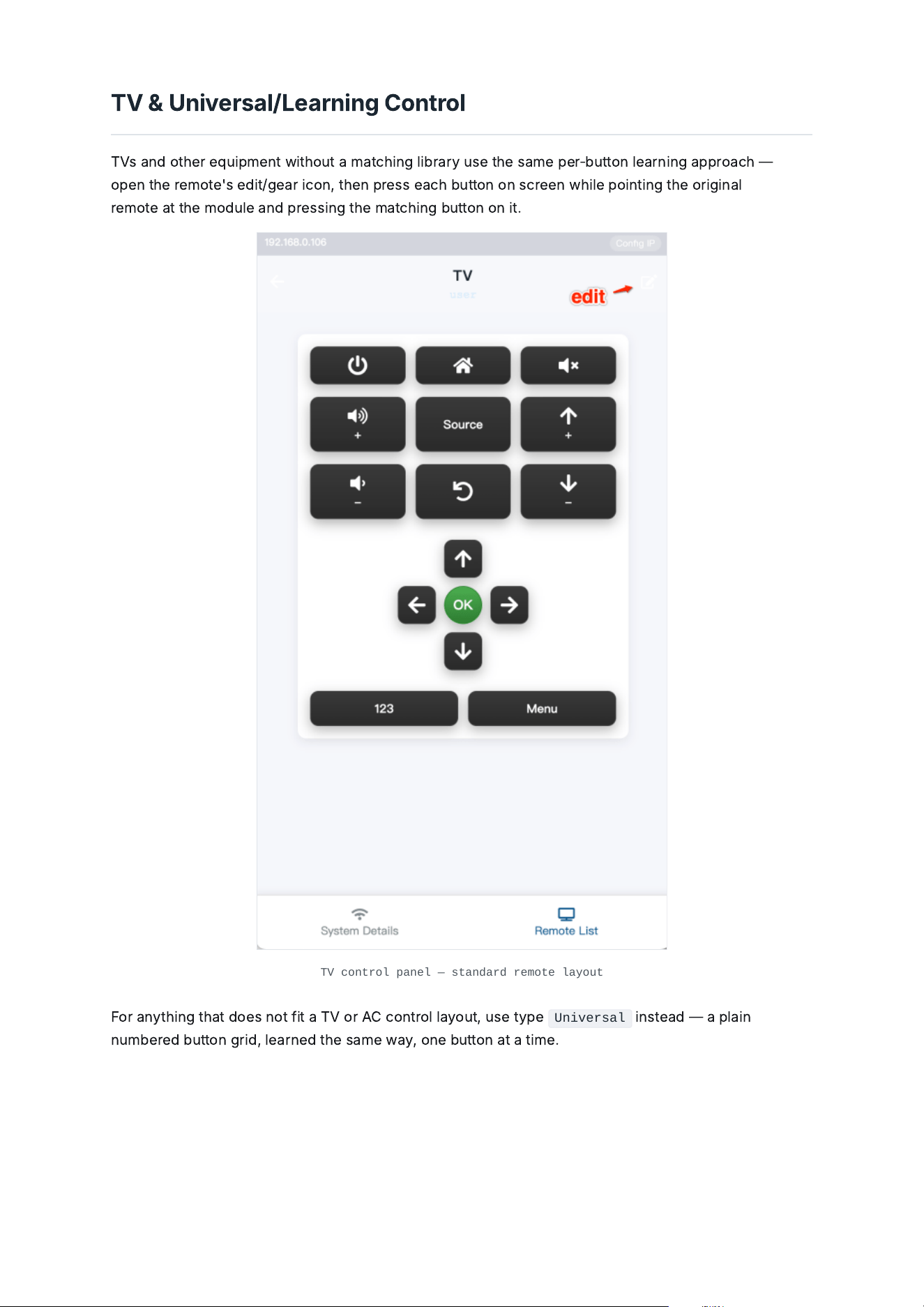
TV
&
U
n
i
v
e
rs
a
l
/
L
e
a
rn
i
n
g
C
ontro
l
TV
s
a
n
d
ot
he
r
e
qu
i
pm
e
nt
w
i
t
h
out
a
m
a
t
chi
n
g
lib
r
a
ry
us
e
t
he
s
a
m
e
p
e
r
‑
b
utton
le
a
rn
i
n
g
a
ppro
a
ch
—
op
e
n
t
he
r
e
mot
e
'
s
edi
t
/
ge
a
r
ic
on
,
t
he
n
pr
e
ss
e
a
ch
b
utton
on
s
c
r
ee
n
w
hile
po
i
nt
i
n
g
t
he
or
igi
n
a
l
r
e
mot
e
a
t
t
he
mo
d
u
le
a
n
d
pr
e
ss
i
n
g
t
he
m
a
t
chi
n
g
b
utton
on
i
t
.
TV control panel — standard remote layout
F
or
a
nyt
hi
n
g
t
h
a
t
d
o
e
s
not
fi
t
a
TV
or
AC
c
ontro
l
l
a
yout
,
us
e
typ
e
Universal
i
nst
e
a
d
—
a
p
l
a
i
n
num
be
r
ed
b
utton
g
r
id
,
le
a
rn
ed
t
he
s
a
m
e
w
a
y
,
on
e
b
utton
a
t
a
t
i
m
e
.
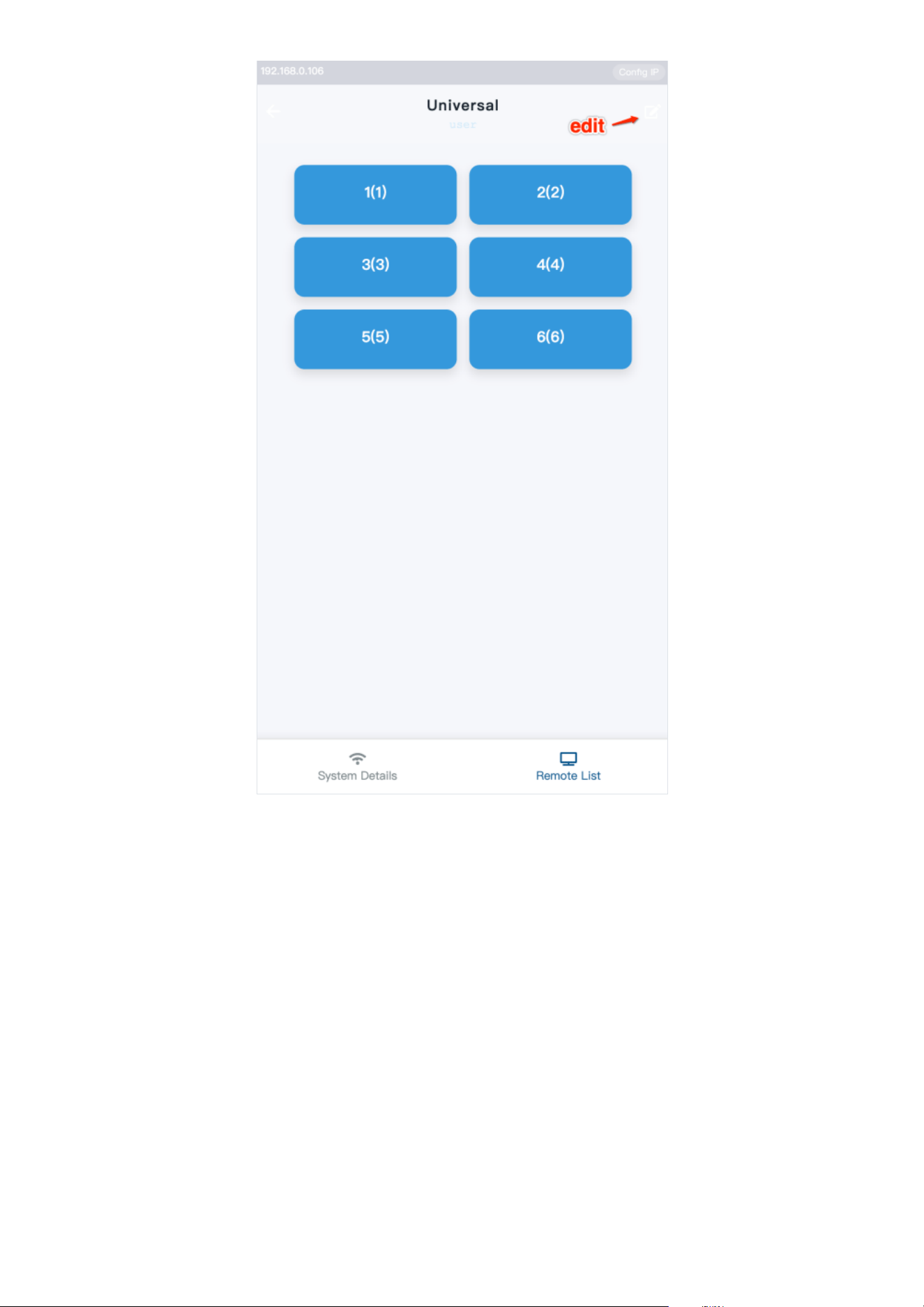
Universal — numbered button grid
6.4 / IR Remotes
R
e
a
di
n
g
I
R
C
o
de
s
T
he
mo
d
u
le
c
a
n
di
sp
l
a
y
t
he
I
R
c
o
de
o
f
a
ny
b
utton
i
t
r
ecei
v
e
s
,
i
n
G
l
o
b
a
l
C
a
ché
S
e
n
di
r
)
or
HE
X
f
orm
a
t
—
us
ef
u
l
f
or
b
u
ildi
n
g
a
n
e
xt
e
rn
a
l
c
o
de
lib
r
a
ry
or
s
e
n
di
n
g
c
o
de
s
di
r
ec
t
l
y
t
h
rou
gh
a
not
he
r
syst
e
m
.
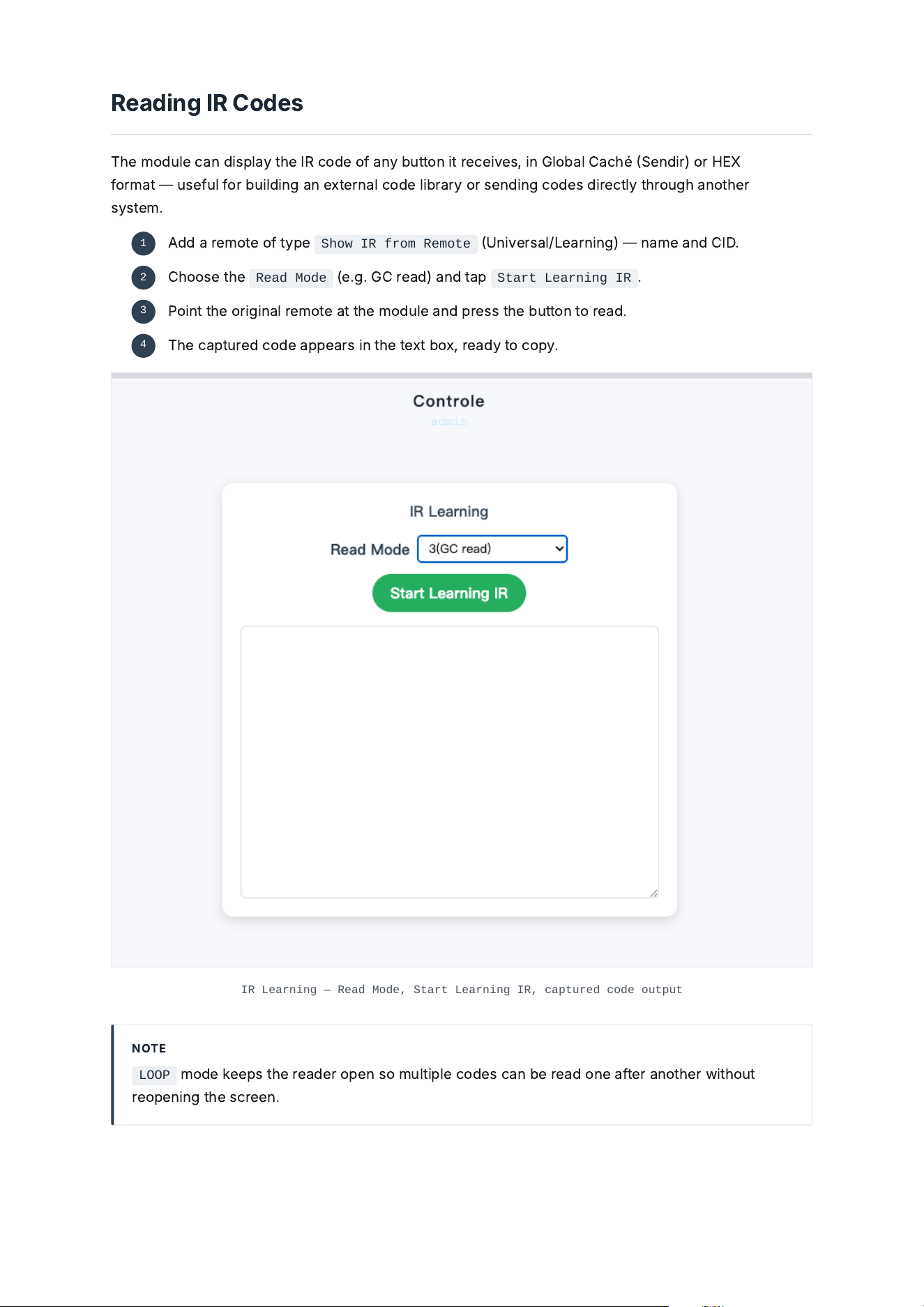
IR Learning — Read Mode, Start Learning IR, captured code output
NOT
E
LOOP
mo
de
kee
ps
t
he
r
e
a
de
r
op
e
n
so
mu
l
t
i
p
le
c
o
de
s
c
a
n
be
r
e
a
d
on
e
a
f
t
e
r
a
not
he
r
w
i
t
h
out
r
e
op
e
n
i
n
g
t
he
s
c
r
ee
n
.
A
dd
a
r
e
mot
e
o
f
typ
e
Show IR from Remote
U
n
i
v
e
rs
a
l
/
L
e
a
rn
i
n
g
)
—
n
a
m
e
a
n
d
CID
.
1
C
h
oos
e
t
he
Read Mode
(
e
.
g
.
GC
r
e
a
d
)
a
n
d
t
a
p
Start Learning IR
.
2
P
o
i
nt
t
he
or
igi
n
a
l
r
e
mot
e
a
t
t
he
mo
d
u
le
a
n
d
pr
e
ss
t
he
b
utton
to
r
e
a
d
.
3
T
he
c
a
ptur
ed
c
o
de
a
pp
e
a
rs
i
n
t
he
t
e
xt
b
ox
,
r
e
a
d
y
to
c
opy
.
4
6.5 / IR Remotes
S
e
n
di
n
g
I
R
C
o
de
s
T
o
t
e
st
a
c
o
de
bef
or
e
w
i
r
i
n
g
i
t
i
nto
a
s
ce
n
e
,
d
r
i
v
e
r
or
e
xt
e
rn
a
l
lib
r
a
ry
,
p
a
st
e
i
t
di
r
ec
t
l
y
i
nto
t
he
mo
d
u
le
a
n
d
s
e
n
d
i
t
out
ov
e
r
a
ch
os
e
n
I
R
ch
a
nn
el
.
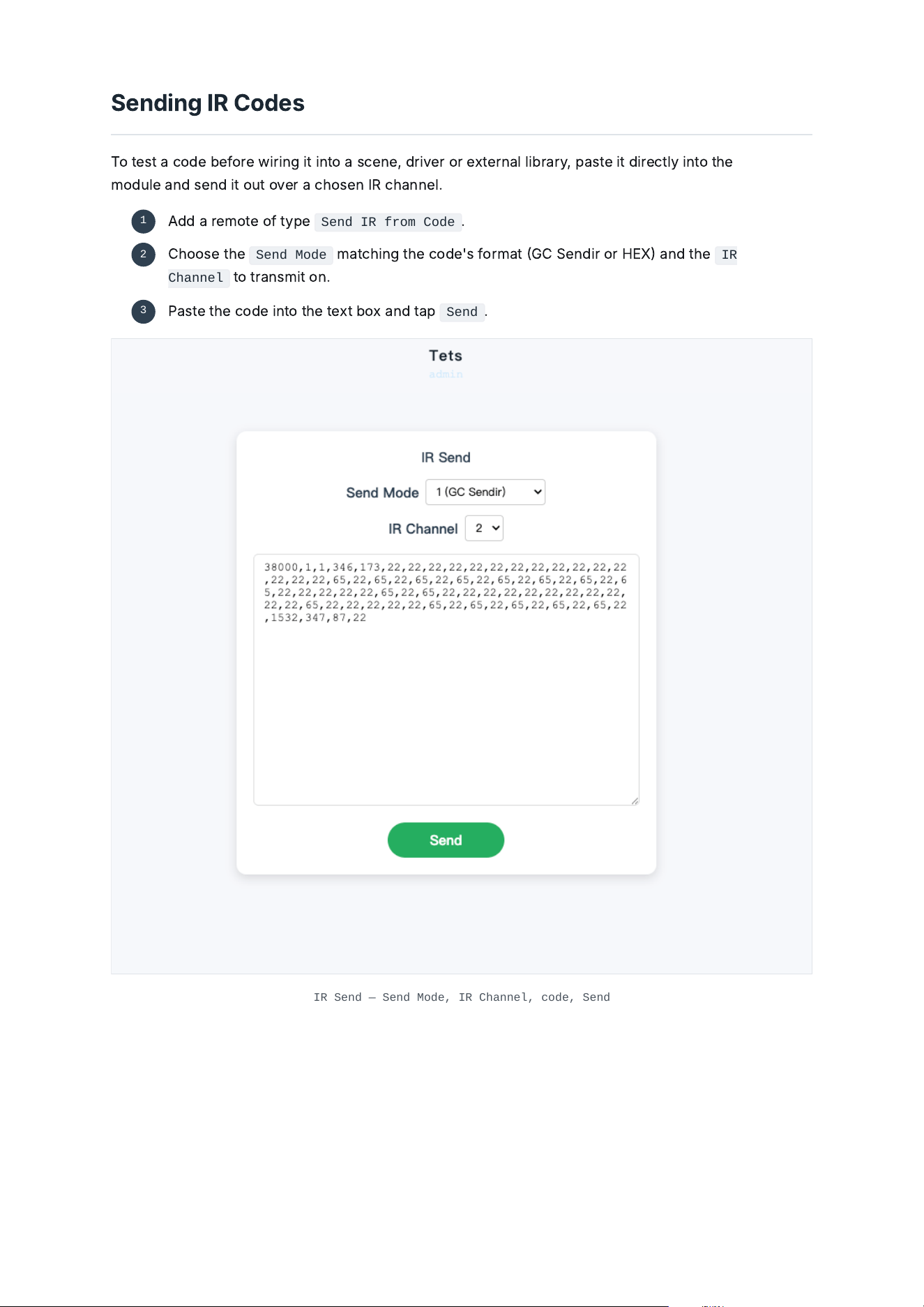
IR Send — Send Mode, IR Channel, code, Send
A
dd
a
r
e
mot
e
o
f
typ
e
Send IR from Code
.
1
C
h
oos
e
t
he
Send Mode
m
a
t
chi
n
g
t
he
c
o
de
'
s
f
orm
a
t
GC
S
e
n
di
r
or
HE
X
a
n
d
t
he
IR
Channel
to
tr
a
nsm
i
t
on
.
2
Pa
st
e
t
he
c
o
de
i
nto
t
he
t
e
xt
b
ox
a
n
d
t
a
p
Send
.
3
7.1 / Integrations & API
O
p
e
n
A
P
I
T
he
G
W
8
e
xpos
e
s
a
n
H
TTP
A
P
I
so
a
ny
h
u
b
,
d
r
i
v
e
r
or
c
ustom
s
c
r
i
pt
c
a
n
li
st
,
c
ontro
l
a
n
d
le
a
rn
R
F
/
I
R
r
e
mot
e
s
w
i
t
h
out
a
M
o
l
S
m
a
rt
cl
ou
d
a
cc
ount
—
t
he
s
a
m
e
f
un
c
t
i
on
a
li
ty
a
v
a
il
a
ble
t
h
rou
gh
t
he
w
eb
i
nt
e
r
f
a
ce
.
NOT
E
F
u
ll
A
P
I
r
efe
r
e
n
ce
(
e
n
d
po
i
nts
,
p
a
y
l
o
a
d
s
,
e
x
a
mp
le
s
):
a
p
i
.
mo
l
m
a
rt
.
c
om
.
7.2 / Integrations & API
F
i
rmw
a
r
e
U
p
d
a
t
e
I
MPORT
A
NT
O
n
l
y
up
d
a
t
e
t
he
fi
rmw
a
r
e
if
M
o
l
S
m
a
rt
support
a
s
k
s
you
to
—
st
a
y
i
n
g
on
a
n
o
lde
r
v
e
rs
i
on
i
s
fi
n
e
ot
he
rw
i
s
e
.
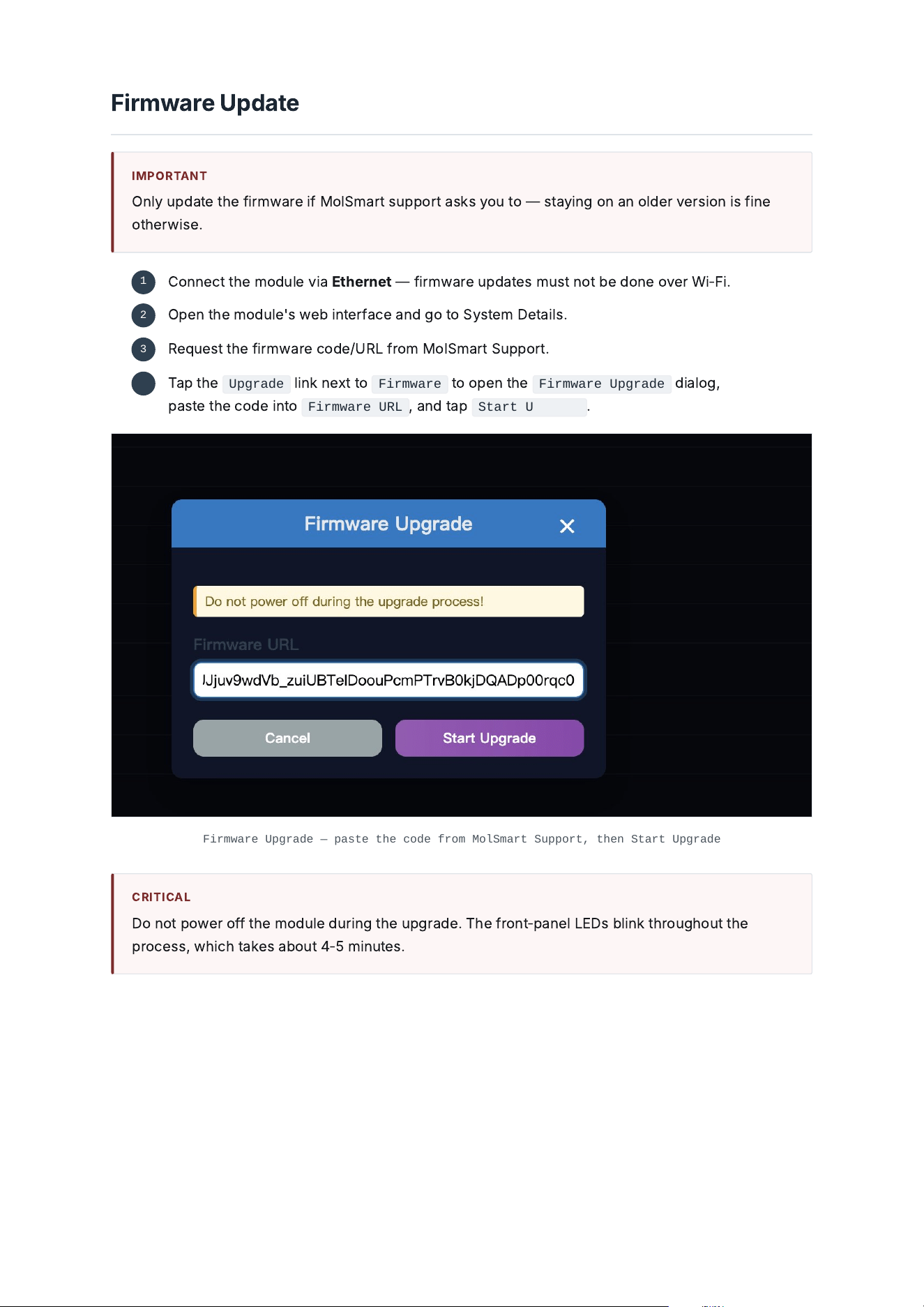
Firmware Upgrade — paste the code from MolSmart Support, then Start Upgrade
C
R
I
T
ICA
L
D
o
not
pow
e
r
o
ff
t
he
mo
d
u
le
d
ur
i
n
g
t
he
up
g
r
a
de
.
T
he
f
ront
‑
p
a
n
el
L
ED
s
bli
n
k
t
h
rou
gh
out
t
he
pro
ce
ss
,
w
hich
t
a
ke
s
a
b
out
4
‑
5
m
i
nut
e
s
.
C
onn
ec
t
t
he
mo
d
u
le
v
i
a
E
t
he
rn
e
t
—
fi
rmw
a
r
e
up
d
a
t
e
s
must
not
be
d
on
e
ov
e
r
W
i
‑
F
i
.
1
O
p
e
n
t
he
mo
d
u
le
'
s
w
eb
i
nt
e
r
f
a
ce
a
n
d
g
o
to
S
yst
e
m
D
e
t
a
il
s
.
2
R
e
qu
e
st
t
he
fi
rmw
a
r
e
c
o
de
/
URL
f
rom
M
o
l
S
m
a
rt
S
upport
.
3
Ta
p
t
he
Upgrade
li
n
k
n
e
xt
to
Firmware
to
op
e
n
t
he
Firmware Upgrade
di
a
l
o
g
,
p
a
st
e
t
he
c
o
de
i
nto
Firmware URL
,
a
n
d
t
a
p
Start Upgrade
.
4
8.1 / Troubleshooting
T
rou
ble
s
h
oot
i
n
g
SYMPTOM POSS
IB
L
E
CA
US
E
/
SOLUT
I
ON
Module does not power on
C
on
fi
rm
t
he
US
B
‑
C
pow
e
r
sour
ce
supp
lie
s
5
V
/
2
A
.
T
ry
a
diffe
r
e
nt
c
a
ble
/
a
d
a
pt
e
r
.
Module unreachable on the network
V
e
r
if
y
t
he
E
t
he
rn
e
t
li
n
k
,
or
r
e
‑
p
a
i
r
W
i
‑
F
i
v
i
a
M
e
t
h
o
d
2
W
i
‑
F
i
Pa
i
r
i
n
g
.
A
s
a
f
a
llb
a
ck
,
r
e
s
c
a
n
w
i
t
h
http://molsmart.local/scan
f
rom
a
c
omput
e
r
on
t
he
s
a
m
e
n
e
twor
k
.
Web interface shows an error, top‐left corner reads 127.0.0.1
T
he
mo
d
u
le
'
s
I
P
i
s
m
i
s
c
on
fig
ur
ed
i
n
t
he
i
nt
e
r
f
a
ce
.
C
lick
Config IP
(
top
‑
r
igh
t
c
orn
e
r
),
e
nt
e
r
t
he
mo
d
u
le
'
s
c
orr
ec
t
I
P
a
dd
r
e
ss
i
n
t
he
popup
,
a
n
d
s
a
v
e
—
t
he
mo
d
u
le
r
eb
oots
a
n
d
t
he
i
nt
e
r
f
a
ce
bec
om
e
s
r
e
a
ch
a
ble
a
t
t
h
a
t
a
dd
r
e
ss
.
RF remote fails to copy
T
ry
RAW
bef
or
e
COPY
—
s
ee
C
opy
i
n
g
a
n
R
F
R
e
mot
e
.
C
on
fi
rm
t
he
r
e
mot
e
i
s
433.92
M
H
z
,
OOK
/
A
SK
,
w
i
t
h
out
ro
lli
n
g
c
o
de
.
Somfy/TUBE motor does not pair
C
on
fi
rm
t
he
motor
j
o
gged
w
he
n
t
he
r
e
mot
e
'
s
r
e
a
r
pro
g
r
a
mm
i
n
g
b
utton
w
a
s
pr
e
ss
ed
(
p
a
i
r
i
n
g
‑
mo
de
e
ntry
)
bef
or
e
t
a
pp
i
n
g
b
utton
04
s
ee
SOM
F
Y
RTS
&
TU
BE
Pa
i
r
i
n
g
.
AC does not respond to Match
F
a
ll
b
a
ck
to
le
a
rn
i
n
g
e
a
ch
b
utton
i
n
di
v
id
u
a
ll
y
f
rom
t
he
AC
'
s
or
igi
n
a
l
r
e
mot
e
—
s
ee
A
i
r
C
on
di
t
i
on
e
r
C
ontro
l
.
IR command not received by the equipment
C
on
fi
rm
t
he
r
e
mot
e
'
s
IR
Channel
m
a
t
che
s
t
he
p
h
ys
ic
a
l
port
t
he
e
m
i
tt
e
r
/
bl
a
st
e
r
i
s
w
i
r
ed
to
.
“24 remotes” limit reached
D
ele
t
e
a
n
unus
ed
r
e
mot
e
f
rom
R
e
mot
e
L
i
st
bef
or
e
a
ddi
n
g
a
n
e
w
on
e
.
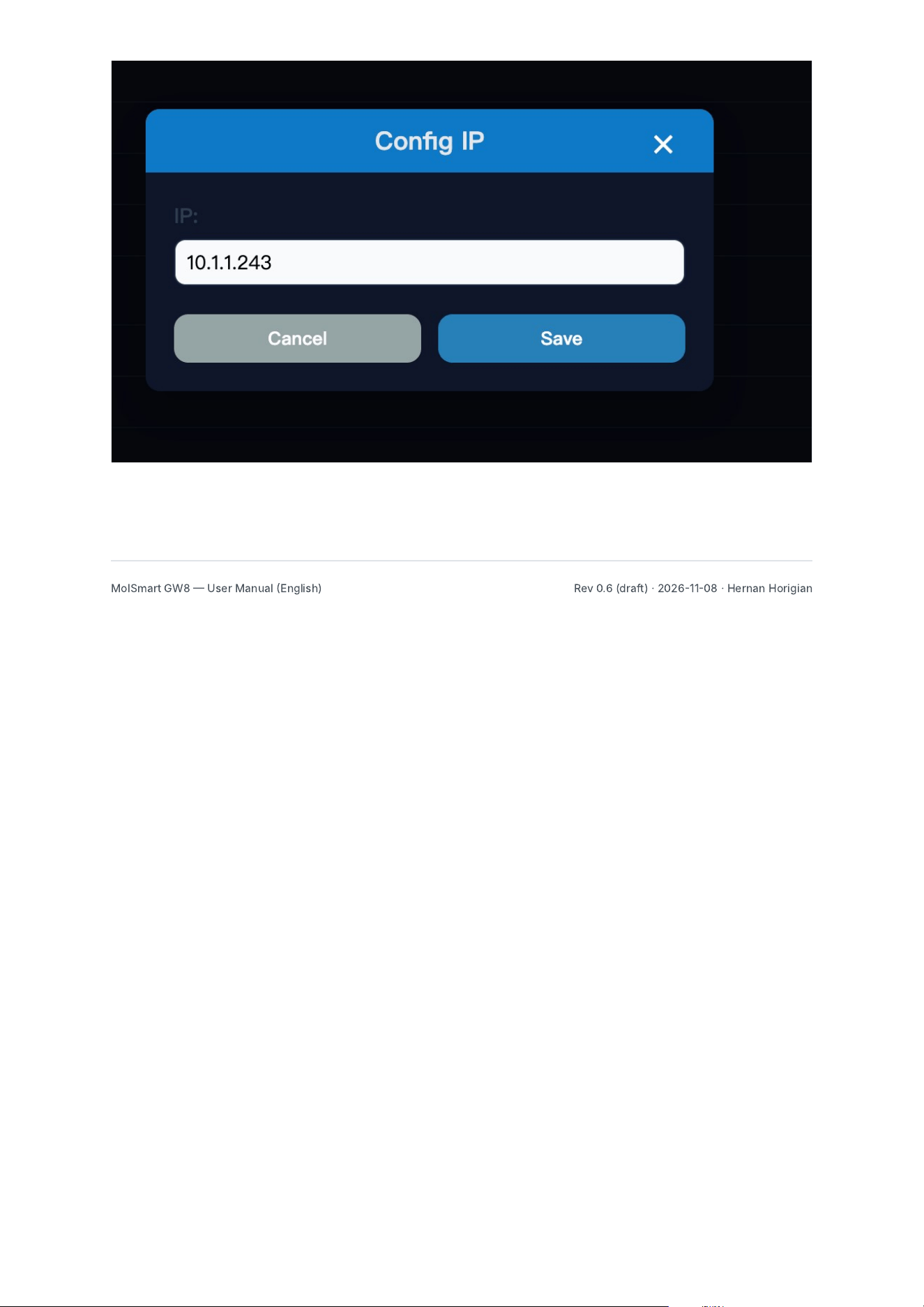
Config IP — reachable from the top‐right corner of the web interface
M
o
l
S
m
a
rt
G
W
8
U
s
e
r
Ma
nu
a
l
E
n
gli
s
h
)
R
e
v
0.6
(
d
r
a
f
t
)
·
20261108
·
H
e
rn
a
n
H
or
igi
a
n

FCC Warning
This device complies with Part 15 of the FCC Rules. Operation is subject to the following two conditions:
(1) This device may not cause harmful interference, and (2) this device must accept any interference received, including
interference that may cause undesired operation.
NOTE 1: This equipment has been tested and found to comply with the limits for a Class B digital device, pursuant to part 15 of
the FCC Rules. These limits are designed to provide reasonable protection against harmful interference in a residential
installation. This equipment generates, uses and can radiate radio frequency energy and, if not installed and used in accordance
with the instructions, may cause harmful interference to radio communications. However, there is no guarantee that
interference will not occur in a particular installation. If this equipment does cause harmful interference to radio or television
reception, which can be determined by turning the equipment off and on, the user is encouraged to try to correct the
interference by one or more of the following measures:
- Reorient or relocate the receiving antenna.
- Increase the separation between the equipment and receiver.
-Connect the equipment into an outlet on a circuit different from that to which the receiver is connected.
-Consult the dealer or an experienced radio/TV technician for help.
NOTE 2: Any changes or modifications to this unit not expressly approved by the party responsible for compliance could void the
user's authority to operate the equipment.
RF Exposure Statement
To maintain compliance with FCC'S RF Exposure guidelines, This equipment should be installed and operated with minimum
20cm between the radiator and your body. This device and its antenna(s) must not be co-located or operation in conjunction
with any other antenna or transmitter.