Scan for
product
webpage
For assembly assistance, contact us at (800) 349-3839 or [email protected]
©2026 UPLIFT Desk®. All Rights Reserved.
Patent Pending
Wireless Charging Grommet
JCP35W7
Assembly Instructions
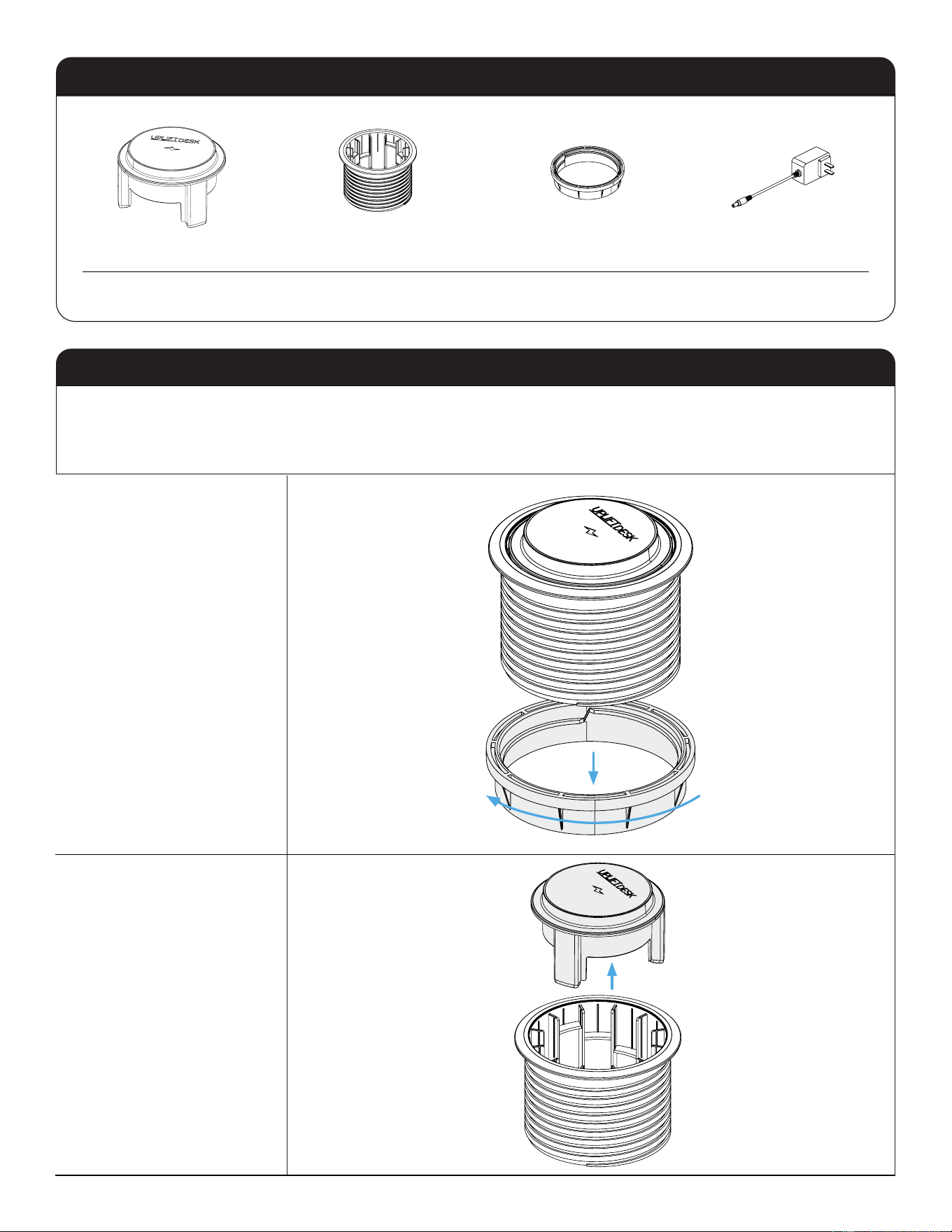
Product Components
Wireless Module (1)
Housing (1)
Locking Ring (1)
Power Adapter (1)
The installation of the Wireless Charging Grommet requires a hole through the desktop measuring 3.15"
(80mm) in diameter and a maximum desktop thickness of 1.75".
If there are any damaged or missing parts, please contact us at (800) 349-3839 or [email protected].
Step 1
Unscrew the Locking Ring
from the Housing.
Step 2
Remove the Wireless Module
from the Housing.
2
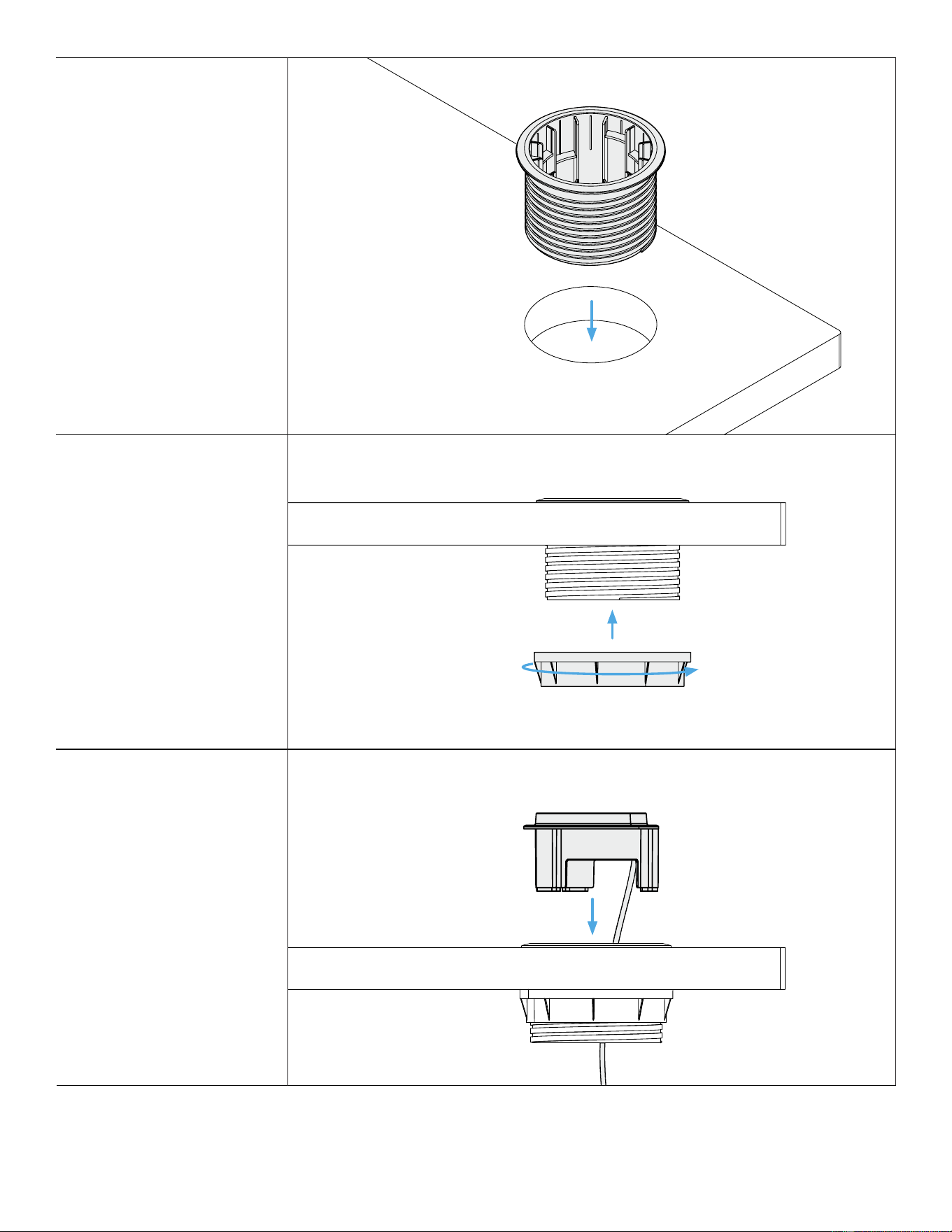
Step 3
Insert the Housing into the
grommet hole.
Step 4
Thread the Locking Ring onto
the Housing and tighten
until it is rmly against the
underside of the desktop.
The Locking Ring should
rotate smoothly when
properly engaged with
threads. If it does not, it may
be cross-threaded. Remove it
and try again.
Step 5
Feed the Wireless Module’s
power cable through the top
of Housing.
3
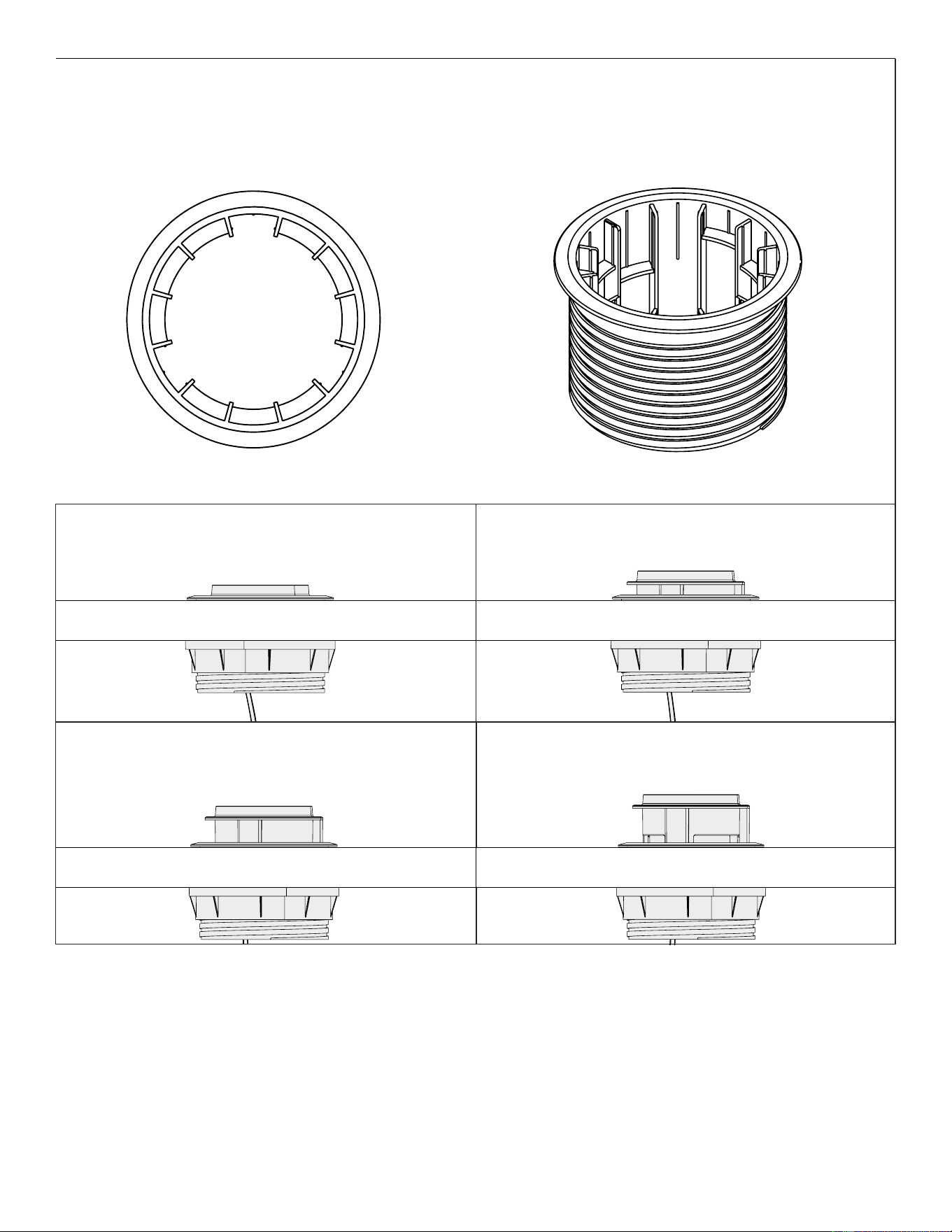
Align the legs on the Wireless Module with one of the four sets of grooves in the Housing per the height positions
shown in the diagrams.
Top view of Housing Side view of Housing
1
1
2
3
4
1
2
3
4
1
2
3
4
2
3
4
4
3
2
4
2
Step 4 - Secure Locking Ring
Thread the Locking Ring onto the Housing and tighten until it is
Ģ% !
Note: : 2 8 ! % # %
# / %
8" %
Step 5 - Insert Wireless Module
Position 1
,! !
Position 2
6 !
Top view of Housing
1
1
1
2
2
2
2
2
3
3
3
4
4
4
1
3
3
4
4
, =3!D# !
Housing.
Align the legs on the Wireless Module with one of the four sets
of grooves in the Housing per the height positions shown in the
diagrams.
Side view of Housing
Position 3
6 !! JLNEPF
Position 4
6 !! JMSEKJF
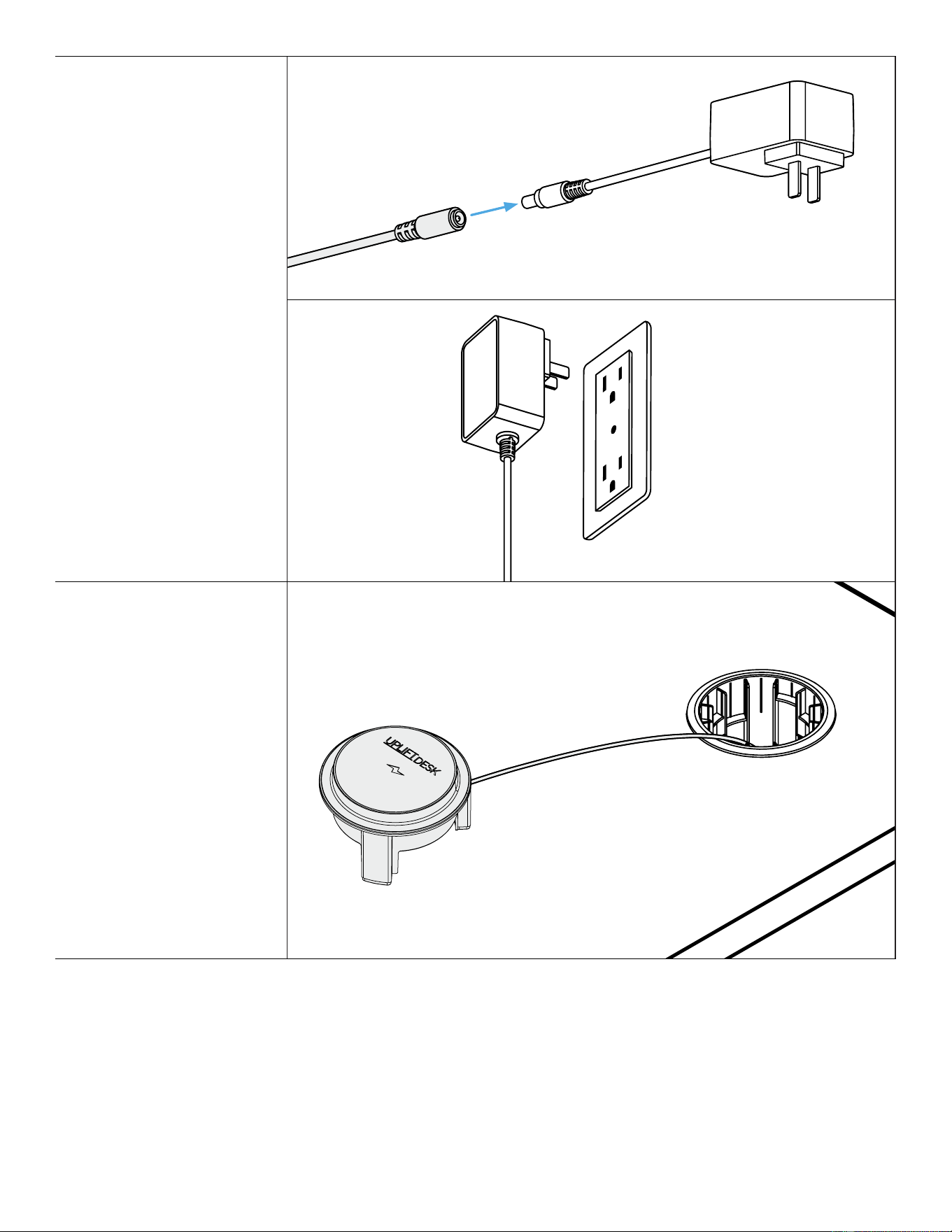
Step 6
Plug the Power Adapter cord
into the Wireless Module
cord.
Desktop Use
The Wireless Module can be
removed from the housing
and placed closer for easier
access.
Rubber feet on the ends of
the legs protect the desktop
from scratches and keep the
module from sliding.
Plug the Power Adapter into a
120V power outlet.
If you are using a height
adjustable desk or table,
make sure there is enough
slack in the power cord to
reach the Wireless Charging
Grommet when the desk or
table is raised.
5
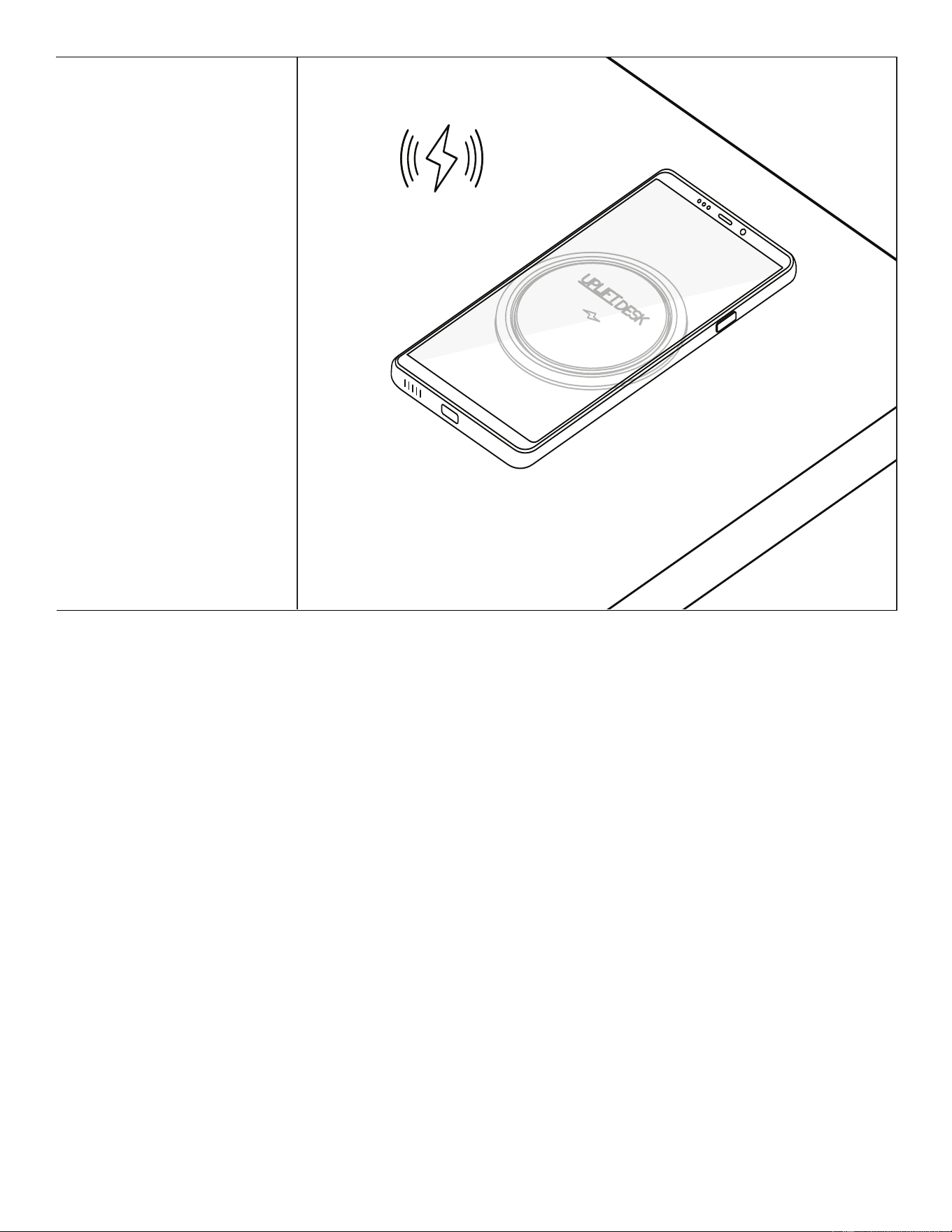
Center the device on the charger.
Charging will be most ecient
when the ambient temperature
is below 77° F. Temperatures
greater than 95° F may result
in an auto-shuto until the
Wireless Module has cooled.
Spacing greater than 0.25”
between the device and charger
(such as with thick phone cases)
may prevent or slow charging.
Read all Safety & Warnings and
Wireless Product Information at
the end of this manual before
use.
Wireless charging
Charging &
Toubleshooting
Information
6

Read all instructions before assembly. Failure to assemble or operate properly may
result in damage or personal injury.
Retain manual for future reference or new owners.
• This device complies with Part 15 of the FCC Rules. Operation is subject to the following two
conditions: (1) This device may not cause harmful interference, and (2) this device must accept any
interference received, including interference that may cause undesired operation.
• For indoor use only. Use only in dry areas.
• This product must be installed and used in accordance with all appropriate electrical codes and
regulations.
• Avoid getting any liquid on or in the product, as it can cause shock and re. If the product gets wet,
disconnect the product from power. Ensure the product is completely dry before reconnecting to
power.
• Do not attempt to open the product or attempt to perform service on the product. Dangerous
voltages are present inside the components during operation.
• Never operate the product if it has a damaged cord or plug, if it is not working properly, or if it has
been dropped or damaged.
• Avoid placing any card with a magnetic strip on the charger as it could be damaged by the charger.
• For safe charging, remove all items from the charging area, including phone cases, pop sockets,
coins, keys, rings, staples, paper clips, RFID cards, credit cards, and any metal objects. Metal objects
near the charging pad can become hot and potentially cause burns.
• Ensure the charging area is clear and free from dust and other debris prior to use.
• Use and store the product only within the specied temperature ranges. Avoid high temperatures
and direct sunlight, and keep away from open ames and other heat sources. Excess heat will
aect performance and may result in damage to the product.
• Do not attempt to disassemble, repurpose, or modify the product in any way.
• Do not use near industrial equipment or aboard an aircraft.
• DO NOT USE IF YOU HAVE A PACEMAKER OR OTHER IMPLANTED MEDICAL DEVICE. Wireless
charging may disrupt the operation of these devices.
• The distance between the wireless product and the user should be at least 7.9 in (20 cm) when
installed and operated.
• Under no circumstances does the manufacturer accept warranty or liability claims for damages
caused from improper use of this product.
Safety & Warnings
7
upliftdesk.com
(800) 349-3839
(512) 614-3152
This product complies with following FCC standards:
FCC 15.207 - AC Line Conducted Emission
FCC 15.209, 15.205 - Radiated Emission Test
FCC 15.203 - Antenna Requirement
FCC 1.1310, 2.1091 - Maximum Permissible Exposure (MPE)
FCC Radiation Exposure Statement:
This equipment complies with FCC radiation exposure limits set forth for an uncontrolled
environment. This equipment should be installed and operated with minimum distance 20cm
between the radiator & your body.
This transmitter must not be co-located or operating in conjunction with any other antenna
or transmitter.
Any changes or modications not expressly approved by the party responsible for compliance could
void the user's authority to operate the equipment.
This equipment has been tested and found to comply with the limits for a Class B digital device,
pursuant to part 15 of the FCC Rules. These limits are designed to provide reasonable protection against
harmful interference in a residential installation. This equipment generates, uses and can radiate radio
frequency energy and, if not installed and used in accordance with the instructions, may cause harmful
interference to radio communications. However, there is no guarantee that interference will not occur
in a particular installation.
If this equipment does cause harmful interference to radio or television reception, which can
be determined by turning the equipment o and on, the user is encouraged to try to correct the
interference by one or more of the following measures:
• Reorient or relocate the receiving antenna.
• Increase the separation between the equipment and receiver.
• Connect the equipment into an outlet on a circuit dierent from that to which the receiver is
connected.
• Consult the dealer for help.
AI-PDC020-1.3
Save This Manual: Study this manual carefully. If this product is sold, please provide this manual to the
buyer, installers, or support personnel operating the product.
Copyright Notice: This manual is a component of this UPLIFT Desk product. This manual is a part of the
scope of delivery, even if the item is resold. This manual is also available on the UPLIFT Desk website:
upliftdesk.com. This manual is subject to United States copyright law.
FCC Standards