Made in China | 705-ML10K3-00
www.godox.com
深圳市神牛摄影器材有限公司
Wechat
Offi cial Account
神牛微信公众号
地址:深圳市宝安区福海街道塘尾社区耀川工业园厂房 2 栋
电话:
0755-29609320
(
8062
) 传真:
0755-25723423
邮箱:
godox@godox. com
合格证
GODOX Photo Equipment Co., Ltd.
Add.: Building 2, Yaochuan Industrial ZoneTangwei Community, Fuhai Street, Bao'an District, Shenzhen
518103, China Tel: +86-755-29609320(8062) Fax: +86-755-25723423 E-mail: [email protected]
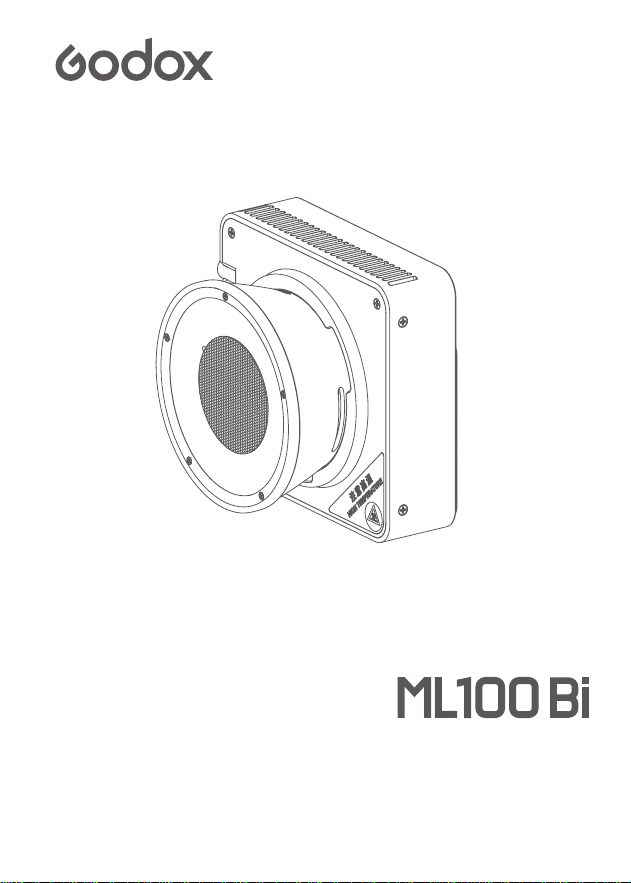
使用手册
Instruction Manual
便携 LED 摄影灯
Portable LED Video Light

01
重要的安全说明及注意事项
使用前必须阅读并理解产品说明书。
专业灯具,禁止儿童使用。当儿童靠近时,家长或陪护人必须密切监督,以免儿童因碰撞
灯具或私用灯具造成人身伤害。
本灯具并非普通照明灯具,不可用于普通照明,任何有过眼部损伤或眼部敏感的人群均
应避免使用本灯具。
灯具点亮时,必须小心使用,禁止接触高温部件,如 LED 灯珠,以免造成灼伤。
灯具点亮时,任何情况下均禁止直视灯珠。应该在专业灯光师指导下使用强光,任何情况
下避免长时间处于强光环境,如引起眼睛不适,请及时关闭灯具,暂停使用,请及时就医。
倘灯珠损坏或因热变形,应停止使用,并及时联系制造商、服务代理商或合格的维修人员
更换灯珠,以免发生意外。
本产品仅适用于 -10℃~ 40℃工作环境温度及正常湿度环境下使用。
请勿使用损坏的设备或设备配件,待专业维修人员检查维修,确认设备正常方可使用。
在使用过程中,如果本产品由于跌落、受到挤压或遭受强烈冲击而造成外壳破裂的,请勿
继续使用,以免因接触到内部电子元件而受到电击伤害。
在清洁和维修之前,请务必从电源插座上拔下该设备插头。不使用时,禁止拉扯电源线以
将设备插头从电源插座中拔出。正常断电,应是用手抓住该设备插头两端,将插头从电源
插座中拔出。此设备需连接到接地插座中。
本设备没有防水性能,请让设备保持干燥,请勿将本设备浸入水中或其他液体中。设备需
安装在干燥且通风处,避免在雨天、潮湿、多尘或过热环境下使用。请勿将任何物体置于
灯具上或使液体流入灯具内部,以免发生意外。
请勿私自拆卸产品,如产品出现故障,须由本公司或授权的维修人员进行检查维修。
存放本设备之前,请确保设备已完全冷却。存放时,将电源线从设备上拔出。设备应放置
于设备便携包内或通风干燥处。
请勿将设备放置在酒精、汽油等易燃易挥发的溶剂附近。
本厂不推荐的产品附件,请勿使用,以免导致火灾、触电或人身伤害。
清洁本设备时,请勿用湿布擦拭,请用干布,软布擦拭设备污垢。
设备使用前,请注意将保护罩取下。
本产品已通过 ROHS,CE 和 FCC 认证,请参考相关国家标准使用和操作。
安全说明依据本厂严格测试制定,设备设计和规格如有变更,恕不另行通知。客户可以
上神牛官网查看最新的电子版说明,了解产品最新资讯。
—年保修期,消耗品电池、适配器、电源线等配件不在此保修范围内。
经发现,擅自检修设备,将取消一年保修期,维修需要收取相关费用。
对于不规范操作引起的机器故障不在保修范围内。
1.
2.
3.
4.
5.
6.
7.
8.
9.
10.
11.
12.
13.
14.
15.
16.
17.
18.
19.
20.
21.
22.
保存这些说明
首先作为最基本原则:本产品为专业灯光布景设备,应由专业灯光师使用或在专业人士指导
下使用。使用时必须始终遵循基本的安全预防措施,具体安全预防措施如下:
02
前 言
感谢您购买神牛产品。
神牛全新推出便携 LED 摄影灯 ML100Bi,其机身方正而薄,底部设有 1/4″螺丝口,可兼容
市面上绝大多数三脚架。此外,ML100Bi 支持“Godox light”App 无线控制;具备两种模式:
双色温模式和 11 类 FX 场景光效模式;适用于户外直播、室内直播、视频拍摄等场景。
设备使用前,请务必将灯头保护罩取下。
注意灯珠高温,使用时请勿触碰光源处。
请勿私自拆卸产品,如产品出现故障须由本公司或授权的维修人员进行检查维修。
设备在使用时请注意灯头表面壳体的高温,切勿长时间触摸;设备在结束工作后表面
仍会留有较高余温,请等待灯体冷却后再进行长时间触摸。
警告
人眼不可直视
03
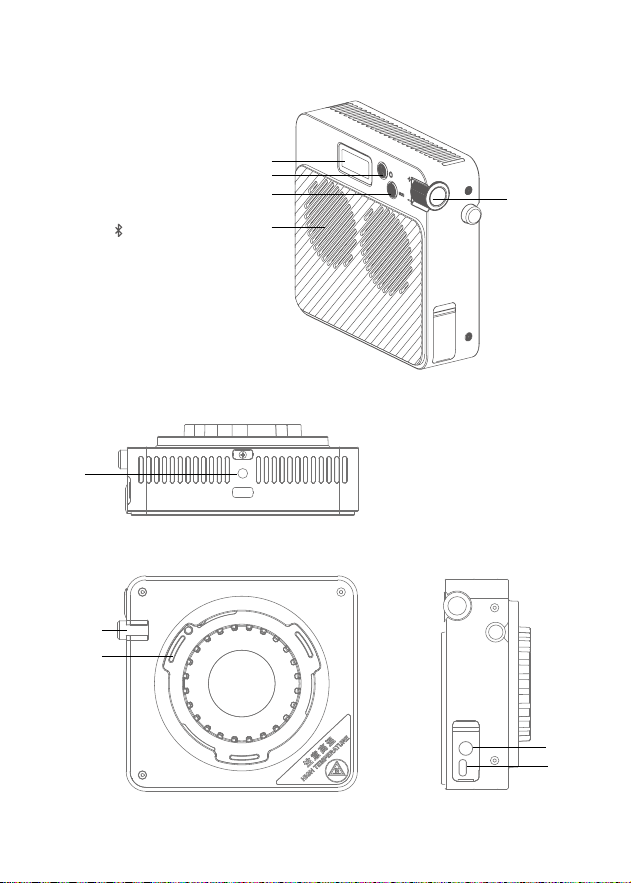
部件名称
灯体
1. 显示屏
2. 开关按键
3.MODE/ 按键
4. 调节旋钮
5. 风扇口
6. 卡口推制
7. 神牛卡口
8.DC 输入接口
9.USB-C 输入接口
10.1/4”接口
1
2
3
4
5
6
8
7
9
10
04
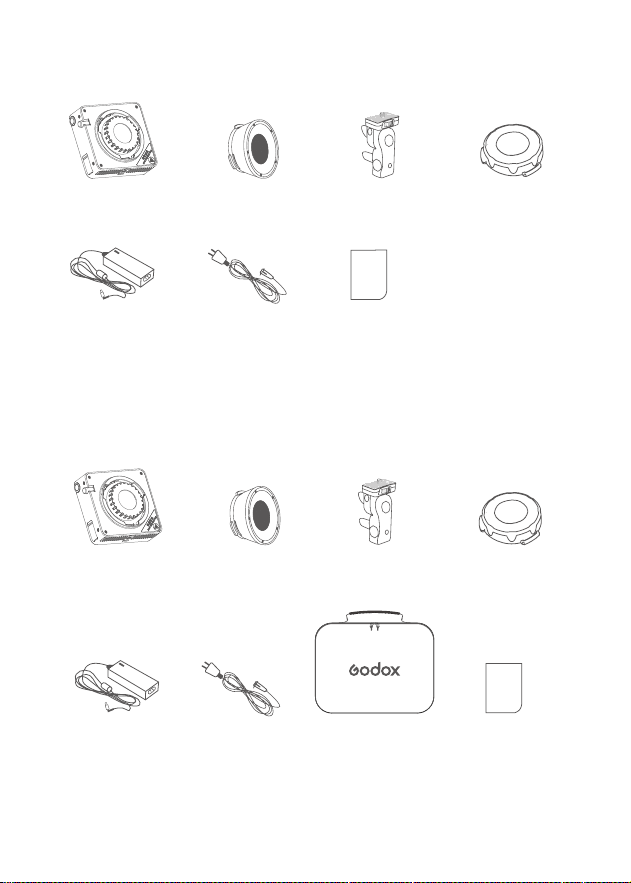
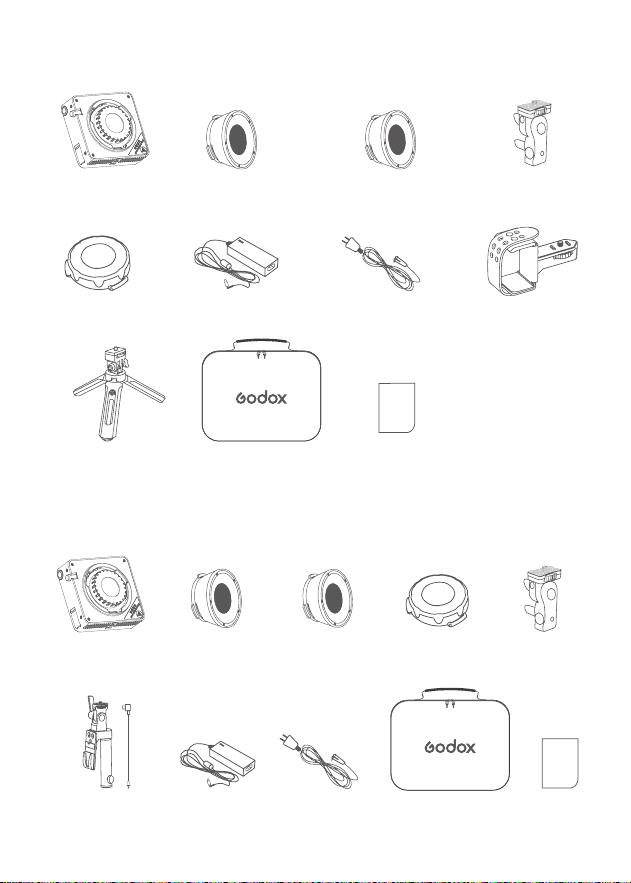
ML100Bi 标配清单
ML100Bi(With Car Bag)清单
灯体 ×1
灯体 ×1
透镜反光杯 ML-L15 ×1
透镜 反光 杯 ML-L15 ×1
支架 AD-E2 ×1
支架 AD-E2 ×1
灯头保护罩 ×1
灯头保护罩 ×1
适配器 ×1
适配器 ×1
AC 电源线 ×1
AC 电源线 ×1 收纳包 ×1
说明书 ×1
说明书 ×1
05
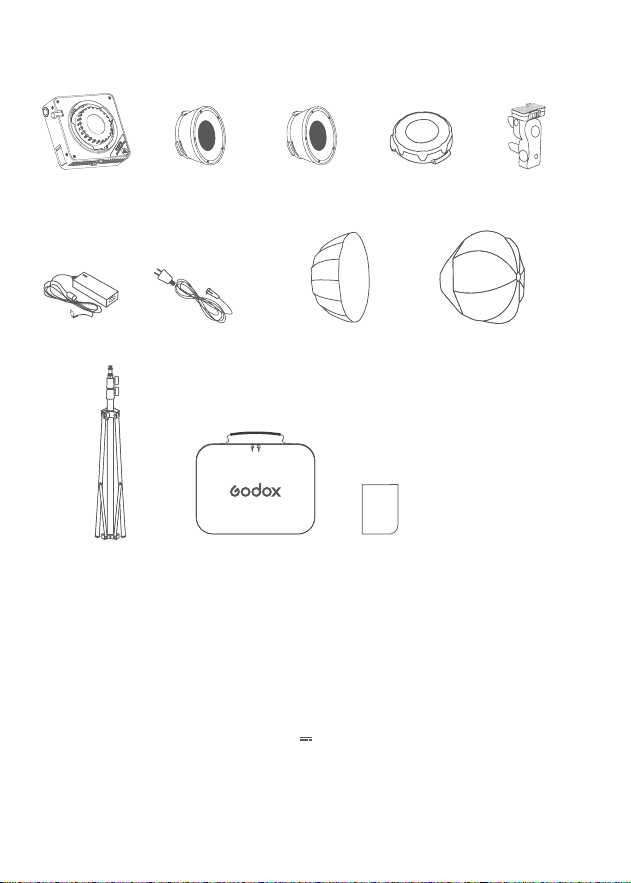
ML100Bi Kit2 套装清单
ML100Bi Kit1 套装清单
灯体 ×1
灯体 ×1 透镜反光杯 ML-L15 ×1
透镜反光杯
ML-L15 ×1
透镜反光杯
ML-L36 ×1
透镜反光杯 ML-L36 ×1 支架 AD-E2 ×1
支架 AD-E2 ×1
适配器 ×1
适配器 ×1
AC 电源线 ×1
AC 电源线 ×1V 口电池附件套装
AK-B02 ×1
收纳包 ×1
收纳包 ×1
移动电源支架 PH01 ×1
迷你三脚架 MT01 ×1
说明书 ×1
灯头保护罩 ×1
灯头保护罩 ×1
说明书 × 1
06
电源管理
DC 供电:
通过适配器连接交流电,输入 20V 6A
Type-C 供电:
您可另购充电头或充电宝进行供电,具体输出亮度将根据使用的
充电头或充电宝的功率值来调整。
AK-B02 供电:
您可另购 AK-B02 V 口电池附件套装和 V 口电池,通过接入一节 14.8V
的 V 口电池进行供电。
八角柔光箱 ML-SF50、球形灯笼柔光箱 ML-CS30、透镜反光杯 ML-L36、透镜反光杯 ML-
L15、移动电源支架 PH01、神牛转保荣卡口转接环 ML-GB。
另购附件
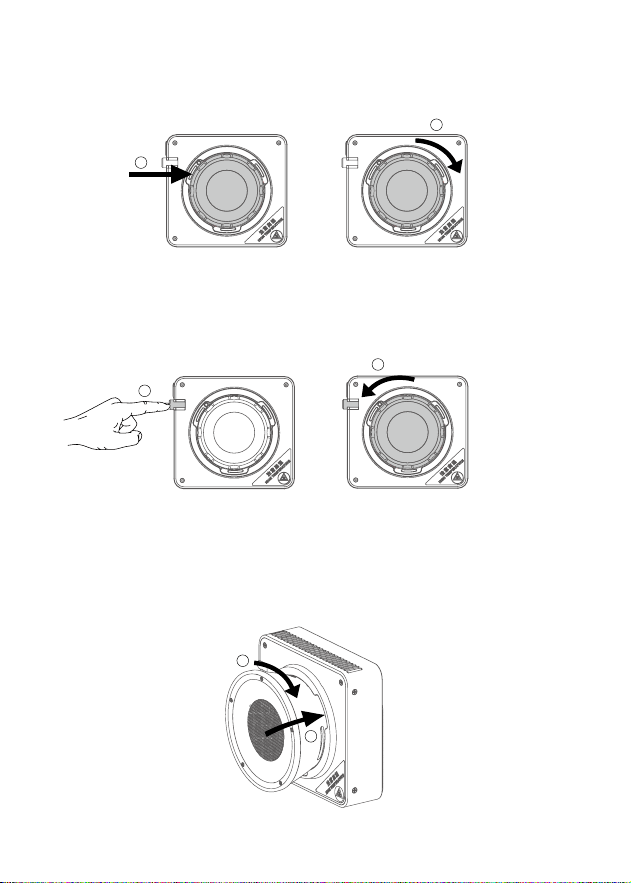
ML100Bi Kit3 套装清单
灯体 ×3 透镜反光杯
ML-L15 ×1
透镜反光杯
ML-L36 ×1
支架 AD-E2 ×3
适配器 ×3 AC 电源线 ×3
收纳包 ×1 说明书 ×1灯架 BS-3R-FE-190 ×3
60cm 柔光箱
AD-S60S ×1
30cm 柔光球
ML-CS30 ×1
灯头保护罩 ×3
07
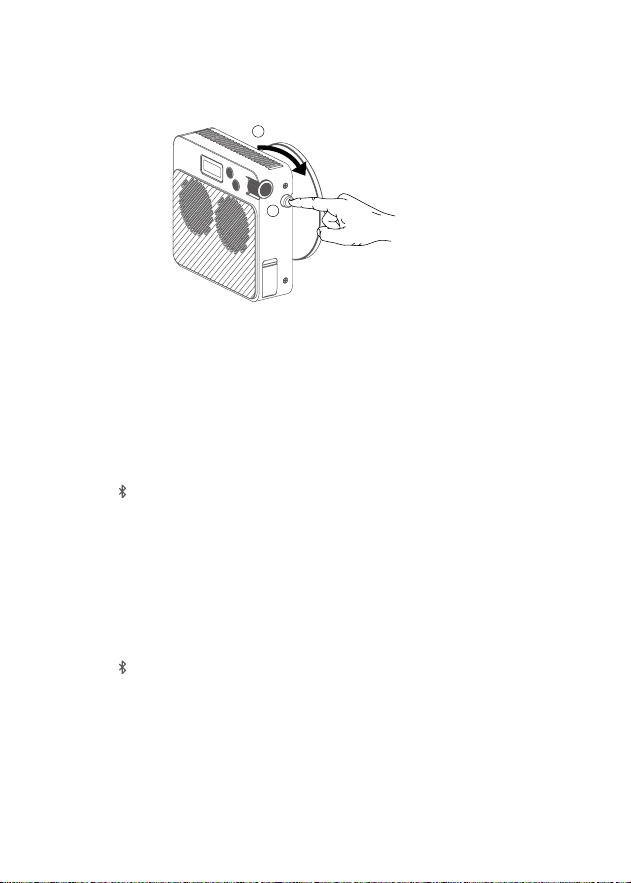
拆卸灯头保护罩
安装透镜反光杯
推动灯具卡口推制的同时,逆时针旋转灯头保护罩,即可取下灯头保护罩。
将透镜反光杯对准神牛卡口插入,顺时针旋转透镜反光杯,听到“咔”一声即可安装完毕。
1
2
1
2
安装灯头保护罩
将灯头保护罩对准神牛卡口插入,顺时针旋转灯头保护罩,听到“咔”一声即可安装完毕。
1
2
08
接通电源后,长按开关按键即可实现开机 / 关机。
短按 MODE/ 按键可切换模式。当显示屏显示“CCT”即表示当前模式为色温模式,短按调节
旋钮可选色温 / 亮度。
选中色温时,滚动调节旋钮可调节色温值,向上滚动一次增加 100K 色温,向下滚动一次减少
100K 色温,色温范围为 2800-6500K。
选中亮度时,滚动调节旋钮可调节亮度值,向上滚动一次增加 1%亮度,向下滚动一次减少1%
亮度,亮度范围为 0% -100%。
短按 MODE/ 按键可切换模式。当显示屏显示“FX”即表示当前模式为 FX 场景光效模式,短
按调节旋钮可选光效 / 光效参数 / 亮度。
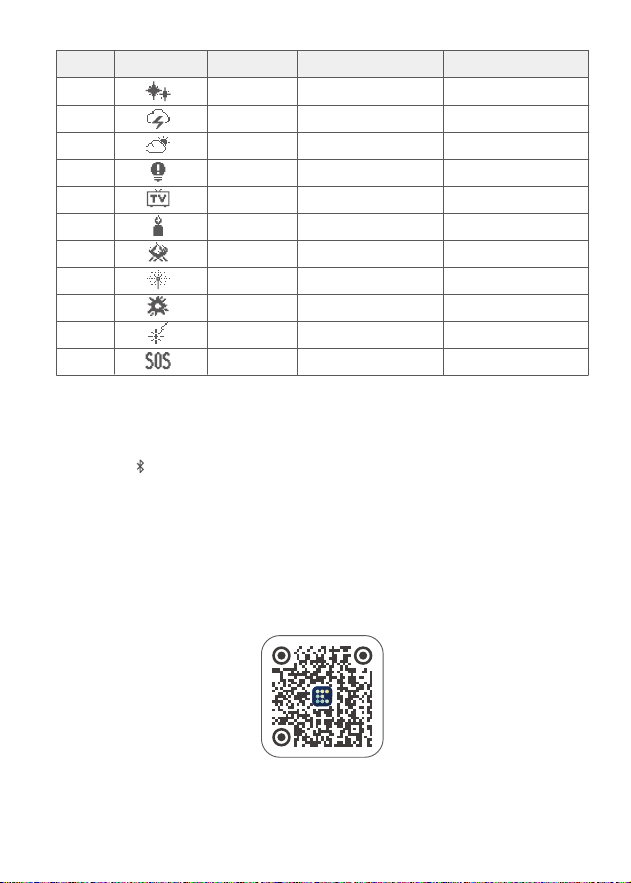
选中光效时,滚动调节旋钮可选择光效类型,共有 11 类。
选中光效参数时,滚动调节旋钮可调节具体光效参数,调节范围如下表所示。
选中亮度时,滚动调节旋钮可调节亮度值,向上滚动一次增加 1%亮度,向下滚动一次减少 1%
亮度,亮度范围为 0% -100%。
开机 / 关机
色温模式
FX 场景光效模式
拆卸透镜反光杯
推动灯具卡口推制的同时,逆时针旋转透镜反光杯,即可取下透镜反光杯。
1
2
09
长按 MODE/ 按钮进入蓝牙设置,滚动调节旋钮可选蓝牙重置 (RESET)/ 蓝牙开启 (ON)/
蓝 牙 关 闭( O F F )。
蓝牙重置 (RESET):选中蓝牙重置 (RESET) 后,短按调节旋钮即可进行蓝牙重置,重置完毕
自动返回主界面。
蓝牙开启 (ON):蓝牙开启后,可使用“Godox Light”App 连接灯体。
蓝牙关闭(OFF):蓝牙关闭后,无法使用“Godox Light”App 连接灯体。
扫描下面二维码即可下载“Godox Light”App(安卓和苹果系统都可以使用)。
蓝牙设置
注:首个移动设备(手机或平板电脑)可直接使用 App 操控灯体。更换其他移动设备时,灯体需进行蓝牙重
置方可正常使用 App。App 需升级至 V3.0 以上版本。
序号
1
2
3
4
5
6
7
8
9
10
11
光效图标 光效类型
闪光灯
雷闪电
多云
坏灯泡
电视机
蜡烛
火
烟花
爆炸
焊接
SOS
选项
SPD(速度)
FREQ( 频率 )
SPD(速度)
SPD(速度)
SPD(速度)
SPD(速度)
SPD(速度)
SPD(速度)
SPD(速度)
SPD(速度)
CCT(色温)
调节范围
1-100
RANDOM( 随机 )/2-20
RANDOM( 随机 )/1-100
1-100
1-100
1-100
1-100
1-100
1-100
1-100
2800K-6500K
10
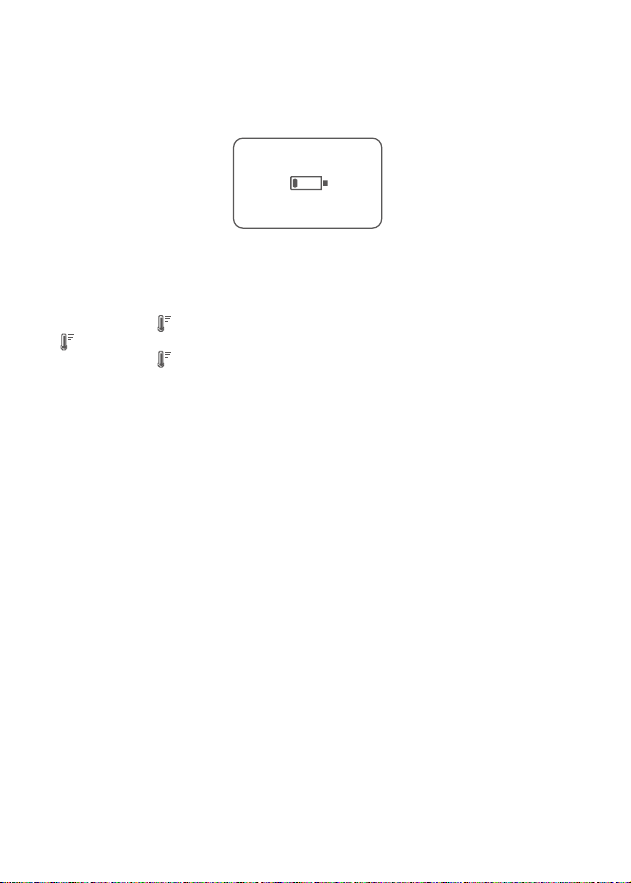
通过 DC 电源口连接外置电池组供电,当电池电量低于一格时,显示屏自动弹出低电量提
示符号。
当显示屏顶部显示 时,即表示当前灯体灯珠温度过高,建议您暂停使用,待显示屏不再显
示 ,您方可再次使用。
当显示屏全屏显示 时,即表示当前灯体温度过高,灯体自动启动灭灯功能,待灯珠温度恢
复正常后,灯体恢复正常。
低电提示
高温报警提示
11
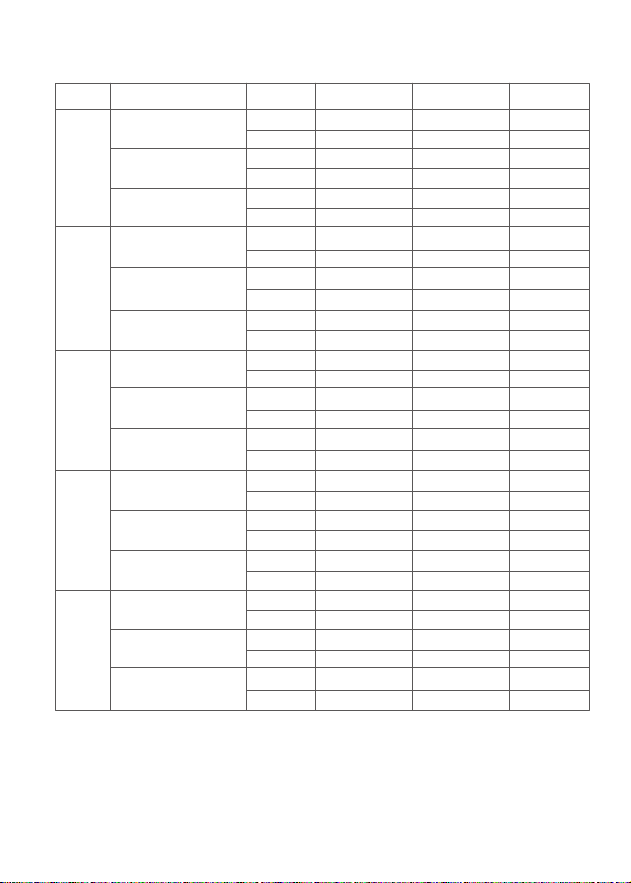
以上数据非绝对值,为平均值,以上测试皆在灯体 100%亮度下进行。上述透镜反光杯 ML-L15 为标配,透镜
反光杯 ML-L36 为另购。
照度数据
lux
fc
lux
fc
lux
fc
lux
fc
lux
fc
lux
fc
lux
fc
lux
fc
lux
fc
lux
fc
lux
fc
lux
fc
lux
fc
lux
fc
lux
fc
≈ 2580
≈ 239
≈ 24100
≈ 2240
≈ 12500
≈ 1160
≈ 2990
≈ 278
≈ 27900
≈ 2590
≈ 14500
≈ 1350
≈ 3520
≈ 327
≈ 32900
≈ 3060
≈ 17100
≈ 1590
≈ 3670
≈ 341
≈ 34300
≈ 3190
≈ 17900
≈ 1660
≈ 3380
≈ 314
≈ 31200
≈ 2840
≈ 16500
≈ 1530
≈ 682
≈ 63
≈ 6010
≈ 558
≈ 3140
≈ 292
≈ 777
≈ 72
≈ 7040
≈ 654
≈ 3640
≈ 338
≈ 916
≈ 85
≈ 8350
≈ 776
≈ 4320
≈ 401
≈ 953
≈ 89
≈ 8800
≈ 817
≈ 4480
≈ 416
≈ 878
≈ 82
≈ 8100
≈ 752
≈ 4130
≈ 383
≈ 316
≈ 29
≈ 2800
≈ 260
≈ 1380
≈ 128
≈ 363
≈ 34
≈ 3250
≈ 302
≈ 1610
≈ 150
≈ 427
≈ 40
≈ 3860
≈ 359
≈ 1910
≈ 177
≈ 446
≈ 41
≈ 4040
≈ 376
≈ 1990
≈ 185
≈ 410
≈ 38
≈ 3730
≈ 346
≈ 1830
≈ 170
裸灯
带透镜反光杯 ML-L15
带透镜反光杯 ML-L36
裸灯
带透镜反光杯 ML-L15
带透镜反光杯 ML-L36
裸灯
带透镜反光杯 ML-L15
带透镜反光杯 ML-L36
裸灯
带透镜反光杯 ML-L15
带透镜反光杯 ML-L36
裸灯
带透镜反光杯 ML-L15
带透镜反光杯 ML-L36
2800K
3200K
4300K
5600K
6500K
色温 测试条件 照度单位 1m 2m 3m
12
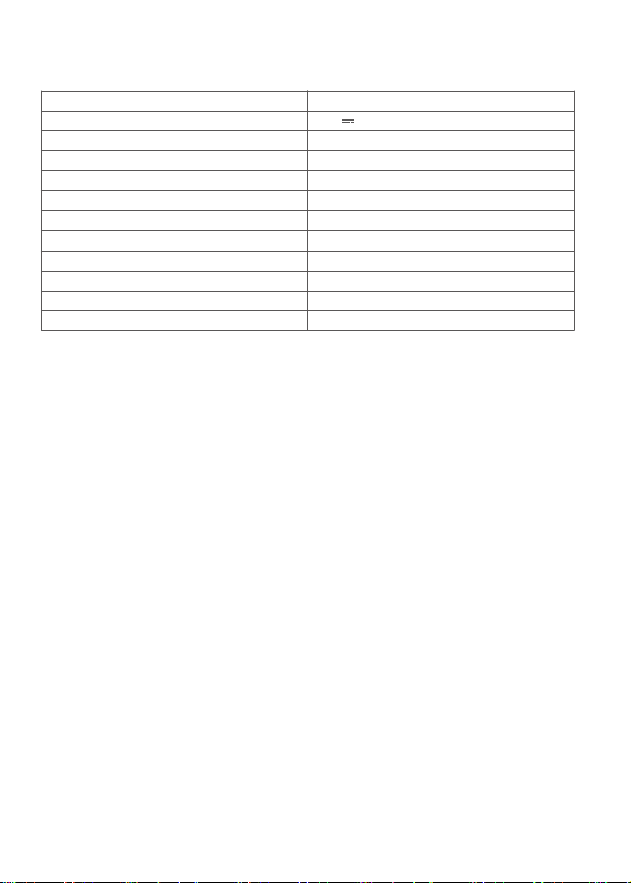
规格参数
型号
供电
最大输入功率
调光范围
CRI
TLCI
色温
场景光效
蓝牙控制范围
工作环境温度
尺寸(不含透镜反光杯)
净重(不含透镜反光杯)
ML100 Bi
20V 6A
≈ 120W
0% -100%
平均≥ 97
平均≥ 98
2800-6500K
11 类
最远 30m
-10℃ ~+40℃
≈ 122mm×110mm×46mm
≈ 487g
规格和参数如有变更,恕不另行通知。
维修保护
为防止灰尘堆积影响到产品性能,请定时用干净的湿布轻轻擦拭产品外部。
1 年保修,消耗品如充电电源线等配件不在保修范围内。
对于不规范操作引起的机器故障不在保修范围内。
所有维修概由本厂指定的可供原厂配件的维修部负责。
经发现,擅自维修本产品,将取消一年的保修期,维修需收取相关费用。
如果本品出现故障或被水淋湿,在专业人员维修后方可使用。如有技术更改,恕不另行通知。
1.
2.
3.
4.
5.
6.

13
Safety Instructions and Attentions
First of all, as the most basic principle: This product is a professional lighting set equipment and should
be used by professional lighting engineers or under the guidance of professionals. Basic safety attentions
must always be followed during use, as follows:
Before use, please read and understand these instructions and attentions.
Professional lighting is prohibited for children. When children are near, parents or accompanying persons
must supervise closely to prevent children from personal injury due to collision with lamps or private use of
lamps.
This lighting product is not ordinary lighting product and cannot be used for general lighting. Anyone who
has suffered eye damage or has sensitive eyes should avoid using this product.
When the lamp is on, it must be used with care. Do not touch high-temperature parts, such as LED lamp
beads, to avoid burns.
When the lamp is on, it is forbidden to look directly at the lamp beads under any circumstances. Strong
light should be used under the guidance of professional lighting engineers. Avoid prolonged exposure to
strong light under any circumstances. If eye discomfort, please turn off the lamp in time, suspend use, and
see a doctor immediately.
If the lamp bead is damaged or deformed by heat, stop using this equipment, and contact the
manufacturer, service agent or qualifi ed maintenance personnel to replace the lamp bead in time to avoid
accidents.
This product is only suitable for use in -10
℃
to 40
℃
operating environment and normal humidity
environment.
Do not use damaged equipment or accessories, and wait for professional maintenance personnel to check
and repair to confi rm being normal before use.
During using, if the casing of this product is broken due to being dropped, squeezed or subjected to strong
impact, please do not use it, so as to avoid electric shock injury due to contact with internal electronic
components.
Be sure to unplug equipment from the power outlet before cleaning and repairing. When not in use, do
not pull the power cord to unplug the equipment. For normal power-off, please hold both ends of the
plug of the equipment with your hands and pull the plug out of power outlet. This equipment needs to be
connected to a grounded outlet.
This equipment is not waterproof, please keep it dry and do not immerse it in water or other liquids. The
equipment should be installed in a dry and ventilated place, and avoid using it in rainy, humid, dusty or
overheated environments. Do not place any objects on the lamp or let liquid flow into the lamp to avoid
accidents.
Do not disassemble the product without permission. If the product fails, it must be checked and repaired
by authorized maintenance personnel.
Before storing, make sure that the equipment has cooled down completely. For storage, unplug the power
cord from the equipment. The equipment should be placed in the carrying case or in a ventilated dry place.
Do not place equipment near flammable and volatile solvents such as alcohol and gasoline.
Do not use accessories that are not recommended by our factory to avoid fi re, electric shock or personal
injury.
When cleaning, do not wipe it with a damp cloth, please use a dry cloth or a soft cloth to wipe the dirt of the
equipment.
Please take off the protective cover before using.
This product complies with ROHS
,
CE
,
and FCC certifi cation, please refer to the relevant national
standards for use and operation.
1.
2.
3.
4.
5.
6.
7.
8.
9.
10.
11.
12.
13.
14.
15.
16.
17.
18.
14
Foreword
Thank you for purchasing a Godox product.
Godox introduces the new portable LED video light ML100Bi. It features a square and slim body with a 1/4"
screw hole at the bottom, making it compatible with most tripods available in the market. In addition, the
ML100Bi supports wireless control through the "Godox light" app, offering two modes: bi-color temperature
mode and 11 types of FX modes. This product is suitable for outdoor livestreaming, indoor livestreaming,
video shooting, and other scenarios.
Before using the device, please make sure to remove the lamp head protective cover.
The light beads generate high temperatures. Do not touch the light source during use.
Do not disassemble the product by yourself. If the product malfunctions, it should be inspected and
repaired by our company or authorized personnel.
Be careful of the high temperature on the light head surface shell in using, and do not touch for a long
time. The surface willstill have a high residual temperature after the end of work, please wait for the light
body to cool down before touching it for a long time.
The safety instructions are formulated according to the strict testing of the factory, and the design and
specifi cations of the equipment are subject to change without prior notice. For latest product information,
please check the GODOX website and view latest electronic instruction.
One-year warranty period, accessories such as consumable batteries, adapters, power cords, etc. are not
covered by this warranty.
If it is found that the equipment is repaired without authorization, the one-year warranty period will be
cancelled and relevant fees will be charged for maintenance.
Machine failures caused by non-standard operation are not covered by the warranty.
keep these instructions!
19.
20.
21.
22.
Warning
Don't stare at a bright light source
15
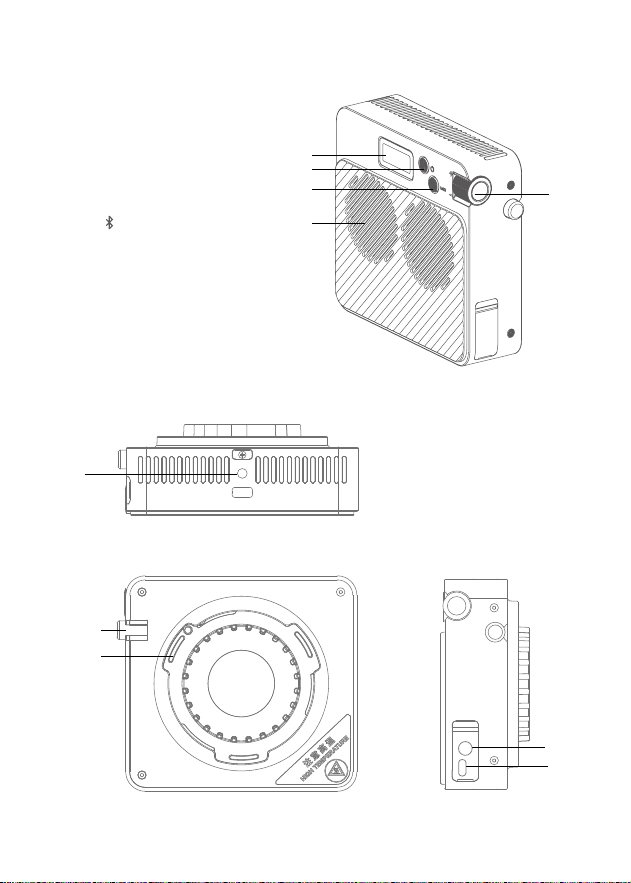
Name of Parts
Light Body
1. Display
2. Power Switch
3. MODE/ Button
4. Select Dial
5. Fan Vent
6. Mount Locking Pusher
7. Godox Mount
8. DC Input Port
9. USB-C Input Port
10. 1/4”Interface
1
2
3
4
5
6
8
7
9
10
16
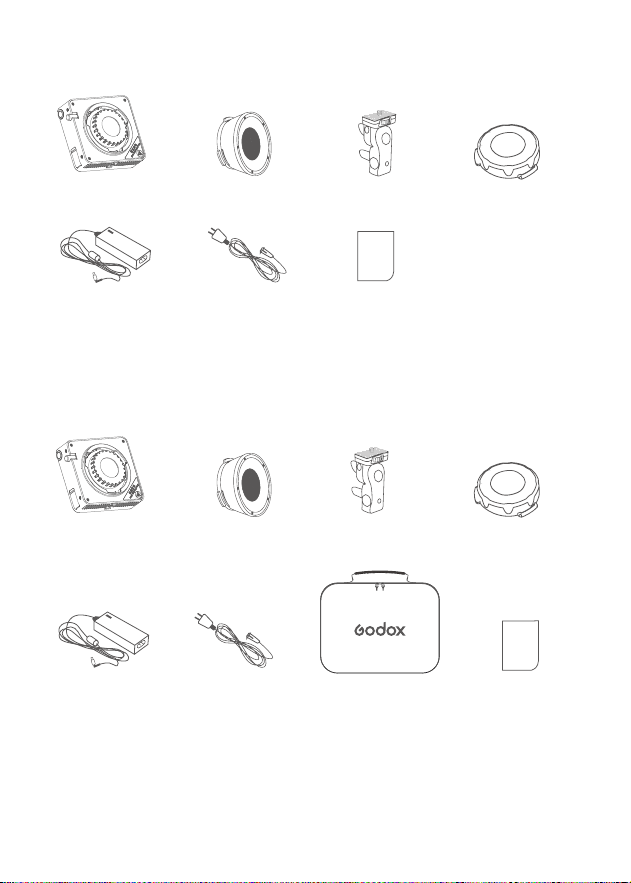
Item List for ML100Bi
Item List for ML100Bi(With Carry Bag)
Light Body ×1
Light Body ×1
Lens Reflector ML-L15 ×1
Lens Reflector ML-L15 ×1
Holder AD-E2 ×1
Holder AD-E2 ×1
Lamp Head Protective
Cover ×1
Lamp Head Protective
Cover ×1
Adapter ×1
Adapter ×1
AC Power Cord ×1
AC Power Cord
×1
Instruction Manual ×1
Storage Bag ×1 Instruction
Manual ×1
17
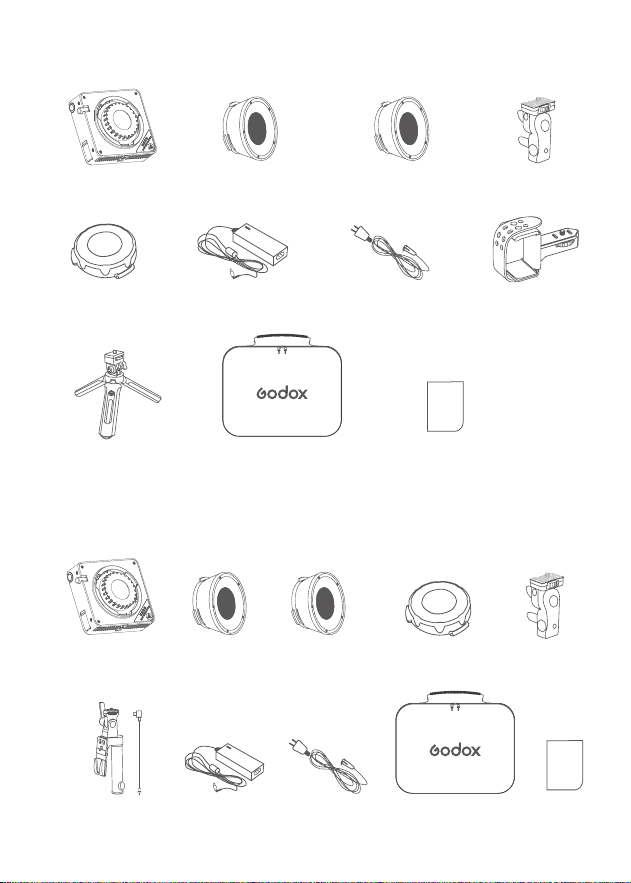
Lens Reflector ML-L15 ×1 Lens Reflector ML-L36 ×1 Holder AD-E2 ×1
Item List for ML100Bi Kit1
Light Body ×1
Lamp Head Protective
Cover ×1
Power Bank
Holder PH01×1
Adapter ×1 AC Power Cord ×1
Item List for ML100Bi Kit2
Light Body ×1
Lens Reflector
ML-L15 ×1
Lens Reflector
ML-L36 ×1
Holder AD-E2
×1
Lamp Head Protective
Cover ×1
Adapter ×1V-mount Battery
Accessory Kit AK-B02 ×1
Storage Bag ×1
Instruction
Manual ×1
AC Power Cord ×1
Mini Tripod MT01 ×1 Storage Bag ×1 Instruction Manual ×1
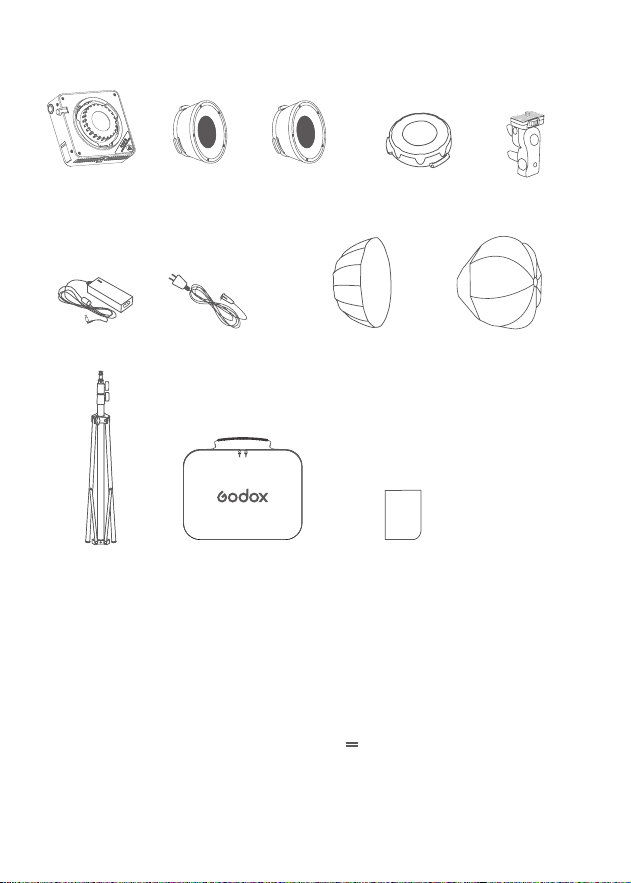
18
Power Management
Optional Accessories
Octagon Softbox ML-SF50
,
Collapisble Lantern Softbox ML-CS30, Lens Reflector ML-L36, Lens Reflector ML-
L15, Power Bank Holder PH01, Godox to Bowens Mount Adapter Ring ML-GB
DC Power Supply : Connect the adapter to AC power, input 20V 6A.
USB-C Power Supply : You can separately purchase a charging adapter or power bank, the output
of which is determined by the charging adapter or power bank used
.
AK-B02 Power Supply : You can separately purchase a V-mount battery accessory kit AK-B02 and one 14.8V
V-mount battery.
Item List for ML100Bi Kit3
Light Body × 3
Lens Reflector
ML-L15 × 1
Lens Reflector
ML-L36 × 1
Holder AD-E2
× 3
Lamp Head Protective
Cover ×3
Storage Bag × 1
Instruction Manual ×1
Light Stand BS-3R-
FE-190 ×3
AC Power Cord
× 3
60cm Softbox
AD-S60S × 1
30cm Diffusion Dome
ML-CS30 × 1
Adapter × 3
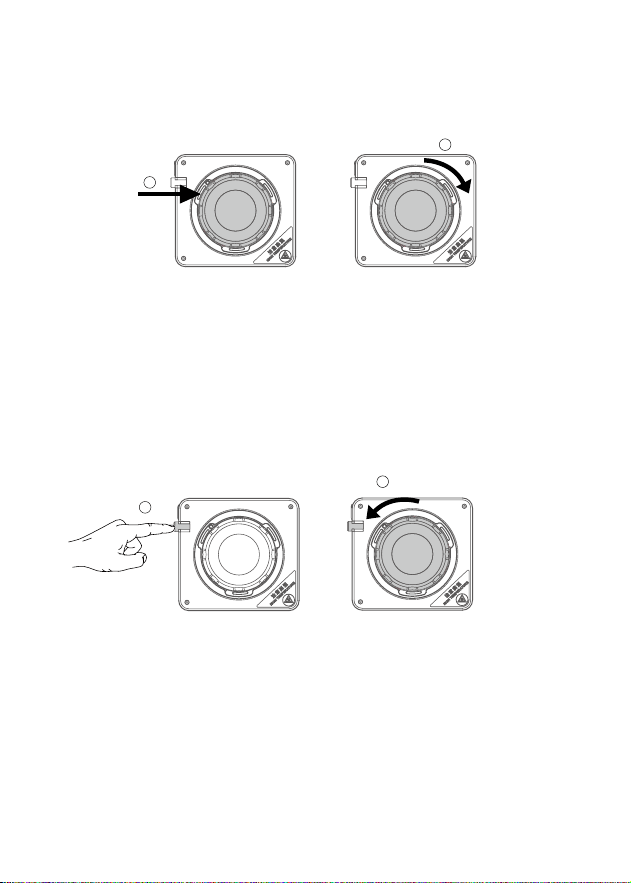
19
Installation of the Lamp Head Protective Cover
Removal of the Lamp Head Protective Cover
Align the lamp head protective cover with the Godox mount and insert it. Rotate the lamp head protective
cover clockwise until you hear a "click" sound, indicating that the installation is complete.
While pushing the lamp fi xture's mount locking pusher, rotate the lamp head protective cover
counterclockwise to remove it.
1
2
1
2
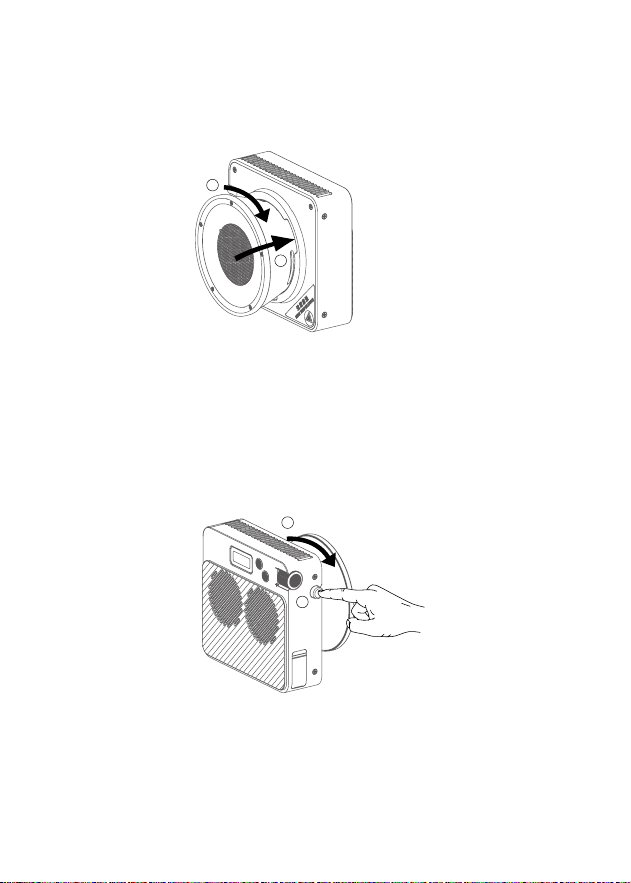
20
Installation of the Lens Reflector
Removal of the Lens Reflector
Power On/Off
Align the lens reflector with the Godox mount on the device and insert it. Rotate the lens reflector clockwise
until you hear a "click" sound, indicating that the installation is complete.
While pushing the lamp mount locking pusher, rotate the lens reflector counterclockwise to detach it.
After connecting the power supply, continuously press the power switch button to turn the device on or off.
1
2
1
2
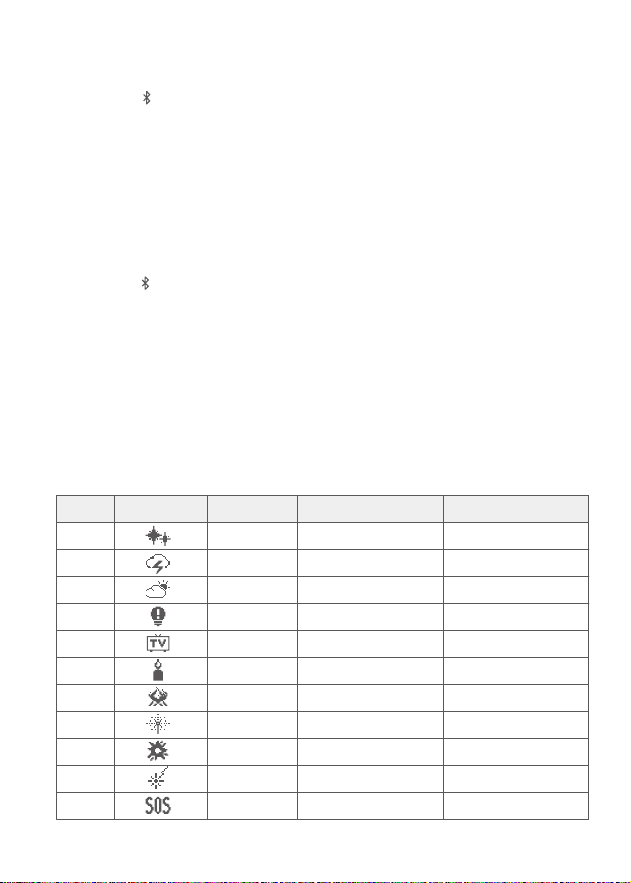
21
CCT Mode
FX Mode
Press the MODE/ button briefly to switch modes. When the display screen shows "CCT," it indicates that the
current mode is the color temperature mode. Press the select dial briefly to select between CCT/Brightness.
When selecting CCT, scroll the select dial to adjust the CCT value. Scroll up once to increase CCT by 100k,and
scroll down once to decrease CCT by 100k.The CCT range is from 2800K to 6500K.
When selecting brightness, scroll the select dial to adjust the brightness value. Scroll up once to increase the
brightness by 1%, and scroll down onec to decrease the brightness by 1%.The brightness range is from 0% to
100%.
Press the MODE/ button briefly to switch modes. When the display shows "FX," it indicates that the current
mode is the FX Mode. Press the select dial briefly to select lighting effects/lighting effect parameters/
brightness.
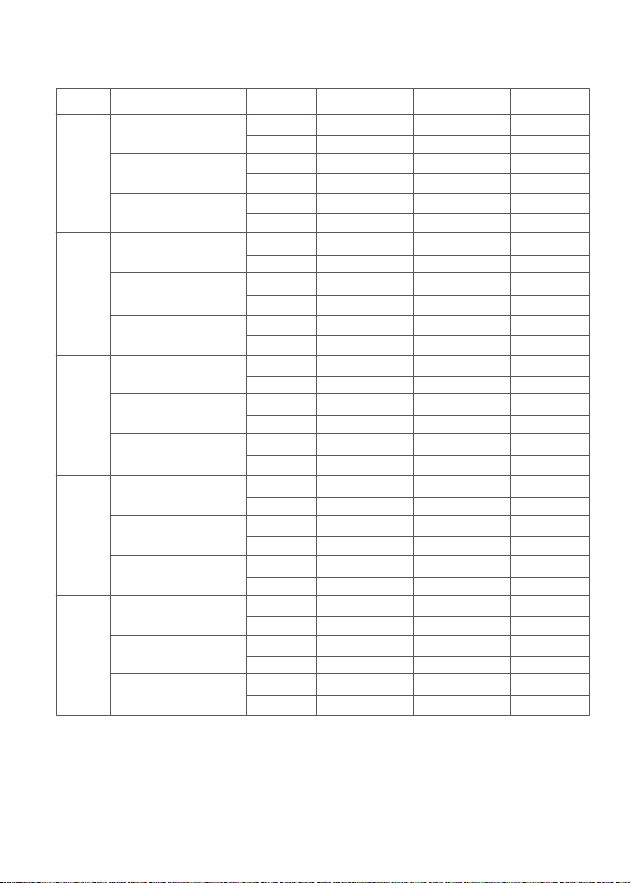
When selecting lighting effects, scroll the select dial to choose from the 11 available lighting effect types.
When selecting lighting effect parameters, scroll the select dial to adjust specifi c lighting effect parameters
within the range specifi ed in the table below.
When selecting brightness, scroll the select dial to adjust the brightness value. Scroll up once to increase the
brightness by 1%, and scroll down once to decrease the brightness by 1%
.
The brightness range is from 0% to
100%.
FX Table
No.
1
2
3
4
5
6
7
8
9
10
11
FX Icon
FX Type
FLASH
LIGHTNING
CLOUDY
BROKEN BULB
TV
CANDLE
FIRE
FIREWORKS
EXPLOSION
WELDING
SOS
Option
SPD
FREQ
SPD
SPD
SPD
SPD
SPD
SPD
SPD
SPD
CCT
Adjustable Range
1-100
RANDOM/2-20
RANDOM/1-100
1-100
1-100
1-100
1-100
1-100
1-100
1-100
2800K-6500K
22
Bluetooth Settings
Low Battery Warning
High Temperature Warning
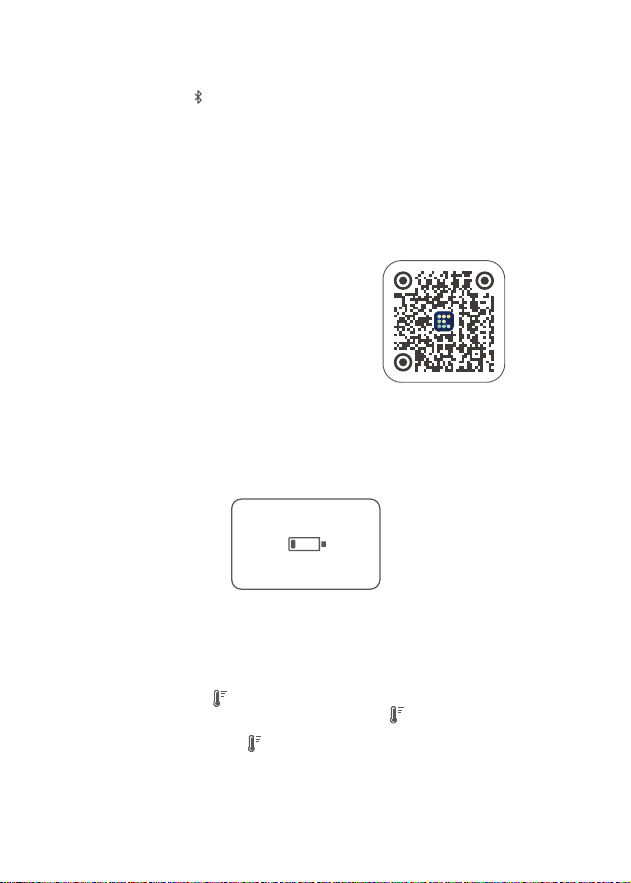
Continuously press the MODE/ button to enter the Bluetooth settings. Scroll the select dial to select
Bluetooth Reset (RESET)/Bluetooth On (ON)/ Bluetooth Off (OFF).
Bluetooth Reset (RESET): Select Bluetooth Reset (RESET), then press the select dial briefly to perform a
Bluetooth reset. After the reset is complete, it will automatically return to the main interface.
Bluetooth On (ON): After Bluetooth is turned on, you can use the "Godox Light" app to connect to the light
body.
Bluetooth Off (OFF): After Bluetooth is turned off, the "Godox Light" app cannot connect to the light body.
Scan the QR code below to download the "Godox Light" app (compatible with both Android and iOS systems).
Please power the device with an external battery pack through DC port. When the battery level is below one
green bar, the display screen will automatically show a low battery symbol.
When the top of the display shows , it indicates that the lamp bead temperature is too high. It is
recommended to pause usage until the display screen no longer shows , and then you can resume using
the light.
When the full screen of the display shows , it indicates that the light body temperature is too high. The light
fi xture will automatically activate the light-off function. Once the temperature of the light beads returns to
normal, the light fi xture will resume normal operation.
Note: The fi rst mobile device (phone or tablet) can directly
control the light body using the app. When switching to
another mobile device, the light body needs to be Bluetooth
reset before the app can be used. The app needs to be
upgraded to version 3.0 or above.
23
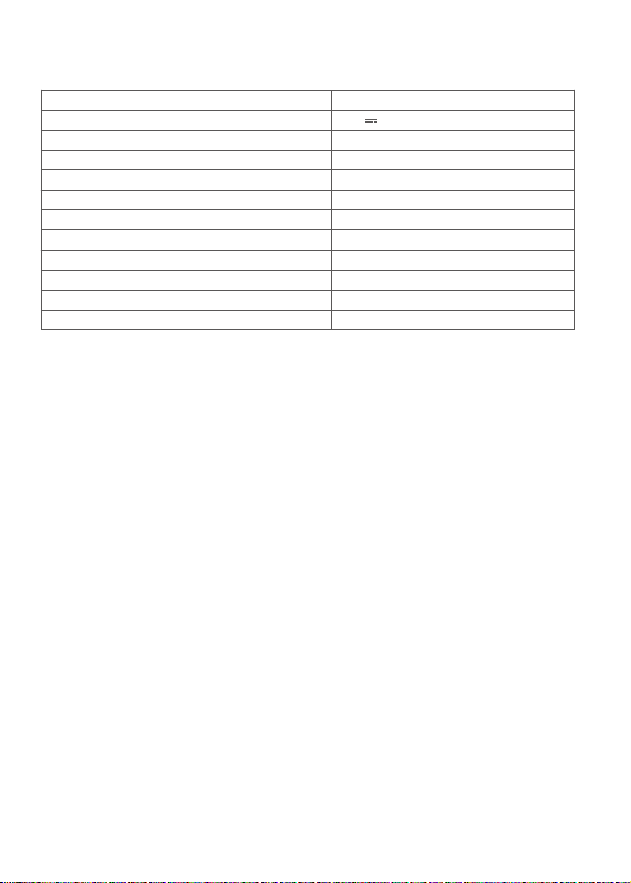
The above data is not absolute values but averages. All the tests mentioned above were conducted at 100% brightness of
the light body. Lens reflector ML-L15 is included, while lens Reflector ML-L36 is sold separately.
Photometric Data
lux
fc
lux
fc
lux
fc
lux
fc
lux
fc
lux
fc
lux
fc
lux
fc
lux
fc
lux
fc
lux
fc
lux
fc
lux
fc
lux
fc
lux
fc
Bare Light
Lens Reflector ML-L15
Lens Reflector ML-L36
Bare Light
Lens Reflector ML-L15
Lens Reflector ML-L36
Bare Light
Lens Reflector ML-L15
Lens Reflector ML-L36
Bare Light
Lens Reflector ML-L15
Lens Reflector ML-L36
Bare Light
Lens Reflector ML-L15
Lens Reflector ML-L36
2800K
3200K
4300K
5600K
6500K
CCT Test Condition Unit 1m 2m 3m
≈ 2580
≈ 239
≈ 24100
≈ 2240
≈ 12500
≈ 1160
≈ 2990
≈ 278
≈ 27900
≈ 2590
≈ 14500
≈ 1350
≈ 3520
≈ 327
≈ 32900
≈ 3060
≈ 17100
≈ 1590
≈ 3670
≈ 341
≈ 34300
≈ 3190
≈ 17900
≈ 1660
≈ 3380
≈ 314
≈ 31200
≈ 2840
≈ 16500
≈ 1530
≈ 682
≈ 63
≈ 6010
≈ 558
≈ 3140
≈ 292
≈ 777
≈ 72
≈ 7040
≈ 654
≈ 3640
≈ 338
≈ 916
≈ 85
≈ 8350
≈ 776
≈ 4320
≈ 401
≈ 953
≈ 89
≈ 8800
≈ 817
≈ 4480
≈ 416
≈ 878
≈ 82
≈ 8100
≈ 752
≈ 4130
≈ 383
≈ 316
≈ 29
≈ 2800
≈ 260
≈ 1380
≈ 128
≈ 363
≈ 34
≈ 3250
≈ 302
≈ 1610
≈ 150
≈ 427
≈ 40
≈ 3860
≈ 359
≈ 1910
≈ 177
≈ 446
≈ 41
≈ 4040
≈ 376
≈ 1990
≈ 185
≈ 410
≈ 38
≈ 3730
≈ 346
≈ 1830
≈ 170
24
Technical Data
Maintenance
Specifi cations and data may subject to changes without notice.
To prevent dust buildup affecting performance, please clean the exterior of the device regularly using a soft,
damp cloth.
This product, except consumables, is supported with a one-year warranty.
Unauthorized service will void the warranty. Maintenance of the light must be performed by our authorized
maintenance department which can provide original accessories.
Unauthorized repairs of this product will void the one-year warranty, and repair fees will be charged for any
repairs.
If the product had failures or got wet, do not use it until it is repaired by professionals.
Changes made to the specifi cations or designs may not be reflected in this manual.
1.
2.
3.
4.
5.
6.
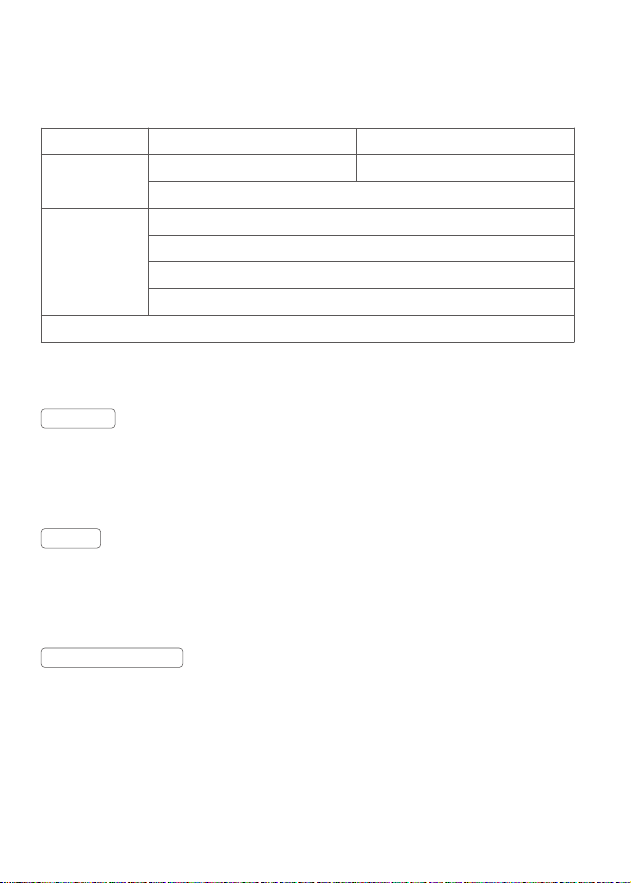
Model
Power Supply
Max. Input Power
Brightness Range
CRI
TLCI
CCT
FX Type
Bluetooth Control Distance
Working Environment Temperature
Dimension(Excluding lens reflector)
Net Weight(Excluding lens reflector)
ML100Bi
20V 6A
≈120W
0%-100%
Average≥97
Average≥98
2800-6500K
11
Max.30m
-10
℃
~+40
℃
4.80” × 4.33” × 1.81”
487g

25
Note: This equipment has been tested and found to comply with the limits for a Class B digital device, pursuant to part 15
of the FCC Rules. These limits are designed to provide reasonable protection against harmful interference in a residential
installation.
This equipment generates uses and can radiate radio frequency energy and, if not installed and used in accordance
with the instructions, may cause harmful interference to radio communications. However, there is no guarantee that
interference will not occur in a particular installation. If this equipment does cause harmful interference to radio or
television reception, which can be determined by turning the equipment off and on, the user is encouraged to try to correct
the interference by one or more of the following measures:
- Reorient or relocate the receiving antenna.
- Increase the separation between the equipment and receiver.
- Connect the equipment into an outlet on a circuit different from that to which the receiver is connected.
- Consult the dealer or an experienced radio/TV technician for help.
The device has been evaluated to meet general RF exposure requirement.
The device can be used in portable exposure condition without restriction.
This device complies with part 15 of the FCC Rules. Operation is subject to the following two conditions:
(1) This device may not cause harmful interference, and
(2) this device must accept any interference received, including interference that may cause undesired
operation.
Operating frequency:2402MHz – 2480MHz
(
BT
)
Maximum EIRP Power: 4.64dBm
GODOX Photo Equipment Co.,Ltd. hereby declares that this equipment are in compliance with the essential
requirements and other relevant provisions of Directive 2014/53/EU. In accordance with Article 10(2) and
Article 10(10), this product is allowed to be used in all EU member states.For more information of DoC, Please
click this web link:
https://www.godox.com/eu-declaration-of-conformity/
The device complies with RF specifi cations when the device used at 0mm from your body.
Any Changes or modifi cations not expressly approved by the party responsible for compliance could void the
user's authority to operate the equipment.
FCC Statement
Warning
Declaration of Conformity
产品保修
尊敬的用户,本保修卡是申请保修服务的重要凭证,请您配合销售商填写并妥善保管,谢谢!
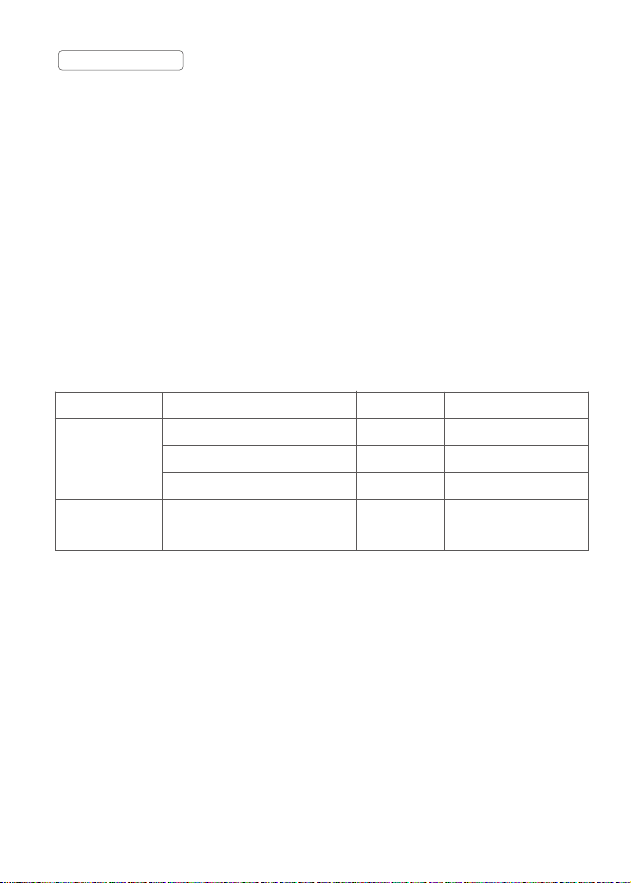
产品信息
用户信息
销售商信息
备注
型号
姓名
通信地址
名称
联系电话
通信地址
销售日期
产品条码
联系电话
注:此表应由销售商盖章确认。
本文件适用于相关《产品保修信息》(见后面说明 ) 所列产品,其他非属此范围的产品或部件( 如促销品、
赠品及其他出厂后附加的部件等 ) 不在此保修承诺内。
产品信息
产品及部件的相应保修期按相关的《产品保修信息》执行。保修期自产品首次购买日起算,购买日
以购买产品时保修卡登记日期为准。
保修期
您可直接与产品销售商或授权服务机构联系,也可拨打神牛产品售后服务电话,与我们联系,由我
们的服务人员为您安排服务。申请保修时,您应提供有效的保修卡作为保修凭证,方可获得保修。
如您不能提供有效的保修卡,则在我们确认产品或部件属于保修范围的情况下,也可以为您提供保修,
但这不作为我们的义务。
如何获得保修服务
如产品存在下列情况,本文件项下的保证和服务将不适用 : ①产品或部件超过相应保修期;②错误
或不适当使用、维护或保管导致的故障或损坏,如:不当搬运;非按产品合理预期用途使用;不当
插拨外接设备;跌落或外力挤压;接触或暴露于不适当温度、溶剂、酸碱、水浸或潮湿环境;③由
非神牛授权机构或人员安装、修理、更改、添加或拆卸造成的故障或损坏;④产品或部件原有识别
信息被修改变更或除去;⑤无有效保修卡;⑥使用非合法授权、非标准或非公开发行的软件造成的
故障或损坏;⑦因不可抗力或意外事件造成的故障或损坏;⑧其他非因产品本身质量问题导致的故
障或损坏。遇上述情况,您应向相关责任方寻求解决,神牛对此不承担任何责任。因非在保修期或
保修范围内的部件、附件或软件导致产品不能正常使用的,不是保修范围内的故障。产品使用过程
中正常的脱色,磨损和消耗,不是保修范围内的故障。
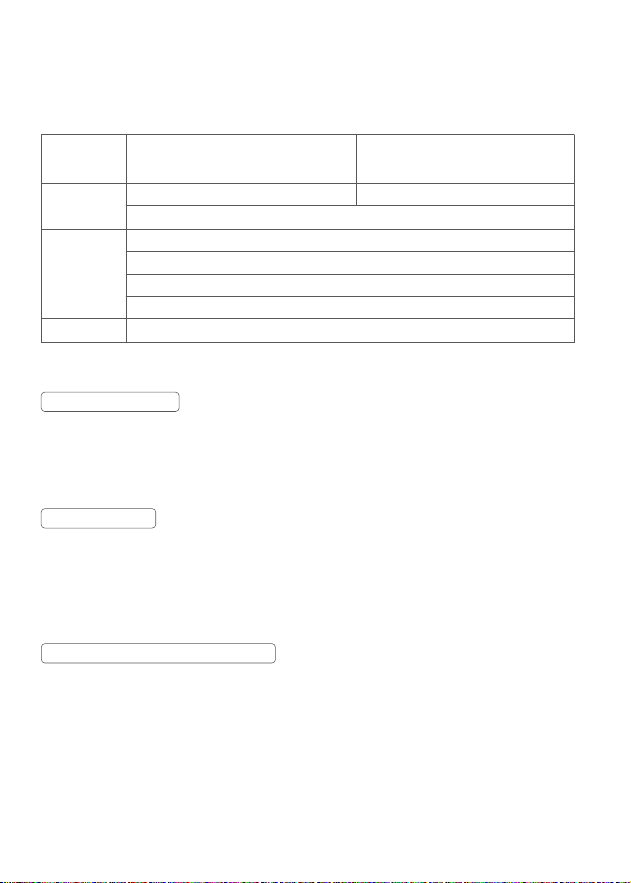
产品类别
部件
其他
选件名称
电路板
电池
充电器等带电性能的部件。
如外壳、 保护罩、锁紧装置、包
装等。
保修期(月)
12
3
12
无
神牛产品售后服务电话 0755-29609320-8062
不适用保修情況
产品保修和服务支持信息
产品的保修期和服务类型按以下《产品保修信息》执行:
保修服务类型
客户送修
客户送修
客户送修
无保修
Warranty
Dear customers, as this warranty card is an important certifi cate to apply for our maintenance
service, please fi ll in the following form in coordination with the seller and safe-keep it. Thank you!
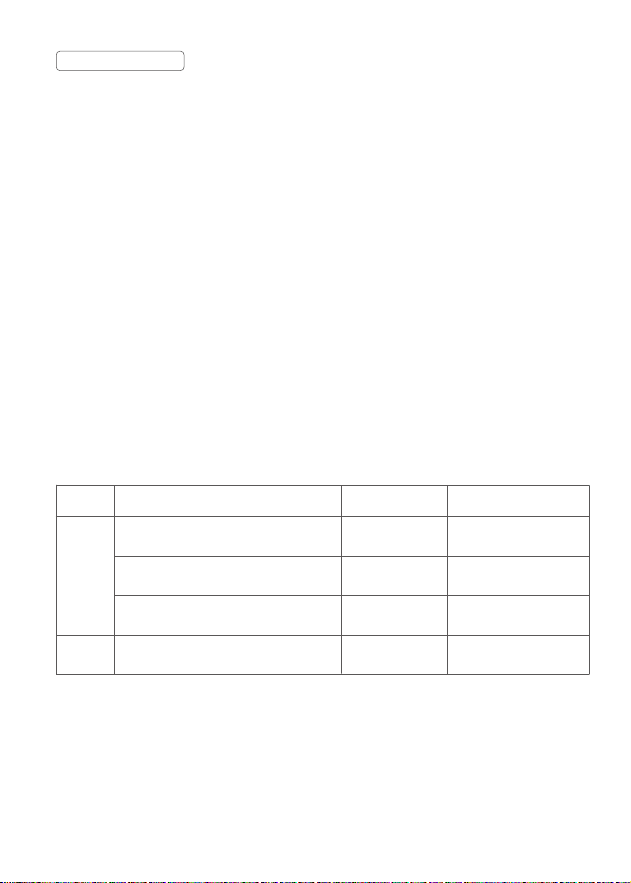
Note: This form shall be sealed by the seller.
If maintenance service is needed, you can directly contact the product distributor or authorized
service institutions. You can also contact the Godox after-sale service call and we will offer you
service. When applying for maintenance service, you should provide valid warranty card. If you
cannot provide valid warranty card, we may offer you maintenance service once confi rmed that the
product or accessory is involved in the maintenance scope, but that shall not be considered as our
obligation.
How to Get the Maintenance Service
Applicable ProductsThe document applies to the products listed on the Product Maintenance
lnformation (see below for further information). Other products or accessories (e.g. promotional
items,giveaways and additional accessories attached,etc.) are not included in this warranty scope.
Applicable Products
The warranty period of products and accessories isimplemented according to the relevant Product
Maintenance Information. The warranty period is calculated from the day(purchase date) when the
product is bought for the fi rst time,And the purchase date is considered as the date registered onthe
warranty card when buying the product.
Warranty Period
Product
Information
Customer
Information
Seller
Information
Note
Model
Name
Address
Name
Contact Number
Address
Date of Sale
Product Code Number
Contact Number
The guarantee and service offered by this document are not applicable in the following cases:
①
The product or accessory has expired its warranty period;
②
Breakage or damage caused by
inappropriate usage, maintenance or preservation, such as improper packing, improper usage,
improper plugging in/out external equipment, falling off or squeezing by external force, contacting
or exposing to the improper temperature, solvent, acid, base, flooding and damp environments, etc;
③
Breakage or damage caused by non-authorized institution or staff in the process of installation,
maintenance, alternation, addition and detachment;
④
The original identifying information of
product or accessory is modifi ed, alternated, or removed;
⑤
No valid warranty card;
⑥
Breakage
or damage caused by using illegally authorized, nonstandard or non-public released software;
⑦
Breakage or damage caused by force majeure or accident;
⑧
Breakage or damage that could not
be attributed to the product itself. Once met these situations above, you should seek solutions
from the related responsible parties and Godox assumes no responsibility. The damage caused
by parts, accessories and software that beyond the warranty period or scope is not included in our
maintenance scope. The normal discoloration, abrasion and consumption are not the breakage
within the maintenance scope.
Godox After-sale Service Call +86-755-29609320(8062)
Inapplicable Cases
Maintenance and Service Support Information
The warranty period and service types of products are implemented according to the following Product
Maintenance Information:
Product
Type
Parts
Other
Items
Lamp body, lamp cover, locking device,
package, etc.
Electrical parts e.g.battery charger, etc.
Battery
Circuit board
Name
Maintenance
Period(month)
3
12
3
No
Customer sends the
product to
designated site
Customer sends the
product to
designated site
Customer sends the
product to
designated site
Without warranty
Warranty
Service Type