
X
www.worall.com
UserManual

CHANGSHAWORALLTECHNOLOGYCO.,LTD.
Room 2306, Shimao Picuiwan Office Building, Yinpenling Sub
district, Yuelu District, Changsha, Hunan, China

1
TableofContents
TableofContents
Precautions-----------------------------------------------------------------------------2
Features--------------------------------------------------------------------------------- 4
PanelOverview- ------------------------------------------------------------------------5
---------------------------------------------------------------------5MainPanel
-----------------------------------------------------------------------8I/OPanel
Connections- --------------------------------------------------------------------------10
Functions&Modes-------------------------------------------------------------------12
------------------------------------------------------------12EffectsOverview
-------------------------------------------------------------------14PlayMode-
---------------------------------------------------------------------15EditMode
--------------------------------------------------------------------16SaveMode
--------------------------------------------------------------------------17Tuner
---------------------------------------------------------------18DrumMachine
--------------------------------------------------------------------19Bluetooth
-------------------------------------------------------------- 20OTGRecording
ToneGuide-----------------------------------------------------------------------------21
Specifications- ------------------------------------------------------------------------36
X

2
Precautions
Precautions
PowerSupply
●
Useapowersupplyapprovedbyrelevantauthoritiesandcompliantwithlocal
regulations(e.g.,UL,CSA,VDE,CCC).
●
Useapowersupplythatmeetsthemanufacturer'sspecifiedratings.
●
Unplugthepowersupplywhennotinuseorduringthunderstorms.
●
Donotexposebattery-containingproductstoexcessiveheat
(e.g.,avoiddirectsunlightandkeepawayfromfiresources).
●
Ifbatteryleakageoccurs,avoidcontactwithskinoreyes.Ifcontactoccurs,
consultaphysician.
●
Thebatteryincludedwiththisproductmaypresentafireorchemicalburnhazard
ifmishandled.
Placement
Topreventdeformation,discoloration,andotherseriousdamage,avoidthe
followingconditions:
● ●
Directsunlight
Nearheatsources
●
●
Dustyoruncleanareas Magneticfields
●
●
Hightemperatureandhumidity Excessivemoisture
●
Strongvibrationorshaking
X
*carefullyreviewall
instructionspriortofirstuse*

Cleaning
Whencleaningtheunit,useadry,soft,orslightlydampcloth.Donotuseabrasive
cleaningpowders,alcohol,paintthinner,wax,solvents,detergents,orchemical
reagents.
Operation
Donotuseexcessiveforceonswitchesandcontrols.
Donotallowpaperscraps,metalobjects,orotherforeignmattertofallintotheunit.
Donotdroptheunitorsubjectittoimpactorexcessivepressure.
Donotmodifythisproductwithoutauthorization.
Forallrepairs,contactafter-salesservice.
3
Precautions
X

4
Features
●
Detachable,portable,lightweightbody
●
Built-in8EffectBlockswith97outstandingEffectModels
●
Built-in40storablePresetslots
●
Supportsthird-partyIRfilesandAMPmodelsloadingwith20storageslots
●
Built-inTunerand40DrumMachinepatterns
●
Dual-modeBluetoothmodulewithaudioplaybacksupport
●
Headphoneoutput
●
Built-inlong-liferechargeablelithiumbattery
●
USBOTGrecordingsupport
●
USBconnectiontoPCfordedicatededitorsoftware
●
BluetoothconnectiontomobiledevicesfordedicatedAPP
Features
X
5
PanelOverview
PanelOverview
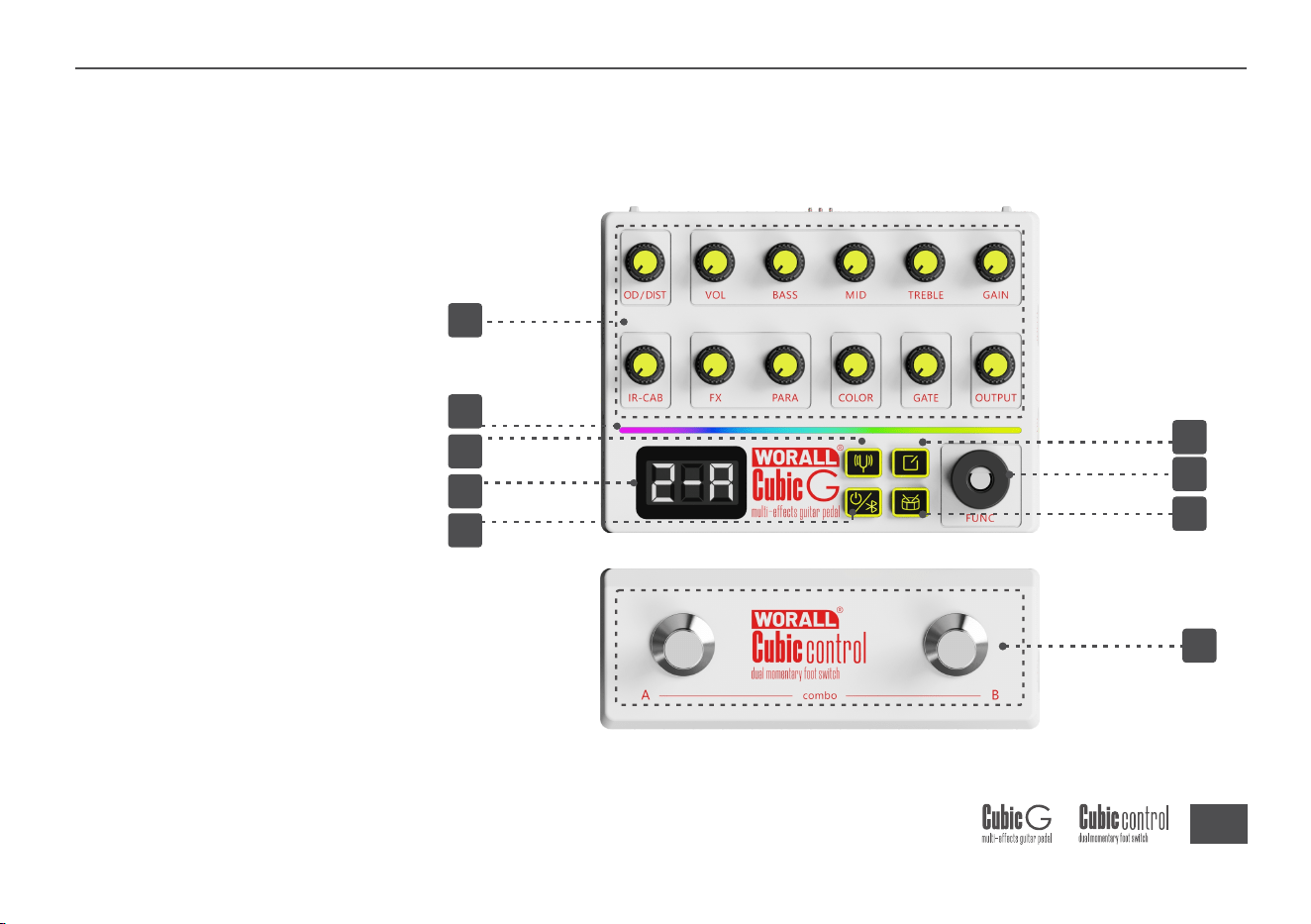
1
MainPanel
8
9
3
2
6
5
7
4
X
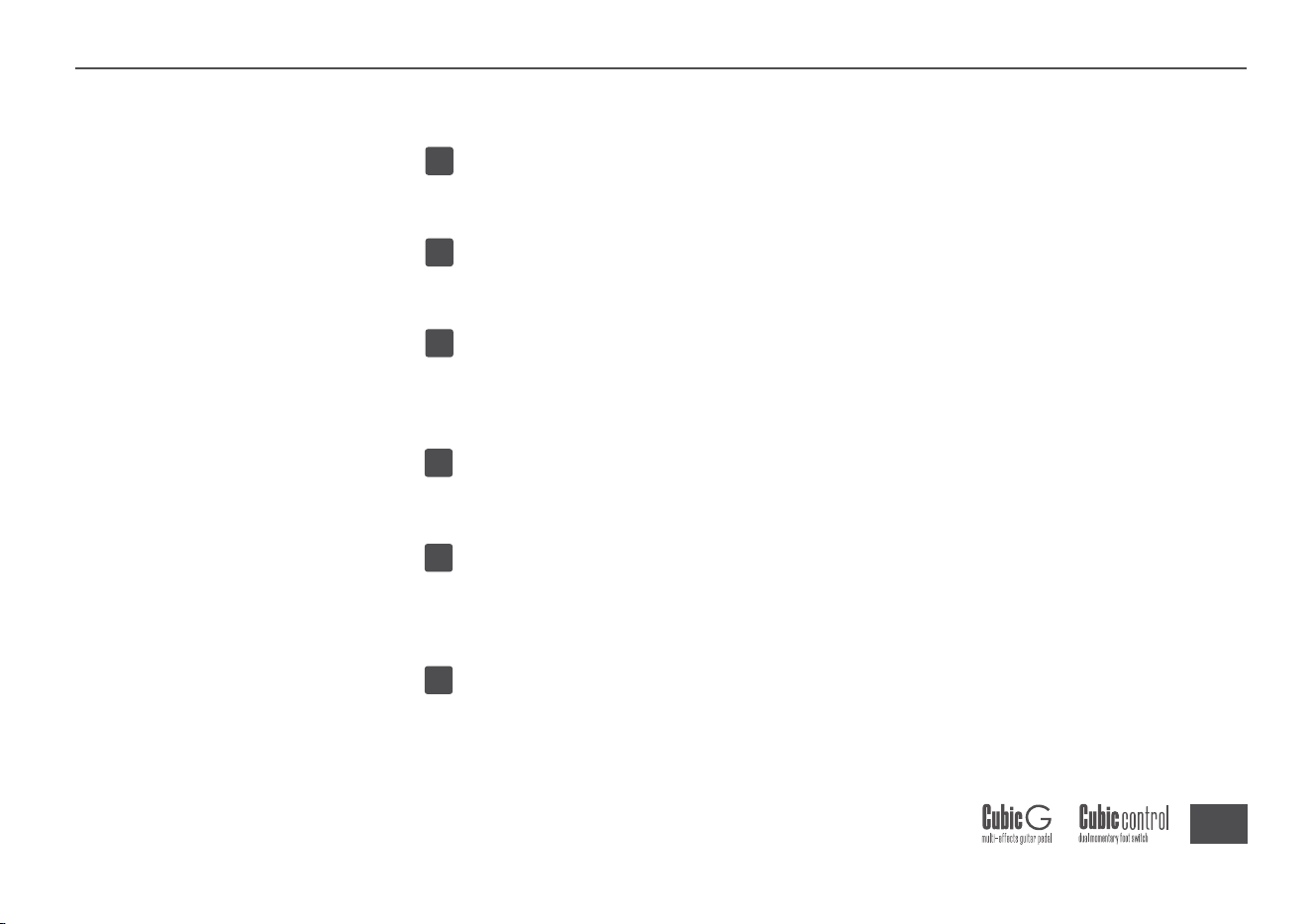
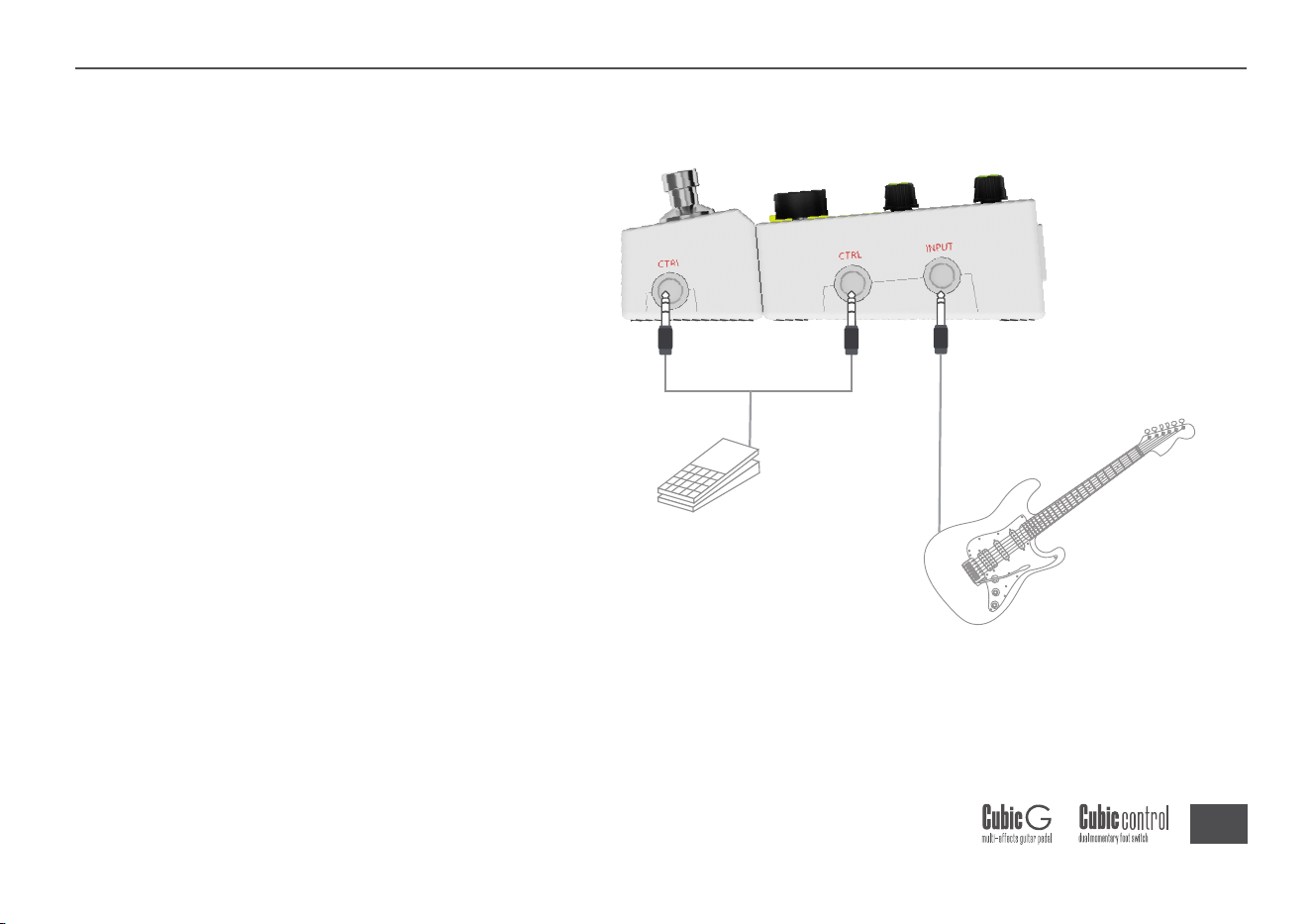
Host-Controller
Inadditiontobeingconnectedviathe
magneticattachment,thehostandcontrollercan
alsobeseparatedandconnectedusingaTRScable.
6
4
5
6
1
2
3
PARAMETERKnobs
AdjustparametersforeachEffectBlockinthesignalchain
LEDBar
Displaystuningstatus,inputlevel,andotherinformation
LEDDisplay
DisplaysPresetnumber,notename,parametervalues,Modelnumber,and
more
TUNERButton
ShortpresstoenterTuner
DRUMButton
ShortpresstoenterDrumMachinemode
Longpresstostart/stoptheDrumMachine
Bluetooth/POWERButton
ShortpresstotoggleBluetoothon/off
Longpresstopoweron/off
X
PanelOverview
7
8
9
X
EDITButton
ShortpresstoenterEditMode
LongpresstoenterSaveMode
FUNCKnob
InPlayMode,rotatetoselectaPreset;shortpresstoswitchFXblock
InEditMode,rotatetoselectaBlock;shortpresstoenterModelselection;
longpresstotoggletheBlockon/off
InSaveMode,rotatetoswitchsavelocation
Footswitches
InPlayMode,shortpressA/BtoswitchPresets;longpressA/BtoswitchBanks;
ShortpressA+BfootswitchestoenterTuner
LongpressA+BfootswitchestoenterDrumMachine
Thecontrollercanalsobeusedtocontrolotherdevicesviaa6.35mmTRS
cable.
7
PanelOverview
8
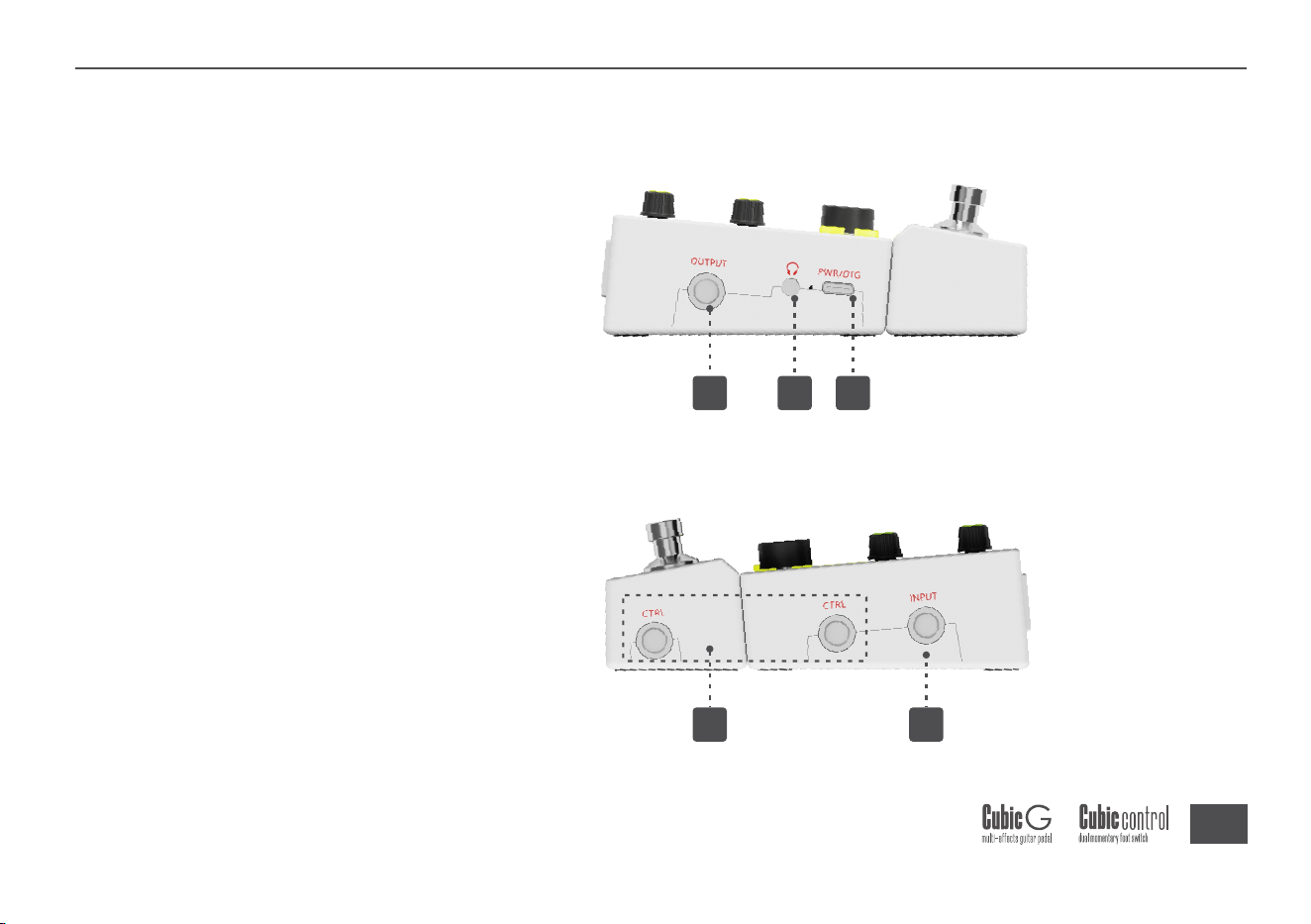
I/OPanel
I/OPanel
2 3 4
5 1
X
9
4
5
1
2
3
INPUTJack
1/4"instrumentinputjack.
OUTPUTJack
1/4"unbalancedoutputjack
HeadphoneJack:
1/8"stereoheadphoneoutputjack.
5V2AUSB-CPower/OTGRecordingPort
Useacompliantpoweradaptertosupplypower.AlsosupportsPCconnection
foreditorsoftwareandsmartdeviceconnectionforOTGdigitalrecording.
CTRLJack
Forconnectingadetachablefootswitchoranexternalexpressionpedal.
X
I/OPanel
10
Connections
Connections
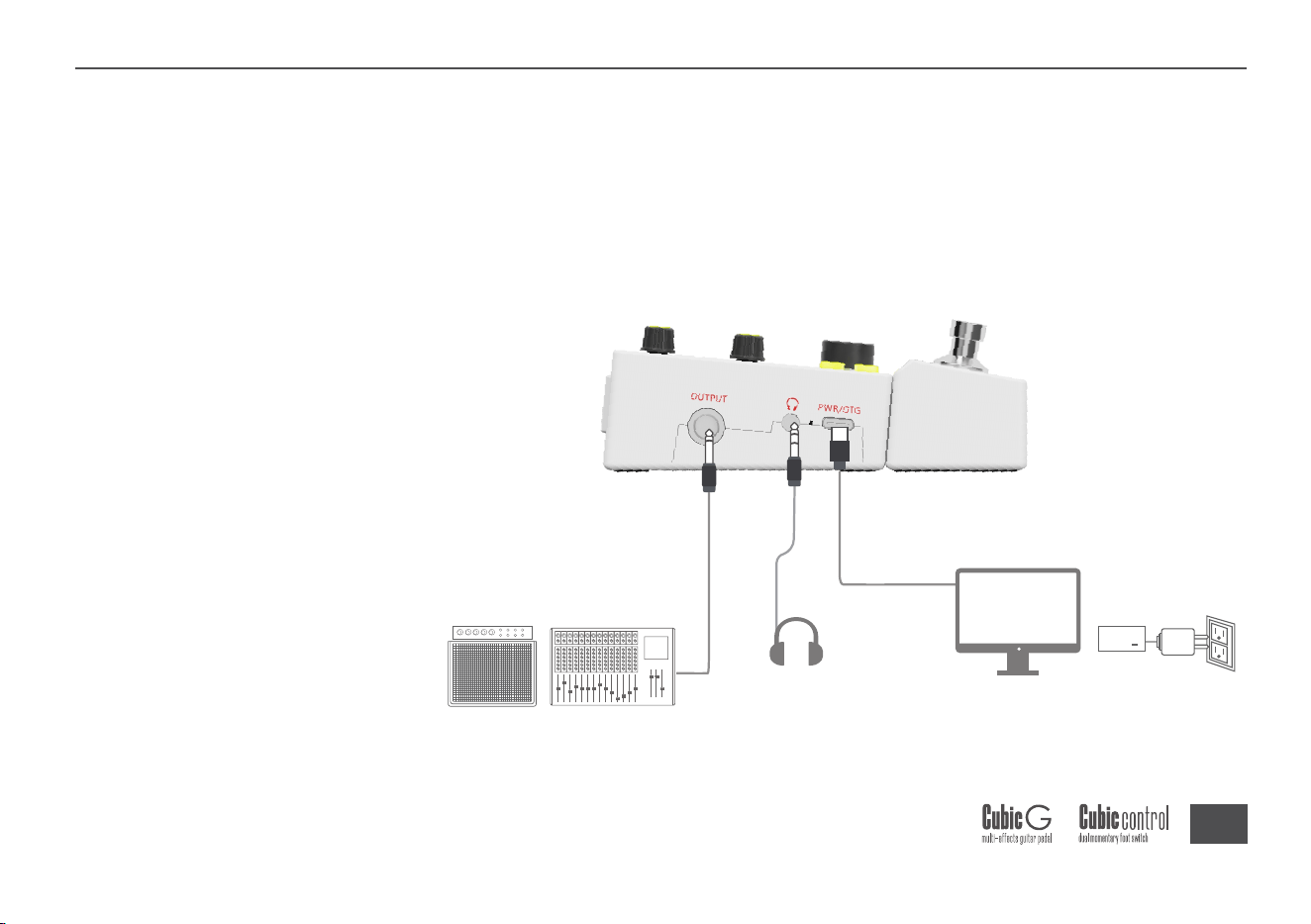
Topreventmalfunctionandequipmentdamage,turndownthevolumeandpower
offalldevicesbeforemakingconnections.Connectapoweradapterwiththecorrect
rating(5V2A)tothepowerport,yourinstrumenttotheINPUTjack,andOUTPUTto
anamp,audiointerface,mixer,orotherequipment.
Headphones
Speaker,mixer,poweramplifier,soundcard
Powersupply,computer,smartdevices
X
11
Note:WhenOUTPUTisconnectedtoaguitaramp'sINPUT,itisrecommendedto
turnofftheAMPandCABblocks.
Whenconnectedtoaguitaramp'sRETURNorapoweramp,turnonAMPand
turnoffCAB.
WhenconnectedtoFRFRspeakers,turnonbothAMPandCABblocks.
Musicalinstruments
Connecttoeachotherortoanexternalpedal
X
Connections

12
1.OD/DISTKnob
AdjuststheLevelparameteroftheOD/DISTblock
2.AMPKnob
AdjustsparametersfortheAmpblock
VOL:Adjustsvolume
BASS:Adjustslowfrequencies
MID:Adjustsmidfrequencies
TREBLE:Adjustshighfrequencies
GAIN:Adjustsgain
3.CABKnob
AdjuststheVolumeparameteroftheCabblock
4.FXKnob
AdjustsMixandRate/Time/DecayparametersfortheMod/Dly/Revblocks
5.COLORKnob
AdjustsColorblockparameters—asingle-knobmulti-parameterEQ
Functions&Modes
Functions
&Modes
EffectsOverview
X

13
6.GATEKnob
AdjuststheThresholdparameteroftheGateblock
7.OUTPUTKnob
Adjuststheoveralloutputvolume
X
Functions&Modes

14
CubicGdefaultstoPlayModeuponstartup.Inthismode
SwitchPresets
RotatetheFUNCknob(clockwisetoincreasePresetnumber,counter-clockwiseto
decrease);shortpressfootswitchAtogotoalower-numberedPreset,shortpress
footswitchBtogotoahigher-numberedPreset;longpressfootswitchAtoswitchto
alower-numberedBank,longpressfootswitchBtoswitchtoahigher-numbered
Bank.
SelectFXBlock
PressFUNCtocyclethroughFXblocksinorder:Mod—Dly—Rev.
AdjustParameters
Rotatethetoprowknobstoadjustparameters;thedisplayfollowsinrealtime.The
specificFXblockisindicatedbyknobLEDcolor:Dly=white,Rev=blue,Mod=purple.
PlayMode
X
Functions&Modes

15
InPlayMode,shortpresstheEDITbuttontoenterEditMode.Inthismode
EditaBlock
RotatetheFUNCknobtocyclethroughblocksinorder:
OD/Dist—Amp—Cab—Mod—Dly—Rev—Color—Gate.ShortpressFUNCtoselect
ablock,thenrotatetochooseaModel(thedisplayflashestheModelnumber).Press
againtoconfirm.LongpressFUNCtotoggletheblockon/off.
AdjustParameters
Rotatethetoprowknobstoadjustparameters;thedisplayshowsthecurrent
parametervalue.
Exit
ShortpresstheEDITbuttonoroperateafootswitch.
EditMode
X
Functions&Modes

16
InPlayModeorEditMode,longpresstheEDITbuttontoenterSaveMode.Inthis
mode
SelectSaveLocation
RotatetheFUNCknoboroperatethefootswitches.
ExecuteSave
LongpresstheEDITbutton.ThebuttonLED,allknobLEDs,LEDbar,anddisplaywill
flashrapidlytoindicateasuccessfulsave,thenreturntoPlayMode.
Exit
ShortpresstheEDITbutton.
SaveMode
X
Functions&Modes

17
InPlayMode,shortpresstheTUNERbuttonorA+BfootswitchestoenterTuner.
Inthismode
LongpresstheTUNERbuttonorA+BfootswitchestoswitchbetweenMute/Bypass
mode.RotatetheFUNCknobtoadjustreferencepitch,range:435‒445Hz.
Thedisplayshowsthenotename;sharpisindicatedbyadot(e.g.,A·).TheLEDbar
indicatestuningaccuracy.
Exit
ShortpresstheTUNERbuttonoranyfootswitch.
Tuner
X
Functions&Modes

18
InPlayMode,shortpresstheDRUMbuttonorlongpressA+Bfootswitchesto
enterDrumMachine.LongpresstheDRUMbuttontoplay/stop.Inthismode
FootswitchFunctions
ShortpressfootswitchAtoplay/stop.PressfootswitchBrepeatedlytotaptempo.
ParameterAdjustment
ShortpresstheFUNCknobtocyclethroughType/BPM/Volume.RotateFUNCto
adjusttheselectedparameter.Displayranges:Type=T01‒T40,BPM=040‒260,
Volume=000‒020.
Exit
ShortpresstheDRUMbuttonorlongpressA+B.
DrumMachine
X
Functions&Modes

19
ShortpresstheBluetoothbuttontoenableBluetoothforAPPconnection.When
connected,thebuttonLEDstayslit;whennotconnected,theLEDflashes.Short
pressagaintoturnoffBluetooth;theLEDturnsoff.
BluetoothAudioPlayback
AfterenablingBluetooth,find“ CubicGAudio”intheBluetoothdevicelistonyour
smartphone,tablet,orothersmartdevice.Taptoconnectandstreamaudiovia
CubicG’sBluetoothinput.
Bluetooth
X
Functions&Modes

20
TheUSBportonCubicGsupportsOTGrecordingandplaybackwithsmartdevices.
HowtoUse
ConnecttoyoursmartdeviceviaaUSBcable(anOTGadaptermayberequired,sold
separately).Openarecordingorvideoapponyoursmartdeviceandstartrecording
tobeginOTGrecording.TheoutputsignalgainforOTGcanbeadjustedintheAPP’s
globalsettings.
Note:PleaseensureyoursmartdevicesupportsOTGrecording.
OTGRecording
X
Functions&Modes
21
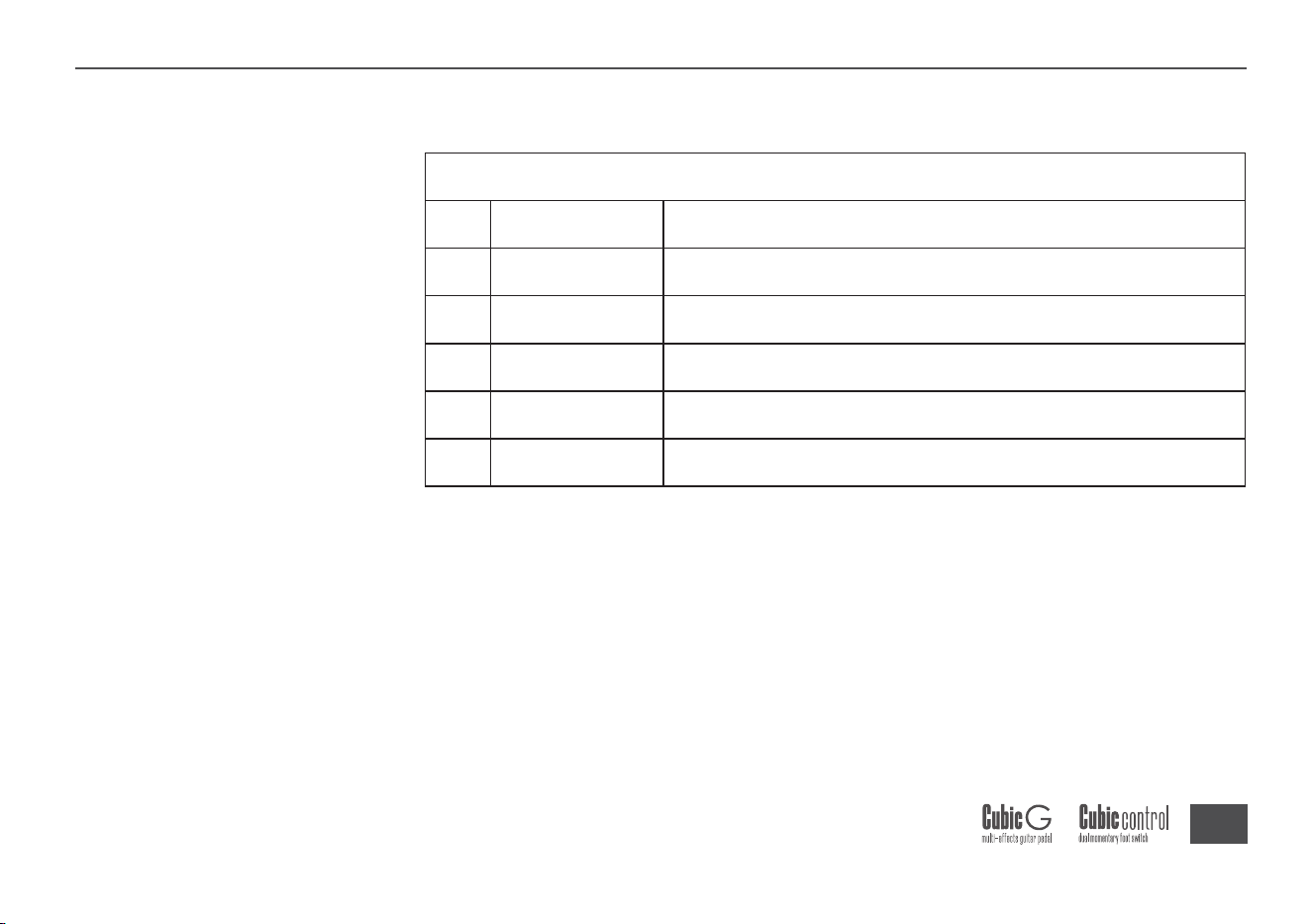
ToneGuide
ToneGuide
No. Name ToneGuide
1
2
3
4
5
TubeDR
808
MTLZone
MTLMaster
GoldClon
TubeoverdrivetonebasedontheB.K.Butler®TubeDriver
OverdrivebasedontheIBANEZ®TS808
DistortionbasedontheBOSS®MetalZone
DistortionbasedontheDigitech®MetalMaster
OverdrivebasedontheKlon®CentaurGold
Overdrive
X
22
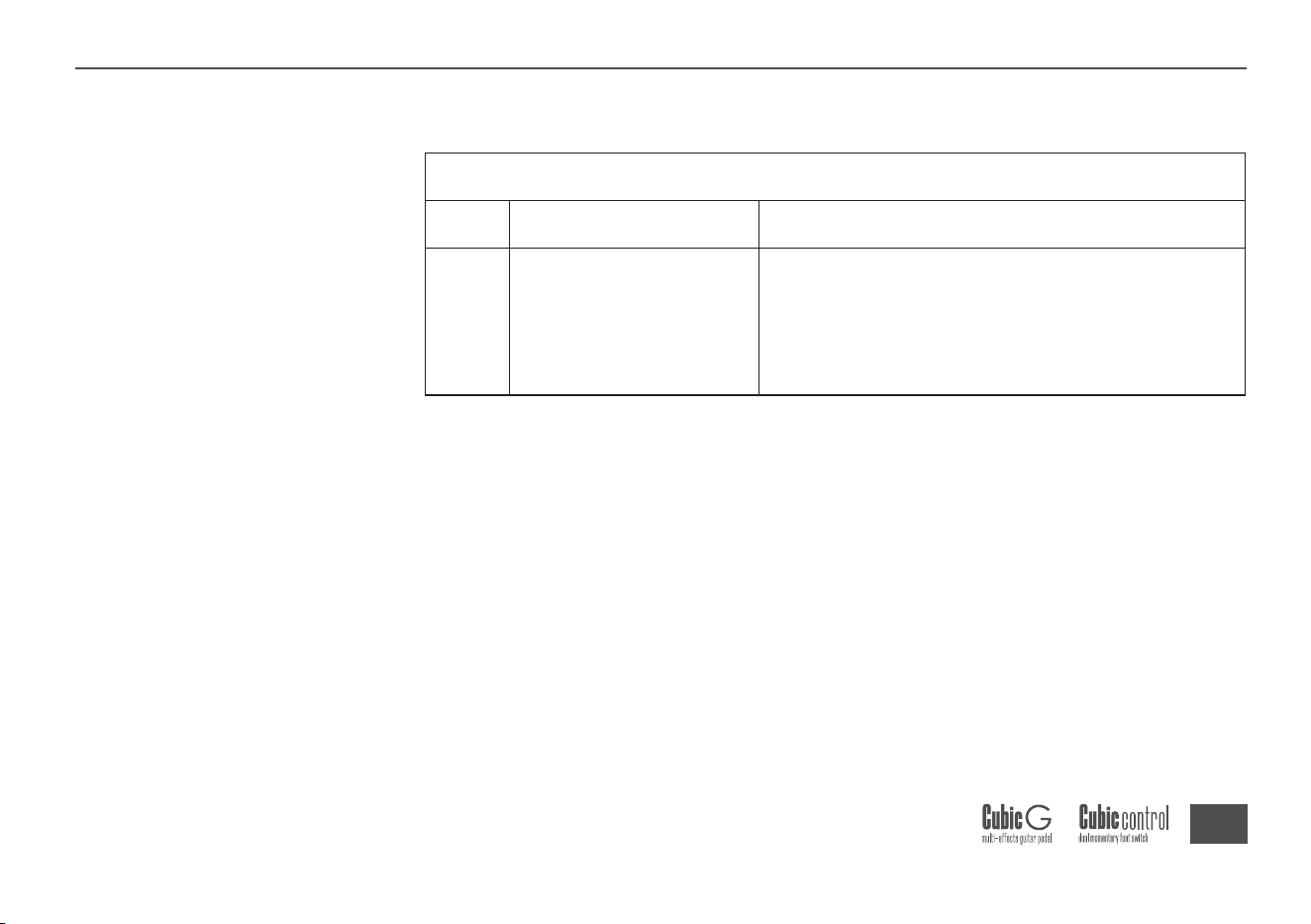
1 NoiseGate
ThreecommonlyusedNoiseGateparameters.
AdjusttheeffectiveThresholdfirstbasedon
yourcurrentnoiselevel,thenfine-tuneAttack
andReleasetosuityourneeds.
NoiseGate
X
ToneGuide
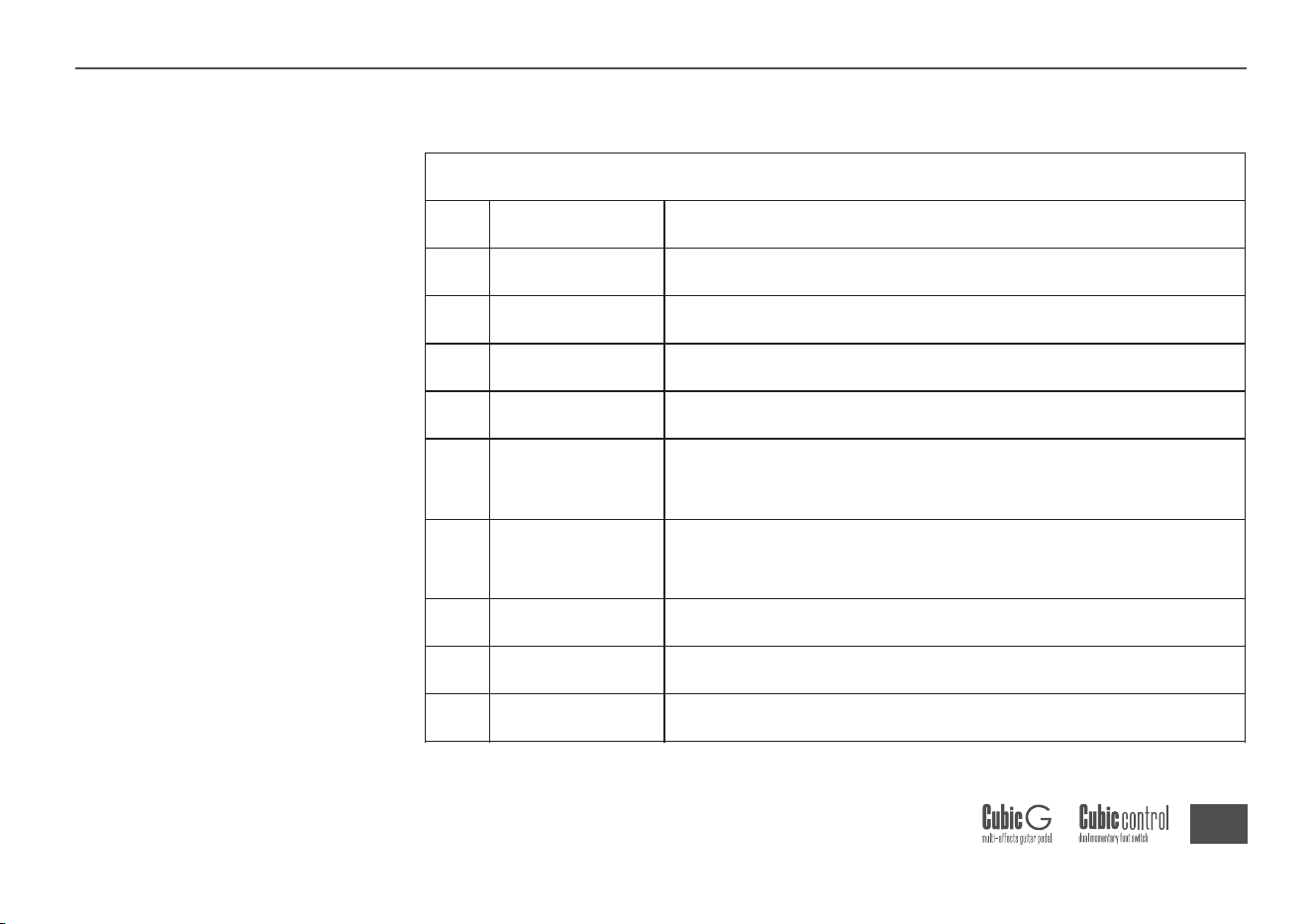
No. Name ToneGuide
23
1
2
3
4
7
8
9
65USDX
65USTW
59USBASS
USSONIC
J800
J900
PLX100
BasedonthepreampoftheFender®’65DeluxeReverb
BasedonthepreampoftheFender®’65TwinReverb
BasedonthepreampoftheFender®’59Bassman
BasedonthepreampoftheFender®Super-Sonic
BasedonthepreampoftheMarshall®JCM800
BasedonthepreampoftheMarshall®JCM900
BasedonthepreampoftheMarshall®Plexi100
AmpModels
X
ToneGuide
No. Name ToneGuide
CleansettingbasedonthepreampoftheFender®
BluesDeluxe
OverdrivesettingbasedonthepreampoftheFender®
BluesDeluxe
USBLUESCL
USBLUESOD
5
6
24
10
11
E560CL
E560DS
X
ToneGuide
No. Name ToneGuide
CleansettingbasedonthepreampoftheEngl®E650
DistortionsettingbasedonthepreampoftheEngl®E650
CleansettingbasedonthepreampoftheEngl®
PowerballE645
CleansettingbasedonthepreampoftheMESA/Boogie®
MarkIII
POWERBELLCL
POWERBELLDS
BLACKNIGHTCL
BLACKNIGHTDS
MARKIIICL
MARKIIIDS
MARKVCL
12
13
14
15
16
17
18
DistortionsettingbasedonthepreampoftheEngl®
PowerballE645
DistortionsettingbasedonthepreampoftheMESA
/Boogie®MarkIII
CleansettingbasedonthepreampoftheEngl®
BlackmoreSignature
DistortionsettingbasedonthepreampoftheEngl®
BlackmoreSignature
CleansettingbasedonthepreampoftheMESA/Boogie®
MarkV
25
X
ToneGuide
No. Name ToneGuide
19
20
21
22
23
24
25
26
MARKVDS
TRIRECCL
TRIRECDS
ROCKVRBCL
ROCKVRBDS
CITRUS30
CITRUS50
SLOW100CR
DistortionsettingbasedonthepreampoftheMESA
/Boogie®MarkV
CleansettingbasedonthepreampoftheMESA/Boogie®
TripleRectifier
CleansettingbasedonthepreampoftheMESA/Boogie®
TripleRectifier
CleansettingbasedonthepreampoftheOrange®
Rockerverb
DistortionsettingbasedonthepreampoftheOrange®
Rockerverb
BasedonthepreampoftheOrange®Ad30
BasedonthepreampoftheOrange®Or50
CrunchsettingbasedonthepreampoftheSoldano®
SLO-100
26
X
ToneGuide
No. Name ToneGuide
27 SLOW100DS
DistortionsettingbasedonthepreampoftheSoldano®
SLO-100
BasedonthepreampoftheDR.Z®Maz18Jr
BasedonthepreampoftheDR.Z®Z-Wreck
CleansettingbasedonthepreampoftheJetCity®
JCA100H
DR.ZEE18JR
DR.ZEERECK
28
29
OverdrivesettingbasedonthepreampoftheJetCity®
JCA100H
BasedonthepreampoftheRoland®JC-120
CleansettingbasedonthepreampoftheVOX®AC 30
OverdrivesettingbasedonthepreampoftheVOX®AC 30
BasedonthepreampoftheHiwatt®DR-103
CleansettingbasedonthepreampofthePeavey®5150
JET100HCL
JET100HOD
JAZZ120
UK30CL
UK30OD
HWT103
PV5050CL
30
31
32
33
34
35
36
27
X
ToneGuide
No. Name ToneGuide
PV5050DS
REGALTONECL
REGALTONEOD1
REGALTONEOD2
CAROLCL
CAROLOD
CARDEFF
EV5050CL
EV5050DS
BasedonthepreampoftheTwo-Rock®Cardiff
CleansettingbasedonthepreampoftheEVH®5150
DistortionsettingbasedonthepreampoftheEVH®5150
37
38
39
40
41
42
43
44
45
DistortionsettingbasedonthepreampofthePeavey®
5150
RhythmsettingbasedonthepreampoftheToneKing®
Falcon
TweedsettingbasedonthepreampoftheToneKing®
Falcon
LeadsettingbasedonthepreampoftheToneKing®
Falcon
CleansettingbasedonthepreampoftheTwo-Rock®
Coral
OverdrivesettingbasedonthepreampoftheTwo-Rock®
Coral
28
X
ToneGuide
No. Name ToneGuide
HTCLUBCL
HTCLUBDS
HUGENCL
HUGENOD
HUGENDS
KOCHEOD
KOCHEDS
46
47
48
49
50
51
52
CleansettingbasedonthepreampoftheBlackstar®HT
Stage100
DistortionsettingbasedonthepreampoftheBlackstar®
HTStage100
CleansettingbasedonthepreampoftheDiezel®Hagen
OverdrivesettingbasedonthepreampoftheDiezel®
Hagen
DistortionsettingbasedonthepreampoftheDiezel®
Hagen
OverdrivesettingbasedonthepreampoftheKoch®
Powertone
DistortionsettingbasedonthepreampoftheKoch®
Powertone
29
X
ToneGuide
1
2
3
4
5
6
7
8
9
10
11
USTWIN212
USBASS410
BLUES112
1960412
EAGLEP412
REC412
CITRUS412
SLOW412
DR.ZEE212
JAZZ212
UK212
BasedontheFender ®’65TwinReverb2x12cab
BasedontheFender ®’59Bassman4x10cab
BasedontheFender ®BluesDeluxe1x12cab
BasedontheMarshall®1960A4x12cab
BasedontheENGL®ProXXL4x12cab
BasedontheMesa/Boogie®RectifierStandard4x12cab
BasedontheOrange®PPC412cab
BasedontheSoldano®SLO4x12cab
BasedontheDR.Z®Z-Wreck2x12cab
BasedontheRoland®JC-1202x12cab
BasedontheVOX®AC302x12cab
CabModels
No. Name ToneGuide
30
X
ToneGuide
12
13
14
15
16
HWT412
TWOSTONES212
EV5050412
HT412
GASSTATION412
BasedontheHiwatt®AP4x12cab
BasedontheTwo-Rock®2x12cab
BasedontheEVH®51504x12cab
BasedontheBlackstar®HTV4x12cab
BasedontheDiezel®Hagen4x12cab
No. Name ToneGuide
31
X
ToneGuide
1 CustomEQ 3-bandEQwithcustomizablefrequencypoints
EQ
No. Name ToneGuide
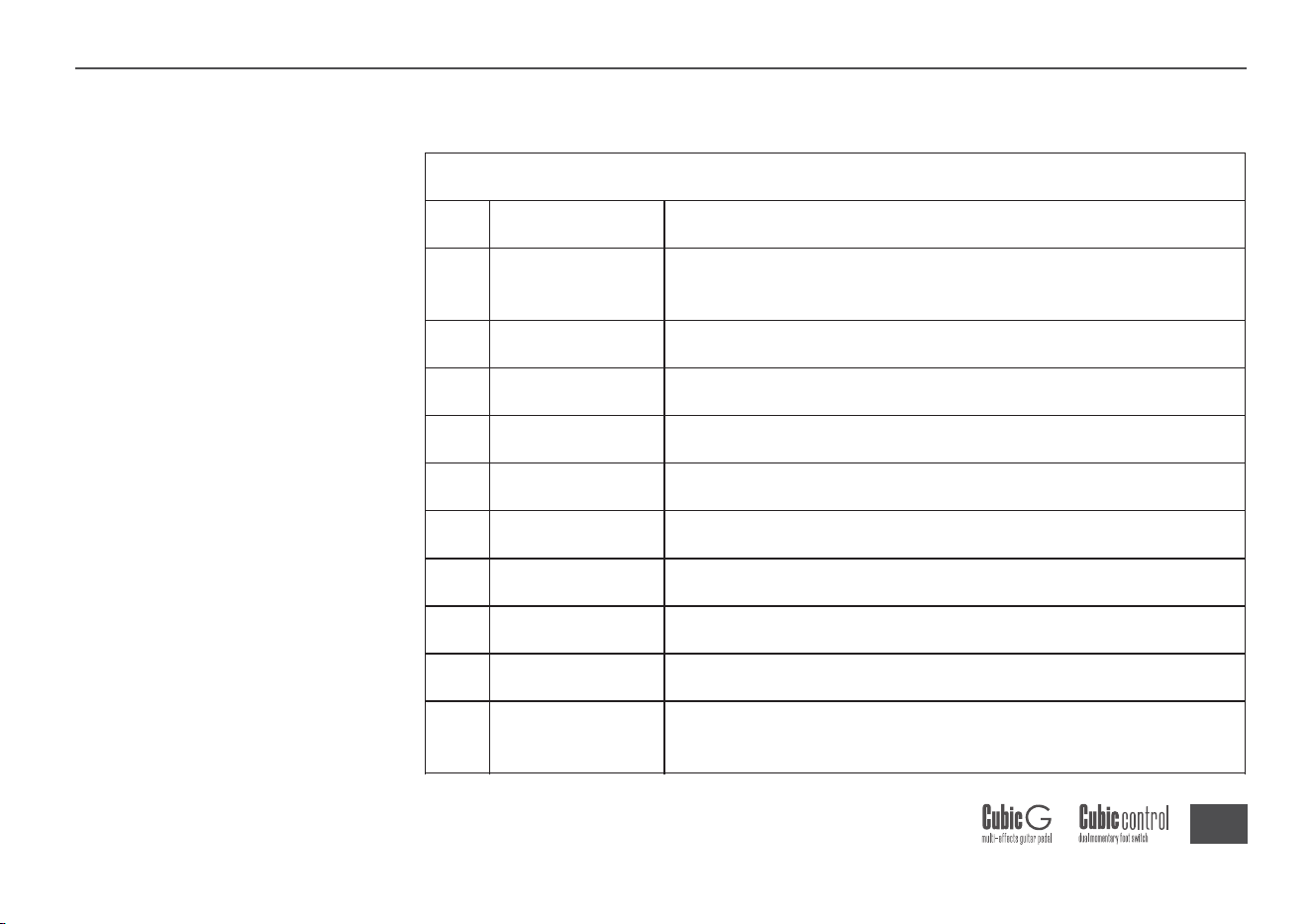
32
X
ToneGuide
1
2
3
4
5
6
7
8
9
10
PHASER
STEPPHASER
FATPHASER
FLANGER
JET-FLANGER
TREMOLO
STUTTER
VIBRATO
PITCHSHIFT
DETUNE
Standardsine-wavephaserbasedontheMOOER®Ninety
Orange
Square-wavestepphaser
Phaserwithenhancedlow-endresponse
FlangerbasedontheMOOER®E-Lady
FlangerbasedontheMOOER®JetFlanger
VolumetremolobasedontheMOOER®Trelicopter
Square-wavevolumetremolo
Standardpitchvibrato
Pitchshifterbasedonthedrysignal
Charactereffectlayeringaslightlydetunedsignalontop
ofthedrypitch
Modulation
No. Name ToneGuide
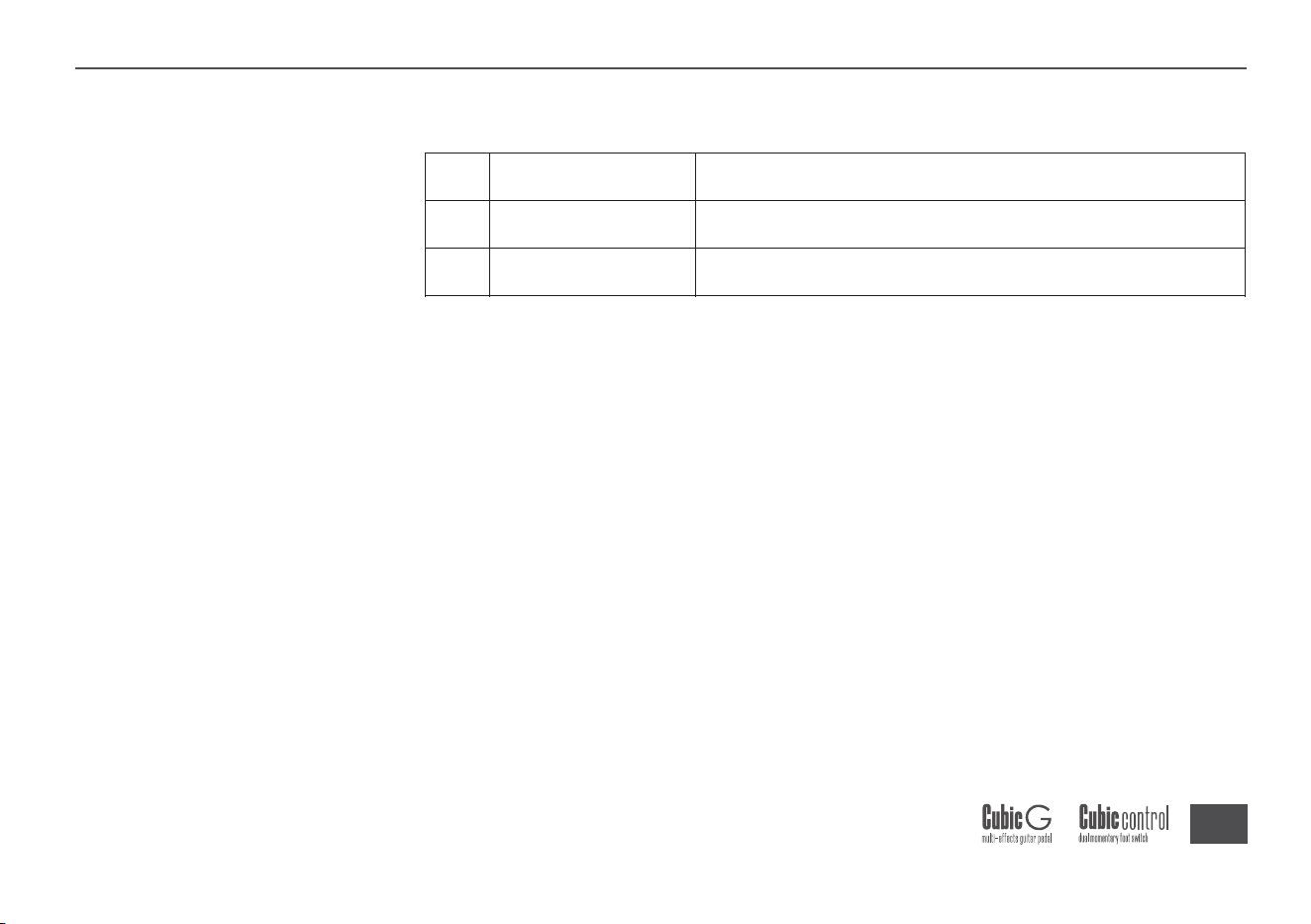
33
X
ToneGuide
11
12
ROTARY
ANA-CHORUS
Classicrotaryspeakeremulation
Classicanalogchorus
No. Name ToneGuide
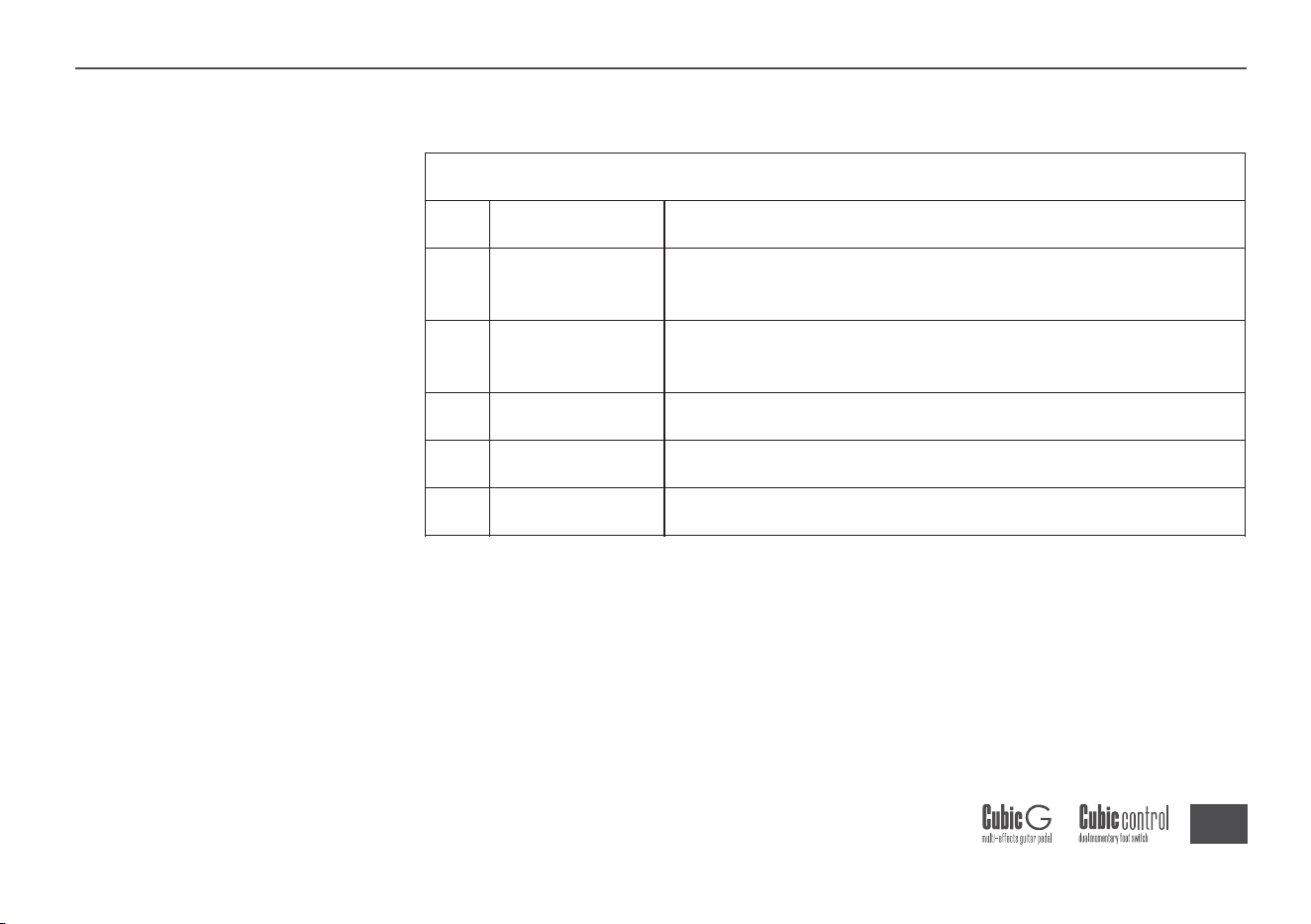
34
X
ToneGuide
1
2
3
4
5
DIGITAL
ANALOG
REAL
TAPE
MOD
Pristinedigitaldelay—everyrepeatisaclean
reproductionoftheplayedsignal
Delay
No. Name ToneGuide
Digitallyrecreatesthewarm,smoothcharacterof
analogcircuitdelay
Recreatestheechoofarealphysicalspace
Emulatestheclassictapeechotone
Delaywithaddedmodulationontherepeats
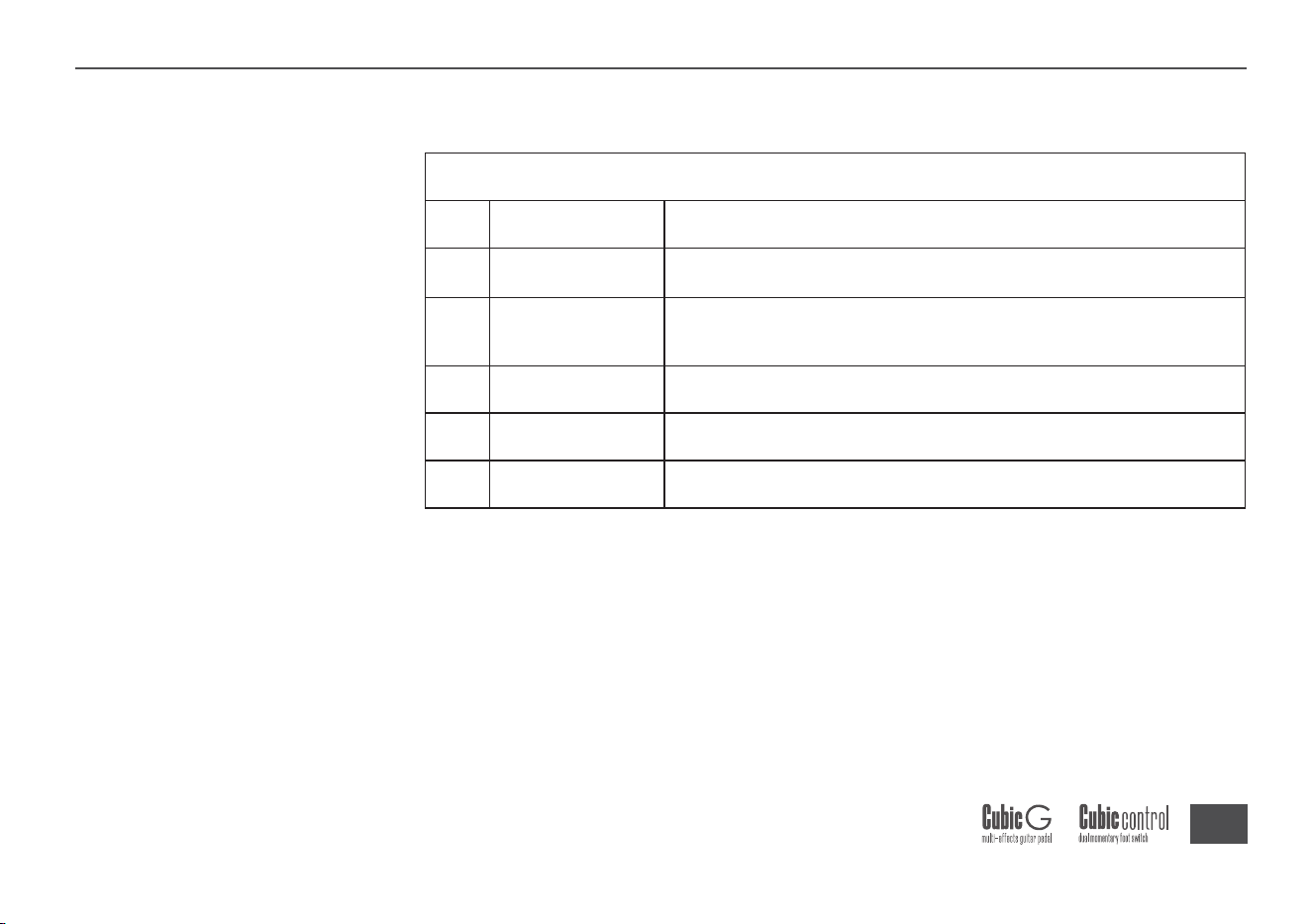
35
X
ToneGuide
1
2
3
4
5
ROOM
HALL
CHURCH
PLATE
SPRING
Reverb
No. Name ToneGuide
Recreatestheambienceofasmallroom
Recreatesthesoundofalargehallwithrichdiffusion
andlongerdecaytime
Evenlargerchurchreverbwithextendeddecaytime
Brightplatereverb
Vintagespringreverb
*Note:Allmanufacturerandproductnamesmentionedinthislistarethe
propertyoftheirrespectiveownersandareusedheresolelytodescribethe
typesofeffectsandtonesmodeledbythisproduct.

36
Specifications
Specifications
Input:6.35mm(1/4”),2MΩ
Output:6.35mm(1/4”),100Ω
USB:USB-C,forPCeditorsoftwareorOTGrecording
PowerInput:DC5V/2A.ChargingsupportsUSB-CtoUSB-Acableonly.
Bluetooth:5.0
ImpulseResponse(IR)
Format:WAV
SampleRate:44.1kHz(supportsimportingIRfilesatanysamplerate)
BitDepth:24-bit
SamplePoints:512pts
OperatingTemperature:0°C~60°C
Weight:276g
Dimensions:L110mm×W123mm×H40mm
X

This equipment has been tested and found to comply with the limits for a Class
B digital device, pursuant to part 15 of the FCC Rules. These limits are
designed to provide reasonable protection against harmful interference in a
residential installation. This equipment generates, uses and can radiate radio
frequency energy and, if not installed and used in accordance with the
instructions, may cause harmful interference to radio communications.
However, there is no guarantee that interference will not occur in a particular
installation. If this equipment does cause harmful interference to radio or
television reception, which can be determined by turning the equipment off and
on, the user is encouraged to try to correct the interference by one or more of
the following measures:
• Reorient or relocate the receiving antenna.
• Increase the separation between the equipment and receiver.
• Connect the equipment into an outlet on a circuit different from that to which
the receiver is connected.
• Consult the dealer or an experienced radio/TV technician for help.
Caution: Any changes or modifications to this device not explicitly approved
by manufacturer could void your authority to operate this equipment.
This device complies with part 15 of the FCC Rules. Operation is subject to the
following two conditions: (1) This device may not cause harmful interference,
and (2) this device must accept any interference received, including
interference that may cause undesired operation.
The device has been evaluated to meet general RF exposure requirement.
FCC Warning Statement:

www.worall.com
X