※ In the interest of product improvement, the specications and/or the content of products (including but not limited to appearances, packaging design, manual
content, accessories, size, parameters and display screen), are subject to change without prior notice. Please check with local supplier for exact oers. Specications
and features (including but not limited to appearances, colors and size) may vary by model owing to environmental factors, and all images are illustrative.
User Manual
For Firmware V1.6.0

Welcome ········································· 1
Attention ········································· 1
Overview ········································ 2
Panel Introduction ·························· 3
Getting Started ······························ 4
Screen Introduction ························ 5
Main Display Screen ········································5
TUNER ······································································5
LOOPER ···································································6
DRUM ········································································ 6
MIDI Device Control Functions (MIDI) ···· 7
EXP Pedal ·······························································8
Patch Setting ································· 8
Edit Menu ·······························································8
Editing a Module ················································9
Managing the Signal Chain ··························9
Patch Settings ·····················································9
Save Menu ···························································· 11
Global Settings ·······························11
Input/Output ······················································· 12
USB Audio ···························································· 12
Footswitch ··························································· 13
EXP Calibrate ·····················································14
EXP 2 / Footswitch ········································· 15
MIDI ·········································································· 15
Display ····································································16
Auto CAB Match ·············································· 17
Global EQ ······························································ 17
About ······································································18
Compatible software ···················· 20
Application Scenarios ···················· 21
With full-range speaker devices ············· 21
With guitar amps (INPUT jack) ·················21
With guitar amps (using FX Loop to pre-
position the GP-200) ····································22
With guitar amps (using FX Loop to
post-position the GP-200) ························22
With guitar amps (using FX Loop to run
the 4 cable method) ······································23
Audio Studio (for livestreaming) ············ 23
Effect List ···································· 24
PRE ·········································································· 24
WAH ········································································29
DST ··········································································30
AMP ········································································ 37
NR ·············································································51
CAB ··········································································52
EQ ·············································································54
MOD ········································································55
DLY ·········································································· 60
RVB ·········································································65
VOL ·········································································· 67
Drum Rhythm List ························68
MIDI Control Information List ·· 71
Troubleshooting ··························· 73
Technical Specifications ················ 74
Contents

1
Welcome
Welcome
Thank you for purchasing a VALETON product.
We know it might be tedious but please read this manual carefully to get the most out of your GP-
200.
Please keep this manual for future reference.
Attention
Handling
• Do not get the unit wet. If liquid is spilled on the unit, shut it o immediately.
• Do not block any jack of the unit.
• Keep away from heat sources.
• Disconnect the unit during storms to prevent damage.
• Operation of this unit within signicant electromagnetic elds should be avoided.
Connecting the power and input/output jacks
• Always turn OFF the power to the unit and all other equipment before connecting or
disconnecting any cables. Also make sure to disconnect all connection cables and the AC adapter
before moving the unit.
Cleaning
• Clean only with a dry cloth.
Alterations
• Do not open the unit.
• Do not attempt to service the unit yourself.
• Operation of this unit within signicant electromagnetic elds should be avoided.
AC Adapter Operation
• Always use a DC9V center negative 1000mA AC adapter. Use of an adapter other than that
specied could damage the unit or cause malfunction and pose a safety hazard. Always connect
the AC adapter to an AC outlet that supplies the rated voltage required by the adapter.
• Unplug the unit during lightning storms or when unused for long periods of time.
Malfunction
• If the unit malfunctioned, disconnect the AC adapter and turn the power OFF immediately. Then,
disconnect all other connected cables.
• Prepare information including the model name, serial number, specic symptoms related to the
malfunction, your name, address and telephone number and contact the store where you bought
the unit, or contact VALETON support(service@valeton.net)
Thank you for choosing a VALETON product!
2
Overview
Overview
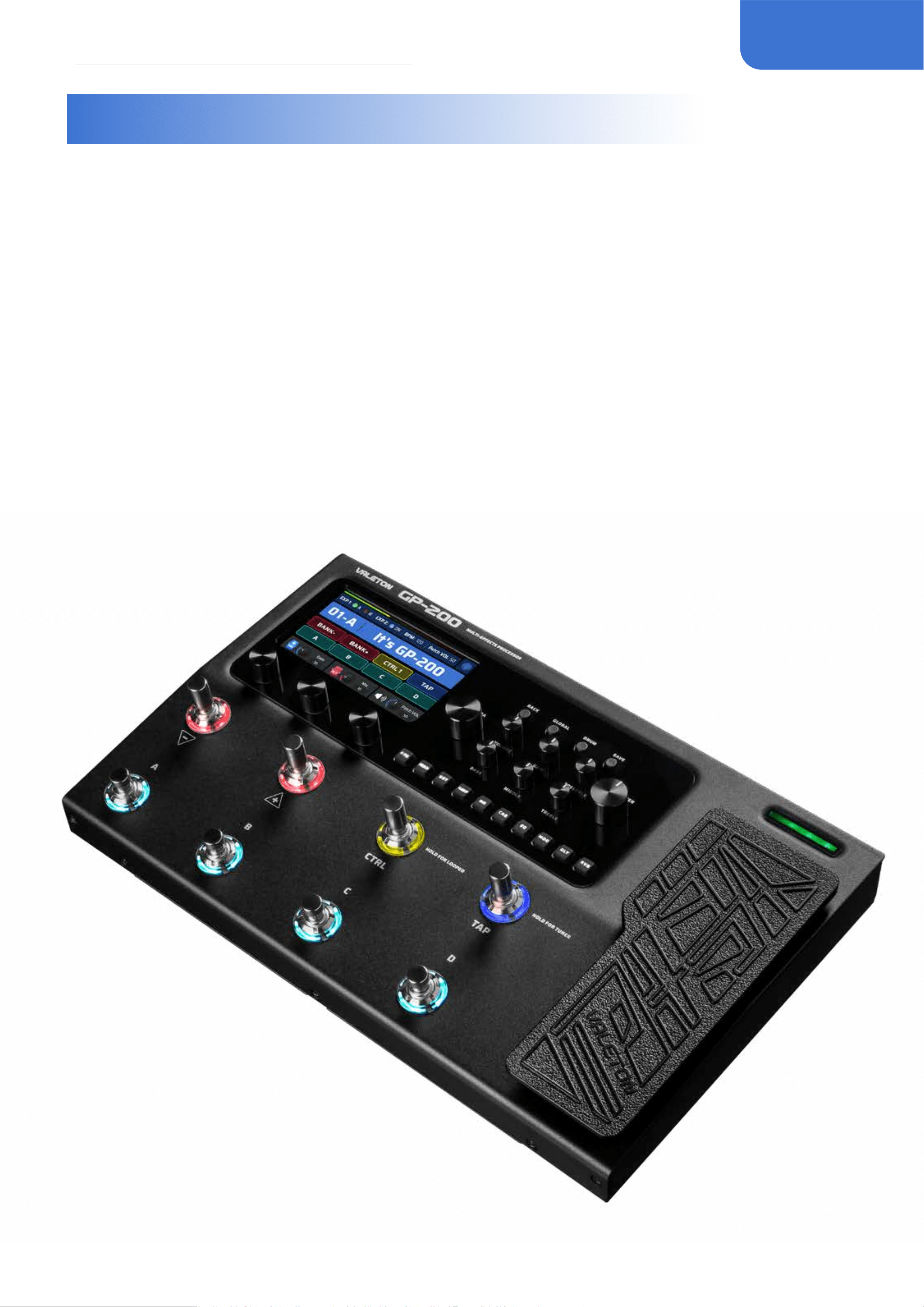
Inspired by the craftsmanship in making GP-100, Valeton strives for a higher goal and presents
GP-200, the new-gen HD modeling multi-eects processor, declaring an unprecedented
upgrade in order to bring you a better sonic experience. With the aim of creating the ultimately
heartfelt partner on stage, GP-200 comprehensively enhances features that matter, including
more footswitches and I/Os, larger display screen and more user-friendly buttons and knobs,
freelyadjustableFXloop, as well as 11 freely movable eect modules and more than 240 patches
from world-renowned classic ampliers, cabinets and stompboxes.
Apart from that, GP-200 oers 180-second looper and 100 high quality drum machines,
externalMIDIdevicecontrolinterface, with the additional function as an audio interface compatible
with multiple platforms (Windows/Mac/iOS/Android) to accompany the editor software of
Windows/Mac and ASIO, escorting immeasurable convenience to your songwriting, practice and
recording.
3
Panel Introduction
Panel Introduction
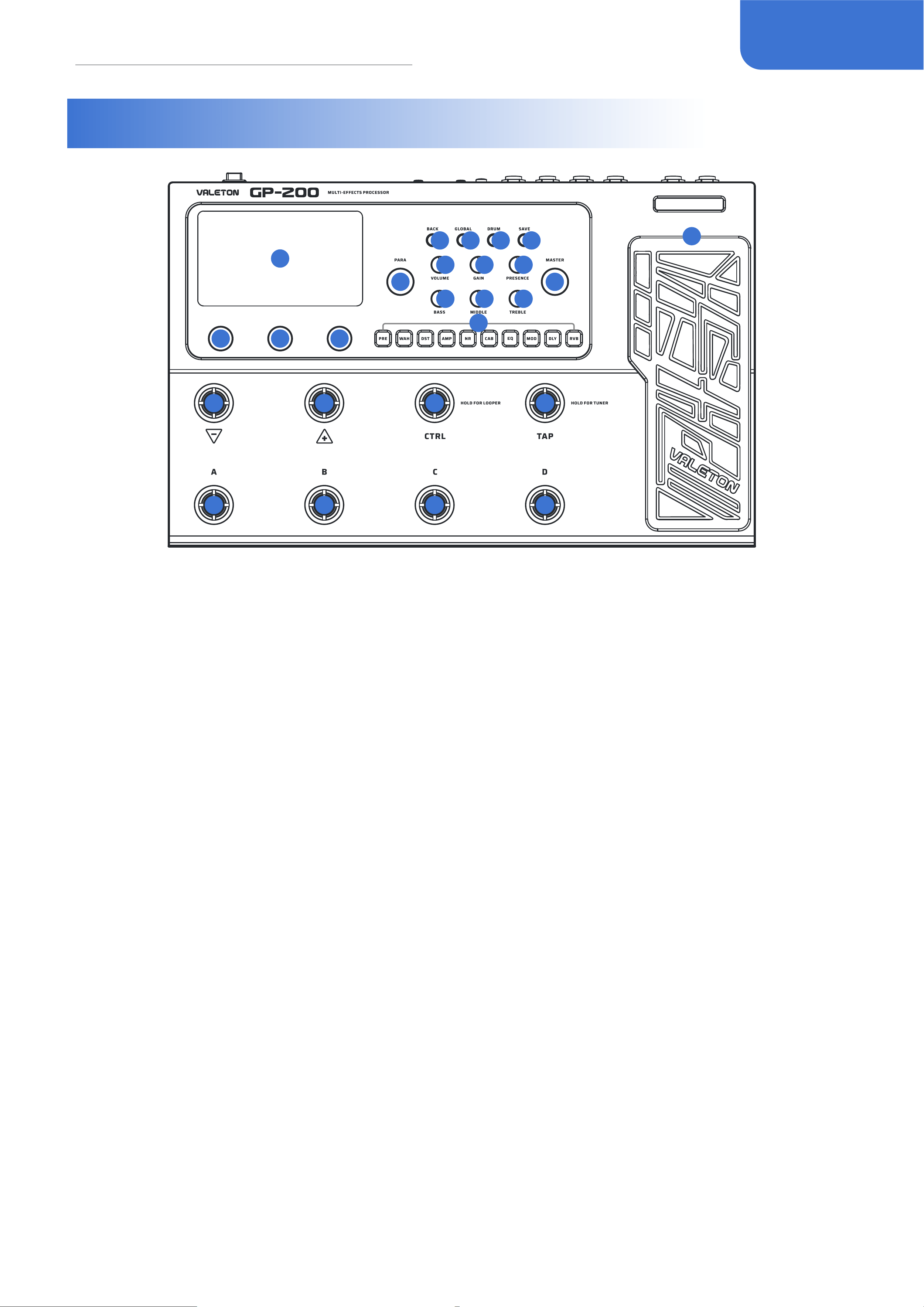
10
10 10
1
2
3
4 5 6 7
8
11
9
8 8
8 8 8
11
11
11
11
11
11
11
12
1. LCD Display
4.3” color LCD shows GP-200’s patch numbers,
patch name, and other operation information.
2. PARA Knob (with enter button)
Turn to select menus and adjust parameters
3. MASTER Knob
Turn to control GP-200’s main output volume.
4. BACK Button
Press to return to the previous page, hold to
return to the main display screen.
5. GLOBAL Button
Press to enter the Global Setting menu, where
you can edit the global parameters of the GP-
200.
6. DRUM Button
Press to play the drum. Hold to enter the Drum
Machine Edit menu, where you can edit the
drum parameters (style, rhythm, volume).
7. SAVE Button
Whenever a patch is modied, the main
display will show a symbol to indicate that the
parameter has been changed. Use SAVE button
to store, rename, or copy the patch. Press SAVE
button again to store the changed parameter.
Hold for quick saving in same slot with same
name.
8. AMP Knobs
Control the AMP module in real time just like a
real amp.
9. Module Buttons
Press to enter the Edit Settings menu of module,
hold for module on/o.
10. Quick Access Knobs
Turn to adjust parameters on the lower part
of the screen. Each knob will vary in function
according to the parameter on the display.
11. 8 Footswitches
Use to change patches, turn on/o eects, set
tap tempo, etc.
12. Expression Pedal
Use to control one or several parameters of
selected module(s).

4
Getting Started
13
14
15
16
17
18
19
20
21
22
23
24
16
17
19
21
13. EXP/FS Jack
1/4” TRS input, for connecting an external
expression pedal/footswitch controller.
14. INPUT Jack
1/4” Mono input connection for guitar or other
instruments.
15. AUX IN Jack
1/8” TRS input for connecting an audio player
and playing along (or recording).
16. FX LOOP (SEND/RETURN) Jack
These 1/4” jacks can be used as FX loop for
inserting external stompboxes into your tone.
17. UNBALANCED OUTPUT (L for mono
output)
Use 1/4” TS jacks cables to connect to your guitar
amp, full rang at response (FRFR) speaker(s), or
other playback system.
When using a single amp or speaker, connect
only the L (MONO) jack.
18. GND/LIFT Switch
Toggle o (up) the GND/LIFT switch to LIFT to
cut o the ground connection of the two XLR
connectors (Ground Lift) to avoid noise caused
by the Ground Loop. Toggle on (down) to GND,
the XLR line will be grounded normally.
19. BALANCED OUTPUT (L for mono
output)
Use balanced XLR cables to connect to your
studio gear, mixer, PA, or FRFR speaker(s).
When using a single amp or speaker, connect
only the L (MONO) jack.
20. PHONES Jack
1/8” TRS output for connecting headphones.
21. MIDI Jacks
Connect an external MIDI device here.
22. USB Jack
By connecting USB 2.0 Type-C to Mac and
Windows computers, GP-200 also functions
as a high quality audio interface with Direct
Injection (DI), Re-amping and MIDI functionality
built right in.
23. POWER Switch
Turn the power on.
24. DC 9V Jack
Power Requirements: DC 9V, 1000mA, center
negative.
Getting Started
1. Connect your device: Plug your guitar into the GP-200’s INPUT jack, and run a cable from the
UNBALANCED OUTPUT L (MONO) to your amp.
Please remember:
• Keep your amp volume down.
• Connect your cable to the amp’s FX Loop Return if it has one. For connection methods, please
check Page 19 “Application Scenarios”.
5
Screen Introduction
2. Turn the GP-200 MASTER knob all the way down, then connect the power supply and turn on
the GP-200.
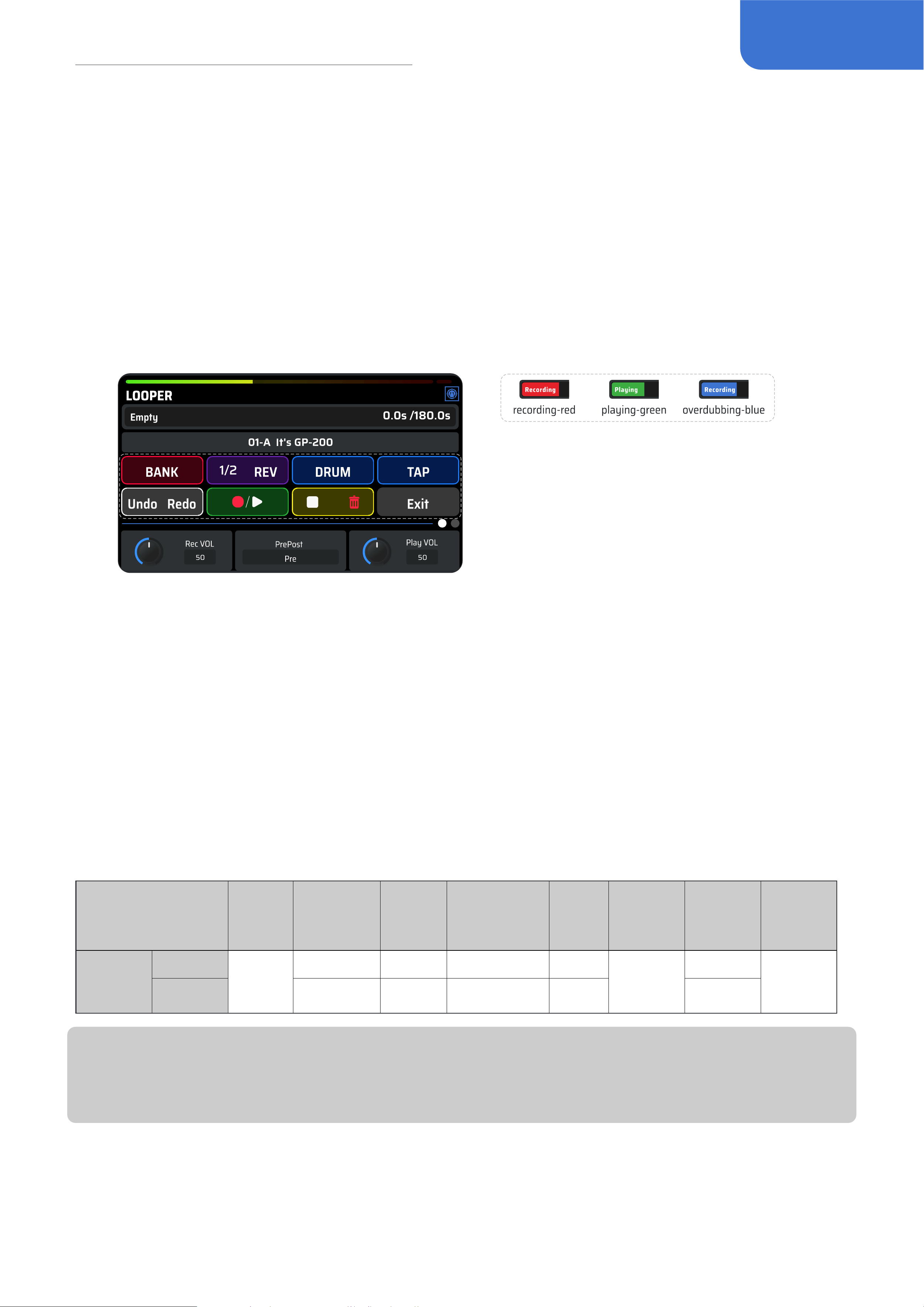
3. Tune your strings: Press and hold footswitch TAP (HOLD FOR TUNER) to enter Tuner interface.
Pluck each string and tune it until the pitch reaches the middle of the screen and turns green.
When all strings are tuned, follow the onscreen instruction to exit the tuner.
Select a patch
GP-200 includes 256 patches, with the rst 100 (01-A~25-D) containing default factory parameters.
When performing a factory reset, you can separately reset these 100 patches to the default values.
Tap footswitch A, B, C, D, choose a patch you like. Tap footswitch BANK- to move back through the
banks, and tap footswitch BANK+ to move forward through the banks. When you switch a BANK,
the LED ring on footswitch A, B, C, D will light up to indicate the patch if you want to select one.
Screen Introduction
Main Display Screen
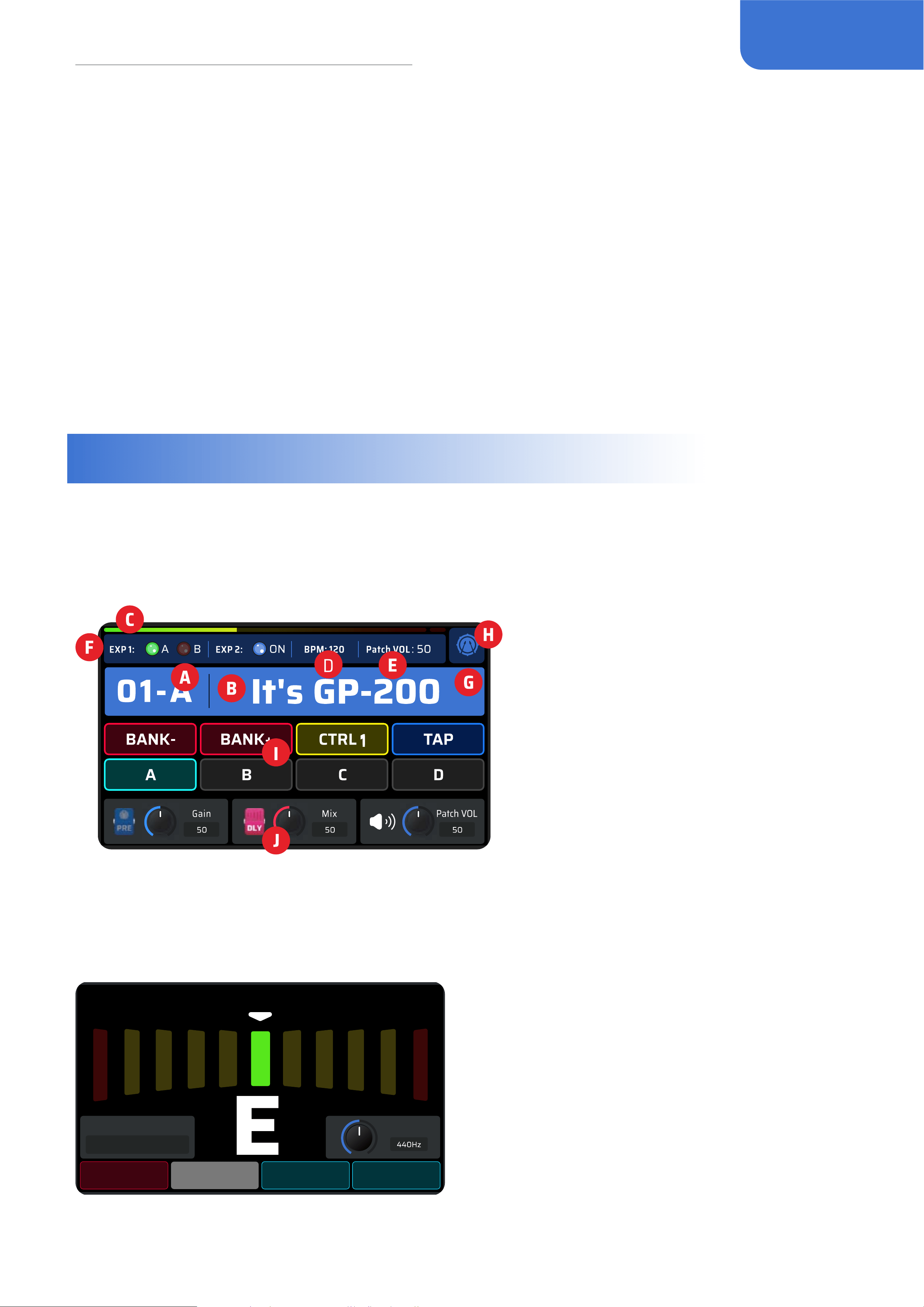
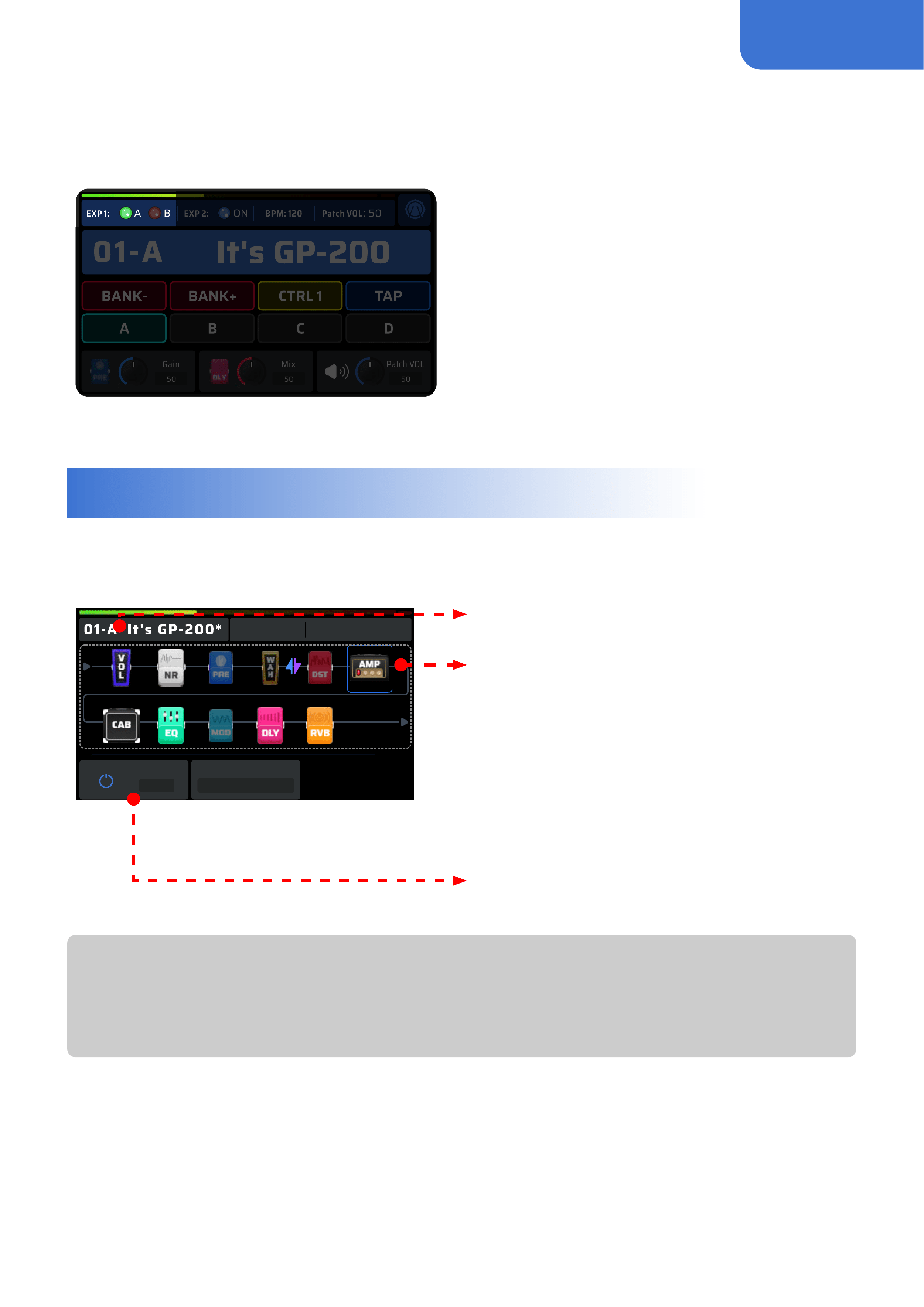
Main Display Screen is the home page displayed right after the power is turned on. You can directly
see the key information and settings of the current patch.
A. Patch number
B. Patch name
C. Patch volume
monitor
D. Patch BPM
E. Patch volume
F. EXP pedal state
G. Patch state
H. DRUM state
I. Current footswitch
setting
J. Quick adjust paras
TUNER
Hold the [TAP] footswitch to activate the tuner mode.
Mode Back Pitch - Pitch +
Mode
Mute
Pitch
TUNER
In tuner mode, the LED screen will display the
tuning interface. When you pluck a string, the
note will appear in the center. Left of center is
at, and right of center is sharp. As you tune your
instrument towards the middle, the color of the
scale will change from red (out of tune) to yellow
(near pitch) to green (in tune).
• Turn Quick Access Knob 1 or tap footswitch A to select the work mode of the tuner:
6
Screen Introduction
-
Thru: Your tune will be normal.
-
Bypass: Eect chain will be bypassed, and you will only hear the dry guitar input sound.
-
Mute: There will be no output.
• Turn Quick Access Knob 3 or tap footswitch C and D to change the standard A’s frequency ranged
from 432Hz to 447Hz, with default set to 440Hz.
• Tap other footswitches or click BACK to return back to the Main Display screen.
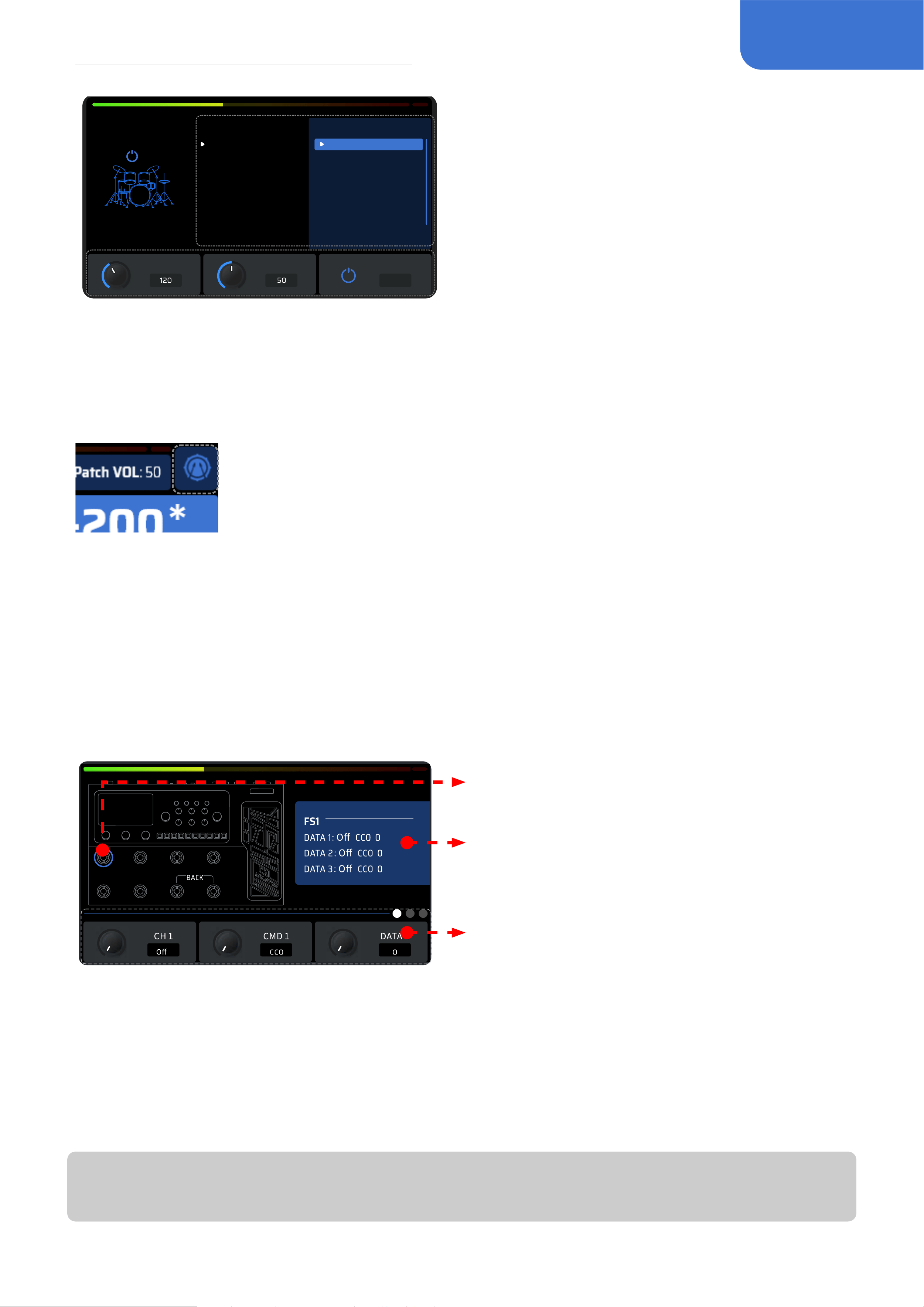
LOOPER
In the Main Display screen, hold [Ctrl] footswitch to enter Looper.
Turning PARA knob on this page to
switch current patch, clicking PARA knob
to access more options. When double
options are provided in the footswitch
function display, the left corresponds to
tap and the right corresponds to hold.
• Rec VOL: Change the recording volume of the looper;
• Pre/Post: Change the position of the looper in the eects chain, when setting to “Post”, the
recording time will be cut to half.
• Play VOL: Change the volume of the looper when playing back;
• Recording Time: When “Undo/Redo” are not required, you can select up to 180s recording time.
• Sync*: Synchronize the drumbeat to the timeline of the looper. When activating the looper and
playing the drum, the audio will adjust in a brief period of time to match with the drumbeat.
• Auto Rec: Turn on/o the auto-recording, when activating auto-recording, the GP-200 will not
immediately start to record until certain level of input signal is perceived.
Footswitches function dierently in the LOOPER interface than in the Home Screen, and their
default function
Footswitch
FS 1
[-]
FS 2
[+]
FS 3
[CTRL]
FS 4
[TAP]
FS 5
[A]
FS 6
[B]
FS 7
[C]
FS 8
[D]
Function
Tap
Bank
1/2 Speed DRUM Tap Tempo Undo
Record/
Playback
Stop
Back
Hold Reverse / Tuner Redo Clear
*Note:
Sync requires the margin of error to be under 50ms, otherwise the sync would not function
normally.
DRUM
Press the “DRUM” button to turn on the drum, hold it to enter the DRUM menu.
7
Screen Introduction
DRUM
ON
Genre Style
BPM
Volume
Sync
ON
Rock
Funk
Blues
Pop
Jazz
Electronic
World
Metro
Classic Rock 1
Classic Rock 2
Classic Rock 3
Classic Rock 4
Classic Rock 5
Classic Rock 6
Hard Rock 1
Hard Rock 2
Turn PARA to switch genres, click PARA to switch
Genre and Style.
GP-200 includes 100 drum patterns (check the
Drum Patterns list for details)
• Turn Quick Access Knob 1 to change the tempo of the drum, ranged from 40-250 BPM.
• Turn Quick Access Knob 2 to change the volume of the drum, ranged from 0-100;
• Turn Quick Access Knob 3 to synchronize the drum tempo with the patch tempo.
• Click “Back” button to exit Drum menu.
After the drum is turned on, a symbol will be displayed on the right side of the
main interface to show the drum machine is active.
MIDI Device Control Functions (MIDI)
In a default footswitch setting, you can enter the MIDI control interface by pressing the footswitch
7+8 simultaneously.
This interface can control the external MIDI devices and adjust the settings of the plugins when
using the MIDI learn function in the DAW
All 8 MIDI switches and 1 MIDI pedal are ready to use in this interface.
The icon will light blue when the corresponding
the footswitch/pedal is pressed.
The display of all three groups of MIDI information
of your current footswitch/pedal.
The corresponding parameters of your current
MIDI setting group.
Each footswitch can have three groups of MIDI information.
CH 1/2/3: default is o, adjustable from 1-16
CMD 1/2/3: range from CC0~CC127~PC. (CC: ControlChange)/(PC: ProgramChange)
DATA 1/2/3: adjust the parameter of CC/PC in CMD 1/2/3
GP-200 supports two types of MIDI messages (CC/PC), the parameters in DATA 1/2/3 will vary
based on the type of MIDI function you intend to use.
Note:
Only in this interface for using GP-200 to control external MIDI devices.
8
Patch Setting
EXP Pedal
When the built-in expression pedal is on, an icon will show up on the Main Display screen at the top
left to indicate the mode it is on:
You can use a built-in expression pedal oering two
modes to control various parameters in real time.
Press the pedal all the way forward to switch A/B
mode.
Some GP-200 patches have been set up to use
the built-in expression pedal. These can be used
without any further set up;
Refer to the expression pedal setting section to
customize the expression pedal settings.
Patch Setting
Edit Menu
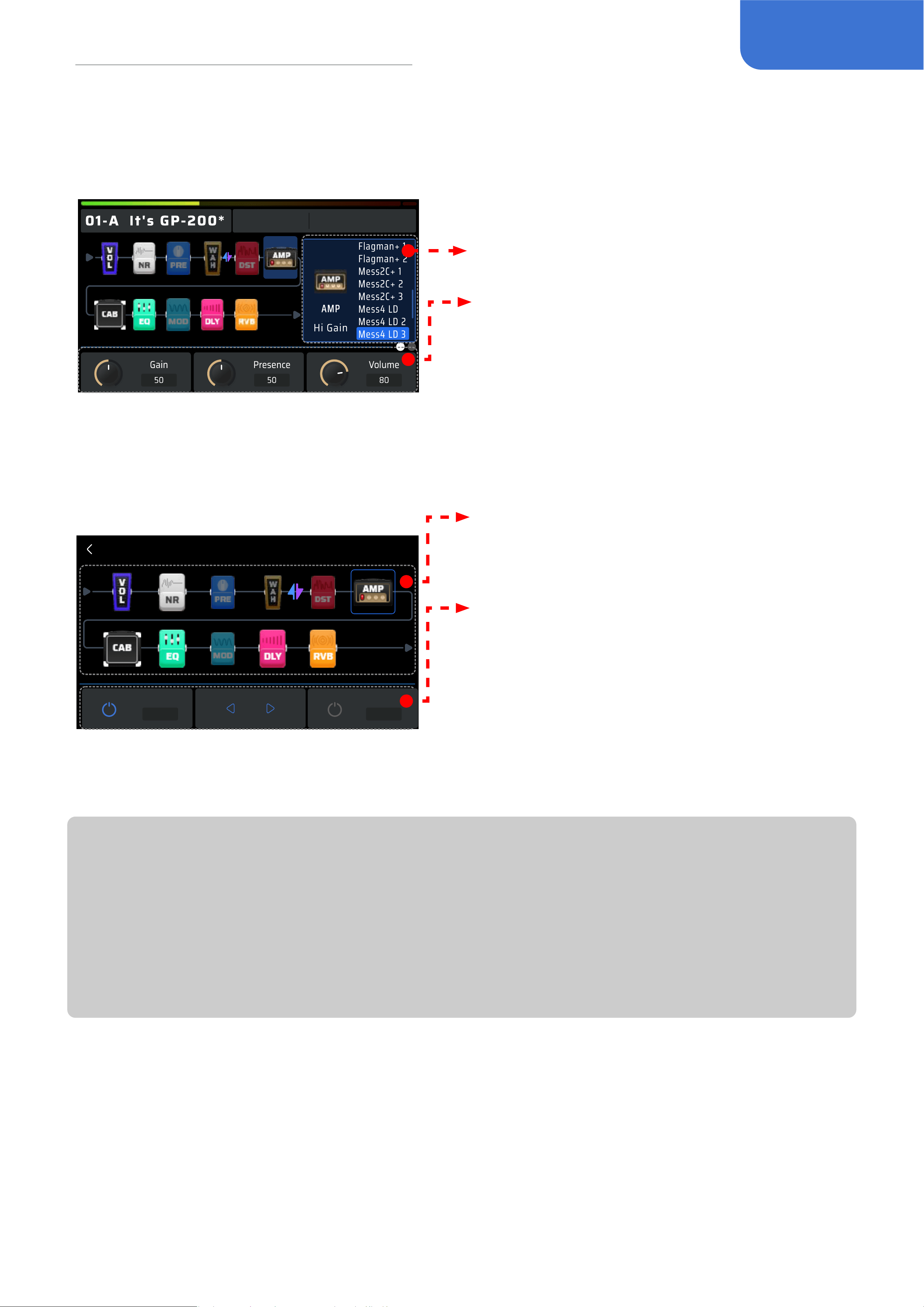
Click PARA to enter Edit Menu.
Patch Settings
Patch VOL: 50
EXP 1: A
Current Eect
ON/OFF
Mess4 LD 3
ON
BPM: 120 EXP 2: ON
Press PARA
Showing the current patch number and name
The complete signal chain simulation of the
GP-200. You can directly view all 11 modules’
sequence and on/o status based on the color
of the icons. Shaded dark indicates o and
exposed bright indicates on.
The default sequence of the signal chain is: PRE
- WAH - DST - AMP - NR - CAB - EQ - MOD - DLY
- RVB - VOL. You can freely move and adjust the
eects sequence to create your own ideal tones.
In Quick Access display area, you can check the
currently loaded eect’s status.
Note:
Please remember to save after editing your parameters.
A “*” sign with patch name indicates that the parameters of current patch is changed. If without
saving, the change will be removed by changing the patch.
9
Patch Setting
Editing a Module
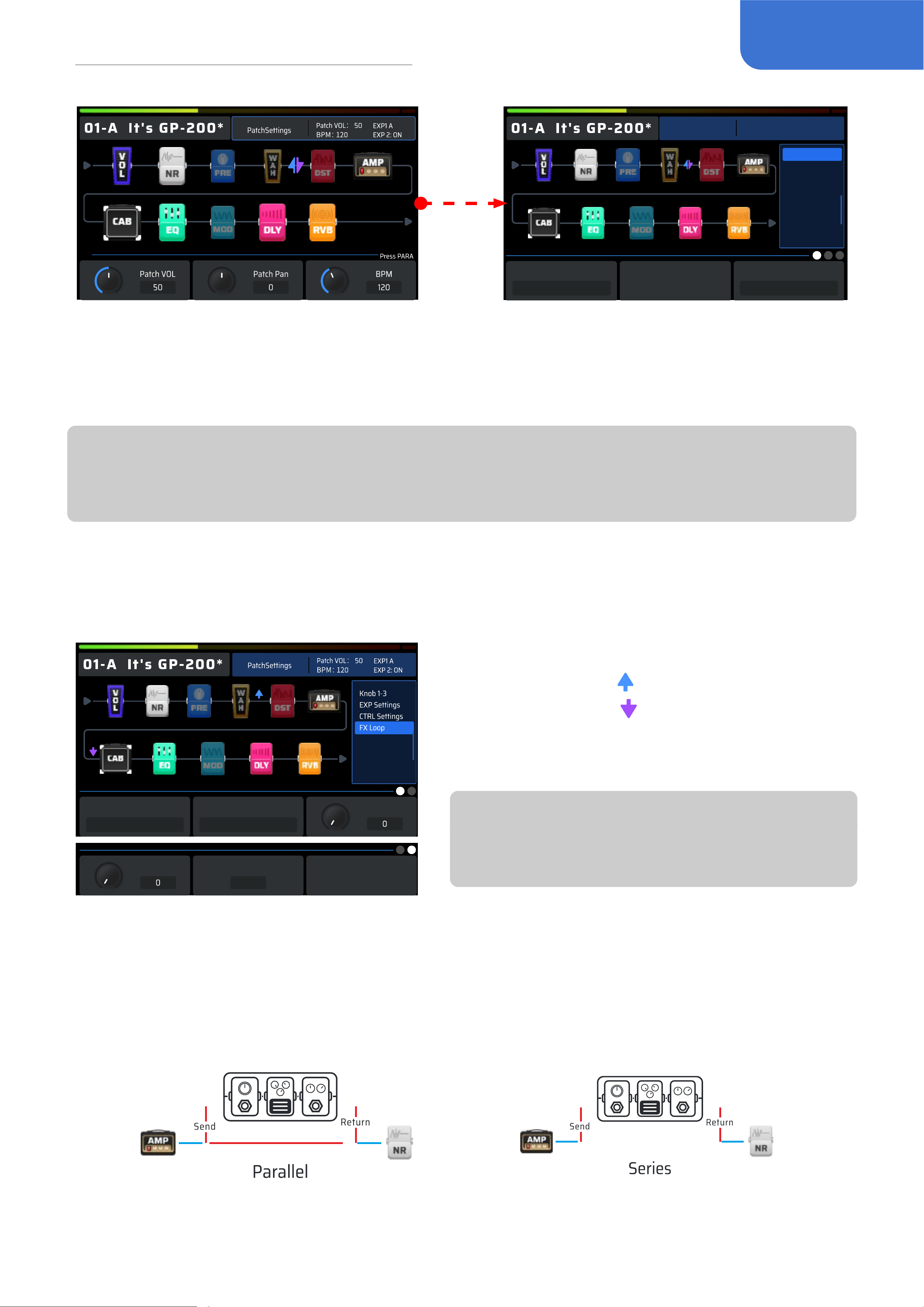
Choose a module in the Edit Menu using PARA knob and click it to see all eects listed in this
module.
ON
Patch Settings
Patch VOL: 50
EXP 1: A
BPM: 120 EXP 2: ON
All eects in the module are listed on the right
of the screen, turn PARA knob and click to
switch eects.
Click PARA knob to access more options.
For specic parameter settings, please check
Page 20 “Eect List”.
Managing the Signal Chain
After choosing a module in the Edit Menu, you can hold PARA to enter the Manage Signal Chain
menu:
In this menu, turn PARA knob to select the
module you want to move.
• Quick Access Knob 1 controls the on/o of
the selected module;
• Quick Access Knob 2 controls moving the
selected module;
• Quick Access Knob 3 oers a Mute Mode
(only applicable in this menu) to avoid
possible noise when moving the eect
module.
Move It
ON/OFF
ON
Manage Signal Chain
Mute
OFF
Press and hold PARA or click BACK to return to the Edit Menu.
Note:
In some extreme cases the signal processor may become overloaded and display a “System
Overload” message. Please try other eects combos instead.
Keep in mind that turning the modules on/o and adjusting parameters will change the current
patch. If you switch patches or turn GP-200 o before saving your changes, the changes will be
lost. Make sure to press the SAVE button to save your settings.
In EDIT Menu, footswitches function the same as in the Main Display screen.
Patch Settings
Patch Settings is referred to functional settings that can be independently saved in dierent
patches. It oers settings to CTRL, footswitches, Quick Access Knobs, patch volume, patch pan,
patch tempo(BPM) and so on.
When the icon selects patch settings, use the quick access knobs to adjust patch volume, patch pan
and patch tempo(BPM).
10
Patch Setting
Patch Settings
Patch VOL: 50
EXP 1: A
BPM: 120 EXP 2: ON
Knob 1-3
EXP Settings
CTRL Settings
FX Loop
Module 1
Boost
Para 1
Gain
PRE
• Knob 1-3: To use the Quick Access Knobs for adjusting eect parameters of the selected patch.
• EXP Settings: Settings of the selected patch’s expression pedal, including EXP 1A, EXP 1B and
EXP 2. Every pedal mode can simultaneously control up to 3 eect parameters with max/min
value settings. EXP 2 means external pedals, you can use them through Global Settings.
Note:
EXP pedal-related parameters are regarded as module parameters, and no save reminder will be
shown up.
• CTRL Settings: You can assign the on/o of one or multiple modules, and there are totally 8
CTRLs available. When used with “Global Settings”, you’re able to control multiple modules’ on/
o in one patch, making you feel like playing with the stompbox matrix.
Parallel/Series
Parallel
Return Level
Send Position
5
Return Position
7
Send Level
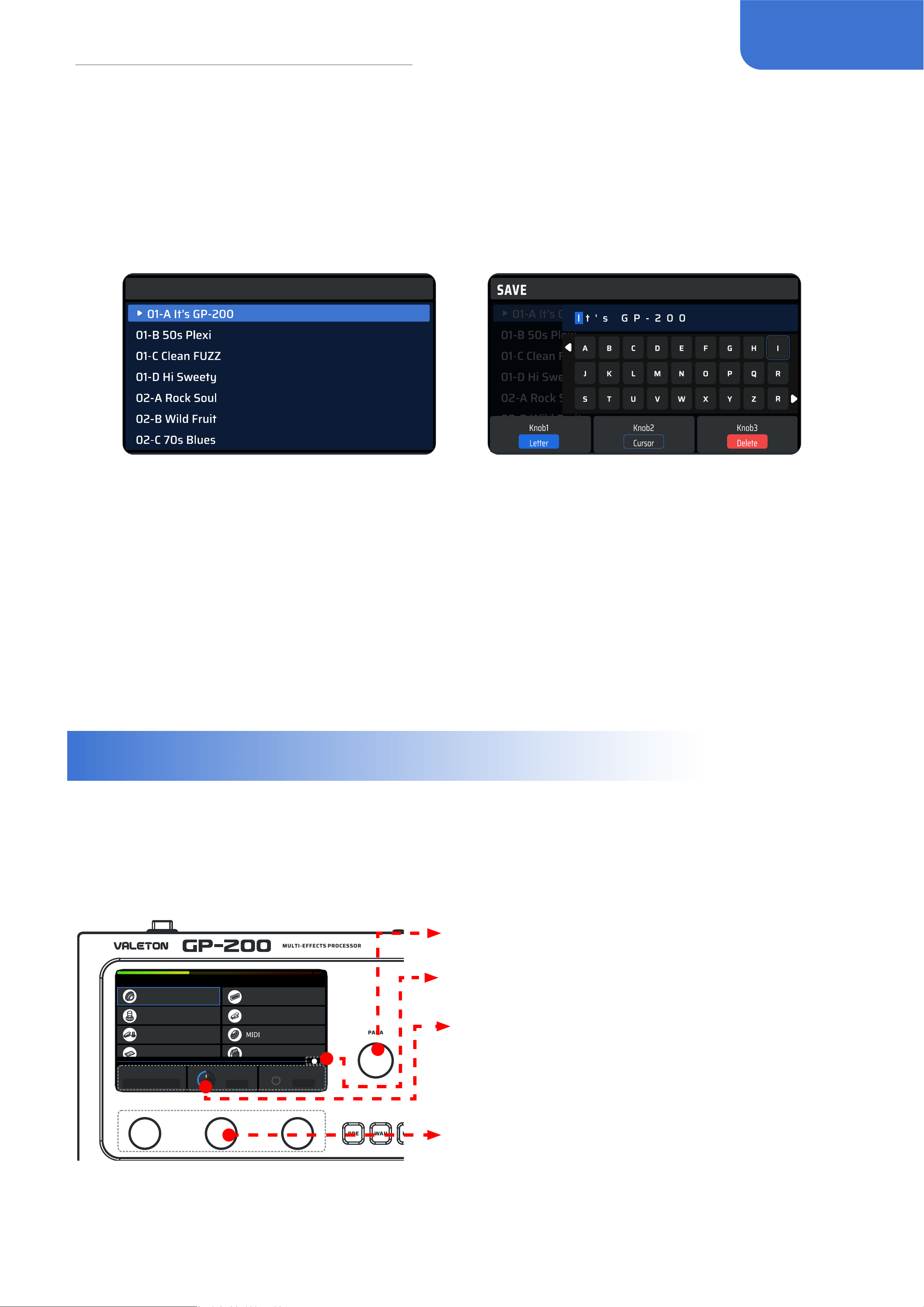
• FX Loop: the FX Loop settings in the current
patch. Blue arrow
the signal is sent from
here. Purple arrow
the signal is returned here.
The Send/Return nodes can be freely moved in
the eect chain.
Note:
The return node can’t be placed in front of the
send node to avoid the squealing sound.
Parallel/Series illustrates how the eects loop is connected to the signal chain.
• When set to Parallel, the returned signal from external eect chains will mix with the AMP
module and be sent to the latter signals in the signal chain.
• When set to Series, internal eect chain will be temporarily paused, only signals from external
eect chains will be sent to the latter signals in the signal chain. In this situation, if the eect loop
interface is not connected to the any other eect unit, the GP-200 output will remain silent.
11
Global Settings
Save Menu
In the Save menu, you can save the changes you make to your eects parameters, control
information, and other editable targets.
When pressing SAVE button, the interface will enter Save Menu, choose a slot via rotating and
pressing PARA. Press it to enter Rename Menu.
Hold SAVE to jump renaming and position change and save directly.
SAVE
In the Rename Menu, you can manage your editing through PARA knob or 3 Quick Access Knobs.
Quick Access Knob 1: There are 4 types of characters to choose from: Uppercase, lowercase,
numbers and symbols (including space).
Quick Access Knob 2: Switch the position of the icon.
Quick Access Knob 3: Delete the icon targeted character.
When nishing, press SAVE to make sure you saved.
Click BACK to exit editing and return to the previous menu.
Remember to save after nishing the editing.
Global Settings
Global Settings, unlike previous ones, will aect the whole status of the GP-200 and not change
when the patch has changed. All the settings will immediately function when editing is nished.
There are input/output, USB Audio, footswitch/EXP pedal, language and more in this menu, as well
as factory reset.
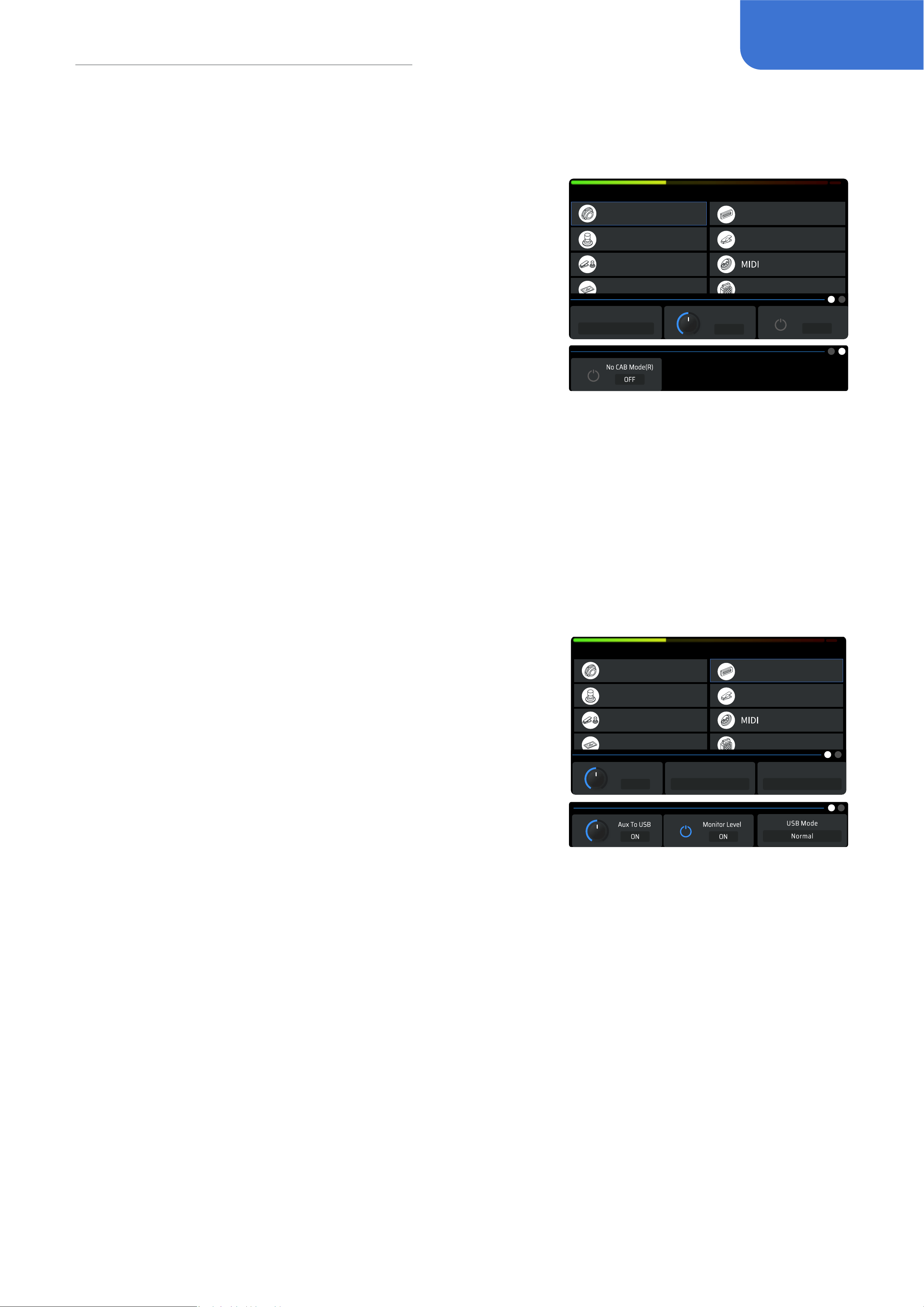
Display
Auto CAB Match
GLOBAL SETTINGS
USB Audio
EXP Calibrate
Footswitch
Input/Output
EXP 2/Footswitch
Input Mode
Input Level No CAB Mode(L)
OFF
0dB
E. GT
Rotate PARA knob to move the cursor
Page progress bar, click PARA to turn pages
Use Quick Access Knob 1-3 to operate the
displayed options in the submenu at the button
screen
Currently selected submenu. The options displayed
will change when you click in dierent menu items.
There will be buttons in some submenus, click
PARA to continue
12
Global Settings
Input/Output
This option is to adjust input/output related parameters.
Display
Auto CAB Match
GLOBAL SETTINGS
USB Audio
EXP Calibrate
Footswitch
Input/Output
EXP 2/Footswitch
Input Mode
Input Level No CAB Mode(L)
OFF
0dB
E. GT
• Input Mode: to adjust the impedance, including acoustic
guitars, electric guitars and line in.
-
Acoustic guitar: Impedance set to 4.7MΩ, used to connect
acoustic guitars or piezoelectric pickups.
-
Electric guitar: Impedance set to 1MΩ, used to connect
electric guitars and bass guitars with pickups.
-
Line in: Impedance set to 10kΩ, used to connect
synthesizers and more analog audio devices.
-
The default option is set to electric guitar.
• Input Level: Ranged from -20dB to +20dB with default value set to 0dB, you can adjust the
value to get the best experience based on varied instruments.
• No CAB mode(L/R): By activating no CAB mode on Mono left or right, you can get the audio
eect where there is no CAB module simulation in the analog output. The default is o.
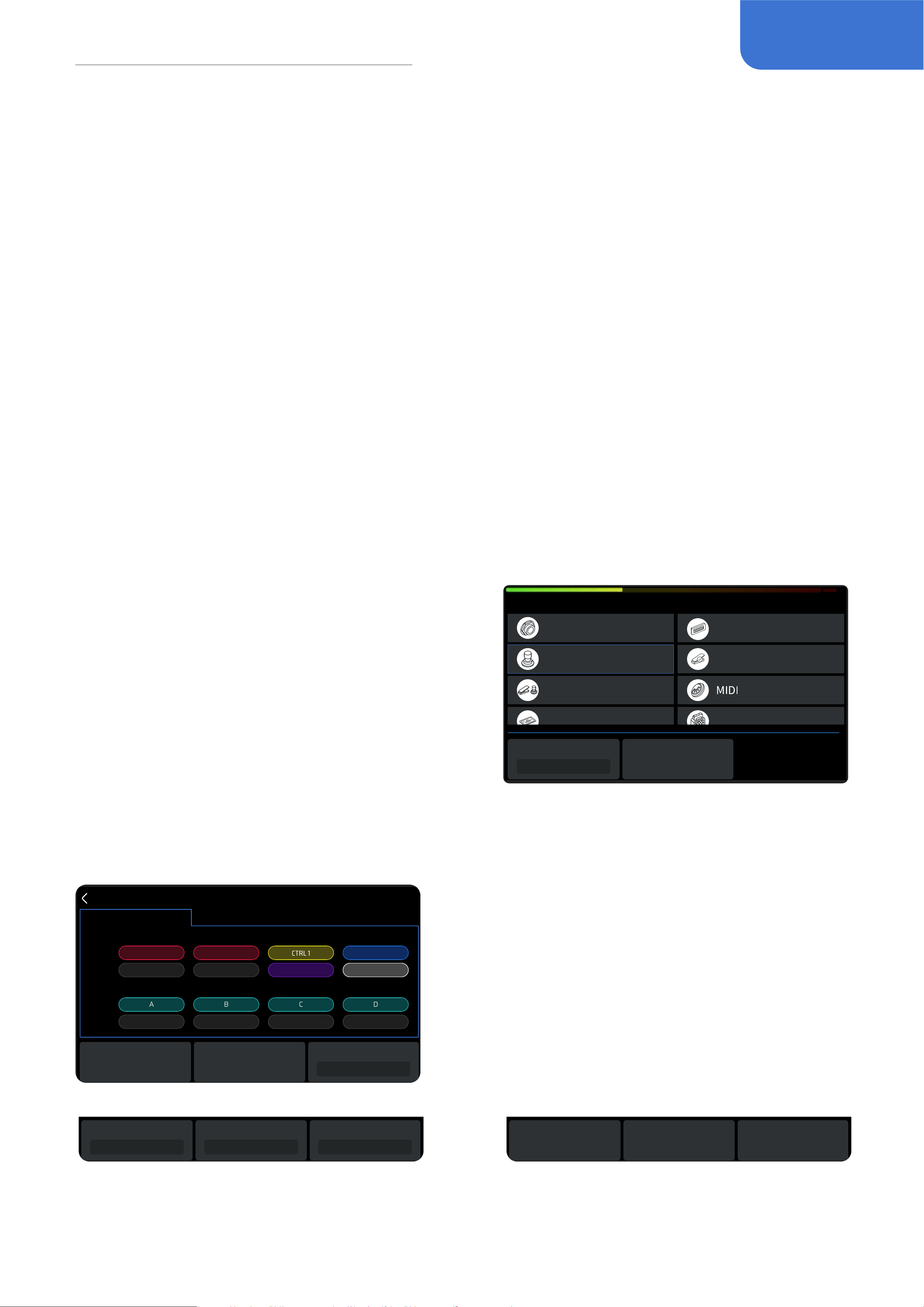
USB Audio
This is to adjust related settings when using the GP-200 as a USB audio interface.
Display
Rec Level
Rec Mode(L)
Wet
Rec Mode(R)
0dB
Auto CAB Match
USB Audio
EXP Calibrate
Footswitch
Input/Output
EXP 2/Footswitch
GLOBAL SETTINGS
Wet
• Rec Level: To control the master volume of the output when
recording, ranged from -20dB to +20dB. The default is 0dB.
• Rec Mode Left/Right: GP-200 has a USB stereo analog
output channel. When choosing Dry, the corresponding
output channel will send out direct signals; when choosing
Wet, the corresponding output channel will send out signals
with eects. This function can easily achieve “monitor wet,
record dry”. The default is wet.
• AUX To USB: When activating, audios from AUX IN can be recorded in USB devices. This means,
when using GP-200 for livestreaming, you can mix the audios from AUX IN with eects from the
GP-200, and send out to the streaming device through USB output.
• Monitor Level: To control the volume of playback through USB, ranged from -20dB to +20dB.
The default is 0dB.
• USB mode: switch to a multi-channel output. Legacy mode: switch to this mode for a 2x2
USB audio without MIDI function, this mode is compatible with the OTG function of most
phones(connection to GP-200 software will be lost). Normal mode: switch to this mode for a 6 x
4 USB audio with MIDI function, this mode is compatible with using this device as a soundcard.
Using GP-200 as an audio interface
When used as a USB audio interface, the GP-200 will be recognized by the system as a 6-in/4-out
USB device. Here we will show you how to use this function through listing two scenarios.
13
Global Settings
Scene 1: Using the built-in re-amp function in the DAW to record or adjust the tone
1. Set the Mono L and Mono R’s output to “Dry” in the Global Settings-USB Audio
2. In the DAW, create two new Tracks A and B, and import/record a dry guitar Track in A
3. Set Track A output to Output 3-4, set Track B input to Input 3-4, keep Track B’s monitoring o
4. Play the dry track in DAW, and now you can hear the eect sound of the processed dry track le
in GP-200
5. Activate “Record” in Track B on the recording software, then you’ll get to record the Track with
eect after re-amp on Track B.
Scene 2: Using LOOPBACK function to record, combining the audio from multiple sources on your
computer
1. In the DAW, create a new stereo audio track
2. Set the input to Input 5-6
3. Start recording in the DAW
4. By playing other audio sources on your computer, you can record them in the track now
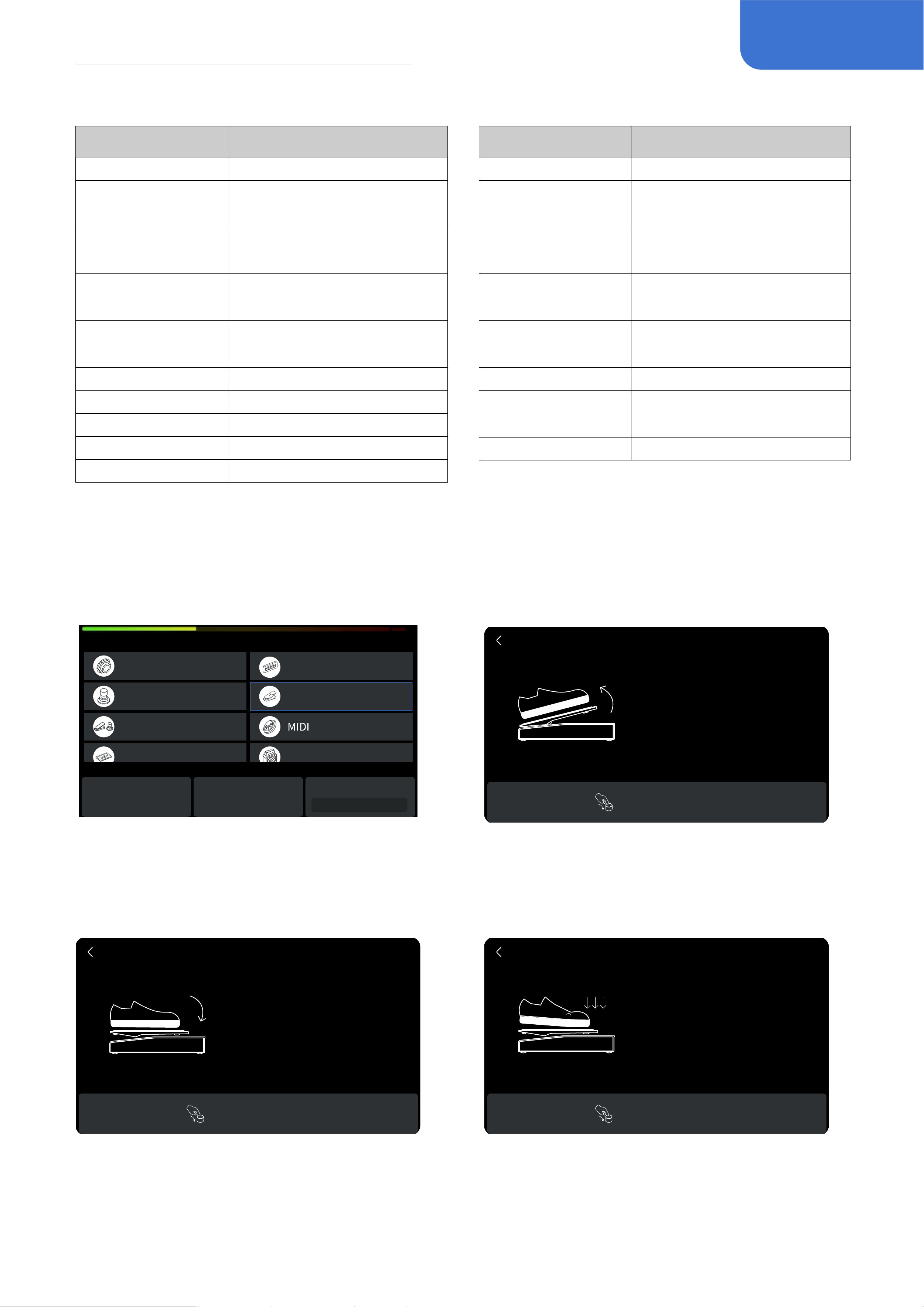
Footswitch
This is for choosing footswitch modes and corresponding function settings.
Display
Auto CAB Match
Bank Sel Mode
Wait
Setting
USB Audio
EXP CalibrateFootswitch
Input/Output
EXP 2/Footswitch
GLOBAL SETTINGS
Quick Access Knob 1 is to choose Bank Select Mode.
This setting simultaneously aect internal and
external footswitches and oers two modes: Initial
and Wait.
Initial: When switching banks, the patches will roll
immediately.
Wait: The default mode. When switching banks, the
patches will NOT roll immediately, instead, you will
need to enable footswitch functions and select a conrmed patch number. After that, the patches
will switch.
Quick Access Knob 2 is to enter Footswitch Setting (See picture below).
Footswitch
Patch Stomp User
FS 1 FS 2 FS 3 FS 4
FS 5 FS 6 FS 7 FS 8
Tap
Hold
Tap
Hold
BANK- BANK+ TAP
BANK- BANK+ TUNER
None None None
LOOPER
None
Single FS
Page
There are 3 footswitch modes: Patch mode, Stomp
mode and User mode. In each mode, all options are
the same with varied default settings. All functions
will work immediately when selected and presented.
All changes will be saved automatically.
You can also click PARA to enter Footswitch
Setting, and assign tap and hold functions for each
footswitch. By fast-selecting which footswitch to
assign functions, tap the corresponding footswitch.
Footswitch
Stomp User
FS 1 FS 2 FS 3 FS 4
FS 5 FS 6 FS 7 FS 8
Tap
Hold
Tap
Hold
BANK- BANK+ TAP
BANK- BANK+ TUNER
None None None
LOOPER
None
Single FS
Page
BANK-
Hold
BANK-
Tap
Patch
• Turn Quick Access Knob 1 to select tap functions
• Turn Quick Access Knob 2 to select hold functions
• Turn Quick Access Knob 3 to turn pages between
single FS and dual FS settings.
Footswitch
Stomp User
FS 5 FS 6 FS 7 FS 8
Tap
Hold
None None NoneNone
Reset
Patch
FS 1+5 FS 5+6 FS 6+7 FS 7+8
Reset
None None NoneNone
We have a reset option in every mode to
perform a factory reset for all footswitches.
14
Global Settings
Footswitch functions include:
Function Description
Bank Enter bank selecting menu
Bank+
Load the latter adjacent
bank
Bank-
Load the former adjacent
bank
Patch+
Load the latter adjacent
patch
Patch-
Load the former adjacent
patch
A Load the A patch
B Load the B patch
C Load the C patch
D Load the D patch
LOOPER Enter the Looper
Function Description
DRUM Play/stop the drum
Drum Patch+
Load the latter adjacent
drum patch
Drum Patch-
Load the former adjacent
drum patch
EXP 1 A/B
Switch between A/B of
EXP 1
MIDI
Enter the MIDI function
interface
TUNER Enter the tuner
CTRL 1 ~ 8
Execute CTRL 1 - 8’s
function
Tap Tempo Use Tap Tempo
EXP Calibrate
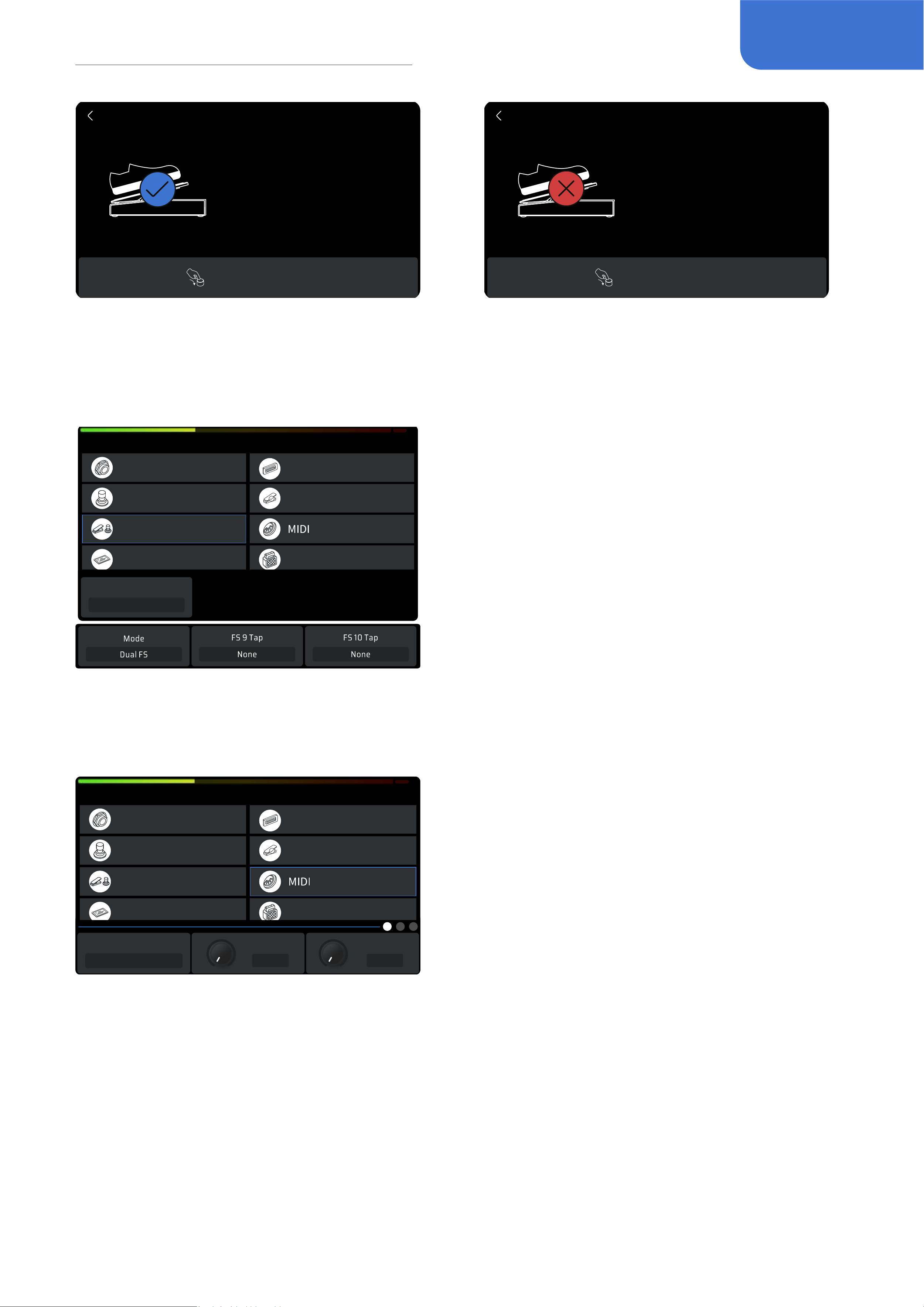
The EXP Calibrate helps you calibrate your expression pedal. It is important to do so if you nd the
sweep has very little or too much change in the eect you’ve set.
Display
Auto CAB Match
USB Audio
EXP CalibrateFootswitch
Input/Output
EXP 2/Footswitch
GLOBAL SETTINGS
EXP 1 EXP 2
EXP 1 CURVE
Log
As shown, turn Quick Access Knob 1 or 2 to
calibrate EXP pedal 1 or 2. Knob 3 can select
the curve of EXP 1: Line, Expo, Log.
EXP Calibrate
Lift the pedal
fully up towards heel.
Press PARA to continue.
Lift your pedal all the way up, and click PARA to
continue.
EXP Calibrate
Lift the pedal
fully down towards toe.
Press PARA to continue.
EXP Calibrate
Press PARA to continue.
Press strongly.
Press the pedal all the way down, and click
PARA to continue.
Press the front side strongly, and click
PARA to continue.
15
Global Settings
EXP Calibrate
Press PARA to continue.
Complete!
Press PARA to continue.
Failed!
EXP Calibrate
If successfully calibrated, the screen will
display as so.
If not, the screen will display as so. Please
try to repeat the process.You can also click
BACK to return to the previous menu.
EXP 2 / Footswitch
Display
Auto CAB Match
USB Audio
EXP CalibrateFootswitch
Input/Output
EXP 2/Footswitch
GLOBAL SETTINGS
EXP
Mode
This menu is to adjust parameters related to external
devices through EXP/FS input.
You need to set up for the type of the external
devices. If it is an external pedal, it is called EXP 2,
and you’ll need to manage the parameters in “Patch
Settings – EXP Settings”; if it is a single footswitch or
dual footswitch, the options in the Quick Access menu
will help you set up.
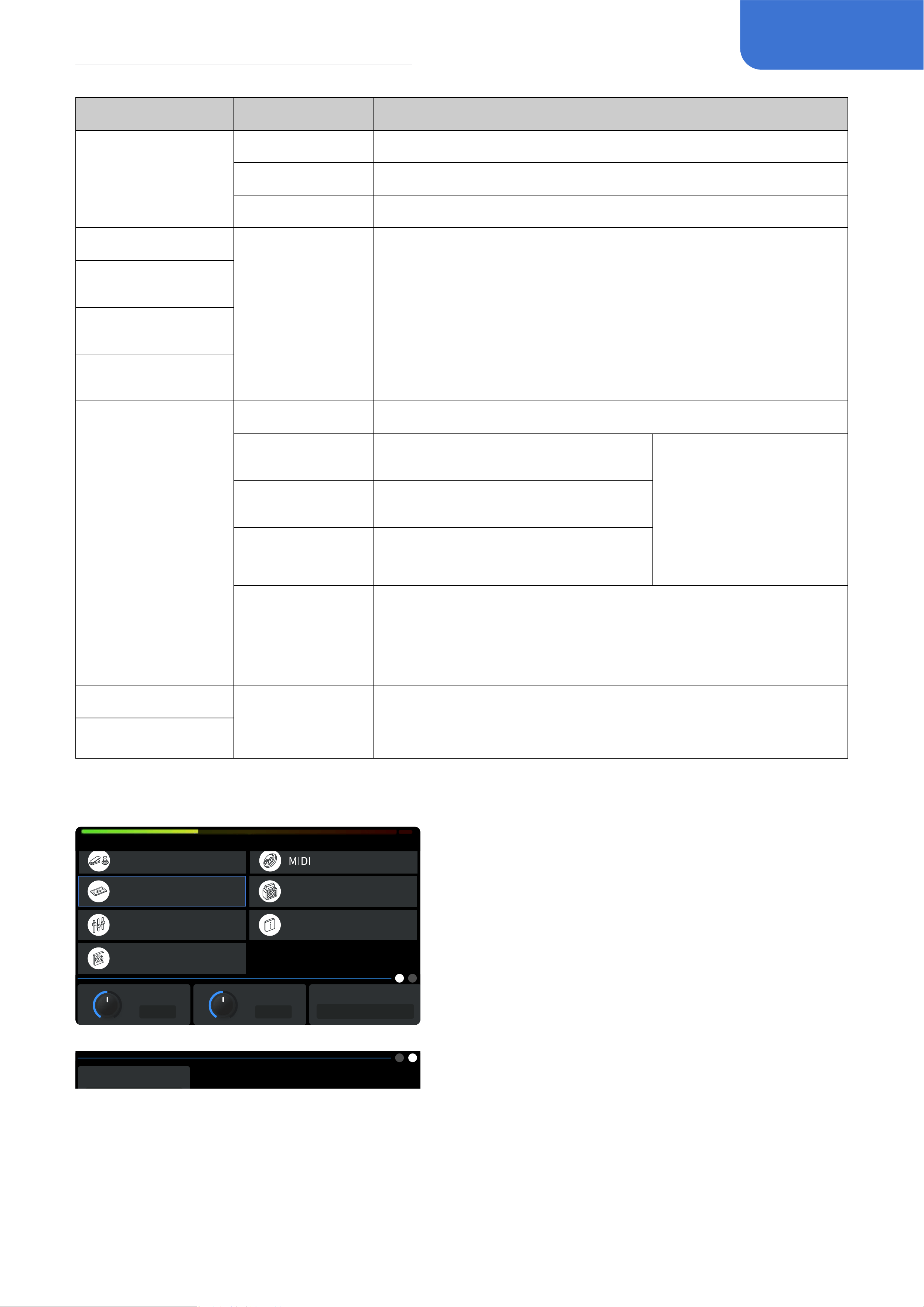
MIDI
Display
Auto CAB Match
USB Audio
EXP CalibrateFootswitch
Input/Output
EXP 2/Footswitch
GLOBAL SETTINGS
MIDI In Source
Mixed
Input Ch(DIN) Input Ch(USB)
Omni Omni
This menu is to set up MIDI messages, including MIDI
In Source, Input Channel (DIN), Input Channel (USB),
Output Channel (DIN), Output Channel (USB), Clock
Source, Clock Out (DIN) and Clock Out (USB).
• MIDI In Source: Control where the MIDI message is
coming from.
• Input Channel (DIN), Input Channel (USB), Output
Channel (DIN), Output Channel (USB): For setting up the channel of the USB input and the MIDI
messages’ input and output
• Clock Source: For choosing the source of the MIDI clock.
• Clock Out (DIN), Clock Out (USB): To control whether the MIDI OUT and USB will send out MIDI
clock messages. Use this to set your GP-200 as the main clock for all MIDI devices.
16
Global Settings
Parameters Range Description
MIDI In Source
DIN Only Only receiving MIDI messages from the MIDI IN.
USB Only Only receiving MIDI messages from the USB.
Mixed Receiving from both the MIDI IN and the USB.
Input Channel (DIN)
Omni ~ 1 ~ 16
(The default
setting is Omni)
For setting up the channel of the USB input and the MIDI
messages’ input and output
Input Channel
(USB)
Output Channel
(DIN)
Output Channel
(USB)
Clock Source
Internal Only receiving from the internal clock
DIN Only
Only receiving the clock messages
from the MIDI IN
When “Din Only” , “USB
Only” or “External” is
selected, the internal
clock will not work and
the Tap Tempo will not
function
USB Only
Only receiving the clock messages
from the USB
External
Only receiving from the external
clock
Mixed
(Default)
Receiving clock messages from the internal clock, MIDI In
and USB. If using dierent clock sources simultaneously,
then the last message type the GP-200 receives will cover
previous ones
Clock Out (DIN)
ON/OFF
(The default is
OFF)
When turned ON, this unit will negate all input signals;
Additionally, when your Clock Source is set to “DIN Only” or
“USB Only”, this unit will not send out MIDI clock messages.
Clock Out (USB)
Display
Brightness
50
Display Time
Always
Language
EXP 2/ Footswitch
Display
Global EQ
Factory Reset
Auto CAB Match
About
GLOBAL SETTINGS
English
Display Mode
Footswitch
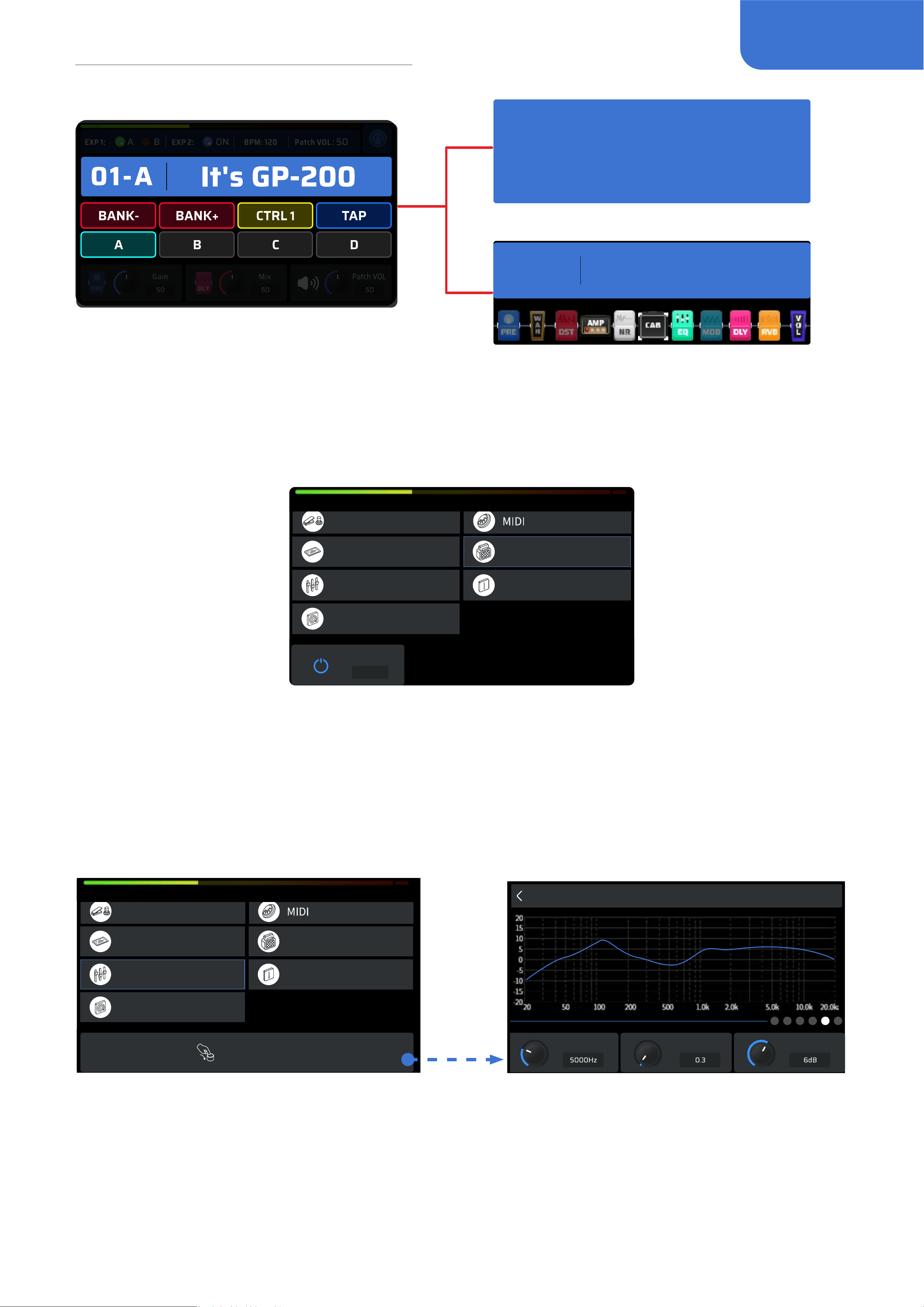
This menu is to adjust parameters and settings of the
displayed factors.
• Brightness: For adjusting screen brightness
• Display Time: The time GP-200 needs to enter sleep
mode.
• Language: For choosing your system language.
• Display Mode: Personalize the important
information displayed in the main interface.
Switch between these modes according to your
preferences.
-
Footswitch: the current setting of the footswitch.
-
Patch: magnify the patch names and numbers.
-
Signal chain: display the current signal chain and the module’s status.
17
Global Settings
01-A
It's GP-200
01-A
It's GP-200
Footswitch
Patch
Signal chain
Auto CAB Match
This is to turn on/o the correlation status of the AMP module and the CAB module.
ON/OFF
ON
EXP 2/ Footswitch
Display
Global EQ
Factory Reset
Auto CAB Match
About
GLOBAL SETTINGS
When turned ON, the eects in the CAB module will correspondingly change with the eects in the
AMP module.
Global EQ
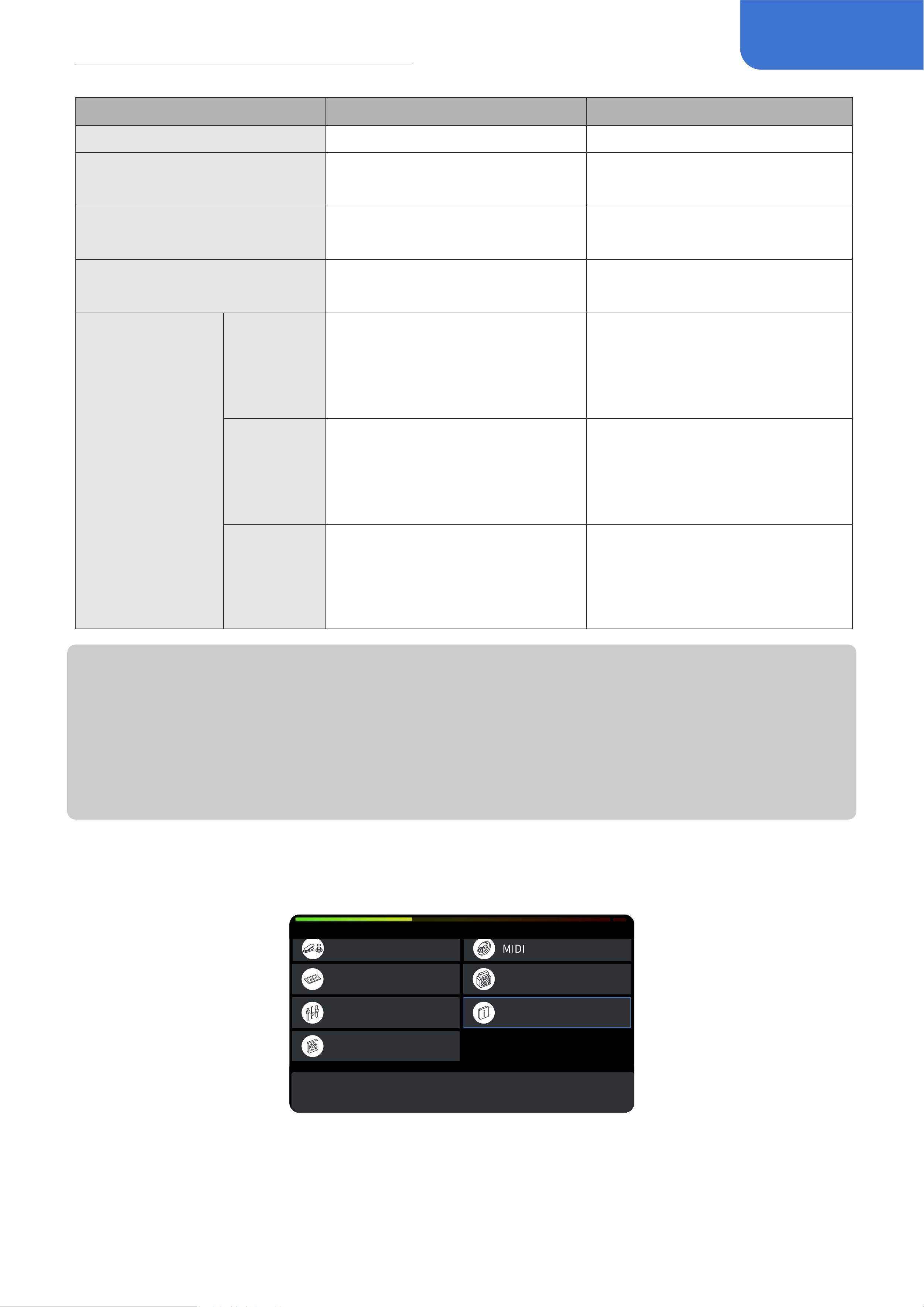
This menu is to control the global equalizer of the GP-200 in order to change the overall tone feel.
This is the displayed menu:
Global EQ
Band 4 Freq Band 4 Q Band 4 Gain
EXP 2/ Footswitch
Display
Global EQ
Factory Reset
Auto CAB Match
About
GLOBAL SETTINGS
Press PARA to continue.
Global EQ contains Low Cut / High Cut, and 4 bands of parametric EQ. Every frequency band can be
freely turned on/o based on your needs. There are total 6 of them.
18
Global Settings
Parameter Range Description
ON/OFF ON/OFF On/O global EQ
Level 0~100(Default: 50)
Adjust the master volume of the
global equalizer
Low Cut
OFF~20Hz~20000Hz
(Default: OFF)
High pass lter to cut o low
frequency signals.
High Cut
20Hz~20000Hz~OFF
(Default: 20000Hz)
Low pass lter to cut o high
frequency signals.
Band 1-4: 4
selectable peak
lters used for
overall or detailed
frequency
adjustment
in the certain
range, including
3 available
parameters:
Frequency, Q and
Gain.
Band 1-4
Frequency
20Hz~20000Hz
(Band 1-4’s default frequencies
are accordingly 100Hz, 500Hz,
1000Hz and 5000Hz)
To adjust the corresponding
lter’s frequency.
Band 1-4 Q
0.1~10.0
(Default: 0.71)
Width. To adjust the width of the
formant (slope of the lter), the
larger the number, the steeper
the slope.
Band 1-4
Gain
-20dB ~ +20dB
(Default: 0dB)
Adjust the lter gain
Note:
• Please stay cautious when adjusting your global EQ to protect your hearing and device
• Global EQ won’t aect the USB audio output of the GP-200
• When a patch is using too many modules, or some modules are consumed with too much
system resources (such as reverb eect), the system may be overloaded after applying global
EQ.
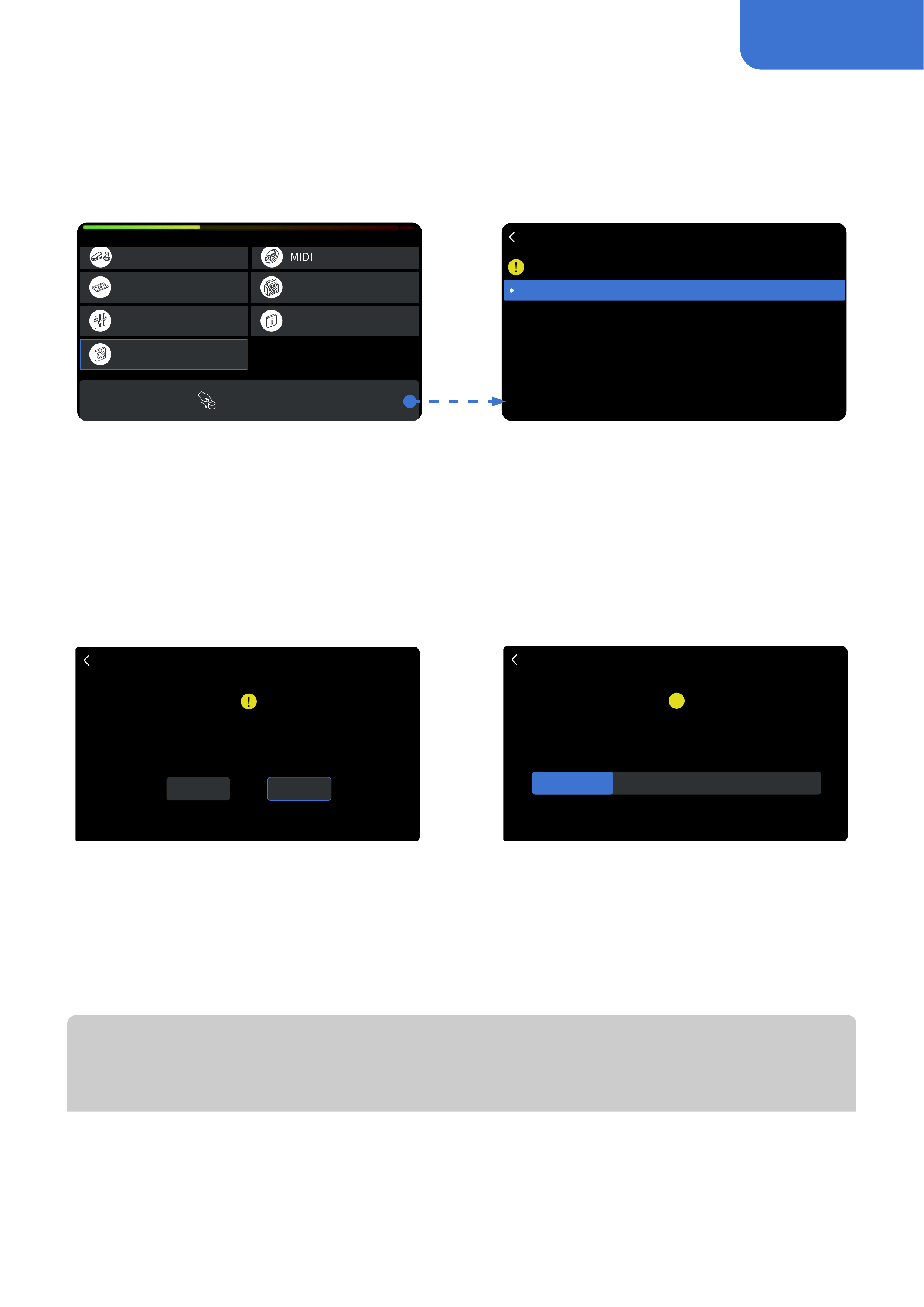
About
This menu is to check the rmware and hardware version.
Firmware Version V1.6.0
©Valeton All Rights Reserved
EXP 2/ Footswitch
Display
Global EQ
Factory Reset
Auto CAB Match
About
GLOBAL SETTINGS
19
Global Settings
Factory Reset
This menu is to perform a factory reset. Remember, resetting the GP-200 will delete all of your
saved changes and personal settings. Once it is executed, it cannot be undone. Please back up your
settings before performing a factory reset.
Factory Reset
Choose an option
Reset global settings only
Reset factory patches(01-A~25~D)
Reset all data(All user data will be lost)
Press PARA to enter.
EXP 2/ Footswitch
Display
Global EQ
Factory Reset
Auto CAB Match
About
GLOBAL SETTINGS
To improve the precision of factory reset function, the GP-200 provides 3 types of factory reset.
When clicking PARA to enter the menu, the screen will display with 3 options:
• Reset global settings only
• Reset factory patches (01-A~25-D)
• Reset all data (All user data will be lost)
When selecting one of them, there will be another window for conrming. When clicking OK, the
factory reset will be performed. When clicking Cancel, it will return to the global settings menu.
Factory Reset
This will reset the global settings to default.
Do you still want to continue?
CANCEL OK
!
30%
Factory Reset
Resetting in progress
Please do not shut down!
After the factory reset is performed, the screen will display this window to indicate it is now on
factory resetting.
Please remember, never turn o the power when performing the factory reset, otherwise the GP-
200 may malfunction.
When it is all set, the screen will suggest the resetting is complete. Click OK to return to the Main
Display menu.
Note:
To maintain the capability for interaction, factory reset won’t aect the language you have
chosen.
20
Compatible software
Compatible software
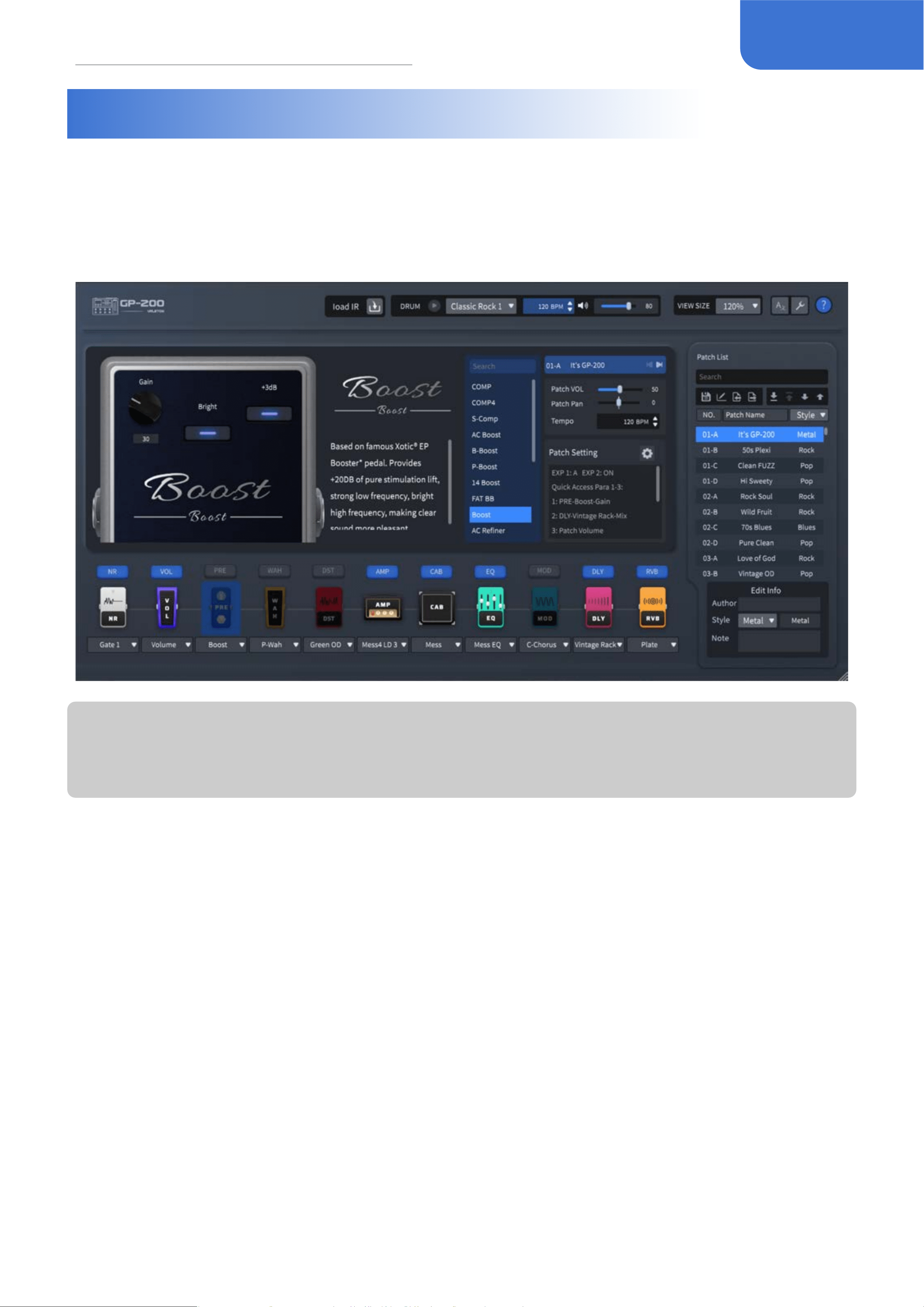
When you connect your GP-200 with the PC/Mac, you can use the free GP-200 software to
manage multiple functions, including adjusting tones, import/export patches, rmware upgrade,
loading 3rd party IRs and more. The GP-200 software supports both Windows and MacOS
platforms. Please download the software at www.valeton.net/support.
Note:
Before connecting the computer, make sure that it is set to “Normal” under “GLOBAL SETTINGS -
USB Audio - USB Mode”
21
Application Scenarios
Application Scenarios
In this section, we will introduce the connection methods of GP-200 in common usage scenarios.
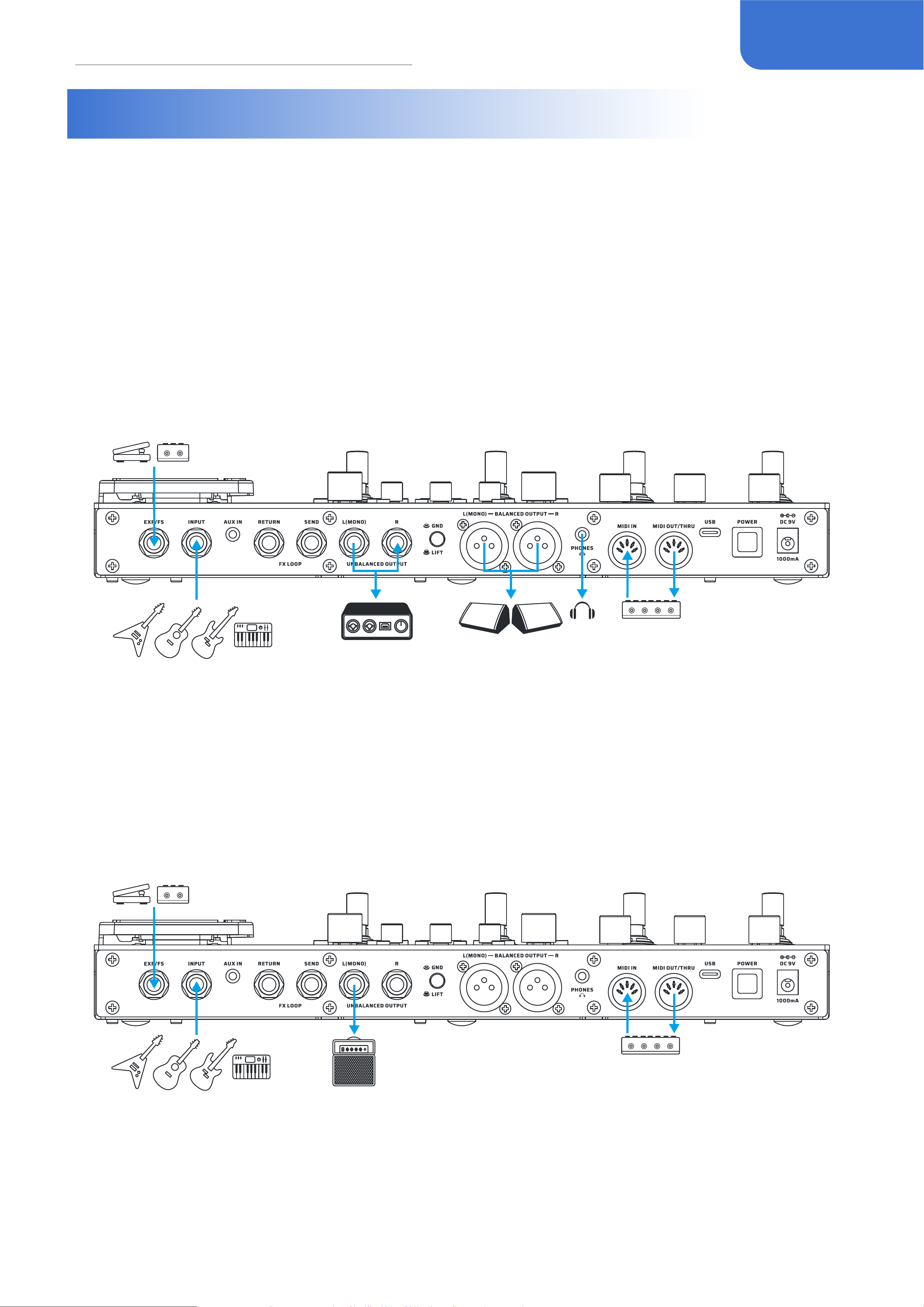
With full-range speaker devices
Full-range devices include audio interface, studio monitor, PA system, headphones etc. In this
scenario, the output jack or headphone jack of the GP-200 can be connected according to the
need of subsequent devices. The balanced and unbalanced output signals are the same, and the
balanced output is more suitable for long-distance signal transmission.
If there is only one speaker, please select the L (MONO) rst.
To get the best tonal performance, keep the AMP and CAB modules ON and keep the “No CAB”
mode o.
With guitar amps (INPUT jack)
In this scenario, directly connect the GP-200’s UNBALANCED OUTPUT to the guitar amp’s INPUT.
If only one amp is available, please select the L (MONO) rst.
To get the best tonal performance, keep the AMP and CAB modules o to avoid adverse eects on
the tone.
22
Application Scenarios
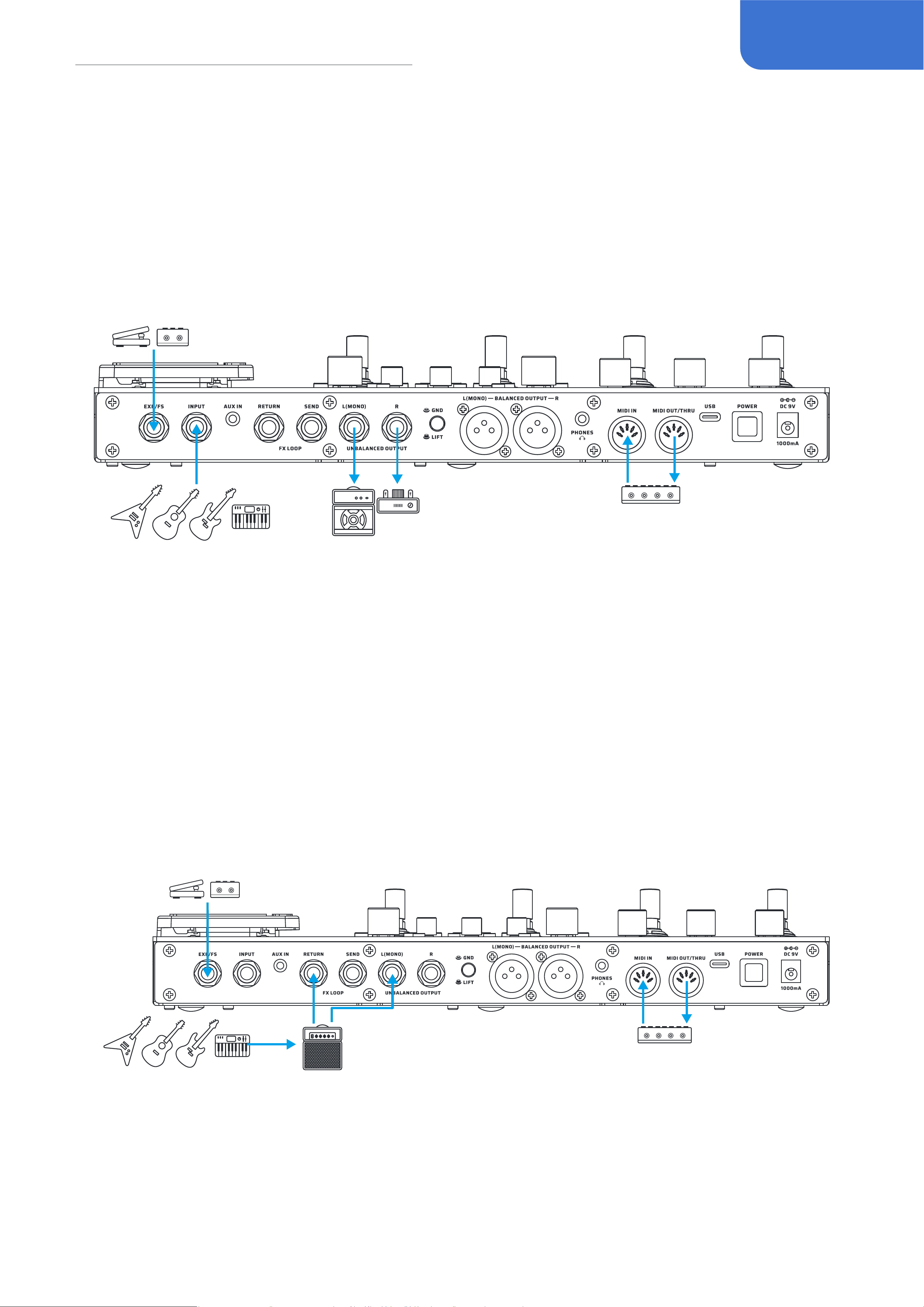
With guitar amps (using FX Loop to pre-position the GP-200)
In this scenario, connect the GP- 200’s UNBALANCED OUTPUT to a guitar amp’s RETURN.
This way, by bypassing the preamp and using the power amp of the guitar amp to pair with dozens
of rened eects in the AMP module, you’ll get the more realistic sound.
If only one amp is available, please select the L (MONO) rst.
To get the best tone performance, keep the CAB module o or turn on the “No CAB” mode to avoid
adverse eects on the tone.
With guitar amps (using FX Loop to post-position the GP-200)
In this scenario, all modules before the AMP (including the AMP module) will be muted, and the
eect chain after the AMP module will be applied between the preamp and the power amp. In
default setting, RETURN node is after AMP Module.
In order to get the best tone performance, keep the CAB module o or turn on the “No CAB” mode
to avoid adverse eects on the tone.
In addition, you need to pay attention to the GP-200’s patch volume monitor, if you hear the “clip”
sound, please reduce the input volume in the “Global - Input/Output”, or adjust the input to Line to
try get the more ideal tone.
23
Application Scenarios
With guitar amps (using FX Loop to run the 4 cable method)
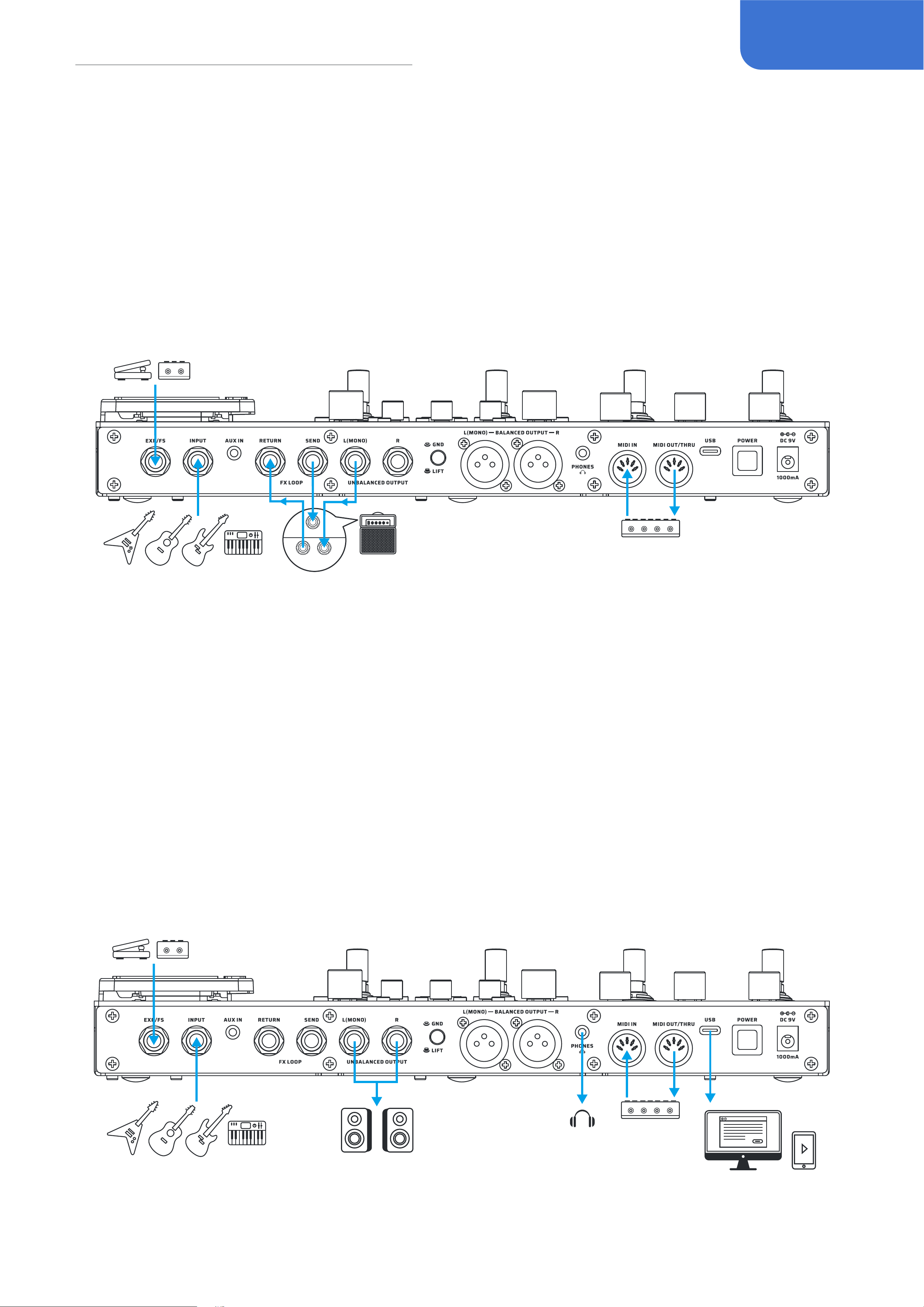
This method will split the GP-200’s eect chain into two parts (as shown below). It allows you to
place the GP-200’s PRE and DST modules before the preamp, while placing the EQ, MOD, DLY and
RVB modules between the preamp and the power amp.
In order to get the best tone performance, please keep the AMP and CAB modules o to avoid any
adverse eect on the tone.
Also note that please set the FX Loop at Series mode in the “Patch Settings - FX Loop - Parallel/
Series” to “Series”.
INPUT
SEND
RETURN
Audio Studio (for livestreaming)
In this scenario, the GP-200 will be functioned as an audio interface for a computer or a cell phone.
Use the supplied USB cable to connect to the computer; if connecting to a cell phone, an additional
OTG adapter cable may be required. When under Windows system prior to Windows 10, it needs
to be used with the ASIO driver available for downloading on the Valeton oicial website; while
on MacOS, iOS, Android and Windows system after Windows 10, it can be easily plugged in and
played. The input signal (INPUT) and the auxiliary input signal (AUX IN)* of the GP-200 can be used
by all the devices connected to the USB.
*Please make sure the “Global - USB Audio- AUX IN USB” function is enabled.

24
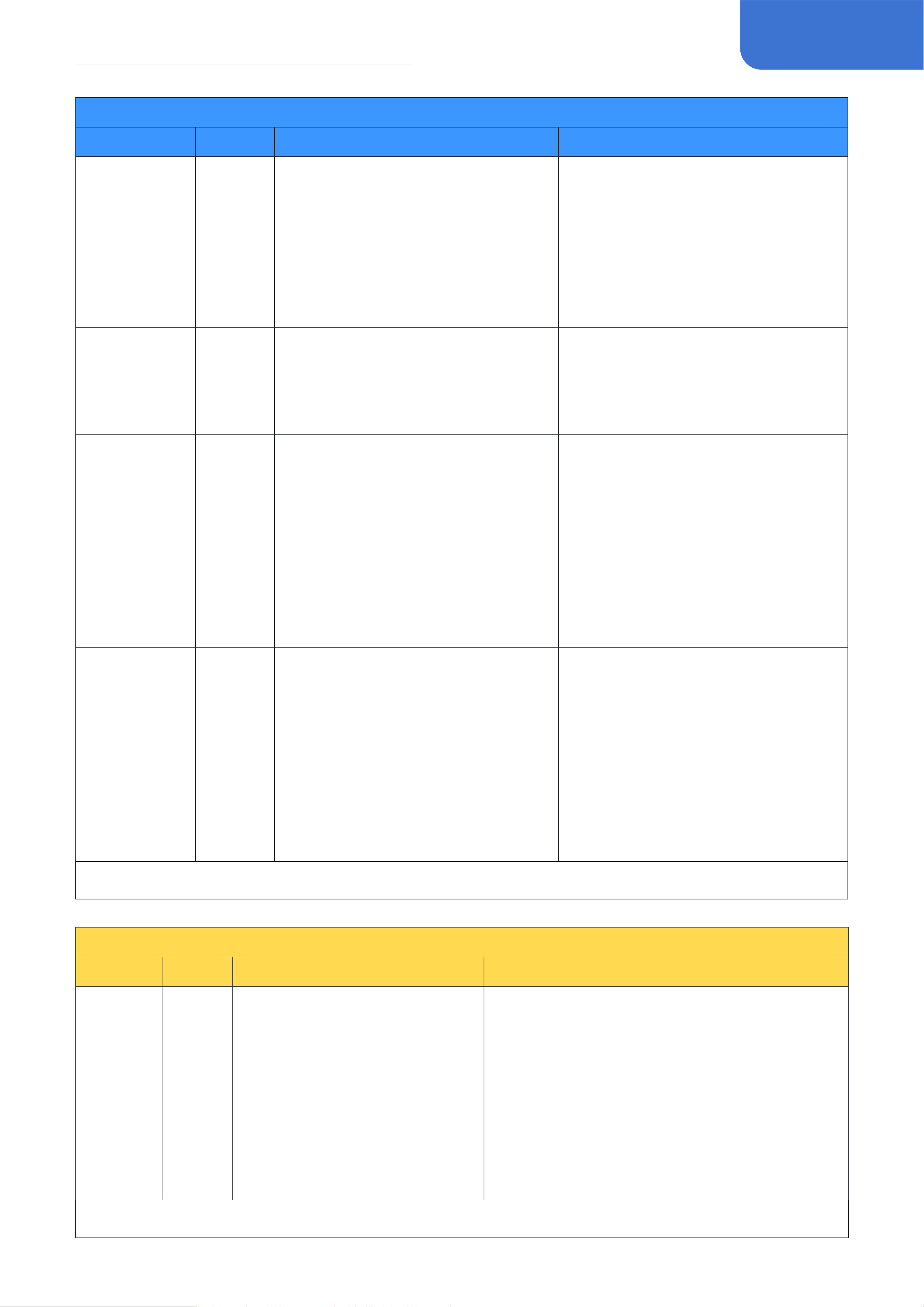
Eect List
Eect List
PRE
FX Title
Type
Description
Parameter Description
COMP Comp
Based on the legendary Ross™
Compressor. This is the originator
of the guitar compression effect.
It brings the guitar compression
effect to the public and becomes
an important element in the future.
It has a very natural and mellow
compression effect.
Sustain: Controls the compression
amount
Volume: Controls the effect output
COMP4 Comp
Based on the Keeley ® C4 4-knob
compressor*. A recording studio -
level compression effect.Clear sense
of hierarchy, the right amount of high
frequency makes your guitar sound
brighter.
Sustain: Controls the compression
amount
Attack: Controls how soon the
compressor starts to process the
signal
Volume: Controls the effect output
Clipping: Controls the input
sensitivity
S-Comp Comp
Flexible, fully adjustable compressor
effect
Threshold: Controls the compression
trigger level
Ratio: Controls the amount of
compression when the compressor is
triggered
Volume: Controls the output volume/
makeup amount
Attack: Controls how soon the
compressor starts to process the
signal
Release: Controls how soon the
compressor starts to release the
signal level back to normal after the
level drops below the threshold
Blend: Controls the wet/dry signal
ratio
Tone: Controls the effect tone
Micro Boost Boost
Based on the legendary MXR®
M133 Micro Amp2 pedal. Providing
up to 20dB of gain, the Micro Boost
elevates your amp sound without
changing its tonal character.
Gain: Controls the gain amount
AC Boost Boost
Based on famous Xotic® AC
Booster* pedal, It is a beautiful
smooth sounding drive/boost pedal
that it perfect for giving your tube
amp a bit of extra grunt.
Gain: Controls the gain amount
Volume: Controls the effect output
Bass/Treble: 2-band EQ that controls
the effect tone
*The manufacturers and product names mentioned above are trademarks or registered trademarks of their respective owners.
The trademarks were used merely to identify the sound character of the products

25
Eect List
PRE
FX Title
Type
Description
Parameter Description
B-Boost Boost
Any guitarist can benefit from the
Xotic® BB Preamp* overdrive pedal.
The pedal works equally well for
getting thick and creamy overdrive
tones with great sustain as it does
for pushing the clean front end of an
already driven amp with up to 30dB
of boost.
Gain: Controls the distortion amount
Volume: Controls the effect output
Bass/Treble: 2-band EQ that controls
the effect tone
P-Boost Boost
Based famous on Xotic® RC
Booster* provides you with super-
transparent 20dB boost without
altering your carefully crafted tone.
And it offers an added gain channel
for extra fatness. Take advantage
of the +/-15dB range on the treble
and bass EQ controls, and imbue
your guitar sound with unbelievable
harmonic complexity. The EQ
controls also compensate for the
extra bass boominess the volume
boost may cause and are great for
matching the response for multiple
guitars.
Gain: Controls the gain amount
Volume: Controls the effect output
Bass/Treble: 2-band EQ that controls
the effect tone
14 Boost Boost
Based famous on Fortin®Grind*. It
gives you up to +20dB of boost that
will tighten up and add aggression
to any tube or solid-state amplifier.
The GRIND’s surprising low noise
floor and high input Z lets every
nuance of instrument character
come through unaltered.
Gain: Controls the gain amount
FAT BB Boost
This is a clean boost and pre-amp
with a switchable low-cut filter and
separate bass and treble controls.
Volume: Controls the effect output
Bass/Treble: 2-band EQ that controls
the effect tone
Low Cut: Switches the low cut filter
(-6dB/oct @200Hz) on/off
Boost Boost
Based on famous Xotic® EP
Booster* pedal. Provides +20DB
of pure stimulation lift, strong low
frequency, bright high frequency,
making clear sound more pleasant.
Volume: Controls the effect output/
boost amount
+3dB: Selects the minimum boost
amount from 0dB (off) to +3dB (on)
Bright: Selects the sound character
from vintage (Bright off) to flat
(Bright on)
*The manufacturers and product names mentioned above are trademarks or registered trademarks of their respective owners.
The trademarks were used merely to identify the sound character of the products

26
Eect List
PRE
FX Title
Type
Description
Parameter Description
OD 9 OD
The Ibanez® Tube Screamer® is
synonymous with the transparent
overdrive tone used by many of
today's top guitarists. The TS9 pedal
boosts the guitar signal enough to
drive the preamp stage of your amp,
giving a very natural-sounding and
pure overdrive and crisp rhythm
crunch.
Gain: Controls the overdrive amount
Tone: Controls the effect tone
Volume: Controls the effect output
Yellow OD OD
Artist of the 70's was mostly
using a fuzz distortion sound and
the overdrive produced by it was
not typical. It was however soon
accepted as the new standard
of guitar sound. It features an
asymmetric circuit where the
positive and negative halves of the
waveform isn't distorted equally.
The sound is therefore still close to
the original even though distortion
have been added.
Gain: Controls the overdrive amount
Volume: Controls the effect output
Penesas OD
Based on the legendary Klon®
Centaur*, this overdrive model gives
you an authentic amp-in-a-box feel
with full, rich sound character that is
not harsh or boomy at all. Turn Gain
knob to minimum you get a superb
clean boost.
Gain: Controls the gain amount
Tone: Controls the effect tone
Volume: Controls the effect output
Super OD OD
The unique asymmetric overdrive
effect circuit adds warm and
pleasant overdrive effect to the
traditional guitar timbre.
Gain: Controls the overdrive amount
Tone: Controls the effect tone
Volume: Controls the effect output
Blues OD OD
Whether it's warm and natural
overdrive or full open distortion,
it gives your guitar the most
expression, makes it easy to control
the tone, and allows for subtle
variations in your personal playing
style.
Gain: Controls the distortion amount
Tone: Controls the effect tone
Volume: Controls the effect output
AC Refiner Acoustic
Designed for acoustic instruments,
bringing you a
more natural "woody" acoustic
sound
Shape: Controls the detailed effect
character
*The manufacturers and product names mentioned above are trademarks or registered trademarks of their respective owners.
The trademarks were used merely to identify the sound character of the products

27
Eect List
PRE
FX Title
Type
Description
Parameter Description
AC Sim Acoustic
Acoustic guitar simulator designed
for guitars. Its prototype comes
from a classic acoustic guitar analog
stompbox.
Body: Controls the “body resonance”
(low frequency response)
Top: Controls the upper harmonics
(high frequency response)
Volume: Controls the effect output
level
Mode: Selects from 4 different sound
characters:
Standard: Simulates the tonal
characteristics of a standard acoustic
guitar
Jumbo: Simulates the tonal
characteristics of a jumbo acoustic
guitar
Enhanced: Simulates the tonal
characteristics of an acoustic guitar
with enhanced attack
Piezo: Simulates the sound of a
piezo pickup
T-Wah Filter
Control the wah sound by playing
intensity.A wide range d envelope
filter (a.k.a. touch wah) designed
for guitarists and bassists that is
touch-sensitive and flexible
Sens: Controls the effect sensitivity
Range: Controls the frequency range
of the filter
Q: Controls the sharpness of the filter
Mix: Controls the wet/dry signal ratio
Mode: Selects from two modes:
Guitar/Bass
A-WAH
Auto
Filter
Set the rate to make the wah pedal
work regularly. Providing a variable
auto wah effect for both guitars and
basses.
Depth: Controls the effect depth
Rate: Controls the effect speed
Volume: Controls the output level
Low: Controls the bottom point of
center frequency (low freq)
High: Controls the top point of center
frequency (high freq)
Q: Controls the sharpness of the filter
Sync: Switches Tap Tempo sync on/
off
Step Filter Filter
A 4-step auto filter machine for
creating synth-like sounds
Step 1-4: Controls the filter center
frequency of each step
Rate: Controls the sequencing speed
Sync: Switches Tap Tempo sync on/
off
OCTA Pitch Provides polyphonic octave effect.
Oct 1: Controls the volume of lower
octave (1 oct down)
Oct 2: Controls the volume of higher
octave (1 oct up)
Dry: Controls the dry signal level
*The manufacturers and product names mentioned above are trademarks or registered trademarks of their respective owners.
The trademarks were used merely to identify the sound character of the products

28
Eect List
PRE
FX Title
Type
Description
Parameter Description
Pitch Pitch Polyphonic pitch shifter/harmonizer.
Low/Hi Pitch: Controls the low/high
pitch shifting range by semitones
Dry: Controls the dry signal level
Low/High Volume: Controls the low/
high pitch volume
P-Bend Pitch Polyphonic pitch shifter/harmonizer.
Low/Hi Pitch: Controls the low/high
pitch shifting range by semitones
Wet: Controls the wet signal level
Dry: Controls the dry signal level
Range: Controls the pitch range of
harmony effect
Hammy Pitch
Based on classic Whammy®*
monophonic pitch shifter pedal.
Assign the Position parameter to
expression pedal, then move the
pedal to get the effect.
Range: Controls the pitch shifting
range
Harmony: Switches Harmony
mode (dry and wet signals output
simultaneously) on/off
Volume: Controls the effect output
volume
Position: Control the changes in pitch
Harmonizer 1 Pitch
This model is a monophonic single
voice automatic harmonizer with
max. one octave pitch shifting range.
Detailed Key, Scale and Interval
settings can bring you lots of fun.
Mix: Controls the wet/dry signal ratio
of the effect
Key: Selects the chord key according
to your music
Mode: Selects the scale mode
according to your music
Interval: Selects the interval between
wet and dry signal
Smooth Mode: Switch on to get a
smooth note transition
Harmonizer 2 Pitch
This model is a monophonic dual
voice automatic harmonizer with
max. one octave pitch shifting range.
Detailed Key, Scale and Interval
settings can bring you lots of fun.
Mix: Controls the wet/dry signal ratio
of the effect
Key: Selects the chord key according
to your music
Mode: Selects the scale mode
according to your music
Interval 1/2: Selects the interval
between wet and dry signal
Smooth Mode: Switch on to get a
smooth note transition
Ring Mod Special
A ring modulator for creating
intresting inharmonic frequency
spectra (like bells and chimes.
Mix: Controls the wet/dry signal ratio
Freq: Controls the overall modulation
frequency
Fine: Fine tune the modulation
frequency by +/- 50Hz
Tone: Controls the effect tone
*The manufacturers and product names mentioned above are trademarks or registered trademarks of their respective owners.
The trademarks were used merely to identify the sound character of the products
29
Eect List
PRE
FX Title
Type
Description
Parameter Description
Saturate Special
Vintage tape saturation simulater
providing analog warmth and
natural distortion.
Saturation: Controls the effect gain
Mix: Controls the effect wet/dry
signal ratio
Volume: Controls the effect output
volume
Mix: Controls the wet/dry signal ratio
High Cut: Cuts the effect high
frequency signal
Auto Swell Special
This is an auto swell effect with
two parameters that are easy to
understand and use. It can make the
guitar sound like a violin.
Attack: Controls how fast the effect
swells
the input signal
Curve: Selects the volume swell curve
(Line, Exp, Log)
Hold Special
This is a freeze effect that can
freeze the sound for a short period
of time before the effect is activated
and make it play in a loop. The
Activate parameter can be assigned
to the expression pedal to activate
and deactivate the effect; You can
also turn on the Activate parameter
and use CTRL to directly control the
On/Off of the effect module.
Volume: Controls the effect output
volume
Activate: Switches the effect on/off
Freeze Special
This is a freeze effect that can
freeze the sound at the moment of
activation and keep it playing when
the effect is activated. The Activate
parameter can be assigned to the
expression pedal to activate and
deactivate the effect; You can also
turn on the Activate parameter and
use CTRL to directly control the On/
Off of the effect module.
Volume: Controls the effect output
volume
Attack: Controls how fast the effect
volume fades in
Release: Controls how fast the effect
volume fades out
Activate: Switches the effect on/off
*The manufacturers and product names mentioned above are trademarks or registered trademarks of their respective owners.
The trademarks were used merely to identify the sound character of the products
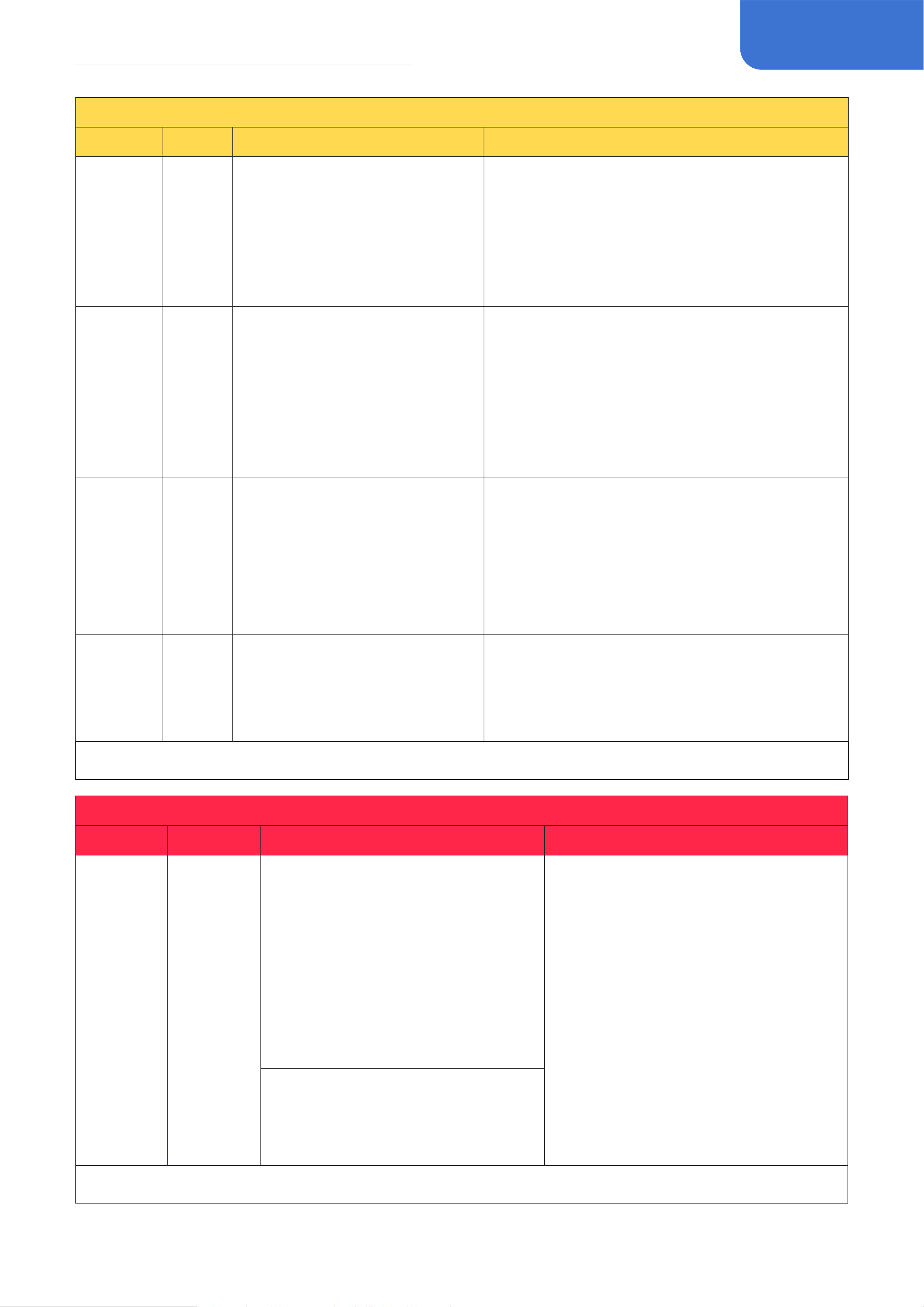
WAH
FX Title
Type
Description
Parameter Description
V-Wah Wah
Based on legendary VOX®
V846* wah pedal. The earliest
wa-wah pedal was originally
designed to allow the wind
instrument passing through it
to produce a more emotionally
expressive "wa-wah" sound.
The amplitude is small and acts
between medium and high
frequency.
Range: Controls the wah filter frequency range
Q: Controls the wah resonance (filter Q)
Volume: Controls the effect output
When using the EXP pedal as a wah pedal,
remember to first assign the position
parameters, then turn on and press the pedal
to get the effect.
*The manufacturers and product names mentioned above are trademarks or registered trademarks of their respective owners.
The trademarks were used merely to identify the sound character of the products
30
Eect List
WAH
FX Title
Type
Description
Parameter Description
C-Wah Wah
Based on legendary Dunlop®
CryBaby®* wah pedal. The
classic 60's traditional wha
pedal, acting between low and
medium frequency, moderate
amplitude, neutral timbre.
Range: Controls the wah filter frequency range
Q: Controls the wah resonance (filter Q)
Volume: Controls the effect output
When using the EXP pedal as a wah pedal,
remember to first assign the position
parameters, then turn on and press the pedal
to get the effect.
P-Wah Wah
Based on John Petrucci's rack
wah settings, this Cry Baby®
Wah features Volume, Q, and six
EQ controls for ultimate tonal
control over your wah sound.
Range: Controls the wah filter frequency range
Q: Controls the wah resonance (filter Q)
Volume: Controls the effect output
EQ: Switches built-in EQ on/off
When using the EXP pedal as a wah pedal,
remember to first assign the position
parameters, then turn on and press the pedal
to get the effect.
S-Wah Wah
Classic wah tone. Just press
down and feel the vocal sweep
and lush harmonics from the
wah's classic era. Its like keeping
a tiny jimi hendrix in your
pocket.
Range: Controls the wah filter frequency range
Q: Controls the wah resonance (filter Q)
Volume: Controls the effect output
When using the EXP pedal as a wah pedal,
remember to first assign the position
parameters, then turn on and press the pedal
to get the effect.B-Wah Wah Wah designed for basses
Hammy Pitch
Based on classic Whammy®*
monophonic pitch shifter pedal.
Assign the Position parameter
to expression pedal, then move
the pedal to get the effect.
Range: Controls the pitch shifting range
Harmony: Switches Harmony mode (dry and
wet signals output simultaneously) on/off
Volume: Controls the effect output volume
Position: Control the changes in pitch
*The manufacturers and product names mentioned above are trademarks or registered trademarks of their respective owners.
The trademarks were used merely to identify the sound character of the products
DST
FX Title
Type
Description
Parameter Description
Green OD OD
Based on legenary Ibanez® TS-808
Tube Screamer®* overdrive pedal.
Since it was first shown to the world
in 1979, TS808 has opened up a
new world. There are countless
guitarists who love it. It is a warm,
delicate overdrive effect.Can be
used as either an overdrive or a
Boost, can be used in a variety of
musical styles.
Gain: Controls the overdrive amount
Tone: Controls the effect tone
Volume: Controls the effect output
Famous users: Stevie Ray Vaughan,
Joe Satriani, Paul Gilbert, Andy
Timmons, Kirk Hammett, Steve Ray
Vanghan, Michal Landau, U2
*The manufacturers and product names mentioned above are trademarks or registered trademarks of their respective owners.
The trademarks were used merely to identify the sound character of the products

31
Eect List
DST
FX Title
Type
Description
Parameter Description
OD 9 OD
The Ibanez® Tube Screamer® is
synonymous with the transparent
overdrive tone used by many of
today's top guitarists. The TS9 pedal
boosts the guitar signal enough to
drive the preamp stage of your amp,
giving a very natural-sounding and
pure overdrive and crisp rhythm
crunch.
Gain: Controls the overdrive amount
Tone: Controls the effect tone
Volume: Controls the effect output
Yellow OD OD
Artist of the 70's was mostly
using a fuzz distortion sound and
the overdrive produced by it was
not typical. It was however soon
accepted as the new standard
of guitar sound. It features an
asymmetric circuit where the
positive and negative halves of the
waveform isn't distorted equally.
The sound is therefore still close to
the original even though distortion
have been added.
Gain: Controls the overdrive amount
Volume: Controls the effect output
Penesas OD
Based on the legendary Klon®
Centaur*, this overdrive model gives
you an authentic amp-in-a-box feel
with full, rich sound character that is
not harsh or boomy at all. Turn Gain
knob to minimum you get a superb
clean boost.
Gain: Controls the gain amount
Tone: Controls the effect tone
Volume: Controls the effect output
Swarm OD
The Providence® SOV-2 Stampede
OD pedal is designed to deliver
natural overdrive without obscuring
the inherent characteristics and tone
of the guitar being used. It features
a special bipolar power supply
that powers the internal circuitry
with boosted voltage, providing a
wider dynamic range than possible
with conventional 9-volt powered
overdrives. For singing lead tones
and solid, chunky rhythms, there’s
nothing like the SOV-2 Stampede
OD.
Gain: Controls the overdrive amount
Tone: Controls the effect tone
Volume: Controls the effect output
Super OD OD
The unique asymmetric overdrive
effect circuit adds warm and
pleasant overdrive effect to the
traditional guitar timbre.
Gain: Controls the overdrive amount
Tone: Controls the effect tone
Volume: Controls the effect output
*The manufacturers and product names mentioned above are trademarks or registered trademarks of their respective owners.
The trademarks were used merely to identify the sound character of the products

32
Eect List
DST
FX Title
Type
Description
Parameter Description
Scream OD OD
Based on Tube Screamer® Style
overdrive pedal, with unique timbre
characteristics.
Gain: Controls the overdrive amount
Volume: Controls the effect output
Tone: Controls the effect tone
Fat: Switches extra resonance on/off
Air: Switches extra presence on/off
Blues OD OD
Whether it's warm and natural
overdrive or full open distortion,
it gives your guitar the most
expression, makes it easy to control
the tone, and allows for subtle
variations in your personal playing
style.
Gain: Controls the distortion amount
Tone: Controls the effect tone
Volume: Controls the effect output
Force OD
Fulltone® OCD* sounds like finding
the “sweet spot” on your favorite
amp. It produces overdriven
tones that sound warm and full,
with genuine tube-like response.
There’s no shortage of usable drive,
meaning it dynamically ramps up
overdriven grit from dirty overtones
to saturated distortion in the smooth
range of its drive control.
Gain: Controls the distortion amount
Tone: Controls the effect tone
Volume: Controls the effect output
Mode: Selects from two different
sound characters: HP (High Peak mode
with more bottom end and distortion),
LP (Low Peak mode without changing
your original tone)
Blues
Master
OD
The Marshall® BluesBreaker* is a
low-gain pedal with exceptional
transparent tone. Moderate
overdrive and subtle boost are the
strong points, though it can get as
well emphatic with a cranked up
tube amp.
Gain: Controls the distortion amount
Volume: Controls the effect output
Bass/Middle/Treble: 3-band EQ that
controls the effect tone
Master OD OD
The EQ stage is extremely wide,
offering treble, mid and bass
shaping options and the gain stage
goes from clean to a well driven
plexi kind of tone and that is also
where its magic lies.
Gain: Controls the distortion amount
Tone: Controls the effect tone
Volume: Controls the effect output
Famous users: Stevie Ray Vaughan,
Joe Satriani, Paul Gilbert, Andy
Timmons, Kirk Hammett, Steve Ray
Vanghan, Michal Landau, U2
*The manufacturers and product names mentioned above are trademarks or registered trademarks of their respective owners.
The trademarks were used merely to identify the sound character of the products

33
Eect List
DST
FX Title
Type
Description
Parameter Description
TaiChi OD OD
Hermida® Zendrive® rose to fame
because of its tube-like tone. To get
the perfect balance of saturation
and harmonics required to result in
all of the 'in-tangibles' that make
a pedal overdrive sound like a real
amp overdrive. Things like touch
sensitivity and response to guitar
tone and volume control changes.
Gain: Controls the overdrive amount
Tone: Controls the effect tone
Volume: Controls the effect output
Voice: Controls the upper harmonics
character
Timmy OD OD
Paul Cochrane® Timmy* overdrive
was one of the original boutique
overdrive pedals, generating a
dedicated following based on its
open, un-compressed drive tone and
good EQ options.
Gain: Controls the distortion amount
Volume: Controls the effect output
Bass/Middle/Treble: 3-band EQ that
controls the effect tone
Mode(I,II,III): Distortion type selection
Precise OD OD
Horizon Devices® Precision Drive*
overdrive. Perfect modern metal rig
with precise tonal carving controls.
The built-in noise gate ensures the
cleanness and clarity of tone.
Gain: Controls the overdrive amount
Tone: Controls the effect tone
Volume: Controls the effect output
Attack (1, 2, 3, 4, 5, 6): Overdrive type
selection
Gate: Controls the built-in noise gate
threshold
Empire OD OD
Based on Analog.Man™ Prince of
Tone* Overload effect, multi-mode
selection, large tone adjustment
range to suit different scenes.
Gain: Controls the gain amount
Tone: Tone: Controls the effect tone
Volume: Controls the effect output
Mode: Select from 3 different modes
Lazaro Fuzz
Based on legendary Electro-
Harmonix®Big Mu Pi®*fuzz/
distortion pedal. It is very individual,
warm and thick sound wall, restless
but full of beauty.
Sustain: Controls the gain amount
Tone: Controls the effect tone
Volume: Controls the effect output
Famous users: Jimi Hendrix,
Santana, Pink Floyd, Jack White
Red Haze Fuzz
Based on legendary Dallas-Arbiter®
Fuzz Face®* fuzz pedal. Dallas
Arbiter conjured the sound of rock
and roll for half a century in 1966
with a few simple transistors. The
sound of Fuzz Face was heavy and
sharp, and its sound influenced
countless famous musicians.
Fuzz: Controls the gain amount
Volume: Controls the effect output
Famous users: Jimi Hendrix,
Santana, Pink Floyd, Jack White
*The manufacturers and product names mentioned above are trademarks or registered trademarks of their respective owners.
The trademarks were used merely to identify the sound character of the products

34
Eect List
DST
FX Title
Type
Description
Parameter Description
Sora Fuzz Fuzz
For fans of the aggressive
germanium fuzz tones that could
be wrought from those early units,
there’s nothing quite like the Sola
Sound® Tone Bender*. The Tone
Bender’s circuit became massively
popular, and over the following
years its design rapidly evolved,
making for a tangled and winding
history that is intertwined with
some of the most formative music
made in the U.K. from the mid 1960s
to the early ’70s.
Fuzz: Controls the gain amount
Volume: Controls the effect output
Plustortion Distortion
This little yellow box has produced
lots of great soundings in countless
classic studio albums. Yeah, we’re
talking the legendary MXR® M104
Distortion +*, and this M104-
based Plustortion. The Plustortion
recreated the Germanium-powered
soft clipping distortion, like what
Randy Rhoads and other hard
rockers do!
Gain: Controls the distortion amount
Volume: Controls the effect output
SM Dist Distortion
It is based on a classic orange three-
knob distortion effector, which can
be used to easily get the timbre
characteristics of the 70s-80s.
Gain: Controls the distortion amount
Tone: Controls the effect tone
Volume: Controls the effect output
Darktale Distortion
Based on legendary ProCo™ The
Rat* distortion (early LM308 OP-
amp version). The Rat* has come to
life thanks to its wide range of Filter
knob, bright and compact sound
head, full end and strong plasticity,
making it a favorite of many
musicians.
Gain: Controls the distortion amount
Filter: Counterclockwise controls the
effect tone
Volume: Controls the effect output
Famous users: Je Beck, Kurt Cobain
Chief Distortion
The Marshall® Guv'nor* was
released in 1988 and in production
during 4 years. This overdrive/
distortion Made in England effect
replicates the classic tube Marshall®
Amp sound into compact and solid
state box featuring a sustainable
gain with a touch of compression.
Gain: Controls the distortion amount
Volume: Controls the effect output
Bass/Middle/Treble: 3-band EQ that
controls the effect tone
*The manufacturers and product names mentioned above are trademarks or registered trademarks of their respective owners.
The trademarks were used merely to identify the sound character of the products

35
Eect List
DST
FX Title
Type
Description
Parameter Description
Master
Dist
Distortion
The Marshall Shredmaster Distortion
guitar effect pedal delivers face-
melting distortion and that tone
you can only get out of a Marshall.
The pedal offers treble, bass, and
contour knobs to tweak, twist, and
deliver an unbelievable performance.
Gain: Controls the distortion amount
Volume: Controls the effect output
Bass/Contour/Treble: 3-band EQ that
controls the effect tone
La Charger Distortion
Based on MI Audio® Crunch Box®*
distortion peal. Sensitive and
exquisite distortion beast, it satisfies
all the passion of Riff and Solo.The
response of each frequency band
is balanced, the dynamic feedback
is faithful to the fingertip, and the
noise can be well controlled even at
high gain.
Gain: Controls the distortion amount
Tone: Controls the effect tone
Volume: Controls the effect output
Revolt Distortion
Based on the
Suhr® Riot Distortion™* pedal,Three
knobs and a tone selection switch,
easy to use, large adjustable range
is very suitable for a variety of
playing scenes.
Gain: Controls the gain amount
Tone: Controls the effect tone
Volume: Controls the effect output
Mode: Selects from three different
sound
characters:
-I: Neutral sound
-II: A tighter, more aggressive sound
- III: A smoother, warmer sound
Flagman
Dist
Distortion
This model is based on a famous dirt
box recreating, perfect reproduction
of modern British high-gain timbre,
rich tunability, intuitive operation
to provide the perfect boost to your
music.
Gain: Controls the gain amount
Volume: Controls the effect output
Bass/Treble: 2-band EQ that controls
the
effect tone
Presence: Controls the effect
headroom
Tight: Controls the low bottom
resonance
Flex OD Bass Drive
A simple and effective distortion
effect for guitars and basses.
Gain: Controls the overdrive amount
Tone: Controls the effect tone
Volume: Controls the effect output
Mode: Selects from 3 different sound
characters: Normal (neutral sound),
Scoop (mid-scooped sound), Edge
(edgy sound)
Blend: Controls the wet/dry signal ratio
*The manufacturers and product names mentioned above are trademarks or registered trademarks of their respective owners.
The trademarks were used merely to identify the sound character of the products

36
Eect List
DST
FX Title
Type
Description
Parameter Description
Bass OD Bass Drive
This is an overload effect device
specially designed for bass. It
combines the original bass sound
with a unique overdrive effect to
make a very good distortion effect
while ensuring The original bass
dynamic tone. It can also be used as
a pretty good boost.
Gain: Controls the distortion amount
Blend: Controls the wet/dry signal ratio
Volume: Controls the effect output
Bass/Treble: 2-band EQ that controls
the effect tone
Black Bass
Bass
Preamp
Based on the Darkglass® Microtubes
B7K*. Takes the powerful dynamic
saturation circuit and adds a four-
band equalizer and a balanced line
driver for even greater versatility.
Designed for both studio and live
use, it will take your direct sound to
a whole new level.
Gain: Controls the distortion amount
Blend: Controls the wet/dry signal ratio
Volume: Controls the effect output
Low/Lo-mid/Hi-mid/Treble: 2-band EQ
that controls the effect tone
Attack(Cut,Boost,Flat): Controls the
effect high frequency tone
Bass
Hammer
Bass
Preamp
Based on the famous Aguilar®
Tone Hammer* Front effect, with
two sounds
Color, three-stage equalization and
mid-frequency sweep frequency
regulation, high timbre regulation, is
a good shape for timbre.
Gain: Controls the gain amount
Master: Controls the effect output
Bass/Middle/Treble: 3-band EQ that
controls
the effect tone
Mid Freq: Controls the range of middle
frequency
Drive: Turn on for extra gain stage
Micro
Boost
Boost
Based on the legendary MXR®
M133 Micro Amp2 pedal. Providing
up to 20dB of gain, the Micro Boost
elevates your amp sound without
changing its tonal character.
Gain: Controls the gain amount
AC Boost Boost
Based on famous Xotic® AC
Booster* pedal, It is a beautiful
smooth sounding drive/boost pedal
that it perfect for giving your tube
amp a bit of extra grunt.
Gain: Controls the gain amount
Volume: Controls the effect output
Bass/Treble: 2-band EQ that controls
the effect tone
B-Boost Boost
Any guitarist can benefit from the
Xotic® BB Preamp* overdrive pedal.
The pedal works equally well for
getting thick and creamy overdrive
tones with great sustain as it does
for pushing the clean front end of an
already driven amp with up to 30dB
of boost.
Gain: Controls the distortion amount
Volume: Controls the effect output
Bass/Treble: 2-band EQ that controls
the effect tone
*The manufacturers and product names mentioned above are trademarks or registered trademarks of their respective owners.
The trademarks were used merely to identify the sound character of the products

37
Eect List
DST
FX Title
Type
Description
Parameter Description
P-Boost Boost
Based famous on Xotic® RC
Booster* provides you with super-
transparent 20dB boost without
altering your carefully crafted tone.
And it offers an added gain channel
for extra fatness. Take advantage
of the +/-15dB range on the treble
and bass EQ controls, and imbue
your guitar sound with unbelievable
harmonic complexity. The EQ
controls also compensate for the
extra bass boominess the volume
boost may cause and are great for
matching the response for multiple
guitars.
Gain: Controls the gain amount
Volume: Controls the effect output
Bass/Treble: 2-band EQ that controls
the effect tone
14 Boost Boost
Based famous on Fortin®Grind*. It
gives you up to +20dB of boost that
will tighten up and add aggression
to any tube or solid-state amplifier.
The GRIND’s surprising low noise
floor and high input Z lets every
nuance of instrument character
come through unaltered.
Gain: Controls the gain amount
FAT BB Boost
This is a clean boost and pre-amp
with a switchable low-cut filter and
separate bass and treble controls.
Volume: Controls the effect output
Bass/Treble: 2-band EQ that controls
the effect tone
Low Cut: Switches the low cut filter
(-6dB/oct @200Hz) on/off
Boost Boost
Based on famous Xotic® EP
Booster* pedal. Provides +20DB
of pure stimulation lift, strong low
frequency, bright high frequency,
making clear sound more pleasant.
Volume: Controls the effect output/
boost amount
+3dB: Selects the minimum boost
amount from 0dB (off) to +3dB (on)
Bright: Selects the sound character
from vintage (Bright off) to flat (Bright
on)
*The manufacturers and product names mentioned above are trademarks or registered trademarks of their respective owners.
The trademarks were used merely to identify the sound character of the products
AMP
FX Title
Type
Description
Parameter Description
Tweedy Clean
Based on Fender® Tweed Deluxe*.
This amplifier with a dynamic range
from clean to wild overdrive, from
country rock to distortion, the
Fender® Tweed Deluxe* has been a
totem in every style for more than 60
years.
Gain: Controls the gain amount (pre
gain)
Tone: Controls the effect tone
Volume: Controls the output volume
(post gain)
*The manufacturers and product names mentioned above are trademarks or registered trademarks of their respective owners.
The trademarks were used merely to identify the sound character of the products

38
Eect List
AMP
FX Title
Type
Description
Parameter Description
Bellman 59N Clean
Based on Fender® ’59 Bassman®*.
The most dramatic speaker in the
history of Rock&Roll, originally
designed for bass, has become the
most classic guitar speaker.As clear
as water, Vacuum tubemakes the
sound more beautiful,make musical
instrument manufacturers are eager
to imitate the product.
Gain: Controls the gain amount (pre
gain)
Presence: Controls the effect
headroom
Volume: Controls the output volume
(post gain)
Bass/Middle/Treble: 3-band EQ that
controls the effect tone
Famous users: Stevie Ray Vaughan,
Kurt Cobain
Bellman 59B Drive Based on Fender® ’59 Bassman®*.
Gain: Controls the gain amount (pre
gain)
Presence: Controls the effect
headroom
Volume: Controls the output volume
(post gain)
Bass/Middle/Treble: 3-band EQ that
controls the effect tone
Dark Twin Clean
Based on Fender® ’65 Twin
Reverb®*. With a Stratocaster*, the
classic sound can be easily restored
in both country jazz and rock music.
Gain: Controls the gain amount (pre
gain)
Volume: Controls the output volume
(post gain)
Bass/Middle/Treble: 3-band EQ that
controls the effect tone
Bright: Switches extra brightness on/
off
Dark DLX Clean
Great clean tones are possible, but
the versatile "sweet distortion" is
what so many guitarists appreciate
and love with the Deluxe. Therefore
the amp is the number 1 for many
blues musicians, as well as for
modern super guitarrists. The
fender-typical spring reverb and a
tube vibrato effect allow even more
"vintage"- sound variants.
Gain: Controls the gain amount (pre
gain)
Volume: Controls the output volume
(post gain)
Bass/Treble: 2-band EQ that controls
the effect tone
Dark Vibra Clean
The original (6G16 circuit) Vibroverb
was introduced in February 1963.
The speaker lineup and the output
transformer were based on the
Fender Super amp of the time and the
circuit based on the Fender Vibrolux
of the time. The 40-watt amplifier
boasted two channels (NORMAL
and BRIGHT). Both channels had
VOLUME, TREBLE and BASS controls;
the single-control REVERB affected
only the BRIGHT channel.
Gain: Controls the gain amount (pre
gain)
Volume: Controls the output volume
(post gain)
Bass/Treble: 2-band EQ that controls
the effect tone
Bright: Switches extra brightness on/
off
*The manufacturers and product names mentioned above are trademarks or registered trademarks of their respective owners.
The trademarks were used merely to identify the sound character of the products

39
Eect List
AMP
FX Title
Type
Description
Parameter Description
Silver Twin Clean
Fender® Silverface Twin Reverb*
amplifiers were built between 1967
and 1981. It makes the sound of
history.
Gain: Controls the gain amount (pre
gain)
Volume: Controls the output volume
(post gain)
Bass/Treble: 2-band EQ that controls
the effect tone
SUPDual CL Clean
Based on the Supro®Dual-Tone
1624T* (CH1, clean tone). In the mid
60’s , vintage 1624T amps have been
sought-after for decades because
the Dual-Tone’s volume knob is
turned beyond noon, a fat and
compressed clean tone evolves into
an immediately recognizable grind
that remains articulate and listenable
even when turned up to full blast.
Gain: Controls the gain amount (pre
gain)
Volume: Controls the output volume
(post gain)
Tone: Controls the effect tone
SUPDual OD Drive
Based on the Supro®Dual-Tone
1624T* (CH1+2, dirty tone). In the
mid 60’s , vintage 1624T amps have
been sought-after for decades
because the Dual-Tone’s volume knob
is turned beyond noon, a fat and
compressed clean tone evolves into
an immediately recognizable grind
that remains articulate and listenable
even when turned up to full blast.
Gain 1/2: Controls the effect gain
amount
Tone 1/2: Controls the effect tone
Volume: Controls the effect output
and gain amount
Foxy 15TB Clean
Based on vintage VOX®* AC-100*
bass amp. In 1963, the Beatles was in
urgent need of a bass speaker with a
volume greater than that of the club's
crazy shouting, and the AC-100* came
into being. With 100W power and
4x12 "box, it has successfully become
the most representative bass voice in
the 1960s.
Gain: Controls the effect gain amount
Tone: Controls the effect tone
Volume: Controls the effect output
and gain amount
Bass/Treble: 2-band EQ that controls
the effect tone
Foxy 30N Clean
Based on VOX® AC30HW* (normal
channel). The symbolic clear sound
and warm and sharp overdrive, since
the day of its birth, has become the
Shadows, The Beatles, the Rolling
Stones and other group's favorite
speaker. The British band led the
"British Invasion" has made VOX®
speaker a household name as a
British rock icon.Even in hard rock and
British rock, Radiohead, Suede, Oasis
and other super groups are preferred.
Gain: Controls the gain amount (pre
gain)
Volume: Controls the output volume
(post gain)
Tone cut: Counterclockwise controls
the effect tone
Bright: Switches extra brightness on/
off
*The manufacturers and product names mentioned above are trademarks or registered trademarks of their respective owners.
The trademarks were used merely to identify the sound character of the products

40
Eect List
AMP
FX Title
Type
Description
Parameter Description
Foxy 30TB Drive
Based on VOX® AC30HW* (normal
channel).
Gain: Controls the gain amount (pre
gain)
Tone cut: Counterclockwise controls
the effect tone
Volume: Controls the output volume
(post gain)
Bass/Treble: 2-band EQ that controls
the effect tone
Char: Selects from two sound
characters: Cool (lower gain)/Hot
(higher gain)
J-120 CL Clean
Based on the legendary “Jazz Chorus”
solid state combo. When it came
out in 1975, it is the first musical
instrument speaker equipped with
Chorus effect. It was famous for its
pure sound and stereo chorus effect.
Gain: Controls the effect gain/output
amount
Bright: Switches extra presence on/
off
Bass/Middle/Treble: 3-band EQ that
controls the effect tone
Match CL Clean
Based Matchless™ Chieftain 212
combo* (clean tone). MATCHLESS®'s
philosophy since its founding in 1989
has been to make as many top-notch,
all-purpose speakers as possible.The
crisp graininess and perfect dynamic
feedback will make your playing
easy.
Gain: Controls the gain amount (pre
gain)
Presence: Controls the effect
headroom
Volume: Controls the output volume
(post gain)
Bass/Middle/Treble: 3-band EQ that
controls the effect tone
Match OD Drive
Based Matchless™ Chieftain 212
combo* (overdrive tone).
Gain: Controls the gain amount (pre
gain)
Presence: Controls the effect
headroom
Volume: Controls the output volume
(post gain)
Bass/Middle/Treble: 3-band EQ that
controls the effect tone
L-Star CL Clean
Based on Mesa/Boogie® Lone
Star™*(CH1). The pre-amp circuit has
extraordinary expressive power,
the comprehensive timbre and
intuitive operation are indicative
of Mesa/Boogie®'s far superior
technical capabilities.An engaging
and lively timbre experience.It has
a more compressed, balanced, soft
mid frequency sound, and its high-
frequency like gorgeous bell.
Gain: Controls the gain amount (pre
gain)
Presence: Controls the effect
headroom
Volume: Controls the output volume
(post gain)
Bass/Middle/Treble: 3-band EQ that
controls the effect tone
*The manufacturers and product names mentioned above are trademarks or registered trademarks of their respective owners.
The trademarks were used merely to identify the sound character of the products

41
Eect List
AMP
FX Title
Type
Description
Parameter Description
L-Star OD Drive
Based on Mesa/Boogie® Lone
Star™(CH2).
Input: Controls the gain amount (pre
gain)
Gain: Controls the effect drive amount
Presence: Controls the effect
headroom
Volume: Controls the output volume
(post gain)
Bass/Middle/Treble: 3-band EQ that
controls the effect tone
BogSV CL Clean
Based on Bogner ® Shiva* (20th
Anniversary version, Ch1. Modern
optimized circuit, with a double
channel treasure house of sound,
excellent circuit design makes it have
high-frequency transparent and
flexible low frequency, crystal clear
sound, British higain compact and
gorgeous.
Gain: Controls the gain amount (pre
gain)
Presence: Controls the effect
headroom
Volume: Controls the output volume
(post gain)
Bass/Treble: 2-band EQ that controls
the effect tone
Bright: Switches extra brightness on/
off
BogSV OD Drive
Based on Bogner ® Shiva* (20th
Anniversary version, Ch2.
Gain: Controls the gain amount (pre
gain)
Presence: Controls the effect
headroom
Volume: Controls the output volume
(post gain)
Bass/Middle/Treble: 3-band EQ that
controls the effect tone
Bog BlueV Drive
Bogner® XTC blue channel is popular
for its highly recognizable classic rock
and roll sound. Its loud and handsome
plexi voice has extraordinary
attainments.
Gain: Controls the gain amount (pre
gain)
Presence: Controls the effect
headroom
Volume: Controls the output volume
(post gain)
Bass/Middle/Treble: 3-band EQ that
controls the effect tone
Bog BlueM Drive
Bogner® XTC blue channel is popular
for its highly recognizable classic rock
and roll sound. Its loud and handsome
plexi voice has extraordinary
attainments.
Gain: Controls the gain amount (pre
gain)
Presence: Controls the effect
headroom
Volume: Controls the output volume
(post gain)
Bass/Middle/Treble: 3-band EQ that
controls the effect tone
*The manufacturers and product names mentioned above are trademarks or registered trademarks of their respective owners.
The trademarks were used merely to identify the sound character of the products

42
Eect List
AMP
FX Title
Type
Description
Parameter Description
Bog RedV Hi Gain
The Bogner® XTC red channel
is known for its fiery high gain
distortion and the main timbre.
Gain: Controls the gain amount (pre
gain)
Presence: Controls the effect
headroom
Volume: Controls the output volume
(post gain)
Bass/Middle/Treble: 3-band EQ that
controls the effect tone
Bog RedM Hi Gain
The Bogner® XTC red channel
is known for its fiery high gain
distortion and the main timbre.
Gain: Controls the gain amount (pre
gain)
Presence: Controls the effect
headroom
Volume: Controls the output volume
(post gain)
Bass/Middle/Treble: 3-band EQ that
controls the effect tone
Z38 CL Clean
Based on Dr. Z® Maz 38 Sr.* combo
(clean sound). With its varied
sound, wide frequency response
and dynamic range, it is not only an
excellent single platform, but it can
meet your needs whether you are a
British or An American fan.
Gain: Controls the output volume (pre
gain)
Tone cut: Counterclockwise controls
the effect tone
Volume: Controls the output volume
(post gain)
Bass/Middle/Treble: 3-band EQ that
controls the effect tone
Z38 OD Drive
Based on Dr. Z® Maz 38 Sr.* combo
(clean sound).
Gain: Controls the output volume (pre
gain)
Tone cut: Counterclockwise controls
the effect tone
Volume: Controls the output volume
(post gain)
Bass/Middle/Treble: 3-band EQ that
controls the effect tone
Knights CL Clean
Based on Grindrod® Pendragon
PG20C* (Normal channel, bright off).
If you're a big fan of British sound/
overdrive, this is a sound you can't
miss.It can bring the pure British
style, sound full of penetrating power.
Gain: Controls the gain amount (pre
gain)
Volume: Controls the effect output
(post gain)
Bass/Middle/Treble: 3-band EQ that
controls the effect tone
Knights CL+ Clean
Based on Grindrod® Pendragon
PG20C* (Normal channel, bright on).
If you're a big fan of British sound/
overdrive, this is a sound you can't
miss.It can bring the pure British
style, sound full of penetrating power.
Gain: Controls the gain amount (pre
gain)
Volume: Controls the effect output
(post gain)
Bass/Middle/Treble: 3-band EQ that
controls the effect tone
*The manufacturers and product names mentioned above are trademarks or registered trademarks of their respective owners.
The trademarks were used merely to identify the sound character of the products
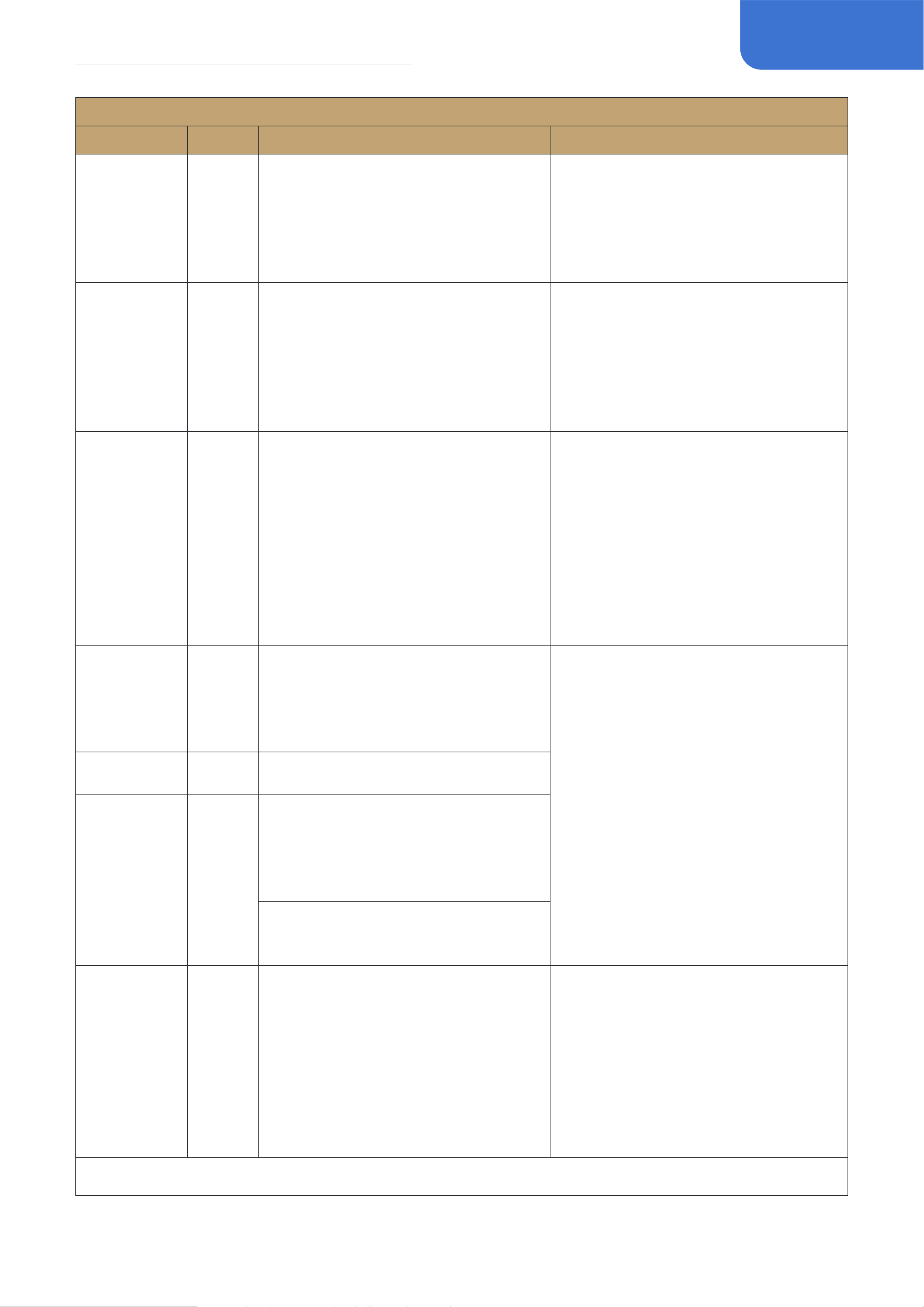
43
Eect List
AMP
FX Title
Type
Description
Parameter Description
Knights OD Drive
Based on Grindrod® Pendragon
PG20C* (Drive channel). If you're a
big fan of British sound/overdrive,
this is a sound you can't miss.It can
bring the pure British style, sound full
of penetrating power.
Gain: Controls the gain amount (pre
gain)
Volume: Controls the effect output
(post gain)
Bass/Middle/Treble: 3-band EQ that
controls the effect tone
Bad-KT CL Clean
Based on Bad Cat® Hot Cat 30* (clean
channel). As the world's first use of
Class A circuit design guitar speakers,
the sound quality has been greatly
improved.It combines British and
American styles, with rich harmonics
and sufficient headroom.
Gain: Controls the gain amount (pre
gain)
Presence: Controls the effect
headroom
Volume: Controls the output volume
(post gain)
Bad-KT OD Drive
Based on Bad Cat® Hot Cat 30*
(overdrive channel).
Gain: Controls the gain amount (pre
gain)
Presence: Controls the effect
headroom
Volume: Controls the output volume
(post gain)
Edge: Controls the high and high-mid
tone character
Bass/Treble: 2-band EQ that controls
the effect tone
Solo100 CL Clean
Based on Soldano® SLO100* (clean
channel). Also from Eddie Van Halen's
Brown Sound, Steve Vai's classic
album “Passion & Warfare” was
recorded in SLO100*.
Gain: Controls the gain amount (pre
gain)
Presence: Controls the effect
headroom
Volume: Controls the output volume
(post gain)
Bass/Middle/Treble: 3-band EQ that
controls the effect tone
Solo100 OD Drive
Based on Soldano® SLO100* (crunch
channel).
Solo100 LD Hi Gain
Based on Soldano® SLO100*
(overdrive channel). Also from Eddie
Van Hale's Brown Sound, Steve Vai's
classic album “Passion & Warfare”
was recorded in SLO100*.
Famous users: Steve Vai, Mark
Knopfler, Eric Clapton, Gary Moore
UK 45 Drive
Based on Marshall® JTM45*
(normal channel). In 1962, Marshall®
introduced the first guitar speakers
specifically designed for rock music,
and its powerful sound laid the
foundation for rock music. So its
panel material plexiglas as the most
classic 1960s sound specific name---
Plexi.
Gain: Controls the gain amount (pre
gain)
Presence: Controls the effect
headroom
Volume: Controls the output volume
(post gain)
Bass/Middle/Treble: 3-band EQ that
controls the effect tone
*The manufacturers and product names mentioned above are trademarks or registered trademarks of their respective owners.
The trademarks were used merely to identify the sound character of the products

44
Eect List
AMP
FX Title
Type
Description
Parameter Description
UK 45+ Drive
Based on Marshall® JTM45* . In 1962,
Marshall® introduced the first guitar
speakers specifically designed for
rock music, and its powerful sound
laid the foundation for rock music. So
its panel material plexiglas as the
most classic 1960s sound specific
name--- Plexi.
Gain: Controls the gain amount (pre
gain)
Presence: Controls the effect
headroom
Volume: Controls the output volume
(post gain)
Bass/Middle/Treble: 3-band EQ that
controls the effect tone
UK 45JP Drive
Based on Marshall® JTM45* . In 1962,
Marshall® introduced the first guitar
speakers specifically designed for
rock music, and its powerful sound
laid the foundation for rock music. So
its panel material plexiglas as the
most classic 1960s sound specific
name--- Plexi.
Gain: Controls the gain amount (pre
gain)
Presence: Controls the effect
headroom
Volume: Controls the output volume
(post gain)
Bass/Middle/Treble: 3-band EQ that
controls the effect tone
UK 50 Drive
Based on Marshall® JMP50* ("Jump"
connection). Through the adjustment
of JTM45*'s rectifier tube, the power
was improved. In 1966, Marshall
company launched JTM50*, and the
"Plexi" sound obtained utilizing the
overdrive by more people. The timbre
is more full compared to JTM45*.
Gain: Controls the gain amount (pre
gain)
Presence: Controls the effect
headroom
Volume: Controls the output volume
(post gain)
Bass/Middle/Treble: 3-band EQ that
controls the effect tone
UK 50+ Drive
Based on Marshall® JMP50* ("Jump"
connection). Through the adjustment
of JTM45*'s rectifier tube, the power
was improved. In 1966, Marshall
company launched JTM50*, and the
"Plexi" sound obtained utilizing the
overdrive by more people. The timbre
is more full compared to JTM45*.
Gain: Controls the gain amount (pre
gain)
Presence: Controls the effect
headroom
Volume: Controls the output volume
(post gain)
Bass/Middle/Treble: 3-band EQ that
controls the effect tone
UK 50JP Drive
Based on Marshall® JMP50* ("Jump"
connection). Through the adjustment
of JTM45*'s rectifier tube, the power
was improved. In 1966, Marshall
company launched JTM50*, and the
"Plexi" sound obtained utilizing the
overdrive by more people. The timbre
is more full compared to JTM45*.
Gain 1/2: Controls the gain amount
(pre gain)
Presence: Controls the effect
headroom
Volume: Controls the output volume
(post gain)
Bass/Middle/Treble: 3-band EQ that
controls the effect tone
*The manufacturers and product names mentioned above are trademarks or registered trademarks of their respective owners.
The trademarks were used merely to identify the sound character of the products

45
Eect List
AMP
FX Title
Type
Description
Parameter Description
UK SLP Drive
The 1959HWTM is a line right back to
the celebrated era of the mid to late
1960s, the original was born when
Pete Townshend asked Jim Marshall
if he could make it louder. This re-
issue delivers that classic Marshall
tone with the same overdrive and
crunch, using the authentic parts and
methods to construct.
Gain: Controls the gain amount (pre
gain)
Presence: Controls the effect
headroom
Volume: Controls the output volume
(post gain)
Bass/Middle/Treble: 3-band EQ that
controls the effect tone
UK 800 Drive
Based on Marshall® JCM800*. In
1981, the JCM800* quickly became
the rock and metal sound of the '80s
with its excellent higain sound.The
founders named it after their own
license plate number, inheriting and
continuing the legend of Plexi*.
Gain: Controls the gain amount (pre
gain)
Presence: Controls the effect
headroom
Volume: Controls the output volume
(post gain)
Bass/Middle/Treble: 3-band EQ that
controls the effect tone
Famous users: Kerry King, AC/DC,
Zakk Wylde
UK 900 Hi Gain
The JCM900 is the evolution of the
JCM800® adding another channel,
two reverb options and two gain
features. Tube Set consists of 3
x 12AX7 preamp tubes, and 4 x
6L6/5881 power tubes.
Known for its tone and workhorse
roadworthiness, the JCM900 has
many fans due to its feature set and
versatility.
Gain: Controls the gain amount (pre
gain)
Presence: Controls the effect
headroom
Volume: Controls the output volume
(post gain)
Bass/Middle/Treble: 3-band EQ that
controls the effect tone
Flagman 1 Drive
Based on the famous“Brown Eye”UK-
style boutique amp head (BE
channel). Improvement on Marshall®
Plexi* basis. It has smooth high
frequency, tight low frequency and
high frequency gain function. It can
be used in many musical styles.
Gain: Controls the gain amount (pre
gain)
Presence: Controls the effect
headroom
Volume: Controls the output volume
(post gain)
Bass/Middle/Treble: 3-band EQ that
controls the effect tone
Flagman 2 Drive
Based on the famous“Brown Eye”UK-
style boutique amp head (BE
channel).
Gain: Controls the gain amount (pre
gain)
Presence: Controls the effect
headroom
Volume: Controls the output volume
(post gain)
Bass/Middle/Treble: 3-band EQ that
controls the effect tone
*The manufacturers and product names mentioned above are trademarks or registered trademarks of their respective owners.
The trademarks were used merely to identify the sound character of the products
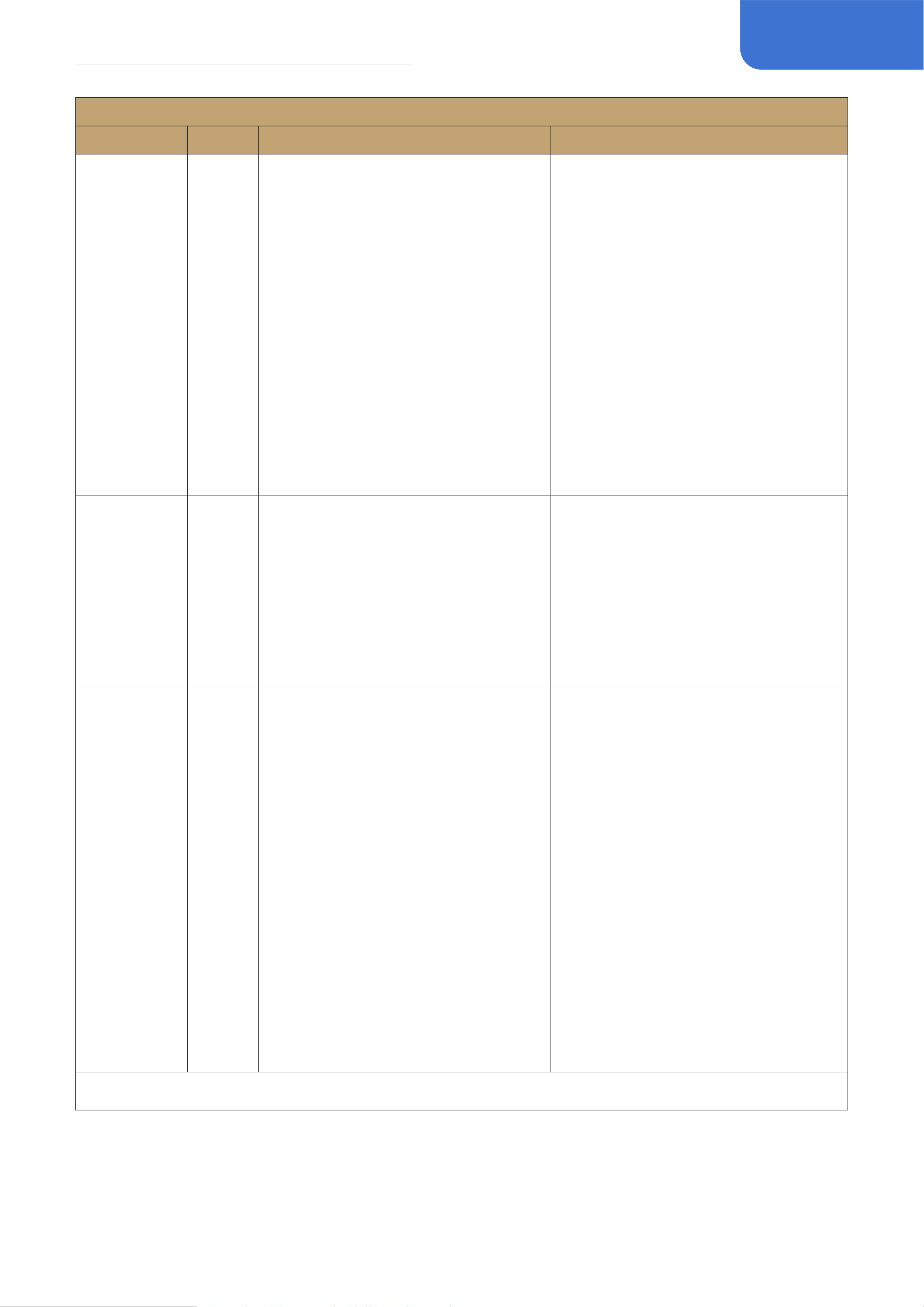
46
Eect List
AMP
FX Title
Type
Description
Parameter Description
Flagman+ 1 Hi Gain
Based on the famous“Brown Eye”UK-
style boutique amp head (HBE
channel).
Gain: Controls the gain amount (pre
gain)
Presence: Controls the effect
headroom
Volume: Controls the output volume
(post gain)
Bass/Middle/Treble: 3-band EQ that
controls the effect tone
Flagman+ 2 Hi Gain
Based on the famous“Brown Eye”UK-
style boutique amp head (HBE
channel).
Gain: Controls the gain amount (pre
gain)
Presence: Controls the effect
headroom
Volume: Controls the output volume
(post gain)
Bass/Middle/Treble: 3-band EQ that
controls the effect tone
Mess2C+ 1 Drive
Based on Mesa/Boogie® Mark II
C+™ (Lead channel) with 2 different
onboard switch combinations. In the
1980s, Mark II C + *established the
position of Mesa / Boogie® metal
style, and its voice appeared in the
albums of Metallica and Dream
Theater, and become a classic of
American Higain.
Gain: Controls the gain amount (pre
gain)
Presence: Controls the effect
headroom
Volume: Controls the output volume
(post gain)
Bass/Middle/Treble: 3-band EQ that
controls the effect tone
Mess2C+ 2 Drive
Based on Mesa/Boogie® Mark II
C+™ (Lead channel) with 2 different
onboard switch combinations. In the
1980s, Mark II C + *established the
position of Mesa / Boogie® metal
style, and its voice appeared in the
albums of Metallica and Dream
Theater, and become a classic of
American Higain.
Gain: Controls the gain amount (pre
gain)
Presence: Controls the effect
headroom
Volume: Controls the output volume
(post gain)
Bass/Middle/Treble: 3-band EQ that
controls the effect tone
Mess 2C+ 3 Drive
Based on Mesa/Boogie® Mark II
C+™ (Lead channel) with 2 different
onboard switch combinations. In the
1980s, Mark II C + *established the
position of Mesa / Boogie® metal
style, and its voice appeared in the
albums of Metallica and Dream
Theater, and become a classic of
American Higain.
Gain: Controls the gain amount (pre
gain)
Presence: Controls the effect
headroom
Volume: Controls the output volume
(post gain)
Bass/Middle/Treble: 3-band EQ that
controls the effect tone
*The manufacturers and product names mentioned above are trademarks or registered trademarks of their respective owners.
The trademarks were used merely to identify the sound character of the products

47
Eect List
AMP
FX Title
Type
Description
Parameter Description
Mess4 LD Hi Gain
Based on Mesa/Boogie® Mark
IV™ (Lead channel). Based on the
classic upgrade, it inherits the
omnipotence of Mesa / Boogie®,
with rich harmonics and sustain from
the voiceless tone to the sharp dark
morden higain timbre.
Gain: Controls the gain amount (pre
gain)
Presence: Controls the effect
headroom
Volume: Controls the output volume
(post gain)
Bass/Middle/Treble: 3-band EQ that
controls the effect tone
Mess4 LD 2 Hi Gain
Based on Mesa/Boogie® Mark IV™
(Lead 2 channel).
Gain: Controls the gain amount (pre
gain)
Presence: Controls the effect
headroom
Volume: Controls the output volume
(post gain)
Bass/Middle/Treble: 3-band EQ that
controls the effect tone
Mess4 LD 3 Hi Gain
Based on Mesa/Boogie® Mark IV™
(Lead 3 channel).
Gain: Controls the gain amount (pre
gain)
Presence: Controls the effect
headroom
Volume: Controls the output volume
(post gain)
Bass/Middle/Treble: 3-band EQ that
controls the effect tone
Mess DualV Hi Gain
Based on Mesa/Boogie Dual
Rectifier(Vintage mode). The
distortion of Rectifier series is warm,
and the distortion of Rectifier series
is very wide, which is more thick and
solid than Mark.
Gain: Controls the gain amount (pre
gain)
Presence: Controls the effect
headroom
Volume: Controls the output volume
(post gain)
Bass/Middle/Treble: 3-band EQ that
controls the effect tone
Mess DualM Hi Gain
Based on Mesa/Boogie Dual
Rectifier(Modern mode). The
distortion of Rectifier series is warm,
and the distortion of Rectifier series
is very wide, which is more thick and
solid than Mark.
Gain: Controls the gain amount (pre
gain)
Presence: Controls the effect
headroom
Volume: Controls the output volume
(post gain)
Bass/Middle/Treble: 3-band EQ that
controls the effect tone
*The manufacturers and product names mentioned above are trademarks or registered trademarks of their respective owners.
The trademarks were used merely to identify the sound character of the products

48
Eect List
AMP
FX Title
Type
Description
Parameter Description
Juice30 OD Drive
Based on Orange® AD30™* (Dirty
channel). This is an amp head with
pure tube sound in the classic Class A
circuit (with 4 El84 amp tubes), which
guarantees harmonious sounds with
an impressive spectrum. The "TC"
stands for "twin channel", where
a lead channel available, ensuring
sustain rich sounds even at lowest
volume.
Gain: Controls the gain amount (pre
gain)
Volume: Controls the output volume
(post gain)
Bass/Middle/Treble: 3-band EQ that
controls the effect tone
Juice R100 Hi Gain
Based on Orange® Rockerverb 100™*
(Dirty channel). Once launched, this
amplifier has become a new favorite
of rock musicians. Its sound is unique,
and its timbre can be controlled from
warm and sweet clear tone to heavy
music, which will bring surprise to the
performers.
Gain: Controls the gain amount (pre
gain)
Volume: Controls the output volume
(post gain)
Bass/Middle/Treble: 3-band EQ that
controls the effect tone
Bright: Switches extra brightness on/
off
EV 51 Hi Gain
Based on Peavey® 5150® (LEAD
channel). Guitarist Eddie Van Halen,
who began working with Peavey® in
the 1980s, loved the sound and took
the album's title "5150" to the world
with its metallic sound.
Gain: Controls the gain amount (pre
gain)
Presence: Controls the effect
headroom
Volume: Controls the output volume
(post gain)
Bass/Middle/Treble: 3-band EQ that
controls the effect tone
Famous users: Eddie Van Halen
Eagle 120 Hi Gain
ENGL® Savage 120 Amplifier
embodies ENGL’s rich legacy
of creating metal machines for
delivering truly punishing tones, with
clear dynamics and tremendous sonic
variety.
This incredible tonal flexibility comes
from the 4 channel layout of the
amp, with a dedicated Clean channel,
two separate Crunch channels, and
a super-saturated Lead channel, all
supported by two discrete EQs and a
wide selection of additional features.
Gain: Controls the gain amount (pre
gain)
Presence: Controls the effect
headroom
Volume: Controls the output volume
(post gain)
Bass/Middle/Treble: 3-band EQ that
controls the effect tone
*The manufacturers and product names mentioned above are trademarks or registered trademarks of their respective owners.
The trademarks were used merely to identify the sound character of the products
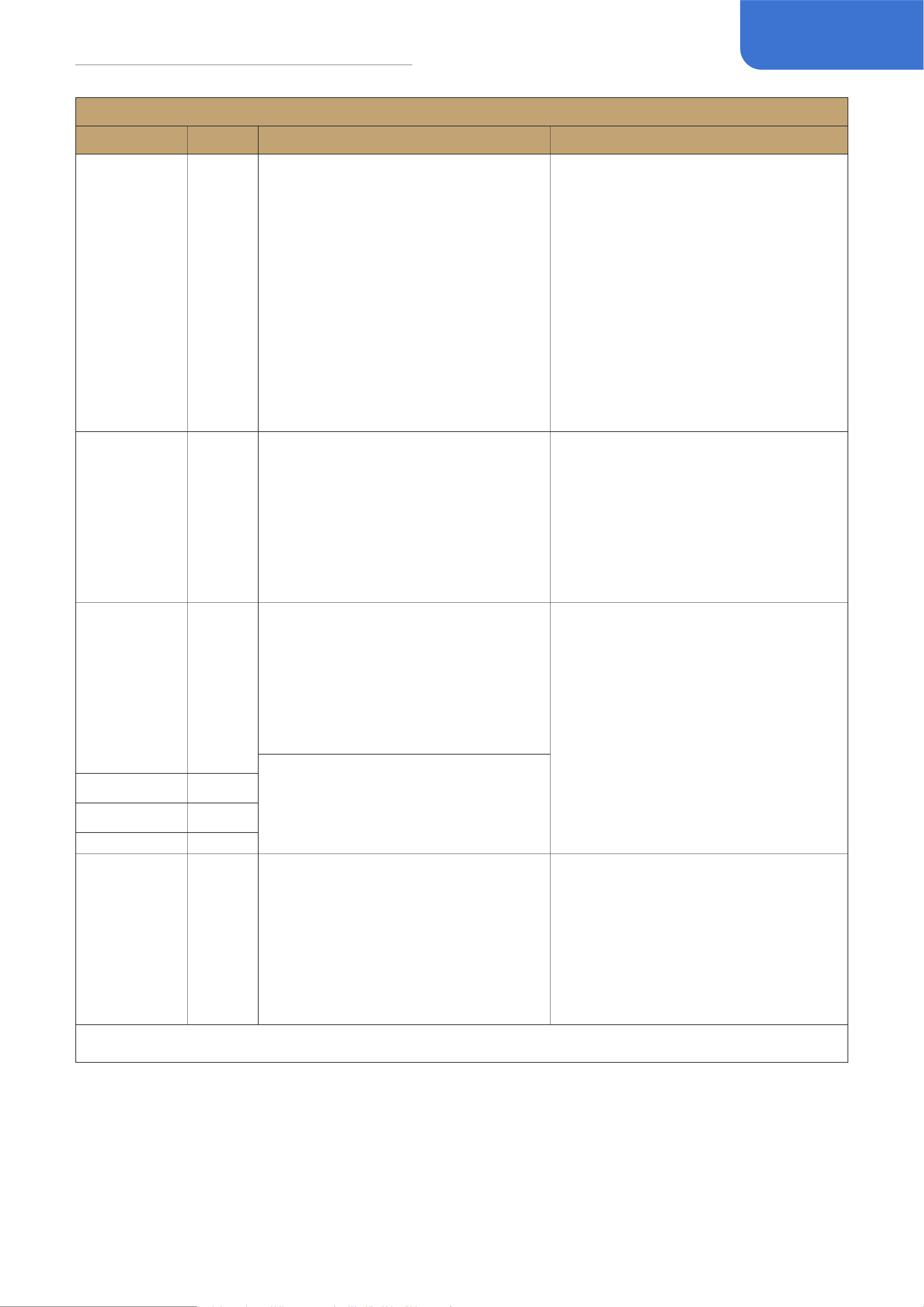
49
Eect List
AMP
FX Title
Type
Description
Parameter Description
Eagle 120+ Hi Gain
ENGL® Savage 120 Amplifier
embodies ENGL’s rich legacy
of creating metal machines for
delivering truly punishing tones, with
clear dynamics and tremendous sonic
variety.
This incredible tonal flexibility comes
from the 4 channel layout of the
amp, with a dedicated Clean channel,
two separate Crunch channels, and
a super-saturated Lead channel, all
supported by two discrete EQs and a
wide selection of additional features.
Gain: Controls the gain amount (pre
gain)
Presence: Controls the effect
headroom
Volume: Controls the output volume
(post gain)
Bass/Middle/Treble: 3-band EQ that
controls the effect tone
Power LD Hi Gain
Based on ENGL® Powerball II
E645/2* (CH4). It can bring you
extremely compact low frequency,
a lot of gain and precise dynamic
response, which is very suitable for
modern rock and metal music.
Gain: Controls the gain amount (pre
gain)
Presence: Controls the effect
headroom
Volume: Controls the output volume
(post gain)
Bass/Middle/Treble: 3-band EQ that
controls the effect tone
Dizz VH Hi Gain
Based on Diezel® VH4*. Born in
Germany in the 1990s, its timbre
and multifunction have attracted
countless guitar masters.The unique
Modern Higain quickly conquered
many musicians.
Gain: Controls the gain amount (pre
gain)
Presence: Controls the effect
headroom
Volume: Controls the output volume
(post gain)
Bass/Middle/Treble: 3-band EQ that
controls the effect tone
Famous users: Guns N’ Roses,
METALLICA, KORN, Slipknot, BON
JOVI
Dizz VH S Hi Gain
Dizz VH+ Hi Gain
Dizz VH+ S Hi Gain
Classic Bass Bass
Based on Ampeg® SVT* bass amp.
Launched in 1969, Ampeg SVT has
always been the most mainstream
bass speaker, Have a strong ability to
sound shape.
Gain: Controls the gain amount
Midrange: Selects the center
frequency of Midrange control:
220Hz/450Hz /800Hz/1.6kHz/3kHz
Volume: Controls the output volume
(post gain)
Bass/Midrange/Treble: 3-band EQ that
controls the effect tone
*The manufacturers and product names mentioned above are trademarks or registered trademarks of their respective owners.
The trademarks were used merely to identify the sound character of the products

50
Eect List
AMP
FX Title
Type
Description
Parameter Description
Foxy Bass Bass
Based on vintage VOX®* AC-100*
bass amp. In 1963, the Beatles was in
urgent need of a bass speaker with a
volume greater than that of the club's
crazy shouting, and the AC-100* came
into being. With 100W power and
4x12 "box, it has successfully become
the most representative bass voice in
the 1960s.
Volume: Controls the effect gain/
output amount
Bass/Treble: 2-band EQ that controls
the effect tone
Mess Bass Bass
Based on Mesa/Boogie® Bass 400*
amp. You can hear the sound of the
early bass speakers in many albums.
Gain: Controls the gain amount
Volume: Controls the output volume
(post gain)
Bass/Middle/Treble: 3-band EQ that
controls the effect tone
Mini Bass Bass
Based on Ampeg® B-15* "Flip Top”
bass amp. The B-15* was conceived
by legendary Jess Oliver in 1958. It
can be seen from the early clubs to
the world's top studios. B-15* can be
said to be a landmark product that is
hard to be ignored.
Volume: Controls the effect gain/
output amount
Bass/Treble: 2-band EQ that controls
the effect tone
Bass Pre Bass
Based on Alembic™ F-2B* preamp.In
the 1960s, inspired by the Fender®
speaker, the circuit was transformed
in an all-round way, which brought
the extremely advanced adjustment
mode at that time, which was loved
by many musicians, thus leaving a
strong mark in the history of rock
music.
Volume: Controls the effect gain/
output amount
Bright: Switches extra brightness on/
off
Bass/Middle/Treble: 3-band EQ that
controls the effect tone
AC Pre Acoustic
Based on AER® Colourizer 2* acoustic
preamp. Originated in Germany, it
is a preamp designed for acoustic
guitar sound reinforcement. It will
bring richer dynamics and overtones
to your acoustic guitar, making the
sound more three-dimensional and
vivid.
Volume: Controls the effect gain/
output amount
Tone: Controls the brightness
Balance: Controls the tone control
balance; set to 0 to disable tone
control
EQ Freq: Controls the EQ center
frequency from 90Hz to 1.6kHz
EQ Q: Controls the EQ bandwidth
EQ Gain: Controls the EQ boost/cut
amount; set to 50 to keep neutral
*The manufacturers and product names mentioned above are trademarks or registered trademarks of their respective owners.
The trademarks were used merely to identify the sound character of the products
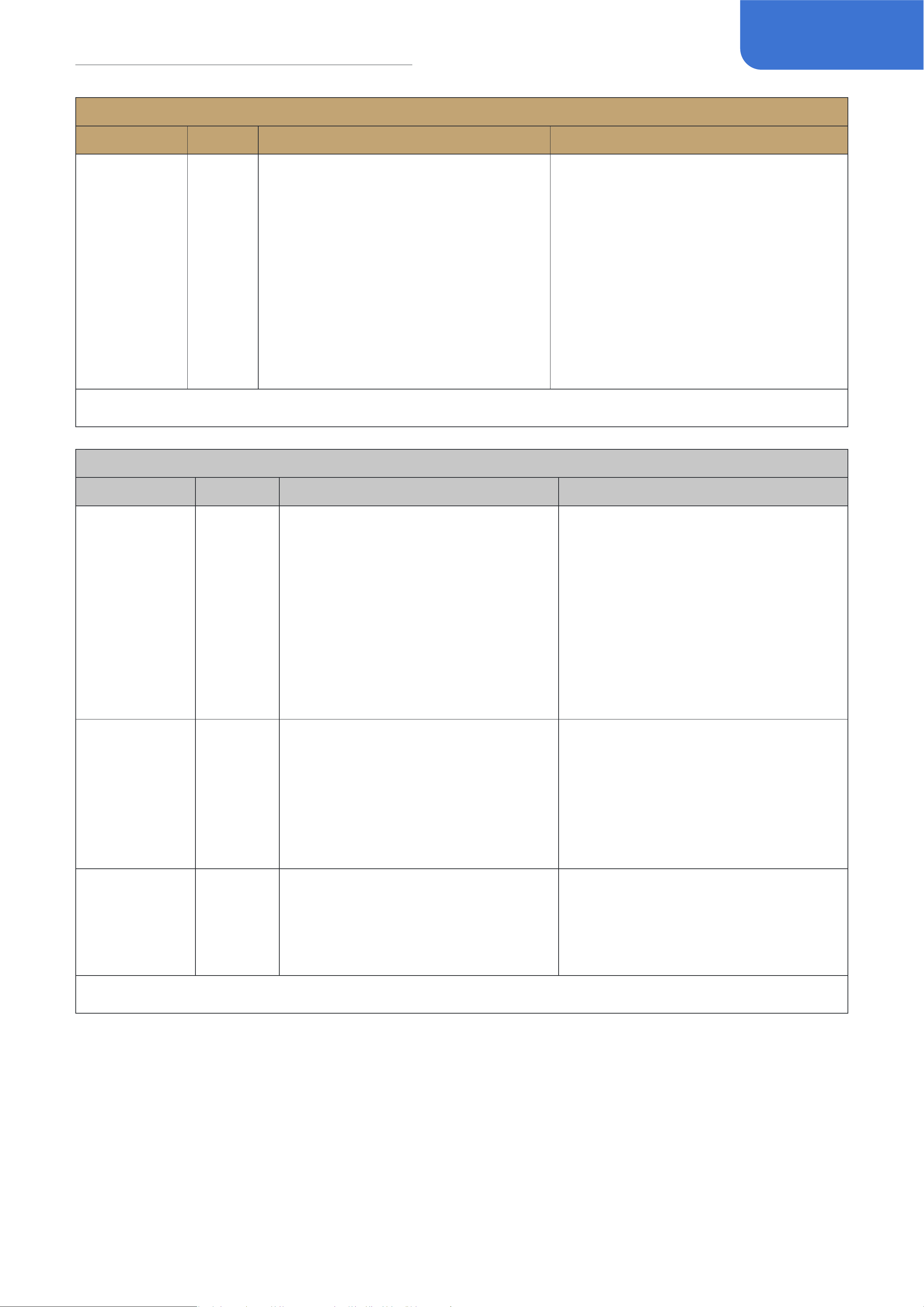
51
Eect List
AMP
FX Title
Type
Description
Parameter Description
AC Pre 2 Acoustic
Based on AER® Colourizer 2* acoustic
preamp. Originated in Germany, it
is a preamp designed for acoustic
guitar sound reinforcement. It will
bring richer dynamics and overtones
to your acoustic guitar, making the
sound more three-dimensional and
vivid.
Volume: Controls the effect gain/
output amount
Tone: Controls the brightness
Balance: Controls the tone control
balance; set to 0 to disable tone
control
EQ Freq: Controls the EQ center
frequency from 680Hz to 11kHz
EQ Q: Controls the EQ bandwidth
EQ Gain: Controls the EQ boost/cut
amount; set to 50 to keep neutral
*The manufacturers and product names mentioned above are trademarks or registered trademarks of their respective owners.
The trademarks were used merely to identify the sound character of the products
NR
FX Title
Type
Description
Parameter Description
Gate 1 Gate
Based on famous ISP®Decimator™*
noise gate pedal. The Decimator
features improvements in the
expander tracking with their new
Linearized Time Vector Processing™.
This novel improvement provides a
more linear release time-constant
response for the exponential
release curve of the downward
expander.
Threshold: Controls the gate trigger
level
Gate 2 Gate
Flexible noise gate with attack and
release control.
Threshold: Controls the gate trigger
level
Attack: Controls how soon the gate
starts to process the signal
Release: Controls the noise fade-out
duration time after the level drops
below the threshold
Auto Swell Special
This is an auto swell effect with
two parameters that are easy to
understand and use. It can make
the guitar sound like a violin.
Attack: Controls how fast the effect
swells
the input signal
Curve: Selects the volume swell curve
(Line, Exp, Log)
*The manufacturers and product names mentioned above are trademarks or registered trademarks of their respective owners.
The trademarks were used merely to identify the sound character of the products
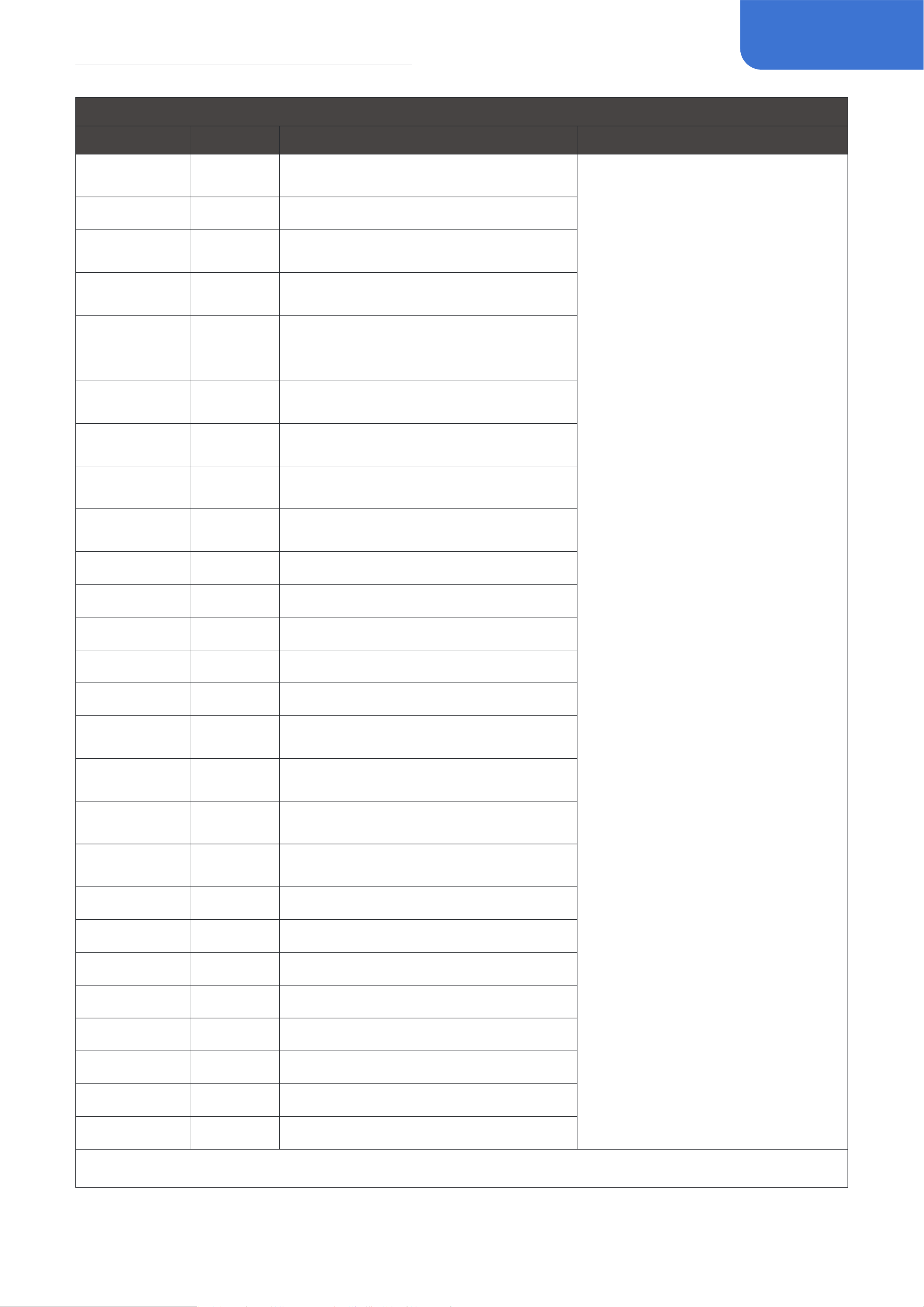
52
Eect List
CAB
FX Title
Type
Description
Parameter Description
SUP ZEP 1 x 6”
Supro®* 1x6" cabinet with oval
speaker
Volume: Controls effect output
volume
Low Cut: Highpass filter, cut off
the low-frequency signal below
the selected
Hi Cut: Lowpass filter, cut off the
high-frequency signal above the
selected
TWD CP 1 x 8” Vintage Fender® Champ* 1x8" cabinet
TWD PRC 1 x 10”
Vintage Fender® Princeton* 1x10"
cabinet
TWD SUP 2 x 10”
A custom Fender® Tweed* 2x10"
cabinet
TWD LUX 1 x 12” Fender® Tweed Deluxe* 1x12" cabinet
Dark LUX 1 x 12” Vintage Fender® Deluxe* 1x12" cabinet
Dark VIT 1 x 12”
Vintage Fender® Vibrolux* 1x12"
cabinet
Dark Twin 2 x 12”
Vintage Fender® ’65 Twin Reverb*
2x12" cabinet
Dark CS 2 x 12”
Custom modified Fender®* 2x12"
cabinet
Bellman 1 2 x 12”
Vintgae Fender® "Piggyback"
Bassman®* 2x12" cabinet
Bellman 2 4 x 10” Fender® '59 Bassman®* 4x10" cabinet
J-120 2 x 12” Legendary "Jazz Chorus" 2x12" cabinet
UK G12 1 x 12” Marshall®* 1x12" cabinet
UK GRN 1 2 x 12” Marshall® 2550* 2x12" cabinet
UK LD 4 x 12” Marshall® 1960AV* 4x12" cabinet
UK TD 4 x 12”
68 Marshall® Basketweave* 4x12"
cabinet
UK MD 4 x 12”
Custom modified Marshall®* 4x12"
cabinet
UK GRN 2 4 x 12”
Vintage Marshall® 4x12" cabinet with
Celestion® Greenback®* speakers
UK 75 4 x 12”
Marshall®* 4x12" cabinet with
Celestion® G12T-75* speakers
UK Dark 4 x 12” 1968 Marshall®* 4x12" cabinet
FOXY 1 1 x 12” Vintage VOX® AC15* 1x12" cabinet
FOXY 2 2 x 12” Vintage VOX® AC30* 2x12" cabinet
ROUT 1 x 12” Carr® Rambler* 1x12" cabinet
BogSV 1 x 12” Bogner® Shiva* 1x12" cabinet
Bad-KT 1 x 12” Black Cat® Hot Cat* 1x12" cabinet
Match 2 x 12” Matchless® Chieftain* 2x12" cabinet
TOM OPEN 1 x 12” Swart® Atomic Space* 1x12" cabinet
*The manufacturers and product names mentioned above are trademarks or registered trademarks of their respective owners.
The trademarks were used merely to identify the sound character of the products
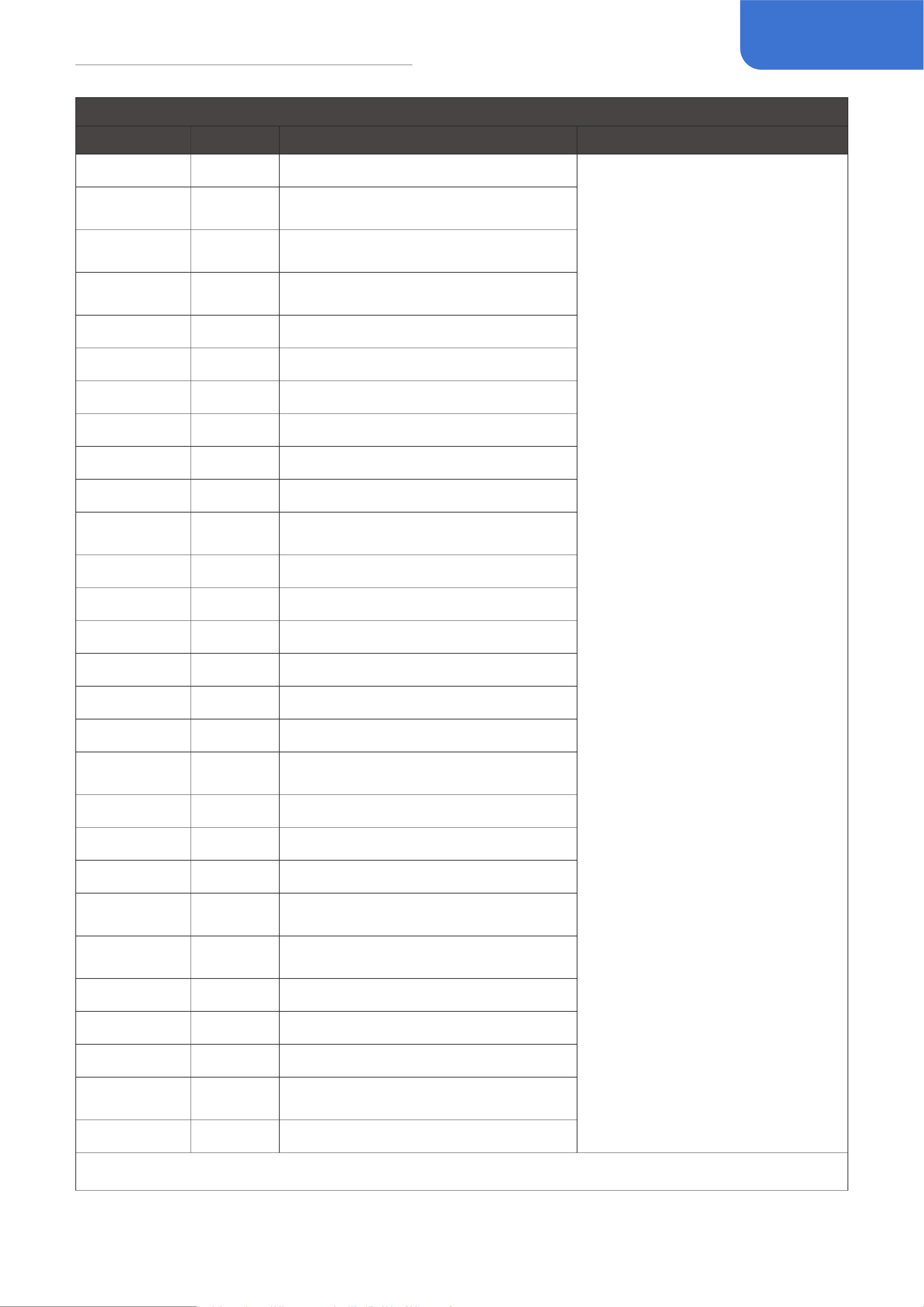
53
Eect List
CAB
FX Title
Type
Description
Parameter Description
ACE 1 x 12” Morgan® AC-20 Deluxe* 1x12" cabinet
Volume: Controls effect output
volume
Low Cut: Highpass filter, cut off
the low-frequency signal below
the selected
Hi Cut: Lowpass filter, cut off the
high-frequency signal above the
selected
Mess 4 x 12”
Mesa/Boogie® Rectifier®* 4x12"
cabinet
D STAR 1 x 12”
Mesa/Boogie® Lonestar* 1x12"
cabinet
SUP Star 2 x 12”
Mesa/Boogie® Lonestar* 2x12"
cabinet
US STO 1 x 12” 1980's Mesa/Boogie®* 1x12" cabinet
BOUTI 2 x 12” A unique custom 2x12" cabinet
SUP 2 x 12” Supro® 1624T* 2x12" cabinet
MATT TWD 2 x 12” Matchless®* 2x12" cabinet
Freed 2 x 12” Fryette® Deliverance* 2x12" cabinet
DB Rock 2 x 12” Two-Rock®* 2x12" cabinet
Blue SK 2 x 12”
A custom 2x12" cabinet with
Celestion® Alnico Blue* speakers
EV 4 x 12” Peavey® 6505* 4x12" cabinet
Bog 4 x 12” Bogner®* 4x12" cabinet
Eagle 4 x 12” ENGL®* 4x12" cabinet
Uban 4 x 12” Bogner® Uberkab* 4x12" cabinet
Solo 4 x 12” Soldano®* 4x12" caninet
Juice 4 x 12” Orange® PPC412* 4x12" cabinet
H-WAY 4 x 12”
Vintage Hiwatt® SE4123* 4x12"
cabinet
Way 4 x 12” Vintage WEM®* 4x12" cabinet
Dumb 4 x 12” Dumble®* 4x12" cabinet
Dizz 4 x 12” Diezel®* 4x12" cabinet
TRP 4 x 12”
Hughes & Kettner® Triamp* 4x12"
cabinet
King 4 x 12”
Mesa/Boogie® Road King®* 4x12"
cabinet
ADM 1 1 x 15” David Eden®* 1x15" bass cabinet
ADM 2 4 x 10” David Eden®* 4x10" bass cabinet
Workman 1 1 x 15” SWR®* 1x15" bass cabinet
Workman 2 4 x 10”
SWR® Workingman's* 4x10" bass
cabinet
US BASS 2 x 10” Mesa/Boogie®* 2x10" bass cabinet
*The manufacturers and product names mentioned above are trademarks or registered trademarks of their respective owners.
The trademarks were used merely to identify the sound character of the products
54
Eect List
CAB
FX Title
Type
Description
Parameter Description
MATT 2 x 10” Mark Bass®* 4x10" bass cabinet
Volume: Controls effect output
volume
Low Cut: Highpass filter, cut off
the low-frequency signal below
the selected
Hi Cut: Lowpass filter, cut off the
high-frequency signal above the
selected
F-TOP 1 x 15” Ampeg® PF-115HE* 1x15" bass cabinet
AMPG 1 4 x 10”
Ampeg® SVT-410HE* 4x10" bass
cabinet
AMPG 2 8 x 10” Ampeg SVT-810E* 8x10" bass cabinet
HACK 4 x 12” Hartke®* 4x12" bass cabinet
AC Acoustic Dreadnought guitar simulation 1
AC Dream Acoustic Dreadnought guitar simulation 2
OM Acoustic Simulates an OM type acoustic guitar
JUMBO Acoustic Simulates a jumbo acoustic guitar
Bird Acoustic
Simulates the iconic "H-Bird" acoustic
guitar
GA Acoustic Simulates a GA type acoustic guitar
Classic AC Acoustic Simulates a classical guitar
Mandolin Acoustic Simulates a mandolon
Fretless Bass Acoustic Simulates a fretless acoustic bass
Double Bass Acoustic Simulates a double bass
User IR 1~20 User IR
User IR 1~20
IR WAV (44kHz/1024 sample rate)
*The manufacturers and product names mentioned above are trademarks or registered trademarks of their respective owners.
The trademarks were used merely to identify the sound character of the products
EQ
FX Title
Type
Description
Parameter Description
Guitar EQ 1 EQ
Equalizer designed for
guitars
Band 1: 125Hz
Band 2: 400Hz
Band 3: 800Hz
Band 4: 1.6kHz
Band 5: 4kHz
Use the five bands above to control the EQ level.
Volume: Controls the output level
Guitar EQ 2 EQ
Equalizer designed for
guitars
Band 1: 100Hz
Band 2: 500Hz
Band 3: 1kHz
Band 4: 3kHz
Band 5: 6kHz
Use the five bands above to control the EQ level.
Volume: Controls the output level
*The manufacturers and product names mentioned above are trademarks or registered trademarks of their respective owners.
The trademarks were used merely to identify the sound character of the products

55
Eect List
EQ
FX Title
Type
Description
Parameter Description
Bass EQ 1 EQ
Equalizer designed for
basses
Band 1: 33Hz
Band 2: 150Hz
Band 3: 600Hz
Band 4: 2kHz
Band 5: 8kHz
Use the five bands above to control the EQ level.
Volume: Controls the output level
Bass EQ 2 EQ
Equalizer designed for
basses
Band 1: 50Hz
Band 2: 120Hz
Band 3: 400Hz
Band 4: 800Hz
Band 5: 4.5kHz
Use the five bands above to control the EQ level.
Volume: Controls the output level
Mess EQ EQ
Based on the 5-band
EQ module on Mesa/
Boogie®* amps,
can easily realize
the classic boogie
V-shaped sound
Band 1: 80Hz
Band 2: 240Hz
Band 3: 750Hz
Band 4: 2.2kHz
Band 5: 6.6kHz
Use the five bands above to control the EQ level.
Hyper EQ EQ
10-band graphic
EQ suitable for any
instrument
Band 1: 31Hz
Band 2: 63Hz
Band 3: 125Hz
Band 4: 250Hz
Band 5: 500Hz
Band 6: 1kHz
Band 7: 2kHz
Band 8: 4kHz
Band 9: 8kHz
Band 10: 16kHz
Use the ten bands above to control the EQ level by
±12dB.
Volume: Controls the output level
*The manufacturers and product names mentioned above are trademarks or registered trademarks of their respective owners.
The trademarks were used merely to identify the sound character of the products
MOD
FX Title
Type
Description
Parameter Description
G-Chorus Chorus
Based on the legendary huge
ensemble
chorus pedal born in late 1970s
(chorus mode), producing rich,
shimmering vintage analog
chorus tone. Warm, rich, and
dreamlike analog chorus
sound.
Depth: Controls the chorus depth
Rate: Controls the chorus rate
Volume: Controls the effect level
Sync: Switches Tap Tempo sync on/off
*The manufacturers and product names mentioned above are trademarks or registered trademarks of their respective owners.
The trademarks were used merely to identify the sound character of the products

56
Eect List
MOD
FX Title
Type
Description
Parameter Description
C-Chorus Chorus
Based on a legendary 4-button
purple stereo chorus pedal,
providing detailed rich chorus
tone that expands sonic
dimensions
Mode: Select from 4 different chorus
modes
B-Chorus Chorus
Based on the famous ensemble
chorus unit tuned for bassists
Depth: Controls the vibrato depth
Rate: Controls the vibrato rate
Volume: Controls the effect level
Sync: Switches Tap Tempo sync on/off
M-Chorus Chorus
A multi-dimensional chorus
pedal producing rich
surrounding chorus sound,
better playing with stereo
sound systems
Mix: Controls the wet/dry signal ratio
Rate: Controls the chorus speed
Filter: Controls the effect tone
Depth L/C/R: Controls the chorus depth of
left/right/center channels
Sync: Switches Tap Tempo sync on/off
Jet Flanger
Classic flanger effect,
producing rich and natural
flanger tone.
Depth: Controls the flanger depth
Rate: Controls the flanger speed
Pre Delay: Controls the pre delay time
Feedback: Controls the amount of
feedback
Sync: Switches Tap Tempo sync on/off
B-Jet Flanger
Classic flanging effect tuned
for basses
Depth: Controls the flanger depth
Rate: Controls the flanger speed
Pre Delay: Controls the pre delay time
Feedback: Controls the amount of
feedback
Sync: Switches Tap Tempo sync on/off
N-Jet Flanger
A flanger with negative
feedback, producing
"underwater" style sound
Depth: Controls the flanger depth
Rate: Controls the flanger speed
Pre Delay: Controls the pre delay time
Feedback: Controls the amount of
feedback
Sync: Switches Tap Tempo sync on/off
Trem Jet Flanger
Combines flanger and tremolo
in one
Flg Depth: Controls the flanger depth
Flg Rate: Controls the flanger speed
Feedback: Controls the flanger feedback
amount
Trm Depth: Controls the tremolo depth
Trm Rate: Controls the tremolo speed
Flg Sync: Switches flanger Tap Tempo sync
on/off
Trm Sync: Switches tremolo Tap Tempo
sync on/off
V-Roto Vibrato
Based on a BBD-based blue
vibrato pedal, producing
natural analog vibrato sound
Depth: Controls the vibrato depth
Rate: Controls the vibrato rate
Sync: Switches Tap Tempo sync on/off
*The manufacturers and product names mentioned above are trademarks or registered trademarks of their respective owners.
The trademarks were used merely to identify the sound character of the products

57
Eect List
MOD
FX Title
Type
Description
Parameter Description
G-Roto Vibrato
Based on the legendary huge
ensemble chorus pedal born
in late 1970s (vibrato mode),
producing rich, shimmering
vintage analog vibrato tone
Depth: Controls the vibrato depth
Rate: Controls the vibrato rate
Volume: Controls the effect output
Sync: Switches Tap Tempo sync on/off
Vibrato Vibrato
A classic vibrato effect with
wide adjustable range
Depth: Controls the vibrato depth
Rate: Controls the vibrato speed
Volume: Controls the effect level
Sync: Switches Tap Tempo sync on/off
Vibrato T Vibrato
This is a special vibrato effect
with dynamic depth control,
which lets you create touch-
sensitive pitch modulation.
Use the Rate knob to control
the modulation speed; use
the Sens knob to fine tune the
sensitivity.
You can use Tap Tempo
function to control the effect
speed by turning on the Sync
switch. When the Sync switch
is on, turn the Rate knob to
set a proper tap divide value.
The default value is 1/4 (no
division).
Sens: Controls the effect sensitivity
Rate: Controls the vibrato speed
Output: Controls the effect level
Sync: Switches Tap Tempo sync on/off
O-Phase Phaser
Based on legendary MXR®
M101 Phase 90*. Have you
heard the guitar sound in Eddie
Van Halen's "Eruption"? That
distorted tone with a sense of
rotation is realized by Phase
90.
Rate: Controls the vibrato speed
Sync: Switches Tap Tempo sync on/off
G-Phase Phaser
Based on a BBD-based green
phase pedal, producing natural
analog phase sound
Depth: Controls the phaser depth
Rate: Controls the phaser speed
Sync: Switches Tap Tempo sync on/off
S-Phase Phaser
The Electro Harmonix Small
Stone was one of the first
phasers available in the 70's
and can be heard on countless
recordings. As the competitors
of that time, it comes with a
control (rate, the speed of the
effect) and the intensity can
be modified with a switch -
the sound is just right for most
applications.
Rate: Controls the phaser speed
Sync: Switches Tap Tempo sync on/off
Char: Selects from two sound characters:
Warm/Sharp
*The manufacturers and product names mentioned above are trademarks or registered trademarks of their respective owners.
The trademarks were used merely to identify the sound character of the products

58
Eect List
MOD
FX Title
Type
Description
Parameter Description
Pan Phase Phaser
A special, subtle phaser
combines tremolo/pan
variations
Pan Depth: Controls the tremolo depth
(using mono output) or panning depth
(using stereo output)
Pan Rate: Controls the tremolo speed
(using mono output) or panning speed
(using stereo output)
Phaser Depth: Controls the phaser depth
Phaser Rate: Controls the phaser speed
Phs Sync: Switches phaser Tap Tempo
sync on/off
Pan Sync: Switches tremolo/pan Tap
Tempo sync on/off
M-Vibe Phaser
Based on Voodoo Lab® Micro
Vibe*. Voodoo Lab Micro
Vibe has the same design as
the original 1968 Uni-Vibe*.
Jimi Hendrix and Stevie Ray
Vaughan used these effects
extensively in their albums.
The Vibe effect will bring
about slight and regular pitch
changes.
Depth: Controls the effect depth
Rate: Controls the effect speed
Sync: Switches Tap Tempo sync on/off
Vibe Phaser
The Shin-Ei Uni-Vibe is a
classic phase shifter(chorus)
effect made famous by Jimi
Hendrix, David Gilmour, Robin
Trower and many more. The
rich “chorus” effect that
it’s famous for has become
a staple in a classic rock
guitarist’s rig. While the Uni-
Vibe’s construction is closely
copied by many companies,
many players confirm that
there’s just nothing like the
real thing!
Depth: Controls the effect depth
Rate: Controls the effect speed
Volume: Controls the effect output
Mode: Select from 2 different vibe modes:
Chorus and Vibrato
Sync: Switches Tap Tempo sync on/off
O-Trem Tremolo
Based on legendary Demeter®
TRM-1Tremulator*,offering
classical opto tremolo sound. In
1982, rock pioneer Ry Cooder
approached James Demeter to
ask whether the tremolo sound
of the Fender® twin series
speakers could be made into
a pedal effect device, and this
classic effect device was born.
Depth: Controls the tremolo depth
Rate: Controls the tremolo speed
Sync: Switches Tap Tempo sync on/off
*The manufacturers and product names mentioned above are trademarks or registered trademarks of their respective owners.
The trademarks were used merely to identify the sound character of the products

59
Eect List
MOD
FX Title
Type
Description
Parameter Description
Sine Trem Tremolo
Sine tremolo waveforms and
super wide tonal range.
Depth: Controls the effect depth
Rate: Controls the effect speed
Volume: Controls the effect output
Sync: Switches Tap Tempo sync on/off
Bias Trem Tremolo
Bias tremolo waveforms and
super wide tonal range
Depth: Controls the effect depth
Rate: Controls the effect speed
Volume: Controls the effect output
Sync: Switches Tap Tempo sync on/off
Bias: Adjust the offset change of the
waveform
Detune Pitch
This is a detuning effect that
combines a slightly shifted
signal with the original signal
to create a chorus-like tone.
Dry/Wet: Controls the dry/wet signal level
Detune: Controls the detune amount from
-50 to +50 cents
Bit Smash Special
Provides bitcrushing/sample
reducing effect with musical
fashion
Mix: Controls the wet/dry signal ratio of
the effect
Krush: Controls the sample rate of the
effect
Bit: Controls the bit resolution of the effect
Hi Cut: Controls the cutoff frequency of
the high cut filter
Lo Cut: Controls the cutoff frequency of
the low cut filter
Auto Swell Special
This is an auto swell effect
with two parameters that are
easy to understand and use. It
can make the guitar sound like
a violin.
Attack: Controls how fast the effect swells
the input signal
Curve: Selects the volume swell curve
(Line, Exp, Log)
Hold Special
This is a freeze effect that
can freeze the sound for a
short period of time before the
effect is activated and make
it play in a loop. The Activate
parameter can be assigned
to the expression pedal to
activate and deactivate the
effect; You can also turn on the
Activate parameter and use
CTRL to directly control the
On/Off of the effect module.
Volume: Controls the effect output volume
Activate: Switches the effect on/off
*The manufacturers and product names mentioned above are trademarks or registered trademarks of their respective owners.
The trademarks were used merely to identify the sound character of the products
60
Eect List
MOD
FX Title
Type
Description
Parameter Description
Freeze Special
This is a freeze effect that
can freeze the sound at the
moment of activation and keep
it playing when the effect
is activated. The Activate
parameter can be assigned
to the expression pedal to
activate and deactivate the
effect; You can also turn on the
Activate parameter and use
CTRL to directly control the
On/Off of the effect module.
Volume: Controls the effect output volume
Attack: Controls how fast the effect
volume fades in
Release: Controls how fast the effect
volume fades out
Activate: Switches the effect on/off
*The manufacturers and product names mentioned above are trademarks or registered trademarks of their respective owners.
The trademarks were used merely to identify the sound character of the products
DLY
FX Title
Type
Description
Parameter Description
BBD Delay S Delay
This is a stereo analog delay
model that captures the
sound of a BBD based analog
delay machine that is warm,
smooth, rounded due to the
limitation of BBD chips.
Mix: Controls the wet/dry signal ratio
Feedback: Controls the amount of feedback
Time: Controls the delay time of left channel
Time R%: Controls the delay time of right
channel
(time ratio of left channel)
Spread: Controls the effect stereo width
Level: Controls the effect output
Sync: Switches Tap Tempo sync on/off
Trail: Switched effect trail on/off when the
effect is bypassed
Digital Delay S Delay
This model is a stereo digital
delay that
produces a pure clean delay
sound, clear
and accurate.
Mix: Controls the wet/dry signal ratio
Feedback: Controls the amount of feedback
Time: Controls the delay time of left channel
Time R%: Controls the delay time of right
channel
(time ratio of left channel)
Spread: Controls the effect stereo width
Level: Controls the effect output
Sync: Switches Tap Tempo sync on/off
Trail: Switched effect trail on/off when the
effect is bypassed
*The manufacturers and product names mentioned above are trademarks or registered trademarks of their respective owners.
The trademarks were used merely to identify the sound character of the products

61
Eect List
DLY
FX Title
Type
Description
Parameter Description
Tape Delay S Delay
Back in the old days,
producers and engineers
created delay and echo
effects using tape machines.
That sweet, space-like echo
tone is still popular today,
especially among psychedelic
musicians.
Mix: Controls the wet/dry signal ratio
Feedback: Controls the amount of feedback
Time: Controls the delay time of left channel
Time R%: Controls the delay time of right
channel (time
ratio of left channel)
Spread: Controls the effect stereo width
Wow & Flutter: Controls the delay pitch/speed
variation
amount caused by malfunctioning tape/motor
Age: Selects from 3 tone variations
Spread: Controls the effect stereo width
Scrape: Controls the tape scratch amount
Drive: Controls the delay distortion amount
Level: Controls the effect output
Sync: Switches Tap Tempo sync on/off
Trail: Switched effect trail on/off when the
effect is bypassed
Ambience 1 Delay
This model is a multi-tap delay
that brings you expanded
sound spaciousness. 1, 2
stands for different tonal
variations
Mix: Controls the wet/dry signal ratio
Feedback: Controls the amount of
feedback
Time: Controls the delay time
Level: Controls the effect output
Mod: Controls the effect modulation
amount
Tone: Controls the effect tone
Sync: Switches Tap Tempo sync on/off
Trail: Switched effect trail on/off when the
effect is bypassed
Ambience 2 Delay
Produce pure, precised delay
sound
Mix: Controls the wet/dry signal ratio
Feedback: Controls the amount of feedback
Time: Controls the delay time
Sync: Switches Tap Tempo sync on/off
Trail: Switched effect trail on/off when the
effect is bypassed
Pure Delay
Produciing warm delay sound
with analog feel
Mix: Controls the wet/dry signal ratio
Feedback: Controls the amount of feedback
Time: Controls the delay time
Sync: Switches Tap Tempo sync on/off
Trail: Switched effect trail on/off when the
effect is bypassed
Analog Delay
Simulates solid-state tape
echo sound
Mix: Controls the wet/dry signal ratio
Feedback: Controls the amount of feedback
Time: Controls the delay time
Sync: Switches Tap Tempo sync on/off
Trail: Switched effect trail on/off when the
effect is bypassed
*The manufacturers and product names mentioned above are trademarks or registered trademarks of their respective owners.
The trademarks were used merely to identify the sound character of the products

62
Eect List
DLY
FX Title
Type
Description
Parameter Description
Tape Delay
A ping-pong delay producing
stereo feedbadk bounces
back and forth between left
and right channels
Mix: Controls the wet/dry signal ratio
Feedback: Controls the amount of feedback
Time: Controls the delay time
Sync: Switches Tap Tempo sync on/off
Trail: Switched effect trail on/off when the
effect is bypassed
Ping Pong Delay
Simulates the classic slapback
echo effect
Mix: Controls the delay wet/dry signal ratio
Feedback: Controls the amount of feedback
Time: Controls the delay time
Trail: Switched effect trail on/off when the
effect is bypassed
Slapback Delay
Producing a delay effect with
sweeping filter
modulated repeats
Mix: Controls the wet/dry signal ratio
Feedback: Controls the amount of feedback
Time: Controls the delay time
Sweep Depth: Controls the sweep filter depth
Sweep Rate: Controls the sweep filter speed
Swp Sync: Switches sweep filter Tap Tempo
sync on/off
Time Sync: Switches delay Tap Tempo sync on/
off
Trail: Switched effect trail on/off when the
effect is bypassed
Sweep Echo Delay
Producing a delay effect with
ring modulated repeats
Dly Mix: Controls the delay wet/dry signal ratio
Feedback: Controls the amount of feedback
Time: Controls the delay time
Ring Mix: Controls the ring mod wet/dry signal
ratio
Freq: Controls the ring mod frequency
Tone: Controls the ring mod tone
Sync: Switches Tap Tempo sync on/off
Trail: Switched effect trail on/off when the
effect is bypassed
Ring Echo Delay
Simulates tube-driven tape
echo sound
Mix: Controls the wet/dry signal ratio
Feedback: Controls the amount of feedback
Time: Controls the delay time
Sync: Switches Tap Tempo sync on/off
Trail: Switched effect trail on/off when the
effect is bypassed
*The manufacturers and product names mentioned above are trademarks or registered trademarks of their respective owners.
The trademarks were used merely to identify the sound character of the products

63
Eect List
DLY
FX Title
Type
Description
Parameter Description
Tube Delay
A multi tap delay that
simulates a huge
4-head tape echo machine
Mix: Controls the wet/dry signal ratio
Feedback: Controls the amount of feedback
Time: Controls the delay time
Time: Controls the delay time
Tone: Controls the effect tone
Mode: Selects from 12 different head variations:
1: Single head, same as ordinary delays
2: Head 1 & 2
3: Head 2 & 3
4: Head 3 & 4
5: Head 1 & 3
6: Head 2 & 4
7: Head 1 & 4
8: Head 1, 2 & 3
9: Head 2, 3 & 4
10: Head 1, 2 & 4
11: Head 1, 3 & 4
12: Head 1, 2, 3 & 4
Sync: Switches delay Tap Tempo sync on/off
Trail: Switched effect trail on/off when the
effect is bypassed
M-Echo Delay
This analog delay pedal was
sold from 1981 to 1984 and
is still sought after thanks
to its warm, natural sound.
Produces a delay time ranging
from 20 to 300 milliseconds.
Mix: Controls the wet/dry signal ratio
Feedback: Controls the amount of feedback
Time: Controls the delay time
Sync: Switches Tap Tempo sync on/off
Trail: Switched effect trail on/off when the
effect is bypassed
Sweet Echo Delay
Based on Maxon® AD900
Analog Delay*, providing
warm, accurate delay sound.
100% Analog Delay, dynamic
distortion on Delay repeats,
gorgeous, warm, organic
delay tone.
Mix: Controls the wet/dry signal ratio
Feedback: Controls the amount of feedback
Time: Controls the delay time
Sync: Switches Tap Tempo sync on/off
Trail: Switched effect trail on/off when the
effect is bypassed
999 Echo Delay
Reproduces the sound of a
vintage 1980's rack-mount
delay
machine with slightly sample-
reduced feedback
Mix: Controls the wet/dry signal ratio
Feedback: Controls the amount of feedback
Time: Controls the delay time
Mod: Controls the effect modulation amount
Tone: Controls the effect tone
Sync: Switches Tap Tempo sync on/off
Trail: Switched effect trail on/off when the
effect is bypassed
*The manufacturers and product names mentioned above are trademarks or registered trademarks of their respective owners.
The trademarks were used merely to identify the sound character of the products

64
Eect List
DLY
FX Title
Type
Description
Parameter Description
Vintage Rack Delay
Producing a delay effect with
lo-fi'd repeats
Mix: Controls the wet/dry signal ratio
Feedback: Controls the amount of feedback
Time: Controls the delay time
Crush: Controls the effect sampling rate
Bit: Controls the effect sampling accuracy
Sync: Switches Tap Tempo sync on/off
Trail: Switched effect trail on/off when the
effect is bypassed
Lofi Echo Delay
Producing a special delay
e%ect with reversed feedback
Mix: Controls the wet/dry signal ratio
Feedback: Controls the amount of feedback
Time: Controls the delay time
Volume: Controls the effect output volume
Sync: Switches Tap Tempo sync on/off
Trail: Switched effect trail on/off when the
effect is bypassed
Rev Echo Delay
Producing a pure dual delay
effect with
Dual Echo separated L/R
channel signal proessing
Mix A:Contols the delay A wet/dry signal ratio
FB A:Controls the feedback amount of delay A
Time A: Controls the delay time of delay A
Mix B: Contols the delay B wet/dry signal ratio
FB B: Controls the feedback amount of delay B
Time B: Controls the delay time of delay B
A Sync: Switches delay A Tap Tempo sync on/
off
B Sync: Switches delay B Tap Tempo sync on/
off
Trail: Switches effect trail on/off
Dual Echo Delay
This is a special delay effect
that combining normal
feedback with pitch shifted
slices.
You can use Tap Tempo
function to control the delay
time by turning on the Sync
switch. When the Sync switch
is on, turn the Time knob to
set a proper tap divide value.
The default value is 1/4 (no
division).
Mix: Controls the wet/dry signal ratio
Time: Controls the delay time
Feedback: Controls the amount of feedback
Mod: Controls the effect modulation amount
Tone: Controls the effect tone
Pitch: Selects pitch shifting interval of the slices
Slice: Choose audio signal slicing length
Direction: Controls audio slice playback direction
Blend: Controls the ratio between normal/pitch
shifted feedback
Smooth: Controls the feedback attack
Level: Controls the effect output
Sync: Switches Tap Tempo sync on/off
Trail: Switched effect trail on/off when the
effect is bypassed
*The manufacturers and product names mentioned above are trademarks or registered trademarks of their respective owners.
The trademarks were used merely to identify the sound character of the products
65
Eect List
DLY
FX Title
Type
Description
Parameter Description
Ice Delay Delay
This is a special delay effect
that combining normal
feedback with pitch shifted
slices.
You can use Tap Tempo
function to control the delay
time by turning on the Sync
switch. When the Sync switch
is on, turn the Time knob to
set a proper tap divide value.
The default value is 1/4 (no
division).
Mix: Controls the wet/dry signal ratio
Time: Controls the delay time
Feedback: Controls the amount of feedback
Mod: Controls the effect modulation amount
Tone: Controls the effect tone
Pitch: Selects pitch shifting interval of the slices
Slice: Choose audio signal slicing length
Direction: Controls audio slice playback direction
Blend: Controls the ratio between normal/pitch
shifted feedback
Smooth: Controls the feedback attack
Level: Controls the effect output
Sync: Switches Tap Tempo sync on/off
Trail: Switched effect trail on/off when the
effect is bypassed
*The manufacturers and product names mentioned above are trademarks or registered trademarks of their respective owners.
The trademarks were used merely to identify the sound character of the products
RVB
FX Title
Type
Description
Parameter Description
Room Reverb
Simulates the spaciousness
of a room
Mix: Controls the wet/dry signal ratio
Pre Delay: Controls the amount of time
between the dry signal and the audible onset
of early reflections and the reverb tail
Decay: Controls the duration of reverb time
Trail: Switched effect trail on/off when the
effect is bypassed
Hall Reverb
Simulates the spaciousness
of a performance hall
Mix: Controls the wet/dry signal ratio
Pre Delay: Controls the amount of time
between the dry signal and the audible onset
of early reflections and the reverb tail
Decay: Controls the duration of reverb time
Trail: Switched effect trail on/off when the
effect is bypassed
Church Reverb
Simulates the spaciousness
of a church
Mix: Controls the wet/dry signal ratio
Pre Delay: Controls the amount of time
between the dry signal and the audible onset
of early reflections and the reverb tail
Decay: Controls the duration of reverb time
Trail: Switched effect trail on/off when the
effect is bypassed
*The manufacturers and product names mentioned above are trademarks or registered trademarks of their respective owners.
The trademarks were used merely to identify the sound character of the products
66
Eect List
RVB
FX Title
Type
Description
Parameter Description
Plate Reverb
Simulates the sound
character produced by a
vintage plate reverberator
Mix: Controls the wet/dry signal ratio
Decay: Controls the duration of reverb time
High Damp: Controls the low pass filter
frequency
Trail: Switched effect trail on/off when the
effect is bypassed
Spring Reverb
Simulates the sound
character produced by a
vintage spring reverberator
Mix: Controls the wet/dry signal ratio
Decay: Controls the duration of reverb time
Tone: Controls the effect tone
Trail: Switched effect trail on/off when the
effect is bypassed
Tube Spring Reverb
This reverb model
simulates the sound
coming from a vintage tube
driven spring reverb unit.
Mix: Controls the wet/dry signal ratio
Pre Delay: Controls the amount of time
between the dry signal and the audible onset
of early reflections and the reverb tail
Decay: Controls the duration of reverb time
Low Damp/Hi Damp: Dampens the effect low/
high frequency amount
Mod: Controls the effect modulation amount
Trail: Switched effect trail on/off when the
effect is bypassed
Amp Spring Reverb
This reverb model
simulates the solid state
spring reverb module
coming from a combo amp.
Mix: Controls the wet/dry signal ratio
Pre Delay: Controls the amount of time
between the dry signal and the audible onset
of early reflections and the reverb tail
Decay: Controls the duration of reverb time
Low Damp/Hi Damp: Dampens the effect
low/high frequency amount
Mod: Controls the effect modulation amount
Trail: Switched effect trail on/off when the
effect is bypassed
Studio Reverb
This reverb model
recreates the spaciousness
of a recording studio.
Mix: Controls the wet/dry signal ratio
Pre Delay: Controls the amount of time
between the dry signal and the audible onset
of early reflections and the reverb tail
Decay: Controls the duration of reverb time
Low Damp/Hi Damp: Dampens the effect
low/high frequency amount
Mod: Controls the effect modulation amount
Trail: Switched effect trail on/off when the
effect is bypassed
N-Star Reverb
Special-tuned reverb effect
with lush, bright decays
Mix: Controls the wet/dry signal ratio
Decay: Controls the duration of reverb time
Trail: Switched effect trail on/off when the
effect is bypassed
Deepsea Reverb
Special-tuned reverb effect
with huge, deep decays
Mix: Controls the wet/dry signal ratio
Decay: Controls the duration of reverb time
Trail: Switched effect trail on/off when the
effect is bypassed
*The manufacturers and product names mentioned above are trademarks or registered trademarks of their respective owners.
The trademarks were used merely to identify the sound character of the products
67
Eect List
RVB
FX Title
Type
Description
Parameter Description
Sweet Space Reverb
Produces a modulated
reverb effect that is lush
and sweet
Mix: Controls the wet/dry signal ratio
Pre Delay: Controls the amount of time
between the dry signal and the audible onset
of early reflections and the reverb tail
Decay: Controls the duration of reverb time
Low End: Controls the low frequency amount
High End: Controls the high pass filter
frequency
Trail: Switched effect trail on/off when the
effect is bypassed
Shimmer Reverb
Produce a rich, shimmering
reverb effect
Mix: Controls the wet/dry signal ratio
Pre Delay: Controls the amount of time
between the dry signal and the audible onset
of early reflections and the reverb tail
Decay: Controls the duration of reverb time
Low End: Controls the low frequency amount
High End: Controls the high pass filter
frequency
Trail: Switched effect trail on/off when the
effect is bypassed
*The manufacturers and product names mentioned above are trademarks or registered trademarks of their respective owners.
The trademarks were used merely to identify the sound character of the products
VOL
FX Title Type Description Parameter Description
Volume Volume Pure volume control Volume: Controls output volume
*The manufacturers and product names mentioned above are trademarks or registered trademarks of their respective owners.
The trademarks were used merely to identify the sound character of the products
68
Drum Rhythm List
Drum Rhythm List
Genre Type Time Signature Default Tempo
Rock
Classic Rock 1 4/4
120BPM
Classic Rock 2 4/4
Classic Rock 3 4/4
Classic Rock 4 4/4
Classic Rock 5 4/4
Classic Rock 6 4/4
Hard Rock 1 4/4
Hard Rock 2 4/4
Hard Rock 3 3/4
Post Rock 1 5/4
Post Rock 2 4/4
Post Rock 3 4/4
Garage Rock 4/4
Prog Rock 4/4
Surf Rock 4/4
Punk 1 4/4
Punk 2 4/4
Punk 3 4/4
Punk 4 4/4
Post Punk 1 4/4
Post Punk 2 4/4
Heavy Metal 1 4/4
Heavy Metal 2 4/4
Nu-Metal 1 4/4
Nu-Metal 2 4/4
Hardcore 4/4
EMO 4/4
Grunge 4/4
New Wave 4/4
Rock 5/4 5/4
Funk
Funk 1 4/4
Funk 2 4/4
69
Drum Rhythm List
Genre Type Time Signature Default Tempo
Funk
Funk 3 4/4
120BPM
Funk 4 4/4
Jazz Funk 1 4/4
Jazz Funk 2 4/4
Jazz Funk 3 4/4
Blues
Blues 1 4/4
Blues 2 4/4
Blues 3 4/4
Blues 4 4/4
Swing 4/4
Shule 3/4 3/4
Bluegrass 4/4
Country 4/4
Country Folk 4/4
Pop
Pop 1 4/4
Pop 2 4/4
Pop 3 4/4
Hip Hop 1 4/4
Hip Hop 2 4/4
Hip Hop 3 4/4
Hip Hop Rock 4/4
Pub 4/4
Jazz
Jazz 1 4/4
Jazz 2 4/4
Jazz 3 4/4
Jazz 4 4/4
Bossanova 1 4/4
Bossanova 2 4/4
Fusion 4/4
Electronic
Electro1 4/4
Electro2 4/4
Techno 4/4
TripHop 4/4
Electronic Pop 4/4
70
Drum Rhythm List
Genre Type Time Signature Default Tempo
Electronic
Break Beat 4/4
120BPM
Drum&Bass 4/4
World
Latin 1 4/4
Latin 2 4/4
Latin 3 4/4
Latin Pop 1 4/4
Latin Pop 2 4/4
Samba 4/4
Tango 4/4
Beguine 4/4
Ska 4/4
Polka 2/4
Waltz 3/4
Reggae 1 4/4
Reggae 2 4/4
Mazuke 3/4
Musette 4/4
March 1 4/4
March 2 4/4
March 3 4/4
New Age 1 4/4
New Age 2 4/4
World 4/4
Metro
1/4 1/4
2/4 2/4
3/4 3/4
4/4 4/4
5/4 5/4
6/4 6/4
7/4 7/4
6/8 6/8
7/8 7/8
8/9 8/9
71
MIDI Control Information List
MIDI Control Information List
CC# Value Range Description
0 0-1
BANK MSB:
01-A~32-D: CC0=1, PC=0-127
33-A~64-D: CC0=0, PC=0-127
7 0-100 Patch Volume
11 0-100 EXP 1
13 0-127
EXP1 A/B
0-63: A
64-127: B
16 0-100 Quick Access Para 1
17 0-127
Quick Access Knob 1 parameter adjustment:
0-63:Turn down by 1 step
64-127: Turn up by 1 step
18 0-100 Quick Access Knob 2
19 0-127
Quick Access Knob 2 parameter adjustment:
0-63:Turn down by 1 step
64-127: Turn up by 1 step
20 0-100 Quick Access Knob 3
21 0-127
Quick Access Knob 3 parameter adjustment:
0-63:Turn down by 1 step
64-127: Turn up by 1 step
22 0-127 BANK - (initial mode)
23 0-127 BANK + (initial mode)
24 0-127 Patch -
25 0-127 Patch +
26 0-127 BANK - (wait mode)
27 0-127 BANK +(wait mode)
28 0-127 BANK (wait mode)
48 0-127
PRE Module on/o:
0-63: o
64-127: on
49 0-127
DST Module on/o:
0-63: o
64-127: on
72
MIDI Control Information List
CC# Value Range Description
50 0-127
AMP Module on/o:
0-63: o
64-127: on
51 0-127
NR Module on/o:
0-63: o
64-127: on
52 0-127
CAB Module on/o:
0-63: o
64-127: on
53 0-127
EQ Module on/o:
0-63: o
64-127: on
54 0-127
MOD Module on/o:
0-63: o
64-127: on
55 0-127
DLY Module on/o:
0-63: o
64-127: on
56 0-127
RVB Module on/o:
0-63: o
64-127: on
57 0-127
WAH Module on/o:
0-63: o
64-127: on
58 0-127
TUNER on/o:
0-63: o
64-127: on
59 0-127
LOOPER on/o:
0-63: o
64-127: on
60 0-127 LOOPER Record
61 0-127 LOOPER Auto Record
62 0-127
Looper Play/Stop
0-63: Stop
64-127: Play
63 0-127
Looper Tempo
0-63: Half-speed
64-127: Normal Speed
73
Troubleshooting
CC# Value Range Description
64 0-127
Looper Playback Status
0-63: Reverse
64-127: Normal
65 0-127 Delete Loop
66 0-100 Looper Recording Volume
67 0-100 Looper Playback Volume
68 0-127
Looper Placement
0-63: Rear
64-127: Front
69 0-127 CTRL 1
70 0-127 CTRL 2
71 0-127 CTRL 3
72 0-127 CTRL 4
73 0-1 Tempo MSB, Used with Cc74
74 0-127
CC73=0,CC74=40-127:
40BPM-127BPM
CC73=1,CC74=0-122:
128BPM-250BPM
75 0-127 Tap Tempo
76 0-127 CTRL 5
77 0-127 CTRL 6
78 0-127 CTRL 7
79 0-127 CTRL 8
92 0-100
Drum Machine Menu on/o:
0-63: o
64-127: on
93 0-127
Drum Machine Play/Stop
0-63: Stop
64-127: Play
94 0-99 Drum Machine Type
95 0-100 Drum Machine Volume
Troubleshooting
Device Won’t Turn On

74
Technical Specications
• Make sure the power supply is properly connected and the device is switched on.
• Check if the power adapter is working properly.
• Check if you’re using the correct power adapter.
No Sound Or Slight Sound
• Make sure your cables are connected properly.
• Make sure the volume knob is adjusted properly.
• When the expression pedal is used for volume control, check it’s position and volume settings.
• Check the eects module volume settings.
• Check the patch volume settings.
• Make sure your input device is not muted.
Noise
• Make sure your cables are connected properly.
• Check your instrument output jack.
• Check if you’re using the correct power adapter.
• If the noise is coming from your instrument, try using the noise reduction module to reduce it.
Sound Problems
• Make sure your cables are connected properly.
• Check your instrument output jack.
• If you’re using an external expression pedal to control distortion or other similar parameters,
check to see if the expression pedal is set up properly.
• Check your eects parameter setup. If eects are set to extremes, GP-200 may have abnormal
noise.
Problems With Expression Pedal
• Check your expression pedal on/o settings.
• Try calibrating the pedal.
Technical Specications
Technical Specications
• A/D/A Converter: 24-bit high performance audio
• Sampling Frequency: 44.1 kHz
• SNR: 110dB
• Module: 11, can be used simultaneously
• Patch Memory: 256 Patch slots, 100 Factory Patches
• Looper: Maximum 180 seconds of record time

75
Technical Specications
• Drum Machine: 100 Patterns
• MIDI(IN/OUT/THRU): 5-pin MIDI connectors
Analog Input Connections
• Guitar Input: 1/4″ Unbalanced (TS)
• Input Impedance: 4.7M Ohms (A.GT), 1M Ohms (E.GT), 10k Ohms (Line)
• Return Input: 1/4″ Unbalanced (TS)
• Return Input Impedance: 100k Ohms
• Aux Input: 1/8″ Stereo (TRS)
• Aux Input Impedance: 10k Ohms
Analog Output Connections
• L/R Unbalanced Outputs: 1/4″ TS jacks , impedance: 1k Ohms
• L/R Balanced Outputs: XLR jacks , impedance: 1k Ohms
• Send Output: 1/4″ Unbalanced (TS) , impedance: 1k Ohms
• Headphone Output: 1/8″ Stereo (TRS) , impedance: 22 Ohms
Digital Connections
• USB Port: USB 2.0 Type-C Port
USB Recording Specication
• Sample Rate: 44.1 kHz Bit
• Depth: Supports 16-bit or 24-bit
Size and weight
• Dimensions: 345mm(W) x 220mm(D) x 62.5mm(H)
• Unit Weight: 2.37 kg
Power
• Requirements: DC 9V, 1000mA, center negative