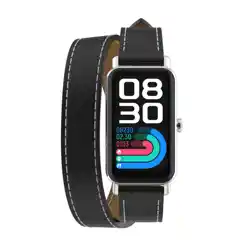
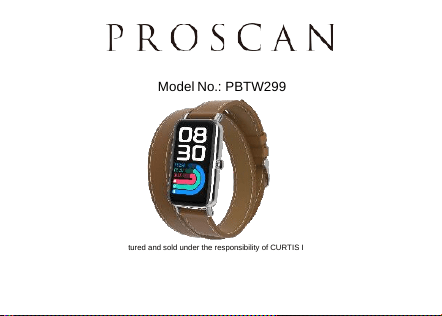
Smart Watch
Model No.: PBTW299
This product has been manufactured and sold under the responsibility of CURTIS INTERNATIONAL LTD.
PROSCAN, and the PROSCAN logo are trademarks used under license by CURTIS INTERNATIONAL LTD. – further
information at www.proscan-brand.com.
All other products, services, companies, trademarks, trade or product names and logos referenced herein are the
property of their respective owners.

1
Safety Warning
The information in this document will not be modified or extended in
accordance with any notice.
The watch should be charged for at least 2 hours prior to initial use, please
use charger and cable accredited.
“Connect Smart Device” can not be used before re-connected when
watch is disconnected by far distance.
Please re-connect APP by Bluetooth while watch is disconnected during use.
(Device must be re-connected by manual operation while disconnected for
over 5 mins.)
The measurement results of this product are for reference only and are
not intended for any medical use or basis. Please follow the doctor’s
instructions.
Do not self-diagnose and treat according to the measurements taken by
this product.
2
Sweat proof only, not waterproof
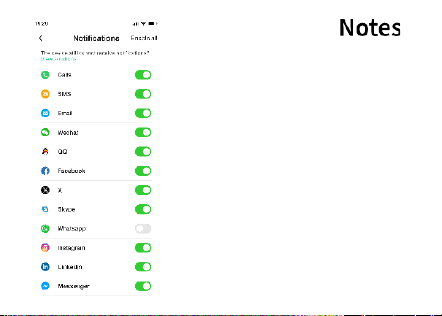
If you want this watch to save the
battery, please turn off the Notification
from Oplayer Smart Life APP.
3
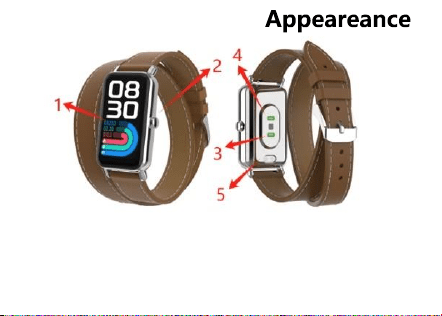
1 Touch Screen 3 Blood oxygen sensor
2 Button 4 Heart rate sensor
5 Charging pins
4
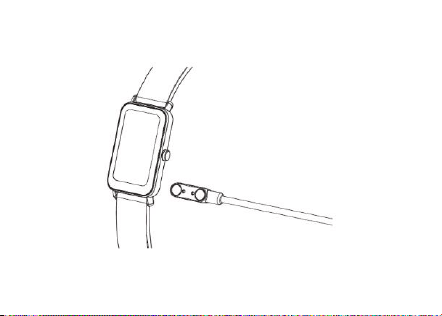
Charging & Power on
*Please use Charger made by Manufacturer
5
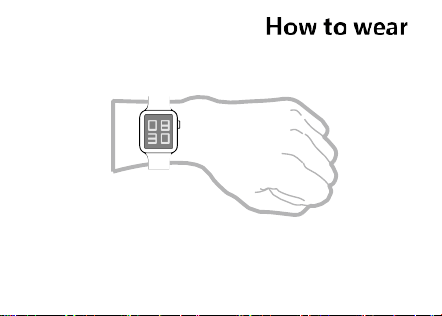
Wear watch on your wrist with suitable tightness,
this watch band is removeable.
6
Android 9.0 and above
IOS 12.0 and above
Bluetooth 5.3 support.
,
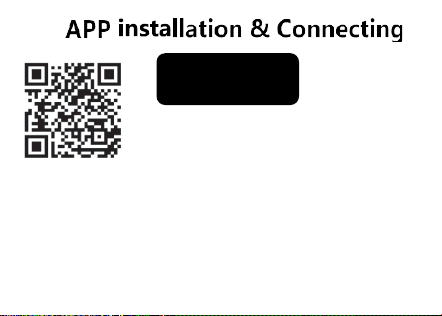
Scan this QR code to download and install "Oplayer Smart
Life" APP in your mobile phone.
First time use, scan this QR code from left or in the Apple
Store or Google Play Store on your mobile phone to download
'Oplayer Smart Life' APP.
Turn on the Bluetooth from your mobile phone, then open
Oplayer Smart Life APP from your mobile phone, tap
"Connect Smart Device" find the device,
it will appear 'PBTW299' here, tap to connect it.
It will pop up a dialog' Bluetooth Pairing Request' from your
mobile phone, tap 'Pair' to connect it, it will sync the time and
date after connected to your Bluetooth device.
There is also a dialog about "Allow to Receive Your phone
Notifications?", tap "Allow" and then when connected, all
notifications you receive on your phone will also be sent to
this device and may be shown on its display.
App name:
Oplayer Smart Life
Android/IOS
7
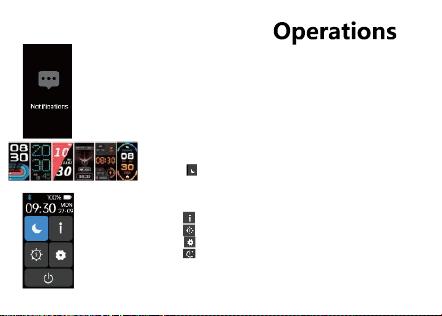
Button:
Long press button 3seconds to power on/power off watch.
Short press button to turn on/turn off screen.
Short press button to go back the last interface.
Shortcuts:
Swipe up to display mobile notifications.
Long press and hold 6 seconds the watch face to choose
different clockface you like.
Swipe down to go to left shortcuts menu.
Tap to turn on Do Not Disturb mode. Then automatically
adjust the brightness to the lowest and turn off raising your
hand to brightness the screen, it will not remind all reminders
except the alarm clock.
Tap to find the MAC address and software version.
Tap to adjust brightness,1-5 files brightness adjustment.
Tap to quick access to setting function.
Tap to shut down the watch.
Swipe left to go to steps, heart rate, blood oxygen, sleep
monitor, sport records, weather, alarm clock.
Swipe right to go to view all menu.
8
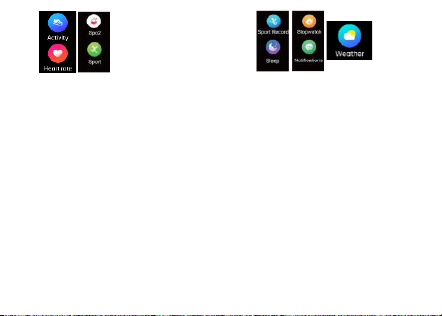
Activity: Tap Activity icon. The watch starts to
log your daily steps, calories, distance.
If connected to the app, daily data is logged.
Swipe right to exit the Activity screen.
Heart Rate: Tap Heart Rate icon. The watch
starts to record your heart rate.
SpO2(Blood Oxygen): Tap SpO2 icon. The
watch starts to record your blood oxygen.
Sport: Tap Sport icon, there are walking,
running, Treadmill, hiking, cycling,
swimming, badminton, stair climber,
elliptical, rower, skipping, golf, workout,
yoga modes, tap each one can go to test
each mode time, calorie and heart rate etc.
A reminder will pop up if your sport data is
achieved your goal set.
Sport record: Tap Sport record icon, show sport
records.
Sleep: Tap Sleep icon, show sleep record, monitor
your sleep between 9:00 p.m. and 9:00 a.m.
automatically.
Stopwatch: Tap Stopwatch icon to the amount of time
elapsed from a particular time when it is activated to
the time when the piece is deactivated.
Notifications: Tap Notifications icon, and then you
can check your SMS, QQ, WeChat, WhatsApp,
Facebook and Twitter notifications, etc. The
messages will be automatically deleted after you
read them.
Weather: After you connect watch with your
mobile phone by Bluetooth, tap weather icon,
the watch displays the current time and weather
conditions.
9
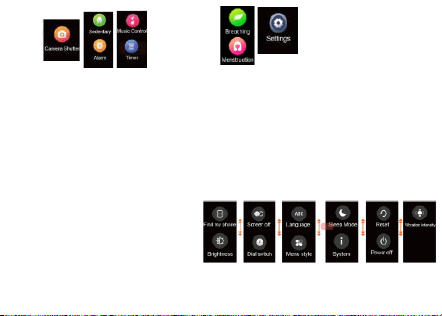
Camera Shutter: After you connect watch
with your mobile phone by Bluetooth, tap
camera shutter icon , open phone camera,
tap camera shutter can control phone to
take pictures.
Sedentary: Tap Sedentary icon to turn on / turn off
sedentary reminder. Set the time intervals
(minutes) from the APP, start time and end time.
Alarm: Tap Alarm icon to set alarm.
Music Control: Tap Music Control icon to enter
the music playback control interface. You can
select the previous/next song, and play/pause
music, and volume adjustment.
Timer: Tap Timer icon to measure time
intervals.
Breathing: Tap Breathing icon to training inhale and
exhale.
Menstruation: Cycle Tracking/pregnancy period to help users
record dates and also set reminders on the app.
Settings: Tap Settings icon, there is Find my
phone / Brightness / Screen off / Dial switch /
Language / Menu style / Sleep Mode / System/
Reset / Power off / Vibration intensity functions,
you can check or set each functions you want
from here.

10
Attentions
What should l do if Bluetooth cannot be connected? (Failed to connect / reconnect or slow connection /reconnect)
1. Please confirm whether the mobile phone supports (IOS12.0 or Android 9.0 or above, mobile phones or tablet
products with Bluetooth 5.3).
2. Due to the problem of signal interference in the Bluetooth wireless connection, the connection time may be different
every time. If you cannot connect for a long time, please make sure to connect in a place where there is no magnetic
field or too much Bluetooth device interference.
3. Turn off the phone's Bluetooth and then turn it on.
4. Clear the phone background application or restart the phone.
5. Do not connect your phone to other products of the same type at the same time.
6. Whether the App is still running in the background, if it is not running in the background, it cannot be connected.
Can't find the watch?
Because the Bluetooth radio of the watch is not searched by the mobile phone, please make sure that the watch is
powered on and activated, and it is not connected to other mobile phones. Put the watch close to the mobile phone and
search again. If it is still invalid, turn off the Bluetooth of the mobile phone for 20 seconds then restart Bluetooth and
search again.
Should the Bluetooth connection be always on? Wil there be any data if it is closed?
Before synchronizing the data, exercise and sleep data will be kept on the wristband host. When the mobile phone and
the watch Bluetooth are successfully connected, the watch will automatically upload data to the mobile phone, but the
data stored by the watch is limited, and only about one week of Bluetooth data can be stored. When the space is full, the
earliest data will be automatically overwritten to generate the latest data, so please sync the watch to your phone in time.
Remarks: lf you turn on the incoming call and SMS reminder function, you need to keep Bluetooth connected, and the
alarm reminder supports offline.
What should l do if the watch cannot be charged?
1. Please confirm whether the direction of the charging stand is correct and whether the charging clip is in good contact
with the watch.
2. When the watch power is lower than 3.6V, there will be a period of battery precharge time.
Remarks: After plugging in the charger, it will immediately enter the charging state. If there is no display, it will take 3-5
minutes to enter the charging state.
Will wear the watch for a long-time cause harm to the human body?
The radiation of the equipment is far lower than the FCC standard of the United States, and it is basically negligible.

11
NOTE: This equipment has been tested and found to comply with the
limits for a Class B digital device, pursuant to part 15 of the FCC Rules.
These limits are designed to provide reasonable protection against
harmful interference in a residential installation. This equipment
generates uses and can radiate radio frequency energy and if not
installed and used in accordance with the instructions, may cause harmful interference to radio
communications. However, there is no guarantee that interference will not occur in a particular
installation. If this equipment does cause harmful interference to radio or television reception,
which can be determined by turning the equipment off and on, the user is encouraged to try to
correct the interference by one or more of the following measures:
-Reorient or relocate the receiving antenna.
-Increase the separation between the equipment and receiver.
-Connect the equipment into an outlet on a circuit different from that to which the receiver is connected.
-Consult the dealer or an experienced radio/ TV technician for help.
Changes or modifications not expressly approved by the party responsible for compliance could void the
user's authority to operate the equipment.
This device complies with Part 15 of the FCC Rules. Operation is
subject to the following two conditions:
(1) this device may not cause harmful interference, and
(2) this device must accept any interference received, including
interference that may cause undesired operation.
The device has been evaluated to meet general RF exposure requirement. The device can be used in
portable exposure condition without restriction.
FCC ID: 2BFD8-PBTW299

12
To make a warranty claim, please email support2@curtiscs.com or call 1-800-968-9853.
90 day Warranty
This product is warranted to be free from defects in material and workmanship for a period of ninety
(90) days from the date of original purchase. During this period, your exclusive remedy is repair or
replacement of this product or component found to be defective, at our option; however, you are
responsible for all costs associated with returning the product to us. If the product or component is no
longer available, we will replace with a similar one of equal or greater value. Prior to a replacement
being sent, the product must be rendered inoperable or returned to us.
This warranty does not cover glass, filters, wear from normal use, use not in conformity with the printed
directions., or damage to the product resulting from accident, alteration, abuse, or misuse. This
warranty extends only to the original consumer purchaser or gift recipient. Keep the original sales
receipt, as proof of purchase is required to make a warranty claim. This warranty is void if the product
is used for other than single-family household use or subjected to any voltage and waveform other
than as on the specified rating on the label (e.g., 120V~60Hz).
We exclude all claims for special, incidental, and consequential damages caused by breach of
express or implied warranty. All liability is limited to the amount of the purchase price. Every implied
warranty, including any statutory warranty or condition of merchantability or fitness for a
particular purpose, is disclaimed except to the extent prohibited by law, in which case such
warranty or condition is limited to the duration of this written warranty. This warranty gives you
specific legal rights. You may have other legal rights that vary depending on where you live. Some states
or provinces do not allow limitations on implied warranties or special, incidental, or consequential
damages, so the foregoing limitations may not apply to you.
For faster service, locate the model, type, and serial numbers on your appliance.

13
For service assistance and product information, please call:
1-800-968-9853.Curtis International Ltd.
7045 BECKETT DRIVE, UNIT 15. MISSISSAUGA. ON,
L5S2A3 www.curtisint.com
To make a warranty claim, do not return this product to the store. Please email support2@curtiscs.com
or call 1-800-968-9853.
ATTACH YOUR PROOF OF PURCHASE HERE, PROOF OF PURCHASE IS REQUIRED
TO OBTAIN WARRANTY SERVICE.
Please have the following information available when you contact the Support Team:
· Name, address and telephone number.
· Model number and serial number.
· A clear, detailed description of the problem.
· Proof of purchase including dealer or retailer name, address and date of purchase.