后排监视器说明书
尺寸:
70mmx100mm
材质:
128
克铜版纸
工艺:彩色印刷
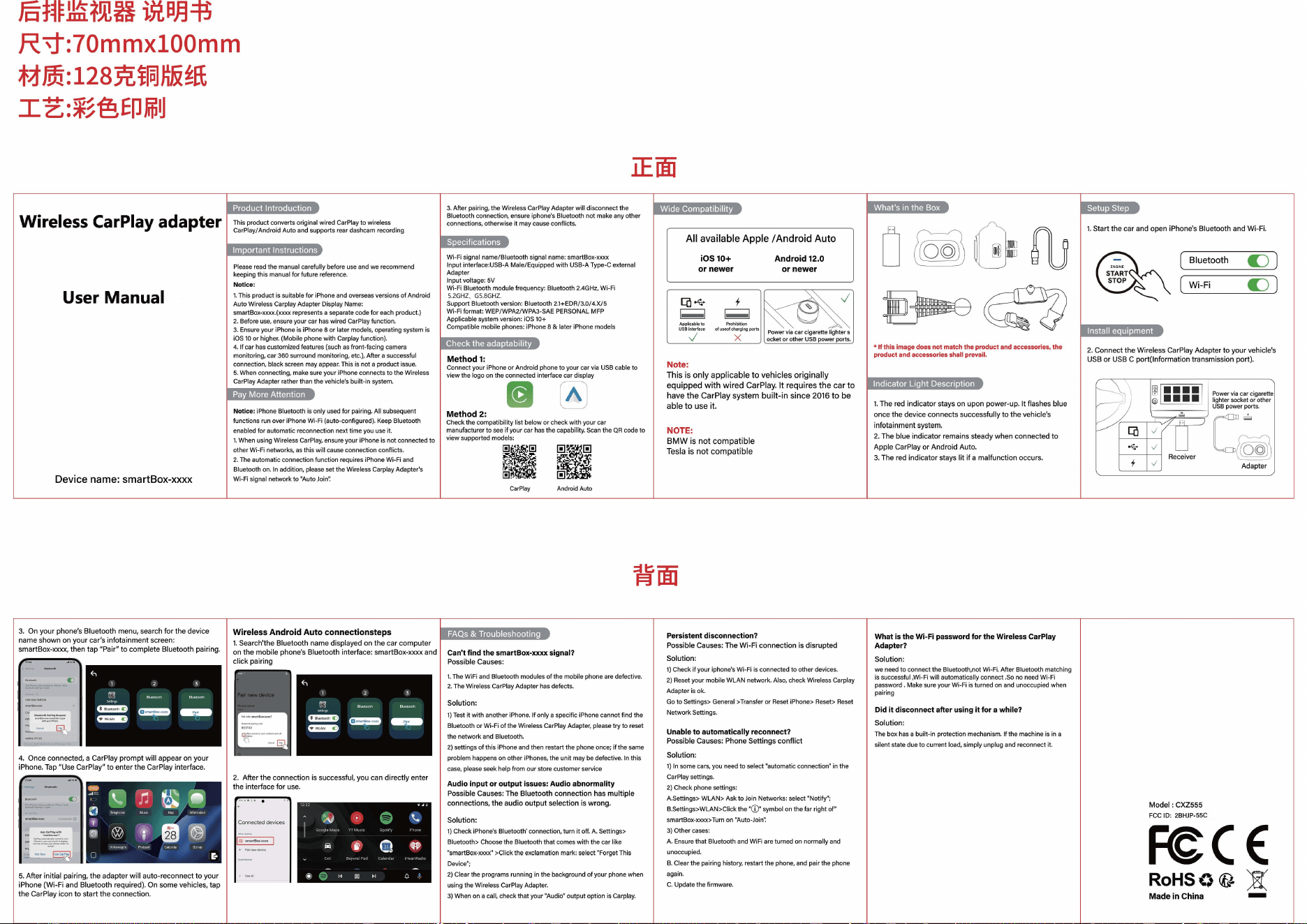
Wireless CarPlay
adapter
User Manual
Device
name:
smartBox-xxxx
This product
c
。
nverts
original wired CarPlay
t
。
wireless
CarPlay/Andro1d Auto
and
supports rear dashcam recording
Please
read
the manual carefully before
use
and
we
recommend
keeping this manual for future reference
Notice:
1.
This product
1s
suitable for
1Ph
。
neand
。
verseas
versions of Android
Auto Wireless Carplay Adapter Display
Name
:
smartBox-xxxx (xxxx represents a separate code for
each
product)
2.
Before
use,
ensure your car
has
wired CarPlay function.
3.
Ensure
your iPhone
is
iPhone
8
。
r
later models, operating system
is
iOS
10
or
higher.
(Mobile phone with Carplay function)
4.
If car
has
customized features (such
as
front-facing camera
m
。
nit
。
ring,
car360surr
。
und
monitoring, etc.
),
After a successful
connection, black screen
may
appear.
This
is
not a product
issue
5.
When
connecting,
make
sure
y
。
ur
1Phone
connects to the Wireless
CarPlay
Adapter rather than the vehicle
’
s built-in system.
Notice. iPhone
Bluet
。。
th
is
only
used
for pairing.
All
subsequent
functions
run
ove
r iPhone Wi-Fi (auto-configured)
Keep
Bluetooth
enabled for automatic
reconnecti
旧
n
next time
you
use
it
1.
When
using Wireless
CarPla
弘
ensure
your iPhone
is
not connected to
other Wi-Fi networks,
as
this will
cause
connection conflicts
2.Theautomatic
c
。
nnection
function requires iPhone
Wi
Fi
and
Bluetooth
on.
In
addition,
please
set the Wireless Carplay Adapter
’
S
Wi-Fi signal network to "Auto
J
。
in
’!
3. After pairing, the Wireless CarPlay
Ad
apter will disconnect the
Bluetooth
c
。
nnecti
。
n
,
ensure iphone's
Bluet
。。
th
n
。
t
make
any other
connections, otherw
ise
it may
cause
c
。
nflicts
.
Wi
-
Fi
signal name/Bluetooth signal
name.
smartBox-xxxx
Input interface.USS-A Male/Equipped with
USB-A
Type-C external
Adapter
Input voltage.
5V
Wi
-
Fi
Bluetooth module frequency. Bluetooth
2.4GHz,
Wi-Fi
5.
2GHZ
. G
S.8
GHZ
.
Support Bluetooth
versi
。
n.
Bluet
。。
th
2.1+EDR/3.0/4.X/5
Wi-Fi format: WEP/WPA2/WPA3-SAE
PERSONAL
MFP
Applicable system version.
iOS
10+
Compatible mobile
ph
。
nes.
iPhone 8
&
later iPhone models
Method
1:
c
。
nnect
your
1Phone
。
r
Android phone
t
。
your
car
via
USB
cable
t
。
view the logo
on
the
c
。
nnected
interface car display
@
画
Method
2:
Check the compatibility list below
。
r
check with
y
。
urcar
manufacturer to
see
1fyour car
has
the capability.
Scan
the
QR
c
。
de
to
view supported models·
黠撞盟
黠晦
~
=
~画~
~盟,
l..,.;t!lft:;
固幡辑
田~国:
CarPlay
Android
Aut
。
正面
Note:
This
is
only
applicable
to
vehicles
originally
equipped
with
wired
CarPlay.
It
requires
the
car
to
have
the
CarPlay
system
built-in
since
2016
to
be
able
to
use
it.
N
。
TE:
BMW
is
not
compatible
Tesla
is
not
compatible
口岳阳
fU
骨髓均
d
专
•
If
this
image does
not
match the
product
and
access
。
ries,the
product and accessories shall prevail.
1.
The
red
indicator
stays
on
upon
power-up
.
It
flashes
blue
once
the
device
connects
successfully
to
the
vehicle
’
s
infotainment
system.
2.
The
blue
indicator
remains
steady
when
connected
to
Apple
CarPlay
or
Android
Auto.
3.
The
red
indicator
stays
lit
if
a
『
nalfunction
occurs
1.
Start
the
car
and
open
iPhone's
Bluetooth
and
Wi-Fi
(
Bluetooth
ε
)
(
Wi-Fi
ε
)
2.
Connect
the
Wireless
CarPlay
Adapter
to
your
vehicle's
USB
or
USB
C
port(lnformation
transmission
port)
rι
Adapter
3.
On
your
phone
’
s
Bluetooth
menu,
search
for
the
device
name
sh
。
wn
on
your
car
’
s
inf
。
tainment
screen:
smartBox-xxxx,
then
tap
”
Pair
”
to
complete
Bluetooth
pairing
-
J
P
…
……
飞
一
一
\
二…
hJ
JL
句
E
牛
1 2 3
4.
Once
connected,
a
CarPlay
prompt
will
appear
on
your
iPhone
. Tap
"Use
CarPlay
”
to
enter
the
CarPlay
interface.
-
m
甲阴晴
叫一
一
也
γ
-叫一
一
刀
m
俑,
叫一
一
呼
…
@
…一
一
回
U
B
E
D
-
-
-
muo
一
5.
After
initial
pairing
,
the
adapter
will
auto-reconnect
to
your
iPhone
(Wi-Fi
and
Bluetooth
required).
On
some
vehicles,
tap
the
CarPlay
icon
to
start
the
connection
Wireless
Android
Auto
connectionsteps
1.
Search'the
Bluet
。。
th
name
displayed
on
the
car
computer
。
n
the
mobile
phone's
Bluetooth
interface:
smartBox-xxxx
and
I
Can
’
t
find
the
smartBox-xxxx
signal?
click
pairing
I
P
。
ssible
Causes
:
……………•
I
1
The
WiFi and Bluetooth modules of the mobile phone
are
defective
2.
The
Wireless CarPlay Adapter
has
defects.
等、
t
1 2 3 I
F
司'"刷
h
""
.叫
.
雹军匈理
ID
-1
2.
After
the
connection
is
successful,
you
can
directly
enter
the
interface
for
use
-
dM
1
』
一
…
r
-
r
r
叫
。川
Solution
1)
Test
1t
with another
1Phone.
If only a specific iPhone
cann
。
t
fmdthe
Bluetooth or Wi-Fi of the Wireless CarPlay Adapter,
please
try to reset
the network and
Bluet
。。
th,
2)settingsofthis
iPh
。
neandthen
restart the
ph
。
ne
。
nce;
if the
same
problem happens
on
other
iPhones,
the unit
may
be
defective
In
this
case
,
please
seek
help from our store customer service
Audio
input
。
r
output
issues:
Audi
。
abn
。
rmality
Possible
Causes
:
The
Bluetooth
connection
has
multiple
connections
,
the
audio
output
selection
is
wrong
Solution
1)
Check iPhone's Bluetooth'
c
。
nnecti
。
n,
turn it
off.
A Settings>
Bluetooth>
Ch
。。
se
the Bluetooth that comes with the car like
”
smartBox-xxxx" >Click the
exclamat1
。
n
mark.select
”
Forget This
Device
”;
2)
Clear the programs running
in
the background
。
f
y
。
ur
phone when
using the Wireless CarPlay Adapter.
3)
When
on
a call, check that your
”'
Audio" output option
is
Carplay.
背面
Persistent
disc
。
nnection?
Possible
Causes:
The
Wi-Fi
connection
is
disrupted
Solution
1)Checkif
y
。
ur
iphone's Wi-Fi
is
connected to other devices
2)
Reset
your mobile
WLAN
network.
Al
白,
check
Wireless Carplay
Adapter
is
ok.
G
。
t
。
Settings>
General
>Transfer
。
r
Reset
iPhone>
Reset>
Reset
Network Settings.
Unable
t
。
automatically
rec
。
nnect?
Possible
Causes:
Phone
Settings
conflict
s
。
lution
l)lnsomecars,y
。
u
need
to select
”
automatic connection
”
inthe
CarPlayse
吐
1ngs.
2)
Check phone
se
忧
1ngs
A.Settings> WLAN>
Ask
to
Join
Networks, select
”
Notify";
B.Settings>WLAN>Click
the
”①”叩
nbol
on
the far
right
。
f ”
smartB
。
x-xxxx>Turn
on
”'
Auto-Join':
3)
Other
cases
A
Ensure
that
Bluet
。
oth
and
WiFi
are
turned
on
normally and
unoccupied
B.
Clear the pairing
hist
。
ry,
restart the
ph
。
ne,and
pair the
ph
。
ne
again.
C Update the firmware
What
is
the
Wi-Fi
passw。
rd
for
the
Wireless
CarPlay
Adapter?
s
。
luti
。
n
we
need
to
c
。
nnect
the Bluetooth,not Wi-Fi After
Bluet
。。
th
matching
is
successful ,Wi-Fi will automatically connect
So
n
。
needWi-Fi
passw
。
rd
Make
sure your Wi-Fi
is
turned
on
and
unoccupied when
pairing
Did
it
disc
。
nnect
after
using
it
f
。
r
awhile?
Solution
The
box
has
a built-in protection mechanism. If the machine
is
in
a
silent state due to current load, simply unplug
and
reconnect
it
Model
:
CXZ555
FCCID
:’
2BHJP-CXZ55C
Feα
RoHSO
~
)3!'

FCC Caution
This device complies with part 15 of the FCC Rules. Operation is subject to the following two conditions:
(1) This device may not cause harmful interference, and
(2) this device must accept any interference received, including interference that may cause undesired operation.
Any Changes or modifications not expressly approved by the party responsible for compliance could void the user's authority to operate the equipment.
Note: This equipment has been tested and found to comply with the limits for a Class B digital device, pursuant to part 15 of the FCC Rules. These limits are designed to provide
reasonable protection against harmful interference in a residential installation. This equipment generates uses and can radiate radio frequency energy and, if not installed and used in
accordance with the instructions, may cause harmful interference to radio communications. However, there is no guarantee that interference will not occur in a particular installation. If
this equipment does cause harmful interference to radio or television reception, which can be determined by turning the equipment off and on, the user is encouraged to try to correct
the interference by one or more of the following measures:
-Reorient or relocate the receiving antenna.
-Increase the separation between the equipment and receiver.
-Connect the equipment into an outlet on a circuit different from that to which the receiver is connected.
-Consult the dealer or an experienced radio/TV technician for help.
This equipment complies with FCC radiation exposure limits set forth for an uncontrolled environment. This equipment should be installed and operated with minimum distance 20 cm
between the radiator & your body.