LUNOGRIP CHARGE
WHAT’S INCLUDED:
1. USB-C to USB-C RTPE Charging Cable
2. Adhesive Metal Ring
3. Sticky Smooth Surface Pad
4. Hex Wrench
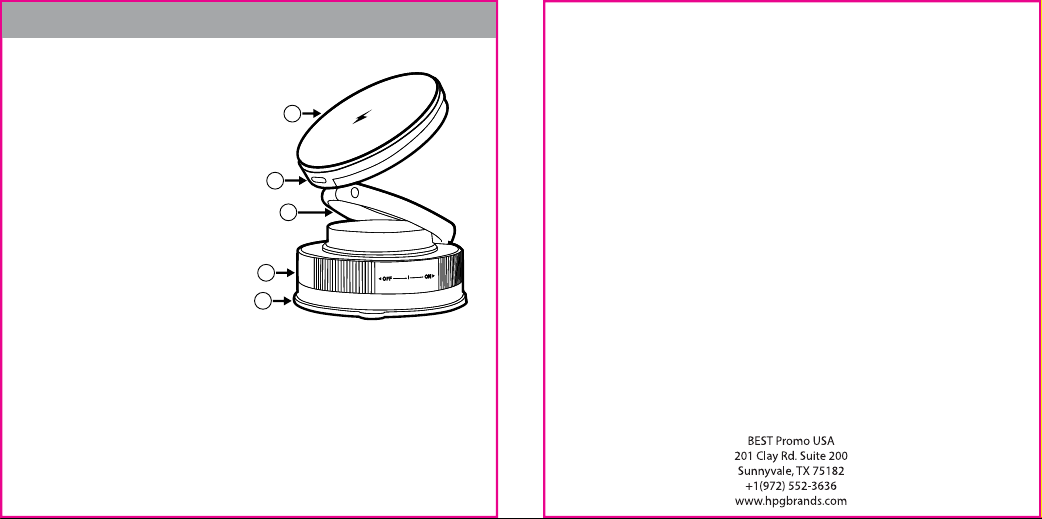
Product Overview:
1. Wireless Charging Area
2. Suction Cup
3. Loosen & Tighten Knob
4. Height Adjustment Ring
5. USB-C Input
Product Specs:
Input: 9V-2.22A
Output: 15W
Instructions:
1. Clean the suction cup thoroughly before use, as dirt may reduce suction strength.
2. Apply to a clean, smooth, flat surface (e.g., glass). Hold the base and twist the knob
left to secure until firmly attached.
3. For wooden desks, apply the auxiliary sticker first, then attach the suction cup to ensure adhesion.
4. Adjust the height ring as desired. Place your phone on the charging area. If your phone
is not magnetic, attach the metal ring before placing it on the charger.
5. Connect the provided USB-C cable to the input port and plug the other end into a wall charger
to begin charging.
6. To remove, hold the base and twist the knob right, then lift the suction tab to release.
7. If the height adjustment ring becomes loose, tighten the screw using the provided hex wrench.
Instruction Manual
1
2
3
5
4
FCC Warning
This device complies with Part 15 of the FCC Rules. Operation is subject to the following two conditions:
(1) This device may not cause harmful interference, and (2) this device must accept any interference
received, including interference that may cause undesired operation.
NOTE 1: This equipment has been tested and found to comply with the limits for a Class B digital device,
pursuant to part 15 of the FCC Rules. These limits are designed to provide reasonable protection against
harmful interference in a residential installation. This equipment generates, uses and can radiate radio
frequency energy and, if not installed and used in accordance with the instructions, may cause harmful
interference to radio communications. However, there is no guarantee that interference will not occur in a
particular installation. If this equipment does cause harmful interference to radio or television reception,
which can be determined by turning the equipment off and on, the user is encouraged to try to correct the
interference by one or more of the following measures:
- Reorient or relocate the receiving antenna.
- Increase the separation between the equipment and receiver.
-Connect the equipment into an outlet on a circuit different from that to which the receiver is connected.
-Consult the dealer or an experienced radio/TV technician for help.
NOTE 2: Any changes or modifications to this unit not expressly approved by the party responsible for
compliance could void the user's authority to operate the equipment.
RF Exposure Statement
To maintain compliance with FCC'S RF Exposure guidelines, This equipment should be installed and
operated with minimum distance of 20cm between the radiator and your body. This device and its
antenna(s) must not be co-located or operation in conjunction with any other antenna or transmitter.