URL: www.bsjkj.com
1
Vehicle Terminal Device
Product User Manual
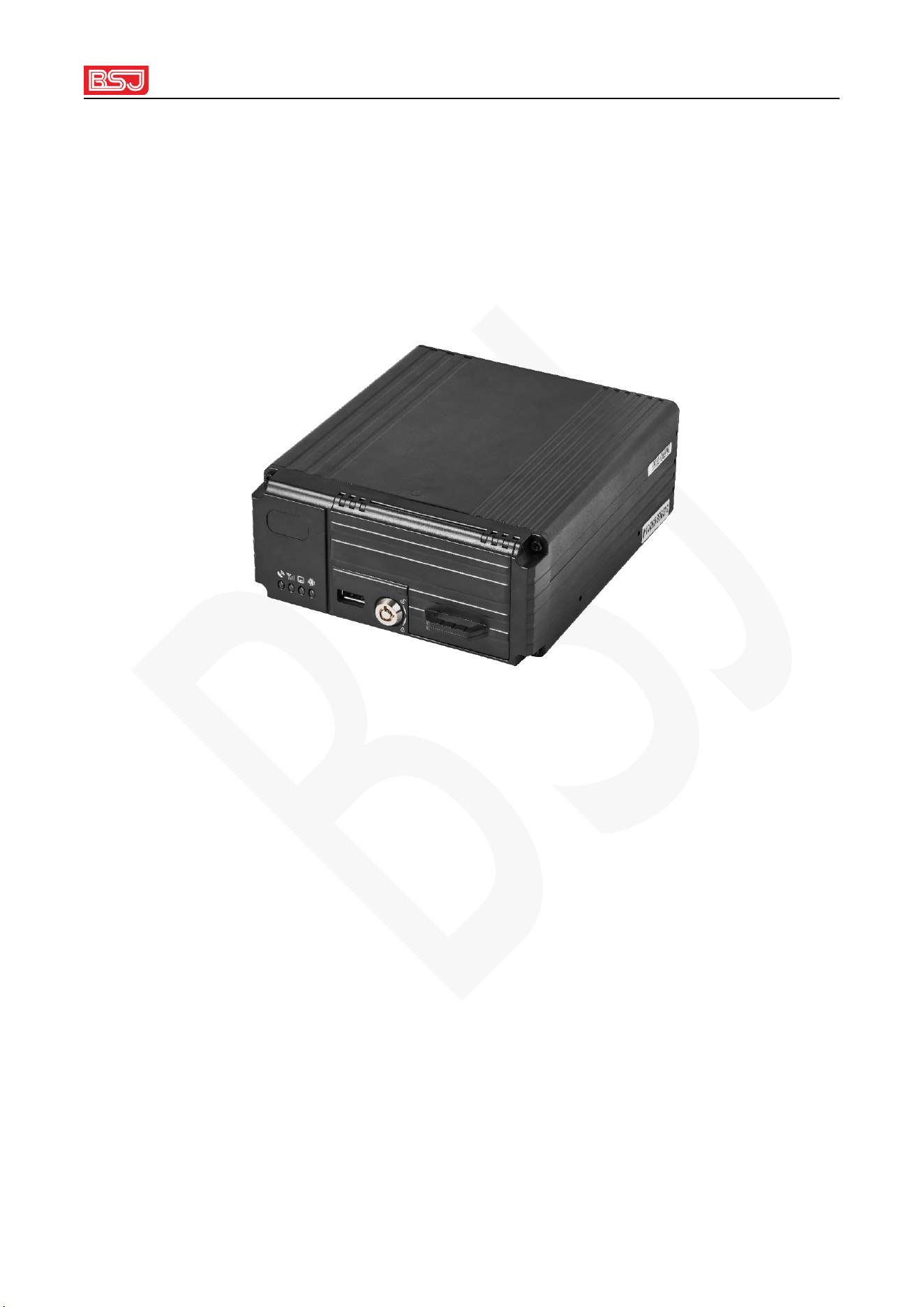
Product Name: Mobile Digital Video Recorders
Product model: ED08R
Please read the installation user manual carefully before installation and using.
Part of the product's functional structure is subject to change without prior notice. The
actual product shall prevail, and the final interpretation right belongs to our company .

URL: www.bsjkj.com
2
Product Composition and Interface Definition
1. Product overview
The vehicle video monitoring terminal integrates 4G communication , GNSS
positioning, ADAS advanced driver assistance system, DMS driver monitoring system,
supports 8-channel audio and video recording, SD card and hard disk storage, driving
data recording, two-way conversation initiated by the monitoring terminal, real-time
Monitoring and other functions, support seamless docking with customer monitoring
systems. Widely used in taxis, online car-hailing, small trucks, engineering vehicles
and other industries.
2. Product specifications
Product Name: Mobile Digital Video Recorders
Product model: ED08R
Product size: L170 mm*W150 mm*H65 mm
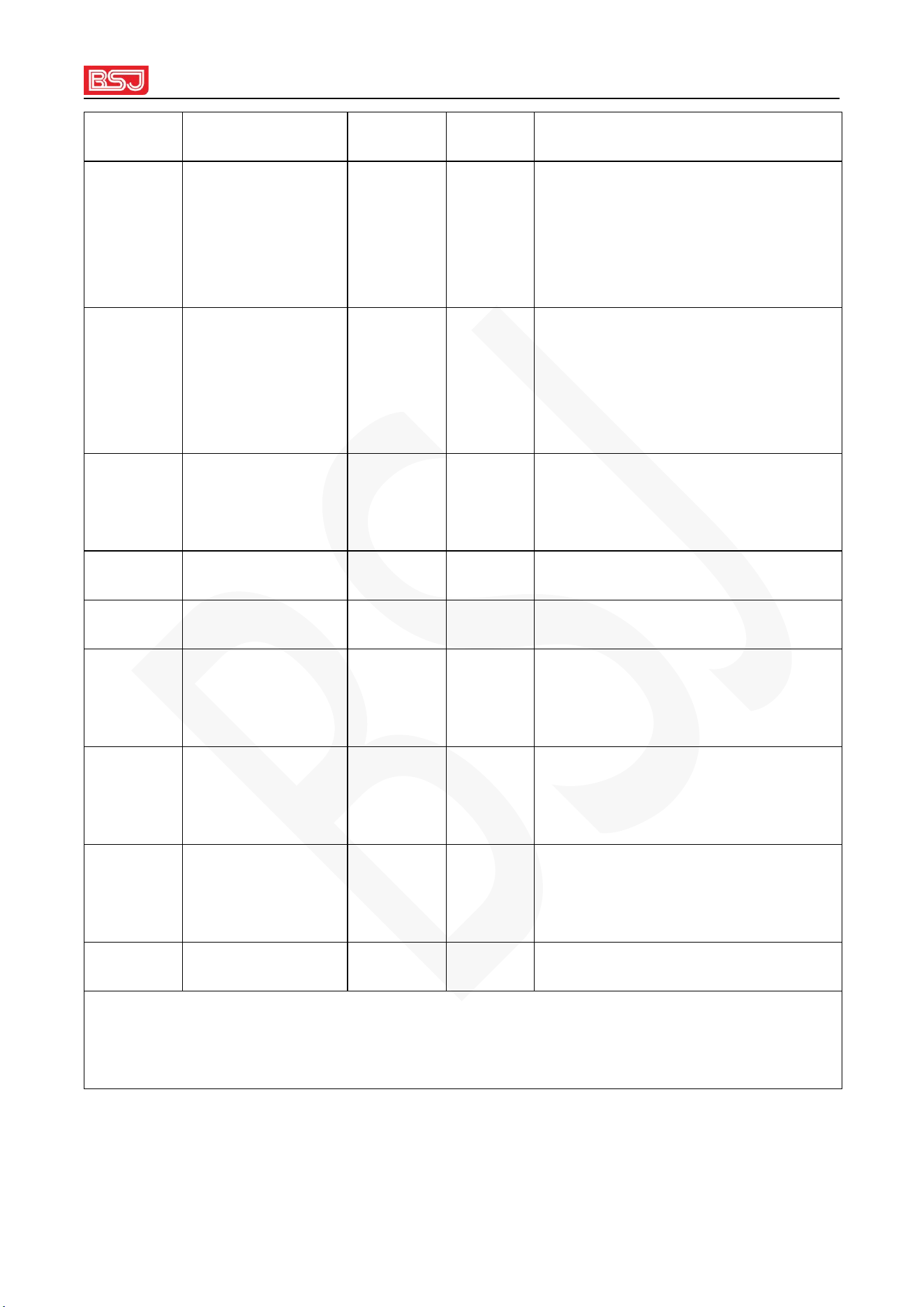
3. Product configuration list
Table 1 Standard configuration list
serial
number
name
quantity
unit
Remark
1
the host
1
pcs
2
power cable
1
pcs
16 PIN, including power line and
URL: www.bsjkj.com
3
IO detection line
3
GNSS
positioning
antenna
1
pcs
4
4G
communication
antenna
1
pcs
5
power key
1
pcs
for equipment opening and
closing
6
screw
4
pcs
fixed equipment
7
manual
1
pcs
8
neutral packing
box
1
set
9
A DAS camera
1
pcs
ADH 720P/1080P , built-in AI
alert speaker
1 0
A DAS camera
extension cable
1
pcs
3M _
1 1
DMS camera
1
pcs
AHD 720P/1080P
Note: The above is a list of the standard configuration of the complete set of
products, and accessories that are out of the above range must be paid extra fee
URL: www.bsjkj.com
4
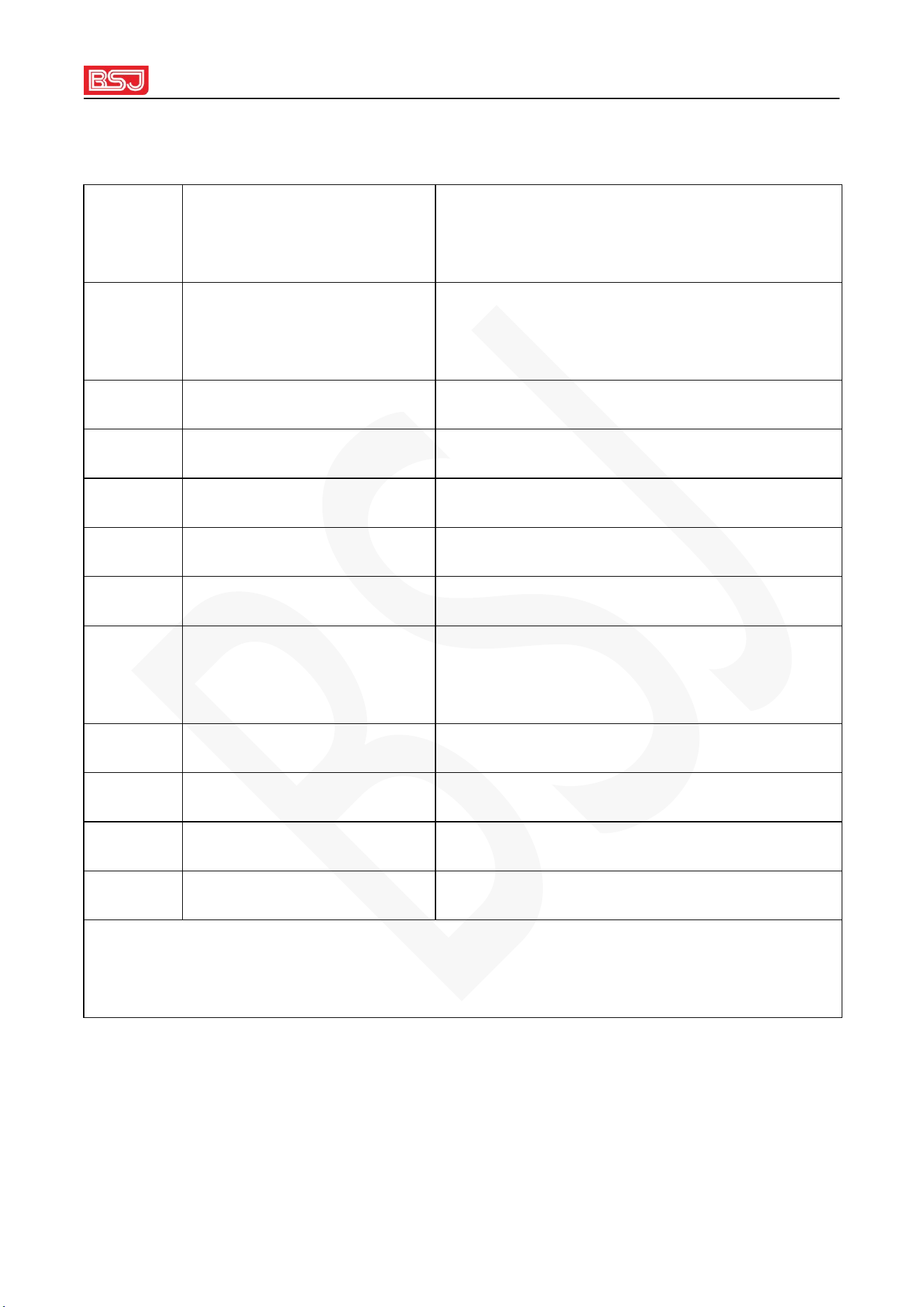
Table 2 Optional list
serial
number
name
Remark
1
AHD camera
AHD 720P or 1 080P (with infrared and
audio)
2
camera extension cable
5m/10m
3
VGA screen
7 inch
4
SD card
Class10
5
hard disk
Solid state or mechanical hard disk
6
Intercom pick-up
for hands-free two-way talk
7
Speaker
For calls, voice broadcast (Over-speed
broadcast, etc.)
8
WIFI antenna
Optional WiFi module at the same time
9
Velcro
fixed host
10
SOS button
11
cable ties
For installing and fixing the wiring harness
Remarks : Two-way communication needs to be equipped with a pickup and a
speaker
URL: www.bsjkj.com
5
Chapter 2 Machine Parameters
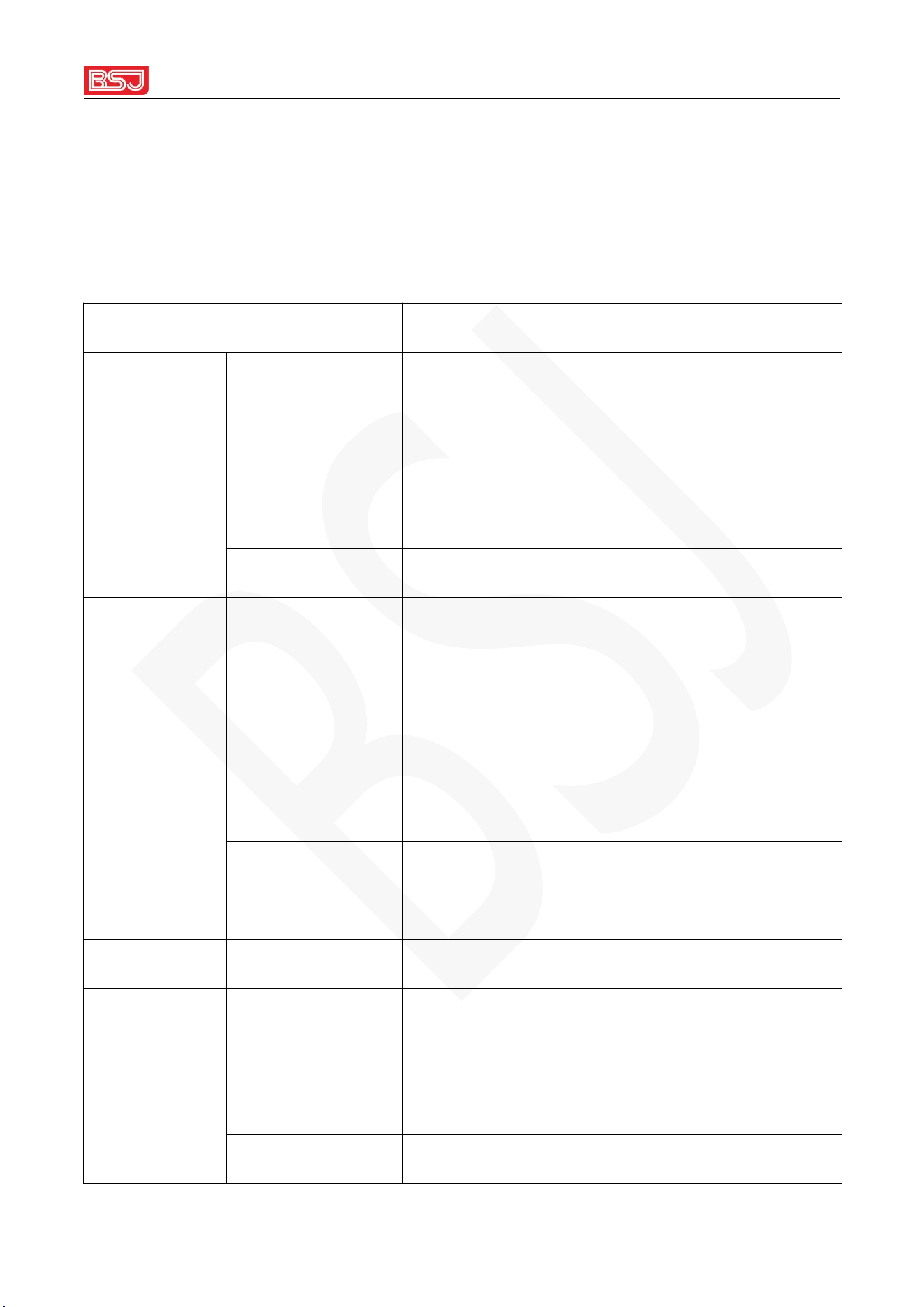
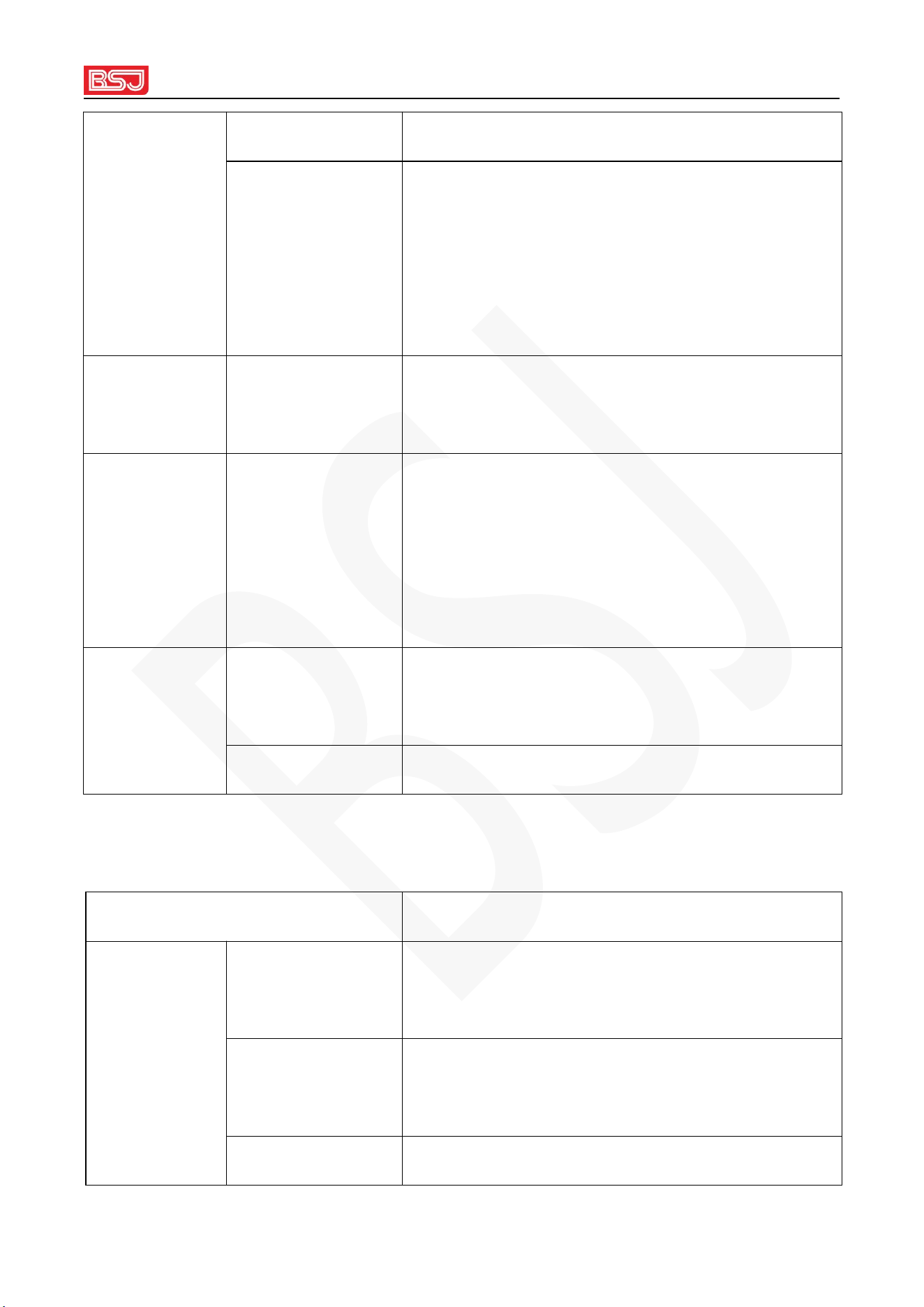
2.1 Parameter indicators
technical indicators
technical item
technical indicators
operating
system
operating system
Linux
hardware
solution
microprocessor
4- core A7
cache
8GB
Memory
1GB
video
AHD720P /
1080P
8 channels 720P (1280*720) or 1 080P (1
920*1080 )
output
1 channel VGA
audio
enter
7- channel audio (PCM format), AV3-AV8 ,
pickup
output
2-way audio (PCM format), speaker and AI
reminder speaker
show
screen display
8- way screen display
video
Audio and video
compression
format
Audio g711A, video H.264
Image Resolution
720P (1280*720) or 1 080P (1 920*1080 )
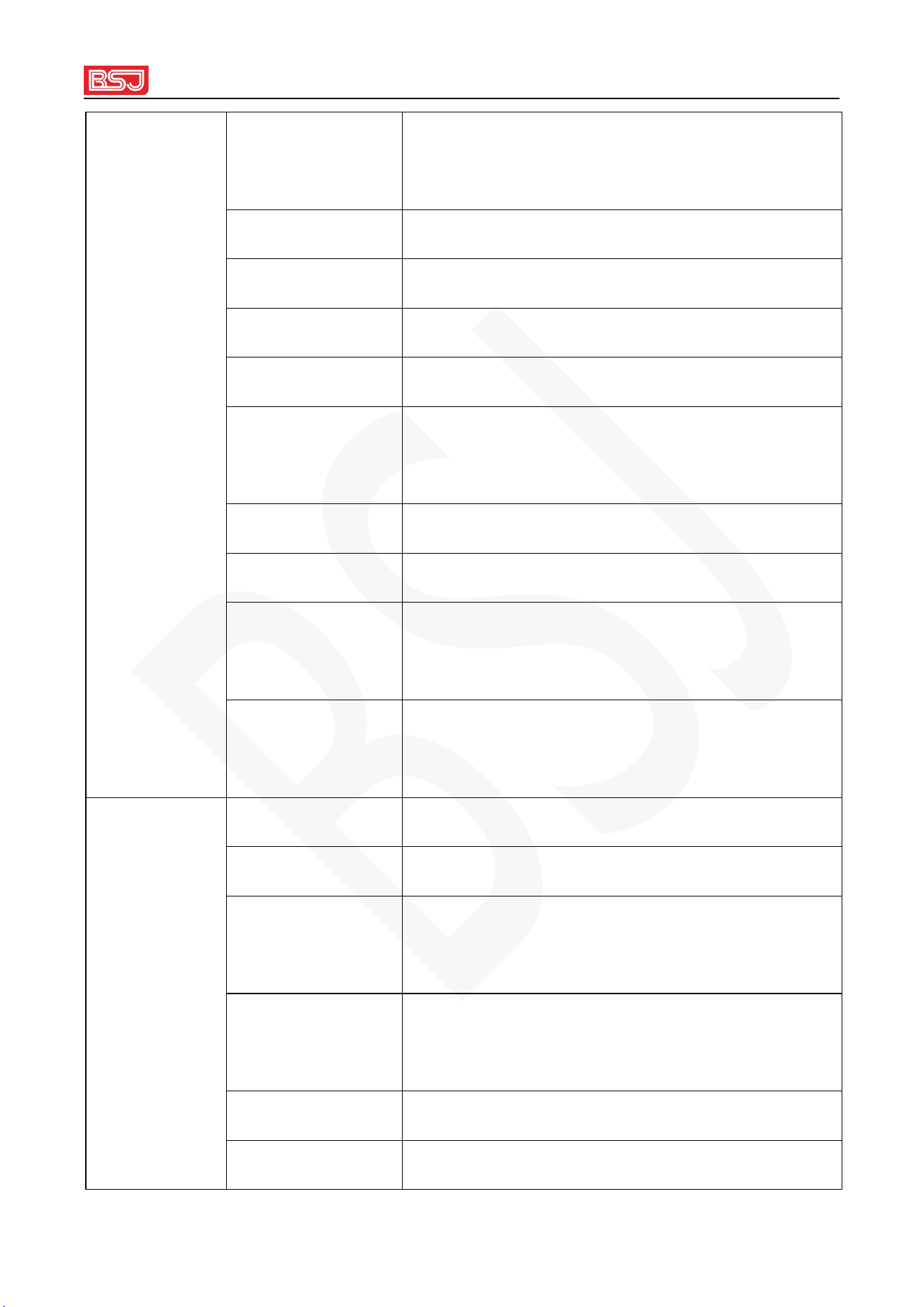
URL: www.bsjkj.com
6
real time video 8 way
time-lapse video
After the ACC is turned off, the default
300-second delay video,
Delay parameters can be set in the range : 1
0-65535s
play back playback channel
Local 8-channel synchronous playback,
monitoring end single-channel playback
network 2G/3G/4G
LTE FDD: B2/4/5/7
LTE TDD: B66
WCDMA: B2/4/5
storag
GSMGSM850 PCS1900
e
hard disk
1 hard drive, the capacity can be expanded up to
2 TB
SD Single SD card, maximum support 256 GB
Interface Features
Interface Features Interface Description
interface
Front USB
interface
AI (ADAS and DMS) calibration, parameter
setting
SIM card
Single card ( for GNSS data upload and video
data transmission)
SD card Single SD card, maximum support 256 GB
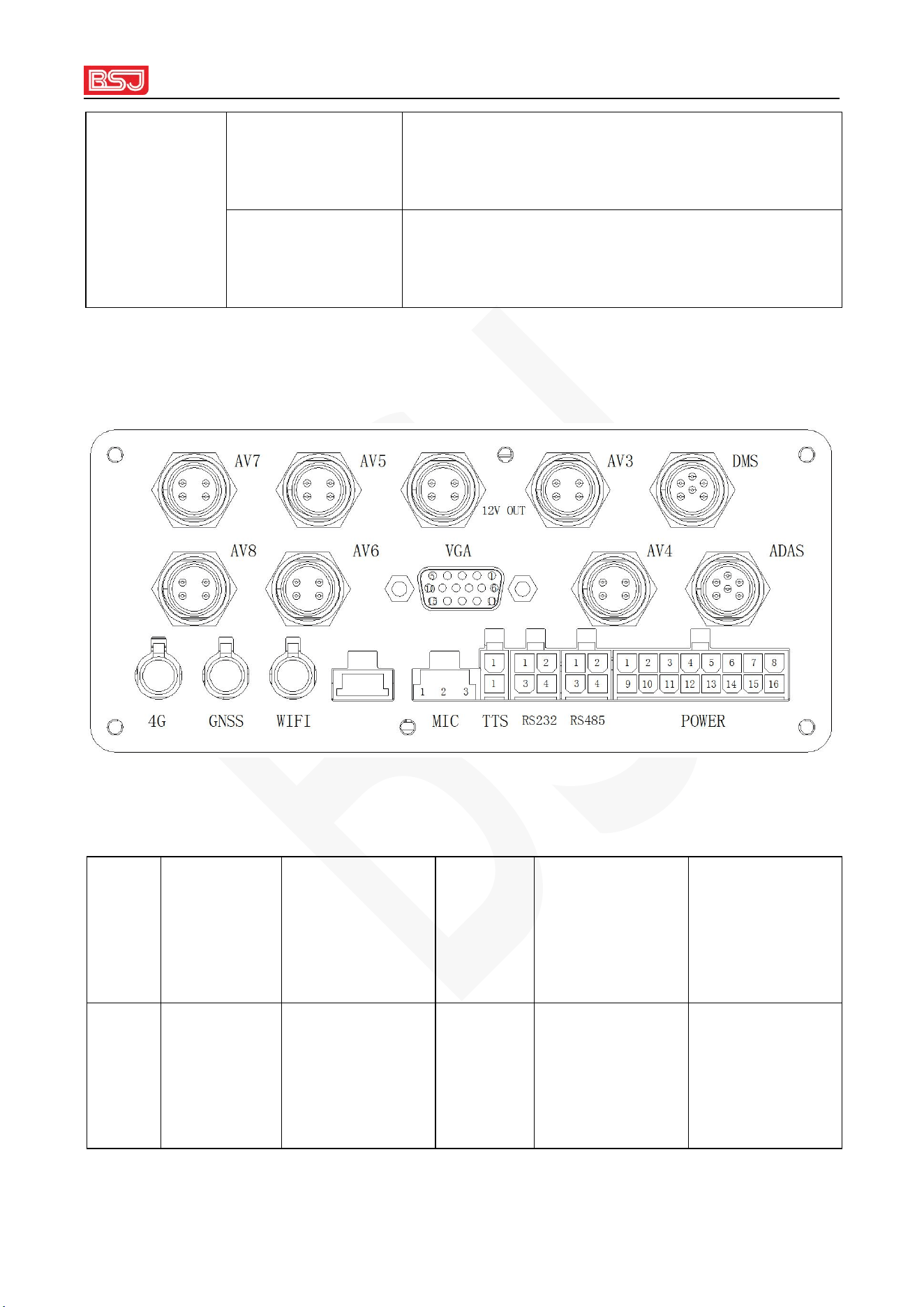
URL: www.bsjkj.com
7
hard disk
2.5 -inch hard drive with a maximum capacity
of 2 TB
DMS
Connect to DMS camera
A DAS
Connect A DAS camera
A V3-AV8
Connect A HD camera
1 2V OUT
V GA display power supply
VGA _
VGA signal output, optional external VGA
display
M IC
Pickup for two-way talk and audio monitoring
TTS
Two-way conversation, voice broadcast
RS485 interface
Connect peripherals, such as: load sensor,
gimbal
RS232 interface
Connect peripherals, such as: oil volume
collector, temperature collector
other features
Operating Voltage
DC 9-36V
Working current
600mA@12V, 300mA@24V
Standby power
consumption
60mA @12V, 3 3mA@24V
spare battery
It can work for 15S after the device is powered
off
Host size
L1 70 mm*W150mm*H 65 mm
Host weight
About 1260g
URL: www.bsjkj.com
8
Operating
temperature
-25°C — +80°C
Storage
temperature
-40°C — +85°C
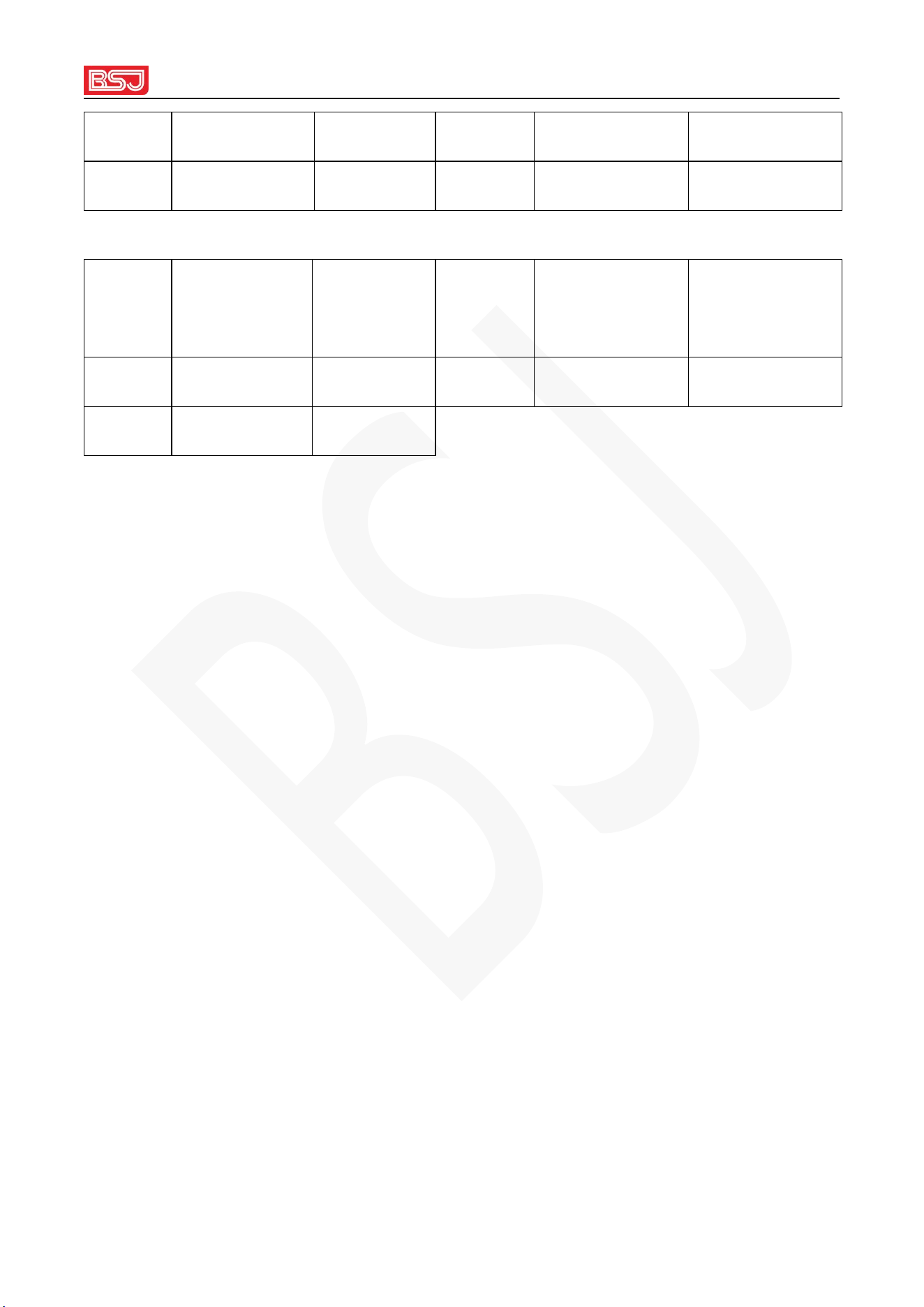
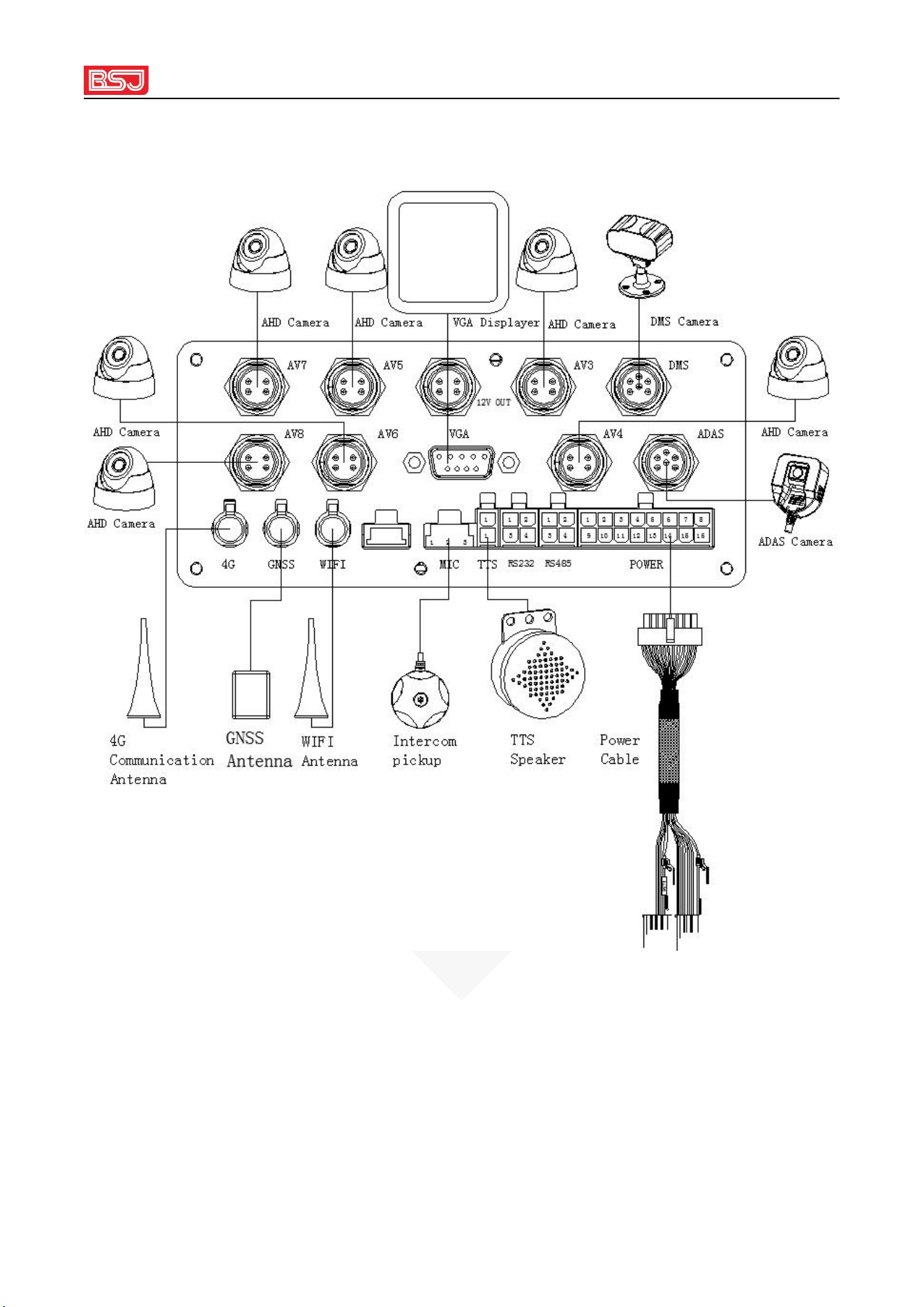
2.2 Product interface definition
Terminal rear panel interface diagram
16PIN POWER interface definition
foot
positi
on
Function
illustrate
foot
position
Function
illustrate
1
custom
high 1
Purple
injection green
(optional)
9
ACC
orange

URL: www.bsjkj.com
9
2
custom
high 2
Yellow and
black
(optional)
10
brake
yellow
3
Low beam
lights
brown
11
robbery
pink
4
High beam
green
12
custom low 2
Red and green
(optional)
5
Magnetic
door
white
(optional)
13
custom low 1
Red note white
(optional)
6
turn right
gray note white
14
turn left
Ash
7
cut off fuel
Purple
(optional)
15
speed sensor
blue (optional)
8
power
negative
black
16
Power positive
red
Definition of transparent port
foot
position
Function
illustrate
foot
position
Function
illustrate
1
X _
take over
3
ground wire
grounding
2
T X
send
4
5V
power supply
TTS interface definition
foot
Function
illustrate
foot
Function
illustrate
URL: www.bsjkj.com
10
position
position
1
SPK+
2
SPK-
Pickup interface definition
foot
position
Function
illustrate
foot
position
Function
illustrate
1
MIC+
2
MIC-
3
GND
URL: www.bsjkj.com
11
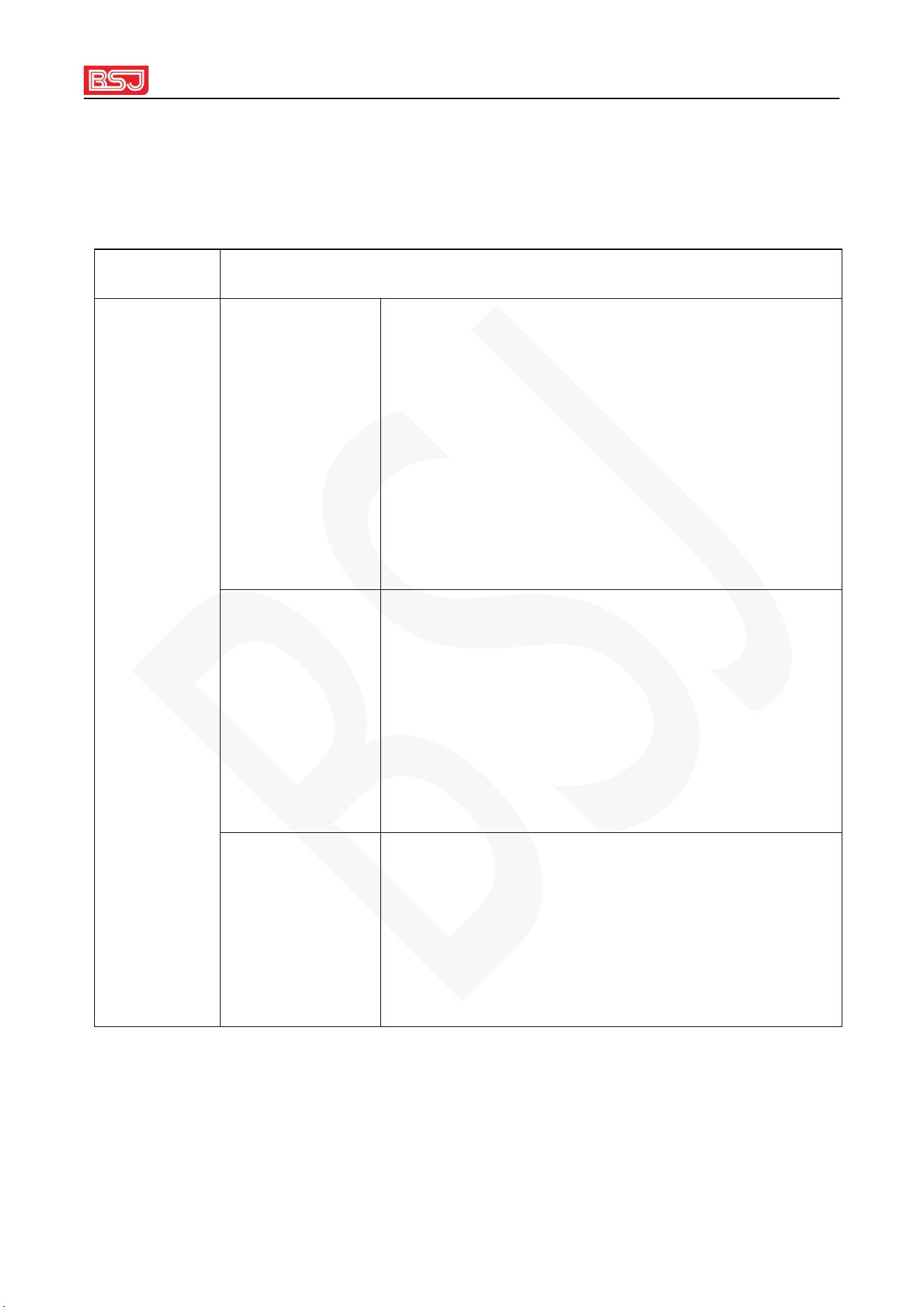
2.3 Product Connection Diagram
URL: www.bsjkj.com
12
2.4 Operating Instructions
2.4.1 Indicator light definition
name
Indicator Status Description
Indicator Definition
red light
Steady on: No SIM card detected.
Blinking (slow): SIM card detected, but not online
yet
Blinking (fast): online
Blinking (short and fast): received data from the
service center
yellow light
Steady light: The positioning antenna is not
connected properly or not connected
Blinking (slow): not located
Blinking (fast): located
Long off: The positioning module is abnormal
blue light
Long off: ACC is off or the safety door is not
closed or the power supply voltage is too low
Steady light: system abnormal
Blinking: The system is working normally
URL: www.bsjkj.com
13
green light
Long off: no SD card or hard disk detected
Steady light: SD card or hard disk failure
Blinking: SD card or hard disk is working
normally
2.4.2 Functional operation
Online
settings
IP settings
Send instructions via SMS or text messages on the
monitoring terminal :
<SPBSJ*P:BSJGPS*D:047.100.237.015,7788*T:
047.100.237.015,6608*A:CMNET,admin,123456*
N:13333223344>
Note D is IP1; T is IP2
domain name
settings
<SPBSJ*P:BSJGPS*D:vdata.car900.com,7788*T:v
data.car900.com*A:CMNET,admin,123456*N:133
33223344>
Note D is IP1; T is IP2
Online
parameter
query
parameter
query
Send command via SMS: <CKBSJ> or monitor
send <EXTCB<CKBSJ>>
SMS version
query
version query
Send commands via SMS: <CKVER>
URL: www.bsjkj.com
14
Monitor
version
query
Query all
versions
<EXTFE0> through the monitoring terminal
Note: The unified IP format is: 219.133.034.098,7788 where the IP field is less
than 3 digits, and the front is filled with 0;
The uniform format of the domain name is: vdata.car900.com,7788
Chapter 3 Common Problem Analysis and Solutions
Symptoms
Cause Analysis
solution
The device is
not online
SIM card has no valid 3G/4G
traffic
Contact the network operator to pay
the fee
Online parameter setting error
Refer to the manual to reset the
parameters
Is the SIM card in good
contact?
Reinstall the SIM card
Abnormal communication
antenna
Retighten or replace the
communication antenna
The vehicle is in an
underground parking lot, and
the tunnel signal is weak
Stay out of poor signal areas
video can't
SIM card has no valid 3G/4G
Contact the network operator to pay
URL: www.bsjkj.com
15
open
traffic
the fee
the lock is opened
locked
ACC off
Check the ACC line
The vehicle is in an
underground parking lot, and
the tunnel signal is weak
Stay out of poor signal areas
unable to
locate
Vehicles in underground
parking lots, tunnels
leave the above area
The positioning antenna is
installed too close to the host
The antenna installation position is
more than 0.5 meters away from the
host
The receiving signal surface of
the positioning antenna is
blocked
remove occlusion
Locating Antenna Open
Circuit
Tighten and locate the antenna
interface or check the line
Locating Antenna Faults
Replace the positioning antenna
Locating Antenna Intertwined
with Other Lines
Locate the antenna and try to route it
alone, 50CM or more away from the
device
no video
SD card/SSD failure
Replace with a new SD card/SSD
ACC off
Connect the ACC line
URL: www.bsjkj.com
16
the lock is opened
locked
Manually stop recording
Start recording via LCD screen or
remote command
disk not
recognized
SD card/hard disk failure
Please confirm whether the SD card
is inserted in place; please confirm
whether the hard disk is pushed to
the end
Attention:
1. Please do not intertwine the 4G antenna, positioning antenna, video cable, and
power cable during installation. They need to be routed separately. In order to reduce
interference, the 4G antenna and positioning antenna should be installed at a distance
of 50 cm or more from the device, and the antenna cannot be blocked by metal
objects.
2. The device will only start recording when the ACC is on and the door lock is off.
You can observe the blue and yellow indicator lights (refer to the status description of
the indicator lights) to confirm whether the device is recording normally. Every time
the device is powered on, it will automatically detect the status of the storage medium.
If the storage medium is not inserted or the storage medium is damaged, the device
will give a voice prompt that the storage device is abnormal.
3. After the hard disk is taken out, please handle it with care to prevent it from being
damaged by external force during the moving process.

URL: www.bsjkj.com
17
4. For 12V battery cars, please connect the following 4 cameras.
5.Stay away from water.

URL: www.bsjkj.com
18
Chapter 4 Radio frequency information
This mobile phone offers the following frequency bands in U S A areas only
and maximum radio-frequency power:
GSM 8 5 0 : 33dBm
PCS1900: 30dBm
WCDMA band 2 /4/5: 25dBm
LTE band 2 /4/5/7/66: 25dBm
Wi-Fi 2.4 GHz band: 1 5 dBm
The distance between user and products should be no less than 20cm.
There is no restriction to use this product across the U S A contries.

URL: www.bsjkj.com
19
FCC Warning
This device complies with part 15 of the FCC rules. Operation is subject to the following two
conditions: (1) this device may not cause harmful interference, and (2) this device must accept any
interference received, including interference that may cause undesired operation.
Changes or modifications not expressly approved by the party responsible for compliance could void
the user's authority to operate the equipment.
NOTE: This equipment has been tested and found to comply with the limits for a Class B digital
device, pursuant to part 15 of the FCC Rules. These limits are designed to provide reasonable
protection against harmful interference in a residential installation. This equipment generates uses
and can radiate radio frequency energy and, if not installed and used in accordance with the
instructions, may cause harmful interference to radio communications. However, there is no
guarantee that interference will not occur in a particular installation. If this equipment does cause
harmful interference to radio or television reception, which can be determined by turning the
equipment off and on, the user is encouraged to try to correct the interference by one or more of the
following measures:
•
Reorient or relocate the receiving antenna.
•
Increase the separation between the equipment and receiver.
•
Connect the equipment into an outlet on a circuit different from that to which the receiver is
connected.
•
Consult the dealer or an experienced radio/TV technician for help.
Radiation Exposure Statement
This equipment complies with FCC radiation exposure limits set forth for an uncontrolled
environment. This equipment should be installed and operated with minimum distance 20cm
between the radiator and your body.