HSW41
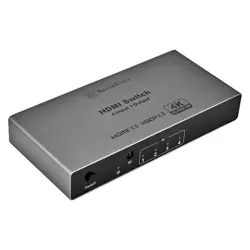
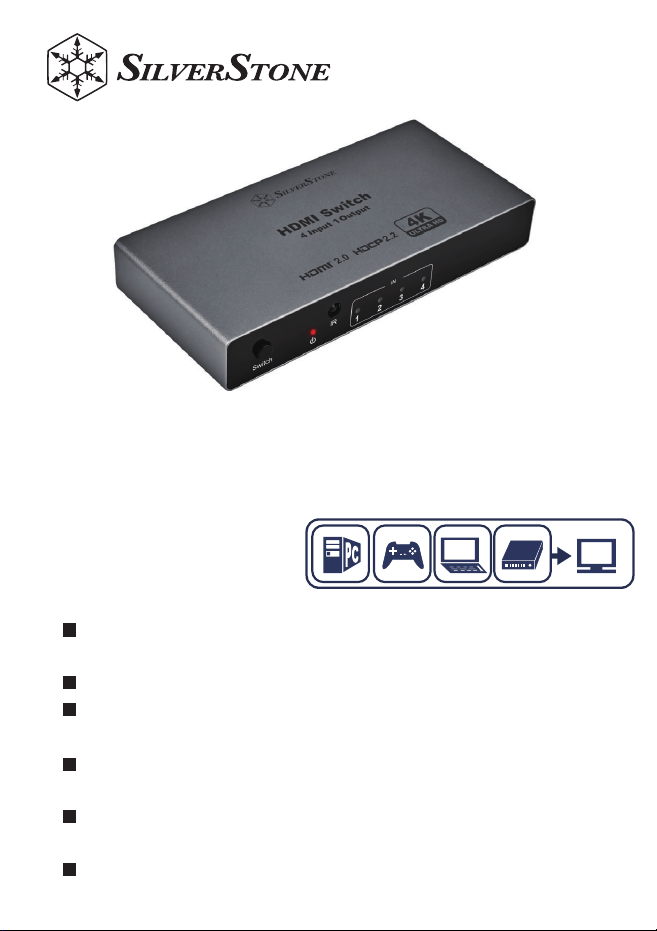
HDMI 2.0 4K Switcher 4 In 1 Out
HDMI LA certified, supports HDCP 2.2 for lossless 4K
streaming output
IR remote control for easy signal switching
Supports HDR10 and Dolby Vision, perfect for
gaming and video applications
Aluminum alloy housing for a sleek look and excellent
heat dissipation
Built-in power management chip provides short-circuit
and overheat protection
Gold-plated connectors for enhanced oxidation
resistance and durability
MANUAL
TV

1.Product Introduction
1. Produkteinführung
1. Introducción del producto
1. Product Introduction
The HDMI switcher is a product that allows you to connect one or more HDMI signals to a display device such
as an HDTV projector monitor. It can optimize your home theater system.
1. Introduction du produit
1. Introduzione del prodotto
1
Der HDMI-Umschalter ermöglicht den Anschluss eines oder mehrerer HDMI-Signale an ein Anzeigegerät wie
HDTV, Projektor oder Monitor und optimiert Ihr Heimkinosystem.
Le commutateur HDMI permet de connecter un ou plusieurs signaux HDMI à un appareil d’affichage tel qu’un
téléviseur HDTV, un projecteur ou un moniteur, afin d’optimiser votre système home cinéma.
Lo switch HDMI consente di collegare uno o più segnali HDMI a un dispositivo di visualizzazione come HDTV,
proiettore o monitor, ottimizzando il sistema home theater.
El conmutador HDMI permite conectar una o más señales HDMI a un dispositivo de visualización, como un
televisor HDTV, proyector o monitor, optimizando su sistema de cine en casa.
此 HDMI 切換器可讓您將一個或多個 HDMI 訊號連接至 HDTV、投影機或顯示器等顯
示設備,能有效優化您的家庭劇院系統。
1. Введение в продукт
洢禎暒儢
一、產品簡介
ϔǃѻકㅔҟ
1.製品紹介
1. แนะนำผลิตภัณฑ์
สวิตช์ HDMI ช่วยให้คุณสามารถเชื่อมต่อสัญญาณ HDMI หนึ่งช่องหรือหลายช่องเข้ากับอุปกรณ์แสดงผล เช่น
HDTV โปรเจกเตอร์ หรือจอมอนิเตอร์ เพื่อเพิ่มประสิทธิภาพของระบบโฮมเธียเตอร์ของคุณ
ไทย
2
此 HDMI 切换器可让您将一个或多个 HDMI 信号连接至 HDTV、投影仪或显示器等设
备,以优化您的家庭影院系统。
このHDMIスイッチャーは、1つまたは複数のHDMI信号をHDTV、プロジェクター、モニターなど
の表示機器に接続でき、ホームシアターシステムを最適化します。
決͵;ͺ枪氊熞垚穞喞決旇汞͵;ͺ柦笾庂͵΅·稊嵢洣瘶微城瘶姷汞娚枪稒崎決沫獞櫖
櫶冶穦朞沎求彶筎柢檺瘶柢枪癢汊牢洇筚穯城埪
Переключатель HDMI позволяет подключать один или несколько HDMI-сигналов к устройству
отображения, например HDTV, проектору или монитору, улучшая работу домашнего кинотеатра.
2. Product Diagram
Produktdiagramm\
1.Infrarotsensor für Fernbedienung
2.Power-LED
3.HDMI-Eingang 1–4 LED-Anzeigen
4.HDMI-Eingangsauswahltaste
5.HDMI-Ausgangsports
6.DC 5V-Stromanschluss
7.HDMI-Eingänge 1–4
Diagrama del producto
1.Sensor infrarrojo para control remoto
2.LED de encendido
3.Indicadores LED de entrada HDMI 1–4
4.Botón de selección de entrada HDMI
5.Puerto de salida HDMI
6.Puerto de entrada de alimentación DC 5V
7.Puertos de entrada HDMI 1–4
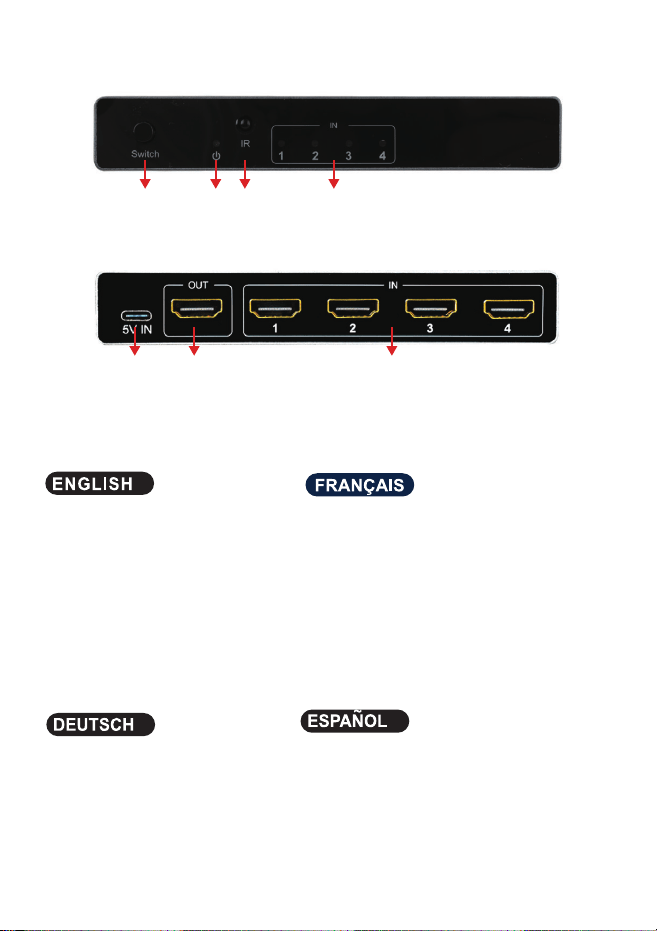
Product Diagram
1.Infrared Red Sensor for Remote Control
2.Power LED
3.HDMI Input 1~4 LED Indicators
4.HDMI Input Select Button
5.HDMI Output Port
6.DC/5V Power Input Port
7.HDMI Input 1~4 Port
Schéma du produit
1.Capteur infrarouge pour la télécommande
2.Témoin d’alimentation
3.Voyants HDMI Entrée 1–4
4.Bouton de sélection d’entrée HDMI
5.Port de sortie HDMI
6.Port d’alimentation DC 5V
7.Ports HDMI Entrée 1–4
3
4
2
3
1
5
7
6
Описание панели
1.Инфракрасный датчик для пульта ДУ
2.Индикатор питания (Power LED)
3.Индикаторы входов HDMI 1–4
4.Кнопка выбора входа HDMI
5.Выходной порт HDMI
6.Вход питания DC 5V
7.Входные порты HDMI 1–4
洢禎砮嘖昪律
庲微珮殯洇歾昦時昢
洊毖ͽͶ͵
͵;ͺ沋崫ίͽͶ͵祢柢姷
͵;ͺ沋崫昦痣憊矂
͵;ͺ犢崫磲瞾
͵ʹ·洊毖沋崫磲瞾
͵;ͺ沋崫ί磲瞾
產品面板說明
1.遙控紅外線感應器
2.電源指示燈
3.HDMI 輸入 1~4 指示燈
4.HDMI 輸入選擇按鍵
5.HDMI 輸出埠
6.DC 5V 電源輸入埠
7.HDMI 輸入 1~4 埠
ѻક䴶ᵓ䇈ᯢ
䘹㑶㒓ᛳᑨ఼
⬉⑤ᣛ⼎♃
+'0,䕧ܹᣛ⼎♃
+'0,䕧ܹ䗝ᢽᣝ䪂
+'0,䕧ߎッষ
'&9⬉⑤䕧ܹッষ
+'0,䕧ܹッষ
製品パネル説明
1.リモコン用赤外線センサー
2.電源LED
3.HDMI入力1〜4LEDインジケーター
4.HDMI入力選択ボタン
5.HDMI出力ポート
6.DC5V電源入力ポート
7.HDMI入力1〜4ポート
Diagramma del prodotto
1.Sensore a infrarossi per telecomando
2.LED di alimentazione
3.Indicatori LED di ingresso HDMI 1–4
4.Pulsante di selezione ingresso HDMI
5.Porta di uscita HDMI
6.Porta di alimentazione DC 5V
7.Porte di ingresso HDMI 1–4
แผงผลิตภัณฑ์
1.เซนเซอร์อินฟราเรดสำหรับรีโมตคอนโทรล
2.ไฟแสดงสถานะพลังงาน (Power LED)
3.ไฟแสดงสถานะ HDMI Input 1–4
4.ปุ่มเลือกอินพุต HDMI
5.พอร์ตเอาต์พุต HDMI
6.พอร์ตจ่ายไฟ DC 5V
7.พอร์ตอินพุต HDMI 1–4
ไทย
4
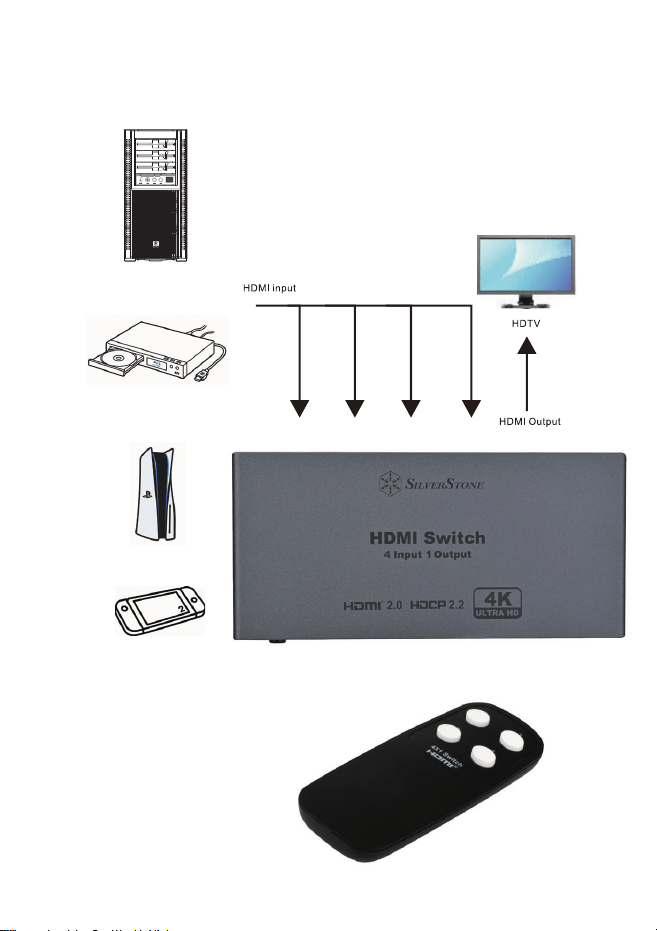
3.Connection diagram
PS5
player
DVD / BD
PC
5

6
4. Package Contents
Lieferumfang
•HDMI 4 Umschalter ×1
•Type-C-Stromkabel ×1
•Fernbedienung ×1
Contenido del paquete
•Conmutador HDMI 4×1
•Cable de alimentación Type-C ×1
•Control remoto ×1
Package Contents
•HDMI 4 switch x1
•Type-C Power Cable ×1
•Remote Control x1
Комплект поставки
•HDMI 4 переключатель ×1
•Кабель питания Type-C ×1
•Пульт дистанционного управления ×1
磲沫喺殯恂
ח͵;ͺ枪氊獞ϧ
ח΅ΪΡΖʹ洊毖理決挚ϧ
ח庲微珮ϧ
包裝內容
•HDMI 4切換器 ×1
•Type-C電源線 ×1
•遙控器 ×1
ࣙ㺙ݙᆍ
•+'0,ߛᤶ఼h
•7\SH&⬉⑤㒓h
•䘹఼h
パッケージ内容
•HDMI4スイッチ×1
•Type-C電源ケーブル×1
•リモコン×1
Contenu de l’emballage
•Commutateur HDMI 4×1
•Câble d’alimentation Type-C ×1
•Télécommande ×1
Contenuto della confezione
•Switch HDMI 4×1
•Cavo di alimentazione Type-C ×1
•Telecomando ×1
อุปกรณ์ภายในกล่อง
•สวิตช์ HDMI 4 ×1
•สายไฟ Type-C ×1
•รีโมตคอนโทรล ×1
ไทย

5. NOTE
Hinweise
•Stellen Sie sicher, dass die HDMI-Stecker vollständig eingesteckt sind und vermeiden Sie Druck oder Belastung
der Kabel.
•Halten Sie mindestens 2,5 cm (1 Zoll) Freiraum um das Gerät für ausreichende Belüftung.
•Installieren Sie das Gerät nicht in feuchten Umgebungen oder in der Nähe von Wasser.
•Platzieren Sie das Gerät auf einer stabilen und ebenen Oberfläche.
Precauciones
•Asegúrese de que los conectores HDMI estén completamente insertados y evite que los cables se
doblen o se pisen.
•Mantenga al menos 2,5 cm (1 pulgada) de espacio alrededor del dispositivo para su ventilación.
•No instale el dispositivo en lugares húmedos ni cerca de agua.
•Coloque el dispositivo en una superficie estable y plana.
Notes
•Ensure HDMI cables are fully inserted into the ports and avoid pressure or stepping on the cables.
•Maintain at least 2.5 cm (1 inch) of space around the device for proper heat dissipation.
•Do not install the device in humid environments or near water sources.
•Place the device on a stable and flat surface.
Remarques
•Assurez-vous que les câbles HDMI soient bien insérés dans les ports et évitez qu’ils soient
comprimés ou piétinés.
•Laissez au moins 2,5 cm (1 pouce) d’espace autour de l’appareil pour une bonne dissipation
thermique.
•N’installez pas l’appareil dans un environnement humide ou près d’une source d’eau.
•Placez l’appareil sur une surface plane et stable.
7
Примечания
•Убедитесь, что HDMI-кабели полностью вставлены в разъёмы, избегайте давления или
повреждения кабелей.
•Оставьте не менее 2,5 см (1 дюйм) пространства вокруг устройства для вентиляции.
•Не устанавливайте устройство во влажных местах или рядом с водой.
•Размещайте устройство на устойчивой и ровной поверхности.
渂汞斲穳
ח͵;ͺ理決挚決磲瞾櫖歊洊粎呈笆沎垚滆筛汾穞処理決挚決園庲其喞愥粎滆橐壊嵣穞柳柢欪
ח斲殯柢洢禎渂懆櫖牢暒ΔΞ汾獞汞击儊汊筛懺穞櫲愢櫺汊愯滆穞柳柢欪
ח枻匶儆廔汆凹決喞恂儆匂熞櫖昪獞穞滆廎柳柢欪
ח橎洛洇決処磏磏穢祢彺櫖昪獞穞柳柢欪
注意事項
•HDMIケーブルのプラグを確実に差し込み、ケーブルが圧迫または踏まれないようご注意ください。
•使用時は本体周囲に少なくとも2.5cm(1インチ)の空間を確保し、放熱を妨げないでください。
•湿気の多い場所や水回りに設置しないでください。
•安定した平らな場所に設置してください。
Note
•Assicurarsi che i cavi HDMI siano inseriti completamente nelle porte ed evitare pressioni o
piegamenti dei cavi.
•Mantenere almeno 2,5 cm (1 pollice) di spazio intorno al dispositivo per una corretta dissipazione
del calore.
•Non installare il dispositivo in ambienti umidi o vicino a fonti d’acqua.
•Posizionare il dispositivo su una superficie stabile e piana.
ข้อควรระวัง
•ตรวจสอบให้แน่ใจว่าสาย HDMI เสียบเข้าพอร์ตอย่างแน่นหนา หลีกเลี่ยงการกดทับหรือเหยียบสาย
•เว้นระยะอย่างน้อย 2.5 ซม. (1 นิ้ว) รอบอุปกรณ์เพื่อการระบายความร้อนที่ดี
•ห้ามติดตั้งอุปกรณ์ในที่ชื้นหรือใกล้น้ำ
•วางอุปกรณ์บนพื้นผิวที่มั่นคงและเรียบ
ไทย
8

注意事項
•請確保 HDMI 線材插頭完全插入端口,避免線材受壓或踩踏
•使用時請保持設備四周至少 2.5 公分(1 吋)空間,以利散熱
•請勿將設備安裝於潮濕或靠近水源之處
•請將設備放置於穩固且平坦的表面上
݁ǃ⊼ᛣџ乍
•䇋⹂ֱ+'0,㒓ᴤᦦ༈ᅠܼᦦܹッষˈ䙓ܡ㒓ᴤফ䏽䏣
•Փ⫼ᯊ䇋ֱᣕ䆒ಯ㟇ᇥ݀ߚ˄㣅ᇌ˅ぎ䯈ˈҹ߽ᬷ⛁
•䇋࣓ᇚ䆒ᅝ㺙Ѣ╂䴴䖥∈⑤П໘
•䇋ᇚ䆒ᬒ㕂Ѣ〇Ϩᑇഺⱘ㸼䴶Ϟ
9
10
᳝↦᳝ᆇ⠽䋼ܗ㋴ঞ݊࣪ᄺ䞣㸼
ᴀ㸼Ḑձ6-7ⱘ㾘ᅮ㓪ࠊDŽ
ƻ㸼⼎䆹᳝ᆇ⠽䋼䆹䚼ӊ᠔᳝ഛ䋼ᴤ᭭Ёⱘ䞣ഛ*%7㾘ᅮⱘ䰤䞣㽕∖ҹϟDŽ
ü㸼⼎䆹᳝ᆇ⠽䋼㟇ᇥ䆹䚼ӊⱘᶤϔഛ䋼ᴤ᭭Ёⱘ䞣䍙ߎ*%7㾘ᅮⱘ䰤䞣㽕∖DŽϨ䁆䰤⫼⠽䊾⚎ᥦ䰸䷙Ⳃ
䕙ࡽᴤᰃᣛՓ⫼ѻકϞⱘ⍖᭭ˈ⍺⒥㛖ǃ⛞ᴤ᭭ǃⴔࠖㄝˈҹঞϢѻકࣙ㺙ˈЎᮑᎹᴤ᭭Փ⫼ⱘ㉬㛊ᏺǃᆚᇕᴤ᭭ǃⴔࠖㄝ
䚼ӊৡ⿄䖍ѻક
∲
(Hg)
䬝
(Cd)
݁Ӌ䫀
(Cr(VI))
⒈㘨㣃
(PBB)
⒈Ѡ㣃䝮
(PBDE)
䪙
(Pb)
ƻƻƻƻƻƻ
ƻƻƻƻƻƻ
ƻƻƻƻƻƻ
ƻƻƻƻƻƻ
ƻƻƻƻƻƻ
ѻકড়Ḑ䆕
Ẕ偠˖Ẕ
⫳ѻ᮹ᳳ˖㾕ѻકᴵⷕ
ᴎ䞥ሲ
⬉ᄤ
㶎ϱ
䞥ሲষ
ࣙᴤ
For North America ([email protected])
SilverStone Technology in North America may repair or replace defective product with refurbished product that is not new but has been functionally tested.
Replacement product will be warranted for remainder of the warranty period or thirty days, whichever is longer. All products should be sent
back to the place of purchase if it is within 30 days of purchase, after 30 days, customers need to initiate RMA procedure with SilverStone Technology
in USA by first downloading the “USA RMA form for end-users” form from the below link and follow its instructions.
http://silverstonetek.com/contactus.php
For Australia only ([email protected])
Our goods come with guarantees that cannot be excluded under the Australian Consumer Law.
You are entitled to a replacement or refund for a major failure and for compensation for any other reasonably foreseeable loss or damage.
You are also entitled to have the goods repaired or replaced if the goods fail to be of acceptable quality and the failure does not amount to a major failure.
Please refer to above “Warranty terms & conditions” for further warranty details.
SilverStone Technology Co., Ltd. 12F No. 168 Jiankang Rd., Zhonghe Dist., New Taipei City 235 Taiwan R.O.C. + 886-2-8228-1238
(standard international call charges apply)
For Europe ([email protected])
For China ([email protected])
For all other regions ([email protected])
Additional info & contacts
This product has a limited 1 year warranty in North America and Australia.
For information on warranty periods in other regions, please contact your reseller or SilverStone authorized distributor.
ᴀѻક㞾䌁фП᮹䍋ˈѢЁഄ˄ϡࣙ▇䮼ˈ佭␃⡍߿㸠ᬓ˅ѿ᳝ϔᑈ᳝䰤䋷ӏֱ˄䚼ߚѻકЎѠᑈˈϝᑈѨᑈ˅DŽ
䆺㒚ֱᑈ䰤䇋খ✻ᅬᮍ㔥キ
https://silverstonetek.com.cn/
݀ᏗПѻકൟোЎձDŽ
Warranty Information
Warranty terms & conditions
1. Product component defects or damages resulted from defective production is covered under warranty.
Defects or damages with the following conditions will be fixed or replaced under SilverStone Technology’s jurisdiction.
a) Usage in accordance with instructions provided in this manual, with no misuse, overuse, or other inappropriate actions.
b) Damage not caused by natural disaster (thunder, fire, earthquake, flood, salt, wind, insect, animals, etc…)
c) Product is not disassembled, modified, or fixed. Components not disassembled or replaced.
d) Warranty mark/stickers are not removed or broken.
Loss or damages resulted from conditions other than ones listed above are not covered under warranty.
2. Under warranty, SilverStone Technology’s maximum liability is limited to the current market value for the product (depreciated
value, excluding
shipping, handling, and other fees). SilverStone Technology is not responsible for other damages or loss associated with the use
of product.
3. Under warranty, SilverStone Technology is obligated to repair or replace its defective products. Under no circumstances will
SilverStone
Technology be liable for damages in connection with the sale, purchase, or use including but not limited to loss of data, loss of
business, loss of
profits, loss of use of the product or incidental or consequential damage whether or not foreseeable and whether or not based on
breach of warranty,
contract or negligence, even if SilverStone Technology has been advised of the possibility of such damages.
4. Warranty covers only the original purchaser through authorized SilverStone distributors and resellers and is not transferable to a
second hand
purchaser.
5. You must provide sales receipt or invoice with clear indication of purchase date to determine warranty eligibility.
6. If a problem develops during the warranty period, please contact your retailer/reseller/SilverStone authorized distributors or
SilverStone
http://www.silverstonetek.com.
Please note that: (i) You must provide proof of original purchase of the product by a dated itemized receipt; (ii) You shall bear the
cost of shipping
(or otherwise transporting) the product to SilverStone authorized distributors. SilverStone authorized distributors will bear the cost
of shipping
(or otherwise transporting) the product back to you after completing the warranty service; (iii) Before you send the product, you
must be issued a
Return Merchandise Authorization (“RMA”) number from SilverStone. Updated warranty information will be posted on
SilverStone’s official website.
Please visit http://www.silverstonetek.com for the latest updates.